Upgrade to Pro
— share decks privately, control downloads, hide ads and more …
Speaker Deck
Sign up for free
Menu
Search
Features
All features
Private URLs
Password Protection
Custom URLS
Scheduled publishing
Remove Branding
Restrict embedding
Deck Collections
Notes
Features
All features
Private URLs
Password Protection
Custom URLS
Scheduled publishing
Remove Branding
Restrict embedding
Deck Collections
Notes
Explore
Featured decks
Featured speakers
Programming
Technology
Storyboards
Explore
Featured decks
Featured speakers
Programming
Technology
Storyboards
Pricing
Search
Sign in
Sign up for free
空間情報システム入門Ⅰ #02 2016/06/16
Search
yoshino
June 16, 2016
Programming
61
0
Share
Embed
Copy iframe code
Copy JS code
Copy link
Start on current slide
空間情報システム入門Ⅰ #02 2016/06/16
yoshino
June 16, 2016
More Decks by yoshino
See All by yoshino
空間情報システム入門Ⅰ 2016/07/14
yossy09
0
42
Other Decks in Programming
See All in Programming
ActionController meets Protocol Buffers
sorah
0
520
[Dev Group Paris Octobre 26] Agentforce, SIforce, Claudeforce, Slackbot… on s'y retrouve ?
nabondance
0
110
Agentic Software Factoryに、すごく賢いIF文を。 / super smart IF statement into the Agentic Software Factory.
rkaga
8
2.2k
UnityでSystem.Net.WebSocketsなWebSocketサーバが動かないのでUnity Monoのコードを覗いてみた / about implementing websocket server with unity mono
drumath2237
1
610
全ての永続トークンを、生まれる前に消し去りたい!
sylph01
2
880
3回つくってわかった、 定期実行ジョブ基盤の本質情報
takai
0
450
JAWS-UG 東京支部が始める、JAWS-UG支部コラボ / JAWS-UG lunchtime LT Collaboration
y0hgi
0
270
Rでドレミ/Do-Re-Mi_with_R
florets1
0
130
Simple Storage Service(S3) is not simple
iwatsukayura
0
290
Apple Intelligence を用いた個人情報誤送信防止、及びユーザーリクエスト体験の改善について
yukiny
0
350
KiroのSpecで「五目並べ」を作ってみる
satoshi256kbyte
1
380
コードで差別化できない時代の ソフトウェアエンジニアリング / Software Engineering in an Era Where Code Doesn’t Differentiate
kishida
2
180
Featured
See All Featured
Being A Developer After 40
akosma
92
590k
Leveraging LLMs for student feedback in introductory data science courses - posit::conf(2025)
minecr
1
440
The Art of Programming - Codeland 2020
erikaheidi
57
14k
Optimising Largest Contentful Paint
csswizardry
37
4k
How to train your dragon (web standard)
notwaldorf
96
6.9k
GraphQLとの向き合い方2022年版
quramy
50
15k
Paper Plane
katiecoart
PRO
5
54k
Save Time (by Creating Custom Rails Generators)
garrettdimon
PRO
33
5.2k
What's in a price? How to price your products and services
michaelherold
247
13k
Navigating the Design Leadership Dip - Product Design Week Design Leaders+ Conference 2024
apolaine
2
480
Design and Strategy: How to Deal with People Who Don’t "Get" Design
morganepeng
133
20k
For a Future-Friendly Web
brad_frost
184
10k
Transcript
“マッピング作業のマニュアル” 1A116239 吉野 豪
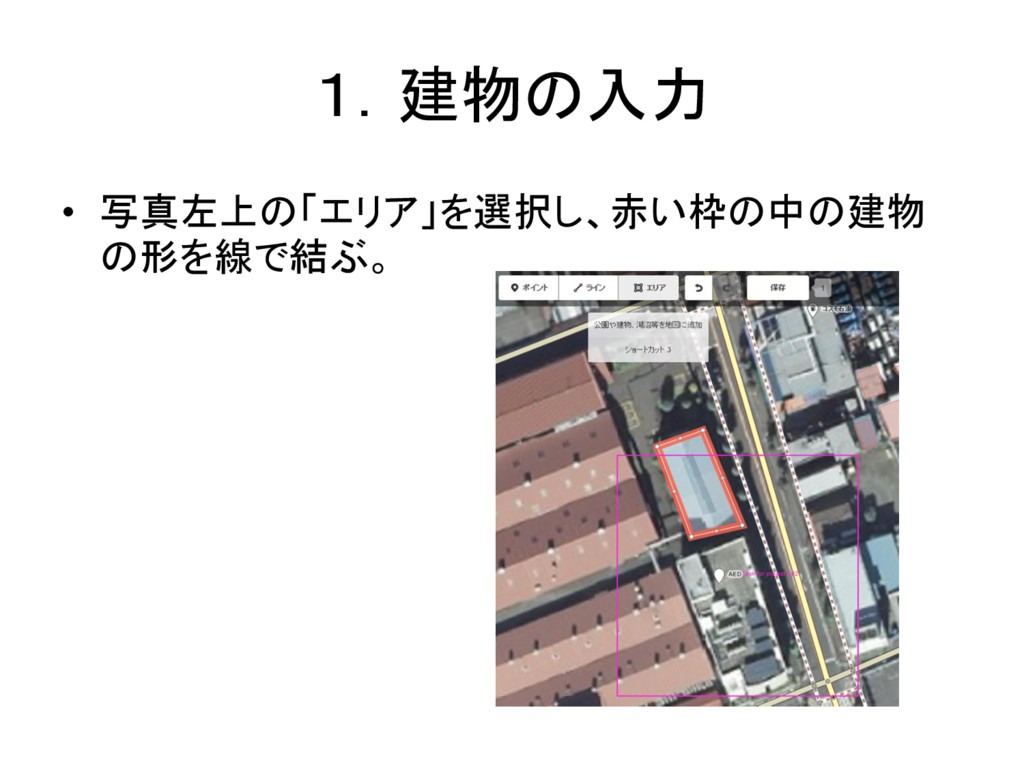
1.建物の入力 • 写真左上の「エリア」を選択し、赤い枠の中の建物 の形を線で結ぶ。
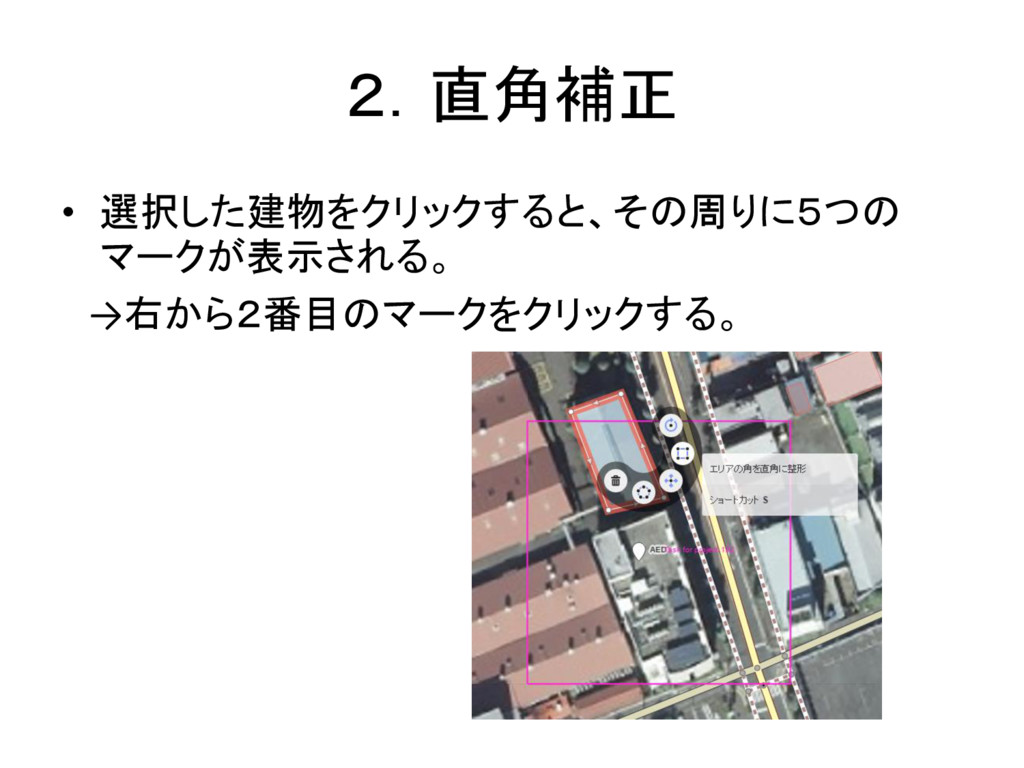
2.直角補正 • 選択した建物をクリックすると、その周りに5つの マークが表示される。 →右から2番目のマークをクリックする。
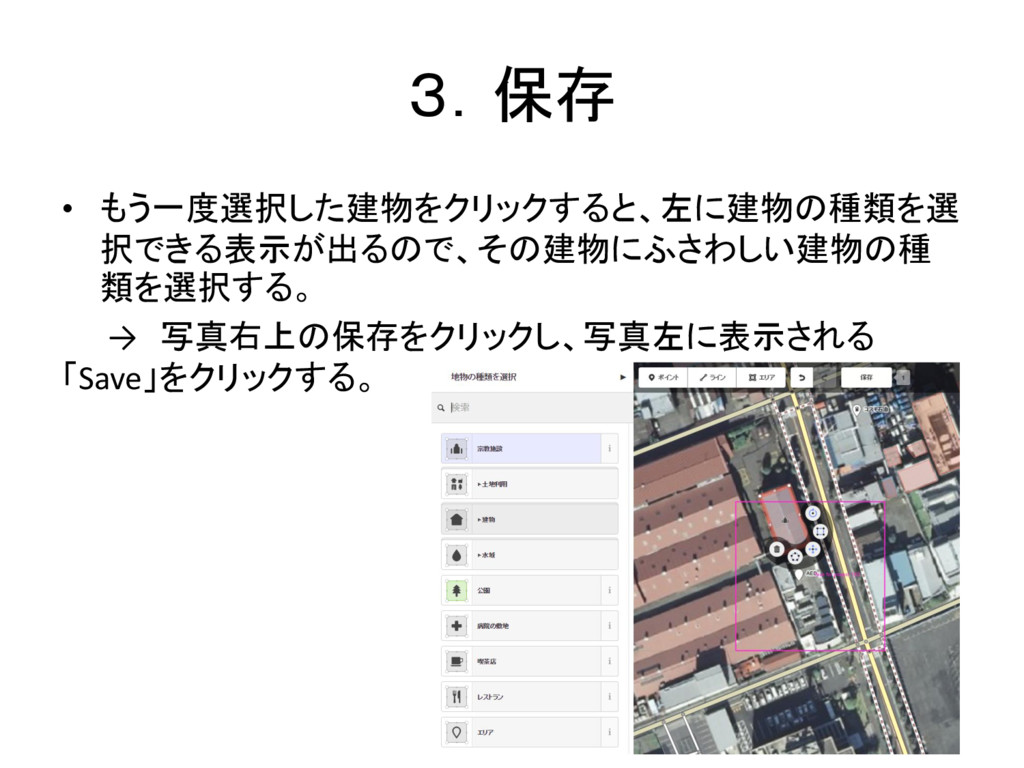
3.保存 • もう一度選択した建物をクリックすると、左に建物の種類を選 択できる表示が出るので、その建物にふさわしい建物の種 類を選択する。 → 写真右上の保存をクリックし、写真左に表示される 「Save」をクリックする。
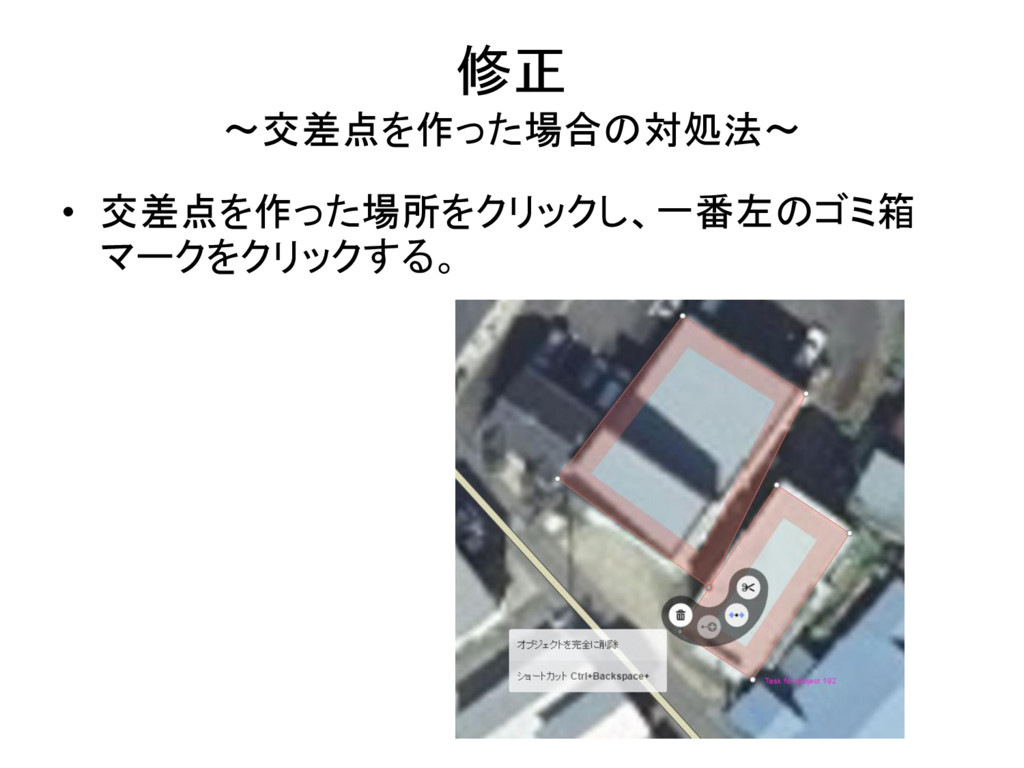
修正 ~交差点を作った場合の対処法~ • 交差点を作った場所をクリックし、一番左のゴミ箱 マークをクリックする。
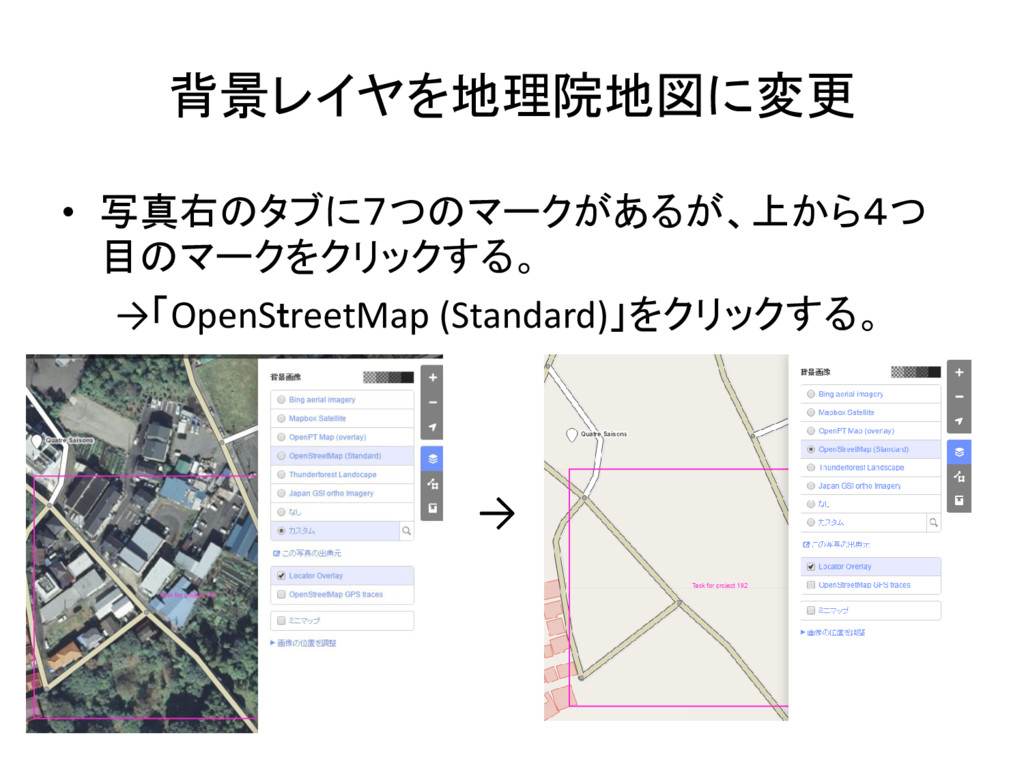
背景レイヤを地理院地図に変更 • 写真右のタブに7つのマークがあるが、上から4つ 目のマークをクリックする。 →「OpenStreetMap (Standard)」をクリックする。 →
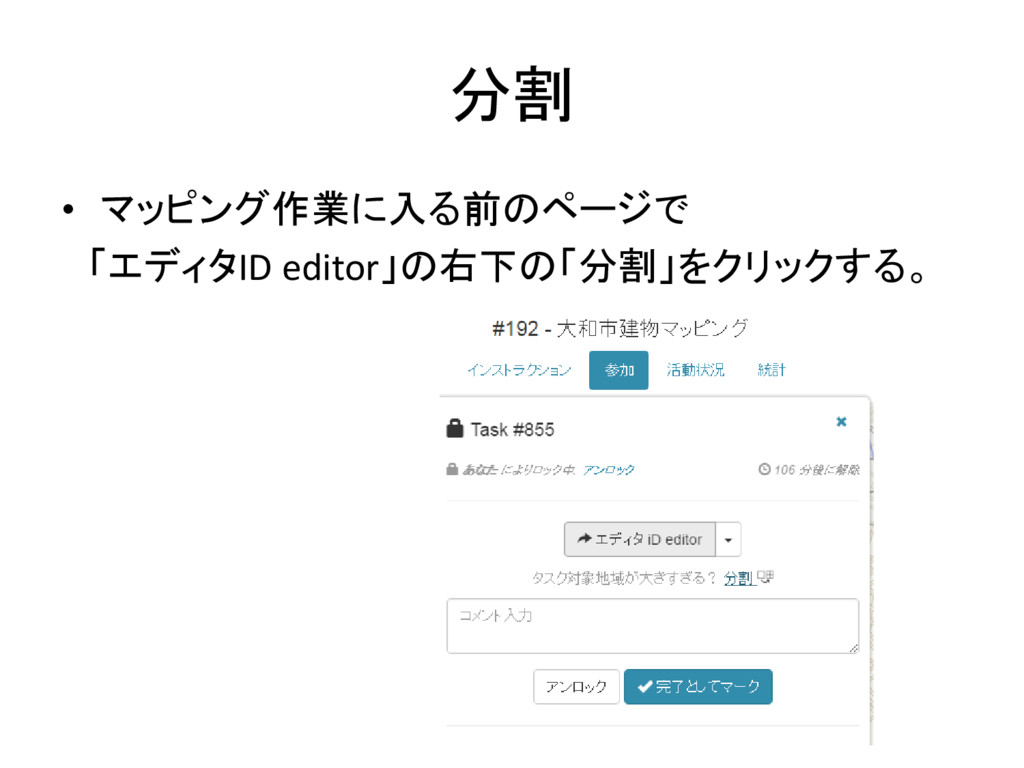
分割 • マッピング作業に入る前のページで 「エディタID editor」の右下の「分割」をクリックする。
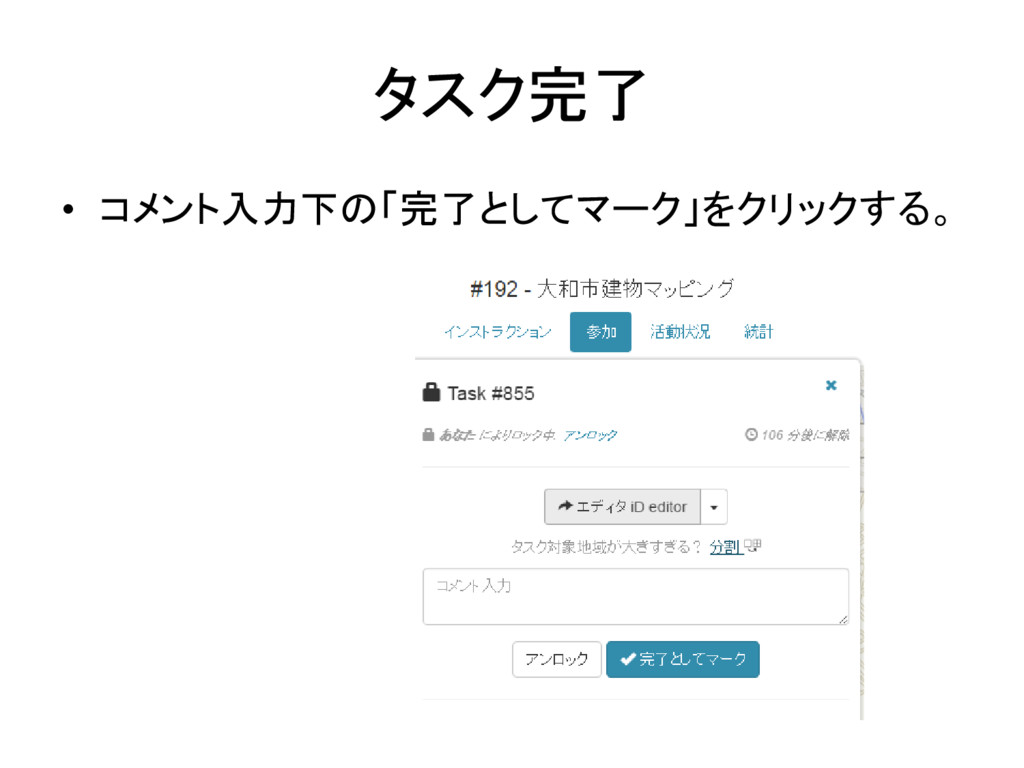
タスク完了 • コメント入力下の「完了としてマーク」をクリックする。


 yossy09
 sorah
sorah
 nabondance
 rkaga
rkaga
 drumath2237
 sylph01
 takai
takai
 y0hgi
y0hgi
 florets1
 iwatsukayura
 yukiny
 satoshi256kbyte
 kishida
 akosma
 minecr
 erikaheidi
 csswizardry
 notwaldorf
 quramy
 katiecoart
 garrettdimon
 michaelherold
 apolaine
 morganepeng
 brad_frost