Upgrade to Pro
— share decks privately, control downloads, hide ads and more …
Speaker Deck
Sign up for free
Menu
Search
Features
All features
Private URLs
Password Protection
Custom URLS
Scheduled publishing
Remove Branding
Restrict embedding
Deck Collections
Notes
Features
All features
Private URLs
Password Protection
Custom URLS
Scheduled publishing
Remove Branding
Restrict embedding
Deck Collections
Notes
Explore
Featured decks
Featured speakers
Programming
Technology
Storyboards
Explore
Featured decks
Featured speakers
Programming
Technology
Storyboards
Pricing
Search
Sign in
Sign up for free
Manual for beginners of Tasking Manager
Search
chisamasuda
June 12, 2018
47
0
Share
Embed
Copy iframe code
Copy JS code
Copy link
Start on current slide
Manual for beginners of Tasking Manager
chisamasuda
June 12, 2018
More Decks by chisamasuda
See All by chisamasuda
Manual for beginners of Tasking Manager Validate ver.
chisamasuda
0
31
Featured
See All Featured
Docker and Python
trallard
47
4.2k
The Invisible Side of Design
smashingmag
301
52k
Code Reviewing Like a Champion
maltzj
529
40k
Mozcon NYC 2025: Stop Losing SEO Traffic
samtorres
1
600
How to Align SEO within the Product Triangle To Get Buy-In & Support - #RIMC
aleyda
2
1.9k
Producing Creativity
orderedlist
PRO
348
41k
The MySQL Ecosystem @ GitHub 2015
samlambert
251
13k
Agile Actions for Facilitating Distributed Teams - ADO2019
mkilby
0
330
<Decoding/> the Language of Devs - We Love SEO 2024
nikkihalliwell
1
380
Measuring & Analyzing Core Web Vitals
bluesmoon
9
1.1k
jQuery: Nuts, Bolts and Bling
dougneiner
66
8.7k
From π to Pie charts
rasagy
1
430
Transcript
TASKING MANAGER MANUAL 1A118148 増田千紗
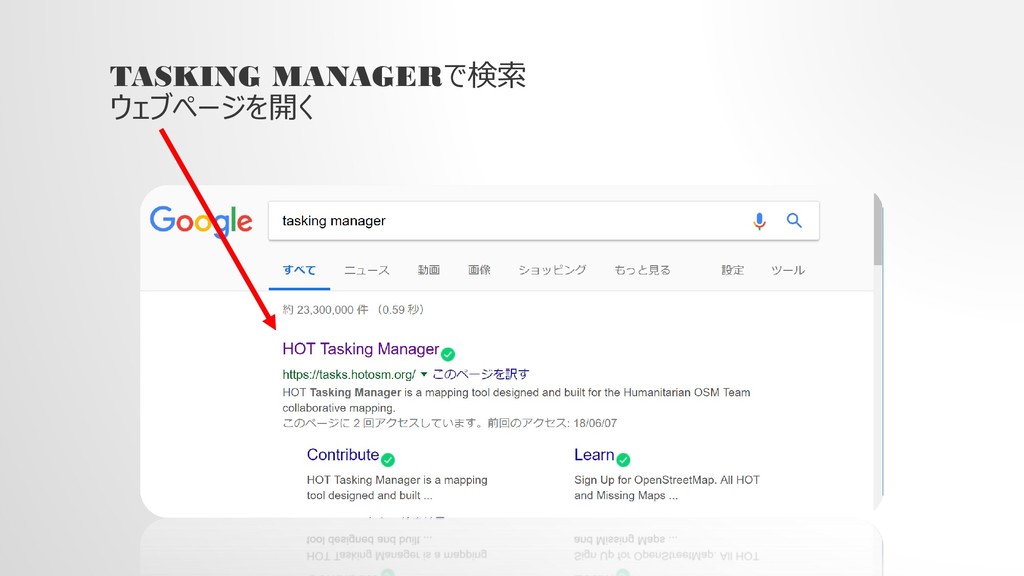
TASKING MANAGERで検索 ウェブページを開く
LOGIN 使用言語を 「日本語」に 変更できる
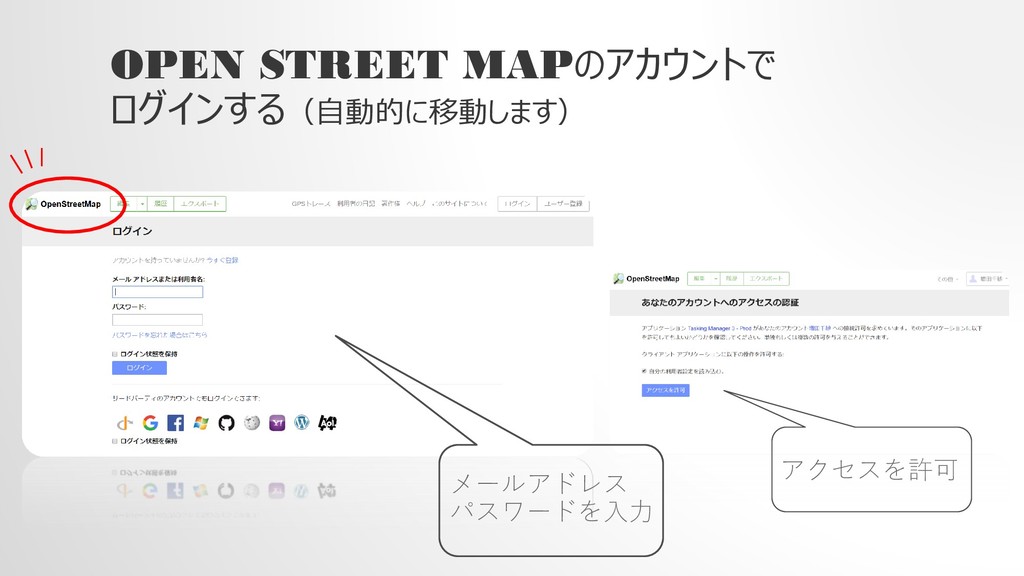
OPEN STREET MAPのアカウントで ログインする(自動的に移動します) メールアドレス パスワードを入力 アクセスを許可
プロジェクトを探す 方法① 「search] に入力して 探す 方法② 表示されて いるプロ ジェクトを 選択する
マッピングするタイルを選ぶ 色のついていない タイルを選び、 「マッピング開始」
OPEN STREET MAPでマッピング ※ピンクの枠内のみ編集する ①「エリア」を選択し 建物の角をクリック ②直交化を忘れずに ③建物の種類を選択
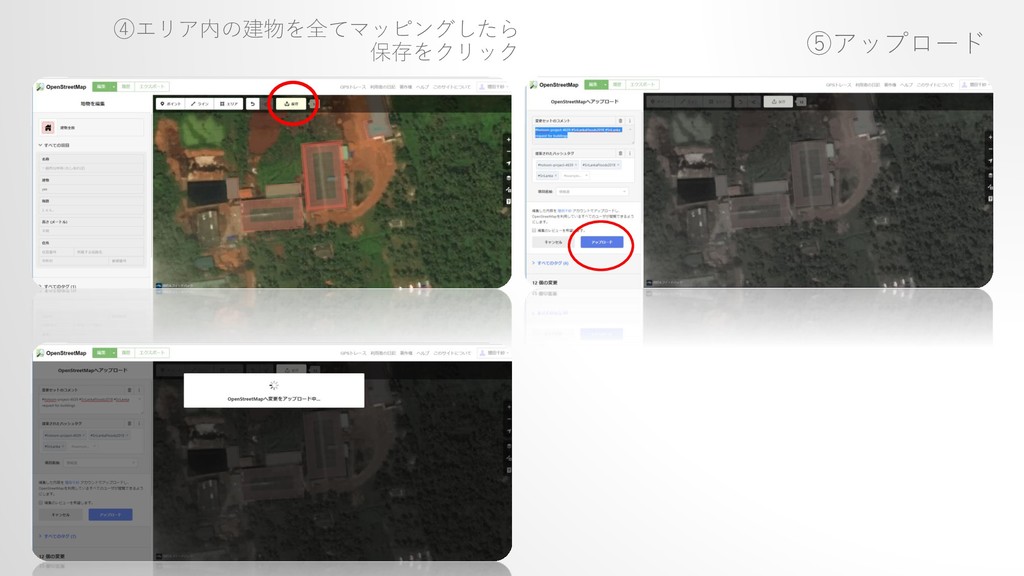
④エリア内の建物を全てマッピングしたら 保存をクリック ⑤アップロード
▲ 画像が荒い場合 背景設定からDigital Globeプレミアム画像 に切り替える ▲ エリアが広すぎる場合 エリア選択画面で「SPLIT TASK] を選択し分割する
▲同じ形の建物がある場合 Ctrl + C + V でコピぺすることができる
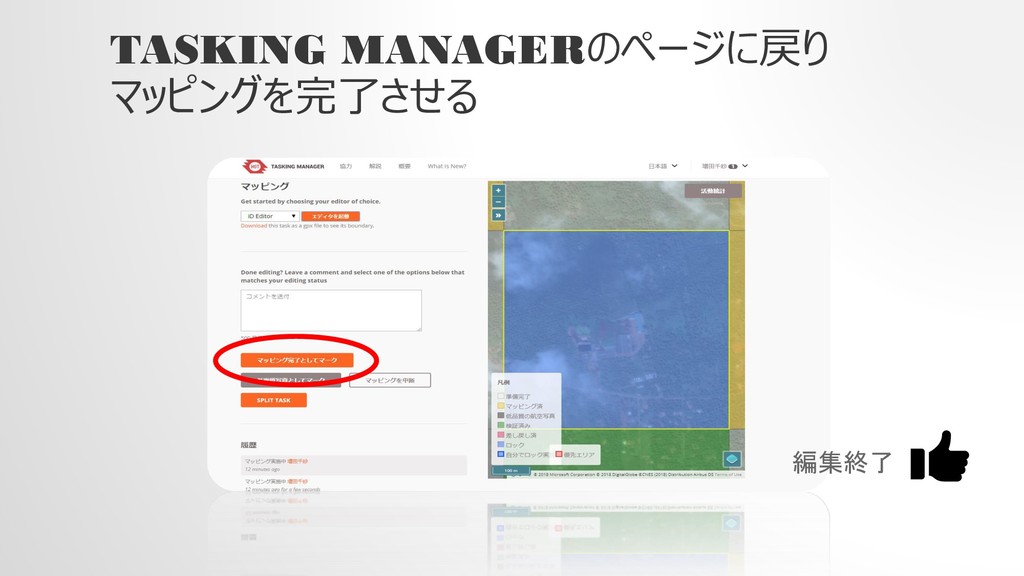
TASKING MANAGERのページに戻り マッピングを完了させる 編集終了
自分の活動記録はプロフィールから 確認できます


 chisamasuda
 trallard
 smashingmag
 maltzj
 samtorres
 aleyda
 orderedlist
 samlambert
 mkilby
 nikkihalliwell
 bluesmoon
 dougneiner
 rasagy


![プロジェクトを探す 方法① 「search] に入力して 探す 方法② 表示されて いるプロ ジェクトを 選択する](https://files.speakerdeck.com/presentations/e0568147c9fb49b581f41476749fd1c9/slide_4.jpg)


![▲ 画像が荒い場合 背景設定からDigital Globeプレミアム画像 に切り替える ▲ エリアが広すぎる場合 エリア選択画面で「SPLIT TASK] を選択し分割する](https://files.speakerdeck.com/presentations/e0568147c9fb49b581f41476749fd1c9/slide_8.jpg)