Upgrade to Pro
— share decks privately, control downloads, hide ads and more …
Speaker Deck
Sign up for free
Menu
Search
Features
All features
Private URLs
Password Protection
Custom URLS
Scheduled publishing
Remove Branding
Restrict embedding
Deck Collections
Notes
Features
All features
Private URLs
Password Protection
Custom URLS
Scheduled publishing
Remove Branding
Restrict embedding
Deck Collections
Notes
Explore
Featured decks
Featured speakers
Programming
Technology
Storyboards
Explore
Featured decks
Featured speakers
Programming
Technology
Storyboards
Pricing
Search
Sign in
Sign up for free
Pythonの環境構築について
Search
株式会社Curious Vehicle
February 21, 2025
14
0
Share
Embed
Copy iframe code
Copy JS code
Copy link
Start on current slide
Pythonの環境構築について
株式会社Curious Vehicle
February 21, 2025
More Decks by 株式会社Curious Vehicle
See All by 株式会社Curious Vehicle
AI Agent Harness 入門
curicle
0
6
クネビンフレームワークで考える最初の一歩
curicle
0
6
AIガバナンス
curicle
0
7
PQCが変える暗号の世界
curicle
0
49
最近流行ってるClaudeについて
curicle
0
17
ElasticsearchのHA構成について
curicle
0
27
機械学習で絶対音感になりたかった
curicle
0
20
BQにおけるSQLアンチパターンとslot消費削減策
curicle
0
35
VibeKanbanについて
curicle
0
16
Featured
See All Featured
Information Architects: The Missing Link in Design Systems
soysaucechin
1
1.2k
Reflections from 52 weeks, 52 projects
jeffersonlam
356
22k
Ecommerce SEO: The Keys for Success Now & Beyond - #SERPConf2024
aleyda
1
2.2k
Design of three-dimensional binary manipulators for pick-and-place task avoiding obstacles (IECON2024)
konakalab
0
620
Balancing Empowerment & Direction
lara
6
1.3k
The browser strikes back
jonoalderson
0
1.8k
Exploring anti-patterns in Rails
aemeredith
4
540
Building Applications with DynamoDB
mza
96
7.2k
[Rails World 2023 - Day 1 Closing Keynote] - The Magic of Rails
eileencodes
38
3.1k
Skip the Path - Find Your Career Trail
mkilby
1
260
JAMstack: Web Apps at Ludicrous Speed - All Things Open 2022
reverentgeek
1
640
Keith and Marios Guide to Fast Websites
keithpitt
413
23k
Transcript
Python の環境構築が 自分には難しすぎた のでどうすればいいか 考えた 原口 昌也
なんかよくわかんないな〜 難しいな〜って思ってたこと
ズバリ...! リンターとフォーマッターの設定 方法についてです!!
初心者には難しすぎる!!!
わかりづらポイント 1 管理するものが多い! 覚えることが多い!
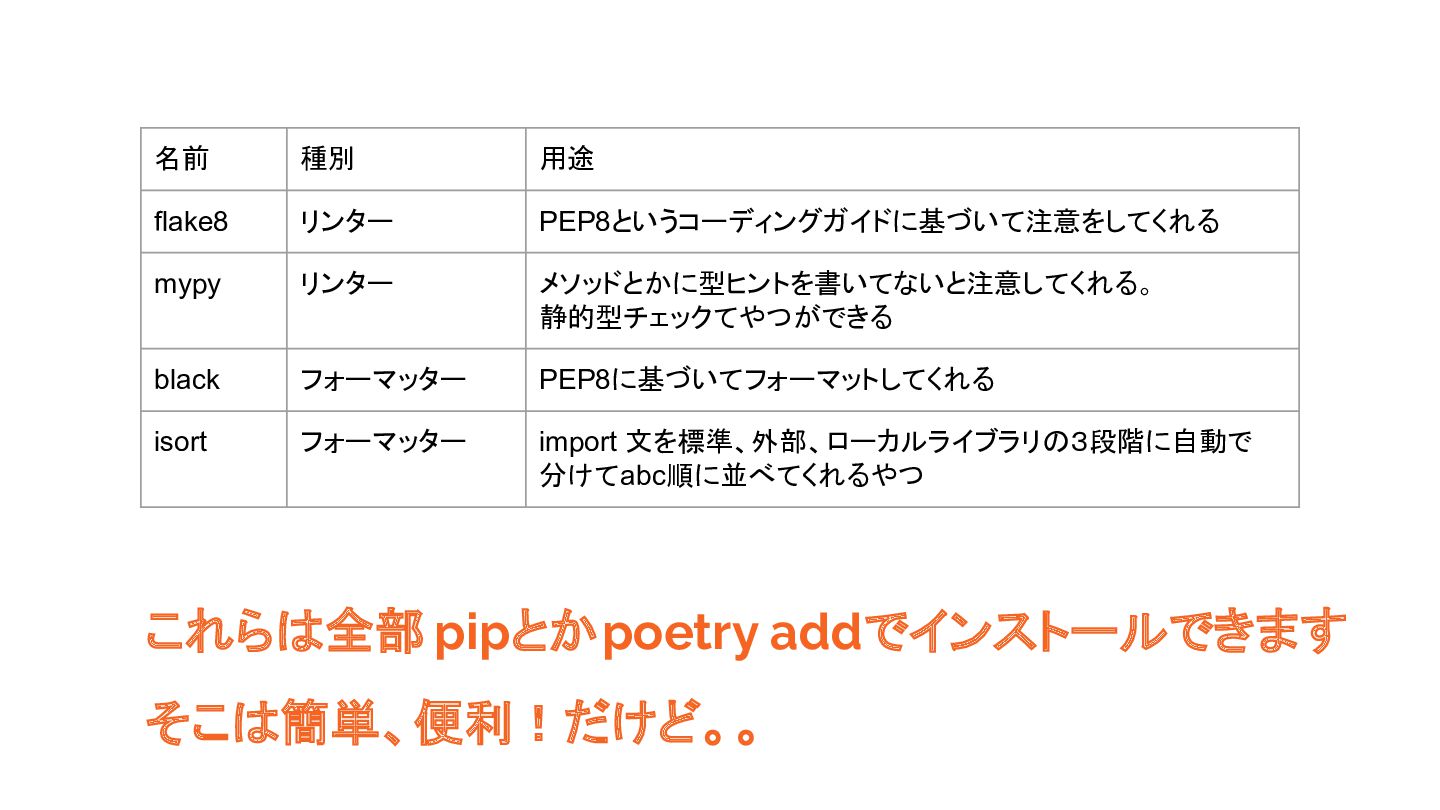
とあるrepoで使用していた リンターとフォーマッターがこちら
名前 種別 用途 flake8 リンター PEP8というコーディングガイドに基づいて注意をしてくれる mypy リンター メソッドとかに型ヒントを書いてないと注意してくれる。 静的型チェックてやつができる
black フォーマッター PEP8に基づいてフォーマットしてくれる isort フォーマッター import 文を標準、外部、ローカルライブラリの3段階に自動で 分けてabc順に並べてくれるやつ これらは全部 pipとかpoetry addでインストールできます そこは簡単、便利!だけど。。
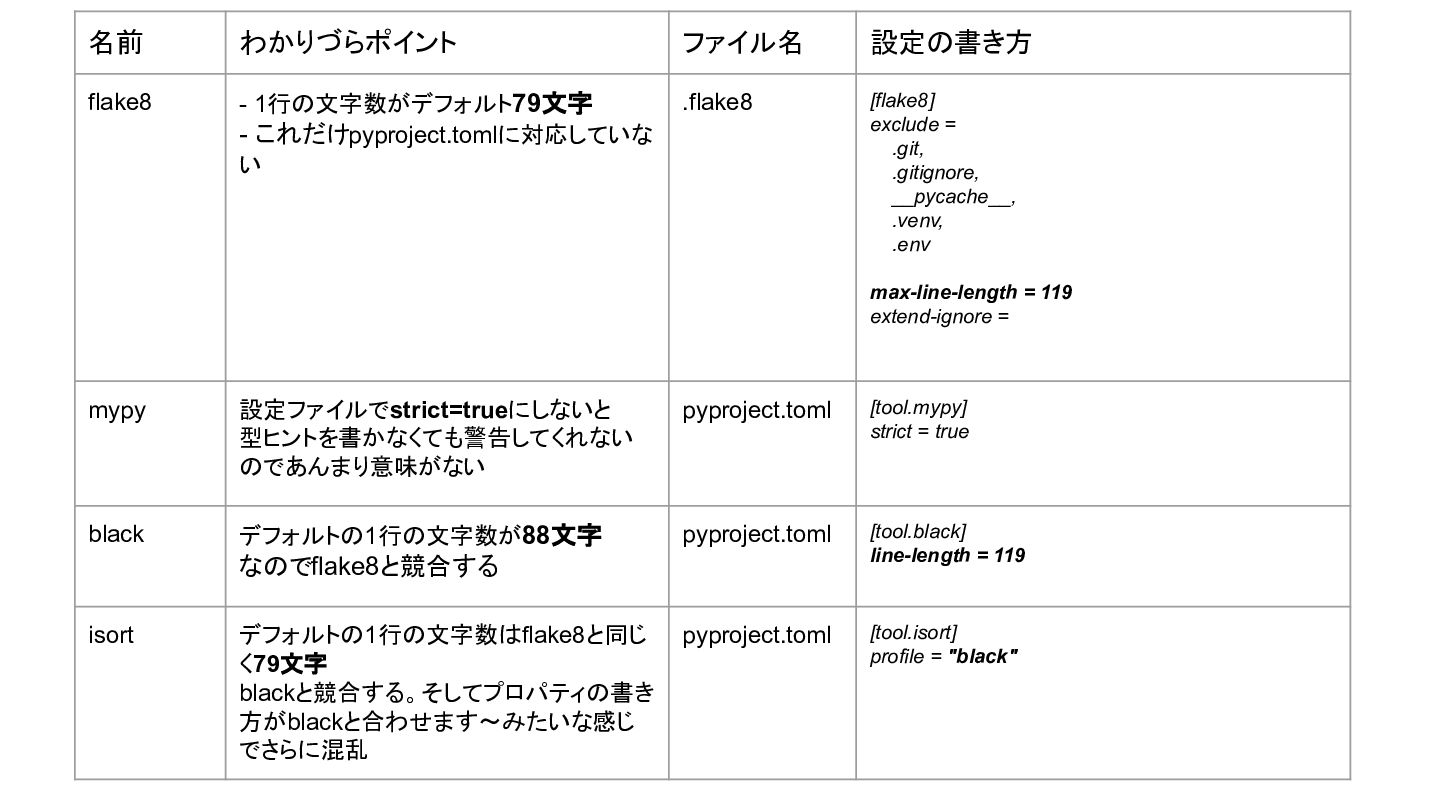
これらの4つのツールには 全部わかりづらポイント があ ります!!
名前 わかりづらポイント ファイル名 設定の書き方 flake8 - 1行の文字数がデフォルト79文字 - これだけpyproject.tomlに対応していな い
.flake8 [flake8] exclude = .git, .gitignore, __pycache__, .venv, .env max-line-length = 119 extend-ignore = mypy 設定ファイルでstrict=trueにしないと 型ヒントを書かなくても警告してくれない のであんまり意味がない pyproject.toml [tool.mypy] strict = true black デフォルトの1行の文字数が88文字 なのでflake8と競合する pyproject.toml [tool.black] line-length = 119 isort デフォルトの1行の文字数はflake8と同じ く79文字 blackと競合する。そしてプロパティの書き 方がblackと合わせます〜みたいな感じ でさらに混乱 pyproject.toml [tool.isort] profile = "black"
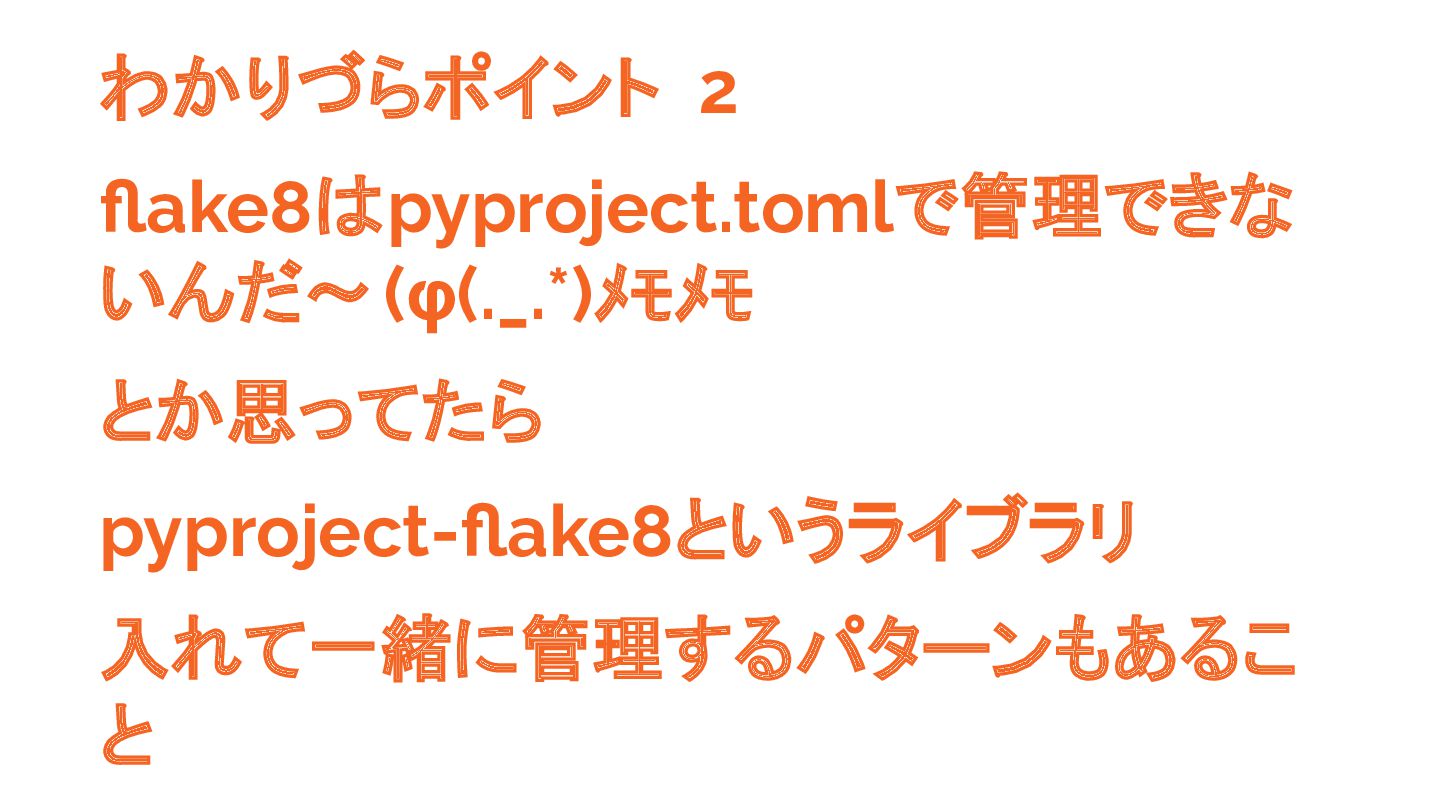
わかりづらポイント 2 flake8はpyproject.tomlで管理できな いんだ〜(φ(._.*)メモメモ とか思ってたら pyproject-flake8というライブラリ 入れて一緒に管理するパターンもあるこ と
わかりづらポイント 3 人は皆リンターフォーマッターを VSCodeでファイル保存時に自動適用 さ せるようにしたいと思うはず。 なのでsettings.jsonの書き方も知る必 要があること
わかりづらポイント 4 一生懸命設定した VSCodeの設定が 2023年9月のアップデートで いつの間にか使えなくなってたこと
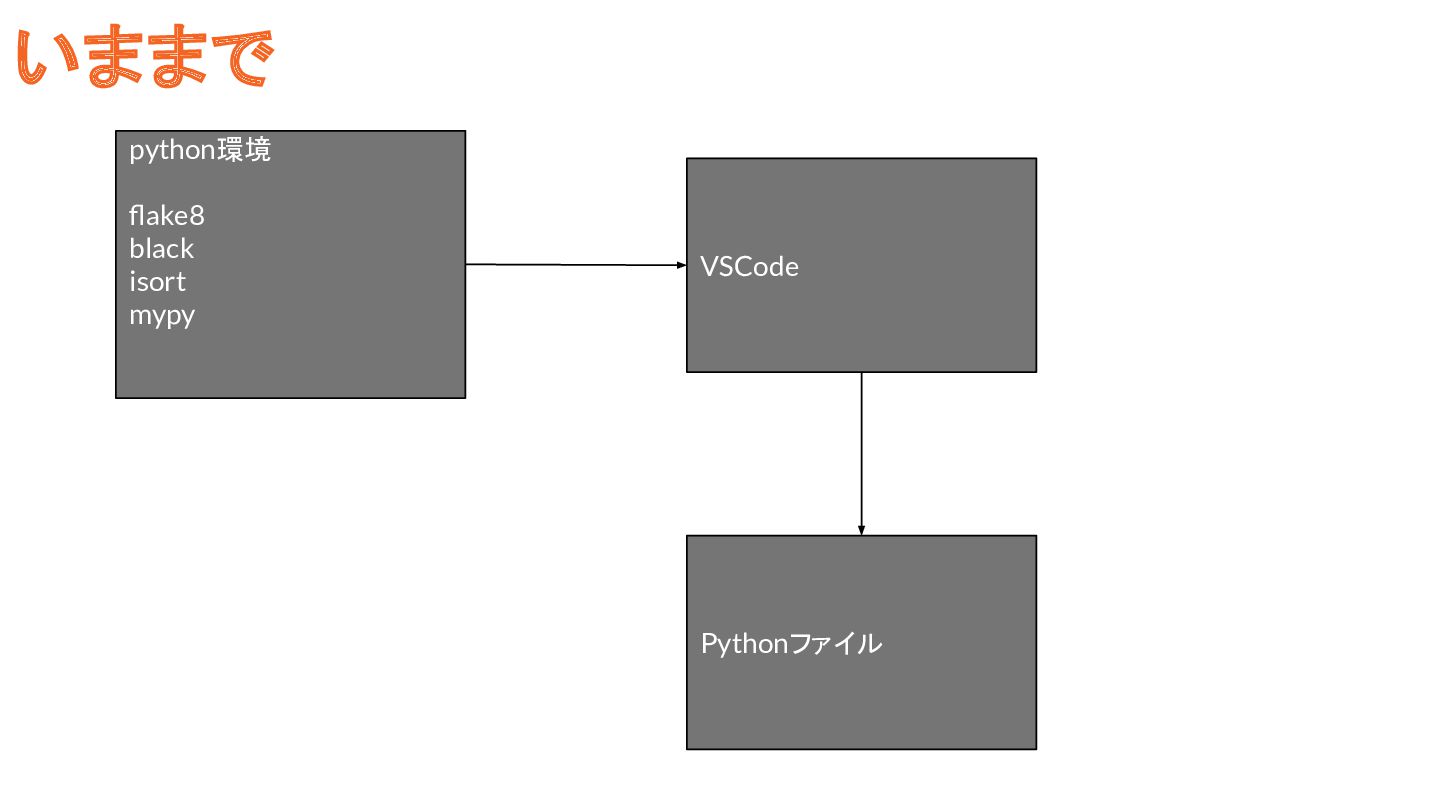
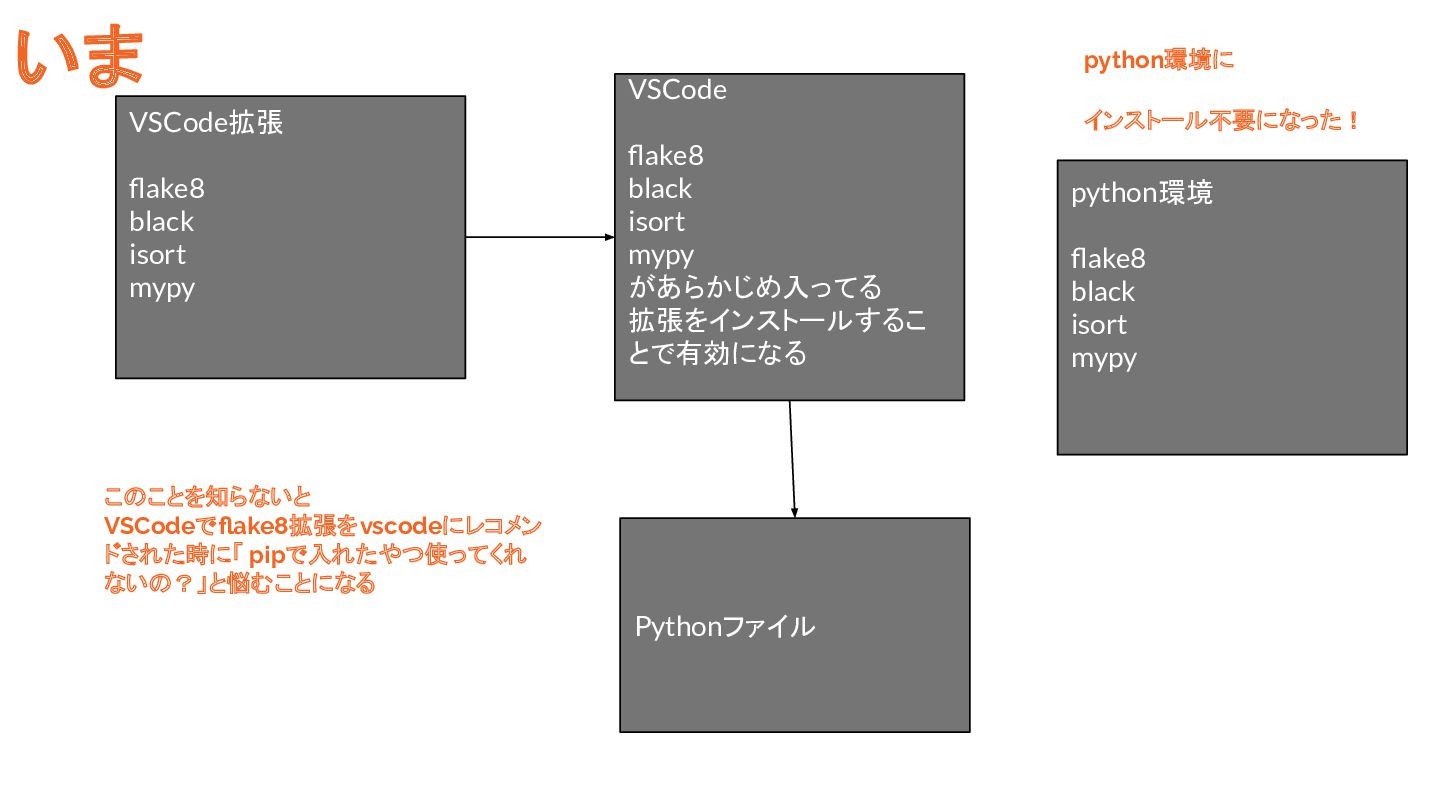
python環境 flake8 black isort mypy VSCode Pythonファイル いままで
VSCode拡張 flake8 black isort mypy VSCode flake8 black isort mypy
があらかじめ入ってる 拡張をインストールするこ とで有効になる Pythonファイル python環境 flake8 black isort mypy このことを知らないと VSCodeでflake8拡張をvscodeにレコメン ドされた時に「 pipで入れたやつ使ってくれ ないの?」と悩むことになる いま python環境に インストール不要になった!
わかりづらポイント 5 pyproject.tomlに書いた方が絶対にい いのに settings.jsonに リンターフォーマッター の詳細な設定を書けてしまうこと!
わかりづらポイント 6 VSCodeの 「ユーザー settings.json」と 「ワークスペース settings.json」の 親子関係を理解してないとつまづくこと
わかりづらポイント 7 setting.json とファイル名を間違えた時 誰も教えてくれないこと(4時間無駄にし たこと)
これらのことを把握するのが 初心者には大変すぎる!
リンターフォーマッターの設定を もう少し簡単にする方法を教えます!
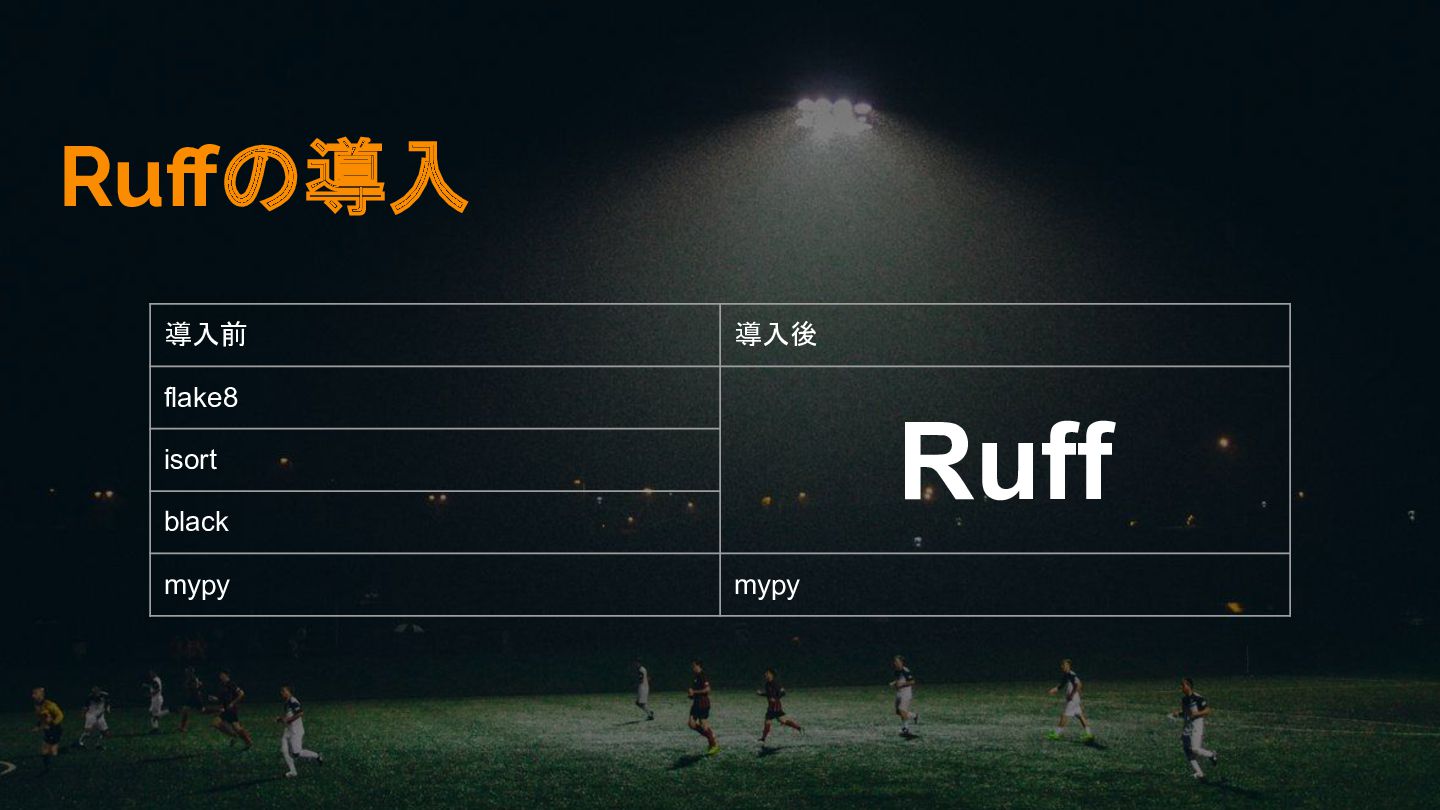
新ツール Ruffを使いましょう!
Ruffの導入 導入前 導入後 flake8 Ruff isort black mypy mypy
メリット1 3つのツールを1つに統合できる
メリット2 Rustで書かれており 10倍くらい高速になってる
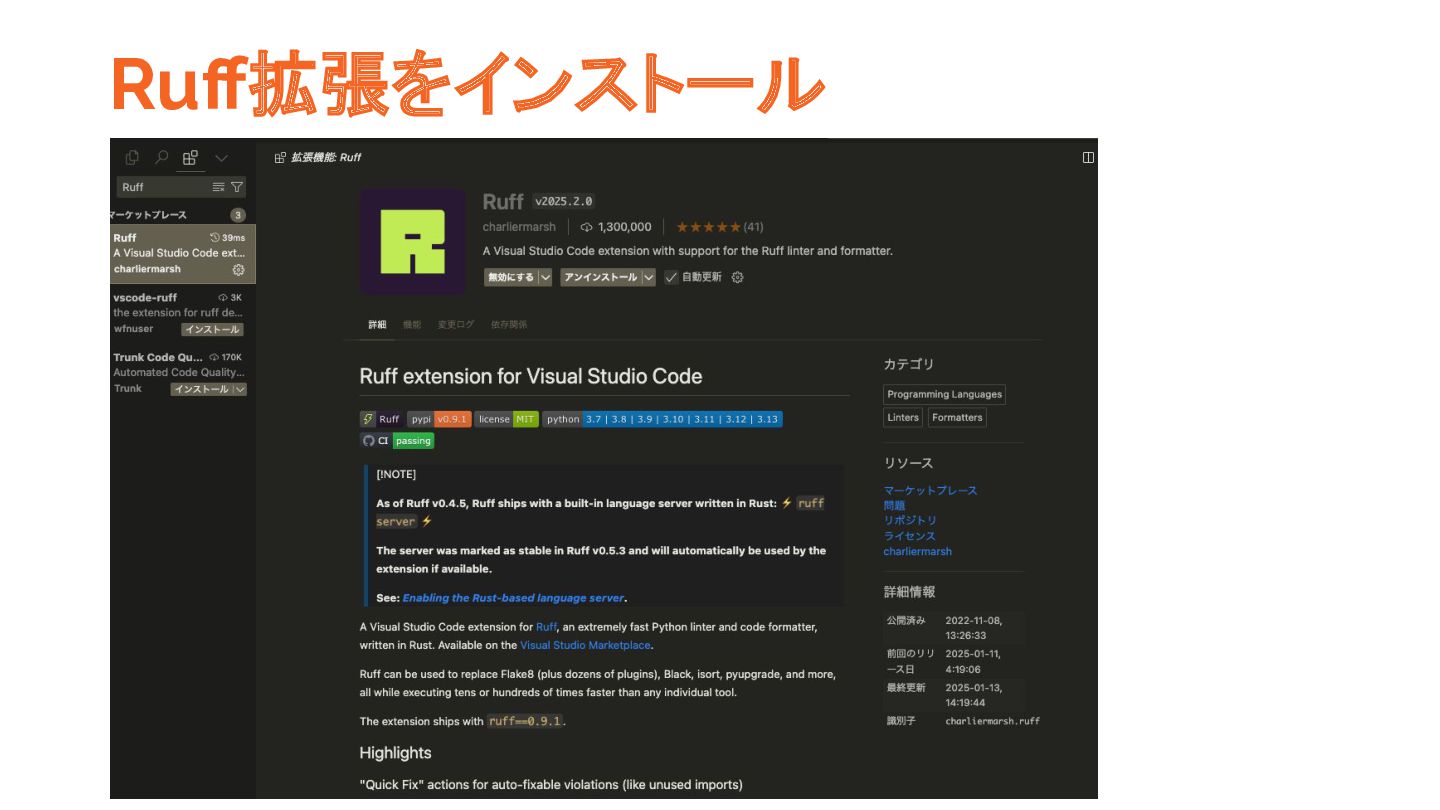
VSCodeでの インストール方法
Ruff拡張をインストール
settings.json { "[python]": { // 保存したときにフォーマットする "editor.formatOnSave": true, // デフォルトフォーマッターの設定
"editor.defaultFormatter": "charliermarsh.ruff", "editor.codeActionsOnSave": { //always->保存されたときにアクションを実行 "source.organizeImports.ruff": "always", // explicit->保存、ウインドウ変更、フォーカス変更時にアクションを実行。 "source.fixAll.ruff": "explicit", } }, "ruff.format.args": [ "--config=${workspaceFolder}/pyproject.toml" ], "mypy-type-checker.args" :["--config-file=${workspaceFolder}/pyproject.toml"] }
pyproject.toml[tool.ruff] target-version = "py312" # pythonのバージョン line-length = 119 #
1行の文字数 indent-width = 4 # インデントサイズ # blackformatの設定 [tool.ruff.format] quote-style = "double" docstring-code-format = true [tool.ruff.lint] # 実は.venvはデフォルトで有効になってるから設定不要 ignore = [".venv/", ] select = [ "F", # Flake8 "I", # isort "E", # error "W" # warning ] [tool.mypy] strict = true
これで 3つのツールが ひとつにまとまりました! 多分ちょっとわかりやすくなったと思 います!
今回紹介した ruffの設定方法はこちらの repoにも まとめましたので 気になったらみてください! https:/ /github.com/curicle/dev-toolbox
まとめ リンターフォーマッターの設定が難しすぎる! Ruffを使おう!!
おしまい


 curicle
 soysaucechin
 jeffersonlam
 aleyda
 konakalab
 lara
lara
 jonoalderson
 aemeredith
 mza
mza
 eileencodes
 mkilby
 reverentgeek
 keithpitt















![settings.json { "[python]": { // 保存したときにフォーマットする "editor.formatOnSave": true, // デフォルトフォーマッターの設定](https://files.speakerdeck.com/presentations/2fc52189495f4f04b798539509189d89/slide_25.jpg)
![pyproject.toml[tool.ruff] target-version = "py312" # pythonのバージョン line-length = 119 #](https://files.speakerdeck.com/presentations/2fc52189495f4f04b798539509189d89/slide_26.jpg)