Upgrade to Pro — share decks privately, control downloads, hide ads and more …

[AWS Summit Japan 2026] Amazon ECS 最新デプロイパター...

Avatar for kenicazu kenicazu
July 13, 2026
1.6k

[AWS Summit Japan 2026] Amazon ECS 最新デプロイパターン Deep Dive

AWS Summit Japan 2026 の Developer on Live にて発表させていただいた資料となります。

Avatar for kenicazu

kenicazu

July 13, 2026

More Decks by kenicazu

Transcript

  1. © 2026, Amazon Web Services, Inc. or its affiliates. All

    rights reserved. © 2026, Amazon Web Services, Inc. or its affiliates. All rights reserved. Kenichi Azuma Amazon Web Service Japan Amazon ECS 最新デプロイパターン Deep Dive C N S 3 0 9
  2. © 2026, Amazon Web Services, Inc. or its affiliates. All

    rights reserved. ⾃⼰紹介 東 健⼀ (あずま けんいち) アマゾンウェブサービスジャパン パブリックセクター ソリューションアーキテクト • 中央省庁のお客様を中⼼に ガバメントクラウド、医療DXに関するご⽀援
  3. © 2026, Amazon Web Services, Inc. or its affiliates. All

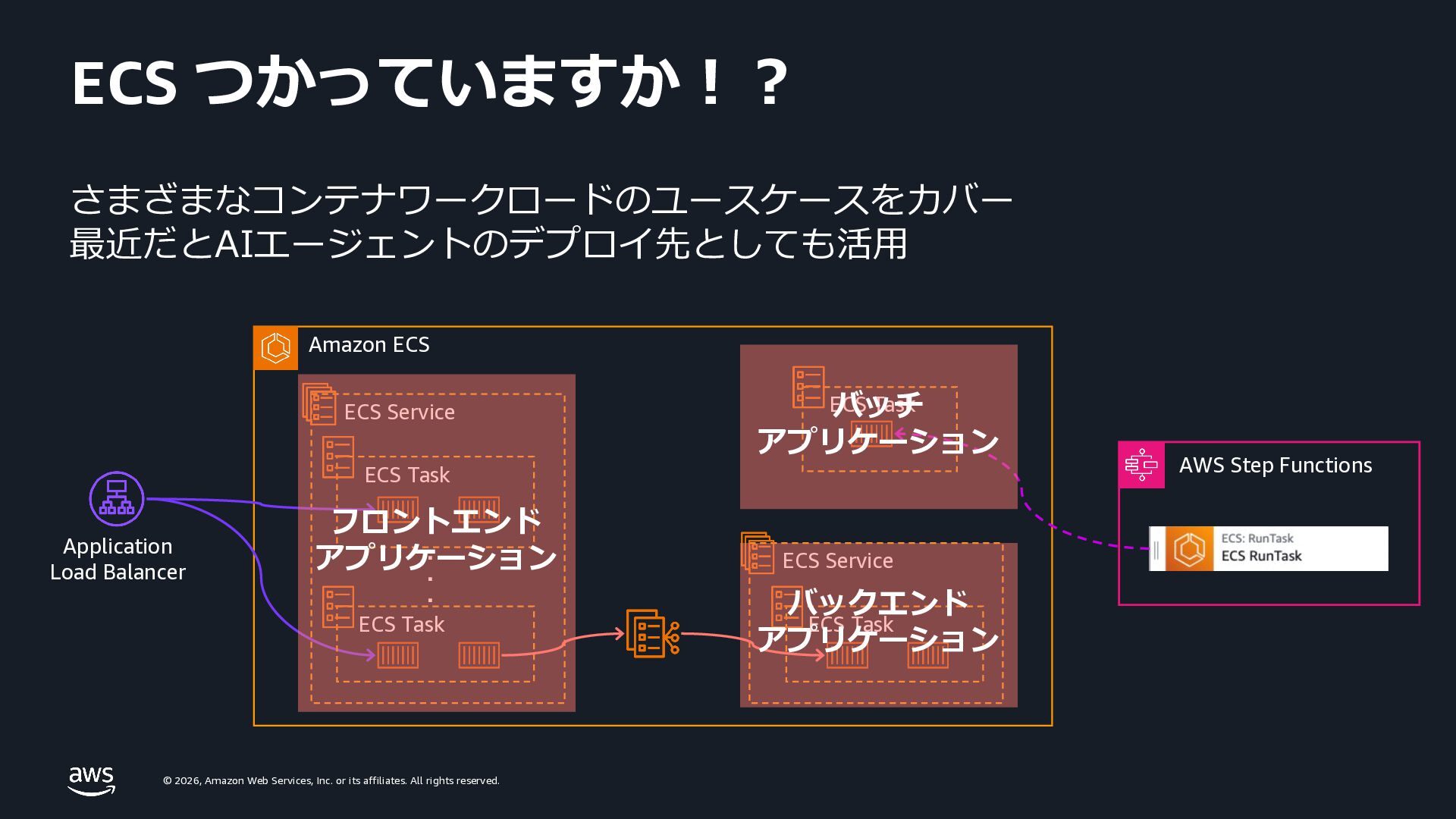
    rights reserved. ECS つかっていますか︕︖ Amazon ECS ・・・ Application Load Balancer ECS Service ECS Task ECS Task ECS Task AWS Step Functions ECS Service ECS Task バッチ アプリケーション バックエンド アプリケーション フロントエンド アプリケーション さまざまなコンテナワークロードのユースケースをカバー 最近だとAIエージェントのデプロイ先としても活⽤
  4. © 2026, Amazon Web Services, Inc. or its affiliates. All

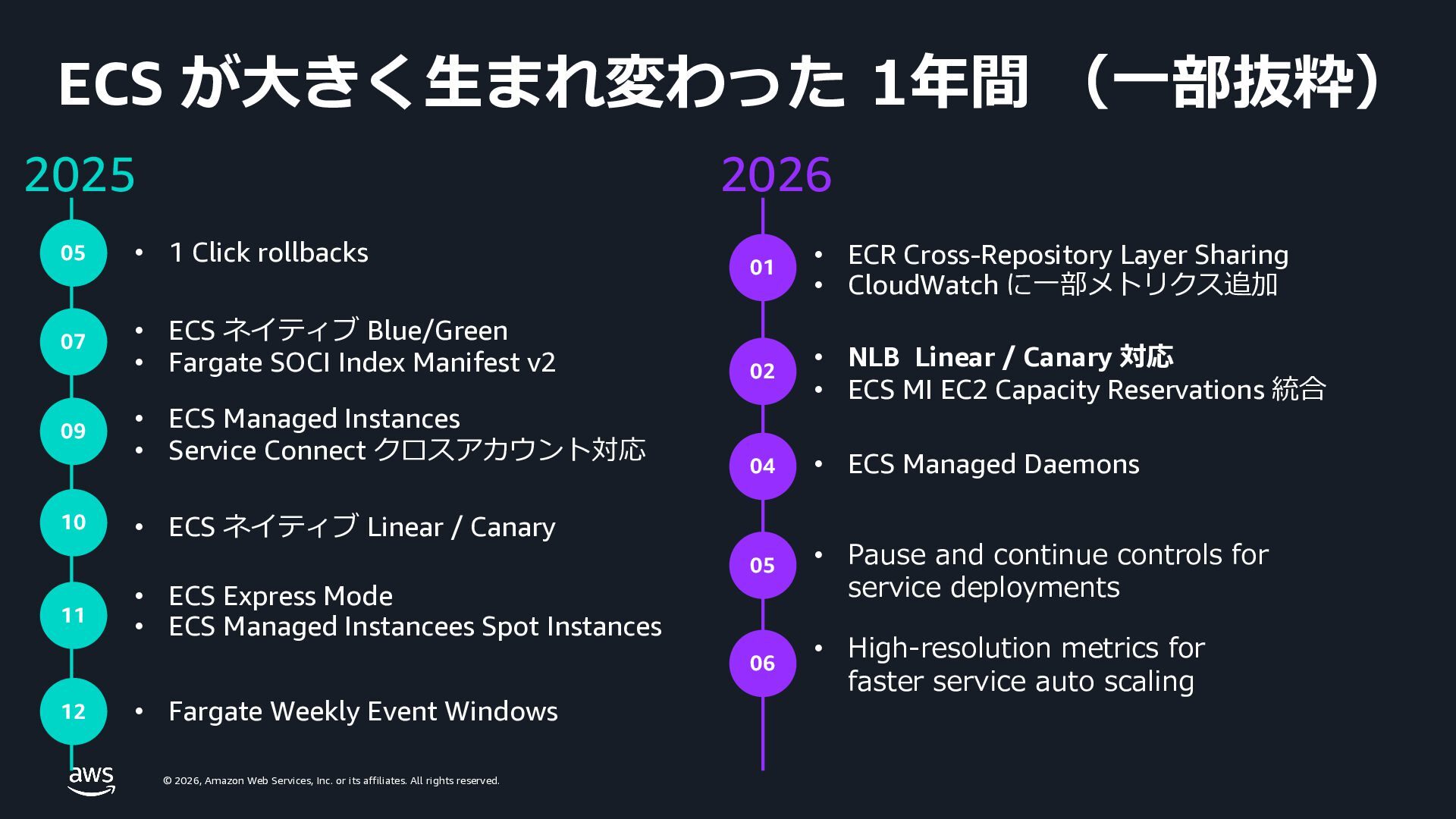
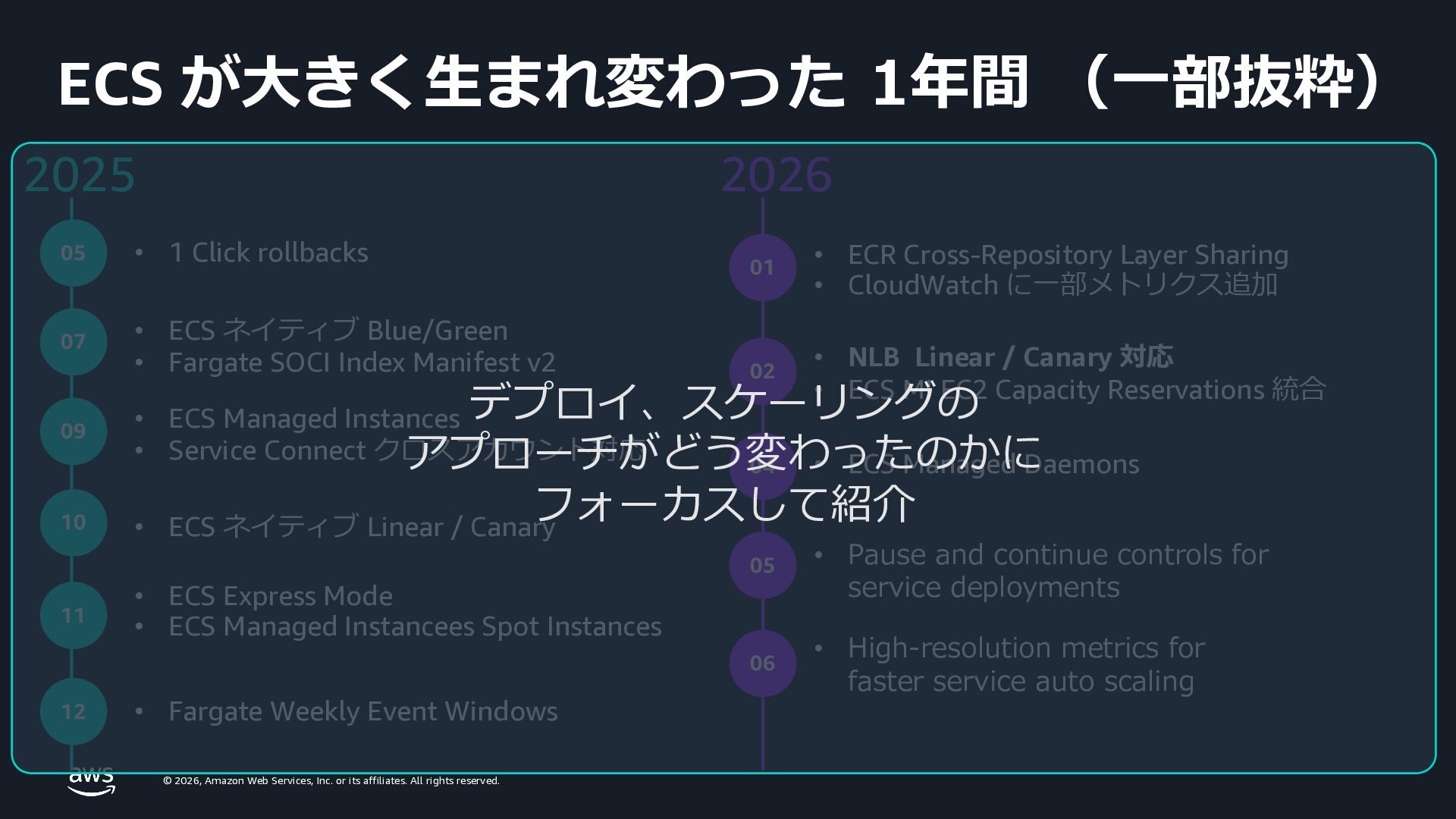
    rights reserved. ECS が⼤きく⽣まれ変わった 1年間 (⼀部抜粋) 2025 2026 07 • ECS ネイティブ Blue/Green • Fargate SOCI Index Manifest v2 09 • ECS Managed Instances • Service Connect クロスアカウント対応 10 • ECS ネイティブ Linear / Canary 11 • ECS Express Mode • ECS Managed Instancees Spot Instances • Fargate Weekly Event Windows • ECR Cross-Repository Layer Sharing • CloudWatch に⼀部メトリクス追加 • ECS Managed Daemons • Pause and continue controls for service deployments 12 01 04 05 • NLB Linear / Canary 対応 • ECS MI EC2 Capacity Reservations 統合 02 05 • 1 Click rollbacks 06 • High-resolution metrics for faster service auto scaling
  5. © 2026, Amazon Web Services, Inc. or its affiliates. All

    rights reserved. ECS が⼤きく⽣まれ変わった 1年間 (⼀部抜粋) 2025 2026 07 • ECS ネイティブ Blue/Green • Fargate SOCI Index Manifest v2 09 • ECS Managed Instances • Service Connect クロスアカウント対応 10 • ECS ネイティブ Linear / Canary 11 • ECS Express Mode • ECS Managed Instancees Spot Instances • Fargate Weekly Event Windows • ECR Cross-Repository Layer Sharing • CloudWatch に⼀部メトリクス追加 • ECS Managed Daemons • Pause and continue controls for service deployments 12 01 04 05 • NLB Linear / Canary 対応 • ECS MI EC2 Capacity Reservations 統合 02 05 • 1 Click rollbacks 06 • High-resolution metrics for faster service auto scaling デプロイ、スケーリングの アプローチがどう変わったのかに フォーカスして紹介
  6. © 2026, Amazon Web Services, Inc. or its affiliates. All

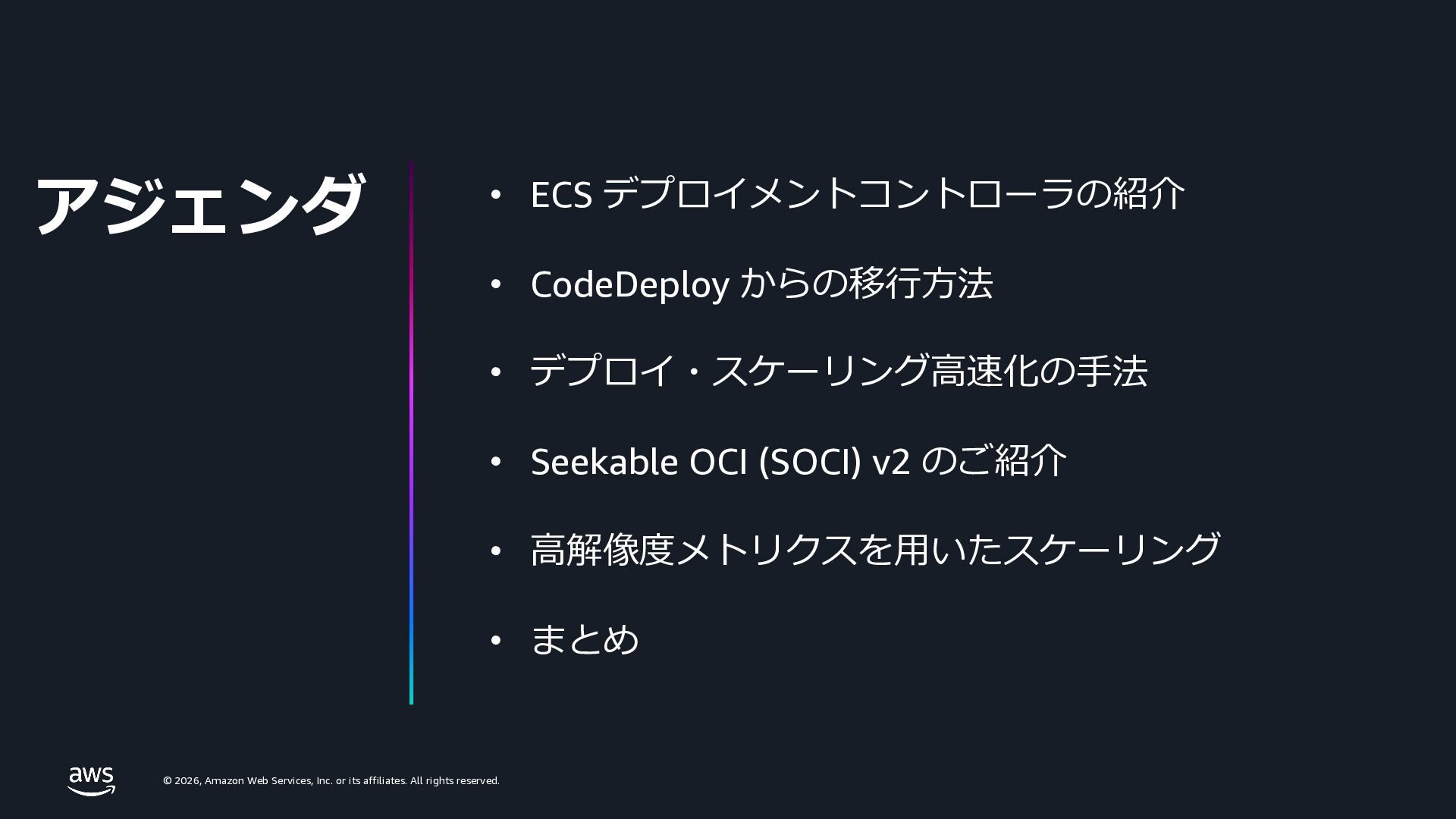
    rights reserved. アジェンダ • ECS デプロイメントコントローラの紹介 • CodeDeploy からの移⾏⽅法 • デプロイ・スケーリング⾼速化の⼿法 • Seekable OCI (SOCI) v2 のご紹介 • ⾼解像度メトリクスを⽤いたスケーリング • まとめ
  7. © 2026, Amazon Web Services, Inc. or its affiliates. All

    rights reserved. © 2026, Amazon Web Services, Inc. or its affiliates. All rights reserved. ECS デプロイメントコントローラの紹介
  8. © 2026, Amazon Web Services, Inc. or its affiliates. All

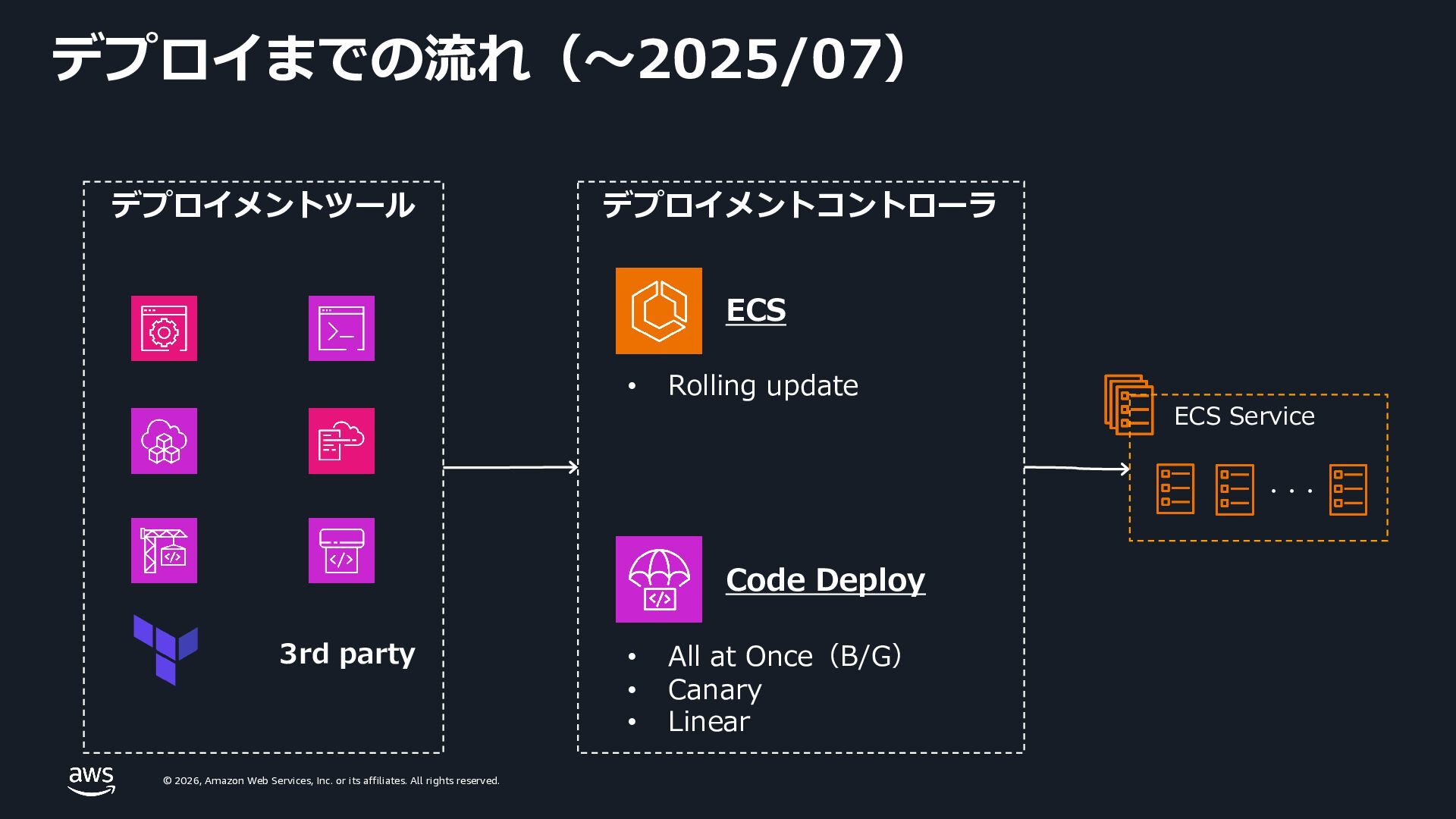
    rights reserved. デプロイまでの流れ(〜2025/07) ECS Code Deploy 3rd party ・・・ • Rolling update • All at Once(B/G) • Canary • Linear デプロイメントツール ECS Service デプロイメントコントローラ
  9. © 2026, Amazon Web Services, Inc. or its affiliates. All

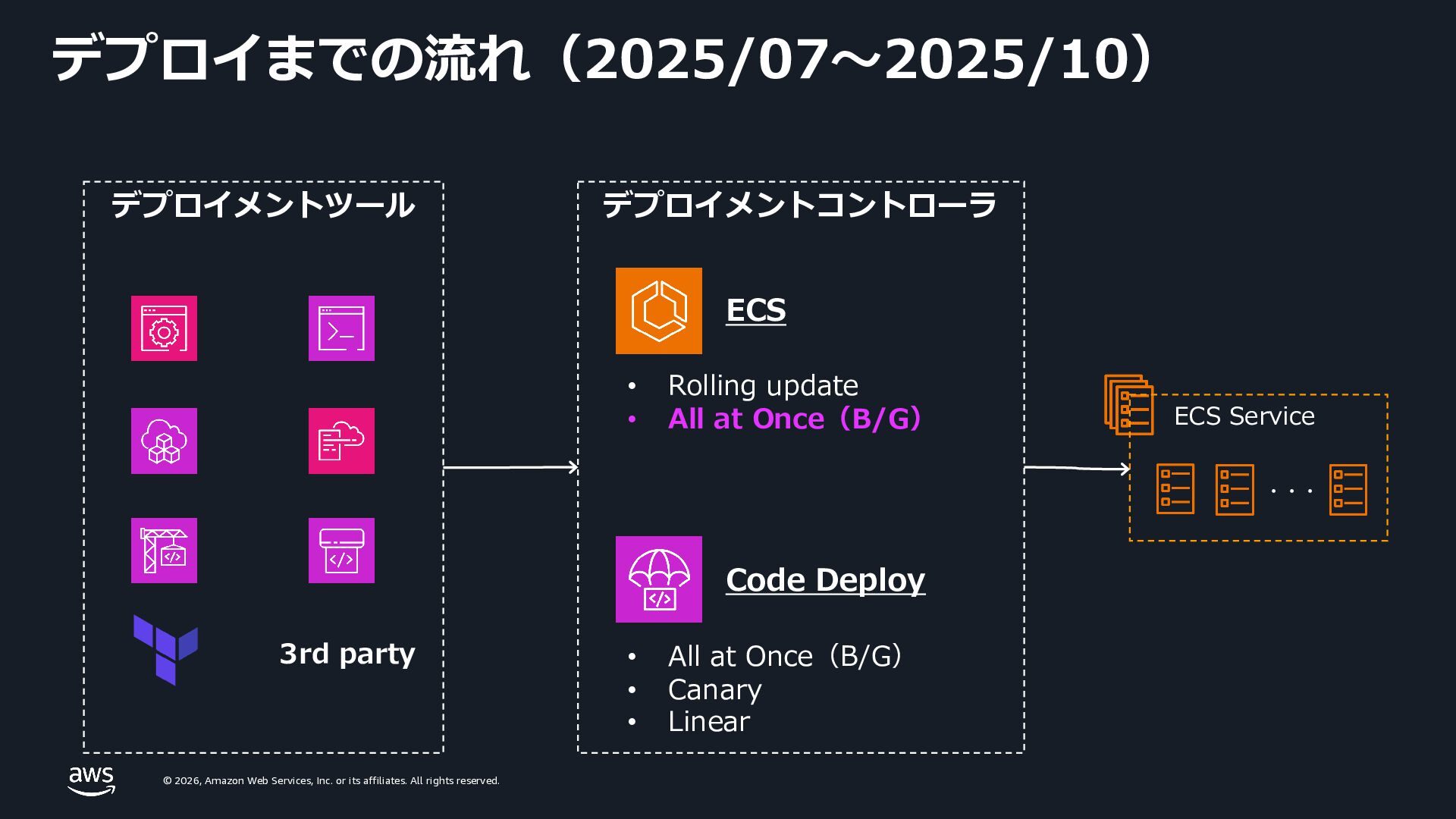
    rights reserved. デプロイまでの流れ(2025/07〜2025/10) ECS 3rd party ・・・ • Rolling update • All at Once(B/G) Code Deploy • All at Once(B/G) • Canary • Linear ECS Service デプロイメントツール デプロイメントコントローラ
  10. © 2026, Amazon Web Services, Inc. or its affiliates. All

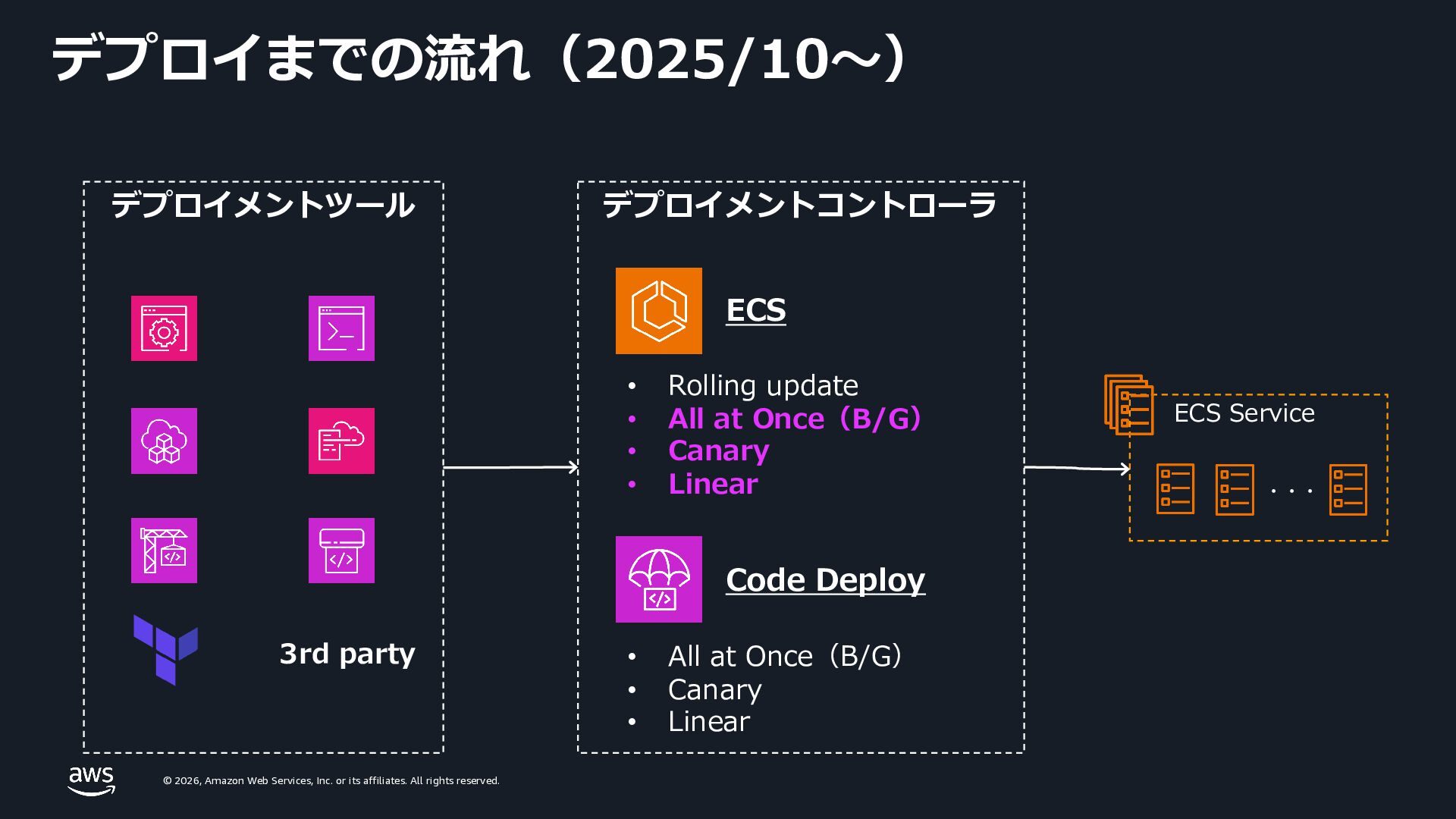
    rights reserved. デプロイまでの流れ(2025/10〜) ECS 3rd party ECS Service ・・・ • Rolling update • All at Once(B/G) • Canary • Linear Code Deploy • All at Once(B/G) • Canary • Linear デプロイメントツール デプロイメントコントローラ
  11. © 2026, Amazon Web Services, Inc. or its affiliates. All

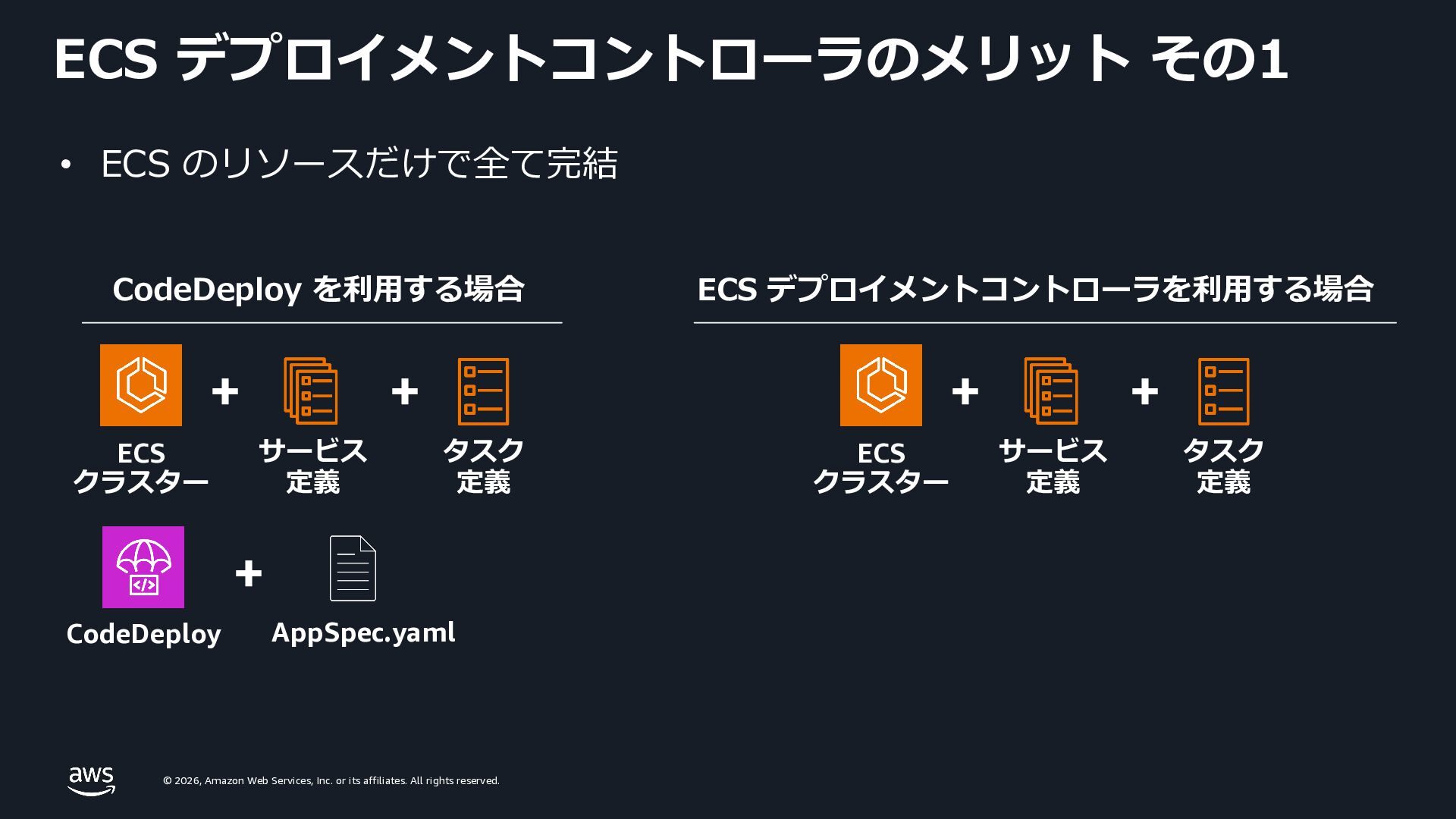
    rights reserved. ECS デプロイメントコントローラのメリット その1 CodeDeploy を利⽤する場合 ECS クラスター + CodeDeploy + AppSpec.yaml + サービス 定義 タスク 定義 ECS クラスター + + サービス 定義 タスク 定義 ECS デプロイメントコントローラを利⽤する場合 • ECS のリソースだけで全て完結
  12. © 2026, Amazon Web Services, Inc. or its affiliates. All

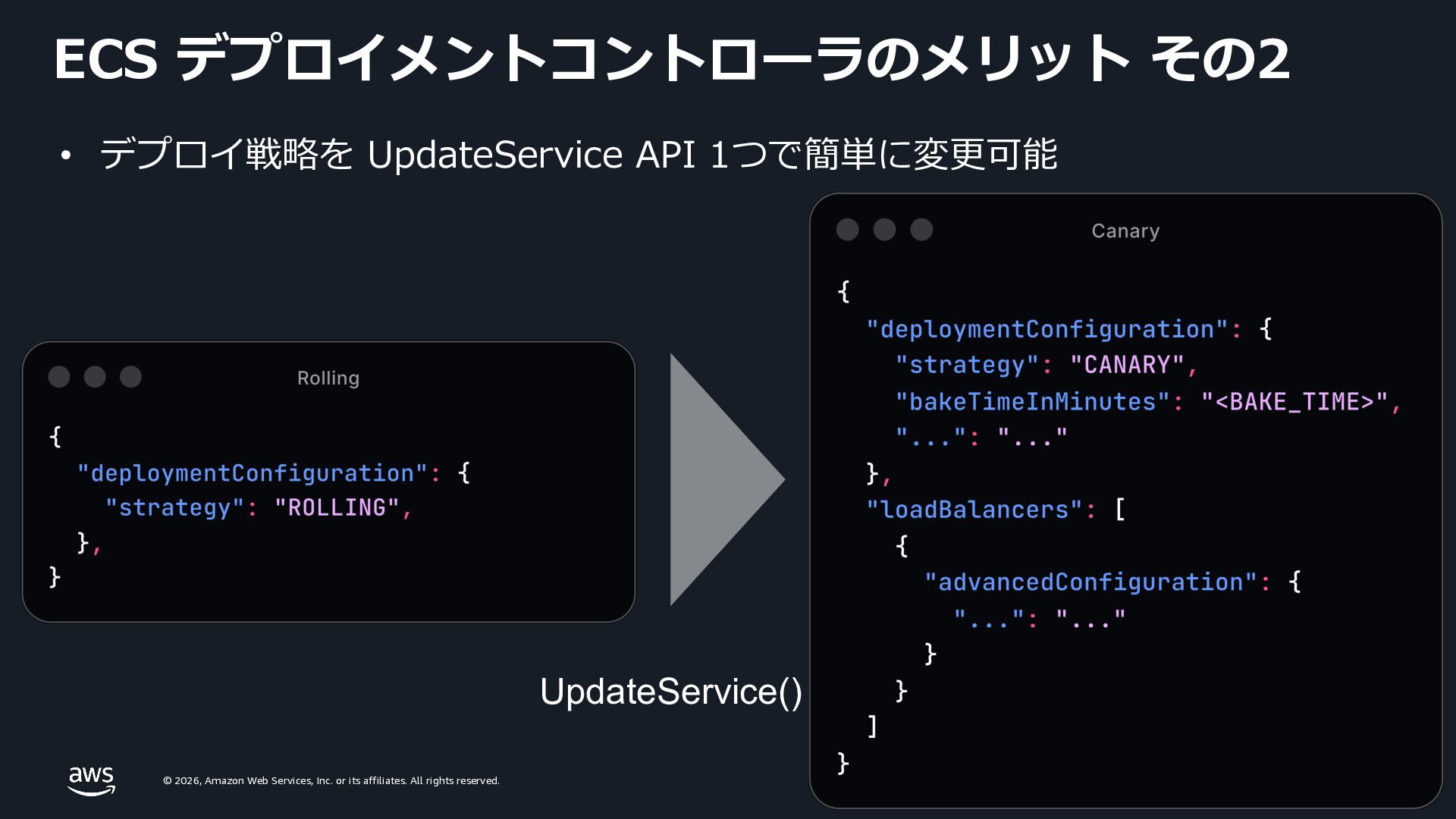
    rights reserved. UpdateService() • デプロイ戦略を UpdateService API 1つで簡単に変更可能 ECS デプロイメントコントローラのメリット その2
  13. © 2026, Amazon Web Services, Inc. or its affiliates. All

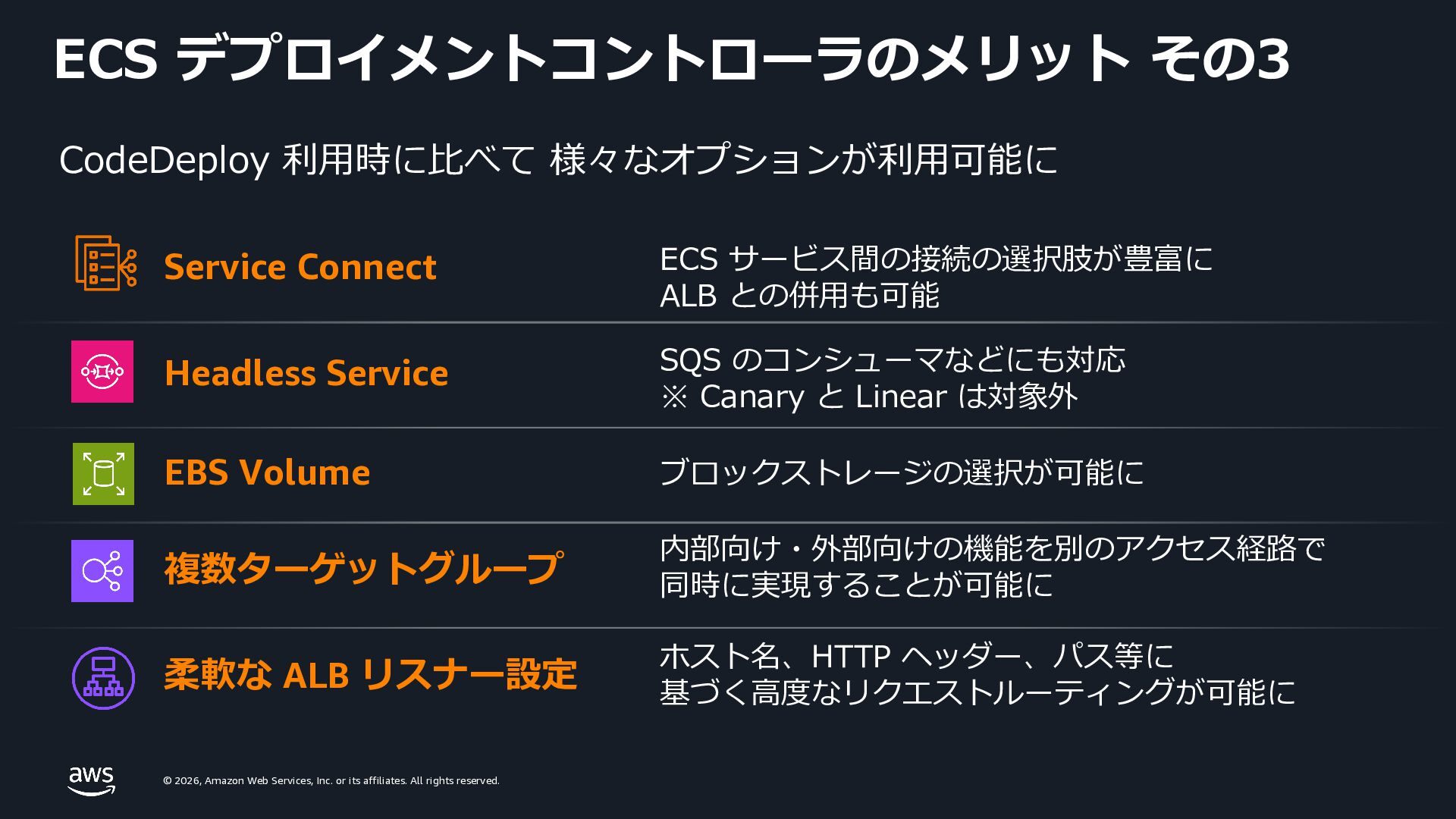
    rights reserved. ECS デプロイメントコントローラのメリット その3 Service Connect Headless Service CodeDeploy 利⽤時に⽐べて 様々なオプションが利⽤可能に EBS Volume 複数ターゲットグループ 柔軟な ALB リスナー設定 ECS サービス間の接続の選択肢が豊富に ALB との併⽤も可能 SQS のコンシューマなどにも対応 ※ Canary と Linear は対象外 内部向け・外部向けの機能を別のアクセス経路で 同時に実現することが可能に ホスト名、HTTP ヘッダー、パス等に 基づく⾼度なリクエストルーティングが可能に ブロックストレージの選択が可能に
  14. © 2026, Amazon Web Services, Inc. or its affiliates. All

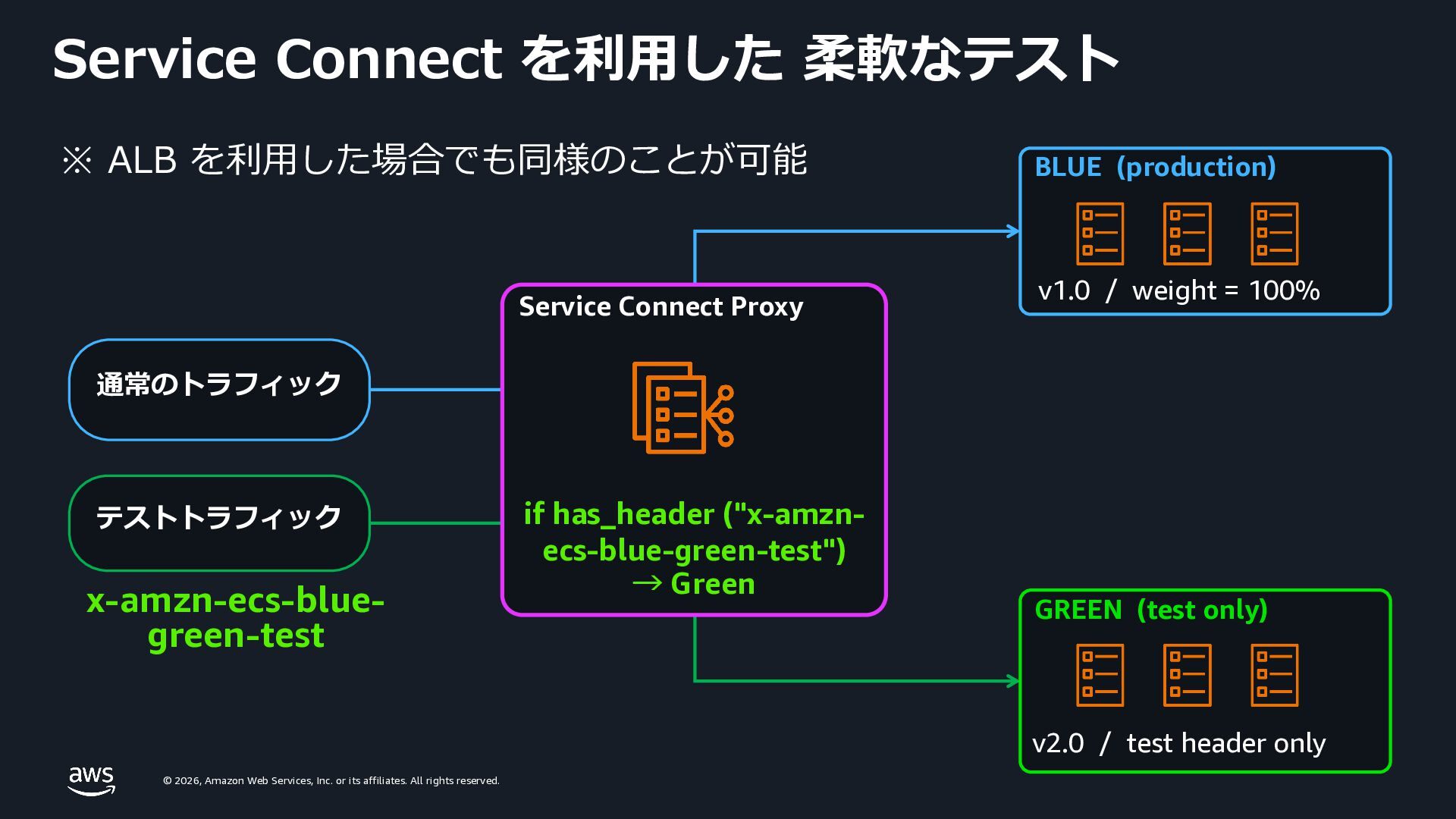
    rights reserved. Service Connect を利⽤した 柔軟なテスト 通常のトラフィック テストトラフィック x-amzn-ecs-blue- green-test Service Connect Proxy if has_header ("x-amzn- ecs-blue-green-test") → Green BLUE (production) v1.0 / weight = 100% GREEN (test only) v2.0 / test header only ※ ALB を利⽤した場合でも同様のことが可能
  15. © 2026, Amazon Web Services, Inc. or its affiliates. All

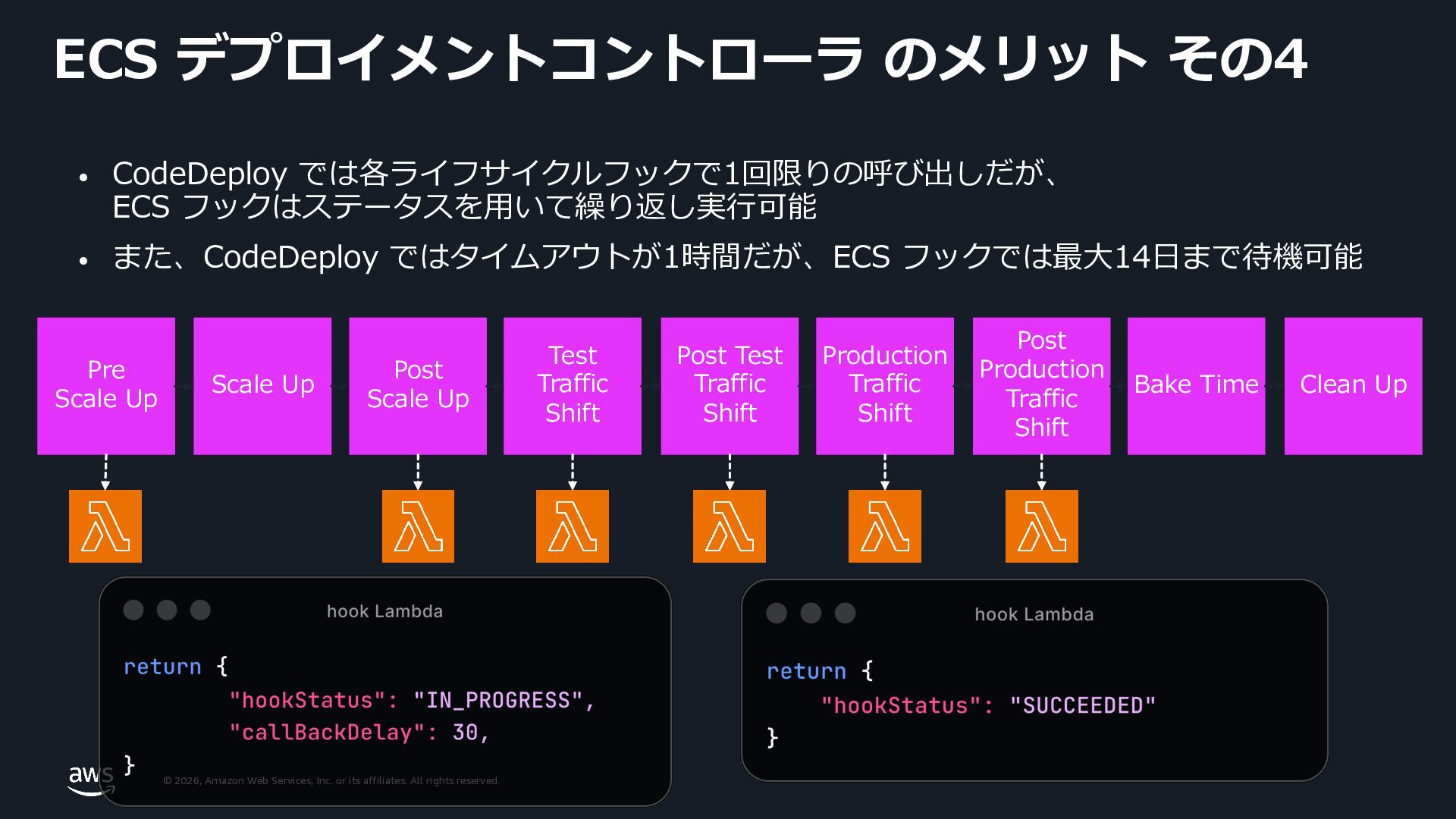
    rights reserved. ECS デプロイメントコントローラ のメリット その4 Pre Scale Up Post Test Traffic Shift Post Production Traffic Shift Bake Time Clean Up Production Traffic Shift Scale Up Post Scale Up Test Traffic Shift • CodeDeploy では各ライフサイクルフックで1回限りの呼び出しだが、 ECS フックはステータスを⽤いて繰り返し実⾏可能 • また、CodeDeploy ではタイムアウトが1時間だが、ECS フックでは最⼤14⽇まで待機可能
  16. © 2026, Amazon Web Services, Inc. or its affiliates. All

    rights reserved. © 2026, Amazon Web Services, Inc. or its affiliates. All rights reserved. CodeDeploy から ECS デプロイメント コントローラへの移⾏⽅法
  17. © 2026, Amazon Web Services, Inc. or its affiliates. All

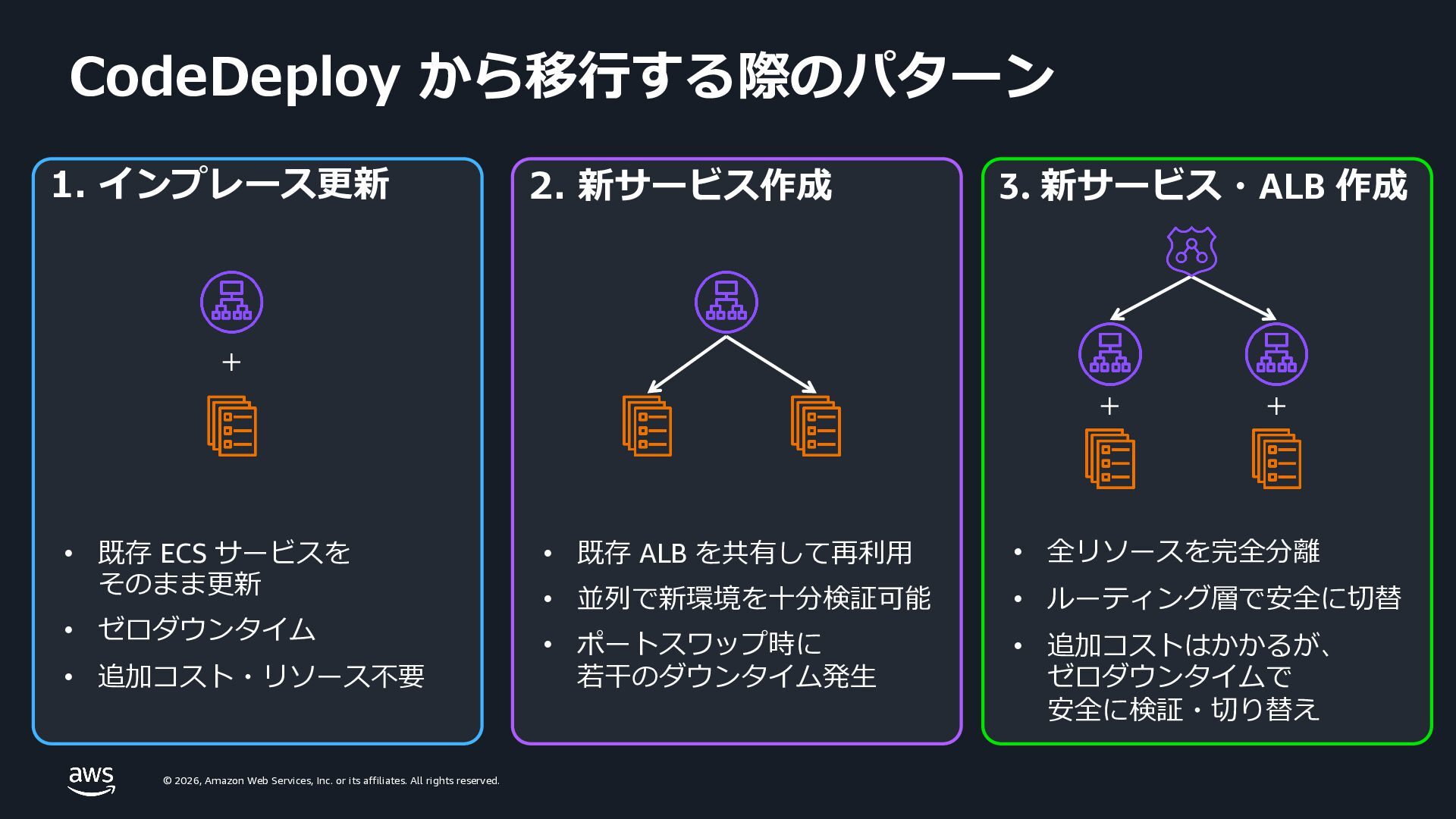
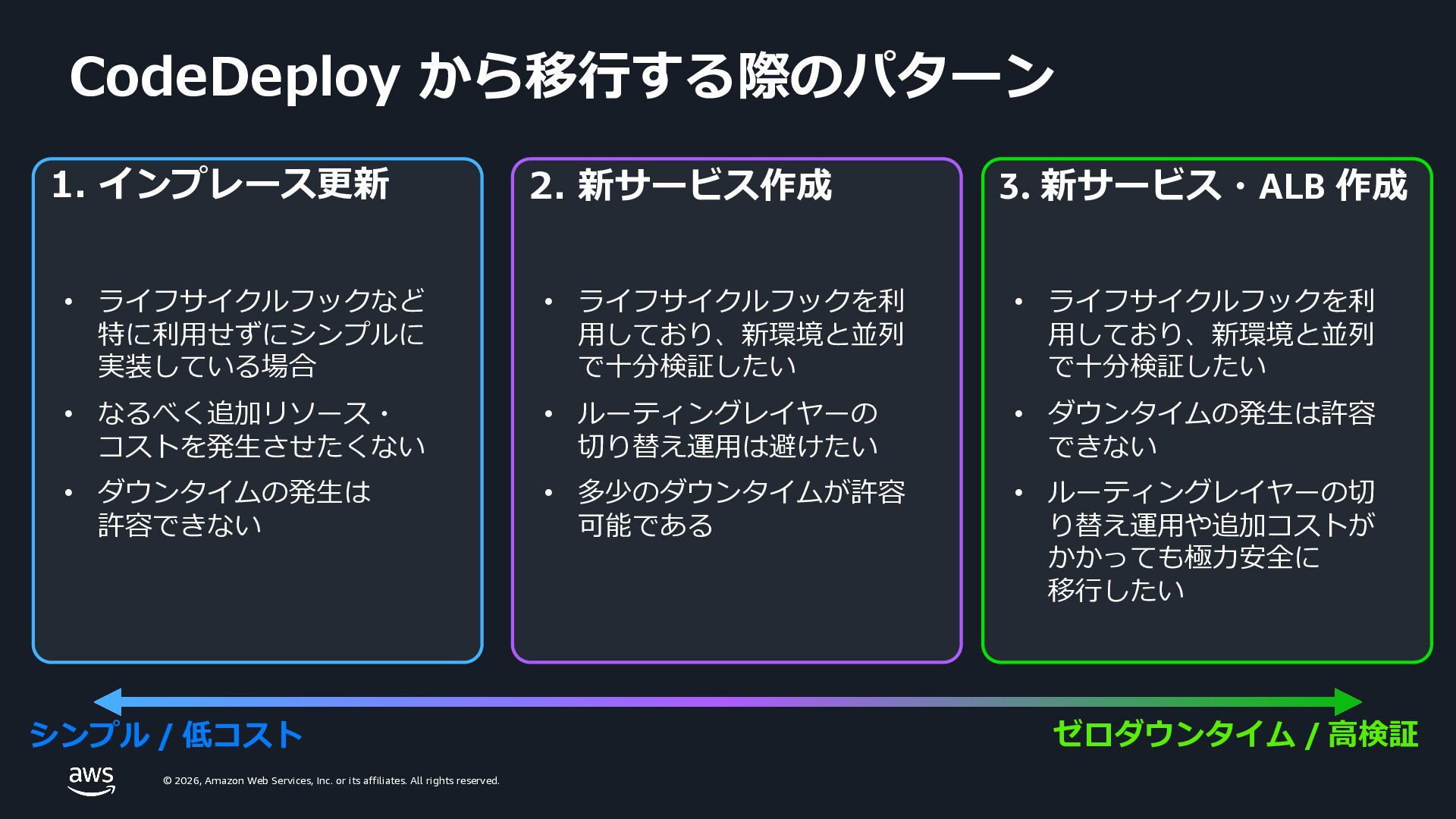
    rights reserved. CodeDeploy から移⾏する際のパターン 1. インプレース更新 • 既存 ECS サービスを そのまま更新 • ゼロダウンタイム • 追加コスト・リソース不要 2. 新サービス作成 • 既存 ALB を共有して再利⽤ • 並列で新環境を⼗分検証可能 • ポートスワップ時に 若⼲のダウンタイム発⽣ 3. 新サービス・ALB 作成 • 全リソースを完全分離 • ルーティング層で安全に切替 • 追加コストはかかるが、 ゼロダウンタイムで 安全に検証・切り替え + + +
  18. © 2026, Amazon Web Services, Inc. or its affiliates. All

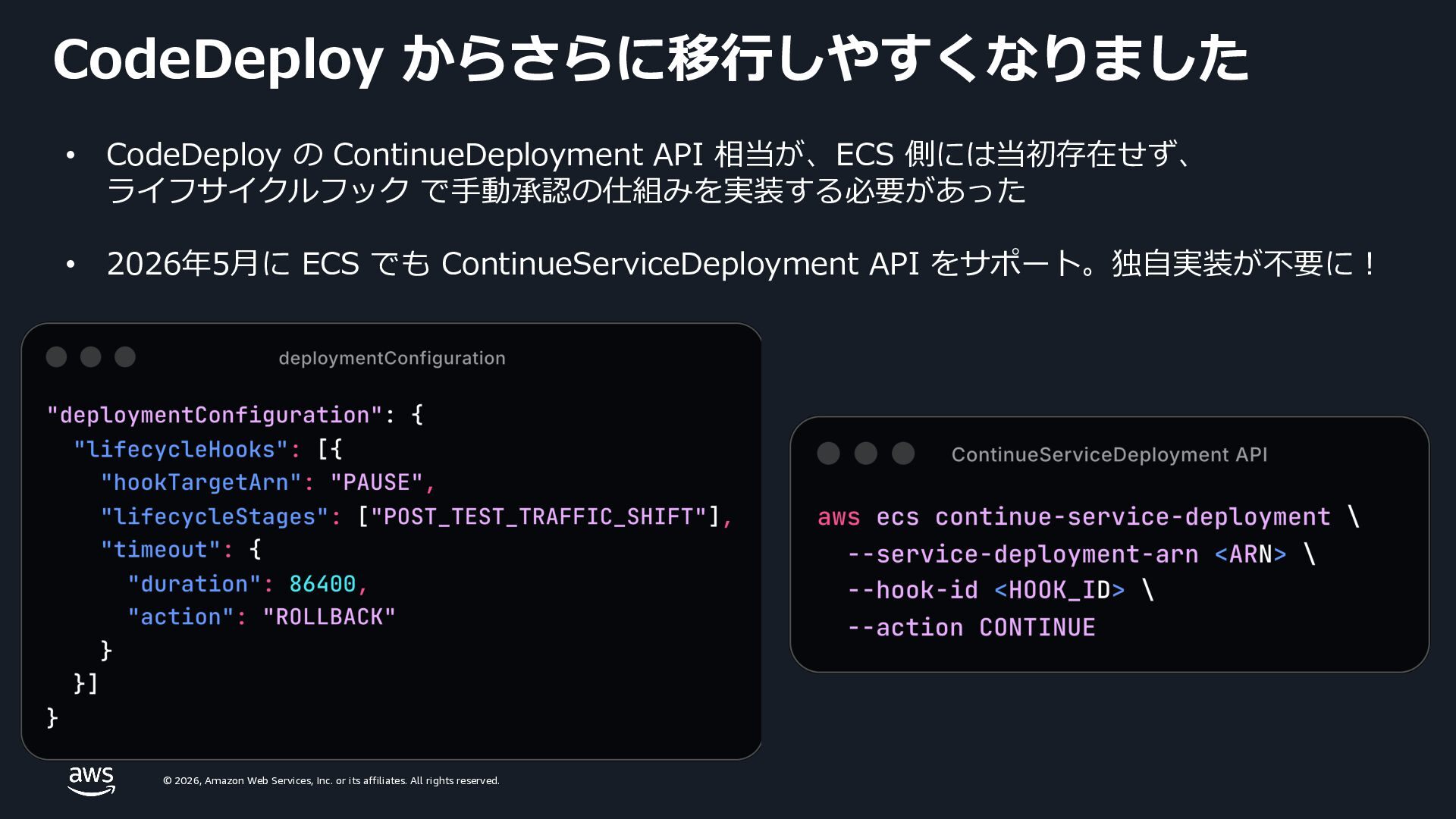
    rights reserved. CodeDeploy からさらに移⾏しやすくなりました • CodeDeploy の ContinueDeployment API 相当が、ECS 側には当初存在せず、 ライフサイクルフック で⼿動承認の仕組みを実装する必要があった • 2026年5⽉に ECS でも ContinueServiceDeployment API をサポート。独⾃実装が不要に︕
  19. © 2026, Amazon Web Services, Inc. or its affiliates. All

    rights reserved. © 2026, Amazon Web Services, Inc. or its affiliates. All rights reserved. デプロイ・スケーリング⾼速化の⼿法
  20. © 2026, Amazon Web Services, Inc. or its affiliates. All

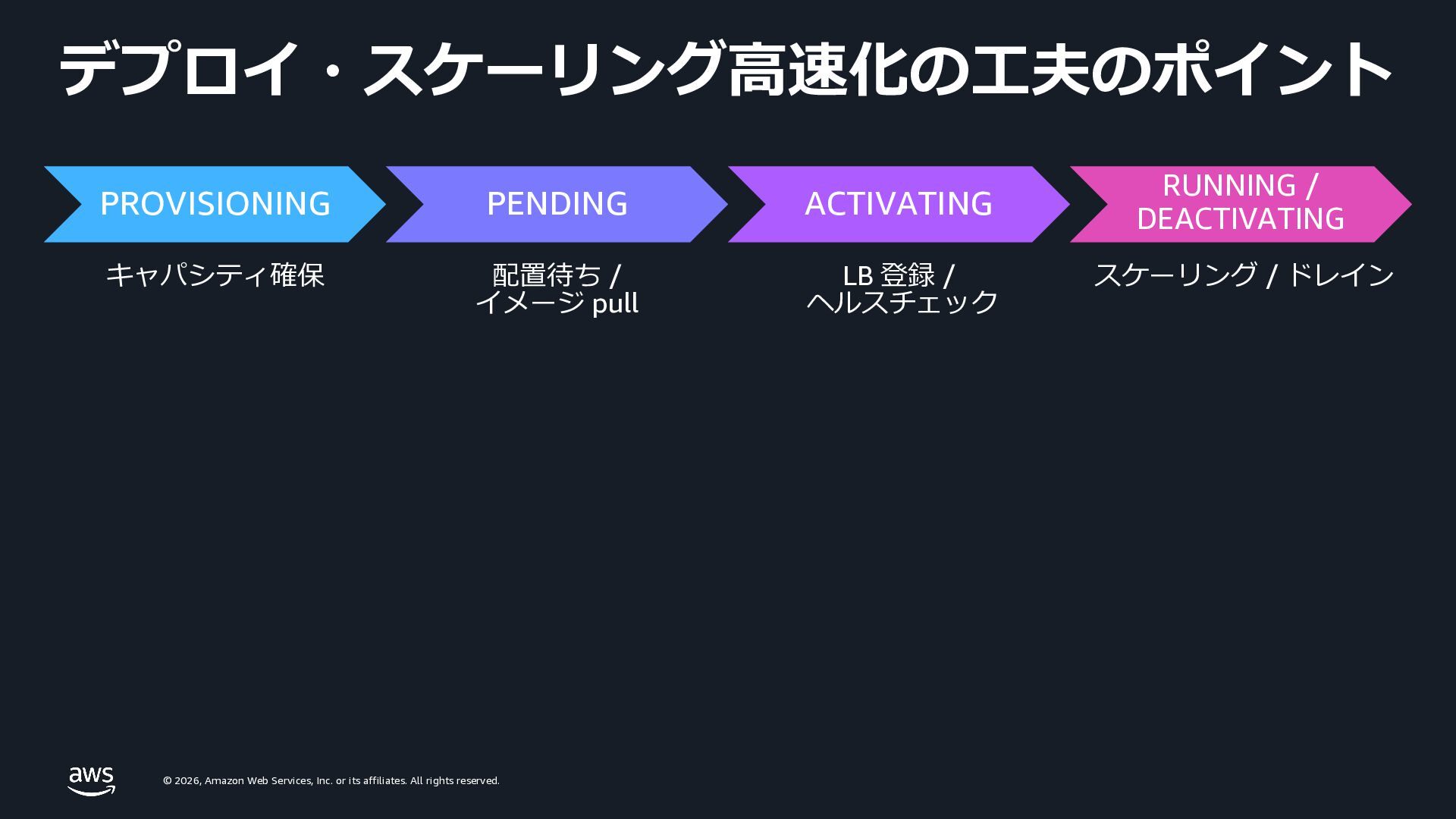
    rights reserved. デプロイ・スケーリング⾼速化の⼯夫のポイント PROVISIONING PENDING ACTIVATING RUNNING / DEACTIVATING キャパシティ確保 配置待ち / イメージ pull LB 登録 / ヘルスチェック スケーリング / ドレイン
  21. © 2026, Amazon Web Services, Inc. or its affiliates. All

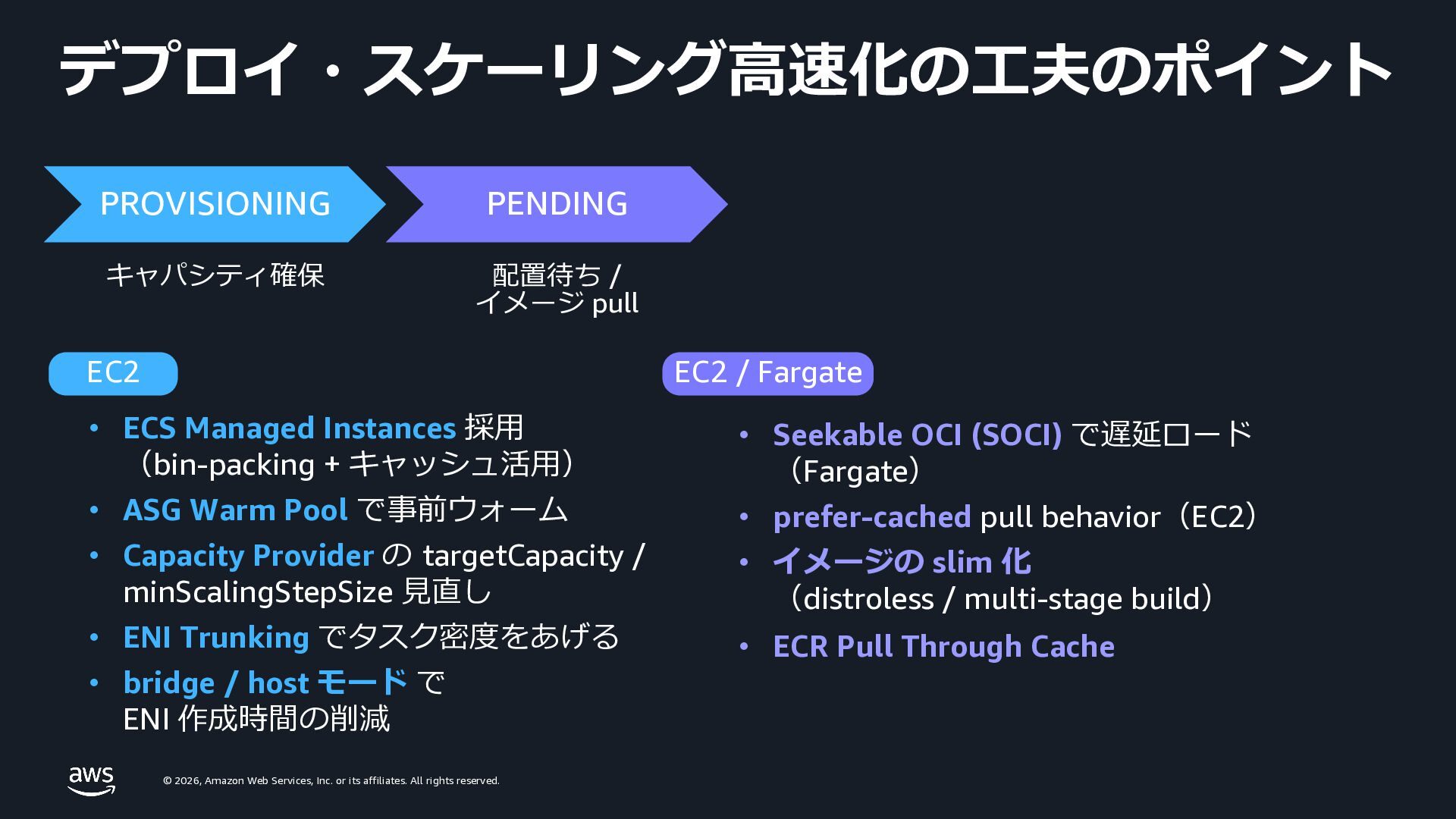
    rights reserved. デプロイ・スケーリング⾼速化の⼯夫のポイント EC2 • ECS Managed Instances 採⽤ (bin-packing + キャッシュ活⽤) • ASG Warm Pool で事前ウォーム • Capacity Provider の targetCapacity / minScalingStepSize ⾒直し • ENI Trunking でタスク密度をあげる • bridge / host モード で ENI 作成時間の削減 EC2 / Fargate • Seekable OCI (SOCI) で遅延ロード (Fargate) • prefer-cached pull behavior(EC2) • イメージの slim 化 (distroless / multi-stage build) • ECR Pull Through Cache PROVISIONING PENDING キャパシティ確保 配置待ち / イメージ pull
  22. © 2026, Amazon Web Services, Inc. or its affiliates. All

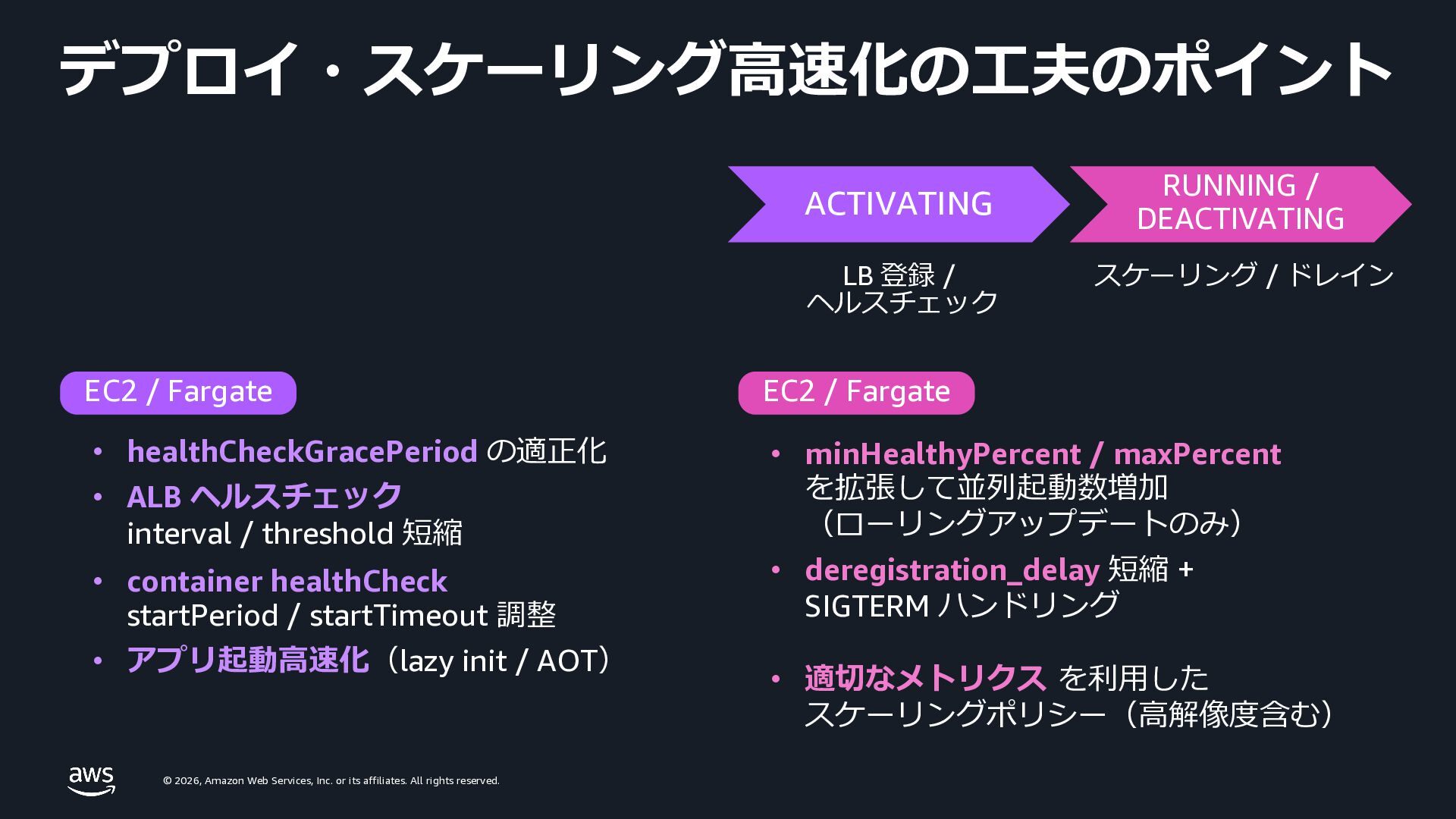
    rights reserved. デプロイ・スケーリング⾼速化の⼯夫のポイント EC2 / Fargate • healthCheckGracePeriod の適正化 • ALB ヘルスチェック interval / threshold 短縮 • container healthCheck startPeriod / startTimeout 調整 • アプリ起動⾼速化(lazy init / AOT) EC2 / Fargate • minHealthyPercent / maxPercent を拡張して並列起動数増加 (ローリングアップデートのみ) • deregistration_delay 短縮 + SIGTERM ハンドリング • 適切なメトリクス を利⽤した スケーリングポリシー(⾼解像度含む) ACTIVATING RUNNING / DEACTIVATING LB 登録 / ヘルスチェック スケーリング / ドレイン
  23. © 2026, Amazon Web Services, Inc. or its affiliates. All

    rights reserved. © 2026, Amazon Web Services, Inc. or its affiliates. All rights reserved. Seekable OCI (SOCI) v2 の ご紹介
  24. © 2026, Amazon Web Services, Inc. or its affiliates. All

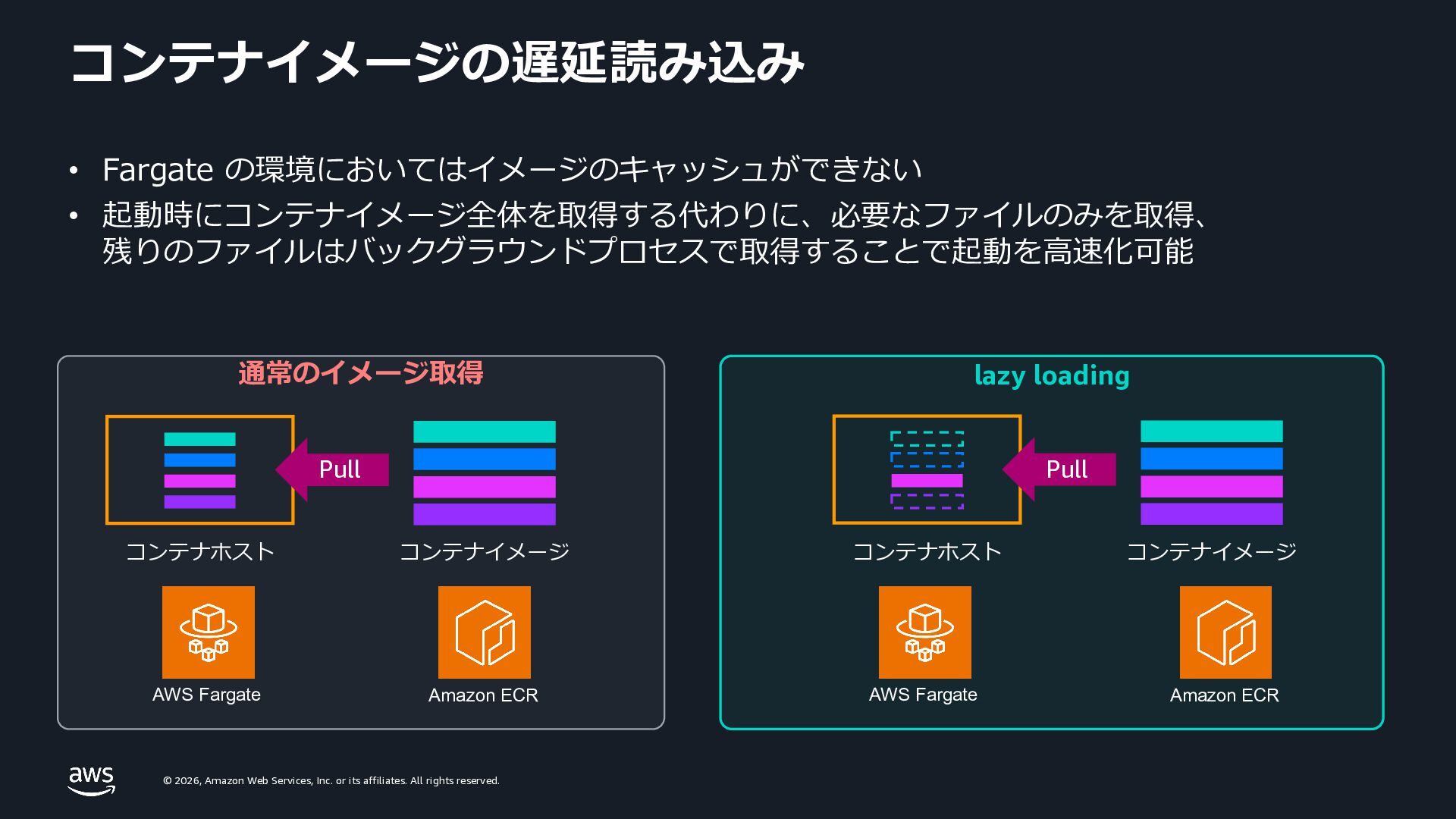
    rights reserved. コンテナイメージの遅延読み込み • Fargate の環境においてはイメージのキャッシュができない • 起動時にコンテナイメージ全体を取得する代わりに、必要なファイルのみを取得、 残りのファイルはバックグラウンドプロセスで取得することで起動を⾼速化可能 通常のイメージ取得 lazy loading コンテナホスト Pull コンテナイメージ コンテナホスト Pull コンテナイメージ Amazon ECR AWS Fargate Amazon ECR AWS Fargate
  25. © 2026, Amazon Web Services, Inc. or its affiliates. All

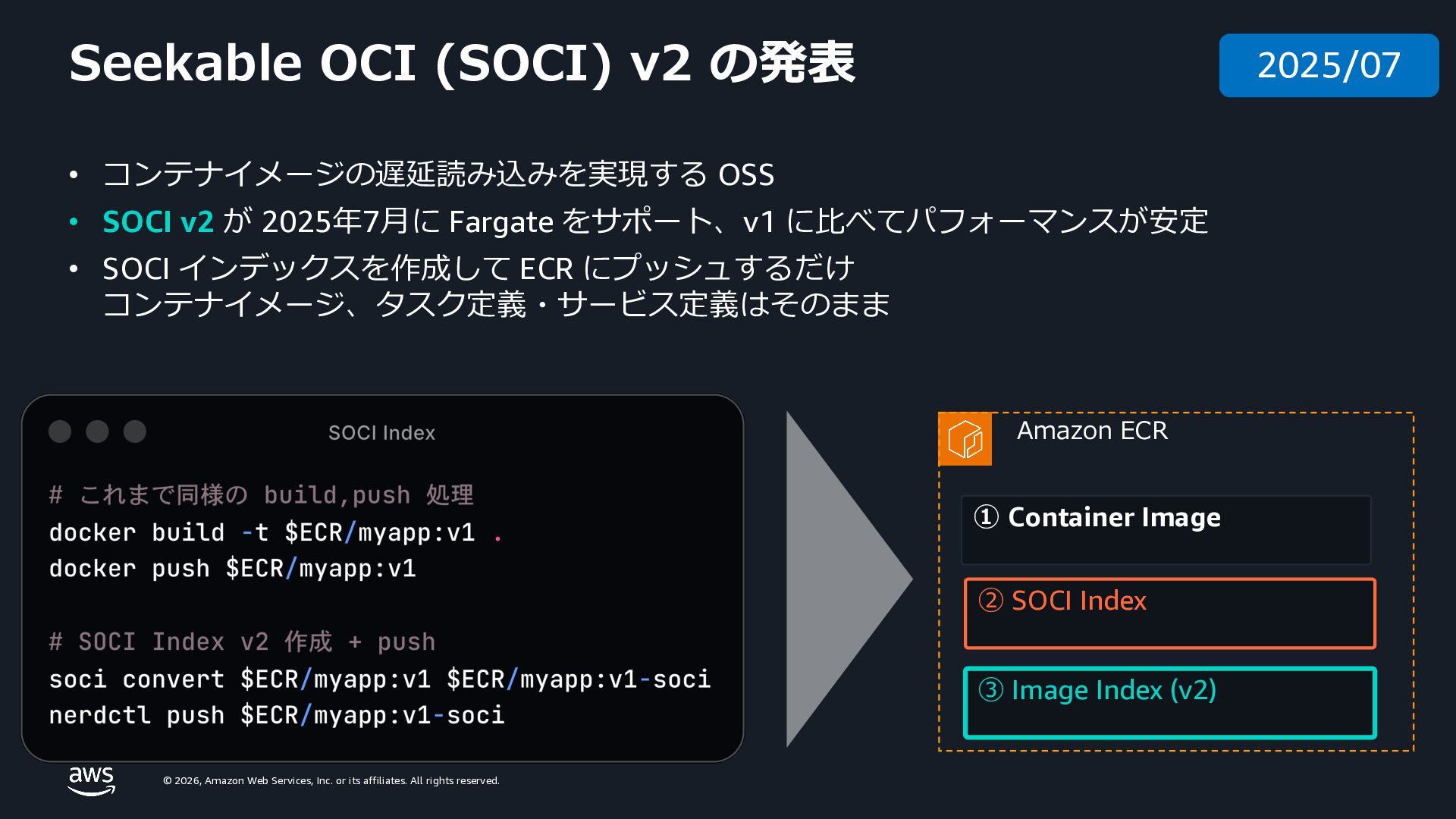
    rights reserved. ① Container Image ② SOCI Index ③ Image Index (v2) Amazon ECR • コンテナイメージの遅延読み込みを実現する OSS • SOCI v2 が 2025年7⽉に Fargate をサポート、v1 に⽐べてパフォーマンスが安定 • SOCI インデックスを作成して ECR にプッシュするだけ コンテナイメージ、タスク定義・サービス定義はそのまま Seekable OCI (SOCI) v2 の発表 2025/07
  26. © 2026, Amazon Web Services, Inc. or its affiliates. All

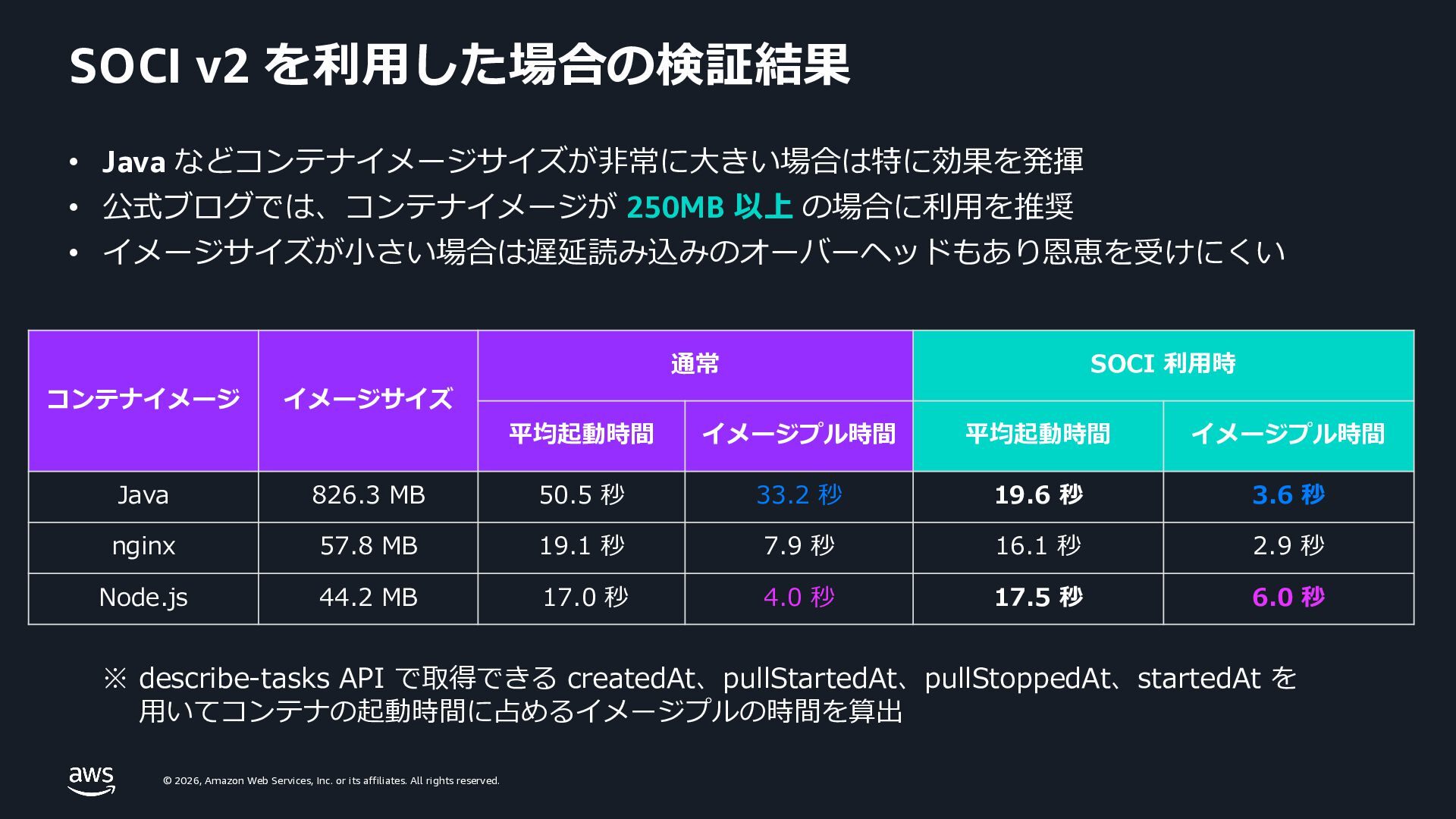
    rights reserved. SOCI v2 を利⽤した場合の検証結果 • Java などコンテナイメージサイズが⾮常に⼤きい場合は特に効果を発揮 • 公式ブログでは、コンテナイメージが 250MB 以上 の場合に利⽤を推奨 • イメージサイズが⼩さい場合は遅延読み込みのオーバーヘッドもあり恩恵を受けにくい コンテナイメージ イメージサイズ 通常 SOCI 利⽤時 平均起動時間 イメージプル時間 平均起動時間 イメージプル時間 Java 826.3 MB 50.5 秒 33.2 秒 19.6 秒 3.6 秒 nginx 57.8 MB 19.1 秒 7.9 秒 16.1 秒 2.9 秒 Node.js 44.2 MB 17.0 秒 4.0 秒 17.5 秒 6.0 秒 ※ describe-tasks API で取得できる createdAt、pullStartedAt、pullStoppedAt、startedAt を ⽤いてコンテナの起動時間に占めるイメージプルの時間を算出
  27. © 2026, Amazon Web Services, Inc. or its affiliates. All

    rights reserved. © 2026, Amazon Web Services, Inc. or its affiliates. All rights reserved. ⾼解像度メトリクスを⽤いた スケーリング
  28. © 2026, Amazon Web Services, Inc. or its affiliates. All

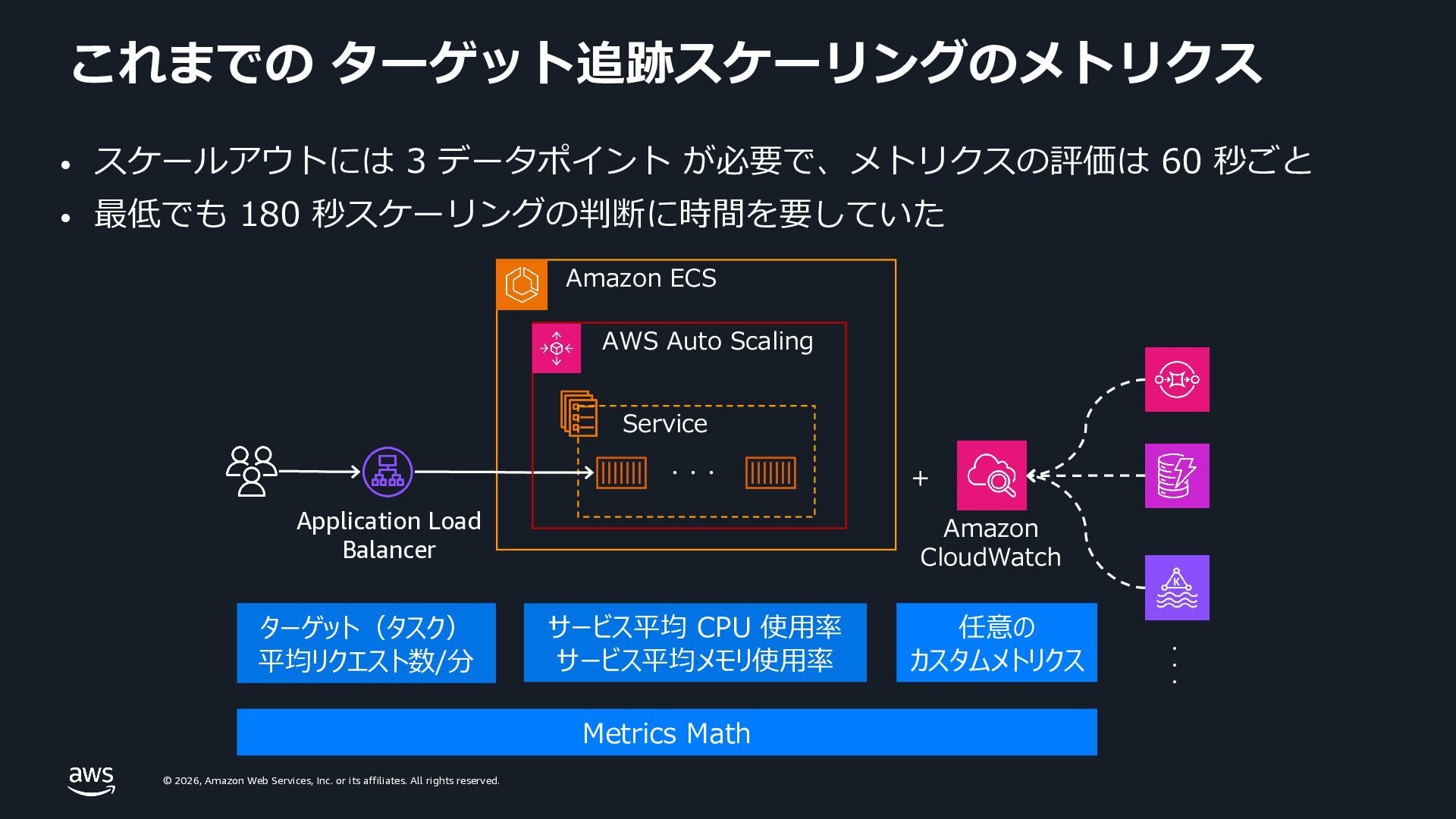
    rights reserved. これまでの ターゲット追跡スケーリングのメトリクス Application Load Balancer Amazon ECS Service ・・・ + ターゲット(タスク) 平均リクエスト数/分 サービス平均 CPU 使⽤率 サービス平均メモリ使⽤率 任意の カスタムメトリクス Metrics Math ・・・ Amazon CloudWatch AWS Auto Scaling • スケールアウトには 3 データポイント が必要で、メトリクスの評価は 60 秒ごと • 最低でも 180 秒スケーリングの判断に時間を要していた
  29. © 2026, Amazon Web Services, Inc. or its affiliates. All

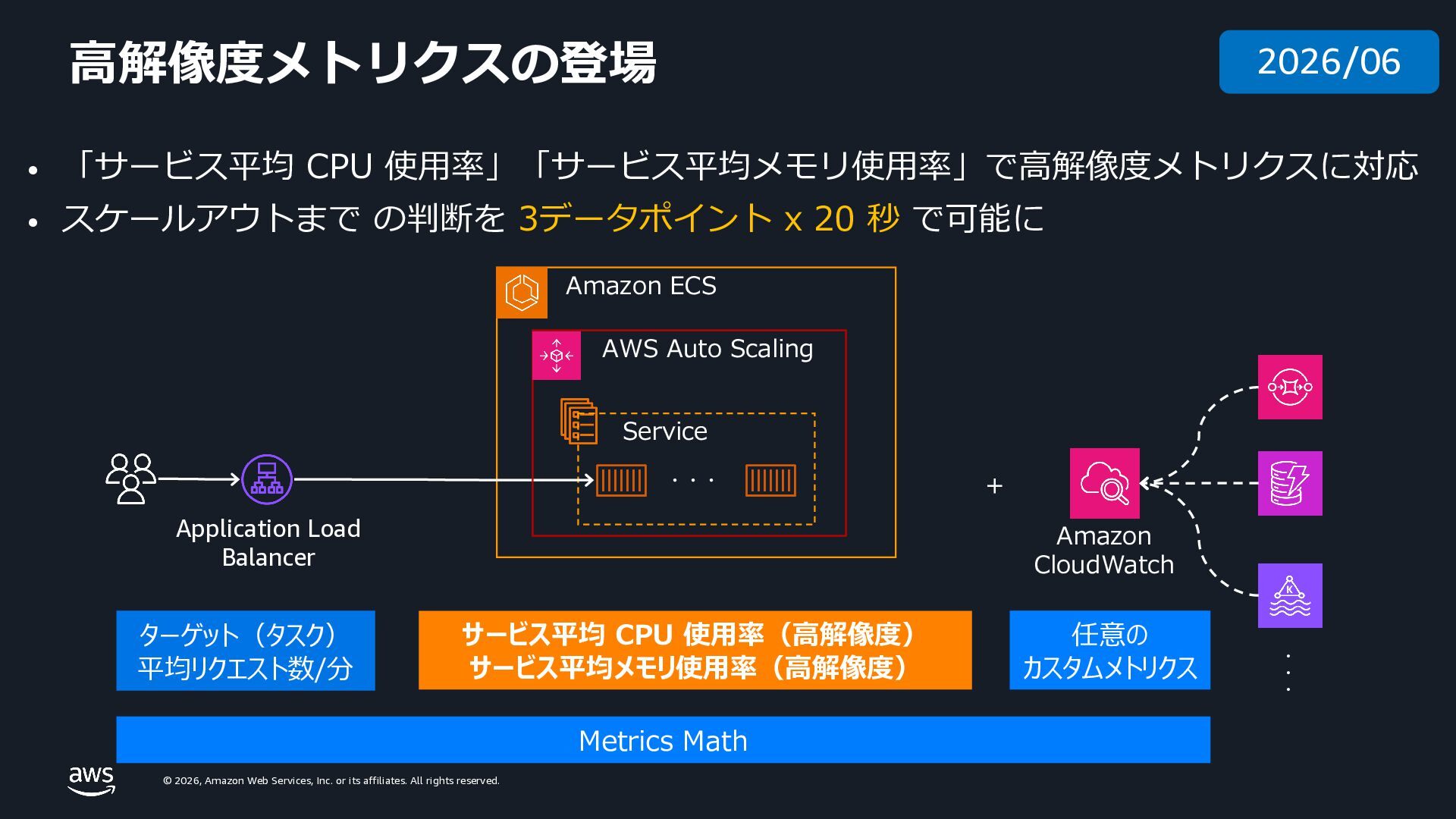
    rights reserved. ⾼解像度メトリクスの登場 Application Load Balancer Amazon ECS Service ・・・ + ターゲット(タスク) 平均リクエスト数/分 サービス平均 CPU 使⽤率(⾼解像度) サービス平均メモリ使⽤率(⾼解像度) 任意の カスタムメトリクス Metrics Math ・・・ Amazon CloudWatch AWS Auto Scaling • 「サービス平均 CPU 使⽤率」「サービス平均メモリ使⽤率」で⾼解像度メトリクスに対応 • スケールアウトまで の判断を 3データポイント x 20 秒 で可能に 2026/06
  30. © 2026, Amazon Web Services, Inc. or its affiliates. All

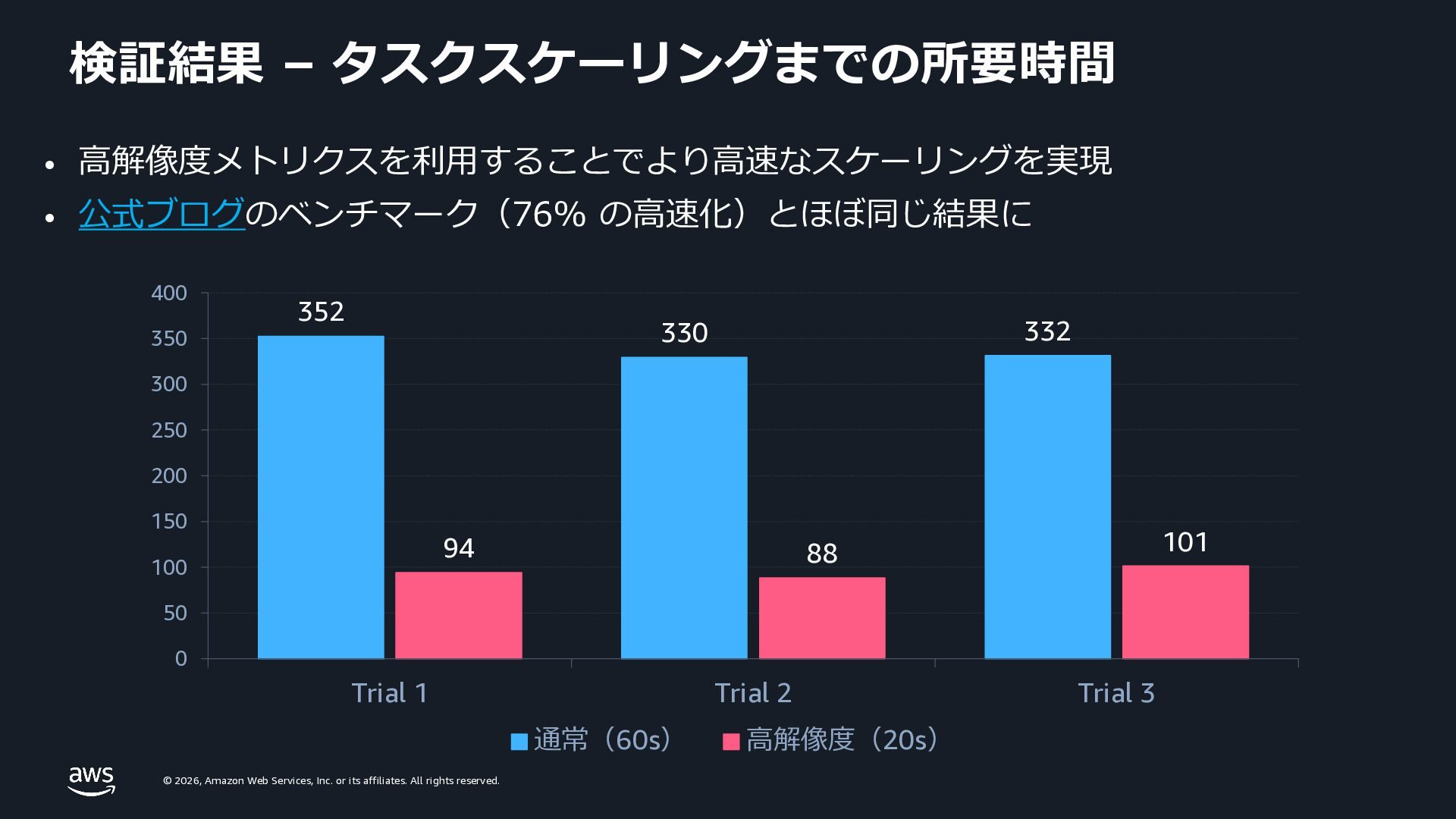
    rights reserved. 検証結果 – タスクスケーリングまでの所要時間 • ⾼解像度メトリクスを利⽤することでより⾼速なスケーリングを実現 • 公式ブログのベンチマーク(76% の⾼速化)とほぼ同じ結果に 352 330 332 94 88 101 0 50 100 150 200 250 300 350 400 Trial 1 Trial 2 Trial 3 通常(60s) ⾼解像度(20s)
  31. © 2026, Amazon Web Services, Inc. or its affiliates. All

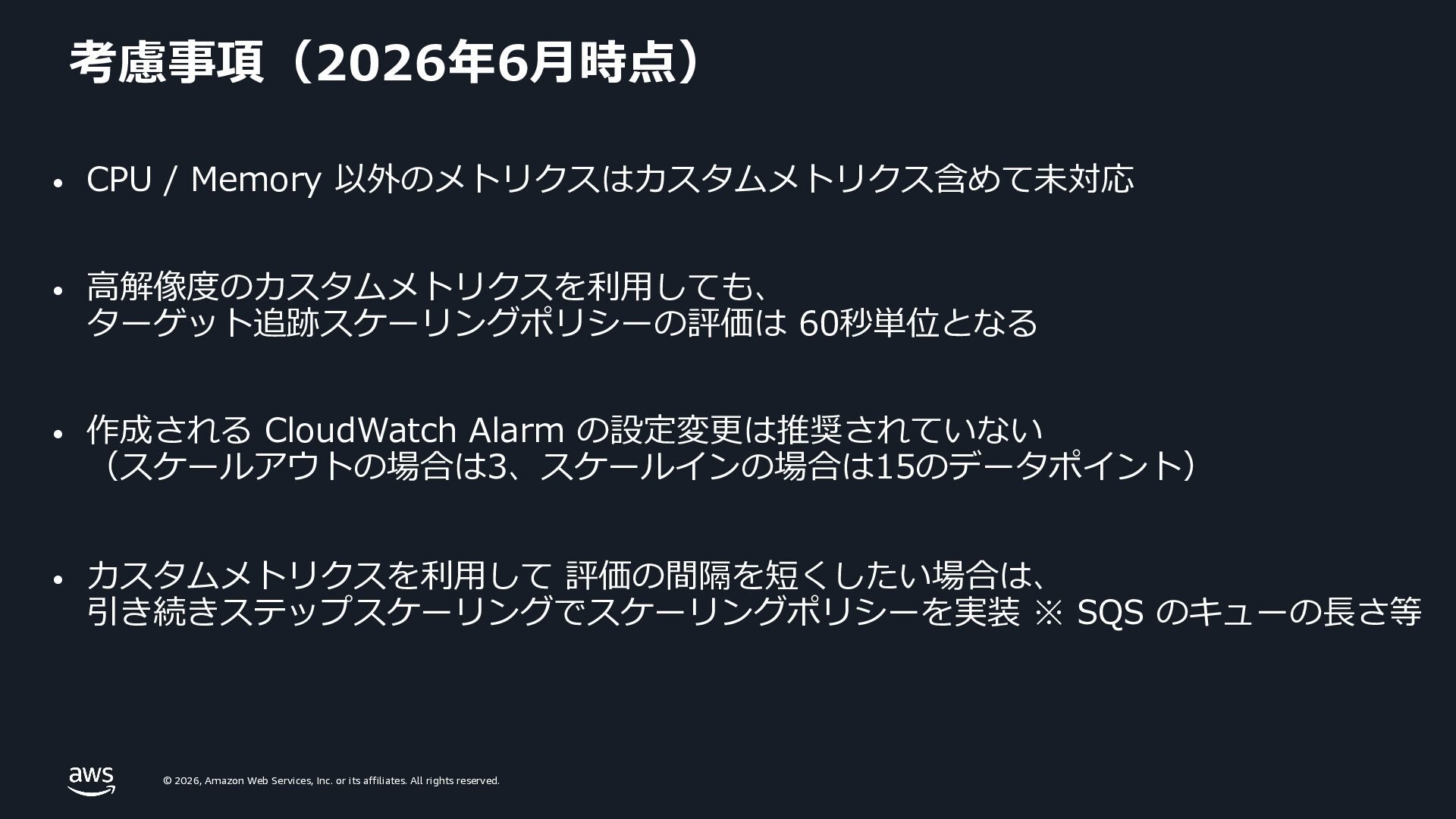
    rights reserved. 考慮事項(2026年6⽉時点) • CPU / Memory 以外のメトリクスはカスタムメトリクス含めて未対応 • ⾼解像度のカスタムメトリクスを利⽤しても、 ターゲット追跡スケーリングポリシーの評価は 60秒単位となる • 作成される CloudWatch Alarm の設定変更は推奨されていない (スケールアウトの場合は3、スケールインの場合は15のデータポイント) • カスタムメトリクスを利⽤して 評価の間隔を短くしたい場合は、 引き続きステップスケーリングでスケーリングポリシーを実装 ※ SQS のキューの⻑さ等
  32. © 2026, Amazon Web Services, Inc. or its affiliates. All

    rights reserved. © 2026, Amazon Web Services, Inc. or its affiliates. All rights reserved. まとめ
  33. © 2026, Amazon Web Services, Inc. or its affiliates. All

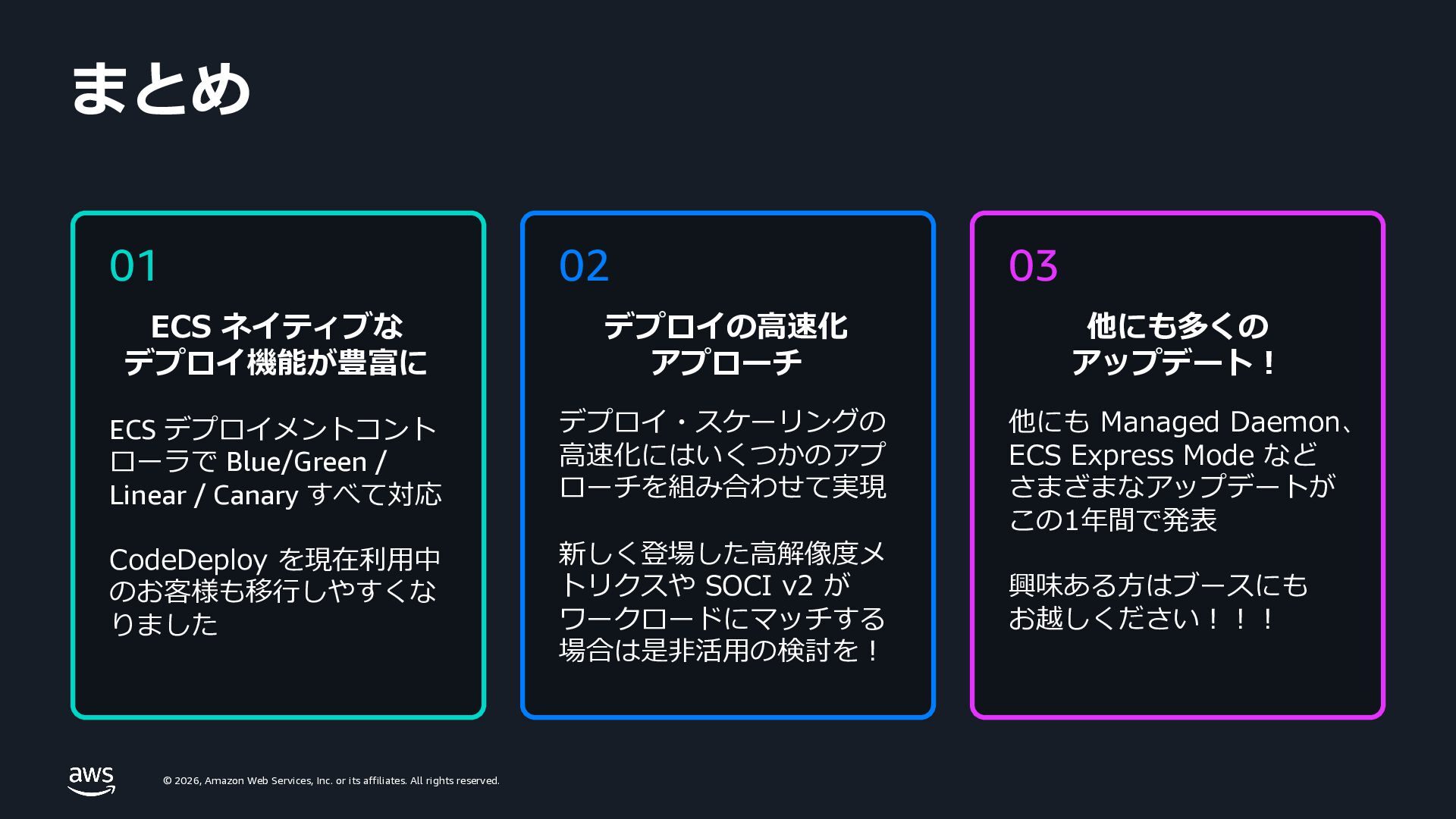
    rights reserved. まとめ 01 ECS ネイティブな デプロイ機能が豊富に ECS デプロイメントコント ローラで Blue/Green / Linear / Canary すべて対応 CodeDeploy を現在利⽤中 のお客様も移⾏しやすくな りました 02 デプロイの⾼速化 アプローチ デプロイ・スケーリングの ⾼速化にはいくつかのアプ ローチを組み合わせて実現 新しく登場した⾼解像度メ トリクスや SOCI v2 が ワークロードにマッチする 場合は是⾮活⽤の検討を︕ 03 他にも多くの アップデート︕ 他にも Managed Daemon、 ECS Express Mode など さまざまなアップデートが この1年間で発表 興味ある⽅はブースにも お越しください︕︕︕
  34. © 2026, Amazon Web Services, Inc. or its affiliates. All

    rights reserved. © 2026, Amazon Web Services, Inc. or its affiliates. All rights reserved. Thank you
  35. © 2026, Amazon Web Services, Inc. or its affiliates. All

    rights reserved. © 2026, Amazon Web Services, Inc. or its affiliates. All rights reserved. Appendix
  36. © 2026, Amazon Web Services, Inc. or its affiliates. All

    rights reserved. © 2026, Amazon Web Services, Inc. or its affiliates. All rights reserved. デプロイ戦略
  37. © 2026, Amazon Web Services, Inc. or its affiliates. All

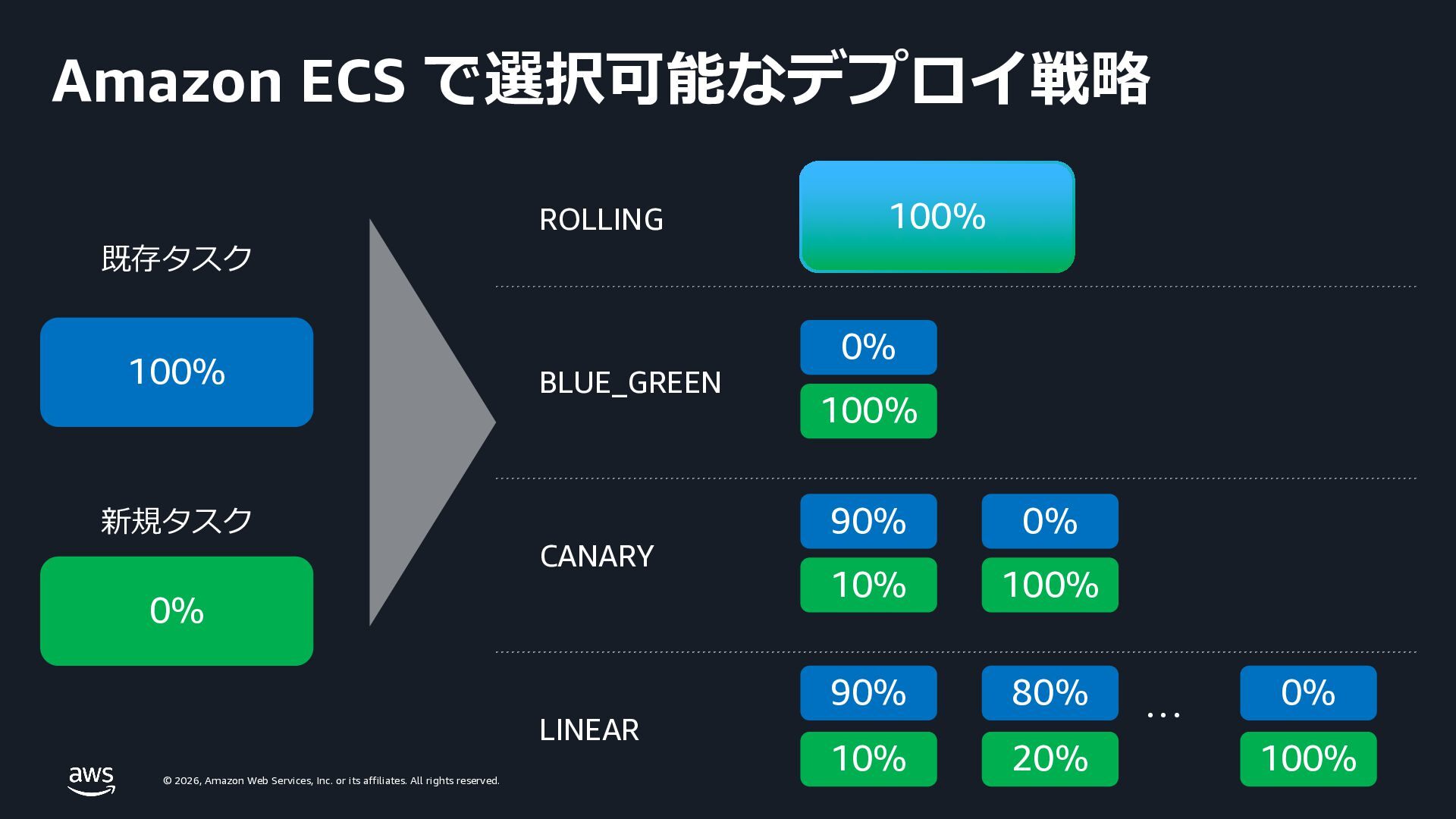
    rights reserved. Amazon ECS で選択可能なデプロイ戦略 100% 0% 0% 100% 90% 10% 90% 10% 0% 100% 80% 20% 0% 100% CANARY LINEAR . . . BLUE_GREEN 100% ROLLING 既存タスク 新規タスク
  38. © 2026, Amazon Web Services, Inc. or its affiliates. All

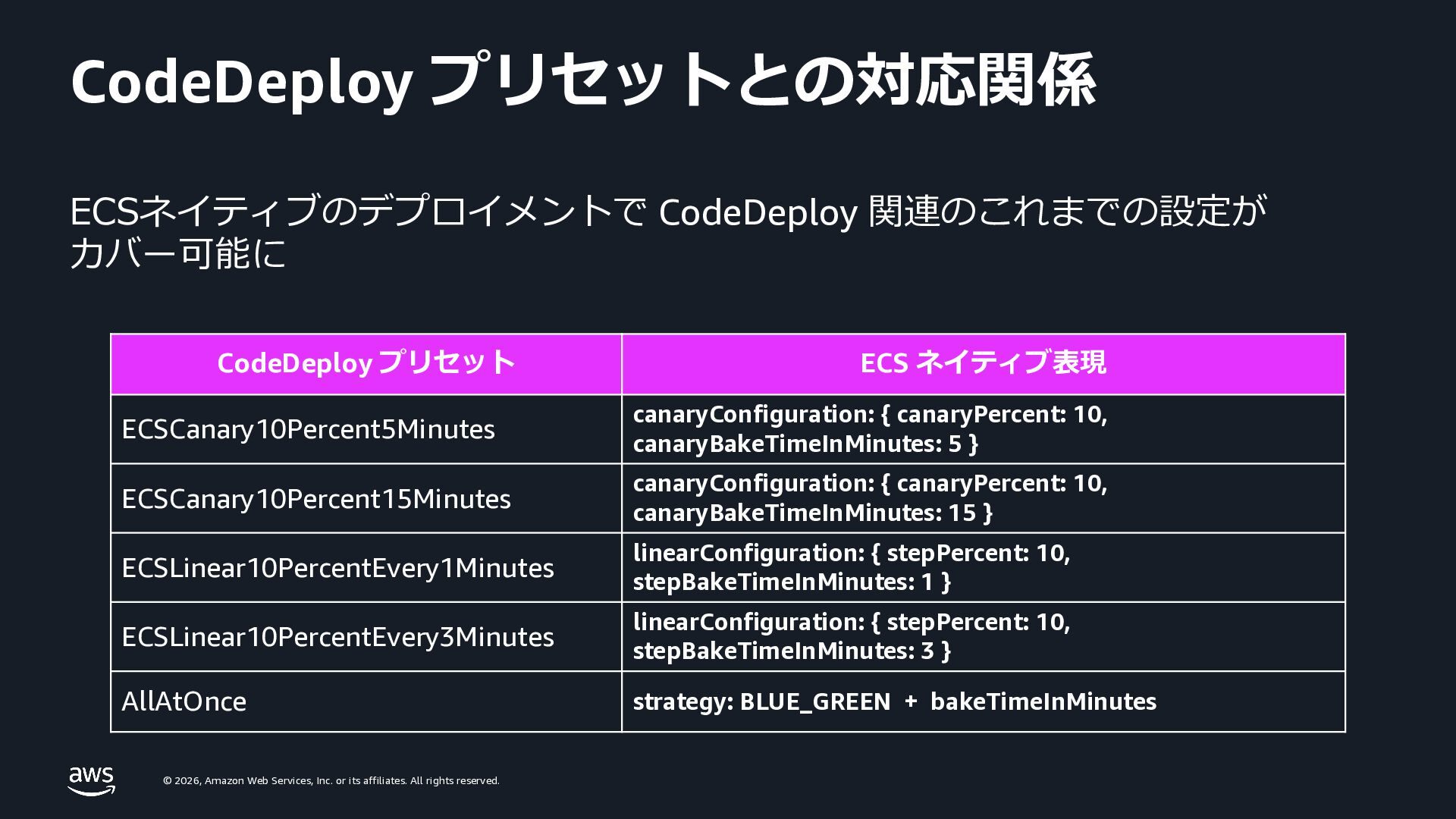
    rights reserved. CodeDeploy プリセットとの対応関係 CodeDeploy プリセット ECS ネイティブ表現 ECSCanary10Percent5Minutes canaryConfiguration: { canaryPercent: 10, canaryBakeTimeInMinutes: 5 } ECSCanary10Percent15Minutes canaryConfiguration: { canaryPercent: 10, canaryBakeTimeInMinutes: 15 } ECSLinear10PercentEvery1Minutes linearConfiguration: { stepPercent: 10, stepBakeTimeInMinutes: 1 } ECSLinear10PercentEvery3Minutes linearConfiguration: { stepPercent: 10, stepBakeTimeInMinutes: 3 } AllAtOnce strategy: BLUE_GREEN + bakeTimeInMinutes ECSネイティブのデプロイメントで CodeDeploy 関連のこれまでの設定が カバー可能に
  39. © 2026, Amazon Web Services, Inc. or its affiliates. All

    rights reserved. CodeDeploy から移⾏する際のパターン 1. インプレース更新 2. 新サービス作成 3. 新サービス・ALB 作成 • ライフサイクルフックなど 特に利⽤せずにシンプルに 実装している場合 • なるべく追加リソース・ コストを発⽣させたくない • ダウンタイムの発⽣は 許容できない • ライフサイクルフックを利 ⽤しており、新環境と並列 で⼗分検証したい • ルーティングレイヤーの 切り替え運⽤は避けたい • 多少のダウンタイムが許容 可能である シンプル / 低コスト ゼロダウンタイム / ⾼検証 • ライフサイクルフックを利 ⽤しており、新環境と並列 で⼗分検証したい • ダウンタイムの発⽣は許容 できない • ルーティングレイヤーの切 り替え運⽤や追加コストが かかっても極⼒安全に 移⾏したい
  40. © 2026, Amazon Web Services, Inc. or its affiliates. All

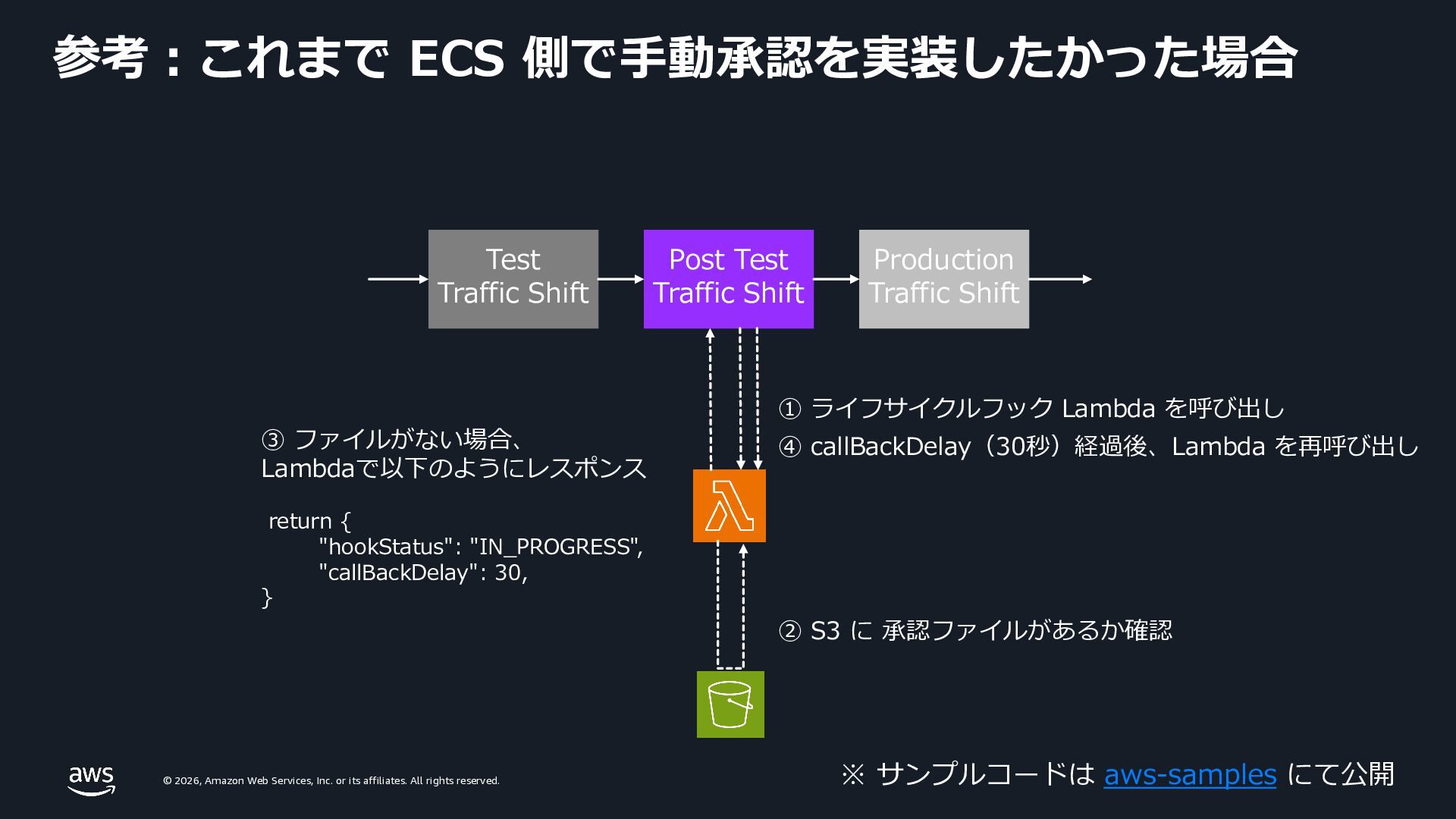
    rights reserved. 参考︓これまで ECS 側で⼿動承認を実装したかった場合 Post Test Traffic Shift Production Traffic Shift Test Traffic Shift ① ライフサイクルフック Lambda を呼び出し ② S3 に 承認ファイルがあるか確認 ③ ファイルがない場合、 Lambdaで以下のようにレスポンス return { "hookStatus": "IN_PROGRESS", "callBackDelay": 30, } ④ callBackDelay(30秒)経過後、Lambda を再呼び出し ※ サンプルコードは aws-samples にて公開
  41. © 2026, Amazon Web Services, Inc. or its affiliates. All

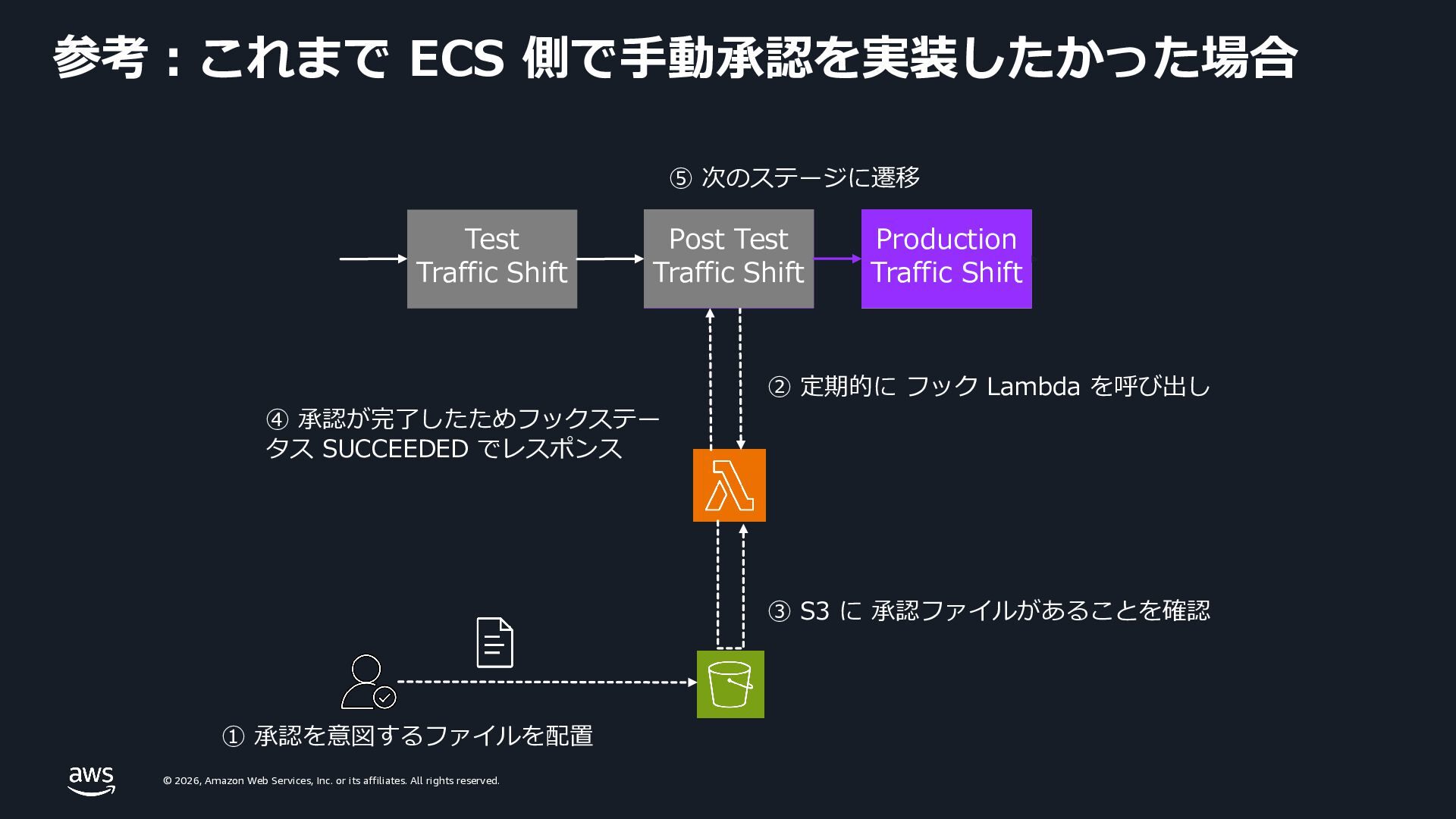
    rights reserved. Post Test Traffic Shift Production Traffic Shift Test Traffic Shift ③ S3 に 承認ファイルがあることを確認 ④ 承認が完了したためフックステー タス SUCCEEDED でレスポンス ② 定期的に フック Lambda を呼び出し ① 承認を意図するファイルを配置 Post Test Traffic Shift Production Traffic Shift ⑤ 次のステージに遷移 参考︓これまで ECS 側で⼿動承認を実装したかった場合
  42. © 2026, Amazon Web Services, Inc. or its affiliates. All

    rights reserved. © 2026, Amazon Web Services, Inc. or its affiliates. All rights reserved. デプロイの⾼速化 ローリングアップデート時の設定
  43. © 2026, Amazon Web Services, Inc. or its affiliates. All

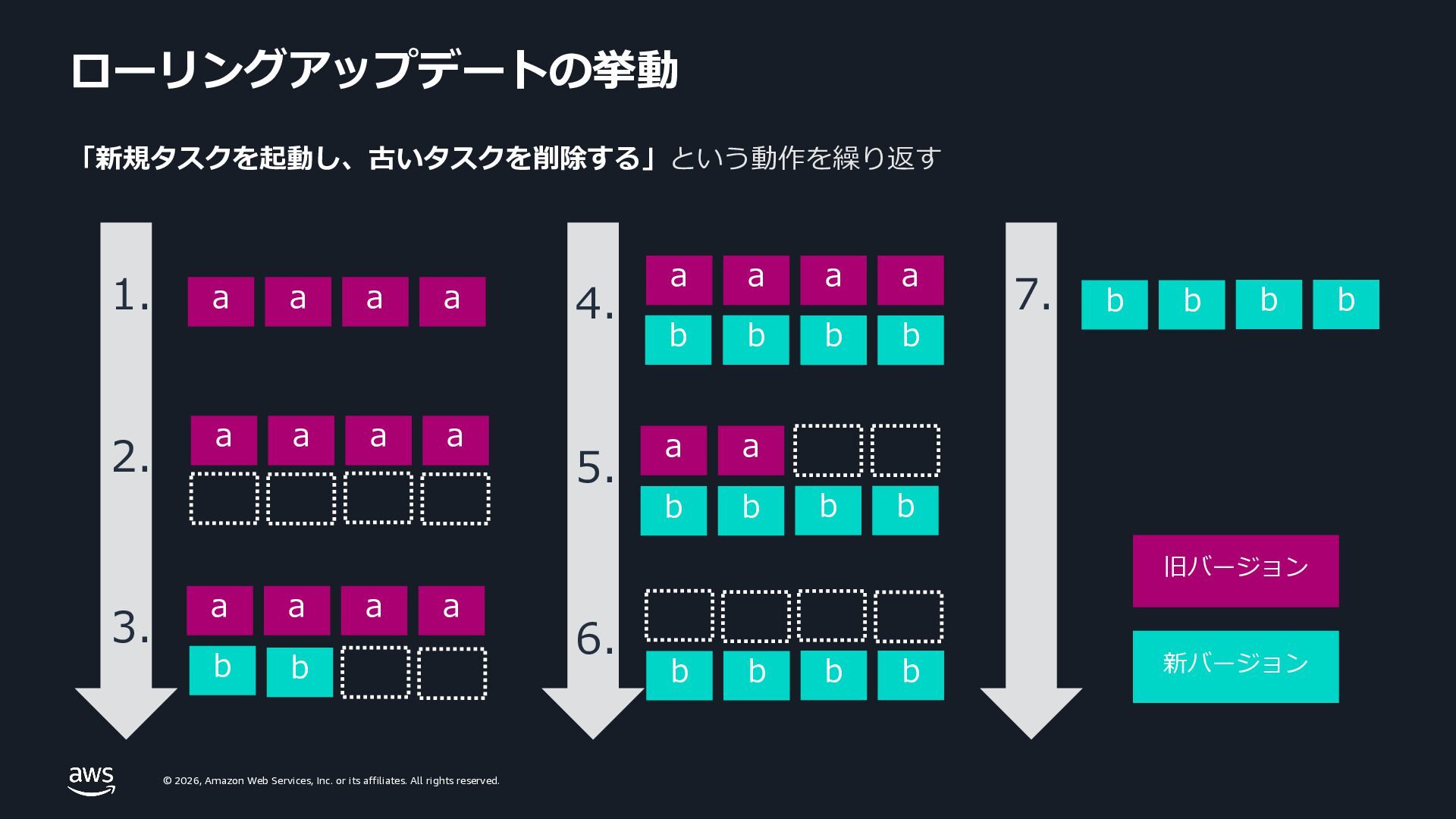
    rights reserved. ローリングアップデートの挙動 「新規タスクを起動し、古いタスクを削除する」という動作を繰り返す a a a a a a a a b b a a a a b b a a b b b b b b b b 1. 3. 4. 5. 6. 旧バージョン 新バージョン b b b b b b 7. a a a a 2.
  44. © 2026, Amazon Web Services, Inc. or its affiliates. All

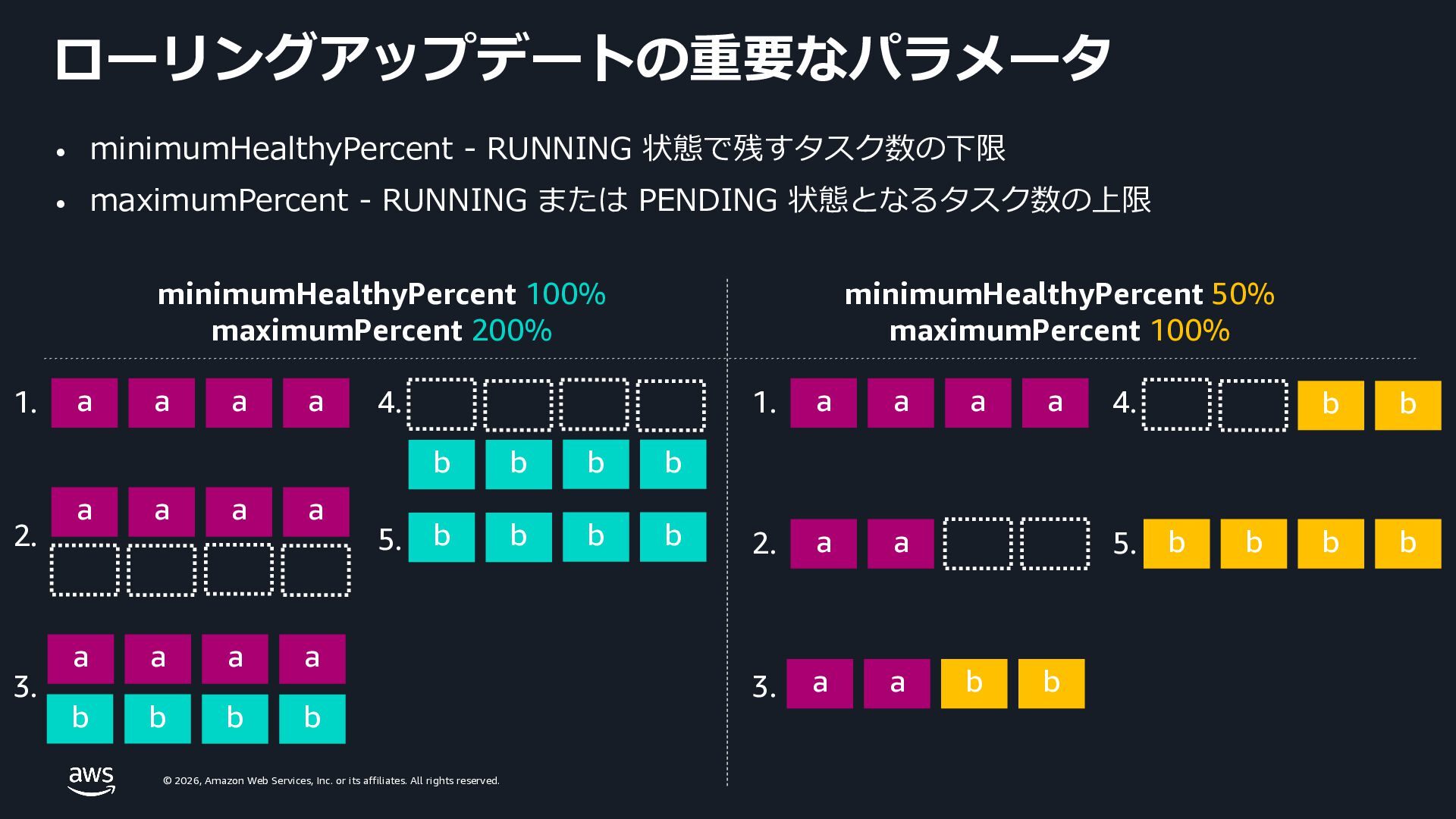
    rights reserved. ローリングアップデートの重要なパラメータ • minimumHealthyPercent - RUNNING 状態で残すタスク数の下限 • maximumPercent - RUNNING または PENDING 状態となるタスク数の上限 a a a a 1. a a a a 2. a a a a b b 3. b b b b b b 4. a a a a 1. a a 2. a a b b 3. b b 4. 5. b b b b b b b b 5. minimumHealthyPercent 100% maximumPercent 200% minimumHealthyPercent 50% maximumPercent 100%
  45. © 2026, Amazon Web Services, Inc. or its affiliates. All

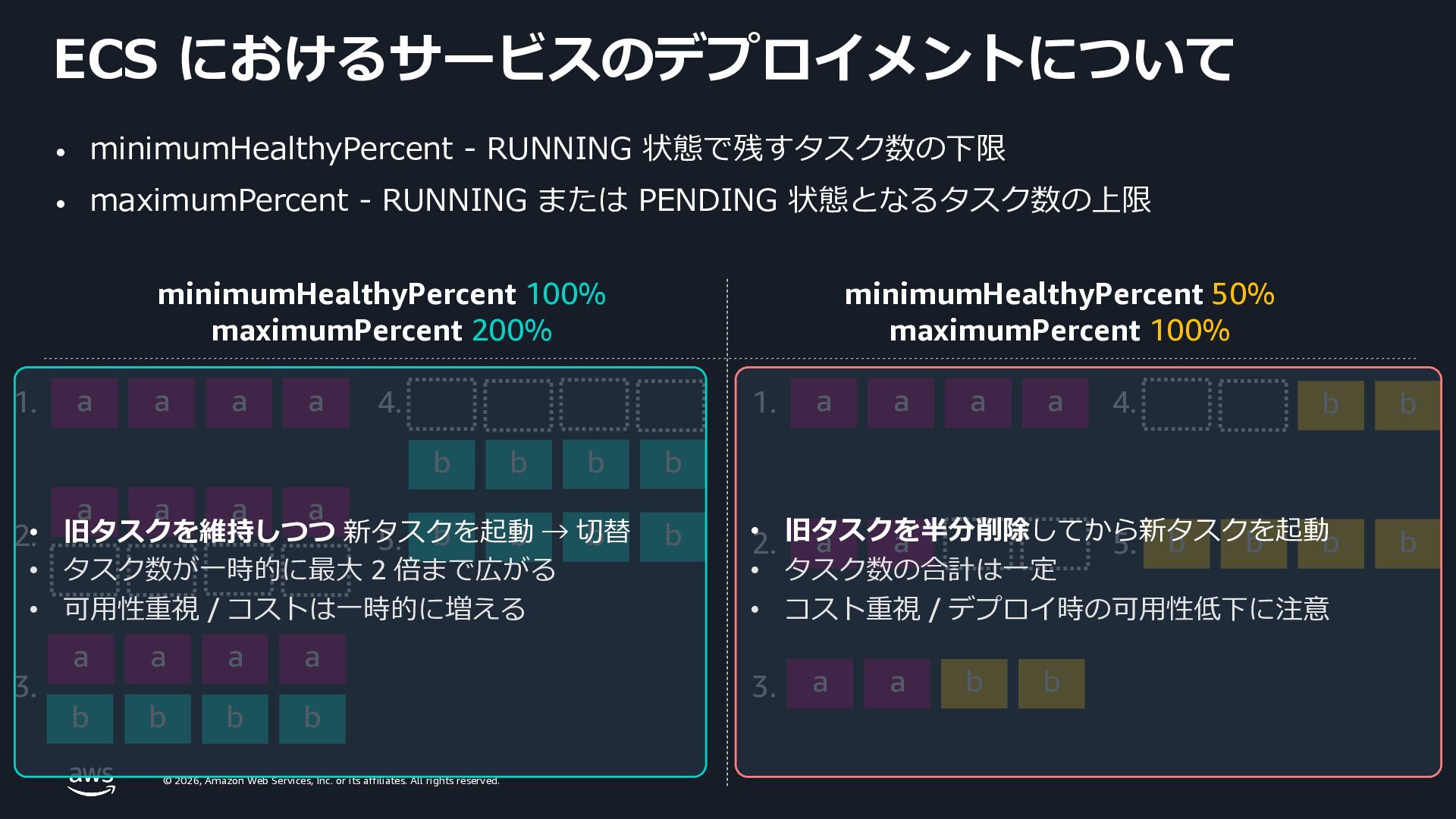
    rights reserved. ECS におけるサービスのデプロイメントについて • minimumHealthyPercent - RUNNING 状態で残すタスク数の下限 • maximumPercent - RUNNING または PENDING 状態となるタスク数の上限 a a a a 1. a a a a 2. a a a a b b 3. b b b b b b 4. a a a a 1. a a 2. a a b b 3. b b 4. 5. b b b b b b b b 5. minimumHealthyPercent 100% maximumPercent 200% minimumHealthyPercent 50% maximumPercent 100% • 旧タスクを維持しつつ 新タスクを起動 → 切替 • タスク数が⼀時的に最⼤ 2 倍まで広がる • 可⽤性重視 / コストは⼀時的に増える • 旧タスクを半分削除してから新タスクを起動 • タスク数の合計は⼀定 • コスト重視 / デプロイ時の可⽤性低下に注意
  46. © 2026, Amazon Web Services, Inc. or its affiliates. All
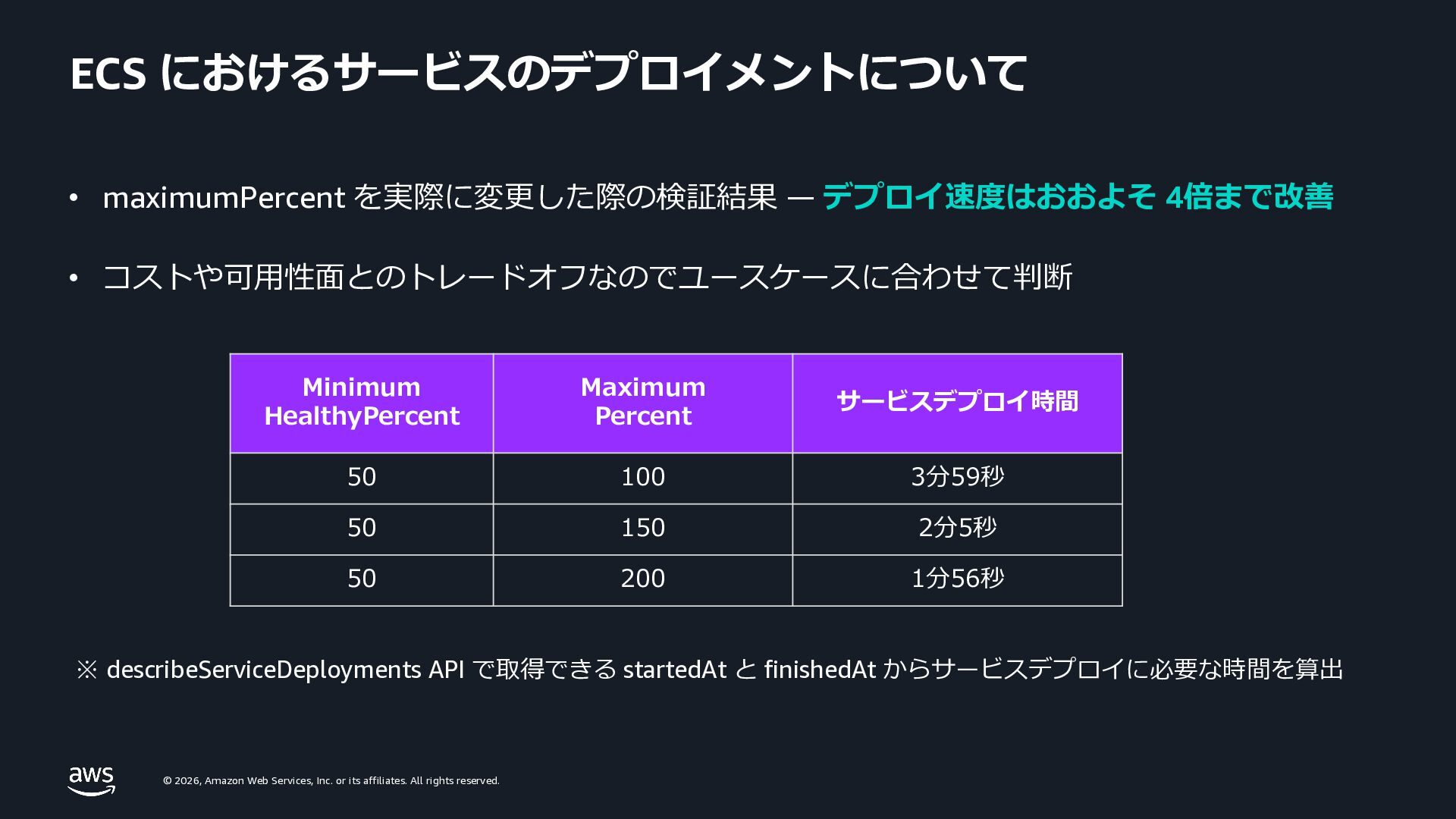
    rights reserved. ECS におけるサービスのデプロイメントについて • maximumPercent を実際に変更した際の検証結果 ̶ デプロイ速度はおおよそ 4倍まで改善 • コストや可⽤性⾯とのトレードオフなのでユースケースに合わせて判断 ※ describeServiceDeployments API で取得できる startedAt と finishedAt からサービスデプロイに必要な時間を算出 Minimum HealthyPercent Maximum Percent サービスデプロイ時間 50 100 3分59秒 50 150 2分5秒 50 200 1分56秒
  47. © 2026, Amazon Web Services, Inc. or its affiliates. All

    rights reserved. © 2026, Amazon Web Services, Inc. or its affiliates. All rights reserved. デプロイの⾼速化 ロードバランサー統合時の設定
  48. © 2026, Amazon Web Services, Inc. or its affiliates. All

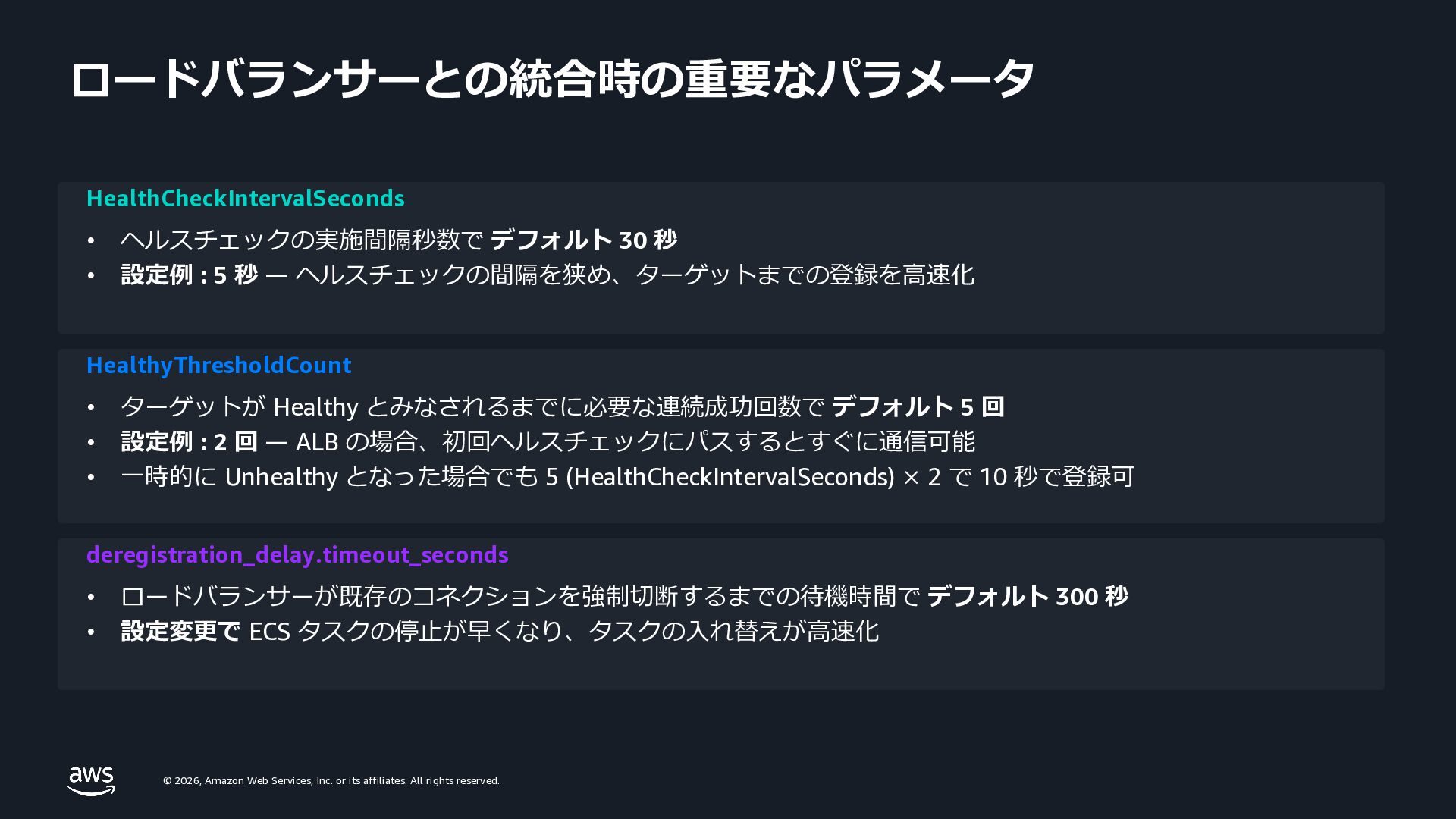
    rights reserved. ロードバランサーとの統合時の重要なパラメータ HealthCheckIntervalSeconds • ヘルスチェックの実施間隔秒数で デフォルト 30 秒 • 設定例 : 5 秒 ̶ ヘルスチェックの間隔を狭め、ターゲットまでの登録を⾼速化 HealthyThresholdCount • ターゲットが Healthy とみなされるまでに必要な連続成功回数で デフォルト 5 回 • 設定例 : 2 回 ̶ ALB の場合、初回ヘルスチェックにパスするとすぐに通信可能 • ⼀時的に Unhealthy となった場合でも 5 (HealthCheckIntervalSeconds) × 2 で 10 秒で登録可 deregistration_delay.timeout_seconds • ロードバランサーが既存のコネクションを強制切断するまでの待機時間で デフォルト 300 秒 • 設定変更で ECS タスクの停⽌が早くなり、タスクの⼊れ替えが⾼速化
  49. © 2026, Amazon Web Services, Inc. or its affiliates. All

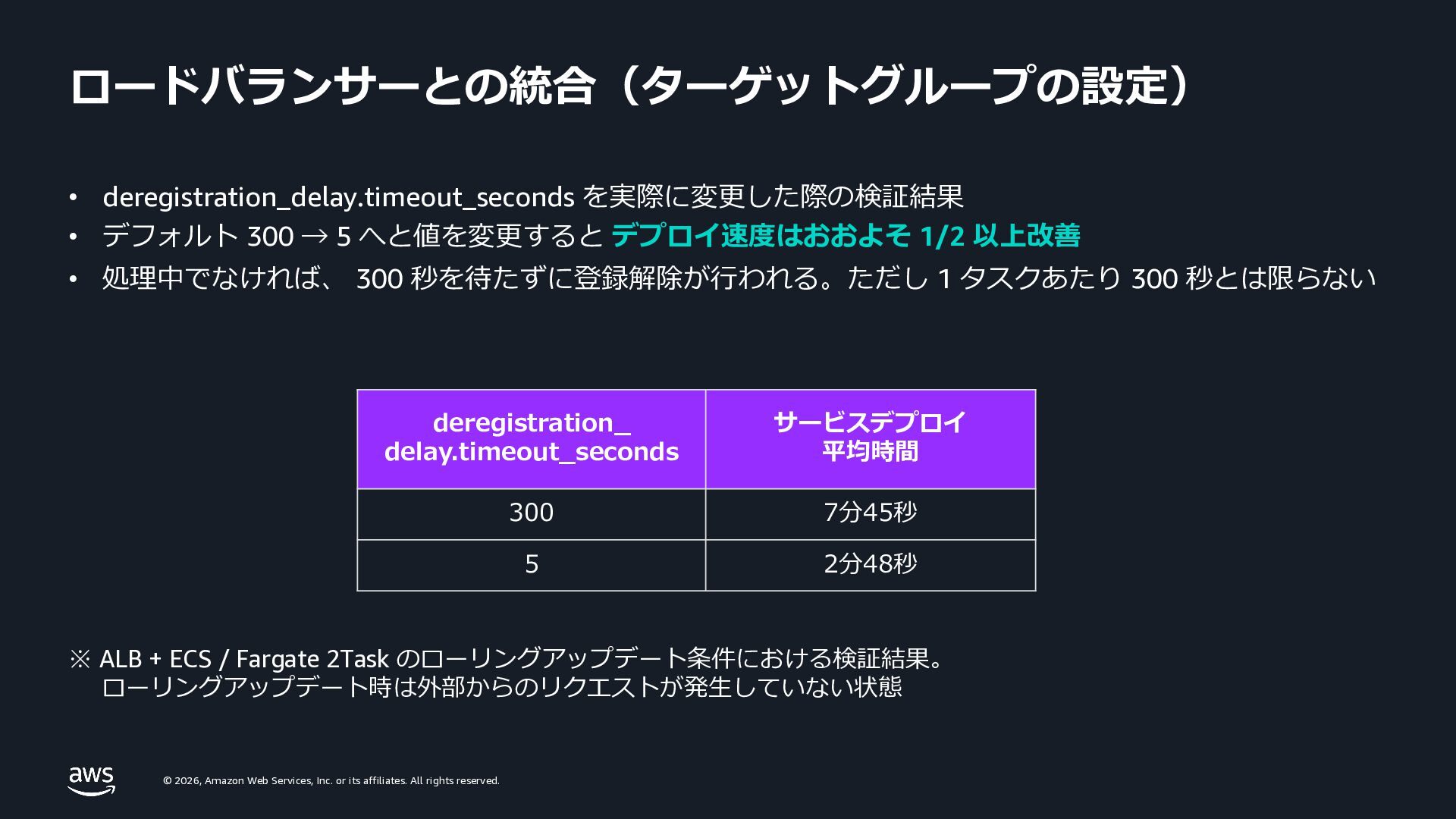
    rights reserved. ロードバランサーとの統合(ターゲットグループの設定) • deregistration_delay.timeout_seconds を実際に変更した際の検証結果 • デフォルト 300 → 5 へと値を変更すると デプロイ速度はおおよそ 1/2 以上改善 • 処理中でなければ、 300 秒を待たずに登録解除が⾏われる。ただし 1 タスクあたり 300 秒とは限らない ※ ALB + ECS / Fargate 2Task のローリングアップデート条件における検証結果。 ローリングアップデート時は外部からのリクエストが発⽣していない状態 deregistration_ delay.timeout_seconds サービスデプロイ 平均時間 300 7分45秒 5 2分48秒
  50. © 2026, Amazon Web Services, Inc. or its affiliates. All

    rights reserved. © 2026, Amazon Web Services, Inc. or its affiliates. All rights reserved. ⾼解像度メトリクスを⽤いた スケーリング
  51. © 2026, Amazon Web Services, Inc. or its affiliates. All

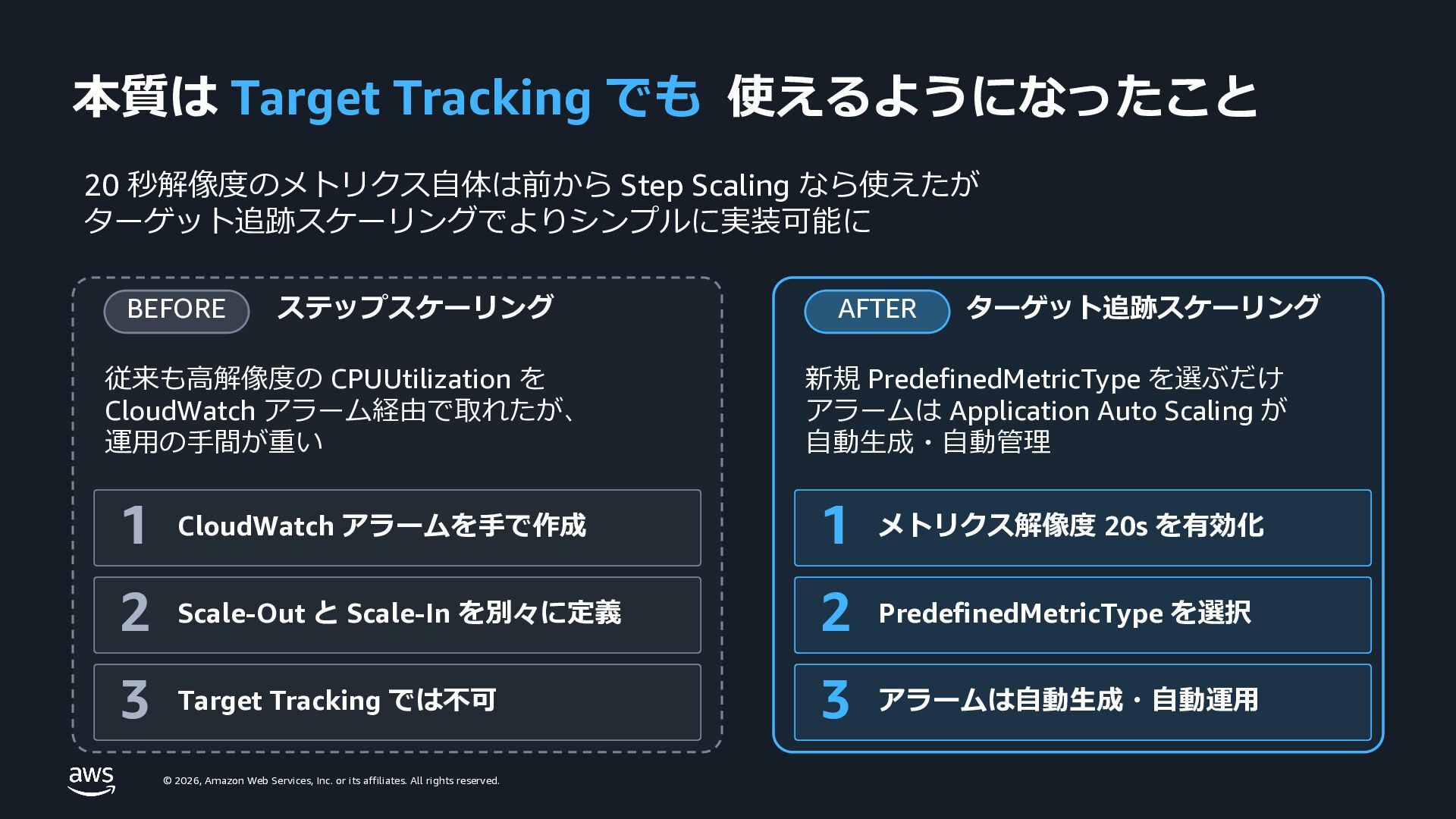
    rights reserved. 本質は Target Tracking でも 使えるようになったこと 20 秒解像度のメトリクス⾃体は前から Step Scaling なら使えたが ターゲット追跡スケーリングでよりシンプルに実装可能に BEFORE ステップスケーリング 従来も⾼解像度の CPUUtilization を CloudWatch アラーム経由で取れたが、 運⽤の⼿間が重い 1 CloudWatch アラームを⼿で作成 2 Scale-Out と Scale-In を別々に定義 3 Target Tracking では不可 AFTER ターゲット追跡スケーリング 新規 PredefinedMetricType を選ぶだけ アラームは Application Auto Scaling が ⾃動⽣成・⾃動管理 1 メトリクス解像度 20s を有効化 2 PredefinedMetricType を選択 3 アラームは⾃動⽣成・⾃動運⽤