Upgrade to Pro
— share decks privately, control downloads, hide ads and more …
Speaker Deck
Sign up for free
Menu
Search
Features
All features
Private URLs
Password Protection
Custom URLS
Scheduled publishing
Remove Branding
Restrict embedding
Deck Collections
Notes
Features
All features
Private URLs
Password Protection
Custom URLS
Scheduled publishing
Remove Branding
Restrict embedding
Deck Collections
Notes
Explore
Featured decks
Featured speakers
Programming
Technology
Storyboards
Explore
Featured decks
Featured speakers
Programming
Technology
Storyboards
Pricing
Search
Sign in
Sign up for free
初階講義.pdf
Search
Sponsored
·
Your Podcast. Everywhere. Effortlessly.
Share. Educate. Inspire. Entertain. You do you. We'll handle the rest.
→
董沒
February 01, 2013
41
0
Share
Embed
Copy iframe code
Copy JS code
Copy link
Start on current slide
初階講義.pdf
董沒
February 01, 2013
More Decks by 董沒
See All by 董沒
簡報1.pdf
sakamoto
0
110
核能.pdf
sakamoto
0
120
核能.pdf
sakamoto
0
140
Featured
See All Featured
[Rails World 2023 - Day 1 Closing Keynote] - The Magic of Rails
eileencodes
38
3.1k
Cheating the UX When There Is Nothing More to Optimize - PixelPioneers
stephaniewalter
287
14k
Why Your Marketing Sucks and What You Can Do About It - Sophie Logan
marketingsoph
0
430
Between Models and Reality
mayunak
4
500
Joys of Absence: A Defence of Solitary Play
codingconduct
1
550
The Psychology of Web Performance [Beyond Tellerrand 2023]
tammyeverts
49
3.6k
The Art of Programming - Codeland 2020
erikaheidi
57
14k
AI Search: Where Are We & What Can We Do About It?
aleyda
0
8.1k
What Being in a Rock Band Can Teach Us About Real World SEO
427marketing
0
1.1k
Tips & Tricks on How to Get Your First Job In Tech
honzajavorek
1
800
Mozcon NYC 2025: Stop Losing SEO Traffic
samtorres
1
580
From Legacy to Launchpad: Building Startup-Ready Communities
dugsong
0
360
Transcript
None
前言 許多人在小時候,接觸的第一外文不外乎就 是英文,直到大學甚至研究所畢業都還在學 習英文,此類我們可以分為第一外文,但很 多人發現進了公司,公司需要更多的不是英 文而是日文,而我們又開始學習日文,日文 的教學市面上很多,然而對日文輸入的教學 文章卻少之又少,今天我將教各位如何使用 電腦打出日文.
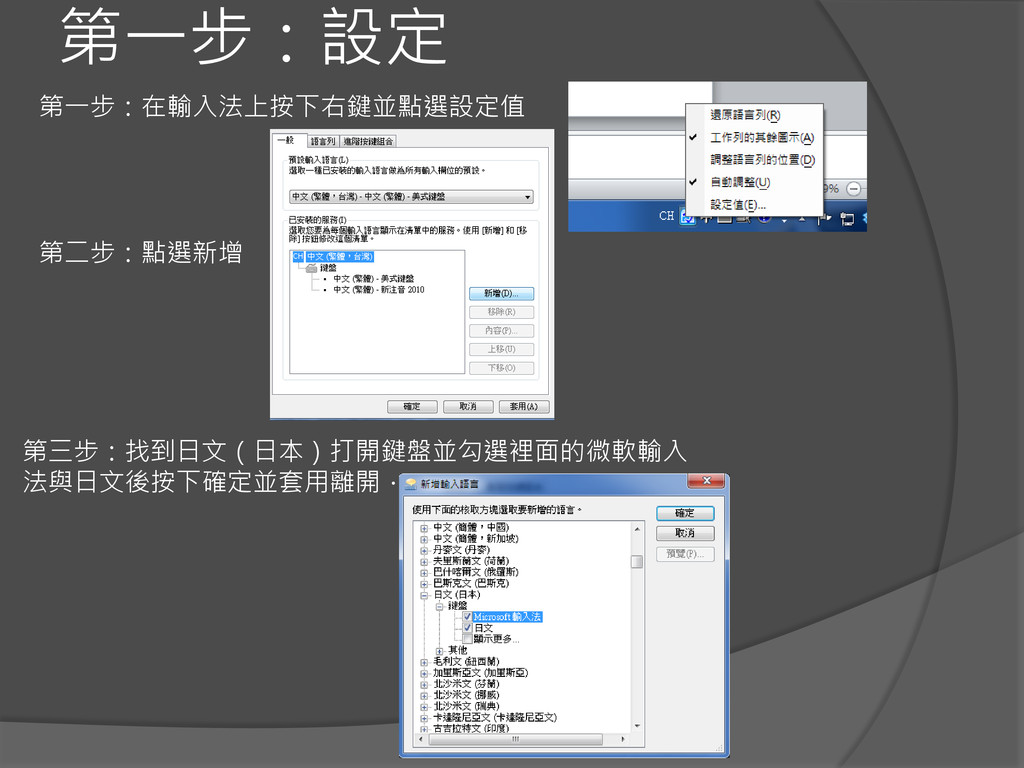
第一步:設定 第一步:在輸入法上按下右鍵並點選設定值 第二步:點選新增 第三步:找到日文(日本)打開鍵盤並勾選裡面的微軟輸入 法與日文後按下確定並套用離開.
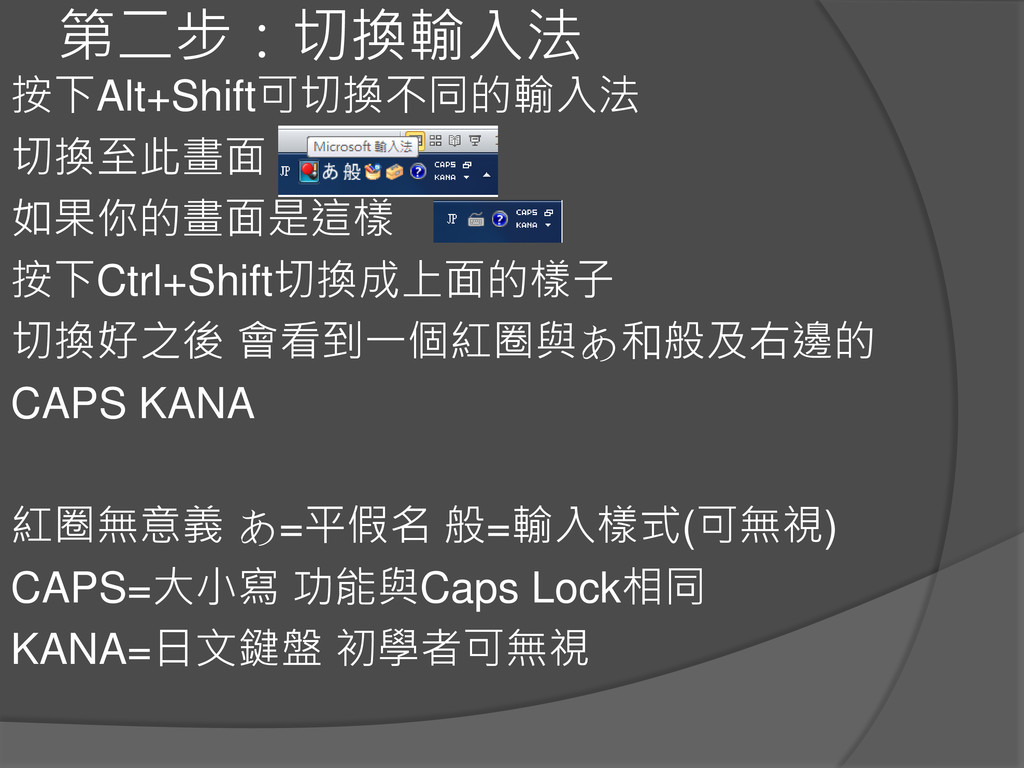
第二步:切換輸入法 按下Alt+Shift可切換不同的輸入法 切換至此畫面 如果你的畫面是這樣 按下Ctrl+Shift切換成上面的樣子 切換好之後 會看到一個紅圈與あ和般及右邊的 CAPS KANA 紅圈無意義
あ=平假名 般=輸入樣式(可無視) CAPS=大小寫 功能與Caps Lock相同 KANA=日文鍵盤 初學者可無視
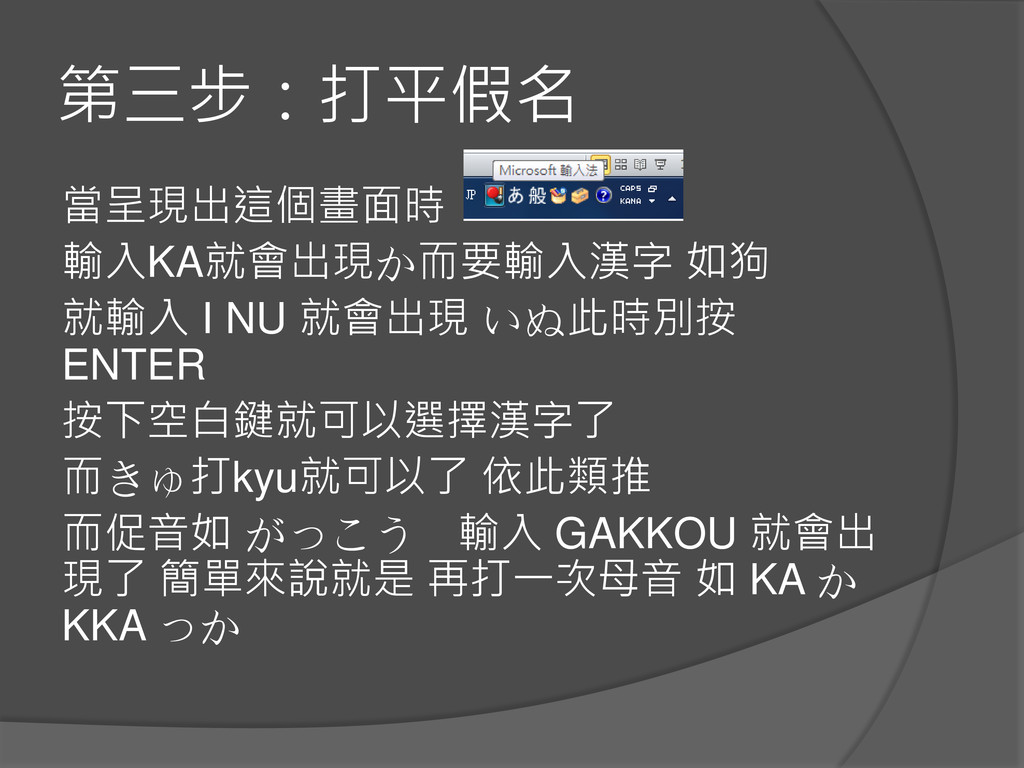
第三步:打平假名 當呈現出這個畫面時 輸入KA就會出現か而要輸入漢字 如狗 就輸入 I NU 就會出現 いぬ此時別按 ENTER
按下空白鍵就可以選擇漢字了 而きゅ打kyu就可以了 依此類推 而促音如 がっこう 輸入 GAKKOU 就會出 現了 簡單來說就是 再打一次母音 如 KA か KKA っか
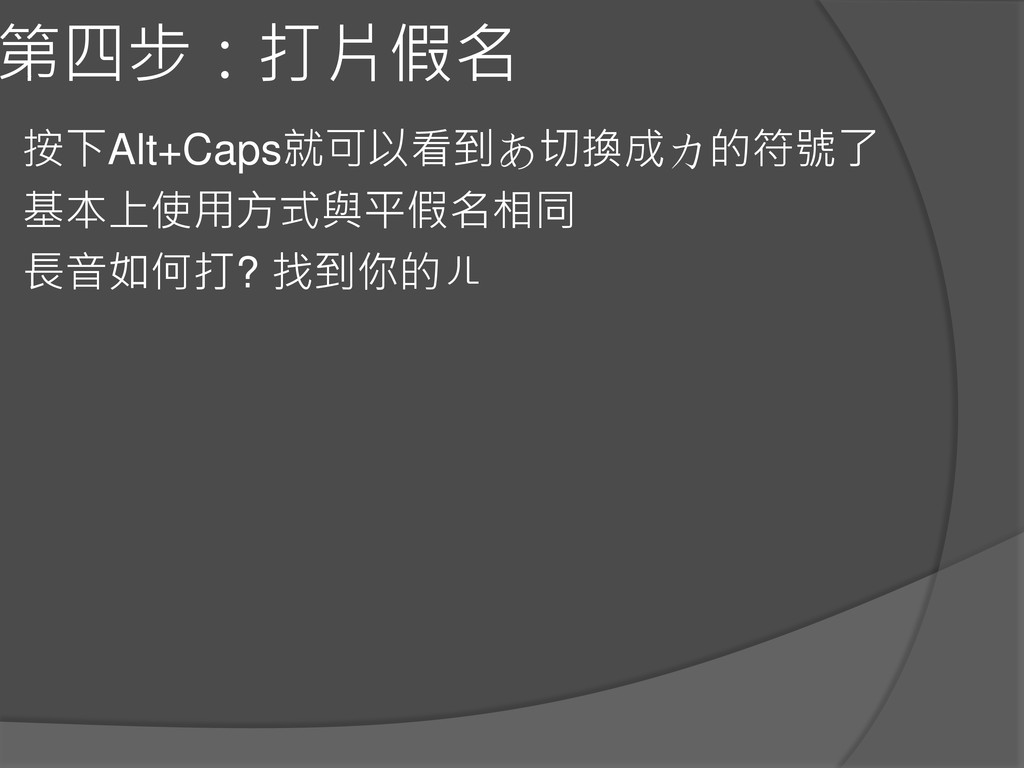
第四步:打片假名 按下Alt+Caps就可以看到あ切換成カ的符號了 基本上使用方式與平假名相同 長音如何打? 找到你的ㄦ


 sakamoto
 eileencodes
 stephaniewalter
 marketingsoph
 mayunak
 codingconduct
 tammyeverts
 erikaheidi
 aleyda
 427marketing
 honzajavorek
 samtorres
 dugsong