Upgrade to Pro
— share decks privately, control downloads, hide ads and more …
Speaker Deck
Sign up for free
Menu
Search
Features
All features
Private URLs
Password Protection
Custom URLS
Scheduled publishing
Remove Branding
Restrict embedding
Deck Collections
Notes
Features
All features
Private URLs
Password Protection
Custom URLS
Scheduled publishing
Remove Branding
Restrict embedding
Deck Collections
Notes
Explore
Featured decks
Featured speakers
Programming
Technology
Storyboards
Explore
Featured decks
Featured speakers
Programming
Technology
Storyboards
Pricing
Search
Sign in
Sign up for free
How to use Tasking Manager
Search
ssssayumi
June 08, 2018
50
0
Share
Embed
Copy iframe code
Copy JS code
Copy link
Start on current slide
How to use Tasking Manager
I explain how to use the mapping work using Tasking Manager.
ssssayumi
June 08, 2018
Featured
See All Featured
Unsuck your backbone
ammeep
672
58k
Claude Code のすすめ
schroneko
67
230k
DevOps and Value Stream Thinking: Enabling flow, efficiency and business value
helenjbeal
2
410
GitHub's CSS Performance
jonrohan
1033
470k
Evolving SEO for Evolving Search Engines
ryanjones
0
330
Responsive Adventures: Dirty Tricks From The Dark Corners of Front-End
smashingmag
254
22k
Pawsitive SEO: Lessons from My Dog (and Many Mistakes) on Thriving as a Consultant in the Age of AI
davidcarrasco
0
260
Abbi's Birthday
coloredviolet
4
10k
Bridging the Design Gap: How Collaborative Modelling removes blockers to flow between stakeholders and teams @FastFlow conf
baasie
0
730
Believing is Seeing
oripsolob
1
240
Leveraging Curiosity to Care for An Aging Population
cassininazir
1
540
CoffeeScript is Beautiful & I Never Want to Write Plain JavaScript Again
sstephenson
162
16k
Transcript
Tasking Managerを使おう 1A116010 阿部 紗弓
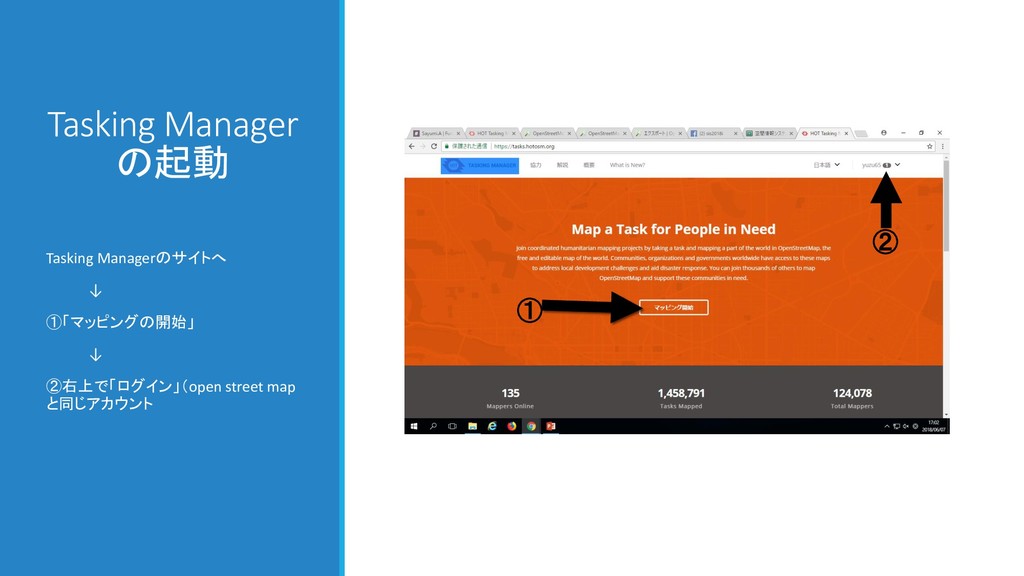
Tasking Manager の起動 Tasking Managerのサイトへ ↓ ①「マッピングの開始」 ↓ ②右上で「ログイン」(open street
map と同じアカウント ① ②
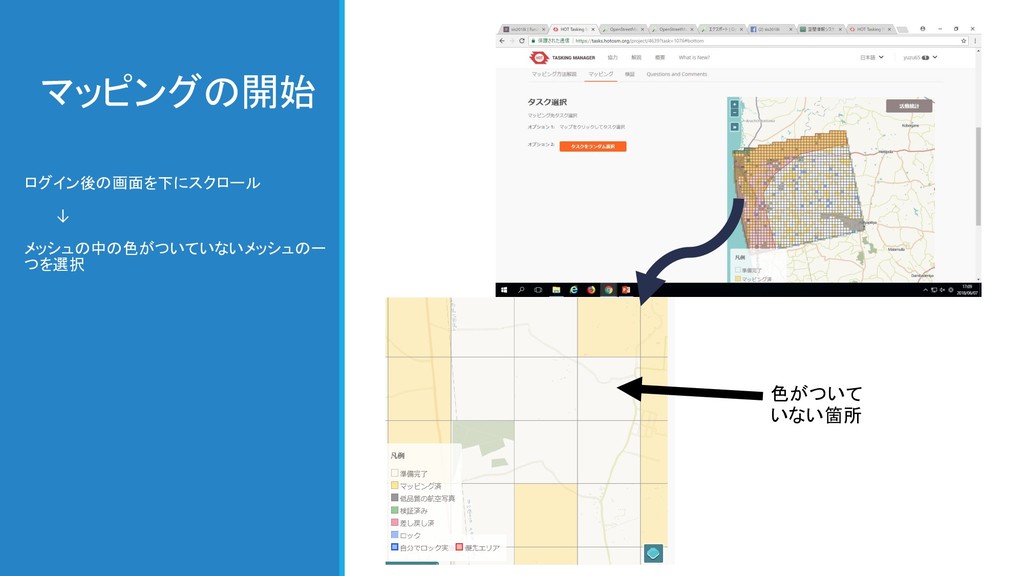
マッピングの開始 ログイン後の画面を下にスクロール ↓ メッシュの中の色がついていないメッシュの一 つを選択 色がついて いない箇所
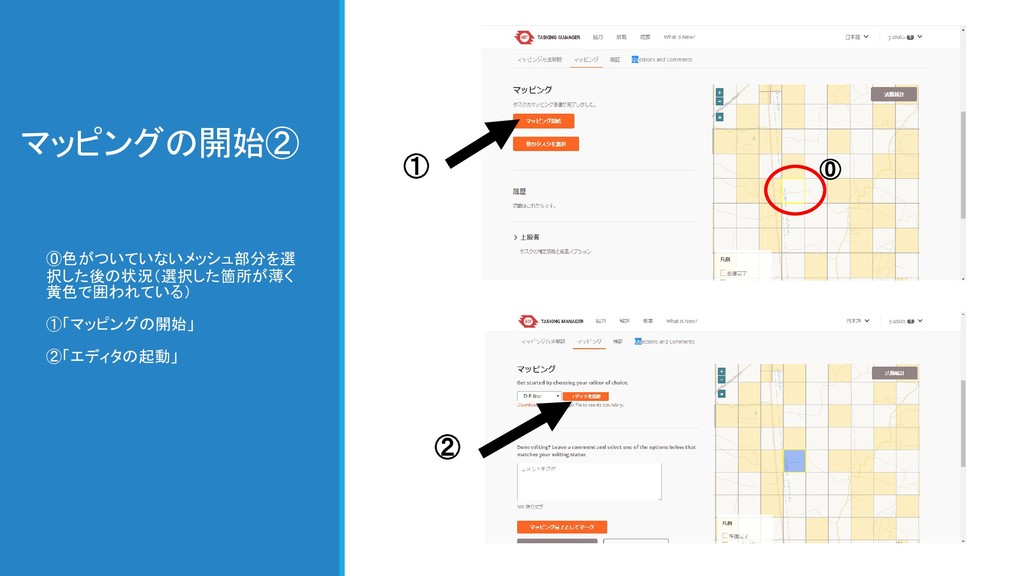
マッピングの開始② ⓪色がついていないメッシュ部分を選 択した後の状況(選択した箇所が薄く 黄色で囲われている) ①「マッピングの開始」 ②「エディタの起動」 ① ⓪ ②
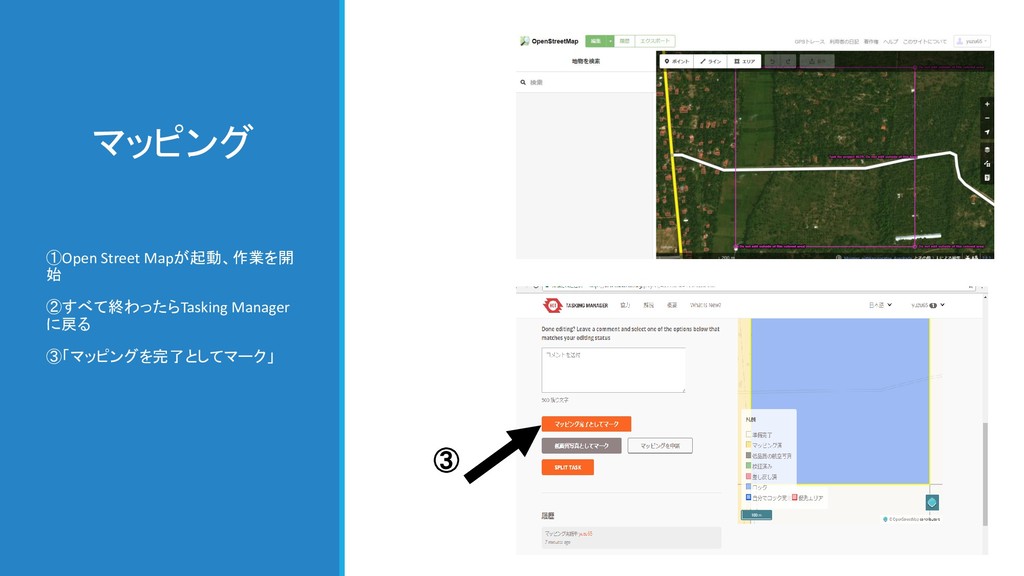
マッピング ①Open Street Mapが起動、作業を開 始 ②すべて終わったらTasking Manager に戻る ③「マッピングを完了としてマーク」 ③
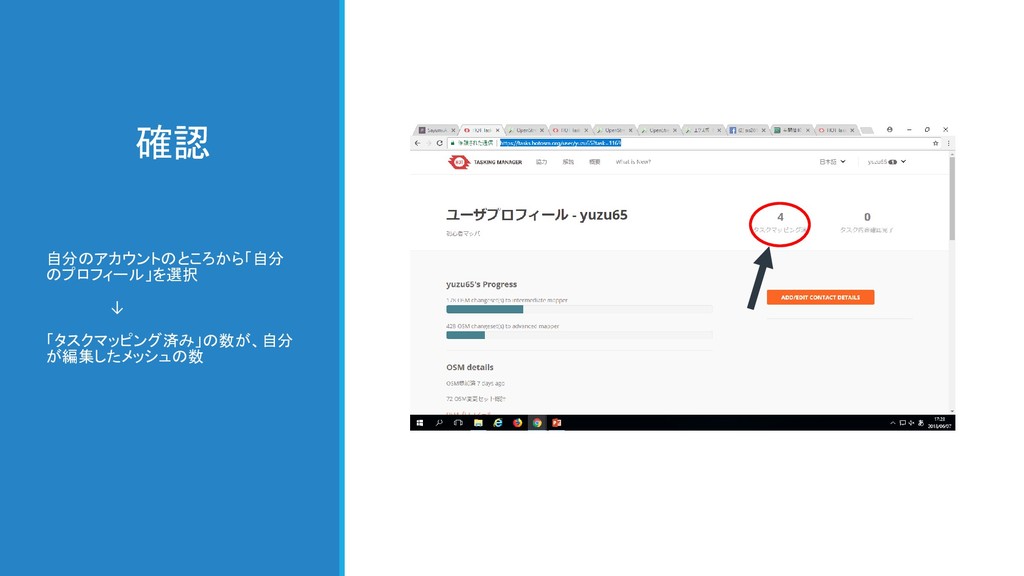
確認 自分のアカウントのところから「自分 のプロフィール」を選択 ↓ 「タスクマッピング済み」の数が、自分 が編集したメッシュの数


 ammeep
 schroneko
.png) helenjbeal
helenjbeal
 jonrohan
 ryanjones
 smashingmag
 davidcarrasco
 coloredviolet
 baasie
 oripsolob
 cassininazir
 sstephenson