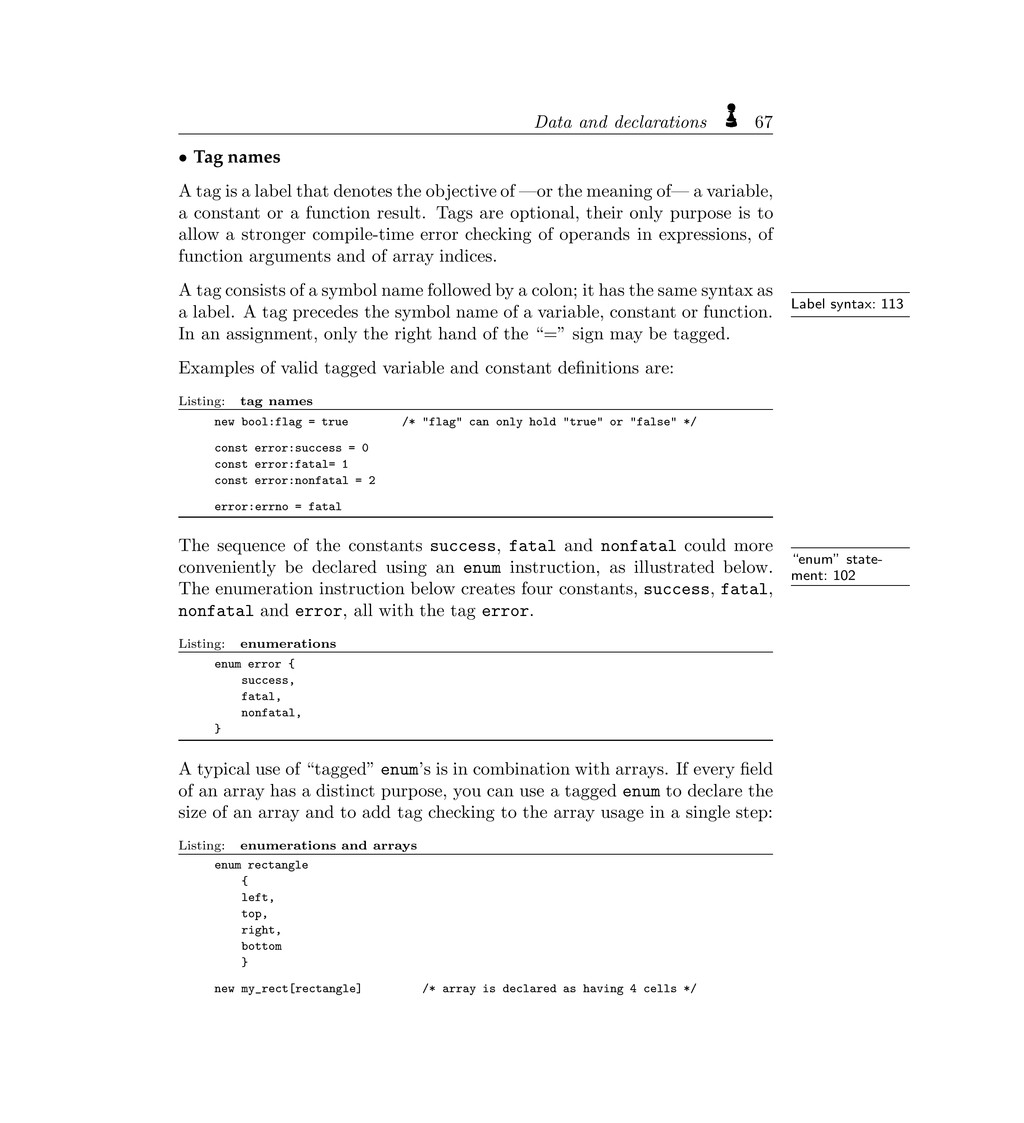
Upgrade to Pro — share decks privately, control downloads, hide ads and more …

Pawn_Language_Guide.pdf

Avatar for bicentric bicentric
April 16, 2012
170

 Pawn_Language_Guide.pdf

Avatar for bicentric

bicentric

April 16, 2012

Transcript

  1. ii “Java” is a trademark of Sun Microsystems, Inc. “Microsoft”

    and “Microsoft Windows” are registered trademarks of Microsoft Corporation. “Linux” is a registered trademark of Linus Torvalds. “CompuPhase” is a registered trademark of ITB CompuPhase. “Unicode” is a registered trademark of Unicode, Inc. Copyright c 1997–2007, ITB CompuPhase Eerste Industriestraat 19–21, 1401VL Bussum The Netherlands (Pays Bas) telephone: (+31)-(0)35 6939 261 e-mail: [email protected], www: http://www.compuphase.com The documentation is licensed under the Creative Commons Attribution-ShareAlike 2.5 License. A summary of this license is in appendix D. For more information on this licence, visit http://creativecommons.org/licenses/by-sa/2.5/ or send a letter to Creative Commons, 559 Nathan Abbott Way, Stanford, California 94305, USA. The information in this manual and the associated software are provided “as is”. There are no guarantees, explicit or implied, that the software and the manual are accurate. Requests for corrections and additions to the manual and the software can be directed to ITB CompuPhase at the above address. Typeset with TEX in the “Computer Modern” and “Palatino” typefaces at a base size of 11 points.
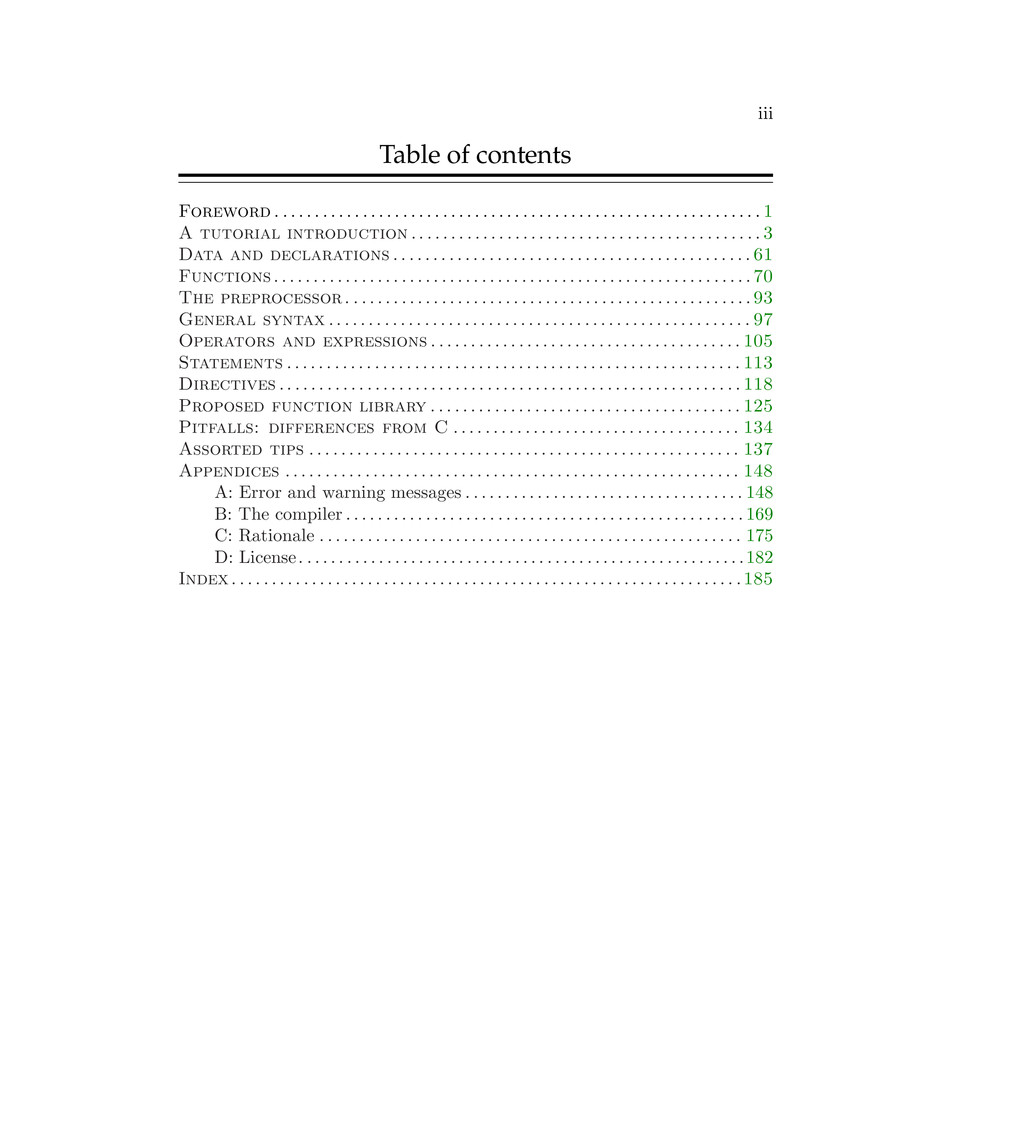
  2. iii Table of contents Foreword . . . . .

    . . . . . . . . . . . . . . . . . . . . . . . . . . . . . . . . . . . . . . . . . . . . . . . . . . . . . . . . 1 A tutorial introduction .. . . . . . . . . . . . . . . . . . . . . . . . . . . . . . . . . . . . . . . . . . . 3 Data and declarations . . . . . . . . . . . . . . . . . . . . . . . . . . . . . . . . . . . . . . . . . . . . . 61 Functions. . . . . . . . . . . . . . . . . . . . . . . . . . . . . . . . . . . . . . . . . . . . . . . . . . . . . . . . . . . .70 The preprocessor. . . . . . . . . . . . . . . . . . . . . . . . . . . . . . . . . . . . . . . . . . . . . . . . . . .93 General syntax .. . . . . . . . . . . . . . . . . . . . . . . . . . . . . . . . . . . . . . . . . . . . . . . . . . . . 97 Operators and expressions . . . . . . . . . . . . . . . . . . . . . . . . . . . . . . . . . . . . . . . 105 Statements . . . . . . . . . . . . . . . . . . . . . . . . . . . . . . . . . . . . . . . . . . . . . . . . . . . . . . . . . 113 Directives .. . . . . . . . . . . . . . . . . . . . . . . . . . . . . . . . . . . . . . . . . . . . . . . . . . . . . . . . . 118 Proposed function library . . . . . . . . . . . . . . . . . . . . . . . . . . . . . . . . . . . . . . . 125 Pitfalls: differences from C . . . . . . . . . . . . . . . . . . . . . . . . . . . . . . . . . . . . 134 Assorted tips . . . . . . . . . . . . . . . . . . . . . . . . . . . . . . . . . . . . . . . . . . . . . . . . . . . . . . 137 Appendices . . . . . . . . . . . . . . . . . . . . . . . . . . . . . . . . . . . . . . . . . . . . . . . . . . . . . . . . . 148 A: Error and warning messages . . . . . . . . . . . . . . . . . . . . . . . . . . . . . . . . . . . 148 B: The compiler . . . . . . . . . . . . . . . . . . . . . . . . . . . . . . . . . . . . . . . . . . . . . . . . . . 169 C: Rationale . . . . . . . . . . . . . . . . . . . . . . . . . . . . . . . . . . . . . . . . . . . . . . . . . . . . . 175 D: License. . . . . . . . . . . . . . . . . . . . . . . . . . . . . . . . . . . . . . . . . . . . . . . . . . . . . . . .182 Index. . . . . . . . . . . . . . . . . . . . . . . . . . . . . . . . . . . . . . . . . . . . . . . . . . . . . . . . . . . . . . . .185
  3. 1 Foreword pawn is a simple, typeless, 32-bit “scripting” language

    with a C-like syntax. Execution speed, stability, simplicity and a small footprint were essential design criteria for both the language and the interpreter/abstract machine that a pawn program runs on. An application or tool cannot do or be everything for all users. This not only justifies the diversity of editors, compilers, operating systems and many other software systems, it also explains the presence of extensive configura- tion options and macro or scripting languages in applications. My own ap- plications have contained a variety of little languages; most were very simple, some were extensive. . . and most needs could have been solved by a general purpose language with a special purpose library. Hence, pawn. The pawn language was designed as a flexible language for manipulating objects in a host application. The tool set (compiler, abstract machine) were written so that they were easily extensible and would run on different software/hardware architectures. Õ pawn is a descendent of the original Small C by Ron Cain and James Hen- drix, which at its turn was a subset of C. Some of the modifications that I did to Small C, e.g. the removal of the type system and the substitution of pointers by references, were so fundamental that I could hardly call my language a “subset of C” or a “C dialect” any more. Therefore, I stripped off the “C” from the title and used the name “Small” for the name of the language in my publication in Dr. Dobb’s Journal and the years since. Dur- ing development and maintenance of the product, I received many requests for changes. One of the frequently requested changes was to use a different name for the language —searching for information on the Small scripting language on the Internet was hindered by “small” being such a common word. The name change occurred together with a significant change in the language: the support of “states” (and state machines). I am indebted to Ron Cain and James Hendrix (and more recently, Andy Yuen), and to Dr. Dobb’s Journal to get this ball rolling. Although I must have touched nearly every line of the original code multiple times, the Small C origins are still clearly visible. Õ
  4. 2 Foreword A detailed treatise of the design goals and

    compromises is in appendix C; here I would like to summarize a few key points. As written in the previous paragraphs, pawn is for customizing applications (by writing scripts), not for writing applications. pawn is weak on data structuring because pawn programs are intended to manipulate objects (text, sprites, streams, queries, . . .) in the host application, but the pawn program is, by intent, denied direct access to any data outside its abstract machine. The only means that a pawn program has to manipulate objects in the host application is by calling subroutines, so called “native functions”, that the host application provides. pawn is flexible in that key area: calling functions. pawn supports de- fault values for any of the arguments of a function (not just the last), call- by-reference as well as call-by-value, and “named” as well as “positional” function arguments. pawn does not have a “type checking” mechanism, by virtue of being a typeless language, but it does offer in replacement a “classification checking” mechanism, called “tags”. The tag system is espe- cially convenient for function arguments because each argument may specify multiple acceptable tags. For any language, the power (or weakness) lies not in the individual features, but in their combination. For pawn, I feel that the combination of named arguments —which lets you specify function arguments in any order, and default values —which allows you to skip specifying arguments that you are not interested in, blend together to a convenient and “descriptive” way to call (native) functions to manipulate objects in the host application.
  5. 3 A tutorial introduction pawn is a simple programming language

    with a syntax reminiscent to the “C” programming language. A pawn program consists of a set of functions and a set of variables. The variables are data objects and the functions contain instructions (called “statements”) that operate on the data objects or that perform tasks. The first program in almost any computer language is one that prints a Compiling and running scripts: see page 169 simple string; printing “Hello world” is a classic example. In pawn, the program would look like: Listing: hello.p main() printf "Hello world\n" This manual assumes that you know how to run a pawn program; if not, please consult the application manual (more hints are at page 169). A pawn program starts execution in an “entry” function∗ —in nearly all examples of this manual, this entry function is called “main”. Here, the function main contains only a single instruction, which is at the line below the function head itself. Line breaks and indenting are insignificant; the invocation of the function print could equally well be on the same line as the head of function main. The definition of a function requires that a pair of parentheses follow the function name. If a function takes parameters, their declarations appear between the parentheses. The function main does not take any parenthe- ses. The rules are different for a function invocation (or a function call); parentheses are optional in the call to the print function. The single argument of the print function is a string, which must be enclosed String literals: 100 in double quotes. The characters \n near the end of the string form an escape sequence, in this case they indicate a “newline” symbol. When print Escape sequence: 99 encounters the newline escape sequence, it advances the cursor to the first column of the next line. One has to use the \n escape sequence to insert a “newline” into the string, because a string may not wrap over multiple lines. ∗ This should not be confused with the “state” entry functions, which are called entry, but serve a different purpose —see page 41.
  6. 4 A tutorial introduction pawn is a “case sensitive” language:

    upper and lower case letters are consid- ered to be different letters. It would be an error to spell the function printf in the above example as “PrintF”. Keywords and predefined symbols, like the name of function “main”, must be typed in lower case. If you know the C language, you may feel that the above example does not look much like the equivalent “Hello world” program in C/C++. pawn can also look very similar to C, though. The next example program is also valid pawn syntax (and it has the same semantics as the earlier example): Listing: hello.p — C style #include <console> main() { printf("Hello world\n"); } These first examples also reveal a few differences between pawn and the C language: ⋄ there is usually no need to include any system-defined “header file”; ⋄ semicolons are optional (except when writing multiple statements on one line); ⋄ when the body of a function is a single instruction, the braces (for a compound instruction) are optional; ⋄ when you do not use the result of a function in an expression or assignment, parentheses around the function argument are optional. As an aside, the few preceding points refer to optional syntaxes. It is your choice what syntax you wish to use: neither style is “deprecated” or “con- sidered harmful”. The examples in this manual position the braces and use an indentation that is known as the “Whitesmith’s style”, but pawn is a free format language and other indenting styles are just as good. Because pawn is designed to be an extension language for applications, the function set/library that a pawn program has at its disposal depends on the host application. As a result, the pawn language has no intrinsic knowl- edge of any function. The print function, used in this first example, must More function descriptions at page 125 be made available by the host application and be “declared” to the pawn parser.† It is assumed, however, that all host applications provide a minimal † In the language specification, the term “parser” refers to any implementation that pro- cesses and runs on conforming Pawn programs —either interpreters or compilers.
  7. A tutorial introduction 5 set of common functions, like print

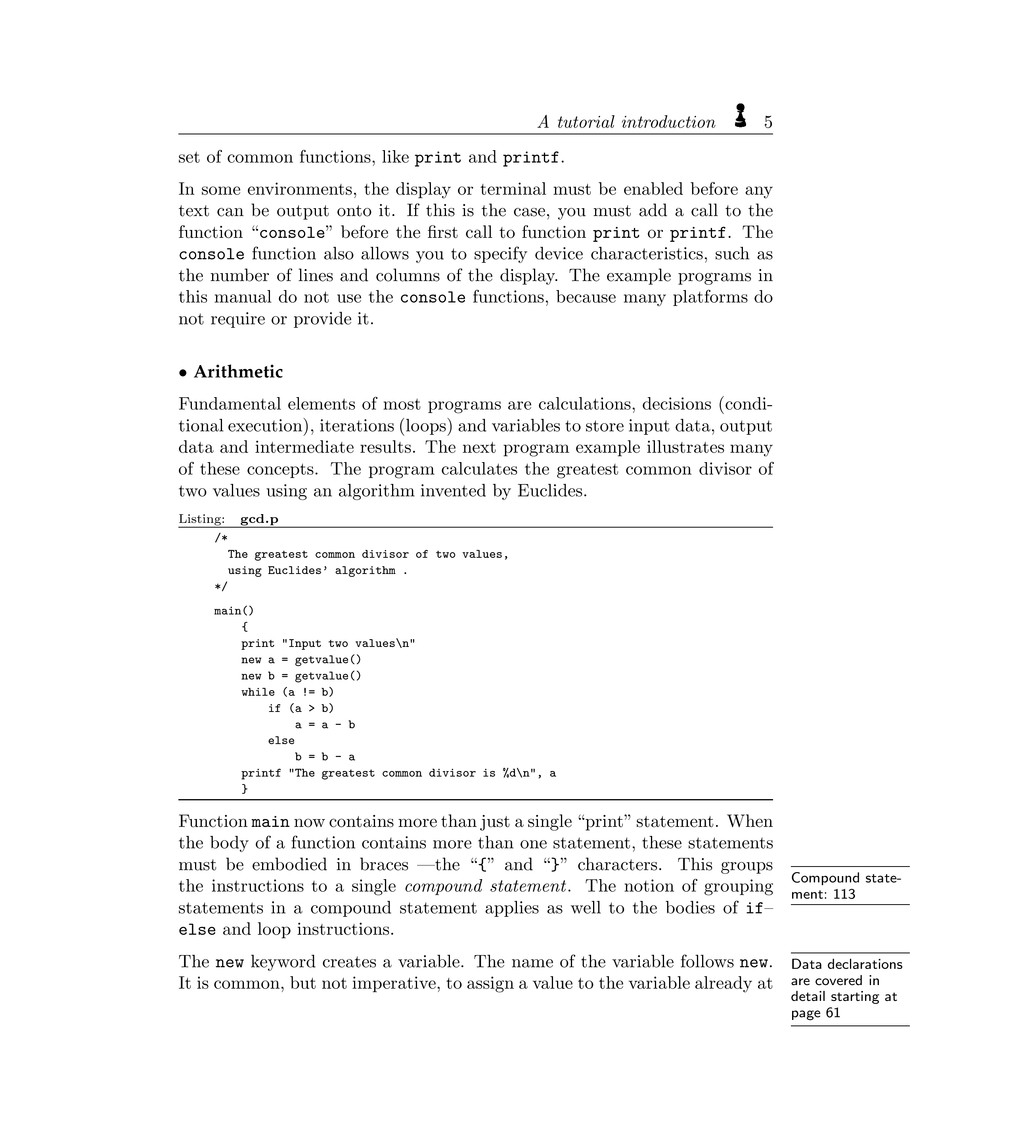
    and printf. In some environments, the display or terminal must be enabled before any text can be output onto it. If this is the case, you must add a call to the function “console” before the first call to function print or printf. The console function also allows you to specify device characteristics, such as the number of lines and columns of the display. The example programs in this manual do not use the console functions, because many platforms do not require or provide it. • Arithmetic Fundamental elements of most programs are calculations, decisions (condi- tional execution), iterations (loops) and variables to store input data, output data and intermediate results. The next program example illustrates many of these concepts. The program calculates the greatest common divisor of two values using an algorithm invented by Euclides. Listing: gcd.p /* The greatest common divisor of two values, using Euclides’ algorithm . */ main() { print "Input two values\n" new a = getvalue() new b = getvalue() while (a != b) if (a > b) a = a - b else b = b - a printf "The greatest common divisor is %d\n", a } Function main now contains more than just a single “print” statement. When the body of a function contains more than one statement, these statements must be embodied in braces —the “{” and “}” characters. This groups Compound state- ment: 113 the instructions to a single compound statement. The notion of grouping statements in a compound statement applies as well to the bodies of if– else and loop instructions. The new keyword creates a variable. The name of the variable follows new. Data declarations are covered in detail starting at page 61 It is common, but not imperative, to assign a value to the variable already at
  8. 6 A tutorial introduction the moment of its creation. Variables

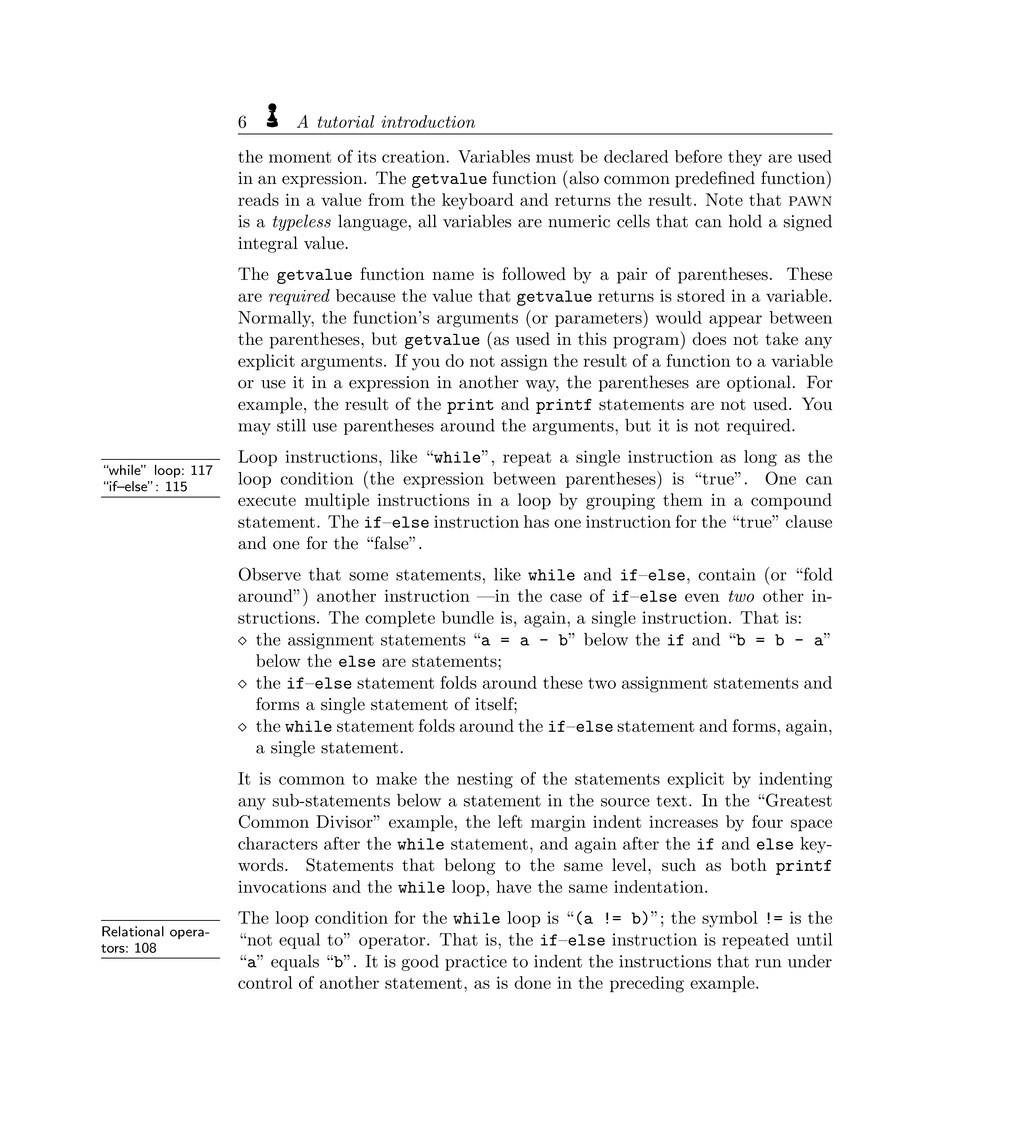
    must be declared before they are used in an expression. The getvalue function (also common predefined function) reads in a value from the keyboard and returns the result. Note that pawn is a typeless language, all variables are numeric cells that can hold a signed integral value. The getvalue function name is followed by a pair of parentheses. These are required because the value that getvalue returns is stored in a variable. Normally, the function’s arguments (or parameters) would appear between the parentheses, but getvalue (as used in this program) does not take any explicit arguments. If you do not assign the result of a function to a variable or use it in a expression in another way, the parentheses are optional. For example, the result of the print and printf statements are not used. You may still use parentheses around the arguments, but it is not required. Loop instructions, like “while”, repeat a single instruction as long as the “while” loop: 117 “if–else”: 115 loop condition (the expression between parentheses) is “true”. One can execute multiple instructions in a loop by grouping them in a compound statement. The if–else instruction has one instruction for the “true” clause and one for the “false”. Observe that some statements, like while and if–else, contain (or “fold around”) another instruction —in the case of if–else even two other in- structions. The complete bundle is, again, a single instruction. That is: ⋄ the assignment statements “a = a - b” below the if and “b = b - a” below the else are statements; ⋄ the if–else statement folds around these two assignment statements and forms a single statement of itself; ⋄ the while statement folds around the if–else statement and forms, again, a single statement. It is common to make the nesting of the statements explicit by indenting any sub-statements below a statement in the source text. In the “Greatest Common Divisor” example, the left margin indent increases by four space characters after the while statement, and again after the if and else key- words. Statements that belong to the same level, such as both printf invocations and the while loop, have the same indentation. The loop condition for the while loop is “(a != b)”; the symbol != is the Relational opera- tors: 108 “not equal to” operator. That is, the if–else instruction is repeated until “a” equals “b”. It is good practice to indent the instructions that run under control of another statement, as is done in the preceding example.
  9. A tutorial introduction 7 The call to printf, near the

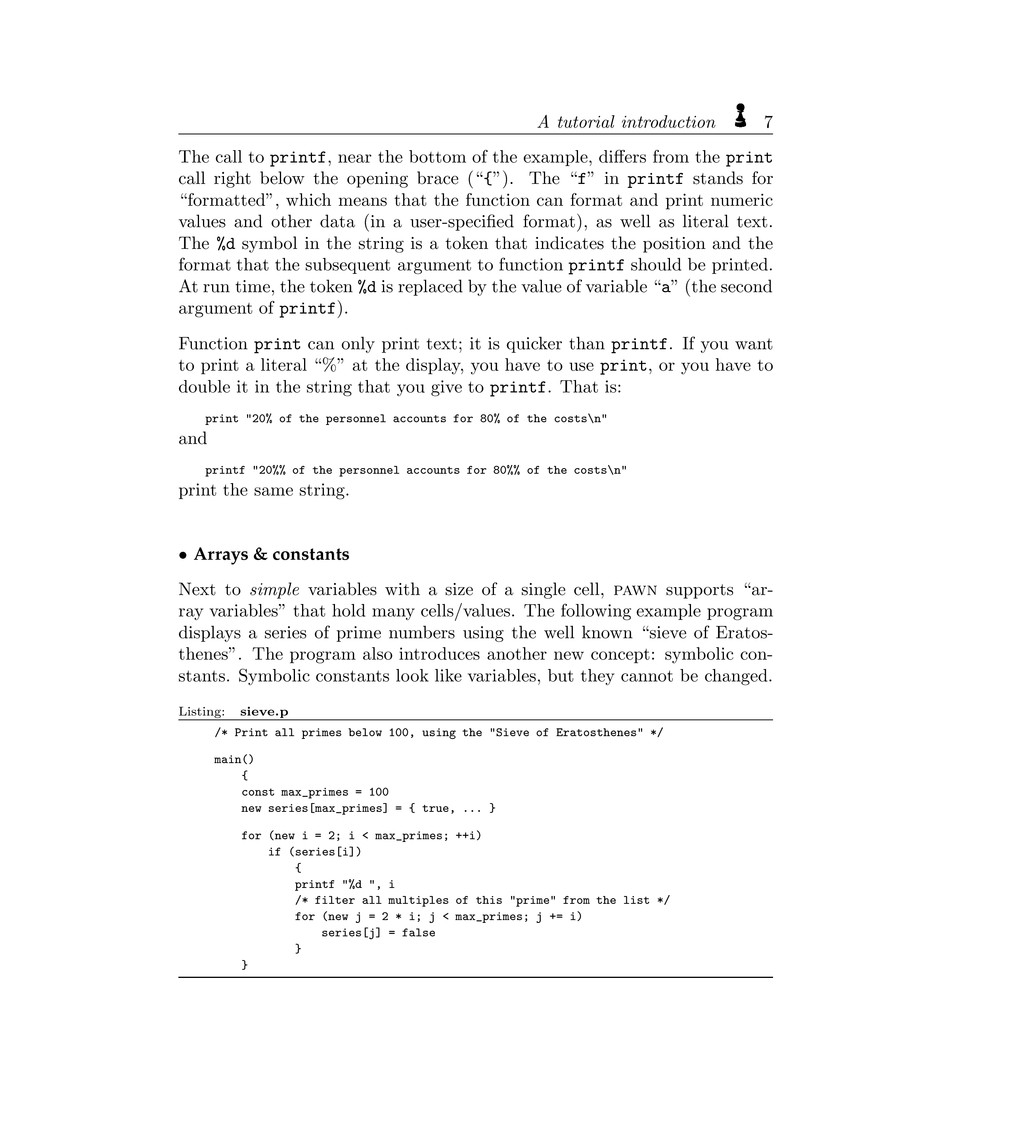
    bottom of the example, differs from the print call right below the opening brace (“{”). The “f” in printf stands for “formatted”, which means that the function can format and print numeric values and other data (in a user-specified format), as well as literal text. The %d symbol in the string is a token that indicates the position and the format that the subsequent argument to function printf should be printed. At run time, the token %d is replaced by the value of variable “a” (the second argument of printf). Function print can only print text; it is quicker than printf. If you want to print a literal “%” at the display, you have to use print, or you have to double it in the string that you give to printf. That is: print "20% of the personnel accounts for 80% of the costs\n" and printf "20%% of the personnel accounts for 80%% of the costs\n" print the same string. • Arrays & constants Next to simple variables with a size of a single cell, pawn supports “ar- ray variables” that hold many cells/values. The following example program displays a series of prime numbers using the well known “sieve of Eratos- thenes”. The program also introduces another new concept: symbolic con- stants. Symbolic constants look like variables, but they cannot be changed. Listing: sieve.p /* Print all primes below 100, using the "Sieve of Eratosthenes" */ main() { const max_primes = 100 new series[max_primes] = { true, ... } for (new i = 2; i < max_primes; ++i) if (series[i]) { printf "%d ", i /* filter all multiples of this "prime" from the list */ for (new j = 2 * i; j < max_primes; j += i) series[j] = false } }
  10. 8 A tutorial introduction When a program or sub-program has

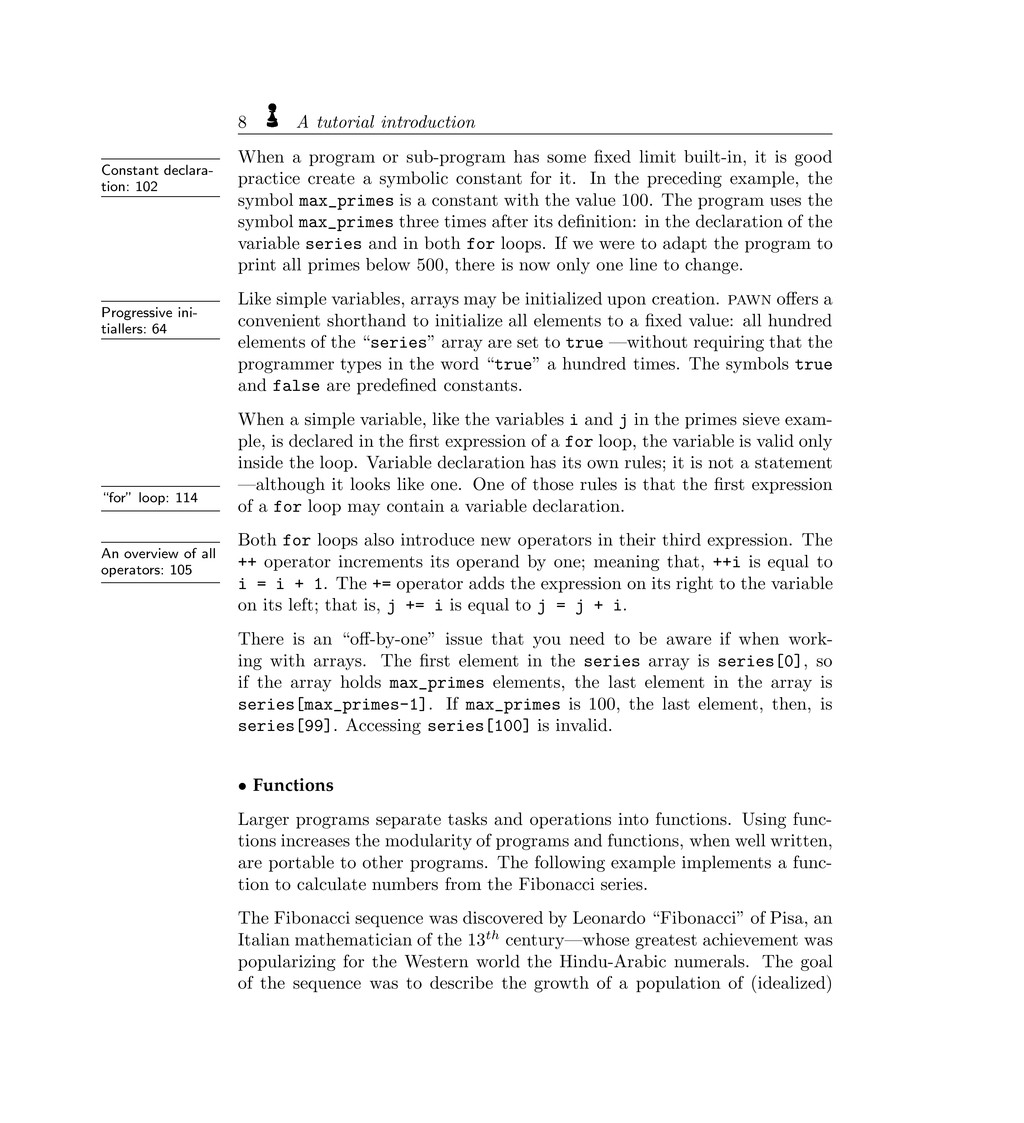
    some fixed limit built-in, it is good Constant declara- tion: 102 practice create a symbolic constant for it. In the preceding example, the symbol max_primes is a constant with the value 100. The program uses the symbol max_primes three times after its definition: in the declaration of the variable series and in both for loops. If we were to adapt the program to print all primes below 500, there is now only one line to change. Like simple variables, arrays may be initialized upon creation. pawn offers a Progressive ini- tiallers: 64 convenient shorthand to initialize all elements to a fixed value: all hundred elements of the “series” array are set to true —without requiring that the programmer types in the word “true” a hundred times. The symbols true and false are predefined constants. When a simple variable, like the variables i and j in the primes sieve exam- ple, is declared in the first expression of a for loop, the variable is valid only inside the loop. Variable declaration has its own rules; it is not a statement —although it looks like one. One of those rules is that the first expression “for” loop: 114 of a for loop may contain a variable declaration. Both for loops also introduce new operators in their third expression. The An overview of all operators: 105 ++ operator increments its operand by one; meaning that, ++i is equal to i = i + 1. The += operator adds the expression on its right to the variable on its left; that is, j += i is equal to j = j + i. There is an “off-by-one” issue that you need to be aware if when work- ing with arrays. The first element in the series array is series[0], so if the array holds max_primes elements, the last element in the array is series[max_primes-1]. If max_primes is 100, the last element, then, is series[99]. Accessing series[100] is invalid. • Functions Larger programs separate tasks and operations into functions. Using func- tions increases the modularity of programs and functions, when well written, are portable to other programs. The following example implements a func- tion to calculate numbers from the Fibonacci series. The Fibonacci sequence was discovered by Leonardo “Fibonacci” of Pisa, an Italian mathematician of the 13th century—whose greatest achievement was popularizing for the Western world the Hindu-Arabic numerals. The goal of the sequence was to describe the growth of a population of (idealized)
  11. A tutorial introduction 9 rabbits; and the sequence is 1,

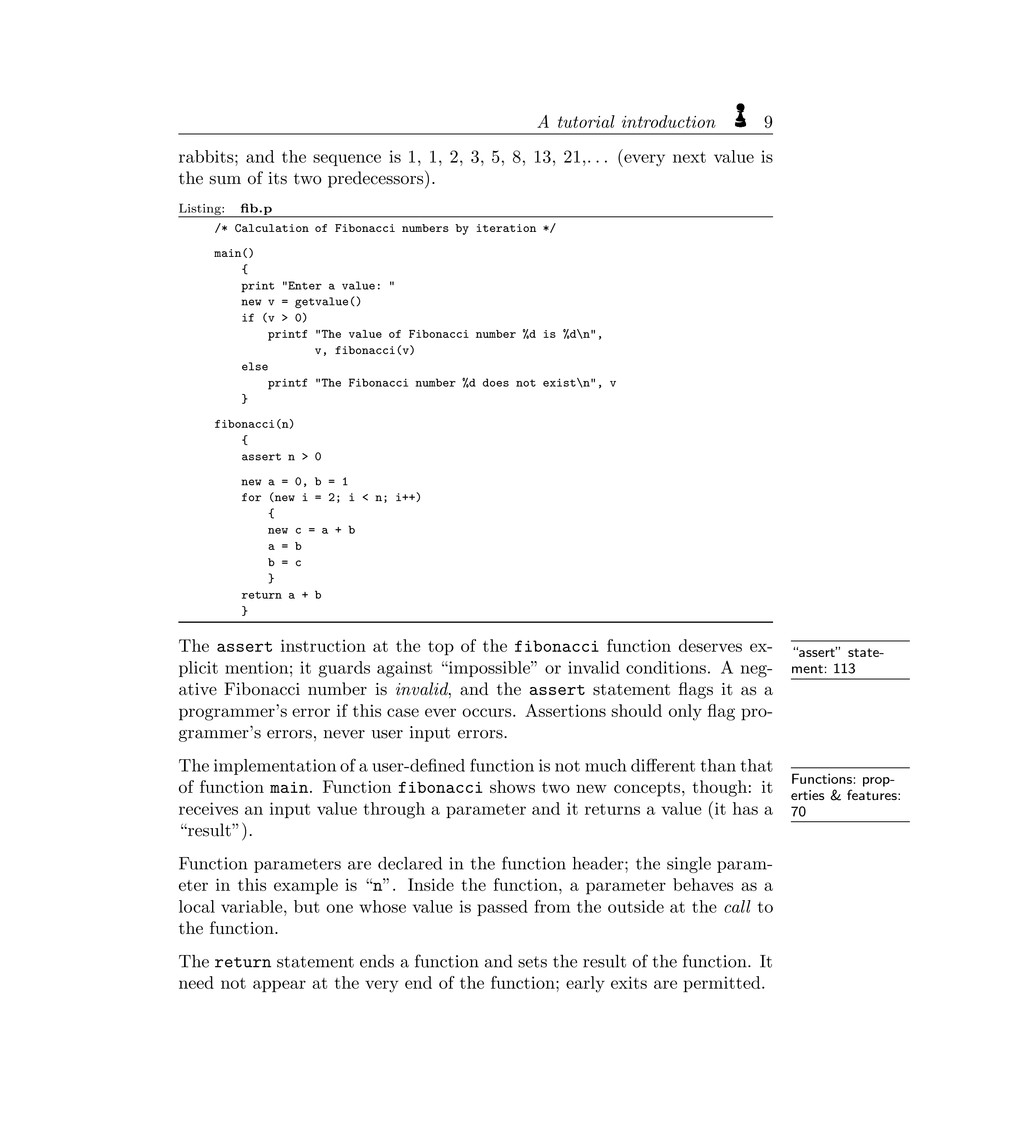
    1, 2, 3, 5, 8, 13, 21,. . . (every next value is the sum of its two predecessors). Listing: fib.p /* Calculation of Fibonacci numbers by iteration */ main() { print "Enter a value: " new v = getvalue() if (v > 0) printf "The value of Fibonacci number %d is %d\n", v, fibonacci(v) else printf "The Fibonacci number %d does not exist\n", v } fibonacci(n) { assert n > 0 new a = 0, b = 1 for (new i = 2; i < n; i++) { new c = a + b a = b b = c } return a + b } The assert instruction at the top of the fibonacci function deserves ex- “assert” state- ment: 113 plicit mention; it guards against “impossible” or invalid conditions. A neg- ative Fibonacci number is invalid, and the assert statement flags it as a programmer’s error if this case ever occurs. Assertions should only flag pro- grammer’s errors, never user input errors. The implementation of a user-defined function is not much different than that Functions: prop- erties & features: 70 of function main. Function fibonacci shows two new concepts, though: it receives an input value through a parameter and it returns a value (it has a “result”). Function parameters are declared in the function header; the single param- eter in this example is “n”. Inside the function, a parameter behaves as a local variable, but one whose value is passed from the outside at the call to the function. The return statement ends a function and sets the result of the function. It need not appear at the very end of the function; early exits are permitted.
  12. 10 A tutorial introduction The main function of the Fibonacci

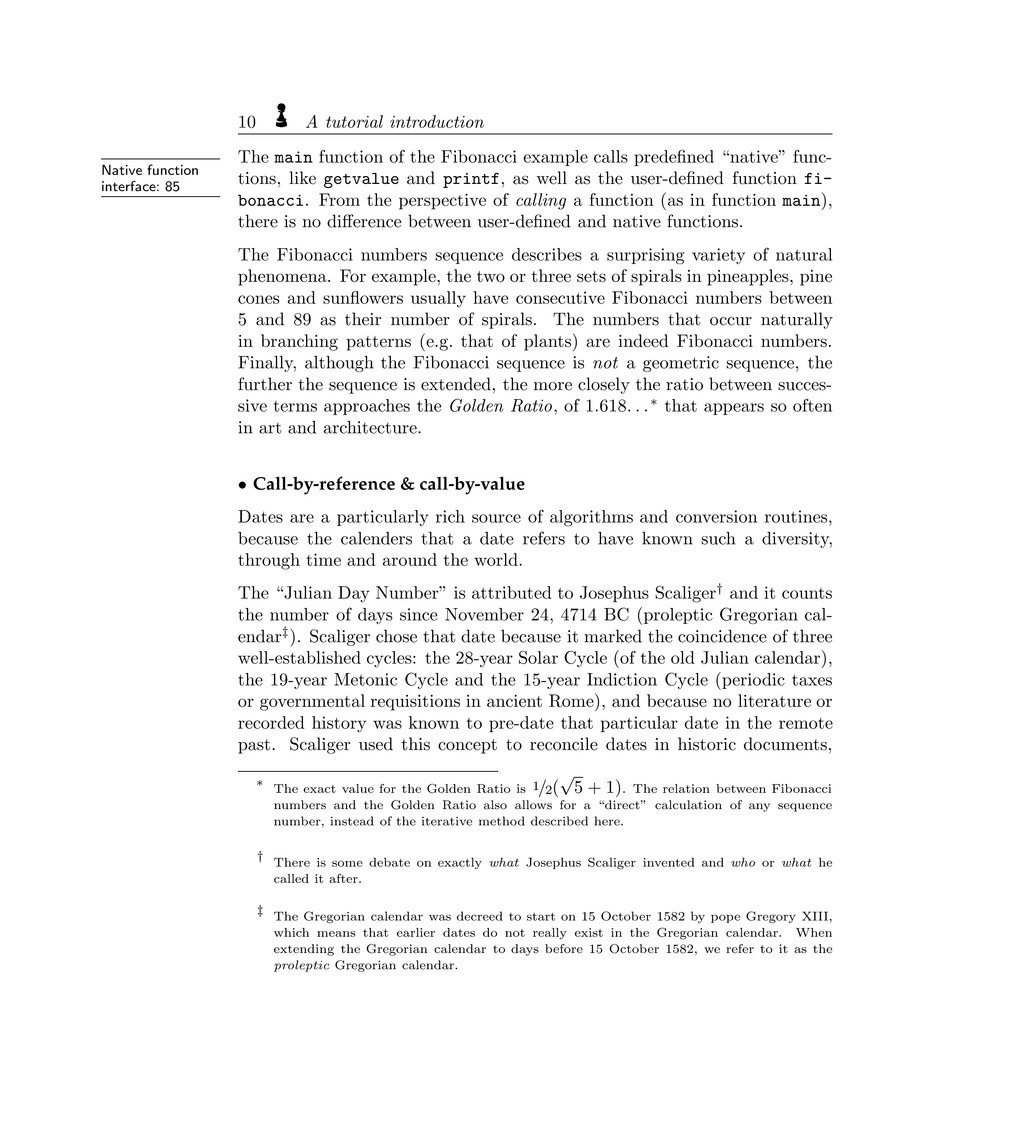
    example calls predefined “native” func- Native function interface: 85 tions, like getvalue and printf, as well as the user-defined function fi- bonacci. From the perspective of calling a function (as in function main), there is no difference between user-defined and native functions. The Fibonacci numbers sequence describes a surprising variety of natural phenomena. For example, the two or three sets of spirals in pineapples, pine cones and sunflowers usually have consecutive Fibonacci numbers between 5 and 89 as their number of spirals. The numbers that occur naturally in branching patterns (e.g. that of plants) are indeed Fibonacci numbers. Finally, although the Fibonacci sequence is not a geometric sequence, the further the sequence is extended, the more closely the ratio between succes- sive terms approaches the Golden Ratio, of 1.618. . .∗ that appears so often in art and architecture. • Call-by-reference & call-by-value Dates are a particularly rich source of algorithms and conversion routines, because the calenders that a date refers to have known such a diversity, through time and around the world. The “Julian Day Number” is attributed to Josephus Scaliger† and it counts the number of days since November 24, 4714 BC (proleptic Gregorian cal- endar‡). Scaliger chose that date because it marked the coincidence of three well-established cycles: the 28-year Solar Cycle (of the old Julian calendar), the 19-year Metonic Cycle and the 15-year Indiction Cycle (periodic taxes or governmental requisitions in ancient Rome), and because no literature or recorded history was known to pre-date that particular date in the remote past. Scaliger used this concept to reconcile dates in historic documents, ∗ The exact value for the Golden Ratio is 1/2( √ 5 + 1). The relation between Fibonacci numbers and the Golden Ratio also allows for a “direct” calculation of any sequence number, instead of the iterative method described here. † There is some debate on exactly what Josephus Scaliger invented and who or what he called it after. ‡ The Gregorian calendar was decreed to start on 15 October 1582 by pope Gregory XIII, which means that earlier dates do not really exist in the Gregorian calendar. When extending the Gregorian calendar to days before 15 October 1582, we refer to it as the proleptic Gregorian calendar.
  13. A tutorial introduction 11 later astronomers embraced it to calculate

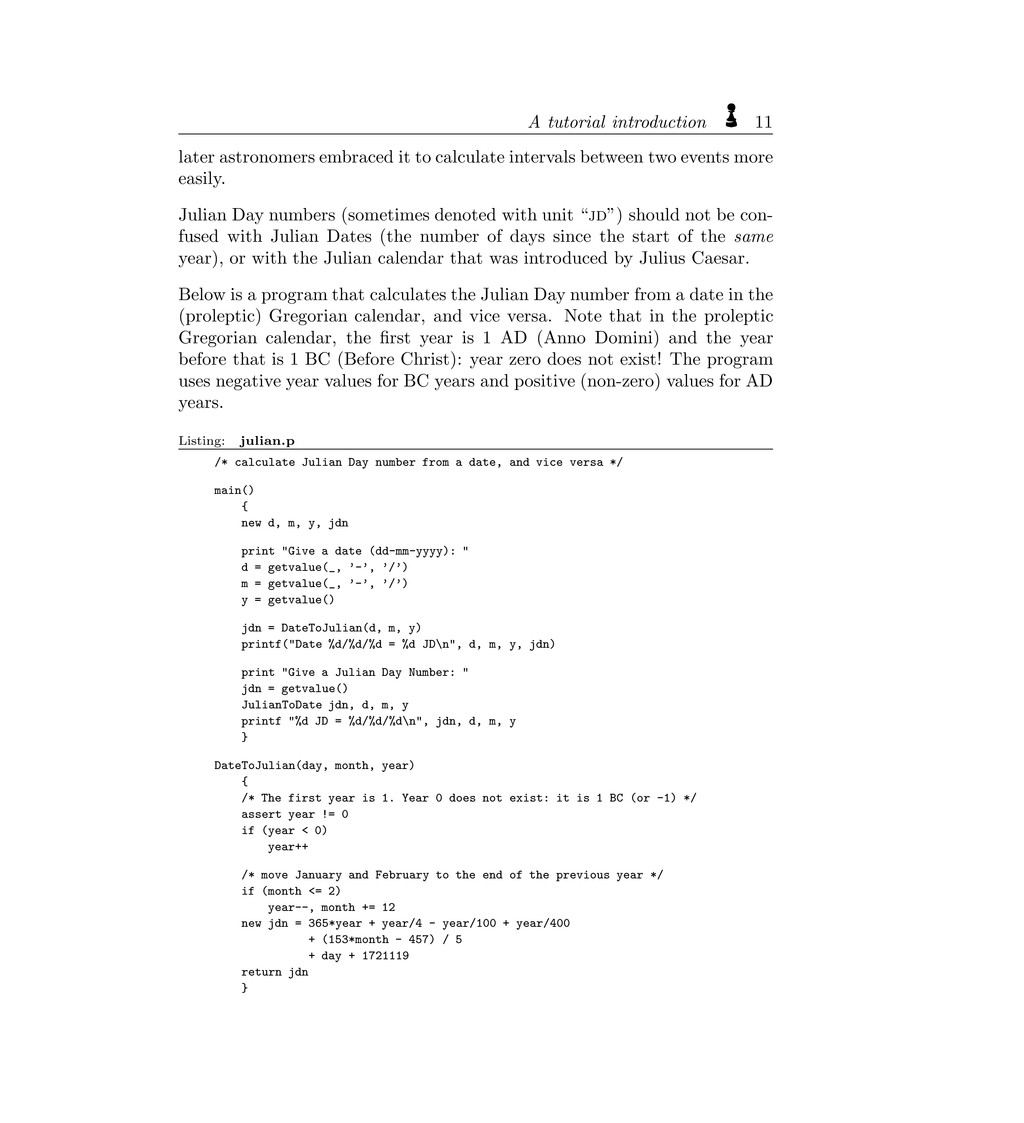
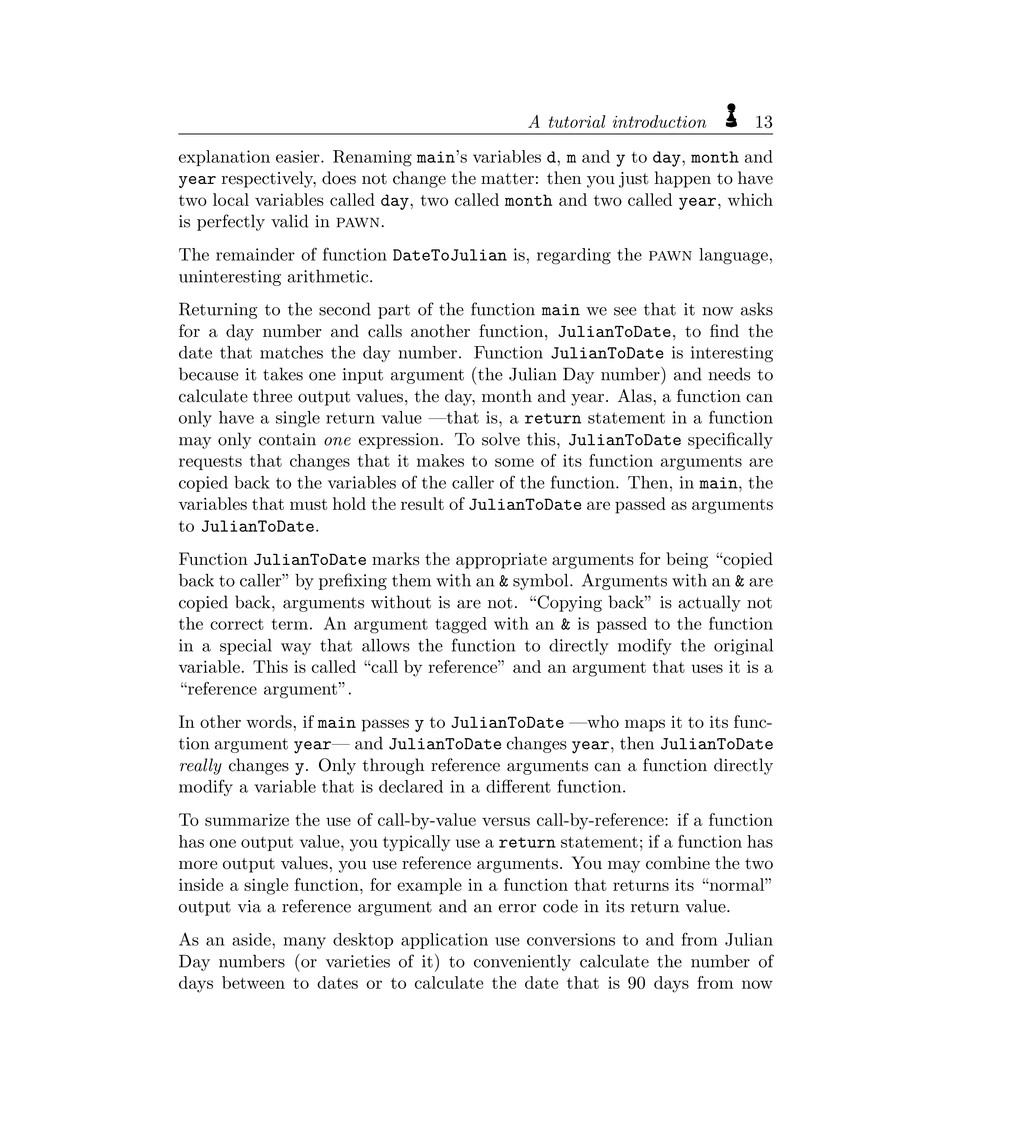
    intervals between two events more easily. Julian Day numbers (sometimes denoted with unit “jd”) should not be con- fused with Julian Dates (the number of days since the start of the same year), or with the Julian calendar that was introduced by Julius Caesar. Below is a program that calculates the Julian Day number from a date in the (proleptic) Gregorian calendar, and vice versa. Note that in the proleptic Gregorian calendar, the first year is 1 AD (Anno Domini) and the year before that is 1 BC (Before Christ): year zero does not exist! The program uses negative year values for BC years and positive (non-zero) values for AD years. Listing: julian.p /* calculate Julian Day number from a date, and vice versa */ main() { new d, m, y, jdn print "Give a date (dd-mm-yyyy): " d = getvalue(_, ’-’, ’/’) m = getvalue(_, ’-’, ’/’) y = getvalue() jdn = DateToJulian(d, m, y) printf("Date %d/%d/%d = %d JD\n", d, m, y, jdn) print "Give a Julian Day Number: " jdn = getvalue() JulianToDate jdn, d, m, y printf "%d JD = %d/%d/%d\n", jdn, d, m, y } DateToJulian(day, month, year) { /* The first year is 1. Year 0 does not exist: it is 1 BC (or -1) */ assert year != 0 if (year < 0) year++ /* move January and February to the end of the previous year */ if (month <= 2) year--, month += 12 new jdn = 365*year + year/4 - year/100 + year/400 + (153*month - 457) / 5 + day + 1721119 return jdn }
  14. 12 A tutorial introduction JulianToDate(jdn, &day, &month, &year) { jdn

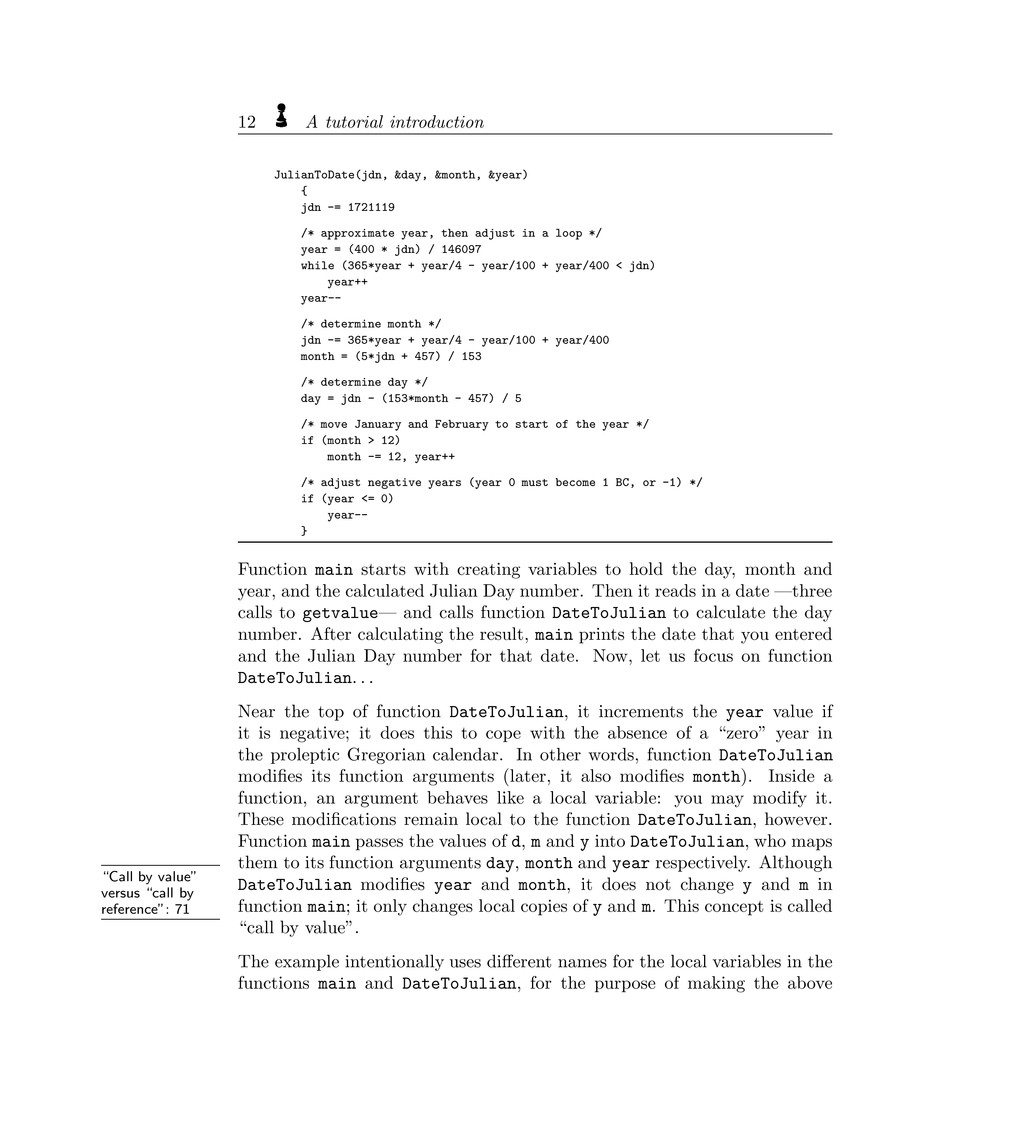
    -= 1721119 /* approximate year, then adjust in a loop */ year = (400 * jdn) / 146097 while (365*year + year/4 - year/100 + year/400 < jdn) year++ year-- /* determine month */ jdn -= 365*year + year/4 - year/100 + year/400 month = (5*jdn + 457) / 153 /* determine day */ day = jdn - (153*month - 457) / 5 /* move January and February to start of the year */ if (month > 12) month -= 12, year++ /* adjust negative years (year 0 must become 1 BC, or -1) */ if (year <= 0) year-- } Function main starts with creating variables to hold the day, month and year, and the calculated Julian Day number. Then it reads in a date —three calls to getvalue— and calls function DateToJulian to calculate the day number. After calculating the result, main prints the date that you entered and the Julian Day number for that date. Now, let us focus on function DateToJulian. . . Near the top of function DateToJulian, it increments the year value if it is negative; it does this to cope with the absence of a “zero” year in the proleptic Gregorian calendar. In other words, function DateToJulian modifies its function arguments (later, it also modifies month). Inside a function, an argument behaves like a local variable: you may modify it. These modifications remain local to the function DateToJulian, however. Function main passes the values of d, m and y into DateToJulian, who maps them to its function arguments day, month and year respectively. Although “Call by value” versus “call by reference”: 71 DateToJulian modifies year and month, it does not change y and m in function main; it only changes local copies of y and m. This concept is called “call by value”. The example intentionally uses different names for the local variables in the functions main and DateToJulian, for the purpose of making the above
  15. A tutorial introduction 13 explanation easier. Renaming main’s variables d,

    m and y to day, month and year respectively, does not change the matter: then you just happen to have two local variables called day, two called month and two called year, which is perfectly valid in pawn. The remainder of function DateToJulian is, regarding the pawn language, uninteresting arithmetic. Returning to the second part of the function main we see that it now asks for a day number and calls another function, JulianToDate, to find the date that matches the day number. Function JulianToDate is interesting because it takes one input argument (the Julian Day number) and needs to calculate three output values, the day, month and year. Alas, a function can only have a single return value —that is, a return statement in a function may only contain one expression. To solve this, JulianToDate specifically requests that changes that it makes to some of its function arguments are copied back to the variables of the caller of the function. Then, in main, the variables that must hold the result of JulianToDate are passed as arguments to JulianToDate. Function JulianToDate marks the appropriate arguments for being “copied back to caller” by prefixing them with an & symbol. Arguments with an & are copied back, arguments without is are not. “Copying back” is actually not the correct term. An argument tagged with an & is passed to the function in a special way that allows the function to directly modify the original variable. This is called “call by reference” and an argument that uses it is a “reference argument”. In other words, if main passes y to JulianToDate —who maps it to its func- tion argument year— and JulianToDate changes year, then JulianToDate really changes y. Only through reference arguments can a function directly modify a variable that is declared in a different function. To summarize the use of call-by-value versus call-by-reference: if a function has one output value, you typically use a return statement; if a function has more output values, you use reference arguments. You may combine the two inside a single function, for example in a function that returns its “normal” output via a reference argument and an error code in its return value. As an aside, many desktop application use conversions to and from Julian Day numbers (or varieties of it) to conveniently calculate the number of days between to dates or to calculate the date that is 90 days from now
  16. 14 A tutorial introduction —for example. • Rational numbers All

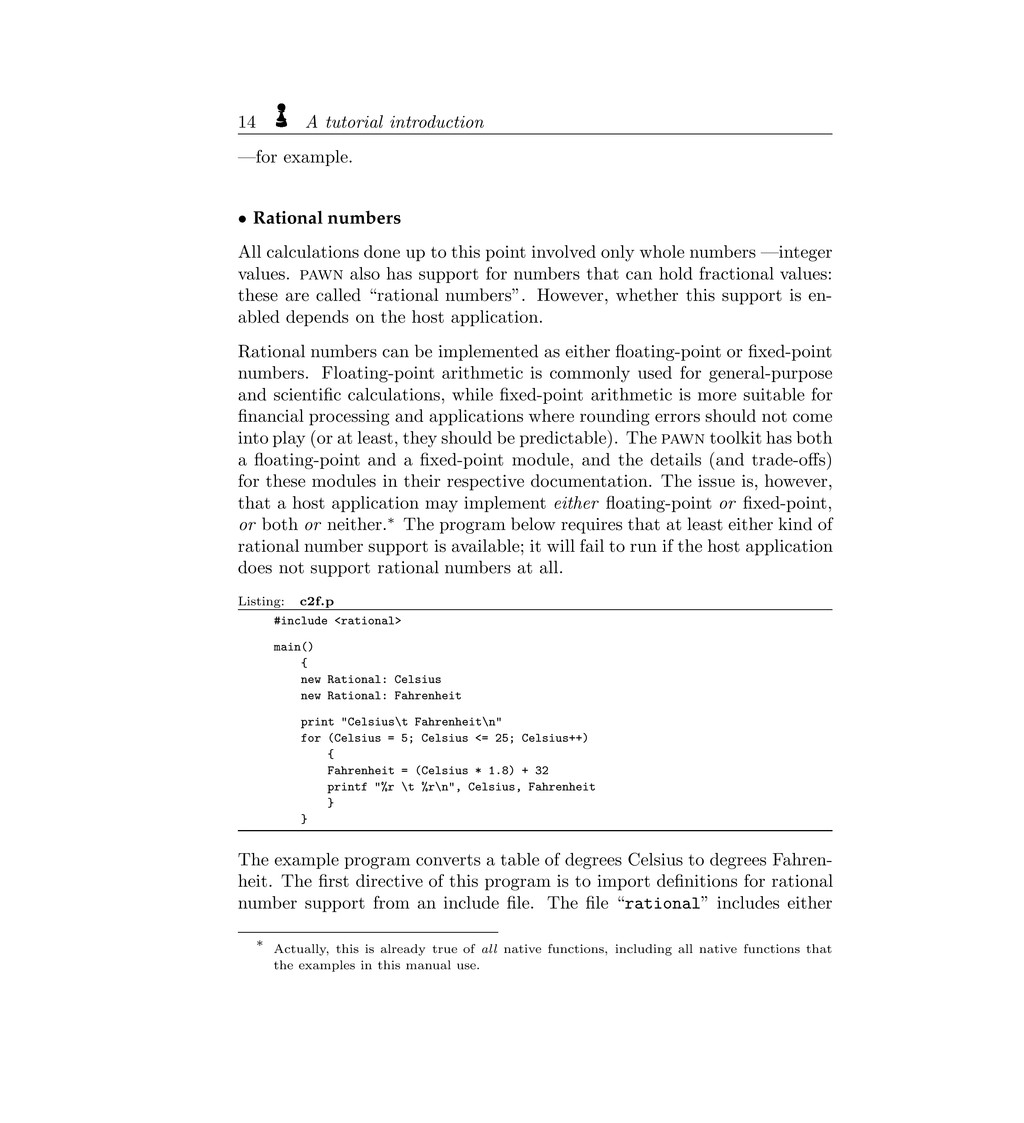
    calculations done up to this point involved only whole numbers —integer values. pawn also has support for numbers that can hold fractional values: these are called “rational numbers”. However, whether this support is en- abled depends on the host application. Rational numbers can be implemented as either floating-point or fixed-point numbers. Floating-point arithmetic is commonly used for general-purpose and scientific calculations, while fixed-point arithmetic is more suitable for financial processing and applications where rounding errors should not come into play (or at least, they should be predictable). The pawn toolkit has both a floating-point and a fixed-point module, and the details (and trade-offs) for these modules in their respective documentation. The issue is, however, that a host application may implement either floating-point or fixed-point, or both or neither.∗ The program below requires that at least either kind of rational number support is available; it will fail to run if the host application does not support rational numbers at all. Listing: c2f.p #include <rational> main() { new Rational: Celsius new Rational: Fahrenheit print "Celsius\t Fahrenheit\n" for (Celsius = 5; Celsius <= 25; Celsius++) { Fahrenheit = (Celsius * 1.8) + 32 printf "%r \t %r\n", Celsius, Fahrenheit } } The example program converts a table of degrees Celsius to degrees Fahren- heit. The first directive of this program is to import definitions for rational number support from an include file. The file “rational” includes either ∗ Actually, this is already true of all native functions, including all native functions that the examples in this manual use.
  17. A tutorial introduction 15 support for floating-point numbers or for

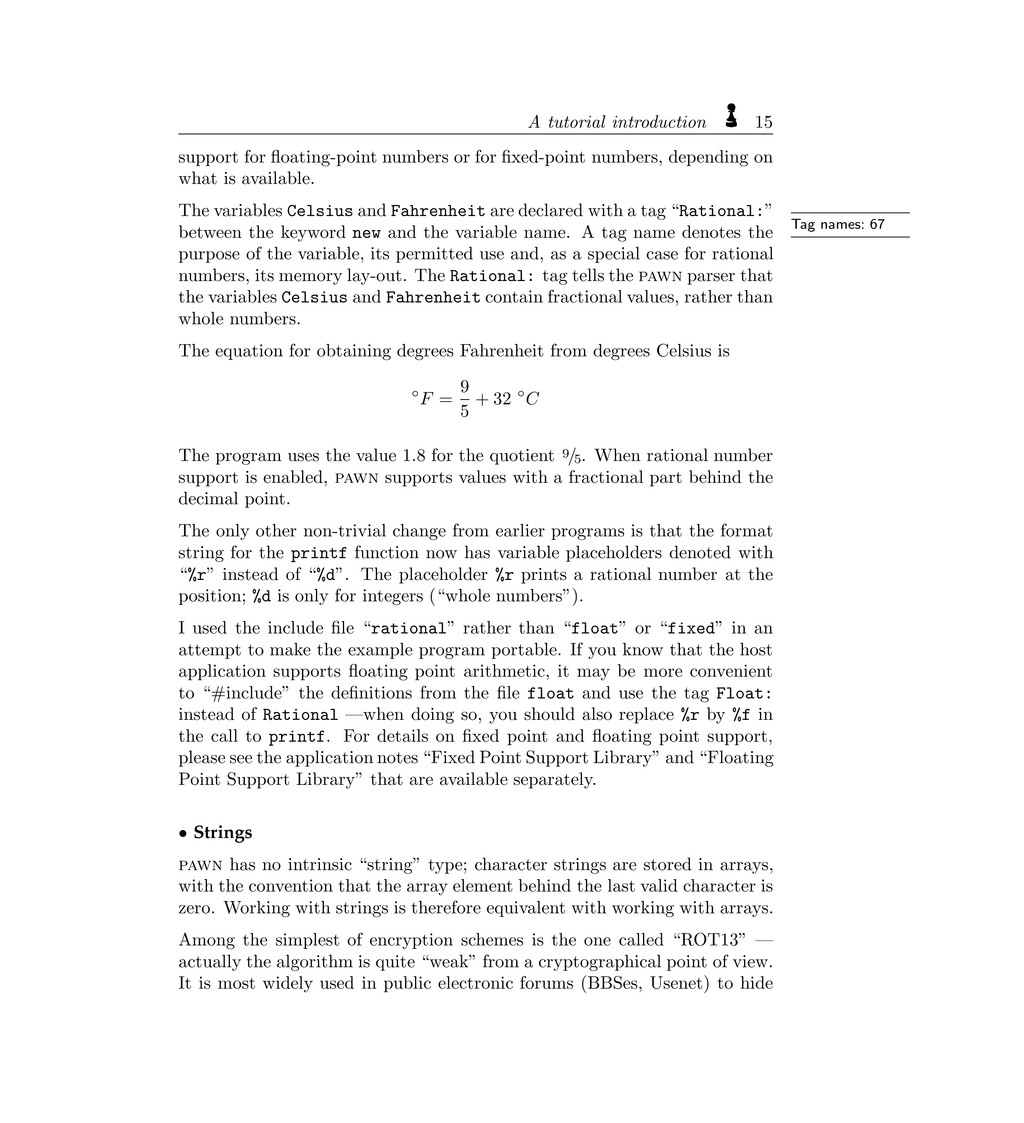
    fixed-point numbers, depending on what is available. The variables Celsius and Fahrenheit are declared with a tag “Rational:” Tag names: 67 between the keyword new and the variable name. A tag name denotes the purpose of the variable, its permitted use and, as a special case for rational numbers, its memory lay-out. The Rational: tag tells the pawn parser that the variables Celsius and Fahrenheit contain fractional values, rather than whole numbers. The equation for obtaining degrees Fahrenheit from degrees Celsius is ◦F = 9 5 + 32 ◦C The program uses the value 1.8 for the quotient 9/5. When rational number support is enabled, pawn supports values with a fractional part behind the decimal point. The only other non-trivial change from earlier programs is that the format string for the printf function now has variable placeholders denoted with “%r” instead of “%d”. The placeholder %r prints a rational number at the position; %d is only for integers (“whole numbers”). I used the include file “rational” rather than “float” or “fixed” in an attempt to make the example program portable. If you know that the host application supports floating point arithmetic, it may be more convenient to “#include” the definitions from the file float and use the tag Float: instead of Rational —when doing so, you should also replace %r by %f in the call to printf. For details on fixed point and floating point support, please see the application notes “Fixed Point Support Library” and “Floating Point Support Library” that are available separately. • Strings pawn has no intrinsic “string” type; character strings are stored in arrays, with the convention that the array element behind the last valid character is zero. Working with strings is therefore equivalent with working with arrays. Among the simplest of encryption schemes is the one called “ROT13” — actually the algorithm is quite “weak” from a cryptographical point of view. It is most widely used in public electronic forums (BBSes, Usenet) to hide
  18. 16 A tutorial introduction texts from casual reading, such as

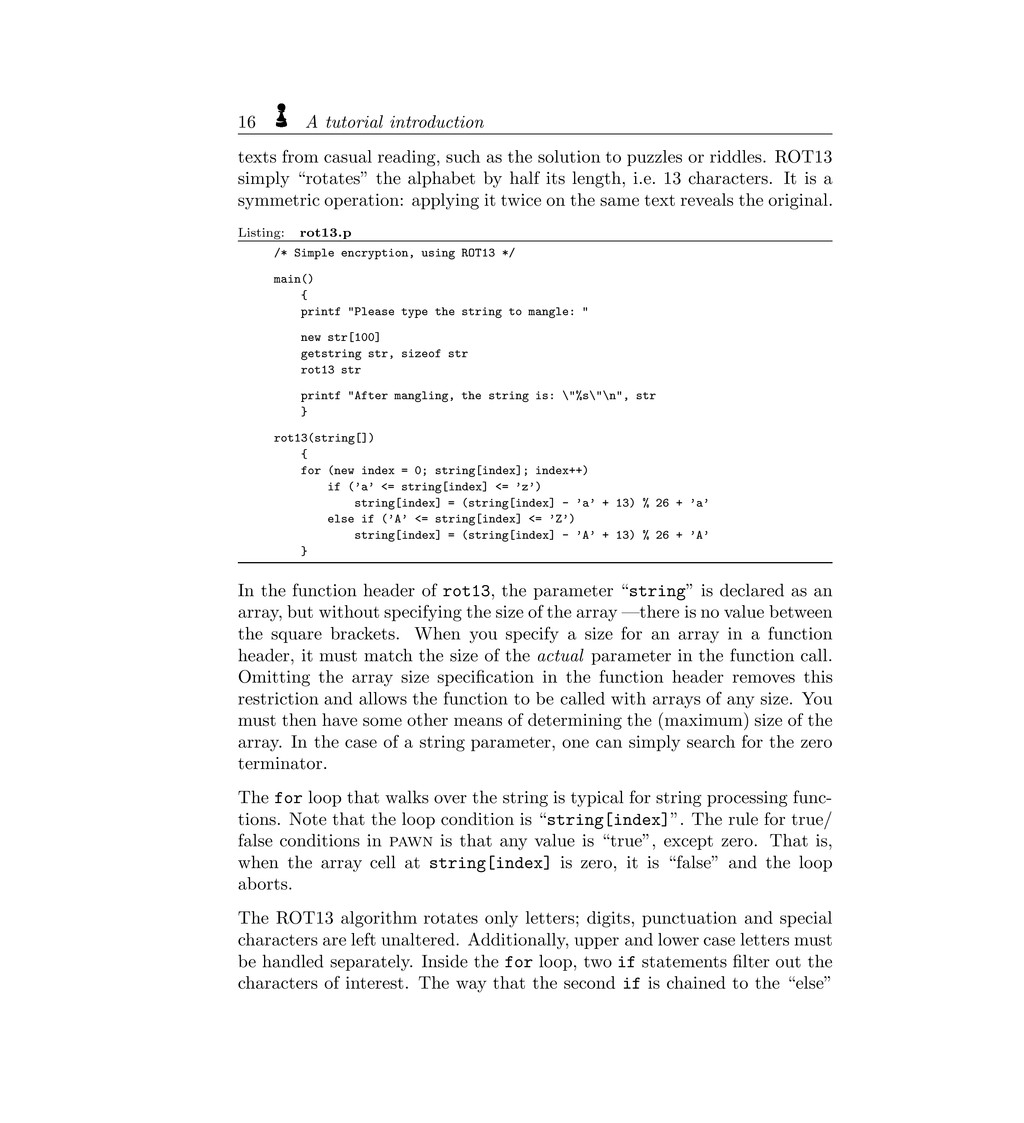
    the solution to puzzles or riddles. ROT13 simply “rotates” the alphabet by half its length, i.e. 13 characters. It is a symmetric operation: applying it twice on the same text reveals the original. Listing: rot13.p /* Simple encryption, using ROT13 */ main() { printf "Please type the string to mangle: " new str[100] getstring str, sizeof str rot13 str printf "After mangling, the string is: \"%s\"\n", str } rot13(string[]) { for (new index = 0; string[index]; index++) if (’a’ <= string[index] <= ’z’) string[index] = (string[index] - ’a’ + 13) % 26 + ’a’ else if (’A’ <= string[index] <= ’Z’) string[index] = (string[index] - ’A’ + 13) % 26 + ’A’ } In the function header of rot13, the parameter “string” is declared as an array, but without specifying the size of the array —there is no value between the square brackets. When you specify a size for an array in a function header, it must match the size of the actual parameter in the function call. Omitting the array size specification in the function header removes this restriction and allows the function to be called with arrays of any size. You must then have some other means of determining the (maximum) size of the array. In the case of a string parameter, one can simply search for the zero terminator. The for loop that walks over the string is typical for string processing func- tions. Note that the loop condition is “string[index]”. The rule for true/ false conditions in pawn is that any value is “true”, except zero. That is, when the array cell at string[index] is zero, it is “false” and the loop aborts. The ROT13 algorithm rotates only letters; digits, punctuation and special characters are left unaltered. Additionally, upper and lower case letters must be handled separately. Inside the for loop, two if statements filter out the characters of interest. The way that the second if is chained to the “else”
  19. A tutorial introduction 17 clause of the first if is

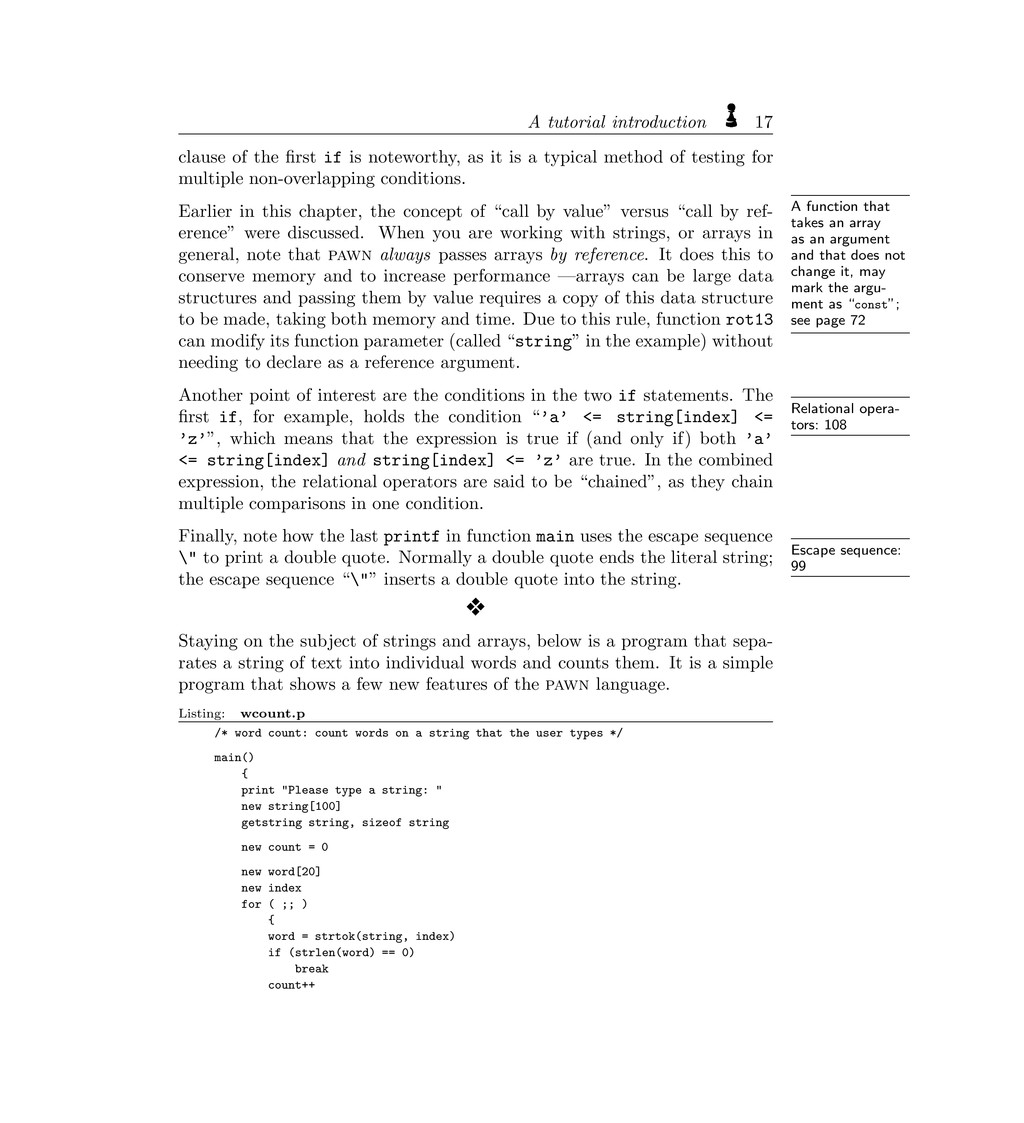
    noteworthy, as it is a typical method of testing for multiple non-overlapping conditions. Earlier in this chapter, the concept of “call by value” versus “call by ref- A function that takes an array as an argument and that does not change it, may mark the argu- ment as “const”; see page 72 erence” were discussed. When you are working with strings, or arrays in general, note that pawn always passes arrays by reference. It does this to conserve memory and to increase performance —arrays can be large data structures and passing them by value requires a copy of this data structure to be made, taking both memory and time. Due to this rule, function rot13 can modify its function parameter (called “string” in the example) without needing to declare as a reference argument. Another point of interest are the conditions in the two if statements. The Relational opera- tors: 108 first if, for example, holds the condition “’a’ <= string[index] <= ’z’”, which means that the expression is true if (and only if) both ’a’ <= string[index] and string[index] <= ’z’ are true. In the combined expression, the relational operators are said to be “chained”, as they chain multiple comparisons in one condition. Finally, note how the last printf in function main uses the escape sequence Escape sequence: 99 \" to print a double quote. Normally a double quote ends the literal string; the escape sequence “\"” inserts a double quote into the string. Õ Staying on the subject of strings and arrays, below is a program that sepa- rates a string of text into individual words and counts them. It is a simple program that shows a few new features of the pawn language. Listing: wcount.p /* word count: count words on a string that the user types */ main() { print "Please type a string: " new string[100] getstring string, sizeof string new count = 0 new word[20] new index for ( ;; ) { word = strtok(string, index) if (strlen(word) == 0) break count++
  20. 18 A tutorial introduction printf "Word %d: ’%s’\n", count, word

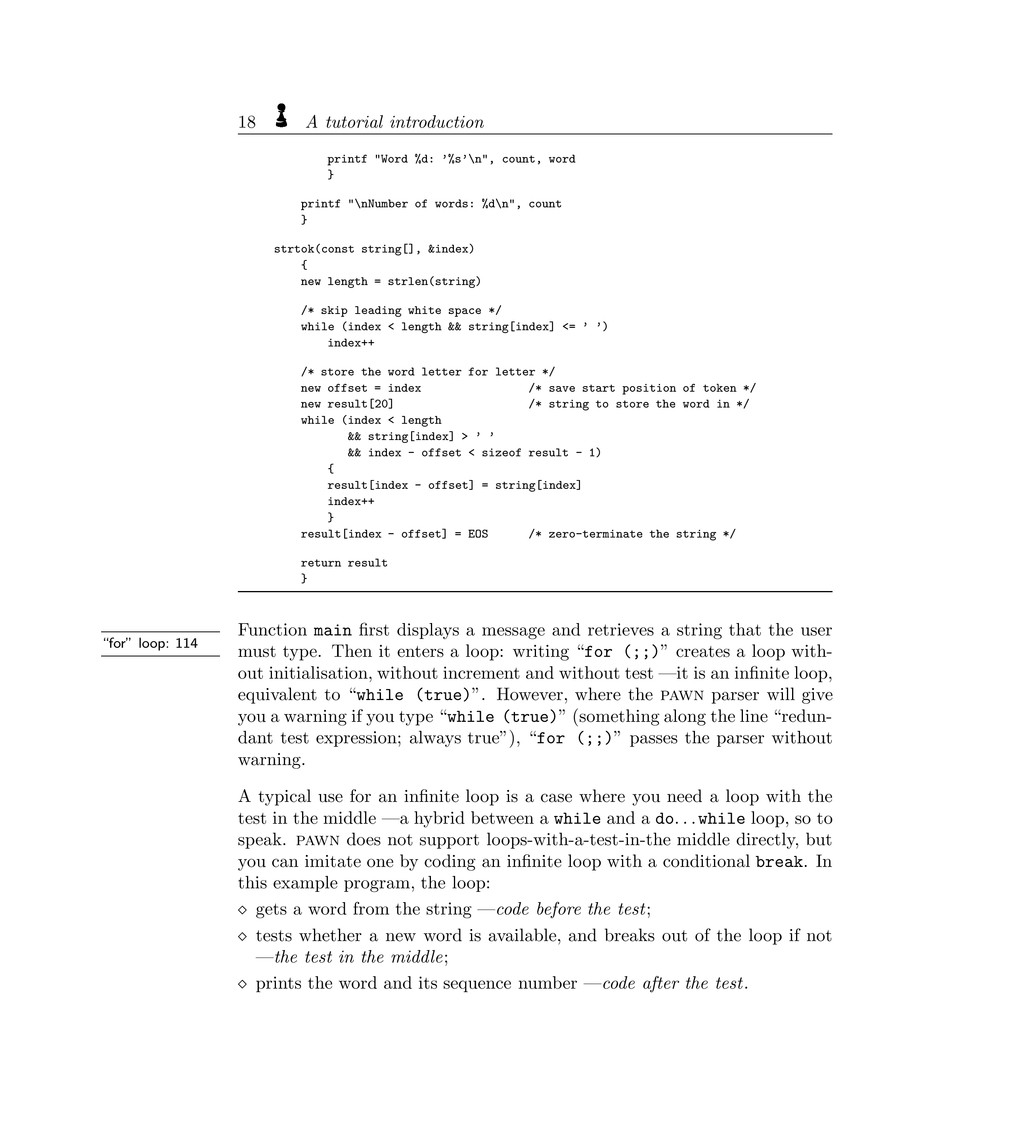
    } printf "\nNumber of words: %d\n", count } strtok(const string[], &index) { new length = strlen(string) /* skip leading white space */ while (index < length && string[index] <= ’ ’) index++ /* store the word letter for letter */ new offset = index /* save start position of token */ new result[20] /* string to store the word in */ while (index < length && string[index] > ’ ’ && index - offset < sizeof result - 1) { result[index - offset] = string[index] index++ } result[index - offset] = EOS /* zero-terminate the string */ return result } Function main first displays a message and retrieves a string that the user “for” loop: 114 must type. Then it enters a loop: writing “for (;;)” creates a loop with- out initialisation, without increment and without test —it is an infinite loop, equivalent to “while (true)”. However, where the pawn parser will give you a warning if you type “while (true)” (something along the line “redun- dant test expression; always true”), “for (;;)” passes the parser without warning. A typical use for an infinite loop is a case where you need a loop with the test in the middle —a hybrid between a while and a do. . .while loop, so to speak. pawn does not support loops-with-a-test-in-the middle directly, but you can imitate one by coding an infinite loop with a conditional break. In this example program, the loop: ⋄ gets a word from the string —code before the test; ⋄ tests whether a new word is available, and breaks out of the loop if not —the test in the middle; ⋄ prints the word and its sequence number —code after the test.
  21. A tutorial introduction 19 As is apparent from the line

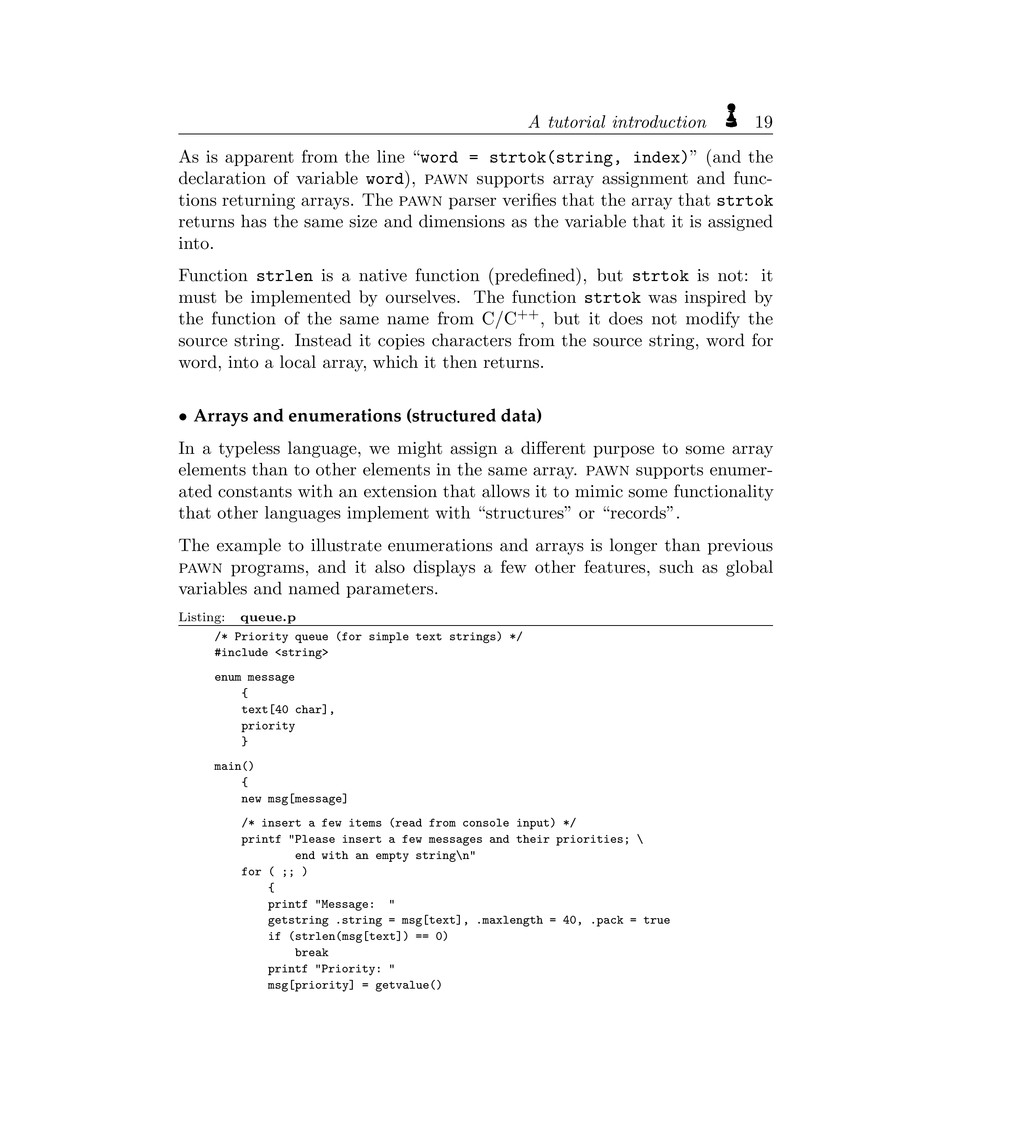
    “word = strtok(string, index)” (and the declaration of variable word), pawn supports array assignment and func- tions returning arrays. The pawn parser verifies that the array that strtok returns has the same size and dimensions as the variable that it is assigned into. Function strlen is a native function (predefined), but strtok is not: it must be implemented by ourselves. The function strtok was inspired by the function of the same name from C/C++, but it does not modify the source string. Instead it copies characters from the source string, word for word, into a local array, which it then returns. • Arrays and enumerations (structured data) In a typeless language, we might assign a different purpose to some array elements than to other elements in the same array. pawn supports enumer- ated constants with an extension that allows it to mimic some functionality that other languages implement with “structures” or “records”. The example to illustrate enumerations and arrays is longer than previous pawn programs, and it also displays a few other features, such as global variables and named parameters. Listing: queue.p /* Priority queue (for simple text strings) */ #include <string> enum message { text[40 char], priority } main() { new msg[message] /* insert a few items (read from console input) */ printf "Please insert a few messages and their priorities; \ end with an empty string\n" for ( ;; ) { printf "Message: " getstring .string = msg[text], .maxlength = 40, .pack = true if (strlen(msg[text]) == 0) break printf "Priority: " msg[priority] = getvalue()
  22. 20 A tutorial introduction if (!insert(msg)) { printf "Queue is

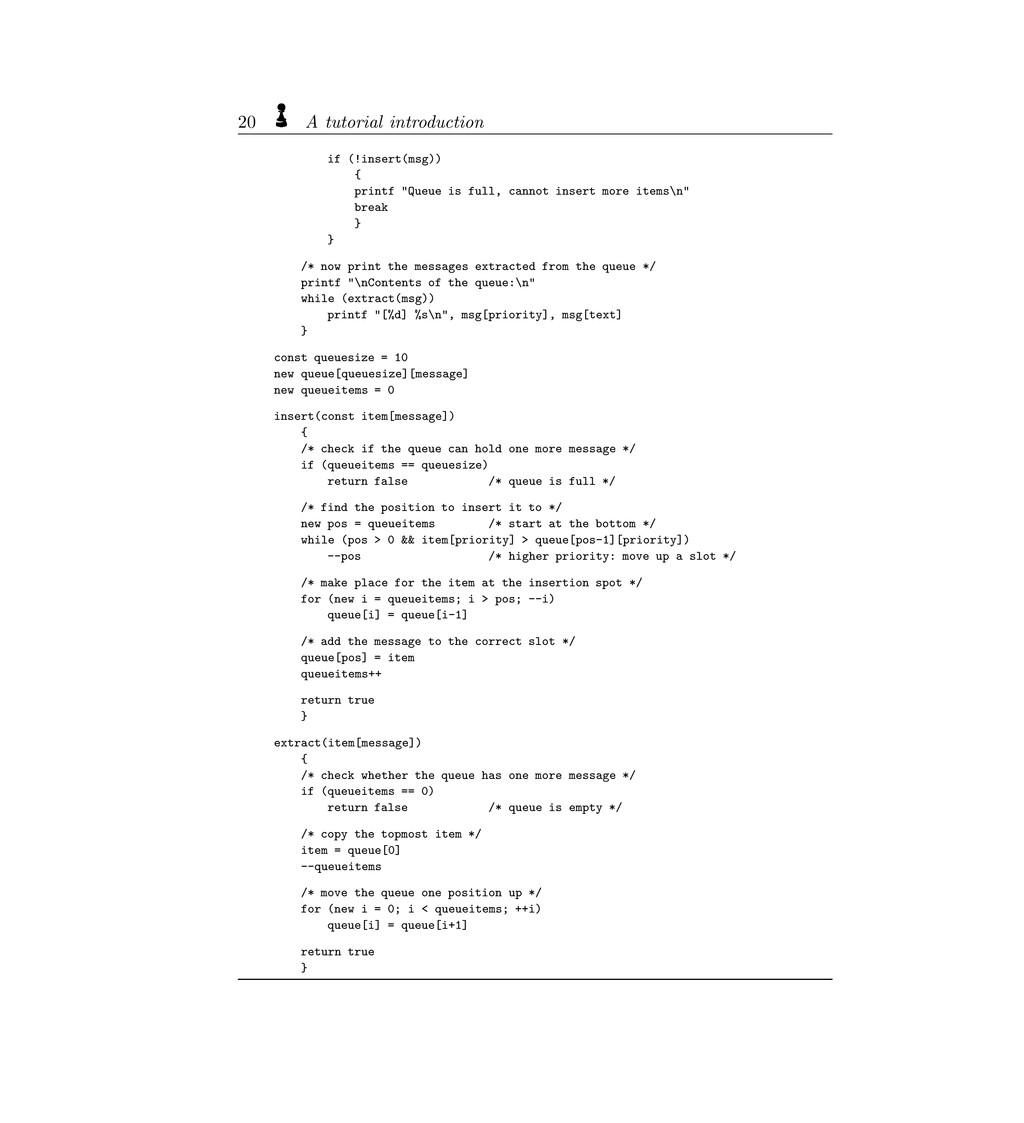
    full, cannot insert more items\n" break } } /* now print the messages extracted from the queue */ printf "\nContents of the queue:\n" while (extract(msg)) printf "[%d] %s\n", msg[priority], msg[text] } const queuesize = 10 new queue[queuesize][message] new queueitems = 0 insert(const item[message]) { /* check if the queue can hold one more message */ if (queueitems == queuesize) return false /* queue is full */ /* find the position to insert it to */ new pos = queueitems /* start at the bottom */ while (pos > 0 && item[priority] > queue[pos-1][priority]) --pos /* higher priority: move up a slot */ /* make place for the item at the insertion spot */ for (new i = queueitems; i > pos; --i) queue[i] = queue[i-1] /* add the message to the correct slot */ queue[pos] = item queueitems++ return true } extract(item[message]) { /* check whether the queue has one more message */ if (queueitems == 0) return false /* queue is empty */ /* copy the topmost item */ item = queue[0] --queueitems /* move the queue one position up */ for (new i = 0; i < queueitems; ++i) queue[i] = queue[i+1] return true }
  23. A tutorial introduction 21 Near the top of the program

    listing is the declaration of the enumeration “enum” state- ment: 102 message. This enumeration defines two constants: text, which is zero, and priority, which is 10 (assuming a 32-bit cell). The idea behind an enu- meration is to quickly define a list of symbolic constants without duplicates. By default, every constant in the list is 1 higher than its predecessor and the very first constant in the list is zero. However, you may give an extra increment for a constant so that the successor has a value of 1 plus that extra increment. The text constant specifies an extra increment of 40 char. In “char” operator: 111 pawn, char is an operator, it returns the number of cells needed to hold a packed string of the specified number of characters. Assuming a 32-bit cell and a 8-bit character, 10 cells can hold 40 packed characters. Immediately at the top of function main, a new array variable is declared with the size of message. The symbol message is the name of the enu- meration. It is also a constant with the value of the last constant in the enumeration list plus the optional extra increment for that last element. So in this example, message is 11. That is to say, array msg is declared to hold 11 cells. Further in main are two loops. The for loop reads strings and priority values from the console and inserts them in a queue. The while loop below that extracts element by element from the queue and prints the information on the screen. The point to note, is that the for loop stores both the string and the priority number (an integer) in the same variable msg; indeed, function main declares only a single variable. Function getstring stores the message text that you type starting at array msg[text] while the priority value is stored (by an assignment a few lines lower) in msg[priority]. The printf function in the while loop reads the string and the value from those positions as well. At the same time, the msg array is an entity on itself: it is passed in its entirety to function insert. That function, in turn, says near the end “queue[queueitems] = item”, where item is an array with size message and queue is a two-dimensional array that holds queuesize elements of size message. The declaration of queue and queuesize are just above function insert. The example implements a “priority queue”. You can insert a number of messages into the queue and when these messages all have the same priority, they are extracted from the queue in the same order. However, when the messages have different priorities, the one with the highest priority comes
  24. 22 A tutorial introduction out first. The “intelligence” for this

    operation is inside function insert: it first determines the position of the new message to add, then moves a few messages one position upward to make space for the new message. Function extract simply always retrieves the first element of the queue and shifts all remaining elements down by one position. Note that both functions insert and extract work on two shared variables, queue and queueitems. A variable that is declared inside a function, like variable msg in function main can only be accessed from within that function. A “global variable” is accessible by all functions, and that variable is declared outside the scope of any function. Variables must still be declared before they are used, so main cannot access variables queue and queueitems, but both insert and extract can. Function extract returns the messages with the highest priority via its func- tion argument item. That is, it changes its function argument by copying the first element of the queue array into item. Function insert copies in the other direction and it does not change its function argument item. In such a case, it is advised to mark the function argument as “const”. This helps the pawn parser to both check for errors and to generate better (more compact, quicker) code. A final remark on this latest sample is the call to getstring in function Named parame- ters: 74 main: note how the parameters are attributed with a description. The first parameter is labelled “.string”, the second “.maxlength” and the third “.pack”. Function getstring receives “named parameters” rather than positional parameters. The order in which named parameters are listed is not important. Named parameters are convenient in specifying —and deciphering— long parameter lists. • Bit operations to manipulate “sets” A few algorithms are most easily solved with “set operations”, like inter- section, union and inversion. In the figure below, for example, we want to design an algorithm that returns us the points that can be reached from some other point in a specified maximum number of steps. For example, if we ask it to return the points that can be reached in two steps starting from B, the algorithm has to return C, D, E and F, but not G because G takes three steps from B. Our approach is to keep, for each point in the graph, the set of other points
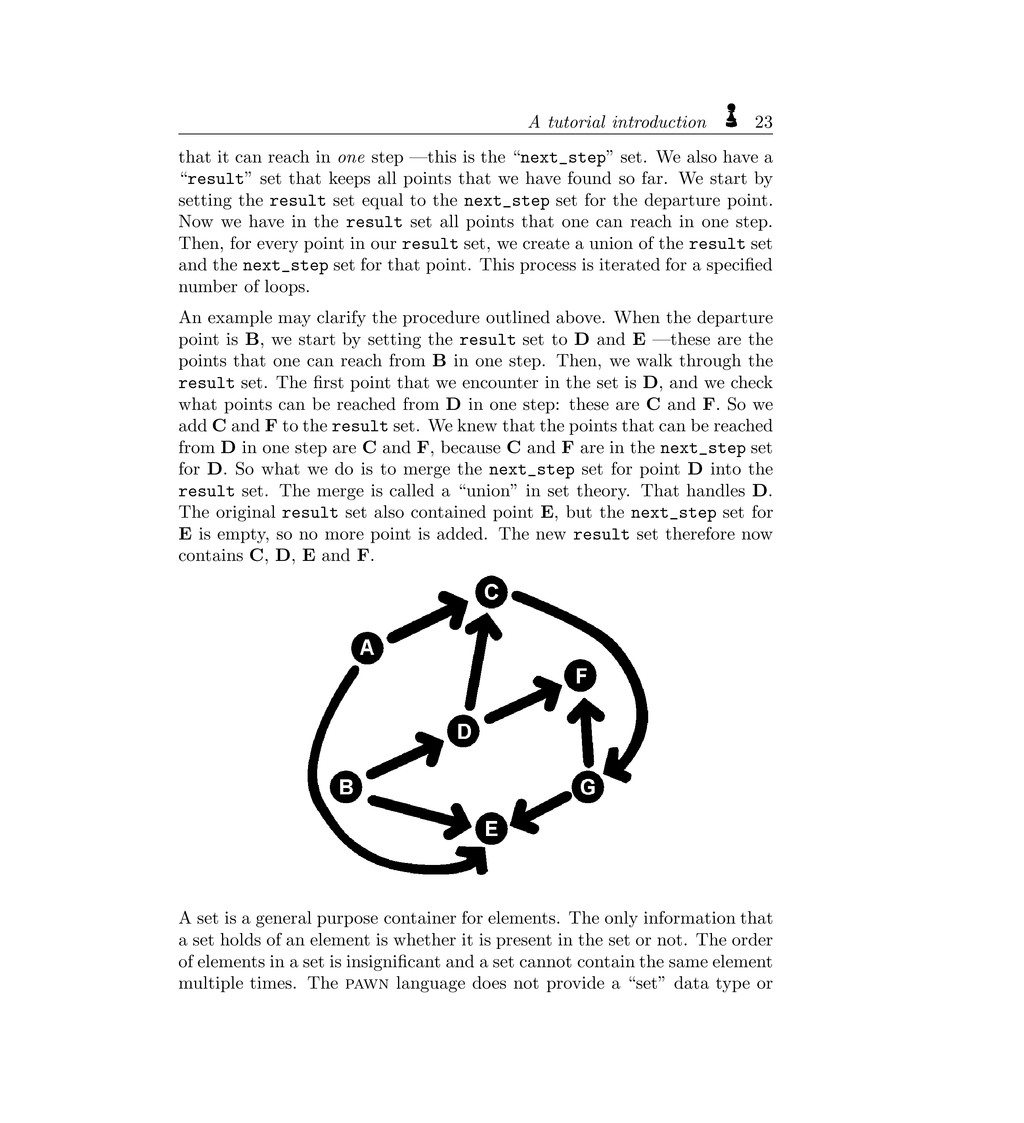
  25. A tutorial introduction 23 that it can reach in one

    step —this is the “next_step” set. We also have a “result” set that keeps all points that we have found so far. We start by setting the result set equal to the next_step set for the departure point. Now we have in the result set all points that one can reach in one step. Then, for every point in our result set, we create a union of the result set and the next_step set for that point. This process is iterated for a specified number of loops. An example may clarify the procedure outlined above. When the departure point is B, we start by setting the result set to D and E —these are the points that one can reach from B in one step. Then, we walk through the result set. The first point that we encounter in the set is D, and we check what points can be reached from D in one step: these are C and F. So we add C and F to the result set. We knew that the points that can be reached from D in one step are C and F, because C and F are in the next_step set for D. So what we do is to merge the next_step set for point D into the result set. The merge is called a “union” in set theory. That handles D. The original result set also contained point E, but the next_step set for E is empty, so no more point is added. The new result set therefore now contains C, D, E and F. A set is a general purpose container for elements. The only information that a set holds of an element is whether it is present in the set or not. The order of elements in a set is insignificant and a set cannot contain the same element multiple times. The pawn language does not provide a “set” data type or
  26. 24 A tutorial introduction operators that work on sets. However,

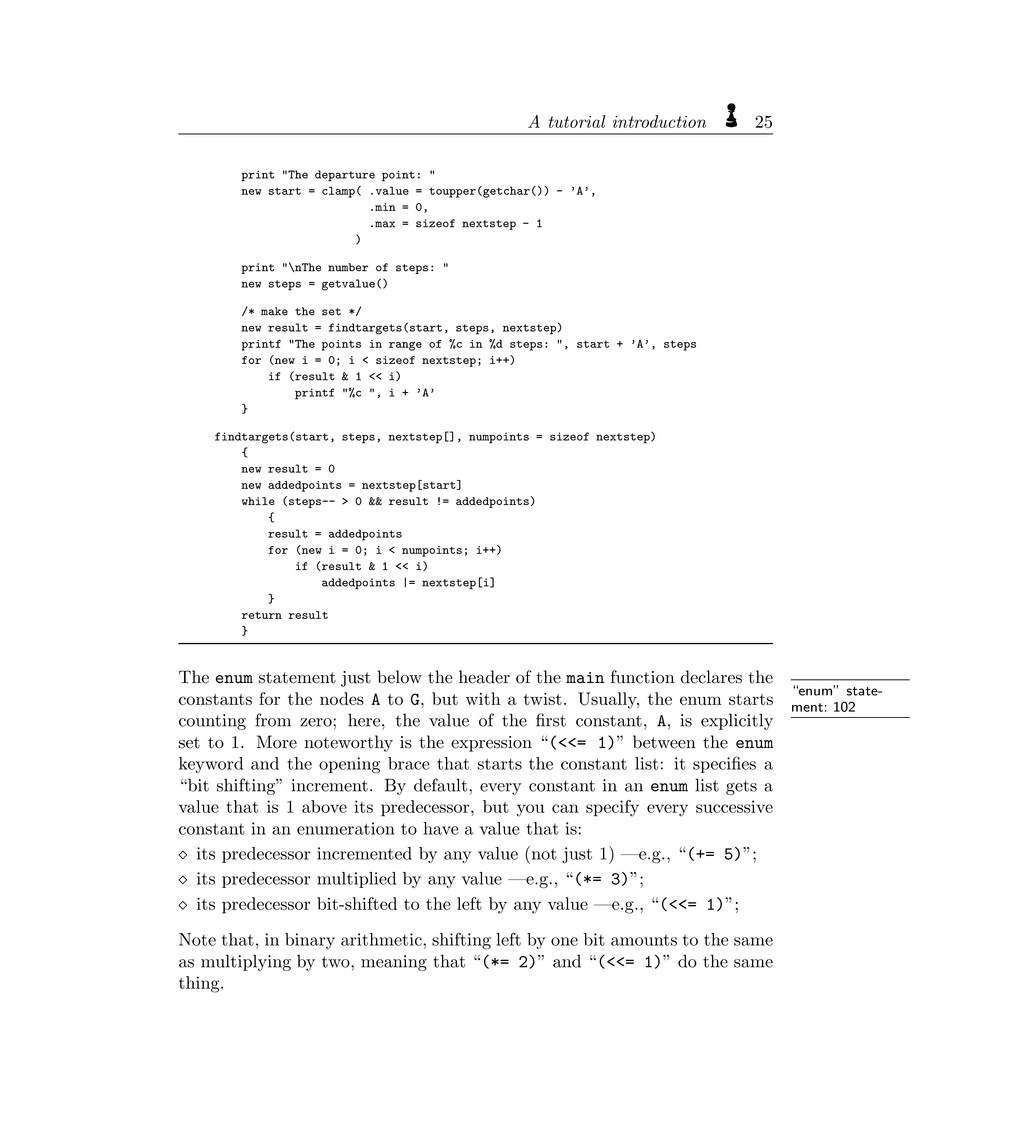
    sets with up to 32 elements can be simulated by bit operations. It takes just one bit to store a “present/absent” status and a 32-bit cell can therefore maintain the status for 32 set elements —provided that each element is assigned a unique bit position. The relation between set operations and bitwise operations is summarized in the following table. In the table, an upper case letter stands for a set and a lower case letter for an element from that set. concept mathematical notation pawn expression intersection A ∩ B A & B union A ∪ B A | B complement A ~A empty set ε 0 membership x ∈ A (1 << x) & A To test for membership —that is, to query whether a set holds a particular element, create a set with just one element and take the intersection. If the result is 0 (the empty set) the element is not in the set. Bit numbering starts typically at zero; the lowest bit is bit 0 and the highest bit in a 32-bit cell is bit 31. To make a cell with only bit 7 set, shift the value 1 left by seven —or in a pawn expression: “1 << 7”. Below is the program that implements the algorithm described earlier to find all points that can be reached from a specific departure in a given number of steps. The algorithm is completely in the findtargets function. Listing: set.p /* Set operations, using bit arithmetic */ main() { enum (<<= 1) { A = 1, B, C, D, E, F, G } new nextstep[] = { C | E, /* A can reach C and E */ D | E, /* B " " D and E */ G, /* C " " G */ C | F, /* D " " C and F */ 0, /* E " " none */ 0, /* F " " none */ E | F, /* G " " E and F */ } #pragma unused A, B
  27. A tutorial introduction 25 print "The departure point: " new

    start = clamp( .value = toupper(getchar()) - ’A’, .min = 0, .max = sizeof nextstep - 1 ) print "\nThe number of steps: " new steps = getvalue() /* make the set */ new result = findtargets(start, steps, nextstep) printf "The points in range of %c in %d steps: ", start + ’A’, steps for (new i = 0; i < sizeof nextstep; i++) if (result & 1 << i) printf "%c ", i + ’A’ } findtargets(start, steps, nextstep[], numpoints = sizeof nextstep) { new result = 0 new addedpoints = nextstep[start] while (steps-- > 0 && result != addedpoints) { result = addedpoints for (new i = 0; i < numpoints; i++) if (result & 1 << i) addedpoints |= nextstep[i] } return result } The enum statement just below the header of the main function declares the “enum” state- ment: 102 constants for the nodes A to G, but with a twist. Usually, the enum starts counting from zero; here, the value of the first constant, A, is explicitly set to 1. More noteworthy is the expression “(<<= 1)” between the enum keyword and the opening brace that starts the constant list: it specifies a “bit shifting” increment. By default, every constant in an enum list gets a value that is 1 above its predecessor, but you can specify every successive constant in an enumeration to have a value that is: ⋄ its predecessor incremented by any value (not just 1) —e.g., “(+= 5)”; ⋄ its predecessor multiplied by any value —e.g., “(*= 3)”; ⋄ its predecessor bit-shifted to the left by any value —e.g., “(<<= 1)”; Note that, in binary arithmetic, shifting left by one bit amounts to the same as multiplying by two, meaning that “(*= 2)” and “(<<= 1)” do the same thing.
  28. 26 A tutorial introduction When working with sets, a typical

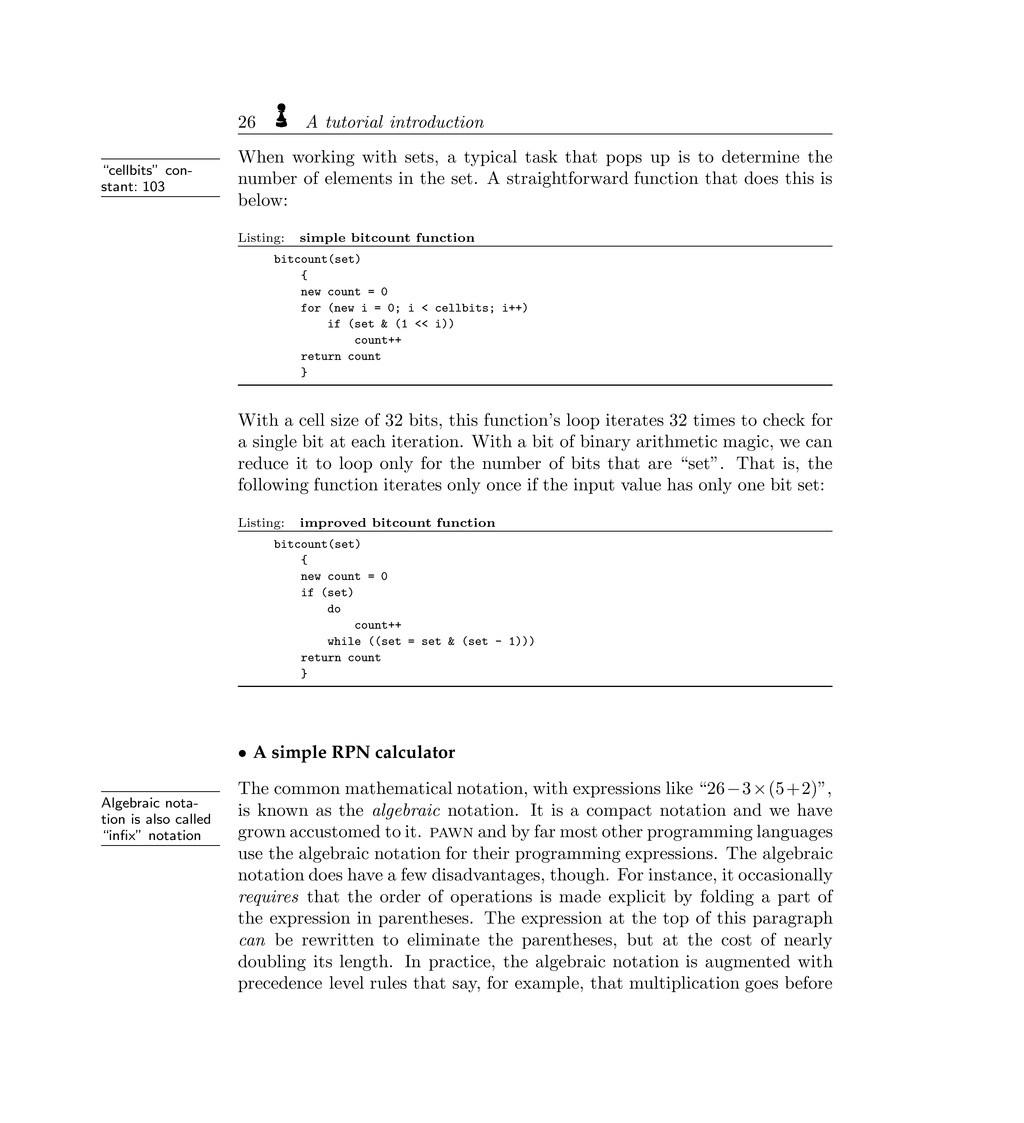
    task that pops up is to determine the “cellbits” con- stant: 103 number of elements in the set. A straightforward function that does this is below: Listing: simple bitcount function bitcount(set) { new count = 0 for (new i = 0; i < cellbits; i++) if (set & (1 << i)) count++ return count } With a cell size of 32 bits, this function’s loop iterates 32 times to check for a single bit at each iteration. With a bit of binary arithmetic magic, we can reduce it to loop only for the number of bits that are “set”. That is, the following function iterates only once if the input value has only one bit set: Listing: improved bitcount function bitcount(set) { new count = 0 if (set) do count++ while ((set = set & (set - 1))) return count } • A simple RPN calculator The common mathematical notation, with expressions like “26−3×(5+2)”, Algebraic nota- tion is also called “infix” notation is known as the algebraic notation. It is a compact notation and we have grown accustomed to it. pawn and by far most other programming languages use the algebraic notation for their programming expressions. The algebraic notation does have a few disadvantages, though. For instance, it occasionally requires that the order of operations is made explicit by folding a part of the expression in parentheses. The expression at the top of this paragraph can be rewritten to eliminate the parentheses, but at the cost of nearly doubling its length. In practice, the algebraic notation is augmented with precedence level rules that say, for example, that multiplication goes before
  29. A tutorial introduction 27 addition and subtraction.∗ Precedence levels greatly

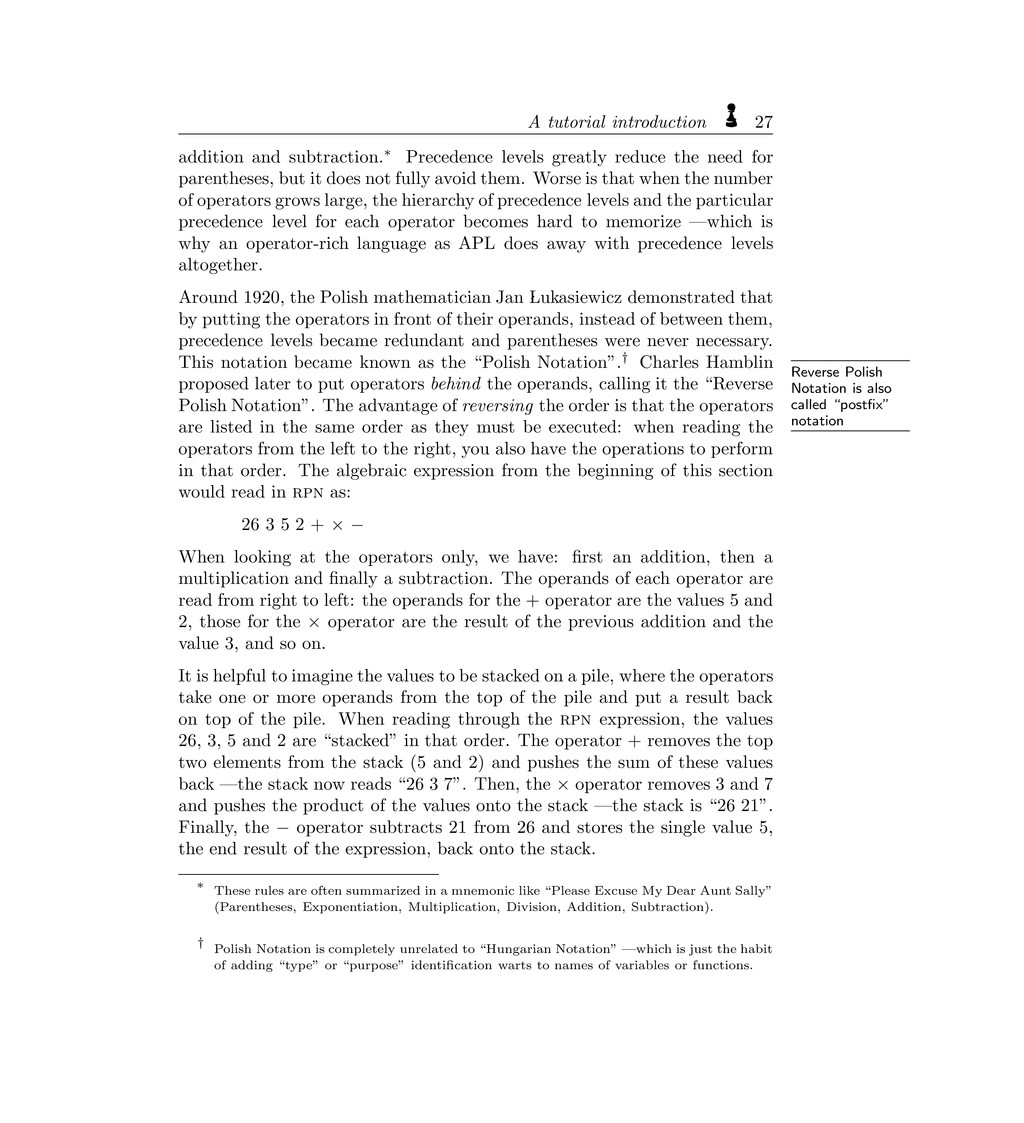
    reduce the need for parentheses, but it does not fully avoid them. Worse is that when the number of operators grows large, the hierarchy of precedence levels and the particular precedence level for each operator becomes hard to memorize —which is why an operator-rich language as APL does away with precedence levels altogether. Around 1920, the Polish mathematician Jan ´ Lukasiewicz demonstrated that by putting the operators in front of their operands, instead of between them, precedence levels became redundant and parentheses were never necessary. This notation became known as the “Polish Notation”.† Charles Hamblin Reverse Polish Notation is also called “postfix” notation proposed later to put operators behind the operands, calling it the “Reverse Polish Notation”. The advantage of reversing the order is that the operators are listed in the same order as they must be executed: when reading the operators from the left to the right, you also have the operations to perform in that order. The algebraic expression from the beginning of this section would read in rpn as: 26 3 5 2 + × − When looking at the operators only, we have: first an addition, then a multiplication and finally a subtraction. The operands of each operator are read from right to left: the operands for the + operator are the values 5 and 2, those for the × operator are the result of the previous addition and the value 3, and so on. It is helpful to imagine the values to be stacked on a pile, where the operators take one or more operands from the top of the pile and put a result back on top of the pile. When reading through the rpn expression, the values 26, 3, 5 and 2 are “stacked” in that order. The operator + removes the top two elements from the stack (5 and 2) and pushes the sum of these values back —the stack now reads “26 3 7”. Then, the × operator removes 3 and 7 and pushes the product of the values onto the stack —the stack is “26 21”. Finally, the − operator subtracts 21 from 26 and stores the single value 5, the end result of the expression, back onto the stack. ∗ These rules are often summarized in a mnemonic like “Please Excuse My Dear Aunt Sally” (Parentheses, Exponentiation, Multiplication, Division, Addition, Subtraction). † Polish Notation is completely unrelated to “Hungarian Notation” —which is just the habit of adding “type” or “purpose” identification warts to names of variables or functions.
  30. 28 A tutorial introduction Reverse Polish Notation became popular because

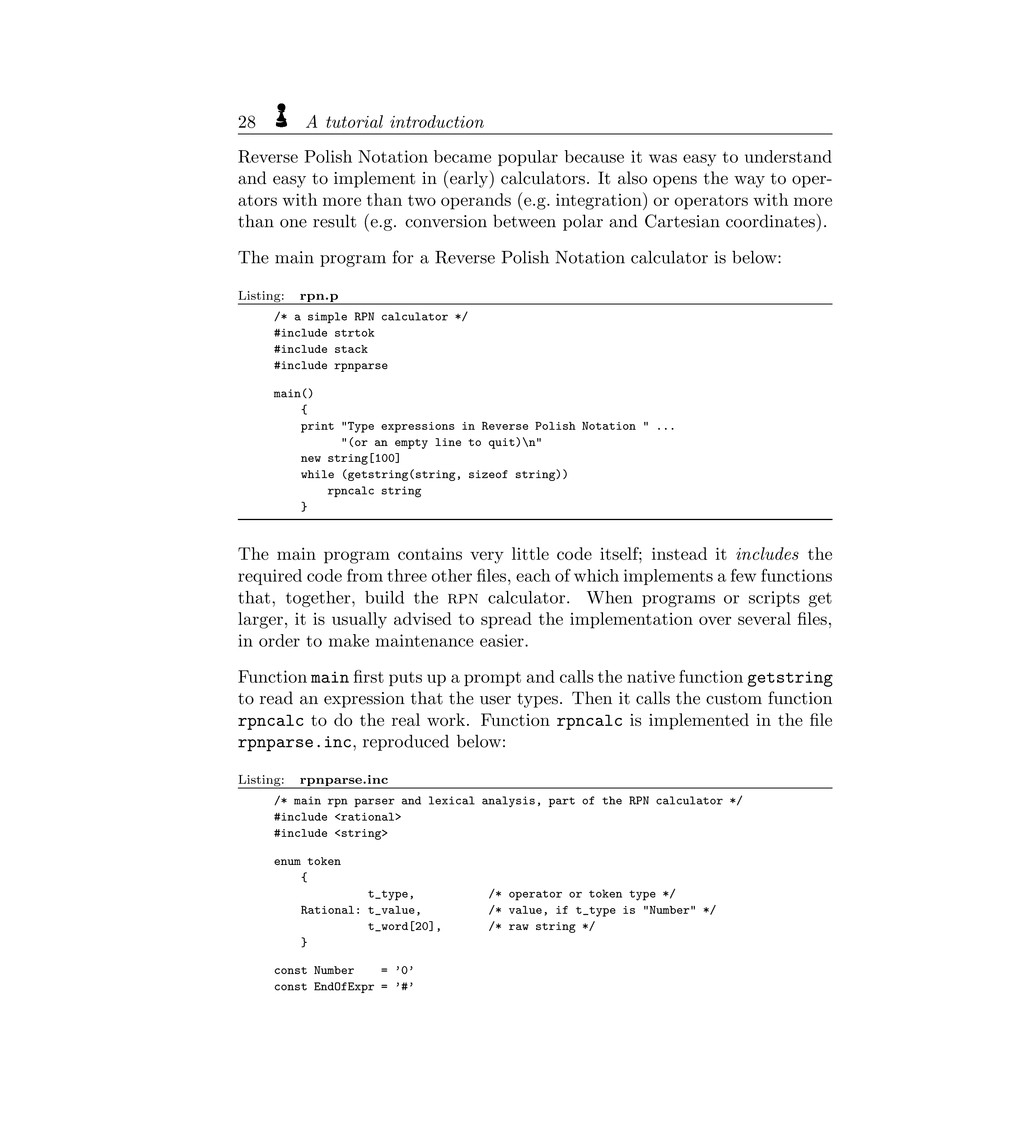
    it was easy to understand and easy to implement in (early) calculators. It also opens the way to oper- ators with more than two operands (e.g. integration) or operators with more than one result (e.g. conversion between polar and Cartesian coordinates). The main program for a Reverse Polish Notation calculator is below: Listing: rpn.p /* a simple RPN calculator */ #include strtok #include stack #include rpnparse main() { print "Type expressions in Reverse Polish Notation " ... "(or an empty line to quit)\n" new string[100] while (getstring(string, sizeof string)) rpncalc string } The main program contains very little code itself; instead it includes the required code from three other files, each of which implements a few functions that, together, build the rpn calculator. When programs or scripts get larger, it is usually advised to spread the implementation over several files, in order to make maintenance easier. Function main first puts up a prompt and calls the native function getstring to read an expression that the user types. Then it calls the custom function rpncalc to do the real work. Function rpncalc is implemented in the file rpnparse.inc, reproduced below: Listing: rpnparse.inc /* main rpn parser and lexical analysis, part of the RPN calculator */ #include <rational> #include <string> enum token { t_type, /* operator or token type */ Rational: t_value, /* value, if t_type is "Number" */ t_word[20], /* raw string */ } const Number = ’0’ const EndOfExpr = ’#’
  31. A tutorial introduction 29 rpncalc(const string[]) { new index new

    field[token] for ( ;; ) { field = gettoken(string, index) switch (field[t_type]) { case Number: push field[t_value] case ’+’: push pop() + pop() case ’-’: push - pop() + pop() case ’*’: push pop() * pop() case ’/’, ’:’: push 1.0 / pop() * pop() case EndOfExpr: break /* exit "for" loop */ default: printf "Unknown operator ’%s’\n", field[t_word] } } printf "Result = %r\n", pop() if (clearstack()) print "Stack not empty\n", red } gettoken(const string[], &index) { /* first get the next "word" from the string */ new word[20] word = strtok(string, index) /* then parse it */ new field[token] field[t_word] = word if (strlen(word) == 0) { field[t_type] = EndOfExpr /* special "stop" symbol */ field[t_value] = 0 } else if (’0’ <= word[0] <= ’9’) { field[t_type] = Number field[t_value] = rval(word) } else {
  32. 30 A tutorial introduction field[t_type] = word[0] field[t_value] = 0

    } return field } The rpn calculator uses rational number support and rpnparse.inc in- Rational numbers, see also the “Cel- sius to Fahren- heit” example on page page 14 cludes the “rational” file for that purpose. Almost all of the operations on rational numbers is hidden in the arithmetic. The only direct references to rational numbers are the “%r” format code in the printf statement near the bottom of function rpncalc and the call to rationalstr halfway function gettoken. The first remarkable element in the file rpnparse.inc is the enum declara- “enum” state- ment: 102 tion, where one element has a tag (t_value) and the other element has a size (t_word). Function rpncalc declares variable field as an array using the enumeration symbol as its size. Behind the screens, this declaration does more than just create an array with 22 cells: ⋄ The index tag of the array is set to the tag name “token:”. This means Another example of an index tag: page 67 that you can index the array with any of the elements from the enu- meration, but not with values that have a different tag. In other words, field[t_type] is okay, but field[1] gives a parser diagnostic. ⋄ The tag name of the enumeration overrules the tag name of the array variable, if any. The field variable is untagged, but field[t_value] has the tag Rational:, because the enumeration element t_value is declared as such. This, hence, allows you to create an array whose elements have different tag names. ⋄ When the enumeration element has a size, the array element indicated with that element is sometimes treated as a sub-array. In rpncalc, expression “field[t_type]” is a single cell, “field[t_value]” is a single cell, but “field[t_word]” is a one-dimensional array of 20 cells. We see that specifically in the line: printf "Unknown operator ’%s’\n", field[t_word] where the format code %s expects a string —a zero-terminated array. If you know C/C++ or Java, you may want to look at the switch statement. “switch” state- ment: page 116 The switch statement differs in a number of ways from the other languages that provide it. The cases are not fall-through, for example, which in turn means that the break statement for the case EndOfExpr breaks out of the enclosing loop, instead of out of the switch.
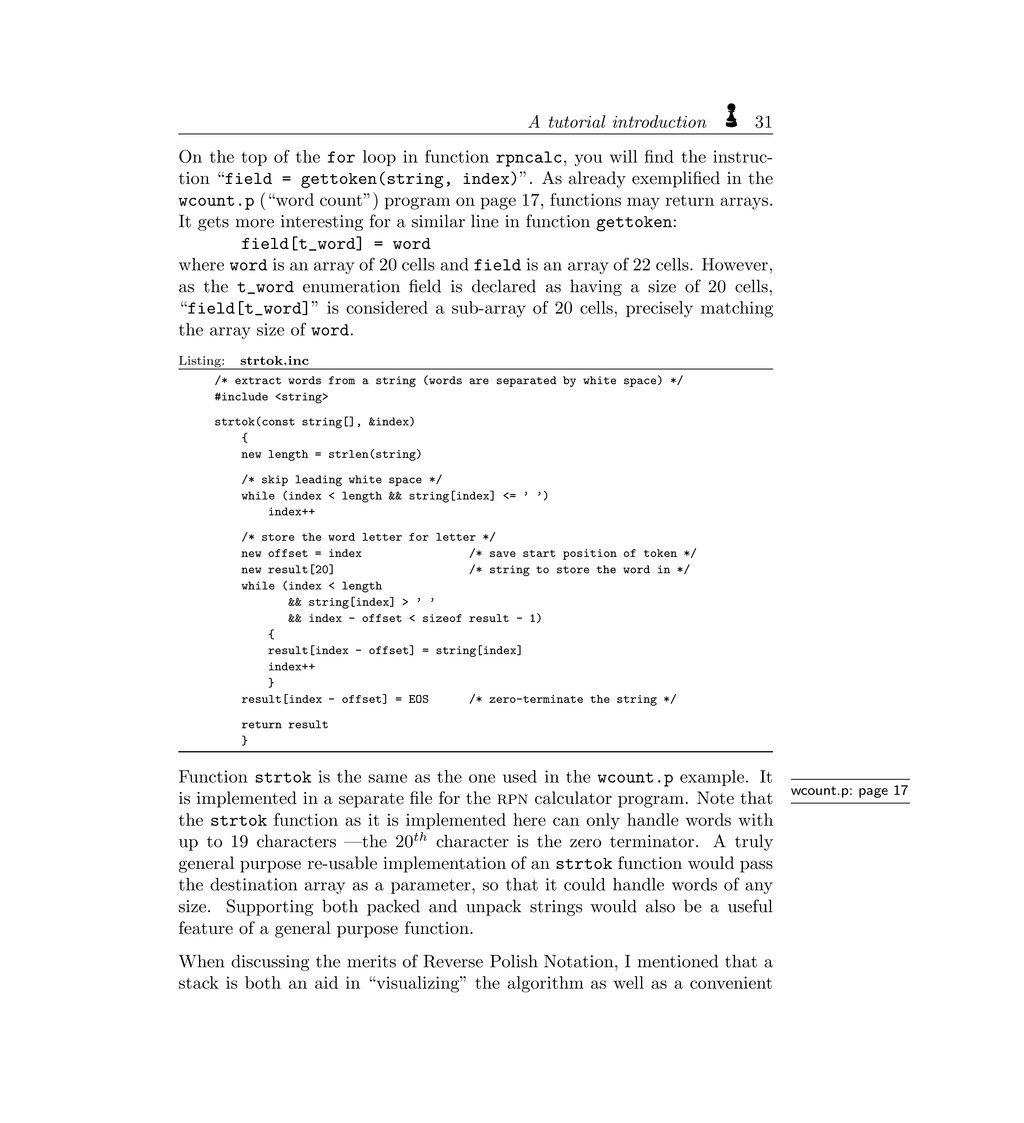
  33. A tutorial introduction 31 On the top of the for

    loop in function rpncalc, you will find the instruc- tion “field = gettoken(string, index)”. As already exemplified in the wcount.p (“word count”) program on page 17, functions may return arrays. It gets more interesting for a similar line in function gettoken: field[t_word] = word where word is an array of 20 cells and field is an array of 22 cells. However, as the t_word enumeration field is declared as having a size of 20 cells, “field[t_word]” is considered a sub-array of 20 cells, precisely matching the array size of word. Listing: strtok.inc /* extract words from a string (words are separated by white space) */ #include <string> strtok(const string[], &index) { new length = strlen(string) /* skip leading white space */ while (index < length && string[index] <= ’ ’) index++ /* store the word letter for letter */ new offset = index /* save start position of token */ new result[20] /* string to store the word in */ while (index < length && string[index] > ’ ’ && index - offset < sizeof result - 1) { result[index - offset] = string[index] index++ } result[index - offset] = EOS /* zero-terminate the string */ return result } Function strtok is the same as the one used in the wcount.p example. It wcount.p: page 17 is implemented in a separate file for the rpn calculator program. Note that the strtok function as it is implemented here can only handle words with up to 19 characters —the 20th character is the zero terminator. A truly general purpose re-usable implementation of an strtok function would pass the destination array as a parameter, so that it could handle words of any size. Supporting both packed and unpack strings would also be a useful feature of a general purpose function. When discussing the merits of Reverse Polish Notation, I mentioned that a stack is both an aid in “visualizing” the algorithm as well as a convenient
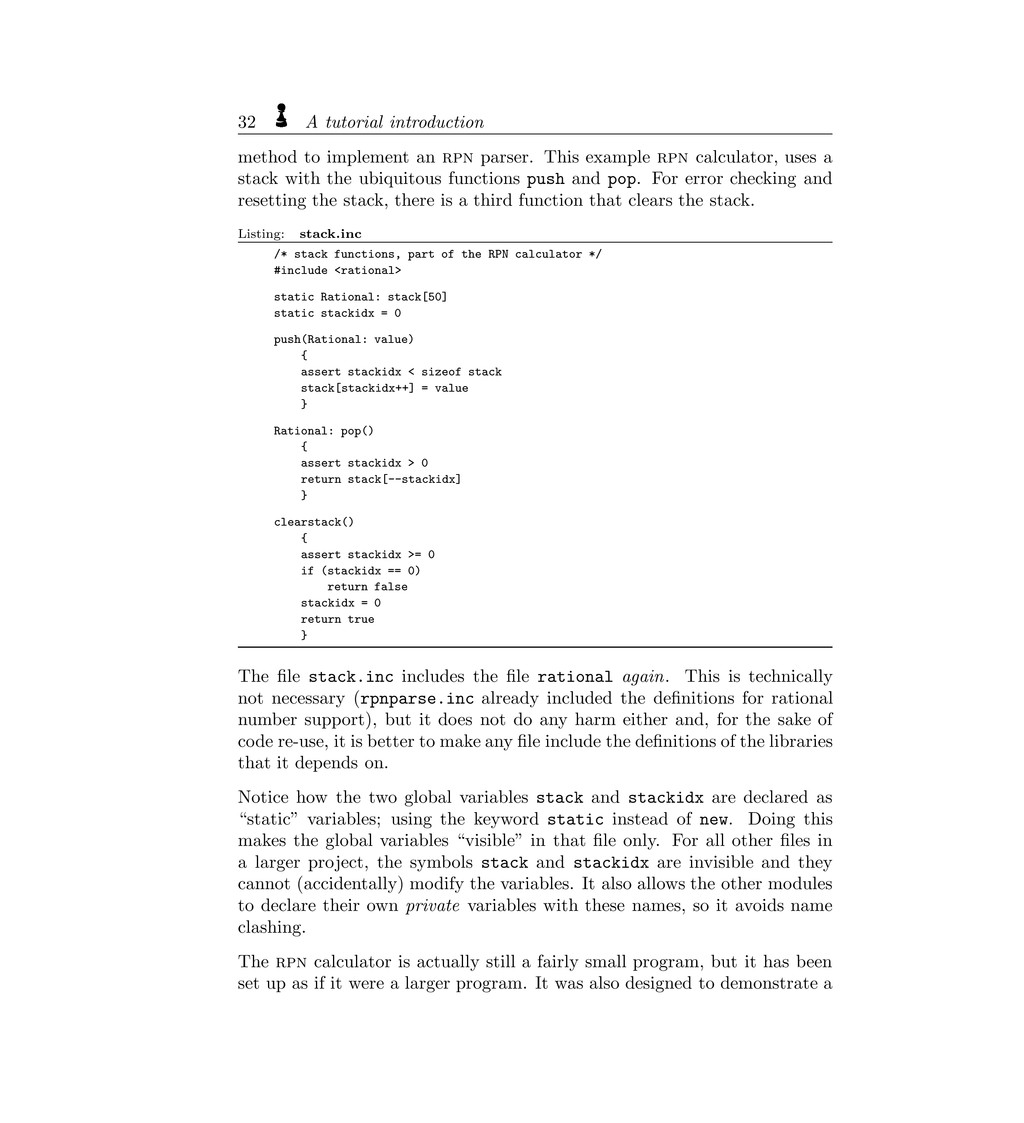
  34. 32 A tutorial introduction method to implement an rpn parser.

    This example rpn calculator, uses a stack with the ubiquitous functions push and pop. For error checking and resetting the stack, there is a third function that clears the stack. Listing: stack.inc /* stack functions, part of the RPN calculator */ #include <rational> static Rational: stack[50] static stackidx = 0 push(Rational: value) { assert stackidx < sizeof stack stack[stackidx++] = value } Rational: pop() { assert stackidx > 0 return stack[--stackidx] } clearstack() { assert stackidx >= 0 if (stackidx == 0) return false stackidx = 0 return true } The file stack.inc includes the file rational again. This is technically not necessary (rpnparse.inc already included the definitions for rational number support), but it does not do any harm either and, for the sake of code re-use, it is better to make any file include the definitions of the libraries that it depends on. Notice how the two global variables stack and stackidx are declared as “static” variables; using the keyword static instead of new. Doing this makes the global variables “visible” in that file only. For all other files in a larger project, the symbols stack and stackidx are invisible and they cannot (accidentally) modify the variables. It also allows the other modules to declare their own private variables with these names, so it avoids name clashing. The rpn calculator is actually still a fairly small program, but it has been set up as if it were a larger program. It was also designed to demonstrate a
  35. A tutorial introduction 33 set of elements of the pawn

    language and the example program could have been implemented more compactly. • Event-driven programming All of the example programs that were developed in this chapter so far, have used a “flow-driven” programming model: they start with main and the code determines what to do and when to request input. This programming model is easy to understand and it nicely fits most programming languages, but it is also a model does not fit many “real life” situations. Quite often, a program cannot simply process data and suggest that the user provides input only when it is ready for him/her. Instead, it is the user who decides when to provide input, and the program or script should be prepared to process it in an acceptable time, regardless of what it was doing at the moment. The above description suggests that a program should therefore be able to interrupt its work and do other things before picking up the original task. In early implementations, this was indeed how such functionality was im- plemented: a multi-tasking system where one task (or thread) managed the background tasks and a second task/thread that sits in a loop continuously requesting user input. This is a heavy-weight solution, however. A more light-weight implementation of a responsive system is what is called the “event-driven” programming model. In the event-driven programming model, a program or script decomposes any lengthy (background) task into short manageable blocks and in between, it is available for input. Instead of having the program poll for input, how- ever, the host application (or some other sub-system) calls a function that is attached to the event —but only if the event occurs. A typical event is “input”. Observe that input does not only come from hu- man operators. Input packets can arrive over serial cables, network stacks, internal sub-systems such as timers and clocks, and all kinds of other equip- ment that you may have attached to your system. Many of the apparatus that produce input, just send it. The arrival of such input is an event, just like a key press. If you do not catch the event, a few of them may be stored in an internal system queue, but once the queue is saturated the events are simply dropped. pawn directly supports the event-driven model, because it supports multi- ple entry points. The sole entry point of a flow-driven program is main; an
  36. 34 A tutorial introduction event-driven program has an entry point

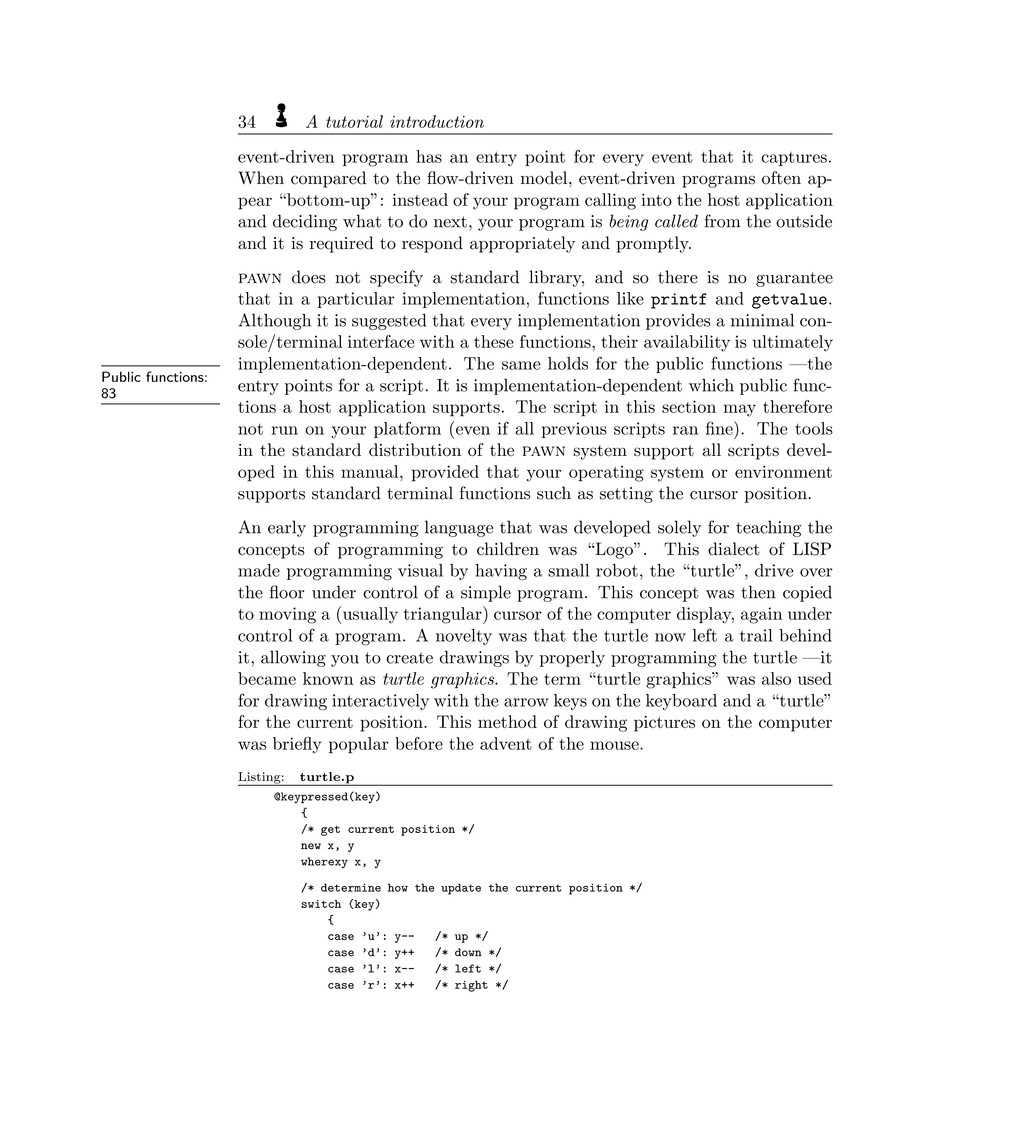
    for every event that it captures. When compared to the flow-driven model, event-driven programs often ap- pear “bottom-up”: instead of your program calling into the host application and deciding what to do next, your program is being called from the outside and it is required to respond appropriately and promptly. pawn does not specify a standard library, and so there is no guarantee that in a particular implementation, functions like printf and getvalue. Although it is suggested that every implementation provides a minimal con- sole/terminal interface with a these functions, their availability is ultimately implementation-dependent. The same holds for the public functions —the Public functions: 83 entry points for a script. It is implementation-dependent which public func- tions a host application supports. The script in this section may therefore not run on your platform (even if all previous scripts ran fine). The tools in the standard distribution of the pawn system support all scripts devel- oped in this manual, provided that your operating system or environment supports standard terminal functions such as setting the cursor position. An early programming language that was developed solely for teaching the concepts of programming to children was “Logo”. This dialect of LISP made programming visual by having a small robot, the “turtle”, drive over the floor under control of a simple program. This concept was then copied to moving a (usually triangular) cursor of the computer display, again under control of a program. A novelty was that the turtle now left a trail behind it, allowing you to create drawings by properly programming the turtle —it became known as turtle graphics. The term “turtle graphics” was also used for drawing interactively with the arrow keys on the keyboard and a “turtle” for the current position. This method of drawing pictures on the computer was briefly popular before the advent of the mouse. Listing: turtle.p @keypressed(key) { /* get current position */ new x, y wherexy x, y /* determine how the update the current position */ switch (key) { case ’u’: y-- /* up */ case ’d’: y++ /* down */ case ’l’: x-- /* left */ case ’r’: x++ /* right */
  37. A tutorial introduction 35 case ’\e’: exit /* Escape =

    exit */ } /* adjust the cursor position and draw something */ moveturtle x, y } moveturtle(x, y) { gotoxy x, y print "*" gotoxy x, y } The entry point of the above program is @keypressed —it is called on a key press. If you run the program and do not type any key, the function @keypressed never runs; if you type ten keys, @keypressed runs ten times. Contrast this behaviour with main: function main runs immediately after you start the script and it runs only once. It is still allowed to add a main function to an event-driven program: the main function will then serve for one-time initialization. A simple addition to this example program is to add a main function, in order to clear the console/terminal window on entry and perhaps set the initial position of the “turtle” to the centre. Support for function keys and other special keys (e.g. the arrow keys) is highly system-dependent. On ANSI terminals, these keys produce different codes than in a Windows “DOS box”. In the spirit of keeping the exam- ple program portable, I have used common letters (“u” for up, “l” for left, etc.). This does not mean, however, that special keys are beyond pawn’s capabilities. In the “turtle” script, the “Escape” key terminates the host application through the instruction exit. For a simple pawn run-time host, this will indeed work. With host applications where the script is an add-on, or host- applications that are embedded in a device, the script usually cannot termi- nate the host application. • Multiple events The advantages of the event-driven programming model, for building reactive programs, become apparent in the presence of multiple events. In fact, the event-driven model is only useful if you have more that one entry point; if your script just handles a single event, it might as well enter a polling loop
  38. 36 A tutorial introduction for that single event. The more

    events need to be handled, the harder the flow-driven programming model becomes. The script below implements a bare-bones “chat” program, using only two events: one for sending and one for receiving. The script allows users on a network (or perhaps over another connection) to exchange single-line messages. The script depends on the host application to provide the native and public functions for sending and receiving “datagrams” and for responding to keys that are typed in. How the host application sends its messages, over a serial line or using TCP/IP, the host application may decide itself. The tools in the standard pawn distribution push the messages over the TCP/IP network, and allow for a “broadcast” mode so that more than two people can chat with each other. Listing: chat.p #include <datagram> @receivestring(const message[], const source[]) printf "[%s] says: %s\n", source, message @keypressed(key) { static string[100 char] static index if (key == ’\e’) exit /* quit on ’Esc’ key */ echo key if (key == ’\r’ || key == ’\n’ || index char == sizeof string) { string{index} = ’\0’ /* terminate string */ sendstring string index = 0 string[index] = ’\0’ } else string{index++} = key } echo(key) { new string[2 char] = { 0 } string{0} = key == ’\r’ ? ’\n’ : key printf string } The bulk of the above script handles gathering received key-presses into a string and sending that string after seeing the enter key. The “Escape” key
  39. A tutorial introduction 37 ends the program. The function echo

    serves to give visual feedback of what the user types: it builds a zero-terminated string from the key and prints it. Despite its simplicity, this script has the interesting property that there is no fixed or prescribed order in which the messages are to be sent or received —there is no query–reply scheme where each host takes its turn in talking & listening. A new message may even be received while the user is typing its own message.∗ • State programming In a program following the event-driven model, events arrive individually, and they are also responded to individually. On occasion, though, an event is part of a sequential flow, that must be handled in order. Examples are data transfer protocols over, for example, a serial line. Each event may carry a command, a snippet of data that is part of a larger file, an acknowledgement, or other signals that take part in the protocol. For the stream of events (and the data packets that they carry) to make sense, the event-driven program must follow a precise hand-shaking protocol. To adhere to a protocol, an event-driven program must respond to each event in compliance with the (recent) history of events received earlier and the responses to those events. In other words, the handling of one event may set up a “condition” or “environment” for the handling any one or more subsequent events. A simple, but quite effective, abstraction for constructing reactive systems that need to follow (partially) sequential protocols, is that of the “automa- ton” or state machine. As the number of states are usually finite, the theory often refers to such automatons as Finite State Automatons or Finite State Machines. In an automaton, the context (or condition) of an event is its state. An event that arrives may be handled differently depending on the state of the automaton, and in response to an event, the automaton may switch to another state —this is called a transition. A transition, in other words, as a response of the automaton to an event in the context of its state. ∗ As this script makes no attempt to separate received messages from typed messages (for example, in two different scrollable regions), the terminal/console will look confusing when this happens. With an improved user-interface, this simple script could indeed be a nice message-base chat program.
  40. 38 A tutorial introduction Automatons are very common in software

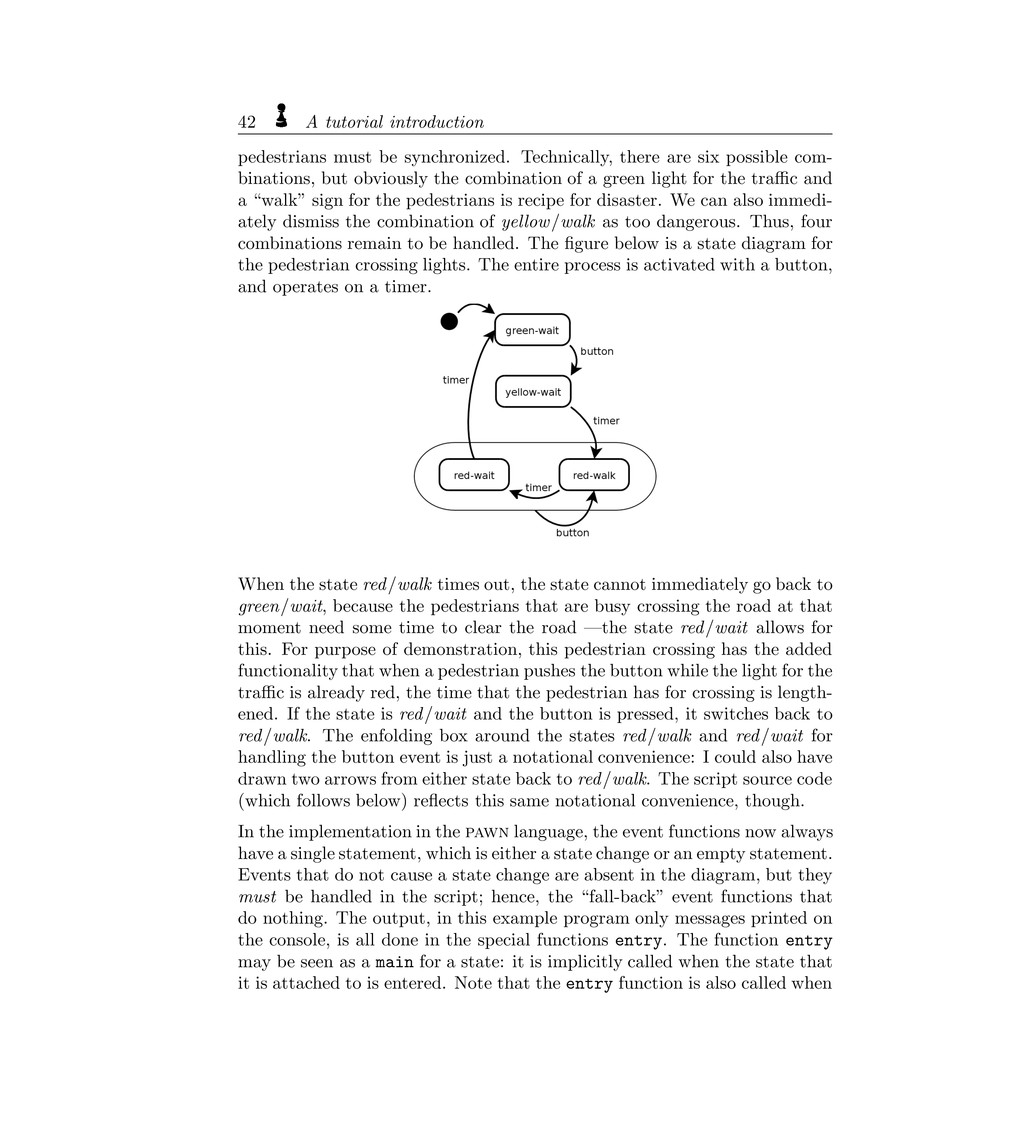
    as well as in mechanical devices (you may see the Jacquard Loom as an early state machine). Automa- tons, with a finite number of states, are deterministic (i.e. predictable in behaviour) and their relatively simple design allows a straightforward imple- mentation from a “state diagram”. In a state diagram, the states are usually represented as circles or rounded rectangles and the arrows represent the transitions. As transitions are the response of the automaton to events, an arrow may also be seen as an event “that does something”. An event/transition that is not defined in a par- ticular state is assumed to have no effect —it is silently ignored. A filled dot represents the entry state, which your program (or the host application) must set in start-up. It is common to omit in a state diagram all event ar- rows that drop back into the same state, but for the preceding figure I have chosen to make the response to all events explicit. This state diagram is for “parsing” comments that start with “/*” and end with “*/”. There are states for plain text and for text inside a comment, plus two states for tentative entry into or exit from a comment. The automaton is intended to parse the comments interactively, from characters that the user types on the keyboard. Therefore, the only events that the automaton reacts on are key presses. Actually, there is only one event (“key-press”) and the state switches are determined by event’s parameter: the key. pawn supports automatons and states directly in the language. Every func- tion† may optionally have one or more states assigned to it. pawn also † With the exception of “native functions” and user-defined operators.
  41. A tutorial introduction 39 supports multiple automatons, and each state

    is part of a particular au- tomaton. The following script implements the preceding state diagram (in a single, anonymous, automaton). To differentiate plain text from comments, both are output in a different colour. Listing: comment.p /* parse C comments interactively, using events and a state machine */ main() state plain @keypressed(key) <plain> { state (key == ’/’) slash if (key != ’/’) echo key } @keypressed(key) <slash> { state (key != ’/’) plain state (key == ’*’) comment echo ’/’ /* print ’/’ held back from previous state */ if (key != ’/’) echo key } @keypressed(key) <comment> { echo key state (key == ’*’) star } @keypressed(key) <star> { echo key state (key != ’*’) comment state (key == ’/’) plain } echo(key) <plain, slash> printchar key, yellow echo(key) <comment, star> printchar key, green printchar(ch, colour) { setattr .foreground = colour printf "%c", ch }
  42. 40 A tutorial introduction Function main sets the starting state

    to main and exits; all logic is event- driven. When a key arrives in state plain, the program checks for a slash and conditionally prints the received key. The interaction between the states plain and slash demonstrates a complexity that is typical for automatons: you must decide how to respond to an event when it arrives, without being able to “peek ahead” or undo responses to earlier events. This is usually the case for event-driven systems —you neither know what event you will receive next, nor when you will receive it, and whatever your response to the current event, there is a good chance that you cannot erase it on a future event and pretend that it never happened. In our particular case, when a slash arrives, this might be the start of a comment sequence (“/*”), but it is not necessarily so. By inference, we cannot decide on reception of the slash character what colour to print it in. Hence, we hold it back. However, there is no global variable in the script that says that a character is held back —in fact, apart from function parameters, no variable is declared at all in this script. The information about a character being held back is “hidden” in the state of the automaton. As is apparent in the script, state changes may be conditional. The condition is optional, and you can also use the common if–else construct to change states. Being state-dependent is not reserved for the event functions. Other func- tions may have state declarations as well, as the echo function demonstrates. When a function would have the same implementation for several states, you just need to write a single implementation and mention all applicable states. For function echo there are two implementations to handle the four states.∗ That said, an automaton must be prepared to handle all events in any state. Typically, the automaton has neither control over which events arrive nor over when they arrive, so not handling an event in some state could lead to wrong decisions. It frequently happens, then, that a some events are meaningful only in a few specific states and that they should trigger an error or “reset” procedure in all other cases. The function for handling the event in such “error” condition might then hold a lot of state names, if you were to mention them explicitly. There is a shorter way: by not mentioning ∗ A function that has the same implementation for all states, does not need a state classi- fierat all —see printchar.
  43. A tutorial introduction 41 Figure 1: Pedestrian crossing lights any

    name between the angle brackets, the function matches all states that have not explicit implementation elsewhere. So, for example, you could use the signature “echo(key) <>” for either of the two implementations (but not for both). A single anonymous automaton is pre-defined. If a program contains more than one automaton, the others must be explicitly mentioned, both in the state classifier of the function and in the state instruction. To do so, add the name of the automaton in front of the state name and separate the names of the automaton and the state with a colon. That is, “parser:slash” stands for the state slash of the automaton parser. A function can only be part of a single automaton; you can share one implementation of a function for several states of the same automaton, but you cannot share that function for states of different automatons. • Entry functions and automata theory State machines, and the foundation of “automata theory”, originate from mechanical design and pneumatic/electric switching circuits (using relays rather than transistors). Typical examples are coin acceptors, traffic light control and communication switching circuits. In these applications, robust- ness and predictability are paramount, and it was found that these goals were best achieved when actions (output) were tied to the states rather than to the events (input). In this design, entering a state causes activity —events cause state changes, but do not carry out other operations. In a pedestrian crossing lights system, the lights for the vehicles and the
  44. 42 A tutorial introduction pedestrians must be synchronized. Technically, there

    are six possible com- binations, but obviously the combination of a green light for the traffic and a “walk” sign for the pedestrians is recipe for disaster. We can also immedi- ately dismiss the combination of yellow/walk as too dangerous. Thus, four combinations remain to be handled. The figure below is a state diagram for the pedestrian crossing lights. The entire process is activated with a button, and operates on a timer. When the state red/walk times out, the state cannot immediately go back to green/wait, because the pedestrians that are busy crossing the road at that moment need some time to clear the road —the state red/wait allows for this. For purpose of demonstration, this pedestrian crossing has the added functionality that when a pedestrian pushes the button while the light for the traffic is already red, the time that the pedestrian has for crossing is length- ened. If the state is red/wait and the button is pressed, it switches back to red/walk. The enfolding box around the states red/walk and red/wait for handling the button event is just a notational convenience: I could also have drawn two arrows from either state back to red/walk. The script source code (which follows below) reflects this same notational convenience, though. In the implementation in the pawn language, the event functions now always have a single statement, which is either a state change or an empty statement. Events that do not cause a state change are absent in the diagram, but they must be handled in the script; hence, the “fall-back” event functions that do nothing. The output, in this example program only messages printed on the console, is all done in the special functions entry. The function entry may be seen as a main for a state: it is implicitly called when the state that it is attached to is entered. Note that the entry function is also called when
  45. A tutorial introduction 43 “switching” to the state that the

    automaton is already in: when the state is red_walk an invocation of the @keypressed sets the state to red_walk (which it is already in) and causes the entry function of red_walk to run —this is a re-entry of the state. Listing: traffic.p /* traffic light synchronizer, using states in an event-driven model */ #include <time> main() state green_wait @keypressed(key) <green_wait> state yellow_wait @keypressed(key) <red_walk, red_wait> state red_walk @keypressed(key) <> {} /* fallback */ @timer() <yellow_wait> state red_walk @timer() <red_walk> state red_wait @timer() <red_wait> state green_wait @timer() <> {} /* fallback */ entry() <green_wait> print "Green / Don’t walk\n" entry() <yellow_wait> { print "Yellow / Don’t walk\n" settimer 2000 } entry() <red_walk> { print "Red / Walk\n" settimer 5000 } entry() <red_wait> { print "Red / Don’t walk\n" settimer 2000 } This example program has an additional dependency on the host applica- tion/environment: in addition to the “@keypressed” event function, the host must also provide an adjustable “@timer” event. Because of the timing functions, the script includes the system file time.inc near the top of the script. The event functions with the state changes are all on the top part of the script. The functions are laid out to take a single line each, to suggest a table-like structure. All state changes are unconditional in this example,
  46. 44 A tutorial introduction but conditional state changes may be

    used with entry functions too. The bottom part are the event functions. Two transitions to the state red_walk exist —or three if you consider the affection of multiple states to a single event function as a mere notational convenience: from yellow_wait and from the combination of red_walk and red_wait. These transitions all pass through the same entry function, thereby reducing and simplifying the code. In automata theory, an automaton that associates activity with state entries, such as this pedestrian traffic lights example, is a “Moore automaton”; an automaton that associates activity with (state-dependent) events or transi- tions is a “Mealy automaton”. The interactive comment parser on page 39 is a typical Mealy automaton. The two kinds are equivalent: a Mealy au- tomaton can be converted to a Moore automaton and vice versa, although a Moore automaton may need more states to implement the same behaviour. In practice, the models are often mixed, with an overall “Moore automaton” design, and a few “Mealy states” where that saves a state. • State variables The model of a pedestrian crossing light in the previous example is not very realistic (its only goal is to demonstrate a few properties of state program- ming with pawn). The first thing that is lacking is a degree of fairness: pedestrians should not be able to block car traffic indefinitely. The car traf- fic should see a green light for a period of some minimum duration after pedestrians have had their time slot for crossing the road. Secondly, many traffic lights have a kind of remote control ability, so that emergency traffic (ambulance, fire truck, . . .) can force green lights on their path. A well- known example of such remote control is the mirt system (Mobile Infra-Red Transmitter) but other systems exist —the Netherlands use a radiographic system called vetag for instance. The new state diagram for the pedestrian crossing light has two more states, but more importantly: it needs to save data across events and share it between states. When the pedestrian presses the button while the state is red_wait, we neither want to react on the button immediately (this was our “fairness rule”), nor the button to be ignored or “forgotten”. In other words, we move to the state green_wait_interim regardless of the button press, but memorize the press for a decision made at the point of leaving state green_wait_interim.
  47. A tutorial introduction 45 Automatons excel in modelling control flow

    in reactive/interactive systems, but data flow has traditionally been a weak point. To see why, consider that each event is handled individually by a function and that the local vari- ables in that function disappear when the function returns. Local variables can, hence, not be used to pass data from one event to the next. Global variables, while providing a work-around, have drawbacks: global scope and an “eternal” lifespan. If a variable is used only in the event handlers of a single state, it is desirable to hide it from the other states, in order to pro- tect it from accidental modification. Likewise, shortening the lifespan to the state(s) that the variable is active in, reduces the memory footprint. “State variables” provide this mix of variable scope and variable lifespan that are tied to a series of states, rather than to functions or modules. pawn enriches the standard finite state machine (or automaton) with vari- ables that are declared with a state classifier. These variables are only ac- cessible from the listed states and the memory these variable hold may be reused by other purposes while the automaton is in a different state (differ- ent than the ones listed). Apart from the state classifier, the declaration of a state variable is similar to that of a global variable. The declaration of the variable button_memo in the next listing illustrates the concept. To reset the memorized button press, the script uses an “exit” function. Just like an entry function is called when entering a state, the exit function is called when leaving a state. Listing: traffic2.p /* a more realistic traffic light synchronizer, including an * "override" for emergency vehicles */ #include <time>
  48. 46 A tutorial introduction main() state green_wait_interim new bool: button_memo

    <red_wait, green_wait_interim> @keypressed(key) { switch (key) { case ’ ’: button_press case ’*’: mirt_detect } } button_press() <green_wait> state yellow_wait button_press() <red_wait, green_wait_interim> button_memo = true button_press() <> /* fallback */ {} mirt_detect() state mirt_override @timer() <yellow_wait> state red_walk @timer() <red_walk> state red_wait @timer() <red_wait> state green_wait_interim @timer() <green_wait_interim> { state (!button_memo) green_wait state (button_memo) yellow_wait } @timer() <mirt_override> state green_wait @timer() <> /* fallback */ {} entry() <green_wait_interim> { print "Green / Don’t walk\n" settimer 5000 } exit() <green_wait_interim> button_memo = false
  49. A tutorial introduction 47 entry() <yellow_wait> { print "Yellow /

    Don’t walk\n" settimer 2000 } entry() <red_walk> { print "Red / Walk\n" settimer 5000 } entry() <red_wait> { print "Red / Don’t walk\n" settimer 2000 } entry() <mirt_override> { print "Green / Don’t walk\n" settimer 5000 } • State programming wrap-up The common notation used in state diagrams is to indicate transitions with arrows and states with circles or rounded rectangles. The circle/rounded rectangle optionally also mentions the actions of an entry or exit function and of events that are handled internally —without causing a transition. The arrow for a transition contains the name of the event (or pseudo-event), an optional condition between square brackets and an optional action behind a slash (“/”). States are ubiquitous, even if we do not always recognize them as such. The concept of finite state machines has traditionally been applied mostly to programs mimicking mechanical apparatus and software that implements communication protocols. With the appearance of event-driven window- ing systems, state machines now also appear in the GUI design of desktop programs. States abound in web programs, because the browser and the web-site scripting host have only a weak link. That said, the state machine in web applications is typically implemented in an ad-hoc manner. States can also be recognized in common problems and riddles. In the well known riddle of the man that must move a cabbage, a sheep and a wolf
  50. 48 A tutorial introduction across a river,∗ the states are

    obvious —the trick of the riddle is to avoid the forbidden states. But now that we are discovering “states” everywhere, we must be careful not to overdo it. For example, in the second implementation of a pedestrian crossing light, see page 45, I used a variable (button_memo) to hold a criterion for a decision made at a later time. An alternative implementation would be to throw in a couple of more states to hold the situations “red-wait-&- button-pressed” and “green-wait-interim-&-button-pressed”. No more vari- able would then be needed, but at the cost of a more complex state diagram and implementation. In general, the number of states should be kept small. Although automata provide a good abstraction to model reactive and inter- active systems, coming to a correct diagram is not straightforward —and sometimes just outright hard. Too often, the “sunny day scenario” of states and events is plotted out first, and everything straying from this path is then added on an impromptu basis. This approach carries the risk that some com- binations of events & states are forgotten, and indeed I have encountered two comment parser diagrams (like the one at page 39) by different book/ magazine authors that were flawed in such way. Instead, I advise to focus on the events and on the responses for individual events. For every state, every event should be considered; do not route events through a general purpose fall-back too eagerly. It has become common practice, unfortunately, to introduce automata the- ory with applications for which better solutions exist. One, oft repeated, example is that of an automaton that accumulates the value of a series of coins, or that “calculates” the remainder after division by 3 of a binary number. These applications may have made sense in mechanical/pneumatic design where “the state” is the only memory that the automaton has, but in software, using variables and arithmetic operations is the better choice. Another typical example is that of matching words or patterns using a state machine: every next letter that is input switches to a new state. Lexical scanners, such as the ones that compilers and interpreters use to interpret source code, might use such state machines to filter out “reserved words”. However, for any practical set of reserved words, such automatons become ∗ A man has to ferry a wolf, a sheep and a cabbage across a river in a boat, but the boat can only carry the man and a single additional item. If left unguarded, the wolf will eat the sheep and the sheep will eat the cabbage. How can the man ferry them across the river?
  51. A tutorial introduction 49 unwieldy, and no one will design

    them by hand. In addition, there is no reason why a lexical scanner cannot peek ahead in the text or jump back to a mark that it set earlier —which is one of the criteria for choosing a state implementation in the first place, and finally, solutions like trie lookups are likely simpler to design and implement while being at least as quick. • Program verification Should the compiler/interpreter not catch all bugs? This rhetorical question has both technical and philosophical sides. I will forego all non-technical aspects and only mention that, in practice, there is a trade-off between the “expressiveness” of a computer language and the “enforced correctness” (or “provable correctness’) of programs in that language. Making a language very “strict” is not a solution if work needs to be done that exceeds the size of a toy program. A too strict language leaves the programmer struggling with the language, whereas the “problem to solve” should be the real struggle and the language should be a simple means to express the solution in. The goal of the pawn language is to provide the developer with an informal, and convenient to use, mechanism to test whether the program behaves as was intended. This mechanism is called “assertions” and, although the concept of assertions pre-dates the idea of “design by contract”, it is most easily explained through the design-by-contract methodology. The “design by contract” paradigm provides an alternative approach for dealing with erroneous conditions. The premise is that the programmer knows the task at hand, the conditions under which the software must op- erate and the environment. In such an environment, each function specifies the specific conditions, in the form of assertions, that must hold true before a client may execute the function. In addition, the function may also specify any conditions that hold true after it completes its operation. This is the “contract” of the function. The name “design by contract” was coined by Bertrand Meyer and its prin- ciples trace back to predicate logic and algorithmic analysis. ⋄ Preconditions specify the valid values of the input parameters and envi- ronmental attributes; ⋄ Postconditions specify the output and the (possibly modified) environ- ment;
  52. 50 A tutorial introduction ⋄ Invariants indicate the conditions that

    must hold true at key points in a function, regardless of the path taken through the function. For example, a function that computes a square root of a number may specify that its input parameter be non-negative. This is a precondition. It may also specify that its output, when squared, is the input value ±0.01%. This is a postcondition; it verifies that the routine operated correctly. A convenient Example square root function (us- ing bisection): 79 way to calculate a square root is via “bisection”. At each iteration, this algorithm gives at least one extra bit (binary digit) of accuracy. This is an invariant (it might be an invariant that is hard to check, though). Preconditions, postconditions and invariants are similar in the sense that they all consist of a test and that a failed test indicates an error in the im- plementation. As a result, you can implement preconditions, postconditions and invariants with a single construct: the “assertion”. For preconditions, write assertions at the very start of the routine; for invariants, write an asser- tion where the invariant should hold; for post conditions, write an assertion before each “return” statement or at the end of the function. In pawn, the instruction is called assert; it is a simple statement that contains a test. If the test outcome is ”true”, nothing happens. If the outcome is ”false”, the assert instruction terminates the program with a message containing the details of the assertion that failed. Assertions are checks that should never fail. Genuine errors, such as user input errors, should be handled with explicit tests in the program, and not with assertions. As a rule, the expressions contained in assertions should be free of side effects: an assertion should never contain code that your application requires for correct operation. This does have the effect, however, that assertions never fire in a bug-free program: they just make the code fatter and slower, without any user-visible benefit. It is not this bad, though. An additional feature of assertions is that you can build the source code without assertions simply using a flag or option to the pawn parser. The idea is that you enable assertions during develop- ment and build the “retail version” of the code without assertions. This is a better approach than removing the assertions, because all assertions are automatically “back” when recompiling the program —e.g. for maintenance. During maintenance, or even during the initial development, if you catch a bug that was not trapped by an assertion, before fixing the bug, you should think of how an assertion could have trapped this error. Then, add this
  53. A tutorial introduction 51 assertion and test whether it indeed

    catches the bug before fixing the bug. By doing this, the code will gradually become sturdier and more reliable. • Documentation comments When programs become larger, documenting the program and the functions becomes vital for its maintenance, especially when working in a team. The pawn language tools have some features to assist you in documenting the code in comments. Documenting a program or library in its comments has a few advantages —for example: documentation is more easily kept up to date with the program, it is efficient in the sense that programming comments now double as documentation, and the parser helps your documentation efforts in generating syntax descriptions and cross references. Every comment that starts with three slashes (“/// ”) followed by white- Comment syntax: 97 space, or that starts with a slash and two stars (“/** ”) followed by white- space is a special documentation comment. The pawn compiler extracts documentation comments and optionally writes these to a “report” file. See the application documentation, or appendix B, how to enable the report generation. As an aside, comments that start with “/**” must still be closed with “*/”. Single line documentation comments (“///”) close at the end of the line. The report file is an XML file that can subsequently be transformed to HTML documentation via an XSL/XSLT stylesheet, or be run through other tools to create printed documentation. The syntax of the report file is com- patible with that of the “.Net” developer products —except that the pawn compiler stores more information in the report than just the extracted doc- umentation strings. The report file contains a reference to the “small- doc.xsl” stylesheet. The example below illustrates documentation comments in a simple script that has a few functions. You may write documentation comments for a function above its declaration or in its body. All documentation comments that appear before the end of the function are attributed to the function. You can also add documentation comments to global variables and global constants —these comments must appear above the declaration of the vari- able or constant. Figure 2 shows part of the output for this (rather long) example. The style of the output is adjustable in the cascading style sheet (CSS-file) associated with the XSLT transformation file.
  54. 52 A tutorial introduction Listing: weekday.p /** * This program

    illustrates Zeller’s congruence algorithm to calculate * the day of the week given a date. */ /** * <summary> * The main program: asks the user to input a date and prints on * what day of the week that date falls. * </summary> */ main() { new day, month, year if (readdate(day, month, year)) { new wkday = weekday(day, month, year) printf "The date %d-%d-%d falls on a ", day, month, year switch (wkday) { case 0: print "Saturday" case 1: print "Sunday" case 2: print "Monday" case 3: print "Tuesday" case 4: print "Wednesday" case 5: print "Thursday" case 6: print "Friday" } } else print "Invalid date" print "\n" } /** * <summary> * The core function of Zeller’s congruence algorithm. The function * works for the Gregorian calender. * </summary> * * <param name="day"> * The day in the month, a value between 1 and 31. * </param> * <param name="month">
  55. A tutorial introduction 53 * The month: a value between

    1 and 12. * </param> * <param name="year"> * The year in four digits. * </param> * * <returns> * The day of the week, where 0 is Saturday and 6 is Friday. * </returns> * * <remarks> * This function does not check the validity of the date; when the * date in the parameters is invalid, the returned "day of the week" * will hold an incorrect value. * <p/> * This equation fails in many programming languages, notably most * implementations of C, C++ and Pascal, because these languages have * a loosely defined "remainder" operator. Pawn, on the other hand, * provides the true modulus operator, as defined in mathematical * theory and as was intended by Zeller. * </remarks> */ weekday(day, month, year) { /** * <remarks> * For Zeller’s congruence algorithm, the months January and * February are the 13th and 14th month of the <em>preceding</em> * year. The idea is that the "difficult month" February (which * has either 28 or 29 days) is moved to the end of the year. * </remarks> */ if (month <= 2) month += 12, --year new j = year % 100 new e = year / 100 return (day + (month+1)*26/10 + j + j/4 + e/4 - 2*e) % 7 } /** * <summary> * Reads a date and stores it in three separate fields. tata * </summary> * * <param name="day"> * Will hold the day number upon return. * </param> * <param name="month"> * Will hold the month number upon return. * </param> * <param name="year">
  56. 54 A tutorial introduction * Will hold the year number

    upon return. * </param> * * <returns> * <em>true</em> if the date is valid, <em>false</em> otherwise; * if the function returns <em>false</em>, the values of * <paramref name="day"/>, <paramref name="month"/> and * <paramref name="year"/> cannot be relied upon. * </returns> */ bool: readdate(&day, &month, &year) { print "Give a date (dd-mm-yyyy): " day = getvalue(_,’-’,’/’) month = getvalue(_,’-’,’/’) year = getvalue() return 1 <= month <= 12 && 1 <= day <= daysinmonth(month,year) } /** * <summary> * Returns whether a year is a leap year. * </summary> * * <param name="year"> * The year in 4 digits. * </param> * * <remarks> * A year is a leap year: * <ul> * <li> if it is divisable by 4, </li> * <li> but <strong>not</strong> if it is divisable by 100, </li> * <li> but it <strong>is</strong> it is divisable by 400. </li> * </ul> * </remarks> */ bool: isleapyear(year) return year % 400 == 0 || year % 100 != 0 && year % 4 == 0 /** * <summary> * Returns the number of days in a month (the month is an integer * in the range 1 .. 12). One needs to pass in the year as well, * because the function takes leap years into account. * </summary> * * <param name="month"> * The month number, a value between 1 and 12. * </param> * <param name="year"> * The year in 4 digits.
  57. A tutorial introduction 55 Figure 2: Documentation generated from the

    source code * </param> */ daysinmonth(month, year) { static daylist[] = {31, 28, 31, 30, 31, 30, 31, 31, 30, 31, 30, 31} assert 1 <= month <= 12 return daylist[month-1] + _:(month == 2 && isleapyear(year)) } The format of the XML file created by “.Net” developer products is docu- mented in the Microsoft documentation. The pawn parser creates a minimal description of each function or global variable or constant that is used in a project, regardless of whether you used documentation comments on that function/variable/constant. The parser also generates few tags of its own: attribute Attributes for a function, such as “native” or “stock”.
  58. 56 A tutorial introduction automaton The automaton that the function

    belongs to (if any). dependency The names of the symbols (other functions, global variables and/global constants) that the function requires. If desired, a call tree can be constructed from the dependencies. param Function parameters. When you add a parameter descrip- tion in a documentation comment, this description is combined with the auto-generated content for the parameter. paraminfo Tags and array or reference information on a parameter. referrer All functions that refer to this symbol; i.e., all functions that use or call this variable/function. This information is suffi- cient to serve as a “cross-reference” —the “referrer” tree is the inverse of the “dependency” tree. stacksize The estimated number of cells that the function will allocate on the stack and heap. This stack usage estimate excludes the stack requirements of any functions that are “called” from the function to which the documentation applies. For example, function readdate is documented as taking 6 cells on the stack, but it also calls daysinmonth which takes 4 additional cells — and in turn calls isleapyear. To calculate the total stack requirements for function readdate, the call tree should be considered. In addition to the local variables and function parameters, the compiler also uses the stack for storing intermediate results in complex expressions. The stack space needed for these inter- mediate results are also excluded from this report. In general, the required overhead for the intermediate results is not cumu- lative (over all functions), which is why it would be inaccurate to add a “safety margin” to every function. For the program as a whole, a safety margin would be highly advised. See ap- pendix B (page 169) for the -v option which can tell you the maximum estimate stack usage, based on the call tree. tagname The tag of the constant, variable, function result or function parameter(s). transition The transitions that the function provokes and their conditions —see the section of automatons on page 37.
  59. A tutorial introduction 57 All text in the documentation comment(s)

    is also copied to each function, variable or constant to which it is attached. The text in the documentation comment is copied without further processing —with one exception, see below. As the rest of the report file is in XML format, and the most suitable way to process XML to on-line documentation is through an XSLT processor (such as a modern browser), you may choose to do any formatting in the documentation comments using HTML tags. Note that you will often need to explicitly close any HTML tags; the HTML standard does not require this, but XML/XSLT processors usually do. The pawn toolkit comes with an example XSLT file (with a matching style sheet) which supports the following XML/HTML tags: <code> </code> Formatted source code in a monospaced font; although the “&”, “<” and “>” must be typed as “&amp;”, “&lt;” and “&rt;” respectively. <example> </example> Text set under the topic “Example”. <param name="..."> </param> A parameter description, with the param- eter name appearing inside the opening tag (the “name=” option) and the param- eter description following it. <paramref name="..." /> A reference to a parameter, with the pa- rameter name appearing inside the open- ing tag (the “name=” option). <remarks> </remarks> Text set under the topic “Remarks”. <returns> </returns> Text set under the topic “Returns”. <seealso> </seealso> Text set under the topic “See also”. <summary> </summary> Text set immediately below the header of the symbol. <section> </section> Sets the text in a header. This should only be used in documentation that is not attached to a function or a variable. <subsection> </subsection> Sets the text in a sub-header. This should only be used in documentation that is not attached to a function or a variable. The following additional HTML tags are supported for general purpose for- matting text inside any of the above sections: <c> </c> Text set in a monospaced font. <em> </em> Text set emphasized, usually in italics.
  60. 58 A tutorial introduction <p> </p> Text set in a

    new paragraph. Instead of wrapping <p> and </p> around every paragraph, inserting <p/> as a separator between two paragraphs produces the same effect. <para> </para> An alternative for <p> </p> <ul> </ul> An unordered (bulleted) list. <ol> </ol> An ordered (numbered) list. <li> </li> An item in an ordered or unordered list. As stated, there is one exception in the processing of documentation com- ments: if your documentation comment contains a <param ...> tag (and a matching </param>), the pawn parser looks up the parameter and combines your description of the parameter with the contents that it has automatically generated. • Warnings and errors The big hurdle that I have stepped over is how to actually compile the code snippets presented in this chapter. The reason is that the procedure depends on the system that you are using: in some applications there is a “Make” or “Compile script” command button or menu option, while in other environments you have to type a command like “pawncc myscript” on a command prompt. If you are using the standard pawn toolset, you will find instructions of how to use the compiler and run-time in the companion booklet “The pawn booklet — Implementer’s Guide”. If you are using Microsoft Windows, it may prove the most convenient to use the Quincy IDE that comes with pawn for writing, running and debugging scripts. Regardless of the differences in launching the compile, the phenomenon that results from launching the compile are likely to be very similar between all systems: ⋄ either the compile succeeds and produces an executable program —that may or may not run automatically after the compile; ⋄ or the compile gives a list of warning and error messages. Mistakes happen and the pawn parser tries to catch as many of them as it can. When you inspect the code that the pawn parser complains about, it may on occasion be rather difficult for you to see why the code is erroneous (or suspicious). The following hints may help:
  61. A tutorial introduction 59 ⋄ Each error or warning number

    is numbered. You can look up the error message with this number in appendix A, along with a brief description on what the message really means. ⋄ If the pawn parser produces a list of errors, the first error in this list is a true error, but the diagnostic messages below it may not be errors at all. After the pawn parser sees an error, it tries to step over it and complete the compilation. However, the stumbling on the error may have confused the pawn parser so that subsequent legitimate statements are misinterpreted and reported as errors too. When in doubt, fix the first error and recompile. ⋄ The pawn parser checks only the syntax (spelling/grammar), not the se- mantics (i.e. the “meaning”) of the code. When it detects code that does not comply to the syntactical rules, there may actually be different ways in which the code can be changed to be “correct”, in the syntactical sense of the word —even though many of these “corrections” would lead to nonsensical code. The result is, though, that the pawn parser may have difficulty to precisely locate the error: it does not know what you meant to write. Hence, the parser often outputs two line numbers and the error is somewhere in the range (between the line numbers). ⋄ Remember that a program that has no syntactical errors (the pawn parser accepts it without error & warning messages) may still have semantical and logical errors which the pawn parser cannot catch. The assert instruction (page 113) is meant to help you catch these “run-time” errors. • In closing If you know the C programming language, you will have seen many concepts that you are familiar with, and a few new ones. If you don’t know C, the pace of this introduction has probably been quite high. Whether you are new to C or experienced in C, I encourage you to read the following pages carefully. If you know C or a C-like language, by the way, you may want to consult the chapter “Pitfalls” (page 134) first. This booklet attempts to be both an informal introduction and a (more for- mal) language specification at the same time, perhaps succeeding at neither. Since it is also the standard book on pawn,∗ the focus of this booklet is on ∗ It is no longer the only book on Pawn.
  62. 60 A tutorial introduction being accurate and complete, rather than

    being easy to grasp. The double nature of this booklet shows through in the order in which it presents the subjects. The larger conceptual parts of the language, variables and functions, are covered first. The operators, the statements and general syntax rules follow later —not that they are less important, but they are easier to learn, to look up, or to take for granted.
  63. 61 Data and declarations pawn is a typeless language. All

    data elements are of type “cell”, and a cell can hold an integral number. The size of a cell (in bytes) is system dependent —usually, a cell is 32-bits. The keyword new declares a new variable. For special declarations, the key- word new is replaced by static, public or stock (see below). A simple variable declaration creates a variable that occupies one “cell” of data mem- ory. Unless it is explicitly initialized, the value of the new variable is zero. A variable declaration may occur: ⋄ at any position where a statement would be valid —local variables; ⋄ at any position where a function declaration (native function declarations) or a function implementation would be valid —global variables; ⋄ in the first expression of a for loop instruction —also local variables. “for” loop: 114 Local declarations A local declaration appears inside a compound statement. A local Compound state- ment: 113 variable can only be accessed from within the compound statement, and from nested compound statements. A declaration in the first expression of a for loop instruction is also a local declaration. Global declarations A global declaration appears outside a function and a global vari- able is accessible to any function. Global data objects can only be initialized with constant expressions. • State variable declarations A state variable is a global variable with a state classifier appended at the end. The scope and the lifespan of the variable are restricted to the states that are listed in the classifier. Fall-back state specifiers are not permitted for state variables. State variables may not be initialized. In contrast to normal variables (which are zero after declaration —unless explicitly initialized), state variables hold an indeterminate value after declaration and after first entering a state in its classifier. Typically, one uses the state entry function(s) to properly initialize the state variable, and the exit function(s) to reset these variables.
  64. 62 Data and declarations • Static local declarations A local

    variable is destroyed when the execution leaves the compound block in which the variable was created. Local variables in a function only exist during the run time of that function. Each new run of the function creates and initializes new local variables. When a local variable is declared with the keyword static rather than new, the variable remains in existence after the end of a function. This means that static local variables provide pri- vate, permanent storage that is accessible only from a single function (or compound block). Like global variables, static local variables can only be initialized with constant expressions. • Static global declarations A static global variable behaves the same as a normal global variable, except that its scope is restricted to the file that the declaration resides in. To declare a global variable as static, replace the keyword new by static. • Stock declarations A global variable may be declared as “stock”. A stock declaration is one Stock functions: 84 that the parser may remove or ignore if the variable turns out not to be used in the program. Stock variables are useful in combination with stock functions. A public variable may be declared as “stock” as well —declaring public variables as “public stock” enables you to declare al public variables that a host appli- cation provides in an include file, with only those variables that the script actually uses winding up in the P-code file. • Public declarations Global “simple” variables (no arrays) may be declared “public” in two ways: ⋄ declare the variable using the keyword public instead of new; ⋄ start the variable name with the “@” symbol. Public variables behave like global variables, with the addition that the host program can also read and write public variables. A (normal) global variable can only be accessed by the functions in your script —the host program is unaware of them. As such, a host program may require that you declare a
  65. Data and declarations 63 variable with a specific name as

    “public” for special purposes —such as the most recent error number, or the general program state. • Constant variables It is sometimes convenient to be able to create a variable that is initialized Symbolic con- stants: 102 once and that may not be modified. Such a variable behaves much like a symbolic constant, but it still is a variable. To declare a constant variable, insert the keyword const between the key- word that starts the variable declaration —new, static, public or stock— and the variable name. Examples: new const address[4] = { 192, 0, 168, 66 } public const status /* initialized to zero */ Three typical situations where one may use a constant variable are: ⋄ To create an “array” constant; symbolic constants cannot be indexed. ⋄ For a public variable that should be set by the host application, and only by the host application. See the preceding section for public variables. ⋄ A special case is to mark array arguments to functions as const. Array arguments are always passed by reference, declaring them as const guards against unintentional modification. Refer to page 72 for an example of const function arguments. • Arrays (single dimension) The syntax name[constant] declares name to be an array of “constant” See also “multi- dimensional ar- rays”, page 65 elements, where each element is a single cell. The name is a placeholder of an identifier name of your choosing and constant is a positive non-zero value; constant may be absent. If there is no value between the brackets, the number of elements is set equal to the number of initiallers —see the example below. The array index range is “zero based” which means that the first element is at name[0] and the last element is name[constant-1].
  66. 64 Data and declarations • Initialization Data objects can be

    initialized at their declaration. The initialler of a global Constants: 98 data object must be a constant. Arrays, global or local, must also be initial- ized with constants. Uninitialized data defaults to zero. Examples: Listing: good declaration new i = 1 new j /* j is zero */ new k = ’a’ /* k has character code for letter ’a’ */ new a[] = {1,4,9,16,25} /* a has 5 elements */ new s1[20] = {’a’,’b’} /* the other 18 elements are 0 */ new s2[] = "Hello world..." /* a unpacked string */ Examples of invalid declarations: Listing: bad declarations new c[3] = 4 /* an array cannot be set to a value */ new i = "Good-bye" /* only an array can hold a string */ new q[] /* unknown size of array */ new p[2] = { i + j, k - 3 } /* array initiallers must be constants */ • Progressive initiallers for arrays The ellipsis operator continues the progression of the initialisation constants for an array, based on the last two initialized elements. The ellipsis operator (three dots, or “...”) initializes the array up to its declared size. Examples: Listing: array initializers new a[10] = { 1, ... } // sets all ten elements to 1 new b[10] = { 1, 2, ... } // b = 1, 2, 3, 4, 5, 6, 7, 8, 9, 10 new c[8] = { 1, 2, 40, 50, ... } // c = 1, 2, 40, 50, 60, 70, 80, 90 new d[10] = { 10, 9, ... } // d = 10, 9, 8, 7, 6, 5, 4, 3, 2, 1
  67. Data and declarations 65 • array initialization and enumerations The

    array size may be set with a constant that represents an enumeration: an example of this is the “priority queue” sample program at page 19. When individual fields of the enumeration have a size, the associated array elements are interpreted as sub-arrays, on occasion. For an example of this behaviour, see the rpn calculator program at page 28. The sub-array syntax applies as well to the initialization of an “enumerated” array. Referring again to the “priority queue” sample program, to initialize a “message” array with fixed values, the syntax is: Listing: array initializers enum message /* declaration copied from "QUEUE.P" */ { text[40 char], priority } new msg[message] = { !"new message", 1 } The initialler consists of a string (a literal array) and a value; these go into the fields “text” and “priority” respectively. • Multi-dimensional arrays Multi-dimensional arrays are arrays that contain references to the sub-arrays. That is, a two-dimensional array is an “array of single-dimensional arrays”.∗ Below are a few examples of declarations of two-dimensional arrays. Listing: Two-dimensional arrays new a[4][3] new b[3][2] = { { 1, 2 }, { 3, 4 }, { 5, 6 } } new c[3][3] = { { 1 }, { 2, ...}, { 3, 4, ... } } new d[2][5] = { !"agreement", !"dispute" } new e[2][] = { "OK", "Cancel" } new f[][] = { "OK", "Cancel" } ∗ The current implementation of the Pawn compiler supports only arrays with up to three dimensions.
  68. 66 Data and declarations As the last two declarations (variable

    “e” en “f”) show, the final dimension of an array may have an unspecified length, in which case the length of each sub-array is determined from the related initializer. Every sub-array may have a different size; in this particular example, “e[1][5]” contains the letter ”l” from the word “Cancel”, but “e[0][5]” is invalid because the length of the sub-array “e[0]” is only three cells (containing the letters “O”, “K” and a zero terminator). The difference between the declarations for arrays “e” and “f” is that in we let the compiler count the number of initializers for the major dimension —“sizeof f” is 2, like “sizeof e” (see the next section on the sizeof operator). • Arrays and the sizeof operator The sizeof operator returns the size of a variable in “elements”. For a simple (non-compound) variable, the result of sizeof is always 1, because an element is a cell for a simple variable. An array with one dimension holds a number of cells and the sizeof operator returns that number. The snippet below would therefore print “5” at the display, because the array “msg” holds four characters (each in one cell) plus a zero-terminator: Listing: sizeof operator new msg[] = "Help" printf("%d", sizeof msg); With multi-dimensional arrays, the sizeof operator can return the number of elements in each dimension. For the last (minor) dimension, an element will again be a cell, but for the major dimension(s), an element is a sub-array. In the following code snippet, observe that the syntax sizeof matrix refers to the major dimension of the two-dimensional array and the syntax sizeof matrix[] refers to the minor dimension of the array. The values that this snippet prints are 3 and 2 (for the major and minor dimensions respectively): Listing: sizeof operator and multidimensional arrays new matrix[3][2] = { { 1, 2 }, { 3, 4 }, { 5, 6 } } printf("%d %d", sizeof matrix, sizeof matrix[]); The application of the sizeof operator on multi-dimensional arrays is espe- Default function arguments and sizeof: 77 cially convenient when used as a default value for function arguments.
  69. Data and declarations 67 • Tag names A tag is

    a label that denotes the objective of —or the meaning of— a variable, a constant or a function result. Tags are optional, their only purpose is to allow a stronger compile-time error checking of operands in expressions, of function arguments and of array indices. A tag consists of a symbol name followed by a colon; it has the same syntax as Label syntax: 113 a label. A tag precedes the symbol name of a variable, constant or function. In an assignment, only the right hand of the “=” sign may be tagged. Examples of valid tagged variable and constant definitions are: Listing: tag names new bool:flag = true /* "flag" can only hold "true" or "false" */ const error:success = 0 const error:fatal= 1 const error:nonfatal = 2 error:errno = fatal The sequence of the constants success, fatal and nonfatal could more “enum” state- ment: 102 conveniently be declared using an enum instruction, as illustrated below. The enumeration instruction below creates four constants, success, fatal, nonfatal and error, all with the tag error. Listing: enumerations enum error { success, fatal, nonfatal, } A typical use of “tagged” enum’s is in combination with arrays. If every field of an array has a distinct purpose, you can use a tagged enum to declare the size of an array and to add tag checking to the array usage in a single step: Listing: enumerations and arrays enum rectangle { left, top, right, bottom } new my_rect[rectangle] /* array is declared as having 4 cells */
  70. 68 Data and declarations my_rect[left] = 10 my_rect[top] = 5

    my_rect[right] = 30 my_rect[bottom] = 12 for (new i = 0; rectangle:i < rectangle; ++i) my_rect[rectangle:i] *= 2 After the declaration of “my_rect” above, you can access the second field of my_rect with “my_rect[top]”, but saying “my_rect[1]” will give a parser diagnostic (a warning or error message). A tag override (or a tag cast) adjusts a function, constant or variable to the desired tag name. The for loop at the last two lines in the preceding example depicts this: the loop variable i is a plain, untagged cell, an it must be cast to the tag rectangle before using it as an index in the array my_rect. Note that the enum construct has created both a constant and a tag with the name “rectangle”. Tag names introduced so far started with a lower case letter; these are “weak” tags. Tag names that start with an upper case letter are “strong” tags. The difference between weak and strong tags is that weak tags may, in a few circumstances, be dropped implicitly by the pawn parser —so that a weakly tagged expression becomes an untagged expression. The tag checking mechanism verifies the following situations: ⋄ When the expressions on both sides of a binary operator have a differ- ent tag, or when one of the expressions is tagged and the other is not, the compiler issues a “tag mismatch” diagnostic. There is no difference between weak and strong tags in this situation. ⋄ There is a special case for the assignment operator: the compiler issues a “lvalue”: the vari- able on the left side in an assign- ment, see page 105 diagnostic if the variable on the left side of an assignment operator has a tag, and the expression on the right side either has a different tag or is untagged. However, if the variable on the left of the assignment operator is untagged, it accepts an expression (on the right side) with a weak tag. In other words, a weak tag is dropped in an assignment when the lvalue is untagged. ⋄ Passing arguments to functions follows the rule for assignments. The compiler issues a diagnostic when the formal parameter (in a function definition) has a tag and the actual parameter (in the function call) either is untagged or has a different tag. However, if the formal parameter is untagged, it also accepts a parameter with any weak tag.
  71. Data and declarations 69 ⋄ An array may specify a

    tag for every dimension, see the “my_rect” exam- ple above. Tag checking array indices follows the rule of binary operator tag checking: there is no difference between weak and strong tags.
  72. 70 Functions A function declaration specifies the name of the

    function and, between paren- theses, its formal parameters. A function may also return a value. A function declaration must appear on a global level (i.e. outside any other functions) and is globally accessible. If a semicolon follows the function declaration (rather than a statement), The preferred way to declare forward functions is at page 82 the declaration denotes a forward declaration of the function. The return statement sets the function result. For example, function sum (see below) has as its result the value of both its arguments added together. The return expression is optional for a function, but one cannot use the value of a function that does not return a value. Listing: sum function sum(a, b) return a + b Arguments of a function are (implicitly declared) local variables for that function. The function call determines the values of the arguments. Another example of a complete definition of the function leapyear (which returns true for a leap year and false for a non-leap year): Listing: leapyear function leapyear(y) return y % 4 == 0 && y % 100 != 0 || y % 400 == 0 The logical and arithmetic operators used in the leapyear example are covered on pages 109 and 105 respectively. Usually a function contains local variable declarations and consists of a com- “assert” state- ment: 113 pound statement. In the following example, note the assert statement to guard against negative values for the exponent. Listing: power function (raise to a power) power(x, y) { /* returns x raised to the power of y */ assert y >= 0 new r = 1 for (new i = 0; i < y; i++) r *= x return r }
  73. Functions 71 A function may contain multiple return statements —one

    usually does this to quickly exit a function on a parameter error or when it turns out that the function has nothing to do. If a function returns an array, all return state- ments must specify an array with the same size and the same dimensions. • Function arguments (call-by-value versus call-by-reference) The “faculty” function in the next program has one parameter which it uses Another exam- ple is function JulianToDate at page 11 in a loop to calculate the faculty of that number. What deserves attention is that the function modifies its argument. Listing: faculty.p /* Calculation of the faculty of a value */ main() { print "Enter a value: " new v = getvalue() new f = faculty(v) printf "The faculty of %d is %d\n", v, f } faculty(n) { assert n >= 0 new result = 1 while (n > 0) result *= n-- return result } Whatever (positive) value that “n” had at the entry of the while loop in function faculty, “n” will be zero at the end of the loop. In the case of the faculty function, the parameter is passed “by value”, so the change of “n” is local to the faculty function. In other words, function main passes “v” as input to function faculty, but upon return of faculty, “v” still has the same value as before the function call. Arguments that occupy a single cell can be passed by value or by reference. The default is “pass by value”. To create a function argument that is passed by reference, prefix the argument name with the character &. Example:
  74. 72 Functions Listing: swap function swap(&a, &b) { new temp

    = b b = a a = temp } To pass an array to a function, append a pair of brackets to the argument name. You may optionally indicate the size of the array; doing so improves error checking of the parser. Example: Listing: addvector function addvector(a[], const b[], size) { for (new i = 0; i < size; i++) a[i] += b[i] } Arrays are always passed by reference. As a side note, array b in the above Constant vari- ables: 63 example does not change in the body of the function. The function argument has been declared as const to make this explicit. In addition to improving error checking, it also allows the pawn parser to generate more efficient code. To pass an array of literals to a function, use the same syntax as for array initiallers: a literal string or the series of array indices enclosed in braces (see page 100; the ellipsis for progressive initiallers cannot be used). Literal arrays can only have a single dimension. The following snippet calls addvector to add five to every element of the array “vect”: Listing: addvector usage new vect[3] = { 1, 2, 3 } addvector(vect, {5, 5, 5}, 3) /* vect[] now holds the values 6, 7 and 8 */ The invocation of function printf with the string "Hello world\n" in the “Hello world” pro- gram: 3 first ubiquitous program is another example of passing a literal array to a function.
  75. Functions 73 • Calling functions When inserting a function name

    with its parameters in a statement or ex- pression, the function will get executed in that statement/expression. The statement that refers to the function is the “caller” and the function itself, at that point, is the “callee”: the one being called. The standard syntax for calling a function is to write the function’s name, followed by a list with all explicitly passed parameters between parentheses. If no parameters are passed, or if the function does not have any, the pair of parentheses behind the function name are still present. For example, to Function power: 70 try out the power function, the following program calls it thus: Listing: example program for the power function main() { print "Please give the base value and the power to raise it to:" new base = getvalue() new power = getvalue() new result = power(base, power) printf "%d raised to the power %d is %d", base, power, result } A function may optionally return a value. The sum, leapyear and power Functions sum & leapyear: 70 Function swap: 71 functions all return a value, but the swap function does not. Even if a function returns a value, the caller may ignore it. For the situation that the caller ignores the function’s return value, there is an alternative syntax to call the function, which is also illustrated by the preceding example program calls the power function. The parentheses around all function arguments are optional if the caller does not use the return value. In the last statement, the example program reads printf "%d raised to the power %d is %d", base, power, result rather than printf("%d raised to the power %d is %d", base, power, result) which does the same thing. The syntax without parentheses around the parameter list is called the “pro- cedure call” syntax. You can use it only if: ⋄ the caller does not assign the function’s result to a variable and does not use it in an expression, or as the “test expression” of an if statement for example; ⋄ the first parameter does not start with an opening parenthesis;
  76. 74 Functions ⋄ the first parameter is on the same

    line as the function name, unless you use named parameters (see the next section). As you may observe, the procedure call syntax applies to cases where a function call behaves rather as a statement, like in the calls to print and printf in the preceding example. The syntax is aimed at making such statements appear less cryptic and friendlier to read, but not that the use of the syntax is optional. As a side note, all parentheses in the example program presented in this section are required: the return values of the calls to getvalue are stored in two variables, and therefore an empty pair of parentheses must follow the function name. Function getvalue has optional parameters, but none are passed in this example program. • Named parameters versus positional parameters In the previous examples, the order of parameters of a function call was im- portant, because each parameter is copied to the function argument with the same sequential position. For example, with the function weekday (which uses Zeller’s congruence algorithm) defined as below, you would call week- day(12,31,1999) to get the week day of the last day of the preceding cen- tury. Listing: weekday function weekday(month, day, year) { /* returns the day of the week: 0=Saturday, 1=Sunday, etc. */ if (month <= 2) month += 12, --year new j = year % 100 new e = year / 100 return (day + (month+1)*26/10 + j + j/4 + e/4 - 2*e) % 7 } Date formats vary according to culture and nation. While the format month/ day/year is common in the United States of America, European countries often use the day/month/year format, and technical publications sometimes standardize on the year/month/day format (ISO/IEC 8824). In other words, no order of arguments in the weekday function is “logical” or “conventional”. That being the case, the alternative way to pass parameters to a function is to use “named parameters”, as in the next examples (the three function calls are equivalent):
  77. Functions 75 Listing: weekday usage —positional parameters new wkday1 =

    weekday( .month = 12, .day = 31, .year = 1999) new wkday2 = weekday( .day = 31, .month = 12, .year = 1999) new wkday3 = weekday( .year = 1999, .month = 12, .day = 31) With named parameters, a period (“.”) precedes the name of the function argument. The function argument can be set to any expression that is valid for the argument. The equal sign (“=”) does in the case of a named parameter not indicate an assignment; rather it links the expression that follows the equal sign to one of the function arguments. One may mix positional parameters and named parameters in a function call with the restriction that all positional parameters must precede any named parameters. • Default values of function arguments A function argument may have a default value. The default value for a Public functions do not support default argument values; see page 83 function argument must be a constant. To specify a default value, append the equal sign (“=”) and the value to the argument name. When the function call specifies an argument placeholder instead of a valid argument, the default value applies. The argument placeholder is the under- score character (“_”). The argument placeholder is only valid for function arguments that have a default value. The rightmost argument placeholders may simply be stripped from the func- tion argument list. For example, if function increment is defined as: Listing: increment function —default values increment(&value, incr=1) value += incr the following function calls are all equivalent: Listing: increment usage increment(a) increment(a, _) increment(a, 1) Default argument values for passed-by-reference arguments are useful to make the input argument optional. For example, if the function divmod is designed to return both the quotient and the remainder of a division oper- ation through its arguments, default values make these arguments optional:
  78. 76 Functions Listing: divmod function —default values for reference parameters

    divmod(a, b, &quotient=0, &remainder=0) { quotient = a / b remainder = a % b } With the preceding definition of function divmod, the following function calls are now all valid: Listing: divmod usage new p, q divmod(10, 3, p, q) divmod(10, 3, p, _) divmod(10, 3, _, q) divmod(10, 3, p) divmod 10, 3, p, q Default arguments for array arguments are often convenient to set a default string or prompt to a function that receives a string argument. For example: Listing: print error function print_error(const message[], const title[] = "Error: ") { print title print message print "\n" } The next example adds the fields of one array to another array, and by default increments the first three elements of the destination array by one: Listing: addvector function, revised addvector(a[], const b[] = {1, 1, 1}, size = 3) { for (new i = 0; i < size; i++) a[i] += b[i] }
  79. Functions 77 • sizeof operator & default function arguments A

    default value of a function argument must be a constant, and its value is “sizeof” operator 110 determined at the point of the function’s declaration. Using the “sizeof” operator to set the default value of a function argument is a special case: the calculation of the value of the sizeof expression is delayed to the point of the function call and it takes the size of the actual argument rather than that of the formal argument. When the function is used several times in a program, with different arguments, the outcome of the “sizeof” expression is potentially different at every call —which means that the “default value” of the function argument may change. Below is an example program that draws ten random numbers in the range of 0–51 without duplicates. An example for an application for drawing random numbers without duplicates is in card games —those ten numbers could represent the cards for two “hands” in a poker game. The virtues of the algorithm used in this program, invented by Robert W. Floyd, are that it is efficient and unbiased —provided that the pseudo-random number generator is unbiased as well. “random” is a proposed core function, see page 125 Listing: randlist.p main() { new HandOfCards[10] FillRandom(HandOfCards, 52) print "A draw of 10 numbers from a range of 0 to 51 \ (inclusive) without duplicates:\n" for (new i = 0; i < sizeof HandOfCards; i++) printf "%d ", HandOfCards[i] } FillRandom(Series[], Range, Number = sizeof Series) { assert Range >= Number /* cannot select 50 values * without duplicates in the * range 0..40, for example */ new Index = 0 for (new Seq = Range - Number; Seq < Range; Seq++) { new Val = random(Seq + 1) new Pos = InSeries(Series, Val, Index) if (Pos >= 0) { Series[Index] = Series[Pos] Series[Pos] = Seq } else
  80. 78 Functions Series[Index] = Val Index++ } } InSeries(Series[], Value,

    Top = sizeof Series) { for (new i = 0; i < Top; i++) if (Series[i] == Value) return i return -1 } Function main declares the array HandOfCards with a size of ten cells and Array declara- tions: 63 then calls function FillRandom with the purpose that it draws ten positive random numbers below 52. Observe, however, that the only two param- eters that main passes into the call to FillRandom are the array HandOf- Cards, where the random numbers should be stored, and the upper bound “52”. The number of random numbers to draw (“10”) is passed implicitly to FillRandom. The definition of function FillRandom below main specifies for its third pa- rameter “Number = sizeof Series”, where “Series” refers to the first parameter of the function. Due to the special case of a “sizeof default value”, the default value of the Number argument is not the size of the for- mal argument Series, but that of the actual argument at the point of the function call: HandOfCards. Note that inside function FillRandom, asking the “sizeof” the function argument Series would (still) evaluate in zero, because the Series array is declared with unspecified length (see page 110 for the behaviour of sizeof). Using sizeof as a default value for a function argument is a specific case. If the formal parameter Series were declared with an explicit size, as in Series[10], it would be redundant to add a Number argument with the array size of the actual argument, because the parser would then enforce that both formal and actual arguments have the size and dimensions. • Arguments with tag names A tag optionally precedes a function argument. Using tags improves the Tag names: 67 compile-time error checking of the script and it serves as “implicit documen- tation” of the function. For example, a function that computes the square root of an input value in fixed point precision may require that the input parameter is a fixed point value and that the result is fixed point as well.
  81. Functions 79 The function below uses the fixed point extension

    module, and an approx- Fixed point arith- metic: 91; see also the appli- cation note “Fixed Point Support Li- brary” imation algorithm known as “bisection” to calculate the square root. Note the use of tag overrides on numeric literals and expression results. Listing: sqroot function —strong tags Fixed: sqroot(Fixed: value) { new Fixed: low = 0.0 new Fixed: high = value while (high - low > Fixed: 1) { new Fixed: mid = (low + high) >> 1 if (fmul(mid, mid) < value) low = mid else high = mid } return low } With the above definition, the pawn parser issues a diagnostic if one calls the sqroot function with a parameter with a tag different from “Fixed:”, or when it tries to store the function result in a variable with a “non-Fixed:” tag. The bisection algorithm is related to binary search, in the sense that it continuously halves the interval in which the result must lie. A “successive substitution” algorithm like Newton-Raphson, that takes the slope of the function’s curve into account, achieves precise results more quickly, but at the cost that a stopping criterion is more difficult to state. State of the art algorithms for computing square roots combine bisection and Newton- Raphson algorithms. In the case of an array, the array indices can be tagged as well. For example, a function that creates the intersection of two rectangles may be written as: For the “rectan- gle” tag, see page 67 Listing: intersection function intersection(dest[rectangle], const src1[rectangle], const src2[rectangle]) {
  82. 80 Functions if (src1[right] > src2[left] && src1[left] < src2[right]

    && src1[bottom] > src2[top] && src1[top] < src2[bottom]) { /* there is an intersection, calculate it using the "min" and * "max" functions from the "core" library, see page 125. */ dest[left] = max(src1[left], src2[left]) dest[right] = min(src1[right], src2[right]) dest[top] = max(src1[top], src2[top]) dest[bottom] = min(src1[bottom], src2[bottom]) return true } else { /* "src1" and "src2" do not intersect */ dest = { 0, 0, 0, 0 } return false } } • Variable arguments A function that takes a variable number of arguments, uses the “ellipsis” operator (“...”) in the function header to denote the position of the first variable argument. The function can access the arguments with the prede- fined functions numargs, getarg and setarg (see page 125). Function sum returns the summation of all of its parameters. It uses a variable length parameter list. Listing: sum function, revised sum(...) { new result = 0 for (new i = 0; i < numargs(); ++i) result += getarg(i) return result } This function could be used in: Listing: sum function usage new v = sum(1, 2, 3, 4, 5)
  83. Functions 81 A tag may precede the ellipsis to enforce

    that all subsequent parameters Tag names: 67 have the same tag, but otherwise there is no error checking with a variable argument list and this feature should therefore be used with caution. The functions getarg and setarg assume that the argument is passed “by reference”. When using getarg on normal function parameters (instead of variable arguments) one should be cautious of this, as neither the compiler nor the abstract machine can check this. Actual parameters that are passed as part of a “variable argument list” are always passed by reference. • Coercion rules If the function argument, as per the function definition (or its declaration), is a “value parameter”, the caller can pass as a parameter to the function: ⋄ a value, which is passed by value; ⋄ a reference, whose dereferenced value is passed; ⋄ an (indexed) array element, which is a value. If the function argument is a reference, the caller can pass to the function: ⋄ a value, whose address is passed; ⋄ a reference, which is passed by value because it has the type that the function expects; ⋄ an (indexed) array element, which is a value. If the function argument is an array, the caller can pass to the function: ⋄ an array with the same dimensions, whose starting address is passed; ⋄ an (indexed) array element, in which case the address of the element is passed. • Recursion A faculty example function earlier in this chapter used a simple loop. An “faculty”: 71 “fibonacci”: 9 example function that calculated a number from the Fibonacci series also used a loop and an extra variable to do the trick. These two functions are the most popular routines to illustrate recursive functions, so by implementing these as iterative procedures, you might be inclined to think that pawn does not support recursion. Well, pawn does support recursion, but the calculation of faculties and of Fibonacci numbers happen to be good examples of when not to use recursion. Faculty is easier to understand with a loop than it is with recursion. Solving
  84. 82 Functions Fibonacci numbers by recursion indeed simplifies the problem,

    but at the cost of being extremely inefficient: the recursive Fibonacci calculates the same values over and over again. The program below is an implementation of the famous “Towers of Hanoi” There exists an intriguing iterative solution to the Towers of Hanoi. game in a recursive function: Listing: hanoi.p /* The Towers of Hanoi, a game solved through recursion */ main() { print "How many disks: " new disks = getvalue() move 1, 3, 2, disks } move(from, to, spare, numdisks) { if (numdisks > 1) move from, spare, to, numdisks-1 printf "Move disk from pillar %d to pillar %d\n", from, to if (numdisks > 1) move spare, to, from, numdisks-1 } • Forward declarations For standard functions, the current “reference implementation” of the pawn compiler does not require functions to be declared before their first use.∗ User-defined operators are special functions, and unlike standard functions they must be declared before use. In many cases it is convenient to put the implementation of a user-defined operator in an include file, so that the implementation and declaration precedes any call/invocation. Sometimes, it Forbidden user- defined operators: 92 may however be required (or convenient) to declare a user- defined operator first and implement it elsewhere. A particular use of this technique is to implement “forbidden” user-defined operators. To create a forward declaration, precede the function name and its param- eter list with the keyword forward. For compatibility with early versions of pawn, and for similarity with C/C++, an alternative way to forwardly ∗ Other implementations of the Pawn language (if they exist) may use “single pass” parsers, requiring functions to be defined before use.
  85. Functions 83 declare a function is by typing the function

    header and terminating it with a semicolon (which follows the closing parenthesis of the parameter list). The full definition of the function, with a non-empty body, is implemented elsewhere in the source file (except for forbidden user-defined operators). State classifiers are ignored on forward declarations. • State classifiers All functions except native functions may optionally have a state attribute. Example: 39 This consists of a list of state (and automata) names between angle brackets behind the function header. The names are separated by commas. When the state is part of a non-default automaton, the name of the automaton and a colon separator must precede the state; for example, “parser:slash” stands for the state slash of the automaton parser. If a function has states, there must be several “implementations” of the function in the source code. All functions must have the same function header (excluding the state classifier list). As a special syntax, when there are no names between the angle brackets, the function is linked to all states that are not attributed to other implemen- tations of the function. The function that handles “all states not handled elsewhere” is the so-called fall-back function. • Public functions, function main A stand-alone program must have the function main. This function is the starting point of the program. The function main may not have arguments. A function library need not to have a main function, but it must have it either a main function, or at least one public function. Function main is the primary entry point into the compiled program; the public functions are alternative entry points to the program. The virtual machine can start execution with one of the public functions. A function library may have a main function to perform one-time initialization at start-up. To make a function public, prefix the function name with the keyword pub- lic. For example, a text editor may call the public function “onkey” for every key that the user typed in, so that the user can change (or reject) keystrokes. The onkey function below would replace every “~” character
  86. 84 Functions (code 126 in the ISO Latin-1 character set)

    by the “hard space” code in the ANSI character table: Listing: onkey function public onkey(keycode) { if (key==’~’) return 160 // replace ~ by hard space (code 160 in Latin-1) else return key // leave other keys unaltered } Functions whose name starts with the “@” symbol are also public. So an alternative way to write the public function onkey function is: Listing: @onkey function @onkey(keycode) return key==’~’ ? 160 : key The “@” character, when used, becomes part of the function name; that is, in the last example, the function is called “@onkey”. The host application decides on the names of the public functions that a script may implement. Arguments of a public function may not have default values. A public func- Default values of function argu- ments: 75 tion interfaces the host application to the pawn script. Hence, the argu- ments passed to the public function originate from the host application, and the host application cannot know what “default values” the script writer plugged for function arguments —which is why the pawn parser flags the use of default values for arguments of public functions as an error. The issue of default values in public function arguments only pops up in the case that you wish to call public functions from the script itself. • Static functions When the function name is prefixed with the keyword static, the scope of the function is restricted to the file that the function resides in. The static attribute can be combined with the “stock” attribute. • Stock functions A “stock” function is a function that the pawn parser must “plug into” the program when it is used, and that it may simply “remove” from the program (without warning) when it is not used. Stock functions allow a
  87. Functions 85 compiler or interpreter to optimize the memory footprint

    and the file size of a (compiled) pawn program: any stock function that is not referred to, is completely skipped —as if it were lacking from the source file. A typical use of stock functions, hence, is in the creation of a set of “library” functions. A collection of general purpose functions, all marked as “stock” may be put in a separate include file, which is then included in any pawn script. Only the library functions that are actually used get “linked” in. To declare a stock function, prefix the function name with the keyword Public variables can be declared “stock” stock. Public functions and native functions cannot be declared “stock”. When a stock function calls other functions, it is usually a good practice to declare those other functions as “stock” too —with the exception of native functions. Similarly, any global variables that are used by a stock function Stock variables: 62 should in most cases also be defined “stock”. The removal of unused (stock) functions can cause a chain reaction in which other functions and global variables are not longer accessed either. Those functions are then removed as well, thereby continuing the chain reaction until only the functions that are used, directly or indirectly, remain. • Native functions A pawn program can call application-specific functions through a “native function”. The native function must be declared in the pawn program by means of a function prototype. The function name must be preceded by the keyword native. Examples: native getparam(a[], b[], size) native multiply_matrix(a[], b[], size) native openfile(const name[]) The names “getparam”, “multiply_matrix” and “openfile” are the in- ternal names of the native functions; these are the names by which the functions are known in the pawn program. Optionally, you may also set an external name for the native function, which is the name of the function as the “host application” knows it. To do so, affix an equal sign to the function prototype followed by the external name. For example: native getparam(a[], b[], size) = host_getparam
  88. 86 Functions native multiply_matrix(a[], b[], size) = mtx_mul When a

    native function returns an array, the dimensions and size of the array must be explicitly declared. The array specification occurs between the function name and the parameter list. For example: enum rect { left, top, right, bottom } native intersect[rect](src1[rect], src2[rect]) Unless specified explicitly, the external name is equal to the internal name An example of a native user- defined operator is on page 90 of a native function. One typical use for explicit external names is to set a symbolic name for a user-defined operator that is implemented as a native function. See the “Implementer’s Guide” for implementing native functions in C/C++ (on the “host application” side). Native functions may not have state specifiers. • User-defined operators The only data type of pawn is a “cell”, typically a 32-bit number or bit Tags: 67 pattern. The meaning of a value in a cell depends on the particular applica- tion —it need not always be a signed integer value. pawn allows to attach a “meaning” to a cell with its “tag” mechanism. Based on tags, pawn also allows you to redefine operators for cells with a specific purpose. The example below defines a tag “ones” and an operator to add two “ones” values together (the example also implements operators for subtraction and negation). The example was inspired by the checksum algo- rithm of several protocols in the TCP/IP protocol suite: it simulates one’s complement arithmetic by adding the carry bit of an arithmetic overflow back to the least significant bit of the value. Listing: ones.p forward ones: operator+(ones: a, ones: b) forward ones: operator-(ones: a, ones: b) forward ones: operator-(ones: a) main() { new ones: chksum = ones: 0xffffffff print "Input values in hexadecimal, zero to exit\n"
  89. Functions 87 new ones: value do { print ">> "

    value = ones: getvalue(.base=16) chksum = chksum + value printf "Checksum = %x\n", chksum } while (value) } stock ones: operator+(ones: a, ones: b) { const ones: mask = ones: 0xffff /* word mask */ const ones: shift = ones: 16 /* word shift */ /* add low words and high words separately */ new ones: r1 = (a & mask) + (b & mask) new ones: r2 = (a >>> shift) + (b >>> shift) new ones: carry restart: /* code label (goto target) */ /* add carry of the new low word to the high word, then * strip it from the low word */ carry = (r1 >>> shift) r2 += carry r1 &= mask /* add the carry from the new high word back to the low * word, then strip it from the high word */ carry = (r2 >>> shift) r1 += carry r2 &= mask /* a carry from the high word injected back into the low * word may cause the new low to overflow, so restart in * that case */ if (carry) goto restart return (r2 << shift) | r1 } stock ones: operator-(ones: a) return (a == ones: 0xffffffff) ? a : ~a stock ones: operator-(ones: a, ones: b) return a + -b
  90. 88 Functions The notable line in the example is the

    line “chksum = chksum + value” in the loop in function main. Since both the variables chksum and value have the tag ones, the “+” operator refers to the user-defined operator (instead of the default “+” operator). User-defined operators are merely a notational convenience. The same effect is achieved by calling functions explicitly. The definition of an operator is similar to the definition of a function, with the difference that the name of the operator is composed by the keyword “operator” and the character of the operator itself. In the above example, both the unary “-” and the binary “-” operators are redefined. An oper- ator function for a binary operator must have two arguments, one for an unary operator must have one argument. Note that the binary “-” operator adds the two values together after inverting the sign of the second operand. The subtraction operator thereby refers to both the user-defined “negation” (unary “-”) and addition operators. A redefined operator must adhere to the following restrictions: ⋄ A user-defined operator must be declared before use (this is in contrast Forward declara- tion: 82 to “normal” functions): either put the implementation of the user-defined operator above the functions that use it, or add a forward declaration near the top of the file. ⋄ Only the following operators may be redefined: +, -, *, /, %, ++, --, ==, !=, <, >, <=, >=, ! and =. That is, the sets of arithmetic and relational operators can be overloaded, but the bitwise operators and the logical operators cannot. The = and ! operators are a special case. ⋄ You cannot invent new operators; you cannot define operator “#” for ex- ample. ⋄ The precedence level and associativity of the operators, as well as their “arity” remain as defined. You cannot make an unary “+” operator, for example. ⋄ The return tag of the relational operators and of the “!” operator must be “bool:”. ⋄ The return tag of the arithmetic operators is at your choosing, but you cannot redefine an operator that is identical to another operator except for its return tag. For example, you cannot make both alpha: operator+(alpha: a, alpha: b) and beta: operator+(alpha: a, alpha: b) (The assignment operator is an exception to this rule.)
  91. Functions 89 ⋄ pawn already defines operators to work on

    untagged cells, you cannot redefine the operators with only arguments without tags. ⋄ The arguments of the operator function must be non-arrays passed by value. You cannot make an operator work on arrays. In the example given above, both arguments of the binary operators have the same tag. This is not required; you may, for example, define a binary “+” operator that adds an integer value to a “ones:” number. Au fond, the operation of the pawn parser is to look up the tag(s) of the operand(s) that the operator works on and to look up whether a user-defined operator exists for the combination of the operator and the tag(s). However, the parser recognizes special situations and provides the following features: ⋄ The parser recognizes operators like “+=” as a sequence of “+” and “=” and it will call a user-defined operator “+” if available and/or a user-defined operator “=”. In the example program, the line “chksum = chksum + value” might have been abbreviated to “chksum += value”. ⋄ The parser recognizes commutative operators (“+”, “*”, “==”, and “!=”) and it will swap the operands of a commutative operator if that produces a fit with a user-defined operator. For example, there is usually no need to implement both ones:operator+(ones:a, b) and ones:operator+(a, ones:b) (implementing both functions is valid, and it is useful in case the user- defined operator should not be commutative). ⋄ Prefix and postfix operators are handled automatically. You only need to define one user operator for the “++” and “--” operators for a tag. ⋄ The parser calls the “!” operator implicitly in case of a test without explicit comparison. For example, in the statement “if (var) ...” when “var” has tag “ones:”, the user-defined operator “!” will be called for var. The “!” operator thus doubles as a “test for zero” operator. (In one’s complement arithmetic, both the “all-ones” and the “all-zeros” bit patterns represent zero.) ⋄ The user-defined assignment operator is implicitly called for a function “Call by value” versus “call by reference”: 71 argument that is passed “by value” when the tag names of the formal and the actual arguments match the tag names of the left and right hand sides of the operator. In other words, the pawn parser simulates that “pass by value” happens through assignment. The user-defined operator is not called for function arguments that are passed “by reference”.
  92. 90 Functions ⋄ If you wish to forbid an operation,

    you can “forward declare” the operator without ever defining it (see page 82). This will flag an error when the user-defined operator is invoked. For example, to forbid the “%” operator (remainder after division) on floating point values, you can add the line: forward Float: operator%(Float: a, Float: b) User-defined operators can optionally be declared “stock” or “native”. In Native functions: 85 the case of a native operator function, the definition should include an ex- ternal name. For example (when, on the host’s side, the native function is called float_add): Listing: native operator+ function native Float: operator+(Float: val, Float: val) = float_add The user-defined assignment operator is a special case, because it is an op- erator that has a side effect. Although the operator has the appearance of a binary operator, its “expression result” is the value at the right hand —the assignment operator would be a “null”-operator if it weren’t for its side-effect. In pawn a user-defined assignment operator is declared as: Listing: operator= function ones: operator=(a) return ones: ( (a >= 0) ? a : ~(-a) ) The user-defined “=” operator looks like a unary operator in this definition, but it is a special case nevertheless. In contrast to the other operators, the tag of the return value for the user-defined operator is important: the pawn parser uses the tags of the argument and the return value to find a matching user-defined operator. The example function above is a typical application for a user-defined as- signment operator: to automatically coerce/convert an untagged value to a tagged value, and to optionally change the memory representation of the value in the process. Specifically, the statement “new ones:A = -5” causes the user-defined operator to run, and for the constant -5 the operator will return “~(- -5)”, or ~5, or −6.∗ ∗ Modern CPUs use two’s complement integer arithmetic. For positive values, the bitwise representation of a value is the same in one’s complement and two’s complement, but the representations differ for negative values. For instance, the same bit pattern that means -5 in one’s complement stands for -6 in two’s complement.
  93. Functions 91 • Floating point and fixed point arithmetic pawn

    only has intrinsic support for integer arithmetic (the Z-domain, or “whole numbers”, both positive and negative). Support for floating point arithmetic or fixed point arithmetic must be implemented through (native) functions. User operators, then, allow a more natural notation of expressions with fixed or floating point numbers. The pawn parser has support for literal values with a fractional part, which Rational literals: 99 #pragma rational: 123 it calls “rational numbers”. Support for rational literals must be enabled explicitly with a #pragma. The #pragma indicates how the rational numbers must be stored —floating point or fixed point. For fixed point rational values, the #pragma also specifies the precision in decimals. Two examples for the #pragma are: #pragma rational Float /* floating point format */ #pragma rational Fixed(3) /* fixed point, with 3 decimals */ Since a fixed point value must still fit in a cell, the number of decimals has a direct influence of the range of a fixed point value. For a fixed point value with 3 decimals, the range would be −2, 147, 482 . . . + 2, 147, 482. The format for a rational number may only be specified once for the entire pawn program. In an implementation one typically chooses either floating point support or fixed point support. As stated above, for the actual imple- mentation of the floating point or fixed point arithmetic, pawn requires the help of (native) functions and user-defined operators. A good place to put the #pragma for rational number support would be in the include file that also defines the functions and operators. The include file † for fixed point arithmetic contains definitions like: native Fixed: operator*(Fixed: val1, Fixed: val2) = fmul native Fixed: operator/(Fixed: val1, Fixed: val2) = fdiv The user-defined operators for multiplication and division of two fixed point numbers are aliased directly to the native functions fmul and fdiv. The host application must, then, provide these native functions. Another native user-defined operator is convenient to transform an integer to fixed point automatically, if it is assigned to a variable tagged as “Fixed:”: † See the application note “Fixed Point Support Library” for where to obtain the include file.
  94. 92 Functions native Fixed: operator=(oper) = fixed With this definition,

    you can say “new Fixed: fract = 3” and the User-defined oper- ators: 86 value will be transformed to 3.000 when it is stored in variable fract. As explained in the section on user-defined operators, the assignment operator also runs for function arguments that are passed by value. In the expression “new Fixed: root = sqroot(16)” (see the implementation of function sqroot on page 79), the user-defined assignment operator is called on the argument 16. For adding two fixed point values together, the default “+” operator is suffi- cient, and the same goes for subtraction. Adding a normal (integer) number to a fixed point number is different: the normal value must be scaled before adding it. Hence, the include file implements operators for that purpose too: Listing: additive operators, commutative and non-commutative stock Fixed: operator+(Fixed: val1, val2) return val1 + fixed(val2) stock Fixed: operator-(Fixed: val1, val2) return val1 - fixed(val2) stock Fixed: operator-(val1, Fixed: val2) return fixed(val1) - val2 The “+” operator is commutative, so one implementation handles both cases. For the “-” operator, both cases must be implemented separately. Finally, the include file forbids the use of the remainder operator (“%”) on fixed point values: the remainder is only applicable to integer divisions: Listing: forbidden operators on fixed point values forward Fixed: operator%(Fixed: val1, Fixed: val2) forward Fixed: operator%(Fixed: val1, val2) forward Fixed: operator%(val1, Fixed: val2) Because of the presence of the (forward) declaration of the operator, the pawn parser will attempt to use the user-defined operator rather than the default “%” operator. By not implementing the operator, the parser will subsequently issue an error message.
  95. 93 The preprocessor The first phase of compiling a pawn

    source file to the executable P-code is “preprocessing”: a general purpose text filter that modifies/cleans up the text before it is fed into the parser. The preprocessing phase removes com- ments, strips out “conditionally compiled” blocks, processes the compiler directives and performs find-&-replace operations on the text of the source file. The compiler directives are summarized on page 118 and the text sub- stitution (“find-&-replace”) is the topic of this chapter. The preprocessor is a process that is invoked on all source lines immediately after they are read. No syntax checking is performed during the text substi- tutions. While the preprocessor allows powerful tricks in the pawn language, it is also easy to shoot yourself in the foot with it. In this chapter, I will refer to the C/C++ language on several occasions because pawn’s preprocessor is similar to the one in C/C++. That said, the pawn preprocessor is incompatible with the C/C++ preprocessor. The #define directive defines the preprocessor macros. Simple macros are: #define maxsprites 25 #define CopyRightString "(c) Copyright 2004 by me" In the pawn script, you can then use them as you would use constants. For example: #define maxsprites 25 #define CopyRightString "(c) Copyright 2004 by me" main() { print( Copyright ) new sprites[maxsprites] } By the way, for these simple macros there are equivalent pawn constructs: const maxsprites = 25 stock const CopyRightString[] = "(c) Copyright 2004 by me" These constant declarations have the advantage of better error checking and the ability to create tagged constants. The syntax for a string constant is an array variable that is declared both “const” and “stock”. The const attribute prohibits any change to the string and the stock attribute makes the declaration “disappear” if it is never referred to. Substitution macros can take up to 10 parameters. A typical use for macros with parameters is to simulate tiny functions:
  96. 94 The preprocessor Listing: the “min” macro #define min(%1,%2) ((%1)

    < (%2) ? (%1) : (%2)) If you know C/C++, you will recognize the habit of enclosing each argument and the whole substitution expression in parentheses. If you use the above macro in a script in the following way: Listing: bad usage of the “min” macro new a = 1, b = 4 new min = min(++a,b) the preprocessor translates it to: new a = 1, b = 4 new min = ((++a) < (b) ? (++a) : (b)) which causes “a” to possibly be incremented twice. This is one of the traps that you can trip into when using substitution macros (this particular prob- lem is well known to C/C++ programmers). Therefore, it may be a good idea to use a naming convention to distinguish macros from functions. In C/C++ it is common practice to write preprocessor macros in all upper case. To show why enclosing macro arguments in parentheses is a good idea, con- sider the macro: #define ceil_div(%1,%2) (%1 + %2 - 1) / %2 This macro divides the first argument by the second argument, but rounding upwards to the nearest integer (the divide operator, “/”, rounds downwards). If you use it as follows: new a = 5 new b = ceil_div(8, a - 2) the second line expands to “new b = (8 + a - 2 - 1) / a - 2”, which, Operator prece- dence: 111 considering the precedence levels of the pawn operators, leads to “b” being set to zero (if “a” is 5). What you would have expected from looking at the macro invocation is eight divided by three (“a - 2”), rounded upwards — hence, that “b” would be set to the value 3. Changing the macro to enclose each parameter in parentheses solves the problem. For similar reasons, it is also advised to enclose the complete replacement text in parentheses. Below is the ceil_div macro modified accordingly: #define ceil_div(%1,%2) ( ((%1) + (%2) - 1) / (%2) ) The pattern matching is subtler than matching strings that look like function calls. The pattern matches text literally, but accepts arbitrary text where the pattern specifies a parameter. You can create patterns like:
  97. The preprocessor 95 Listing: macro that translates a syntax for

    array access to a function call #define Object[%1] CallObject(%1) When the expansion of a macro contains text that matches other macros, the expansion is performed at invocation time, not at definition time. Thus the code: #define a(%1) (1+b(%1)) #define b(%1) (2*(%1)) new c = a(8) will evaluate to “new c = (1+(2*(8)))”, even though the macro “b” was not defined at the time of the definition of “a”. If an argument in the replacement text has a “#” immediately in front of it, the argument is converted to a string constant —meaning that double quotes are tagged at the beginning and the end. For example, if you have the definition: #define log(%1) "ERR: " ... #%1 ... "\n" then the expression log(test) will result in "ERR: " . . . "test" . . . "\n". The See page 101 for concatenating literal strings with the “...” operator “#” operator is also called the “stringize” operator, as it converts arguments to strings. The pattern matching is constrained to the following rules: ⋄ There may be no space characters in the pattern. If you must match a space, you need to use the “\32;” escape sequence. The substitution text, on the other hand, may contain space characters. Due to the matching rules of the macro pattern (explained below), matching a space character is rarely needed. ⋄ As evidenced in the preceding line, escape sequences may appear in the pattern (they are not very useful, though, except perhaps for matching a literal “%” character). ⋄ The pattern may not end with a parameter; a pattern like “set:%1=%2” is illegal. If you wish to match with the end of a statement, you can add a semicolon at the end of the pattern. If semicolons are optional at the end of each statement, the semicolon will also match a newline in the source. ⋄ The pattern must start with a letter, an underscore, or an “@” character The first part of the pattern that consists of alphanumeric characters (plus the “_” and/“@”) is the “name” or the “prefix” of the macro. On the defined operator and the #undef directive, you specify the macro prefix.
  98. 96 The preprocessor ⋄ When matching a pattern, the preprocessor

    ignores white space between non-alphanumeric symbols and white space between an alphanumeric sym- bol and a non-alphanumeric one, with one exception: between two identi- cal symbols, white space is not ignored. Therefore: the pattern abc(+-) matches “abc ( + - )” the pattern abc(--) matches “abc ( -- )” but does not match “abc(- -)” ⋄ There are up to 10 parameters, denoted with a “%” and a single digit (1 to 9 and 0). The order of the parameters in a pattern is not important. ⋄ The #define symbol is a parser directive. As with all parser directives, Directives: 118 the pattern definition must fit on a single line. You can circumvent this with a “\” on the end of the line. The text to match must also fit on a single line. Note that in the presence of (parametrized) macros, lines of source code may not be what they appear: what looks like an array access may be “preprocessed” to a function call, and vice versa. A host application that embeds the pawn parser may provide an option to let you check the result of text substitution through macros. If you are using the standard pawn toolset, you will find instructions of how to use the compiler and run-time in the companion booklet “The pawn booklet — Implementer’s Guide”.
  99. 97 General syntax Format Identifiers, numbers and tokens are separated

    by spaces, tabs, car- riage returns and “form feeds”. Series of one or more of these sepa- rators are called white space. Optional semicolons Semicolons (to end a statement) are optional if they occur at the end Optional semi- colons: 123 of a line. Semicolons are required to separate multiple statements on a single line. An expression may still wrap over multiple lines, but postfix operators (++, -- and char) must appear on the same line as their operand. Comments Text between the tokens /* and */ (both tokens may be at the same line or at different lines) and text behind // (up to the end of the line) is a programming comment. The parser treats a comment as white space. Comments may not be nested. A comment that starts with “/** ” (two stars and white-space behind the second star) and ends with “*/” is a documentation comment. A comment that starts with “/// ” (three slashes and white-space behind the third slash) is also a documentation com- ment. The parser may treat documentation comments in a special way; for example, it may construct on-line help from it. Identifiers Names of variables, functions and constants. Identifiers consist of the characters a. . .z, A. . .Z, 0. . .9, _ or @; the first character may not be a digit. The characters @ and _ by themselves are not valid identifiers, i.e. “_Up” is a valid identifier, but “_” is not. pawn is case sensitive. A parser may truncate an identifier after a maximum length. The number of significant characters is implementation defined, but it is at least 16 characters. Reserved words (keywords) Statements Operators Directives Other
  100. 98 General syntax assert char #assert const break defined #define

    enum case sizeof #else forward continue state #elseif native default tagof #endif new do #endinput operator else #error public exit #file static for #if stock goto #include if #line return #pragma sleep #section state #tryinclude switch #undef while Next to reserved words, pawn also has several predefined constants, Predefined con- stants: 103 you cannot use the symbol names of the predefined constants for variable or function names. Constants (literals) Integer numeric constants binary 0b followed by a series of the digits 0 and 1 decimal a series of digits between 0 and 9 hexadecimal 0x followed by a series of digits between 0 and 9 and the letters a to f In all number radices, the single quote may be used as a “digit group separator”. For decimal numbers, the quote separates 3 digits (thousands separator), for binary numbers, the quote separates 8 digits and for hexadecimal numbers, a quote separates 4 (hexadecimal) digits. Using the single quote as a digit group separator is optional, but if used, the number of digits after the quote must conform to the above specification.
  101. General syntax 99 Rational number constants A rational number is

    a number with a fractional part. A Rational numbers are also called “real numbers” or “floating point numbers” rational number starts with one or more digits, contains a decimal point and has at least one digit following the decimal point. For example, “12.0” and “0.75” are valid rational numbers. Optionally, an exponent may be appended to the rational number; the exponent notation is the letter “e” (lower case) followed by a signed integer numeric constant. For example, “3.12e4” is a valid rational number with an exponent. Support for rational numbers must be enabled with #pragma #pragma rational: 123 rational directive. Depending on the options set with this directive, the rational number represents a floating point or a fixed point number. The single quote may be used as a “thousands separator” (separating 3 digits) in the “whole part” of the number. Character constants A single ASCII character surrounded by single quotes is a character constant (for example: ’a’, ’7’, ’$’). Character constants are assumed to be numeric constants. Escape sequences ’\a’ Audible alarm (beep) ’\b’ Backspace ’\e’ Escape ’\f’ Form feed ’\n’ New-line ’\r’ Carriage Return ’\t’ Horizontal tab ’\v’ Vertical tab ’\\’ \ the escape character ’\’’ ’ single quote ’\"’ " double quote ’\% % percent sign ’\ddd;’ character code with decimal code “ddd” ’\xhhh;’ character code with hexadecimal code “hhh” The semicolon after the \ddd; and \xhhh; codes is optional.
  102. 100 General syntax Its purpose is to give the escape

    sequence sequence an ex- plicit termination symbol when it is used in a string con- stant. The backslash (“\”) is the default “escape” character. If desired, you can set a different escape character with the #pragma ctrlchar directive (page 121). String constants String constants are assumed to be arrays with a size that is sufficient to hold all characters plus a terminating ’\0’. Each string is stored at a unique position in memory; there is no elimination of duplicate strings. An unpacked string is a series of zero or more ASCII char- acters surrounded by double quotes. Each array element contains a single character. An unpacked string can hold characters in a multi-byte character set, such as Unicode or UCS-4. unpacked string constant: "the quick brown fox..." A packed string literal follows the syntax for an unpacked string, but a “!” precedes the first double quote. packed string constant: The syntaxes for packed lit- eral strings and unpacked literal strings can be swapped with the “#pragma pack” directive, see page 122 !"...packed and sacked the lazy dog" In the case of a packed string, the parser packs as many characters in a cell as will fit. A character is not addressable as a single unit, instead each element of the array contains multiple characters. The first character in a “pack” occupies the highest bits of the array element. In environments that store memory words with the high byte at the lower address (Big Endian, or Motorola format), the individual characters are stored in the memory cells in the same order as they are in the string. A packed string ends with a zero character and the string is padded (with zero bytes) to a multiple of cells. A packed string can only hold characters from a single-byte character set, such as ascii or one of the extended ascii sets
  103. General syntax 101 from the ISO 8859 norm. Escape sequences

    may be used within strings. See the sec- tion on character constants (page 99) for a list of escape sequences. There is an alternative syntax for “plain strings”. In a plain string, every character is taken as-is and escape sequences are not recognized. Plain strings are convenient to store file/resource names, especially in the case where the escape character is also used as a special character by the operating system or host application. The syntax for a plain string is the escape character followed by the string in double quotes. The backslash (“\”) is the de- fault “escape” character. You cannot enter escape sequences in a plain string: all characters will be taken literally. plain string constant: \"C:\all my work\novel.rtf" In the above example, the occurrences of “\a” and “\n” do not indicate escape sequences, but rather the literal charac- ter pairs “\” and “a”, and “\” and “n”. A packed plain string has both the “!” and the escape char- acter prefixing the opening double quote. Both strings below are packed plain strings: !\"C:\all my work\novel.rtf" \!"C:\all my work\novel.rtf" Two string literals may be concatenated by inserting with an ellipsis operator (three dots, or “...”) between the strings. For example: "The quick" ... "brown fox" This syntax works with packed, unpacked and raw strings. Different kinds of string literals should not be combined in literal string concatenation, though. String concatenation is valid for string literals only —string variables must be concatenated with a library function or run-time code. Array constants A series of numeric constants between braces is an array
  104. 102 General syntax constant. Array constants can be used to

    initialize array variables with (see page 64) and they can be passed as func- tion arguments (see page 71). Symbolic constants A source file declares symbolic constants with the const and the enum instructions. The const keyword declares a single constant and the enum defines a list of —usually— sequential constants sharing the same tag name. const identifier = constant expression Creates a symbolic constant with the value of the constant Examples: 7, 19 expression on the right hand of the assignment operator. The constant can be used at any place where a literal number is valid (for example: in expressions, in array declarations and in directives like “#if” and “#assert”). enum name (increment) { constant list } The enum instruction creates a series of constants with in- crementing values. The constant list is a series of identifiers Identifiers: 97 separated by commas. Unless overruled, the first constant of an enum list has the value 0 and every subsequent constant has the value of its predecessor plus 1. Both the value of a constant and the increment value can be Examples: 19, 24 set by appending the value to the constant’s identifier. To set a value, use name = value in the constant list. To set the increment, use: name [ increment ] The increment value is reset to 1 after every constant symbol declaration in the constant list. If both an increment and a value should be set for a constant, the increment (“[. . .]” notation) should precede the value (“=” notation. The symbols in the constant list may have an explicit tag, which should precede the symbol name. The name token that follows the enum keyword is optional. If it is included, and if the symbol names does not have an explicit tag, this name is used as the tag name for every
  105. General syntax 103 symbol in the constant list. In addition,

    the enum command See page 67 for examples of the “enum” constant declarations creates an extra constant with name for the constant name and the tag name. The value of the last constant is the value of the last symbol in the constant list plus the increment value of that last constant. Enumeration fields that have a tag may override other fields in different enumerations, provided that both enumerations have a tag name. When the enumeration field is used in an expression, and notably when it is used as an array index, the constant to use is selected based on the expected tag. The increment token that follows the optional name token See page 24 for an example of a custom increment rule is also optional. If included, it specifies a different post- increment rule. By default, an enum increments the value of every successive constant with 1, but you may specify a different rule with the syntax “(operator constant)”, where operator must be +=, *= or <<=. The += operator creates an additive increment, the *= and <<= create a multiplicative increment. The constant may be a literal value or a symbolic constant. The increment rule must be enclosed in parenthe- ses. If no increment rule is specified, the parenthesis may be omitted as well. A symbolic constant that is defined locally, is valid throughout the block. A local symbolic constant may not have the same name as a variable (local or global), a function, or another constant (local or global). Predefined constants cellbits The size of a cell in bits; usually 32. cellmax The largest valid positive value that a cell can hold; usu- ally 2147483647. cellmin The largest valid negative value that a cell can hold; usually -2147483648. charbits The size of a packed character in bits; usually 8. charmax The largest valid packed character value; a packed char- acter is usually 8-bit and the maximum valid value is thus 255.
  106. 104 General syntax charmin The smallest valid character value, for

    both packed and unpacked values; currently set to zero (0). debug The debug level: 2 if the parser creates full symbolic in- formation plus run-time bounds checking, 1 if the parser generates run-time checking only (assertions and array bounds checks), and 0 (zero) if all debug support and run-time checking was turned off. false 0 (this constant is tagged as bool:). line The current line number in the source file. Pawn The version number of the pawn compiler in Binary Coded Decimals (BCD) —that is, for version 2.8.1 the constant is “0x281”. true 1 (this constant is tagged as bool:). ucharmax The largest unpacked character value, its value depends on the size of a cell. A typical use for this constant is in checking whether a string is packed or unpacked, see page 137. Tag names A tag consists of an identifier followed by a colon. There may be no Identifiers: 97 white space between the identifier and the colon. Predefined tag names bool: For “true/false” flags. The predefined constants true and false have this tag. Fixed: Rational numbers have this tag when fixed point support is enabled (page 123). Float: Rational numbers have this tag when floating point sup- port is enabled (page 123).
  107. 105 Operators and expressions • Notational conventions The operation of

    some operators depends on the specific kinds of operands. Therefore, operands are notated thus: e any expression; v any expression to which a value can be assigned (“lvalue” expres- sions); a an array; f a function; s a symbol —which is a variable, a constant or a function. • Expressions An expression consists of one or more operands with an operator. The operand can be a variable, a constant or another expression. An expression followed by a semicolon is a statement. Listing: examples of expressions v++ f(a1, a2) v = (ia1 * ia2) / ia3 • Arithmetic + e1 + e2 Results in the addition of e1 and e2. - e1 - e2 Results in the subtraction of e1 and e2. -e Results in the arithmetic negation of a (two’s complement). * e1 * e2 Results in the multiplication of e1 and e2.
  108. 106 Operators and expressions / e1 / e2 Results in

    the division of e1 by e2. The result is truncated to the nearest integral value that is less than or equal to the quotient. Both negative and positive values are rounded down, i.e. towards −∞. % e1 % e2 Results in the remainder of the division of e1 by e2. The sign of the remainder follows the sign of e2. Integer division and remainder have the Euclidean property: D = q*d + r, where q = D/d and r = D%d. ++ v++ increments v by 1; the result if the expression is the value of v before it is incremented. ++v increments v by 1; the result if the expression is the value of v after it is incremented. -- v-- decrements v by 1; the result if the expression is the value of v before it is decremented. --v decrements v by 1; the result if the expression is the value of v after it is decremented. Notes: The unary + is not defined in pawn. The operators ++ and -- modify the operand. The operand must be an lvalue. • Bit manipulation ~ ~e results in the one’s complement of e. >> e1 >> e2 results in the arithmetic shift to the right of e1 by e2 bits. The shift operation is signed: the leftmost bit of e1 is copied to vacant bits in the result.
  109. Operators and expressions 107 >>> e1 >>> e2 results in

    the logical shift to the right of e1 by e2 bits. The shift operation is unsigned: the vacant bits of the result are filled with zeros. << e1 << e2 results in the value of e1 shifted to the left by e2 bits; the rightmost bits are set to zero. There is no distinction between an arithmetic and a logical left shift & e1 & e2 results in the bitwise logical “and” of e1 and e2. | e1 | e2 results in the bitwise logical “or” of e1 and e2. ^ e1 ^ e2 results in the bitwise “exclusive or” of e1 and e2. • Assignment The result of an assignment expression is the value of the left operand after the assignment. The left operand may not be tagged. Tag names: 67 = v = e assigns the value of e to variable v. = v = a assigns array a to variable v; v must be an array with the same size and dimensions as a; a may be a string or a literal array. Note: the following operators combine an assignment with an arith- metic or a bitwise operation; the result of the expression is the value of the left operand after the arithmetic or bitwise operation. += v += e increments v with e. -= v -= e decrements v with e
  110. 108 Operators and expressions *= v *= e multiplies v

    with e /= v /= e divides v by e. %= v %= e assigns the remainder of the division of v by e to v. >>= v >>= e shifts v arithmetically to the right by e bits. >>>= v >>>= e shifts v logically to the right by e bits. <<= v <<= e shifts v to the left by e bits. &= v &= e applies a bitwise “and” to v and e and assigns the result to v. |= v |= e applies a bitwise “or” to v and e and assigns the result to v. ^= v ^= e applies a bitwise “exclusive or” to v and e and assigns the result to v. • Relational A logical “false” is represented by an integer value of 0; a logical “true” is represented by any value other than 0. Value results of relational expressions are either 0 or 1, and their tag is set to “bool:”. == e1 == e2 results in a logical “true” if e1 is equal to e2. != e1 != e2 results in a logical “true” if e1 differs from e2. Note: the following operators may be “chained”, as in the expression “e1 <= e2 <= e3”, with the semantics that the result is “1” if all individual comparisons hold and “0” otherwise. < e1 < e2 results in a logical “true” if e1 is smaller than e2.
  111. Operators and expressions 109 <= e1 <= e2 results in

    a logical “true” if e1 is smaller than or equal to e2. > e1 > e2 results in a logical “true” if e1 is greater than e2. >= e1 >= e2 results in a logical “true” if e1 is greater than or equal to e2. • Boolean A logical “false” is represented by an integer value of 0; a logical “true” is represented by any value other than 0. Value results of Boolean expressions are either 0 or 1, and their tag is set to “bool”. ! !e results to a logical “true” if e was logically “false”. || e1 || e2 results to a logical “true” if either e1 or e2 (or both) are logically “true”. The expression e2 is only evaluated if e1 is logically “false”. && e1 && e2 results to a logical “true” if both e1 and e2 are logically “true”. The expression e2 is only evaluated if e1 is logically “true”. • Miscellaneous [ ] a[e] array index: results to cell e from array a. { } a{e} array index: results to character e from “packed” array a.
  112. 110 Operators and expressions ( ) f(e1,e2,...eN) results to the

    value returned by the function f. The function is called with the arguments e1, e2, . . .eN. The order of eval- uation of the arguments is undefined (an implementation may choose to evaluate function arguments in reversed order). ? : e1 ? e2 : e3 results in either e2 or e3, depending on the value of e1. The conditional expression is a compound expression with a two part operator, “?” and “:”. Expression e2 is evaluated if e1 is logically “true”, e3 is evaluated if e1 is logically “false”. : tagname: e tag override; the value of the expression e does not change, but its tag changes. See page 67 for more information. , e1, e2 results in e2, e1 is evaluated before e2. If used in function argument lists or a conditional expression, the comma expres- sion must be surrounded by parentheses. defined defined s results in the value 1 if the symbol is defined. The symbol may be a constant (page 98), or a global or local variable. The tag of this expression is bool:. Example: 77 sizeof sizeof s results in the size in “elements” of the specified variable. For simple variables and for arrays with a single dimension, an element is a cell. For multi-dimensional arrays, the result is the number of array elements in that dimension —append [] to the array name to indicate a lower/more minor dimension. If the size of a variable is unknown, the result is zero. When used in a default value for a function argument, the ex- pression is evaluation at the point of the function call, instead of in the function definition.
  113. Operators and expressions 111 See also page 116 for state

    specifiers state state s where s is the name of a state that is optionally prefixed with the automaton name, this operator results in the value 1 if the automatons is in the indicated state and in 0 otherwise. The tag of this expression is bool:. tagof tagof s results in the a unique number that represents the tag of the variable, the constant, the function result or the tag label. When used in a default value for a function argument, the ex- pression is evaluation at the point of the function call, instead of in the function definition. char e char results the number of cells that are needed to hold a packed array of e characters. • Operator precedence The table beneath groups operators with equal precedence, starting with the operator group with the highest precedence at the top of the table. If the expression evaluation order is not explicitly established by parentheses, it is determined by the association rules. For example: a*b/c is equivalent with (a*b)/c because of the left-to-right association, and a=b=c is equivalent with a=(b=c).
  114. 112 Operators and expressions () function call left-to-right [] array

    index (cell) {} array index (character) ! logical not right-to-left ~ one’s complement - two’s complement (unary minus) ++ increment -- decrement : tag override char convert number of packed characters to cells defined symbol definition status sizeof symbol size in “elements” state automaton/state condition tagof unique number for the tag * multiplication left-to-right / division % remainder + addition left-to-right - subtraction >> arithmetic shift right left-to-right >>> logical shift right << shift left & bitwise and left-to-right ^ bitwise exclusive or left-to-right | bitwise or left-to-right < smaller than left-to-right <= smaller than or equal to > greater than >= greater than or equal to == equality left-to-right != inequality && logical and left-to-right || logical or left-to-right ? : conditional right-to-left = assignment right-to-left *= /= %= += -= >>= >>>= <<= &= ^= |= , comma left-to-right
  115. 113 Statements A statement may take one or more lines,

    whereas one line may contain two or more statements. Control flow statements (if, if–else, for, while, do–while and switch) may be nested. Statement label A label consists of an identifier followed by a colon (“:”). A label is Identifiers: 97 a “jump target” of the goto statement. Each statement may be preceded by a label. There must be a state- ment after the label; an empty statement is allowed. The scope of a label is the function in which it is declared (a goto statement cannot therefore jump out off the current function to an- other function). Compound statement A compound statement is a series of zero or more statements sur- rounded by braces ({ and }). The final brace (}) should not be followed by a semicolon. Any statement may be replaced by a com- pound statement. A compound statement is also called a block. A compound statement with zero statements is a special case, and it is called an “empty statement”. Expression statement Any expression becomes a statement when a semicolon (“;”) is ap- pended to it. An expression also becomes a statement when only white space follows it on the line and the expression cannot be ex- tended over the next line. Empty statement An empty statement performs no operation and consists of a com- pound block with zero statements; that is, it consists of the tokens “{ }”. Empty statements are used in control flow statements if there is no action (e.g. while (!iskey()) {}) or when defining a label just before the closing brace of a compound statement. An empty statement does not end with a semicolon. assert expression Aborts the program with a run-time error if the expression evaluates Example: 9 to logically “false”.
  116. 114 Statements break Terminates and exits the smallest enclosing do,

    for or while state- Example: 19 ment from any point within the loop other than the logical end. The break statement moves program control to the next statement outside the loop. continue Terminates the current iteration of the smallest enclosing do, for or while statement and moves program control to the condition part of the loop. If the looping statement is a for statement, control moves to the third expression in the for statement (and thereafter to the second expression). do statement while ( expression ) Executes a statement before the condition part (the while clause) is Example: 26 evaluated. The statement is repeated while the condition is logically “true”. The statement is at least executed once. exit expression Abort the program. The expression is optional, but it must start on the same line as the exit statement if it is present. The exit instruction returns the expression value (plus the expression tag) to the host application, or zero if no exit expression is present. The significance and purpose of exit codes is implementation defined. for ( expression 1 ; expression 2 ; expression 3 ) statement All three expressions are optional. Examples: 7, 9, 19 Variable declara- tions: 61 expression 1 Evaluated only once, and before entering the loop. This expression may be used to initialize a variable. This expression may also hold a variable declaration, using the new syntax. A variable declared in this ex- pression exists only in the for loop. You cannot combine and expression (using already ex- isting variables) and a declaration of new variables in this field —either all variables in this field must already exist, or they must all be created in this field. expression 2 Evaluated before each iteration of the loop and ends the loop if the expression results to logically “false”.
  117. Statements 115 If omitted, the result of expression 2 is

    assumed to be logically “true”. expression 3 Evaluated after each execution of the statement. Pro- gram control moves from expression 3 to expression 2 for the next (conditional) iteration of the loop. The statement for( ; ; ) is equivalent with while (true). goto label Moves program control (unconditionally) to the statement that fol- lows the specified label. The label must be within the same function as the goto statement (a goto statement cannot jump out of a func- tion). if ( expression ) statement 1 else statement 2 Executes statement 1 if the expression results to logically “true”. Example: 5 The else clause of the if statement is optional. If the expression results to logically “false” and an else clause exists, the statement associated with the else clause (statement 2) executes. When if statements are nested and else clauses are present, a given else is associated with the closest preceding if statement in the same block. return expression Terminates the current function and moves program control to the Examples: 9, 19 statement following the calling statement. The value of the expres- sion is returned as the function result. The expression may be an array variable or a literal array. The expression is optional, but it must start on the same line as the return statement if it is present. If absent, the value of the function is zero. sleep expression Abort the program, but leave it in a re-startable state. The ex- pression is optional. If included, the sleep instruction returns the expression value (plus the expression tag) to the host application. The significance and purpose of exit codes/tags is implementation defined; typically, an application uses the sleep instruction to allow for light-weight multi-tasking of several concurrent pawn programs, or to implement “latent” functions.
  118. 116 Statements state ( expression ) automaton :name Changes the

    current state in the specified automaton. The expres- sion between parentheses is optional; if it is absent, the parentheses must be omitted as well. The name of the automaton is optional as well, when changing the state of the default, anonymous, automaton; if the automaton name is absent, the colon (“:”) must be omitted as well. Below are two examples of unconditional state changes. The first is for the default automaton: state handshake and the second for a specific automaton: state gps:handshake Often, whether or not a state changes depends on parameters of the See page 39 for examples of con- ditional state changes event or the condition of the automaton as a whole. Since condi- tional state changes are so frequent, the condition may be in the state instruction itself.∗ The condition follows the keyword state, between parentheses. The state will only change if the condition is logically “true”. The state instruction causes an implied call to the exit function “entry” functions: 43, “exit” func- tions: 45 of the current state and to the entry function for the new state —if such exit and entry functions exist. switch ( expression ) { case list } Transfers control to different statements within the switch body de- pending on the value of the switch expression. The body of the switch statement is a compound statement, which contains a series of “case clauses”. Each “case clause” starts with the keyword case followed by a con- stant list and one statement. The constant list is a series of ex- pressions, separated by comma’s, that each evaluates to a constant value. The constant list ends with a colon. To specify a “range” in the constant list, separate the lower and upper bounds of the range with a double period (“..”). An example of a range is: “case 1..9:”. ∗ The alternative is to fold unconditional state changes in the common if–else construct.
  119. Statements 117 The switch statement moves control to a “case

    clause” if the value of one of the expressions in the constant list is equal to the switch expression result. The “default clause” consists of the keyword default and a colon. The default clause is optional, but if it is included, it must be the last clause in the switch body. The switch statement moves control to the “default clause” if none of the case clauses match the expression result. Example: switch (weekday(12,31,1999)) { case 0, 1: /* 0 == Saturday, 1 == Sunday */ print("weekend") case 2: print("Monday") case 3: print("Tuesday") case 4: print("Wednesday") case 5: print("Thursday") case 6: print("Friday") default: print("invalid week day") } while ( expression ) statement Evaluates the expression and executes the statement if the expres- Examples: 5, 19, 24 sion result yields logically “true”. After the statement has executed, program control returns to the expression again. The statement is thus executed while the expression is true.
  120. 118 Directives All directives must appear first on a line

    (they may be preceded by white space, but not by any other characters). All directives start with the char- acter # and the complete instruction may not span more than one line. #assert constant expression Issues a compile time error if the supplied constant expression eval- uates to zero. The #assert directive is most useful to guard against See also “Prede- fined constants” on page 103 implementation defined constructs on which a program may depend, such as the cell size in bits, or the number of packed characters per cell. #define pattern replacement Defines a text substitution macro. The pattern is matched to all lines read from the source files; the sections that match are replaced by the replacement texts. The pattern and the replacement texts may contain parameters, denoted by “%0” to “%9”. See page 93 for details and examples on text substitution. #endinput Closes the current file and thereby ignores all the text below the #endinput directive. #error message: Signals a “user error” with the specified message. User er- rors are fatal errors and they serve a similar purpose as the #assert directive. #file name Adjusts the name for the current file. This directive is used implicitly by the text preprocessor; there is usually no need to set a filename explicitly. #if constant expression, #elseif, #else, #endif Portions of a program may be parsed or be ignored depending on certain conditions. The pawn parser (compiler or interpreter) gen- erates code only for those portions for which the condition is true. The directive #if must be followed by a constant expression. To check whether a variable or constant is defined, use the defined operator.
  121. Directives 119 Zero or more #elseif directives may follow the

    initial #if directive. These blocks are skipped if any of the preceding #if or #elseif blocks were parsed (i.e. not skipped). As with the #if directive, a constant expression must follow the #elseif expression. The #else causes the parser to skip all lines up to #endif if the pre- ceding #if or any of the preceding #elseif directives were “true”, and the parses these lines if all preceding blocks were skipped. The #else directive may be omitted; if present, there may be only be one #else associated with each #if. The #endif directive terminates a program portion that is parsed conditionally. Conditional directives can be nested and each #if directive must be ended by an #endif directive. #include filename or <filename> Inserts the contents of the specified file at the current position within the current file. A filename between angle brackets (“<” and “>”) refers to a system file; the pawn parser (compiler or interpreter) will search for such files only in a pre-set list of directories and not in the “current” directory. Filenames that are unquoted or that appear in double quotes are normal include files, for which a pawn parser will look in the current directory first. The pawn parser first attempts to open the file with the specified name. If that fails, it tries appending the extensions “.inc”, “.p” and “.pawn” to the filename (in that order). The proposed default extension of include files is “.inc”. When the file can be opened successfully, the #include directive defines a constant with the name “_inc_” plus the base name of the file (the filename without path and extension) and the value 1. If the constant already exists, the #include directive skips opening and including the file, thus preventing a double inclusion. To force a double include, remove the constant definition with the #undef directive before the second inclusion of the file. #line number The current line number (in the current file). This directive is used implicitly by the text preprocessor; there is usually no need to set the line number explicitly.
  122. 120 Directives #pragma extra information A “pragma” is a hook

    for a parser to specify additional settings, such as warning levels or extra capabilities. Common #pragmas are: #pragma align Aligns the next declaration to the offset set with the align- ment compiler option. Some (native) functions may perform better with parameters that are passed by reference when these are on boundaries of 8, 16, or even 32 bytes. Align- ment requirements are dependent of the host applications. Putting the #pragma align line in front of a declaration of a global or a static variable aligns this variable to the boundary set with the compiler option. This #pragma aligns only the variable that immediately follows the #pragma. The alignment of subsequent variables depends on the size and alignment of the variables that precede it. For example, if a global array variable of 2 cells is aligned on a 16-byte boundary and a cell is 4 bytes, the next global variable is located 8 bytes further. Putting the #pragma align line in front of a declaration of a function will align the stack frame of that function to the boundary specified earlier, with the result that the first lo- cal, non-“static”, variable is aligned to that boundary. The alignment of subsequent variables depends on the size and alignment of the variables that precede it. In practice, to align a local non-static variable, you must align the func- tion’s stack frame and declare that variable before any other variables. #pragma amxlimit value Sets the maximum size, in bytes, that the compiled script may grow to. This pragma is useful for (embedded) envi- ronments where the maximum size of a script is bound to a hard upper limit. If there is no setting for the amount of RAM for the data and stack (see the pragma amxram), this refers to the total memory requirements; if the amount of RAM is explicitly set, this value only gives the amount of memory needed for the code and the static data.
  123. Directives 121 #pragma amxram value Sets the maximum memory requirements,

    in bytes, for data and stack that a compiled script may have. This value is is useful for (embedded) environments where the maximum data size of a script is bound to a hard upper limit. Espe- cially in the case where the pawn script runs from ROM, the sizes for the code and data sections need both to be set. #pragma codepage name/value The pawn parser can translate characters in character con- stants and in unpacked strings to Unicode/UCS-4 “wide” characters. This #pragma indicates the codepage that must be used for the translation. See the section “International- ization” on page 139 for details and required extra resources for the codepage translation. #pragma compress value The pawn parser may write the generated P-code in com- pact or plain (“non-compact”) encoding. The default de- pends on the parser configuration (and, perhaps, user set- tings). This #pragma allows the script writer to override the default and force compact encoding (when value is non-zero) or to force plain encoding (when value is zero). Especially toggling compact encoding off (forcing plain encoding) is useful, because the pawn parser may be unable to compile a particular script in “compact encoding” mode. #pragma ctrlchar character Defines the character to use to indicate the start of a “escape Escape character: 100 sequence”. By default, the control character is “\”. For example #pragma ctrlchar ’$’ You may give the new value for the control character as a character constant (between single quotes) or as a decimal or hexadecimal value. When you omit the value of the new control character, the parser reverts to the default control character. #pragma deprecated value The subsequent symbol is flagged as “deprecated”. If a
  124. 122 Directives script uses it, the parser issues a warning.

    #pragma dynamic value Sets the size, in cells, of the memory block for dynamic data (the stack and the heap) to the value specified by the expres- sion. The default size of the dynamic data block is imple- mentation defined. An implementation may also choose to grow the block on an as-needed basis (see the host program’s documentation, or the “Implementer’s Guide” for details). #pragma library name Sets the name of the (dynamically linked) extension mod- ule that contains required native functions. This #pragma should appear above native function declarations that are part of the extension module. The library name parameter may be absent, in which case any subsequent native function declarations are not associ- ated with any extension module. The scope of this #pragma runs from the line at which it appears until the end of the file in which it appears. In typical usage, a #pragma library line will appear at the top of an include file that declares native functions for an extension module, and the scope of the library “link” ends at the end of that include file. #pragma overlay value The pawn parser can generate P-code that runs as dynam- ically loaded overlays. Currently, an overlay is the size of a function. Whether the parser generates P-code for overlaid execution or for standard execution depends on the parser configuration (and, perhaps, user settings). This #pragma allows the script writer to override the default. The param- eter of this #pragma is the size of the overlay pool in bytes, or zero to turn overlay support off. #pragma pack value If value is zero, packed literal strings start with “!"” (excla- mation point + double quote) and unpacked literal strings with only a double quote (“"”), as described in this manual at page 100. If value is non-zero, the syntax for packed and
  125. Directives 123 unpacked literal strings is swapped: literal strings that

    start with a double quote are packed and literal strings that start with “!"” are unpacked. #pragma rational tagname(value) Enables support for rational numbers. The tagname is the Rational number support: 99 name of the tag that rational numbers will have; typically one chooses the names “Float:” or “Fixed:”. The presence of value in parentheses behind tagname is optional: if it is omitted, a rational number is stored as a “floating point” value according to the IEEE 754 norm; if it is present, a ra- tional number is a fixed precision number (“scaled integer”) with the specified number of decimals. #pragma semicolon value If value is zero, no semicolon is required to end a statement if that statement is last on a line. Semicolons are still needed to separate multiple statements on the same line. When semicolons are optional (the default), a postfix oper- ator (one of “++”, “--” and “char”) may not be the first token on a line, as they will be interpreted as prefix opera- tors. #pragma tabsize value The number of characters between two consecutive tab po- sitions. The default value is 8. You may need to set the tab size to avoid warning 217 (loose indentation) if the source code is indented alternately with spaces and with tab char- acters. Alternatively, by setting the “tabsize” #pragma to zero, the parser will no longer issue warning 217. #pragma unused symbol,. . . Marks the named symbol as “used”. Normally, the pawn Warning mes- sages: 162 parser warns about unused variables and unused local con- stants. In most situations, these variables and constants are redundant, and it is better to remove them for the sake of code clarity. Especially in the case of local constants, it may, however, be better (or required) to keep the constant definitions. This #pragma then permits to mark the symbol (variable or constant) as “used”, and avoid a parser warning.
  126. 124 Directives The #pragma must appear after the symbol declaration

    — but it need not appear immediately after the declaration. Multiple symbol names may appear in a single #pragma; the symbols must be separated by commas. #section name Starts a new section for the generated code. Any variables and functions that are declared “static” are only visible to the section to which they belong. By default, each source file is a separate section and there is only one section per file. With the #section directive, you can create multiple sections in a source file. The name of a section is optional, if it is not set, a unique identifier for the source file is used for the name of the section. Any declared section ends automatically at the end of the file. #tryinclude filename or <filename> This directive behaves similarly as the #include directive, but it does not give an error when the file to include does not exist —i.e., try to include but fail silently on error. #undef name Removes a text substitution macro or a numeric constant declared with const. The “name” parameter must be the macro “prefix” —the alphanumeric part of the macro. See page 93 for details and examples on text substitution.
  127. 125 Proposed function library Since pawn is targeted as an

    application extension language, most of the functions that are accessible to pawn programs will be specific to the host application. Nevertheless, a small set of functions may prove useful to many environments. • Core functions The “core” module consists of a set of functions that support the language itself. Several of the functions are needed to pull arguments out of a variable argument list (see page 80). clamp Force a value inside a range Syntax: clamp(value, min=cellmin, max=cellmax) value The value to force in a range. min The low bound of the range. max The high bound of the range. Returns: value if it is in the range min – max; min if value is lower than min; and max if value is higher than max. See also: max, min funcidx Return a public function index Syntax: funcidx(const name[]) Returns: The index of the named public function. If no public function with the given name exists, funcidx returns −1. Notes: A host application runs a public function from the script by amx Exec: see the “Implementer’s Guide” passing the public function’s index to amx_Exec. With this function, the script can query the index of a public function, and thereby return the “next function to call” to the applica- tion.
  128. 126 getarg getarg Get an argument Syntax: getarg(arg, index=0) arg

    The argument sequence number, use 0 for first argument. index The index, in case arg refers to an array. Returns: The value of the argument. Notes: This function retrieves an argument from a variable argument list. When the argument is an array, the index parameter specifies the index into the array. The return value is the retrieved argument. See also: numargs, setarg heapspace Return free heap space Syntax: heapspace() Returns: The free space on the heap. The stack and the heap occupy a shared memory area, so this value indicates the number of bytes that is left for either the stack or the heap. Notes: In absence of recursion, the pawn parser can also give an esti- mate of the required stack/heap space. max Return the highest of two numbers Syntax: max(value1, value2) value1 value2 The two values for which to find the highest num- ber. Returns: The higher value of value1 and value2. See also: clamp, min
  129. random 127 min Return the lowest of two numbers Syntax:

    min(value1, value2) value1 value2 The two values for which to find the lowest num- ber. Returns: The lower value of value1 and value2. See also: clamp, max numargs Return the number of arguments Syntax: numargs() Returns: The number of arguments passed to a function; numargs is useful inside functions with a variable argument list. See also: getarg, setarg random Return a pseudo-random number Syntax: random(max) max The limit for the random number. Returns: A pseudo-random number in the range 0 – max-1. Notes: The standard random number generator of pawn is likely a linear congruential pseudo-random number generator with a range and a period of 231. Linear congruential pseudo-random number generators suffer from serial correlation (especially in the low bits) and it is unsuitable for applications that require high-quality random numbers.
  130. 128 setarg setarg Set an argument Syntax: setarg(arg, index=0, value)

    arg The argument sequence number, use 0 for first argument. index The index, in case arg refers to an array. value The value to set the argument to. Returns: true on success and false if the argument or the index are invalid. Notes: This function sets the value of an argument from a variable argument list. When the argument is an array, the index parameter specifies the index into the array. See also: getarg, numargs swapchars Swap bytes in a cell Syntax: swapchars(c) c The value for which to swap the bytes. Returns: A value where the bytes in parameter “c” are swapped (the lowest byte becomes the highest byte). tolower Convert a character to lower case Syntax: tolower(c) c The character to convert to lower case. Returns: The upper case variant of the input character, if one exists, or the unchanged character code of “c” if the letter “c” has no lower case equivalent. Notes: Support for accented characters is platform-dependent. See also: toupper
  131. toupper 129 toupper Convert a character to upper case Syntax:

    toupper(c) c The character to convert to upper case. Returns: The lower case variant of the input character, if one exists, or the unchanged character code of “c” if the letter “c” has no upper case equivalent. Notes: Support for accented characters is platform-dependent. See also: tolower Õ Properties are general purpose names or values. The property list routines maintain a list of these name/value pairs that is shared among all abstract machines. The property list is therefore a way for concurrent abstract ma- chines to exchange information. All “property maintenance” functions have an optional “id” parameter. You can use this parameter to indicate which abstract machine the property belongs to. (A host application that supports concurrent abstract machines will usually provide each abstract machine with a unique id.) When querying (or deleting) a property, the id value that you pass in is matched to the id values of the list. A property is identified with its “abstract machine id” plus either a name or a value. The name-based interface allows you to attach a value (e.g. the handle of an object) to a name of your choosing. The value-based interface allows you to attach a string to a number. The difference between the two is basically the search key versus the output parameter. All property maintenance functions have a “name” and a “value” param- eter. Only one of this pair must be filled in. When you give the value, the getproperty function stores the result in the string argument and the setproperty function reads the string to store from the string argument. The number of properties that you can add is limited only by available memory.
  132. 130 toupper getproperty(id=0, const name[]=“”, value=cellmin, string[]=“”) Returns the value

    of a property when the name is passed in; fills in the string argument when the value is passed in. The name string may either be a packed or an unpacked string. If the property does not exist, this function returns zero. setproperty(id=0, const name[]=“”, value=cellmin, const string[]=“”) Add a new property or change an existing property. deleteproperty(id=0, const name[]=“”, value=cellmin) Returns the value of the property and subsequently removes it. If the property does not exist, the function returns zero. existproperty(id=0, const name[]=“”, value=cellmin) Returns true if the property exists and false otherwise. • Console functions For testing purposes, the console functions that read user input and that out- put strings in a scrollable window or on a standard terminal display are often convenient. Not all terminal types and implementations may implement all functions —especially the functions that clear the screen, set foreground and background colours and control the cursor position, require an extended terminal control. getchar(echo=true) Read one character from the keyboard and return it. The function can optionally echo the character on the console window. getstring(string[], size=sizeof string, bool pack=false): Read a string from the keyboard. Function getstring stops reading when either the enter key is typed, or the maximum length is reached. The maximum length is in cells (not characters) and it includes a terminating null character. The function can read both packed and unpacked strings; when reading a packed string, the function may read more characters than the size parameter specifies, because each cell holds multiple characters. The return value is the number of characters read, excluding the terminating null character. getvalue(base=10, end=‘\r’, ...) Read a value (a signed number) from the keyboard. The getvalue
  133. toupper 131 function allows you to read in a numeric

    radix from 2 to 36 (the base parameter) with decimal radix by default. By default the input ends when the user types the enter key, but one or more different keys may be selected (the end parameter and subsequent). In the list of terminating keys, a positive number (like ’\r’) displays the key and terminates input, and a negative number terminates input without displaying the terminating key. print(const string[], foreground=-1, background=-1) Prints a simple string on the console. The foreground and back- ground colours may be optionally set (but note that a terminal or a host application may not support colours). See setattr below for a list of colours. printf(const format[], ...) Prints a string with embedded codes: %b print a number at this position in binary radix %c print a character at this position %d print a number at this position in decimal radix %f print a floating point number at this position (assuming floating point support is present) %q print a fixed point number at this position (assuming fixed point support is present) %r print either a floating point number or a fixed point number at this position, depending on what is available; if both floating point and fixed point support is present, %r is equivalent to %f (i.e. printing a floating point number) %s print a character string at this position %x print a number at this position in hexadecimal radix The printf function works similarly to the printf function of the C language. clrscr() Clears the console and sets the cursor in the upper left corner. clreol() Clears the line at which the cursor is, from the position of the cursor to the right margin of the console. This function does not move the cursor.
  134. 132 toupper gotoxy(x=1, y=1) Sets the cursor position on the

    console. The upper left corner is at (1,1). The function returns false if the requested position is invalid. setattr(foreground=-1, background=-1) Sets foreground and background colours for the text written onto the console. When either of the two parameters is negative (or absent), the respective colour setting will not be changed. The colour value must be a value between zero and seven, as per the ANSI Escape sequences, ISO 6429. Predefined constants for the colours are black (0), red (1), green (2), yellow (3), blue (4), magenta (5), cyan (6) and white (7). • Date/time functions Functions to get and set the current date and time, as well as a millisecond resolution “event” timer are described in an application note entitled “Time Functions Library” that is available separately. • File input/output Functions for handling text and binary files, with direct support for UTF- 8 text files, is described in an application note entitled “File I/O Support Library” that is available separately. • Fixed point arithmetic The fixed-point decimal arithmetic module for pawn is described in an ap- plication note entitled “Fixed Point Support Library” that is available sep- arately. • Floating point arithmetic The floating-point arithmetic module for pawn is described in an application note entitled “Floating Point Support Library” that is available separately.
  135. toupper 133 • Process and library call interface Functions to

    launch and control external applications and functions to use general purpose DLLs or shared libraries is described in an application note entitled “Process control and Foreign Function Interface” that is available separately. • String manipulation A general set of string manipulation functions, operating on both packed and unpacked strings, is described in an application note entitled “String Manipulation Library” that is available separately.
  136. 134 Pitfalls: differences from C ⋄ pawn lacks the typing

    mechanism of C. pawn is an “integer-only” variety of C; there are no structures or unions, and floating point support must be implemented with user-defined operators and the help of native functions. ⋄ The accepted syntax for rational numbers is stricter than that of floating point values in C. Values like “.5” and “6.” are acceptable in C, but in pawn one must write “0.5” and “6.0” respectively. In C, the decimal period is optional if an exponent is included, so one can write “2E8”; pawn does not accept the upper case “E” (use a lower case “e”) and it requires the decimal point: e.g. “2.0e8”. See page 99 for more information. ⋄ pawn does not provide “pointers”. For the purpose of passing function arguments by reference, pawn provides a “reference” argument, (page 71). The “placeholder” argument replaces some uses of the NULL pointer (page 75). ⋄ Numbers can have hexadecimal, decimal or binary radix. Octal radix is not supported. See “Constants” on page 98. Hexadecimal numbers must start with “0x” (a lower case “x”), the prefix “0X” is invalid. ⋄ Escape sequences (“\n”, “\t”, etc.) are the same, except for “\ddd” where “ddd” represent three decimal digits, instead of the octal digits that C/C++ uses. The backslash (“\”) may be replaced with another symbol; see #pragma ctrlchar on page 121 —notably, previous versions of pawn used the caret (“^”) as the escape character. ⋄ Cases in a switch statement are not “fall through”. Only a single in- struction may (and must) follow each case label. To execute multiple instructions, you must use a compound statement. The default clause of a switch statement must be the last clause of the switch statement. More on page 116. In C/C++, switch is a “conditional goto”, akin to Fortran’s calculated labels. In pawn, switch is a structured “if”. ⋄ A break statement breaks out of loops only. In C/C++, the break state- ment also ends a case in a switch statement. Switch statements are implemented differently in pawn (see page 116). ⋄ pawn supports “array assignment”, with the restriction that both arrays must have the same size. For example, if “a” and “b” are both arrays with 6 cells, the expression “a = b” is valid. Next to literal strings, pawn
  137. Pitfalls: differences from C 135 also supports literal arrays, allowing

    the expression “a = {0,1,2,3,4,5}” (where “a” is an array variable with 6 elements). ⋄ char is an operator, not a type. See page 111 and the tips on page 137. ⋄ defined is an operator, not a preprocessor directive. The defined opera- tor in pawn operates on constants (with const and enum), global variables, local variables and functions. ⋄ The sizeof operator returns the size of a variable in “elements”, not in “bytes”. An element may be a cell or a sub-array. See page 110 for details. ⋄ The empty instruction is an empty compound block, not a semicolon (page 113). This modification avoids a frequent error. ⋄ The compiler directives differ from C’s preprocessor commands. Notably, the #define directive is incompatible with that of C/C++, and #ifdef and #ifndef are replaced by the more general #if directive (see “Directives” on page 118). To create numeric constants, see also page 102; to create string constants, see also page 93. ⋄ Text substitutions (preprocessor macros; see the #define directive) are not matched across lines. That is, the text that you want to match and replace with a #define macro must appear on a single line. The definition of a #define macro must also appear on a single line. ⋄ The direction for truncation for the operator “/” is always towards the smaller value, where -2 is smaller than -1. The “%” operator always gives a positive result, regardless of the signs of the operands. See page 105. ⋄ There is no unary “+” operator, which is a “no-operation” operator any- way. ⋄ Three of the bitwise operators have different precedence than in C. The precedence levels of the “&”, “^” and | operators is higher than the rela- tional operators (Dennis Ritchie explained that these operators got their low precedence levels in C because early C compilers did not yet have the logical “&&” and || operators, so the bitwise “&” and | were used instead). ⋄ The “extern” keyword does not exist in pawn; the current implementation of the compiler has no “linking phase”. To create a program from several source files, add all source files the compilers command line, or create one main project script file that “#include’s” all other source files. The pawn compiler can optimize out functions and global variables that you do not use. See pages 62 and 84 for details.
  138. 136 Pitfalls: differences from C ⋄ In most situations, forward

    declarations of functions (i.e., prototypes) are not necessary. pawn is a two-pass compiler, it will see all functions on the first pass and use them in the second pass. User-defined operators must be declared before use, however. If provided, forward declarations must match exactly with the function definition, parameter names may not be omitted from the prototype or differ from the function definition. pawn cares about parameter names in prototypes because of the “named parameters” feature. One uses pro- totypes to call forwardly declared functions. When doing so with named parameters, the compiler must already know the names of the parame- ters (and their position in the parameter list). As a result, the parameter names in a prototype must be equal to the ones in the definition.
  139. 137 Assorted tips • Working with characters and strings Strings

    can be in packed or in unpacked format. In the packed format, each cell will typically hold four characters (in common implementations, a cell is 32-bit and a character is 8 bit). In this configuration, the first character in a “pack” of four is the highest byte of a cell and the fourth character is in the lowest byte of each cell. A string must be stored in an array. For an unpacked string, the array must be large enough to hold all characters in the string plus a terminating zero cell. That is, in the example below, the variable ustring is defined as having five cells, which is just enough to contain the string with which it is initialized: Listing: unpacked string new ustring[5] = "test" In a packed string, each cell contains several characters and the string ends with a zero character. The char operator helps with declaring the array size to contain the required number of characters. The example below will allo- cate enough cells to hold five packed characters. In a typical implementation, there will be two cells in the array. Listing: packed string new pstring[5 char] = !"test" In other words, the char operators divides its left operand by the number of bytes that fit in a cell and rounds upwards. Again, in a typical implementa- tion, this means dividing by four and rounding upwards. You can design routines that work on strings in both packed and unpacked formats. To find out whether a string is packed or unpacked, look at the first cell of a string. If its value is either negative or higher than the maxi- mum possible value of an unpacked character, the string is a packed string. Otherwise it is an unpacked string. The code snippet below returns true if the input string is packed and false See the separate application note for proposed na- tive functions that operate on both packed and un- packed strings otherwise:
  140. 138 Assorted tips Listing: ispacked function bool: ispacked(string[]) return !(0

    <= string[0] <= ucharmax) An unpacked string ends with a full zero cell. The end of a packed string is marked with only a zero character. Since there may be up to four characters in a 32-bit cell, this zero character may occur at any of the four positions in the “pack”. The { } operator extracts a character from a cell in an array. Basically, one uses the cell index operator (“[ ]”) for unpacked strings and the character index operator (“{ }”) to work on packed strings. For example, a routine that returns the length in characters of any string EOS: predefined constant standing for End Of String; it has the value ’\0’ (packed or unpacked) is: Listing: my strlen function my_strlen(string[]) { new len = 0 if (ispacked(string)) while (string{len} != EOS) /* get character from pack */ ++len else while (string[len] != EOS) /* get cell */ ++len return len } If you make functions to work exclusively on either packed or unpacked strings, it is a good idea to add an assertion to enforce this condition: Listing: strupper function strupper(string[]) { assert ispacked(string) for (new i=0; string{i} != EOS; ++i) string{i} = toupper(string{i}) } Although, in preceding paragraphs we have assumed that a cell is 32 bits wide and a character is 8 bits, this should not be relied upon. The size of Predefined con- stants: 103 a cell is implementation defined; the maximum and minimum values are in the predefined constants cellmax and cellmin. There are similar predefined constants for characters. One may safely assume, however, that both the size of a character in bytes and the size of a cell in bytes are powers of two. The char operator allows you to determine how many packed characters fit in a cell. For example:
  141. Assorted tips 139 #if 4 char == 1 /* code

    that assumes 4 packed characters per cell */ #elseif 4 char == 2 /* code that assumes 2 packed characters per cell */ #elseif 4 char == 4 /* code that assumes 1 packed character per cell */ #else #assert 0 /* unsupported cell/character size */ #endif • Internationalization Programming examples in this manual have used the English language for all output (prompts, messages, . . .), and a Latin character set. This is not necessarily so; one can, for example, modify the first “hello world” program on page 3 to: Listing: “hello world” in Greek main() printf " ˙ ×ÓÙ ¤˙ Ó×ÑÓ­\n" pawn has basic support for non-Latin alphabets, but it only accepts non- Latin characters in strings and character constants. The pawn language requires that all keywords and symbols (names of functions, variables, tags and other elements) be encoded in the ascii character set. For languages whose required character set is relatively small, a common solution is to use an 8-bit extended ascii character set (the ascii character set is 7-bit, holding 128 characters). The upper 128 codes of the extended set contain glyphs specific for the language. For Western European languages, a well known character set is “Latin-1”, which is standardized as ISO 8859-1 —the same set also goes by the name “codepage 1252”, at least for Microsoft Windows.∗ Codepages have been defined for many languages; for example, ISO 8859-2 (“Latin-2”) has glyphs used in Central and Eastern Europe, and ISO 8859-7 contains the Greek alphabet in the upper half of the extended ascii set. Unfortunately, codepage selection can by confusing, as vendors of operating systems typically created their own codepages irrespective of what already existed. As a result, for most character sets there exist multiple incompatible ∗ Codepage 1252 is not exactly the same as Latin-1; Microsoft extended the standardized set to include glyphs at code positions that Latin-1 marks as “reserved”.
  142. 140 Assorted tips codepages. For example, codepage 1253 for Microsoft

    Windows also encodes the Greek alphabet, but it is incompatible with ISO 8859-7. When writing texts in Greek, it now becomes important to check what encoding is used, because many Microsoft Windows applications support both. When the character set for a language exceeds 256 glyphs, a codepage does not suffice. Traditionally, the codepage technique was extended by reserving special “shift” codes in the base character set that switch to a new set of glyphs. The next character then indicates the specific glyph. In effect, the glyph is now identified by a 2-byte index. On the other hand, some characters (especially the 7-bit ascii set) can still be indicated by a single byte. The “Shift-JIS” standard, for the Japanese character set, is an example for the variable length encoding. Codepages become problematic when interchanging documents or data with people in regions that use a different codepage, or when using different lan- guages in the same document. Codepages that use “shift” characters compli- cate the matter further, because text processing must now take into account that a character may take either one or two bytes. Scanning through a string from right to left may even become impossible, as a byte may either indicate a glyph from the base set (“unshifted”) or it may be a glyph from a shifted set —in the latter case the preceding byte indicates the shift set, but the meaning of the preceding character depends on the character before that. The ISO/IEC 10646 “Universal Character Set” (UCS) standard has the am- bitious goal to eventually include all characters used in all the written lan- guages in the world, using a 31-bit character set. This solves both of the problems related to codepages and “shifted” character sets. However, the ISO/IEC body could not produce a standard in time, and therefore a consor- tium of mainly American software manufacturers started working in parallel on a simplified 16-bit character set called “Unicode”. The rationale behind Unicode was that it would encode abstract characters, not glyphs, and that therefore 65,536 would be sufficient.† In practice, though, Unicode does en- code glyphs and not long after it appeared, it became apparent that 65,536 code points would not be enough. To counter this, later Unicode versions were extended with multiple “planes” and special codes that select a plane. The combination of a plane selector and the code pointer inside that plane † If Unicode encodes characters, an “Unicode font” is a contradictio in terminis —because a font encodes glyphs.
  143. Assorted tips 141 is called a “surrogate pair”. The first

    65,536 code points are in the “Basic Multilingual Plane” (BMP) and characters in this set do not need a plane selector. Essentially, the introduction of surrogate pairs in the Unicode standard is equivalent to the shift codes of earlier character sets —and it carries some of the problems that Unicode was intended to solve. The UCS-4 encoding by ISO/IEC 10646 does not have/need surrogate pairs. Support for Unicode/UCS-4 in (host) applications and operating systems has emerged in two different ways: either the internal representation of char- acters is multi-byte (typically 16-bit, or 2-byte), or the application stores strings internally in UTF-8 format, and these strings are converted to the proper glyphs only when displaying or printing them. Recent versions of Microsoft Windows use Unicode internally; The Plan-9 operating system pi- oneered the UTF-8 encoding approach, which is now widely used in Unix/ Linux. The advantage of UTF-8 encoding as an internal representation is that it is physically an 8-bit encoding, and therefore compatible with nearly all existing databases, file formats and libraries. This circumvents the need for double entry-points for functions that take string parameters —as is the case in Microsoft Windows, where many functions exist in an “A”nsi and a “W”ide version. A disadvantage of UTF-8 is that it is a variable length encoding, and many in-memory string operations are therefore clumsy (and inefficient). That said, with the appearance of surrogate pairs, Unicode has now also become a variable length encoding. The pawn language requires that its keywords and symbols names are in ascii, and it allows non-ascii characters in strings. There are five ways that a host application could support non-ascii characters in strings and character literals: 1 Support codepages: in this strategy the entire complexity of choosing the correct glyphs and fonts is delegated to the host application. The codepage support is based on codepage mapping files with a file format of the “cross mapping tables” distributed by the Unicode consortium. 2 Support Unicode or UCS-4 and let the pawn compiler convert scripts that were written using a codepage to “wide” characters: for this strategy, you need to set #pragma codepage or use the equivalent compiler option. The compiler will only correctly translate characters in unpacked strings. 3 Support Unicode or UCS-4 and let the pawn compiler convert scripts
  144. 142 Assorted tips encoded in UTF-8 to “wide” characters: when

    the source file for the pawn compiler is in UTF-8 encoding, the compiler expands characters to Unicode/UCS-4 in unpacked strings. 4 Support UTF-8 encoding internally (in the host application) and write the source file in UTF-8 too: all strings should now be packed strings to avoid the compiler to convert them. For most internationalization strategies, as you can see, the host application needs to support Unicode or UCS-4. As a side note, the pawn compiler does not generate Unicode surrogate pairs. If characters outside the BMP are needed and the host application (or operating system) does not support the full UCS-4 encoding, the host application must split the 32-bit character cell provided by the pawn compiler into a surrogate pair. The pawn compiler accepts a source file as an UTF-8 encoded text file —see Packed & un- packed strings: 100 page 169. When the source file is in UTF-8 encoding, “wide” characters in an unpacked string are stored as multi-byte Unicode/UCS-4 characters; wide characters in a packed string remain in UTF-8 encoding. To write source files in UTF-8 encoding, you need, of course, a (programmer’s) editor that supports UTF-8. Codepage translation does not apply for files that are in UTF-8 encoding. For an occasional Unicode character in a literal string, an alternative is that Escape sequence: 99 you use an escape sequence. As Unicode character tables are usually docu- mented with hexadecimal glyph indices, the \xhhh; sequence is probably the more convenient specification of a random Unicode character. For example, the escape sequence “\x2209” stands for the “∈” character. There is a lot more to internationalization than just basic support for ex- tended character sets, such as formatting date & time fields, reading order (left-to-right or right-to-left) and locale-driven translation of system mes- sages. The pawn toolkit delegates these issues to the host application. • Working with tags The tag name system was invented to add a “usage checking” mechanism Tag names: 67 to pawn. A tag denotes a “purpose” of a value or variable, and the pawn compiler issues a diagnostic message when the tag of an expression does not match the required tag for the context of the expression.
  145. Assorted tips 143 Many modern computer languages offer variable types,

    where a type specifies the memory layout and the purpose of the variable. The programming lan- guage then checks the type equivalence; the pascal language is very strict at checking type equality, whereas the C programming language is more for- giving. The pawn language does not have types: all variables have the size and the layout of a cell, although bit representations in the cell may depend on the purpose of the variable. In summary: ⋄ a type specifies the memory layout and the range of variables and function results ⋄ a tagname labels the purpose of variables, constants and function results Tags in pawn are mostly optional. A program that was “fortified” with User-defined oper- ators: 86 tag names on the variable and constant declarations will function identically when all tag names are removed. One exception is formed by user-defined operators: the pawn compiler uses the tags of the operands to choose be- tween any user-defined operators and the standard operator. The snippet below declares three variables and does three assignments, two of which give a “tag mismatch” diagnostic message: Listing: comparing apples to oranges new apple:elstar /* variable "elstar" with tag "apple" */ new orange:valencia /* variable "valencia" with tag "orange" */ new x /* untagged variable "x" */ elstar = valencia /* tag mismatch */ elstar = x /* tag mismatch */ x = valencia /* ok */ The first assignment causes a “tag mismatch” diagnostic as it assigns an More tag name rules: 67 “orange” tagged variable to a variable with an “apple” tag. The second assignment puts the untagged value of x into a tagged variable, which causes again a diagnostic. When the untagged variable is on the left hand of the assignment operator, as in the third assignment, there is no warning or error message. As variable x is untagged, it can accept a value of any weak tag. The same mechanism applies to passing variables or expressions to functions as function operands —see page 78 for an example. In short, when a function expects a particular tag name on an argument, you must pass an expression/ variable with a matching tag to that function; but if the function expects an untagged argument, you may pass in arguments with any weak tag. On occasion, it is necessary to temporarily change the tag of an expression. For example, with the declarations of the previous code snippet, if you would
  146. 144 Assorted tips wish to compare apples with oranges (recent

    research indicates that compar- ing apples to oranges is not as absurd than popular belief holds), you could use: if (apple:valencia < elstar) valencia = orange:elstar The test expression of the if statement (between parentheses) compares the variable valencia to the variable elstar. To avoid a “tag mismatch” diagnostic, it puts a tag override apple: on valencia —after that, the ex- pressions on the left and the right hands of the > operator have the same tag name: “apple:”. The second line, the assignment of elstar to valencia, lvalue (definition of ~): 105 overrides the tag name of elstar or orange: before the assignment. In an assignment, you cannot override the tag name of the destination; i.e., the left hand of the = operator. It is an error to write “apple:valencia = elstar”. In the assignment, valencia is an “lvalue” and you cannot override the tag name of an lvalue. As shown earlier, when the left hand of an assignment holds an untagged variable, the expression on the right hand may have any weak tag name. When used as an lvalue, an untagged variable is compatible with all weak tag names. Or rather, a weak tag is silently dropped when it is assigned to an untagged variable or when it is passed to a function that expects an untagged argument. When a tag name indicates the bit pattern of a cell, silently dropping a weak tag can hide errors. For example, the snippet below has an error that is not immediately obvious: Listing: bad way of using tags #pragma rational float new limit = -5.0 new value = -1.0 if (value < limit) printf("Value %f below limit %f\n", value, limit) else printf("Value above limit\n") Through the “#pragma rational”, all rational numbers receive the “float” tag name and these numbers are encoded in the 4-byte IEEE 754 format. The snippet declares two variables, limit and value, both of which are untagged (this is the error). Although the literal values -5.0 and -1.0 are implicitly tagged with float:, this weak tag is silently dropped when the values get assigned to the untagged symbols limit and value. Now, the if statement compares value to limit as integers, using the built-in
  147. Assorted tips 145 standard < operator (a user-defined operator would

    be more appropriate to compare two IEEE 754 encoded values). When run, this code snippet tells us that “Value -1.000000 below limit -5.000000” —which is incorrect, of course. To avoid such subtle errors to go undetected, one should use strong tags. A strong tag is merely a tag name that starts with an upper case letter, such as Float: instead of float:. A strong tag is never automatically “dropped”, but it may still be explicitly overridden. Below is a modified code snippet with the proposed adaptations: Listing: strong tags are safer #pragma rational Float new Float:limit = -5.0 new Float:value = -1.0 if (value < limit) printf("Value %f below limit %f\n", _:value, _:limit) else printf("Value above limit\n") Forgetting the Float: tag name in the declaration of the variables limit or value immediately gives a “tag mismatch” diagnostic, because the literal values -5.0 and -1.0 now have a strong tag name. printf is a general purpose function that can print strings and values in various formats. To be general purpose, printf accepts arguments with any weak tag name, be it apple:’s, orange:’s, or something else. The printf function does this by accepting untagged arguments —weak tags are dropped when an untagged argument is expected. Strong tags, however, are never dropped, and in the above snippet (which uses the original definition of printf), I needed to put an empty tag override, “_:”, before the variables value and limit in the first printf call. There is an alternative to untagging expressions with strong tag names in general purpose functions: adjust the definition of the function to accept both all weak tags and a selective set of strong tag names. The pawn language supports multiple tag names for every function arguments. The original definition of printf (from the file console.inc) is: native printf(const format[], ...);
  148. 146 Assorted tips By adding both a Float: tag and

    an empty tag in front of the ellipsis (“...”), printf will accept arguments with the Float: tag name, argu- ments without a tag name and arguments that have a weak tag name. To specify plural tag names, enclose all tag names without their final colon between braces with a comma separating the tag names (see the example below). It is necessary to add the empty tag specification to the list of tag names, because printf would otherwise only accept arguments with a Float: tag name. Below is the new definition of the function printf: native printf(const format[], {Float, _}: ...); Plural tags allow you to write a single function that accepts cells with a precisely specified subset of tags (strong and/or weak). While a function argument may accept being passed actual arguments with diverse tags, a variable can only have a single tag —and a formal function argument is a local variable in the body of the function. In the presence of plural tags, the formal function argument takes on the tag that is listed first. On occasion, you may want to check which tag an actual function argument had, when the argument accepts plural tags. Checking the tag of the formal argument (in the body of the function) is of no avail, because it will always have the first tag in the tag list in the declaration of the function argument. You can check the tag of the actual argument by adding an extra argument to the function, and set its default value to be the “tagof” of the argument in question. Similar to the sizeof operator, the tagof operator has a special Directives: 77 meaning when it is applied in a default value of a function argument: the expression is evaluated at the point of the function call, instead of at the function definition. This means that the “default value” of the function argument is the actual tag of the parameter passed to the function. Inside the body of the function, you can compare the tag to known tags by, again, using the tagof operator. • Concatenating lines pawn is a free format language, but the parser directives must be on a single Directives: 118 line. Strings may not run over several lines either. When this is inconvenient, you can use a backslash character (“\”) at the end of a line to “glue” that line with the next line. For example:
  149. Assorted tips 147 #define max_path max_drivename + max_directorystring + \

    max_filename + max_extension You also use the concatenation character to cut long literal strings over multiple lines. Note that the “\” eats up all trailing white space that comes after it and leading white space on the next line. The example below prints “Hello world” with one space between the two words (because there is a space between ”Hello” and the backslash): print("Hello \ world") An alternative way to concatenate literal strings is to separate strings, that are each enclosed in pairs of double quotes, with an ellipsis. The next ex- ample is equivalent to the previous one: print("Hello " ... "world") • A program that generates its own source code An odd, slightly academic, criterion to quantify the “expressiveness” of a programming language is size of the smallest program that, upon execution, regenerates its own source code. The rationale behind this criterion is that the shorter the self-generating program, the more flexible and expressive the language must be. Programs of this kind have been created for many programming languages —sometimes surprisingly small, as for languages that have a built-in reflective capabilities. Self-generating programs are called “quines”, in honour of the philosopher Willard Van Orman Quine who wrote self-creating phrases in natural lan- guage. The work of Van Orman Quine became well known through the books “G¨ odel, Escher, Bach” and “Metamagical Themas” by Douglas Hofstadter. The pawn quine is in the example below; it is modelled after the famous “C” quine (of which many variations exist). At 77 characters, it is amongst the smallest versions for the class of imperative programming languages, and the size can be reduced to 73 characters by removing four “space” characters that were left in for readability. Listing: quine.p new s[]="new s[]=%c%s%c; main() printf s,34,s,34"; main() printf s,34,s,34
  150. 148 Error and warning messages appendix a When the compiler

    finds an error in a file, it outputs a message giving, in this order: ⋄ the name of the file ⋄ the line number were the compiler detected the error between parentheses, directly behind the filename ⋄ the error class (“error”, “fatal error” or “warning”) ⋄ an error number ⋄ a descriptive error message For example: demo.p(3) : error 001: expected token: ";", but found "{" Note: the line number given by the compiler may specify a position behind the actual error, since the compiler cannot always establish an error before having analyzed the complete expression. After termination, the return code of the compiler is: 0 no errors —there may be warnings, though 1 errors found 2 reserved 3 aborted by user These return codes may be checked within batch processors (such as the “make” utility). • Error categories Errors are separated into three classes: Errors Describe situations where the compiler is unable to generate appropriate code. Errors messages are numbered from 1 to 99. Fatal errors Fatal errors describe errors from which the compiler cannot re- cover. Parsing is aborted. Fatal error messages are numbered from 100 to 199. Warnings Warnings are displayed for unintended compiler assumptions and common mistakes. Warning messages are numbered from 200 to 299.
  151. Error and warning messages 149 • Errors 001 expected token:

    token, but found token A required token is omitted. 002 only a single statement (or expression) can follow each Pitfalls: 134 Compound state- ment: 113 “case” Every case in a switch statement can hold exactly one statement. To put multiple statements in a case, enclose these statements between braces (which creates a compound statement). 003 declaration of a local variable must appear in a compound Compound state- ment: 113 block The declaration of a local variable must appear between braces (“{. . .}”) at the active scope level. When the parser flags this error, a variable declaration appears as the only statement of a function or the only statement below an if, else, for, while or do statement. Note that, since local variables are accessible only from (or below) the scope that their declaration appears in, having a variable declaration as the only statement at any scope is useless. 004 function name is not implemented Forward declara- tion: 82 There is no implementation for the designated function. The function may have been “forwardly” declared —or prototyped— but the full function definition including a statement, or statement block, is missing. 005 function may not have arguments The function main() is the program entry point. It may not have arguments. 006 must be assigned to an array String literals or arrays must be assigned to an array. This error message may also indicate a missing index (or indices) at the array on the right side of the “=” sign. 007 operator cannot be redefined Only a select set of operators may be redefined, this operator is not one of them. See page 86 for details.
  152. 150 Error and warning messages 008 must be a constant

    expression; assumed zero The size of arrays and the parameters of most directives must be constant values. 009 invalid array size (negative, zero or out of bounds) The number of elements of an array must always be 1 or more. In addition, an array that big that it does exceeds the range of a cell is invalid too. 010 illegal function or declaration The compiler expects a declaration of a global variable or of a function at the current location, but it cannot interpret it as such. 011 invalid outside functions The instruction or statement is invalid at a global level. Local labels and (compound) statements are only valid if used within functions. 012 invalid function call, not a valid address The symbol is not a function. 013 no entry point (no public functions) The file does not contain a main function or any public function. The compiled file thereby does not have a starting point for the execution. 014 invalid statement; not in switch The statements case and default are only valid inside a switch statement. 015 “default” must be the last clause in switch statement pawn requires the default clause to be the last clause in a switch statement. 016 multiple defaults in “switch” Each switch statement may only have one default clause. 017 undefined symbol symbol The symbol (variable, constant or function) is not declared. 018 initialization data exceeds declared size Initialization: 64 An array with an explicit size is initialized, but the number of initiallers exceeds the number of elements specified. For example, in “arr[3]={1,2,3,4};” the array is specified to have three elements, but there are four initiallers.
  153. Error and warning messages 151 019 not a label: name

    A goto statement branches to a symbol that is not a label. 020 invalid symbol name Symbol name syn- tax: 97 A symbol may start with a letter, an underscore or an “at” sign (“@”) and may be followed by a series of letters, digits, underscore characters and “@” characters. 021 symbol already defined: identifier The symbol was already defined at the current level. 022 must be lvalue (non-constant) The symbol that is altered (incremented, decremented, assigned a value, etc.) must be a variable that can be modified (this kind of variable is called an lvalue). Functions, string literals, arrays and constants are no lvalues. Variables declared with the “const” attribute are no lvalues either. 023 array assignment must be simple assignment When assigning one array to another, you cannot combine an arithmetic operation with the assignment (e.g., you cannot use the “+=” operator). 024 “break” or “continue” is out of context The statements break and continue are only valid inside the context of a loop (a do, for or while statement). Unlike the languages C/C++ and Java, break does not jump out of a switch statement. 025 function heading differs from prototype The number of arguments given at a previous declaration of the function does not match the number of arguments given at the current declaration. 026 no matching “#if...” The directive #else or #endif was encountered, but no matching #if directive was found. 027 invalid character constant Escape sequence: 99 One likely cause for this error is the occurrence of an unknown escape sequence, like “\x”. Putting multiple characters between single quotes, as in ’abc’ also issues this error message. A third cause for this error is a situation where a character constant was expected, but none (or a non-character expression) were provided.
  154. 152 Error and warning messages 028 invalid subscript (not an

    array or too many subscripts): identifier The subscript operators “[” and “]” are only valid with arrays. The number of square bracket pairs may not exceed the number of dimensions of the array. 029 invalid expression, assumed zero The compiler could not interpret the expression. 030 compound statement not closed at the end of file An unexpected end of file occurred. One or more compound statements are still unfinished (i.e. the closing brace “}” has not been found). 031 unknown directive The character “#” appears first at a line, but no valid directive was specified. 032 array index out of bounds The array index is larger than the highest valid entry of the array. 033 array must be indexed (variable name) An array as a whole cannot be used in a expression; you must indicate an element of the array between square brackets. 034 argument does not have a default value (argument index) You can only use the argument placeholder when the function definition specifies a default value for the argument. 035 argument type mismatch (argument index) The argument that you pass is different from the argument that the function expects, and the compiler cannot convert the passed-in argument to the required type. For example, you cannot pass the literal value “1” as an argument when the function expects an array or a reference. 036 empty statement Empty compound block: 113 The line contains a semicolon that is not preceded by an expression. pawn does not support a semicolon as an empty statement, use an empty compound block instead. 037 invalid string (possibly non-terminated string) A string was not well-formed; for example, the final quote that ends a string is missing, or the filename for the #include directive was not enclosed in double quotes or angle brackets.
  155. Error and warning messages 153 038 extra characters on line

    There were trailing characters on a line that contained a directive (a directive starts with a # symbol, see page 118). 039 constant symbol has no size A variable has a size (measured in a number of cells), a constant has no size. That is, you cannot use a (symbolic) constant with the sizeof operator, for example. 040 duplicate “case” label (value value) A preceding “case label” in the list of the switch statement evaluates to the same value. 041 invalid ellipsis, array size is not known You used a syntax like “arr[] = { 1, ... };”, which is invalid, because the compiler cannot deduce the size of the array from the declaration. 042 invalid combination of class specifiers A function or variable is denoted as both “public” and “native”, which is unsupported. Other combinations may also be unsup- ported; for example, a function cannot be both “public” and “stock” (a variable may be declared both “public” and “stock”). 043 character constant exceeds range for packed string Usually an attempt to store a Unicode character in a packed string where a packed character is 8-bits. 044 mixing named and positional parameters You must either use named parameters or positional parameters for all parameters of the function. 045 too many function arguments The maximum number of function arguments is currently limited to 64. 046 unknown array size (variable name) For array assignment, the size of both arrays must be explicitly defined, also if they are passed as function arguments. 047 array sizes do not match, or destination array is too small For array assignment, the arrays on the left and the right side of the assignment operator must have the same number of dimensions. In addition:
  156. 154 Error and warning messages ⋄ for multi-dimensional arrays, both

    arrays must have the same size; ⋄ for single arrays with a single dimension, the array on the left side of the assignment operator must have a size that is equal or bigger than the one on the right side. When passing arrays to a function argument, these rules also hold for the array that is passed to the function (in the function call) versus the array declared in the function definition. When a function returns an array, all return statements must specify an array with the same size and dimensions. 048 array dimensions do not match For an array assignment, the dimensions of the arrays on both sides of the “=” sign must match; when passing arrays to a function argument, the arrays passed to the function (in the function call) must match with the definition of the function arguments. When a function returns an array, all return statements must specify an array with the same size and dimensions. 049 invalid line continuation Single line com- ment: 97 A line continuation character (a backslash at the end of a line) is at an invalid position, for example at the end of a file or in a single line comment. 050 invalid range A numeric range with the syntax “n1 .. n2”, where n1 and n2 are numeric constants, is invalid. Either one of the values in not a valid number, or n1 is not smaller than n2. 051 invalid subscript, use “[ ]” operators on major dimensions You can use the “array character index” operator (braces: “{ }” only for the last dimension. For other dimensions, you must use the cell index operator (square brackets: “[ ]”). 052 multi-dimensional arrays must be fully initialized If an array with more than one dimension is initialized at its declaration, then there must be equally many literal vectors/sub- arrays at the right of the equal sign (“=”) as specified for the major dimension(s) of the array.
  157. Error and warning messages 155 053 exceeding maximum number of

    dimensions The current implementation of the pawn compiler only supports arrays with one or two dimensions. 054 unmatched closing brace A closing brace (“}”) was found without matching opening brace (“{”). 055 start of function body without function header An opening brace (“{”) was found outside the scope of a function. This may be caused by a semicolon at the end of a preceding function header. 056 local variables and function arguments cannot be public A local variable or a function argument starts with the character “@”, which is invalid. 057 Unfinished expression before compiler directive Compiler directives may only occur between statements, not inside a statement. This error typically occurs when an expression statement is split over multiple lines and a compiler directive appears between the start and the end of the expression. This is not supported. 058 duplicate argument; same argument is passed twice Named versus positional parame- ters: 74 In the function call, the same argument appears twice, possibly through a mixture of named and positional parameters. 059 function argument may not have a default value (variable name) All arguments of public functions must be passed explicitly. Public functions are typically called from the host application, who has no knowledge of the default parameter values. Arguments of user defined operators are implied from the expression and cannot be inferred from the default value of an argument. 060 multiple “#else” directives between “#if . . . #endif Two or more #else directives appear in the body between the matching #if and #endif. 061 “#elseif” directive follows an “#else” directive All #elseif directives must appear before the #else directive. This error may also indicate that an #endif directive for a higher level is missing.
  158. 156 Error and warning messages 062 number of operands does

    not fit the operator When redefining an operator, the number of operands that the operator has (1 for unary operators and 2 for binary operators) must be equal to the number of arguments of the operator function. 063 operator requires that the function result has a “bool” tag Logical and relational operators are defined as having a result that is either true (1) or false (0) and having a “bool” tag. A user defined operator should adhere to this definition. 064 cannot change predefined operators One cannot define operators to work on untagged values, for example, because pawn already defines this operation. 065 function argument may only have a single tag (argument number) In a user defined operator, a function argument may not have multiple tags. 066 function argument may not be a reference argument or an array (argument number) In a user defined operator, all arguments must be cells (non-arrays) that are passed “by value”. 067 variable cannot be both a reference and an array (variable name) A function argument may be denoted as a “reference” or as an array, but not as both. 068 invalid rational number precision in #pragma The precision was negative or too high. For floating point rational numbers, the precision specification should be omitted. 069 rational number format already defined This #pragma conflicts with an earlier #pragma that specified a different format. 070 rational number support was not enabled #pragma rational: 123 A rational literal number was encountered, but the format for rational numbers was not specified.
  159. Error and warning messages 157 071 user-defined operator must be

    declared before use (func- Forward declara- tion: 82 tion name) Like a variable, a user-defined operator must be declared before its first use. This message indicates that prior to the declaration of the user-defined operator, an instance where the operator was used on operands with the same tags occurred. This may either indicate that the program tries to make mixed use of the default operator and a user-defined operator (which is unsupported), or that the user-defined operator must be “forwardly declared”. 072 “sizeof” operator is invalid on “function” symbols You used something like “sizeof MyCounter” where the symbol “MyCounter” is not a variable, but a function. You cannot request the size of a function. 073 function argument must be an array (argument name) The function argument is a constant or a simple variable, but the function requires that you pass an array. 074 #define pattern must start with an alphabetic character Any pattern for the #define directive must start with a letter, an underscore (“_”) or an “@”-character. The pattern is the first word that follows the #define keyword. 075 input line too long (after substitutions) Either the source file contains a very long line, or text substitutions make a line that was initially of acceptable length grow beyond its bounds. This may be caused by a text substitution that causes recursive substitution (the pattern matching a portion of the replacement text, so that this part of the replacement text is also matched and replaced, and so forth). 076 syntax error in the expression, or invalid function call The expression statement was not recognized as a valid statement (so it is a “syntax error”). From the part of the string that was parsed, it looks as if the source line contains a function call in a “procedure call” syntax (omitting the parentheses), but the function result is used —assigned to a variable, passed as a parameter, used in an expression. . .
  160. 158 Error and warning messages 077 malformed UTF-8 encoding, or

    corrupted file: filename The file starts with an UTF-8 signature, but it contains encodings that are invalid UTF-8. If the source file was created by an editor or converter that supports UTF-8, the UTF-8 support is non-conforming. 078 function uses both “return” and “return <value>” The function returns both with and without a return value. The function should be consistent in always returning with a function result, or in never returning a function result. 079 inconsistent return types (array & non-array) The function returns both values and arrays, which is not allowed. If a function returns an array, all return statements must specify an array (of the same size and dimensions). 080 unknown symbol, or not a constant symbol (symbol name) Where a constant value was expected, an unknown symbol or a non-constant symbol (variable) was found. 081 cannot take a tag as a default value for an indexed array parameter (symbol name) The tagof operator was used on an array parameter where the array also had an index. This is unsupported. 082 user-defined operators and native functions may not have states Only standard and public functions may have states. 083 a function or variable may only belong to a single automa- ton (symbol name) There are multiple automatons in the state declaration for the indicated function or variable, which is not supported. In the case of a function: all instances of the function must belong to the same automaton. In the case of a variable: it is allowed to have several variables with the same name belonging to different automatons, but only in separate declarations —these are distinct variables. 084 state conflict: one of the states is already assigned to State specifiers: 83 another implementation (symbol name) The specified state appears in the state specifier of two implemen- tations of the same function.
  161. Error and warning messages 159 085 no states are defined

    for symbol name Fall-back: 83 When this error occurs on a function, this function has a fall-back implementation, but no other states. If the error refers to a variable, this variable does not have a list of states between the < and > characters. Use a state-less function or variable instead. 086 unknown automaton name The “state” statement refers to an unknown automaton. 087 unknown state name for automaton name The “state” statement refers to an unknown state (for the specified automaton). 088 public variables and local variables may not have states (symbol name) Only standard (global) variables may have a list of states (and an automaton) at the end of a declaration. 089 state variables may not be initialized (symbol name) Variables with a state list may not have initializers. State variables should always be initialized through an assignment (instead of at their declaration), because their initial value is indeterminate. 090 public functions may not return arrays (symbol name) A public function may not return an array. Returning arrays is allowed only for normal functions. 091 ambiguous constant; tag override is required (symbol enum statement: 102 name) The constant exists enumerations, with different tags. The expected tag is different from any of these enumerations, and therefore the parser cannot choose the correct constant automat- ically. You need to use a tag override to indicate the correct constant. • Fatal Errors 100 cannot read from file: filename The compiler cannot find the specified file or does not have access to it.
  162. 160 Error and warning messages 101 cannot write to file:

    filename The compiler cannot write to the specified output file, probably caused by insufficient disk space or restricted access rights (the file could be read-only, for example). 102 table overflow: table name An internal table in the pawn parser is too small to hold the required data. Some tables are dynamically growable, which means that there was insufficient memory to resize the table. The “table name” is one of the following: “staging buffer”: the staging buffer holds the code generated for an expression before it is passed to the peephole optimizer. The staging buffer grows dynamically, so an overflow of the staging buffer basically is an “out of memory” error. “loop table”: the loop table is a stack used with nested do, for, and while statements. The table allows nesting of these statements up to 24 levels. “literal table”: this table keeps the literal constants (numbers, strings) that are used in expressions and as initiallers for arrays. The literal table grows dynamically, so an overflow of the literal table basically is an “out of memory” error. “compiler stack”: the compiler uses a stack to store temporary information it needs while parsing. An overflow of this stack is probably caused by deeply nested (or recursive) file inclusion. The compiler stack grows dynamically, so an overflow of the compiler stack basically is an “out of memory” error. “option table”: in case that there are more options on the command line or in the response file than the compiler can cope with. 103 insufficient memory General “out of memory” error. 104 invalid assembler instruction symbol An invalid opcode in an #emit directive. 105 numeric overflow, exceeding capacity A numeric constant, notably a dimension of an array, is too large for the compiler to handle. For example, when compiled as a 16-bit application, the compiler cannot handle arrays with more than 32767 elements.
  163. Error and warning messages 161 106 compiled script exceeds the

    maximum memory size See also #pragma amxlimit on page 120 (number bytes) The memory size for the abstract machine that is needed to run the script exceeds the value set with #pragma amxlimit. This means that the script is too large to be supported by the host. You might try reducing the script’s memory requirements by: ⋄ setting a smaller stack/heap area —see #pragma dynamic at page 122; ⋄ using packed strings instead of unpacked strings —see pages 100 and 137; ⋄ putting repeated code in separate functions; ⋄ putting repeated data (strings) in global variables; ⋄ trying to find more compact algorithms to perform the same task. 107 too many error/warning messages on one line A single line that causes several error/warning messages is often an indication that the pawn parser is unable to “recover” from an earlier error. In this situation, the parser is unlikely to make any sense of the source code that follows —producing only (more) inappropriate error messages. Therefore, compilation is halted. 108 codepage mapping file not found #pragma code- page: 121 The file for the codepage translation that was specified with the -c compiler option or the #pragma codepage directive could not be loaded. 109 invalid path: path name Configuration file: 174 A path, for example for include files or codepage files, is invalid. Check the compiler options and, if used, the configuration file. 110 assertion failed: expression #assert directive: 118 Compile-time assertion failed. 111 user error: message #error directive: 118 The parser fell on an #error directive.
  164. 162 Error and warning messages • Warnings 200 symbol is

    truncated to number characters The symbol is longer than the maximum symbol length. The maximum length of a symbol depends on whether the symbol is native, public or neither. Truncation may cause different symbol names to become equal, which may cause error 021 or warning 219. 201 redefinition of constant/macro (symbol name) The symbol was previously defined to a different value, or the text substitution macro that starts with the prefix name was redefined with a different substitution text. 202 number of arguments does not match definition At a function call, the number of arguments passed to the function (actual arguments) differs from the number of formal arguments declared in the function heading. To declare functions with variable argument lists, use an ellipsis (...) behind the last known argument in the function heading; for example: print(formatstring,...); (see page 80). 203 symbol is never used: identifier A symbol is defined but never used. Public functions are excluded from the symbol usage check (since these may be called from the outside). 204 symbol is assigned a value that is never used: identifier A value is assigned to a symbol, but the contents of the symbol are never accessed. 205 redundant code: constant expression is zero Where a conditional expression was expected, a constant expression with the value zero was found, e.g. “while (0)” or “if (0)”. The the conditional code below the test is never executed, and it is therefore redundant. 206 redundant test: constant expression is non-zero Where a conditional expression was expected, a constant expression with a non-zero value was found, e.g. if (1). The test is redundant, because the conditional code is always executed. To create an endless loop, use for ( ;; ) instead of while (1).
  165. Error and warning messages 163 207 unknown “#pragma” The compiler

    ignores the pragma. The #pragma directives may change between compilers of different vendors and between different versions of a compiler of the same version. 208 function with tag result used before definition, forcing User-defined oper- ators: 86 Forward declara- tion: 82 reparse When a function is “used” (invoked) before being declared, and that function returns a value with a tag name, the parser must make an extra pass over the source code, because the presence of the tag name may change the interpretation of operators (in the presence of user-defined operators). You can speed up the parsing/compilation process by declaring the relevant functions before using them. 209 function should return a value The function does not have a return statement, or it does not have an expression behind the return statement, but the function’s result is used in a expression. 210 possible use of symbol before initialization: identifier A local (uninitialized) variable appears to be read before a value is assigned to it. The compiler cannot determine the actual order of reading from and storing into variables and bases its assumption of the execution order on the physical appearance order of statements an expressions in the source file. 211 possibly unintended assignment Where a conditional expression was expected, the assignment operator (=) was found instead of the equality operator (==). As this is a frequent mistake, the compiler issues a warning. To avoid this message, put parentheses around the expression, e.g. if ( (a=2) ). 212 possibly unintended bitwise operation Where a conditional expression was expected, a bitwise operator (& or |) was found instead of a Boolean operator (&& or ||). In situations where a bitwise operation seems unlikely, the compiler issues this warning. To avoid this message, put parentheses around the expression.
  166. 164 Error and warning messages 213 tag mismatch Tags are

    discussed on page 67 A tag mismatch occurs when: ⋄ assigning to a tagged variable a value that is untagged or that has a different tag ⋄ the expressions on either side of a binary operator have different tags ⋄ in a function call, passing an argument that is untagged or that has a different tag than what the function argument was defined with ⋄ indexing an array which requires a tagged index with no tag or a wrong tag name 214 possibly a “const” array argument was intended: identifier Arrays are always passed by reference. If a function does not modify the array argument, however, the compiler can sometimes generate more compact and quicker code if the array argument is specifically marked as “const”. 215 expression has no effect The result of the expression is apparently not stored in a variable or used in a test. The expression or expression statement is therefore redundant. 216 nested comment pawn does not support nested comments. 217 loose indentation Statements at the same logical level do not start in the same column; that is, the indents of the statements are different. Although pawn is a free format language, loose indentation frequently hides a logical error in the control flow. The compiler can also incorrectly assume loose indentation if the tab size with which you indented the source code differs from the assumed size. This may happen if the source files use a mixture of tab and space characters to indent lines. Sometimes it is then needed to tell the pawn parser what tab size to use, see #pragma tabsize on page 123 or the compiler option -t on page 170. 218 old style prototypes used with optional semicolon When using “optional semicolons”, it is preferred to explicitly declare forward functions with the forward keyword than using terminating semicolon.
  167. Error and warning messages 165 219 local variable identifier shadows

    a symbol at a preceding level A local variable has the same name as a global variable, a function, a function argument, or a local variable at a lower precedence level. This is called “shadowing”, as the new local variable makes the previously defined function or variable inaccessible. Note: if there are also error messages further on in the script about missing variables (with these same names) or brace level problems, it could well be that the shadowing warnings are due to these syntactical and semantical errors. Fix the errors first before looking at the shadowing warnings. 220 expression with tag override must appear between paren- theses In a case statement and in expressions in the conditional operator (“ ? : ”), any expression that has a tag override should be en- closed between parentheses, to avoid the colon to be misinterpreted as a separator of the case statement or as part of the conditional operator. 221 label name identifier shadows tag name A code label (for the goto instruction) has the same name as a previously defined tag. This may indicate a faultily applied tag override; a typical case is an attempt to apply a tag override on the variable on the left of the = operator in an assignment statement. 222 number of digits exceeds rational number precision A literal rational number has more decimals in its fractional part than the precision of a rational number supports. The remaining decimals are ignored. 223 redundant “sizeof”: argument size is always 1 (symbol name) A function argument has a as its default value the size of another argument of the same function. The “sizeof” default value is only useful when the size of the referred argument is unspecified in the declaration of the function; i.e., if the referred argument is an array.
  168. 166 Error and warning messages 224 indeterminate array size in

    “sizeof” expression (symbol #if . . . #else . . . #endif: 118 name) The operand of the sizeof operator is an array with an unspecified size. That is, the size of the variable cannot be determined at compile time. If used in an “if” instruction, consider a conditionally compiled section, replacing if by #if. 225 unreachable code The indicated code will never run, because an instruction before (above) it causes a jump out of the function, out of a loop or elsewhere. Look for return, break, continue and goto instructions above the indicated line. Unreachable code can also be caused by an endless loop above the indicated line. 226 a variable is assigned to itself (symbol name) There is a statement like “x = x” in the code. The parser checks for self assignments after performing any text and constant substitutions, so the left and right sides of an assignment may appear to be different at first sight. For example, if the symbol “TWO” is a constant with the value 2, then “var[TWO] = var[2]” is also a self-assignment. Self-assignments are, of course, redundant, and they may hide an error (assignment to the wrong variable, error in declaring constants). Note that the pawn parser is limited to performing “static checks” only. In this case it means that it can only compare array assignments for self-assignment with constant array indices. 227 more initiallers than enum fields An array whose size is declared with an enum symbol contains more values/fields as initiallers than the enumeration defines. 228 length of initialler exceeds size of the enum field An array whose size is declared with an enum symbol, and the relevant enumeration field has a size. The initialler in the array contains more values than the size of the enumeration field allows. 229 index tag mismatch (symbol name) When indexing an array, the expression used as the index has a different tag than what the one in the declaration of the array. See pages 28 and 67 for an explanation and examples.
  169. Error and warning messages 167 230 no implementation for state

    name in function name, no fall-back A function is lacking an implementation for the indicated state. The compiler cannot (statically) check whether the function will ever be called in that state, and therefore it issues this warning. When the function would be called for the state for which no implementation exists, the abstract machine aborts with a run time error. See page 83 on how to specify a fall-back function, and page 43 for a description and an example. 231 state specification on forward declaration is ignored State specifiers: 83 A state specification is redundant on forward declarations. The function signature must be equal for all states. Only the imple- mentations of the function are state-specific. 232 compaction buffer overflow Compact encoding may in some particular cases result in files that would actually be bigger than the non-compact encoding. The abstract machine cannot handle this, as it unpacks the P-code “in place”. When the compiler detects this situation, it re-builds the file with compact encoding switched off. To avoid this warning, force building the file with plain (“non-compact”) encoding —see page 121. 233 state variable name shadows a global variable The state variable has the same name as a global variable (without state specifiers). This means that the global variable is inaccessible for a function with one of the same states as those of the variable. 234 function is deprecated (symbol name) The script uses a function which as marked as “deprecated”. The host application can mark (native) functions as deprecated when better alternatives for the function are available or if the function may not be supported in future versions of the host application. 235 public function lacks forward declaration (symbol name) The script defines a public function, but no forward declaration of this function is present. Possibly the function name was written incorrectly. The requirement for forward declarations of public functions guards against a common error.
  170. 168 Error and warning messages 236 unknown parameter in substitution

    (incorrect #define pattern) A #define pattern contains a parameter in the replacement (e.g. “%1”, but one in the match pattern. See page 93 for the preprocessor syntax. 237 recursive function name The specified function calls itself recursively. Although this is valid in pawn, a self-call is often an error. Note that this warning is only generated when the pawn parser/compiler is set to “verbose” mode. 238 mixing string formats in concatenation In concatenating literals strings, strings with different formats (such as packed versus unpacked, and “plain” versus standard strings) were combined. This is usually an error. The parser uses the format of the first (left-most) string in the concatenation for the result.
  171. 169 The compiler appendix b Many applications that embed the

    pawn scripting language use the stand- alone compiler that comes with the pawn toolkit. The pawn compiler is a command-line utility, meaning that you must run it from a “console win- dow”, a terminal/shell, or a “DOS box” (depending on how your operating system calls it). • Usage Assuming that the command-line pawn compiler is called “pawncc” (Unix/ Linux) or “pawncc.exe” (DOS/Windows), the command line syntax is: pawncc <filename> [more filenames...] [options] The input file name is any legal filename. If no extension is given, “.pawn” or “.p” is assumed. The compiler creates an output file with, by default, the same name as the input file and the extension “.amx”. After switching to the directory with the sample programs, the command: pawncc hello should compile the very first “hello world” example (page 3). Should, because the command implies that: ⋄ the operating system can locate the “pawncc” program —you may need to add it to the search path; ⋄ the pawn compiler is able to determine its own location in the file system so that it can locate the include files —a few operating systems do not support this and require that you use the -i option (see below). • Input file The input file for the pawn compiler, the “source code” file for the script/ program, must be a plain text file. All reserved words and all symbol names (names for variables, functions, symbolic constants, tags, . . .) must use the ascii character set. Literal strings, i.e text between quotes, may be in extended ascii, such as one of the sets standardized in the ISO 8859 norm —ISO 8859-1 is the well known “Latin 1” set. The pawn compiler also supports UTF-8 encoded text files, which are prac- Packed/unpacked strings: 100 Character con- stants: 99 tical in an environment based on Unicode or UCS-4. The pawn compiler
  172. 170 The compiler only recognizes UTF-8 encoded characters inside unpacked

    strings and char- acter constants. The compiler interprets the syntax rules for UTF-8 files strictly; non-conforming UTF-8 files are not recognized. The input file may have, but does not require, a “Byte Order Mark” signature; the compiler recognizes the UTF-8 format based on the file’s content. • Options Options start with a dash (“-”) or, on Microsoft Windows and DOS, with a forward slash (“/”). In other words, all platforms accept an option written as “-a” (see below for the purpose of this option) and the DOS/Windows platforms accept “/a” as an alternative way to write “-a”. All options should be separated by at least one space. Many options accept a value —which is sometimes mandatory. A value may be separated from the option letter by a colon or an equal sign (a “:” and a “=” respectively), or the value may be glued to the option letter. Three equivalent options to set the debug level to two are thus: ⋄ -d2 ⋄ -d:2 ⋄ -d=2 The options are: -a Assembler: generate a text file with the pseudo-assembler code for the pawn abstract machine, instead of binary code. -C+/- Compact encoding of the binary file, which reduces the size a the output file typically to less than half the original size. Use -C+ to enable it and -C- to revert to “plain” encoding. The option -C (without + or − suffix) toggles the current setting. Compact encoding is forced off when overlay code is generated. -cname Codepage: set the codepage for translating the source file from extended ascii to Unicode/UCS-4. The default is no translation. The name parameter can specify a full path to a “mapping file” or just the identifier of the codepage —in the latter case, the compiler prefixes the identifier with the letters “cp”, appends the extension “.txt” and loads the mapping file from a system directory.
  173. The compiler 171 -Dpath Directory: the “active” directory, where the

    compiler should search for its input files and store its output files. This option is not supported on every platform. To verify whether the pawn compiler supports this option, run the compiler without any option or filename on the command line. The compiler will then list its usage syntax and all available options in alphabetical order. If the -D switch is absent, the option is not available. -dlevel Debug level: 0 = none, 1 = bounds checking and assertions only, 2 = full symbolic information, 3 = full symbolic infor- mation and optimizations disabled (same as the combination -d2 and -O0). When the debug level is 2 or 3, the pawn compiler also prints the estimated number of stack/heap space required for the program. -efilename Error file: set the name of the file into which the compiler must write any warning and error messages; when set, there is no output to the screen. -Hvalue “HWND” (Microsoft Windows version only): the compiler can optionally post a message to the specified window handle upon completion of the P-code generation. Host applications that invoke the pawn compiler can wait for the arrival of this message or signal the user of the completion of the compile. The message number that is sent to the window is created with the Microsoft Windows SDK function RegisterWin- dowMessage using the name “PawnNotify”. The wParam of the message holds the compiler return code: 0 = success, 1 = warnings, 2 = errors (plus possibly warnings), 3 = compi- lation aborted by the user. -ipathname Include path: set the path where the compiler can find the include files. This option may appear multiple times at the command line, to allow you to set several include paths. -l Listing: perform only the file reading and preprocessing steps; for example, to verify the effects of macro expansion and the conditionally compiled/skipped sections.
  174. 172 The compiler -Olevel Optimization level: 0 = no optimizations;

    1 = JIT compatible optimizations only (JIT = “Just In Time” compiler, a high- performance abstract machine); 2 = full optimizations. -ofilename Output file: set the name and path of the binary output file. -pfilename Prefix file: the name of the “prefix file”, this is a file that is parsed before the input file (as a kind of implicit “include file”). If used, this option overrides the default include file “default.inc”. The -p option on its own (without a file- name) disables the processing of any implicit include file. -rfilename Report: enable the creation of the report and optionally set the filename to which the extracted documentation and a cross-reference report will be written. The report is in “XML” format. The filename parameter is optional; if not specified, the report file has the same name as the input file with the extension “.XML”. -Svalue Stack size: the size of the stack and the heap in cells. #pragma dy- namic: 122 -svalue Skip count: the number of lines to skip in the input file before starting to compile; for example, to skip a “header” in the source file which is not in a valid pawn syntax. -tvalue tab size: the number of space characters to use for a tab character. Without this option, the pawn parser will auto- detect the tab. -V+/-/value Generate the necessary tables and instructions for running the code from overlays. Using overlays reduces the memory requirements for a compiled script, because code sections can be swapped into and out off memory dynamically. Since over- lay loading takes time, the resulting script will also run slower. Use -V+ to enable overlays and -V- to create monolithic code —alternatively, use -V followed by a value to enable overlays and set the size of the overlay pool. The option -V without any suffix toggles the current setting. -vvalue Verbose: display informational messages during the compila- tion. The value can be 0 (zero) for “quiet” compile, 1 (one) for the normal output and 2 for a code/data/stack usage re- port.
  175. The compiler 173 -wvalue+/- Warning control: the warning number following

    the “-w” is Warnings: 162 enabled or disabled, depending on whether a “+” or a “-” follows the number. When a “+” or “-” is absent, the warning status is toggled. For example, -w225- disables the warning for “unreachable code”, -w225+ enables it and -w225 toggles between enabled/disabled. Only warnings can be disabled (errors and fatal errors cannot be disabled). By default, all warnings are enabled. -Xvalue Limit for the abstract machine: the maximum memory re- See also #pragma amxlimit on page 120 quirements that a compiled script may have, in bytes. This value is is useful for (embedded) environments where the max- imum size of a script is bound to a hard upper limit. If there is no setting for the amount of RAM for the data and stack, this refers to the total memory requirements; if the amount of RAM is explicitly set, this value only gives the amount of memory needed for the code and the static data. -XDvalue RAM limit for the abstract machine: the maximum memory See also #pragma amxram on page 121 requirements for data and stack that a compiled script may have, in bytes. This value is is useful for (embedded) envi- ronments where the maximum data size of a script is bound to a hard upper limit. Especially in the case where the pawn script runs from ROM, the sizes for the code and data sections need both to be set. -\ Control characters start with “\” (for the sake of similarity with C, C++ and Java). -^ Control characters start with “ˆ” (for compatibility with ear- lier versions of pawn). -;+/- With -;+ every statement is required to end with a semicolon; with -;-, semicolons are optional to end a statement if the statement is the last on the line. The option -; (without + or − suffix) toggles the current setting. sym=value define constant “sym” with the given (numeric) value, the value is optional; @filename read (more) options from the specified “response file”.
  176. 174 The compiler • Response file To support operating systems

    with a limited command line length (e.g., Microsoft DOS), the pawn compiler supports “response files”. A response file is a text file that contains the options that you would otherwise put at the command line. With the command: pawncc @opts.txt prog.pawn the pawn compiler compiles the file “prog.pawn” using the options that are listed in the response file “opts.txt”. • Configuration file On platforms that support it (currently Microsoft DOS, Microsoft Windows and Linux), the compiler reads the options in a “configuration file” on start- up. The configuration file must have the name “pawn.cfg” and it must reside in the same directory as the compiler executable program. In a sense, the configuration file is an implicit response file. Options specified on the command line may overrule those in the configuration file.
  177. 175 Rationale appendix c The first issue in the presentation

    of a new computer language should be: why a new language at all? Indeed, I did look at several existing languages before I designed my own. Many little languages were aimed at scripting the command shell (TCL, Perl, Python). Other languages were not designed as extension languages, and put the burden to embedding solely on the host application. As I initially attempted to use Java as an extension language (rather than build my own, as I have done now), the differences between pawn and Java are illustrative for the almost reciprocal design goals of both languages. For example, Java promotes distributed computing where “packages” reside on diverse machines, pawn is designed so that the compiled applets can be eas- ily stored in a compound file together with other data. Java is furthermore designed to be architecture neutral and application independent, inversely pawn is designed to be tightly coupled with an application; native functions are a taboo to some extent in Java (at least, it is considered “impure”), whereas native functions are “the reason to be” for pawn. From the view- point of pawn, the intended use of Java is upside down: native functions are seen as an auxiliary library that the application —in Java— uses; in pawn, native functions are part of “the application” and the pawn program itself is a set of auxiliary functions that the application uses. A language for scripting applications and devices: pawn is targeted as an extension language, meant to write application-specific macros or sub- programs with. pawn is not the appropriate language for implementing business applications or operating systems in. pawn is designed to be easily integrated with, and embedded in, other systems/applications. It is also de- signed to run in resource-constrained environments, such as on small micro- controllers. As an extension language, pawn programs typically manipulate objects of the host application. In an animation system, pawn scripts deal with sprites, events and time intervals; in a communication application, pawn scripts han- dle packets and connections. I assume that the host application or the device makes (a subset of) its resources and functionality available via functions, handles, magic cookies. . . in a similar way that a contemporary operating system provides an interface to processes written in C/C++ —e.g., the Win32
  178. 176 Rationale API (“handles everywhere”) or GNU/Linux’ “glibc”. To that

    end, pawn has a simple and efficient interface to the “native” functions of the host ap- plication. A pawn script manipulates data objects in the host application through function calls, but it cannot access the data of the host application directly. The first and foremost criteria for the pawn language were execution speed and reliability. Reliability in the sense that a pawn program should not be able to crash the application or tool in which it is embedded —at least, not easily. Although this limits the capabilities of the language significantly, the advantages are twofold: ⋄ the application vendor can rest assured that its application will not crash due to user additions or macros, ⋄ the user is free to experiment with the language with no (or little) risk of damaging the application files. Speed is essential: pawn programs would probably run in an abstract ma- chine, and abstract machines are notoriously slow. I had to make a language that has low overhead and a language for which a fast abstract machine can be written. Speed should also be reliable, in the sense that a pawn script should not slow down over time or have an occasional performance hiccup. Consequently, pawn excludes any required “background process”, such as garbage collection, and the core of the abstract machine does not implicitly allocate any system or application resources while it runs. That is, pawn does not allocate memory or open files, not without the help of a native function that the script calls explicitly. As Dennis Ritchie said, by intent the C language confines itself to facilities that can be mapped relatively efficiently and directly to machine instruc- tions. The same is true for pawn, and this is also a partial explication why pawn looks so much like C. Even though pawn runs on an abstract machine, the goal is to keep that abstract machine small and quick. pawn is used in tiny embedded systems with ram sizes of 32 kiB or less, as well as in high- performance games that need every processor cycle for their graphics engine and game-play. In both environments, a heavy-weight scripting support is difficult to swallow. A brief analysis showed that the instruction decoding logic for an abstract machine would quickly become the bottleneck in the performance of the abstract machine. To keep the decoding simple, each opcode should have the same size (excluding operands), and the opcode should fully specify the
  179. Rationale 177 instruction (including the addressing methods, size of the

    operands, etc.). That meant that for each operation on a variable, the abstract machine needed a separate opcode for every combination of variable type, storage class and access method (direct, or dereferenced). For even three types (int, char and unsigned int), two storage classes (global and local) and three access methods (direct, indirect or indexed), a total of 18 opcodes (3*2*3) are needed to simply fetch the value of a variable. At the same time, to keep the abstract machine small and manageable, I set the goal at approximately 100 instructions.∗ With 18 opcodes to load a variable in a register, 18 more to store a register into a variable, another 18 to get the address of a variable, etc. . . I was quickly exceeding my self-imposed limit of a hundred opcodes. The languages bob and rexx inspired me to design a typeless language. This saved me a lot of opcodes. At the same time, the language could no longer be called a “subset of C”. I was changing the language. Why, then, not go a foot further in changing the language? This is where a few more design guidelines came into play: ⋄ give the programmer a general purpose tool, not a special purpose solution ⋄ avoid error prone language constructs; promote error checking ⋄ be pragmatic A general purpose tool: pawn is targeted as an extension language, without specifying exactly what it will extent. Typically, the application or the tool that uses pawn for its extension language will provide many, op- timized routines or commands to operate on its native objects, be it text, database records or animated sprites. The extension language exists to per- mit the user to do what the application developer forgot, or decided not to include. Rather than providing a comprehensive library of functions to sort data, match regular expressions, or draw cubic B´ ezier splines, pawn should supply a (general purpose) means to use, extend and combine the specific (“native”) functions that an application provides. pawn lacks a comprehensive standard library. By intent, pawn also lacks features like pointers, dynamic memory allocation, direct access to the op- ∗ 136 Opcodes are defined at this writing, plus 20 “macro” opcodes. To exploit performance gains by forcing proper alignment of memory words (essential on ARM microprocessors), the current abstract machine uses 32-bit opcodes. There is no technical limit on the number of opcodes, but in the interest of a small footprint, the number of opcodes should be restricted.
  180. 178 Rationale erating system or to the hardware, that are

    needed to remain competitive in the field of general purpose application or system programming. You can- not build linked lists or dynamic tree data structures in pawn, and neither can you access any memory beyond the boundaries of the abstract machine. That is not to say that a pawn program can never use dynamic, sorted symbol tables, or change a parameter in the operating system; it can do that, but it needs to do so by calling a “native” function that an application provides to the abstract machine. In other words, if an application chooses to implement the well known peek and poke functions (from BASIC) in the abstract machine, a pawn pro- gram can access any byte in memory, insofar the operating system permits this. Likewise, an application can provide native functions that insert, delete or search symbols in a table and allows several operations on them. The proposed core functions getproperty and setproperty are an example of native functions that build a linked list in the background. Promote error checking: As you may have noticed, one of the foremost design criteria of the C language, “trust the programmer”, is absent from my list of design criteria. Users of script languages may not be experienced programmers; and even if they are, pawn will probably not be their primary language. Most pawn programmers will keep learning the language as they go, and will even after years not have become experts. Enough reason, hence, to replace error prone elements from the C language (pointers) with saver, albeit less general, constructs (references).† References are copied from C++. They are nothing else than pointers in disguise, but they are restricted in various, mostly useful, ways. Turn to a C++ book to find more justification for references. I find it sad that many, even modern, programming languages have so little built-in, or easy to use, support for confirming that programs do as the pro- grammer intended. I am not referring to theoretical correctness (which is too costly to achieve for anything bigger than toy programs), but practical, easy to use, verification mechanisms as a help to the programmer. pawn provides both compile time and execution time assertions to use for preconditions, postconditions and invariants. † You should see this remark in the context of my earlier assertion that many “Pawn” pro- grammers will be novice programmers. In my (teaching) experience, novice programmers make many pointer errors, as opposed to experienced C/C++ programmers.
  181. Rationale 179 The typing mechanism that most programming languages use

    is also an automatic “catcher” of a whole class of bugs. By virtue of being a typeless language, pawn lacked these error checking abilities. This was clearly a weakness, and I created the “tag” mechanism as an equivalent for verifying function parameter passing, array indexing and other operations. The quality of the tools: the compiler and the abstract machine, also have a great impact on the robustness of code —whatever the language. Although this is only very loosely related to the design of the language, I set out to build the tools such that they promote error checking. The warning system of pawn goes a step beyond simply reporting where the parser fails to interpret the data according to the language grammar. At several occasions, the compiler runs checks that are completely unrelated to generating code and that are implemented specifically to catch possible errors. Likewise, the “debugger hook” is designed right into the abstract machine, it is not an add-on implemented as an after-thought. Be pragmatic: The object-oriented programming paradigm has not en- tirely lived up to its promise, in my opinion. On the one hand, OOP solves many tasks in an easier or cleaner way, due to the added abstraction layer. On the other hand, contemporary object-oriented languages leave you strug- gling with the language. The struggle should be with implementing the functionality for a specific task, not with the language used for the imple- mentation. Object-oriented languages are attractive mainly because of the comprehensive class libraries that they come with —but leaning on a stan- dard library goes against one of the design goal for pawn. Object-oriented programming is not a solution for a non-expert programmer with little pa- tience for artificial complexity. The criterion “be pragmatic” is a reminder to seek solutions, not elegance. • Practical design criteria The fact that pawn looks so much like C cannot be a coincidence, and it isn’t. pawn started as a C dialect and stayed that way, because C has a proven track record. The changes from C were mostly born out of necessity after rubbing out the features of C that I did not want in a scripting language: no pointers and no “typing” system. pawn, being a typeless language, needed a different means to declare vari- ables. In the course of modifying this, I also dropped the C requirement that
  182. 180 Rationale all variables should be declared at the top

    of a compound statement. pawn is a little more like C++ in this respect. C language functions can pass “output values” via pointer arguments. The standard function scanf, for example, stores the values or strings that it reads from the console into its arguments. You can design a function in C so that it optionally returns a value through a pointer argument; if the caller of the function does not care for the return value, it passes NULL as the pointer value. The standard function strtol is an example of a function that does this. This technique frequently saves you from declaring and passing dummy variables. pawn replaces pointers with references, but references cannot be NULL. Thus, pawn needed a different technique to “drop” the values that a function returns via references. Its solution is the use of an “argument placeholder” that is written as an underscore character (“ ”); Prolog programmers will recognize it as a similar feature in that language. The argument placeholder reserves a temporary anonymous data object (a “cell” or an array of cells) that is automatically destroyed after the function call. The temporary cell for the argument placeholder should still have a value, because the function may see a reference parameters as input/output. There- fore, a function must specify for each passed-by-reference argument what value it will have upon entry when the caller passes the placeholder instead of an actual argument. By extension, I also added default values for ar- guments that are “passed-by-value”. The feature to optionally remove all arguments with default values from the right was copied from C++. When speaking of BCPL and B, Dennis Ritchie said that C was invented in part to provide a plausible way of dealing with character strings when one begins with a word-oriented language. pawn provides two options for working with strings, packed and unpacked strings. In an unpacked string, every character fits in a cell. The overhead for a typical 32-bit implementa- tion is large: one character would take four bytes. Packed strings store up to four characters in one cell, at the cost of being significantly more difficult to handle if you could only access full cells. Modern BCPL implementations provide two array indexing methods: one to get a word from an array and one to get a character from an array. pawn copies this concept, although the syntax differs from that of BCPL. The packed string feature also led to the new operator char. Unicode applications often have to deal with two characters sets: 8-bit for Support for Uni- code string liter- als: 139
  183. Rationale 181 legacy file formats and standardized transfer formats (like

    many of the In- ternet protocols) and the 16-bit Unicode character set (or the 31-bit UCS-4 character set). Although the pawn compiler has an option that makes char- acters 16-bit (so only two characters fit in a 32-bit cell), it is usually more convenient to store single-byte character strings in packed strings and multi- byte strings in unpacked strings. This turns a weakness in pawn —the need to distinguish packed strings from unpacked strings— into a strength: pawn can make that distinction quite easily. And instead of needing two imple- mentations for every function that deals with strings (an ascii version and a Unicode version —look at the Win32 API, or even the standard C library), pawn enables functions to handle both packed and unpacked strings with ease. Notwithstanding the above mentioned changes, plus those in the chapter “Pitfalls: differences from C” (page 134), I have tried to keep pawn close to C. A final point, which is unrelated to language design, but important nonetheless, is the license: pawn is distributed under a liberal license allow- ing you to use and/or adapt the code with a minimum of restrictions —see appendix D.
  184. 182 License appendix d The software toolkit “pawn” (the compiler,

    the abstract machine and the support routines) are copyright c 1997–2008 by ITB CompuPhase. The Intel assembler implementation of the abstract machine and the just- in-time compiler (specifically the files amxexec.asm, amxjitr.asm and amxjits.asm) are c 1998-2003 Marc Peter. The file amxjitsn.asm is partially c 2004 G.W.M. Vissers. The file amxexecn.asm is partially c 2004–2006 ITB CompuPhase. pawn is distributed under the “zLib/libpng” license, which is reproduced below: This software is provided “as-is”, without any express or implied warranty. In no event will the authors be held liable for any damages arising from the use of this software. Permission is granted to anyone to use this software for any purpose, includ- ing commercial applications, and to alter it and redistribute it freely, subject to the following restrictions: 1 The origin of this software must not be misrepresented; you must not claim that you wrote the original software. If you use this software in a product, an acknowledgement in the product documentation would be appreciated but is not required. 2 Altered source versions must be plainly marked as such, and must not be misrepresented as being the original software. 3 This notice may not be removed or altered from any source distribution. The zLib/libpng license has been approved by the “Open Source Initiative” organization. Õ The pawn documentation is copyright c 1997–2008 by ITB CompuPhase, and licensed under the Creative Commons Attribution/ShareAlike 2.5 Li- cense. To view a copy of this licence, visit http://creativecommons.org/licenses/by-sa/2.5/ or send a letter to Creative Commons, 559 Nathan Abbott Way, Stanford,
  185. License 183 California 94305, USA. Below is a “human-readable” summary

    of the Legal Code (the full licence). You are free: ⋄ to copy, distribute, display, and perform the work ⋄ to make derivative works ⋄ to make commercial use of the work Under the following conditions: ⋄ Attribution. You must give the original author credit. ⋄ Share Alike. If you alter, transform, or build upon this work, you may distribute the resulting work only under a licence identical to this one. ⋄ For any reuse or distribution, you must make clear to others the licence terms of this work. ⋄ Any of these conditions can be waived if you get permission from the copyright holder. Your fair use and other rights are in no way affected by the above.
  186. 185 Index ⋄ Names of persons (not products) are in

    italics. ⋄ Function names, constants and compiler reserved words are in typewriter font. ! #, 95 #assert, 118 #define, 93, 96, 118, 135 #endinput, 118 #error, 118 #file, 118 #if, 118 #include, 119 #line, 119 #pragma, 120 #section, 124 #tryinclude, 124 #undef, 95, 124 @-symbol, 62, 84 . . . considered harmful, 4 A Actual parameter, 16, 68 Algebraic notation, 26 Alias, See External name Alignment (variables), 120 Anno Domini, 11 APL, 27 Argument placeholder, 75 Array enumerated ~, 19, 30, 65 Array assignment, 107, 134 Arrays, 65 Progressive initiallers, 64 ASCII, 139, 141, 169, 170 Assertions, 9, 49, 104, 178 Automata theory, 41, 44, 45 Automaton, 37, 83, see also State anonymous, 116 anonymous ~, 41 B Basic Multilingual Plane, 140 BCPL, 180 Big Endian, 100 Binary arithmetic, 25 Binary Coded Decimals, 104 Binary radix, 98, 134 Bisection, 79 Bit shifting increment, 25 bitcount, 25 Bitwise operators, 23 BOB, 177 Byte Order Mark, 170 Bytecode, See P-code C Cain, Ron, 1 Call by reference, 13, 17, 81 Call by value, 12, 17, 71, 89 Callee (functions), 73 Celsius, 14 Chained relational operators, 17, 108 char, 135 Character constants, 99 clamp, 125 clreol, 131 clrscr, 131
  187. 186 Index Codepage, 121, 139, 141, 142, 170 Coercion rules,

    81 Comments, 97 documentation ~, 51, 97 Commutative operators, 89 Compact encoding, 121, 170 Compiler options, 170 Compound literals, See Literal array Conditional goto, 134 Configuration file, 174 Constants “const” variables, 63 literals, 98 predefined ~, 103 symbolic ~, 102 Counting bits, 25 Cross-reference, 51, 172 D Data declarations, 61–66 arrays, 65 default initialization, 64 global ~, 61 local ~, 61 public ~, 62 stock ~, 62 Date ~ arithmetic, 13 functions, 132 Debug level, 104 Default arguments, 75 Default initialization, 64 deleteproperty, 130 Design by contract, 49 Diagnostic, 30, 68, 79, 142, see also Errors and Warnings Digit group separator, 98, 99 Directives, 96, 118–124 DLL calls, 133 Documentation comments, 51, 97 Documentation tags, 172 Dr. Dobb’s Journal, 1 Dynamic tree, 178 E Eiffel, 49 Ellipsis operator, 64, 72, 80, 101, 147 enum, 19, 102 Enumerated array, 19, 30, 65 Eratosthenes, 7 Error, see also Diagnostic Errors, 58, 148–161 Escape sequences, 99, 101 Euclides, 5 Event-driven programming model, 33, 35, 37 existproperty, 130 Extended ASCII, 139, 169 External name, 86, 90 F Faculty, 71 faculty, 71 Fahrenheit, 14 Fall-back (state functions), 42, 83 Fibonacci, 8 fibonacci, 9 Fibonacci numbers, 9 File input/output, 132 Fixed point arithmetic, 79, 91, 132 Floating point arithmetic, 91, 99, 132, 134 Flow-driven programming model, 33, 35 Floyd, Robert, 77 Forbidden user-defined operators, 92 Foreign Function Interface, 133
  188. Index 187 Formal parameter, 68, 70 Forward declaration, 70, 82

    FSM, See Automaton funcidx, 125 Function library, 125 Functions, 70–86 call by reference, 13, 17, 71 call by value, 12, 17, 71, 89 callee, 73 caller, 73 coercion rules, 81 default arguments, 75 forward declaration, 70, 82 ~ index, 125 latent ~, 115 native ~, 9, 85 public ~, 83 standard library ~, 125 state classifier, 83 state entry ~, 41, 61 state exit ~, 45 static ~, 84 stock ~, 84 variable arguments, 80 G G¨ odel, Escher, Bach, 147 gcd, 5 getarg, 126 getchar, 130 getproperty, 130 getstring, 130 getvalue, 130 Global variables, 61 Golden ratio, 10 gotoxy, 132 Greatest Common Divisor, 5 Gregorian calendar, 10 H Hamblin, Charles, 27 Hanoi, the Towers of ~, 82 heapspace, 126 Hendrix, James, 1 Hexadecimal radix, 98, 134 Hofstadter, Douglas R., 147 Host application, 62, 63, 85, 114, 115, 125, 142, 175 I Identifiers, 97 Implicit conversions, See coercion rules Index tag, 30, 68 Indiction Cycle, 10 Infinite loop, 18 Infix notation, See Algebraic ~ Internationalization, 139 Internet, 180 intersection, 79 Intersection (sets), 22 ISO 8859, 100, 139, 169 ISO/IEC 10646-1, 140, 141 ISO/IEC 8824 (date format), 74 ispacked, 137 J Jacquard Loom, 37 Java, 175 JIT, 172 Julian Day number, 10 K Keywords, See reserved words
  189. 188 Index L Latent function, 115 Latin-1, See ISO 8859

    Leap year, 70 leapyear, 70 Leonardo of Pisa, 8 Library call, 133 Library functions, 85 License, 182 Linear congruential generator, 127 Linked lists, 178 Linux, 141, 175 LISP, 34 Literal array, 72 Literals, See Constants Local variables, 61 Logo (programming language), 34 Lukasiewicz, Jan, 27 lvalue, 68, 105, 144 M Macro, 93, 118 ~ prefix, 95, 124 max, 126 Mealy automata, 44 Metonic Cycle, 10 Meyer, Bertrand, 49 Micro-controllers, 175 Microsoft Windows, 141 min, 127 MIRT, 44 Moore automata, 44 Multiplicative increment, 25 N Named parameters, 74 Native functions, 9, 85 external name, 86, 90 Newton-Raphson, 79 numargs, 127 O Octal radix, 134 Operator precedence, 111 Operators, 105–111 commutative ~, 89 user-defined ~, 86, 143 Optional semicolons, 97 Options compiler ~, 170 Overlays, 122, 172 P P-code, 93, 121, 167 Packed string, 100, 137, 180 Parameter actual ~, 16, 68 formal ~, 68, 70 Parser, 4 Placeholder, See Argument ~ Plain encoding, 170 Plain strings, 101 Plural tag names, 146 Positional parameters, 74 power, 70 Precedence table, 111 Prefix file, 172 Preprocessor, 93–96 ~ macro, 93, 118 Prime numbers, 7 print, 131 printf, 15, 131 Priority queue, 21 Procedure call syntax, 73 Process control, 133 Progressive initiallers, 64 Proleptic Gregorian calendar, 10 Pseudo-random numbers, 127 Public ~ functions, 83, 125 ~ variables, 62
  190. Index 189 Q Quincy, 58 Quine, 147 R random, 127

    Random sample, 77 Rational numbers, 14, 30, 99 Recursive functions, 81 Reference arguments, 13, 71, 81 Report, 172 Reserved words, 97 Response file, 174 Reverse Polish Notation, 27 REXX, 177 Ritchie, Dennis, 135, 176, 180 rot13, 16 ROT13 encryption, 16 S Scaliger, Josephus, 10 Semicolons, optional, 97 Set operations, 22 setarg, 128 setattr, 132 setproperty, 130 Shadowing, 165 Shared libraries, 133 Shift-JIS, 140 sieve, 7 Single line comment, 97 sizeof operator, 110 ~ in function argument, 77, 78 Small C, 1 Solar Cycle, 10 sqroot, 79 Square root, 79 Standard function library, 125 State, 37, 38 ~ classifier, 40, 41, 45, 61, 83 conditional ~, 40 ~ diagram, 37, 47 ~ entry function, 41, 61 ~ exit function, 45 fall-back ~, 42, 83 ~ notation, 47 ~ operator, 111 unconditional ~, 43 ~ variables, 44, 61 Statements, 113–117 Static ~ functions, 84 ~ variables, 62 Stock ~ functions, 84 ~ variables, 62 String ~ concatenation, 101 packed ~, 100, 137, 180 plain ~, 101 unpacked ~, 100, 137, 180 String manipulation, 133 Stringize operator, 95 strtok, 17 Structure, 19, see also Enumerated array strupper, 138 Surrogate pair, 140, 142 swap, 71 swapchars, 128 Symbolic constants, 102 Symbolic information, 171 Syntax rules, 97
  191. 190 Index T Tag name, 15, 30, 67, 142 ~

    and enum, 102 array index, 30, 68 ~ operator, 146 ~ override, 68, 110, 144 plural tags, 146 predefined ~, 104 strong ~, 68, 145 ~ syntax, 104 untag override, 145 weak ~, 68, 143 Tag names, 178 tagof operator, 111 Text substitution, 93, 118 The Towers of Hanoi, 82 Thousands separator, 98, 99 Time functions, 132 tolower, 128 toupper, 129 Transition (state), 37 Turtle graphics, 34 U UCS-4, 100, 140, 141, 169 Unicode, 100, 140, 141, 169, 170, 180 Union (sets), 22 UNIX, 141 Unpacked string, 100, 137, 180 Untag override, 145 User error, 118 User-defined operators, 86, 143 forbidden ~, 92 UTF-8, 141, 142, 158, 169 V Van Orman Quine, Willard, 147 Variable arguments, 80 Variables, See Data declarations state ~, 44 VETAG, 44 Virtual Machine, See Abstract ~ W Warning, see also Diagnostic Warnings, 162–168, 173 weekday, 74, 117 White space, 97 Whitesmith’s style, 4 Wide character, 141 Word count, 17 X XML, 51, 172 XSLT, 51 Y Year zero, 11 Z Zeller, 74