Upgrade to Pro
— share decks privately, control downloads, hide ads and more …
Speaker Deck
Sign up for free
Menu
Search
Features
All features
Private URLs
Password Protection
Custom URLS
Scheduled publishing
Remove Branding
Restrict embedding
Deck Collections
Notes
Features
All features
Private URLs
Password Protection
Custom URLS
Scheduled publishing
Remove Branding
Restrict embedding
Deck Collections
Notes
Explore
Featured decks
Featured speakers
Programming
Technology
Storyboards
Explore
Featured decks
Featured speakers
Programming
Technology
Storyboards
Pricing
Search
Sign in
Sign up for free
Google_Search_Console___1_.pdf
Search
Sponsored
·
Your Podcast. Everywhere. Effortlessly.
Share. Educate. Inspire. Entertain. You do you. We'll handle the rest.
→
Harsh Ramchandani
May 19, 2025
7
0
Share
Embed
Copy iframe code
Copy JS code
Copy link
Start on current slide
Google_Search_Console___1_.pdf
Harsh Ramchandani
May 19, 2025
Featured
See All Featured
Impact Scores and Hybrid Strategies: The future of link building
tamaranovitovic
0
460
How Fast Is Fast Enough? [PerfNow 2025]
tammyeverts
3
940
Context Engineering - Making Every Token Count
addyosmani
9
1.2k
The Cult of Friendly URLs
andyhume
79
7k
Navigating Team Friction
lara
192
16k
Building Better People: How to give real-time feedback that sticks.
wjessup
370
20k
Imperfection Machines: The Place of Print at Facebook
scottboms
270
14k
Measuring Dark Social's Impact On Conversion and Attribution
stephenakadiri
2
310
It's Worth the Effort
3n
188
29k
The Director’s Chair: Orchestrating AI for Truly Effective Learning
tmiket
1
330
The Pragmatic Product Professional
lauravandoore
37
7.5k
Principles of Awesome APIs and How to Build Them.
keavy
128
18k
Transcript
Google Search Console
What is Google Search Console? • Google Search Console is
a free tool by Google that helps monitor and improve your website’s visibility in search results. It provides reports on indexing, performance, and technical issues.
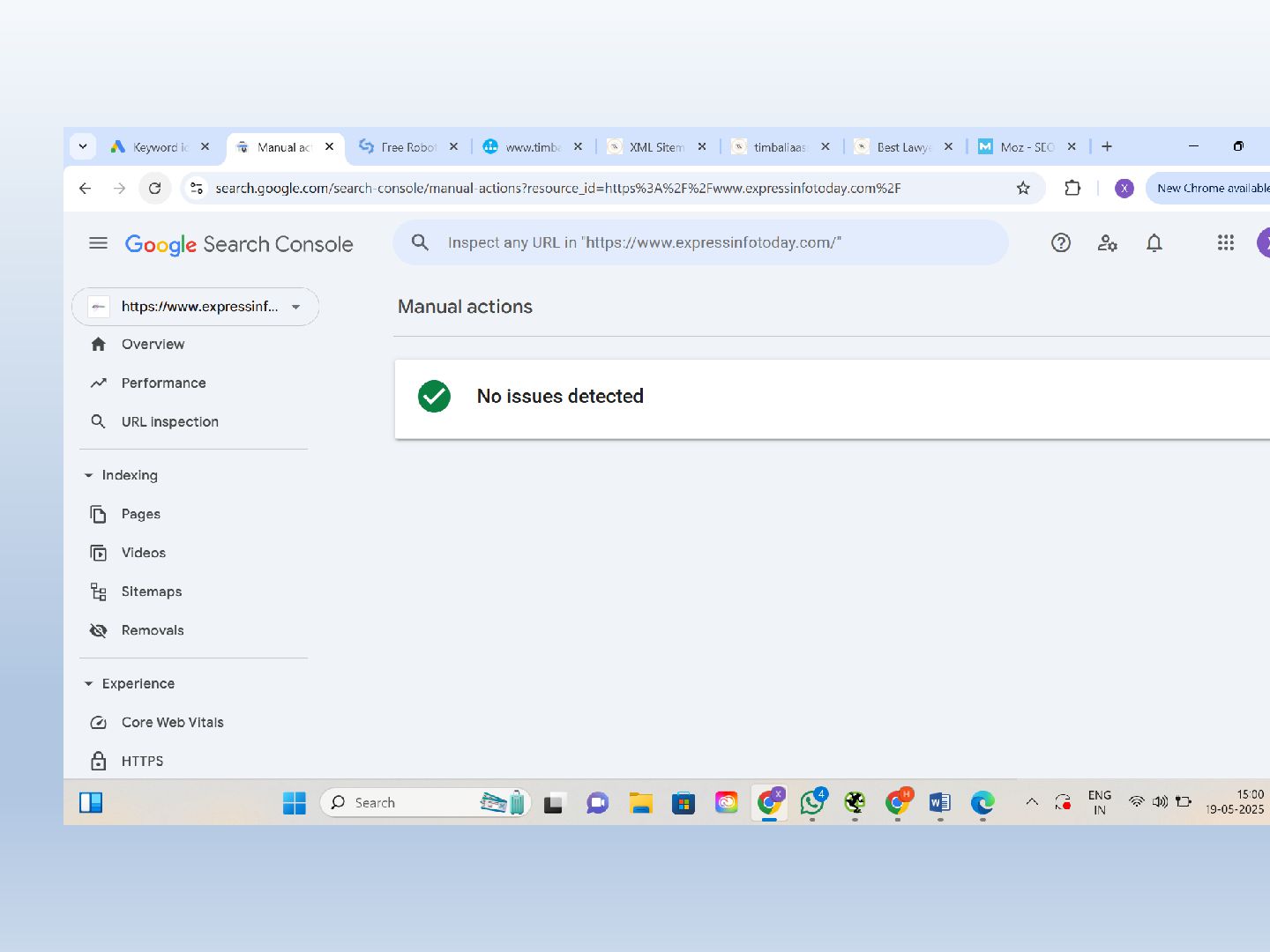
Dashboard Overview • The dashboard shows an overview of your
site’s health, recent alerts, and quick access to main tools. It’s your starting point for monitoring site performance.
Performance • This section shows clicks, impressions, average CTR, and
position. It helps you analyze which queries bring users to your site and how your pages perform.
URL Inspection • Use this tool to check a specific
page’s status in the Google index. It shows crawl history, indexing status, and potential errors or enhancements.
Indexing - Pages, Videos, Sitemaps, Removals • Pages and videos
sections show what’s indexed. Sitemaps let you submit structured maps of site content. Removals help you temporarily block pages from Google Search.
Experience - Core Web Vitals & HTTPS • Core Web
Vitals measure page speed, responsiveness, and visual stability. The HTTPS section ensures your site is secure for users.
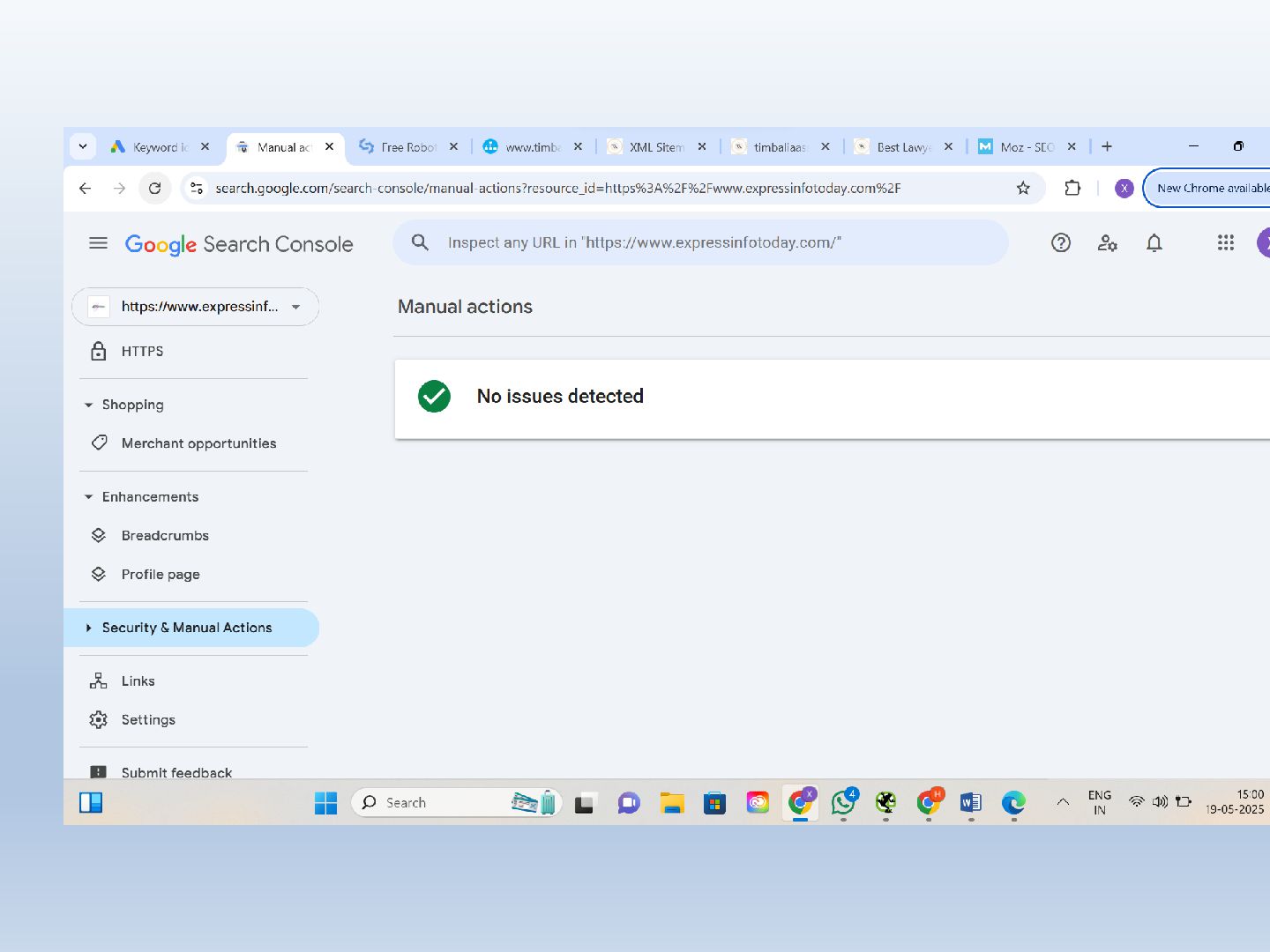
Security & Manual Actions • This section alerts you about
security issues or manual penalties from Google. In your case, ‘No issues detected’ means your site is clean.
Enhancements - Breadcrumbs, Profile Page • Shows structured data enhancements
that improve how your pages appear in search results, like breadcrumbs and profile page details.
Shopping - Merchant Opportunities • Displays options to link your
products to Google Shopping. Helps increase visibility and traffic through product listings.
Links • Provides insights on internal and external links to
your website. Helps understand your site’s authority and linking strategy.
Settings • Manage ownership verification, users, and change settings related
to your Google Search Console account.
None
None
For More Information Refer- https://digitalpundit.in/


 tamaranovitovic
 tammyeverts
 addyosmani
 andyhume
 lara
lara
 wjessup
 scottboms
 stephenakadiri
 3n
3n
 tmiket
 lauravandoore
 keavy
keavy