Upgrade to Pro
— share decks privately, control downloads, hide ads and more …
Speaker Deck
Sign up for free
Menu
Search
Features
All features
Private URLs
Password Protection
Custom URLS
Scheduled publishing
Remove Branding
Restrict embedding
Deck Collections
Notes
Features
All features
Private URLs
Password Protection
Custom URLS
Scheduled publishing
Remove Branding
Restrict embedding
Deck Collections
Notes
Explore
Featured decks
Featured speakers
Programming
Technology
Storyboards
Explore
Featured decks
Featured speakers
Programming
Technology
Storyboards
Pricing
Search
Sign in
Sign up for free
マニュアル課題
Search
Sponsored
·
Your Podcast. Everywhere. Effortlessly.
Share. Educate. Inspire. Entertain. You do you. We'll handle the rest.
→
Hinako Hori
June 16, 2016
70
0
Share
Embed
Copy iframe code
Copy JS code
Copy link
Start on current slide
マニュアル課題
Hinako Hori
June 16, 2016
More Decks by Hinako Hori
See All by Hinako Hori
課題Aマニュアル.pdf
hinako0903
0
96
マニュアル課題
hinako0903
0
82
Featured
See All Featured
Six Lessons from altMBA
skipperchong
29
4.5k
Joys of Absence: A Defence of Solitary Play
codingconduct
1
550
The Mindset for Success: Future Career Progression
greggifford
PRO
0
540
Making the Leap to Tech Lead
cromwellryan
135
10k
I Don’t Have Time: Getting Over the Fear to Launch Your Podcast
jcasabona
35
2.9k
The Success of Rails: Ensuring Growth for the Next 100 Years
eileencodes
47
8.4k
AI: The stuff that nobody shows you
jnunemaker
PRO
10
1.2k
How to train your dragon (web standard)
notwaldorf
96
6.9k
Test your architecture with Archunit
thirion
2
2.4k
StorybookのUI Testing Handbookを読んだ
zakiyama
31
7k
Leveraging Curiosity to Care for An Aging Population
cassininazir
1
540
Ruling the World: When Life Gets Gamed
codingconduct
0
400
Transcript
Tasking Managerによる マッピング作業マニュアル 空間情報システムⅠ 古橋大地 教授 地球社会共生学部 1年 A組 保利日向子
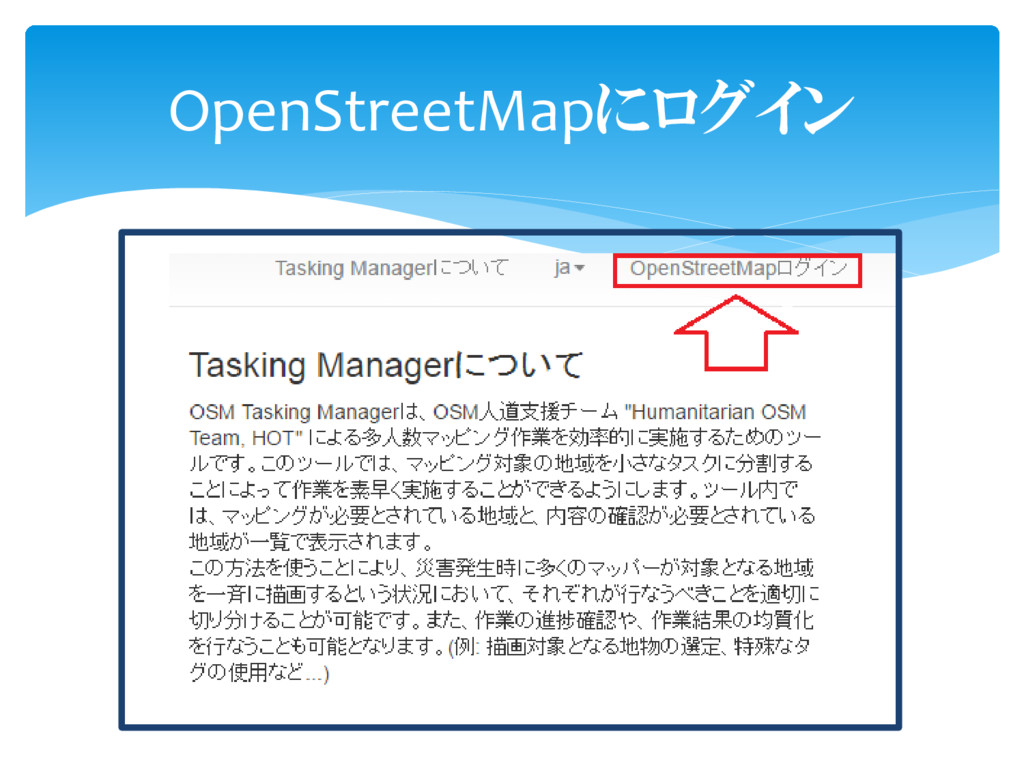
OpenStreetMapにログイン
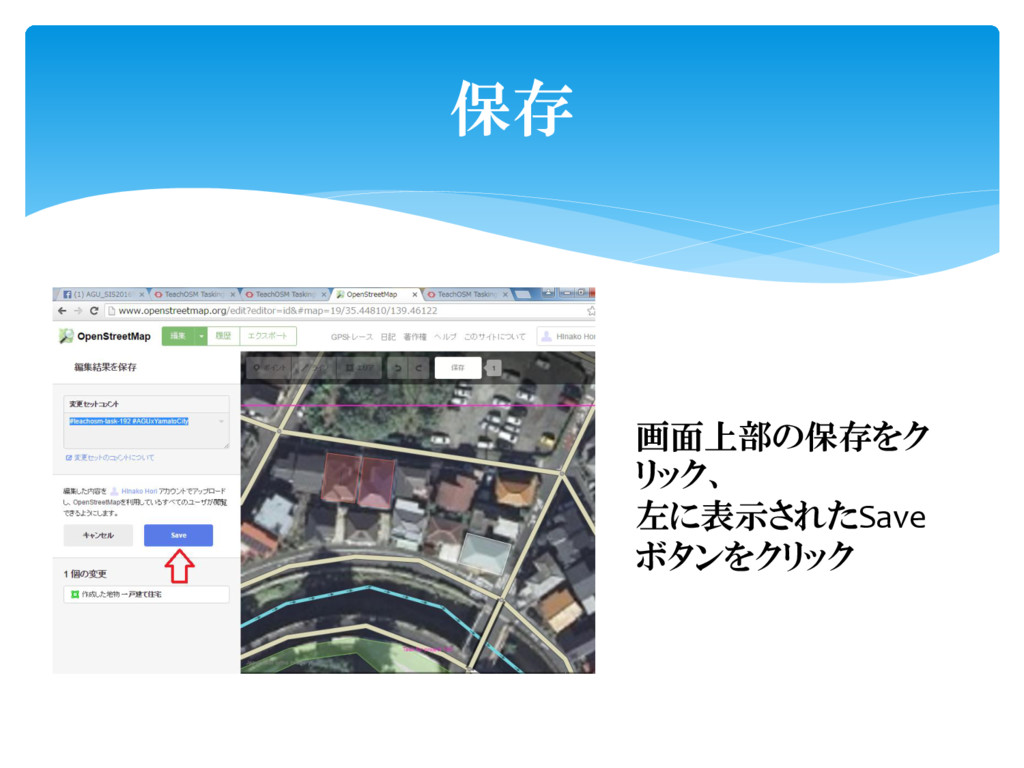
保存 画面上部の保存をク リック、 左に表示されたSave ボタンをクリック
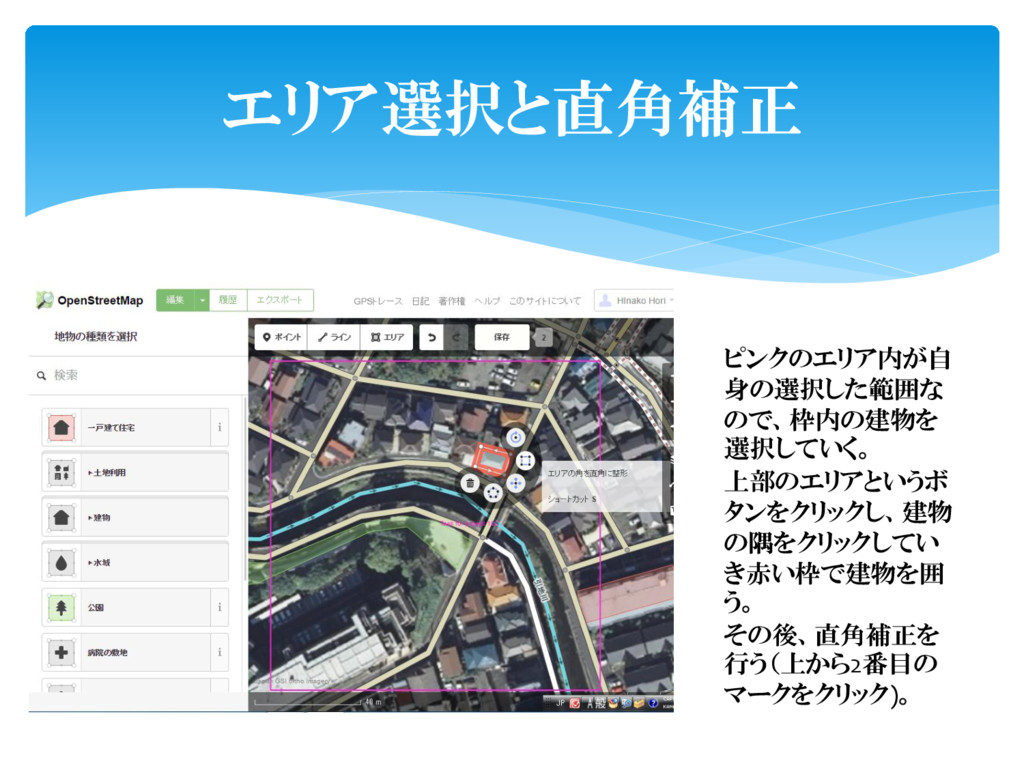
エリア選択と直角補正 ピンクのエリア内が自 身の選択した範囲な ので、枠内の建物を 選択していく。 上部のエリアというボ タンをクリックし、建物 の隅をクリックしてい き赤い枠で建物を囲 う。
その後、直角補正を 行う(上から2番目の マークをクリック)。
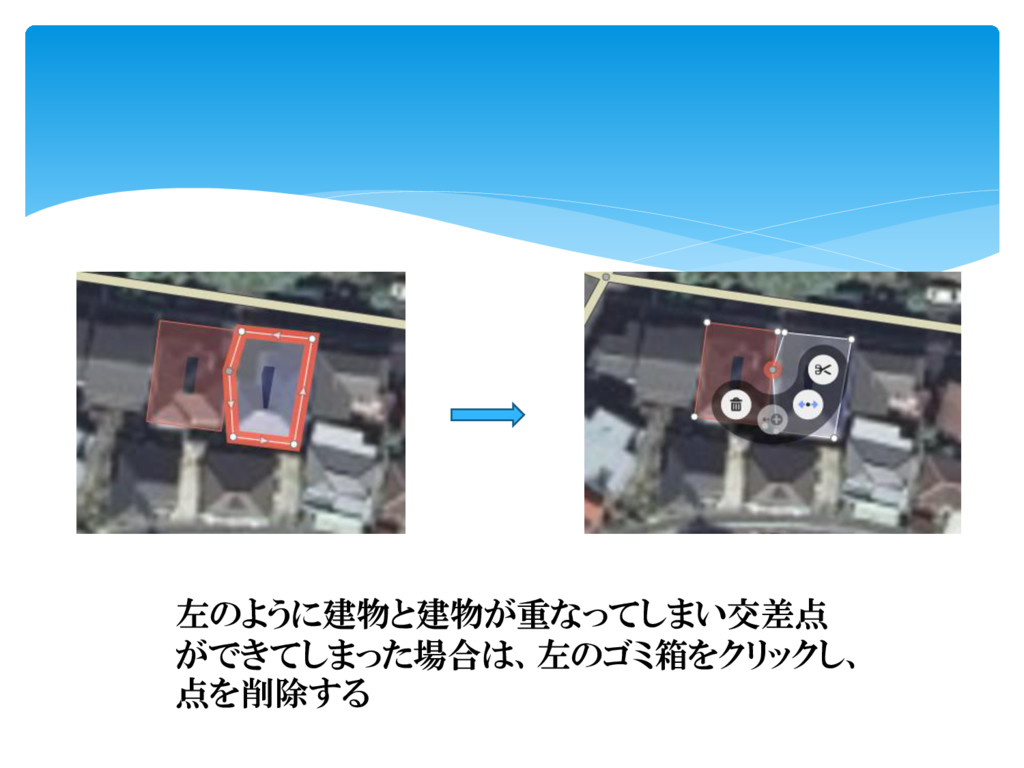
左のように建物と建物が重なってしまい交差点 ができてしまった場合は、左のゴミ箱をクリックし、 点を削除する
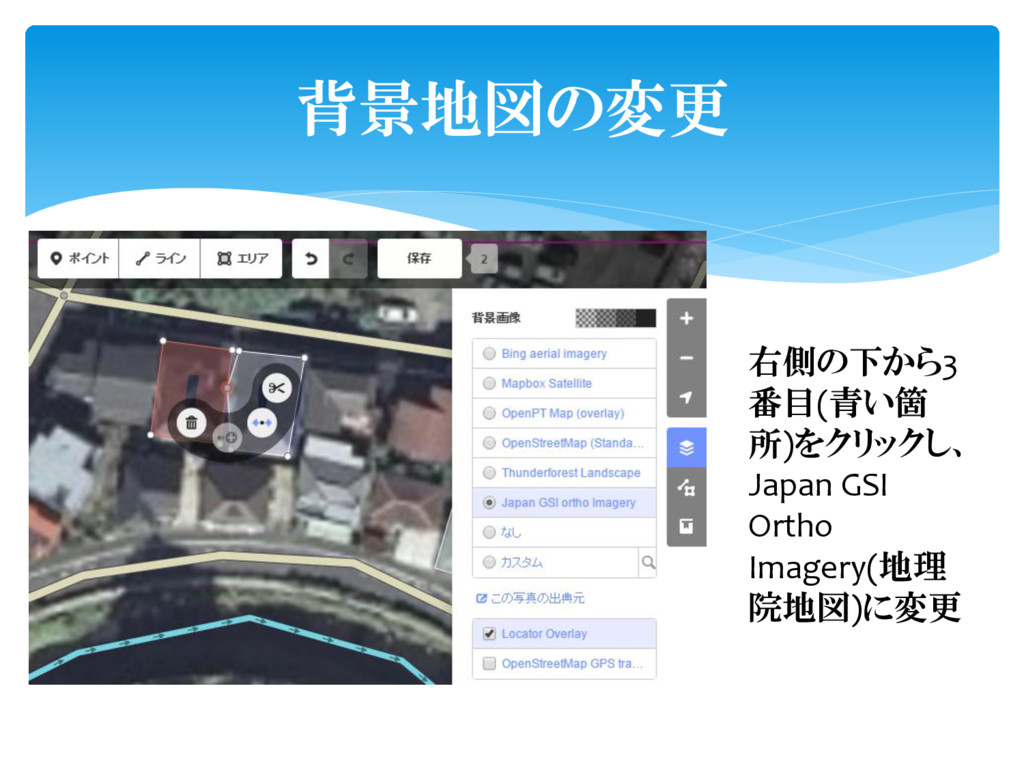
背景地図の変更 右側の下から3 番目(青い箇 所)をクリックし、 Japan GSI Ortho Imagery(地理 院地図)に変更
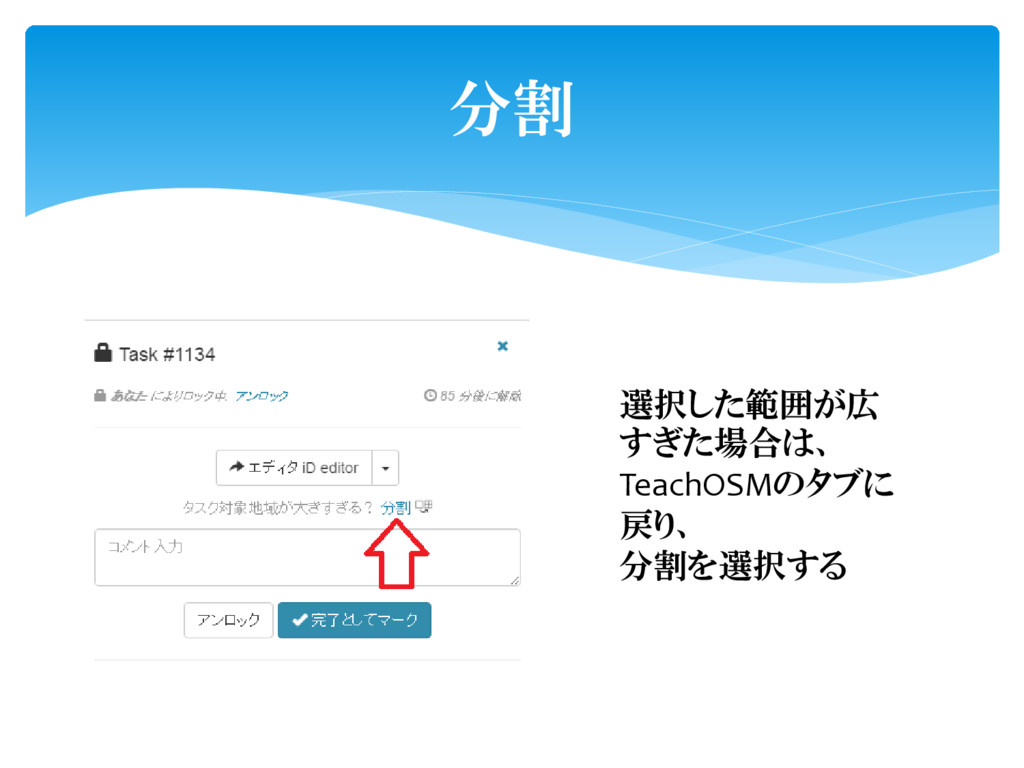
分割 選択した範囲が広 すぎた場合は、 TeachOSMのタブに 戻り、 分割を選択する
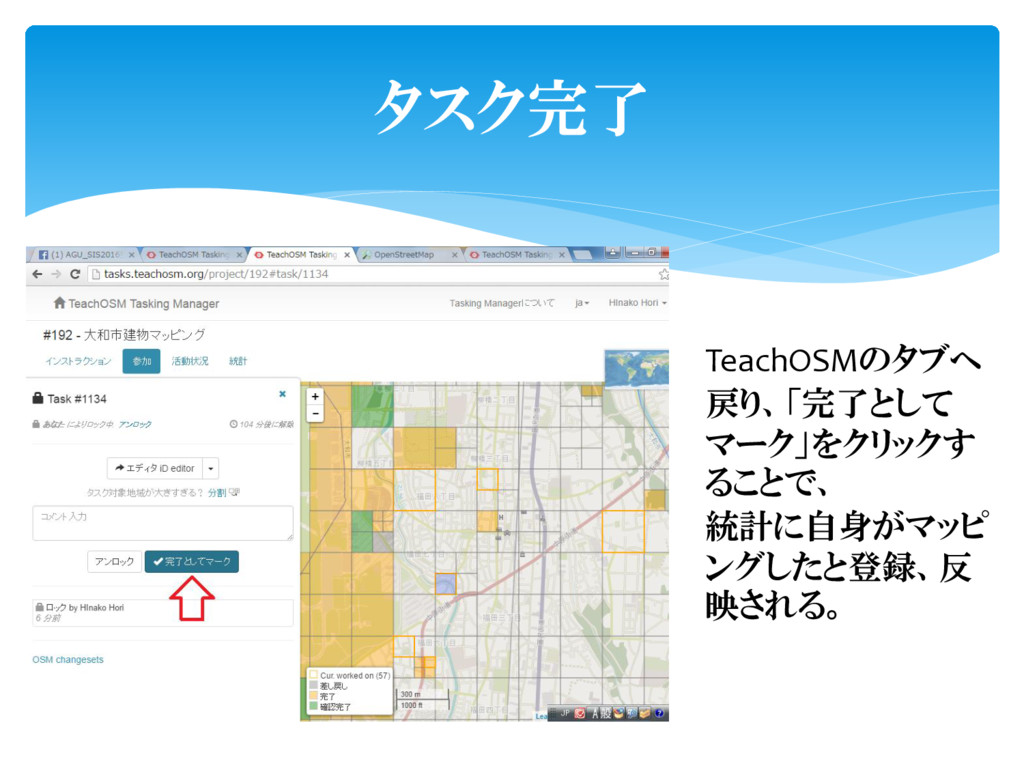
タスク完了 TeachOSMのタブへ 戻り、「完了として マーク」をクリックす ることで、 統計に自身がマッピ ングしたと登録、反 映される。


 hinako0903
 skipperchong
 codingconduct
 greggifford
 cromwellryan
 jcasabona
 eileencodes
 jnunemaker
 notwaldorf
 thirion
 zakiyama
 cassininazir