Upgrade to Pro
— share decks privately, control downloads, hide ads and more …
Speaker Deck
Sign up for free
Menu
Search
Features
All features
Private URLs
Password Protection
Custom URLS
Scheduled publishing
Remove Branding
Restrict embedding
Deck Collections
Notes
Features
All features
Private URLs
Password Protection
Custom URLS
Scheduled publishing
Remove Branding
Restrict embedding
Deck Collections
Notes
Explore
Featured decks
Featured speakers
Programming
Technology
Storyboards
Explore
Featured decks
Featured speakers
Programming
Technology
Storyboards
Pricing
Search
Sign in
Sign up for free
Tasking Managerの使い方
Search
K K
July 04, 2017
70
0
Share
Embed
Copy iframe code
Copy JS code
Copy link
Start on current slide
Tasking Managerの使い方
K K
July 04, 2017
Featured
See All Featured
How To Stay Up To Date on Web Technology
chriscoyier
790
250k
Facilitating Awesome Meetings
lara
57
7.2k
Kristin Tynski - Automating Marketing Tasks With AI
techseoconnect
PRO
0
550
I Don’t Have Time: Getting Over the Fear to Launch Your Podcast
jcasabona
35
2.9k
SEOcharity - Dark patterns in SEO and UX: How to avoid them and build a more ethical web
sarafernandez
0
300
<Decoding/> the Language of Devs - We Love SEO 2024
nikkihalliwell
1
360
What’s in a name? Adding method to the madness
productmarketing
PRO
24
4.2k
The Cost Of JavaScript in 2023
addyosmani
55
10k
The Anti-SEO Checklist Checklist. Pubcon Cyber Week
ryanjones
0
270
Faster Mobile Websites
deanohume
310
32k
First, design no harm
axbom
PRO
2
1.3k
Leveraging Curiosity to Care for An Aging Population
cassininazir
1
540
Transcript
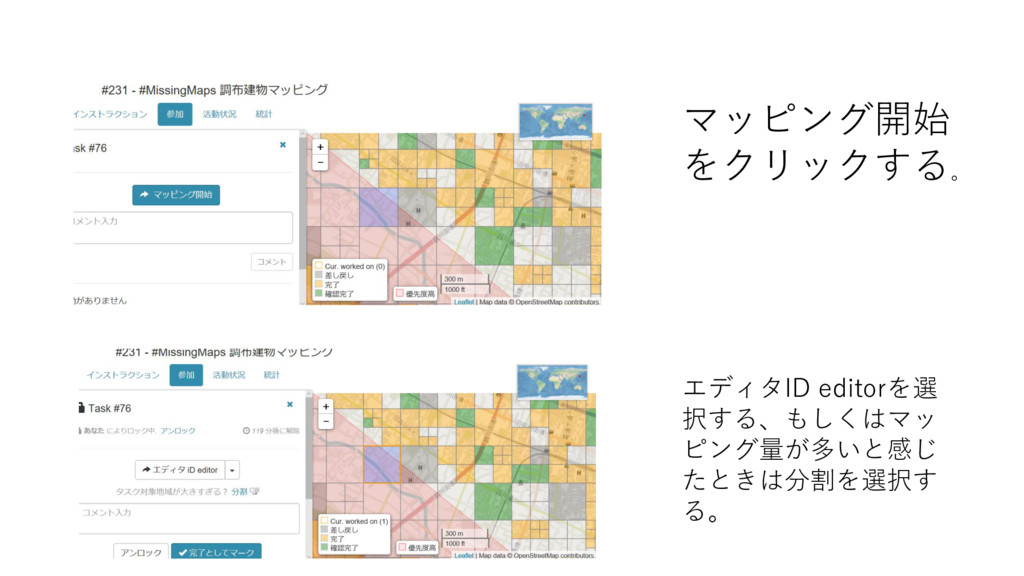
Tasking Managerの使い方 例として調布市のマッ ピングを挙げる。 まずこの画面にある参 加の部分をクリックし ます。 次に自分がマッピング したいタイルをクリッ クします。
マッピング開始 をクリックする。 エディタID editorを選 択する、もしくはマッ ピング量が多いと感じ たときは分割を選択す る。
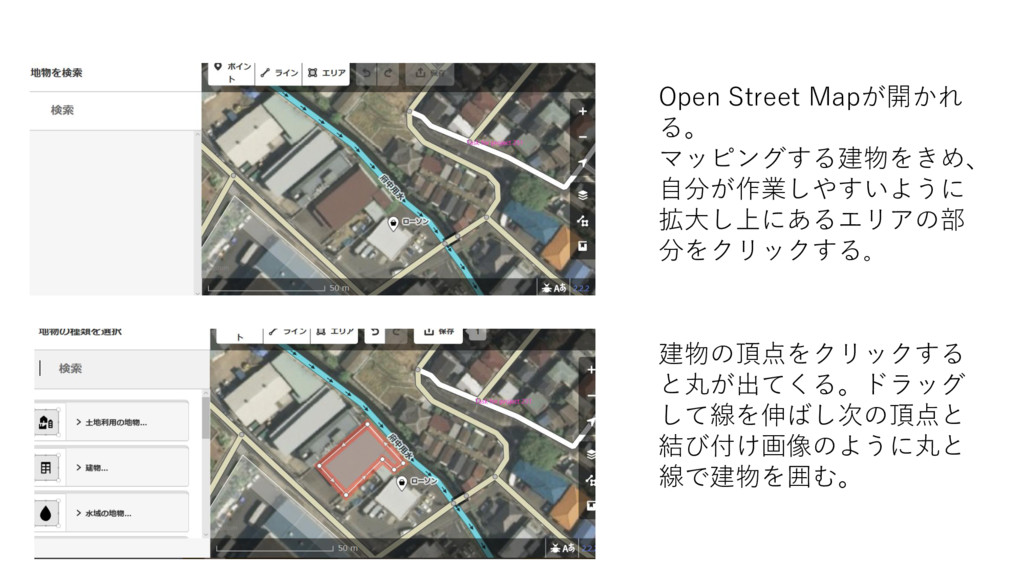
Open Street Mapが開かれ る。 マッピングする建物をきめ、 自分が作業しやすいように 拡大し上にあるエリアの部 分をクリックする。 建物の頂点をクリックする と丸が出てくる。ドラッグ
して線を伸ばし次の頂点と 結び付け画像のように丸と 線で建物を囲む。
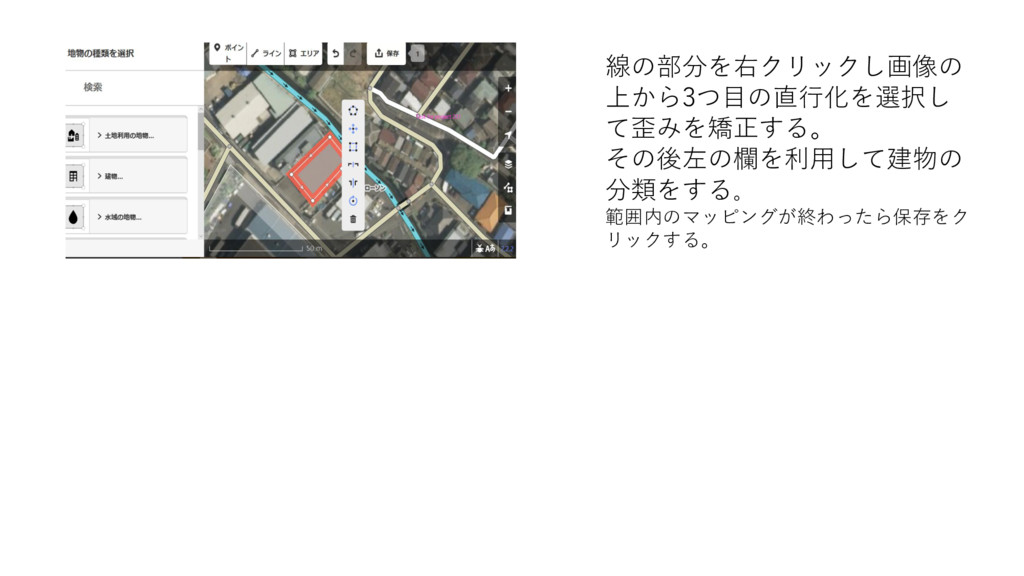
線の部分を右クリックし画像の 上から3つ目の直行化を選択し て歪みを矯正する。 その後左の欄を利用して建物の 分類をする。 範囲内のマッピングが終わったら保存をク リックする。


 chriscoyier
 lara
lara
 techseoconnect
 jcasabona
 sarafernandez
 nikkihalliwell
 productmarketing
 addyosmani
 ryanjones
 deanohume
 axbom
axbom
 cassininazir