Upgrade to Pro
— share decks privately, control downloads, hide ads and more …
Speaker Deck
Sign up for free
Menu
Search
Features
All features
Private URLs
Password Protection
Custom URLS
Scheduled publishing
Remove Branding
Restrict embedding
Deck Collections
Notes
Features
All features
Private URLs
Password Protection
Custom URLS
Scheduled publishing
Remove Branding
Restrict embedding
Deck Collections
Notes
Explore
Featured decks
Featured speakers
Programming
Technology
Storyboards
Explore
Featured decks
Featured speakers
Programming
Technology
Storyboards
Pricing
Search
Sign in
Sign up for free
Tasking Managerを使ったマッピング方
Search
DDD
July 06, 2017
35
0
Share
Embed
Copy iframe code
Copy JS code
Copy link
Start on current slide
Tasking Managerを使ったマッピング方
DDD
July 06, 2017
More Decks by DDD
See All by DDD
土肥卓人提出物
monkeyd1
0
150
Featured
See All Featured
How to optimise 3,500 product descriptions for ecommerce in one day using ChatGPT
katarinadahlin
PRO
3
3.9k
The untapped power of vector embeddings
frankvandijk
2
1.9k
Facilitating Awesome Meetings
lara
57
7.2k
Why Your Marketing Sucks and What You Can Do About It - Sophie Logan
marketingsoph
0
430
Docker and Python
trallard
47
4.2k
From Legacy to Launchpad: Building Startup-Ready Communities
dugsong
0
360
[Rails World 2023 - Day 1 Closing Keynote] - The Magic of Rails
eileencodes
38
3.1k
Creating an realtime collaboration tool: Agile Flush - .NET Oxford
marcduiker
35
2.6k
What the history of the web can teach us about the future of AI
inesmontani
PRO
2
740
Fantastic passwords and where to find them - at NoRuKo
philnash
53
4k
Java REST API Framework Comparison - PWX 2021
mraible
34
9.8k
svc-hook: hooking system calls on ARM64 by binary rewriting
retrage
2
630
Transcript
Tasking Managerを 使ったマッピング方 1A117111 土肥 卓人
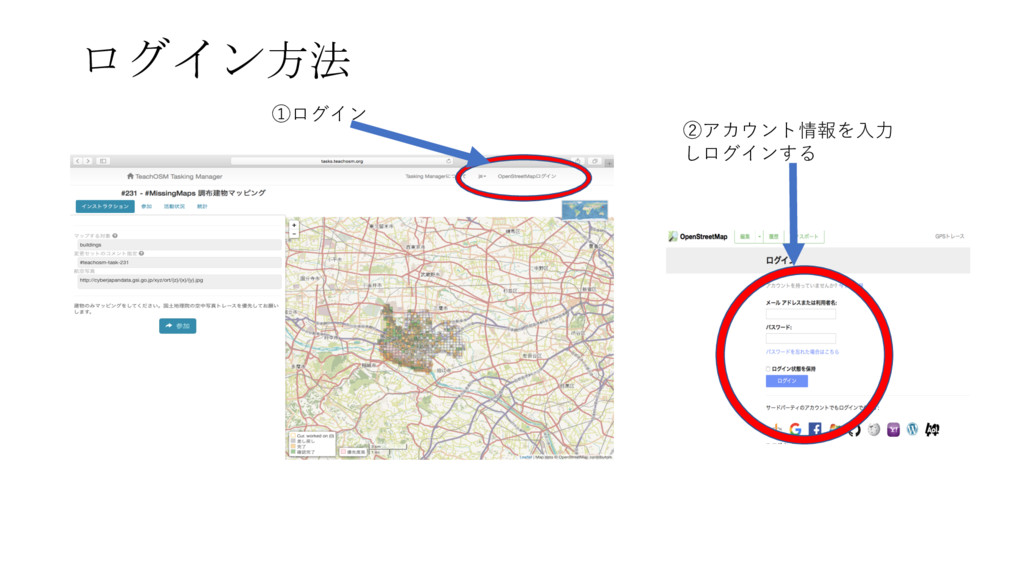
ログイン方法 ①ログイン ②アカウント情報を⼊⼒ しログインする
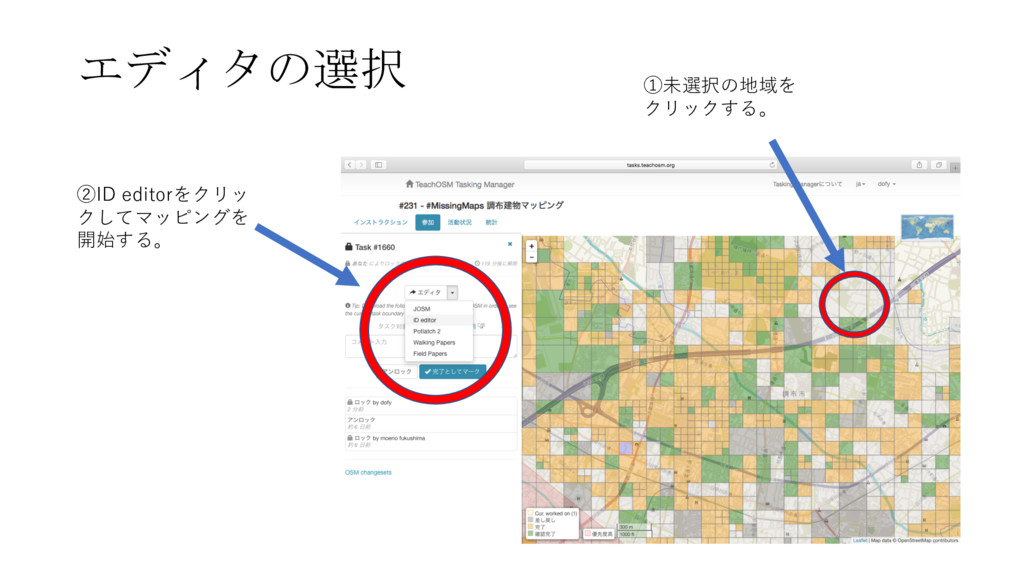
エディタの選択 ②ID editorをクリッ クしてマッピングを 開始する。 ①未選択の地域を クリックする。
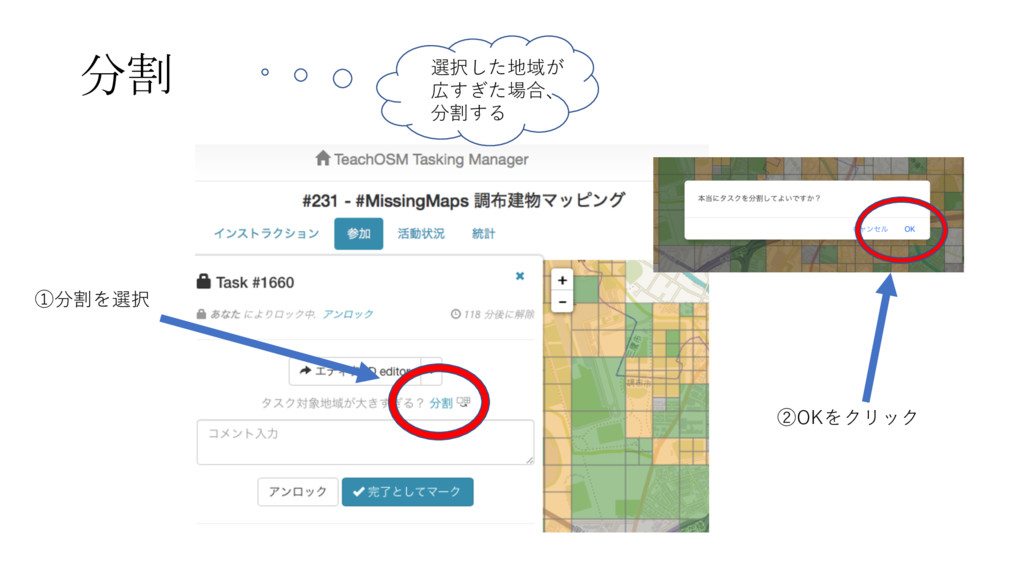
分割 ①分割を選択 ②OKをクリック 選択した地域が 広すぎた場合、 分割する
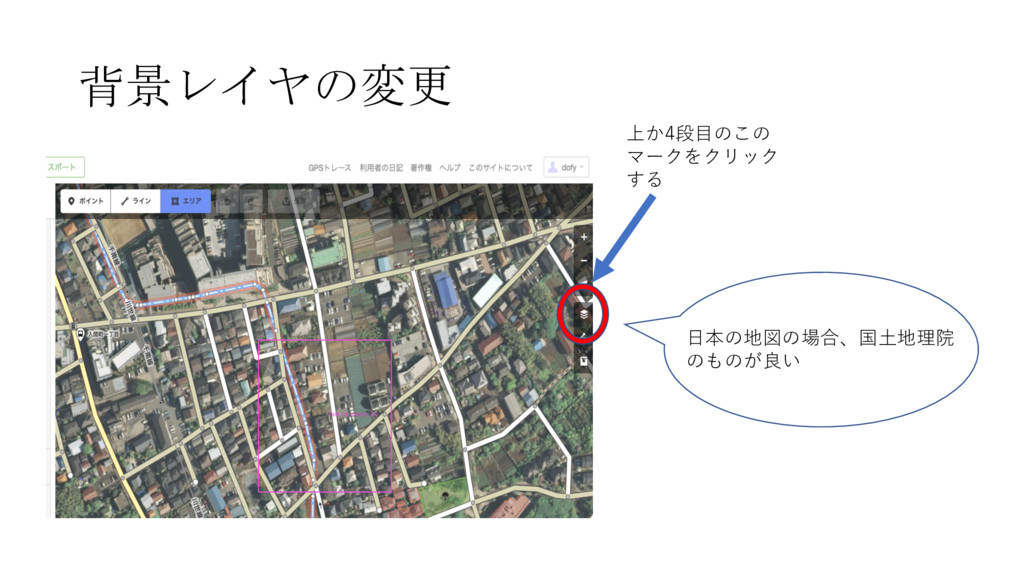
背景レイヤの変更 上か4段⽬のこの マークをクリック する ⽇本の地図の場合、国⼟地理院 のものが良い
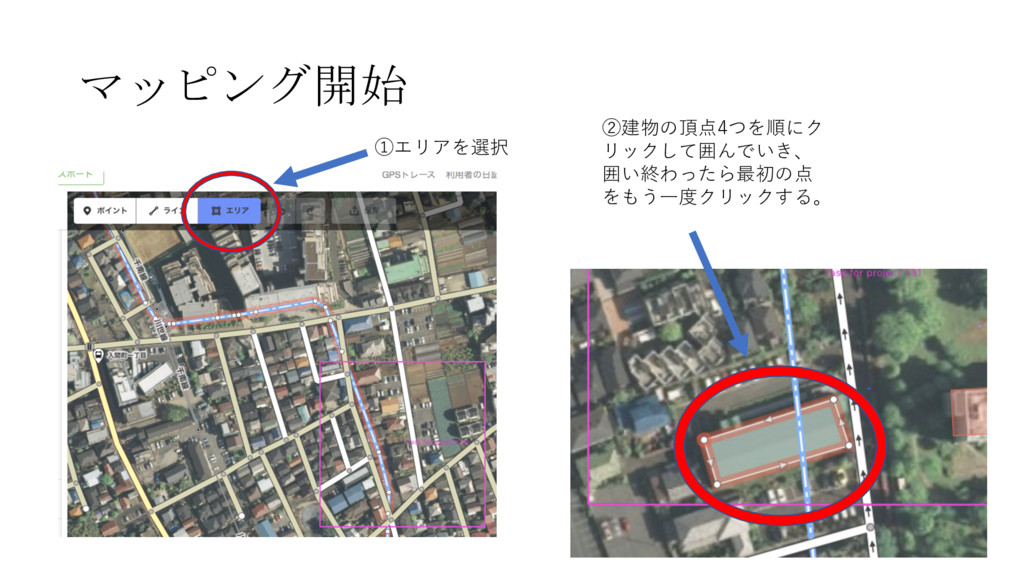
マッピング開始 ①エリアを選択 ②建物の頂点4つを順にク リックして囲んでいき、 囲い終わったら最初の点 をもう⼀度クリックする。
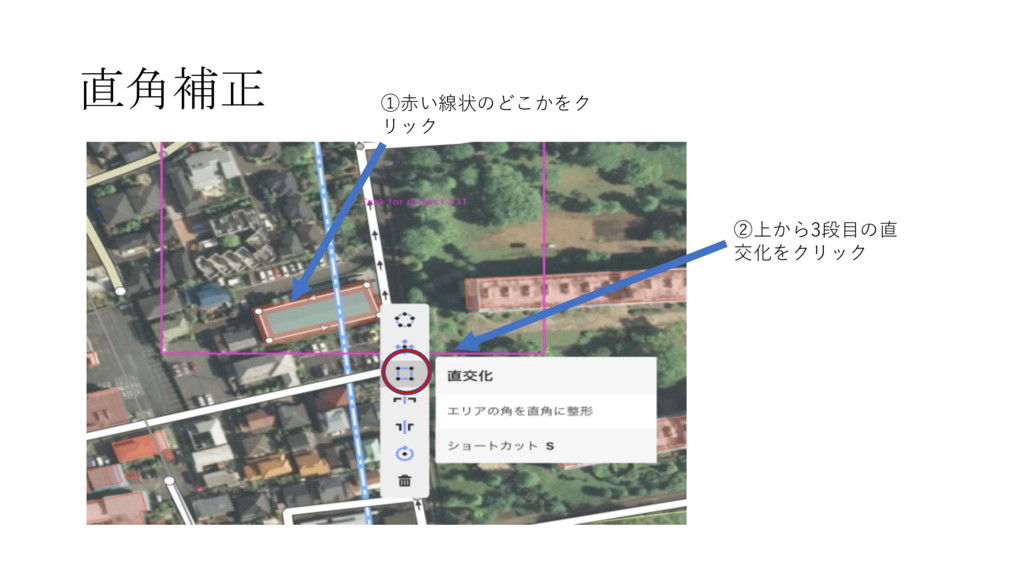
直角補正 ①⾚い線状のどこかをク リック ②上から3段⽬の直 交化をクリック
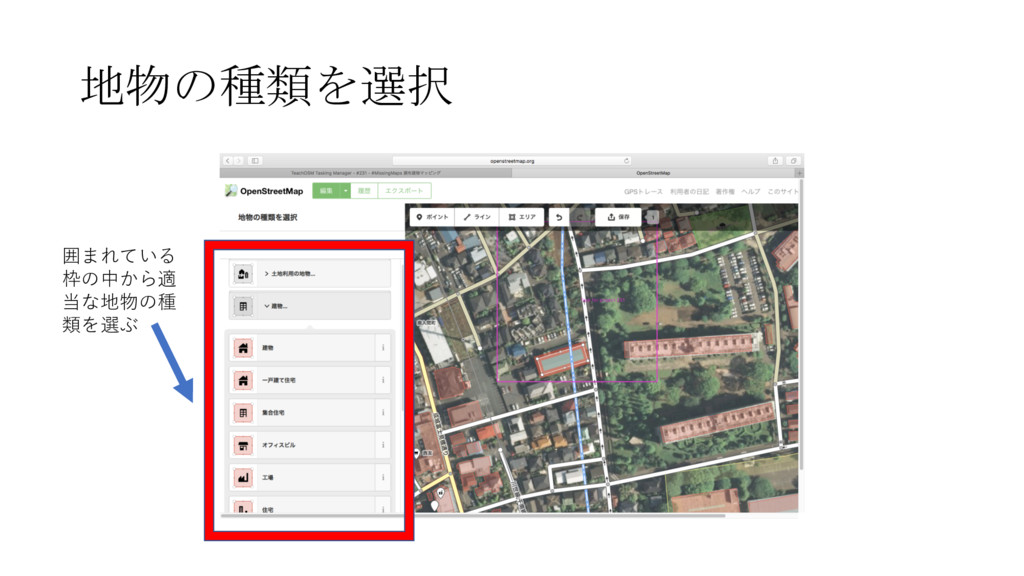
地物の種類を選択 囲まれている 枠の中から適 当な地物の種 類を選ぶ
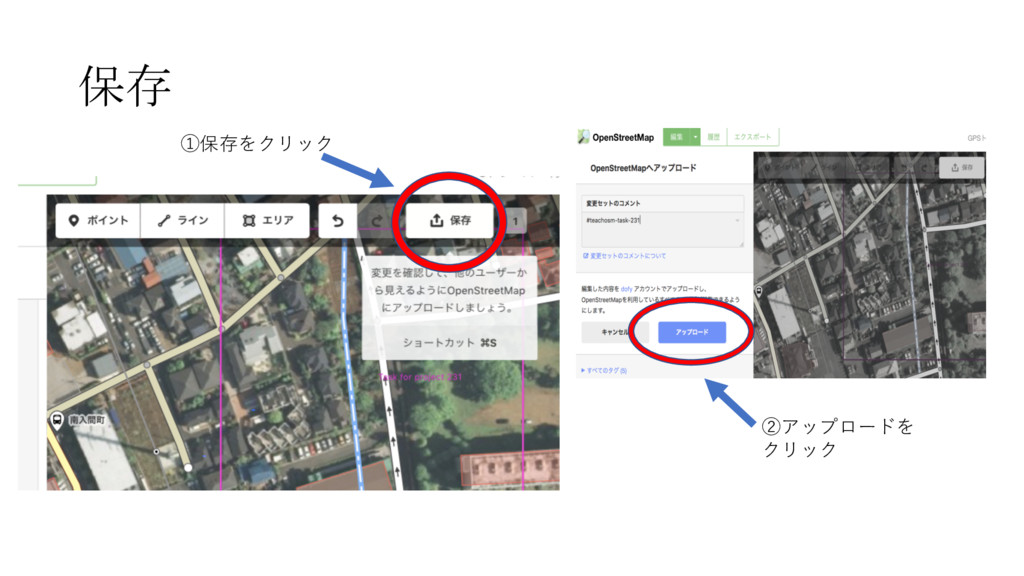
保存 ①保存をクリック ②アップロードを クリック
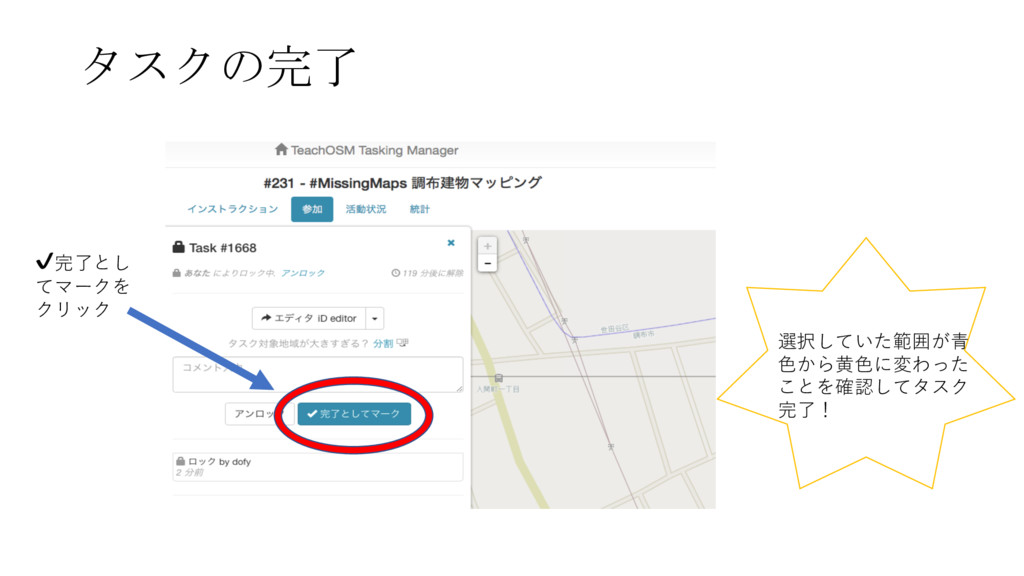
タスクの完了 ✔完了とし てマークを クリック 選択していた範囲が⻘ ⾊から⻩⾊に変わった ことを確認してタスク 完了!


 monkeyd1
 katarinadahlin
 frankvandijk
 lara
lara
 marketingsoph
 trallard
 dugsong
 eileencodes
 marcduiker
 inesmontani
 philnash
 mraible
 retrage