Upgrade to Pro — share decks privately, control downloads, hide ads and more …

クラウド (AWS) と オンプレ (自宅) の テレメトリを 地球儀で可視化する Splun...

Sponsored · Ship Features Fearlessly Turn features on and off without deploys. Used by thousands of Ruby developers.

クラウド (AWS) と オンプレ (自宅) の テレメトリを 地球儀で可視化する Splunk Appを作ってみた

ハイブリッド環境の運用ではAWS のテレメトリとオンプレのテレメトリを別々の画面で追いがちです。本セッションでは、AWS (VPC Flow Logs / GuardDuty / Security Hub) と自宅 LAN を カスタマーDC に見立てて取得したオンプレ系データ (ネットワーク機器 の NetFlow / Syslog) を 1 つの Indexer Cluster に集約し、Splunk App として 3D 地球儀ダッシュボードで一画面に可視化する自作プロジェクトをご紹介します

Avatar for Hiroki Uchida

Hiroki Uchida

June 09, 2026

More Decks by Hiroki Uchida

Other Decks in Technology

Transcript

  1. クラウド (AWS) と オンプレ (自宅) の テレメトリを 地球儀で可視化する Splunk Appを作ってみた

    【GOJAS Meetup-31】Inside Out 〜マニアックな自作Appから現場の即戦力ログ運用まで〜 Splunk Services Japan合同会社 Senior Solutions Engineer 内田 大樹 2026年6月9日
  2. © 2026 Cisco and/or its affiliates. All rights reserved. ©

    2026 Cisco and/or its affiliates. All rights reserved. Forward-looking statements This presentation may contain forward-looking statements regarding future events, plans or the expected financial performance of our company, including our expectations regarding our products, technology, strategy, customers, markets, acquisitions and investments. These statements reflect management’s current expectations, estimates and assumptions based on the information currently available to use. These forward-looking statements are not guarantees of future performance and involve significant risks, uncertainties and other factors that may cause our actual results, performance or achievements to be materially different form results, performance or achievements expressed or implied by the forward-looking statements contained in this presentation. For additional information about factors that could cause actual results to differ materially from those described in the forward-looking statements made in this presentation, please refer to Cisco’s periodic reports its other filings with the SEC, including the risk factors identified in Cisco’s most recent quarterly report on Form 10-Q and annual report on Form 10-K, copies of which may be obtained by visiting the Cisco Investor Relations website at investor.cisco.com or the SEC’s website at www.sec.gov. Any projections in this presentation are based on information currently available to Cisco, which is subject to change. The forward-looking statements made in this presentation are made as of the time and date of this presentation. If reviewed after the initial presentation, even if made available by us, on our website or otherwise, it may not contain current or accurate information. We disclaim any obligation to update or revise any forward-looking statement based on new information, future events or otherwise, except as required by applicable law. In addition, any information about our roadmap outlines or our general product direction is subject to change at any time without notice. It is for information purposes only and shall not be incorporated into any contract or other commitment. We undertake no obligation either to develop the features or functionalities described, in alpha or beta or in preview (used interchangeably), or to include any such feature or functionality in a future release. Copyright © 2026 Cisco and/or its affiliates. All rights reserved. Cisco, Splunk and the Cisco and Splunk logos are trademarks or registered trademarks of Cisco and/or its affiliates in the U.S. and other countries. To view a list of Cisco trademarks, go to www.cisco.com/go/trademarks. Third-party trademarks mentioned in this presentation are the property of their respective owners. The use of the word partner does not imply a partnership relationship between Cisco and any other company.
  3. © 2026 Cisco and/or its affiliates. All rights reserved. ©

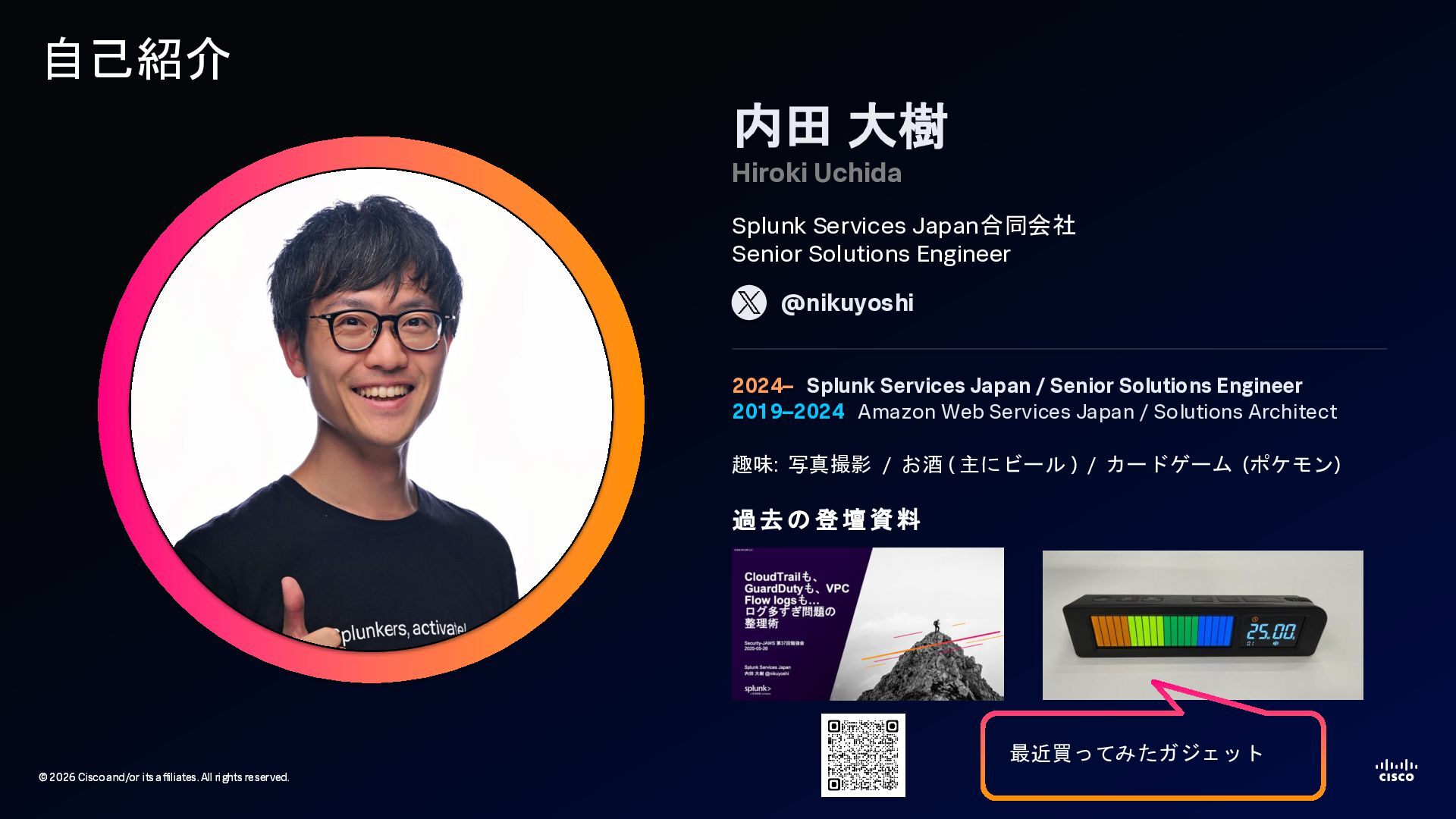
    2026 Cisco and/or its affiliates. All rights reserved. 自己紹介 内田 大樹 Hiroki Uchida Splunk Services Japan合同会社 Senior Solutions Engineer 2024– Splunk Services Japan / Senior Solutions Engineer 2019–2024 Amazon Web Services Japan / Solutions Architect 趣味: 写真撮影 / お酒 ( 主にビール ) / カードゲーム (ポケモン) @nikuyoshi 過去の 登壇資料 最近買ってみたガジェット
  4. © 2026 Cisco and/or its affiliates. All rights reserved. ©

    2026 Cisco and/or its affiliates. All rights reserved. なぜ地球儀のAppを作ろうと思ったか 仕事としてのモチベーション 1. Splunkが多様なデータソースを取り込んで一つのプラットフォームで扱える という価値を一枚絵で表現したかった (主にデモ用) 2. データに地理という軸を与えると、テーブルや時系列グラフでは埋もれてしまう 偏りや異常が一目で見えることを表現したかった 3. Claude Codeのようなツールで、専門家でなくても短期間でSplunk Appを 形にできることを示したかった プライベートのモチベーション (どちらかというと個人的な興味) 1. 自宅にネットワーク機器が4台あり、AWSにEC2インスタンス ( self-managed- splunk-aws で構築) もあることから、オンプレミス、クラウドと見立てて 何かしらのSplunk Appを作ってみたかった 2. Claude Codeを使ってどこまで作れるのか試してみたかった
  5. © 2026 Cisco and/or its affiliates. All rights reserved. ©

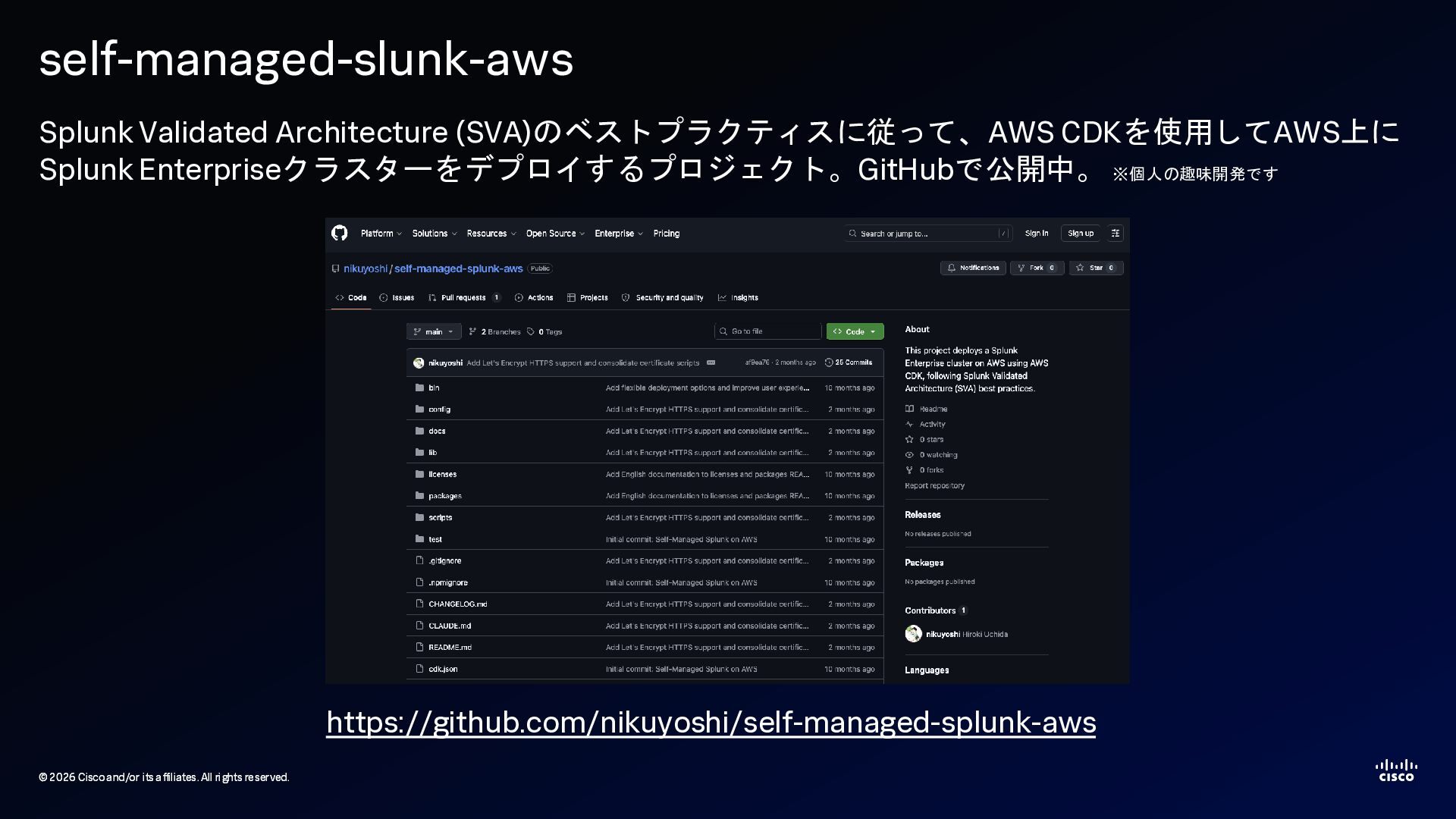
    2026 Cisco and/or its affiliates. All rights reserved. self-managed-slunk-aws Splunk Validated Architecture (SVA)のベストプラクティスに従って、AWS CDKを使用してAWS上に Splunk Enterpriseクラスターをデプロイするプロジェクト。GitHubで公開中。 ※個人の趣味開発です https://github.com/nikuyoshi/self-managed-splunk-aws
  6. © 2026 Cisco and/or its affiliates. All rights reserved. ©

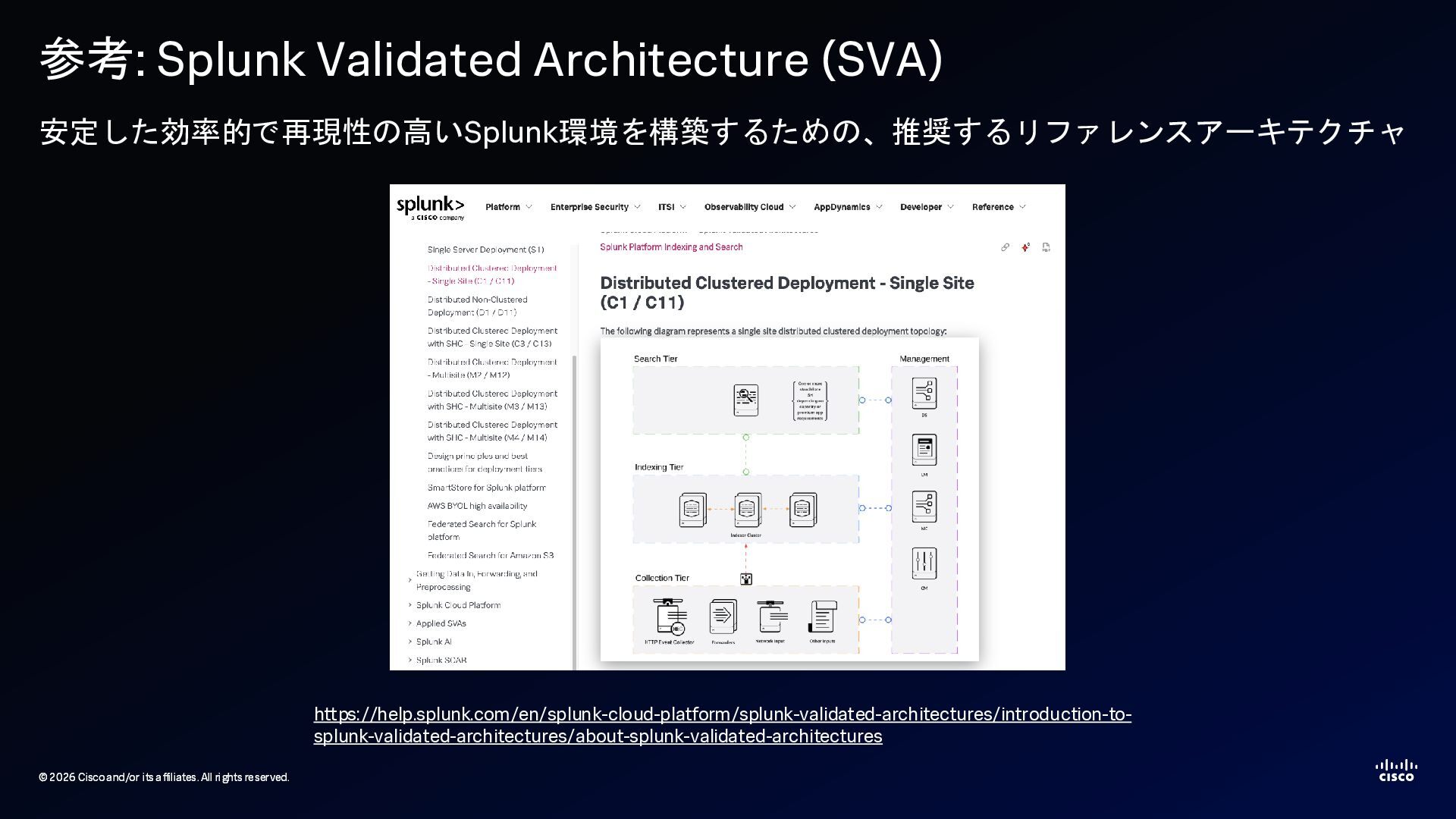
    2026 Cisco and/or its affiliates. All rights reserved. 参考: Splunk Validated Architecture (SVA) 安定した効率的で再現性の高いSplunk環境を構築するための、推奨するリファレンスアーキテクチャ https://help.splunk.com/en/splunk-cloud-platform/splunk-validated-architectures/introduction-to- splunk-validated-architectures/about-splunk-validated-architectures
  7. © 2026 Cisco and/or its affiliates. All rights reserved. ©

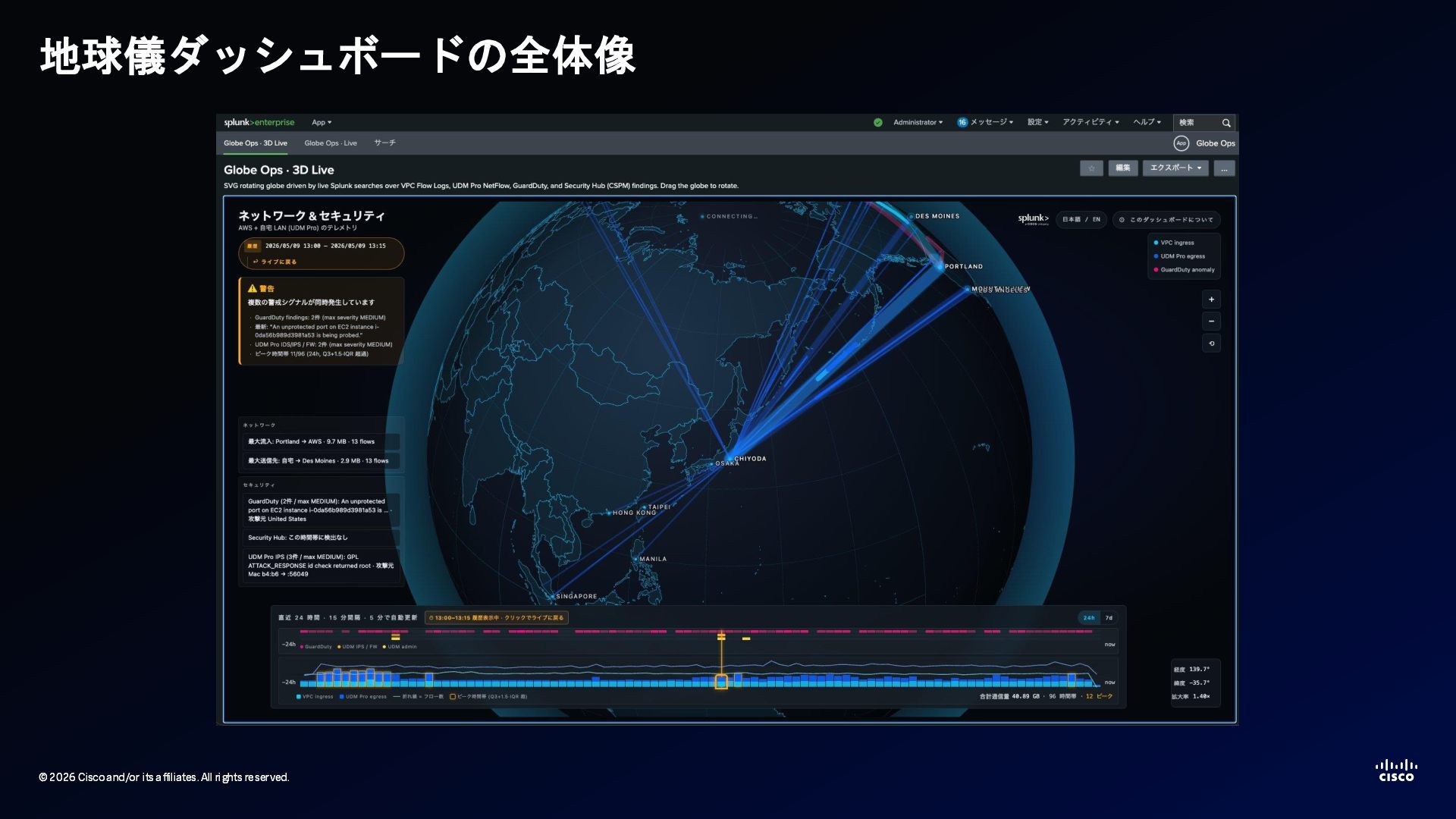
    2026 Cisco and/or its affiliates. All rights reserved. 地球儀ダッシュボードの全体像
  8. © 2026 Cisco and/or its affiliates. All rights reserved. ©

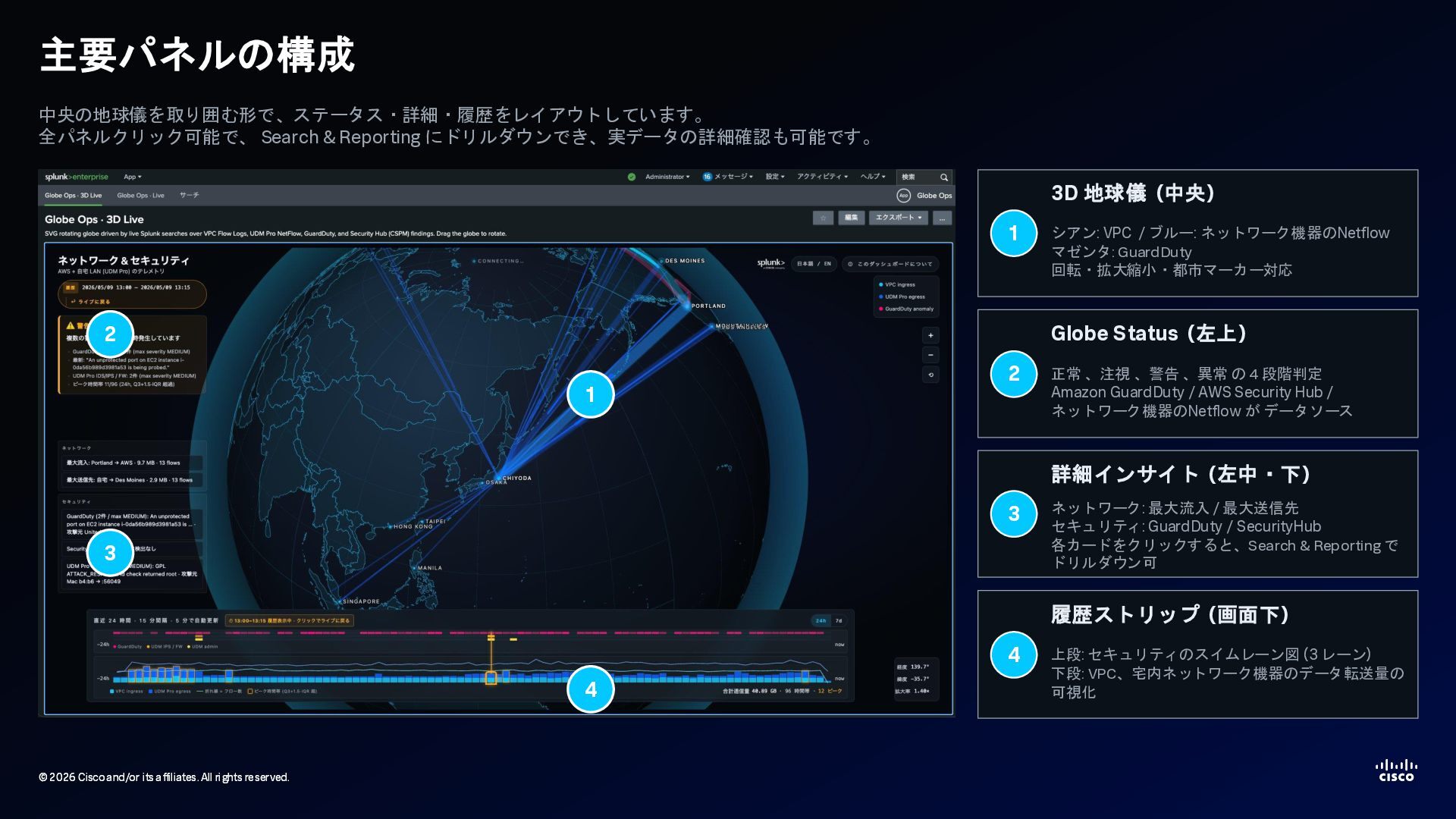
    2026 Cisco and/or its affiliates. All rights reserved. 主要パネルの構成 中央の地球儀を取り囲む形で、ステータス・詳細・履歴をレイアウトしています。 全パネルクリック可能で、 Search & Reporting にドリルダウンでき、実データの詳細確認も可能です。 1 2 3 4 1 3D 地球儀 (中央) シアン: VPC / ブルー: ネットワーク機器のNetflow マゼンタ: GuardDuty 回転・拡大縮小・都市マーカー対応 2 Globe Status (左上) 正常 、注視 、警告 、異常 の 4 段階判定 Amazon GuardDuty / AWS Security Hub / ネットワーク機器のNetflow が データソース 3 詳細インサイト (左中・下) ネットワーク: 最大流入 / 最大送信先 セキュリティ: GuardDuty / SecurityHub 各カードをクリックすると、Search & Reporting で ドリルダウン可 4 履歴ストリップ (画面下) 上段: セキュリティのスイムレーン図 (3 レーン) 下段: VPC、宅内ネットワーク機器のデータ転送量の 可視化
  9. © 2026 Cisco and/or its affiliates. All rights reserved. ©

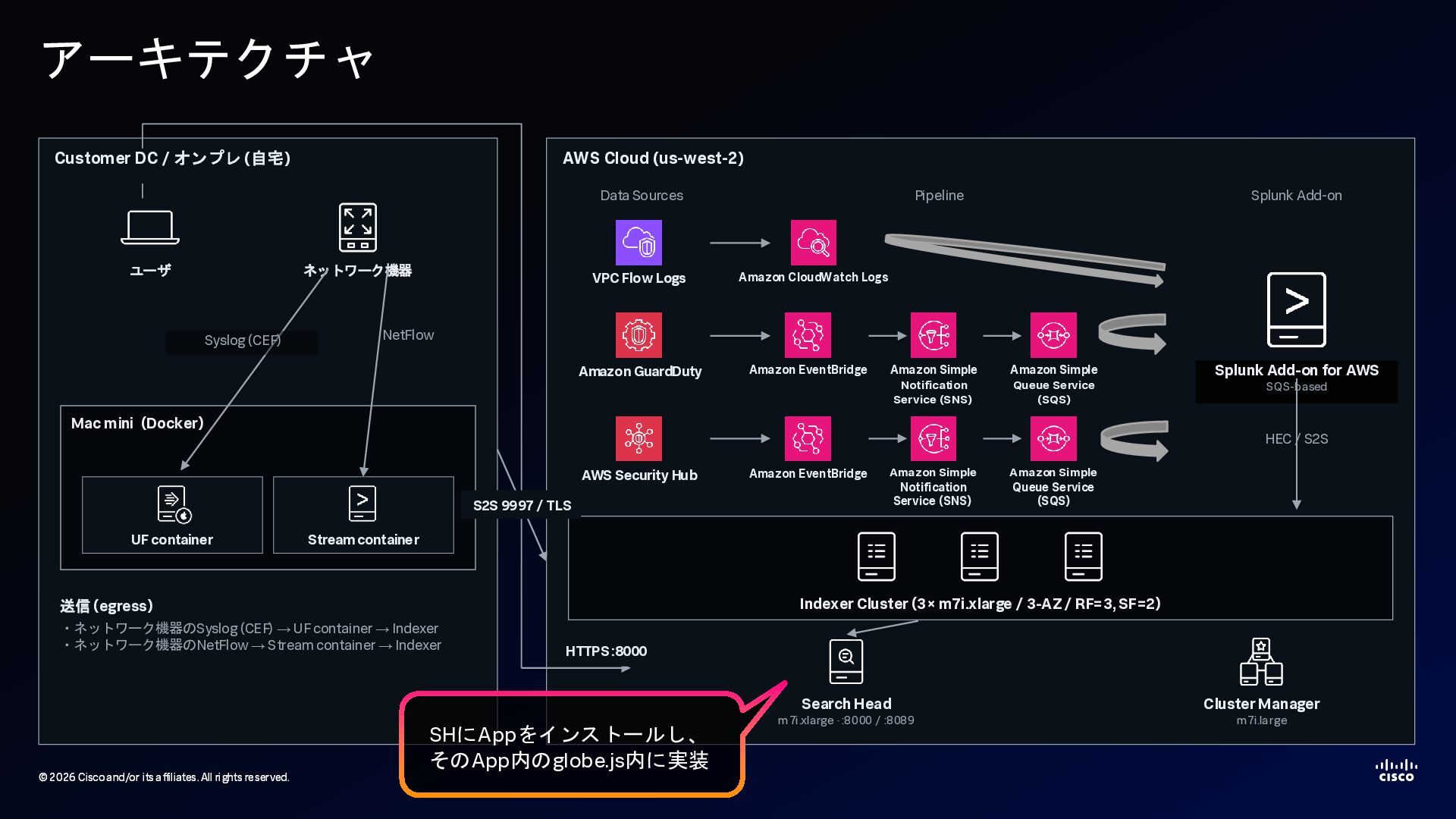
    2026 Cisco and/or its affiliates. All rights reserved. アーキテクチャ AWS Cloud (us-west-2) ユーザ ネットワーク機器 Mac mini (Docker) UF container Stream container Syslog (CEF) NetFlow 送信 (egress) ・ネットワーク機器のSyslog (CEF) → UF container → Indexer ・ネットワーク機器のNetFlow → Stream container → Indexer Data Sources Pipeline Splunk Add-on VPC Flow Logs Amazon GuardDuty AWS Security Hub Amazon CloudWatch Logs Amazon EventBridge Amazon Simple Notification Service (SNS) Amazon Simple Queue Service (SQS) Amazon EventBridge Splunk Add-on for AWS SQS-based Indexer Cluster (3× m7i.xlarge / 3-AZ / RF=3, SF=2) HEC / S2S Search Head m7i.xlarge · :8000 / :8089 Cluster Manager m7i.large S2S 9997 / TLS HTTPS :8000 Customer DC / オンプレ (自宅) Amazon Simple Notification Service (SNS) Amazon Simple Queue Service (SQS) SHにAppをインストールし、 そのApp内のglobe.js内に実装
  10. © 2026 Cisco and/or its affiliates. All rights reserved. ©

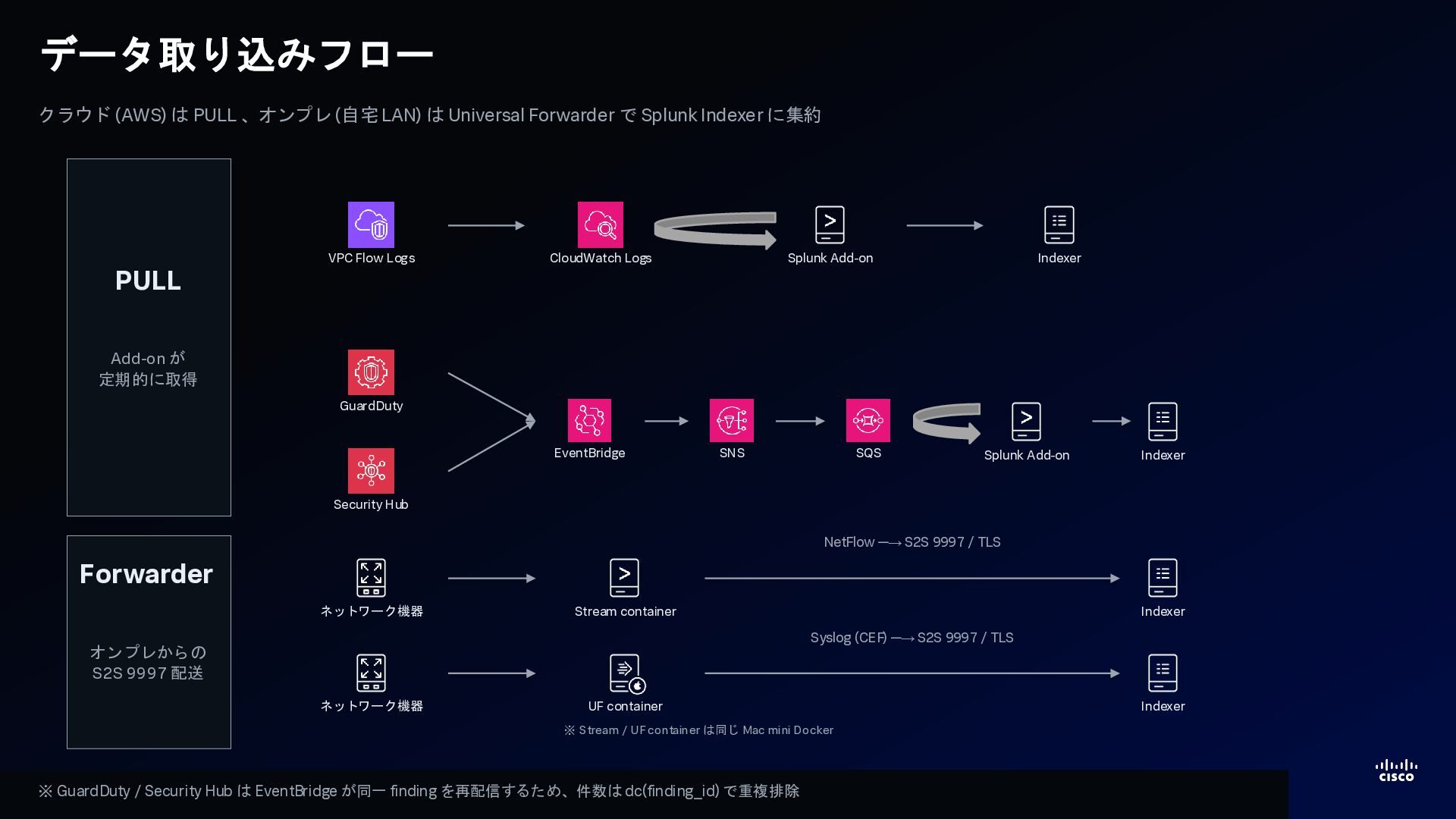
    2026 Cisco and/or its affiliates. All rights reserved. データ取り込みフロー クラウド (AWS) は PULL 、オンプレ (自宅 LAN) は Universal Forwarder で Splunk Indexer に集約 PULL Add-on が 定期的に取得 VPC Flow Logs CloudWatch Logs Splunk Add-on Indexer GuardDuty Security Hub EventBridge SNS SQS Splunk Add-on Indexer Forwarder オンプレからの S2S 9997 配送 ネットワーク機器 Stream container Indexer NetFlow ─→ S2S 9997 / TLS ネットワーク機器 UF container Indexer Syslog (CEF) ─→ S2S 9997 / TLS ※ Stream / UF container は同じ Mac mini Docker ※ GuardDuty / Security Hub は EventBridge が同一 finding を再配信するため、件数は dc(finding_id) で重複排除
  11. © 2026 Cisco and/or its affiliates. All rights reserved. ©

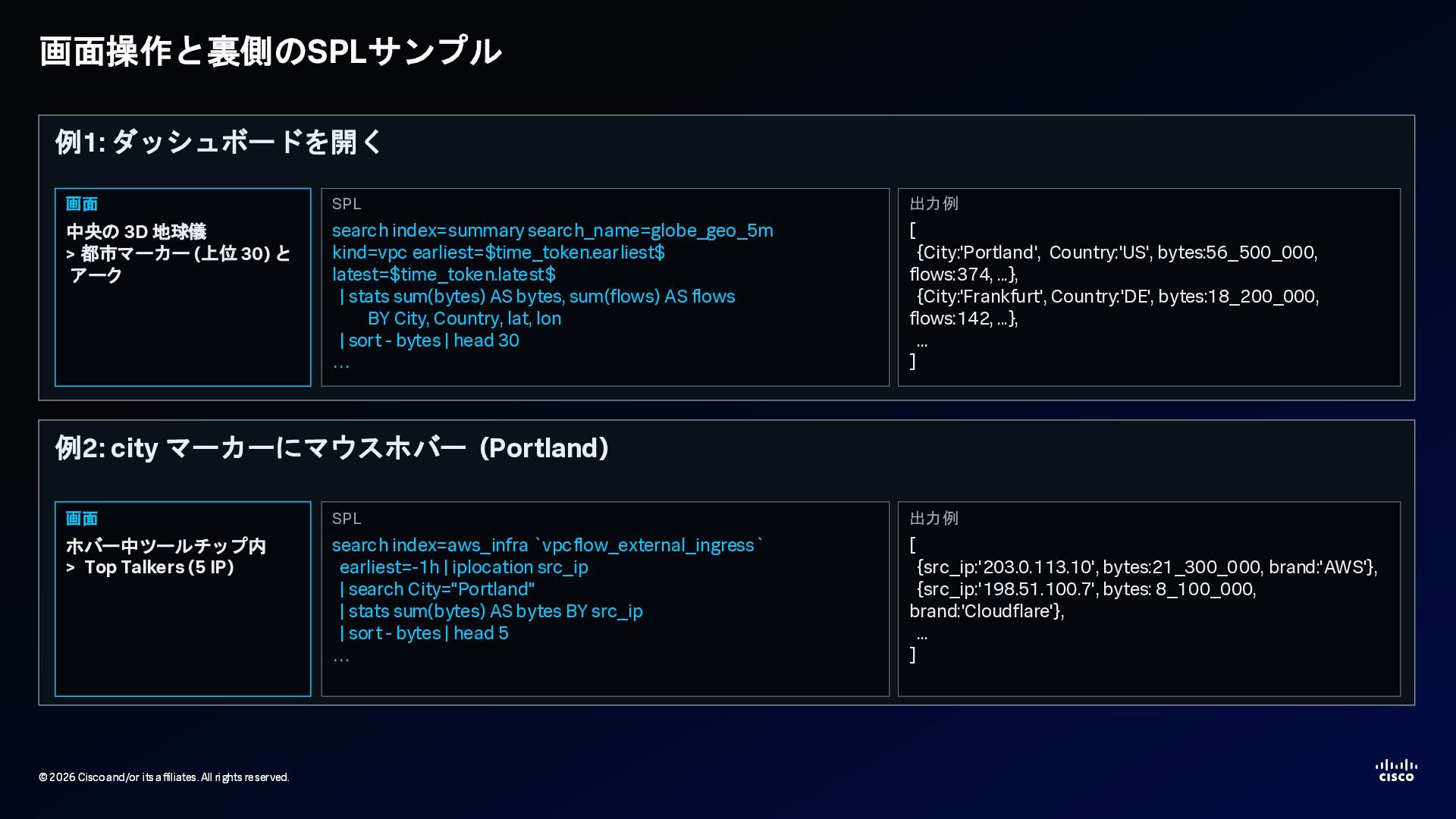
    2026 Cisco and/or its affiliates. All rights reserved. 画面操作と裏側のSPLサンプル 例1: ダッシュボードを開く SPL search index=summary search_name=globe_geo_5m kind=vpc earliest=$time_token.earliest$ latest=$time_token.latest$ | stats sum(bytes) AS bytes, sum(flows) AS flows BY City, Country, lat, lon | sort - bytes | head 30 … 出力例 [ {City:'Portland', Country:'US', bytes:56_500_000, flows:374, ...}, {City:'Frankfurt', Country:'DE', bytes:18_200_000, flows:142, ...}, ... ] 画面 中央の 3D 地球儀 > 都市マーカー (上位 30) と アーク 例2: city マーカーにマウスホバー (Portland) SPL search index=aws_infra `vpcflow_external_ingress` earliest=-1h | iplocation src_ip | search City="Portland" | stats sum(bytes) AS bytes BY src_ip | sort - bytes | head 5 … 出力例 [ {src_ip:'203.0.113.10', bytes:21_300_000, brand:'AWS'}, {src_ip:'198.51.100.7', bytes: 8_100_000, brand:'Cloudflare'}, ... ] 画面 ホバー中ツールチップ内 > Top Talkers (5 IP)
  12. © 2026 Cisco and/or its affiliates. All rights reserved. ©

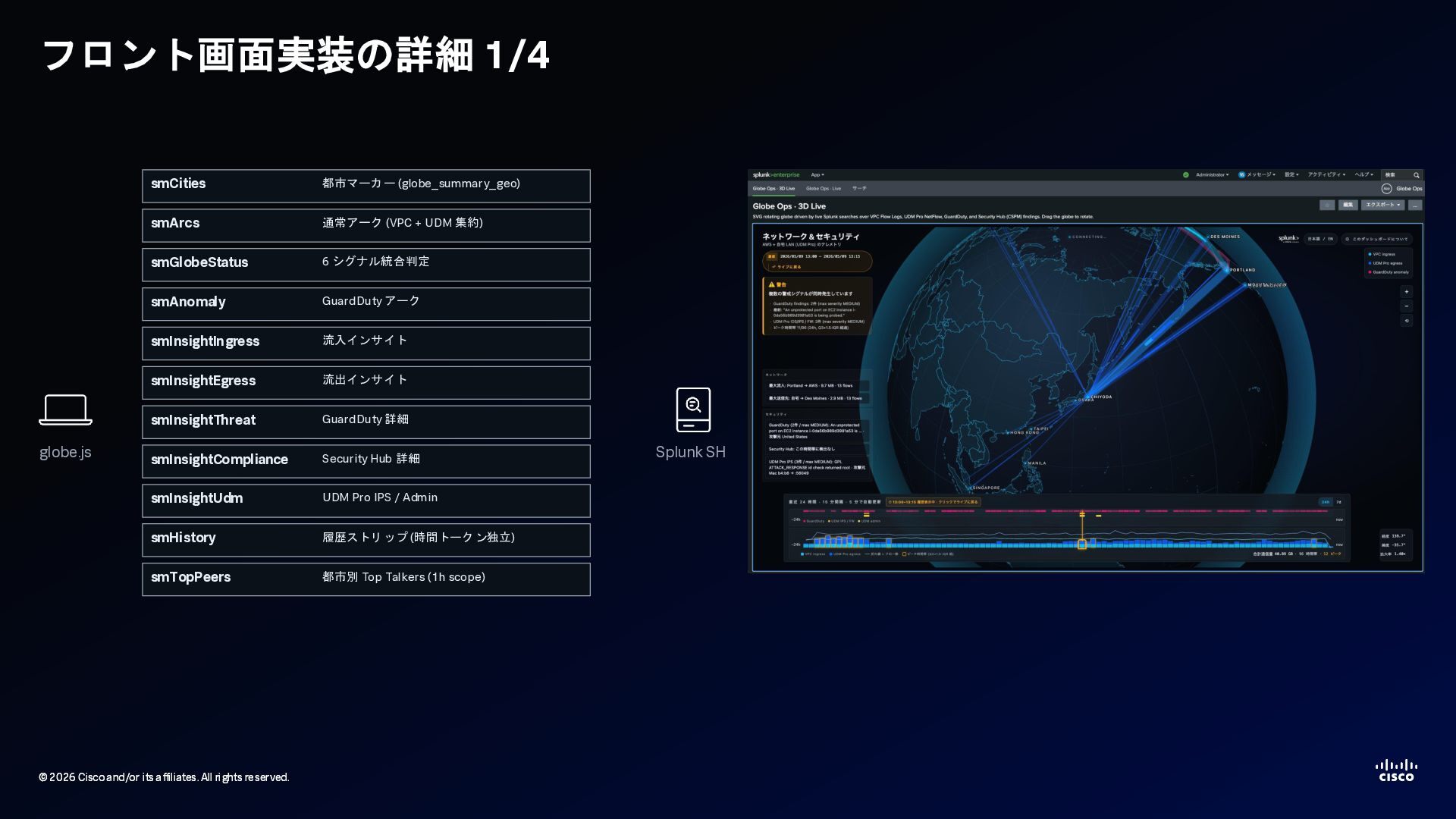
    2026 Cisco and/or its affiliates. All rights reserved. フロント画面実装の詳細 1/4 globe.js smCities 都市マーカー (globe_summary_geo) smArcs 通常アーク (VPC + UDM 集約) smGlobeStatus 6 シグナル統合判定 smAnomaly GuardDuty アーク smInsightIngress 流入インサイト smInsightEgress 流出インサイト smInsightThreat GuardDuty 詳細 smInsightCompliance Security Hub 詳細 smInsightUdm UDM Pro IPS / Admin smHistory 履歴ストリップ (時間トークン独立) smTopPeers 都市別 Top Talkers (1h scope) Splunk SH
  13. © 2026 Cisco and/or its affiliates. All rights reserved. ©

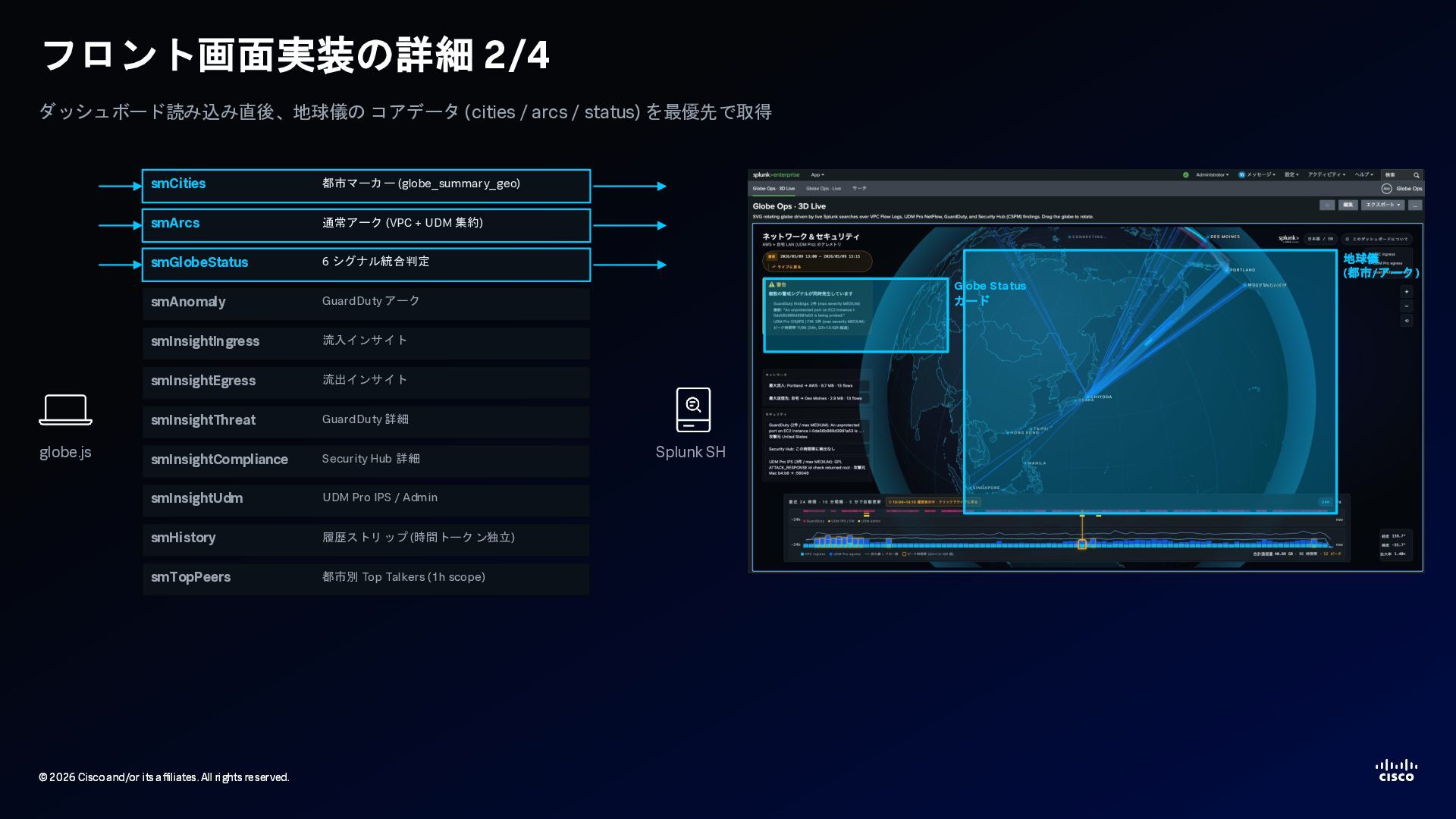
    2026 Cisco and/or its affiliates. All rights reserved. フロント画面実装の詳細 2/4 ダッシュボード読み込み直後、地球儀の コアデータ (cities / arcs / status) を最優先で取得 globe.js smCities 都市マーカー (globe_summary_geo) smArcs 通常アーク (VPC + UDM 集約) smGlobeStatus 6 シグナル統合判定 smAnomaly GuardDuty アーク smInsightIngress 流入インサイト smInsightEgress 流出インサイト smInsightThreat GuardDuty 詳細 smInsightCompliance Security Hub 詳細 smInsightUdm UDM Pro IPS / Admin smHistory 履歴ストリップ (時間トークン独立) smTopPeers 都市別 Top Talkers (1h scope) Splunk SH 地球儀 (都市/アーク) Globe Status カード
  14. © 2026 Cisco and/or its affiliates. All rights reserved. ©

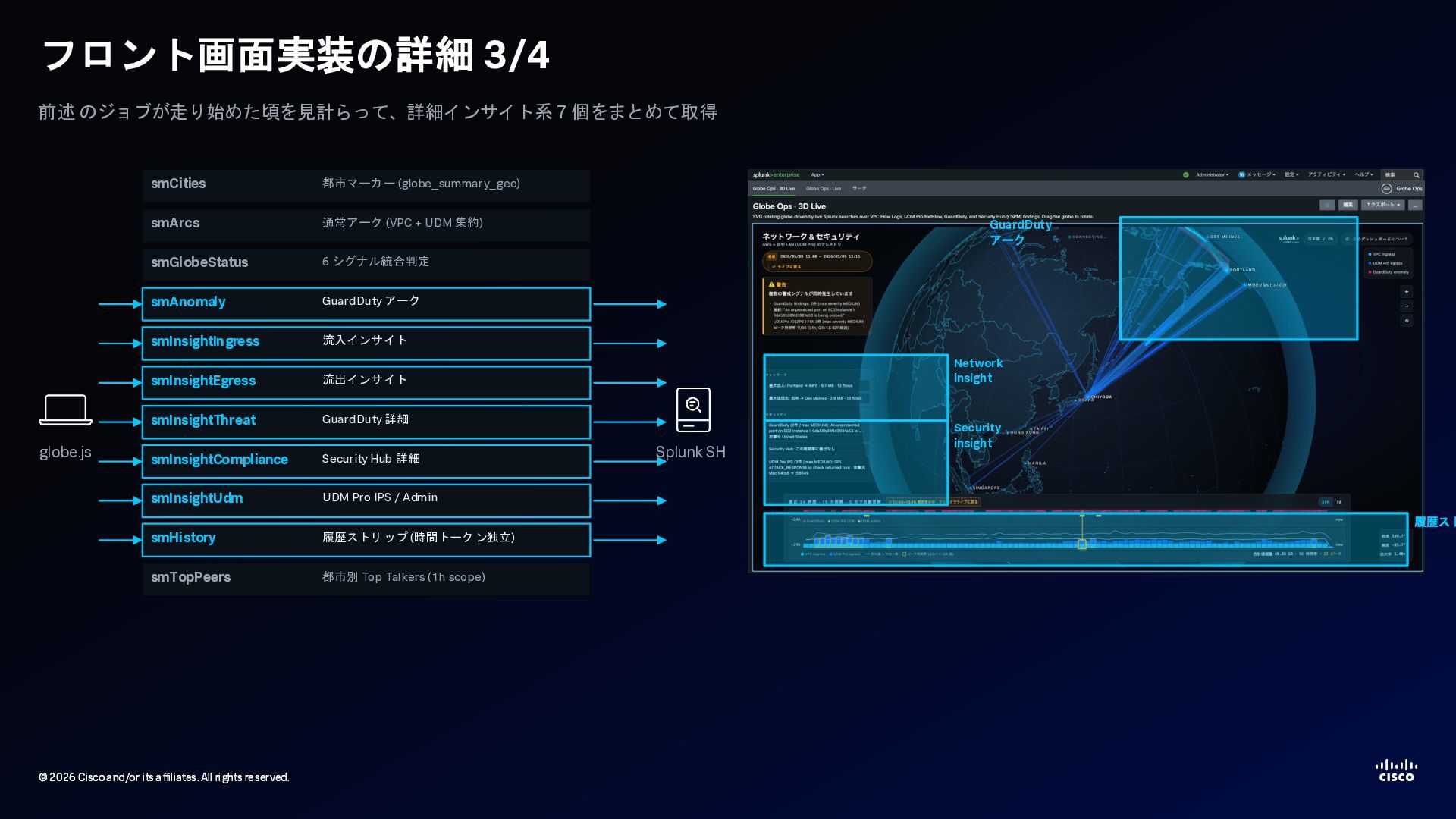
    2026 Cisco and/or its affiliates. All rights reserved. フロント画面実装の詳細 3/4 前述 のジョブが走り始めた頃を見計らって、詳細インサイト系7 個をまとめて取得 globe.js smCities 都市マーカー (globe_summary_geo) smArcs 通常アーク (VPC + UDM 集約) smGlobeStatus 6 シグナル統合判定 smAnomaly GuardDuty アーク smInsightIngress 流入インサイト smInsightEgress 流出インサイト smInsightThreat GuardDuty 詳細 smInsightCompliance Security Hub 詳細 smInsightUdm UDM Pro IPS / Admin smHistory 履歴ストリップ (時間トークン独立) smTopPeers 都市別 Top Talkers (1h scope) Splunk SH GuardDuty アーク Network insight Security insight 履歴スト
  15. © 2026 Cisco and/or its affiliates. All rights reserved. ©

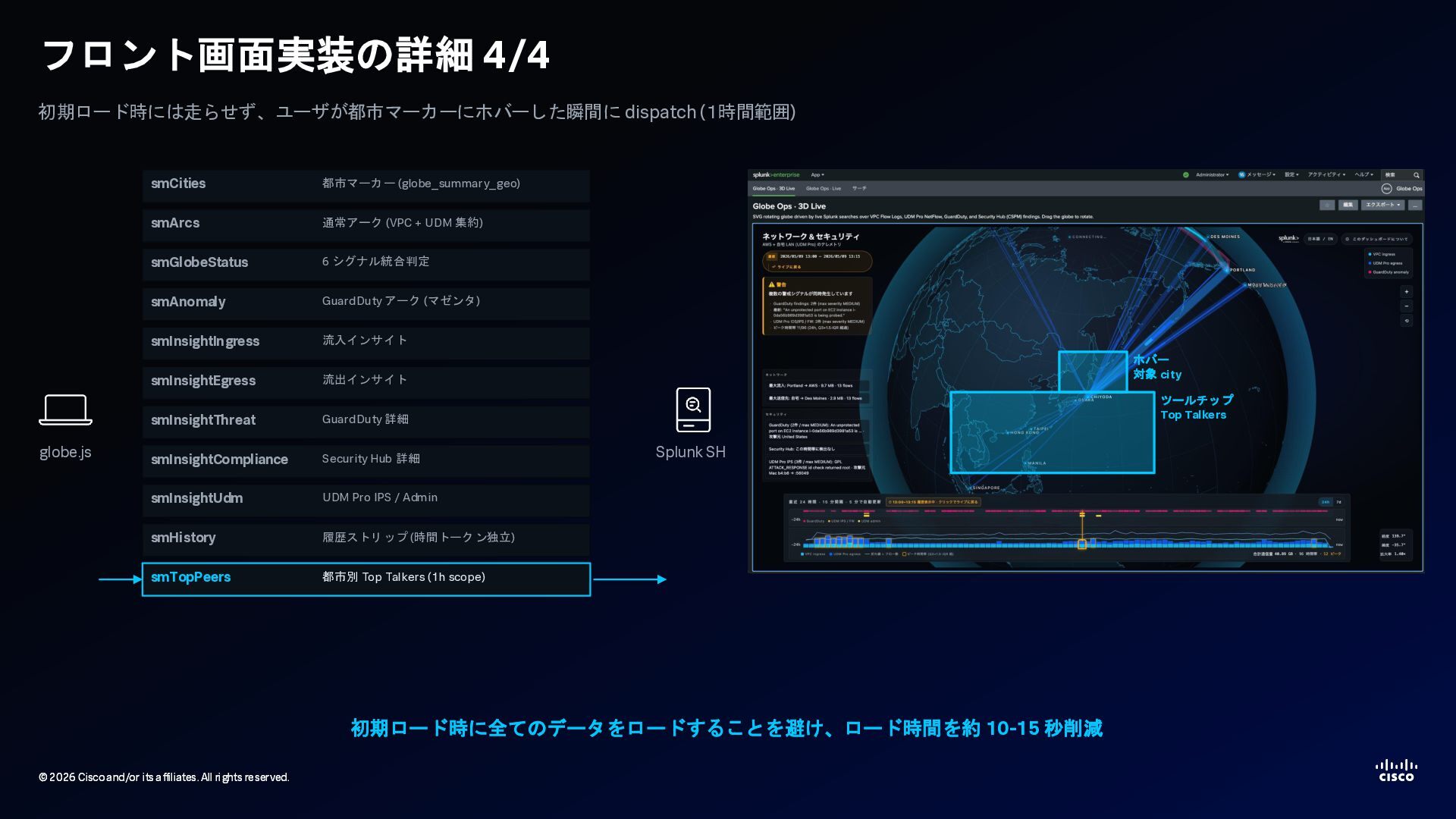
    2026 Cisco and/or its affiliates. All rights reserved. フロント画面実装の詳細 4/4 初期ロード時には走らせず、ユーザが都市マーカーにホバーした瞬間に dispatch (1時間範囲) globe.js smCities 都市マーカー (globe_summary_geo) smArcs 通常アーク (VPC + UDM 集約) smGlobeStatus 6 シグナル統合判定 smAnomaly GuardDuty アーク (マゼンタ) smInsightIngress 流入インサイト smInsightEgress 流出インサイト smInsightThreat GuardDuty 詳細 smInsightCompliance Security Hub 詳細 smInsightUdm UDM Pro IPS / Admin smHistory 履歴ストリップ (時間トークン独立) smTopPeers 都市別 Top Talkers (1h scope) Splunk SH ホバー 対象 city ツールチップ Top Talkers 初期ロード時に全てのデータをロードすることを避け、ロード時間を約 10-15 秒削減
  16. © 2026 Cisco and/or its affiliates. All rights reserved. ©

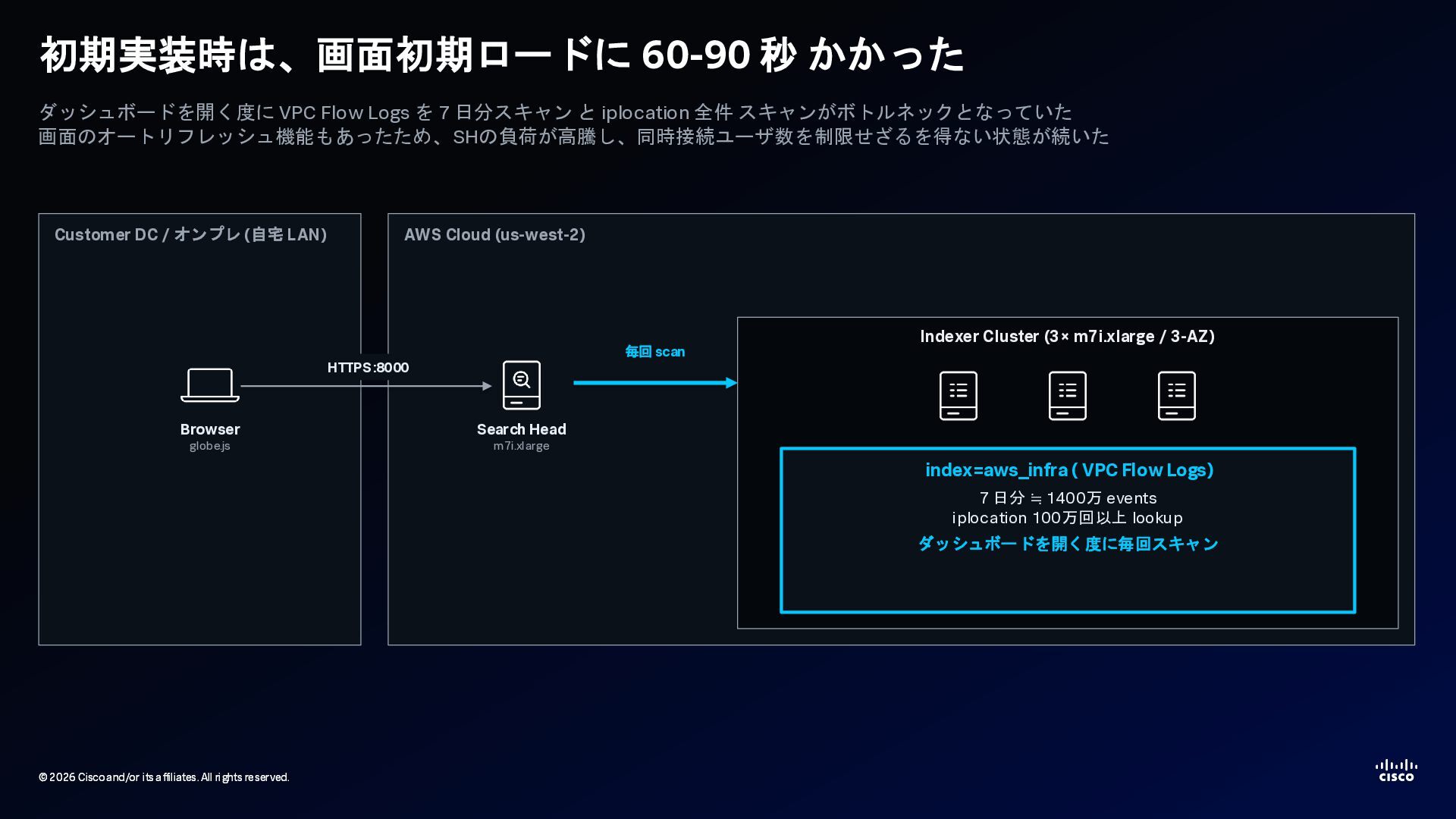
    2026 Cisco and/or its affiliates. All rights reserved. 初期実装時は、画面初期ロードに 60-90 秒 かかった ダッシュボードを開く度に VPC Flow Logs を 7 日分スキャン と iplocation 全件 スキャンがボトルネックとなっていた 画面のオートリフレッシュ機能もあったため、SHの負荷が高騰し、同時接続ユーザ数を制限せざるを得ない状態が続いた Customer DC / オンプレ (自宅 LAN) Browser globe.js AWS Cloud (us-west-2) Search Head m7i.xlarge Indexer Cluster (3× m7i.xlarge / 3-AZ) index=aws_infra ( VPC Flow Logs) 7 日分 ≒ 1400万 events iplocation 100万回以上 lookup ダッシュボードを開く度に毎回スキャン HTTPS :8000 毎回 scan
  17. © 2026 Cisco and/or its affiliates. All rights reserved. ©

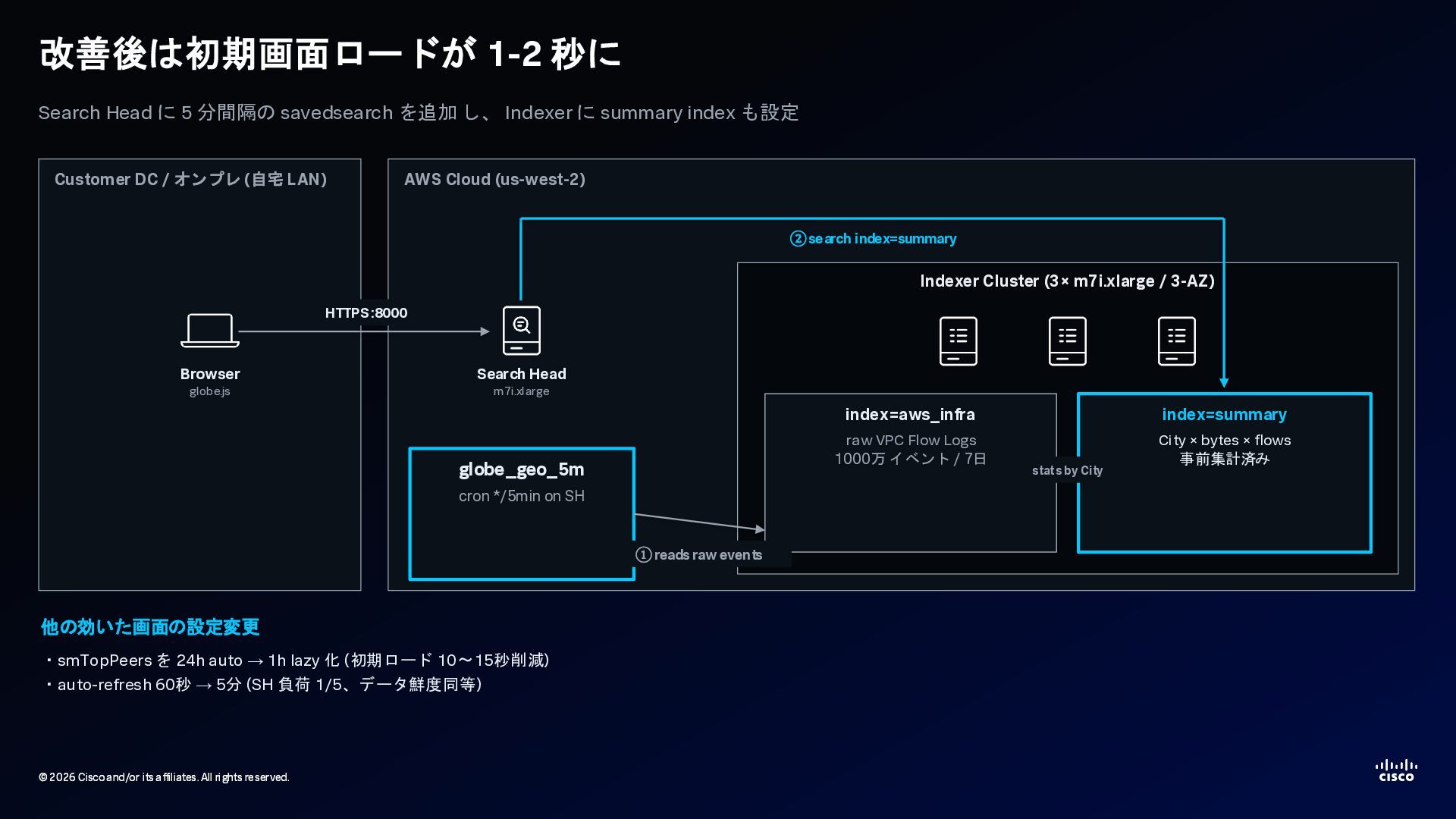
    2026 Cisco and/or its affiliates. All rights reserved. 改善後は初期画面ロードが 1-2 秒に Search Head に 5 分間隔の savedsearch を追加 し、 Indexer に summary index も設定 Customer DC / オンプレ (自宅 LAN) Browser globe.js AWS Cloud (us-west-2) Search Head m7i.xlarge globe_geo_5m cron */5min on SH Indexer Cluster (3× m7i.xlarge / 3-AZ) index=aws_infra raw VPC Flow Logs 1000万 イベント / 7日 index=summary City × bytes × flows 事前集計済み ②search index=summary ①reads raw events stats by City 他の効いた画面の設定変更 ・smTopPeers を 24h auto → 1h lazy 化 (初期ロード 10〜15秒削減) ・auto-refresh 60秒 → 5分 (SH 負荷 1/5、データ鮮度同等) HTTPS :8000
  18. © 2026 Cisco and/or its affiliates. All rights reserved. ©

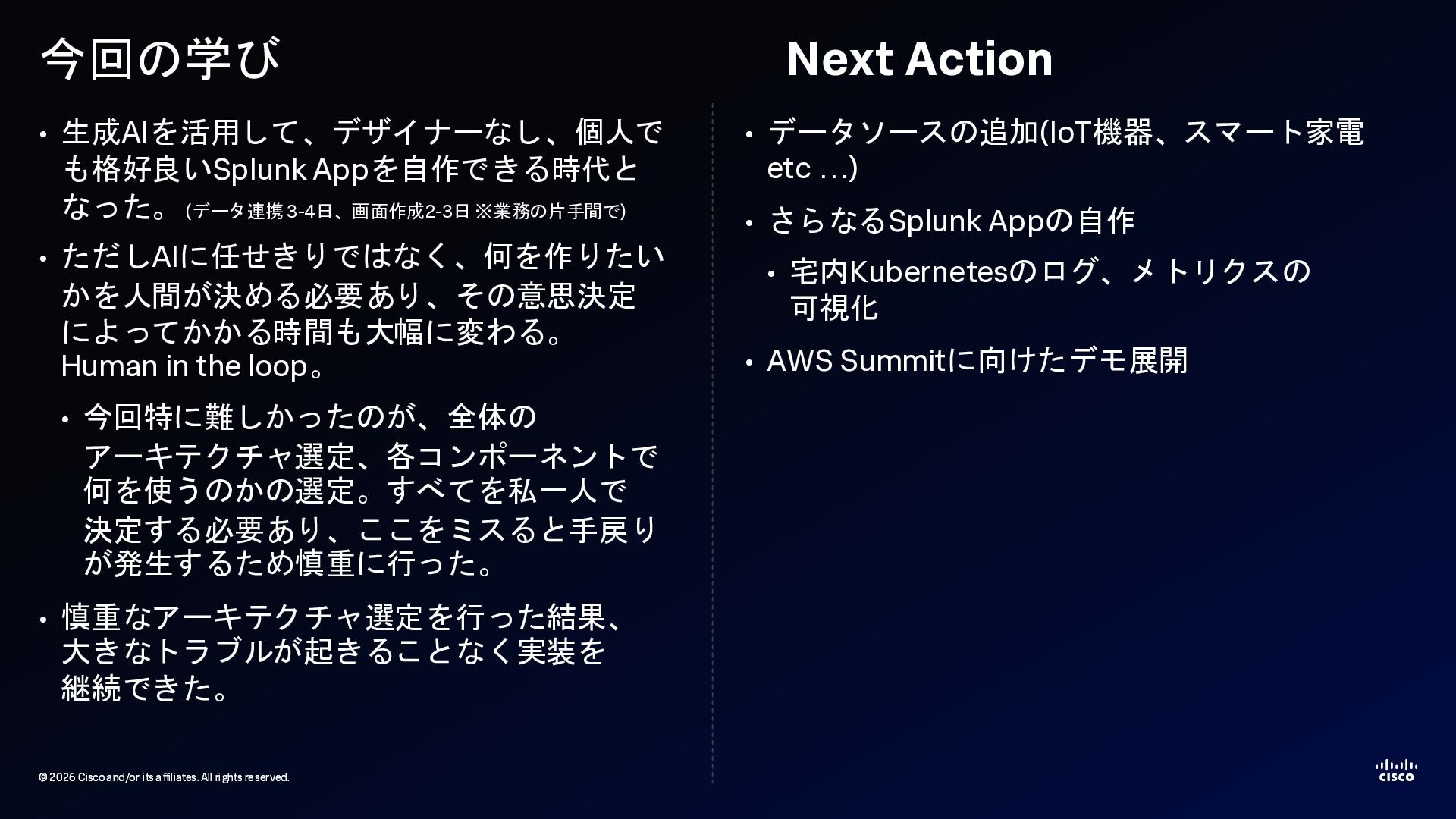
    2026 Cisco and/or its affiliates. All rights reserved. 今回の学び • 生成AIを活用して、デザイナーなし、個人で も格好良いSplunk Appを自作できる時代と なった。(データ連携 3-4日、画面作成2-3日 ※業務の片手間で) • ただしAIに任せきりではなく、何を作りたい かを人間が決める必要あり、その意思決定 によってかかる時間も大幅に変わる。 Human in the loop。 • 今回特に難しかったのが、全体の アーキテクチャ選定、各コンポーネントで 何を使うのかの選定。すべてを私一人で 決定する必要あり、ここをミスると手戻り が発生するため慎重に行った。 • 慎重なアーキテクチャ選定を行った結果、 大きなトラブルが起きることなく実装を 継続できた。 Next Action • データソースの追加(IoT機器、スマート家電 etc …) • さらなるSplunk Appの自作 • 宅内Kubernetesのログ、メトリクスの 可視化 • AWS Summitに向けたデモ展開