Upgrade to Pro
— share decks privately, control downloads, hide ads and more …
Speaker Deck
Sign up for free
Menu
Search
Features
All features
Private URLs
Password Protection
Custom URLS
Scheduled publishing
Remove Branding
Restrict embedding
Deck Collections
Notes
Features
All features
Private URLs
Password Protection
Custom URLS
Scheduled publishing
Remove Branding
Restrict embedding
Deck Collections
Notes
Explore
Featured decks
Featured speakers
Programming
Technology
Storyboards
Explore
Featured decks
Featured speakers
Programming
Technology
Storyboards
Pricing
Search
Sign in
Sign up for free
タスキングマネージャー_検証.pdf
Search
nmorishita
June 18, 2018
51
0
Share
Embed
Copy iframe code
Copy JS code
Copy link
Start on current slide
タスキングマネージャー_検証.pdf
nmorishita
June 18, 2018
More Decks by nmorishita
See All by nmorishita
tasking manager manual
nmorishita
0
55
Featured
See All Featured
Gemini Prompt Engineering: Practical Techniques for Tangible AI Outcomes
mfonobong
2
590
Exploring the relationship between traditional SERPs and Gen AI search
raygrieselhuber
PRO
4
4.4k
Improving Core Web Vitals using Speculation Rules API
sergeychernyshev
21
1.7k
Testing 201, or: Great Expectations
jmmastey
46
8.3k
Building a Modern Day E-commerce SEO Strategy
aleyda
45
9.3k
Between Models and Reality
mayunak
4
500
Connecting the Dots Between Site Speed, User Experience & Your Business [WebExpo 2025]
tammyeverts
11
1.1k
Abbi's Birthday
coloredviolet
4
10k
RailsConf 2023
tenderlove
30
1.6k
Neural Spatial Audio Processing for Sound Field Analysis and Control
skoyamalab
0
570
Game over? The fight for quality and originality in the time of robots
wayneb77
1
310
How GitHub (no longer) Works
holman
316
150k
Transcript
タスキングマネージャー 検証 マニュアル 1A118163 森下直哉
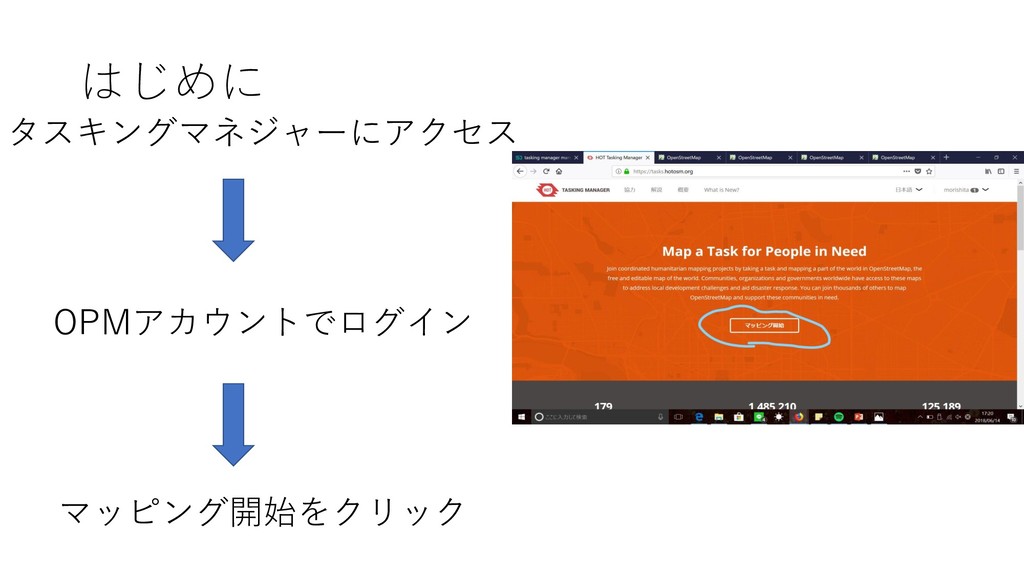
はじめに タスキングマネジャーにアクセス OPMアカウントでログイン マッピング開始をクリック
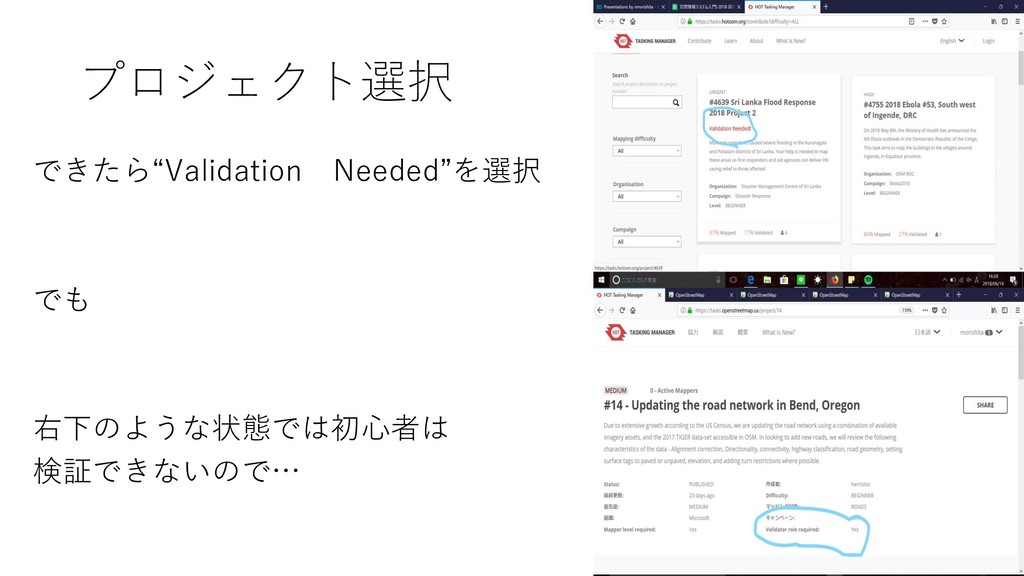
プロジェクト選択 できたら“Validation Needed”を選択 でも 右下のような状態では初心者は 検証できないので…
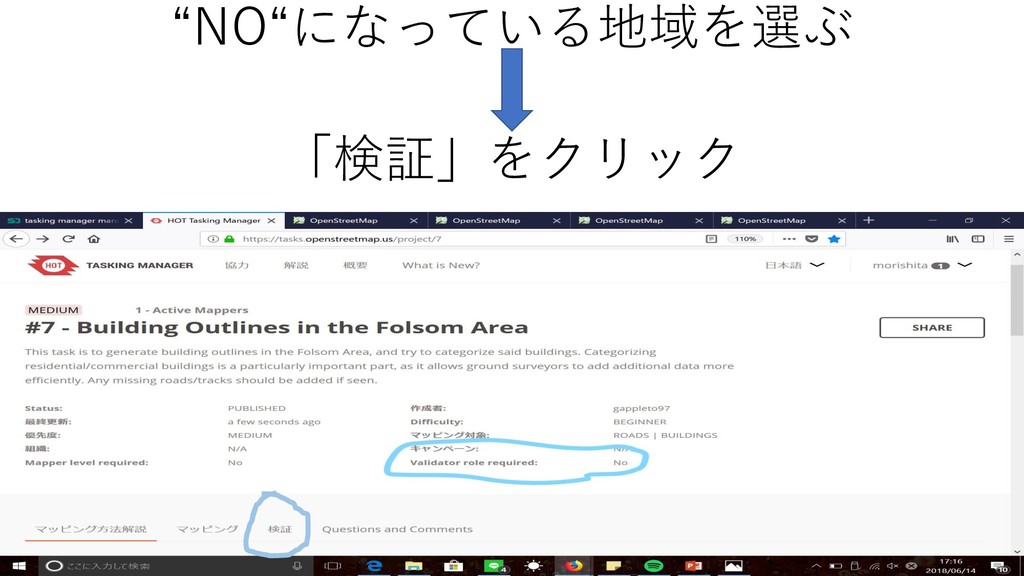
“NO“になっている地域を選ぶ 「検証」をクリック
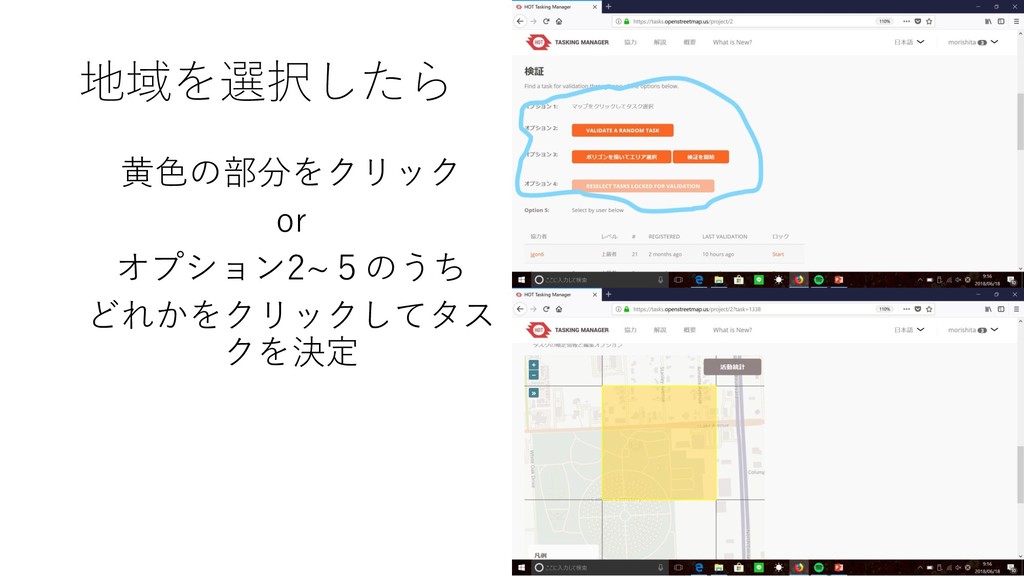
地域を選択したら 黄色の部分をクリック or オプション2~5のうち どれかをクリックしてタス クを決定
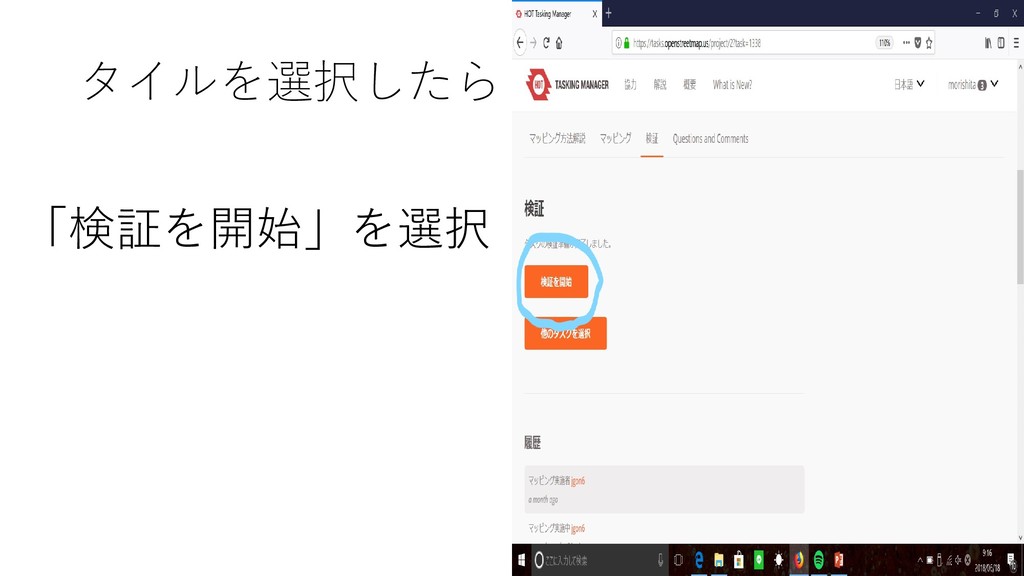
タイルを選択したら 「検証を開始」を選択
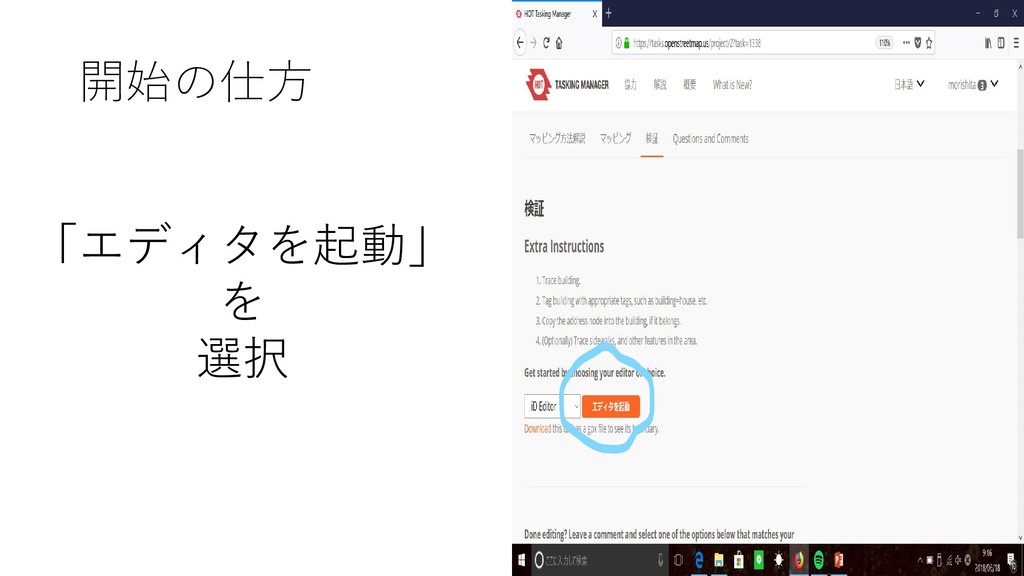
開始の仕方 「エディタを起動」 を 選択
検証時のポイント • 直交化されているかどうか • 大雑把でないか • 境界線で線を引くのを止めていないか • 線の引き忘れがないか など
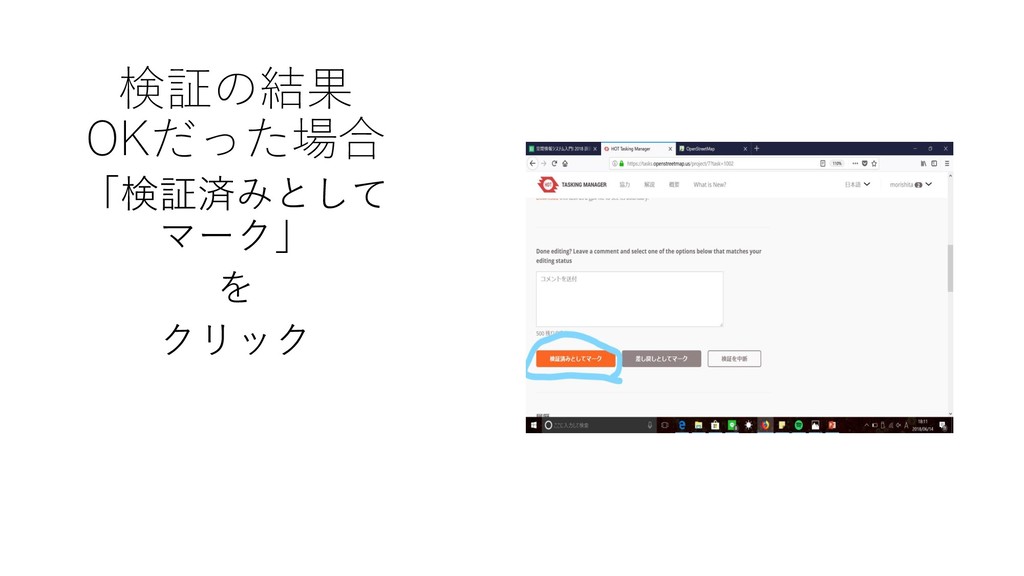
検証の結果 OKだった場合 「検証済みとして マーク」 を クリック
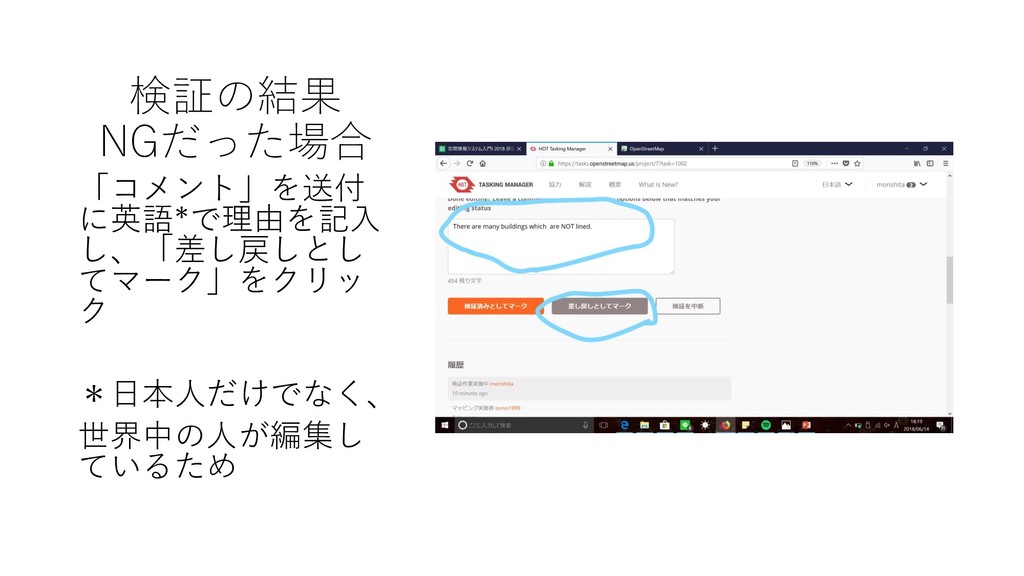
検証の結果 NGだった場合 「コメント」を送付 に英語*で理由を記入 し、「差し戻しとし てマーク」をクリッ ク *日本人だけでなく、 世界中の人が編集し ているため
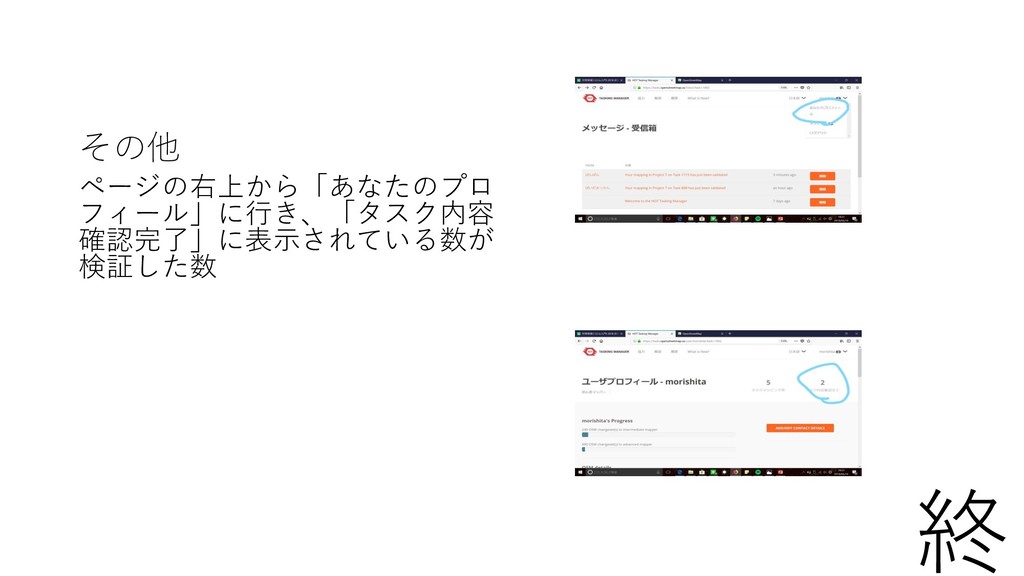
その他 ページの右上から「あなたのプロ フィール」に行き、「タスク内容 確認完了」に表示されている数が 検証した数 終


 nmorishita
 mfonobong
 raygrieselhuber
 sergeychernyshev
 jmmastey
 aleyda
 mayunak
 tammyeverts
 coloredviolet
 tenderlove
 skoyamalab
 wayneb77
 holman