Upgrade to Pro — share decks privately, control downloads, hide ads and more …

Nhiệt kế tự ghi TR7A

Sponsored · Your Podcast. Everywhere. Effortlessly. Share. Educate. Inspire. Entertain. You do you. We'll handle the rest.
Avatar for HTV HTV
March 12, 2024
10

Nhiệt kế tự ghi TR7A

Avatar for HTV

HTV

March 12, 2024

Transcript

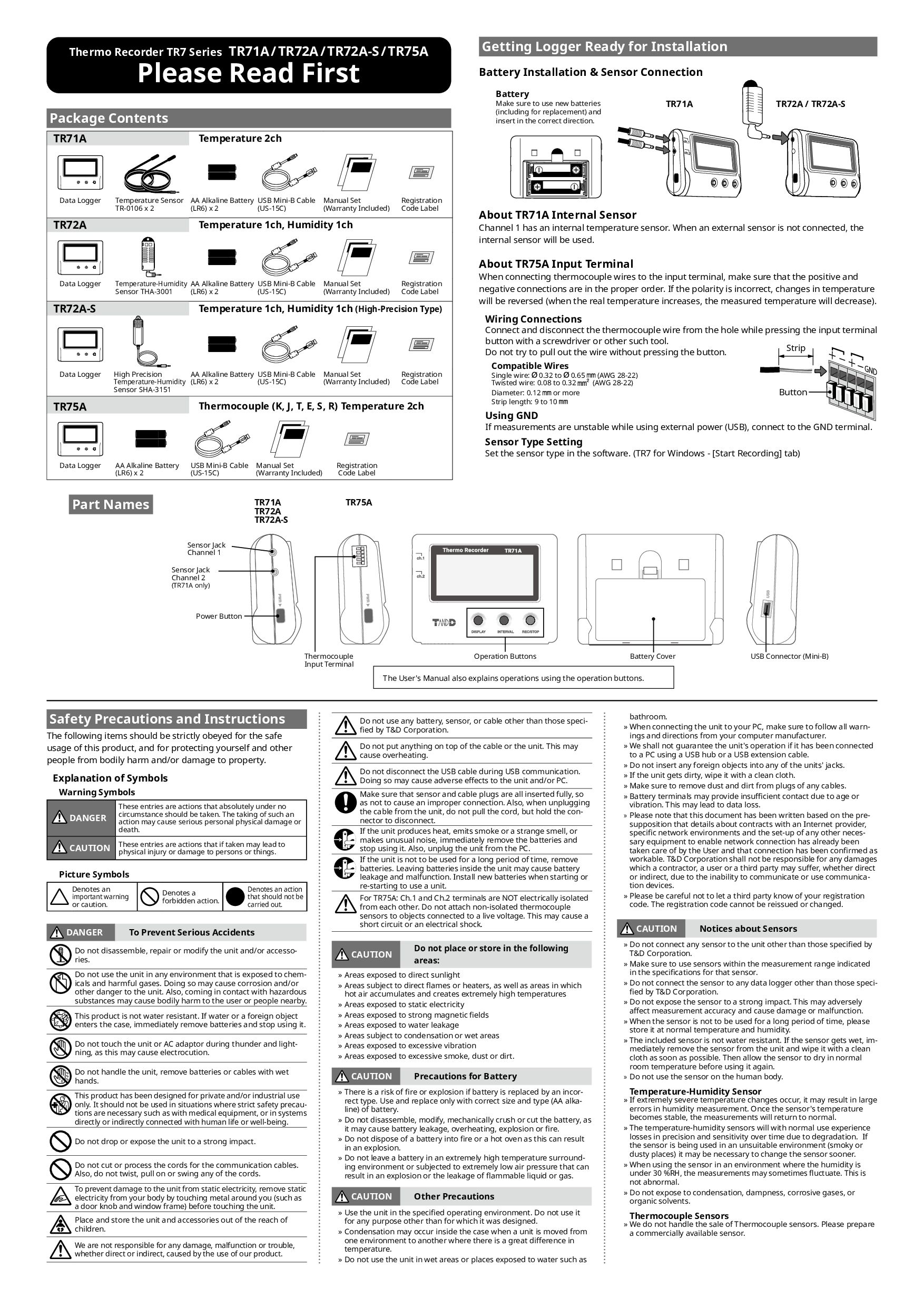
  1. Safety Precautions and Instructions The following items should be strictly

    obeyed for the safe usage of this product, and for protecting yourself and other people from bodily harm and/or damage to property. Explanation of Symbols Warning Symbols DANGER These entries are actions that absolutely under no circumstance should be taken. The taking of such an action may cause serious personal physical damage or death. CAUTION These entries are actions that if taken may lead to physical injury or damage to persons or things. Picture Symbols Denotes an important warning or caution. Denotes a forbidden action. Denotes an action that should not be carried out. DANGER To Prevent Serious Accidents Do not disassemble, repair or modify the unit and/or accesso- ries. Do not use the unit in any environment that is exposed to chem- icals and harmful gases. Doing so may cause corrosion and/or other danger to the unit. Also, coming in contact with hazardous substances may cause bodily harm to the user or people nearby. This product is not water resistant. If water or a foreign object enters the case, immediately remove batteries and stop using it. Do not touch the unit or AC adaptor during thunder and light- ning, as this may cause electrocution. Do not handle the unit, remove batteries or cables with wet hands. This product has been designed for private and/or industrial use only. It should not be used in situations where strict safety precau- tions are necessary such as with medical equipment, or in systems directly or indirectly connected with human life or well-being. Do not drop or expose the unit to a strong impact. Do not cut or process the cords for the communication cables. Also, do not twist, pull on or swing any of the cords. To prevent damage to the unit from static electricity, remove static electricity from your body by touching metal around you (such as a door knob and window frame) before touching the unit. Place and store the unit and accessories out of the reach of children. We are not responsible for any damage, malfunction or trouble, whether direct or indirect, caused by the use of our product. Do not use any battery, sensor, or cable other than those speci- fied by T&D Corporation. Do not put anything on top of the cable or the unit. This may cause overheating. Do not disconnect the USB cable during USB communication. Doing so may cause adverse effects to the unit and/or PC. Make sure that sensor and cable plugs are all inserted fully, so as not to cause an improper connection. Also, when unplugging the cable from the unit, do not pull the cord, but hold the con- nector to disconnect. If the unit produces heat, emits smoke or a strange smell, or makes unusual noise, immediately remove the batteries and stop using it. Also, unplug the unit from the PC. If the unit is not to be used for a long period of time, remove batteries. Leaving batteries inside the unit may cause battery leakage and malfunction. Install new batteries when starting or re-starting to use a unit. For TR75A: Ch.1 and Ch.2 terminals are NOT electrically isolated from each other. Do not attach non-isolated thermocouple sensors to objects connected to a live voltage. This may cause a short circuit or an electrical shock. CAUTION Do not place or store in the following areas: » Areas exposed to direct sunlight » Areas subject to direct flames or heaters, as well as areas in which hot air accumulates and creates extremely high temperatures » Areas exposed to static electricity » Areas exposed to strong magnetic fields » Areas exposed to water leakage » Areas subject to condensation or wet areas » Areas exposed to excessive vibration » Areas exposed to excessive smoke, dust or dirt. CAUTION Precautions for Battery » There is a risk of fire or explosion if battery is replaced by an incor- rect type. Use and replace only with correct size and type (AA alka- line) of battery. » Do not disassemble, modify, mechanically crush or cut the battery, as it may cause battery leakage, overheating, explosion or fire. » Do not dispose of a battery into fire or a hot oven as this can result in an explosion. » Do not leave a battery in an extremely high temperature surround- ing environment or subjected to extremely low air pressure that can result in an explosion or the leakage of flammable liquid or gas. CAUTION Other Precautions » Use the unit in the specified operating environment. Do not use it for any purpose other than for which it was designed. » Condensation may occur inside the case when a unit is moved from one environment to another where there is a great difference in temperature. » Do not use the unit in wet areas or places exposed to water such as bathroom. » When connecting the unit to your PC, make sure to follow all warn- ings and directions from your computer manufacturer. » We shall not guarantee the unit's operation if it has been connected to a PC using a USB hub or a USB extension cable. » Do not insert any foreign objects into any of the units' jacks. » If the unit gets dirty, wipe it with a clean cloth. » Make sure to remove dust and dirt from plugs of any cables. » Battery terminals may provide insufficient contact due to age or vibration. This may lead to data loss. » Please note that this document has been written based on the pre- supposition that details about contracts with an Internet provider, specific network environments and the set-up of any other neces- sary equipment to enable network connection has already been taken care of by the User and that connection has been confirmed as workable. T&D Corporation shall not be responsible for any damages which a contractor, a user or a third party may suffer, whether direct or indirect, due to the inability to communicate or use communica- tion devices. » Please be careful not to let a third party know of your registration code. The registration code cannot be reissued or changed. CAUTION Notices about Sensors » Do not connect any sensor to the unit other than those specified by T&D Corporation. » Make sure to use sensors within the measurement range indicated in the specifications for that sensor. » Do not connect the sensor to any data logger other than those speci- fied by T&D Corporation. » Do not expose the sensor to a strong impact. This may adversely affect measurement accuracy and cause damage or malfunction. » When the sensor is not to be used for a long period of time, please store it at normal temperature and humidity. » The included sensor is not water resistant. If the sensor gets wet, im- mediately remove the sensor from the unit and wipe it with a clean cloth as soon as possible. Then allow the sensor to dry in normal room temperature before using it again. » Do not use the sensor on the human body. Temperature-Humidity Sensor » If extremely severe temperature changes occur, it may result in large errors in humidity measurement. Once the sensor's temperature becomes stable, the measurements will return to normal. » The temperature-humidity sensors will with normal use experience losses in precision and sensitivity over time due to degradation. If the sensor is being used in an unsuitable environment (smoky or dusty places) it may be necessary to change the sensor sooner. » When using the sensor in an environment where the humidity is under 30 %RH, the measurements may sometimes fluctuate. This is not abnormal. » Do not expose to condensation, dampness, corrosive gases, or organic solvents. Thermocouple Sensors » We do not handle the sale of Thermocouple sensors. Please prepare a commercially available sensor. Package Contents TR71A Temperature 2ch Data Logger Temperature Sensor TR-0106 x 2 AA Alkaline Battery (LR6) x 2 USB Mini-B Cable (US-15C) Manual Set (Warranty Included) Registration Code Label TR72A Temperature 1ch, Humidity 1ch Data Logger Temperature-Humidity Sensor THA-3001 AA Alkaline Battery (LR6) x 2 USB Mini-B Cable (US-15C) Manual Set (Warranty Included) Registration Code Label TR72A-S Temperature 1ch, Humidity 1ch (High-Precision Type) Data Logger High Precision Temperature-Humidity Sensor SHA-3151 AA Alkaline Battery (LR6) x 2 USB Mini-B Cable (US-15C) Manual Set (Warranty Included) Registration Code Label TR75A Thermocouple (K, J, T, E, S, R) Temperature 2ch Data Logger AA Alkaline Battery (LR6) x 2 USB Mini-B Cable (US-15C) Manual Set (Warranty Included) Registration Code Label Getting Logger Ready for Installation Battery Installation & Sensor Connection Battery Make sure to use new batteries (including for replacement) and insert in the correct direction. TR71A TR72A / TR72A-S About TR71A Internal Sensor Channel 1 has an internal temperature sensor. When an external sensor is not connected, the internal sensor will be used. About TR75A Input Terminal When connecting thermocouple wires to the input terminal, make sure that the positive and negative connections are in the proper order. If the polarity is incorrect, changes in temperature will be reversed (when the real temperature increases, the measured temperature will decrease). Wiring Connections Connect and disconnect the thermocouple wire from the hole while pressing the input terminal button with a screwdriver or other such tool. Do not try to pull out the wire without pressing the button. Compatible Wires Single wire: 0.32 to 0.65 (AWG 28-22) Twisted wire: 0.08 to 0.32 (AWG 28-22) Diameter: 0.12 or more Strip length: 9 to 10 Using GND If measurements are unstable while using external power (USB), connect to the GND terminal. Sensor Type Setting Set the sensor type in the software. (TR7 for Windows - [Start Recording] tab) Thermo Recorder TR7 Series TR71A/TR72A/TR72A-S/TR75A Please Read First Strip Button TR71A TR72A TR72A-S TR75A Operation Buttons Battery Cover USB Connector (Mini-B) Sensor Jack Channel 1 Sensor Jack Channel 2 (TR71A only) Power Button Thermocouple Input Terminal Part Names The User's Manual also explains operations using the operation buttons.
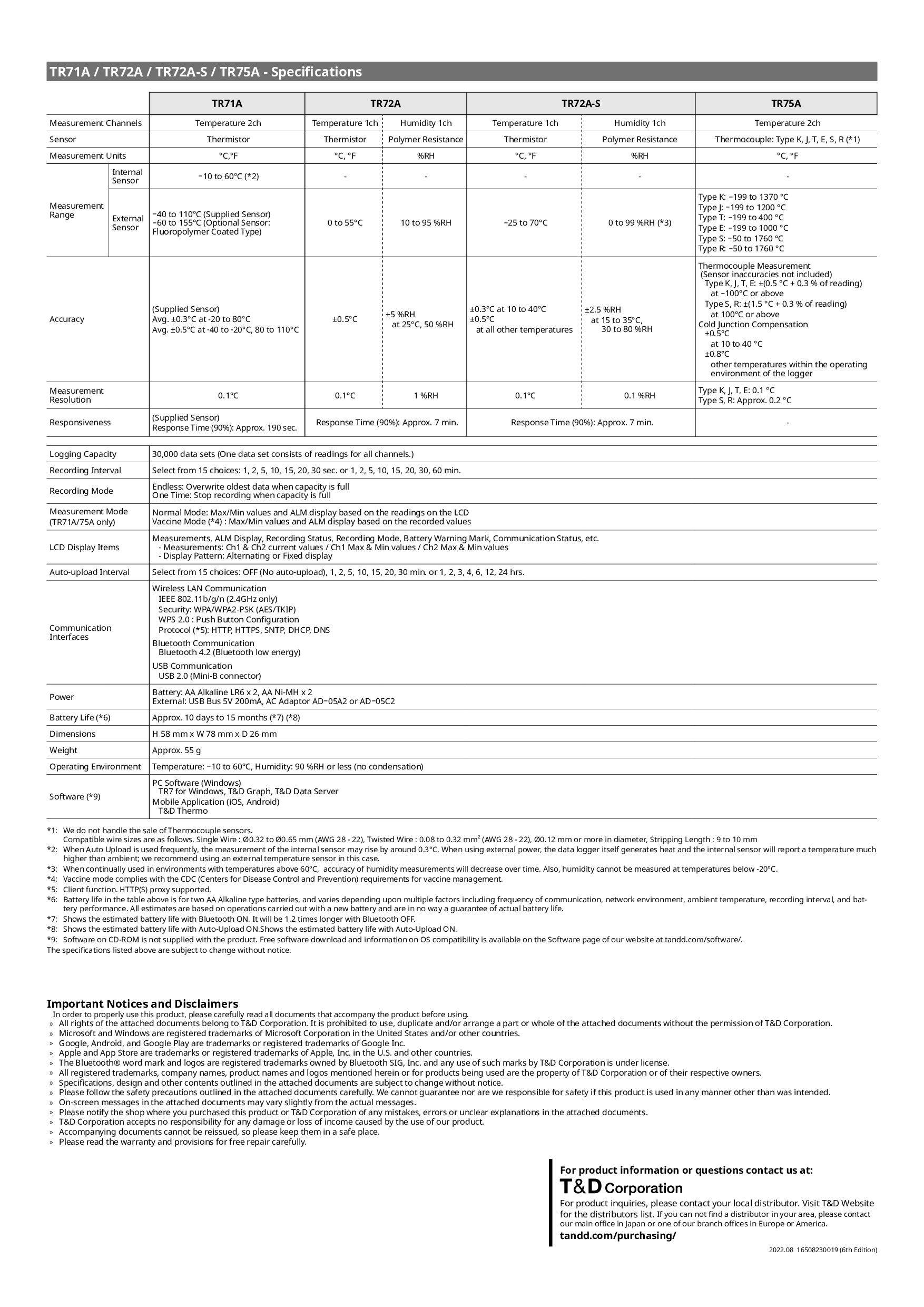
  2. Important Notices and Disclaimers In order to properly use this

    product, please carefully read all documents that accompany the product before using. » All rights of the attached documents belong to T&D Corporation. It is prohibited to use, duplicate and/or arrange a part or whole of the attached documents without the permission of T&D Corporation. » Microsoft and Windows are registered trademarks of Microsoft Corporation in the United States and/or other countries. » Google, Android, and Google Play are trademarks or registered trademarks of Google Inc. » Apple and App Store are trademarks or registered trademarks of Apple, Inc. in the U.S. and other countries. » The Bluetooth® word mark and logos are registered trademarks owned by Bluetooth SIG, Inc. and any use of such marks by T&D Corporation is under license. » All registered trademarks, company names, product names and logos mentioned herein or for products being used are the property of T&D Corporation or of their respective owners. » Specifications, design and other contents outlined in the attached documents are subject to change without notice. » Please follow the safety precautions outlined in the attached documents carefully. We cannot guarantee nor are we responsible for safety if this product is used in any manner other than was intended. » On-screen messages in the attached documents may vary slightly from the actual messages. » Please notify the shop where you purchased this product or T&D Corporation of any mistakes, errors or unclear explanations in the attached documents. » T&D Corporation accepts no responsibility for any damage or loss of income caused by the use of our product. » Accompanying documents cannot be reissued, so please keep them in a safe place. » Please read the warranty and provisions for free repair carefully. For product information or questions contact us at: For product inquiries, please contact your local distributor. Visit T&D Website for the distributors list. If you can not find a distributor in your area, please contact our main office in Japan or one of our branch offices in Europe or America. tandd.com/purchasing/ 2022.08 16508230019 (6th Edition) TR71A / TR72A / TR72A-S / TR75A - Specifications TR71A TR72A TR72A-S TR75A Measurement Channels Temperature 2ch Temperature 1ch Humidity 1ch Temperature 1ch Humidity 1ch Temperature 2ch Sensor Thermistor Thermistor Polymer Resistance Thermistor Polymer Resistance Thermocouple: Type K, J, T, E, S, R (*1) Measurement Units °C,°F °C, °F %RH °C, °F %RH °C, °F Measurement Range Internal Sensor -10 to 60°C (*2) - - - - - External Sensor -40 to 110°C (Supplied Sensor) -60 to 155°C (Optional Sensor: Fluoropolymer Coated Type) 0 to 55°C 10 to 95 %RH -25 to 70°C 0 to 99 %RH (*3) Type K: -199 to 1370 °C Type J: -199 to 1200 °C Type T: -199 to 400 °C Type E: -199 to 1000 °C Type S: -50 to 1760 °C Type R: -50 to 1760 °C Accuracy (Supplied Sensor) Avg. ±0.3°C at -20 to 80°C Avg. ±0.5°C at -40 to -20°C, 80 to 110°C ±0.5°C ±5 %RH at 25°C, 50 %RH ±0.3°C at 10 to 40°C ±0.5°C at all other temperatures ±2.5 %RH at 15 to 35°C, 30 to 80 %RH Thermocouple Measurement (Sensor inaccuracies not included) Type K, J, T, E: ±(0.5 °C + 0.3 % of reading) at -100°C or above Type S, R: ±(1.5 °C + 0.3 % of reading) at 100°C or above Cold Junction Compensation ±0.5℃ at 10 to 40 °C ±0.8℃ other temperatures within the operating environment of the logger Measurement Resolution 0.1°C 0.1°C 1 %RH 0.1°C 0.1 %RH Type K, J, T, E: 0.1 °C Type S, R: Approx. 0.2 °C Responsiveness (Supplied Sensor) Response Time (90%): Approx. 190 sec. Response Time (90%): Approx. 7 min. Response Time (90%): Approx. 7 min. - Logging Capacity 30,000 data sets (One data set consists of readings for all channels.) Recording Interval Select from 15 choices: 1, 2, 5, 10, 15, 20, 30 sec. or 1, 2, 5, 10, 15, 20, 30, 60 min. Recording Mode Endless: Overwrite oldest data when capacity is full One Time: Stop recording when capacity is full Measurement Mode (TR71A/75A only) Normal Mode: Max/Min values and ALM display based on the readings on the LCD Vaccine Mode (*4) : Max/Min values and ALM display based on the recorded values LCD Display Items Measurements, ALM Display, Recording Status, Recording Mode, Battery Warning Mark, Communication Status, etc. - Measurements: Ch1 & Ch2 current values / Ch1 Max & Min values / Ch2 Max & Min values - Display Pattern: Alternating or Fixed display Auto-upload Interval Select from 15 choices: OFF (No auto-upload), 1, 2, 5, 10, 15, 20, 30 min. or 1, 2, 3, 4, 6, 12, 24 hrs. Communication Interfaces Wireless LAN Communication IEEE 802.11b/g/n (2.4GHz only) Security: WPA/WPA2-PSK (AES/TKIP) WPS 2.0 : Push Button Configuration Protocol (*5): HTTP, HTTPS, SNTP, DHCP, DNS Bluetooth Communication Bluetooth 4.2 (Bluetooth low energy) USB Communication USB 2.0 (Mini-B connector) Power Battery: AA Alkaline LR6 x 2, AA Ni-MH x 2 External: USB Bus 5V 200mA, AC Adaptor AD-05A2 or AD-05C2 Battery Life (*6) Approx. 10 days to 15 months (*7) (*8) Dimensions H 58 mm x W 78 mm x D 26 mm Weight Approx. 55 g Operating Environment Temperature: -10 to 60°C, Humidity: 90 %RH or less (no condensation) Software (*9) PC Software (Windows) TR7 for Windows, T&D Graph, T&D Data Server Mobile Application (iOS, Android) T&D Thermo *1: We do not handle the sale of Thermocouple sensors. Compatible wire sizes are as follows. Single Wire : Ø0.32 to Ø0.65 mm (AWG 28 - 22), Twisted Wire : 0.08 to 0.32 mm2 (AWG 28 - 22), Ø0.12 mm or more in diameter, Stripping Length : 9 to 10 mm *2: When Auto Upload is used frequently, the measurement of the internal sensor may rise by around 0.3°C. When using external power, the data logger itself generates heat and the internal sensor will report a temperature much higher than ambient; we recommend using an external temperature sensor in this case. *3: When continually used in environments with temperatures above 60°C, accuracy of humidity measurements will decrease over time. Also, humidity cannot be measured at temperatures below -20°C. *4: Vaccine mode complies with the CDC (Centers for Disease Control and Prevention) requirements for vaccine management. *5: Client function. HTTP(S) proxy supported. *6: Battery life in the table above is for two AA Alkaline type batteries, and varies depending upon multiple factors including frequency of communication, network environment, ambient temperature, recording interval, and bat- tery performance. All estimates are based on operations carried out with a new battery and are in no way a guarantee of actual battery life. *7: Shows the estimated battery life with Bluetooth ON. It will be 1.2 times longer with Bluetooth OFF. *8: Shows the estimated battery life with Auto-Upload ON.Shows the estimated battery life with Auto-Upload ON. *9: Software on CD-ROM is not supplied with the product. Free software download and information on OS compatibility is available on the Software page of our website at tandd.com/software/. The specifications listed above are subject to change without notice.