Upgrade to Pro — share decks privately, control downloads, hide ads and more …

Alex Fishman

Sponsored · Ship Features Fearlessly Turn features on and off without deploys. Used by thousands of Ruby developers. →

Alex Fishman

Nowadays there is significant diversity in Infrastructure
as a Service (IaaS) clouds. The differences span from
virtualization technology and hypervisors, through storage
and network configuration, to the cloud management
APIs. These differences make migration of a VM (or
a set of VMs) from a private cloud into a public cloud,
or between different public clouds, complicated or even
impractical for many use-cases.
HVX is a virtualization platform that enables complete
abstraction of underlying cloud infrastructure from the
application virtual machines. HVX allows deployment
of existing VMs into the cloud without any modifications,
mobility between the clouds and easy duplication
of the entire deployment.
HVX can be deployed on almost any existing IaaS
cloud. Each instance of the HVX deployment packs in
a nested hypervisor, virtual hardware, network and storage
configuration.
Combined with image store and management APIs,
the HVX can be used for the creation of a virtual cloud
that utilizes existing cloud provider infrastructure as the
hardware rather than using physical servers, switches and
storage.

Avatar for Alex Fishman

Alex Fishman

June 30, 2013

Other Decks in Technology

Transcript

  1. HVX: Virtualizing the Cloud Alex Fishman, Mike Rapoport, Evgeny Budilovsky,

    Izik Eidus Ravello Systems Abstract Nowadays there is significant diversity in Infrastructure as a Service (IaaS) clouds. The differences span from virtualization technology and hypervisors, through stor- age and network configuration, to the cloud management APIs. These differences make migration of a VM (or a set of VMs) from a private cloud into a public cloud, or between different public clouds, complicated or even impractical for many use-cases. HVX is a virtualization platform that enables complete abstraction of underlying cloud infrastructure from the application virtual machines. HVX allows deployment of existing VMs into the cloud without any modifica- tions, mobility between the clouds and easy duplication of the entire deployment. HVX can be deployed on almost any existing IaaS cloud. Each instance of the HVX deployment packs in a nested hypervisor, virtual hardware, network and stor- age configuration. Combined with image store and management APIs, the HVX can be used for the creation of a virtual cloud that utilizes existing cloud provider infrastructure as the hardware rather than using physical servers, switches and storage. 1 Introduction There are many virtualization solutions available today: VMware ESX, KVM, Xen, just to name a few. These solutions lack interoperability with each other, meaning that a VM running on one hypervisor cannot be easily migrated to another hypervisor. The existing virtualization solutions differ in several aspects: Virtualization technique. There are two major ap- proaches to virtualization: full virtualization and para- virtualization. The full virtualization hypervisors present their guest a complete virtual system and therefore allow execution of unmodified operating systems. Guest de- privileging is performed using trap-and-simulate tech- nique ([8]). Full virtualization hypervisors for x86 ar- chitecture require hardware assistance available in recent AMD and Intel processors ([2, 10]). By contrast, in the para-virtualized environment, the guest operating system is aware that it is executed on a VM and it should contain modifications necessary to interface with the underlying hypervisor instead of performing privileged operations ([1]). Virtual hardware devices. Different hypervisors ex- pose different sets of virtual hardware devices such as CPU, chipset, network and storage controllers. Migrat- ing a VM from one hypervisor to another resembles transfer of a hard disk between different computers. Image formats. Each hypervisor supports its own proprietary image format, for example, VMware’s VMDK, or KVM qcow and qcow2. The situation in the IaaS world is even more com- plex. Different cloud providers utilize different hyper- visors. For instance, the leading cloud operator Amazon EC2 is based on Xen hypervisor, the HP cloud is built on top of KVM, while the leading private cloud platform is VMware ESX ([4, 9, 11, 20, 23]). In addition, IaaS cloud providers offer incompatible APIs for VM provisioning, configuration and monitoring. Network and storage con- figuration is different as well and varies from operator to operator. Such levels of complexity pose significant challenges for the development and deployment of enterprise appli- cations in a public cloud. Migration of an existing application to the public cloud requires provisioning and reconfiguration of VMs for virtualization technology used in cloud, adaptation for different storage infrastructure, and customization of the networking stack. Development of new applications requires analysis of existing cloud architecture, selection of the appropriate public cloud, and creation of manage- ment software tailored for that particular cloud.
  2. There are efforts to resolve those issues. For instance, Xen-Blanket

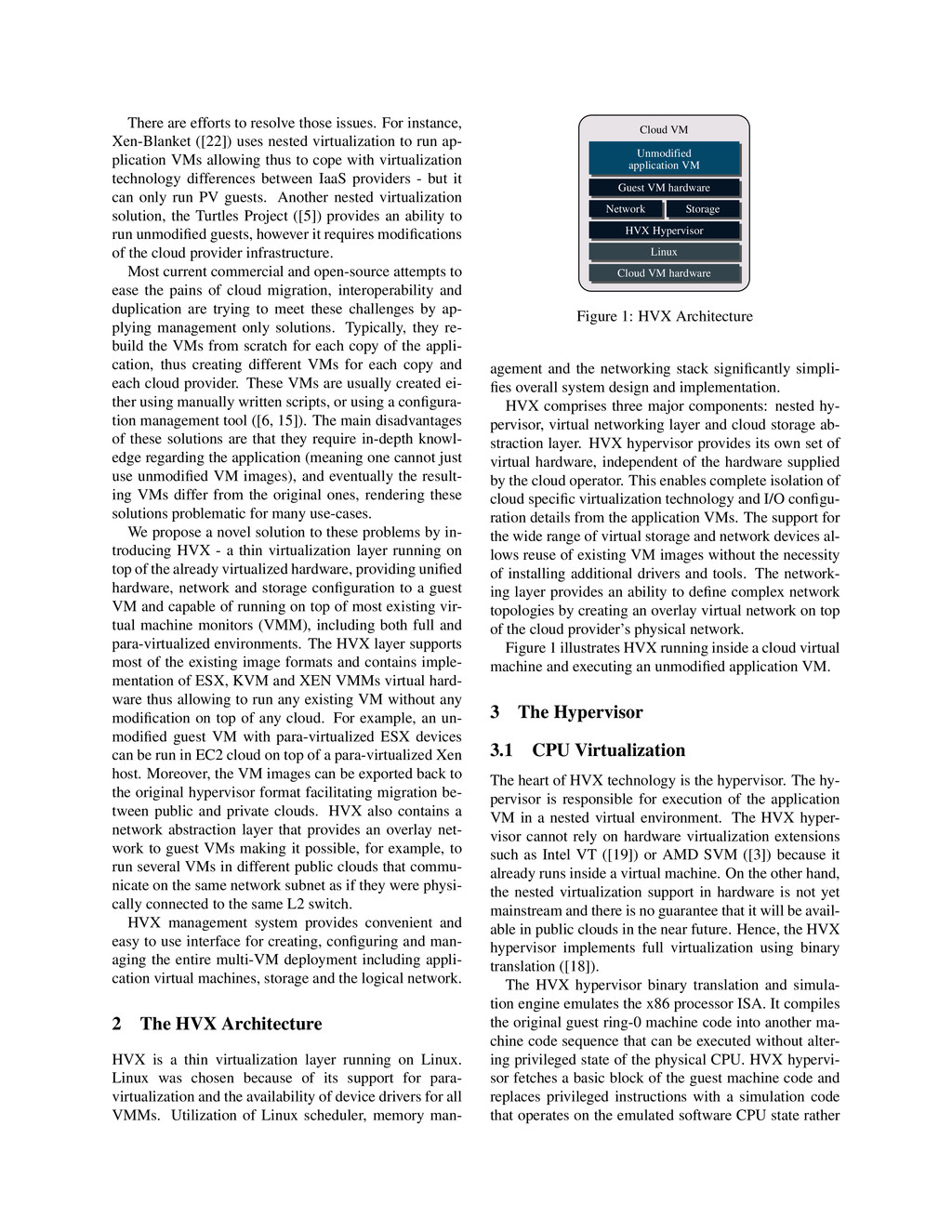
    ([22]) uses nested virtualization to run ap- plication VMs allowing thus to cope with virtualization technology differences between IaaS providers - but it can only run PV guests. Another nested virtualization solution, the Turtles Project ([5]) provides an ability to run unmodified guests, however it requires modifications of the cloud provider infrastructure. Most current commercial and open-source attempts to ease the pains of cloud migration, interoperability and duplication are trying to meet these challenges by ap- plying management only solutions. Typically, they re- build the VMs from scratch for each copy of the appli- cation, thus creating different VMs for each copy and each cloud provider. These VMs are usually created ei- ther using manually written scripts, or using a configura- tion management tool ([6, 15]). The main disadvantages of these solutions are that they require in-depth knowl- edge regarding the application (meaning one cannot just use unmodified VM images), and eventually the result- ing VMs differ from the original ones, rendering these solutions problematic for many use-cases. We propose a novel solution to these problems by in- troducing HVX - a thin virtualization layer running on top of the already virtualized hardware, providing unified hardware, network and storage configuration to a guest VM and capable of running on top of most existing vir- tual machine monitors (VMM), including both full and para-virtualized environments. The HVX layer supports most of the existing image formats and contains imple- mentation of ESX, KVM and XEN VMMs virtual hard- ware thus allowing to run any existing VM without any modification on top of any cloud. For example, an un- modified guest VM with para-virtualized ESX devices can be run in EC2 cloud on top of a para-virtualized Xen host. Moreover, the VM images can be exported back to the original hypervisor format facilitating migration be- tween public and private clouds. HVX also contains a network abstraction layer that provides an overlay net- work to guest VMs making it possible, for example, to run several VMs in different public clouds that commu- nicate on the same network subnet as if they were physi- cally connected to the same L2 switch. HVX management system provides convenient and easy to use interface for creating, configuring and man- aging the entire multi-VM deployment including appli- cation virtual machines, storage and the logical network. 2 The HVX Architecture HVX is a thin virtualization layer running on Linux. Linux was chosen because of its support for para- virtualization and the availability of device drivers for all VMMs. Utilization of Linux scheduler, memory man- Linux Cloud VM hardware HVX Hypervisor Network Guest VM hardware Storage Unmodified application VM Cloud VM Figure 1: HVX Architecture agement and the networking stack significantly simpli- fies overall system design and implementation. HVX comprises three major components: nested hy- pervisor, virtual networking layer and cloud storage ab- straction layer. HVX hypervisor provides its own set of virtual hardware, independent of the hardware supplied by the cloud operator. This enables complete isolation of cloud specific virtualization technology and I/O configu- ration details from the application VMs. The support for the wide range of virtual storage and network devices al- lows reuse of existing VM images without the necessity of installing additional drivers and tools. The network- ing layer provides an ability to define complex network topologies by creating an overlay virtual network on top of the cloud provider’s physical network. Figure 1 illustrates HVX running inside a cloud virtual machine and executing an unmodified application VM. 3 The Hypervisor 3.1 CPU Virtualization The heart of HVX technology is the hypervisor. The hy- pervisor is responsible for execution of the application VM in a nested virtual environment. The HVX hyper- visor cannot rely on hardware virtualization extensions such as Intel VT ([19]) or AMD SVM ([3]) because it already runs inside a virtual machine. On the other hand, the nested virtualization support in hardware is not yet mainstream and there is no guarantee that it will be avail- able in public clouds in the near future. Hence, the HVX hypervisor implements full virtualization using binary translation ([18]). The HVX hypervisor binary translation and simula- tion engine emulates the x86 processor ISA. It compiles the original guest ring-0 machine code into another ma- chine code sequence that can be executed without alter- ing privileged state of the physical CPU. HVX hypervi- sor fetches a basic block of the guest machine code and replaces privileged instructions with a simulation code that operates on the emulated software CPU state rather
  3. than on the physical CPU. The original basic block exit

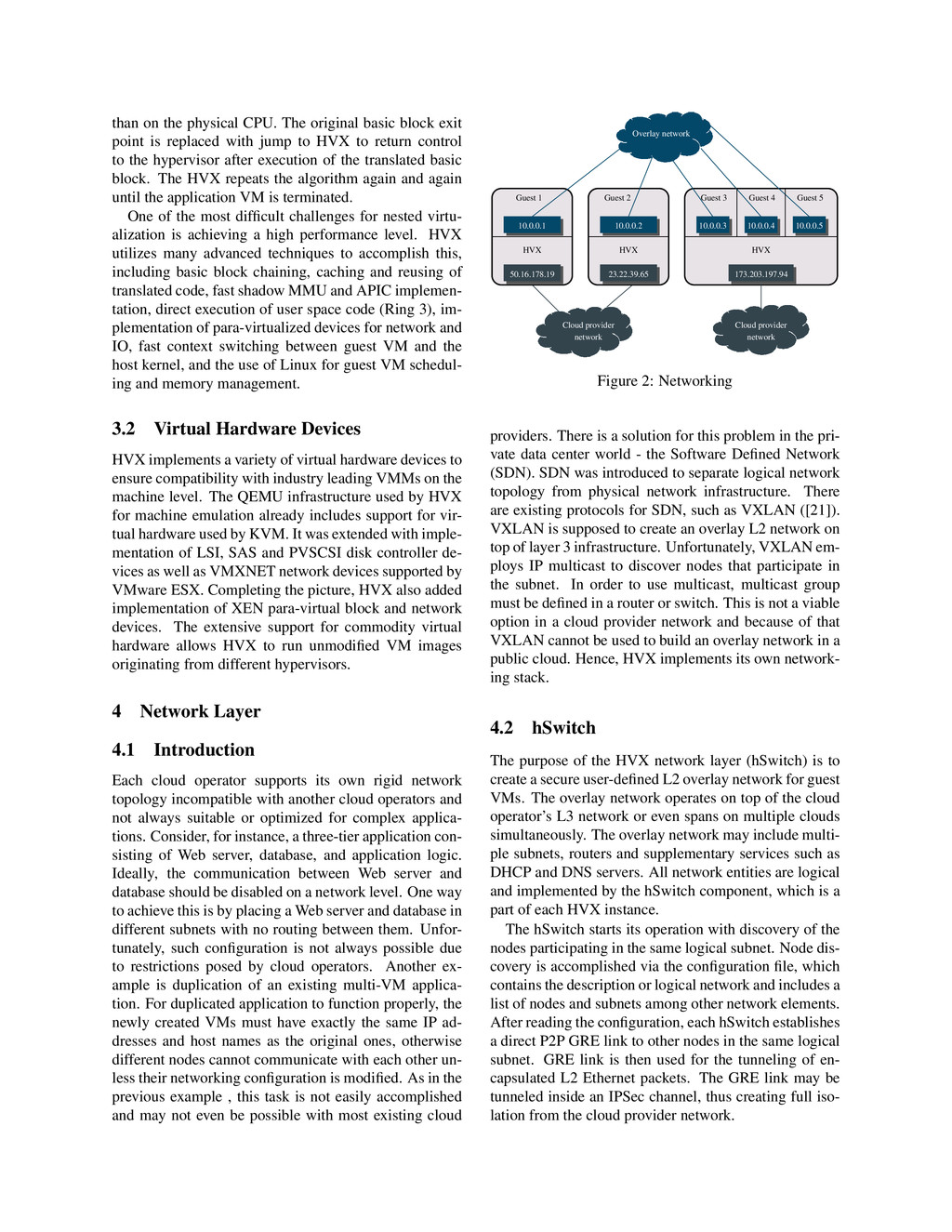
    point is replaced with jump to HVX to return control to the hypervisor after execution of the translated basic block. The HVX repeats the algorithm again and again until the application VM is terminated. One of the most difficult challenges for nested virtu- alization is achieving a high performance level. HVX utilizes many advanced techniques to accomplish this, including basic block chaining, caching and reusing of translated code, fast shadow MMU and APIC implemen- tation, direct execution of user space code (Ring 3), im- plementation of para-virtualized devices for network and IO, fast context switching between guest VM and the host kernel, and the use of Linux for guest VM schedul- ing and memory management. 3.2 Virtual Hardware Devices HVX implements a variety of virtual hardware devices to ensure compatibility with industry leading VMMs on the machine level. The QEMU infrastructure used by HVX for machine emulation already includes support for vir- tual hardware used by KVM. It was extended with imple- mentation of LSI, SAS and PVSCSI disk controller de- vices as well as VMXNET network devices supported by VMware ESX. Completing the picture, HVX also added implementation of XEN para-virtual block and network devices. The extensive support for commodity virtual hardware allows HVX to run unmodified VM images originating from different hypervisors. 4 Network Layer 4.1 Introduction Each cloud operator supports its own rigid network topology incompatible with another cloud operators and not always suitable or optimized for complex applica- tions. Consider, for instance, a three-tier application con- sisting of Web server, database, and application logic. Ideally, the communication between Web server and database should be disabled on a network level. One way to achieve this is by placing a Web server and database in different subnets with no routing between them. Unfor- tunately, such configuration is not always possible due to restrictions posed by cloud operators. Another ex- ample is duplication of an existing multi-VM applica- tion. For duplicated application to function properly, the newly created VMs must have exactly the same IP ad- dresses and host names as the original ones, otherwise different nodes cannot communicate with each other un- less their networking configuration is modified. As in the previous example , this task is not easily accomplished and may not even be possible with most existing cloud Guest 4 Guest 3 Guest 1 Guest 2 Guest 5 Cloud provider network Cloud provider network HVX HVX HVX Overlay network 50.16.178.19 10.0.0.1 10.0.0.2 10.0.0.3 10.0.0.4 10.0.0.5 173.203.197.94 23.22.39.65 Figure 2: Networking providers. There is a solution for this problem in the pri- vate data center world - the Software Defined Network (SDN). SDN was introduced to separate logical network topology from physical network infrastructure. There are existing protocols for SDN, such as VXLAN ([21]). VXLAN is supposed to create an overlay L2 network on top of layer 3 infrastructure. Unfortunately, VXLAN em- ploys IP multicast to discover nodes that participate in the subnet. In order to use multicast, multicast group must be defined in a router or switch. This is not a viable option in a cloud provider network and because of that VXLAN cannot be used to build an overlay network in a public cloud. Hence, HVX implements its own network- ing stack. 4.2 hSwitch The purpose of the HVX network layer (hSwitch) is to create a secure user-defined L2 overlay network for guest VMs. The overlay network operates on top of the cloud operator’s L3 network or even spans on multiple clouds simultaneously. The overlay network may include multi- ple subnets, routers and supplementary services such as DHCP and DNS servers. All network entities are logical and implemented by the hSwitch component, which is a part of each HVX instance. The hSwitch starts its operation with discovery of the nodes participating in the same logical subnet. Node dis- covery is accomplished via the configuration file, which contains the description or logical network and includes a list of nodes and subnets among other network elements. After reading the configuration, each hSwitch establishes a direct P2P GRE link to other nodes in the same logical subnet. GRE link is then used for the tunneling of en- capsulated L2 Ethernet packets. The GRE link may be tunneled inside an IPSec channel, thus creating full iso- lation from the cloud provider network.
  4. The packet forwarding logic is very similar to that of

    the regular network switch. For each virtual network de- vice, hSwitch creates an vPort object that handles incom- ing and outgoing packets from the device. vPort learns MAC addresses of incoming packets and builds a for- warding table based on the destination MAC address. For broadcast frames, the vPort floods the packet to all other distributed vPorts that belong to the same broadcast do- main. Unicast frames are sent to their designated vPort using the learnt MAC address. 4.3 Distributed Routing As already mentioned, the hSwitch implements a logi- cal router entity that is used to route packets between different logical subnets. Contrary to a physical router, the routing function is implemented in a distributed way: there is no central router entity, instead each HVX in- stance implements routing logic independently of each other. The router entity is assigned the same MAC ad- dress on every node. When a guest wishes to commu- nicate with a different logical subnet, it sends an ARP request to discover the router MAC address. The ARP request is replied by the local router component. After a local router receives a packet designated to a different subnet, it consults its forwarding table to find the des- tination node where it should forward the packet. If the table is empty, the ARP request is broadcasted to all other nodes on the designated subnet. On the remote side, the ARP request is replied by its designated VM and tun- neled back to the node that originally sent the request. After the forwarding table is populated, the packets can be forwarded via unicast communication to their final destinations. 5 Storage Abstraction Layer The HVX storage layer allows transparent access to VM images in the image store and provides storage capacity for VM attached block devices and snapshots. As with networking, different cloud providers have different ap- proaches for storage solution. Some operators provide dynamic block devices that can be attached to a guest VM at runtime. Other providers limit VM storage to a single volume with the size specified at VM creation time. The HVX storage layer is used to bridge these dif- ferences by exposing a common API to a guest VM for accessing underlying storage. 5.1 Image store The average VM image occupies several hundred of megabytes and can grow easily to gigabytes of data. Dur- ing the boot process, a VM expects a high data transfer rate, otherwise the boot process would become unaccept- ably slow. In addition, the image store must simultane- ously serve many images to multiple virtual machines that may run on physical servers located in different data centers and geographical regions. Certain regions and data centers have good connectivity between them while others suffer from low transfer rates. Even within same cloud operator network, it is not advisable to place the image and virtual machine in different regions because of relatively slow network speeds. To cope with differences between cloud storage infrastructures, the image store supports several backends for data storage. It supports object stores, such as Amazon’s S3, Rackspace Cloud- Files, network attached devices such as NFS servers or local block devices. The image store contains read only base VM images. During VM provisioning, HVX storage layer creates a new snapshot derived from the base VM image. The snapshot is kept on the host local storage and contains the modified data for the current guest VM. Multiple guest VMs derived from the same base image do not share lo- cally modified data. However, it is possible to create a new base image from the locally modified VM snapshot by pushing the snapshot back into the image store. The storage abstraction layer provides a connector to the image store and implements caching logic to effi- ciently interface with cloud storage infrastructure. It ex- poses a regular FUSE ([7]) based file system to the host VM. To reduce the amount of data transfers between the backing store and guest virtual machine, each host VM caches downloaded image data on a local storage, so the next time when the same data block is requested, it is served locally from the cache. Local cache signifi- cantly decreases boot-up times because local disk access is much faster than downloading image data from a web store or network location. Another challenge is to minimize the amount of data used for image storing to shorten upload and download times, and lower the cost of physical storage. For that purpose each VM image has an associated metadata file describing the partitioning of the image into data chunks. Data chunks that contain only zeros are not stored phys- ically and only listed as metadata file entries. The data stream is scanned during image upload, and zero sequences are detected and marked in the metadata. Additional optimizations, such as data compression and de-duplication techniques, can be used to further reduce the size of the uploaded image. 5.2 Encapsulating Cloud Provider Persis- tent Storage The guest VMs require persistent storage for applica- tion data. As storage mechanisms vary between cloud
  5. providers, HVX adds an abstraction layer above the physical storage

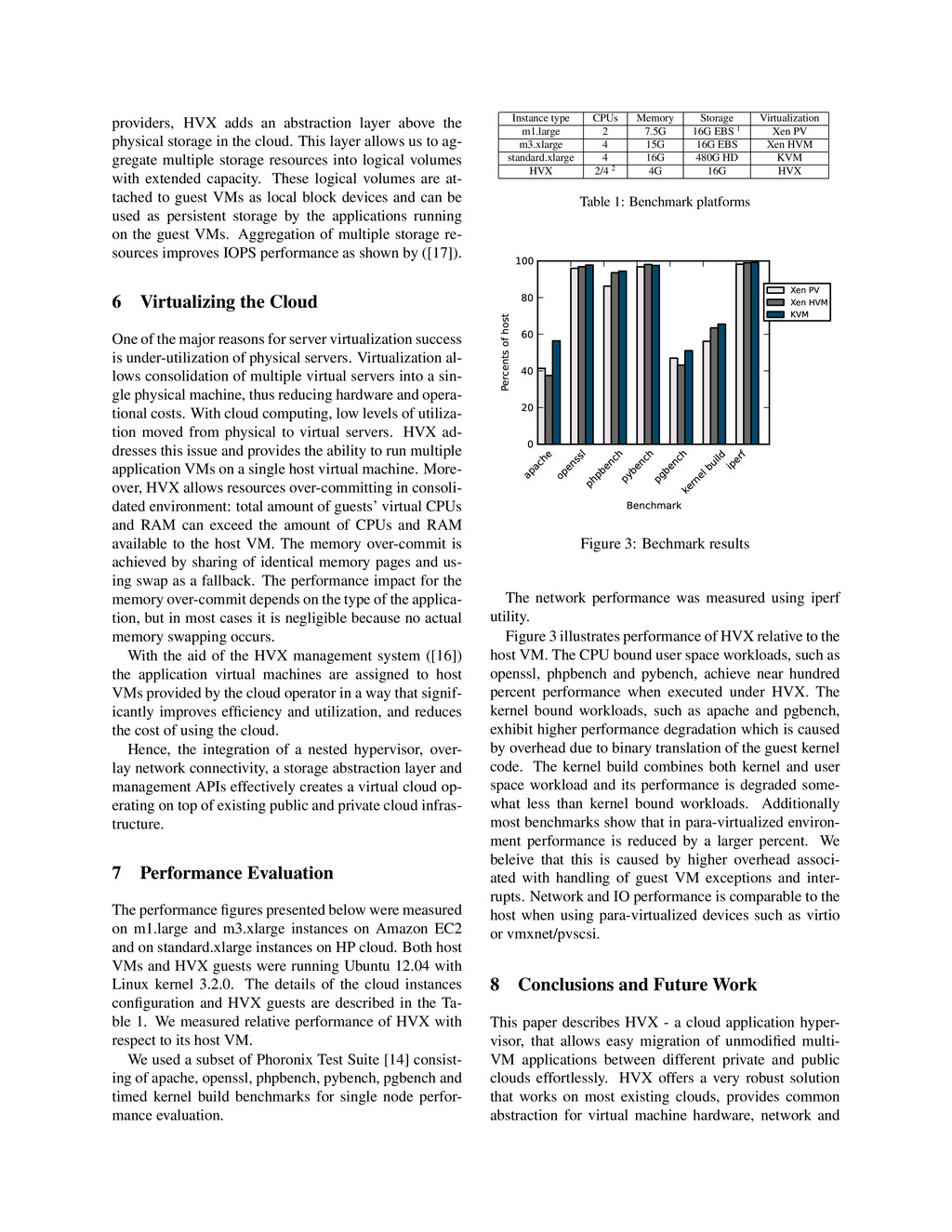
    in the cloud. This layer allows us to ag- gregate multiple storage resources into logical volumes with extended capacity. These logical volumes are at- tached to guest VMs as local block devices and can be used as persistent storage by the applications running on the guest VMs. Aggregation of multiple storage re- sources improves IOPS performance as shown by ([17]). 6 Virtualizing the Cloud One of the major reasons for server virtualization success is under-utilization of physical servers. Virtualization al- lows consolidation of multiple virtual servers into a sin- gle physical machine, thus reducing hardware and opera- tional costs. With cloud computing, low levels of utiliza- tion moved from physical to virtual servers. HVX ad- dresses this issue and provides the ability to run multiple application VMs on a single host virtual machine. More- over, HVX allows resources over-committing in consoli- dated environment: total amount of guests’ virtual CPUs and RAM can exceed the amount of CPUs and RAM available to the host VM. The memory over-commit is achieved by sharing of identical memory pages and us- ing swap as a fallback. The performance impact for the memory over-commit depends on the type of the applica- tion, but in most cases it is negligible because no actual memory swapping occurs. With the aid of the HVX management system ([16]) the application virtual machines are assigned to host VMs provided by the cloud operator in a way that signif- icantly improves efficiency and utilization, and reduces the cost of using the cloud. Hence, the integration of a nested hypervisor, over- lay network connectivity, a storage abstraction layer and management APIs effectively creates a virtual cloud op- erating on top of existing public and private cloud infras- tructure. 7 Performance Evaluation The performance figures presented below were measured on m1.large and m3.xlarge instances on Amazon EC2 and on standard.xlarge instances on HP cloud. Both host VMs and HVX guests were running Ubuntu 12.04 with Linux kernel 3.2.0. The details of the cloud instances configuration and HVX guests are described in the Ta- ble 1. We measured relative performance of HVX with respect to its host VM. We used a subset of Phoronix Test Suite [14] consist- ing of apache, openssl, phpbench, pybench, pgbench and timed kernel build benchmarks for single node perfor- mance evaluation. Instance type CPUs Memory Storage Virtualization m1.large 2 7.5G 16G EBS 1 Xen PV m3.xlarge 4 15G 16G EBS Xen HVM standard.xlarge 4 16G 480G HD KVM HVX 2/4 2 4G 16G HVX Table 1: Benchmark platforms apache openssl phpbench pybench pgbench kernel build iperf Benchmark 0 20 40 60 80 100 Percents of host Xen PV Xen HVM KVM Figure 3: Bechmark results The network performance was measured using iperf utility. Figure 3 illustrates performance of HVX relative to the host VM. The CPU bound user space workloads, such as openssl, phpbench and pybench, achieve near hundred percent performance when executed under HVX. The kernel bound workloads, such as apache and pgbench, exhibit higher performance degradation which is caused by overhead due to binary translation of the guest kernel code. The kernel build combines both kernel and user space workload and its performance is degraded some- what less than kernel bound workloads. Additionally most benchmarks show that in para-virtualized environ- ment performance is reduced by a larger percent. We beleive that this is caused by higher overhead associ- ated with handling of guest VM exceptions and inter- rupts. Network and IO performance is comparable to the host when using para-virtualized devices such as virtio or vmxnet/pvscsi. 8 Conclusions and Future Work This paper describes HVX - a cloud application hyper- visor, that allows easy migration of unmodified multi- VM applications between different private and public clouds effortlessly. HVX offers a very robust solution that works on most existing clouds, provides common abstraction for virtual machine hardware, network and
  6. storage interfaces, and decouples application virtual ma- chines from resources

    provided by the cloud operators. Combined with image store and management APIs, HVX offers a versatile platform for the creation of a vir- tual cloud spanning across public and private clouds. The development of HVX is an ongoing process, and additional features and improvements are planned for the future. We plan to enhance the image store a CDN-like technique to distribute the user images close to the ac- tual deployment location to optimize for network band- width. For example, when a user wishes to deploy a VM on Rackspace cloud, the image will be silently copied to a Rackspace CloudFiles backend store. For the network- ing layer, there are plans to integrate with VXLAN ([21]) )and Open vSwitch ([13]. We are also considering integration of HVX with OpenStack ([12]) to further increase interoperability and provide industry standard management platform. References [1] ABELS, T., DHAWAN, P., AND CHANDRASEKARAN, B. An overview of xen virtualization, 2005. [2] ADAMS, K., AND AGESEN, O. A comparison of software and hardware techniques for x86 virtualization. In ACM SIGOPS Op- erating Systems Review (2006), vol. 40, ACM, pp. 2–13. [3] ADVANCED MICRO DEVICES. AMD64 Virtualization: Secure Virtual Machine Architecture Reference Manual, May 2005. [4] AMAZON EC2. http://aws.amazon.com/ec2/. [5] BEN-YEHUDA, M., DAY, M. D., DUBITZKY, Z., FACTOR, M., HAR’EL, N., GORDON, A., LIGUORI, A., WASSERMAN, O., AND YASSOUR, B.-A. The turtles project: Design and imple- mentation of nested virtualization. In Proceedings of the 9th USENIX conference on Operating systems design and implemen- tation (2010), USENIX Association, pp. 1–6. [6] CHEF. http://www.opscode.com/chef/. [7] FUSE. http://fuse.sourceforge.net/. [8] GOLDBERG, R. Survey of virtual machine research. IEEE Com- puter 7, 6 (1974), 34–45. [9] HP CLOUD. http://www.hpcloud.com/. [10] KIVITY, A., KAMAY, Y., LAOR, D., LUBLIN, U., AND LIGUORI, A. kvm: the linux virtual machine monitor. In Pro- ceedings of the Linux Symposium (2007), vol. 1, pp. 225–230. [11] KVM. http://www.linux-kvm.org/. [12] OPEN STACK. http://www.openstack.org/. [13] OPEN VSWITCH. http://http://openvswitch.org/. [14] PHORONIX TEST SUITE. http://www. phoronix-test-suite.com/. [15] PUPPET LABS. https://puppetlabs.com/solutions/ configuration-management/. [16] RAVELLO SYSTEMS. http://www.ravellosystems.com/. [17] SCALYR LOGS. http://blog.scalyr.com/2012/10/16/ a-systematic-look-at-ec2-io/. [18] SITES, R., CHERNOFF, A., KIRK, M., MARKS, M., AND ROBINSON, S. Binary translation. Communications of the ACM 36, 2 (1993), 69–81. [19] UHLIG, R., NEIGER, G., RODGERS, D., SANTONI, A., MAR- TINS, F., ANDERSON, A., BENNETT, S., KAGI, A., LEUNG, F., AND SMITH, L. Intel virtualization technology. Computer 38, 5 (2005), 48–56. [20] VMWARE ESXI AND ESX INFO CENTER. http:// www.vmware.com/products/vsphere/esxi-and-esx/ overview.html. [21] VXLAN. http://www.vmware.com/il/solutions/ datacenter/vxlan.html. [22] WILLIAMS, D., JAMJOOM, H., AND WEATHERSPOON, H. The xen-blanket: virtualize once, run everywhere. ACM EuroSys (2012). [23] XEN HYPERVISOR. http://www.xen.org. Notes 1Elastic Block Storage 2Depends on host CPUs number