LLM × dbt — An improvement cycle of LLM conversion × dbt evaluation — AXA Life Insurance Co., Ltd. Senior Data Engineer Keisuke Taniguchi JEDAI Meetup! Databricks Case Study Special May 2026
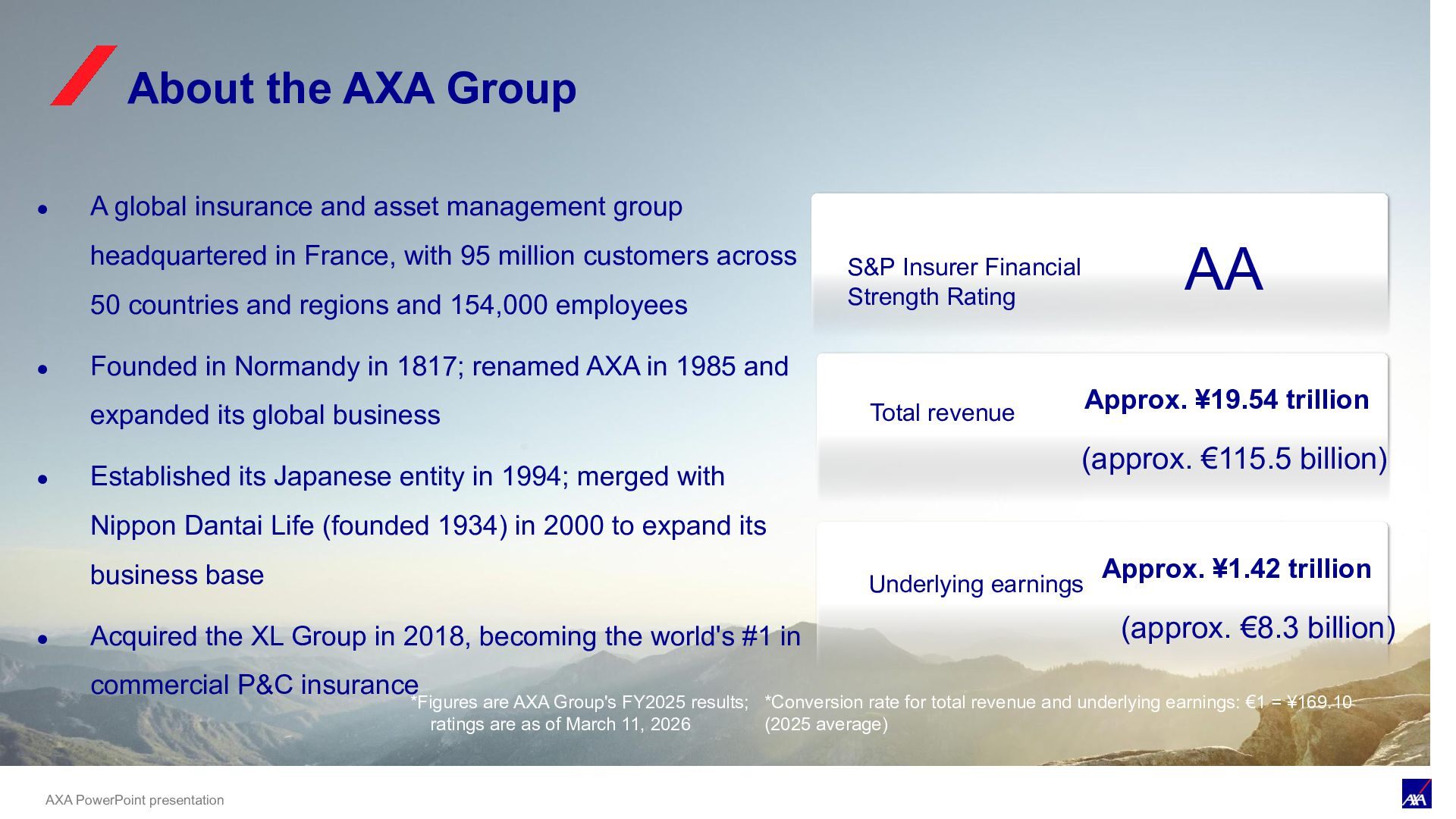
global insurance and asset management group headquartered in France, with 95 million customers across 50 countries and regions and 154,000 employees • Founded in Normandy in 1817; renamed AXA in 1985 and expanded its global business • Established its Japanese entity in 1994; merged with Nippon Dantai Life (founded 1934) in 2000 to expand its business base • Acquired the XL Group in 2018, becoming the world's #1 in commercial P&C insurance S&P Insurer Financial Strength Rating AA *Figures are AXA Group's FY2025 results; ratings are as of March 11, 2026 About the AXA Group *Conversion rate for total revenue and underlying earnings: €1 = ¥169.10 (2025 average) Total revenue Approx. ¥19.54 trillion (approx. €115.5 billion) Underlying earnings (approx. €8.3 billion) Approx. ¥1.42 trillion
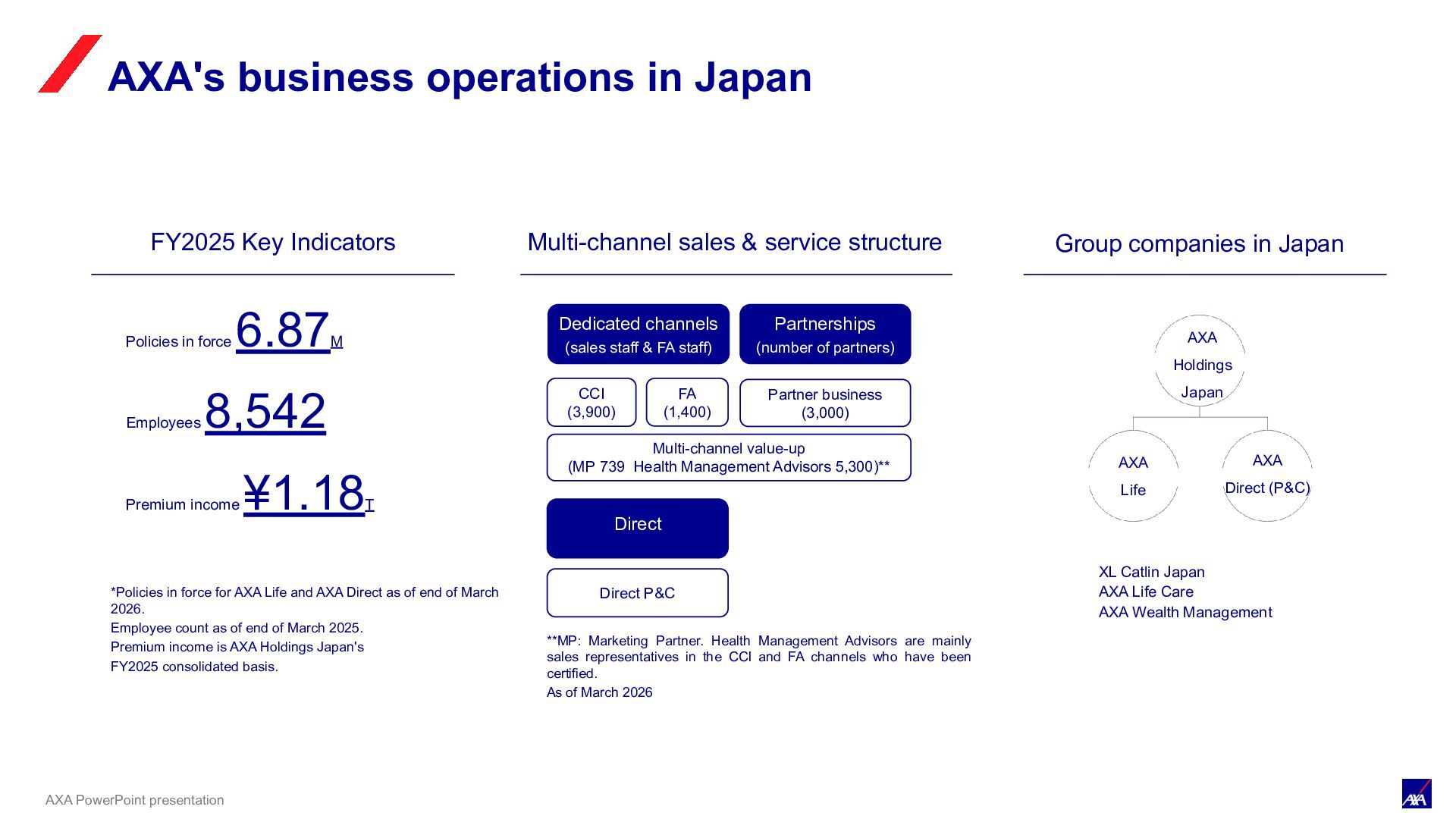
AXA Life and AXA Direct as of end of March 2026. Employee count as of end of March 2025. Premium income is AXA Holdings Japan's FY2025 consolidated basis. Group companies in Japan AXA Holdings Japan AXA Life AXA Direct (P&C) Policies in force 6.87M Employees 8,542 Premium income ¥1.18T XL Catlin Japan AXA Life Care AXA Wealth Management Multi-channel sales & service structure Direct CCI (3,900) FA (1,400) Partner business (3,000) Direct P&C Partnerships (number of partners) Dedicated channels (sales staff & FA staff) Multi-channel value-up (MP 739 Health Management Advisors 5,300)** **MP: Marketing Partner. Health Management Advisors are mainly sales representatives in the CCI and FA channels who have been certified. As of March 2026 AXA's business operations in Japan
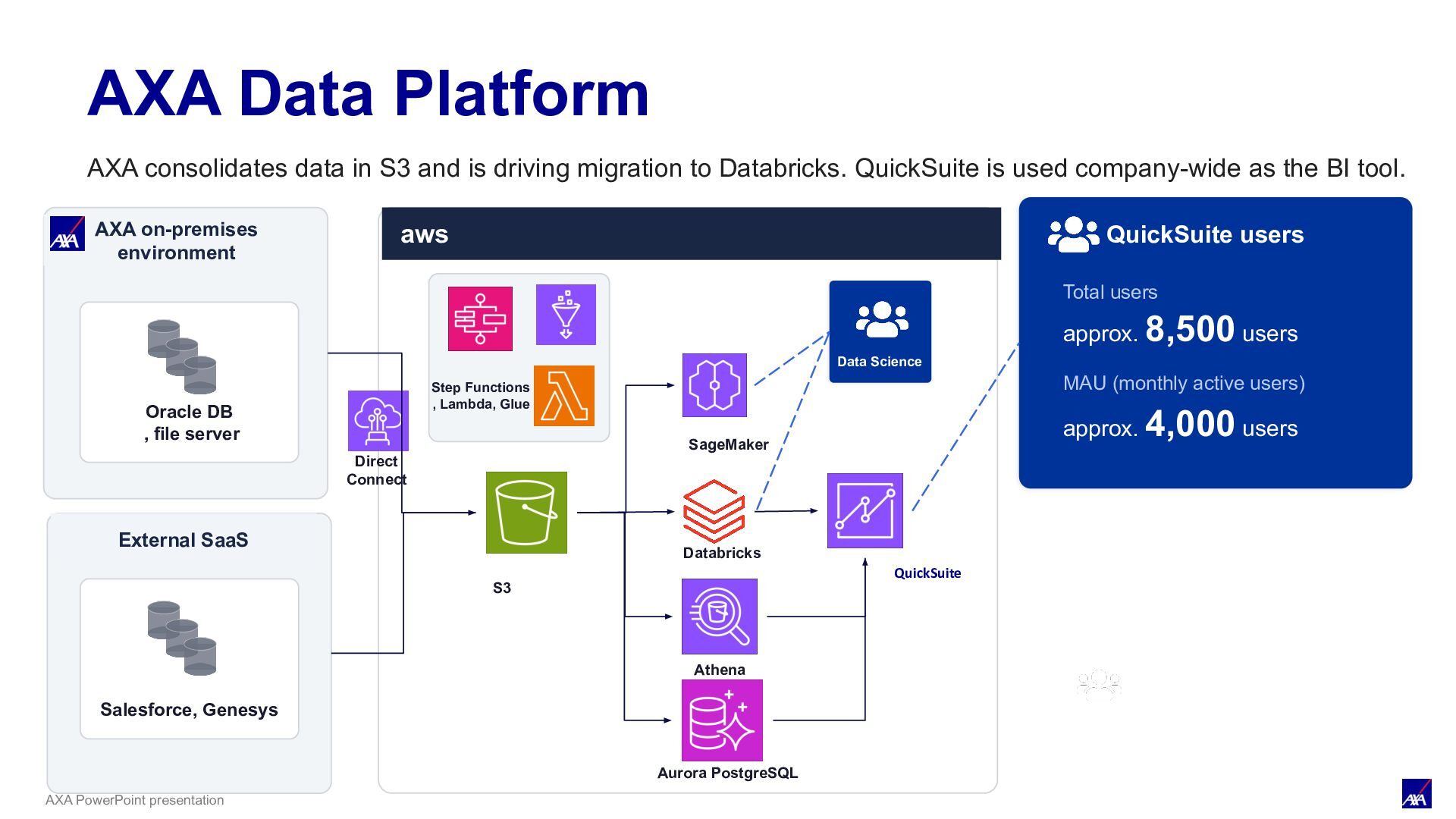
server aws Data Science & Analytics Business users QuickSuite users Total users approx. 8,500 users MAU (monthly active users) approx. 4,000 users External SaaS Data Science Step Functions , Lambda, Glue S3 SageMaker Databricks Athena Aurora PostgreSQL QuickSuite Salesforce, Genesys Direct Connect AXA Data Platform AXA consolidates data in S3 and is driving migration to Databricks. QuickSuite is used company-wide as the BI tool.
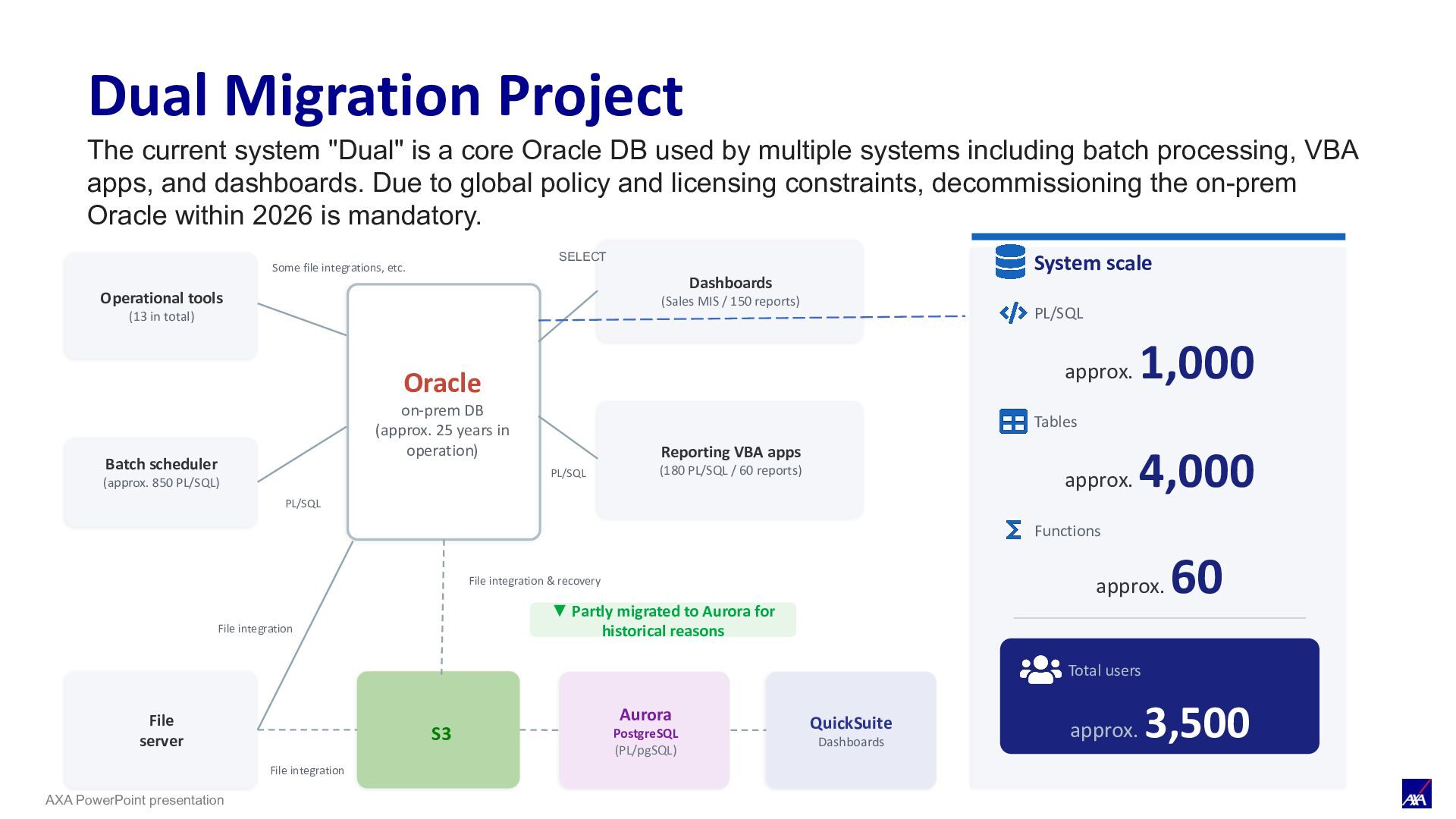
Oracle DB used by multiple systems including batch processing, VBA apps, and dashboards. Due to global policy and licensing constraints, decommissioning the on-prem Oracle within 2026 is mandatory. Operational tools (13 in total) Batch scheduler (approx. 850 PL/SQL) Some file integrations, etc. Dashboards (Sales MIS / 150 reports) Reporting VBA apps (180 PL/SQL / 60 reports) SELECT File server ▼ Partly migrated to Aurora for historical reasons S3 Aurora PostgreSQL (PL/pgSQL) QuickSuite Dashboards System scale PL/SQL approx. 1,000 Tables approx. 4,000 Functions approx. 60 Total users approx. 3,500 Oracle on-prem DB (approx. 25 years in operation) File integration PL/SQL PL/SQL File integration File integration & recovery Dual Migration Project
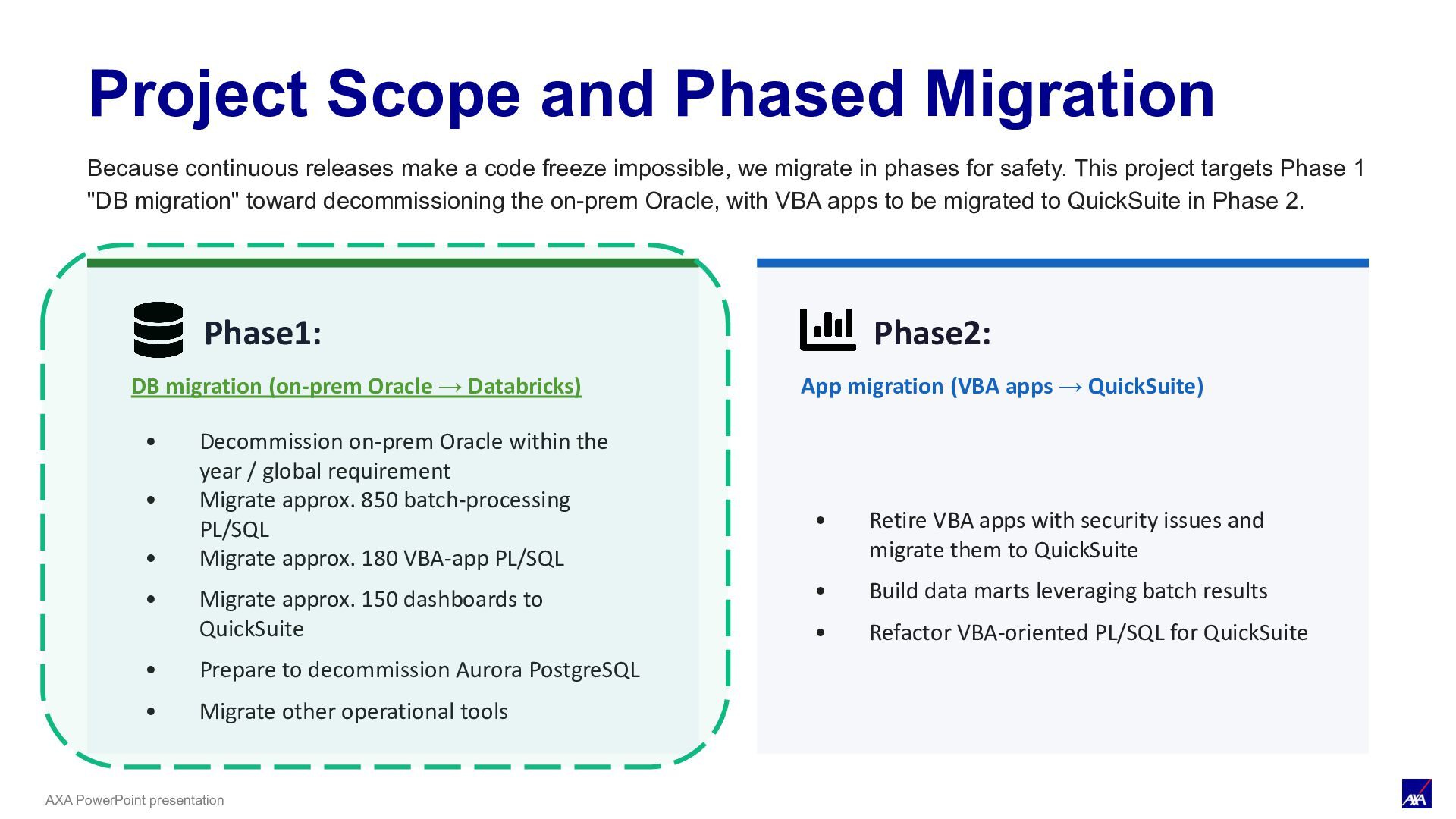
• Decommission on-prem Oracle within the year / global requirement • Migrate approx. 850 batch-processing PL/SQL • Migrate approx. 180 VBA-app PL/SQL • Migrate approx. 150 dashboards to QuickSuite • Prepare to decommission Aurora PostgreSQL • Migrate other operational tools Phase2: App migration (VBA apps → QuickSuite) • Retire VBA apps with security issues and migrate them to QuickSuite • Build data marts leveraging batch results • Refactor VBA-oriented PL/SQL for QuickSuite Project Scope and Phased Migration Because continuous releases make a code freeze impossible, we migrate in phases for safety. This project targets Phase 1 "DB migration" toward decommissioning the on-prem Oracle, with VBA apps to be migrated to QuickSuite in Phase 2.
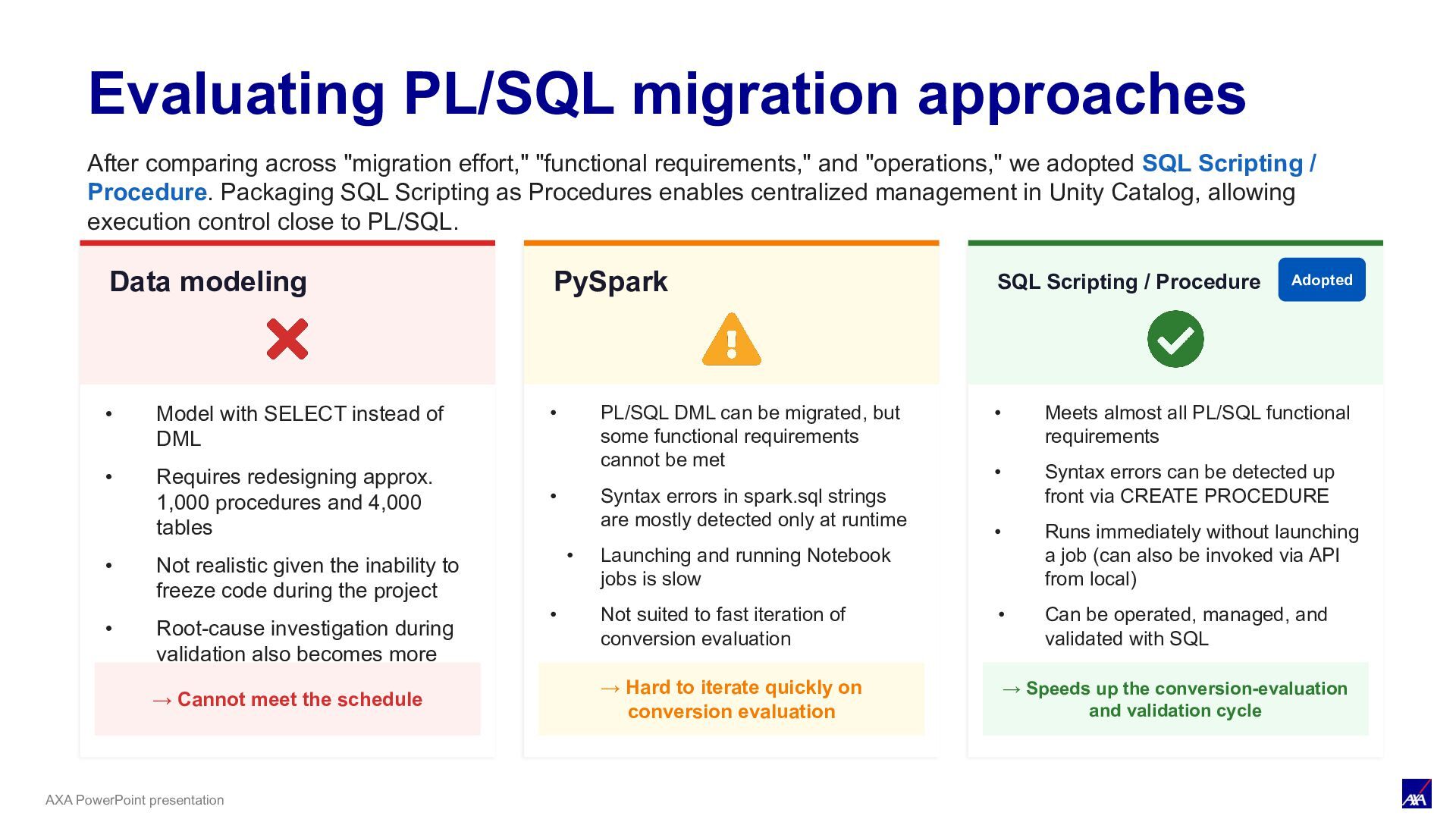
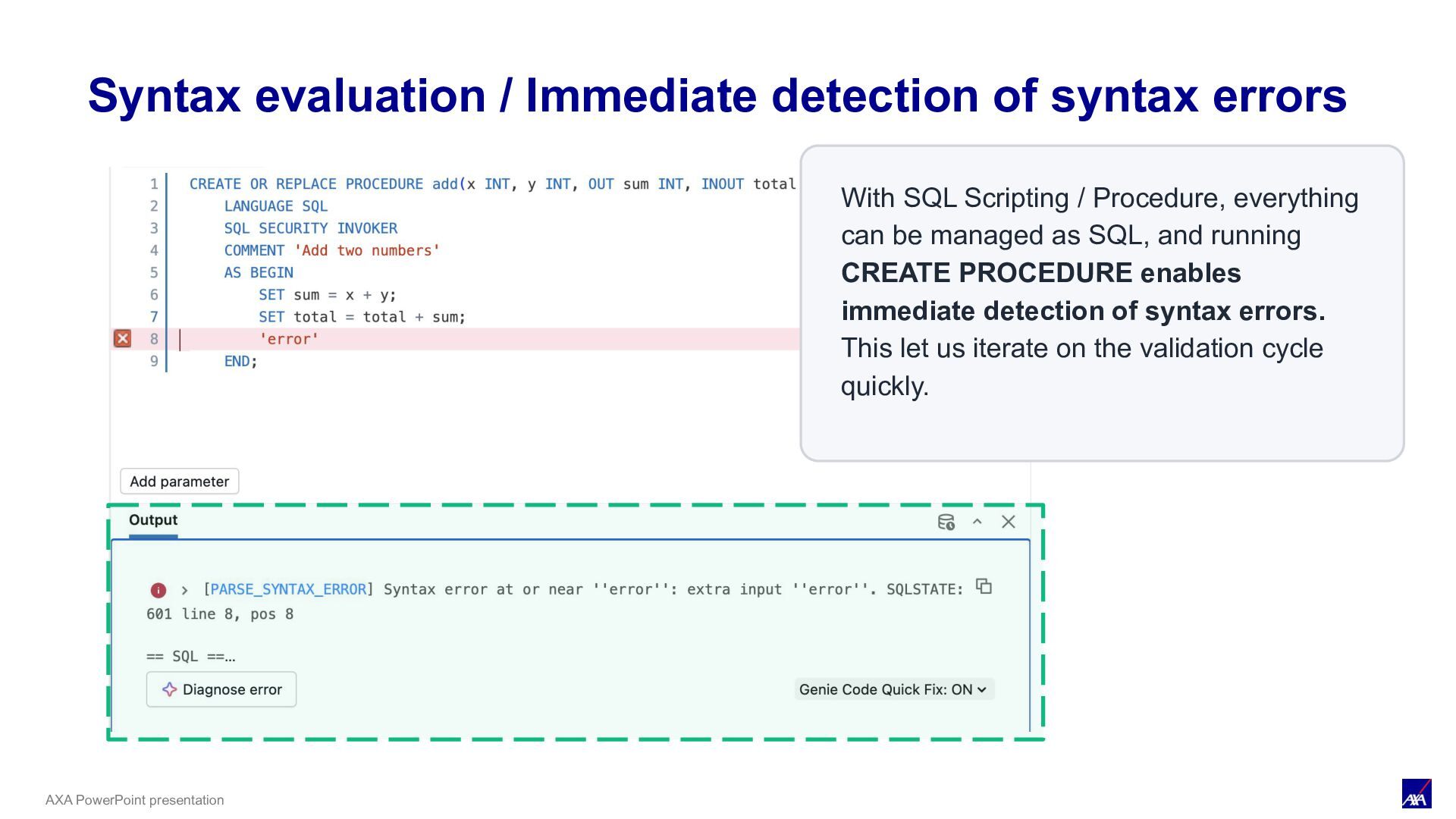
and "operations," we adopted SQL Scripting / Procedure. Packaging SQL Scripting as Procedures enables centralized management in Unity Catalog, allowing execution control close to PL/SQL. Evaluating PL/SQL migration approaches Data modeling • Model with SELECT instead of DML • Requires redesigning approx. 1,000 procedures and 4,000 tables • Not realistic given the inability to freeze code during the project • Root-cause investigation during validation also becomes more difficult. → Cannot meet the schedule PySpark • PL/SQL DML can be migrated, but some functional requirements cannot be met • Syntax errors in spark.sql strings are mostly detected only at runtime • Launching and running Notebook jobs is slow • Not suited to fast iteration of conversion evaluation → Hard to iterate quickly on conversion evaluation SQL Scripting / Procedure Adopted • Meets almost all PL/SQL functional requirements • Syntax errors can be detected up front via CREATE PROCEDURE • No job startup required — instant execution via SQL Warehouse (also executable locally via API). • Easier to migrate, operate, manage, and validate with SQL. → Speeds up the conversion-evaluation and validation cycle
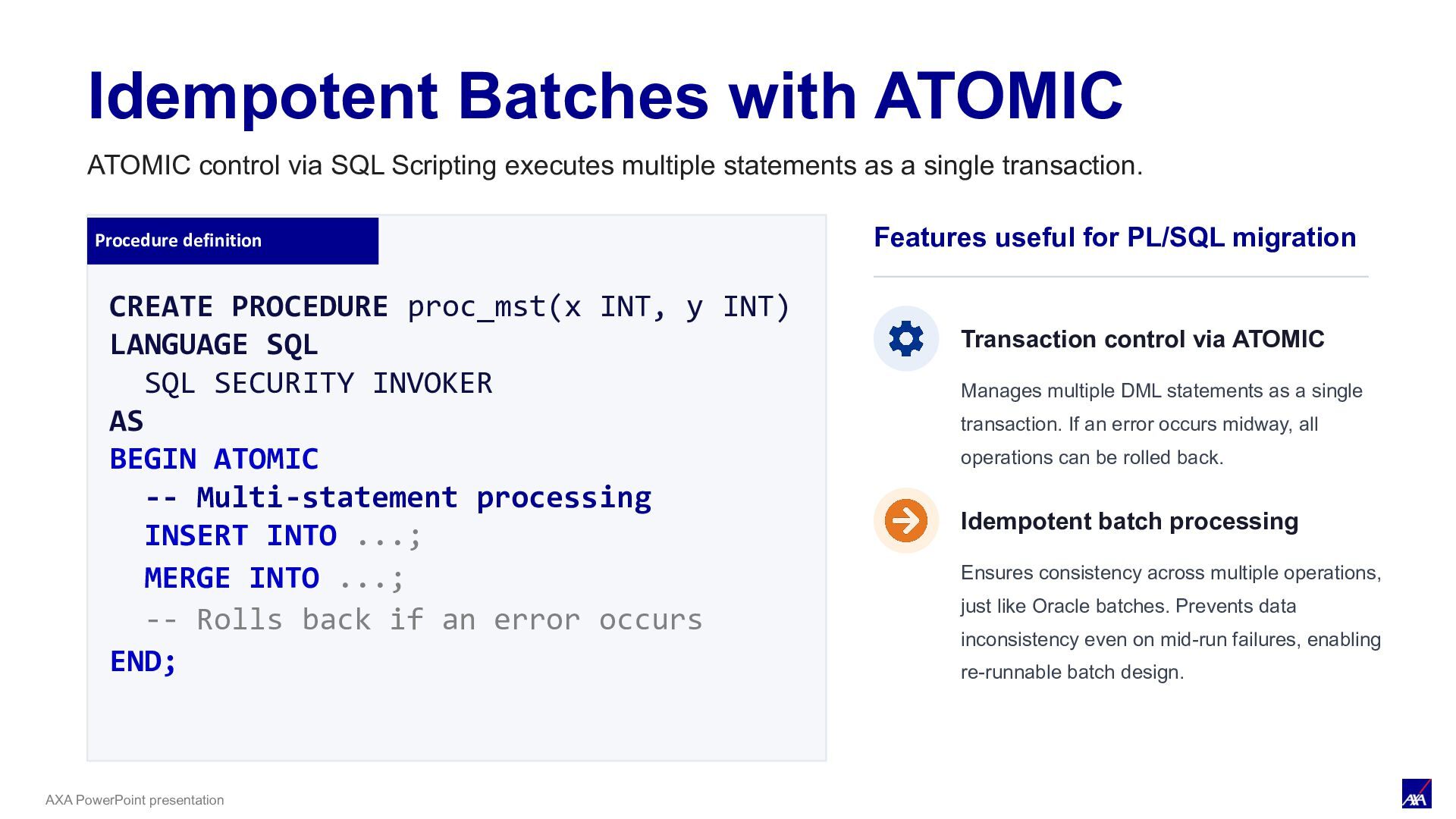
INT) LANGUAGE SQL SQL SECURITY INVOKER AS BEGIN ATOMIC -- Multi-statement processing INSERT INTO ...; MERGE INTO ...; -- Rolls back if an error occurs END; Idempotent Batches with ATOMIC Features useful for PL/SQL migration Transaction control via ATOMIC Manages multiple DML statements as a single transaction. If an error occurs midway, all operations can be rolled back. Idempotent batch processing Ensures consistency across multiple operations, just like Oracle batches. Prevents data inconsistency even on mid-run failures, enabling re-runnable batch design. ATOMIC control via SQL Scripting executes multiple statements as a single transaction.
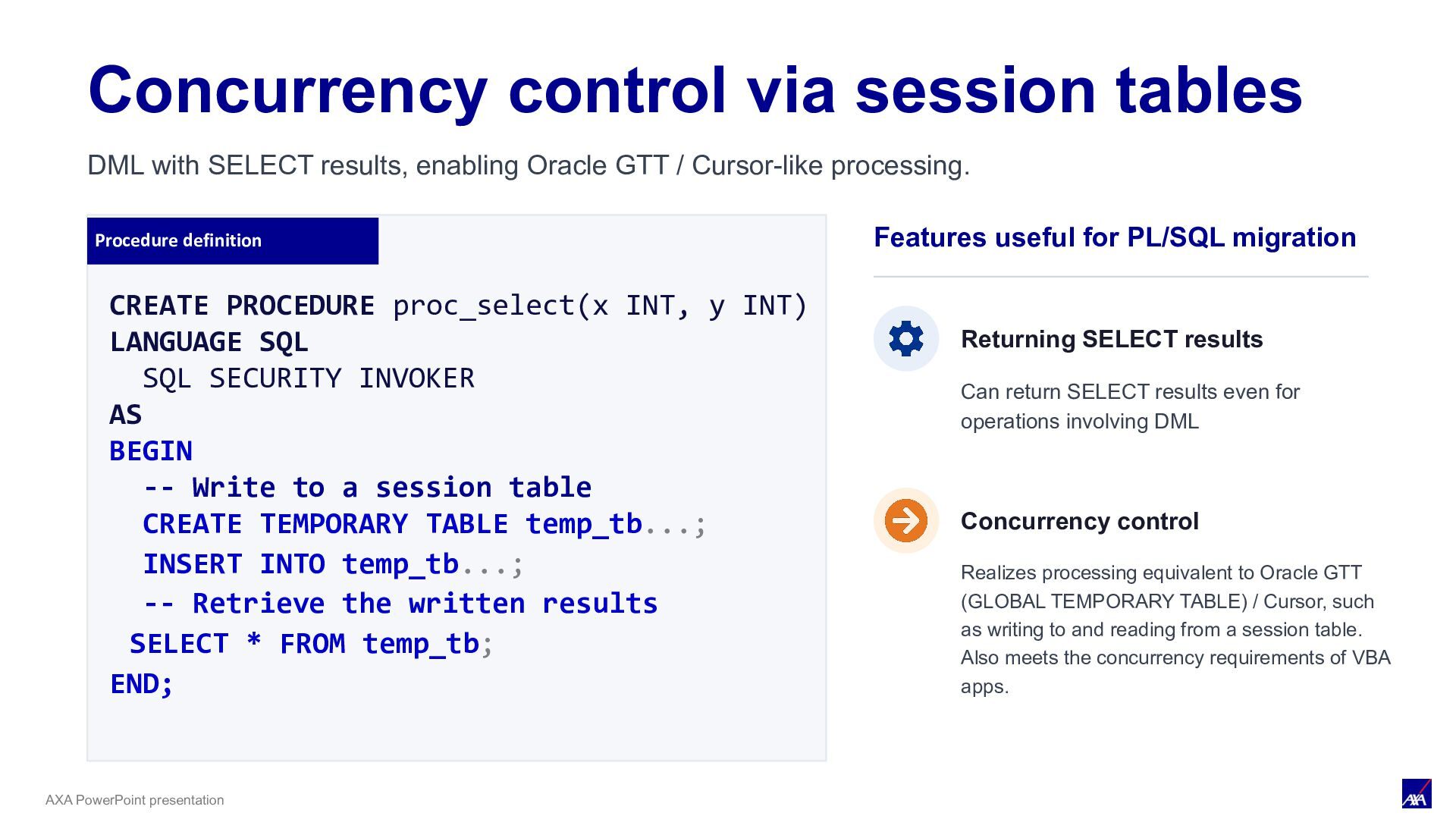
INT) LANGUAGE SQL SQL SECURITY INVOKER AS BEGIN -- Write to a session table CREATE TEMPORARY TABLE temp_tb...; INSERT INTO temp_tb...; -- Retrieve the written results SELECT * FROM temp_tb; END; Concurrency control via session tables Features useful for PL/SQL migration Returning SELECT results Can return SELECT results even for operations involving DML Concurrency control Realizes processing equivalent to Oracle GTT (GLOBAL TEMPORARY TABLE) / Cursor, such as writing to and reading from a session table. Also meets the concurrency requirements of VBA apps. DML with SELECT results, enabling Oracle GTT / Cursor-like processing.
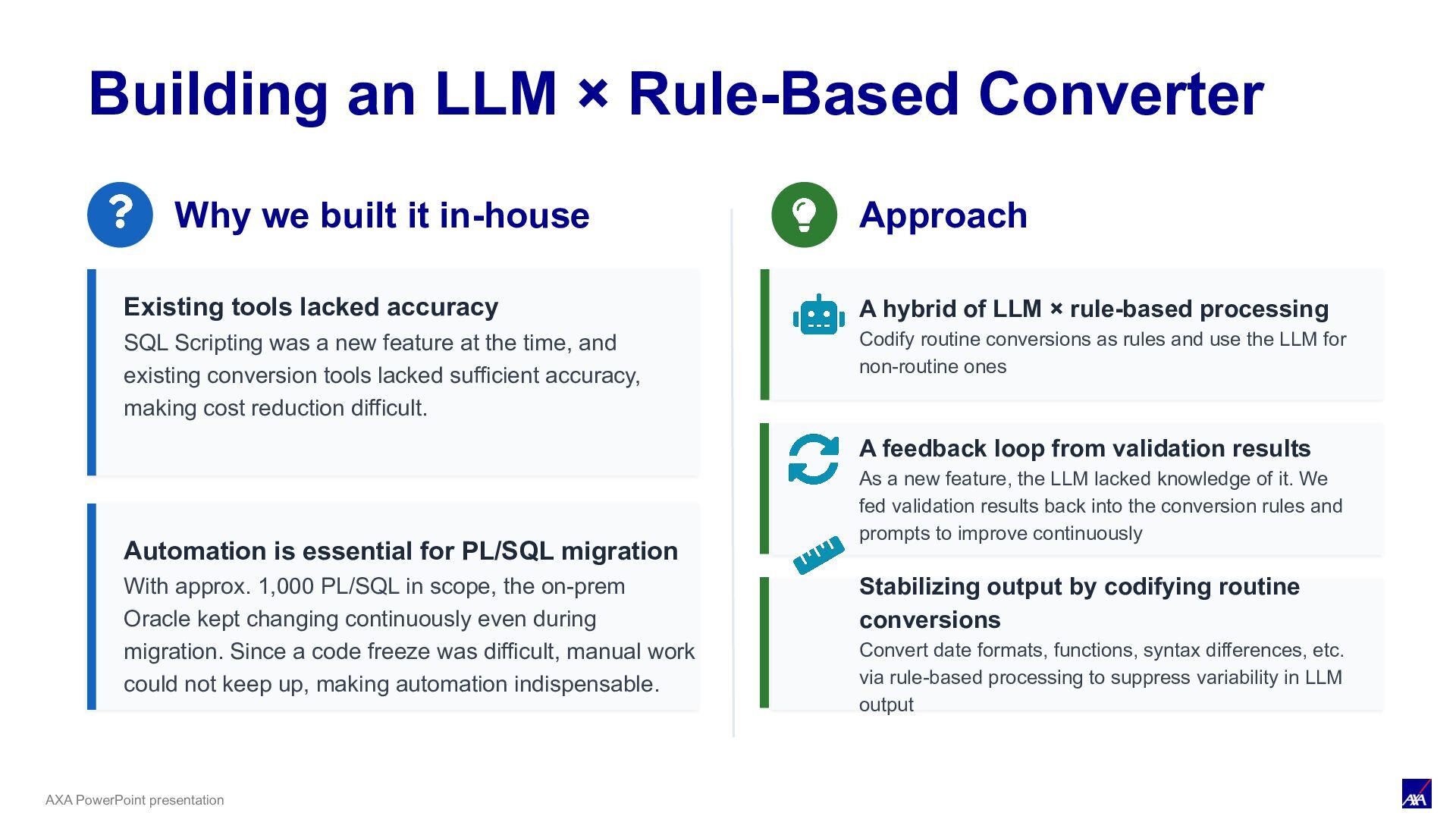
we built it in-house Existing tools lacked accuracy SQL Scripting was a new feature at the time, and existing conversion tools lacked sufficient accuracy, making cost reduction difficult. Automation is essential for PL/SQL migration With approx. 1,000 PL/SQL in scope, the on-prem Oracle kept changing continuously even during migration. Since a code freeze was difficult, manual work could not keep up, making automation indispensable. Approach A hybrid of LLM × rule-based processing Codify routine conversions as rules and use the LLM for non-routine ones A feedback loop from validation results As a new feature, the LLM lacked knowledge of it. We fed validation results back into the conversion rules and prompts to improve continuously Stabilizing output by codifying routine conversions Convert date formats, functions, syntax differences, etc. via rule-based processing to suppress variability in LLM output
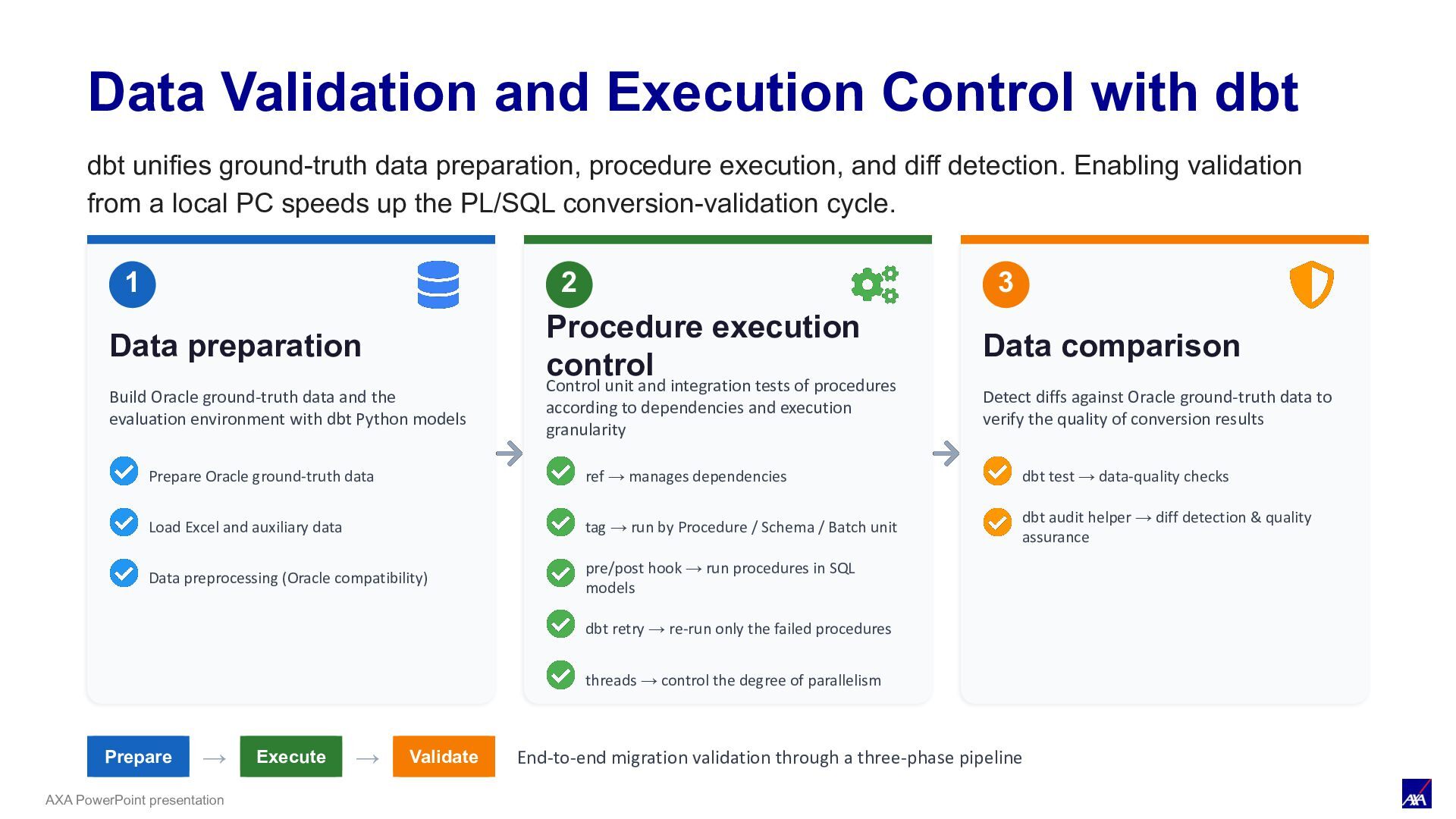
dbt unifies ground-truth data preparation, procedure execution, and diff detection. Enabling validation from a local PC speeds up the PL/SQL conversion-validation cycle. Data preparation Build Oracle ground-truth data and the evaluation environment with dbt Python models Prepare Oracle ground-truth data Load Excel and auxiliary data Data preprocessing (Oracle compatibility) Procedure execution Control unit and integration tests of procedures according to dependencies and execution granularity ref → manages dependencies tag → run by Procedure / Schema / Batch unit pre/post hook → run procedures in SQL models dbt retry → re-run only the failed procedures Data comparison Detect diffs against Oracle ground-truth data to verify the quality of conversion results dbt test → data-quality checks dbt audit helper → diff detection & quality assurance Prepare → Execute → Validate End-to-end migration validation through a three-phase pipeline 1 2 3 threads → control the degree of parallelism
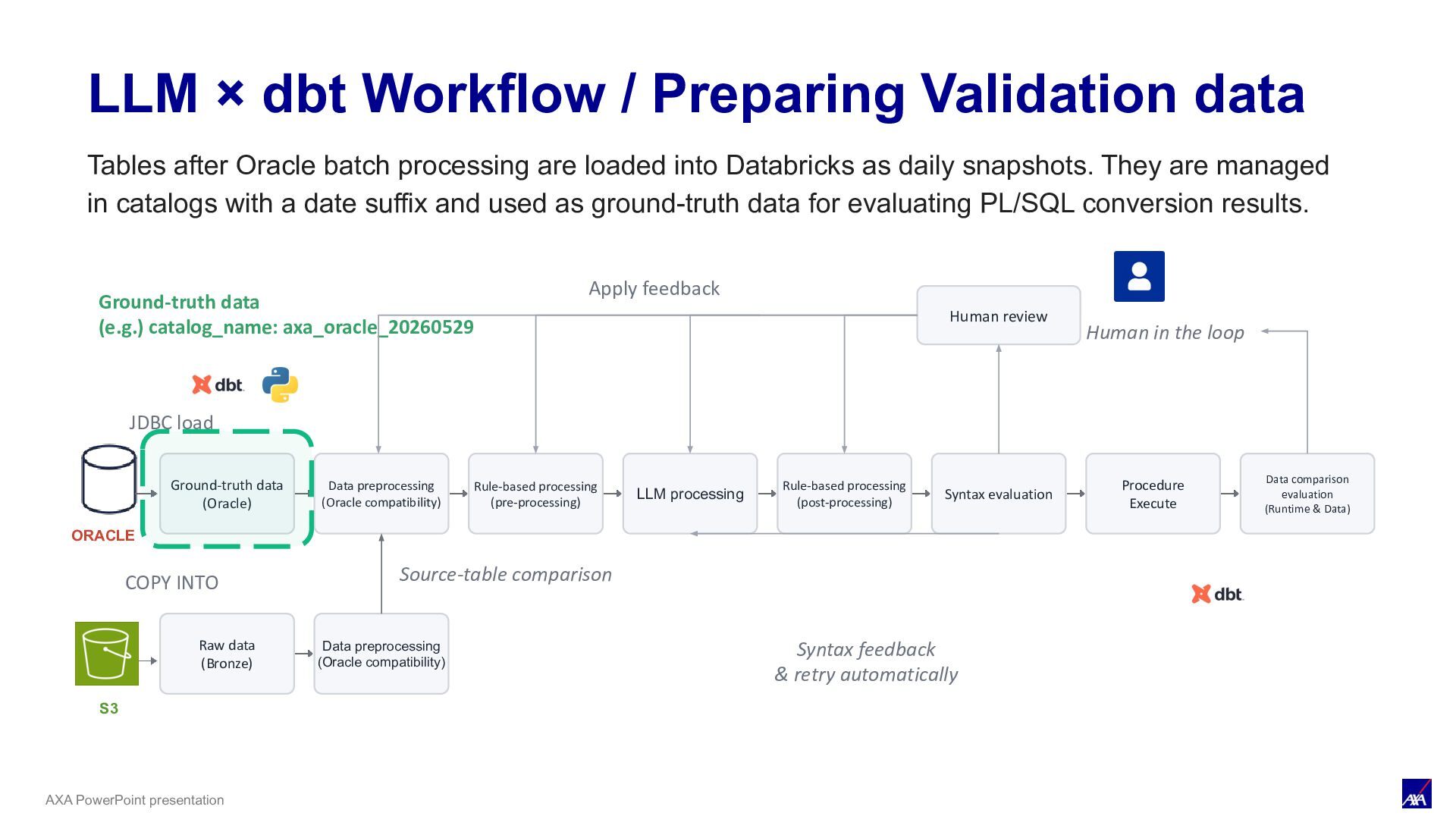
LLM processing Syntax evaluation Procedure Execute Data comparison evaluation (Runtime & Data) ORACLE JDBC load Human review Human in the loop Apply feedback S3 COPY INTO Raw data (Bronze) Data preprocessing (Oracle compatibility) Source-table comparison Rule-based processing (pre-processing) Rule-based processing (post-processing) Syntax feedback & retry automatically LLM × dbt Workflow / Preparing Validation data Ground-truth data (e.g.) catalog_name: axa_oracle_20260529 Tables after Oracle batch processing are loaded into Databricks as daily snapshots. They are managed in catalogs with a date suffix and used as ground-truth data for evaluating PL/SQL conversion results.
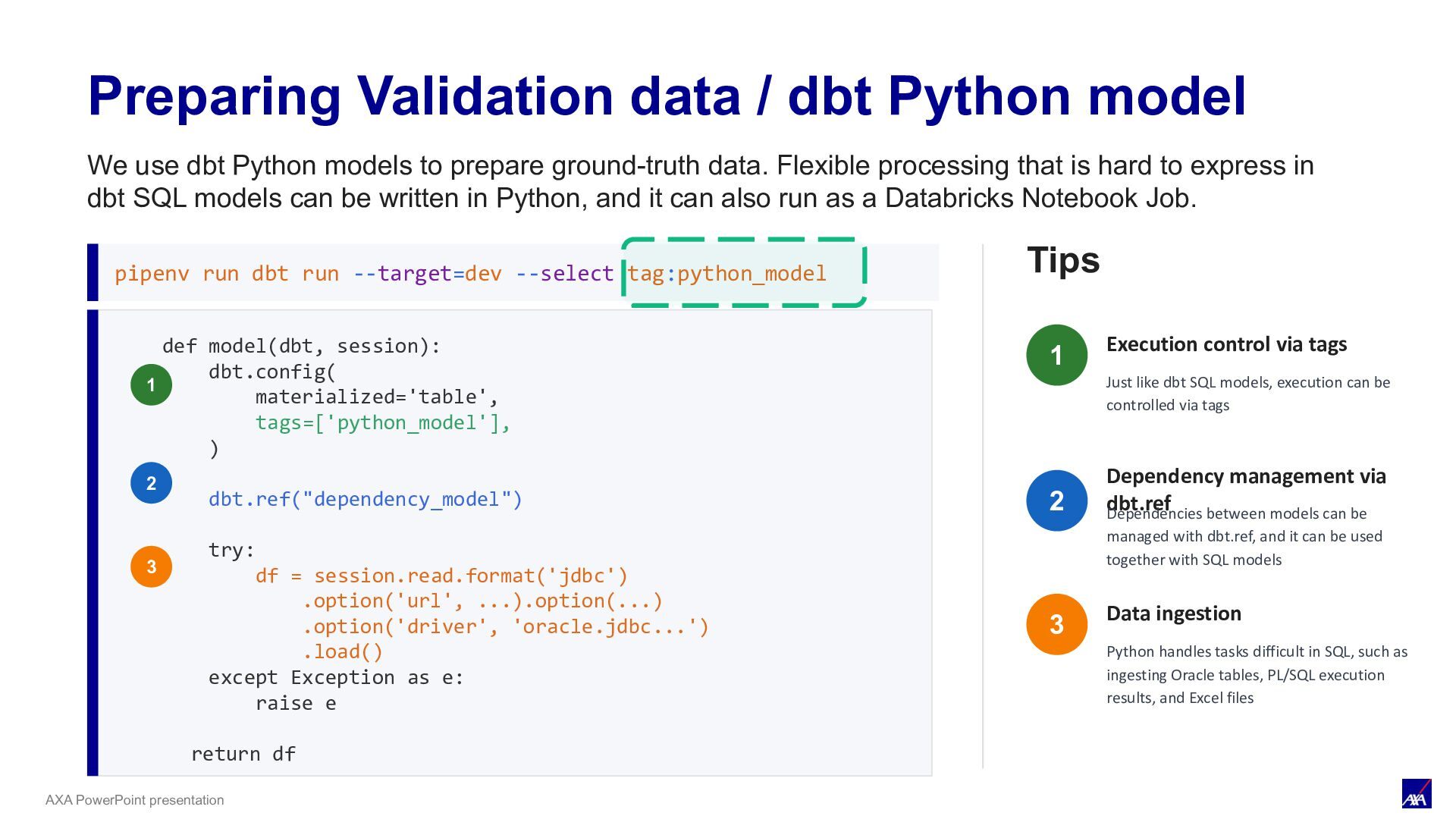
def model(dbt, session): dbt.config( materialized='table', tags=['python_model'], ) dbt.ref("dependency_model") try: df = session.read.format('jdbc') .option('url', ...).option(...) .option('driver', 'oracle.jdbc...') .load() except Exception as e: raise e return df 1 2 3 pipenv run dbt run --target=dev --select tag:python_model Tips Execution control via tags Just like dbt SQL models, execution can be controlled via tags Dependency management Dependencies between models can be managed with dbt.ref, and it can be used together with SQL models Data ingestion Python handles tasks difficult in SQL, such as ingesting Oracle tables, PL/SQL execution results, and Excel files 1 2 3 We use dbt Python models to prepare ground-truth data. Flexible processing that is hard to express in dbt SQL models can be written in Python, and it can also run as a Databricks Notebook Job.
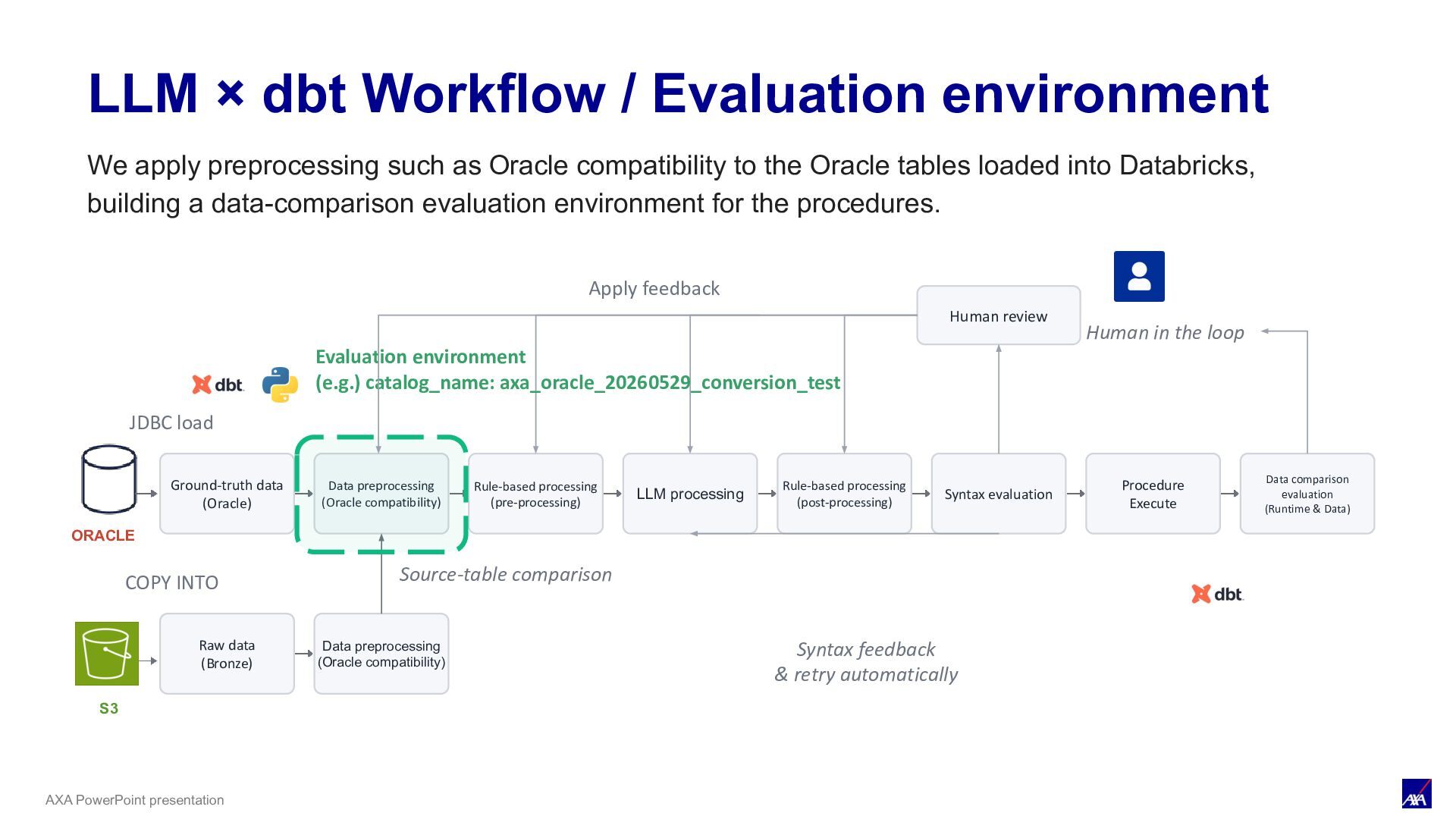
LLM processing Syntax evaluation Procedure Execute Data comparison evaluation (Runtime & Data) ORACLE JDBC load Human review Human in the loop Apply feedback S3 COPY INTO Raw data (Bronze) Data preprocessing (Oracle compatibility) Source-table comparison Rule-based processing (pre-processing) Rule-based processing (post-processing) Syntax feedback & retry automatically LLM × dbt Workflow / Evaluation Environment Evaluation environment (e.g.) catalog_name: axa_oracle_20260529_conversion_test We apply preprocessing such as Oracle compatibility to the Oracle tables loaded into Databricks, building a data-comparison evaluation environment for the procedures.
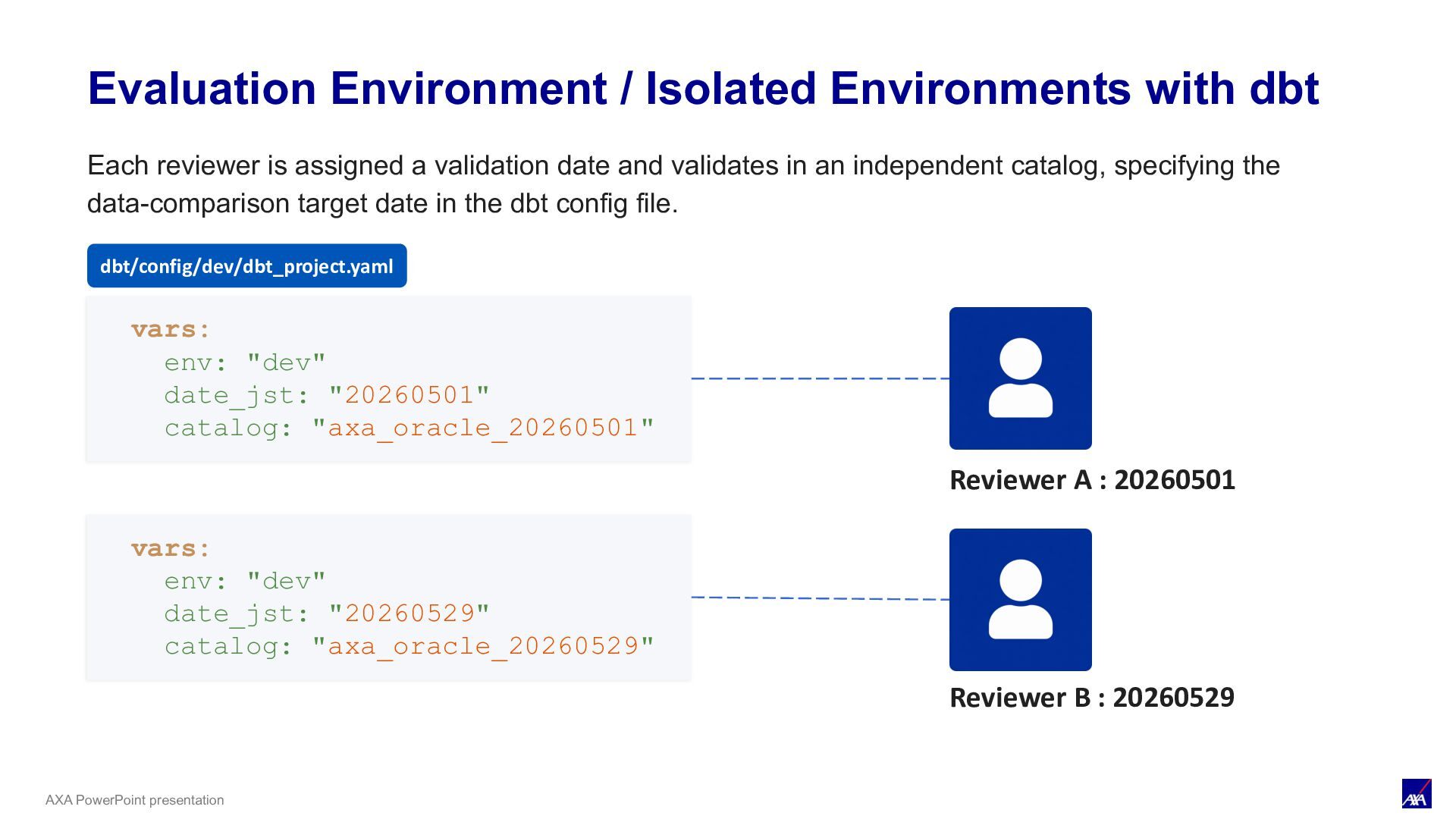
vars: env: "dev" date_jst: "20260501" catalog: "axa_oracle_20260501" vars: env: "dev" date_jst: "20260529" catalog: "axa_oracle_20260529" Reviewer A : 20260401 Reviewer A : 20260501 Reviewer B : 20260529 Each reviewer is assigned a validation date and validates in an independent catalog, specifying the data-comparison target date in the dbt config file. dbt/config/dev/dbt_project.yaml
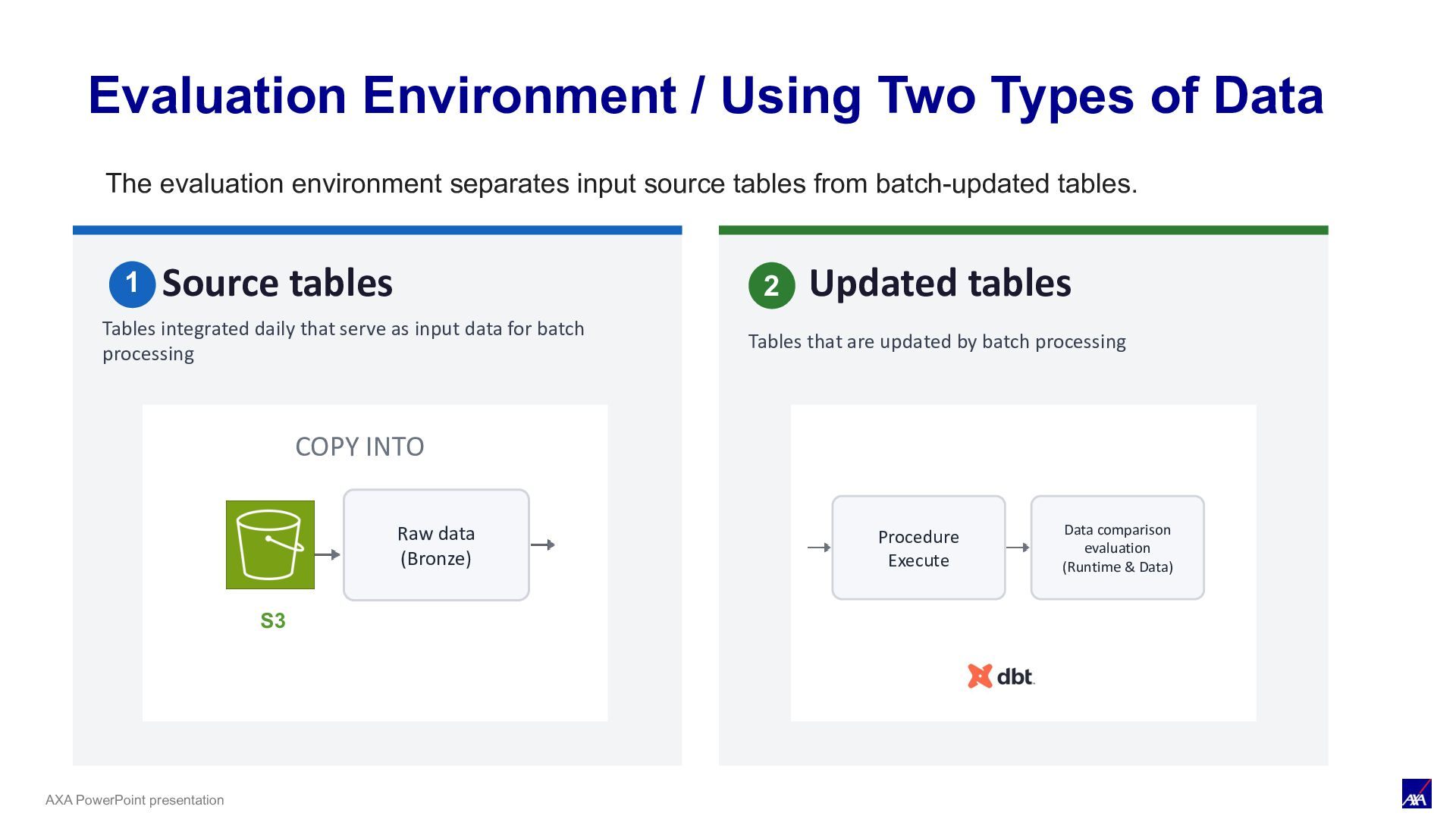
Data Source tables Tables integrated daily that serve as input data for batch processing Updated tables Tables that are updated by batch processing Procedure Execute Data comparison evaluation (Runtime & Data) S3 COPY INTO Raw data (Bronze) The evaluation environment separates input source tables from batch-updated tables. 1 2
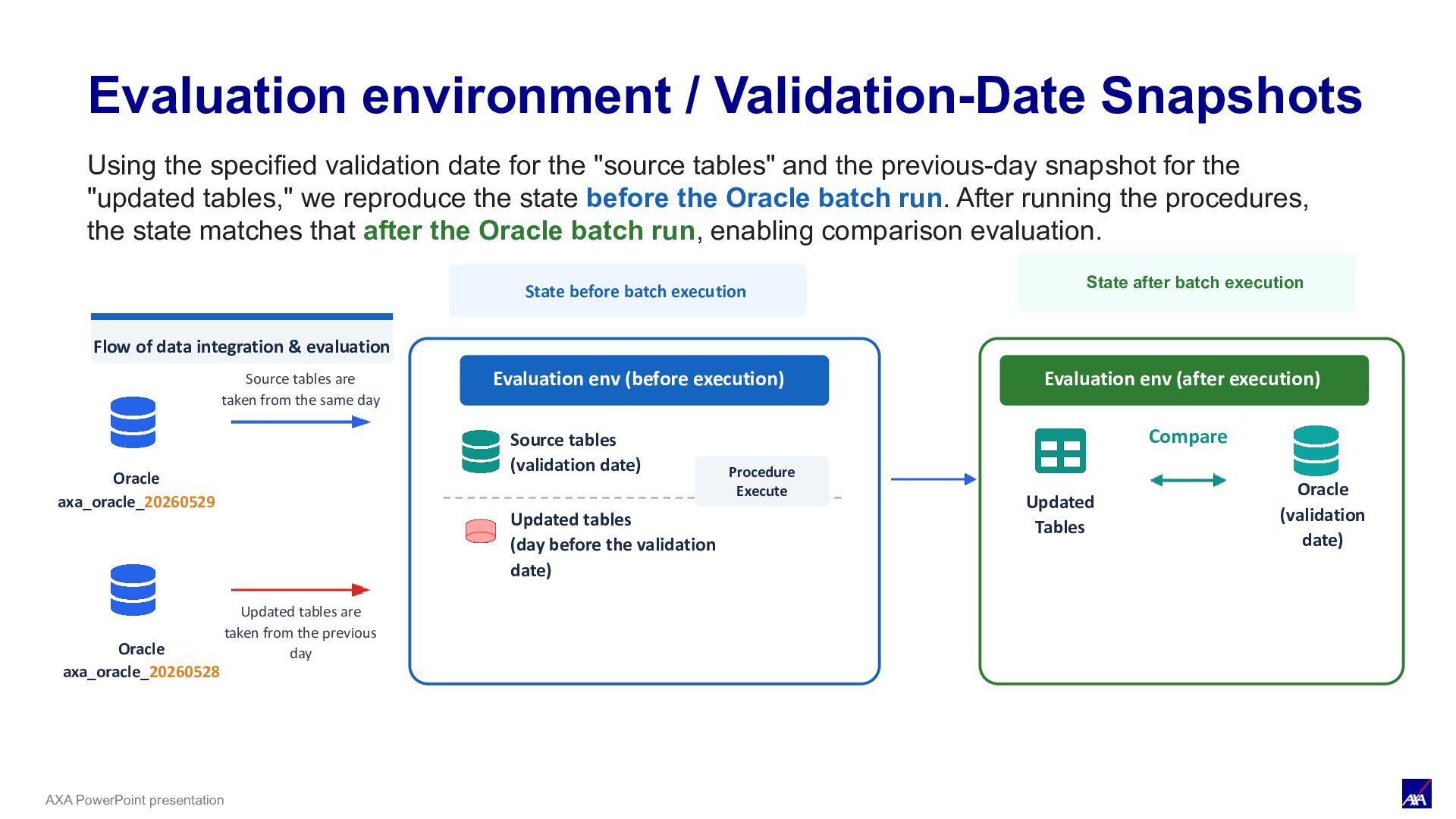
execution Flow of data integration & evaluation Oracle axa_oracle_20260529 Source tables are taken from the same day Updated tables are taken from the previous day Evaluation env (before execution) Source tables (validation date) Updated tables (day before the validation date) Procedure Execute Evaluation env (after execution) Updated Tables Compare Oracle (validation date) Evaluation Environment / Validation-Date Snapshots Oracle axa_oracle_20260528 Using the specified validation date for the "source tables" and the previous-day snapshot for the "updated tables," we reproduce the state before the Oracle batch run. After running the procedures, the state matches that after the Oracle batch run, enabling comparison evaluation.
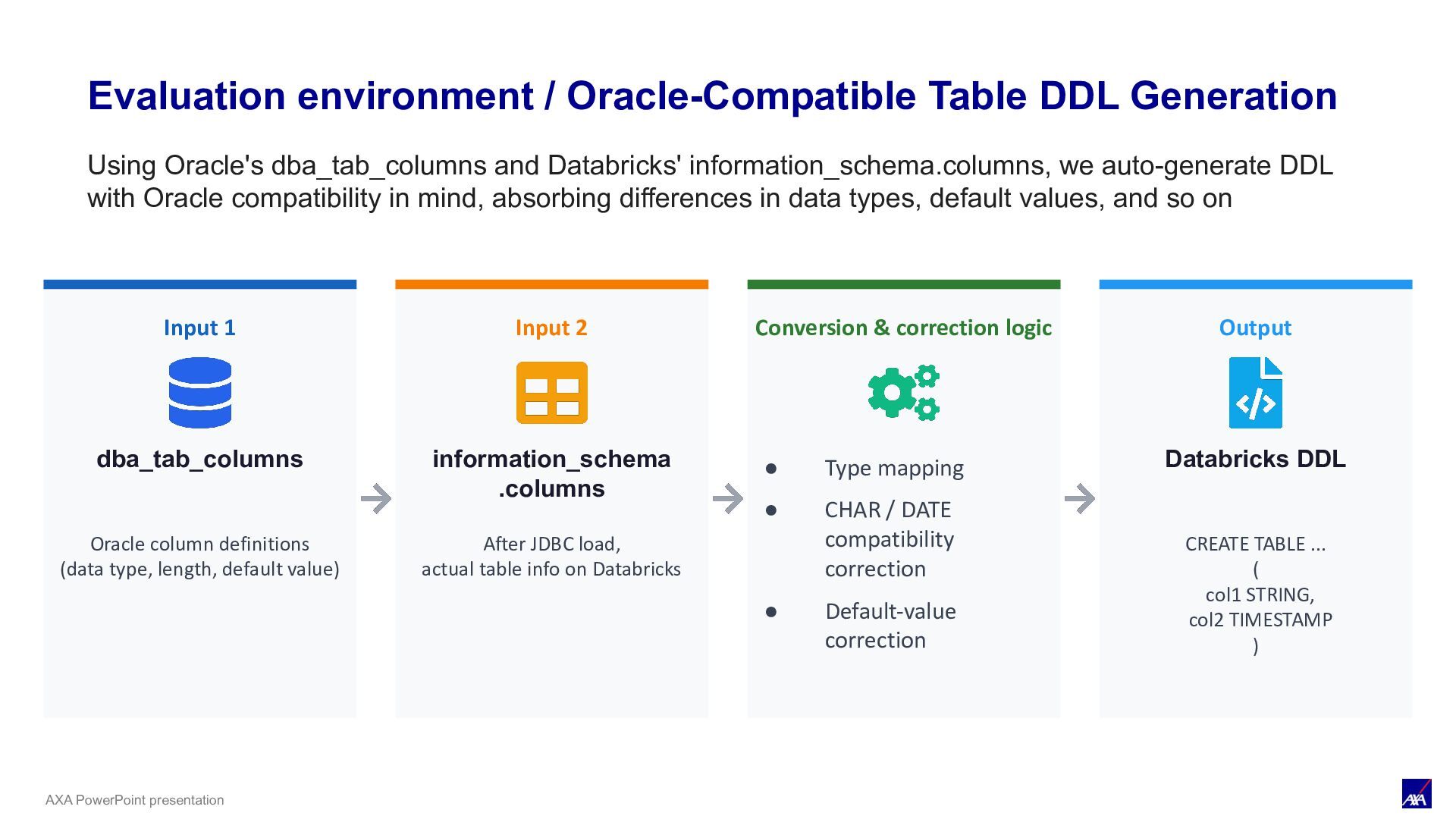
Input 1 dba_tab_columns Oracle column definitions (data type, length, default value) Input 2 information_schema .columns After JDBC load, actual table info on Databricks Conversion & correction logic • Type mapping • CHAR / DATE compatibility correction • Default-value correction Output Databricks DDL CREATE TABLE ... ( col1 STRING, col2 TIMESTAMP ) Using Oracle's dba_tab_columns and Databricks' information_schema.columns, we auto-generate DDL with Oracle compatibility in mind, absorbing differences in data types, default values, and so on
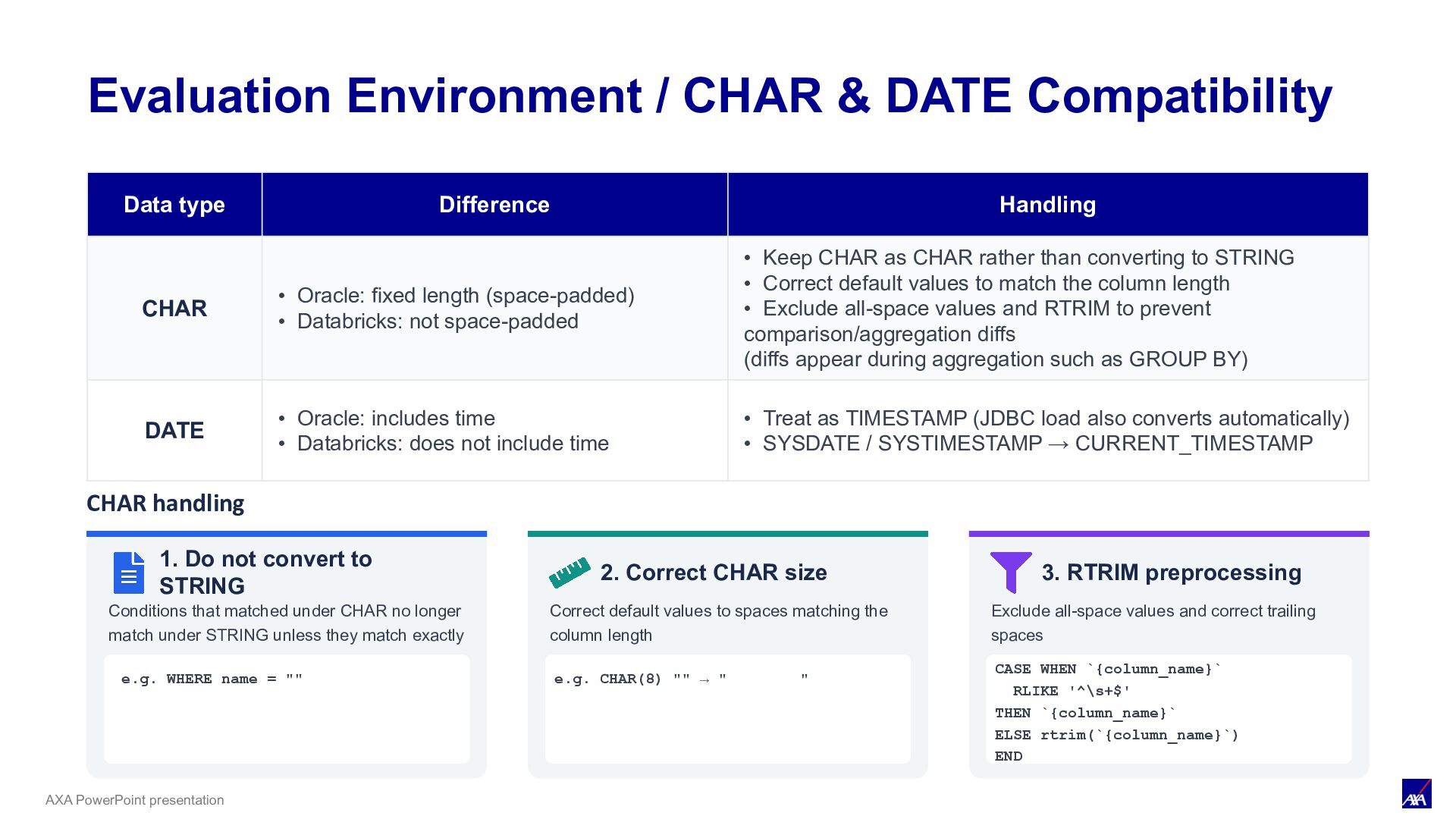
fixed length (space-padded) • Databricks: not space-padded • Keep CHAR as CHAR rather than converting to STRING • Correct default values to match the column length • Exclude all-space values and RTRIM to prevent comparison/aggregation diffs (diffs appear during aggregation such as GROUP BY) DATE • Oracle: includes time • Databricks: does not include time • Treat as TIMESTAMP (JDBC load also converts automatically) • SYSDATE / SYSTIMESTAMP → CURRENT_TIMESTAMP CHAR handling 1. Do not convert to STRING Conditions that matched under CHAR no longer match under STRING unless they match exactly 2. Correct CHAR size Correct default values to spaces matching the column length e.g. CHAR(8) "" → " " 3. RTRIM preprocessing Exclude all-space values and correct trailing spaces CASE WHEN `{column_name}` RLIKE '^\s+$' THEN `{column_name}` ELSE rtrim(`{column_name}`) END Evaluation Environment / CHAR & DATE Compatibility e.g. WHERE name = ""
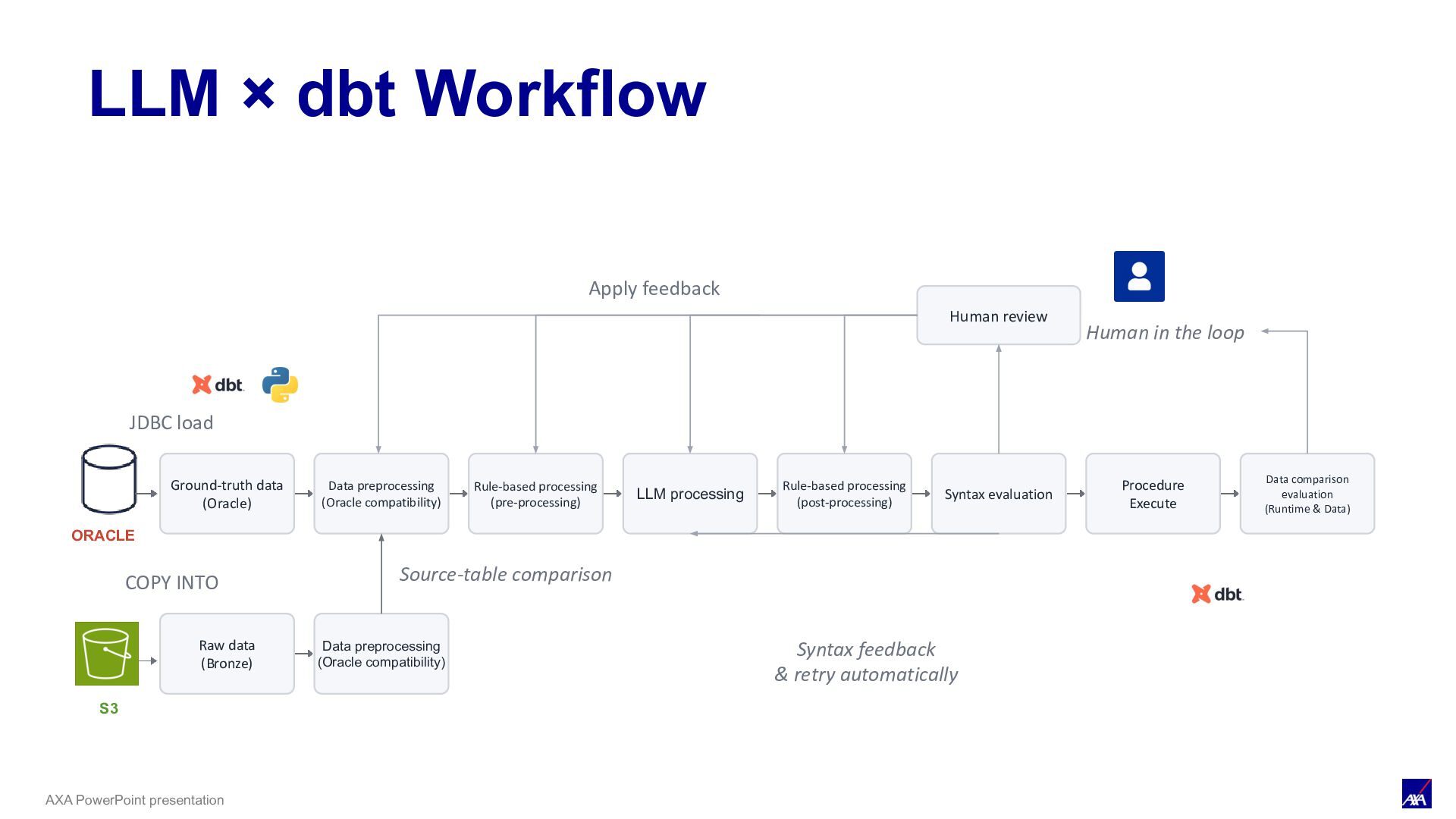
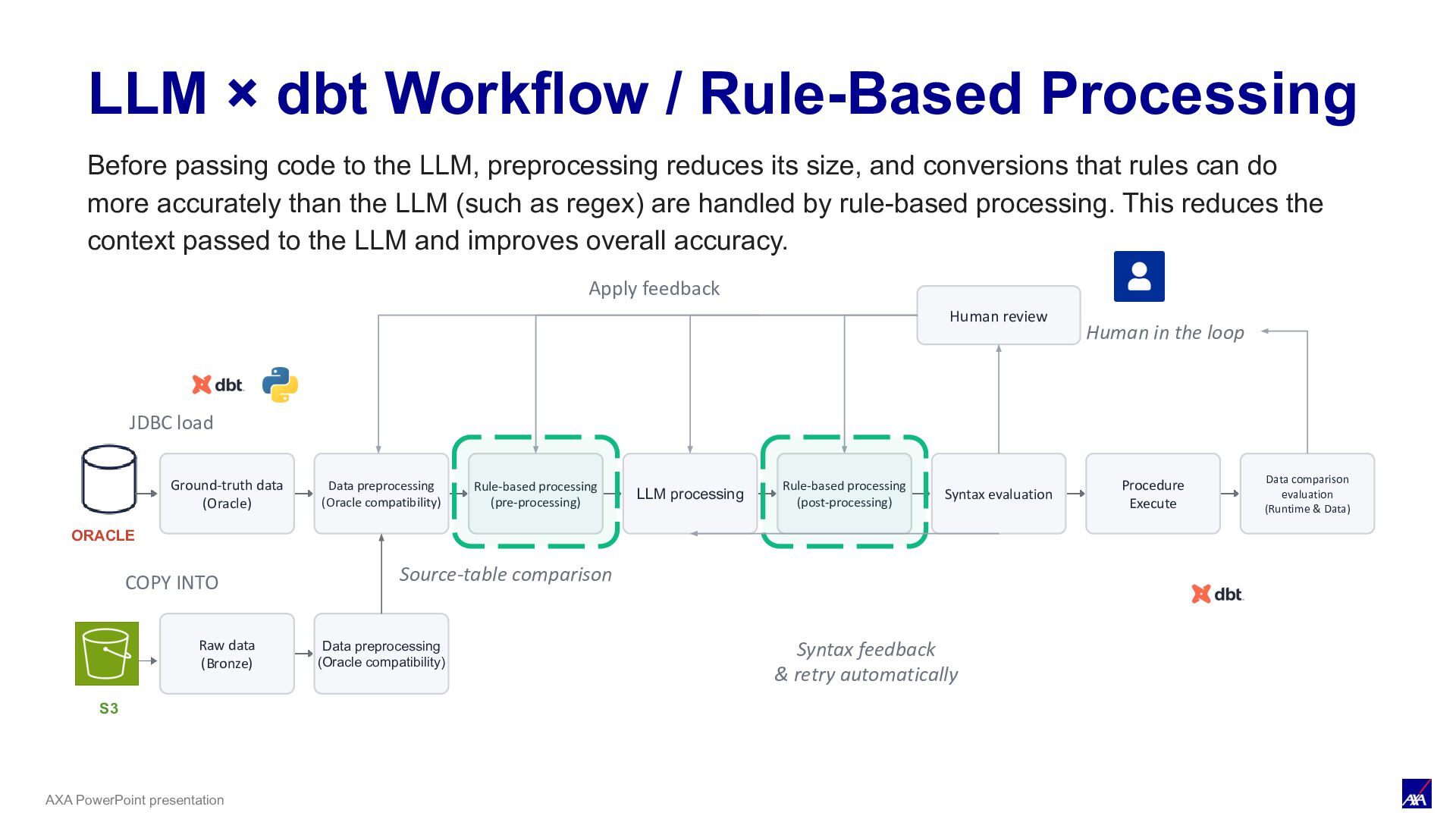
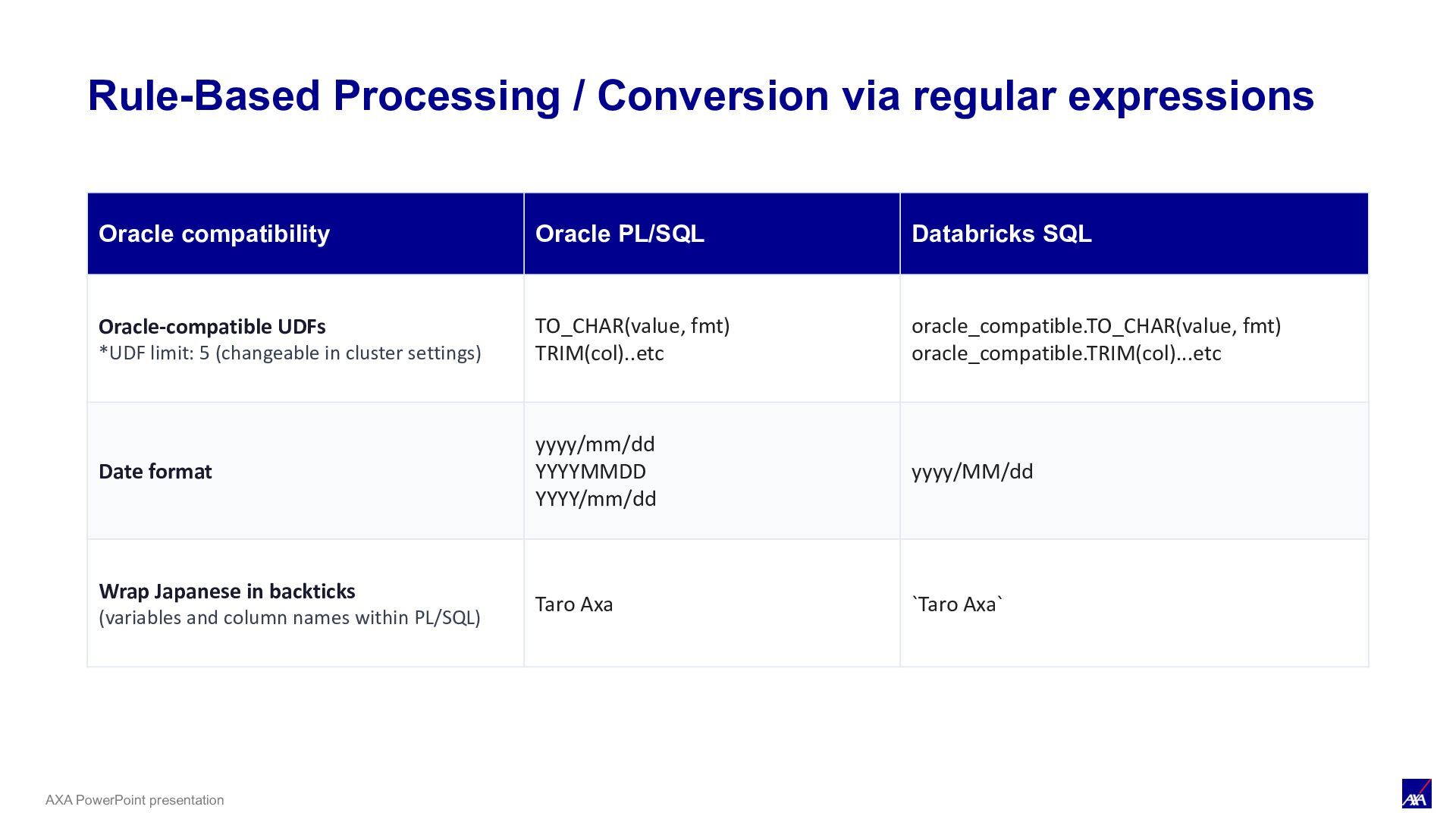
LLM processing Syntax evaluation Procedure Execute Data comparison evaluation (Runtime & Data) ORACLE JDBC load Human review Human in the loop Apply feedback S3 COPY INTO Raw data (Bronze) Data preprocessing (Oracle compatibility) Source-table comparison Rule-based processing (pre-processing) Rule-based processing (post-processing) Syntax feedback & retry automatically LLM × dbt Workflow / Rule-Based Processing Before passing code to the LLM, preprocessing reduces its size, and conversions that rules can do more accurately than the LLM (such as regex) are handled by rule-based processing. This reduces the context passed to the LLM and improves overall accuracy.
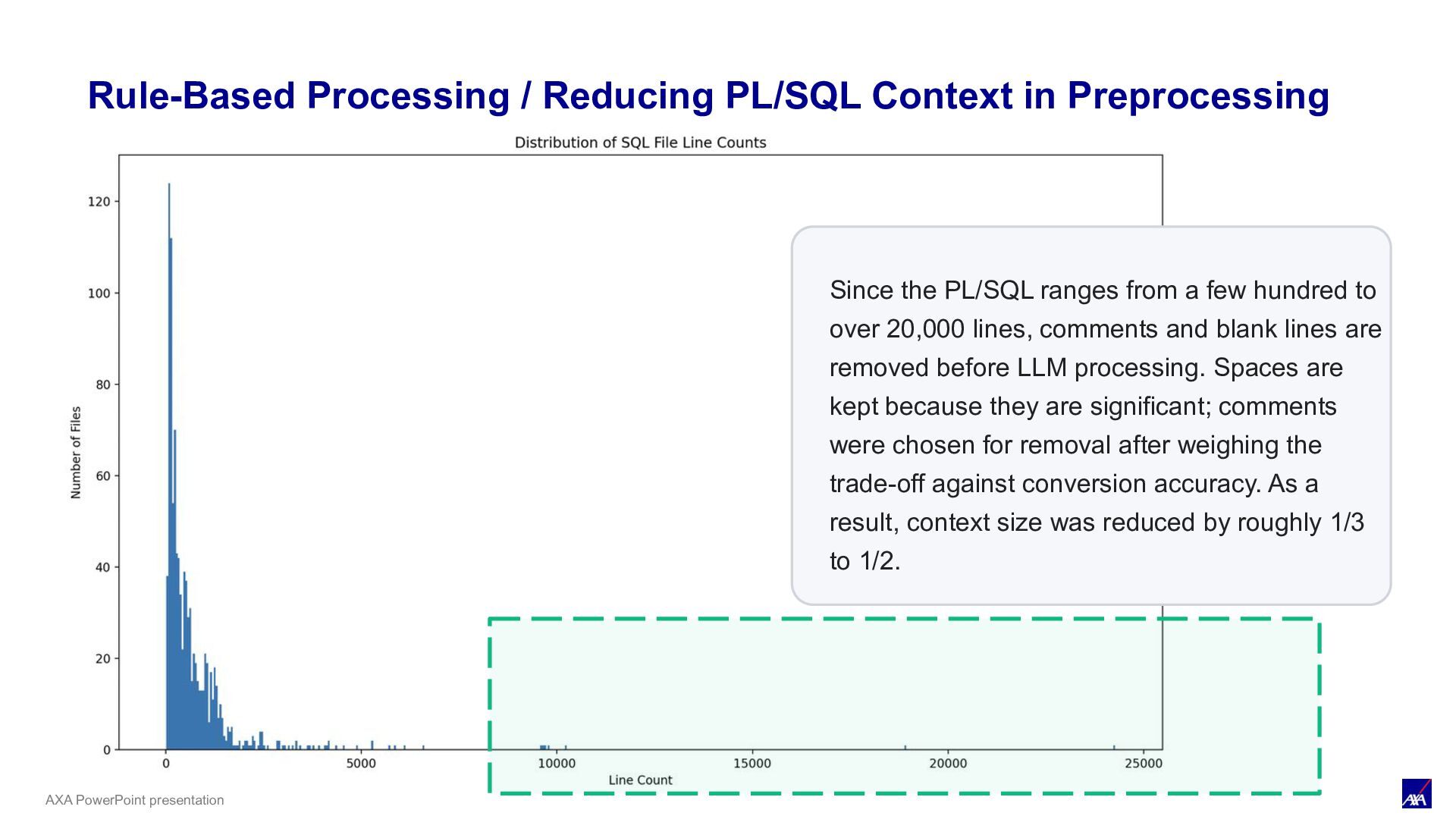
Preprocessing Since the PL/SQL ranges from a few hundred to over 20,000 lines, comments and blank lines are removed before LLM processing. Spaces are kept because they are significant; comments were chosen for removal after weighing the trade-off against conversion accuracy. As a result, context size was reduced by roughly 1/3 to 1/2.
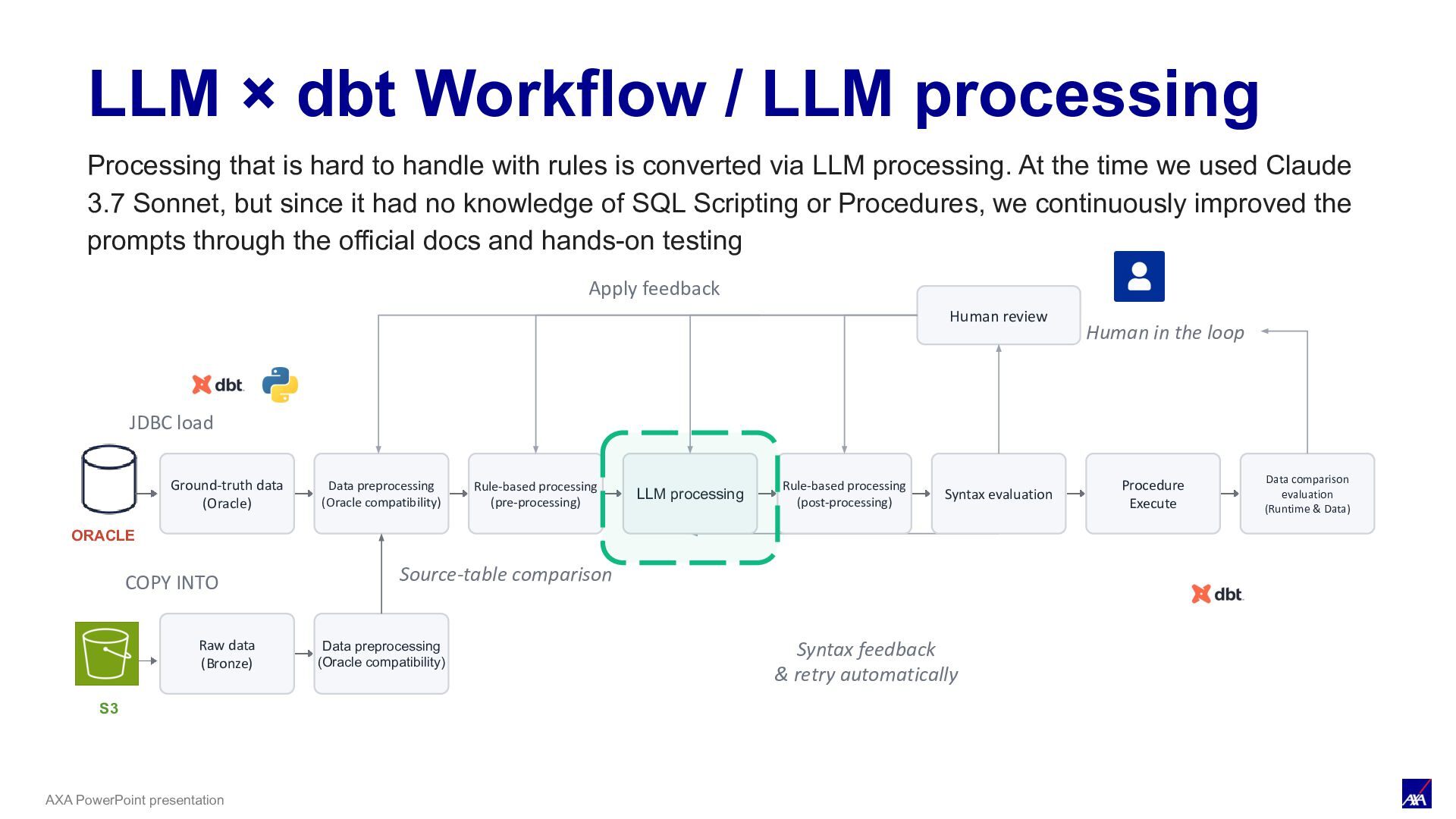
LLM processing Syntax evaluation Procedure Execute Data comparison evaluation (Runtime & Data) ORACLE JDBC load Human review Human in the loop Apply feedback S3 COPY INTO Raw data (Bronze) Data preprocessing (Oracle compatibility) Source-table comparison Rule-based processing (pre-processing) Rule-based processing (post-processing) Syntax feedback & retry automatically LLM × dbt Workflow / LLM processing Processing that is hard to handle with rules is converted via LLM processing. At the time we used Claude 3.7 Sonnet, but since it had no knowledge of SQL Scripting or Procedures, we continuously improved the prompts through the official docs and hands-on testing
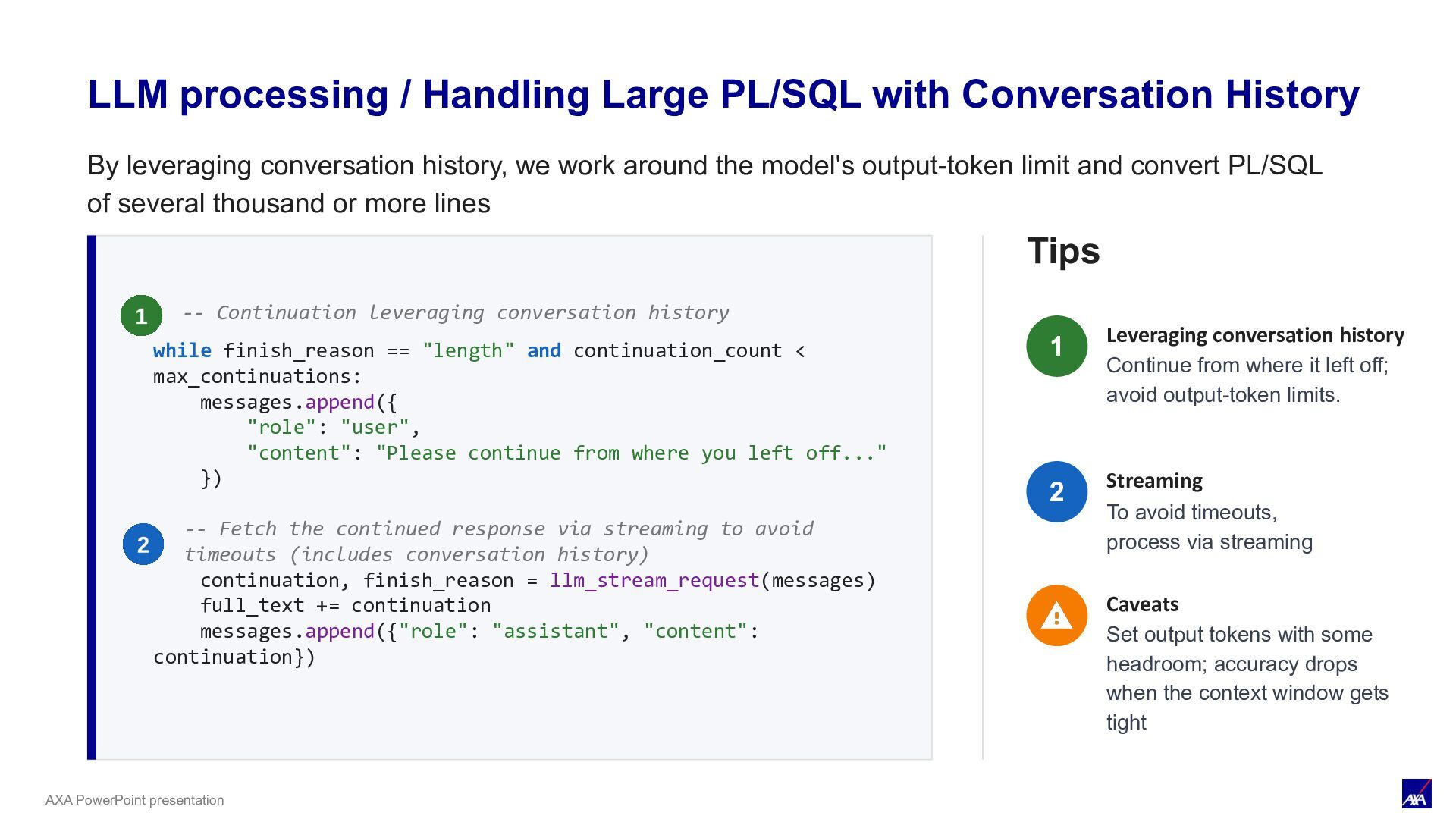
max_continuations: messages.append({ "role": "user", "content": "Please continue from where you left off..." }) continuation, finish_reason = llm_stream_request(messages) full_text += continuation messages.append({"role": "assistant", "content": continuation}) Tips Leveraging conversation history Continue from where it left off; avoid output-token limits. Streaming To avoid timeouts, process via streaming Caveats Set output tokens with some headroom; accuracy drops when the context window gets tight -- Continuation leveraging conversation history -- Fetch the continued response via streaming to avoid timeouts (includes conversation history) LLM processing / Handling Large PL/SQL with Conversation History 1 2 By leveraging conversation history, we work around the model's output-token limit and convert PL/SQL of several thousand or more lines
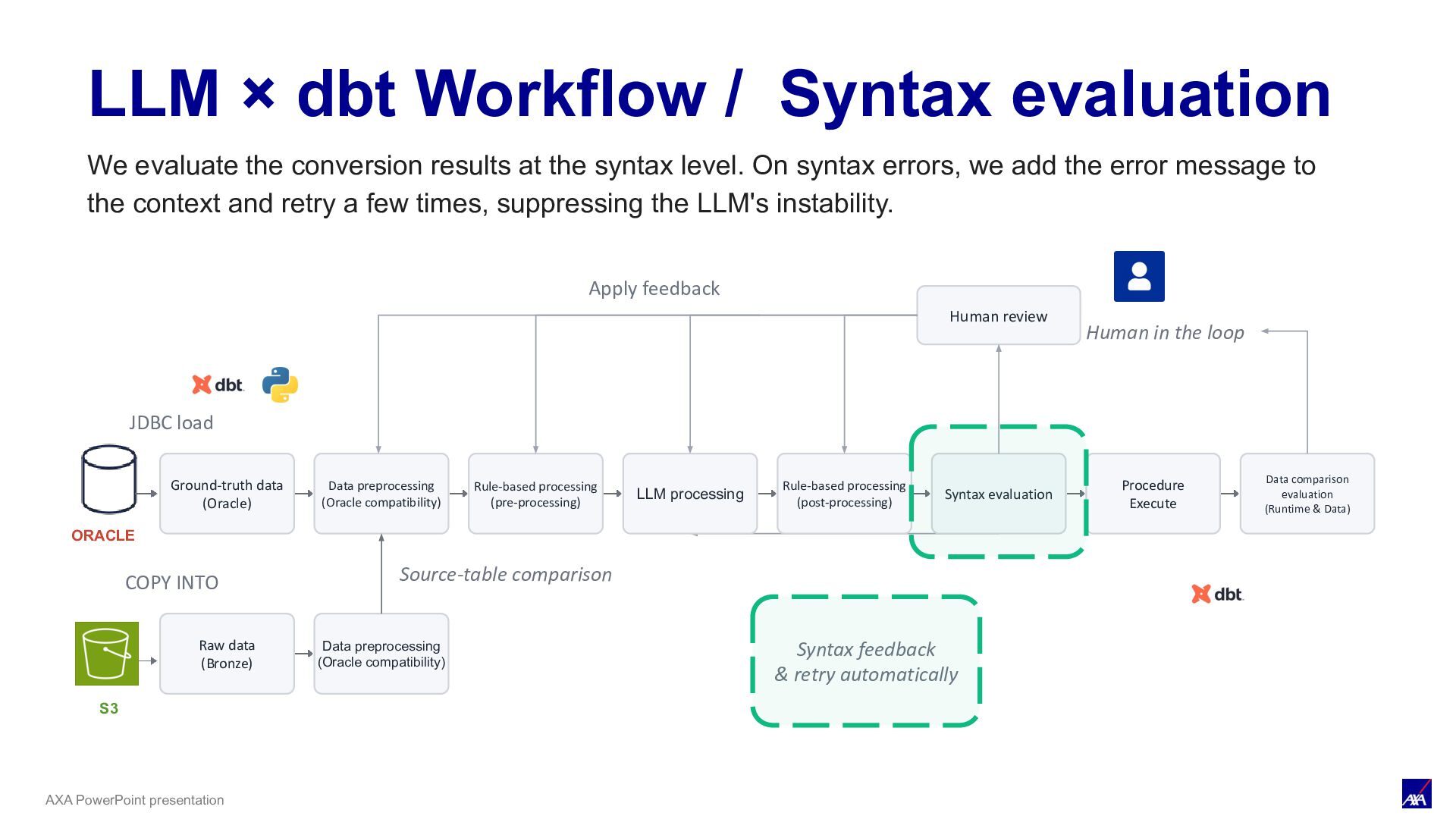
LLM processing Syntax evaluation Procedure Execute Data comparison evaluation (Runtime & Data) ORACLE JDBC load Human review Human in the loop Apply feedback S3 COPY INTO Raw data (Bronze) Data preprocessing (Oracle compatibility) Source-table comparison Rule-based processing (pre-processing) Rule-based processing (post-processing) Syntax feedback & retry automatically LLM × dbt Workflow / Syntax evaluation We evaluate the conversion results at the syntax level. On syntax errors, we add the error message to the context and retry a few times, suppressing the LLM's instability.
be managed as SQL, and running CREATE PROCEDURE enables immediate detection of syntax errors. This let us iterate on the validation cycle quickly. Syntax evaluation / Immediate detection of syntax errors
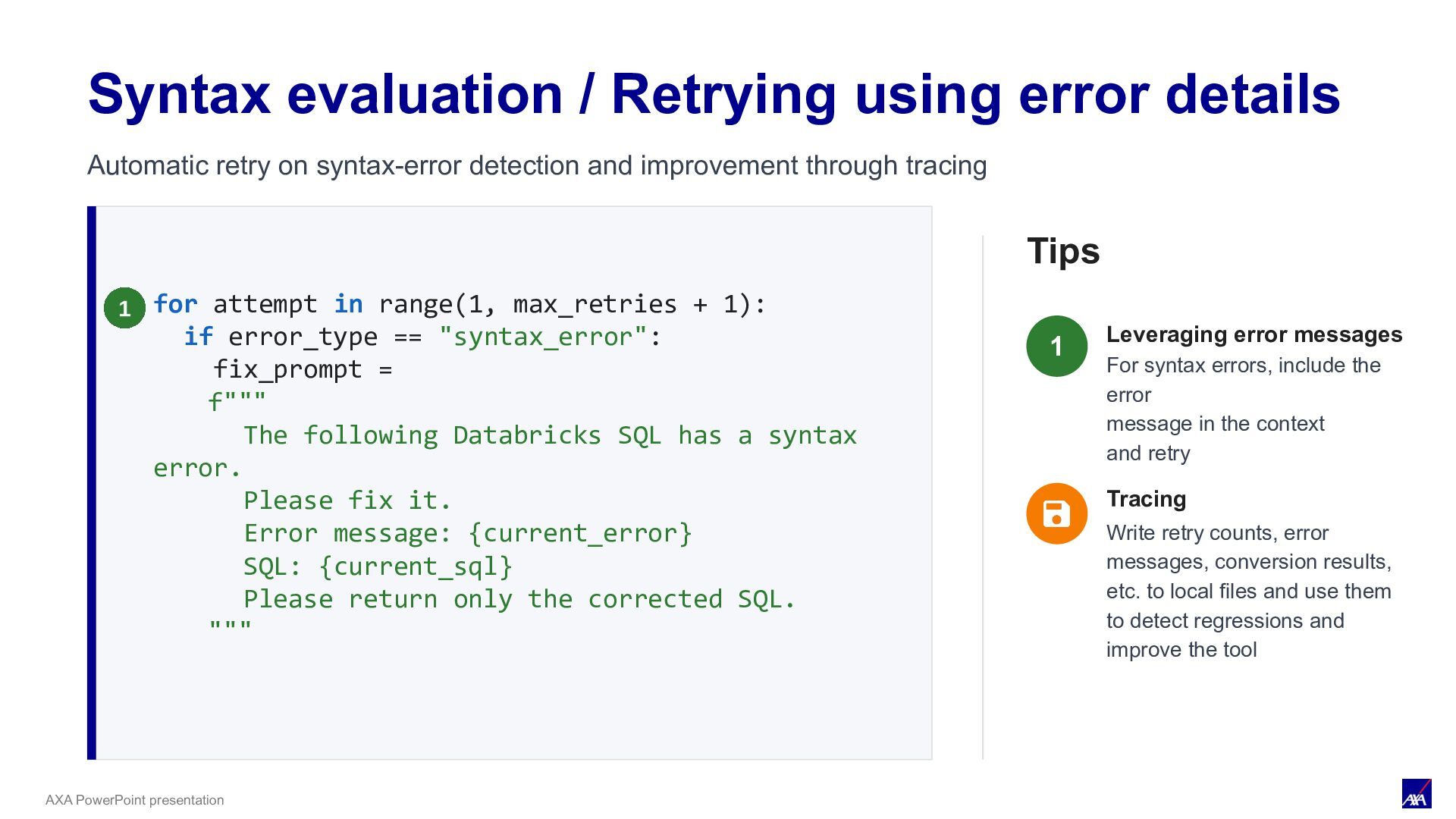
if error_type == "syntax_error": fix_prompt = f""" The following Databricks SQL has a syntax error. Please fix it. Error message: {current_error} SQL: {current_sql} Please return only the corrected SQL. """ Tips Leveraging error messages For syntax errors, include the error message in the context and retry Syntax evaluation / Retrying using error details 1 Tracing Write retry counts, error messages, conversion results, etc. to local files and use them to detect regressions and improve the tool Automatic retry on syntax-error detection and improvement through tracing
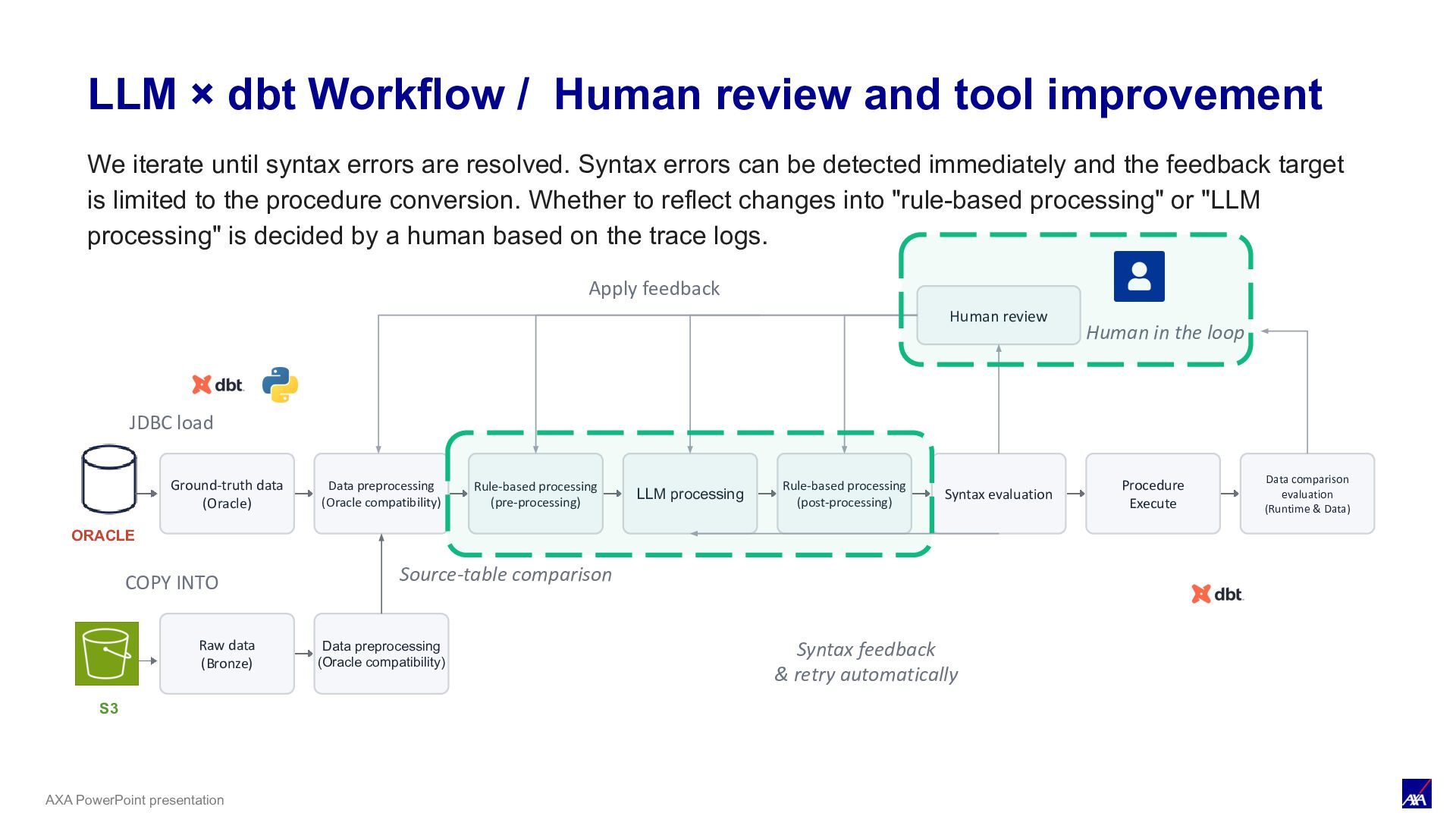
LLM processing Syntax evaluation Procedure Execute Data comparison evaluation (Runtime & Data) ORACLE JDBC load Human review Human in the loop Apply feedback S3 COPY INTO Raw data (Bronze) Data preprocessing (Oracle compatibility) Source-table comparison Rule-based processing (pre-processing) Rule-based processing (post-processing) Syntax feedback & retry automatically LLM × dbt Workflow / Human Review & Conversion Tool Improvement We iterate until syntax errors are resolved. Syntax errors can be detected immediately and the feedback target is limited to the procedure conversion. Whether to reflect changes into "rule-based processing" or "LLM processing" is decided by a human based on the trace logs.
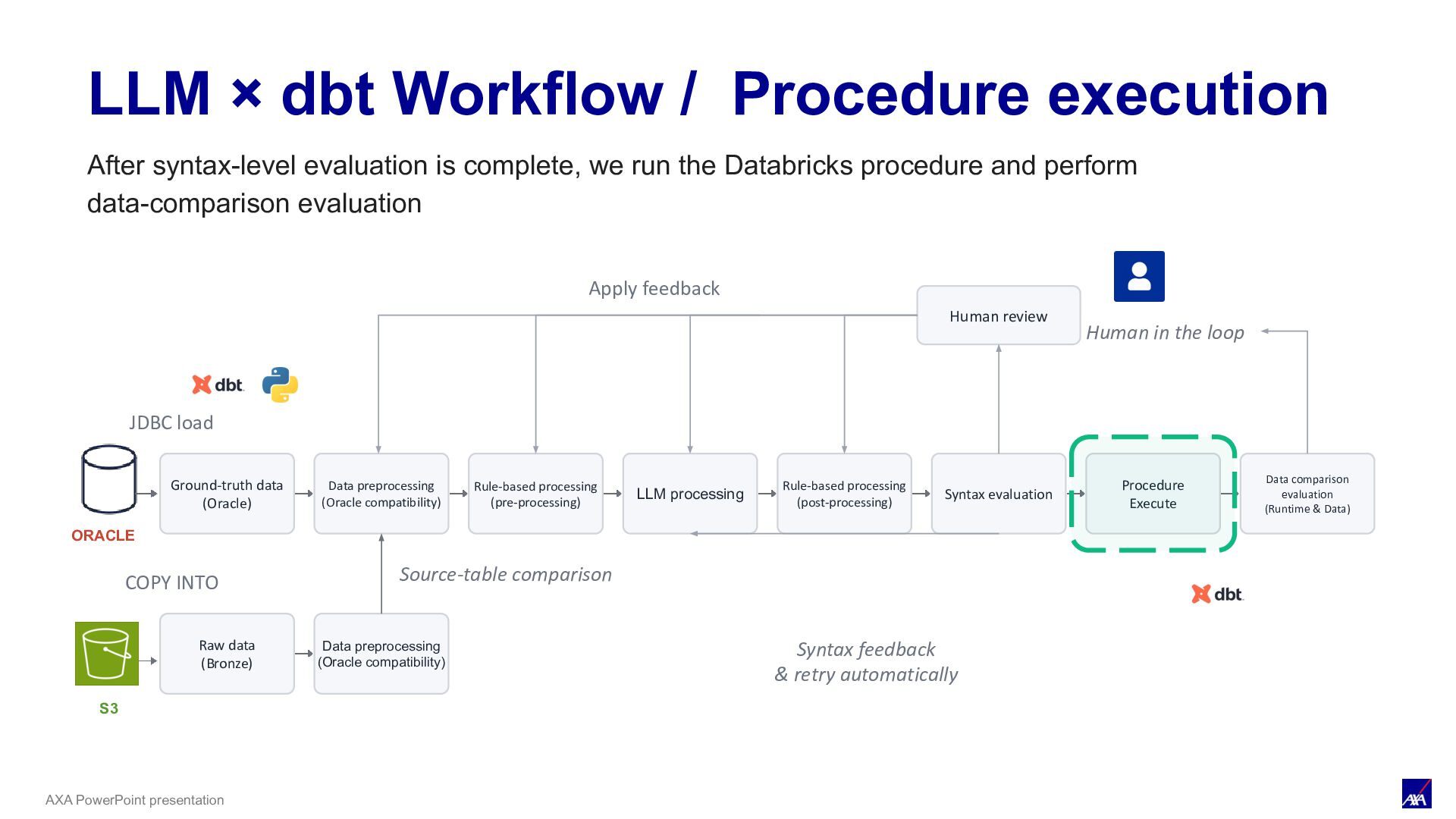
LLM processing Syntax evaluation Procedure Execute Data comparison evaluation (Runtime & Data) ORACLE JDBC load Human review Human in the loop Apply feedback S3 COPY INTO Raw data (Bronze) Data preprocessing (Oracle compatibility) Source-table comparison Rule-based processing (pre-processing) Rule-based processing (post-processing) Syntax feedback & retry automatically LLM × dbt Workflow / Procedure execution After syntax-level evaluation is complete, we run the Databricks procedure and perform data-comparison evaluation
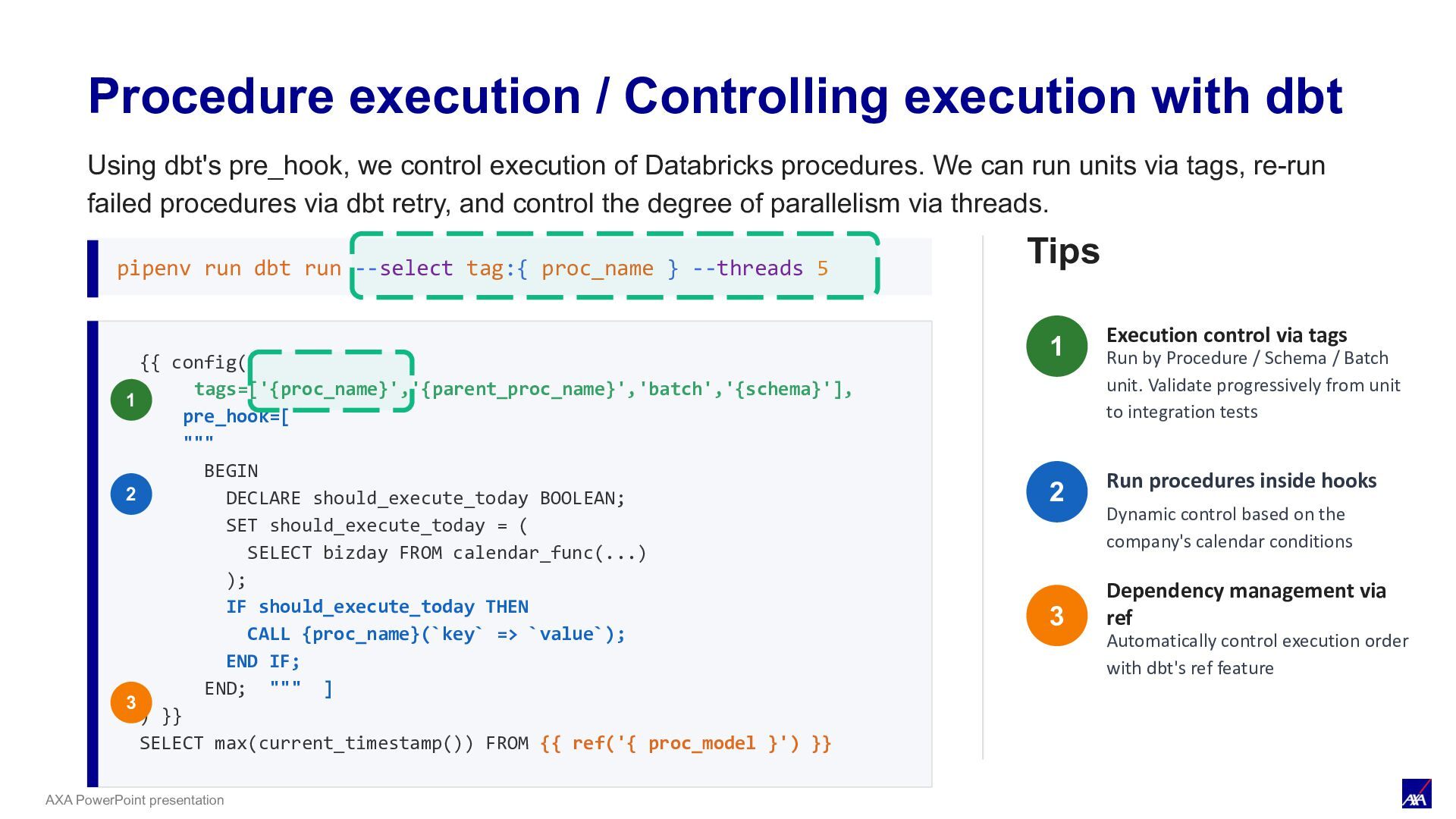
{{ config( tags=['{proc_name}','{parent_proc_name}','batch','{schema}'], pre_hook=[ """ BEGIN DECLARE should_execute_today BOOLEAN; SET should_execute_today = ( SELECT bizday FROM calendar_func(...) ); IF should_execute_today THEN CALL {proc_name}(`key` => `value`); END IF; END; """ ] ) }} SELECT max(current_timestamp()) FROM {{ ref('{ proc_model }') }} 1 2 3 pipenv run dbt run --select tag:{ proc_name } --threads 5 Tips Execution control via tags Run by Procedure / Schema / Batch unit. Validate progressively from unit to integration tests Run procedures inside hooks Dynamic control based on the company's calendar conditions Dependency management Automatically control execution order with dbt's ref feature 1 2 3 Using dbt pre_hook to control Databricks Procedure execution, enabling tagged runs, dbt retries, and thread-based parallelism while avoiding internal IP exhaustion constraints.
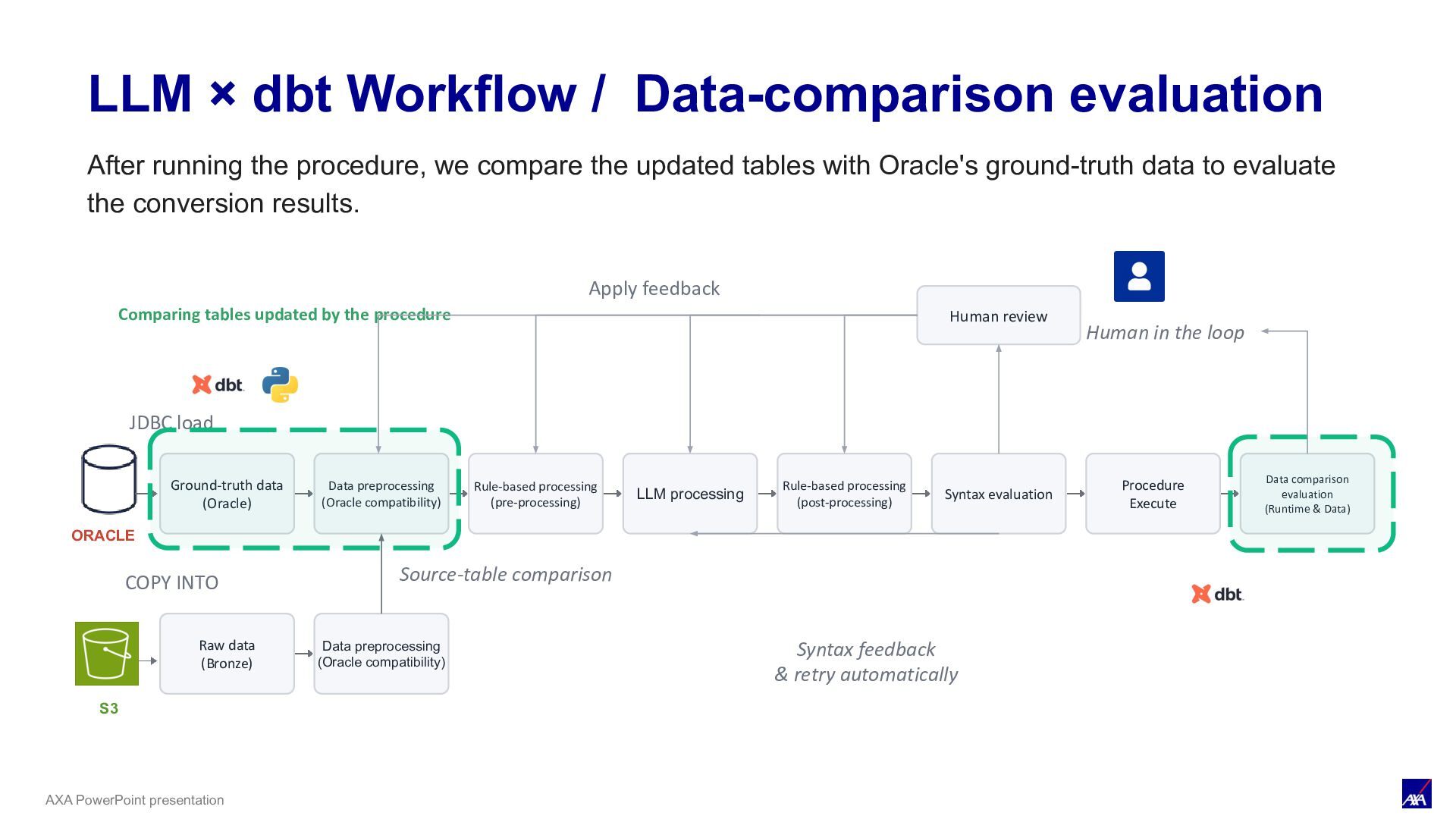
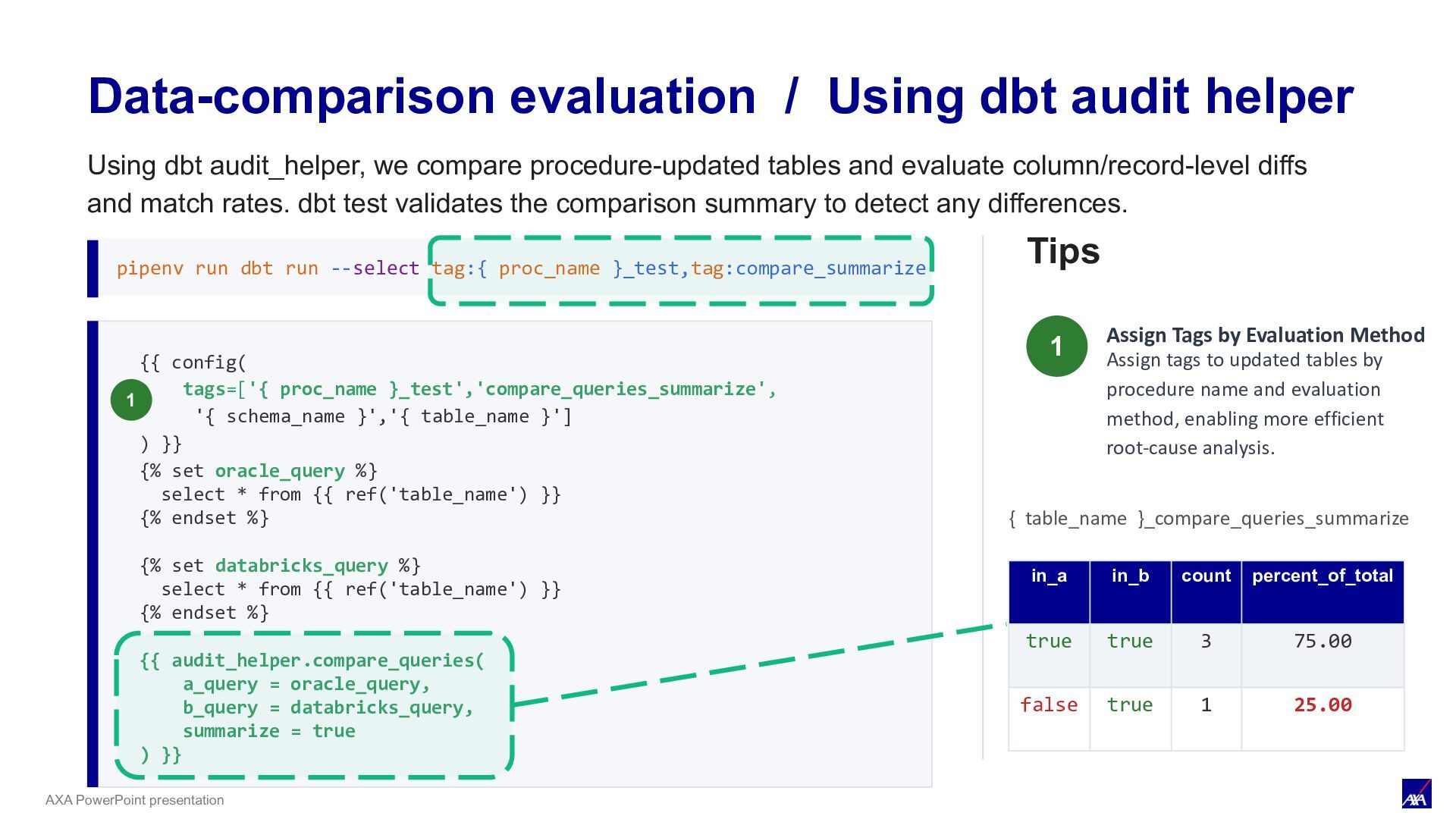
LLM processing Syntax evaluation Procedure Execute Data comparison evaluation (Runtime & Data) ORACLE JDBC load Human review Human in the loop Apply feedback S3 COPY INTO Raw data (Bronze) Data preprocessing (Oracle compatibility) Source-table comparison Rule-based processing (pre-processing) Rule-based processing (post-processing) Syntax feedback & retry automatically LLM × dbt Workflow / Data-comparison evaluation Comparing tables updated by the procedure After running the procedure, we compare the updated tables with Oracle's ground-truth data to evaluate the conversion results.
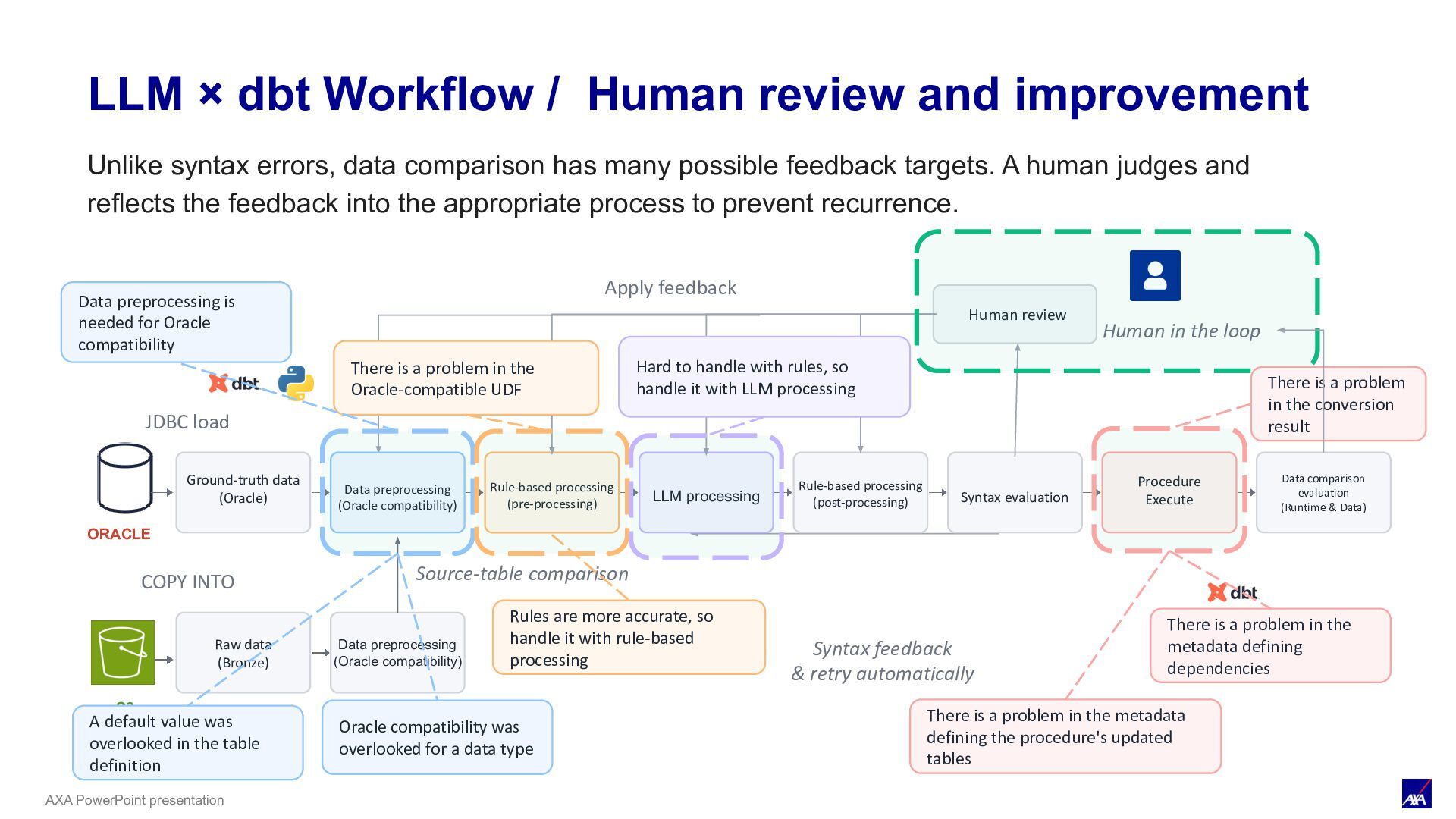
& Process Feedback Ground-truth data (Oracle) Data preprocessing (Oracle compatibility) LLM processing Syntax evaluation Procedure Execute Data comparison evaluation (Runtime & Data) ORACLE JDBC load Human review Human in the loop Apply feedback S3 COPY INTO Raw data (Bronze) Data preprocessing (Oracle compatibility) Source-table comparison Rule-based processing (pre-processing) Syntax feedback & retry automatically Rule-based processing (post-processing) Data preprocessing is needed for Oracle compatibility Hard to handle with rules, so handle it with LLM processing A default value was overlooked in the table definition There is a problem in the metadata defining dependencies Rules are more accurate, so handle it with rule-based processing There is a problem in the conversion result There is a problem in the Oracle-compatible UDF Oracle compatibility was overlooked for a data type There is a problem in the metadata defining the procedure's updated tables Unlike syntax errors, data comparison has many possible feedback targets. A human judges and reflects the feedback into the appropriate process to prevent recurrence.
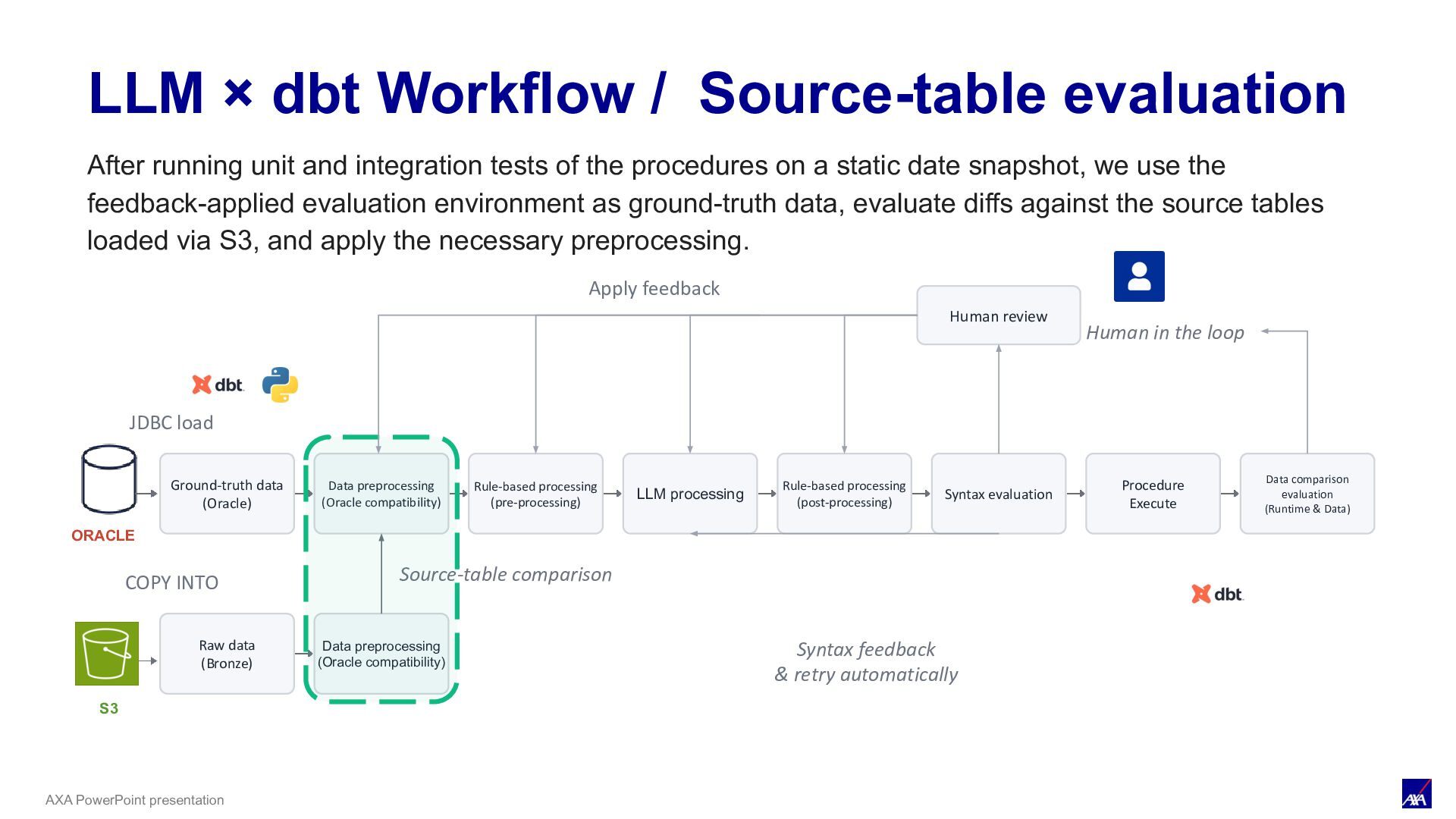
LLM processing Syntax evaluation Procedure Execute Data comparison evaluation (Runtime & Data) ORACLE JDBC load Human review Human in the loop Apply feedback S3 COPY INTO Raw data (Bronze) Data preprocessing (Oracle compatibility) Source-table comparison Rule-based processing (pre-processing) Rule-based processing (post-processing) Syntax feedback & retry automatically LLM × dbt Workflow / Source-table evaluation After running unit and integration tests of the procedures on a static date snapshot, we use the feedback-applied evaluation environment as ground-truth data, evaluate diffs against the source tables loaded via S3, and apply the necessary preprocessing.
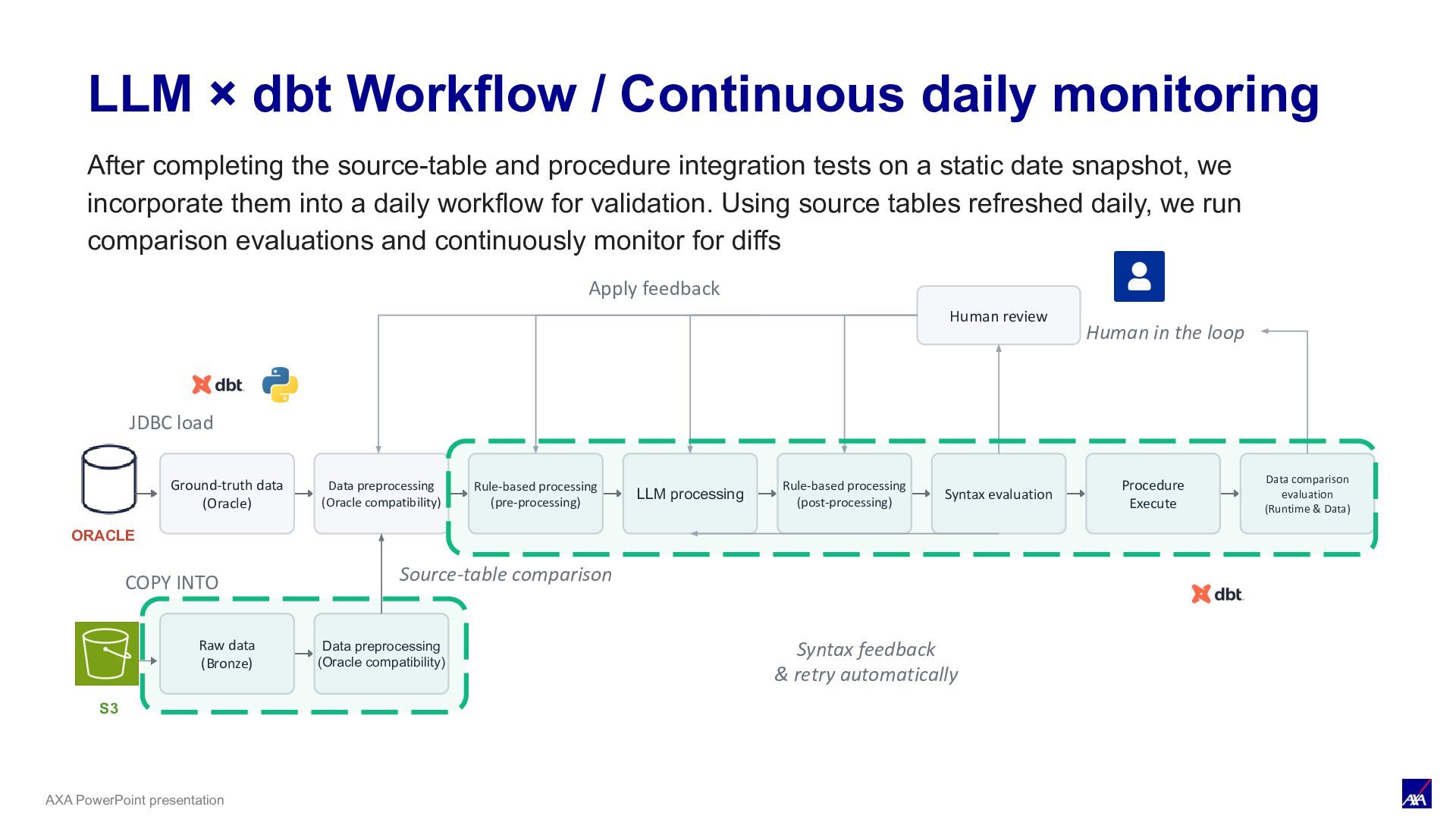
LLM processing Syntax evaluation Procedure Execute Data comparison evaluation (Runtime & Data) ORACLE JDBC load Human review Human in the loop Apply feedback S3 COPY INTO Raw data (Bronze) Data preprocessing (Oracle compatibility) Source-table comparison Rule-based processing (pre-processing) Rule-based processing (post-processing) Syntax feedback & retry automatically LLM × dbt Workflow / Continuous daily monitoring After completing the source-table and procedure integration tests on a static date snapshot, we incorporate them into a daily workflow for validation. Using source tables refreshed daily, we run comparison evaluations and continuously monitor for diffs
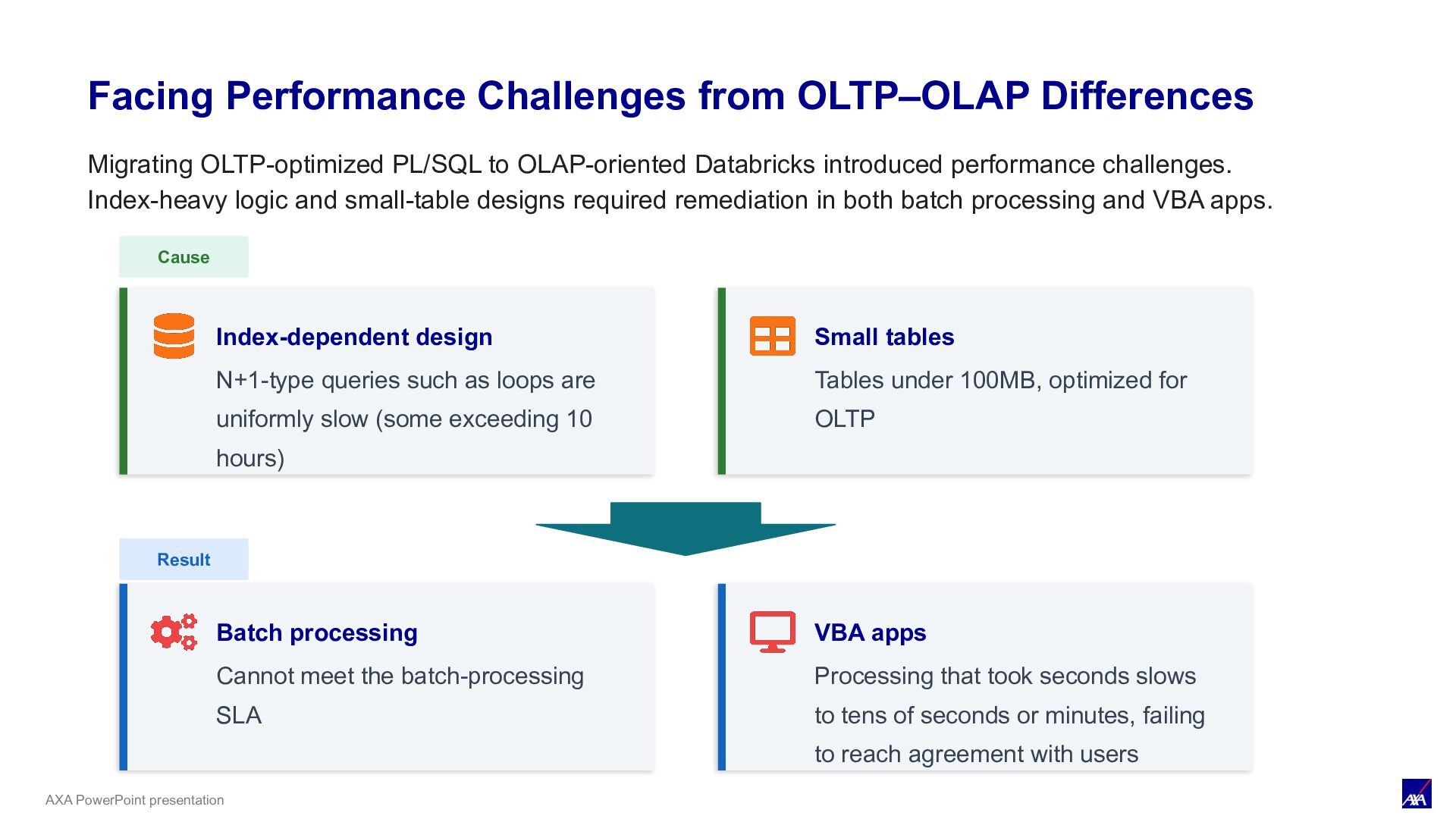
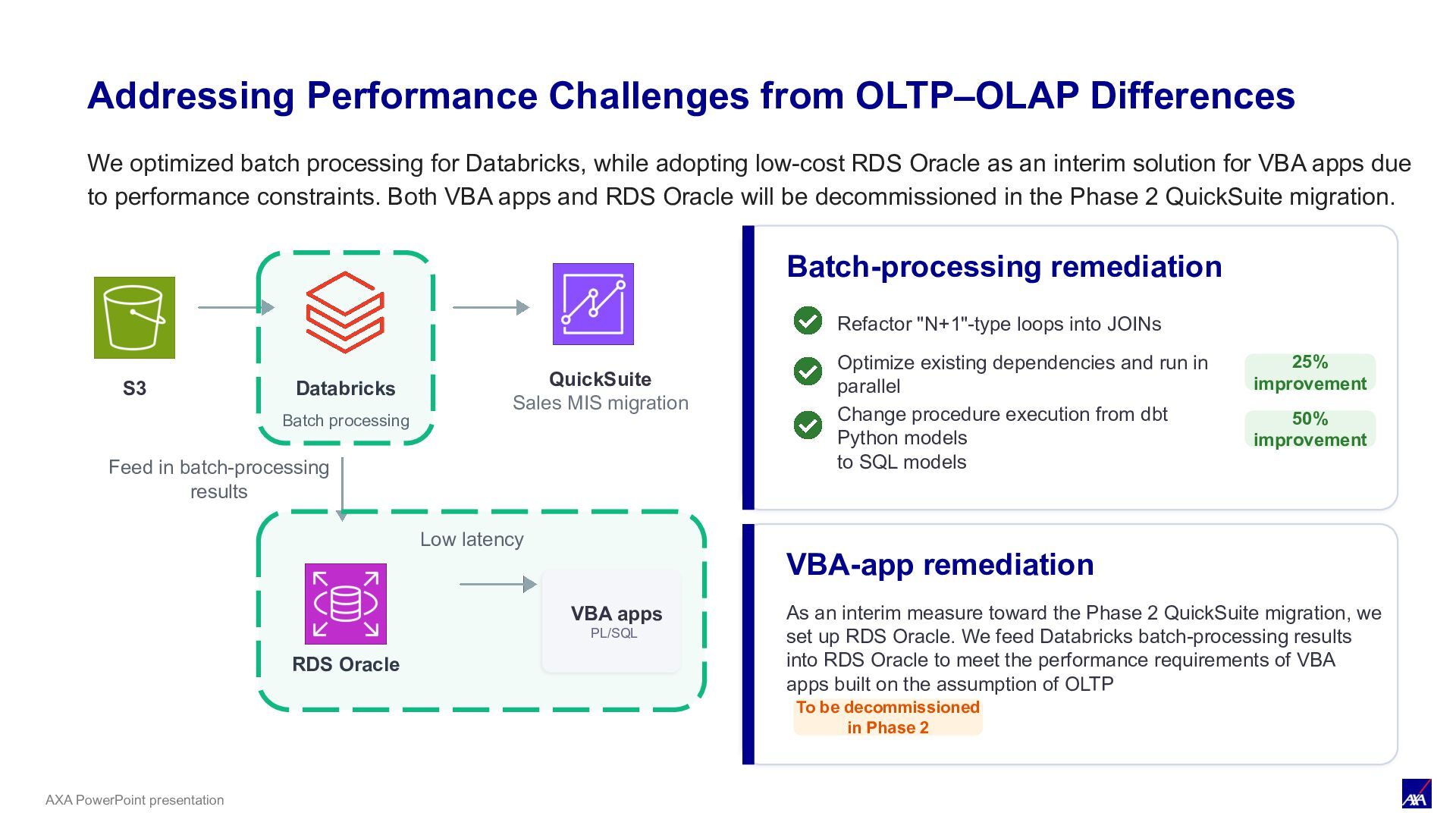
Index-dependent design N+1-type queries such as loops are uniformly slow (some exceeding 10 hours) Small tables Tables under 100MB, optimized for OLTP Result Batch processing Cannot meet the batch-processing SLA VBA apps Processing that took seconds slows to tens of seconds or minutes, failing to reach agreement with users Migrating OLTP-optimized PL/SQL to OLAP-oriented Databricks introduced performance challenges. Index-heavy logic and small-table designs required remediation in both batch processing and VBA apps.
migration Feed in batch-processing results RDS Oracle Batch-processing remediation Refactor "N+1"-type loops into JOINs Optimize existing dependencies and run in parallel Change procedure execution from dbt Python models to SQL models 25% improvement 50% improvement VBA-app remediation As an interim measure toward the Phase 2 QuickSuite migration, we set up RDS Oracle. We feed Databricks batch-processing results into RDS Oracle to meet the performance requirements of VBA apps built on the assumption of OLTP To be decommissioned in Phase 2 VBA apps PL/SQL Low latency We optimized batch processing for Databricks, while adopting low-cost RDS Oracle as an interim solution for VBA apps due to performance constraints. Both VBA apps and RDS Oracle will be decommissioned in the Phase 2 QuickSuite migration. Addressing Performance Challenges from OLTP–OLAP Differences
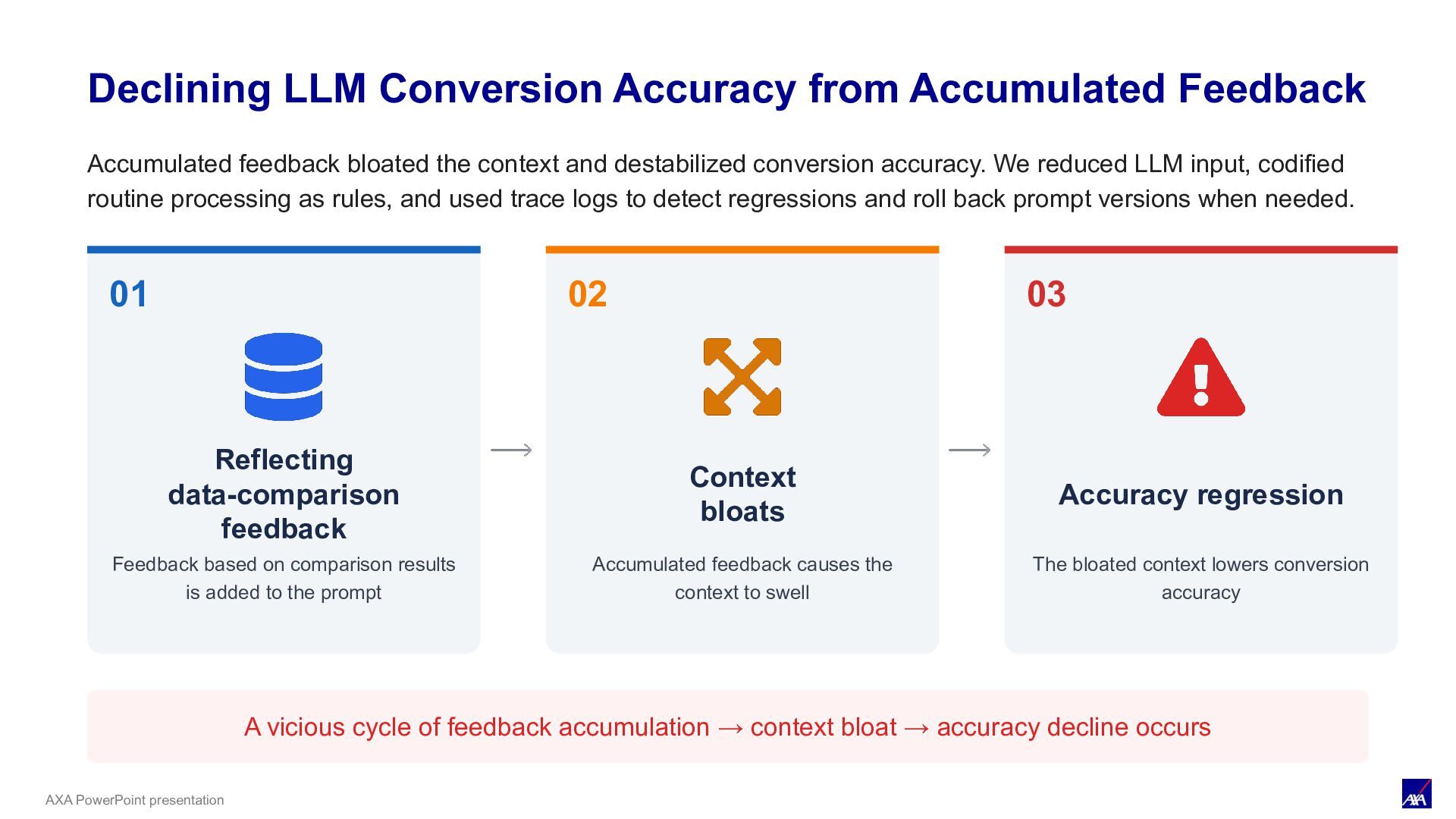
comparison results is added to the prompt 02 Context bloats Accumulated feedback causes the context to swell 03 Accuracy regression The bloated context lowers conversion accuracy A vicious cycle of feedback accumulation → context bloat → accuracy decline occurs Declining LLM Conversion Accuracy from Accumulated Feedback Accumulated feedback bloated the context and destabilized conversion accuracy. We reduced LLM input, codified routine processing as rules, and used trace logs to detect regressions and roll back prompt versions when needed.
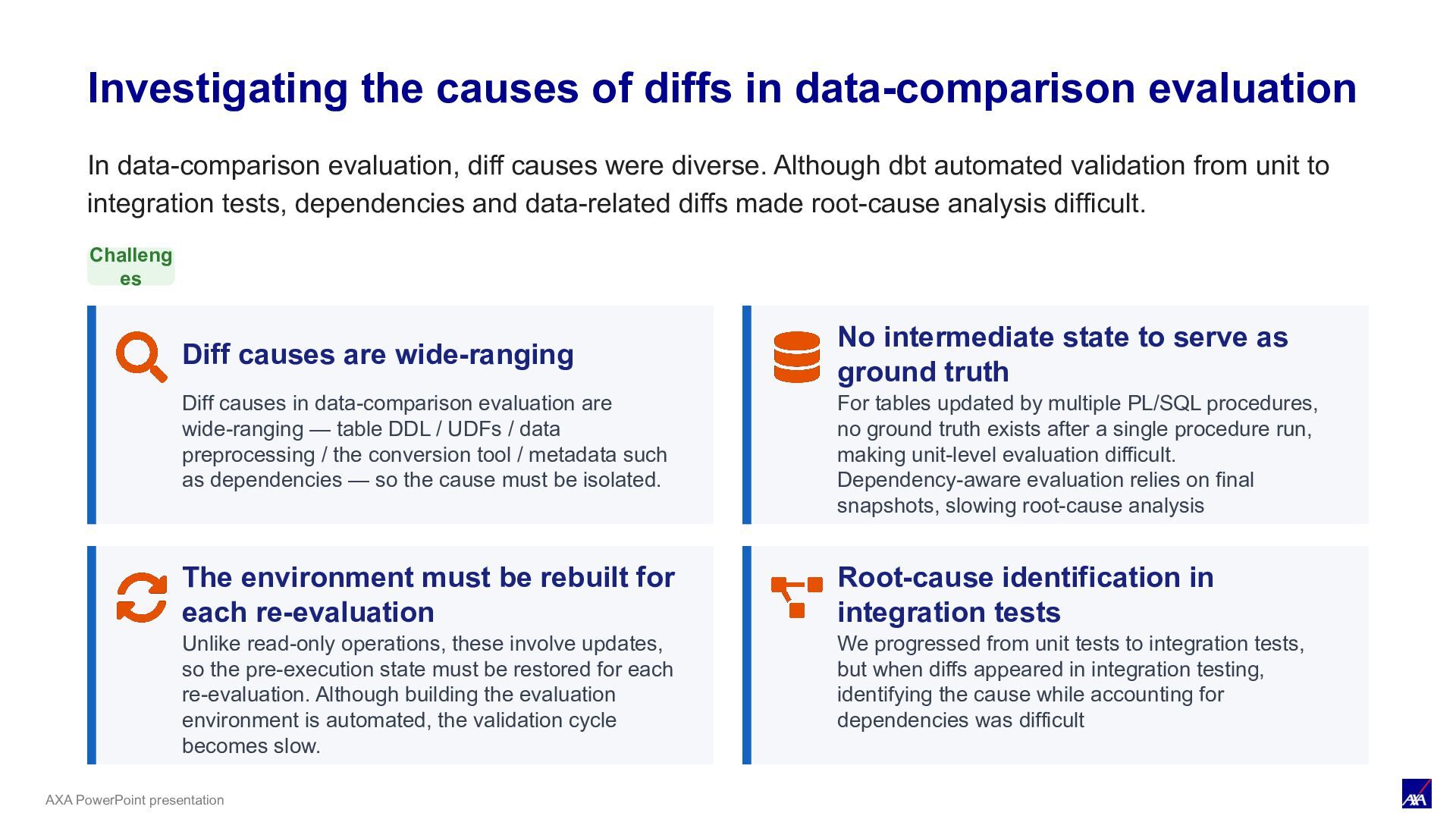
evaluation In data-comparison evaluation, diff causes were diverse. Although dbt automated validation from unit to integration tests, dependencies and data-related diffs made root-cause analysis difficult. Challeng es Diff causes are wide-ranging Diff causes in data-comparison evaluation are wide-ranging — table DDL / UDFs / data preprocessing / the conversion tool / metadata such as dependencies — so the cause must be isolated. No intermediate state to serve as ground truth For tables updated by multiple PL/SQL procedures, no ground truth exists after a single procedure run, making unit-level evaluation difficult. Dependency-aware evaluation relies on final snapshots, slowing root-cause analysis The environment must be rebuilt for each re-evaluation Unlike read-only operations, these involve updates, so the pre-execution state must be restored for each re-evaluation. Although building the evaluation environment is automated, the validation cycle becomes slow. Root-cause identification in integration tests We progressed from unit tests to integration tests, but when diffs appeared in integration testing, identifying the cause while accounting for dependencies was difficult
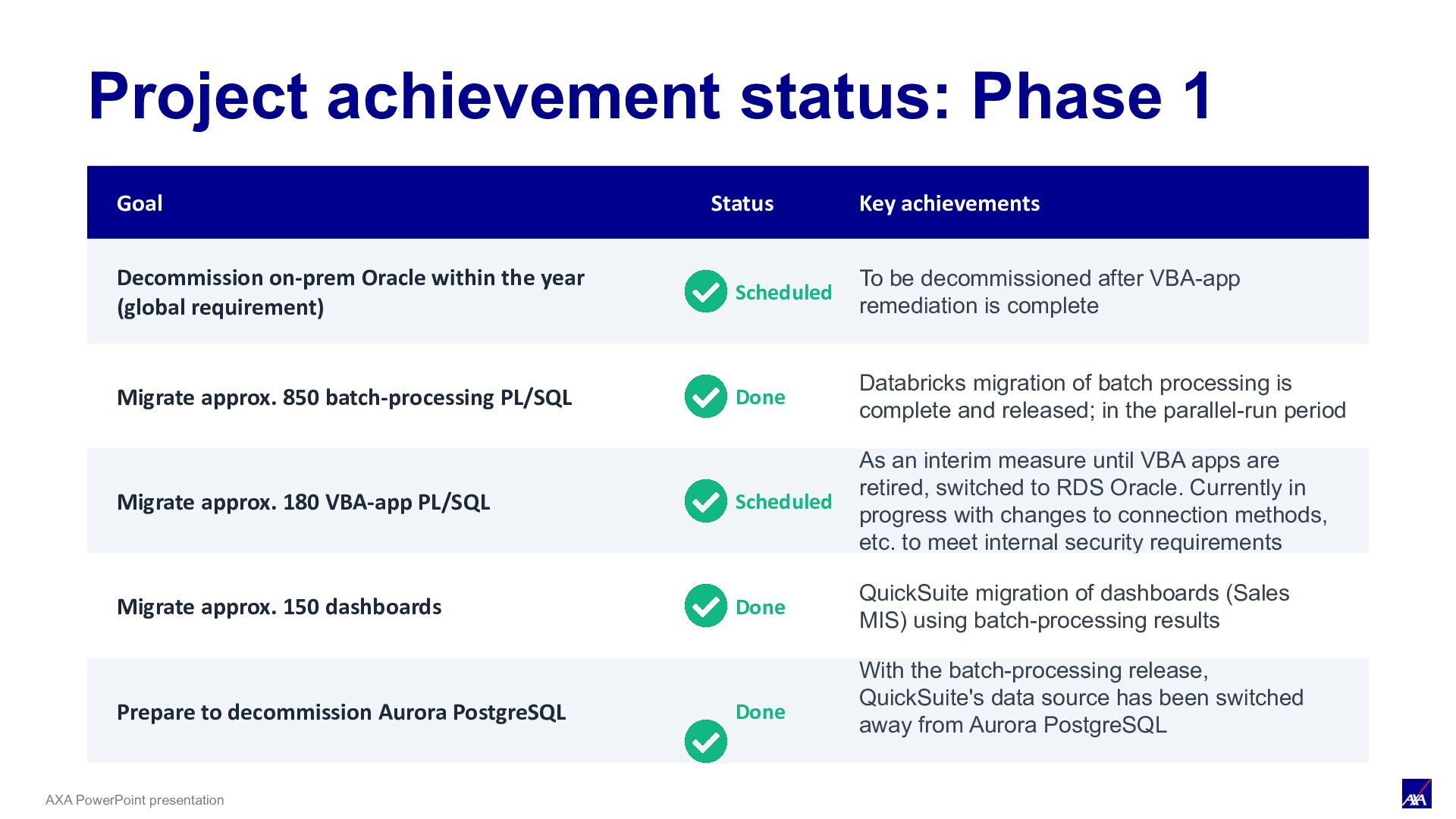
Key achievements Decommission on-prem Oracle within the year (global requirement) Scheduled To be decommissioned after VBA-app remediation is complete Migrate approx. 850 batch-processing PL/SQL Done Databricks migration of batch processing is complete and released; in the parallel-run period Migrate approx. 180 VBA-app PL/SQL Scheduled As an interim measure until VBA apps are retired, switched to RDS Oracle. Currently in progress with changes to connection methods, etc. to meet internal security requirements Migrate approx. 150 dashboards Done QuickSuite migration of dashboards (Sales MIS) using batch-processing results Prepare to decommission Aurora PostgreSQL Done With the batch-processing release, QuickSuite's data source has been switched away from Aurora PostgreSQL
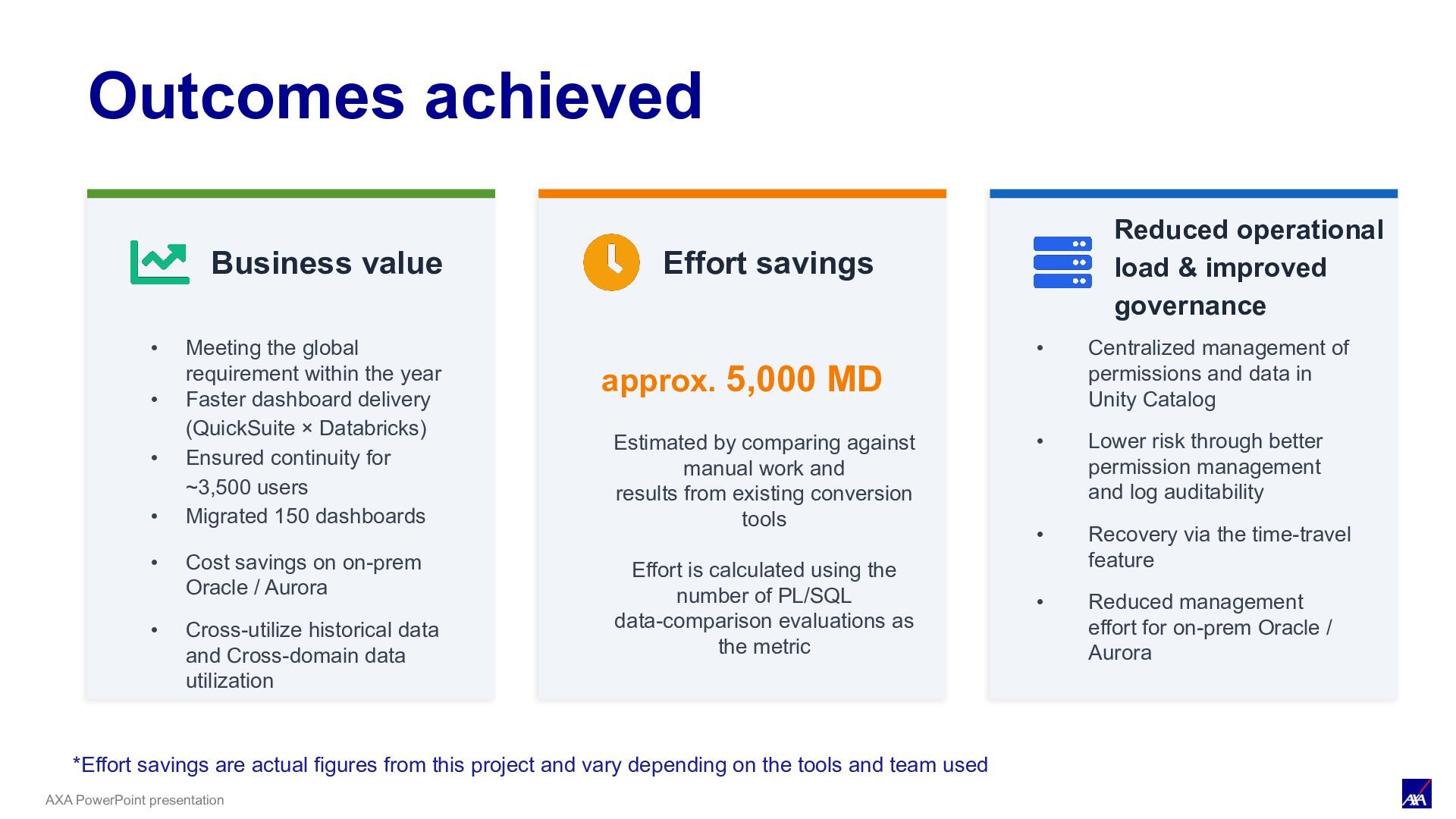
global requirement within the year • Faster dashboard delivery (QuickSuite × Databricks) • Migrated 150 dashboards • Cost savings on on-prem Oracle / Aurora • Cross-utilize historical data and Cross-domain data utilization Effort savings approx. 5,000 MD Reduced operational load & improved governance • Centralized management of permissions and data in Unity Catalog • Lower risk through better permission management and log auditability • Recovery via the time-travel feature • Reduced management effort for on-prem Oracle / Aurora *Effort savings are actual figures from this project and vary depending on the tools and team used Estimated by comparing against manual work and results from existing conversion tools Effort is calculated using the number of PL/SQL data-comparison evaluations as the metric
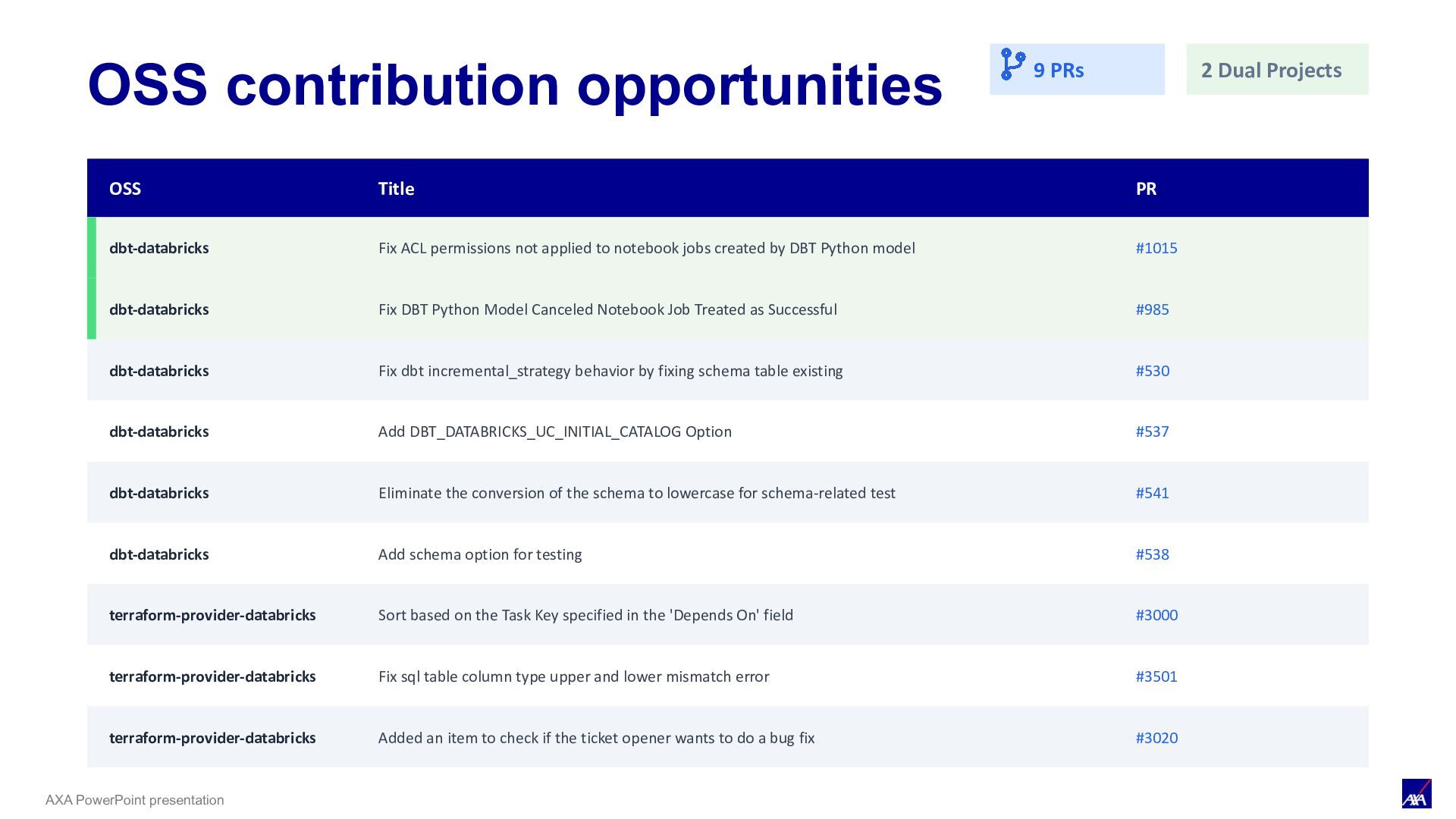
Projects OSS Title PR dbt-databricks Fix ACL permissions not applied to notebook jobs created by DBT Python model #1015 dbt-databricks Fix DBT Python Model Canceled Notebook Job Treated as Successful #985 dbt-databricks Fix dbt incremental_strategy behavior by fixing schema table existing #530 dbt-databricks Add DBT_DATABRICKS_UC_INITIAL_CATALOG Option #537 dbt-databricks Eliminate the conversion of the schema to lowercase for schema-related test #541 dbt-databricks Add schema option for testing #538 terraform-provider-databricks Sort based on the Task Key specified in the 'Depends On' field #3000 terraform-provider-databricks Fix sql table column type upper and lower mismatch error #3501 terraform-provider-databricks Added an item to check if the ticket opener wants to do a bug fix #3020
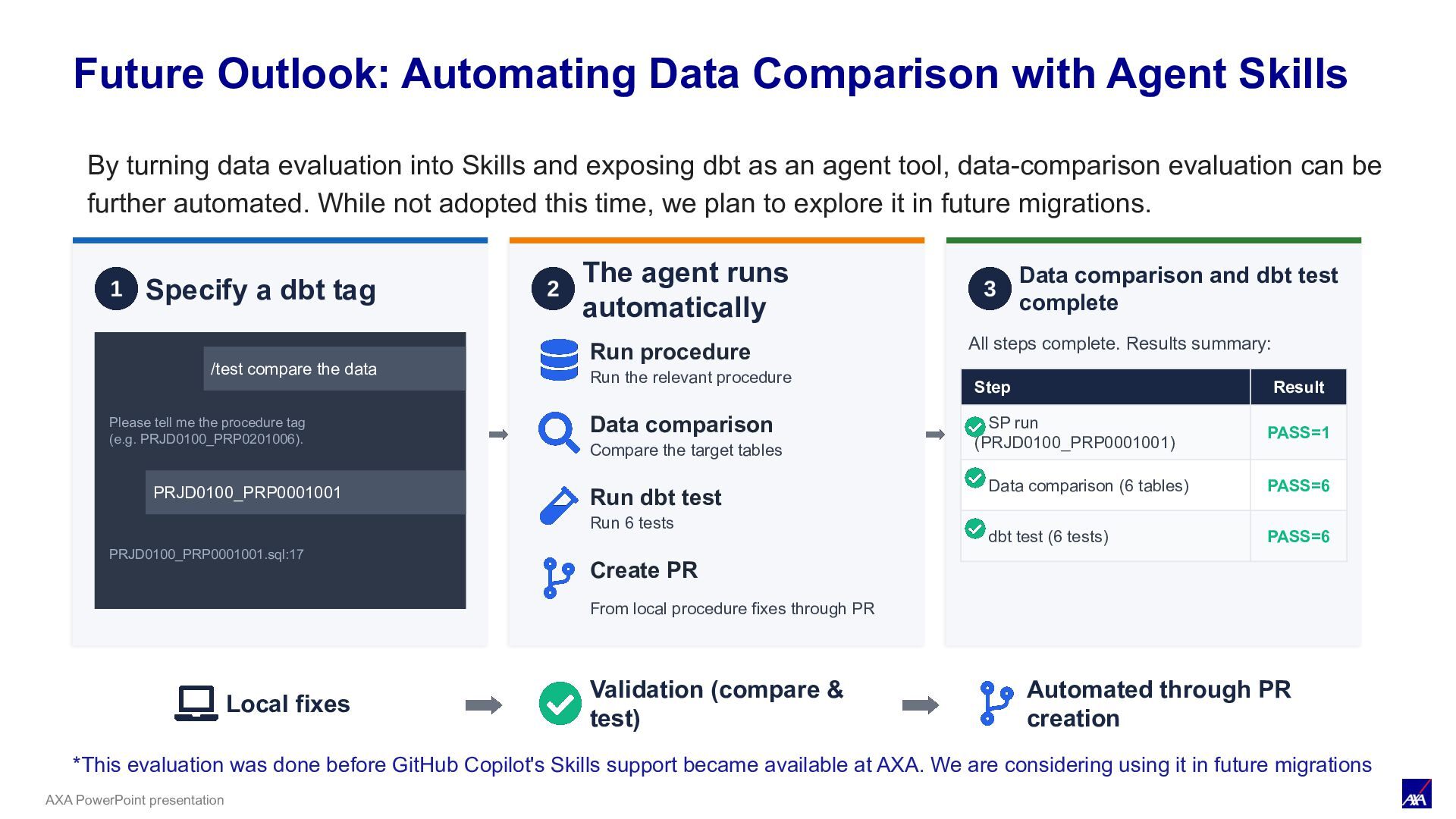
Skills Specify a dbt tag /test compare the data Please tell me the procedure tag (e.g. PRJD0100_PRP0201006). PRJD0100_PRP0001001 PRJD0100_PRP0001001.sql:17 The agent runs automatically Run procedure Run the relevant procedure Data comparison Compare the target tables Run dbt test Run 6 tests Create PR From local procedure fixes through PR Data comparison and dbt test complete All steps complete. Results summary: Step Result SP run (PRJD0100_PRP0001001) PASS=1 Data comparison (6 tables) PASS=6 dbt test (6 tests) PASS=6 Local fixes Validation (compare & test) Automated through PR creation *This evaluation was done before GitHub Copilot's Skills support became available at AXA. We are considering using it in future migrations By turning data evaluation into Skills and exposing dbt as an agent tool, data-comparison evaluation can be further automated. While not adopted this time, we plan to explore it in future migrations.
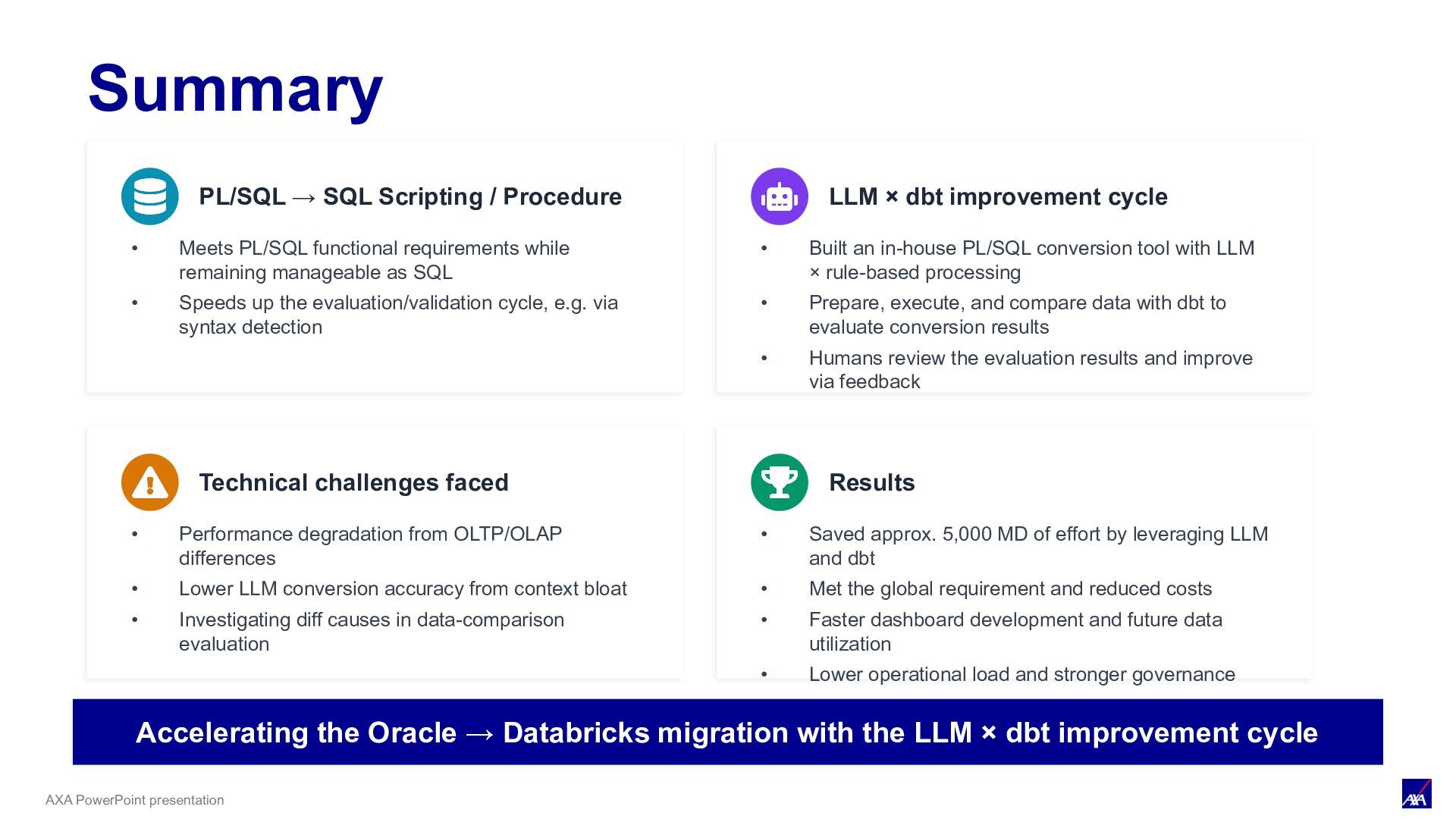
• Meets PL/SQL functional requirements while remaining manageable as SQL • Speeds up the evaluation/validation cycle, e.g. via syntax detection LLM × dbt improvement cycle • Built an in-house PL/SQL conversion tool with LLM × rule-based processing • Prepare, execute, and compare data with dbt to evaluate conversion results • Humans review the evaluation results and improve via feedback Technical challenges faced • Performance degradation from OLTP/OLAP differences • Lower LLM conversion accuracy from context bloat • Investigating diff causes in data-comparison evaluation Results • Saved approx. 5,000 MD of effort by leveraging LLM and dbt • Met the global requirement and reduced costs • Faster dashboard development and future data utilization • Lower operational load and stronger governance Accelerating the Oracle → Databricks migration with the LLM × dbt improvement cycle


 casek
casek
 cassininazir
 chriscoyier
 baasie
 caitiem20
 3n
3n
 rkendrick25
 inesmontani
 chrislema
 nmsamuel
 kimpetersen
 tammyeverts