Upgrade to Pro — share decks privately, control downloads, hide ads and more …

Execute Automation Testing in 3 Steps

Sponsored · SiteGround - Reliable hosting with speed, security, and support you can count on.

Execute Automation Testing in 3 Steps

Automated testing helps eliminate tasks that are too time-consuming and laborious to be performed manually but there are many challenges when apply automation testing for your project.
In order to crack all these challenges, in this article, I will not only show you how to create test case and execute automation test in 3 easy steps but also the solution to manage test & reports efficiently.
Source: https://medium.com/@testautomation/execute-automation-testing-3-steps-158bdfc45a12

Avatar for Fibonance

Fibonance

March 12, 2018
Tweet

Other Decks in Programming

Transcript

  1. Introduction When it comes to automated testing, it’s hard for

    testers to be good at it without programming skills. But over time, the testing tool has matured to simplify the process of testing. There are a lot of code-less tools in the market providing the graphical environment so that testers can easily create test cases. One of the kinds of these tools is Katalon Recorder ( a perfect successor of Selenium IDE ) that will be mentioned as the comprehensive solution in this post.
  2. The Challenges of Executing Automation Test • Preparing test scripts

    In automated testing, test script is a short program written in a programing language, that’s one of the reasons why programming skills are required in automation testing. It is one of the constraints for manual and non-technical testers when executing automation testing.
  3. The Challenges of Executing Automation Test • Managing tests Not

    only is scripting challenging but also managing tests if you are manual or non-technical testers. Why do you have to control tests? If you don’t manage your tests, scripts,… there are many things can occur: First, the effort is duplicated because many people can build the same test scripts. Secondly, test scripts are created for a single purpose, reuse cannot be realized. Existing automated test scripts are at risk of corruption if they are modified without the knowledge of the original author, and many other things.
  4. The Challenges of Executing Automation Test • Reporting Every tool

    has a standard to report the test results. However, sometimes these generic reports do not fulfill your needs. It is challenging to customize the report because it requires a great deal of effort, good planning, and maintenance. In order to crack all these challenges, in this article, I will not only show you how to create test case and execute automation test in 3 easy steps but also the solution to manage test & reports efficiently.
  5. 3 Magical Steps to Execute Automation Testing All magicians need

    the supporting tools and so does Web testing execution. My magical trick will be performed with the tool called Katalon Recorder that can be installed in 3 seconds on both Chrome and Firefox latest versions.
  6. 3 Magical Steps to Execute Automation Testing A few words

    about Katalon Recorder, it has been hailed as one of the alternative solutions since Selenium IDE no longer works from Firefox 55 onwards (Official announcement). As the Toolmakers stated, “Katalon Automation Recorder records actions and captures web elements on web applications to let you generate, edit and execute automated test cases quickly and easily without programming knowledge requirements.”
  7. 3 Magical Steps to Execute Automation Testing Given a sample

    test case whose scenario is as below: Imagine you have a service booking site that requires the user to log in, fill up the form and submit to accomplish booking process. After changing a little bit in theme, you may wonder whether this function is still working or not. The 3 easy steps below will help you get rid of the confusion.
  8. 3 Magical Steps to Execute Automation Testing Step 1: Create

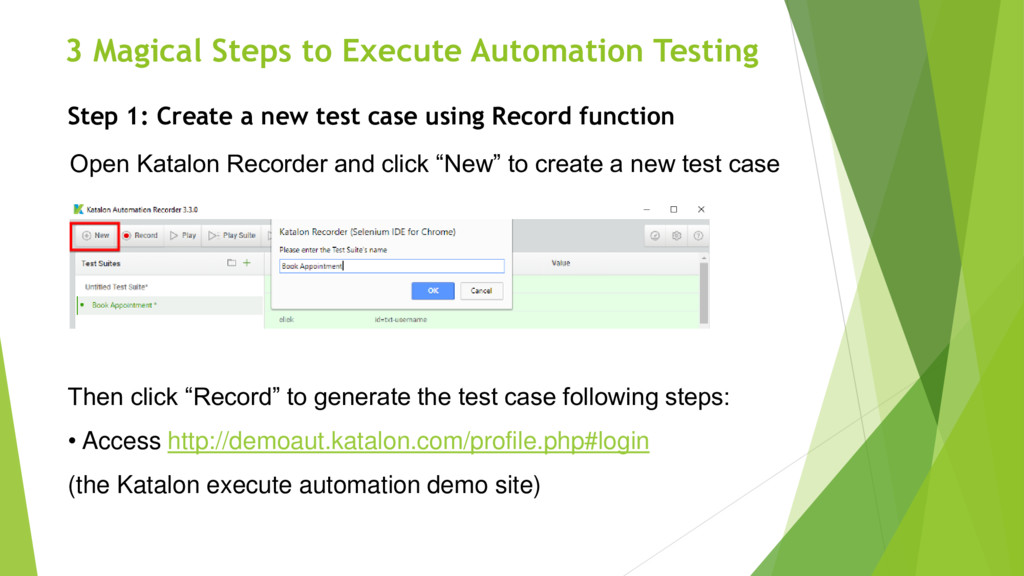
    a new test case using Record function Open Katalon Recorder and click “New” to create a new test case Then click “Record” to generate the test case following steps: • Access http://demoaut.katalon.com/profile.php#login (the Katalon execute automation demo site)
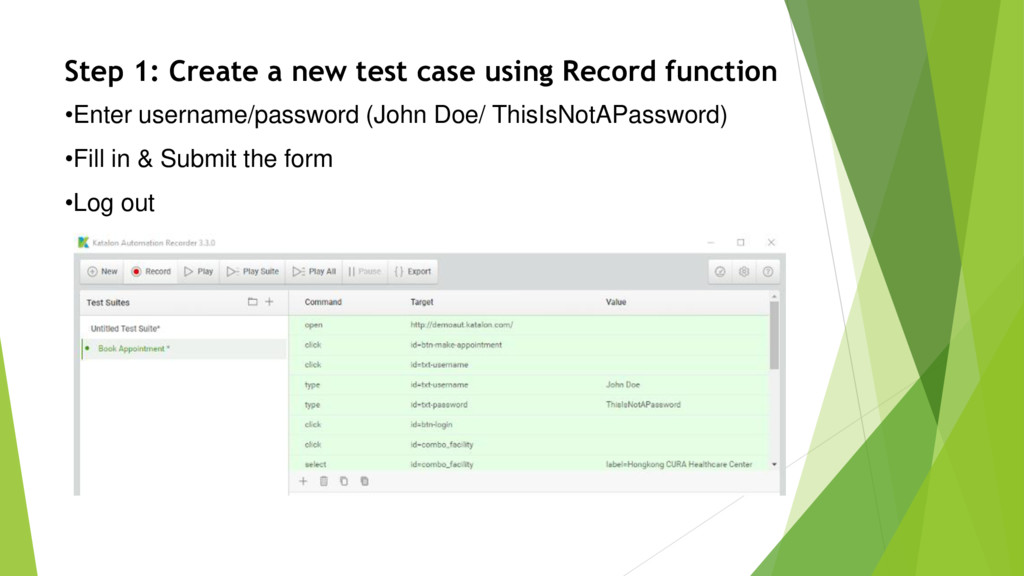
  9. •Enter username/password (John Doe/ ThisIsNotAPassword) •Fill in & Submit the

    form •Log out Step 1: Create a new test case using Record function
  10. Step 2: Keep calm & Execute automation testing Click “Play”

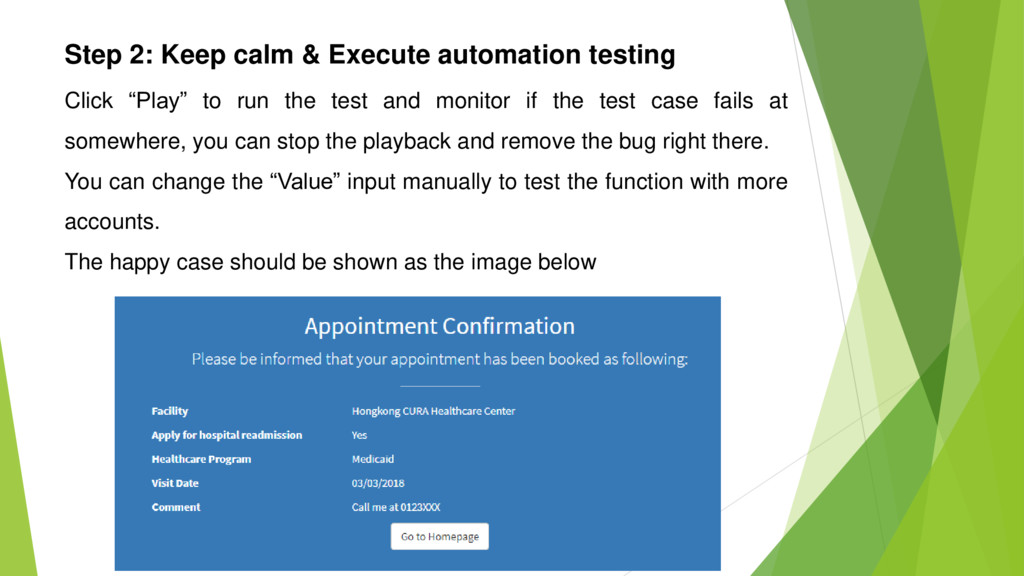
    to run the test and monitor if the test case fails at somewhere, you can stop the playback and remove the bug right there. You can change the “Value” input manually to test the function with more accounts. The happy case should be shown as the image below
  11. Step 2: Keep calm & Execute automation testing And bring

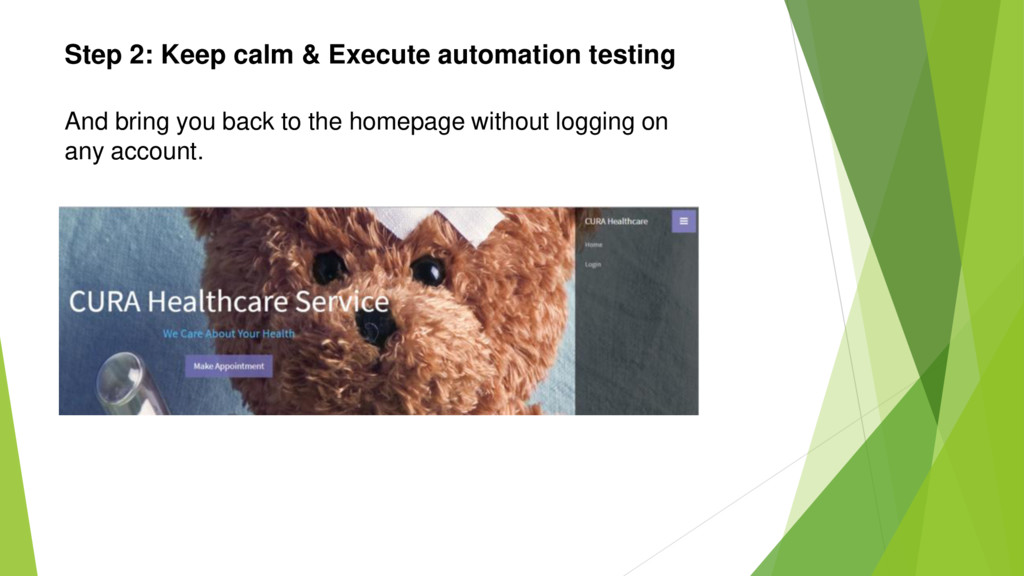
    you back to the homepage without logging on any account. And bring you back to the homepage without logging on any account.
  12. Step 3: Advanced Steps for Automation Test Expert If you

    want to put more variable test data to cover the different cases and run the test with these data automatically, Katalon Recorder supports data-driven testing which allows users to define data sets and execute test scripts that use these data.
  13. Step 3: Advanced Steps for Automation Test Expert • You

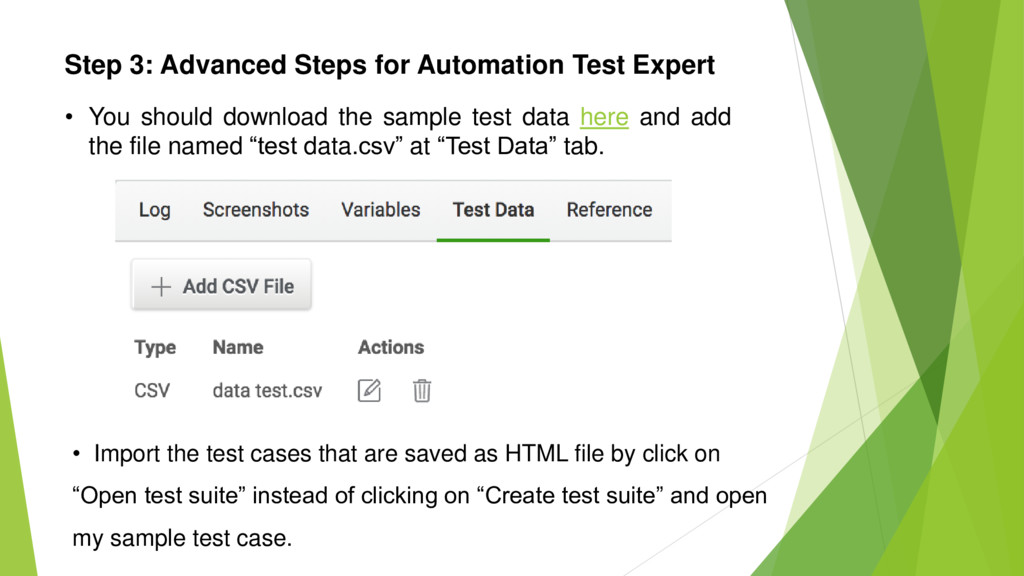
    should download the sample test data here and add the file named “test data.csv” at “Test Data” tab. • Import the test cases that are saved as HTML file by click on “Open test suite” instead of clicking on “Create test suite” and open my sample test case.
  14. Step 3: Advanced Steps for Automation Test Expert • Click

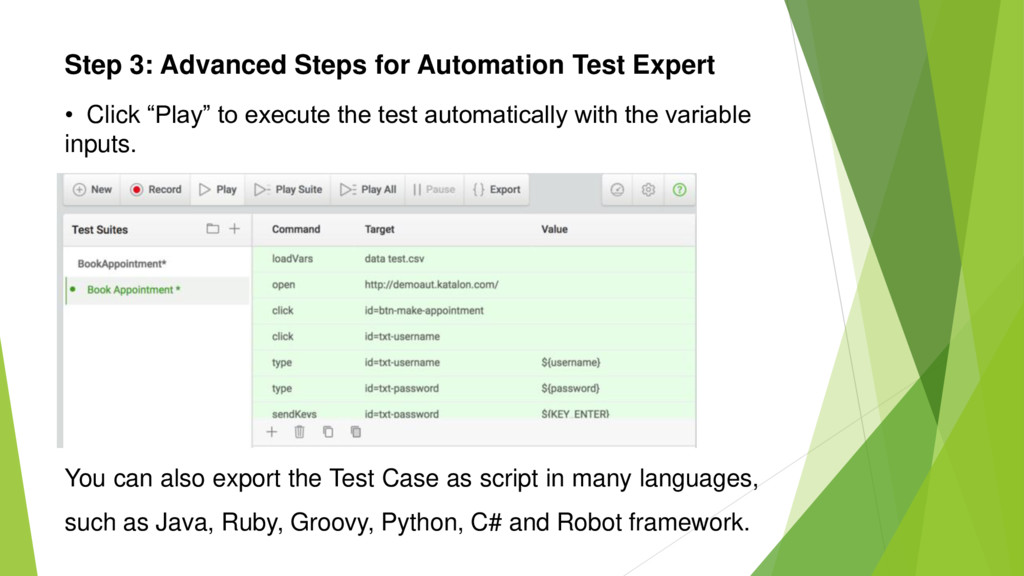
    “Play” to execute the test automatically with the variable inputs. You can also export the Test Case as script in many languages, such as Java, Ruby, Groovy, Python, C# and Robot framework.
  15. Step 3: Advanced Steps for Automation Test Expert And that

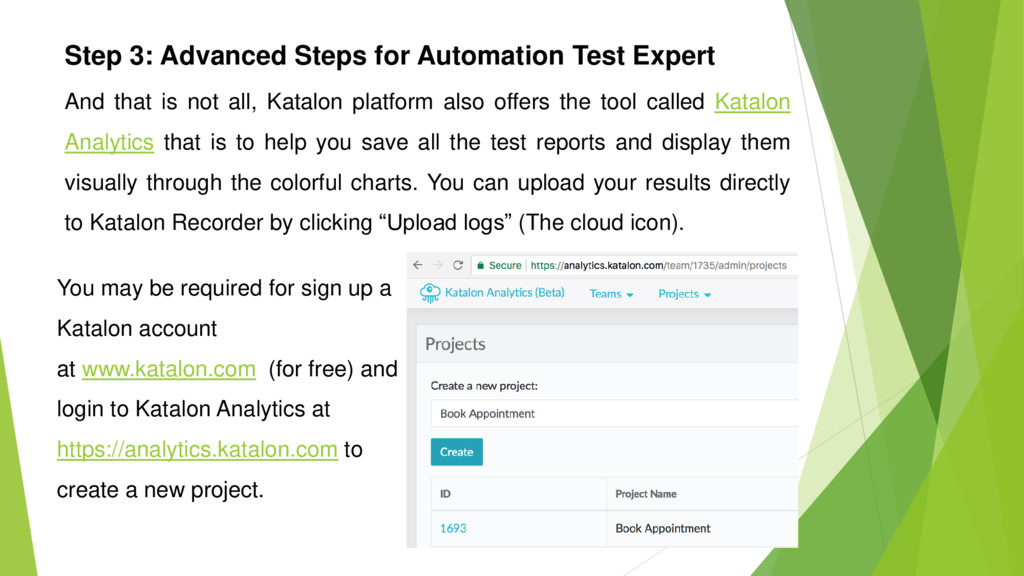
    is not all, Katalon platform also offers the tool called Katalon Analytics that is to help you save all the test reports and display them visually through the colorful charts. You can upload your results directly to Katalon Recorder by clicking “Upload logs” (The cloud icon). You may be required for sign up a Katalon account at www.katalon.com (for free) and login to Katalon Analytics at https://analytics.katalon.com to create a new project.
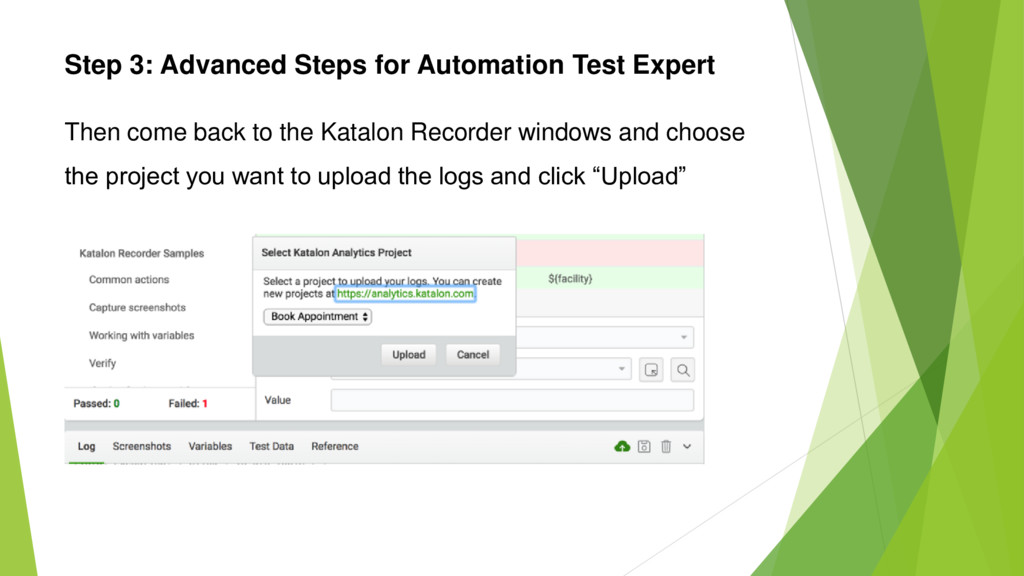
  16. Step 3: Advanced Steps for Automation Test Expert Then come

    back to the Katalon Recorder windows and choose the project you want to upload the logs and click “Upload”
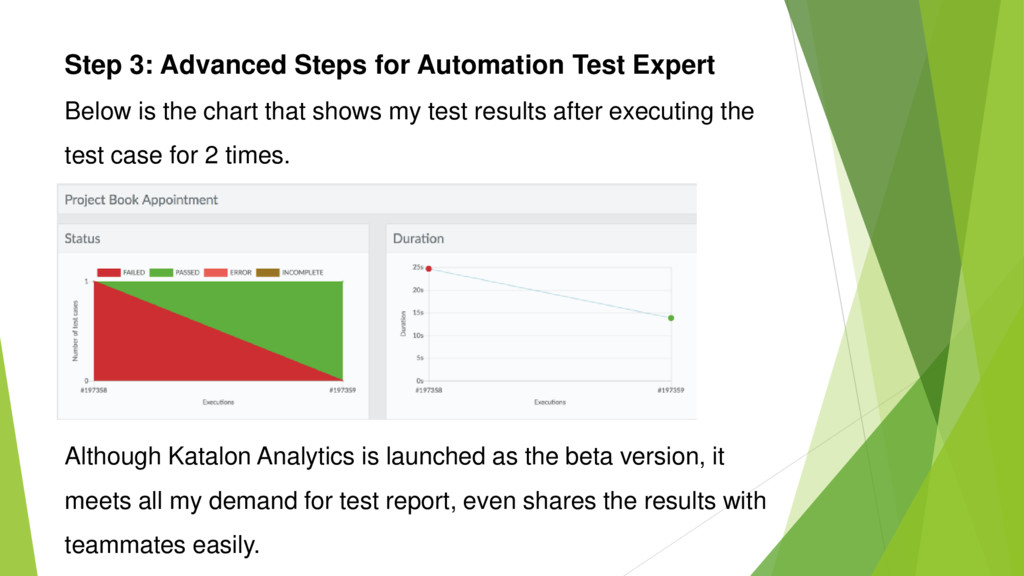
  17. Step 3: Advanced Steps for Automation Test Expert Below is

    the chart that shows my test results after executing the test case for 2 times. Although Katalon Analytics is launched as the beta version, it meets all my demand for test report, even shares the results with teammates easily.
  18. Run Selenese (Selenium IDE) scripts on Chrome & Firefox It

    is the corner for Selenium IDE Fan who are depressed and disappointed after the official announcement of the end of Selenium IDE on Firefox 55 onwards. Some guys in Katalon seems to be kind to bring the hope back by allowing users to import Selenese script from Selenium IDE to Katalon Recorder. Check it out here
  19. Below is the summary of Katalon Recorder outstanding features: •

    Record, play, and debug (pause/resume, set breakpoints) test cases. • Fastest execution speed. • Compatible with all Selenese commands, users can import original Selenium IDE tests into Katalon Recorder. • Support file uploading for testing file input widgets (Chrome only). • Easy flow control with if/elseIf/else and while commands. Conclusion
  20. • Support data driven testing — data can be imported from CSV

    file. • Advanced reporting with logs, screenshots, and (optional) integration with Katalon Analytics for historical reports and analysis. • Export to Selenium WebDriver scripts in these frameworks: C# (MSTest and NUnit), Java (TestNG and JUnit), Ruby (RSpec), Python (unittest), Groovy (Katalon Studio), Robot Framework, and XML (for building custom exporter). • Compatible with latest Firefox and Chrome browsers. Conclusion
  21. I will say no more about Katalon platform in this

    post, even they are all great & free, it should belong to another post that may be named “How to leverage Katalon platform (Katalon Studio, Katalon Docker, Katalon Analytics, Katalon Recorder) to make your testing life easier”, whatever. Executing automated test case and managing test reports are not painful as we thought. In general, with the wise testing strategy and a proper supporting tool collection, Test Execution or Automation Testing is no longer the big deal.