Upgrade to Pro
— share decks privately, control downloads, hide ads and more …
Speaker Deck
Sign up for free
Menu
Search
Features
All features
Private URLs
Password Protection
Custom URLS
Scheduled publishing
Remove Branding
Restrict embedding
Deck Collections
Notes
Features
All features
Private URLs
Password Protection
Custom URLS
Scheduled publishing
Remove Branding
Restrict embedding
Deck Collections
Notes
Explore
Featured decks
Featured speakers
Programming
Technology
Storyboards
Explore
Featured decks
Featured speakers
Programming
Technology
Storyboards
Pricing
Search
Sign in
Sign up for free
世恩- 陣列
Search
Sponsored
·
Your Podcast. Everywhere. Effortlessly.
Share. Educate. Inspire. Entertain. You do you. We'll handle the rest.
→
KuoGeorge
May 11, 2018
25
0
Share
Embed
Copy iframe code
Copy JS code
Copy link
Start on current slide
世恩- 陣列
讀書會- 從ES6開始的Javascript學習生活
KuoGeorge
May 11, 2018
More Decks by KuoGeorge
See All by KuoGeorge
ES6-函示與作用域
georgekuo
0
37
Featured
See All Featured
Accessibility Awareness
sabderemane
1
250
svc-hook: hooking system calls on ARM64 by binary rewriting
retrage
2
630
AI: The stuff that nobody shows you
jnunemaker
PRO
10
1.2k
Beyond borders and beyond the search box: How to win the global "messy middle" with AI-driven SEO
davidcarrasco
3
280
Faster Mobile Websites
deanohume
310
32k
Leo the Paperboy
mayatellez
10
2.4k
Facilitating Awesome Meetings
lara
57
7.2k
Save Time (by Creating Custom Rails Generators)
garrettdimon
PRO
33
5.2k
Balancing Empowerment & Direction
lara
6
1.3k
How to audit for AI Accessibility on your Front & Back End
davetheseo
0
600
How to Think Like a Performance Engineer
csswizardry
28
2.9k
We Have a Design System, Now What?
morganepeng
55
8.4k
Transcript
陣列列
表⽰示法 直接創造空陣列列(沒有限定最⼤大數量量) const aArray = [ ] 使⽤用Array創造 const aAarray=new
Array(10)
影響效能的寫法 const arr = [1, '1', undefined, true, 'true']
陣列列的⼀一些結構 多維陣列列(陣列列中的陣列列) const magicMatrix = [ [2, 9, 4], [7,
5, 3], [6, 1, 8] ]; magicMatrix[2][1]
陣列列的⼀一些結構 多洞洞的陣列列(Holey Arrays)或稀疏陣列列(Sparse Arrays) const aArray = [ ] aArray[0]
= 1 aArray[6] = 3 const bArray = [1, , 3] const cArray =[1, ,3, ,7]
拷⾙貝陣列列 const aArray = [1, 2, 3] const bArray =
aArray aArray[0] = 100 console.log(bArray) //[100, 2, 3]
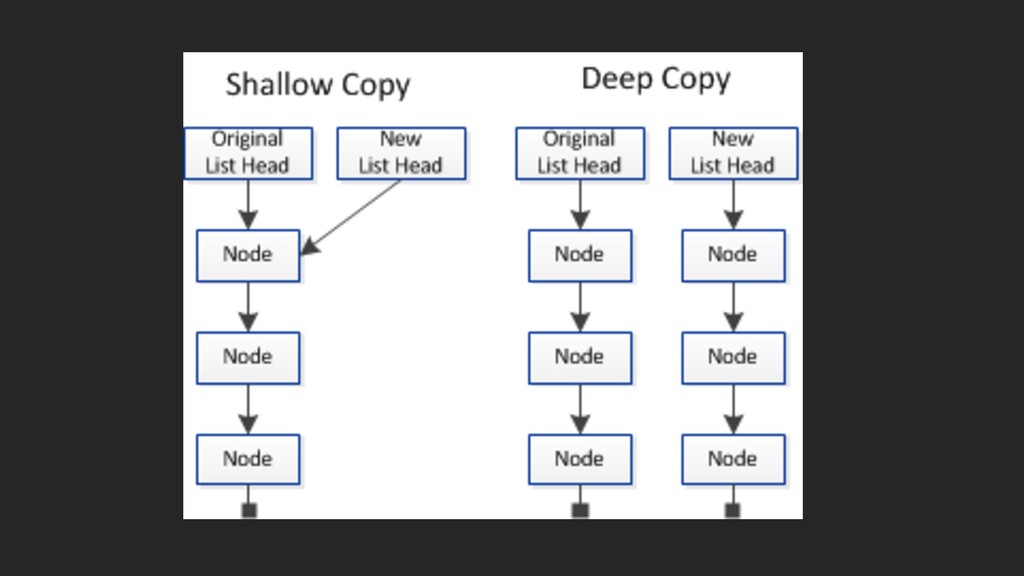
淺拷⾙貝 vs 深拷⾙貝 const a=[1,2,3]; const b=a; 淺拷⾙貝 => 指向同⼀一個陣列列=>參參照位置還是同⼀一個
也就是b指向a的位置 深拷⾙貝 => 獨立出來來的陣列列 也就是b複製a,然後b指向b的位置
None
淺拷⾙貝⽅方法(推薦) 1.展開運算符 const aArray = [1, 2, 3] const bArray
= [...aArray] bArray; //[1,2,3] const cArray=[4,5,6,...aArray,7,8,9] cArray; //[4,5,6,1,2,3,7,8,9] 優點:簡單易易懂
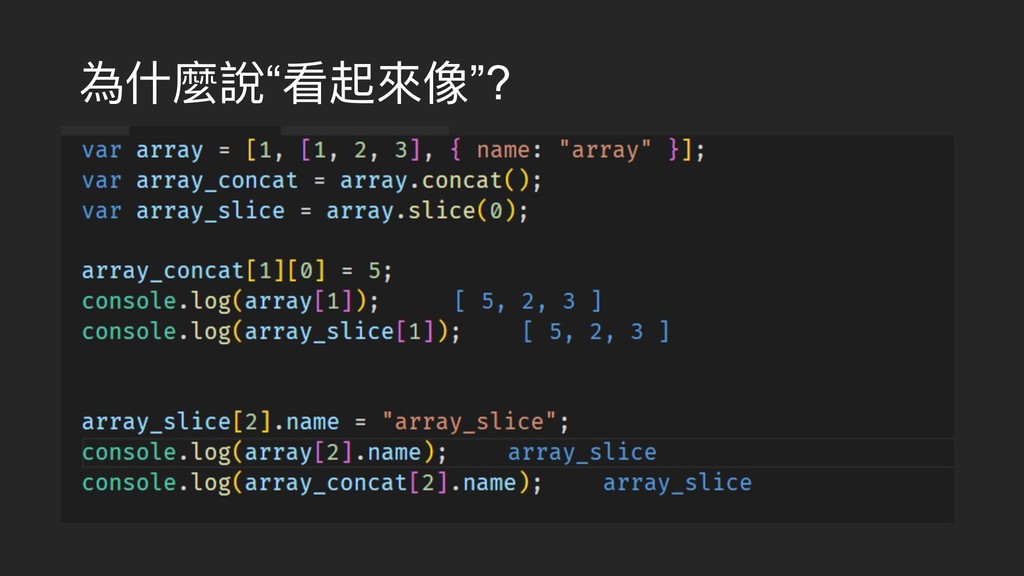
淺拷⾙貝⽅方法 2.concat(串串聯聯) (“看起來來像”深拷⾙貝) const aArray = [1, 2, 3] const
bArray = [4,5,6...aArray] bArray; //[4,5,6,1,2,3] //----------- const cArray =[4,5,6].concat(aArray)
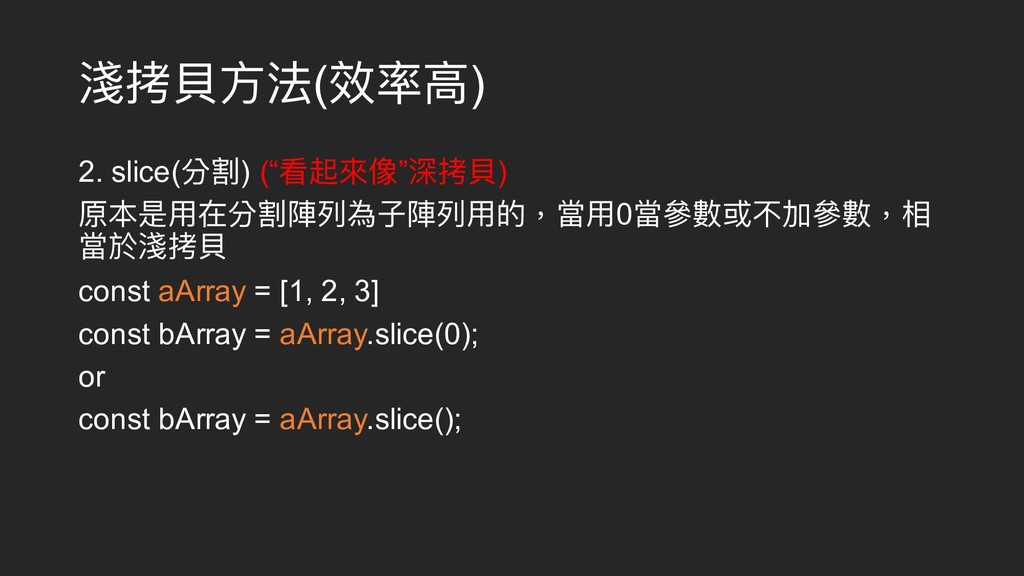
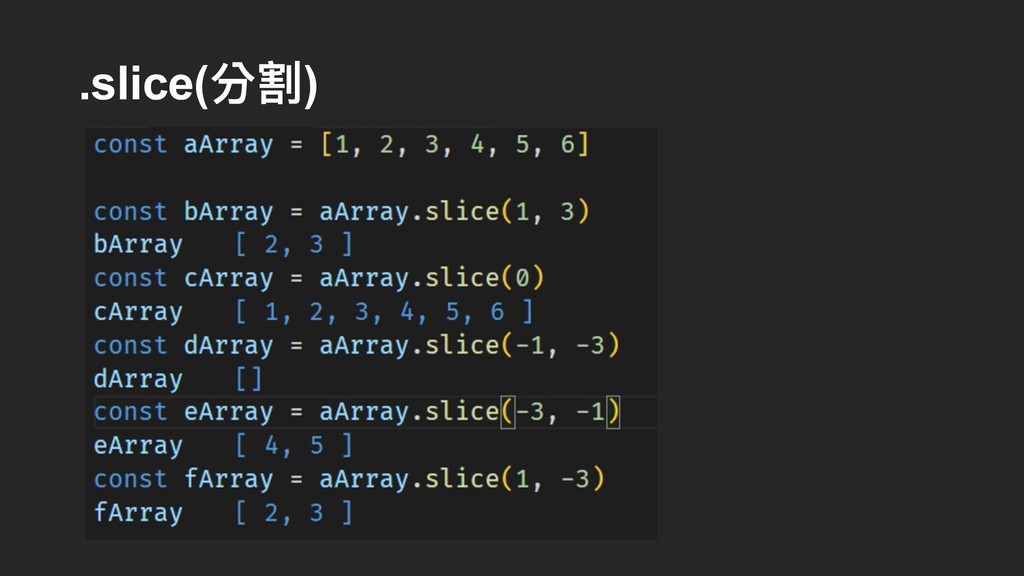
淺拷⾙貝⽅方法(效率⾼高) 2. slice(分割) (“看起來來像”深拷⾙貝) 原本是⽤用在分割陣列列為⼦子陣列列⽤用的,當⽤用0當參參數或不加參參數,相 當於淺拷⾙貝 const aArray = [1,
2, 3] const bArray = aArray.slice(0); or const bArray = aArray.slice();
深拷⾙貝的⽅方法 var arr = [1, 2, 3, 4, 5] var
arr2 = copyArr(arr) function copyArr(arr) { let res = [] for (let i = 0; i < arr.length; i++) { res.push(arr[i]) } return res } arr.push(7); arr //1,2,3,4,5,7 arr2.push(6); arr2 //1,2,3,4,5,6
為什什麼說“看起來來像”?
判斷是不是陣列列 let array=[1,2,3] 1.最簡單 Array.isArray(array) 2.直接⽤用物件建構式判斷,先判斷他是否存在 array.prop && array.prop.constructor ===
Array 失效情況 : 當使⽤用在⼀一個繼承⾃自陣列列的陣列列會失效
判斷是不是陣列列2 let array=[1,2,3] 3. Instanceof 優點:簡潔易易懂 array instanceof Array 失效情況
: 處理理不同window或iframe時的變數會失效 4.toString.call 最正確,但效率最差(推薦) Object.prototype.toString.call(array) === '[object Array]'
陣列列的屬性 length 長度 是可以改變的 const bArray = [1, 2, 3]
console.log(bArray.length) //3 bArray.length=2; console.log(bArray) //1,2 所以,當length=0的時候可以清空陣列列 但直接⽤用空陣列列效率最好 => bArray = [ ];
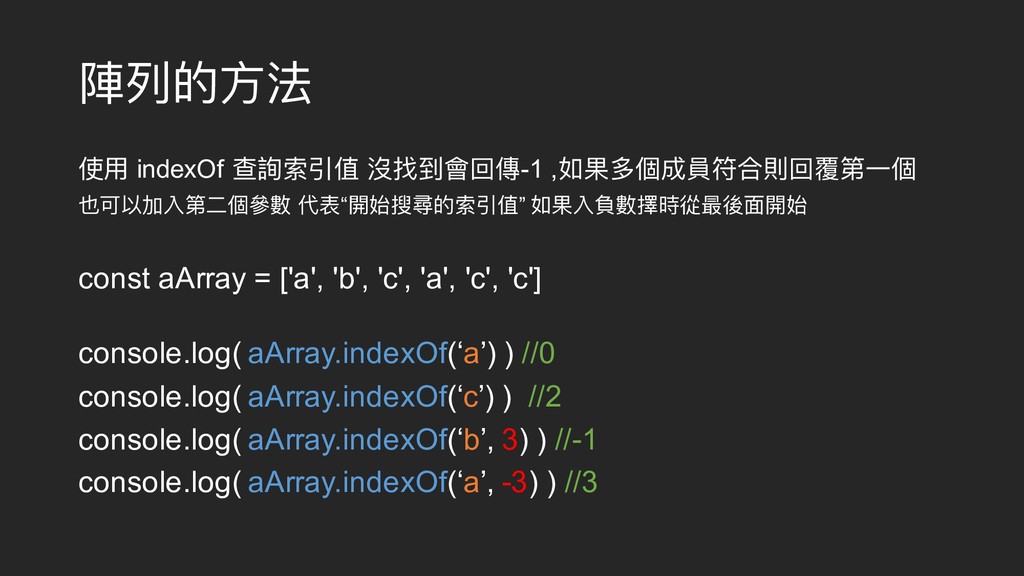
陣列列的⽅方法 使⽤用 indexOf 查詢索引值 沒找到會回傳-1 ,如果多個成員符合則回覆第⼀一個 也可以加入第⼆二個參參數 代表“開始搜尋的索引值” 如果入負數擇時從最後⾯面開始 const
aArray = ['a', 'b', 'c', 'a', 'c', 'c'] console.log( aArray.indexOf(‘a’) ) //0 console.log( aArray.indexOf(‘c’) ) //2 console.log( aArray.indexOf(‘b’, 3) ) //-1 console.log( aArray.indexOf(‘a’, -3) ) //3
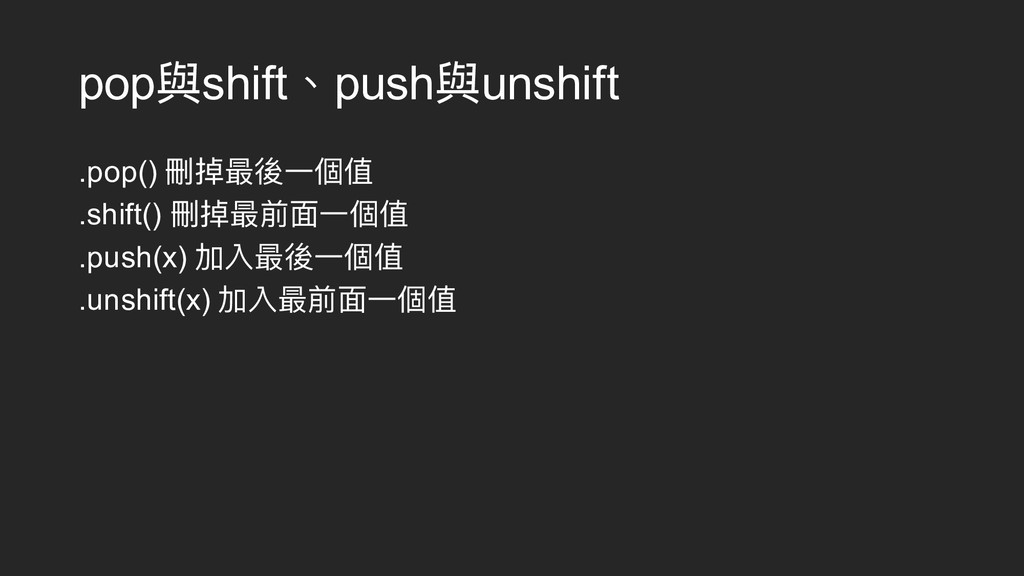
pop與shift、push與unshift .pop() 刪掉最後⼀一個值 .shift() 刪掉最前⾯面⼀一個值 .push(x) 加入最後⼀一個值 .unshift(x) 加入最前⾯面⼀一個值
.slice(分割)
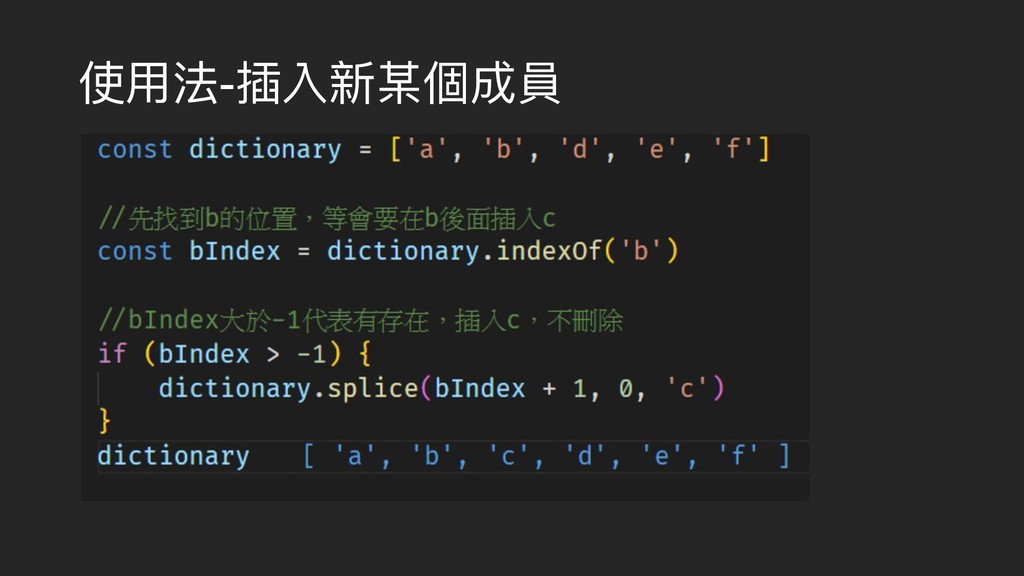
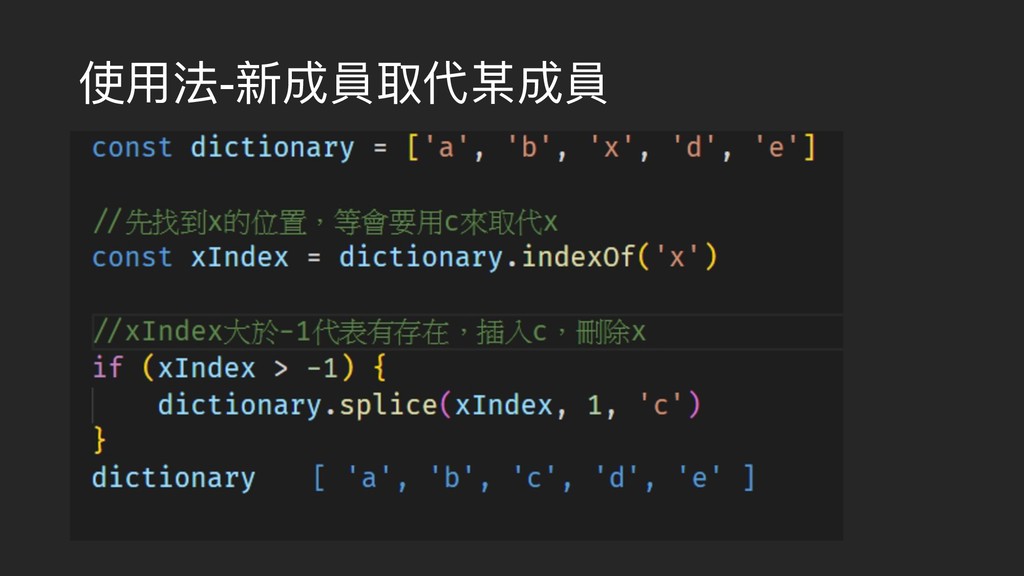
splice splice(粘接)這個字詞與上⾯面的slice(分割)長得很像,但⽤用途不相同 ,這個⽅方法是⽤用於刪除或增加陣列列中的成員,以此來來改變原先的陣 列列的。 語法 array.splice(start, deleteCount[, item1[, item2[, ...]]])
使⽤用法-插入新某個成員
使⽤用法-新成員取代某成員
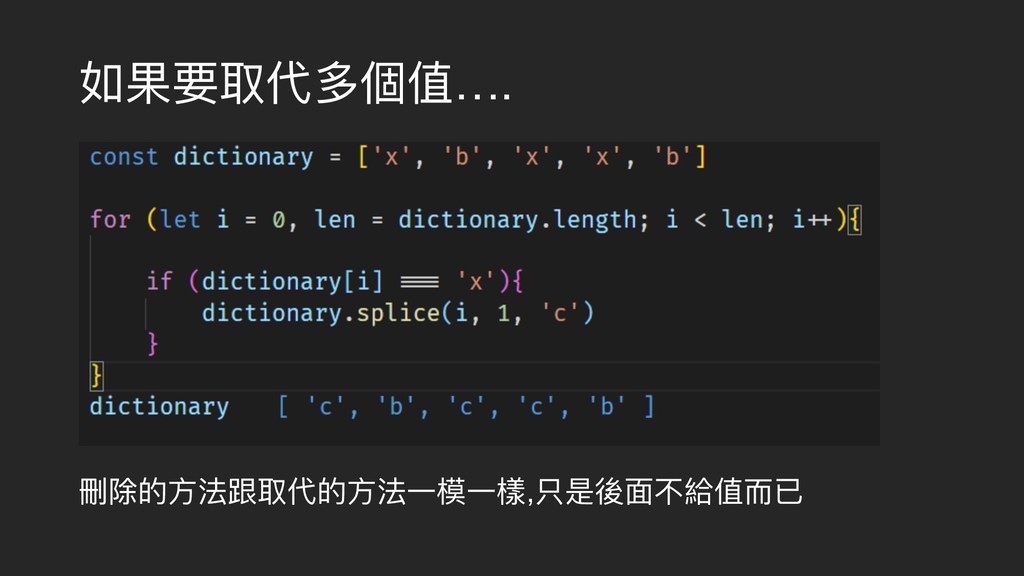
如果要取代多個值…. 刪除的⽅方法跟取代的⽅方法⼀一模⼀一樣,只是後⾯面不給值⽽而已
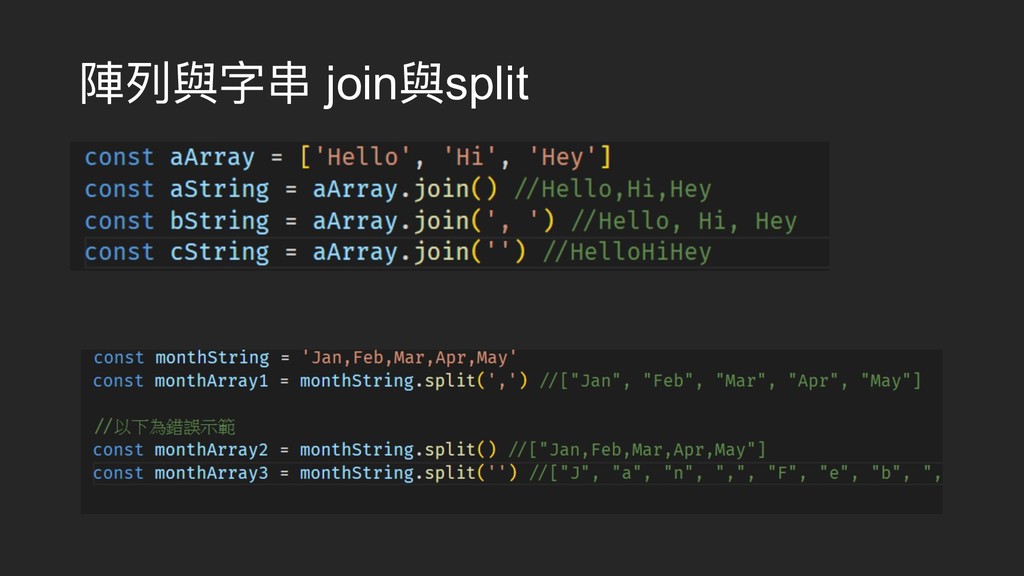
陣列列與字串串 join與split
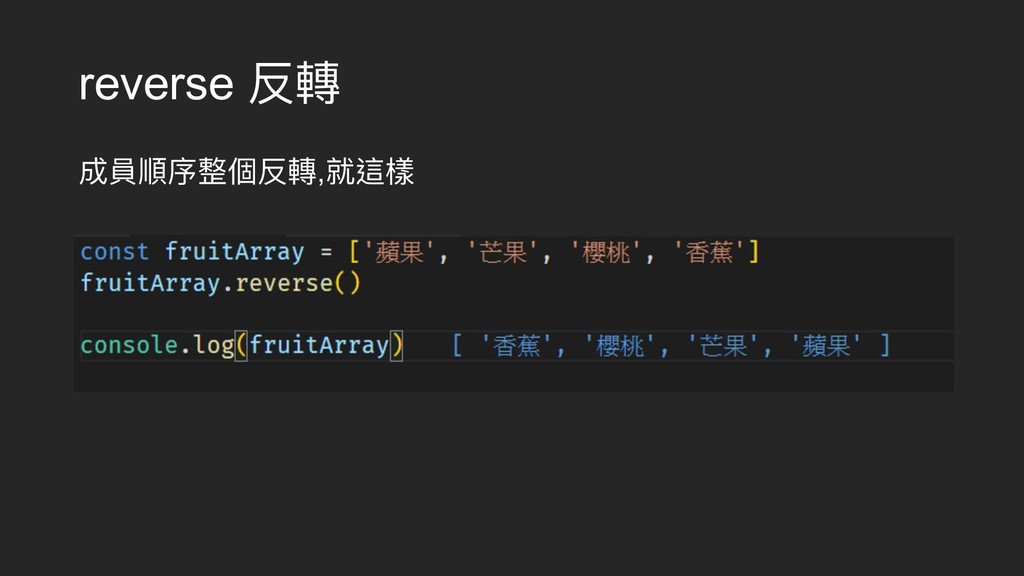
reverse 反轉 成員順序整個反轉,就這樣


 georgekuo
 sabderemane
 retrage
 jnunemaker
 davidcarrasco
 deanohume
 mayatellez
 lara
lara
 garrettdimon
 davetheseo
 csswizardry
 morganepeng

![表⽰示法 直接創造空陣列列(沒有限定最⼤大數量量) const aArray = [ ] 使⽤用Array創造 const aAarray=new](https://files.speakerdeck.com/presentations/da059acdbbf94b5a9d8da854fe5c7b87/slide_1.jpg)
![影響效能的寫法 const arr = [1, '1', undefined, true, 'true']](https://files.speakerdeck.com/presentations/da059acdbbf94b5a9d8da854fe5c7b87/slide_2.jpg)
![陣列列的⼀一些結構 多維陣列列(陣列列中的陣列列) const magicMatrix = [ [2, 9, 4], [7,](https://files.speakerdeck.com/presentations/da059acdbbf94b5a9d8da854fe5c7b87/slide_3.jpg)
![陣列列的⼀一些結構 多洞洞的陣列列(Holey Arrays)或稀疏陣列列(Sparse Arrays) const aArray = [ ] aArray[0]](https://files.speakerdeck.com/presentations/da059acdbbf94b5a9d8da854fe5c7b87/slide_4.jpg)
![拷⾙貝陣列列 const aArray = [1, 2, 3] const bArray =](https://files.speakerdeck.com/presentations/da059acdbbf94b5a9d8da854fe5c7b87/slide_5.jpg)
![淺拷⾙貝 vs 深拷⾙貝 const a=[1,2,3]; const b=a; 淺拷⾙貝 => 指向同⼀一個陣列列=>參參照位置還是同⼀一個](https://files.speakerdeck.com/presentations/da059acdbbf94b5a9d8da854fe5c7b87/slide_6.jpg)
![淺拷⾙貝⽅方法(推薦) 1.展開運算符 const aArray = [1, 2, 3] const bArray](https://files.speakerdeck.com/presentations/da059acdbbf94b5a9d8da854fe5c7b87/slide_8.jpg)
![淺拷⾙貝⽅方法 2.concat(串串聯聯) (“看起來來像”深拷⾙貝) const aArray = [1, 2, 3] const](https://files.speakerdeck.com/presentations/da059acdbbf94b5a9d8da854fe5c7b87/slide_9.jpg)
![深拷⾙貝的⽅方法 var arr = [1, 2, 3, 4, 5] var](https://files.speakerdeck.com/presentations/da059acdbbf94b5a9d8da854fe5c7b87/slide_11.jpg)
![判斷是不是陣列列 let array=[1,2,3] 1.最簡單 Array.isArray(array) 2.直接⽤用物件建構式判斷,先判斷他是否存在 array.prop && array.prop.constructor ===](https://files.speakerdeck.com/presentations/da059acdbbf94b5a9d8da854fe5c7b87/slide_13.jpg)
![判斷是不是陣列列2 let array=[1,2,3] 3. Instanceof 優點:簡潔易易懂 array instanceof Array 失效情況](https://files.speakerdeck.com/presentations/da059acdbbf94b5a9d8da854fe5c7b87/slide_14.jpg)
![陣列列的屬性 length 長度 是可以改變的 const bArray = [1, 2, 3]](https://files.speakerdeck.com/presentations/da059acdbbf94b5a9d8da854fe5c7b87/slide_15.jpg)
![splice splice(粘接)這個字詞與上⾯面的slice(分割)長得很像,但⽤用途不相同 ,這個⽅方法是⽤用於刪除或增加陣列列中的成員,以此來來改變原先的陣 列列的。 語法 array.splice(start, deleteCount[, item1[, item2[, ...]]])](https://files.speakerdeck.com/presentations/da059acdbbf94b5a9d8da854fe5c7b87/slide_19.jpg)