Upgrade to Pro — share decks privately, control downloads, hide ads and more …

Tips for working with Kiro (How to ask, teach, ...

Tips for working with Kiro (How to ask, teach, and delegate) | Kiro: Zero to Hero 09

Fifteen tips for getting better results from Kiro with fewer surprises. Say what done looks like and what must not change, put what you repeat into steering, skills, and hooks, split sessions by topic, roll back with checkpoints, and pick Autopilot or Supervised, the model, and the effort level. Each tip points to the deck that covers it in depth. Includes a running example (a meeting-room booking app). As of November 2026 (Kiro IDE 1.4, Kiro CLI 3.1). This is deck 09, in the Go deeper part of the Kiro: Zero to Hero series.

Avatar for Riku INADA

Riku INADA PRO

November 08, 2026

More Decks by Riku INADA

Other Decks in Technology

Transcript

  1. Kiro: Zero to Hero Go deeper Tips for working with

    Kiro How to ask, teach, and delegate As of November 2026 (Kiro IDE 1.4, Kiro CLI 3.1) 09 November 2026 Riku Inada Amazon Web Services Japan © 2026, Amazon Web Services, Inc. or its affiliates. All rights reserved. 1
  2. Introduction About me Riku Inada Amazon Web Services Japan G.K.

    Solutions Architect Works mainly with manufacturing customers Recent work Promoting the AI-Driven Development Life Cycle (AI-DLC) Writing and speaking about Kiro and AWS Amplify © 2026, Amazon Web Services, Inc. or its affiliates. All rights reserved. X @inada_riku Speaker Deck speakerdeck.com/inariku Zenn zenn.dev/inariku GitHub github.com/inariku 2
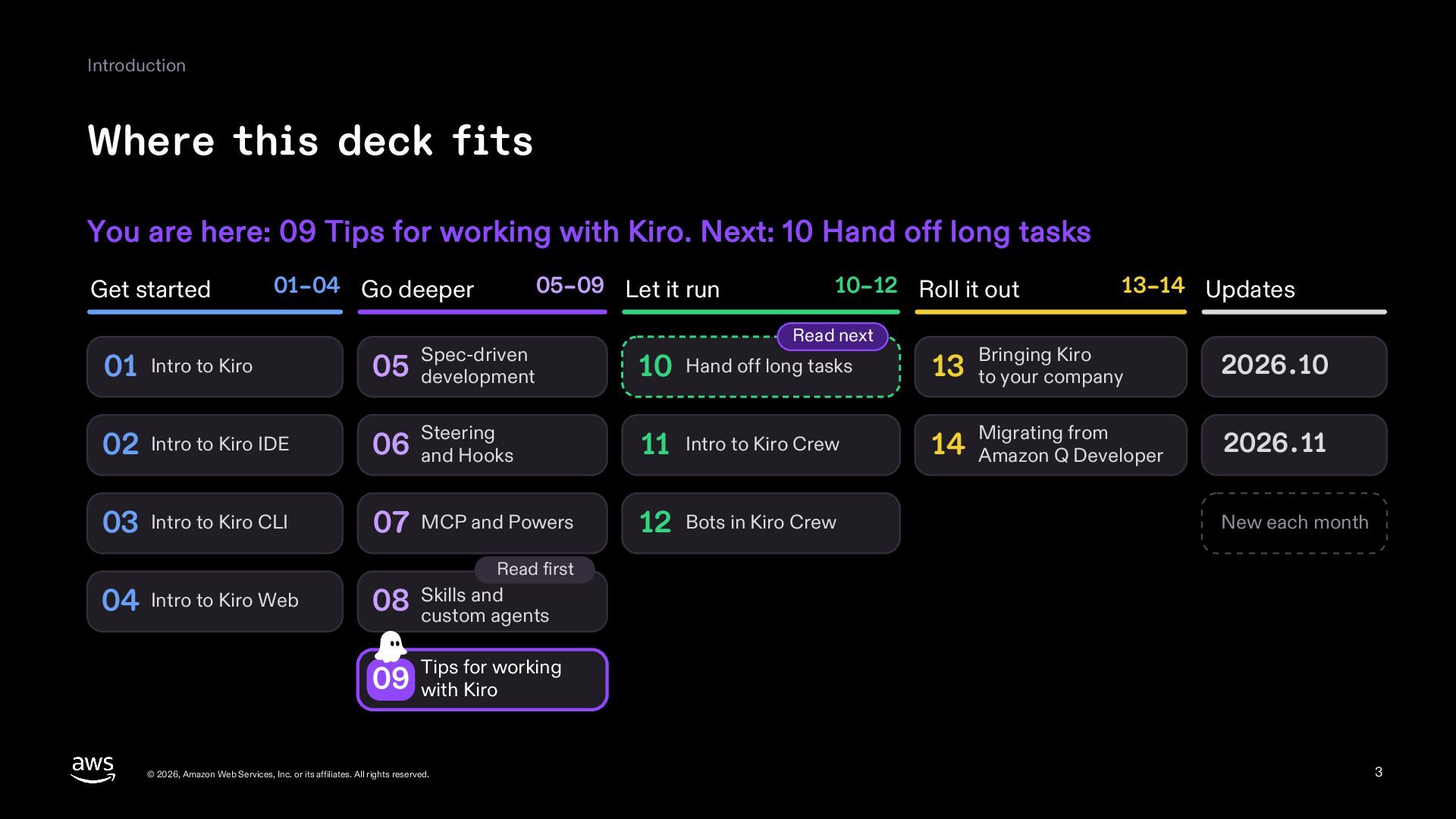
  3. Introduction Where this deck fits You are here: 09 Tips

    for working with Kiro. Next: 10 Hand off long tasks Get started 01–04 Go deeper 05–09 Let it run 10–12 Roll it out Read next 13–14 Updates 01 Intro to Kiro Spec-driven 05 development 10 Hand off long tasks 13 to your company Bringing Kiro 2026.10 02 Intro to Kiro IDE 06 and Hooks Steering 11 Intro to Kiro Crew 14 Amazon Q Developer Migrating from 2026.11 03 Intro to Kiro CLI 07 MCP and Powers 12 Bots in Kiro Crew New each month Read first 04 Intro to Kiro Web and 08 Skills custom agents for working 09 Tips with Kiro © 2026, Amazon Web Services, Inc. or its affiliates. All rights reserved. 3
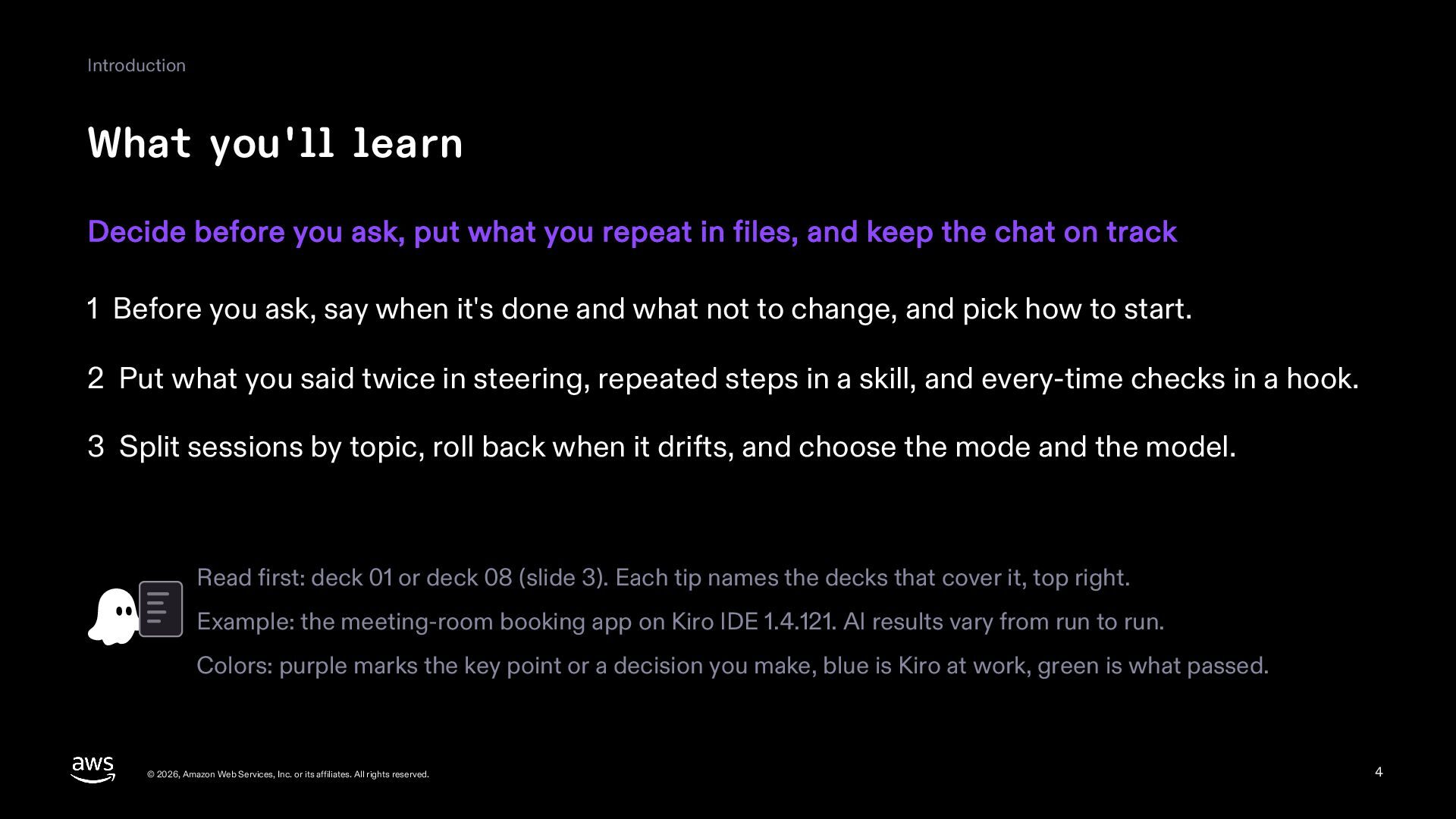
  4. Introduction What you'll learn Decide before you ask, put what

    you repeat in files, and keep the chat on track 1 Before you ask, say when it's done and what not to change, and pick how to start. 2 Put what you said twice in steering, repeated steps in a skill, and every-time checks in a hook. 3 Split sessions by topic, roll back when it drifts, and choose the mode and the model. Read first: deck 01 or deck 08 (slide 3). Each tip names the decks that cover it, top right. Example: the meeting-room booking app on Kiro IDE 1.4.121. AI results vary from run to run. Colors: purple marks the key point or a decision you make, blue is Kiro at work, green is what passed. © 2026, Amazon Web Services, Inc. or its affiliates. All rights reserved. 4
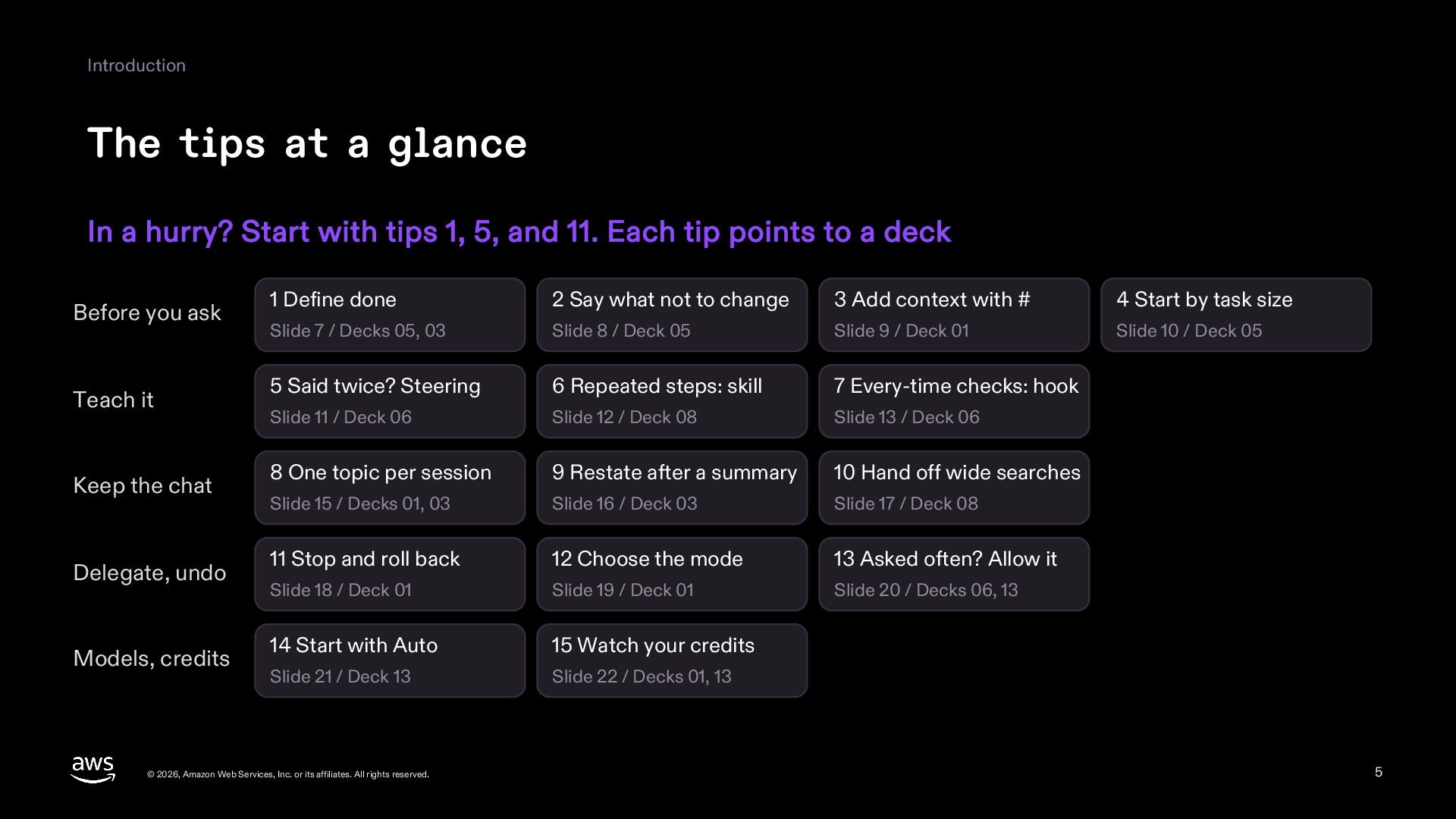
  5. Introduction The tips at a glance In a hurry? Start

    with tips 1, 5, and 11. Each tip points to a deck Before you ask Teach it Keep the chat Delegate, undo Models, credits 1 Define done 2 Say what not to change 3 Add context with # 4 Start by task size Slide 7 / Decks 05, 03 Slide 8 / Deck 05 Slide 9 / Deck 01 Slide 10 / Deck 05 5 Said twice? Steering 6 Repeated steps: skill 7 Every-time checks: hook Slide 11 / Deck 06 Slide 12 / Deck 08 Slide 13 / Deck 06 8 One topic per session 9 Restate after a summary 10 Hand off wide searches Slide 15 / Decks 01, 03 Slide 16 / Deck 03 Slide 17 / Deck 08 11 Stop and roll back 12 Choose the mode 13 Asked often? Allow it Slide 18 / Deck 01 Slide 19 / Deck 01 Slide 20 / Decks 06, 13 14 Start with Auto 15 Watch your credits Slide 21 / Deck 13 Slide 22 / Decks 01, 13 © 2026, Amazon Web Services, Inc. or its affiliates. All rights reserved. 5
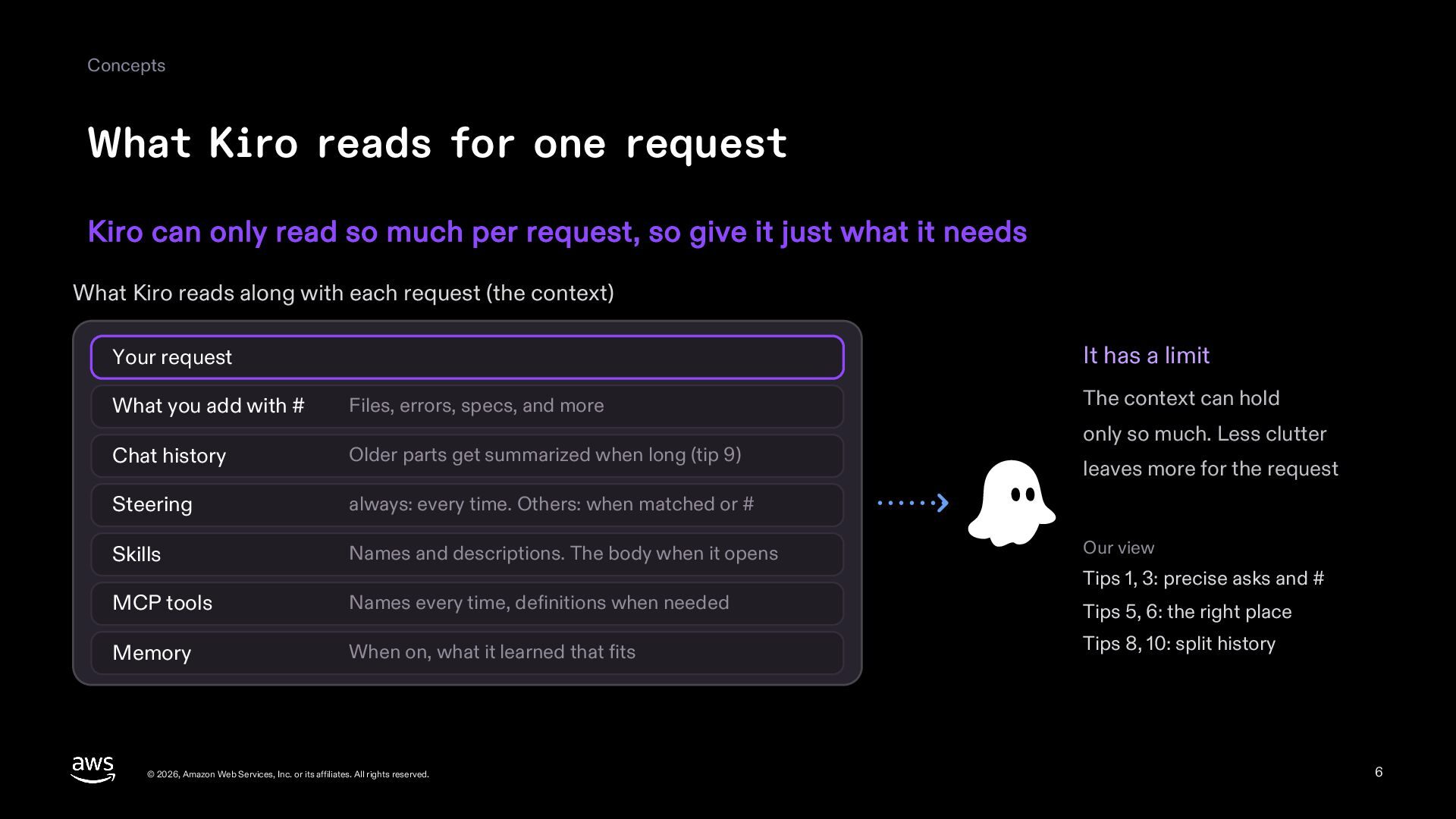
  6. Concepts What Kiro reads for one request Kiro can only

    read so much per request, so give it just what it needs What Kiro reads along with each request (the context) It has a limit Your request What you add with # Files, errors, specs, and more Chat history Older parts get summarized when long (tip 9) Steering always: every time. Others: when matched or # Skills Names and descriptions. The body when it opens MCP tools Names every time, definitions when needed Memory When on, what it learned that fits © 2026, Amazon Web Services, Inc. or its affiliates. All rights reserved. The context can hold only so much. Less clutter leaves more for the request Our view Tips 1, 3: precise asks and # Tips 5, 6: the right place Tips 8, 10: split history 6
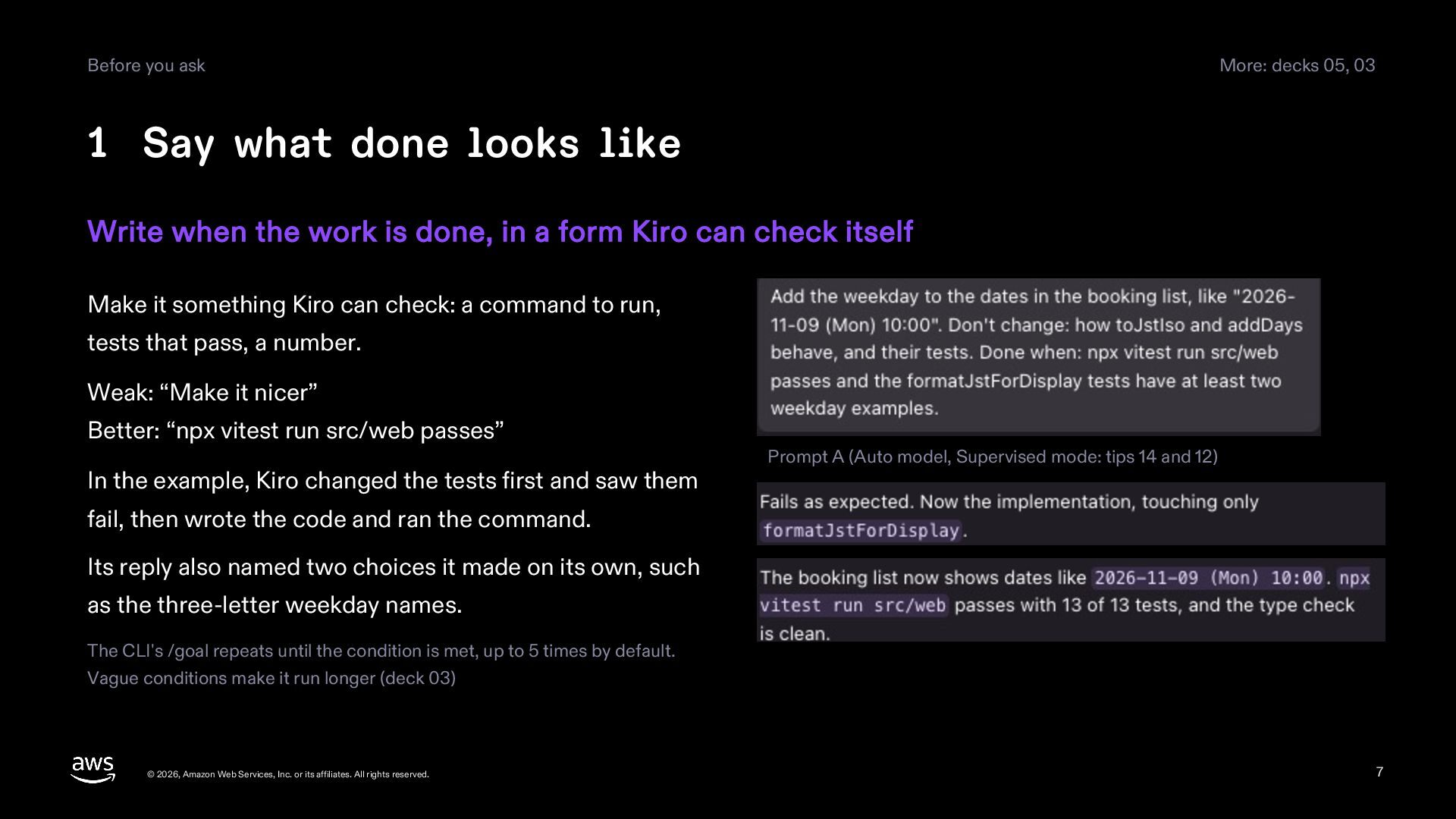
  7. Before you ask More: decks 05, 03 1 Say what

    done looks like Write when the work is done, in a form Kiro can check itself Make it something Kiro can check: a command to run, tests that pass, a number. Weak: “Make it nicer” Better: “npx vitest run src/web passes” In the example, Kiro changed the tests first and saw them Prompt A (Auto model, Supervised mode: tips 14 and 12) fail, then wrote the code and ran the command. Its reply also named two choices it made on its own, such as the three-letter weekday names. The CLI's /goal repeats until the condition is met, up to 5 times by default. Vague conditions make it run longer (deck 03) © 2026, Amazon Web Services, Inc. or its affiliates. All rights reserved. 7
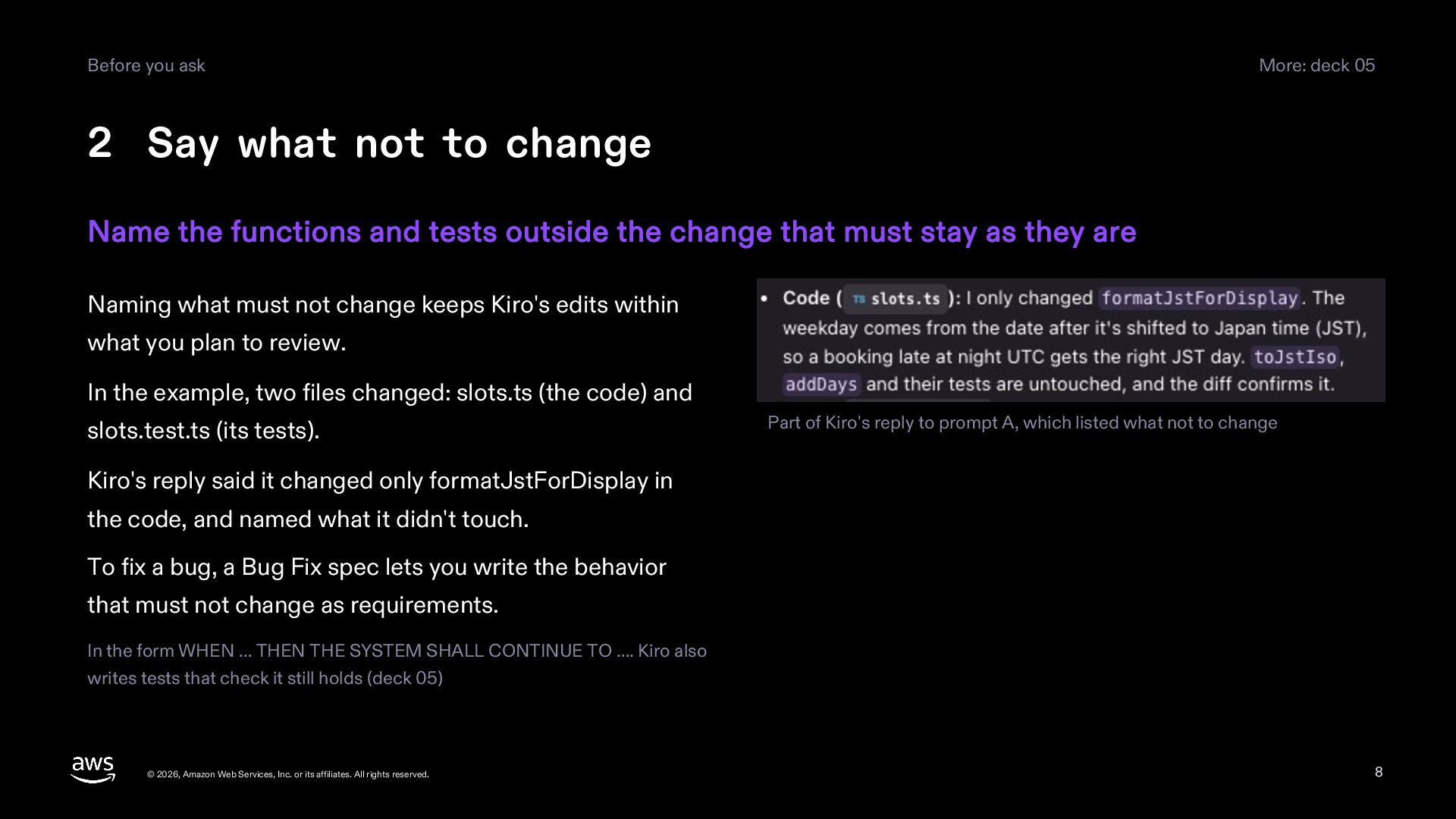
  8. Before you ask More: deck 05 2 Say what not

    to change Name the functions and tests outside the change that must stay as they are Naming what must not change keeps Kiro's edits within what you plan to review. In the example, two files changed: slots.ts (the code) and slots.test.ts (its tests). Part of Kiro's reply to prompt A, which listed what not to change Kiro's reply said it changed only formatJstForDisplay in the code, and named what it didn't touch. To fix a bug, a Bug Fix spec lets you write the behavior that must not change as requirements. In the form WHEN … THEN THE SYSTEM SHALL CONTINUE TO …. Kiro also writes tests that check it still holds (deck 05) © 2026, Amazon Web Services, Inc. or its affiliates. All rights reserved. 8
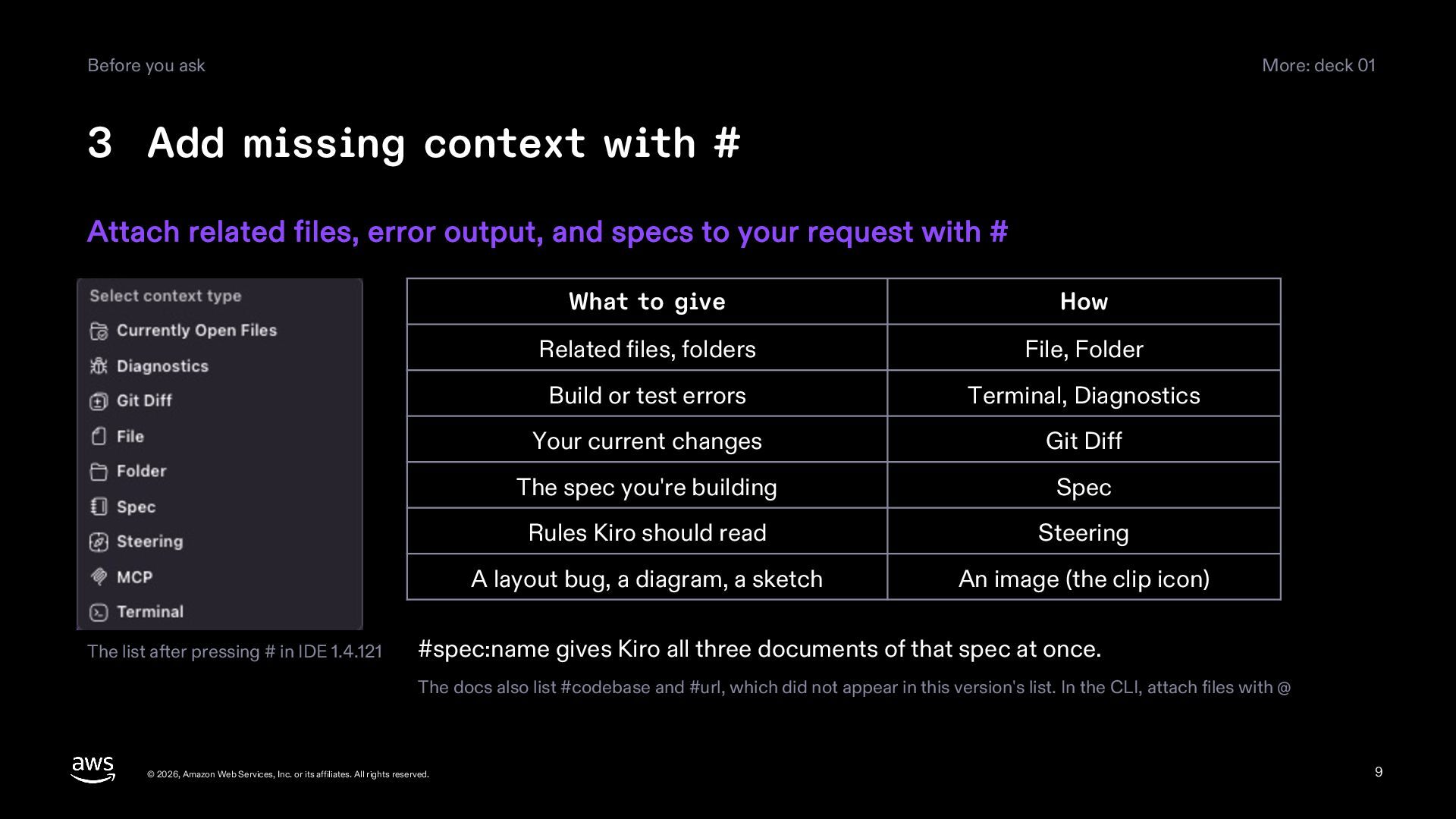
  9. Before you ask More: deck 01 3 Add missing context

    with # Attach related files, error output, and specs to your request with # The list after pressing # in IDE 1.4.121 What to give How Related files, folders File, Folder Build or test errors Terminal, Diagnostics Your current changes Git Diff The spec you're building Spec Rules Kiro should read Steering A layout bug, a diagram, a sketch An image (the clip icon) #spec:name gives Kiro all three documents of that spec at once. The docs also list #codebase and #url, which did not appear in this version's list. In the CLI, attach files with @ © 2026, Amazon Web Services, Inc. or its affiliates. All rights reserved. 9
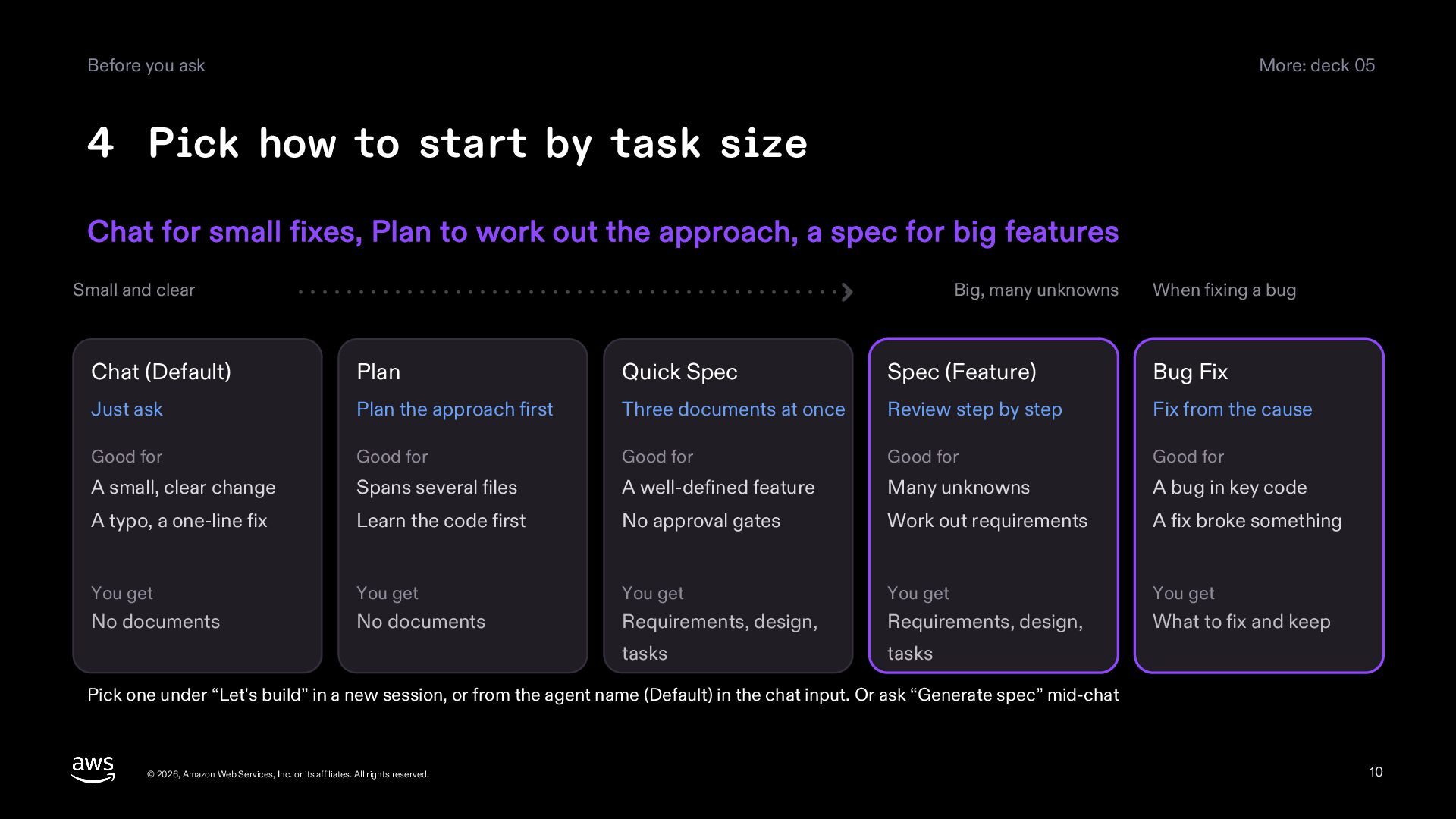
  10. Before you ask More: deck 05 4 Pick how to

    start by task size Chat for small fixes, Plan to work out the approach, a spec for big features Small and clear Big, many unknowns When fixing a bug Chat (Default) Plan Quick Spec Spec (Feature) Bug Fix Just ask Plan the approach first Three documents at once Review step by step Fix from the cause Good for Good for Good for Good for Good for A small, clear change Spans several files A well-defined feature Many unknowns A bug in key code A typo, a one-line fix Learn the code first No approval gates Work out requirements A fix broke something You get You get You get You get You get No documents No documents Requirements, design, Requirements, design, What to fix and keep tasks tasks Pick one under “Let's build” in a new session, or from the agent name (Default) in the chat input. Or ask “Generate spec” mid-chat © 2026, Amazon Web Services, Inc. or its affiliates. All rights reserved. 10
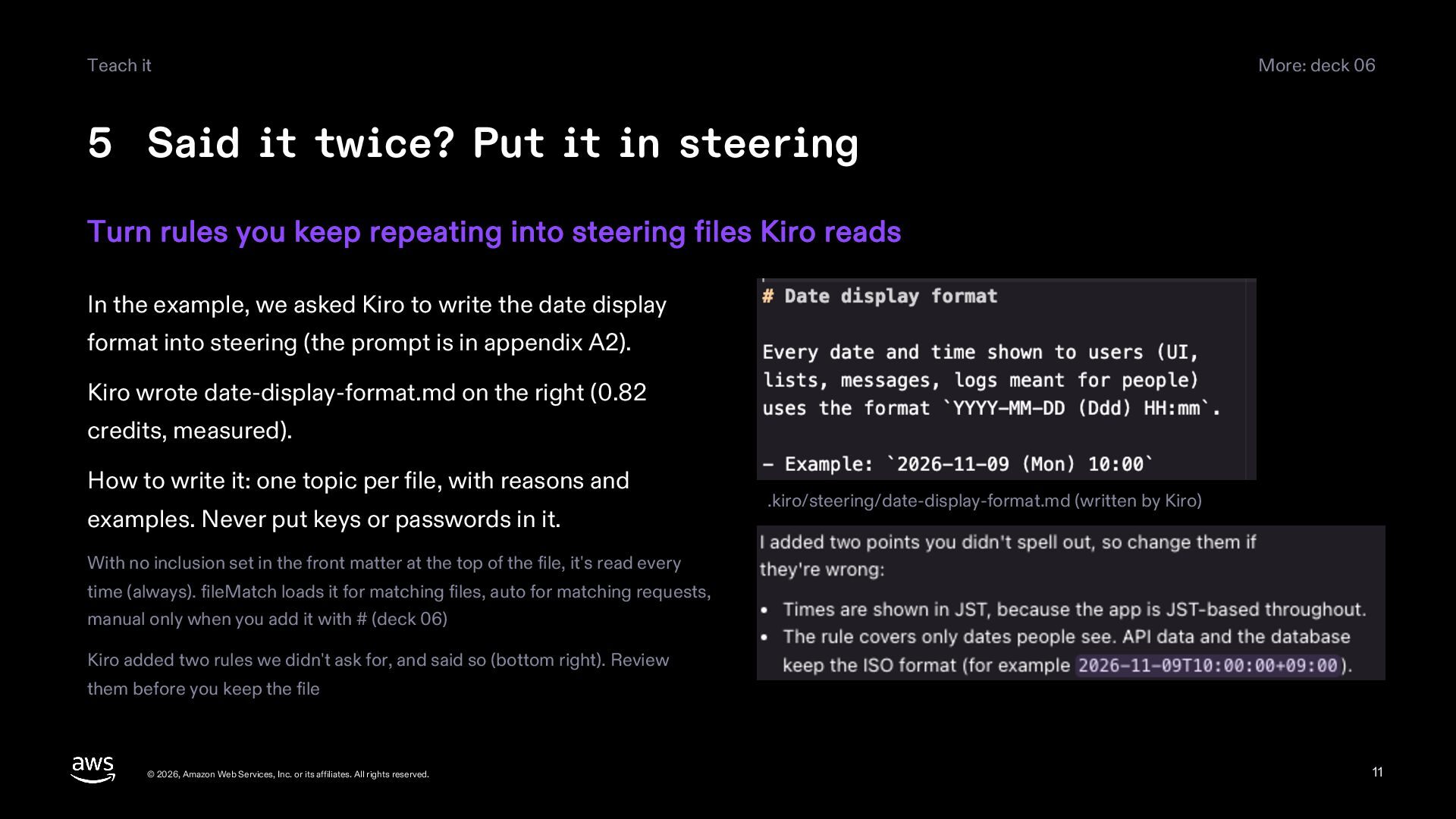
  11. Teach it More: deck 06 5 Said it twice? Put

    it in steering Turn rules you keep repeating into steering files Kiro reads In the example, we asked Kiro to write the date display format into steering (the prompt is in appendix A2). Kiro wrote date-display-format.md on the right (0.82 credits, measured). How to write it: one topic per file, with reasons and examples. Never put keys or passwords in it. .kiro/steering/date-display-format.md (written by Kiro) With no inclusion set in the front matter at the top of the file, it's read every time (always). fileMatch loads it for matching files, auto for matching requests, manual only when you add it with # (deck 06) Kiro added two rules we didn't ask for, and said so (bottom right). Review them before you keep the file © 2026, Amazon Web Services, Inc. or its affiliates. All rights reserved. 11
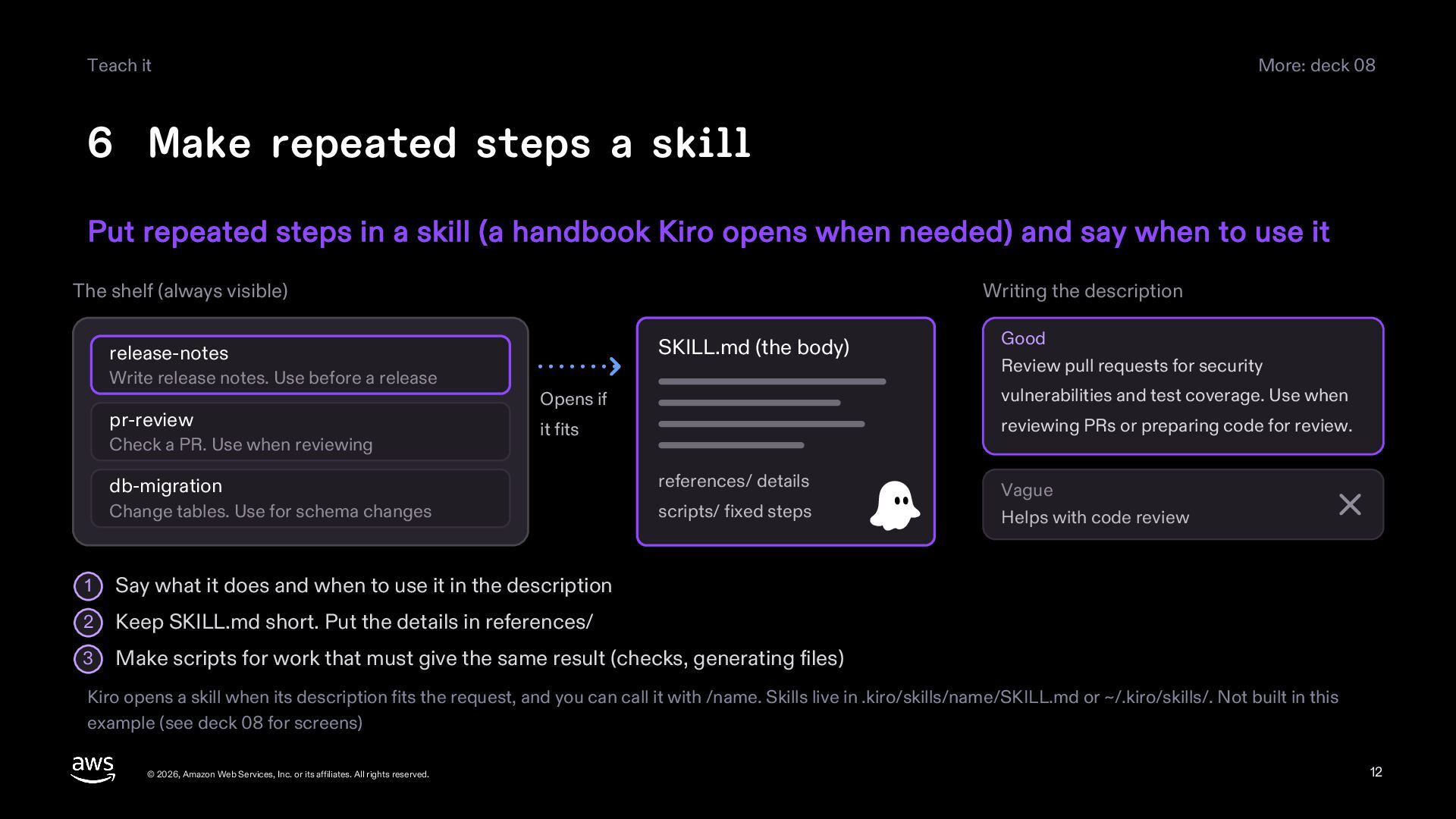
  12. Teach it More: deck 08 6 Make repeated steps a

    skill Put repeated steps in a skill (a handbook Kiro opens when needed) and say when to use it The shelf (always visible) Writing the description SKILL.md (the body) release-notes Write release notes. Use before a release pr-review Check a PR. Use when reviewing Good Review pull requests for security Opens if vulnerabilities and test coverage. Use when it fits reviewing PRs or preparing code for review. db-migration references/ details Change tables. Use for schema changes scripts/ fixed steps 1 Say what it does and when to use it in the description 2 Keep SKILL.md short. Put the details in references/ 3 Make scripts for work that must give the same result (checks, generating files) Vague Helps with code review Kiro opens a skill when its description fits the request, and you can call it with /name. Skills live in .kiro/skills/name/SKILL.md or ~/.kiro/skills/. Not built in this example (see deck 08 for screens) © 2026, Amazon Web Services, Inc. or its affiliates. All rights reserved. 12
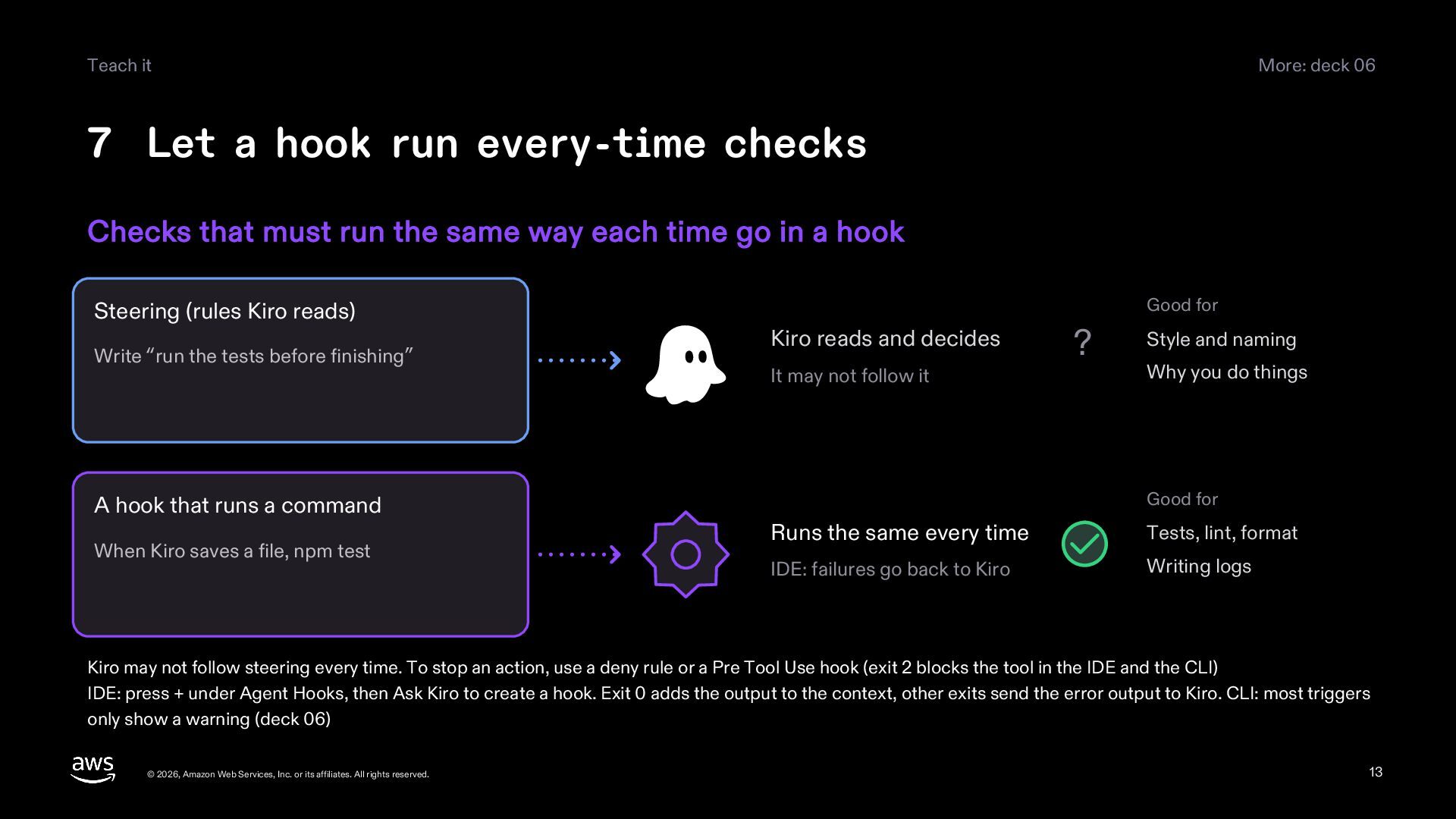
  13. Teach it More: deck 06 7 Let a hook run

    every-time checks Checks that must run the same way each time go in a hook Steering (rules Kiro reads) Write “run the tests before finishing” A hook that runs a command When Kiro saves a file, npm test Good for Kiro reads and decides It may not follow it ? Style and naming Why you do things Good for Runs the same every time Tests, lint, format IDE: failures go back to Kiro Writing logs Kiro may not follow steering every time. To stop an action, use a deny rule or a Pre Tool Use hook (exit 2 blocks the tool in the IDE and the CLI) IDE: press + under Agent Hooks, then Ask Kiro to create a hook. Exit 0 adds the output to the context, other exits send the error output to Kiro. CLI: most triggers only show a warning (deck 06) © 2026, Amazon Web Services, Inc. or its affiliates. All rights reserved. 13
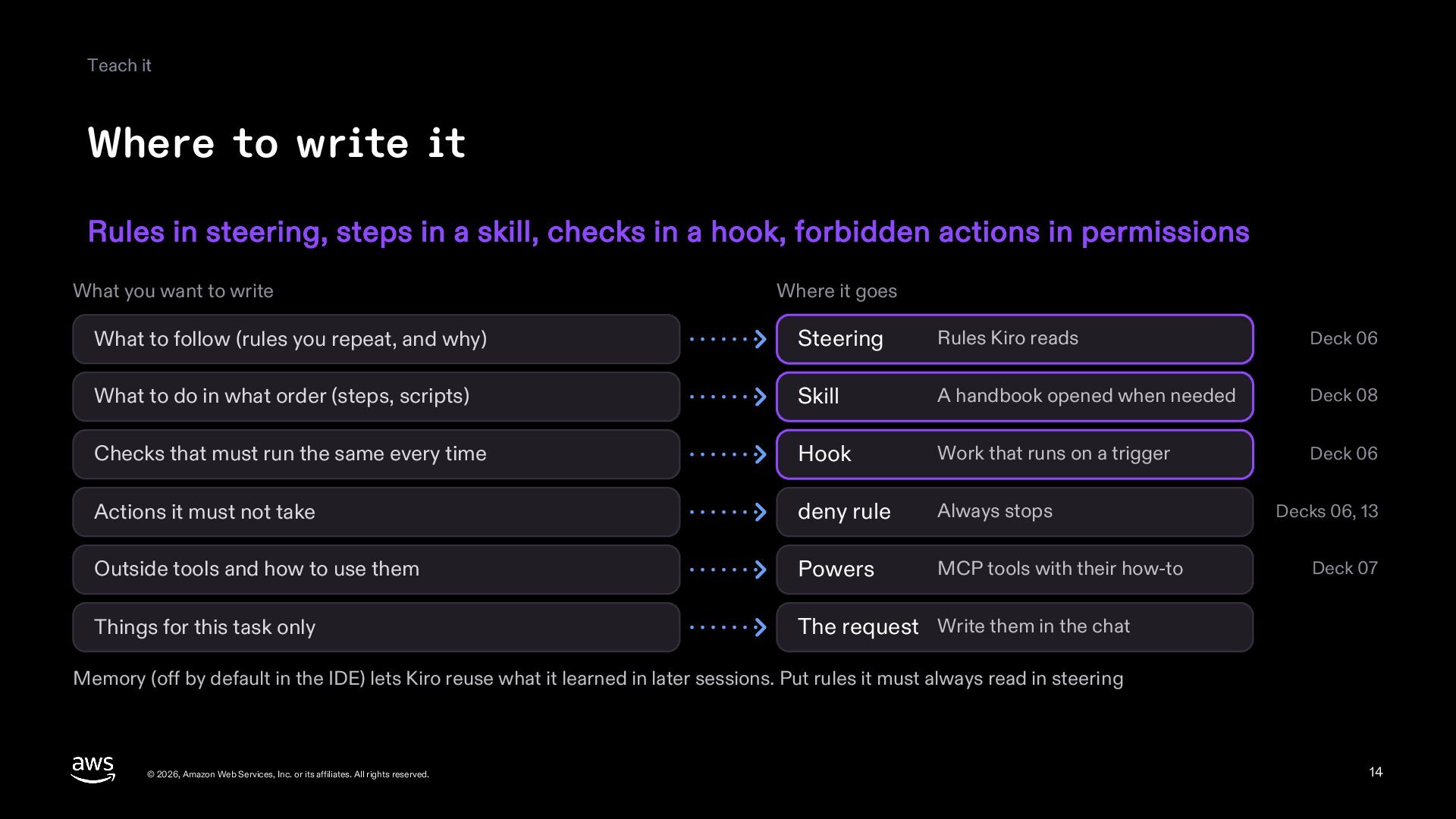
  14. Teach it Where to write it Rules in steering, steps

    in a skill, checks in a hook, forbidden actions in permissions What you want to write Where it goes What to follow (rules you repeat, and why) Steering Rules Kiro reads Deck 06 What to do in what order (steps, scripts) Skill A handbook opened when needed Deck 08 Checks that must run the same every time Hook Work that runs on a trigger Deck 06 Actions it must not take deny rule Always stops Outside tools and how to use them Powers MCP tools with their how-to Things for this task only The request Write them in the chat Decks 06, 13 Deck 07 Memory (off by default in the IDE) lets Kiro reuse what it learned in later sessions. Put rules it must always read in steering © 2026, Amazon Web Services, Inc. or its affiliates. All rights reserved. 14
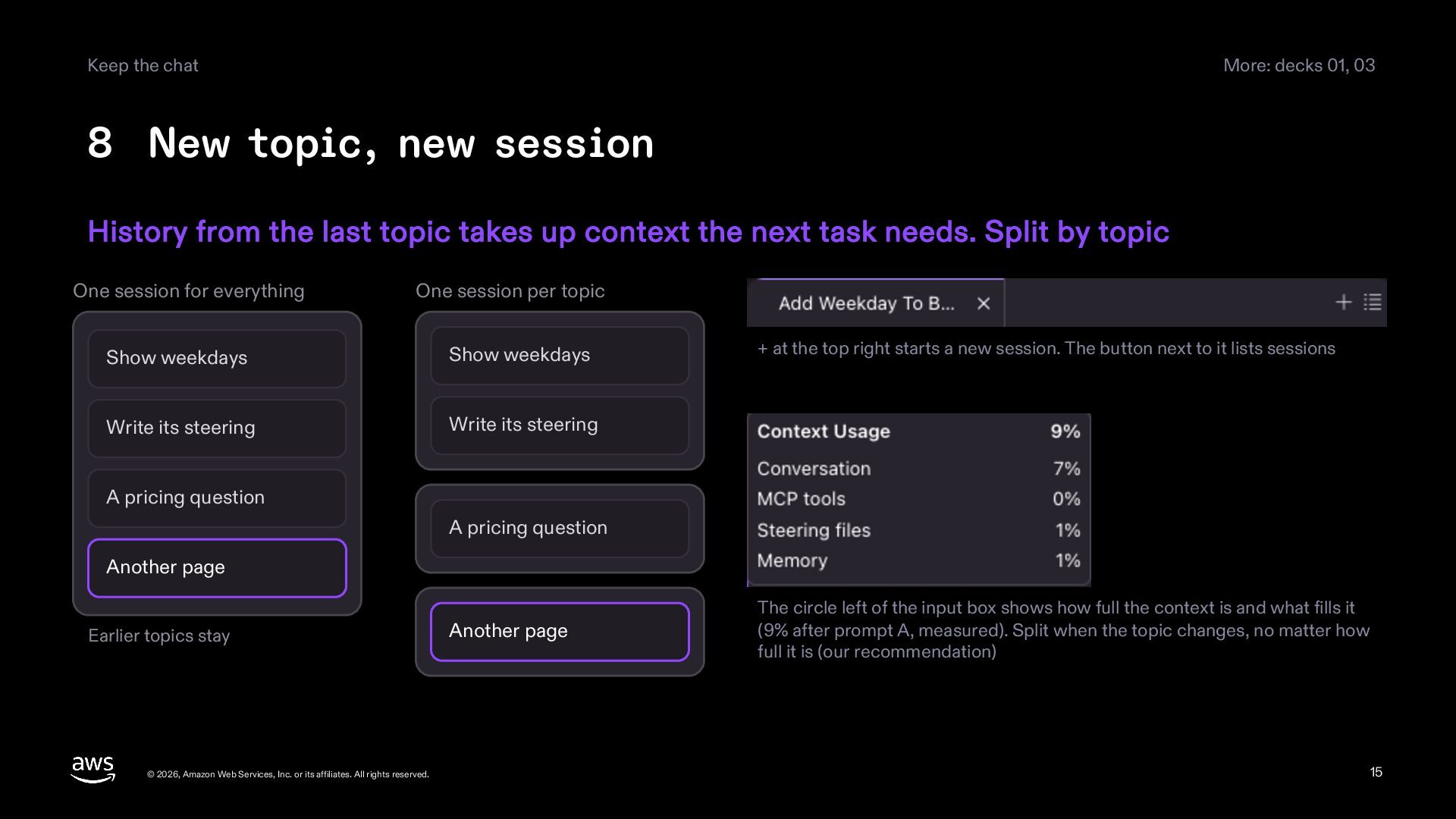
  15. Keep the chat More: decks 01, 03 8 New topic,

    new session History from the last topic takes up context the next task needs. Split by topic One session for everything One session per topic Show weekdays Show weekdays Write its steering Write its steering + at the top right starts a new session. The button next to it lists sessions A pricing question A pricing question Another page Earlier topics stay © 2026, Amazon Web Services, Inc. or its affiliates. All rights reserved. Another page The circle left of the input box shows how full the context is and what fills it (9% after prompt A, measured). Split when the topic changes, no matter how full it is (our recommendation) 15
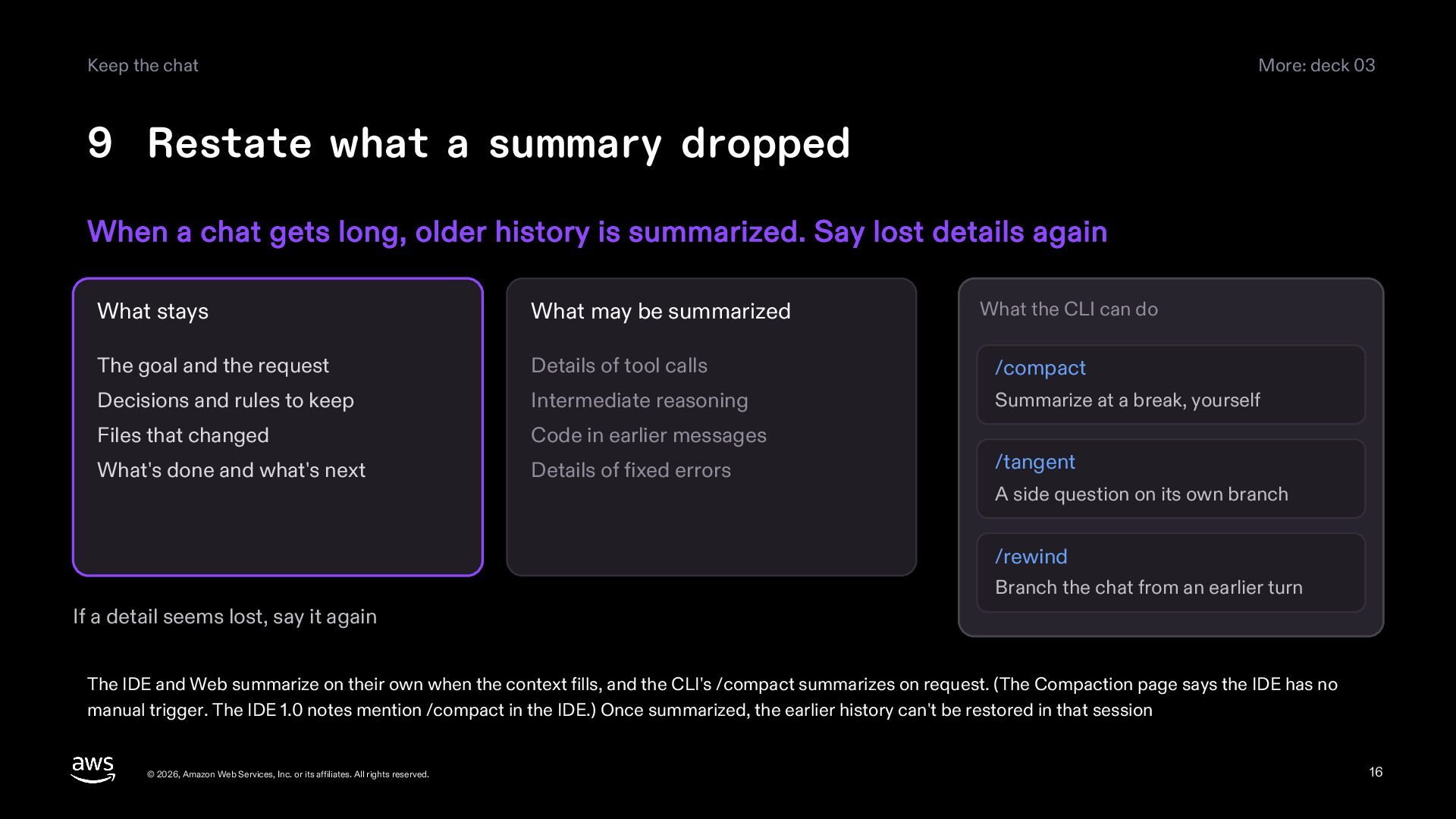
  16. Keep the chat More: deck 03 9 Restate what a

    summary dropped When a chat gets long, older history is summarized. Say lost details again What the CLI can do What stays What may be summarized The goal and the request Details of tool calls /compact Decisions and rules to keep Intermediate reasoning Summarize at a break, yourself Files that changed Code in earlier messages What's done and what's next Details of fixed errors /tangent A side question on its own branch /rewind Branch the chat from an earlier turn If a detail seems lost, say it again The IDE and Web summarize on their own when the context fills, and the CLI's /compact summarizes on request. (The Compaction page says the IDE has no manual trigger. The IDE 1.0 notes mention /compact in the IDE.) Once summarized, the earlier history can't be restored in that session © 2026, Amazon Web Services, Inc. or its affiliates. All rights reserved. 16
  17. Keep the chat More: deck 08 10 Hand wide searches

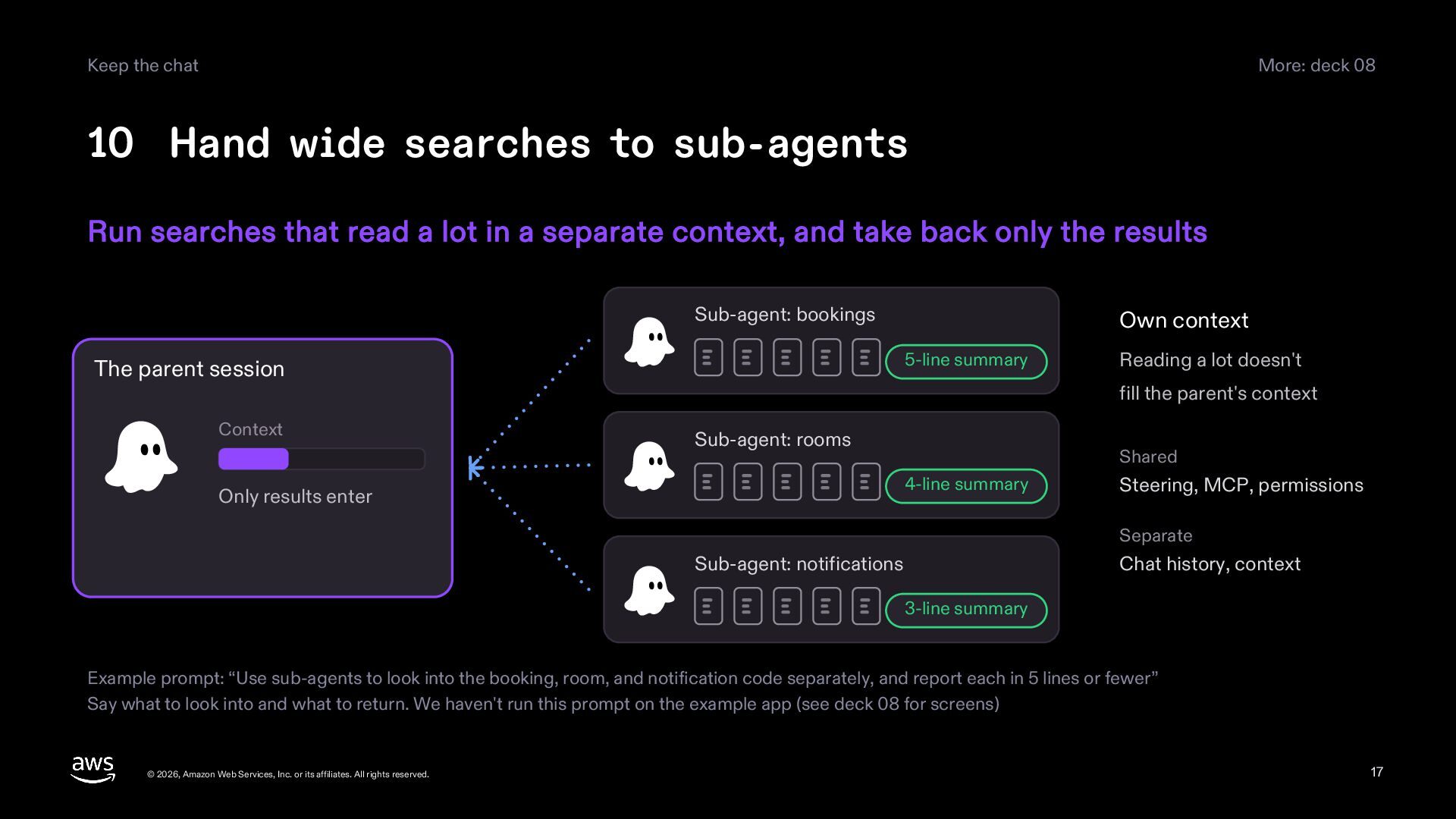
    to sub-agents Run searches that read a lot in a separate context, and take back only the results Sub-agent: bookings 5-line summary The parent session Context Own context Reading a lot doesn't fill the parent's context Sub-agent: rooms Shared 4-line summary Only results enter Steering, MCP, permissions Separate Sub-agent: notifications Chat history, context 3-line summary Example prompt: “Use sub-agents to look into the booking, room, and notification code separately, and report each in 5 lines or fewer” Say what to look into and what to return. We haven't run this prompt on the example app (see deck 08 for screens) © 2026, Amazon Web Services, Inc. or its affiliates. All rights reserved. 17
  18. Delegate, undo More: deck 01 11 Stop when it drifts,

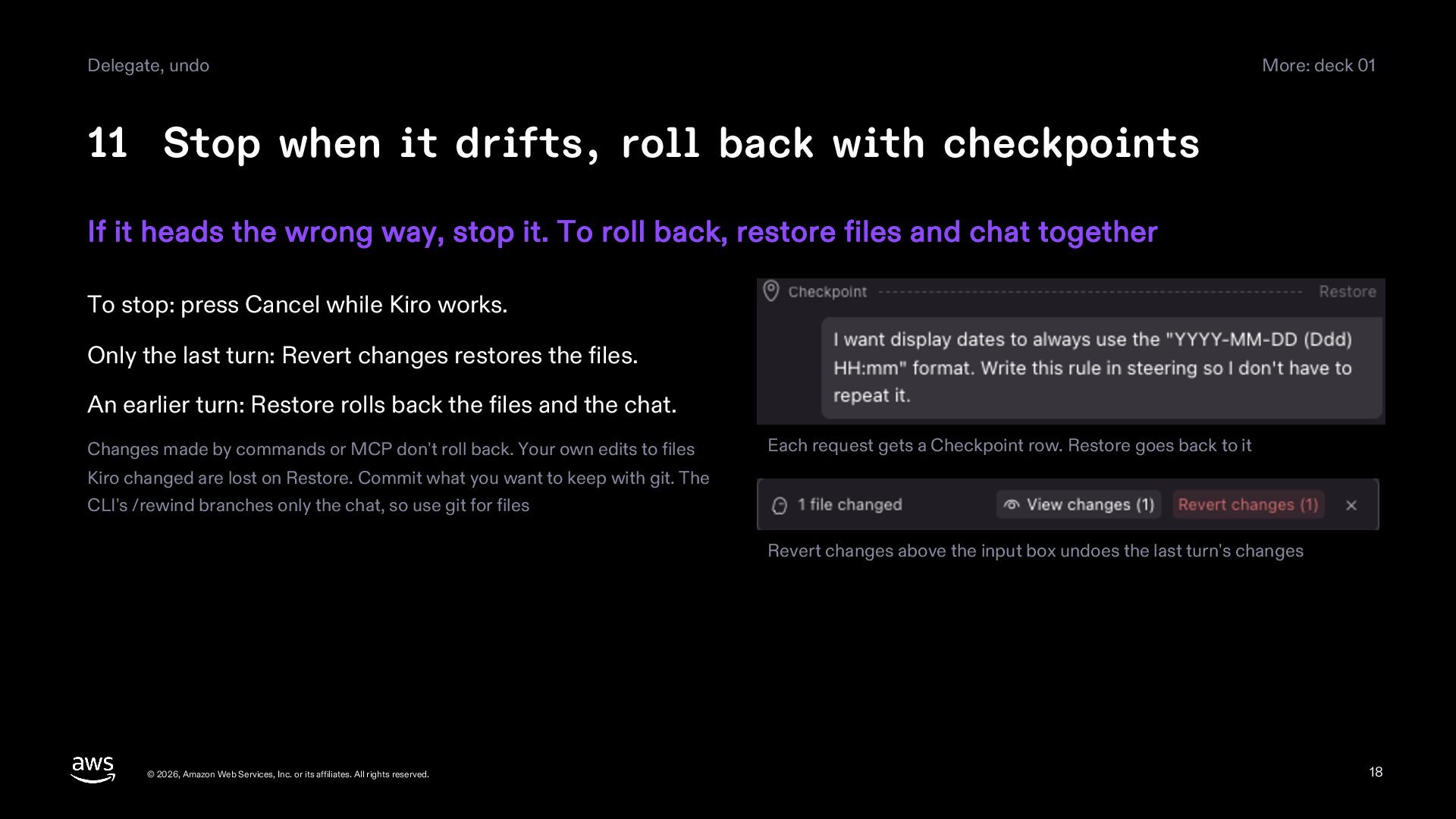
    roll back with checkpoints If it heads the wrong way, stop it. To roll back, restore files and chat together To stop: press Cancel while Kiro works. Only the last turn: Revert changes restores the files. An earlier turn: Restore rolls back the files and the chat. Changes made by commands or MCP don't roll back. Your own edits to files Each request gets a Checkpoint row. Restore goes back to it Kiro changed are lost on Restore. Commit what you want to keep with git. The CLI's /rewind branches only the chat, so use git for files Revert changes above the input box undoes the last turn's changes © 2026, Amazon Web Services, Inc. or its affiliates. All rights reserved. 18
  19. Delegate, undo More: deck 01 12 Choose Autopilot or Supervised

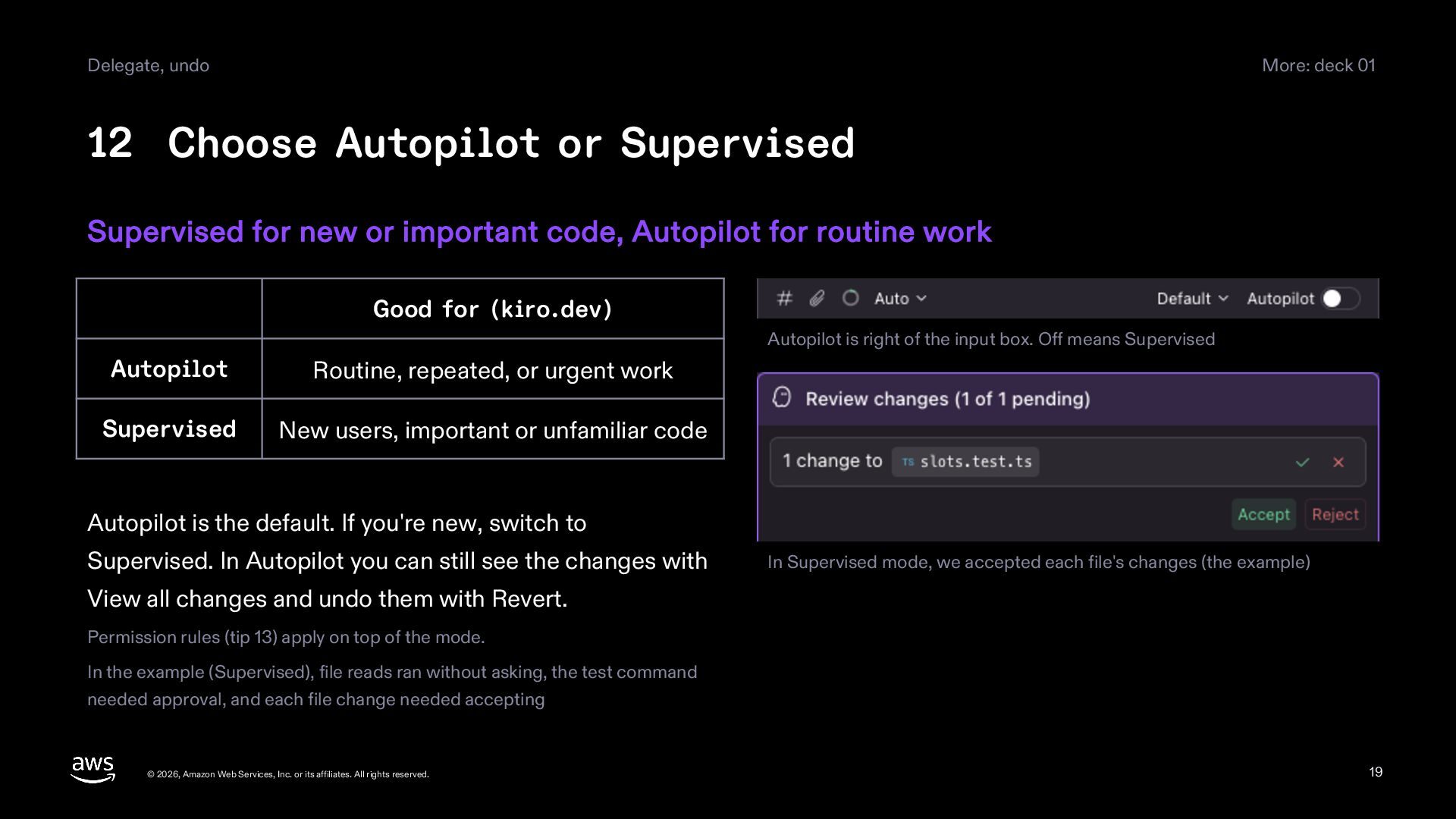
    Supervised for new or important code, Autopilot for routine work Good for (kiro.dev) Autopilot is right of the input box. Off means Supervised Autopilot Routine, repeated, or urgent work Supervised New users, important or unfamiliar code Autopilot is the default. If you're new, switch to Supervised. In Autopilot you can still see the changes with In Supervised mode, we accepted each file's changes (the example) View all changes and undo them with Revert. Permission rules (tip 13) apply on top of the mode. In the example (Supervised), file reads ran without asking, the test command needed approval, and each file change needed accepting © 2026, Amazon Web Services, Inc. or its affiliates. All rights reserved. 19
  20. Delegate, undo More: decks 06, 13 13 Asked often? Allow

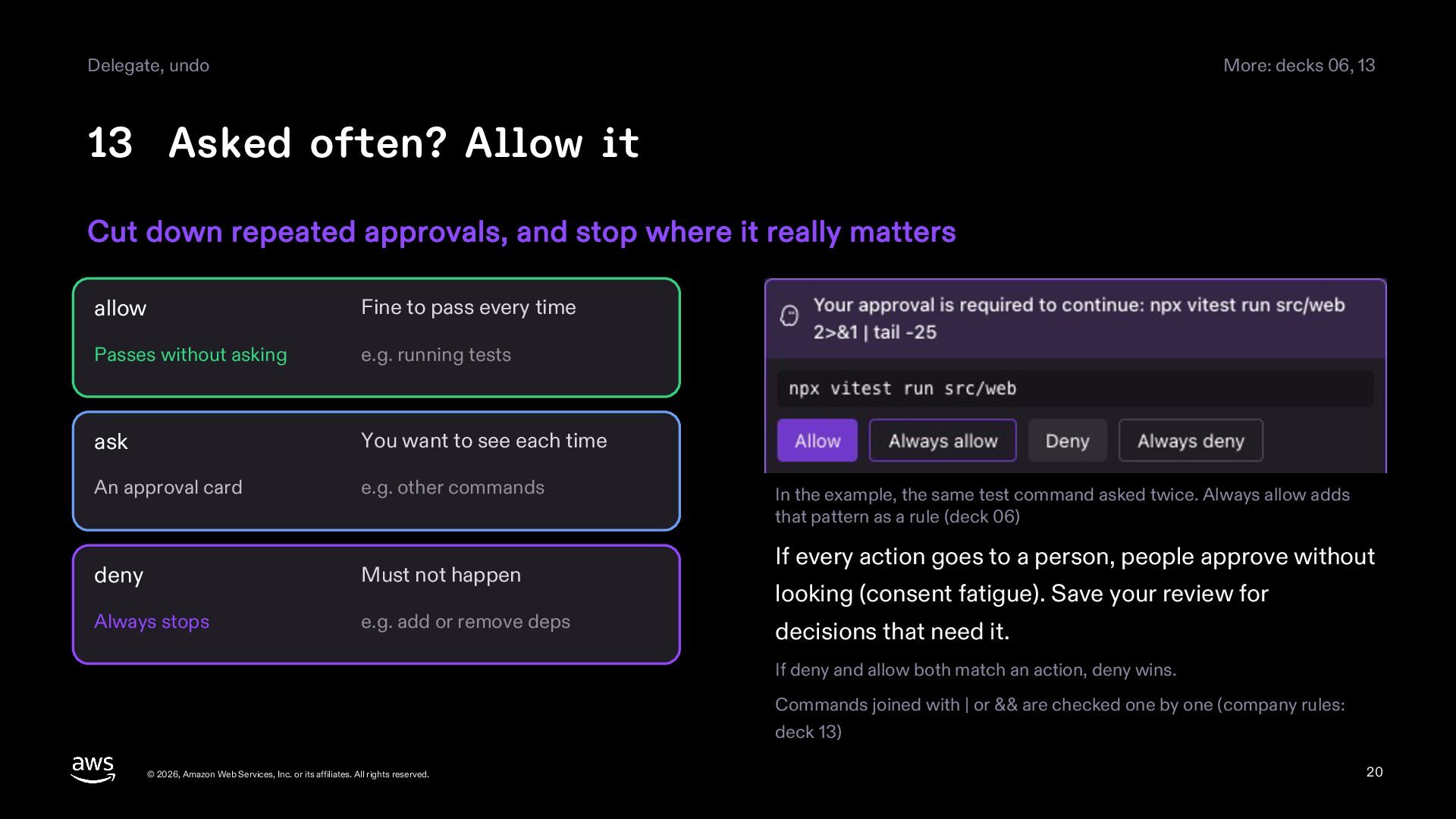
    it Cut down repeated approvals, and stop where it really matters allow Fine to pass every time Passes without asking e.g. running tests ask You want to see each time An approval card e.g. other commands deny Must not happen Always stops e.g. add or remove deps In the example, the same test command asked twice. Always allow adds that pattern as a rule (deck 06) If every action goes to a person, people approve without looking (consent fatigue). Save your review for decisions that need it. If deny and allow both match an action, deny wins. Commands joined with | or && are checked one by one (company rules: deck 13) © 2026, Amazon Web Services, Inc. or its affiliates. All rights reserved. 20
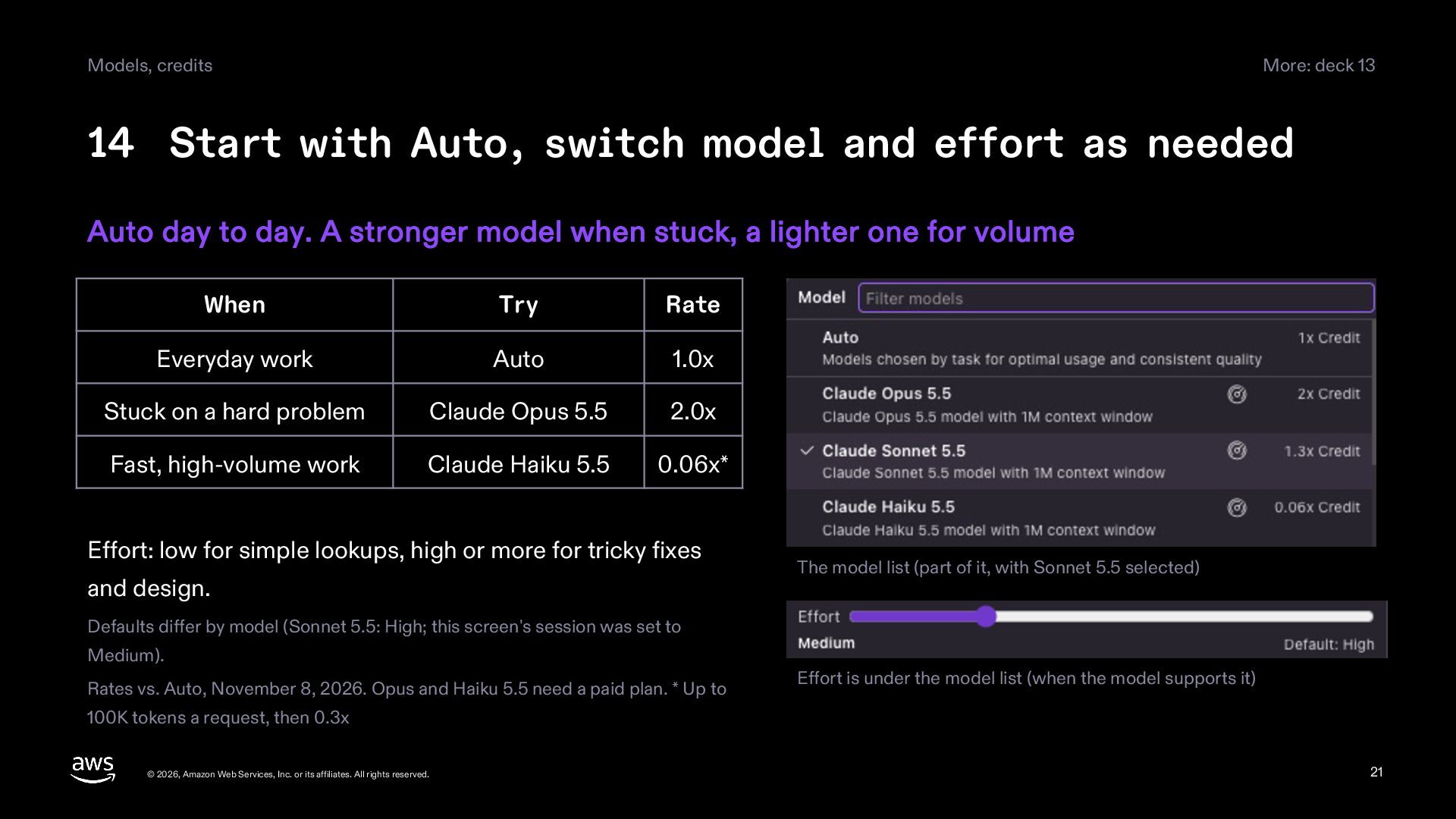
  21. Models, credits More: deck 13 14 Start with Auto, switch

    model and effort as needed Auto day to day. A stronger model when stuck, a lighter one for volume When Try Rate Everyday work Auto 1.0x Stuck on a hard problem Claude Opus 5.5 2.0x Fast, high-volume work Claude Haiku 5.5 0.06x* Effort: low for simple lookups, high or more for tricky fixes and design. The model list (part of it, with Sonnet 5.5 selected) Defaults differ by model (Sonnet 5.5: High; this screen's session was set to Medium). Rates vs. Auto, November 8, 2026. Opus and Haiku 5.5 need a paid plan. * Up to Effort is under the model list (when the model supports it) 100K tokens a request, then 0.3x © 2026, Amazon Web Services, Inc. or its affiliates. All rights reserved. 21
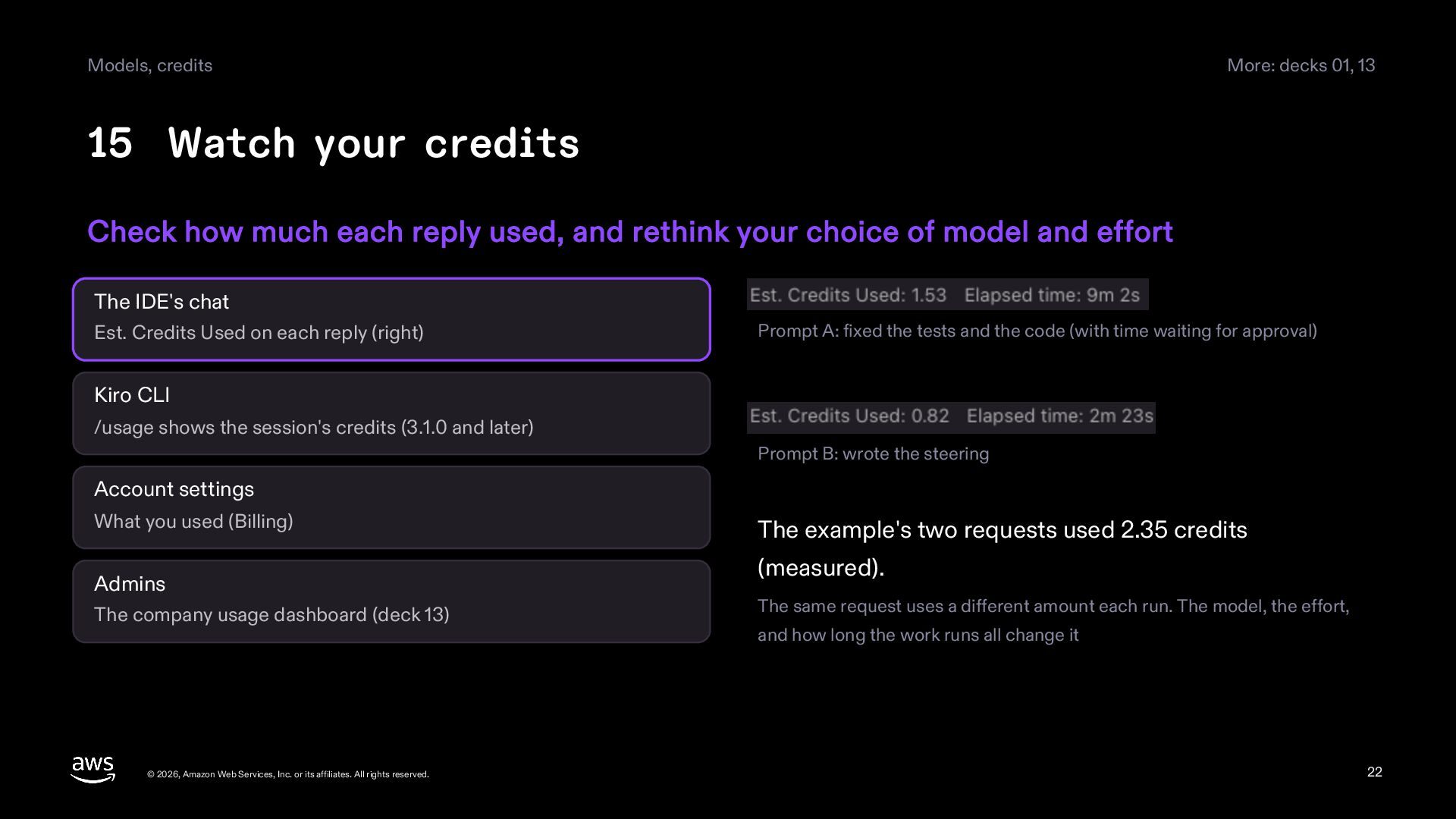
  22. Models, credits More: decks 01, 13 15 Watch your credits

    Check how much each reply used, and rethink your choice of model and effort The IDE's chat Est. Credits Used on each reply (right) Prompt A: fixed the tests and the code (with time waiting for approval) Kiro CLI /usage shows the session's credits (3.1.0 and later) Prompt B: wrote the steering Account settings What you used (Billing) Admins The company usage dashboard (deck 13) © 2026, Amazon Web Services, Inc. or its affiliates. All rights reserved. The example's two requests used 2.35 credits (measured). The same request uses a different amount each run. The model, the effort, and how long the work runs all change it 22
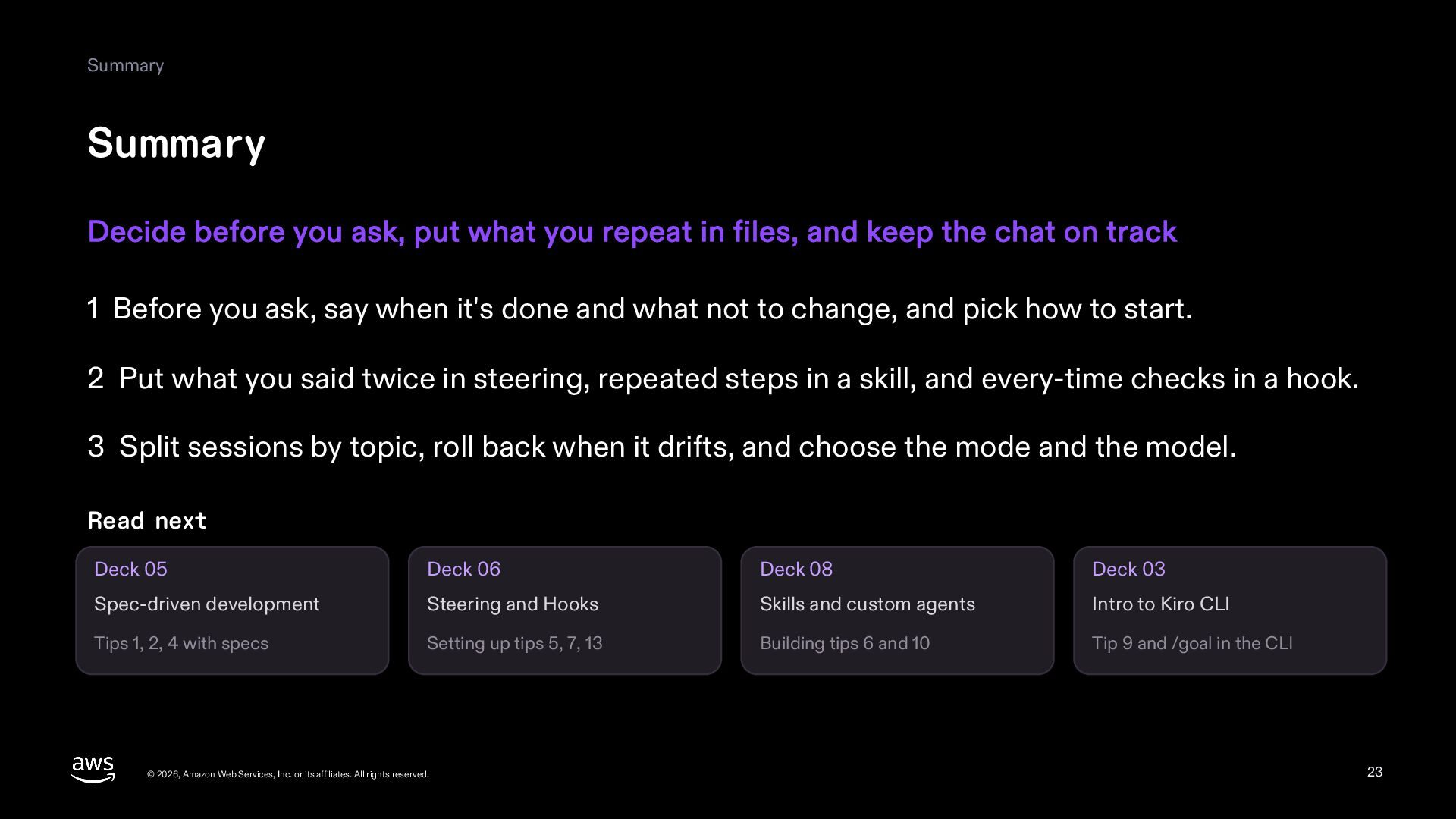
  23. Summary Summary Decide before you ask, put what you repeat

    in files, and keep the chat on track 1 Before you ask, say when it's done and what not to change, and pick how to start. 2 Put what you said twice in steering, repeated steps in a skill, and every-time checks in a hook. 3 Split sessions by topic, roll back when it drifts, and choose the mode and the model. Read next Deck 05 Deck 06 Deck 08 Deck 03 Spec-driven development Steering and Hooks Skills and custom agents Intro to Kiro CLI Tips 1, 2, 4 with specs Setting up tips 5, 7, 13 Building tips 6 and 10 Tip 9 and /goal in the CLI © 2026, Amazon Web Services, Inc. or its affiliates. All rights reserved. 23
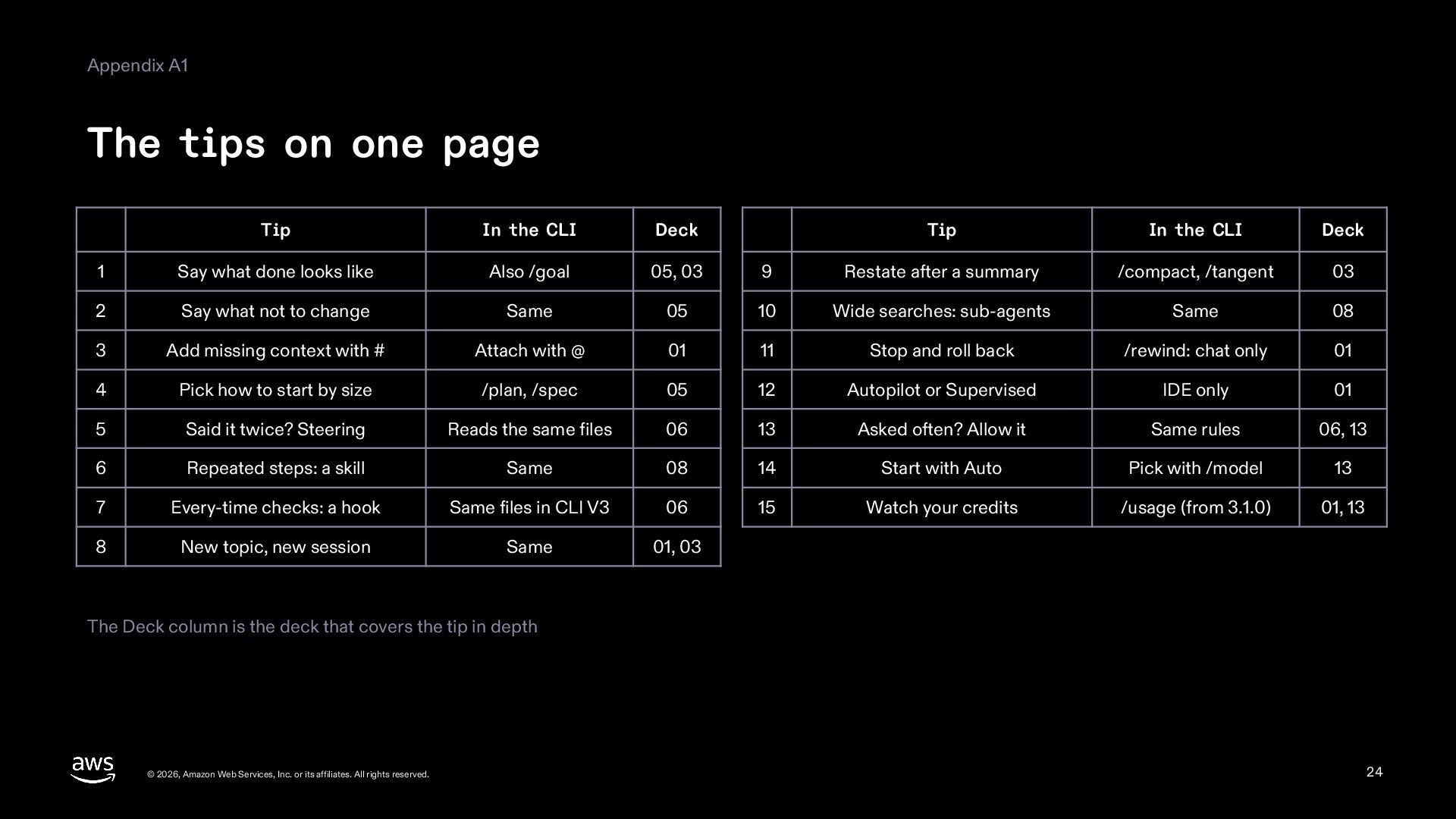
  24. Appendix A1 The tips on one page Tip In the

    CLI Deck Tip In the CLI Deck 1 Say what done looks like Also /goal 05, 03 9 Restate after a summary /compact, /tangent 03 2 Say what not to change Same 05 10 Wide searches: sub-agents Same 08 3 Add missing context with # Attach with @ 01 11 Stop and roll back /rewind: chat only 01 4 Pick how to start by size /plan, /spec 05 12 Autopilot or Supervised IDE only 01 5 Said it twice? Steering Reads the same files 06 13 Asked often? Allow it Same rules 06, 13 6 Repeated steps: a skill Same 08 14 Start with Auto Pick with /model 13 7 Every-time checks: a hook Same files in CLI V3 06 15 Watch your credits /usage (from 3.1.0) 01, 13 8 New topic, new session Same 01, 03 The Deck column is the deck that covers the tip in depth © 2026, Amazon Web Services, Inc. or its affiliates. All rights reserved. 24
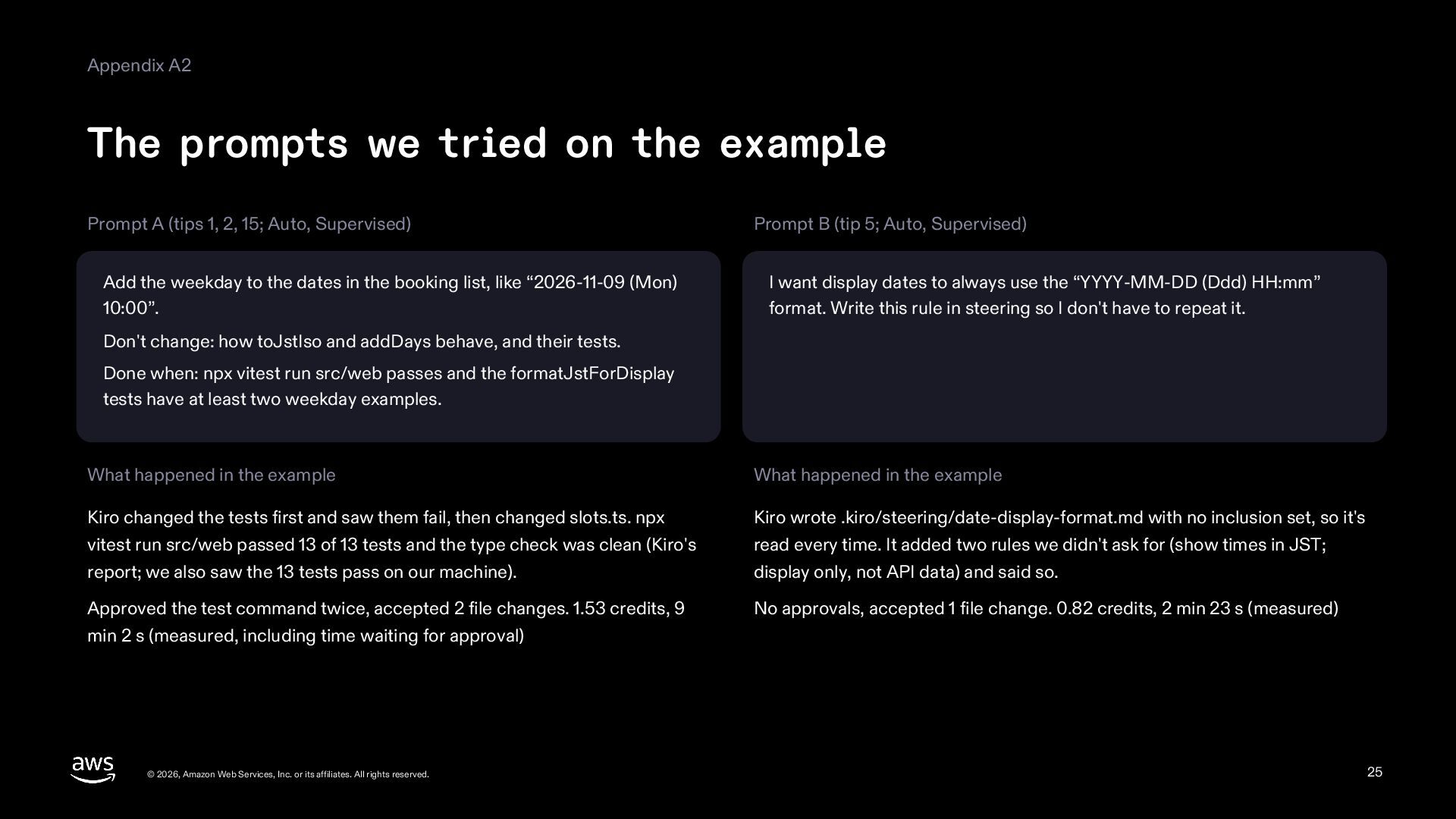
  25. Appendix A2 The prompts we tried on the example Prompt

    A (tips 1, 2, 15; Auto, Supervised) Add the weekday to the dates in the booking list, like “2026-11-09 (Mon) 10:00”. Prompt B (tip 5; Auto, Supervised) I want display dates to always use the “YYYY-MM-DD (Ddd) HH:mm” format. Write this rule in steering so I don't have to repeat it. Don't change: how toJstIso and addDays behave, and their tests. Done when: npx vitest run src/web passes and the formatJstForDisplay tests have at least two weekday examples. What happened in the example What happened in the example Kiro changed the tests first and saw them fail, then changed slots.ts. npx vitest run src/web passed 13 of 13 tests and the type check was clean (Kiro's report; we also saw the 13 tests pass on our machine). Kiro wrote .kiro/steering/date-display-format.md with no inclusion set, so it's read every time. It added two rules we didn't ask for (show times in JST; display only, not API data) and said so. Approved the test command twice, accepted 2 file changes. 1.53 credits, 9 min 2 s (measured, including time waiting for approval) No approvals, accepted 1 file change. 0.82 credits, 2 min 23 s (measured) © 2026, Amazon Web Services, Inc. or its affiliates. All rights reserved. 25
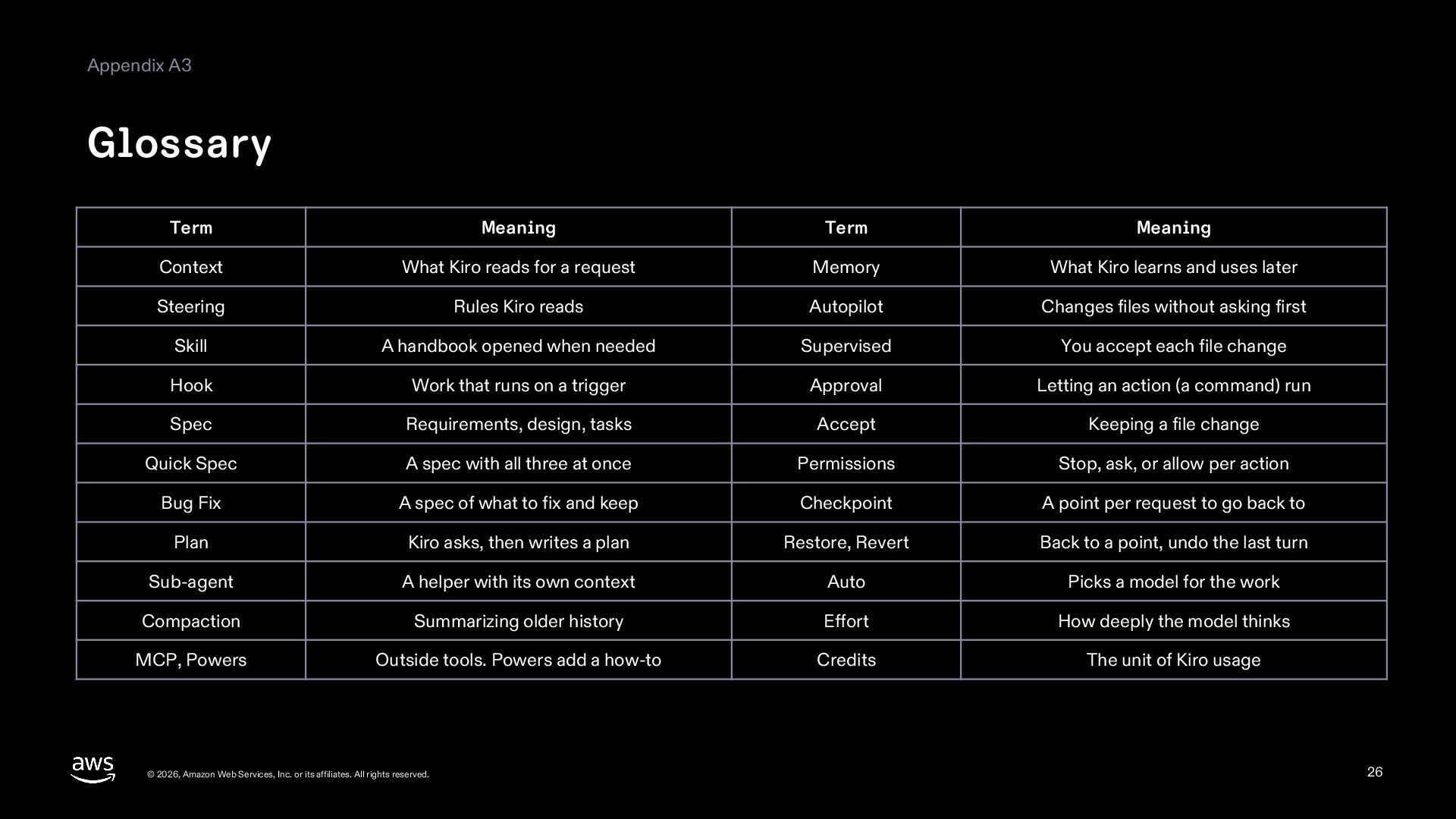
  26. Appendix A3 Glossary Term Meaning Term Meaning Context What Kiro

    reads for a request Memory What Kiro learns and uses later Steering Rules Kiro reads Autopilot Changes files without asking first Skill A handbook opened when needed Supervised You accept each file change Hook Work that runs on a trigger Approval Letting an action (a command) run Spec Requirements, design, tasks Accept Keeping a file change Quick Spec A spec with all three at once Permissions Stop, ask, or allow per action Bug Fix A spec of what to fix and keep Checkpoint A point per request to go back to Plan Kiro asks, then writes a plan Restore, Revert Back to a point, undo the last turn Sub-agent A helper with its own context Auto Picks a model for the work Compaction Summarizing older history Effort How deeply the model thinks MCP, Powers Outside tools. Powers add a how-to Credits The unit of Kiro usage © 2026, Amazon Web Services, Inc. or its affiliates. All rights reserved. 26
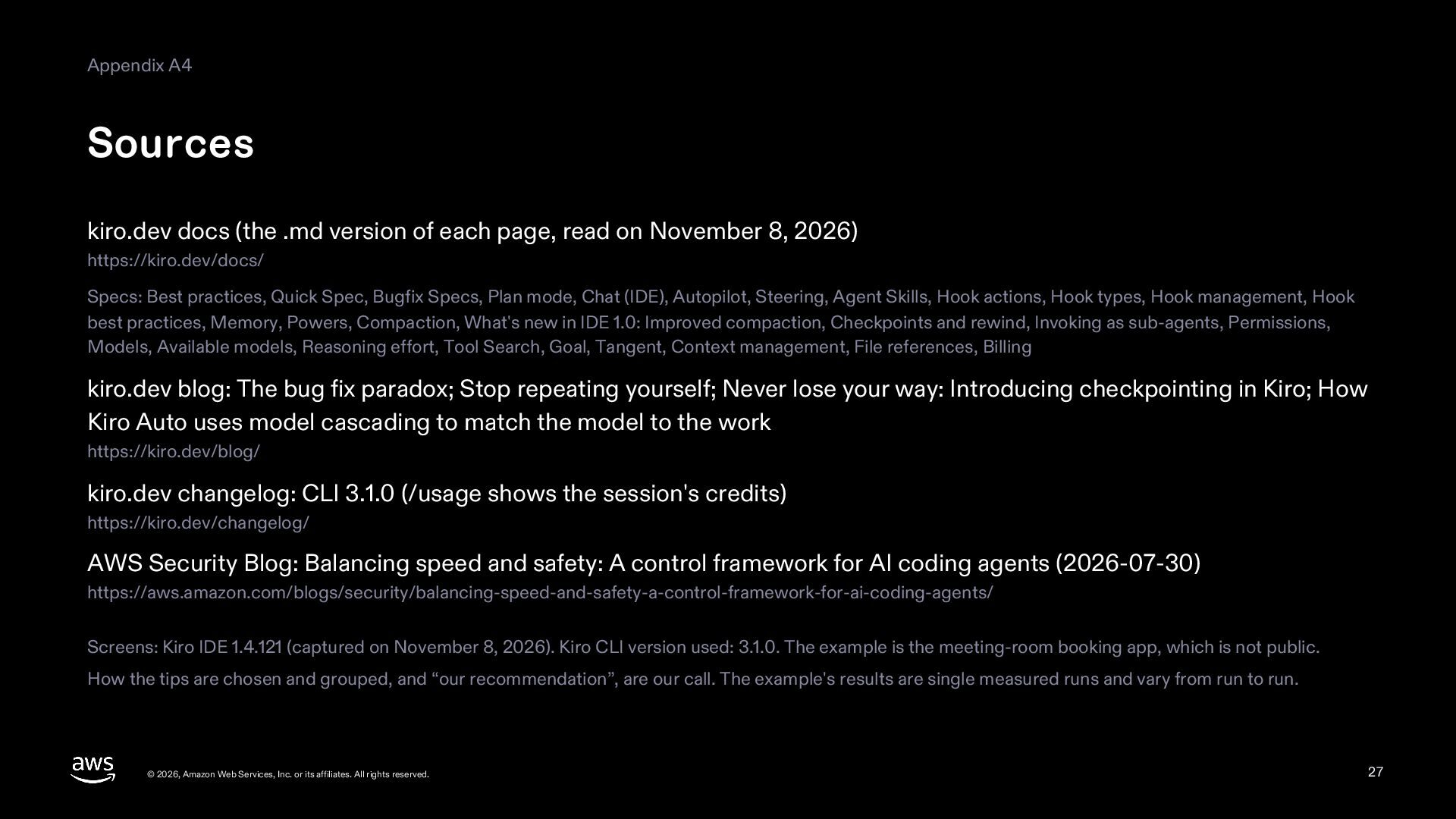
  27. Appendix A4 Sources kiro.dev docs (the .md version of each

    page, read on November 8, 2026) https://kiro.dev/docs/ Specs: Best practices, Quick Spec, Bugfix Specs, Plan mode, Chat (IDE), Autopilot, Steering, Agent Skills, Hook actions, Hook types, Hook management, Hook best practices, Memory, Powers, Compaction, What's new in IDE 1.0: Improved compaction, Checkpoints and rewind, Invoking as sub-agents, Permissions, Models, Available models, Reasoning effort, Tool Search, Goal, Tangent, Context management, File references, Billing kiro.dev blog: The bug fix paradox; Stop repeating yourself; Never lose your way: Introducing checkpointing in Kiro; How Kiro Auto uses model cascading to match the model to the work https://kiro.dev/blog/ kiro.dev changelog: CLI 3.1.0 (/usage shows the session's credits) https://kiro.dev/changelog/ AWS Security Blog: Balancing speed and safety: A control framework for AI coding agents (2026-07-30) https://aws.amazon.com/blogs/security/balancing-speed-and-safety-a-control-framework-for-ai-coding-agents/ Screens: Kiro IDE 1.4.121 (captured on November 8, 2026). Kiro CLI version used: 3.1.0. The example is the meeting-room booking app, which is not public. How the tips are chosen and grouped, and “our recommendation”, are our call. The example's results are single measured runs and vary from run to run. © 2026, Amazon Web Services, Inc. or its affiliates. All rights reserved. 27