Audit and monitor Kiro use: CloudTrail and expo...
Sponsored
·
 Ship Features Fearlessly
Turn features on and off without deploys. Used by thousands of Ruby developers.
→
Ship Features Fearlessly
Turn features on and off without deploys. Used by thousands of Ruby developers.
→

Share
Embed
Audit and monitor Kiro use: CloudTrail and exports show who did what, and how much
A reference deck, with figures, on the records that let you audit and monitor how Kiro is used. AWS CloudTrail shows who called Kiro service MCP tools (from November 12, 2026; MCP servers added to Kiro are not included), the daily CSV report and OpenTelemetry metrics show how much Kiro is used, and real-time events for each LLM request and tool call (from November 16) show what is happening now. The deck covers what each record contains and leaves out (no prompts, responses, code or file content; user IDs are included), adding data events to a CloudTrail trail, delivering OpenTelemetry data over AWS PrivateLink and Amazon VPC Lattice, and the order for turning on the exports. Based on public sources as of November 23, 2026.

Riku INADA PRO
November 23, 2026
Transcript
16 slides
-
Reference Audit and monitor Kiro use CloudTrail and exports show
who did what, and how much After reading, you can choose the record for each question, prepare its destination and receive your first data. As of November 23, 2026 Amazon Web Services Japan © 2026, Amazon Web Services, Inc. or its affiliates. All rights reserved. 1 -
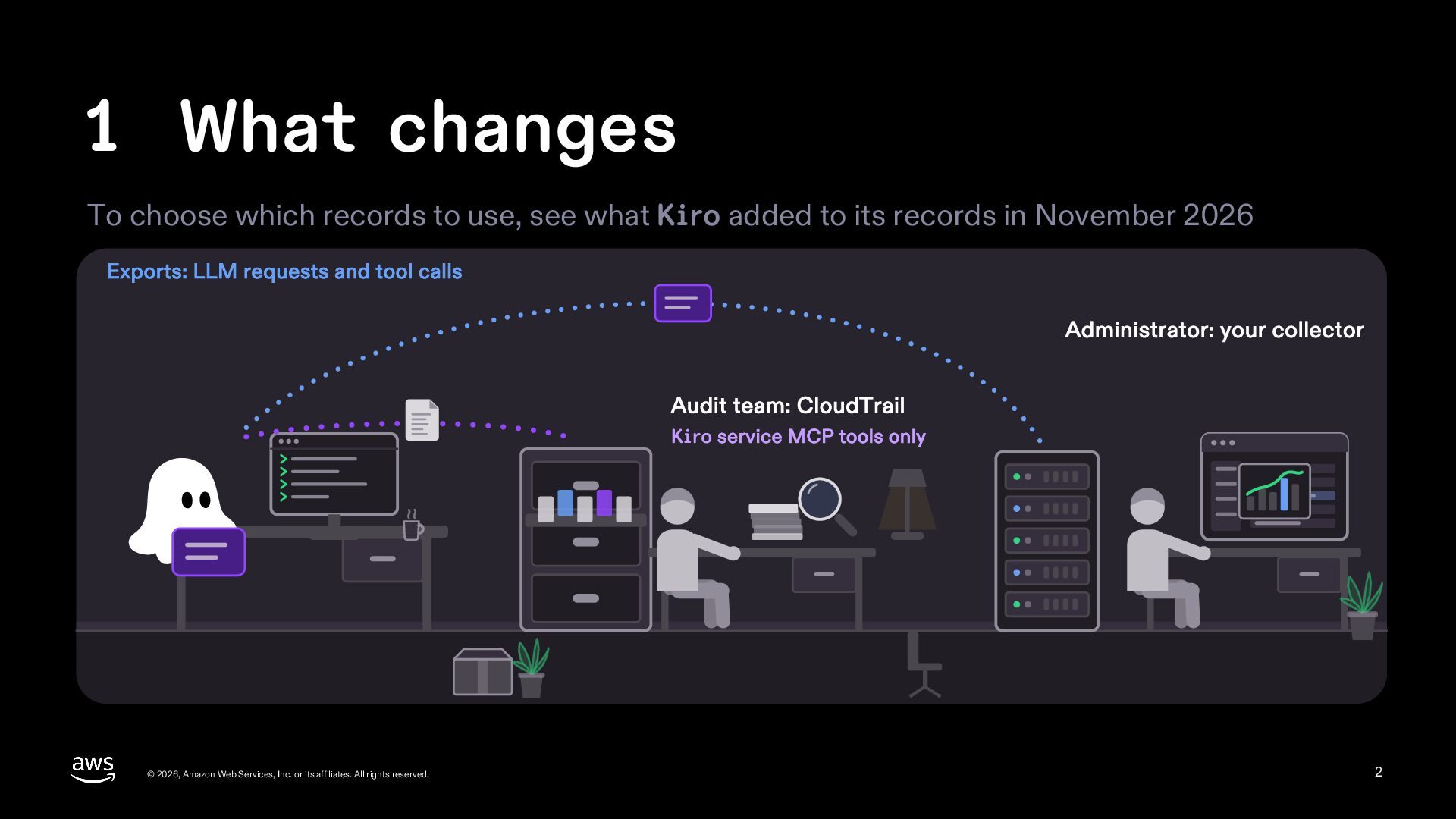
1 What changes To choose which records to use, see
what Kiro added to its records in November 2026 Exports: LLM requests and tool calls Administrator: your collector Audit team: CloudTrail Kiro service MCP tools only © 2026, Amazon Web Services, Inc. or its affiliates. All rights reserved. 2 -
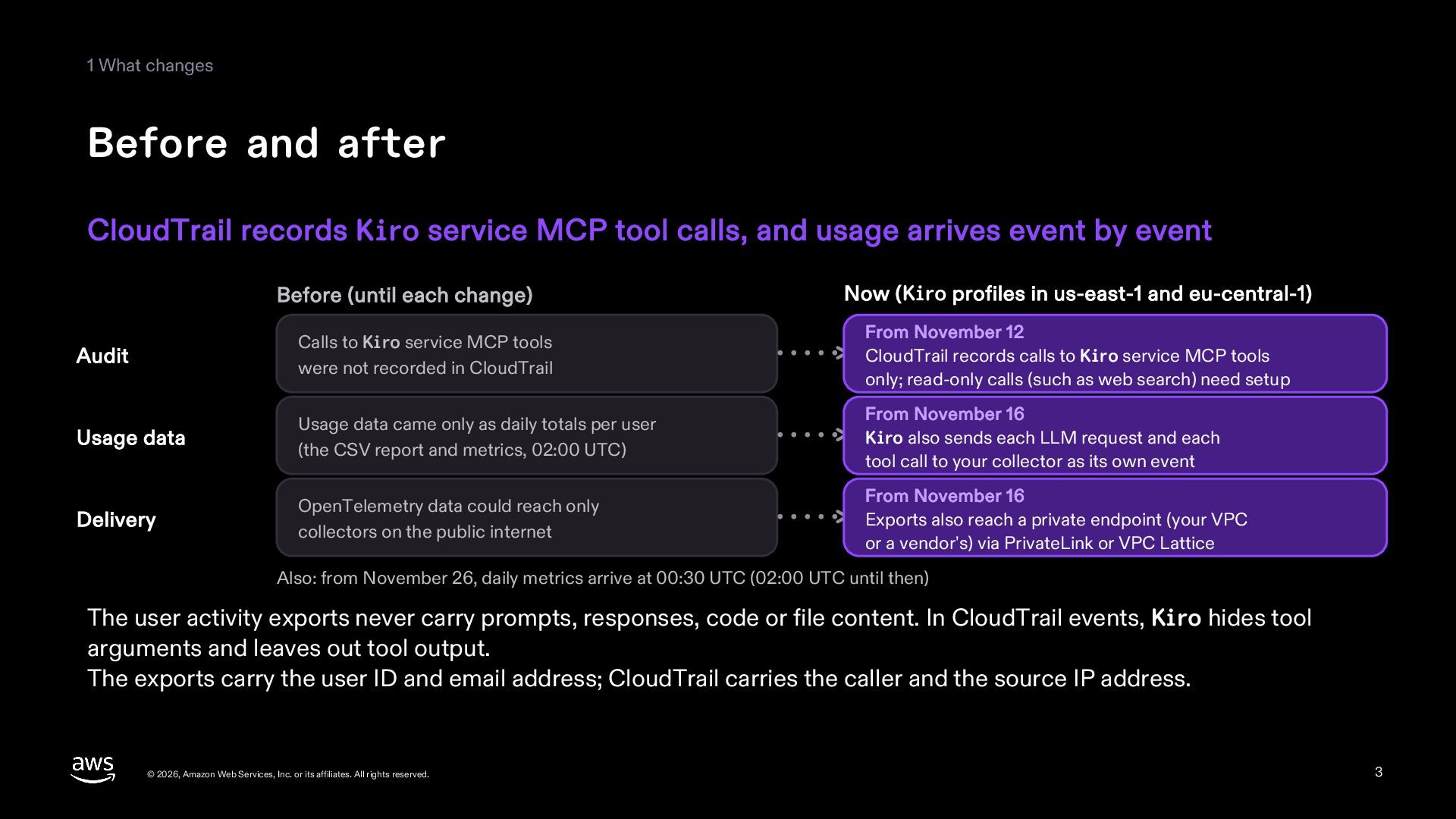
1 What changes Before and after CloudTrail records Kiro service
MCP tool calls, and usage arrives event by event Before (until each change) Now (Kiro profiles in us-east-1 and eu-central-1) Audit Calls to Kiro service MCP tools were not recorded in CloudTrail From November 12 CloudTrail records calls to Kiro service MCP tools only; read-only calls (such as web search) need setup Usage data Usage data came only as daily totals per user (the CSV report and metrics, 02:00 UTC) From November 16 Kiro also sends each LLM request and each tool call to your collector as its own event Delivery OpenTelemetry data could reach only collectors on the public internet From November 16 Exports also reach a private endpoint (your VPC or a vendor's) via PrivateLink or VPC Lattice Also: from November 26, daily metrics arrive at 00:30 UTC (02:00 UTC until then) The user activity exports never carry prompts, responses, code or file content. In CloudTrail events, Kiro hides tool arguments and leaves out tool output. The exports carry the user ID and email address; CloudTrail carries the caller and the source IP address. © 2026, Amazon Web Services, Inc. or its affiliates. All rights reserved. 3 -
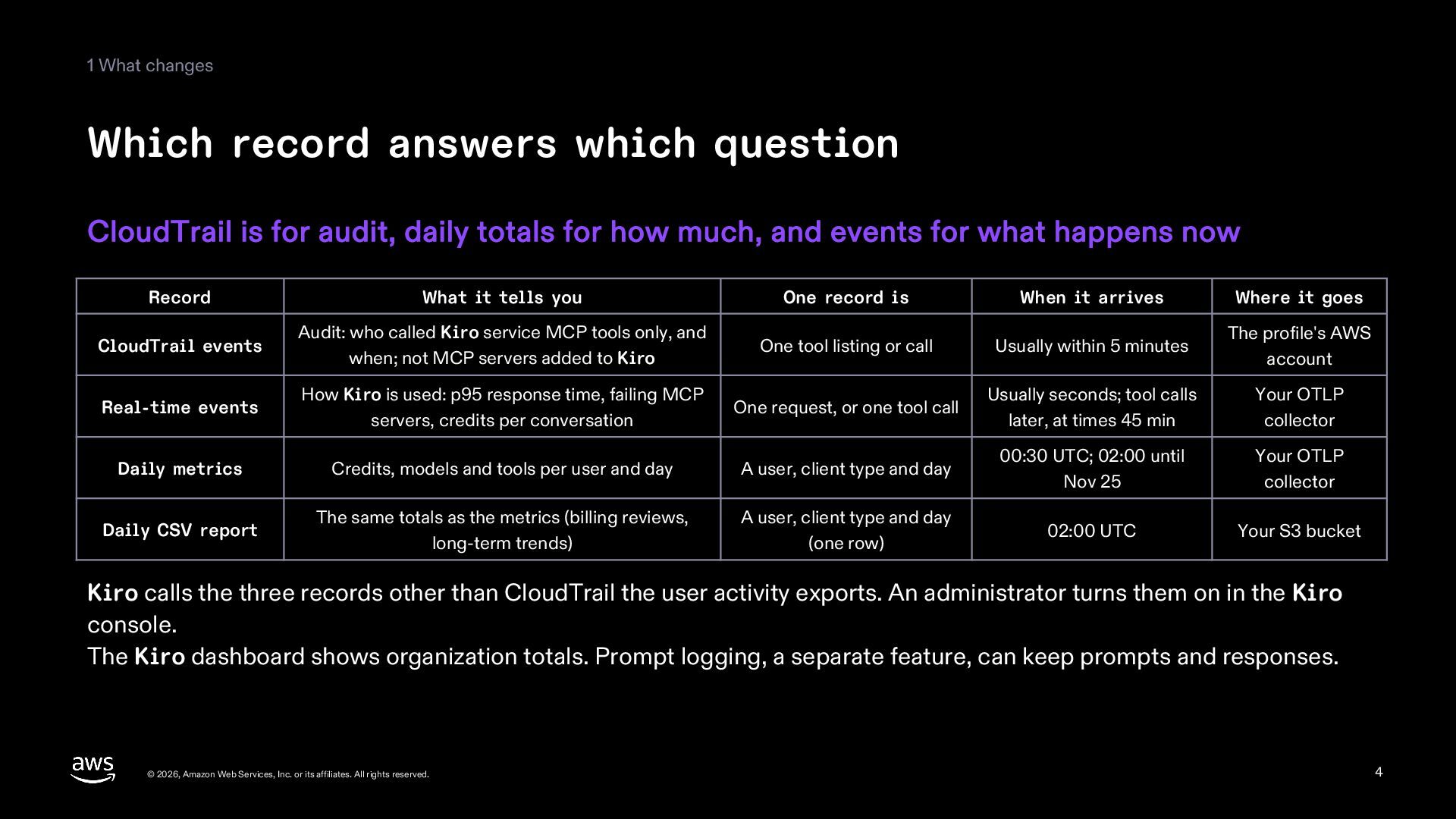
1 What changes Which record answers which question CloudTrail is
for audit, daily totals for how much, and events for what happens now Record What it tells you One record is When it arrives Where it goes CloudTrail events Audit: who called Kiro service MCP tools only, and when; not MCP servers added to Kiro One tool listing or call Usually within 5 minutes The profile's AWS account Real-time events How Kiro is used: p95 response time, failing MCP servers, credits per conversation One request, or one tool call Usually seconds; tool calls later, at times 45 min Your OTLP collector Daily metrics Credits, models and tools per user and day A user, client type and day 00:30 UTC; 02:00 until Nov 25 Your OTLP collector Daily CSV report The same totals as the metrics (billing reviews, long-term trends) A user, client type and day (one row) 02:00 UTC Your S3 bucket Kiro calls the three records other than CloudTrail the user activity exports. An administrator turns them on in the Kiro console. The Kiro dashboard shows organization totals. Prompt logging, a separate feature, can keep prompts and responses. © 2026, Amazon Web Services, Inc. or its affiliates. All rights reserved. 4 -
2 What is recorded To judge whether each record fits
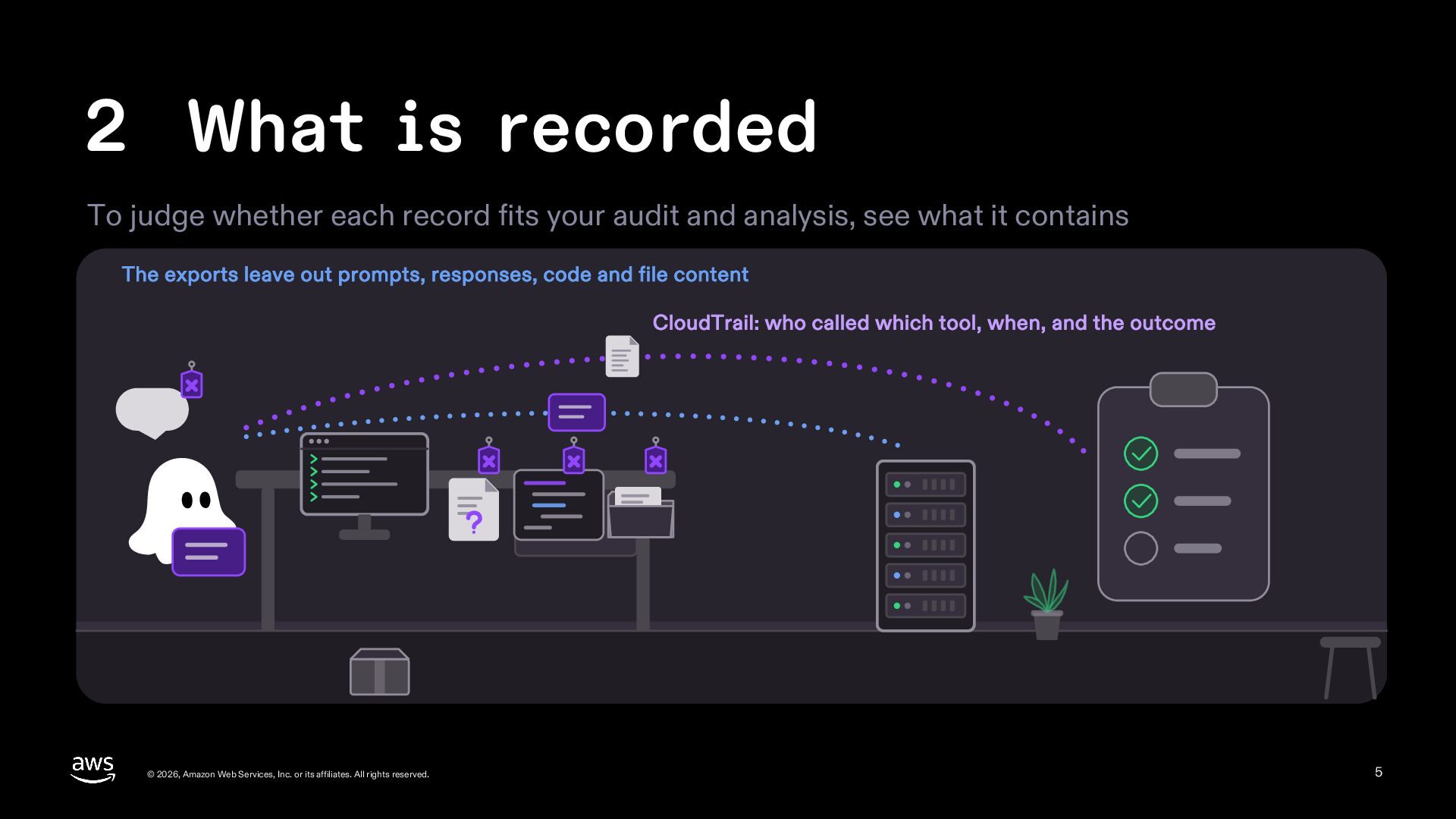
your audit and analysis, see what it contains The exports leave out prompts, responses, code and file content CloudTrail: who called which tool, when, and the outcome © 2026, Amazon Web Services, Inc. or its affiliates. All rights reserved. 5 -
2 What is recorded Management and data events in CloudTrail
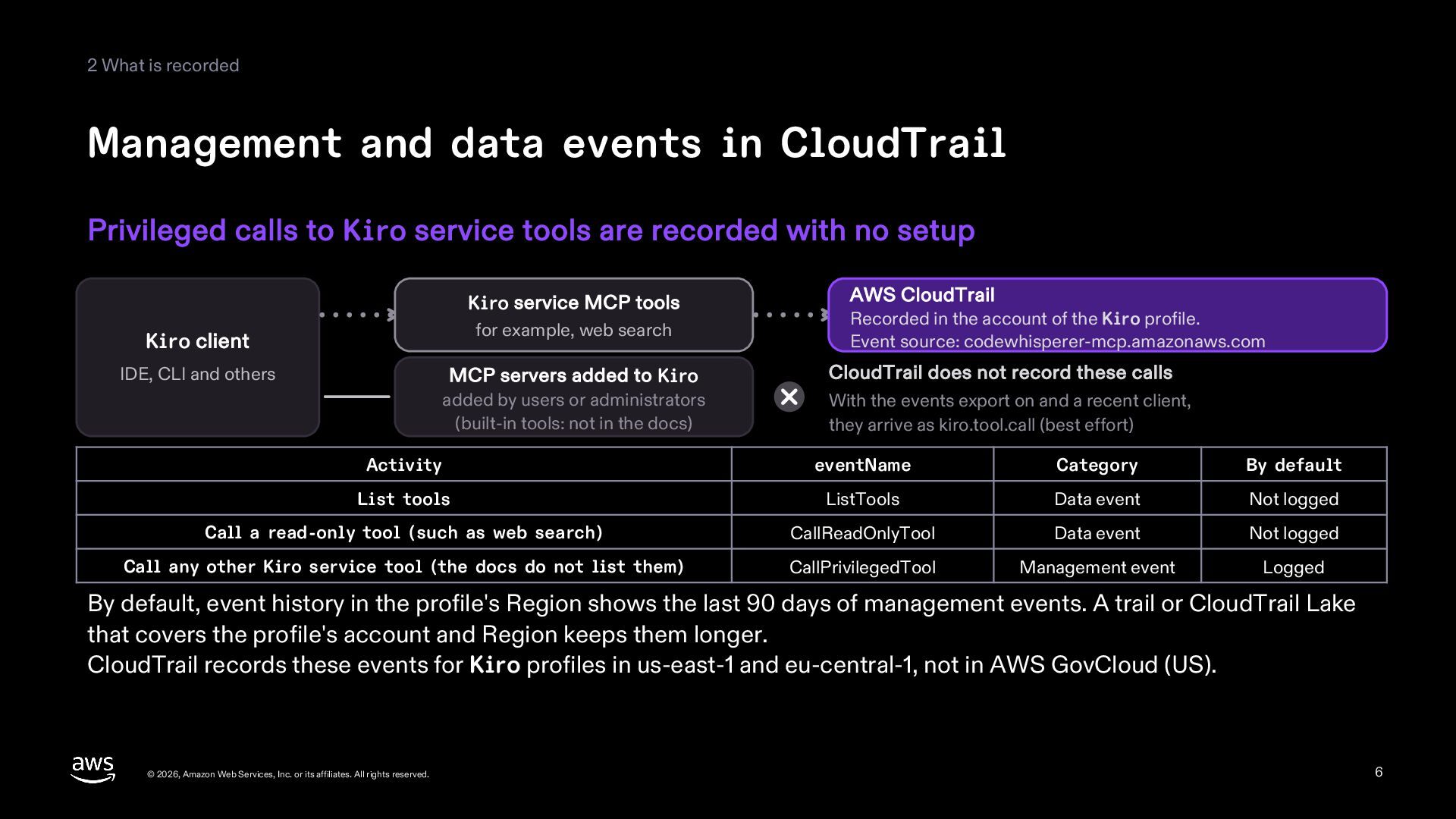
Privileged calls to Kiro service tools are recorded with no setup Kiro service MCP tools Kiro client for example, web search IDE, CLI and others MCP servers added to Kiro added by users or administrators (built-in tools: not in the docs) AWS CloudTrail Recorded in the account of the Kiro profile. Event source: codewhisperer-mcp.amazonaws.com CloudTrail does not record these calls With the events export on and a recent client, they arrive as kiro.tool.call (best effort) Activity eventName Category By default List tools ListTools Data event Not logged Call a read-only tool (such as web search) CallReadOnlyTool Data event Not logged Call any other Kiro service tool (the docs do not list them) CallPrivilegedTool Management event Logged By default, event history in the profile's Region shows the last 90 days of management events. A trail or CloudTrail Lake that covers the profile's account and Region keeps them longer. CloudTrail records these events for Kiro profiles in us-east-1 and eu-central-1, not in AWS GovCloud (US). © 2026, Amazon Web Services, Inc. or its affiliates. All rights reserved. 6 -
2 What is recorded What one CloudTrail event tells you
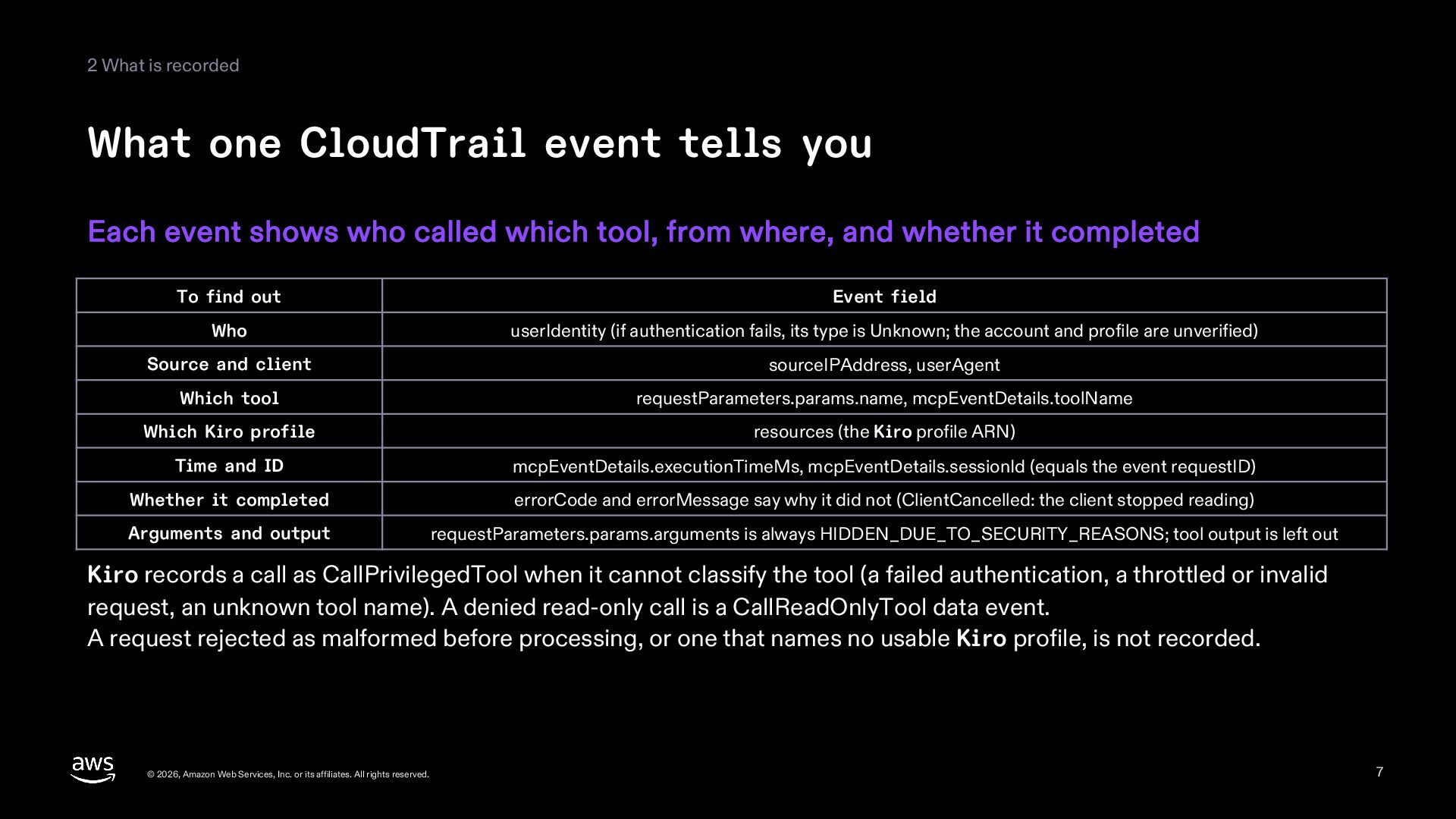
Each event shows who called which tool, from where, and whether it completed To find out Event field Who userIdentity (if authentication fails, its type is Unknown; the account and profile are unverified) Source and client sourceIPAddress, userAgent Which tool requestParameters.params.name, mcpEventDetails.toolName Which Kiro profile resources (the Kiro profile ARN) Time and ID mcpEventDetails.executionTimeMs, mcpEventDetails.sessionId (equals the event requestID) Whether it completed errorCode and errorMessage say why it did not (ClientCancelled: the client stopped reading) Arguments and output requestParameters.params.arguments is always HIDDEN_DUE_TO_SECURITY_REASONS; tool output is left out Kiro records a call as CallPrivilegedTool when it cannot classify the tool (a failed authentication, a throttled or invalid request, an unknown tool name). A denied read-only call is a CallReadOnlyTool data event. A request rejected as malformed before processing, or one that names no usable Kiro profile, is not recorded. © 2026, Amazon Web Services, Inc. or its affiliates. All rights reserved. 7 -
2 What is recorded OpenTelemetry real-time events Each LLM request
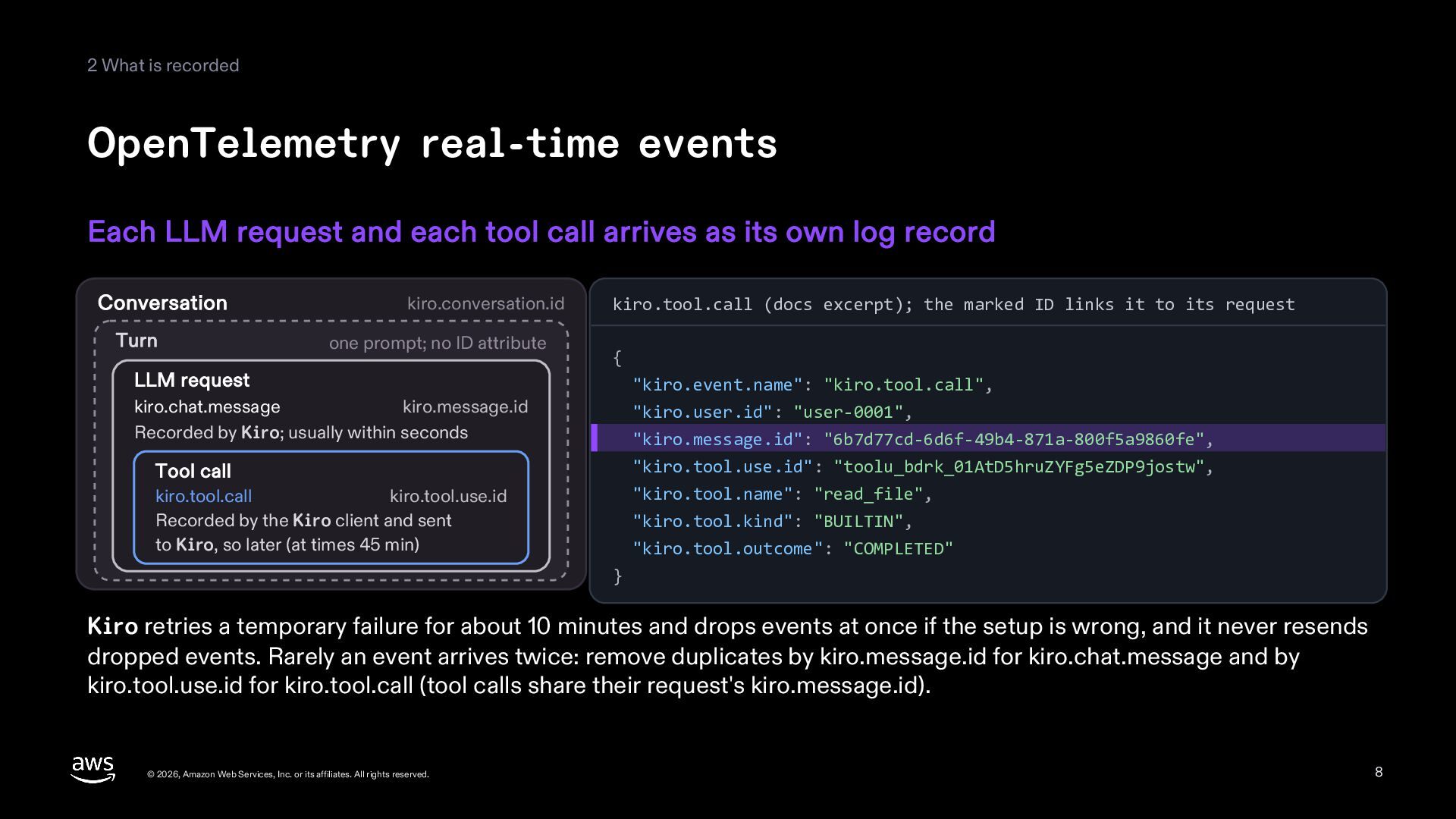
and each tool call arrives as its own log record Conversation Turn kiro.conversation.id one prompt; no ID attribute LLM request kiro.tool.call (docs excerpt); the marked ID links it to its request { "kiro.event.name": "kiro.tool.call", "kiro.user.id": "user-0001", "kiro.message.id": "6b7d77cd-6d6f-49b4-871a-800f5a9860fe", "kiro.tool.use.id": "toolu_bdrk_01AtD5hruZYFg5eZDP9jostw", "kiro.tool.name": "read_file", "kiro.tool.kind": "BUILTIN", "kiro.tool.outcome": "COMPLETED" kiro.chat.message kiro.message.id Recorded by Kiro; usually within seconds Tool call kiro.tool.call kiro.tool.use.id Recorded by the Kiro client and sent to Kiro, so later (at times 45 min) } Kiro retries a temporary failure for about 10 minutes and drops events at once if the setup is wrong, and it never resends dropped events. Rarely an event arrives twice: remove duplicates by kiro.message.id for kiro.chat.message and by kiro.tool.use.id for kiro.tool.call (tool calls share their request's kiro.message.id). © 2026, Amazon Web Services, Inc. or its affiliates. All rights reserved. 8 -
2 What is recorded Daily CSV report and OpenTelemetry metrics
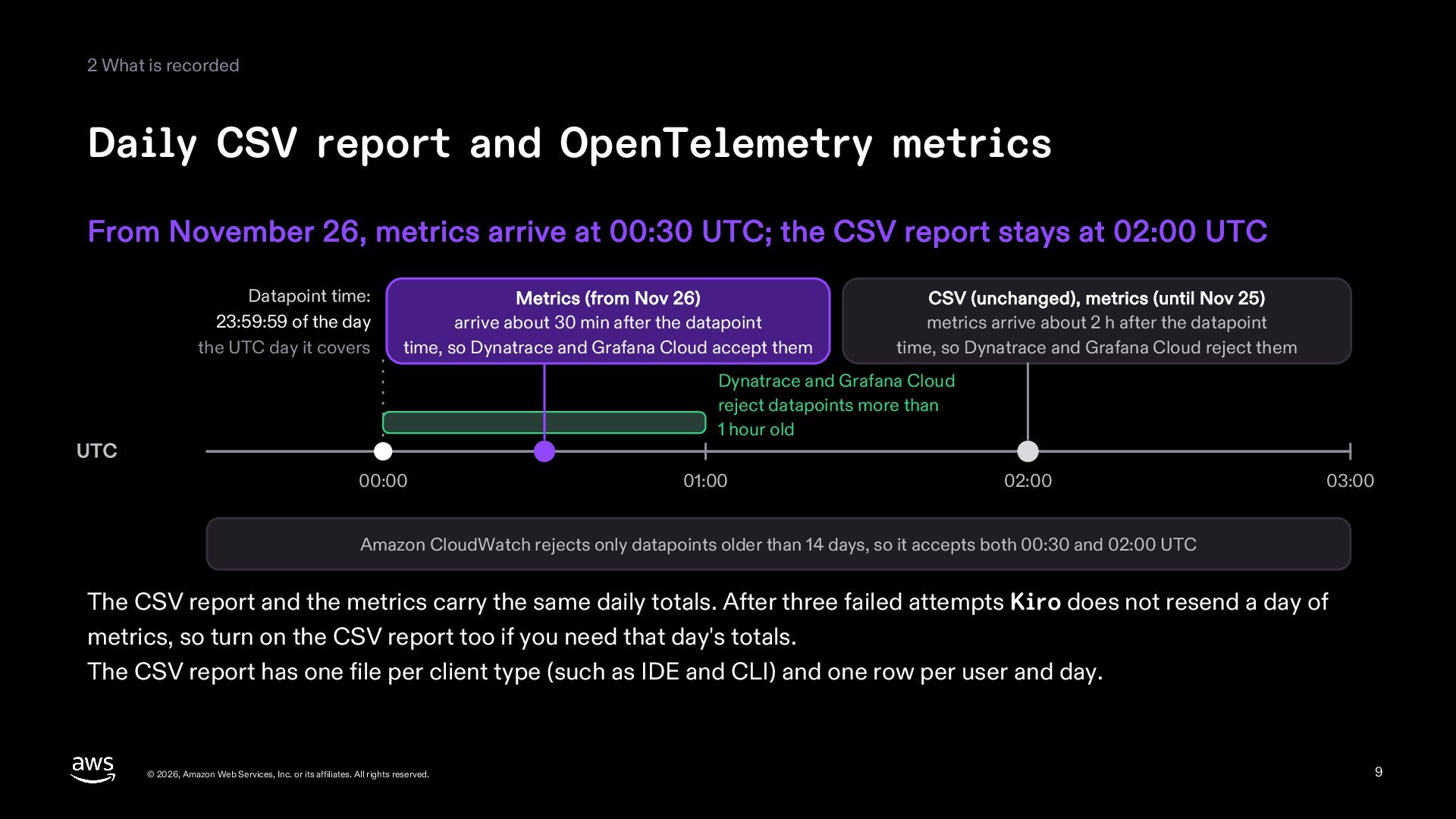
From November 26, metrics arrive at 00:30 UTC; the CSV report stays at 02:00 UTC Datapoint time: 23:59:59 of the day the UTC day it covers Metrics (from Nov 26) arrive about 30 min after the datapoint time, so Dynatrace and Grafana Cloud accept them CSV (unchanged), metrics (until Nov 25) metrics arrive about 2 h after the datapoint time, so Dynatrace and Grafana Cloud reject them Dynatrace and Grafana Cloud reject datapoints more than 1 hour old UTC 00:00 01:00 02:00 03:00 Amazon CloudWatch rejects only datapoints older than 14 days, so it accepts both 00:30 and 02:00 UTC The CSV report and the metrics carry the same daily totals. After three failed attempts Kiro does not resend a day of metrics, so turn on the CSV report too if you need that day's totals. The CSV report has one file per client type (such as IDE and CLI) and one row per user and day. © 2026, Amazon Web Services, Inc. or its affiliates. All rights reserved. 9 -
2 What is recorded What the records carry and what
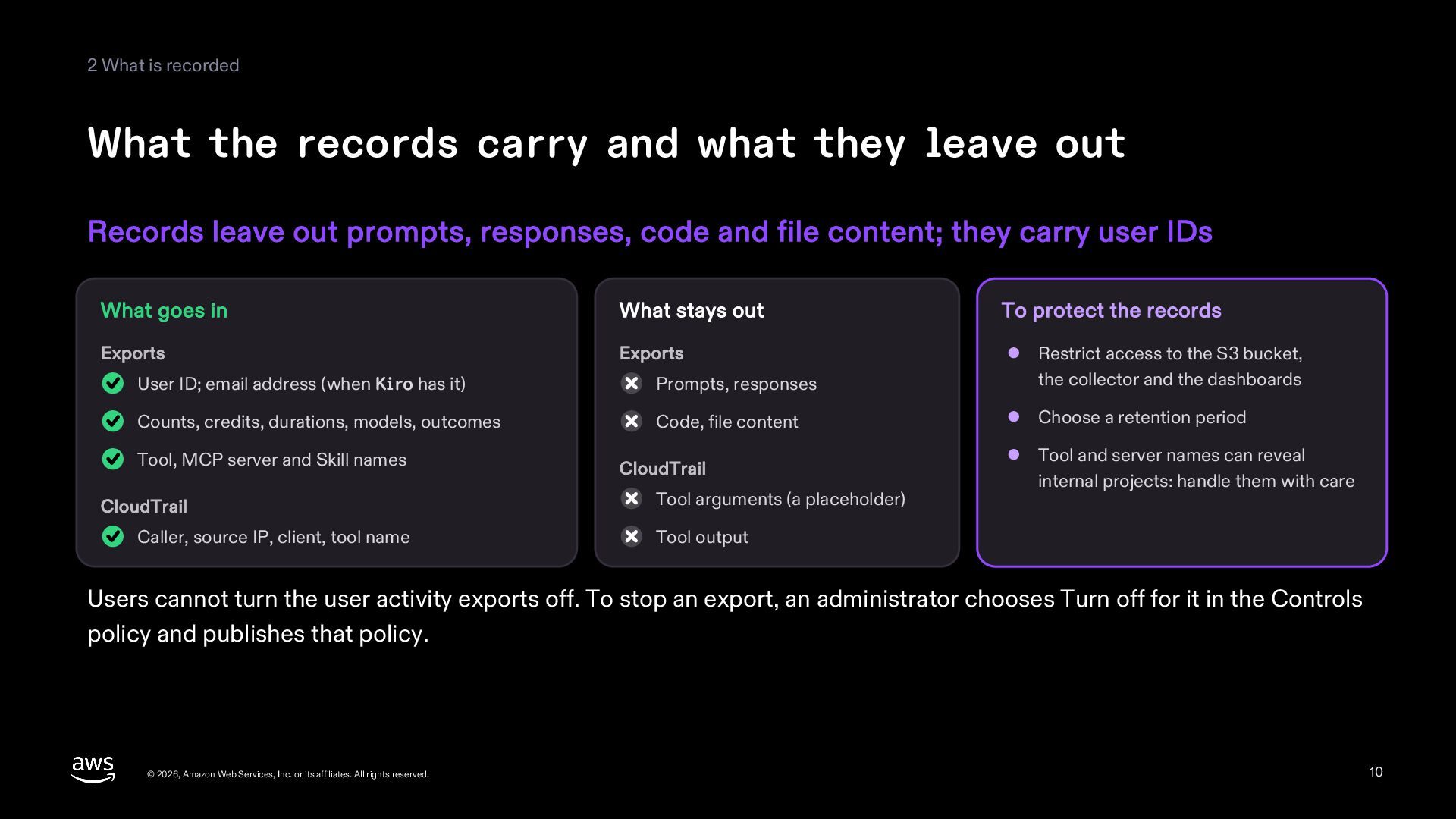
they leave out Records leave out prompts, responses, code and file content; they carry user IDs What goes in What stays out Exports Exports To protect the records User ID; email address (when Kiro has it) Prompts, responses Restrict access to the S3 bucket, the collector and the dashboards Counts, credits, durations, models, outcomes Code, file content Choose a retention period Tool, MCP server and Skill names CloudTrail Caller, source IP, client, tool name CloudTrail Tool arguments (a placeholder) Tool and server names can reveal internal projects: handle them with care Tool output Users cannot turn the user activity exports off. To stop an export, an administrator chooses Turn off for it in the Controls policy and publishes that policy. © 2026, Amazon Web Services, Inc. or its affiliates. All rights reserved. 10 -
3 Delivery and setup To receive your first records, set
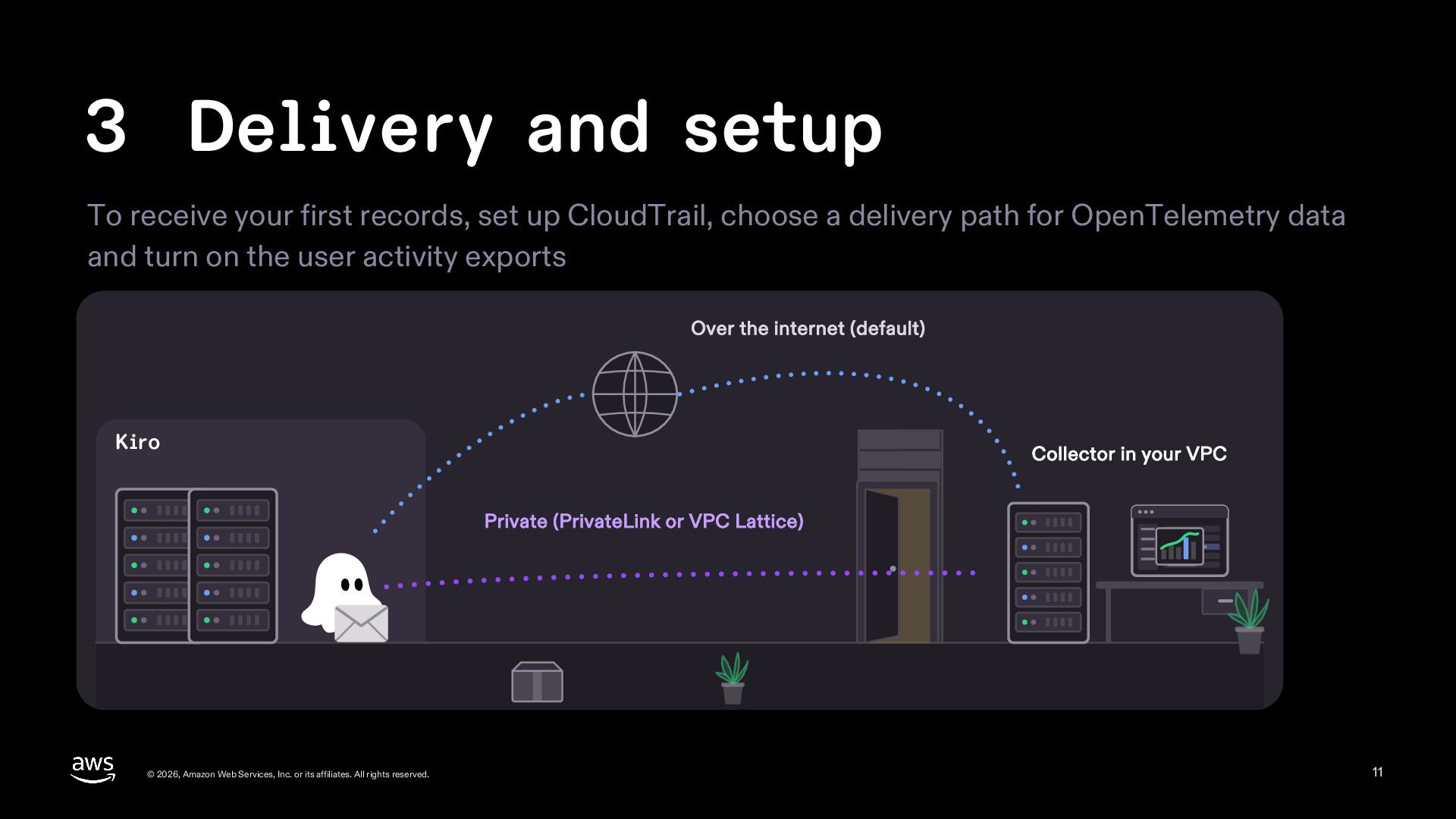
up CloudTrail, choose a delivery path for OpenTelemetry data and turn on the user activity exports Over the internet (default) Kiro Collector in your VPC Private (PrivateLink or VPC Lattice) © 2026, Amazon Web Services, Inc. or its affiliates. All rights reserved. 11 -
3 Delivery and setup Log data events in CloudTrail too
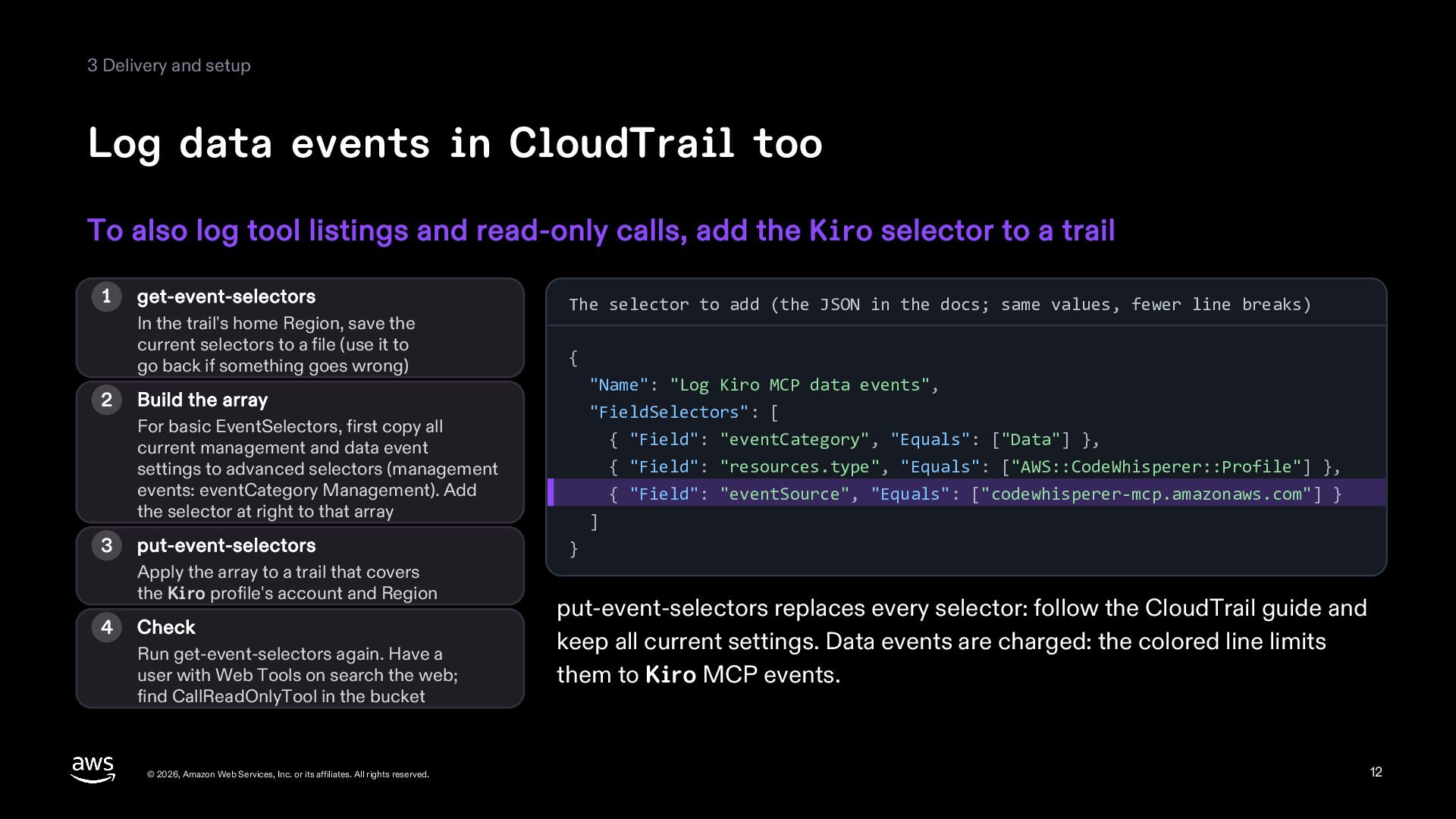
To also log tool listings and read-only calls, add the Kiro selector to a trail 1 get-event-selectors In the trail's home Region, save the current selectors to a file (use it to go back if something goes wrong) 2 The selector to add (the JSON in the docs; same values, fewer line breaks) { "Name": "Log Kiro MCP data events", "FieldSelectors": [ { "Field": "eventCategory", "Equals": ["Data"] }, { "Field": "resources.type", "Equals": ["AWS::CodeWhisperer::Profile"] }, { "Field": "eventSource", "Equals": ["codewhisperer-mcp.amazonaws.com"] } ] Build the array For basic EventSelectors, first copy all current management and data event settings to advanced selectors (management events: eventCategory Management). Add the selector at right to that array 3 put-event-selectors Apply the array to a trail that covers the Kiro profile's account and Region 4 Check Run get-event-selectors again. Have a user with Web Tools on search the web; find CallReadOnlyTool in the bucket © 2026, Amazon Web Services, Inc. or its affiliates. All rights reserved. } put-event-selectors replaces every selector: follow the CloudTrail guide and keep all current settings. Data events are charged: the colored line limits them to Kiro MCP events. 12 -
3 Delivery and setup How OpenTelemetry data reaches you For
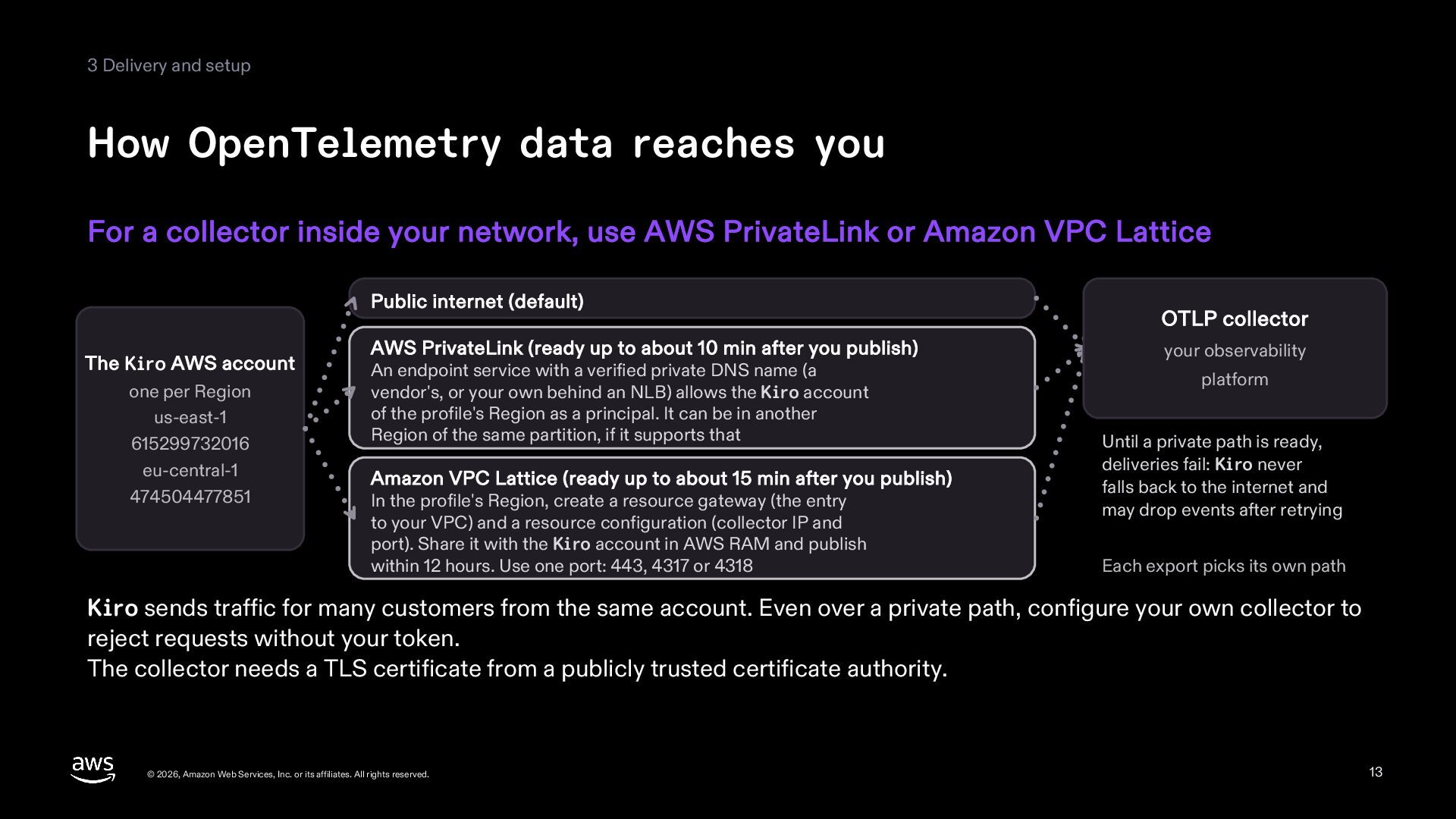
a collector inside your network, use AWS PrivateLink or Amazon VPC Lattice Public internet (default) The Kiro AWS account one per Region us-east-1 615299732016 eu-central-1 474504477851 AWS PrivateLink (ready up to about 10 min after you publish) An endpoint service with a verified private DNS name (a vendor's, or your own behind an NLB) allows the Kiro account of the profile's Region as a principal. It can be in another Region of the same partition, if it supports that Amazon VPC Lattice (ready up to about 15 min after you publish) In the profile's Region, create a resource gateway (the entry to your VPC) and a resource configuration (collector IP and port). Share it with the Kiro account in AWS RAM and publish within 12 hours. Use one port: 443, 4317 or 4318 OTLP collector your observability platform Until a private path is ready, deliveries fail: Kiro never falls back to the internet and may drop events after retrying Each export picks its own path Kiro sends traffic for many customers from the same account. Even over a private path, configure your own collector to reject requests without your token. The collector needs a TLS certificate from a publicly trusted certificate authority. © 2026, Amazon Web Services, Inc. or its affiliates. All rights reserved. 13 -
3 Delivery and setup Steps to turn on a user
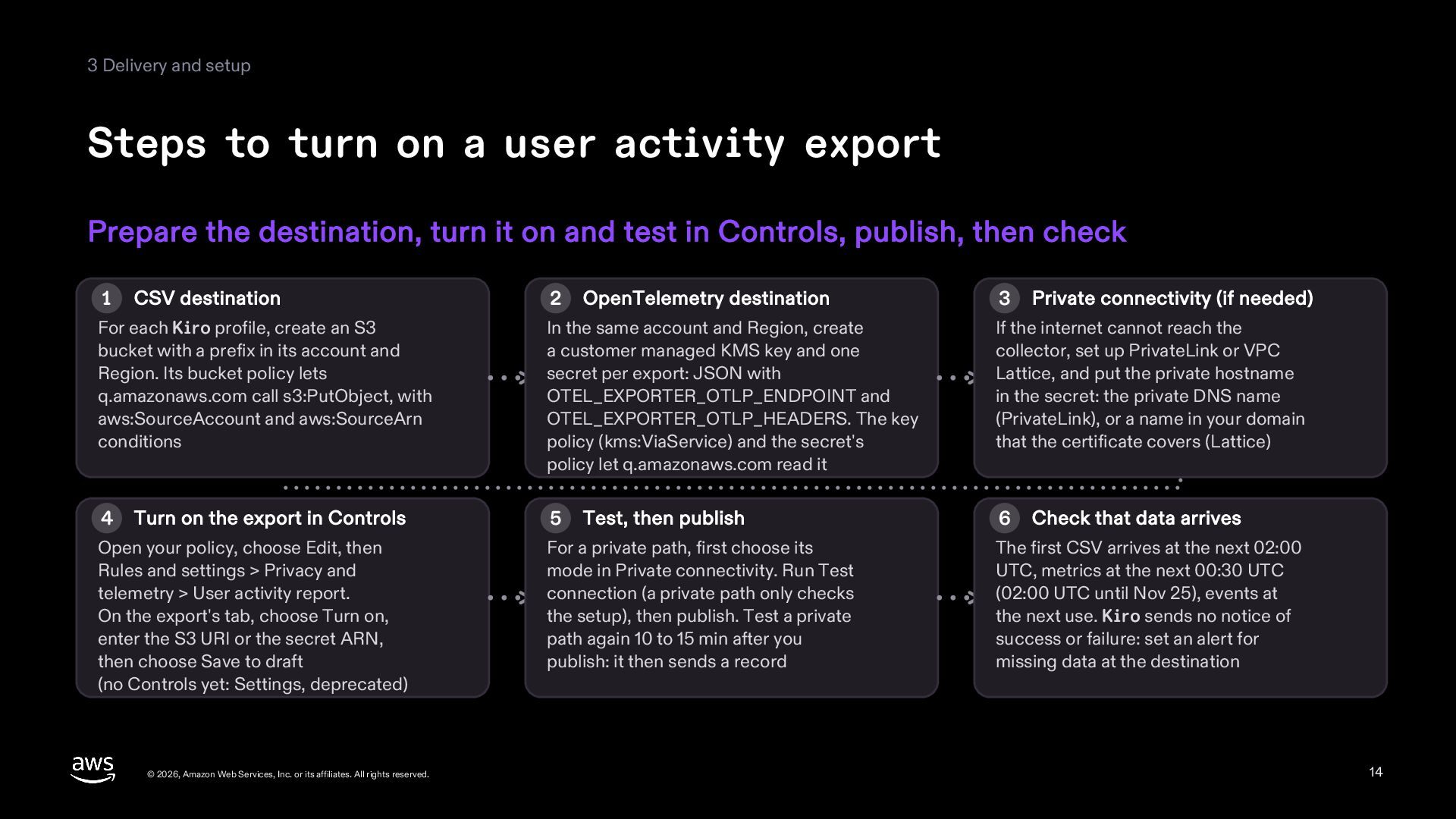
activity export Prepare the destination, turn it on and test in Controls, publish, then check 1 CSV destination 2 OpenTelemetry destination 3 Private connectivity (if needed) For each Kiro profile, create an S3 bucket with a prefix in its account and Region. Its bucket policy lets q.amazonaws.com call s3:PutObject, with aws:SourceAccount and aws:SourceArn conditions In the same account and Region, create a customer managed KMS key and one secret per export: JSON with OTEL_EXPORTER_OTLP_ENDPOINT and OTEL_EXPORTER_OTLP_HEADERS. The key policy (kms:ViaService) and the secret's policy let q.amazonaws.com read it If the internet cannot reach the collector, set up PrivateLink or VPC Lattice, and put the private hostname in the secret: the private DNS name (PrivateLink), or a name in your domain that the certificate covers (Lattice) 4 5 6 Turn on the export in Controls Open your policy, choose Edit, then Rules and settings > Privacy and telemetry > User activity report. On the export's tab, choose Turn on, enter the S3 URI or the secret ARN, then choose Save to draft (no Controls yet: Settings, deprecated) © 2026, Amazon Web Services, Inc. or its affiliates. All rights reserved. Test, then publish For a private path, first choose its mode in Private connectivity. Run Test connection (a private path only checks the setup), then publish. Test a private path again 10 to 15 min after you publish: it then sends a record Check that data arrives The first CSV arrives at the next 02:00 UTC, metrics at the next 00:30 UTC (02:00 UTC until Nov 25), events at the next use. Kiro sends no notice of success or failure: set an alert for missing data at the destination 14 -
Sources (1/2) This deck is for information only. It is
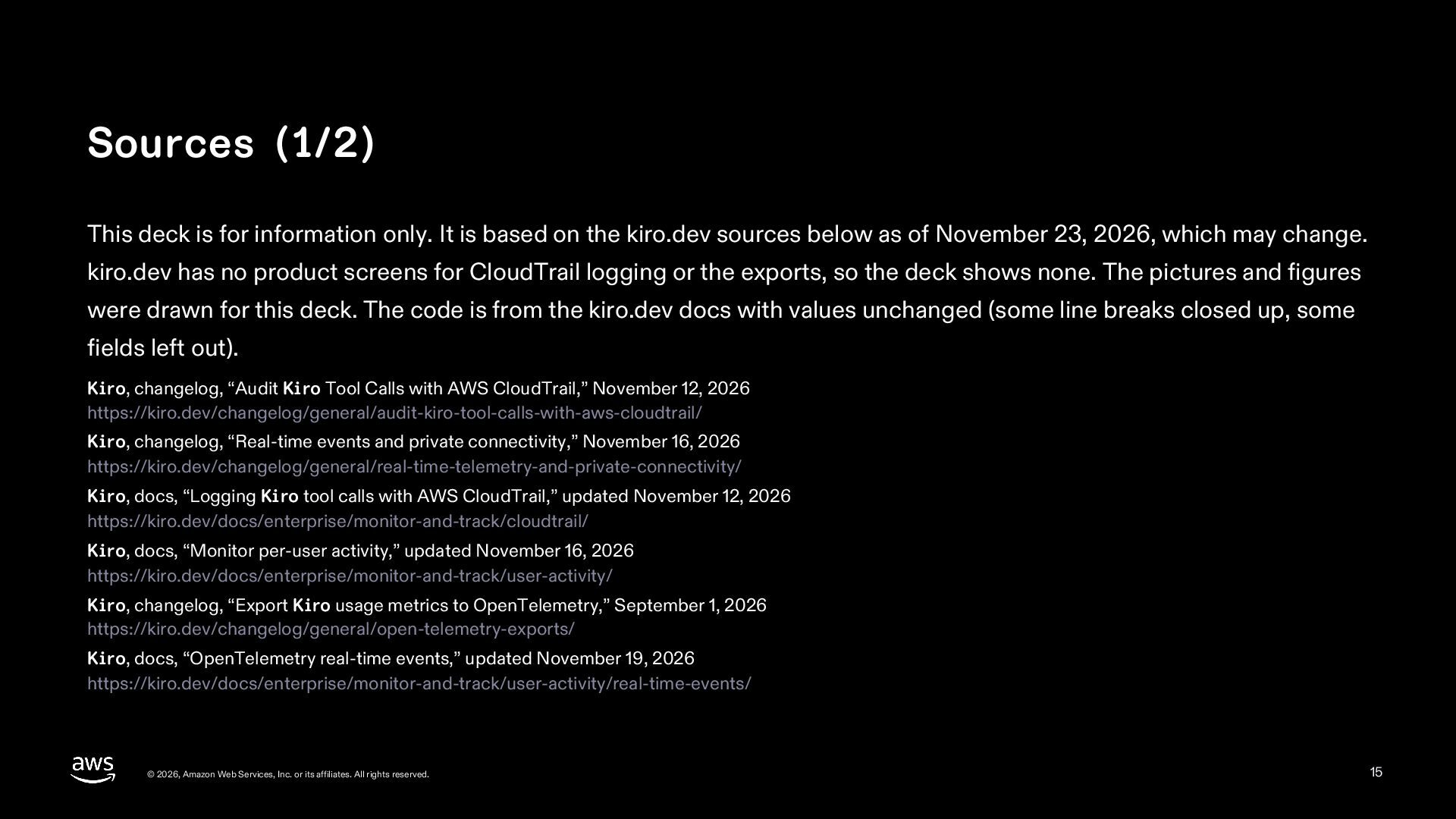
based on the kiro.dev sources below as of November 23, 2026, which may change. kiro.dev has no product screens for CloudTrail logging or the exports, so the deck shows none. The pictures and figures were drawn for this deck. The code is from the kiro.dev docs with values unchanged (some line breaks closed up, some fields left out). Kiro, changelog, “Audit Kiro Tool Calls with AWS CloudTrail,” November 12, 2026 https://kiro.dev/changelog/general/audit-kiro-tool-calls-with-aws-cloudtrail/ Kiro, changelog, “Real-time events and private connectivity,” November 16, 2026 https://kiro.dev/changelog/general/real-time-telemetry-and-private-connectivity/ Kiro, docs, “Logging Kiro tool calls with AWS CloudTrail,” updated November 12, 2026 https://kiro.dev/docs/enterprise/monitor-and-track/cloudtrail/ Kiro, docs, “Monitor per-user activity,” updated November 16, 2026 https://kiro.dev/docs/enterprise/monitor-and-track/user-activity/ Kiro, changelog, “Export Kiro usage metrics to OpenTelemetry,” September 1, 2026 https://kiro.dev/changelog/general/open-telemetry-exports/ Kiro, docs, “OpenTelemetry real-time events,” updated November 19, 2026 https://kiro.dev/docs/enterprise/monitor-and-track/user-activity/real-time-events/ © 2026, Amazon Web Services, Inc. or its affiliates. All rights reserved. 15 -
Sources (2/2) Kiro, docs, “Viewing Kiro usage on the dashboard,”
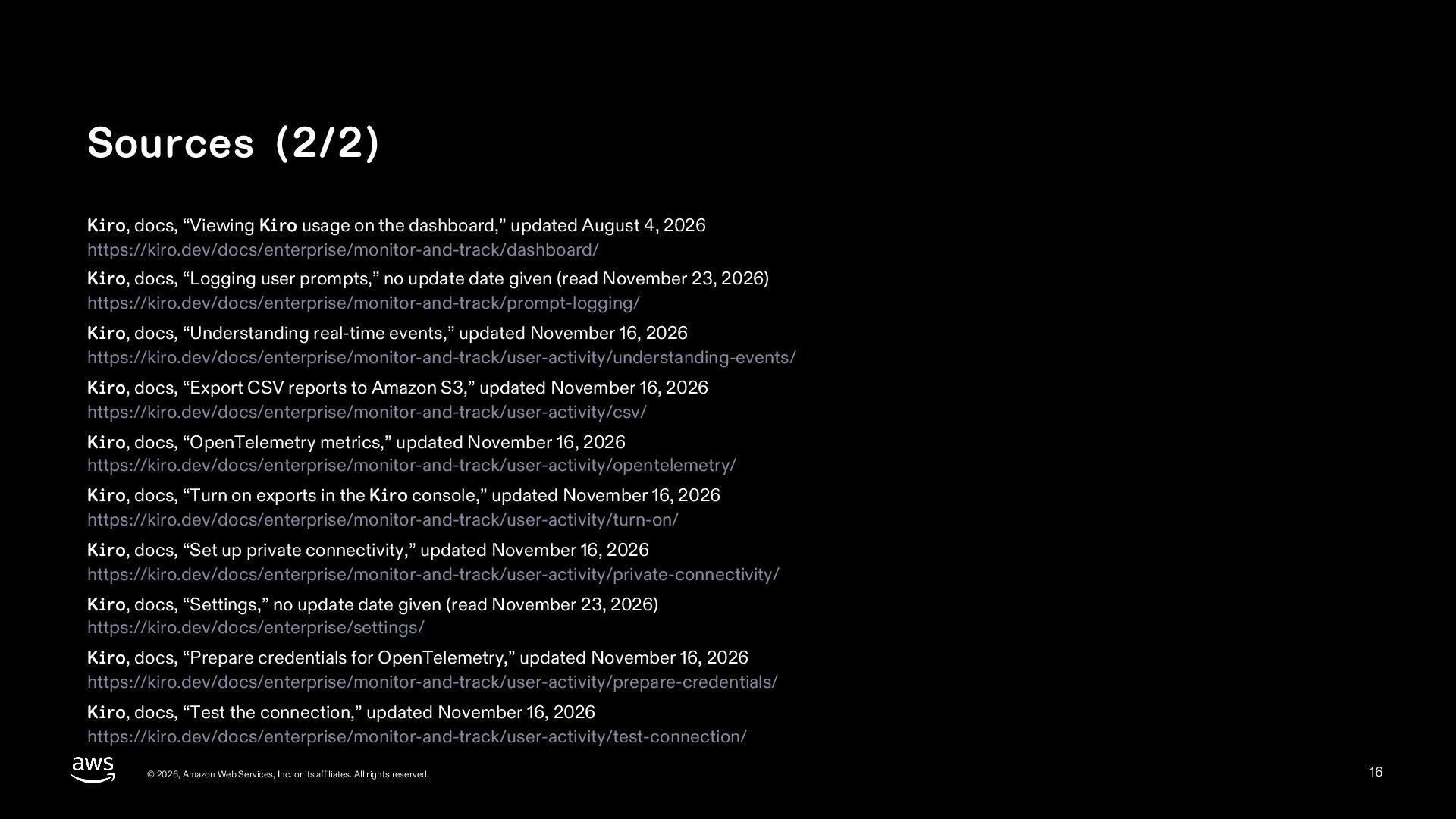
updated August 4, 2026 https://kiro.dev/docs/enterprise/monitor-and-track/dashboard/ Kiro, docs, “Logging user prompts,” no update date given (read November 23, 2026) https://kiro.dev/docs/enterprise/monitor-and-track/prompt-logging/ Kiro, docs, “Understanding real-time events,” updated November 16, 2026 https://kiro.dev/docs/enterprise/monitor-and-track/user-activity/understanding-events/ Kiro, docs, “Export CSV reports to Amazon S3,” updated November 16, 2026 https://kiro.dev/docs/enterprise/monitor-and-track/user-activity/csv/ Kiro, docs, “OpenTelemetry metrics,” updated November 16, 2026 https://kiro.dev/docs/enterprise/monitor-and-track/user-activity/opentelemetry/ Kiro, docs, “Turn on exports in the Kiro console,” updated November 16, 2026 https://kiro.dev/docs/enterprise/monitor-and-track/user-activity/turn-on/ Kiro, docs, “Set up private connectivity,” updated November 16, 2026 https://kiro.dev/docs/enterprise/monitor-and-track/user-activity/private-connectivity/ Kiro, docs, “Settings,” no update date given (read November 23, 2026) https://kiro.dev/docs/enterprise/settings/ Kiro, docs, “Prepare credentials for OpenTelemetry,” updated November 16, 2026 https://kiro.dev/docs/enterprise/monitor-and-track/user-activity/prepare-credentials/ Kiro, docs, “Test the connection,” updated November 16, 2026 https://kiro.dev/docs/enterprise/monitor-and-track/user-activity/test-connection/ © 2026, Amazon Web Services, Inc. or its affiliates. All rights reserved. 16
 inariku
 ivry_presentationmaterials
 minorun365
 azukiazusa1
 oidfj
 _kotobuki_
 atalie2m
 junjikoide
 masasuzu
 miriamschwab
 yama3133
 ykimi
 tsukuboshi
 inesmontani
 smashingmag
 ivargrimstad
 62gerente
 tmiket
 gurzu
 colly
 akademiya2063
 jonoalderson
 garrettdimon
 ryanjones
 pwiseman