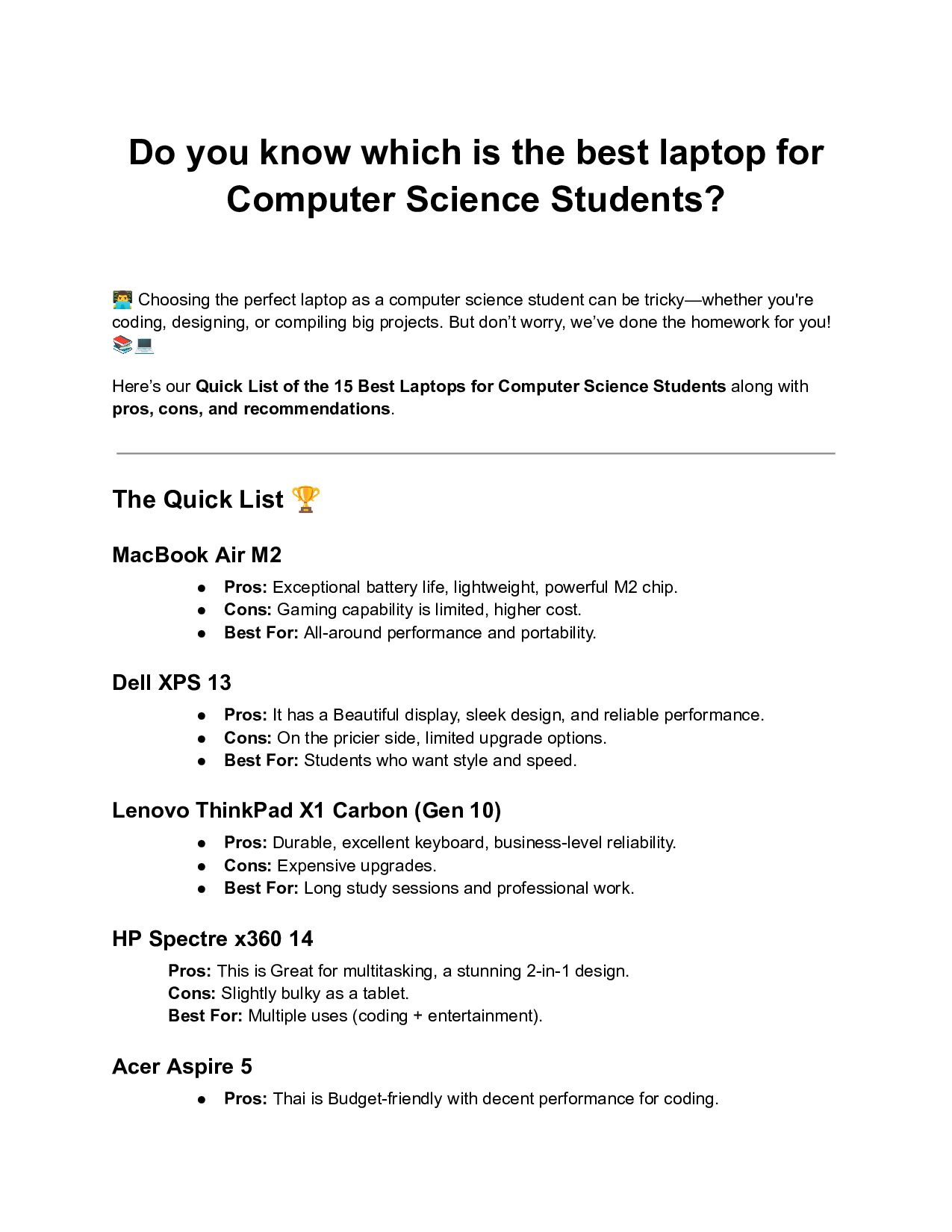
Science Students? 👨💻Choosing the perfect laptop as a computer science student can be tricky—whether you're coding, designing, or compiling big projects. But don’t worry, we’ve done the homework for you! 📚💻 Here’s our Quick List of the 15 Best Laptops for Computer Science Students along with pros, cons, and recommendations. The Quick List 🏆 MacBook Air M2 • Pros: Exceptional battery life, lightweight, powerful M2 chip. • Cons: Gaming capability is limited, higher cost. • Best For: All-around performance and portability. Dell XPS 13 • Pros: It has a Beautiful display, sleek design, and reliable performance. • Cons: On the pricier side, limited upgrade options. • Best For: Students who want style and speed. Lenovo ThinkPad X1 Carbon (Gen 10) • Pros: Durable, excellent keyboard, business-level reliability. • Cons: Expensive upgrades. • Best For: Long study sessions and professional work. HP Spectre x360 14 Pros: This is Great for multitasking, a stunning 2-in-1 design. Cons: Slightly bulky as a tablet. Best For: Multiple uses (coding + entertainment). Acer Aspire 5 • Pros: Thai is Budget-friendly with decent performance for coding.
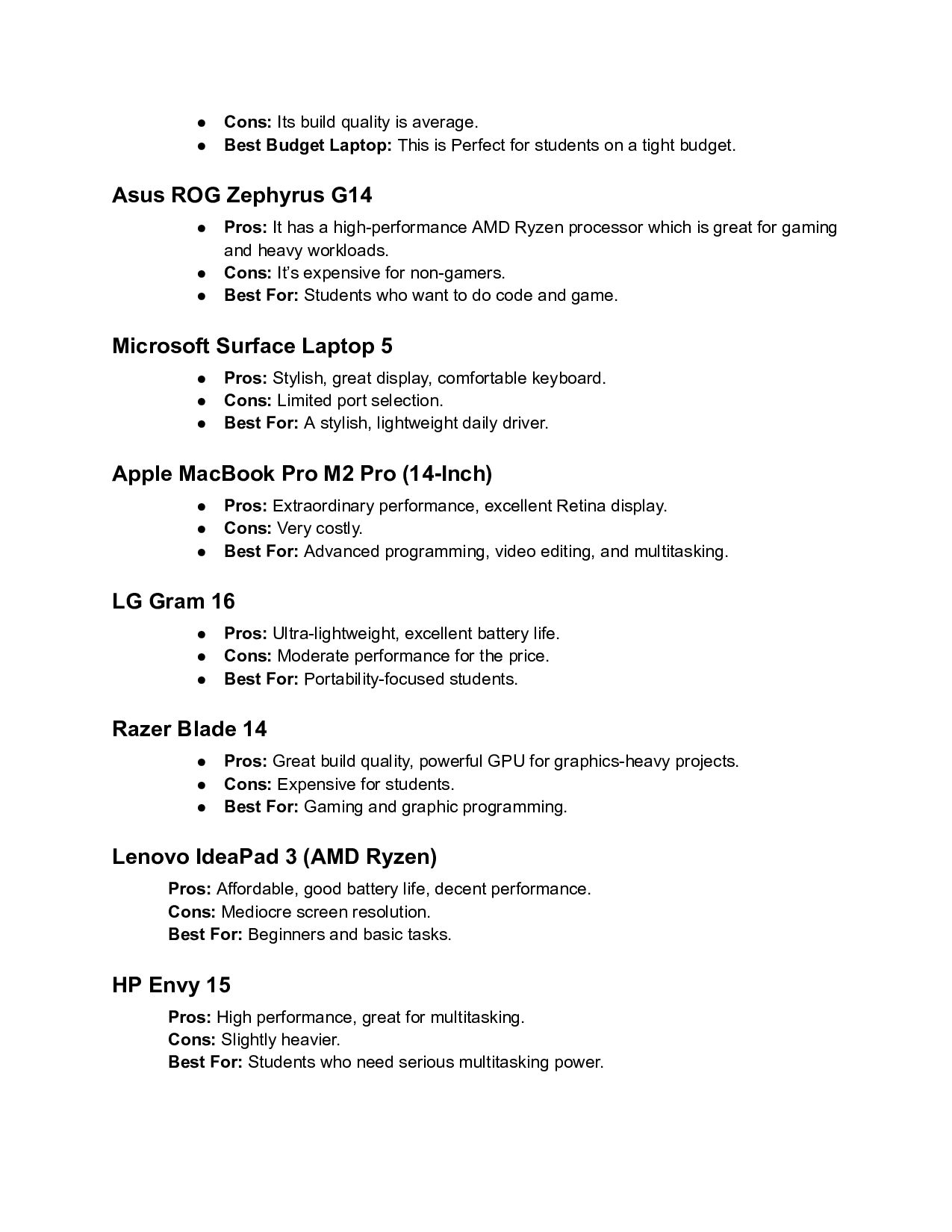
Laptop: This is Perfect for students on a tight budget. Asus ROG Zephyrus G14 • Pros: It has a high-performance AMD Ryzen processor which is great for gaming and heavy workloads. • Cons: It’s expensive for non-gamers. • Best For: Students who want to do code and game. Microsoft Surface Laptop 5 • Pros: Stylish, great display, comfortable keyboard. • Cons: Limited port selection. • Best For: A stylish, lightweight daily driver. Apple MacBook Pro M2 Pro (14-Inch) • Pros: Extraordinary performance, excellent Retina display. • Cons: Very costly. • Best For: Advanced programming, video editing, and multitasking. LG Gram 16 • Pros: Ultra-lightweight, excellent battery life. • Cons: Moderate performance for the price. • Best For: Portability-focused students. Razer Blade 14 • Pros: Great build quality, powerful GPU for graphics-heavy projects. • Cons: Expensive for students. • Best For: Gaming and graphic programming. Lenovo IdeaPad 3 (AMD Ryzen) Pros: Affordable, good battery life, decent performance. Cons: Mediocre screen resolution. Best For: Beginners and basic tasks. HP Envy 15 Pros: High performance, great for multitasking. Cons: Slightly heavier. Best For: Students who need serious multitasking power.
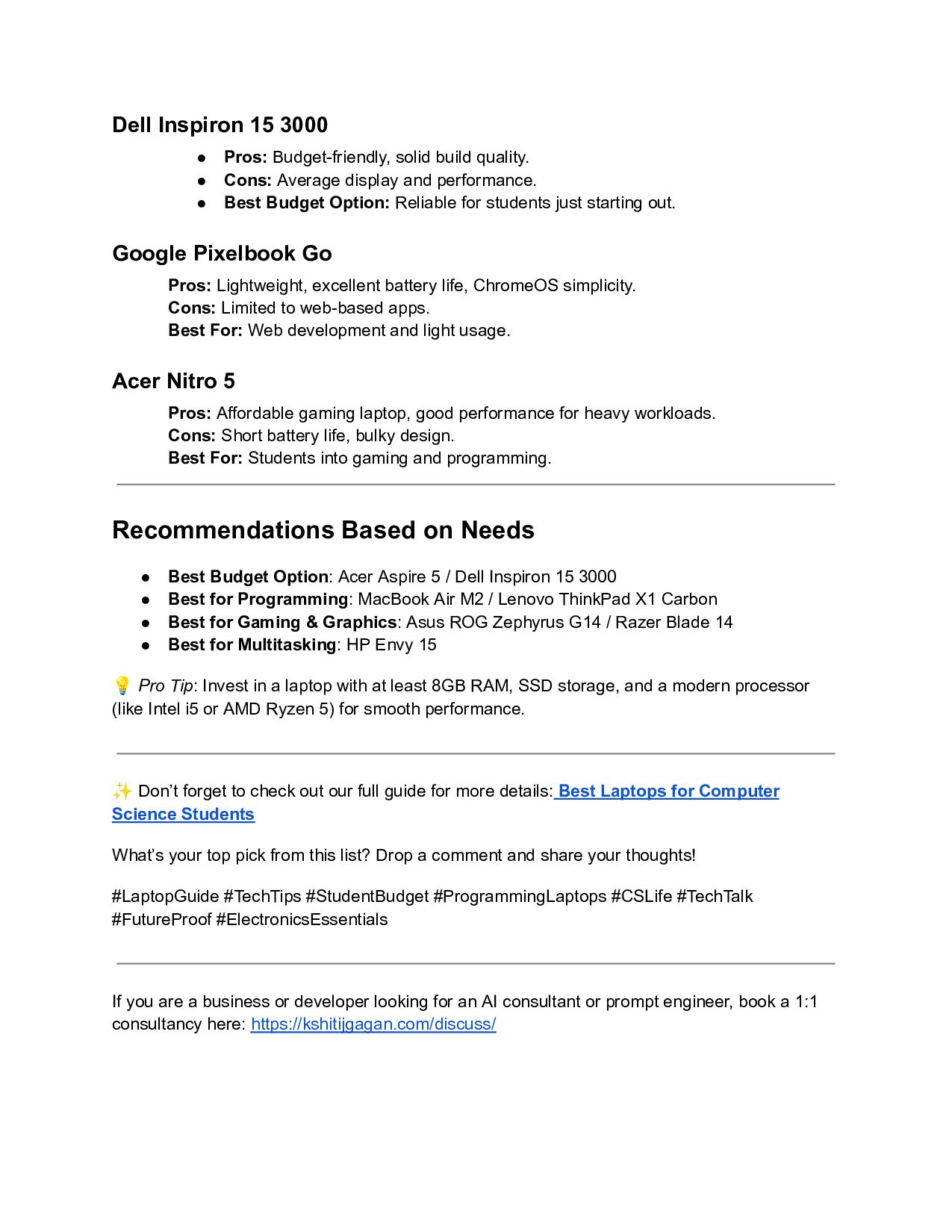
• Cons: Average display and performance. • Best Budget Option: Reliable for students just starting out. Google Pixelbook Go Pros: Lightweight, excellent battery life, ChromeOS simplicity. Cons: Limited to web-based apps. Best For: Web development and light usage. Acer Nitro 5 Pros: Affordable gaming laptop, good performance for heavy workloads. Cons: Short battery life, bulky design. Best For: Students into gaming and programming. Recommendations Based on Needs • Best Budget Option: Acer Aspire 5 / Dell Inspiron 15 3000 • Best for Programming: MacBook Air M2 / Lenovo ThinkPad X1 Carbon • Best for Gaming & Graphics: Asus ROG Zephyrus G14 / Razer Blade 14 • Best for Multitasking: HP Envy 15 💡Pro Tip: Invest in a laptop with at least 8GB RAM, SSD storage, and a modern processor (like Intel i5 or AMD Ryzen 5) for smooth performance. ✨Don’t forget to check out our full guide for more details: Best Laptops for Computer Science Students What’s your top pick from this list? Drop a comment and share your thoughts! #LaptopGuide #TechTips #StudentBudget #ProgrammingLaptops #CSLife #TechTalk #FutureProof #ElectronicsEssentials If you are a business or developer looking for an AI consultant or prompt engineer, book a 1:1 consultancy here: https://kshitijgagan.com/discuss/


 greggifford
 eileencodes
 gurzu
gurzu
 thirion
 sugarenia
 ianozsvald
 notwaldorf
 stephenakadiri
 addyosmani
 sabderemane
 lara
lara
 techseoconnect