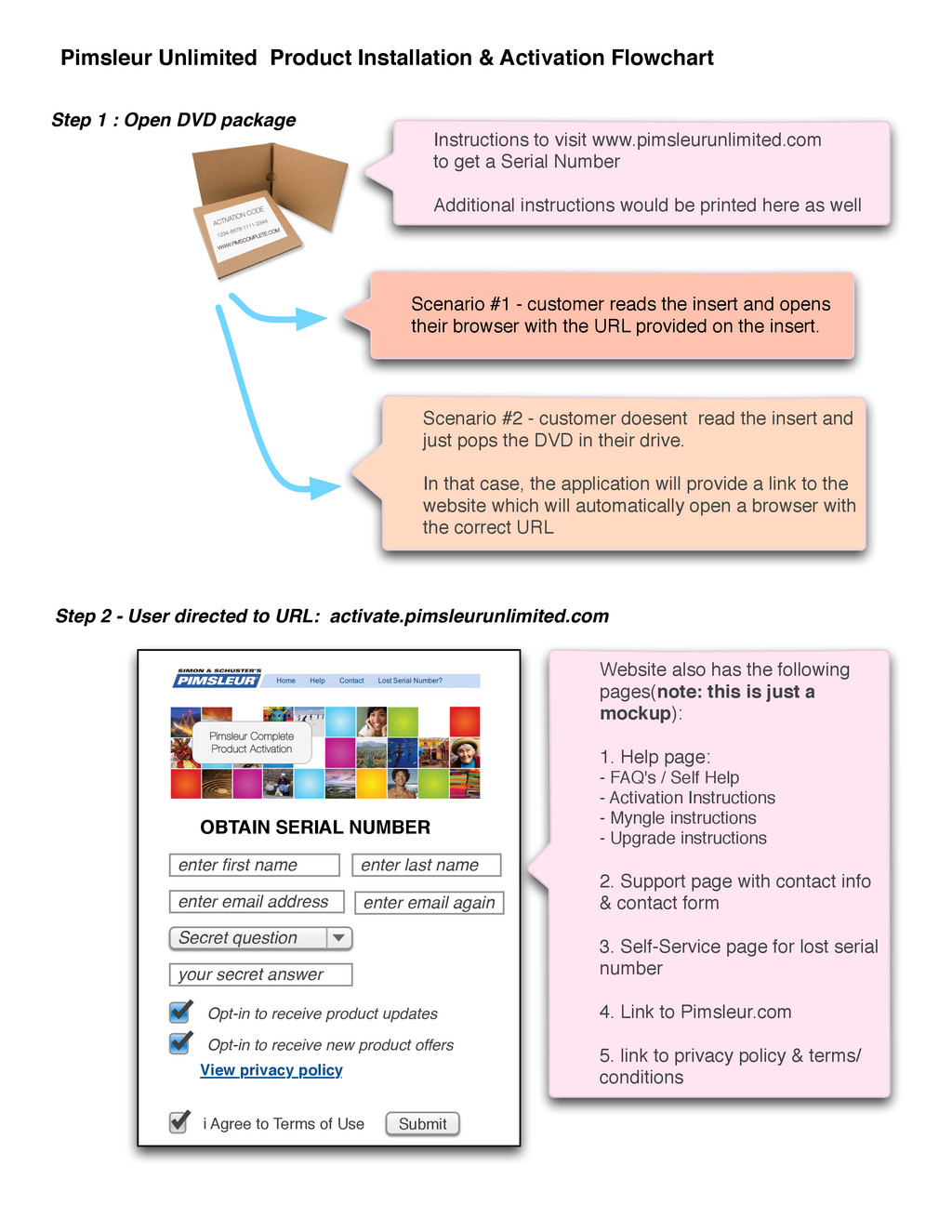
instructions would be printed here as well Step 1 : Open DVD package Step 2 - User directed to URL: activate.pimsleurunlimited.com enter first name enter last name enter email address Secret question your secret answer Opt-in to receive product updates Opt-in to receive new product offers i Agree to Terms of Use Website also has the following pages(note: this is just a mockup): 1. Help page: - FAQ's / Self Help - Activation Instructions - Myngle instructions - Upgrade instructions 2. Support page with contact info & contact form 3. Self-Service page for lost serial number 4. Link to Pimsleur.com 5. link to privacy policy & terms/ conditions Submit View privacy policy OBTAIN SERIAL NUMBER Scenario #2 - customer doesent read the insert and just pops the DVD in their drive. In that case, the application will provide a link to the website which will automatically open a browser with the correct URL Scenario #1 - customer reads the insert and opens their browser with the URL provided on the insert. Pimsleur Unlimited Product Installation & Activation Flowchart enter email again
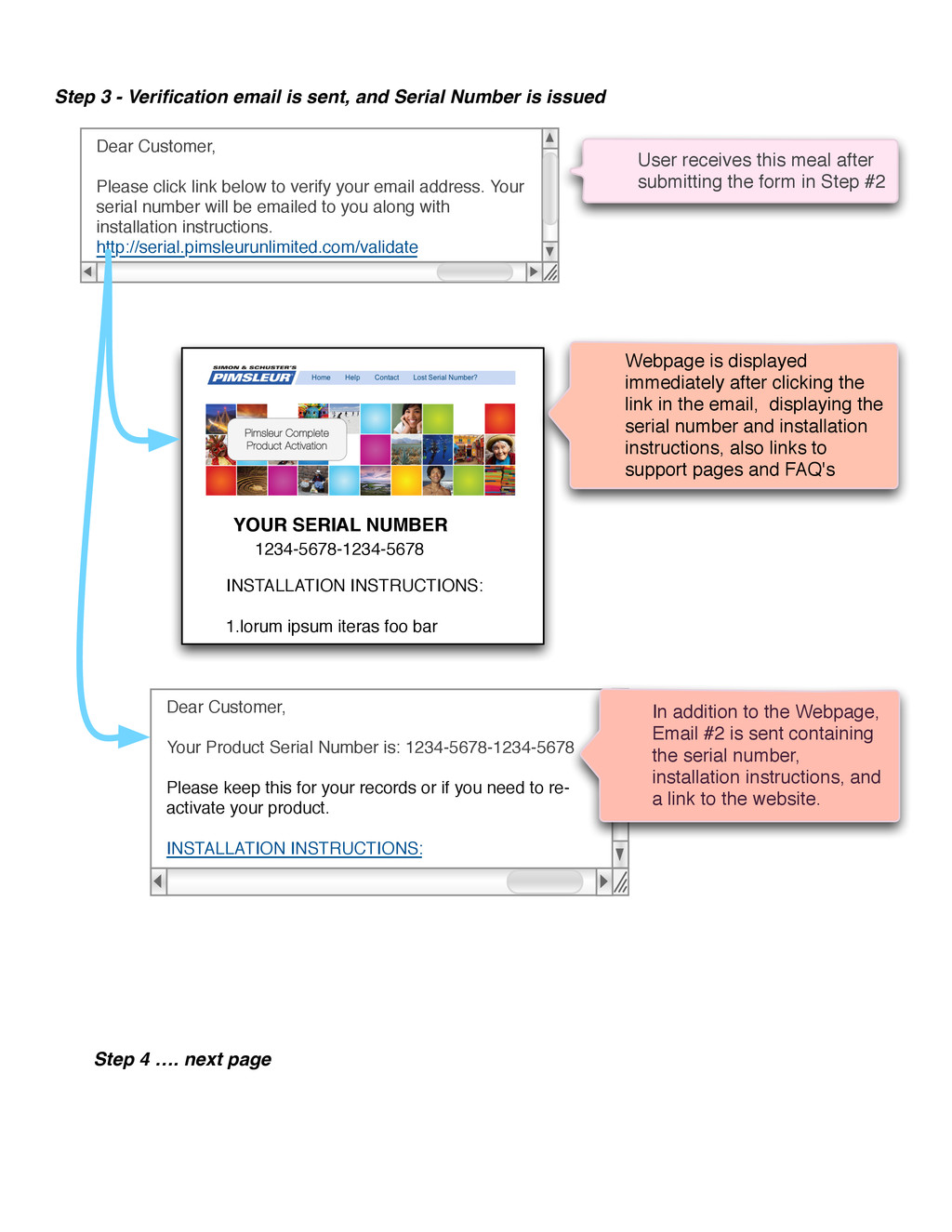
address. Your serial number will be emailed to you along with installation instructions. http://serial.pimsleurunlimited.com/validate Step 3 - Verification email is sent, and Serial Number is issued User receives this meal after submitting the form in Step #2 YOUR SERIAL NUMBER 1234-5678-1234-5678 INSTALLATION INSTRUCTIONS: 1.lorum ipsum iteras foo bar Webpage is displayed immediately after clicking the link in the email, displaying the serial number and installation instructions, also links to support pages and FAQ's Dear Customer, Your Product Serial Number is: 1234-5678-1234-5678 Please keep this for your records or if you need to re- activate your product. INSTALLATION INSTRUCTIONS: In addition to the Webpage, Email #2 is sent containing the serial number, installation instructions, and a link to the website. Step 4 …. next page
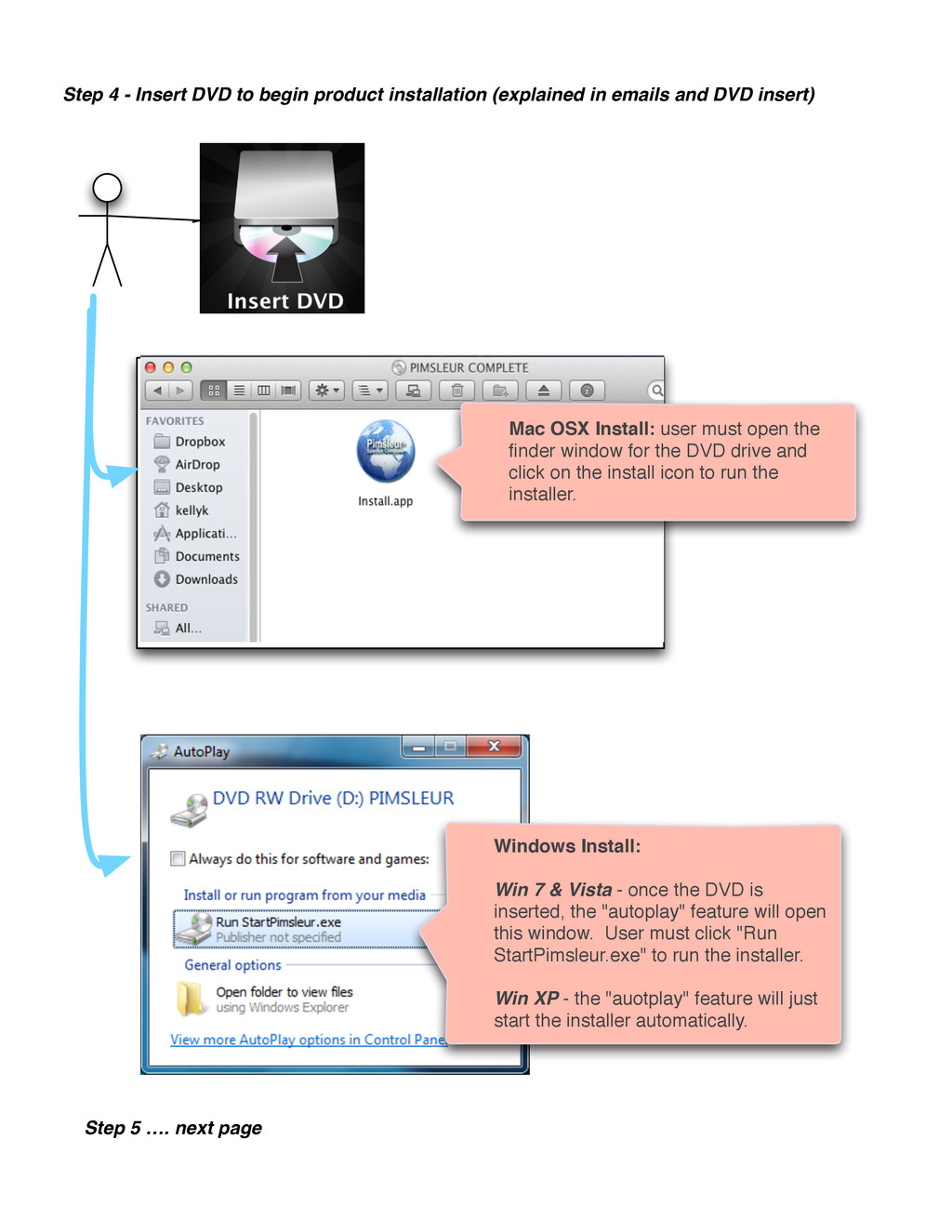
in emails and DVD insert) Mac OSX Install: user must open the finder window for the DVD drive and click on the install icon to run the installer. Windows Install: Win 7 & Vista - once the DVD is inserted, the "autoplay" feature will open this window. User must click "Run StartPimsleur.exe" to run the installer. Win XP - the "auotplay" feature will just start the installer automatically. Step 5 …. next page
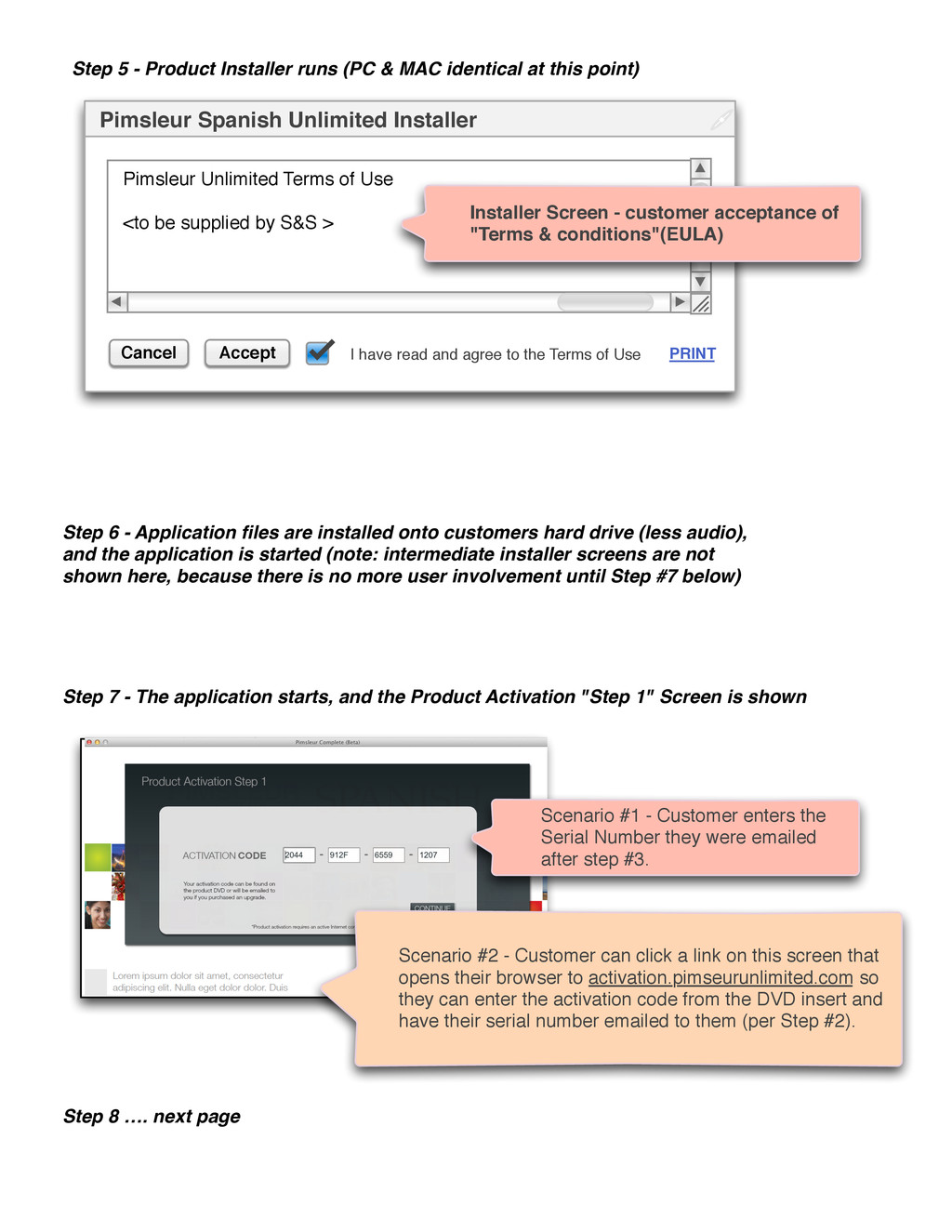
at this point) Accept Pimsleur Spanish Unlimited Installer Pimsleur Unlimited Terms of Use <to be supplied by S&S > I have read and agree to the Terms of Use Cancel Installer Screen - customer acceptance of "Terms & conditions"(EULA) Step 6 - Application files are installed onto customers hard drive (less audio), and the application is started (note: intermediate installer screens are not shown here, because there is no more user involvement until Step #7 below) Scenario #1 - Customer enters the Serial Number they were emailed after step #3. Step 7 - The application starts, and the Product Activation "Step 1" Screen is shown Step 8 …. next page Scenario #2 - Customer can click a link on this screen that opens their browser to activation.pimseurunlimited.com so they can enter the activation code from the DVD insert and have their serial number emailed to them (per Step #2). PRINT
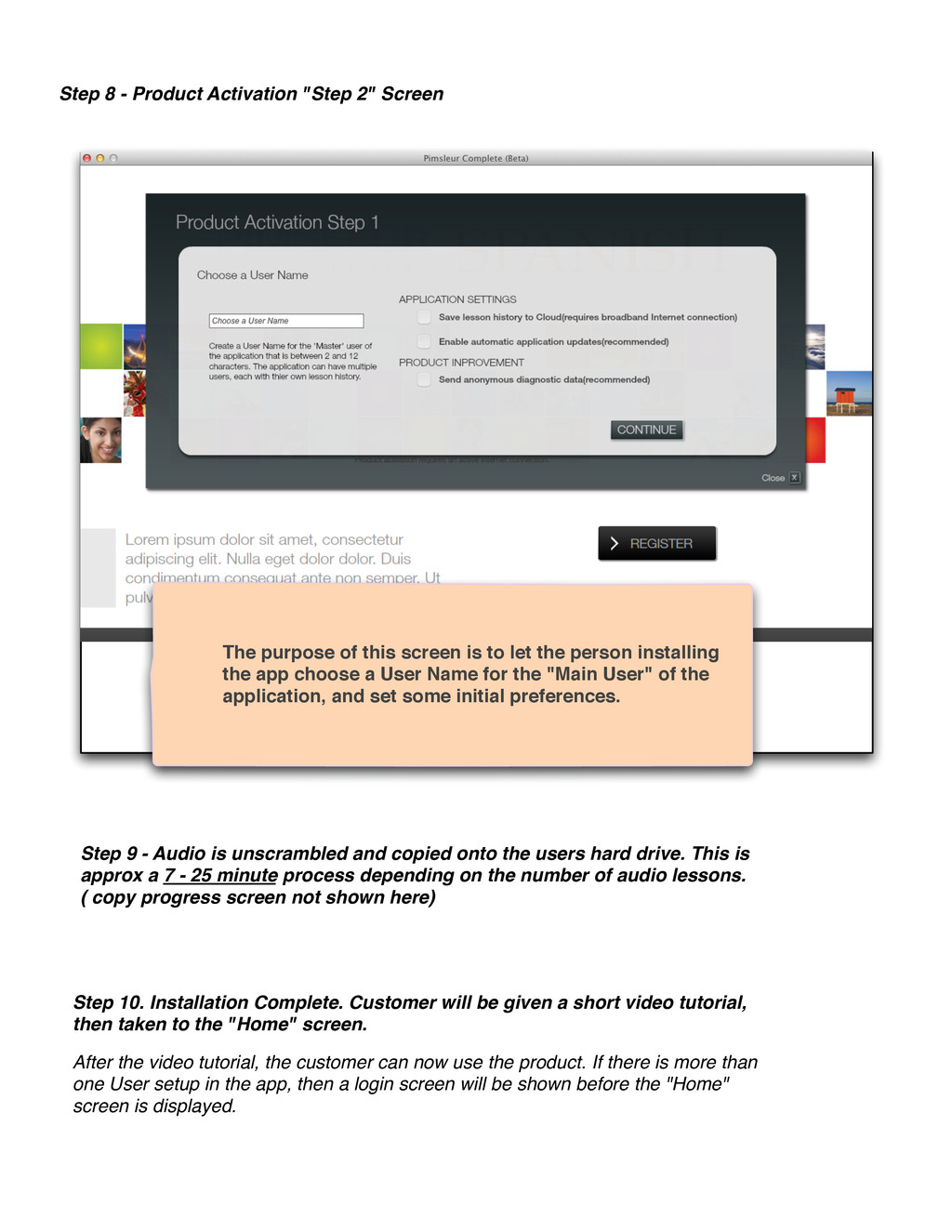
of this screen is to let the person installing the app choose a User Name for the "Main User" of the application, and set some initial preferences. Step 9 - Audio is unscrambled and copied onto the users hard drive. This is approx a 7 - 25 minute process depending on the number of audio lessons. ( copy progress screen not shown here) Step 10. Installation Complete. Customer will be given a short video tutorial, then taken to the "Home" screen. After the video tutorial, the customer can now use the product. If there is more than one User setup in the app, then a login screen will be shown before the "Home" screen is displayed.

 Your Podcast. Everywhere. Effortlessly.


 akademiya2063
 aleyda
 techseoconnect
 inesmontani
 lynnandtonic
 addyosmani
 davidcarrasco
 greggifford
 helmedeiros
 honnibal
 keavy
keavy