Upgrade to Pro — share decks privately, control downloads, hide ads and more …

Modern Security Basics from the Five Kiro Broth...

Avatar for Hiroo Katoh Hiroo Katoh
September 01, 2026

Modern Security Basics from the Five Kiro Brothers

Modern Security Basics from the Five Kiro Brothers — The "Kiro Crew" (the youngest sibling) Has Recently Joined the Family —

Avatar for Hiroo Katoh

Hiroo Katoh

September 01, 2026

More Decks by Hiroo Katoh

Other Decks in Technology

Transcript

  1. Security-JAWS #42 · August 26, 2026 Modern Security Basics from

    the Five Kiro Brothers — The "Kiro Crew" (the youngest sibling) Has Recently Joined the Family — Hiroo Katoh © NTT TechnoCross Corporation
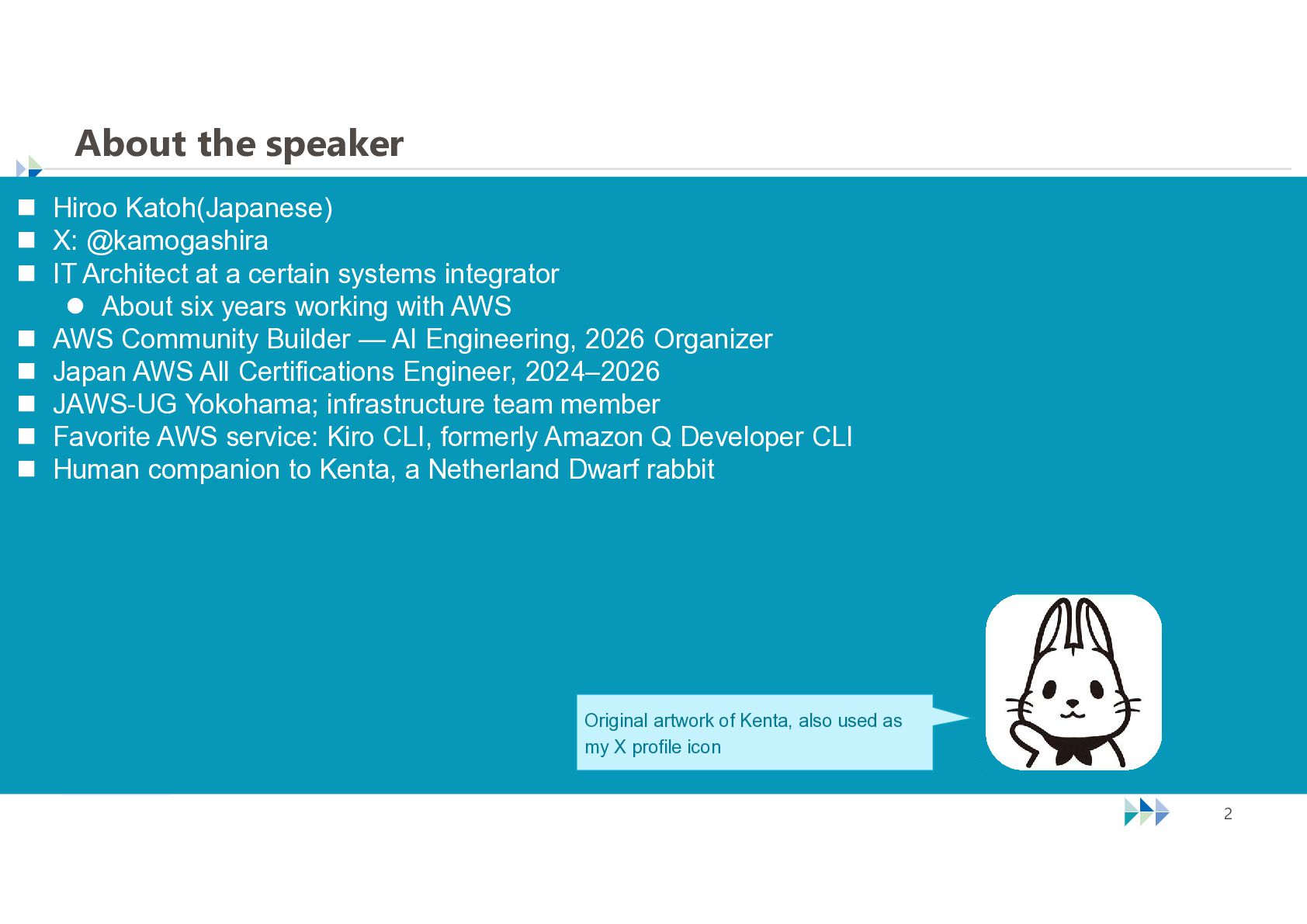
  2. About the speaker  Hiroo Katoh(Japanese)  X: @kamogashira 

    IT Architect at a certain systems integrator  About six years working with AWS  AWS Community Builder — AI Engineering, 2026 Organizer  Japan AWS All Certifications Engineer, 2024–2026  JAWS-UG Yokohama; infrastructure team member  Favorite AWS service: Kiro CLI, formerly Amazon Q Developer CLI  Human companion to Kenta, a Netherland Dwarf rabbit Original artwork of Kenta, also used as my X profile icon © NTT TechnoCross Corporation 2
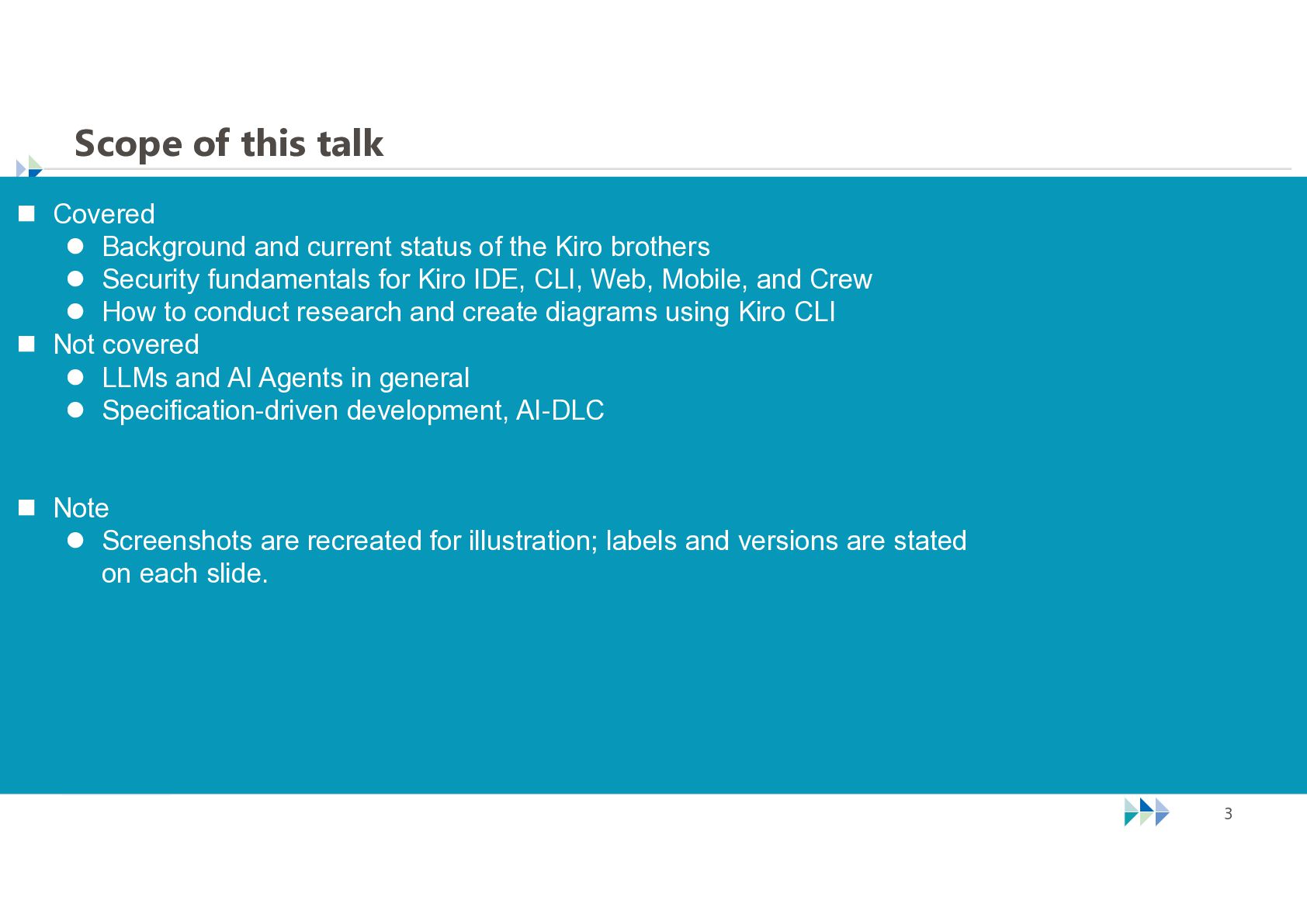
  3. Scope of this talk  Covered  Background and current

    status of the Kiro brothers  Security fundamentals for Kiro IDE, CLI, Web, Mobile, and Crew  How to conduct research and create diagrams using Kiro CLI  Not covered  LLMs and AI Agents in general  Specification-driven development, AI-DLC  Note  Screenshots are recreated for illustration; labels and versions are stated on each slide. © NTT TechnoCross Corporation 3
  4. Before we begin  This is a dense deck, so

    the live explanation moves quickly.  The centerpiece is the set of two Kiro Crew architecture diagrams and one sequence diagram. Those three visuals carry the core argument. © NTT TechnoCross Corporation 4
  5. Are you using Kiro? I am an enthusiastic Kiro CLI

    user. © NTT TechnoCross Corporation 5
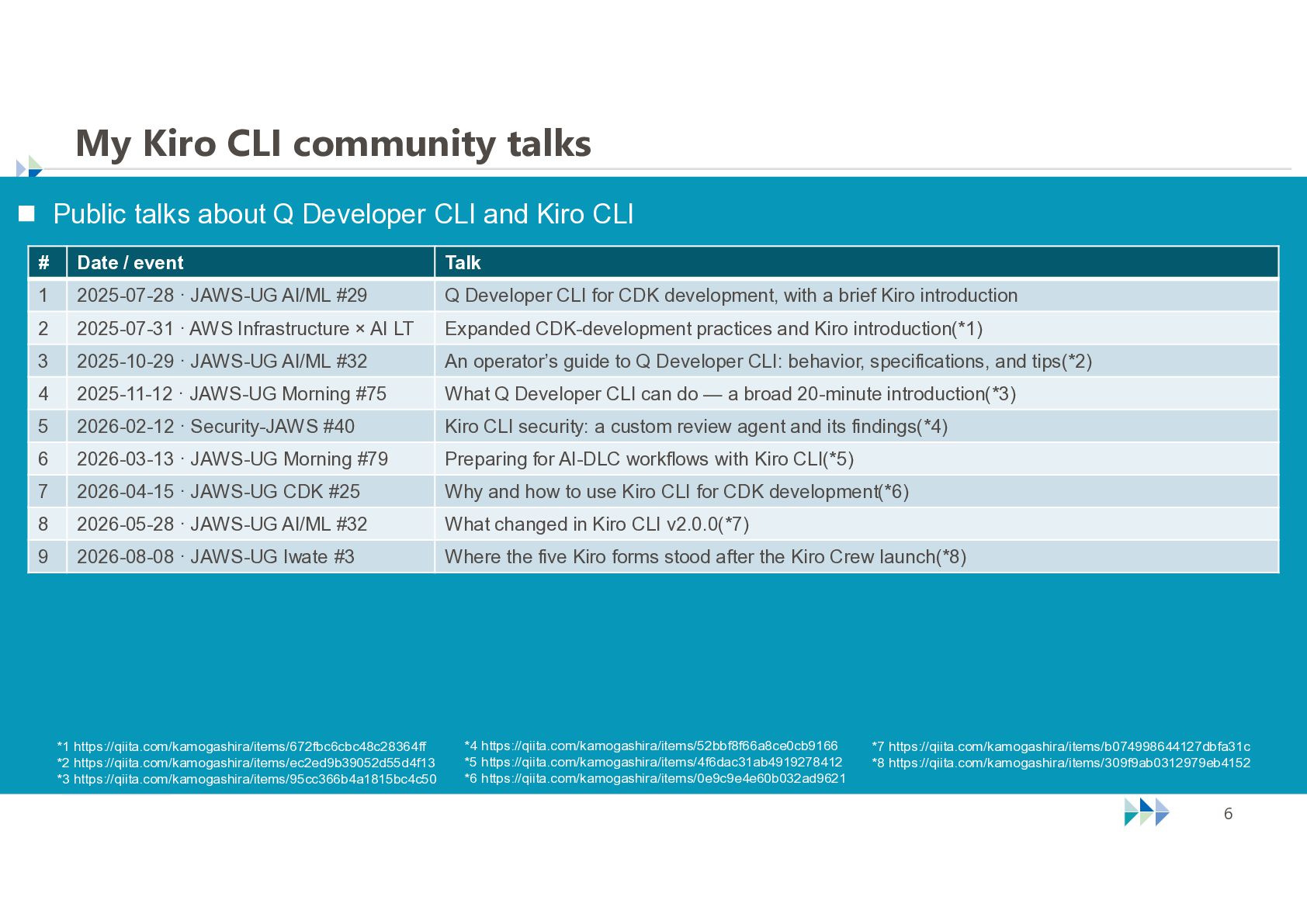
  6. My Kiro CLI community talks  Public talks about Q

    Developer CLI and Kiro CLI # Date / event Talk 1 2025-07-28 · JAWS-UG AI/ML #29 Q Developer CLI for CDK development, with a brief Kiro introduction 2 2025-07-31 · AWS Infrastructure × AI LT Expanded CDK-development practices and Kiro introduction(*1) 3 2025-10-29 · JAWS-UG AI/ML #32 An operator’s guide to Q Developer CLI: behavior, specifications, and tips(*2) 4 2025-11-12 · JAWS-UG Morning #75 What Q Developer CLI can do — a broad 20-minute introduction(*3) 5 2026-02-12 · Security-JAWS #40 Kiro CLI security: a custom review agent and its findings(*4) 6 2026-03-13 · JAWS-UG Morning #79 Preparing for AI-DLC workflows with Kiro CLI(*5) 7 2026-04-15 · JAWS-UG CDK #25 Why and how to use Kiro CLI for CDK development(*6) 8 2026-05-28 · JAWS-UG AI/ML #32 What changed in Kiro CLI v2.0.0(*7) 9 2026-08-08 · JAWS-UG Iwate #3 Where the five Kiro forms stood after the Kiro Crew launch(*8) *1 https://qiita.com/kamogashira/items/672fbc6cbc48c28364ff *2 https://qiita.com/kamogashira/items/ec2ed9b39052d55d4f13 *3 https://qiita.com/kamogashira/items/95cc366b4a1815bc4c50 *4 https://qiita.com/kamogashira/items/52bbf8f66a8ce0cb9166 *5 https://qiita.com/kamogashira/items/4f6dac31ab4919278412 *6 https://qiita.com/kamogashira/items/0e9c9e4e60b032ad9621 © NTT TechnoCross Corporation *7 https://qiita.com/kamogashira/items/b074998644127dbfa31c *8 https://qiita.com/kamogashira/items/309f9ab0312979eb4152 6
  7. The Kiro landscape is changing fast. My current focus is

    Kiro IDE and Kiro Crew. © NTT TechnoCross Corporation 7
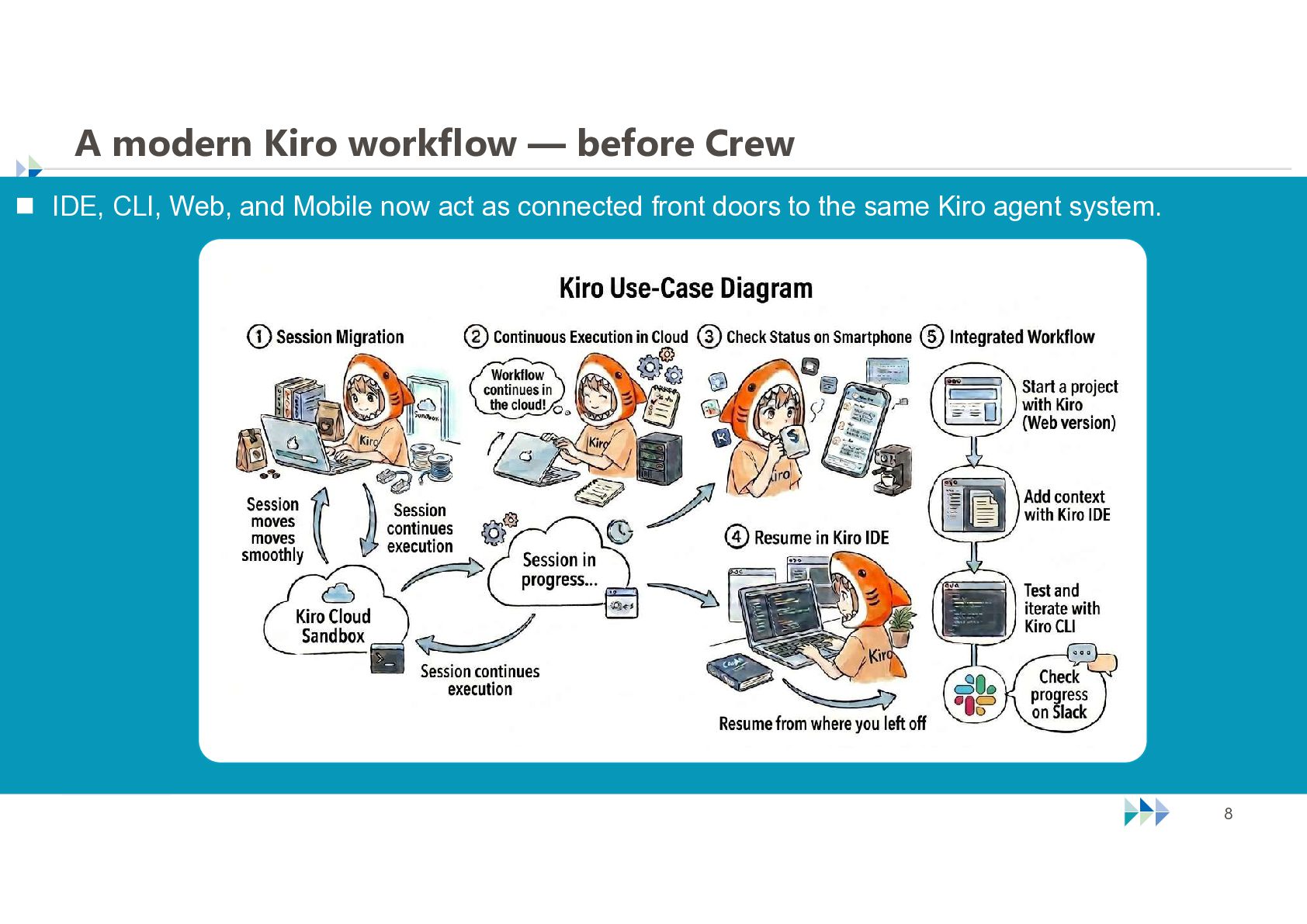
  8. A modern Kiro workflow — before Crew  IDE, CLI,

    Web, and Mobile now act as connected front doors to the same Kiro agent system. © NTT TechnoCross Corporation 8
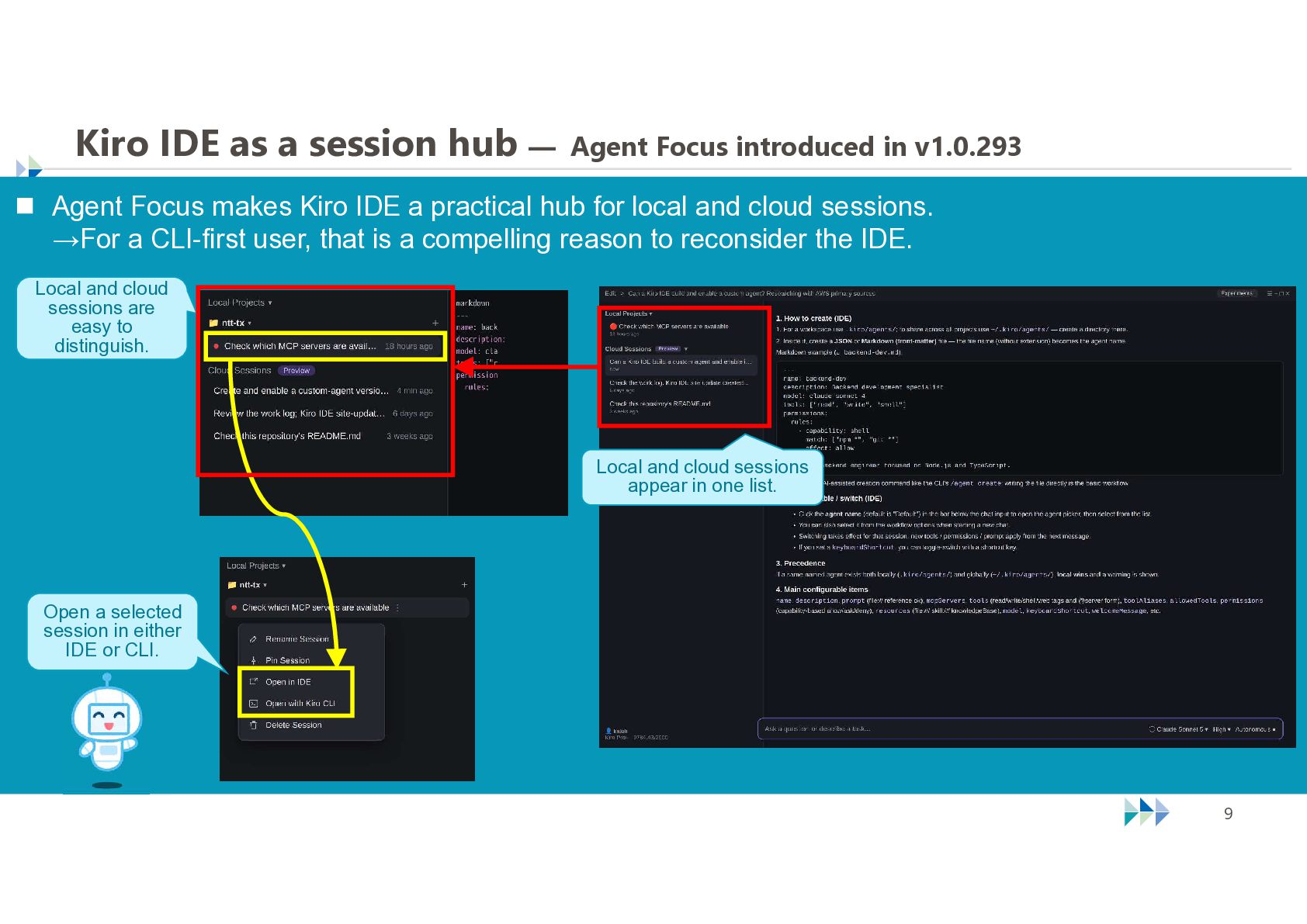
  9. Kiro IDE as a session hub — Agent Focus introduced

    in v1.0.293  Agent Focus makes Kiro IDE a practical hub for local and cloud sessions. →For a CLI-first user, that is a compelling reason to reconsider the IDE. Local and cloud sessions are easy to distinguish. Local and cloud sessions appear in one list. Open a selected session in either IDE or CLI. © NTT TechnoCross Corporation 9
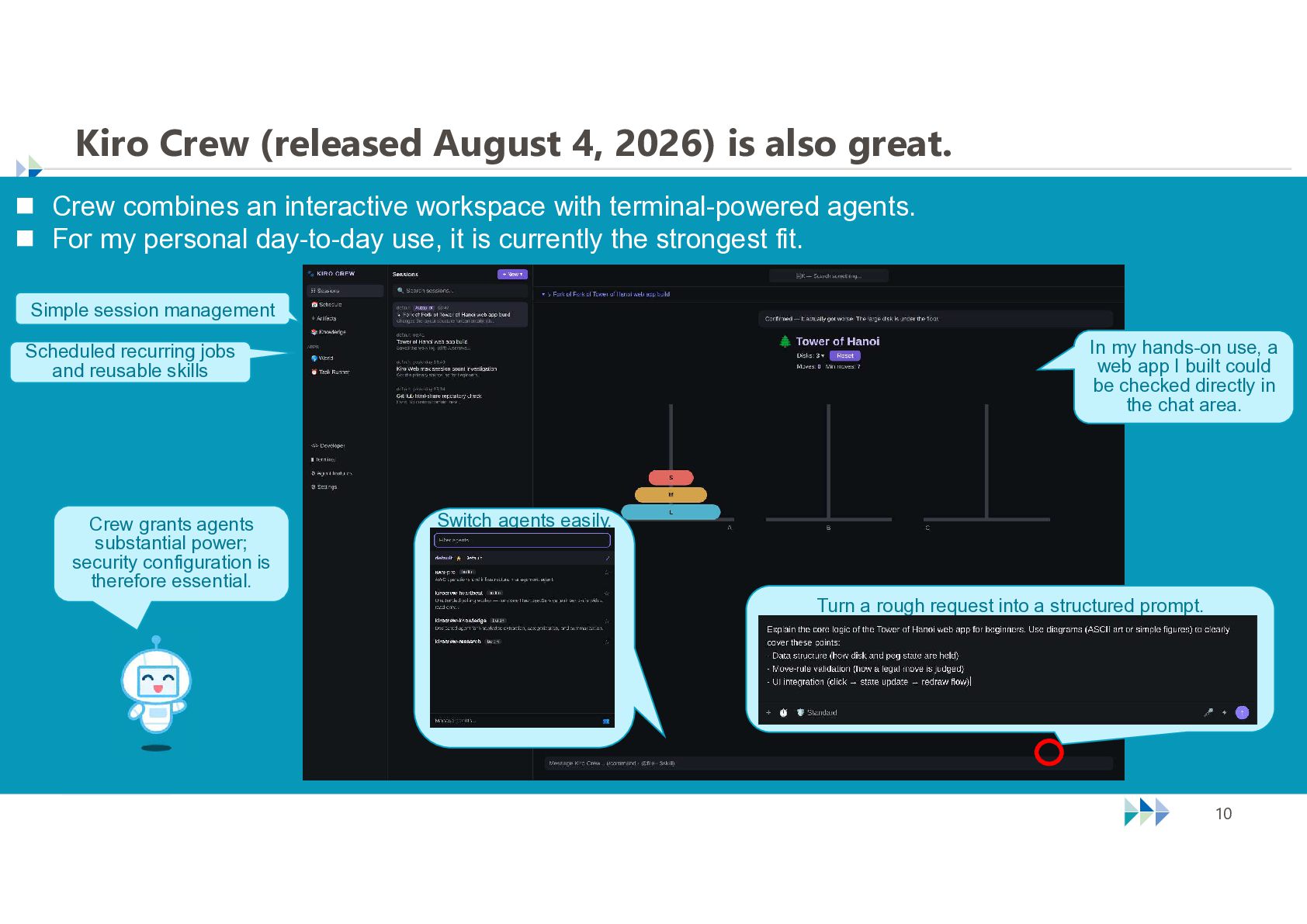
  10. Kiro Crew (released August 4, 2026) is also great. 

    Crew combines an interactive workspace with terminal-powered agents.  For my personal day-to-day use, it is currently the strongest fit. Simple session management In my hands-on use, a web app I built could be checked directly in the chat area. Scheduled recurring jobs and reusable skills Crew grants agents substantial power; security configuration is therefore essential. Switch agents easily. Turn a rough request into a structured prompt. © NTT TechnoCross Corporation 10
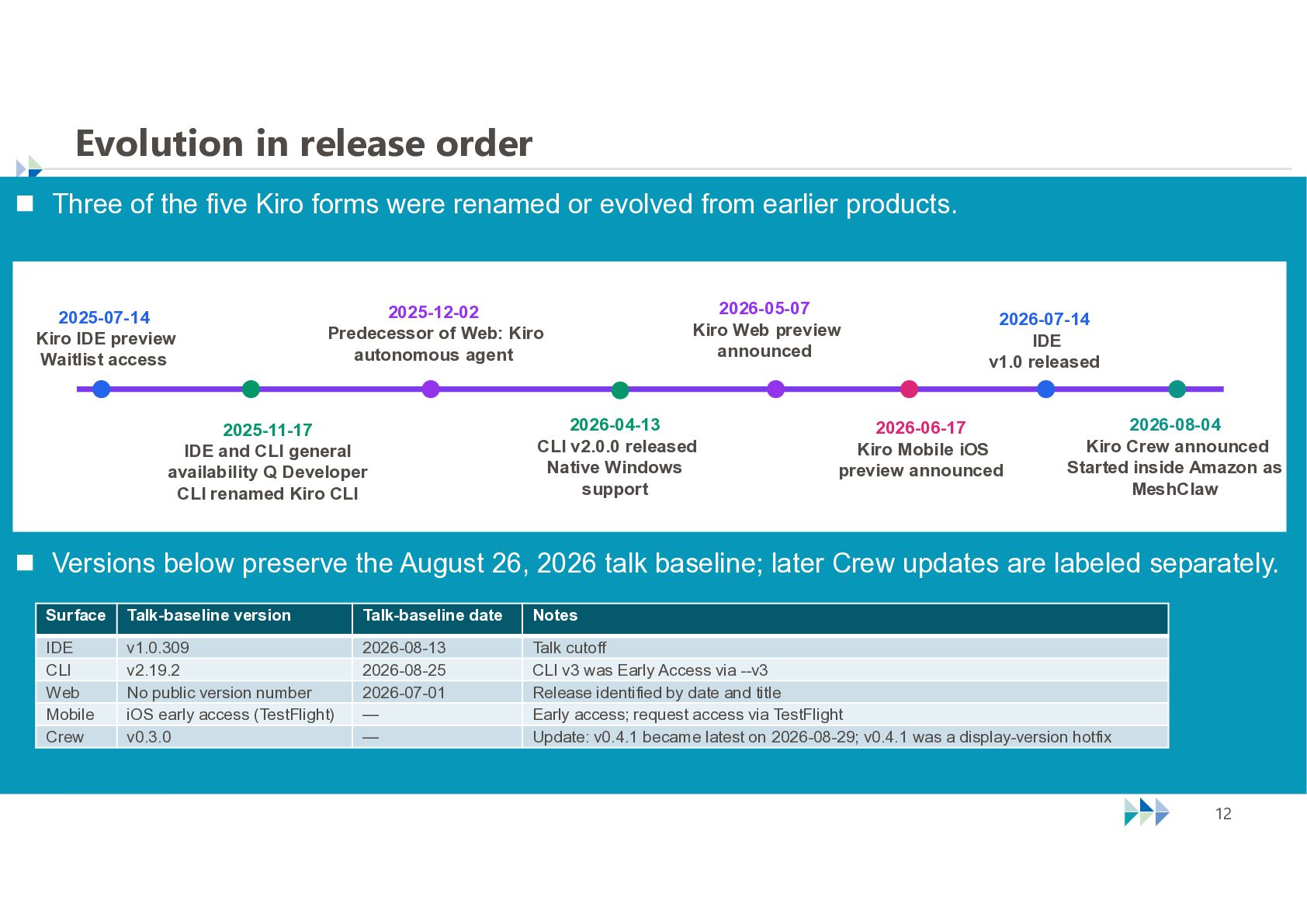
  11. Evolution in release order  Three of the five Kiro

    forms were renamed or evolved from earlier products. 2025-07-14 Kiro IDE preview Waitlist access 2026-05-07 Kiro Web preview announced 2025-12-02 Predecessor of Web: Kiro autonomous agent 2025-11-17 IDE and CLI general availability Q Developer CLI renamed Kiro CLI 2026-04-13 CLI v2.0.0 released Native Windows support 2026-07-14 IDE v1.0 released 2026-06-17 Kiro Mobile iOS preview announced 2026-08-04 Kiro Crew announced Started inside Amazon as MeshClaw  Versions below preserve the August 26, 2026 talk baseline; later Crew updates are labeled separately. Surface Talk-baseline version Talk-baseline date Notes IDE CLI Web Mobile Crew v1.0.309 v2.19.2 No public version number iOS early access (TestFlight) v0.3.0 2026-08-13 2026-08-25 2026-07-01 — — Talk cutoff CLI v3 was Early Access via --v3 Release identified by date and title Early access; request access via TestFlight Update: v0.4.1 became latest on 2026-08-29; v0.4.1 was a display-version hotfix © NTT TechnoCross Corporation 12
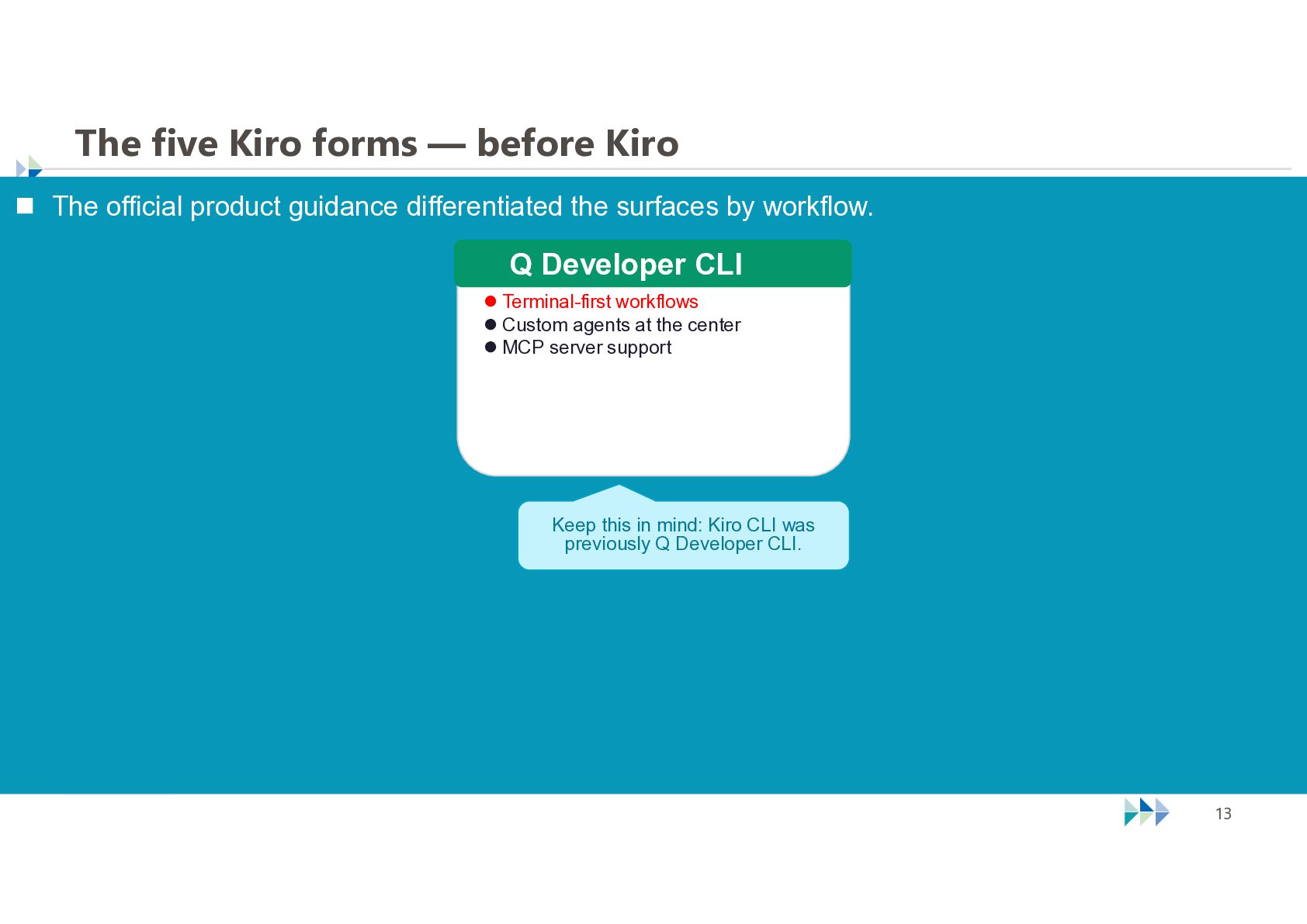
  12. The five Kiro forms — before Kiro  The official

    product guidance differentiated the surfaces by workflow. Q Developer CLI  Terminal-first workflows  Custom agents at the center  MCP server support Keep this in mind: Kiro CLI was previously Q Developer CLI. © NTT TechnoCross Corporation 13
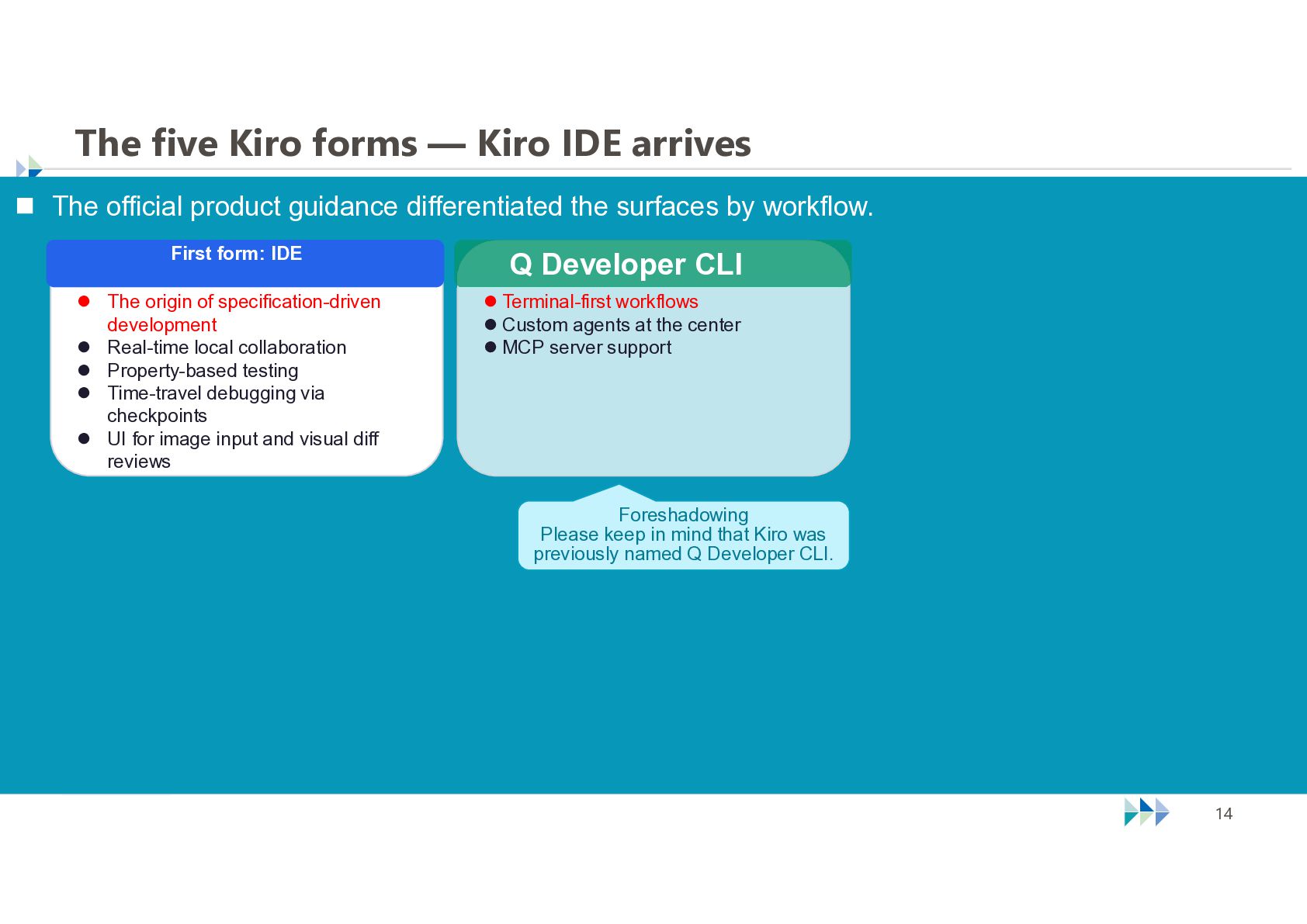
  13. The five Kiro forms — Kiro IDE arrives  The

    official product guidance differentiated the surfaces by workflow. First form: IDE  The origin of specification-driven development  Real-time local collaboration  Property-based testing  Time-travel debugging via checkpoints  UI for image input and visual diff reviews Q Developer CLI  Terminal-first workflows  Custom agents at the center  MCP server support Foreshadowing Please keep in mind that Kiro was previously named Q Developer CLI. © NTT TechnoCross Corporation 14
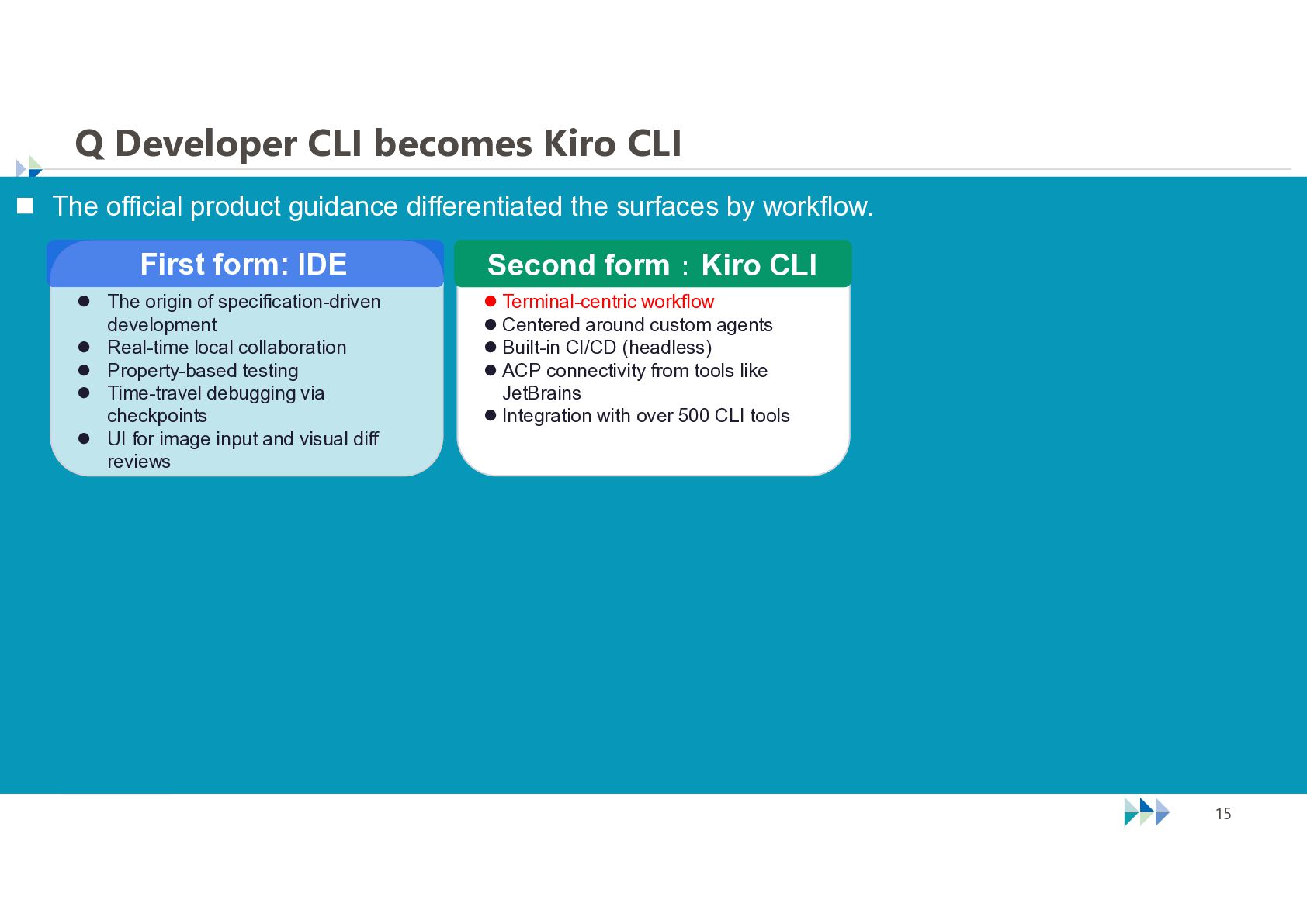
  14. Q Developer CLI becomes Kiro CLI  The official product

    guidance differentiated the surfaces by workflow. First form: IDE  The origin of specification-driven development  Real-time local collaboration  Property-based testing  Time-travel debugging via checkpoints  UI for image input and visual diff reviews Second form:Kiro CLI  Terminal-centric workflow  Centered around custom agents  Built-in CI/CD (headless)  ACP connectivity from tools like JetBrains  Integration with over 500 CLI tools © NTT TechnoCross Corporation 15
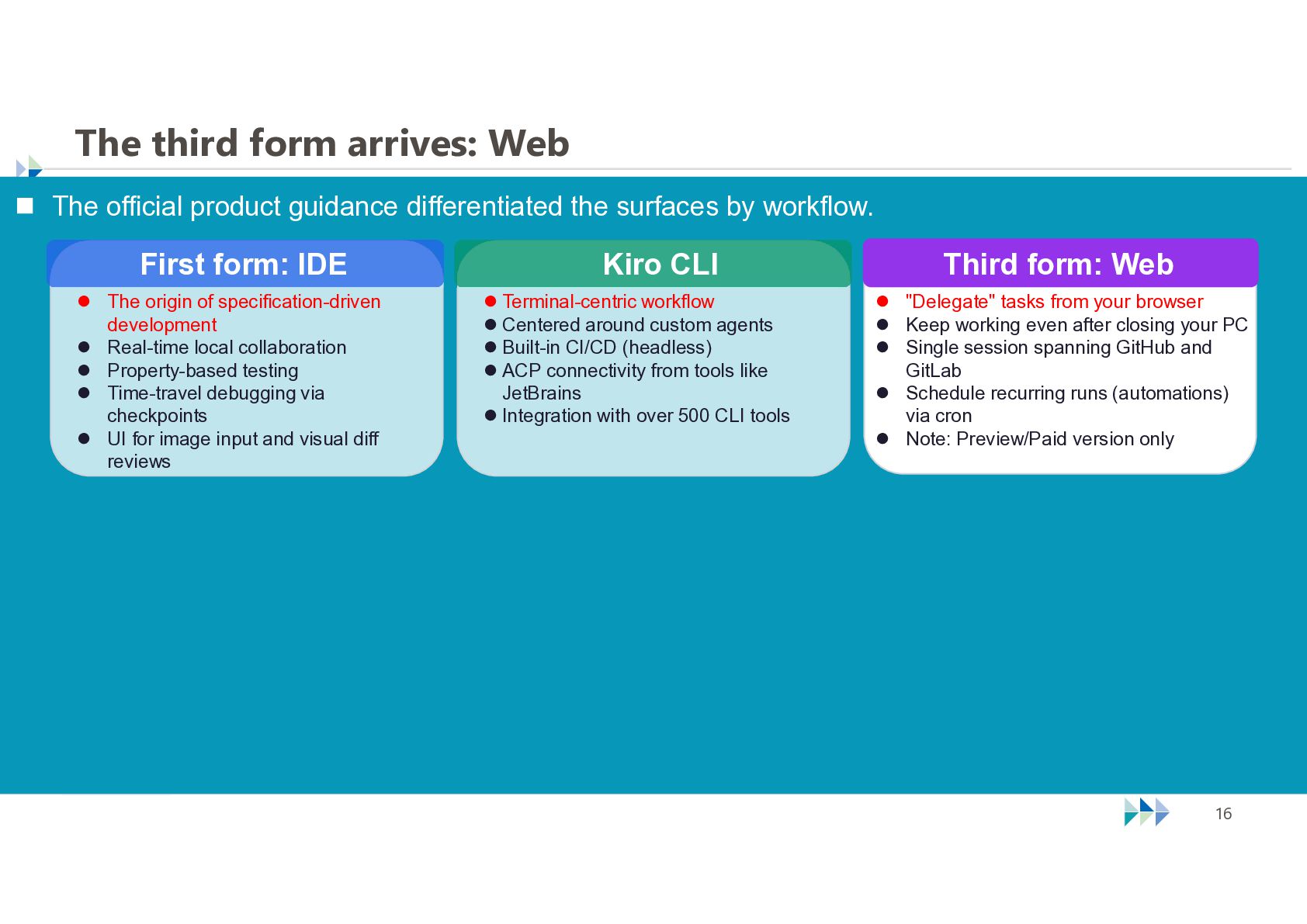
  15. The third form arrives: Web  The official product guidance

    differentiated the surfaces by workflow. First form: IDE  The origin of specification-driven development  Real-time local collaboration  Property-based testing  Time-travel debugging via checkpoints  UI for image input and visual diff reviews Kiro CLI  Terminal-centric workflow  Centered around custom agents  Built-in CI/CD (headless)  ACP connectivity from tools like JetBrains  Integration with over 500 CLI tools © NTT TechnoCross Corporation Third form: Web  "Delegate" tasks from your browser  Keep working even after closing your PC  Single session spanning GitHub and GitLab  Schedule recurring runs (automations) via cron  Note: Preview/Paid version only 16
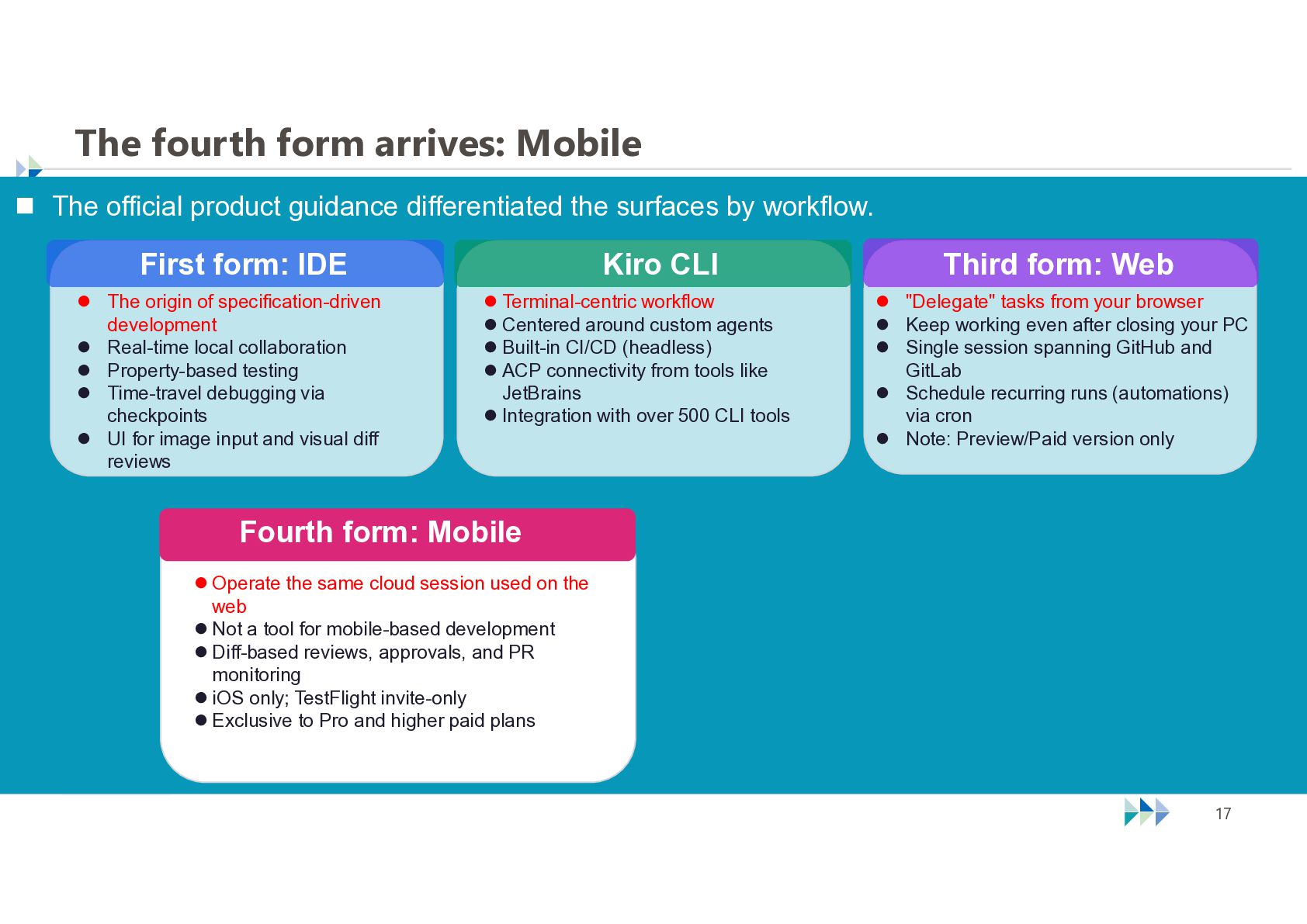
  16. The fourth form arrives: Mobile  The official product guidance

    differentiated the surfaces by workflow. First form: IDE  The origin of specification-driven development  Real-time local collaboration  Property-based testing  Time-travel debugging via checkpoints  UI for image input and visual diff reviews Kiro CLI  Terminal-centric workflow  Centered around custom agents  Built-in CI/CD (headless)  ACP connectivity from tools like JetBrains  Integration with over 500 CLI tools Third form: Web  "Delegate" tasks from your browser  Keep working even after closing your PC  Single session spanning GitHub and GitLab  Schedule recurring runs (automations) via cron  Note: Preview/Paid version only Fourth form: Mobile  Operate the same cloud session used on the web  Not a tool for mobile-based development  Diff-based reviews, approvals, and PR monitoring  iOS only; TestFlight invite-only  Exclusive to Pro and higher paid plans © NTT TechnoCross Corporation 17
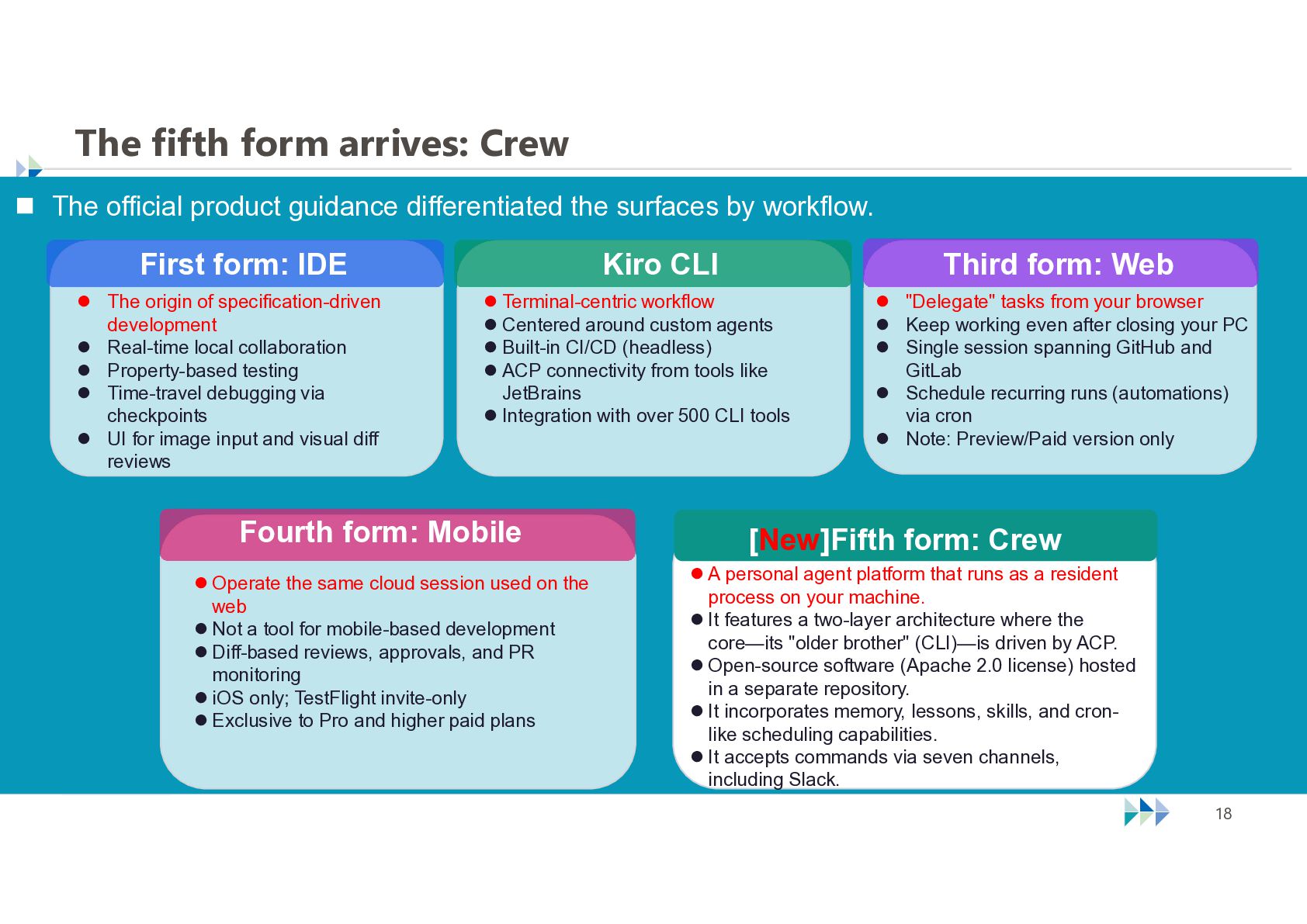
  17. The fifth form arrives: Crew  The official product guidance

    differentiated the surfaces by workflow. First form: IDE  The origin of specification-driven development  Real-time local collaboration  Property-based testing  Time-travel debugging via checkpoints  UI for image input and visual diff reviews Kiro CLI Third form: Web  Terminal-centric workflow  Centered around custom agents  Built-in CI/CD (headless)  ACP connectivity from tools like JetBrains  Integration with over 500 CLI tools Fourth form: Mobile  "Delegate" tasks from your browser  Keep working even after closing your PC  Single session spanning GitHub and GitLab  Schedule recurring runs (automations) via cron  Note: Preview/Paid version only [New]Fifth form: Crew  Operate the same cloud session used on the web  Not a tool for mobile-based development  Diff-based reviews, approvals, and PR monitoring  iOS only; TestFlight invite-only  Exclusive to Pro and higher paid plans  A personal agent platform that runs as a resident process on your machine.  It features a two-layer architecture where the core—its "older brother" (CLI)—is driven by ACP.  Open-source software (Apache 2.0 license) hosted in a separate repository.  It incorporates memory, lessons, skills, and cronlike scheduling capabilities.  It accepts commands via seven channels, including Slack. © NTT TechnoCross Corporation 18
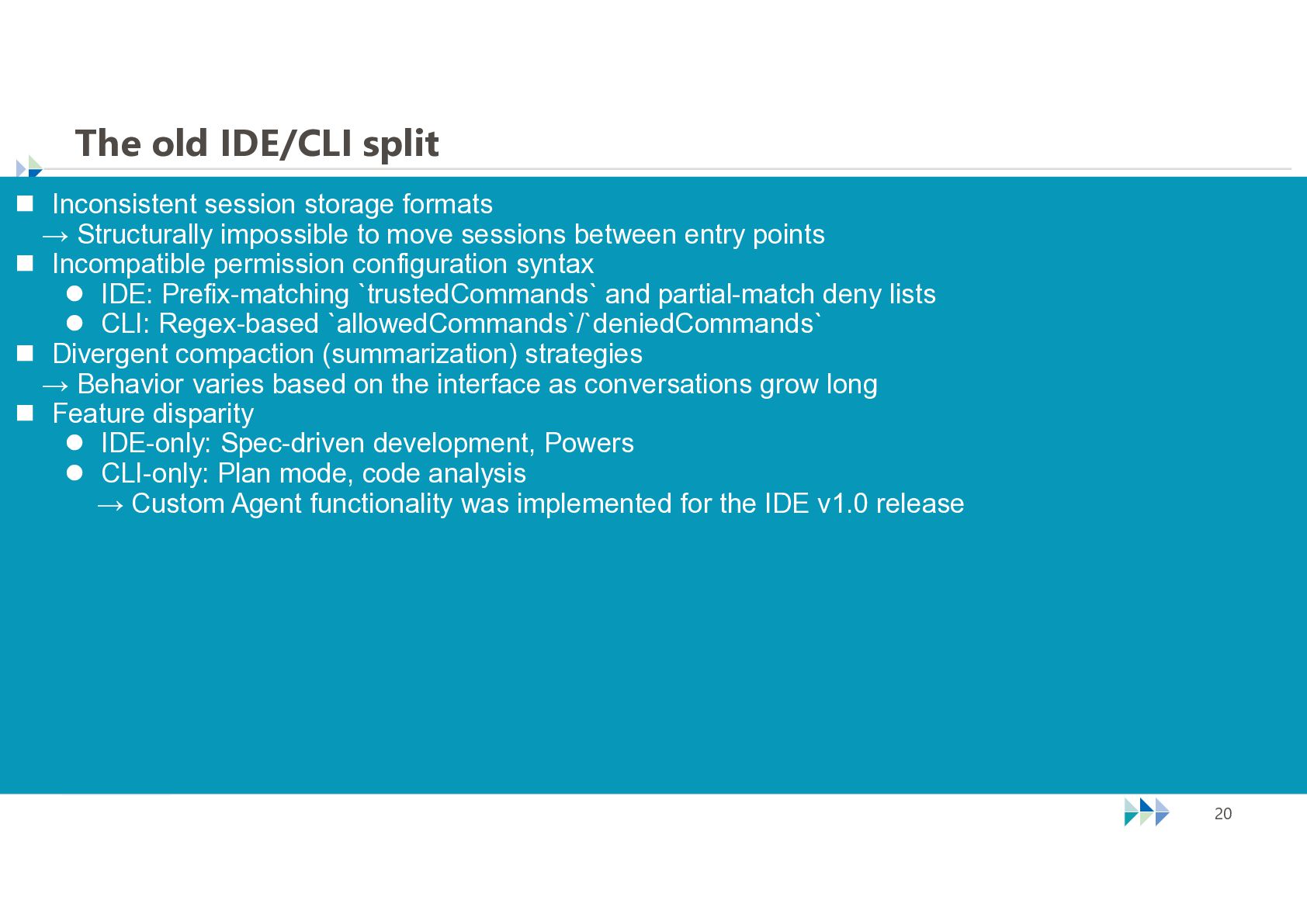
  18. The old IDE/CLI split  Inconsistent session storage formats →

    Structurally impossible to move sessions between entry points  Incompatible permission configuration syntax  IDE: Prefix-matching `trustedCommands` and partial-match deny lists  CLI: Regex-based `allowedCommands`/`deniedCommands`  Divergent compaction (summarization) strategies → Behavior varies based on the interface as conversations grow long  Feature disparity  IDE-only: Spec-driven development, Powers  CLI-only: Plan mode, code analysis → Custom Agent functionality was implemented for the IDE v1.0 release © NTT TechnoCross Corporation 20
  19. The path to one agent harness  Before Kiro Web

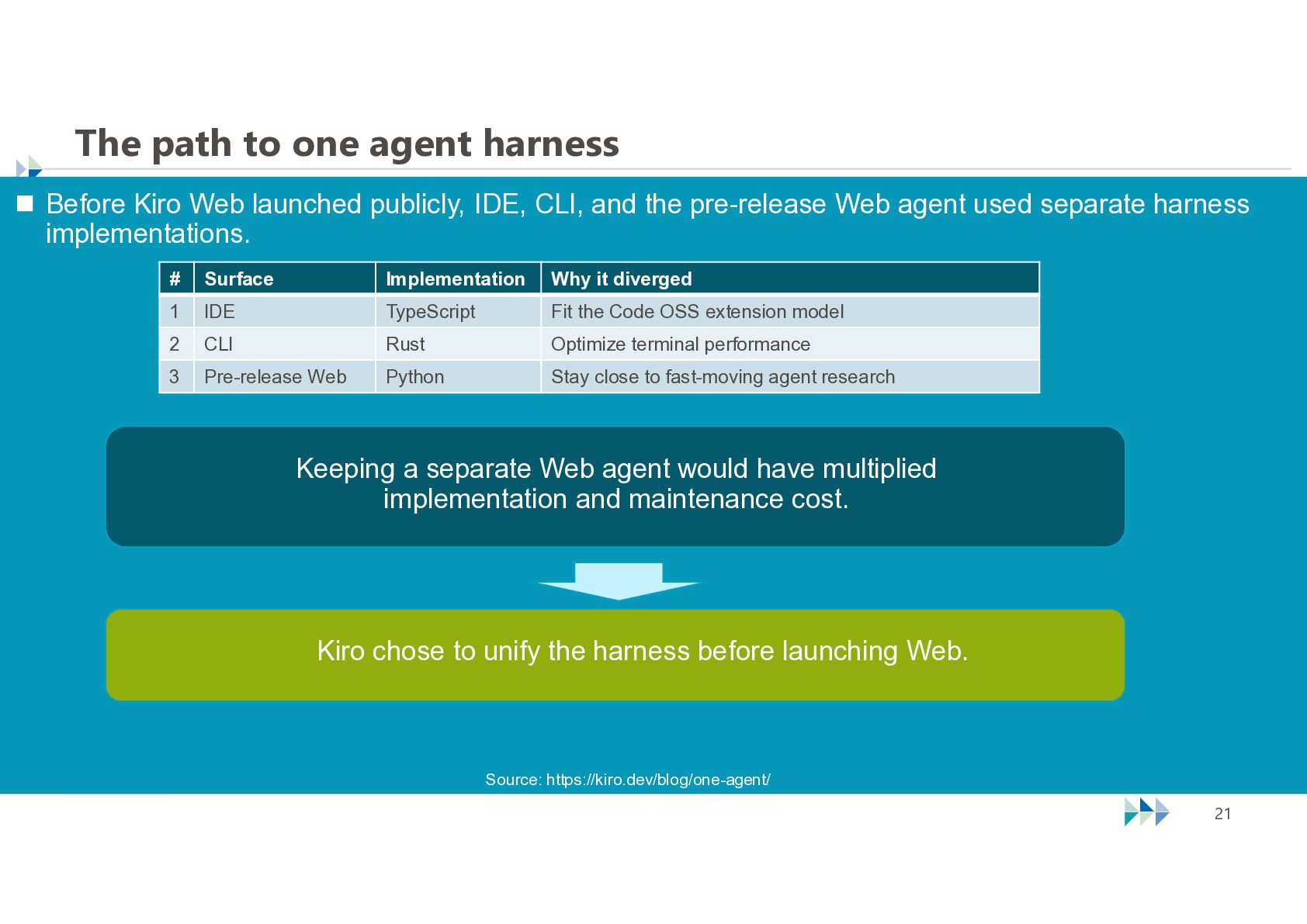
    launched publicly, IDE, CLI, and the pre-release Web agent used separate harness implementations. # Surface Implementation Why it diverged 1 IDE TypeScript Fit the Code OSS extension model 2 CLI Rust Optimize terminal performance 3 Pre-release Web Python Stay close to fast-moving agent research Keeping a separate Web agent would have multiplied implementation and maintenance cost. Kiro chose to unify the harness before launching Web. Source: https://kiro.dev/blog/one-agent/ © NTT TechnoCross Corporation 21
  20. The unified agent harness — a deliberate compatibility break 

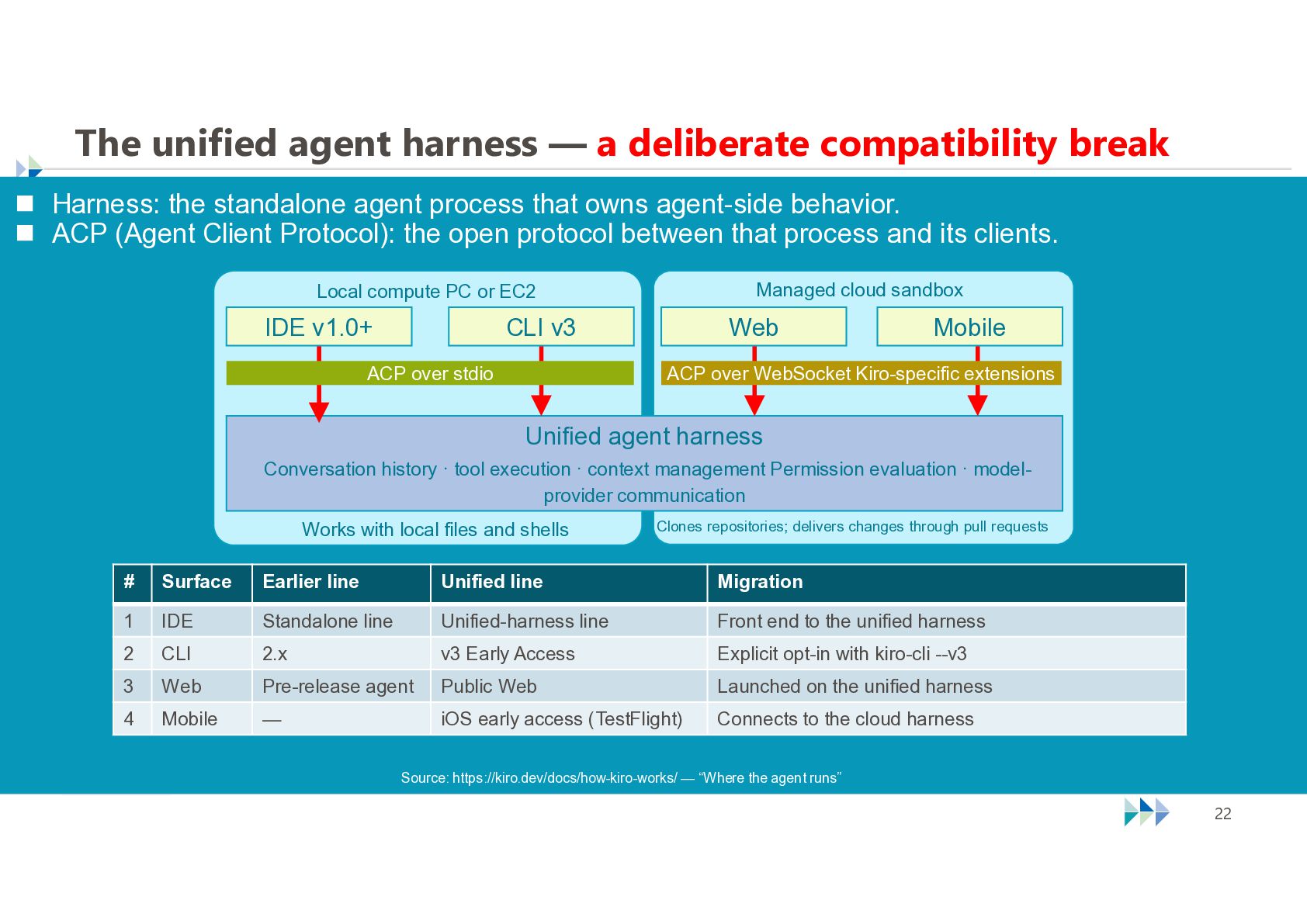
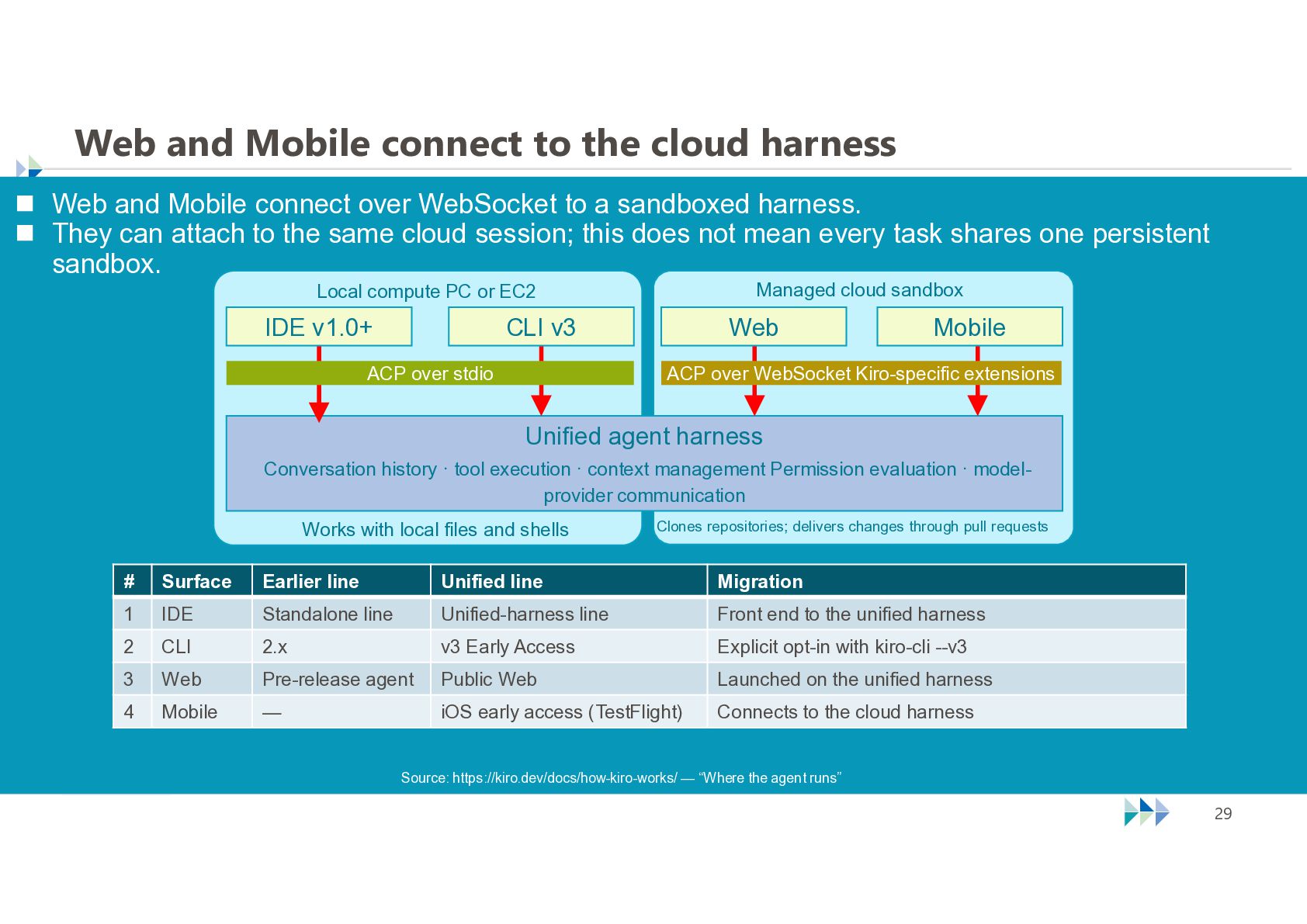
    Harness: the standalone agent process that owns agent-side behavior.  ACP (Agent Client Protocol): the open protocol between that process and its clients. Managed cloud sandbox Local compute PC or EC2 IDE v1.0+ CLI v3 ACP over stdio Web Mobile ACP over WebSocket Kiro-specific extensions Unified agent harness Conversation history · tool execution · context management Permission evaluation · modelprovider communication Clones repositories; delivers changes through pull requests Works with local files and shells # Surface Earlier line Unified line Migration 1 IDE Standalone line Unified-harness line Front end to the unified harness 2 CLI 2.x v3 Early Access Explicit opt-in with kiro-cli --v3 3 Web Pre-release agent Public Web Launched on the unified harness 4 Mobile — iOS early access (TestFlight) Connects to the cloud harness Source: https://kiro.dev/docs/how-kiro-works/ — “Where the agent runs” © NTT TechnoCross Corporation 22
  21. One harness, one permission model  Before unification, IDE and

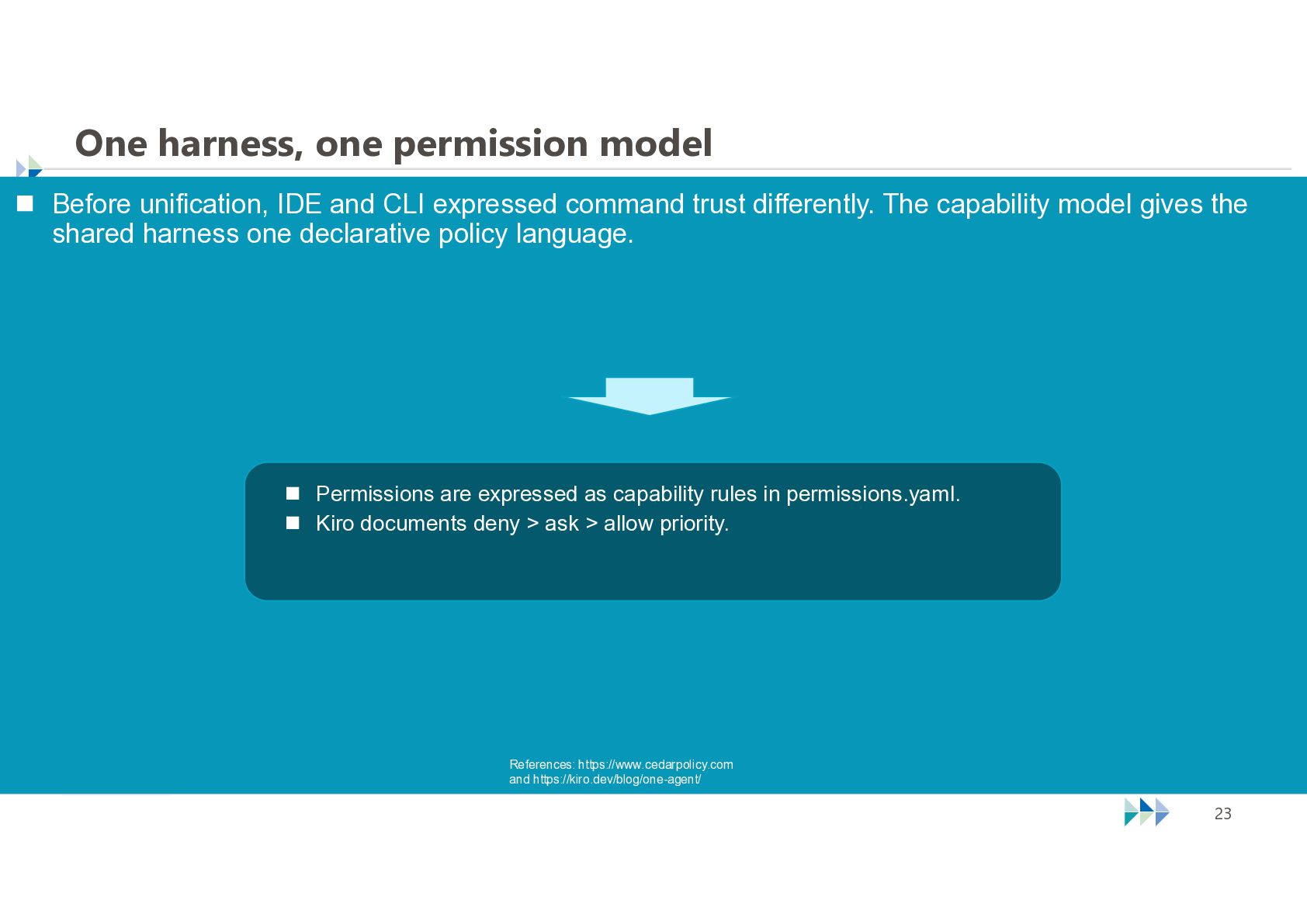
    CLI expressed command trust differently. The capability model gives the shared harness one declarative policy language.  Permissions are expressed as capability rules in permissions.yaml.  Kiro documents deny > ask > allow priority. References: https://www.cedarpolicy.com and https://kiro.dev/blog/one-agent/ © NTT TechnoCross Corporation 23
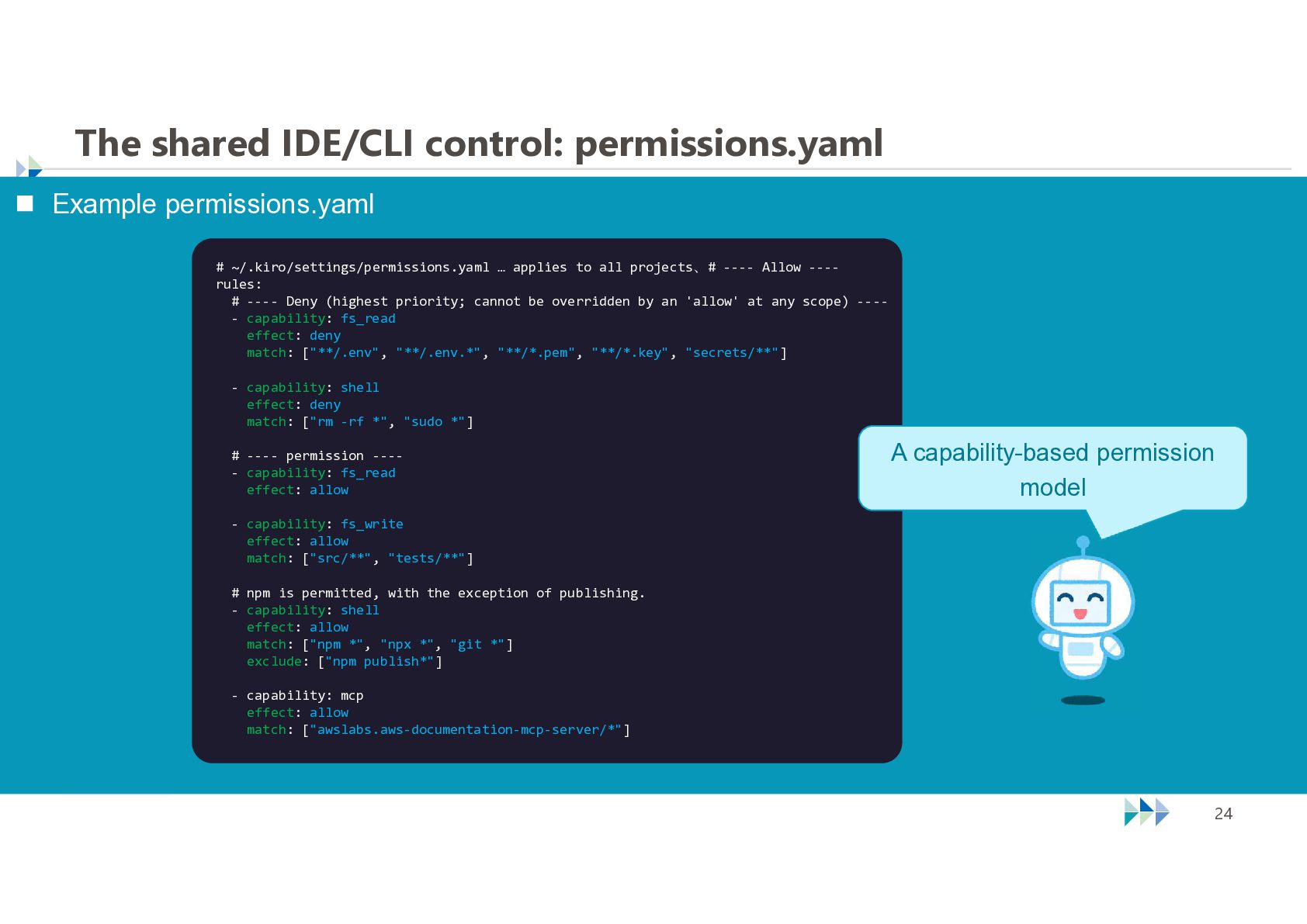
  22. The shared IDE/CLI control: permissions.yaml  Example permissions.yaml # ~/.kiro/settings/permissions.yaml

    … applies to all projects、# ---- Allow ---rules: # ---- Deny (highest priority; cannot be overridden by an 'allow' at any scope) ---- capability: fs_read effect: deny match: ["**/.env", "**/.env.*", "**/*.pem", "**/*.key", "secrets/**"] - capability: shell effect: deny match: ["rm -rf *", "sudo *"] A capability-based permission model # ---- permission ---- capability: fs_read effect: allow - capability: fs_write effect: allow match: ["src/**", "tests/**"] # npm is permitted, with the exception of publishing. - capability: shell effect: allow match: ["npm *", "npx *", "git *"] exclude: ["npm publish*"] - capability: mcp effect: allow match: ["awslabs.aws-documentation-mcp-server/*"] © NTT TechnoCross Corporation 24
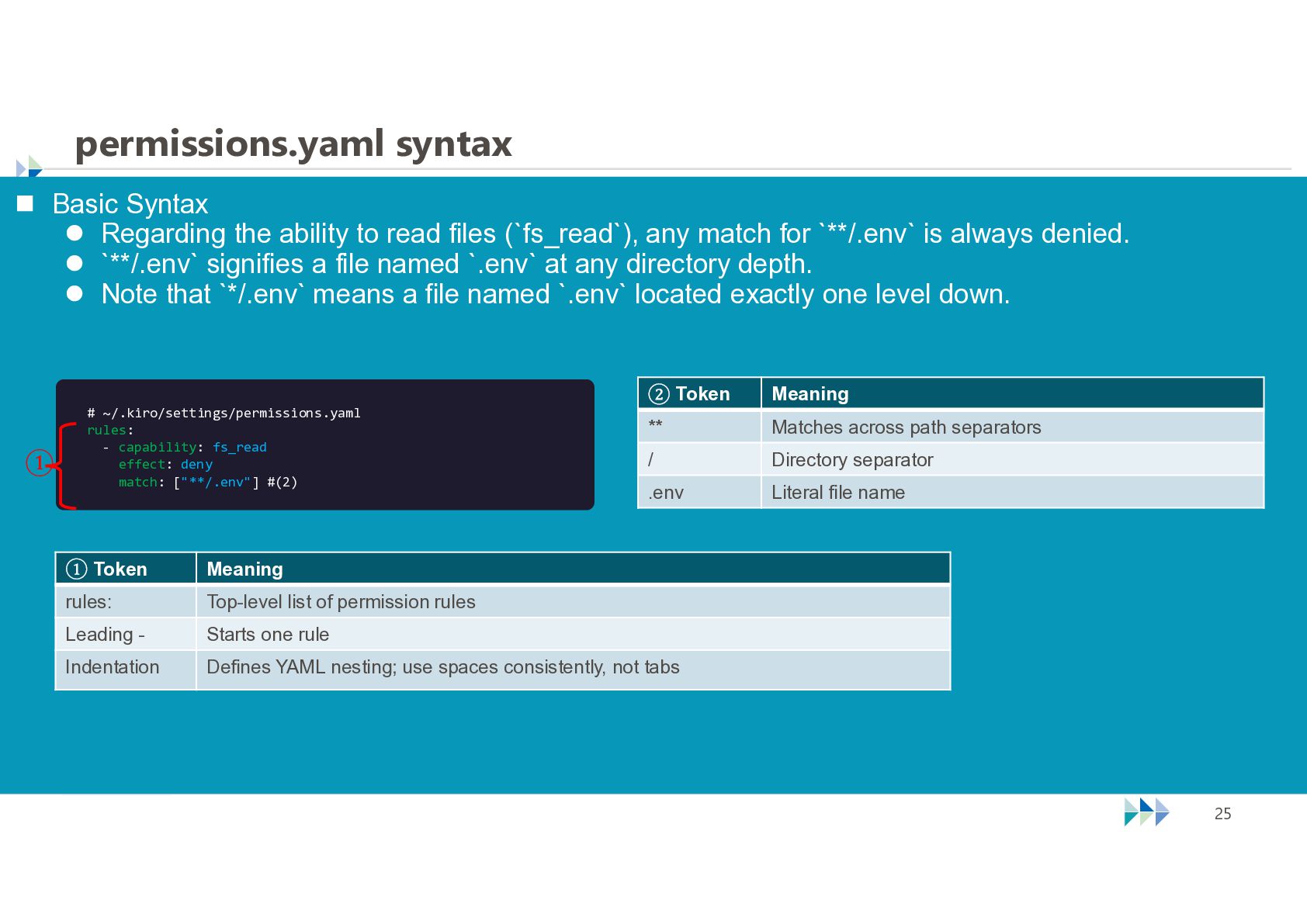
  23. permissions.yaml syntax  Basic Syntax  Regarding the ability to

    read files (`fs_read`), any match for `**/.env` is always denied.  `**/.env` signifies a file named `.env` at any directory depth.  Note that `*/.env` means a file named `.env` located exactly one level down. ① # ~/.kiro/settings/permissions.yaml rules: - capability: fs_read effect: deny match: ["**/.env"] #(2) ② Token Meaning ** Matches across path separators / Directory separator .env Literal file name ① Token Meaning rules: Top-level list of permission rules Leading - Starts one rule Indentation Defines YAML nesting; use spaces consistently, not tabs © NTT TechnoCross Corporation 25
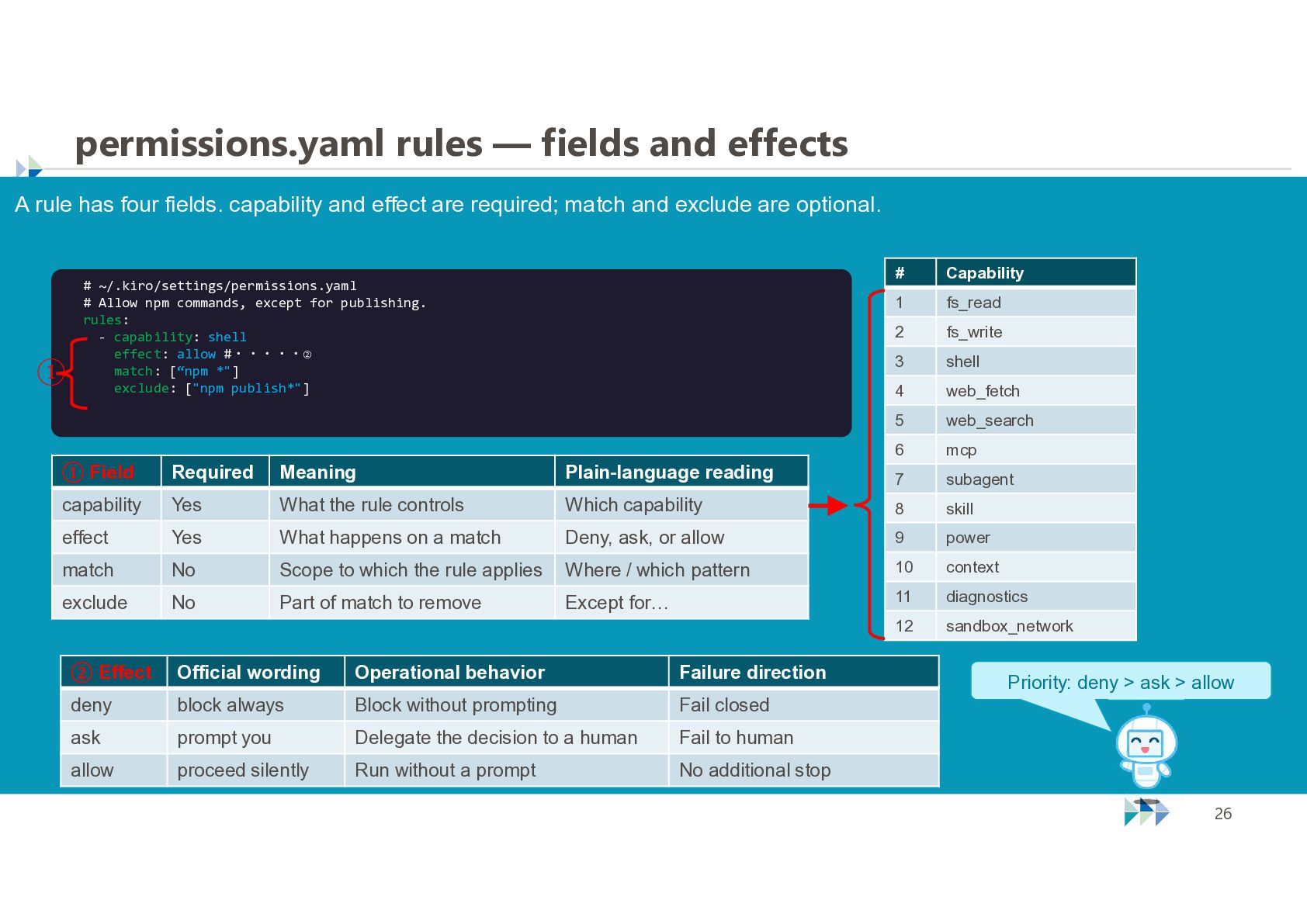
  24. permissions.yaml rules — fields and effects A rule has four

    fields. capability and effect are required; match and exclude are optional. ① # ~/.kiro/settings/permissions.yaml # Allow npm commands, except for publishing. rules: - capability: shell effect: allow #・・・・・② match: [“npm *"] exclude: ["npm publish*"] # Capability 1 fs_read 2 fs_write 3 shell 4 web_fetch 5 web_search 6 mcp ① Field Required Meaning Plain-language reading 7 subagent capability Yes What the rule controls Which capability 8 skill effect Yes What happens on a match Deny, ask, or allow 9 power match No Scope to which the rule applies Where / which pattern 10 context exclude No Part of match to remove Except for… 11 diagnostics 12 sandbox_network ② Effect Official wording Operational behavior Failure direction deny block always Block without prompting Fail closed ask prompt you Delegate the decision to a human Fail to human allow proceed silently Run without a prompt No additional stop © NTT TechnoCross Corporation Priority: deny > ask > allow 26
  25. Kiro Web and Kiro Mobile Two clients for the same

    cloud-session system © NTT TechnoCross Corporation 27
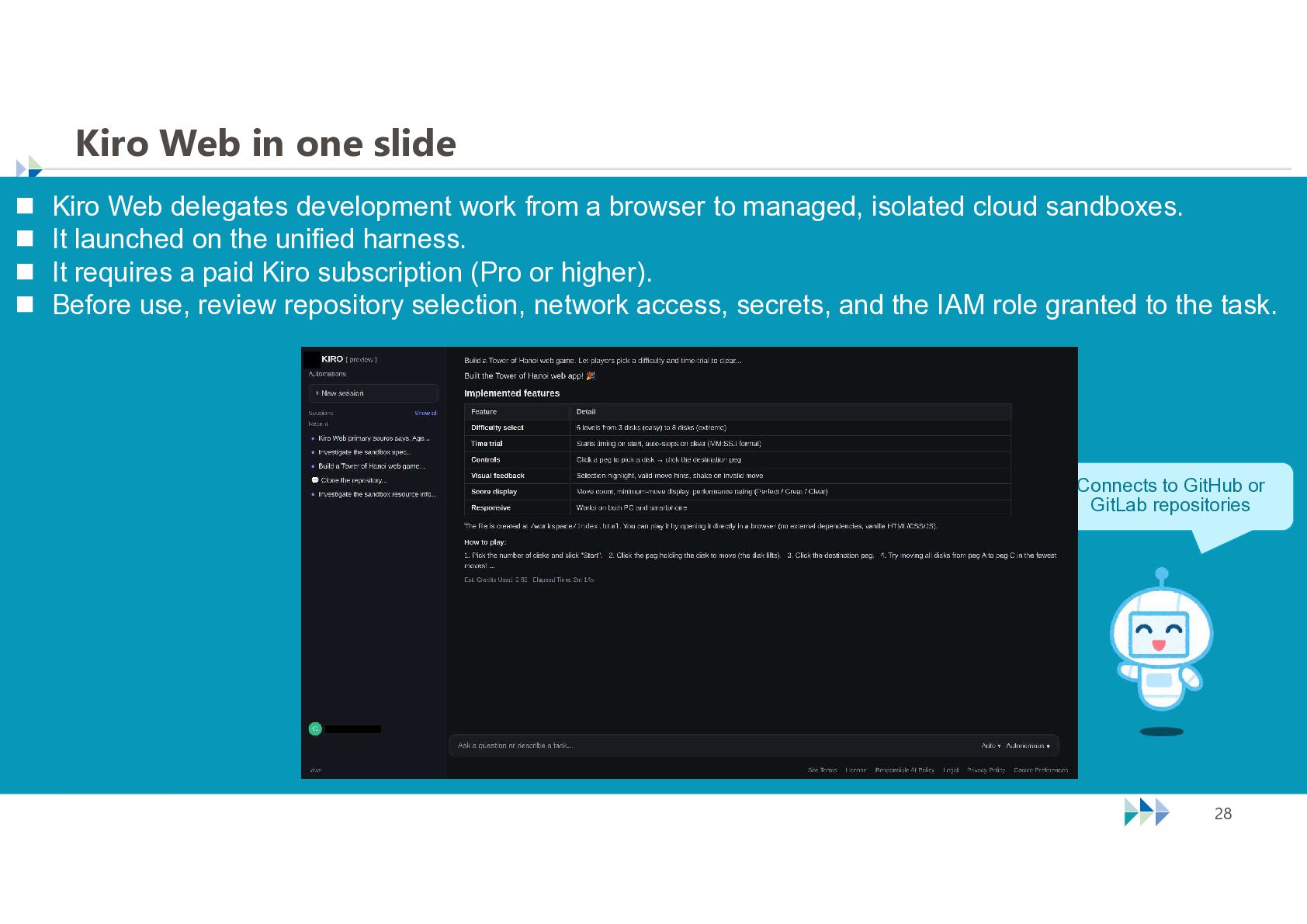
  26. Kiro Web in one slide  Kiro Web delegates development

    work from a browser to managed, isolated cloud sandboxes.  It launched on the unified harness.  It requires a paid Kiro subscription (Pro or higher).  Before use, review repository selection, network access, secrets, and the IAM role granted to the task. Connects to GitHub or GitLab repositories © NTT TechnoCross Corporation 28
  27. Web and Mobile connect to the cloud harness  Web

    and Mobile connect over WebSocket to a sandboxed harness.  They can attach to the same cloud session; this does not mean every task shares one persistent sandbox. Managed cloud sandbox Local compute PC or EC2 IDE v1.0+ CLI v3 ACP over stdio Web Mobile ACP over WebSocket Kiro-specific extensions Unified agent harness Conversation history · tool execution · context management Permission evaluation · modelprovider communication Clones repositories; delivers changes through pull requests Works with local files and shells # Surface Earlier line Unified line Migration 1 IDE Standalone line Unified-harness line Front end to the unified harness 2 CLI 2.x v3 Early Access Explicit opt-in with kiro-cli --v3 3 Web Pre-release agent Public Web Launched on the unified harness 4 Mobile — iOS early access (TestFlight) Connects to the cloud harness Source: https://kiro.dev/docs/how-kiro-works/ — “Where the agent runs” © NTT TechnoCross Corporation 29
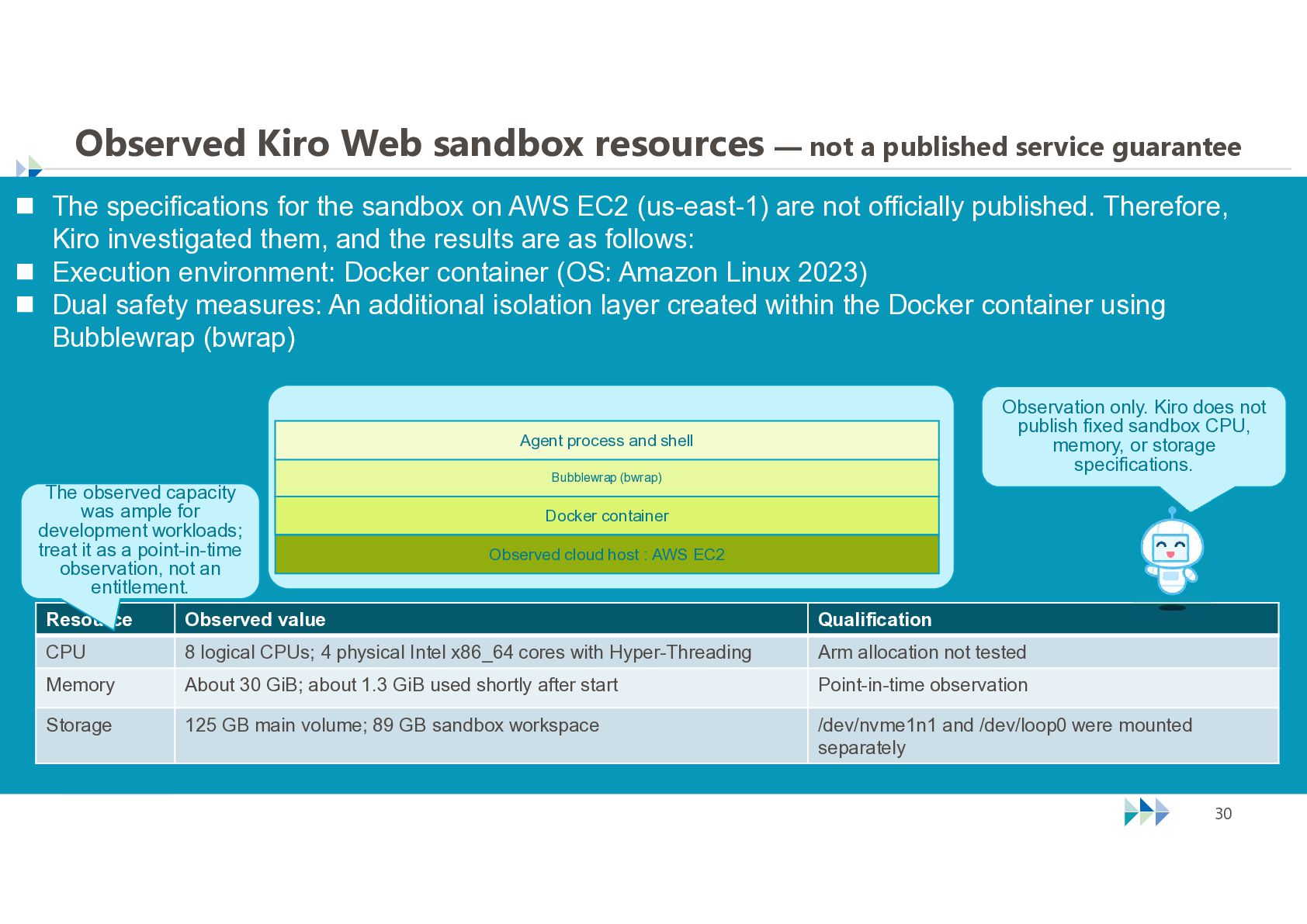
  28. Observed Kiro Web sandbox resources — not a published service

    guarantee  The specifications for the sandbox on AWS EC2 (us-east-1) are not officially published. Therefore, Kiro investigated them, and the results are as follows:  Execution environment: Docker container (OS: Amazon Linux 2023)  Dual safety measures: An additional isolation layer created within the Docker container using Bubblewrap (bwrap) Observation only. Kiro does not publish fixed sandbox CPU, memory, or storage specifications. Agent process and shell The observed capacity was ample for development workloads; treat it as a point-in-time observation, not an entitlement. Bubblewrap (bwrap) Conceptual sandbox stack Docker container Observed cloud host : AWS EC2 Resource Observed value Qualification CPU 8 logical CPUs; 4 physical Intel x86_64 cores with Hyper-Threading Arm allocation not tested Memory About 30 GiB; about 1.3 GiB used shortly after start Point-in-time observation Storage 125 GB main volume; 89 GB sandbox workspace /dev/nvme1n1 and /dev/loop0 were mounted separately © NTT TechnoCross Corporation 30
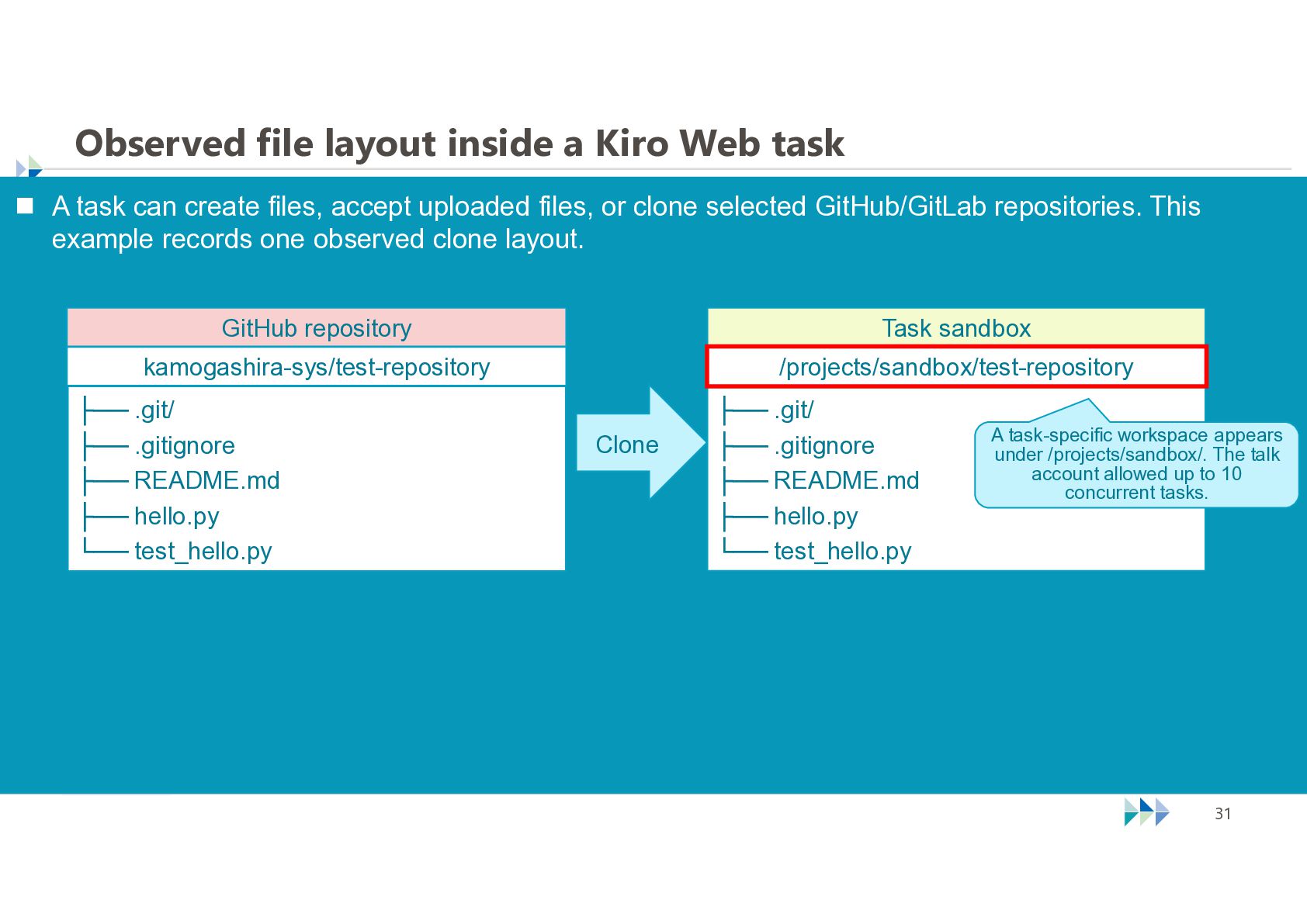
  29. Observed file layout inside a Kiro Web task  A

    task can create files, accept uploaded files, or clone selected GitHub/GitLab repositories. This example records one observed clone layout. GitHub repository Task sandbox kamogashira-sys/test-repository /projects/sandbox/test-repository ├── .git/ ├── .gitignore ├── README.md ├── hello.py └── test_hello.py Clone ├── .git/ ├── .gitignore ├── README.md ├── hello.py └── test_hello.py © NTT TechnoCross Corporation A task-specific workspace appears under /projects/sandbox/. The talk account allowed up to 10 concurrent tasks. 31
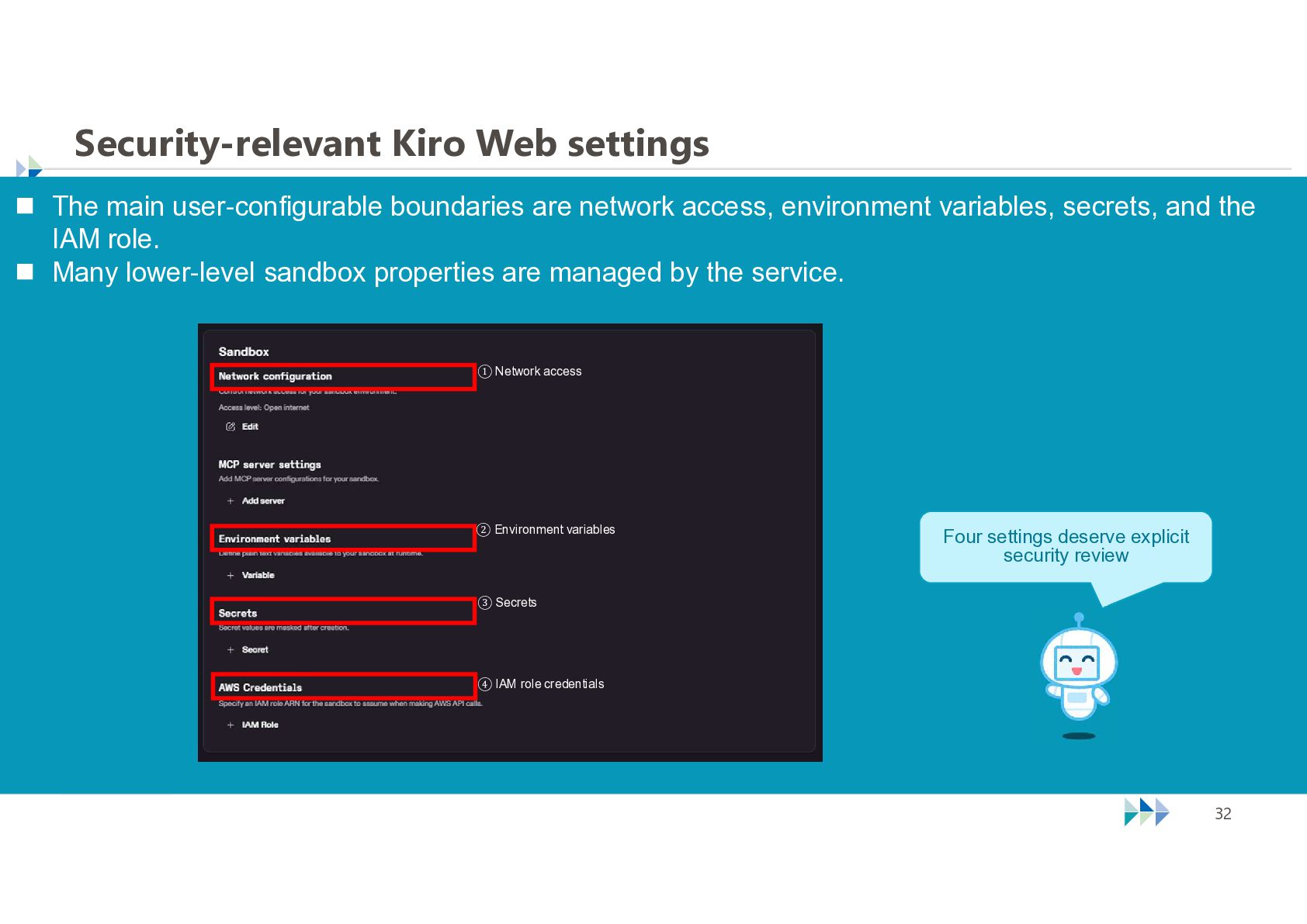
  30. Security-relevant Kiro Web settings  The main user-configurable boundaries are

    network access, environment variables, secrets, and the IAM role.  Many lower-level sandbox properties are managed by the service. ① Network access ② Environment variables Four settings deserve explicit security review ③ Secrets ④ IAM role credentials © NTT TechnoCross Corporation 32
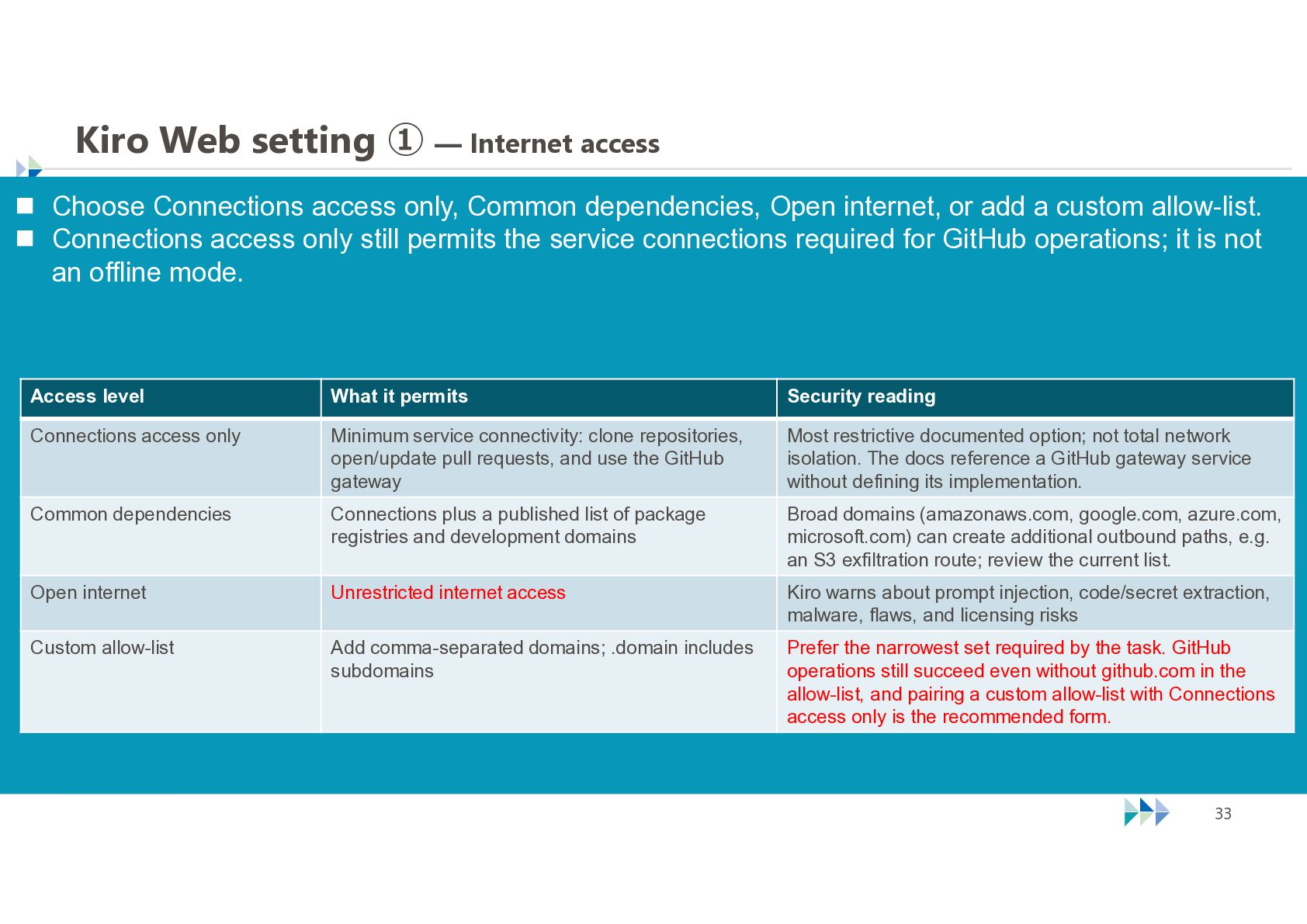
  31. Kiro Web setting ① — Internet access  Choose Connections

    access only, Common dependencies, Open internet, or add a custom allow-list.  Connections access only still permits the service connections required for GitHub operations; it is not an offline mode. Access level What it permits Security reading Connections access only Minimum service connectivity: clone repositories, open/update pull requests, and use the GitHub gateway Most restrictive documented option; not total network isolation. The docs reference a GitHub gateway service without defining its implementation. Common dependencies Connections plus a published list of package registries and development domains Broad domains (amazonaws.com, google.com, azure.com, microsoft.com) can create additional outbound paths, e.g. an S3 exfiltration route; review the current list. Open internet Unrestricted internet access Kiro warns about prompt injection, code/secret extraction, malware, flaws, and licensing risks Custom allow-list Add comma-separated domains; .domain includes subdomains Prefer the narrowest set required by the task. GitHub operations still succeed even without github.com in the allow-list, and pairing a custom allow-list with Connections access only is the recommended form. © NTT TechnoCross Corporation 33
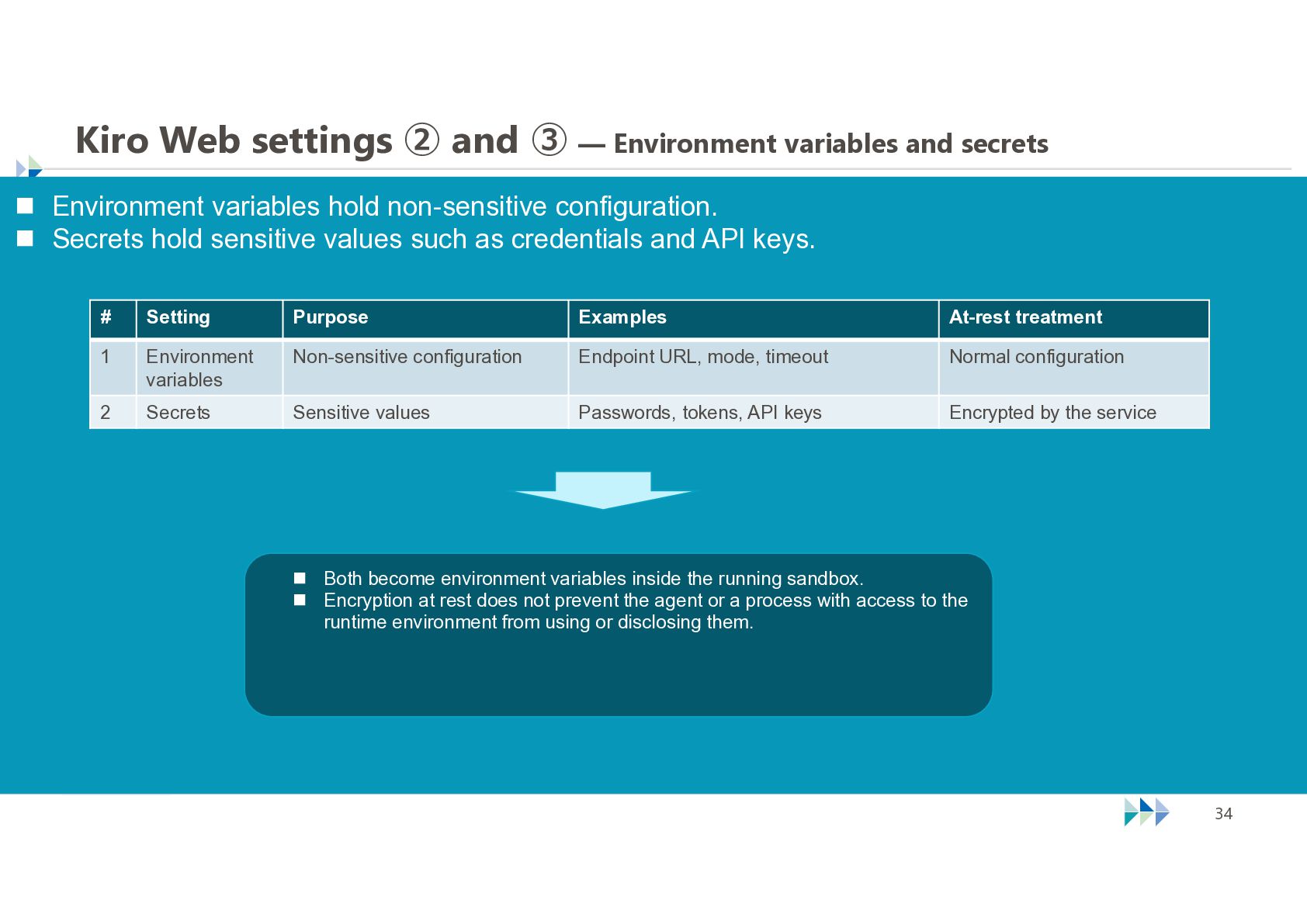
  32. Kiro Web settings ② and ③ — Environment variables and

    secrets  Environment variables hold non-sensitive configuration.  Secrets hold sensitive values such as credentials and API keys. # Setting Purpose Examples At-rest treatment 1 Environment variables Non-sensitive configuration Endpoint URL, mode, timeout Normal configuration 2 Secrets Sensitive values Passwords, tokens, API keys Encrypted by the service  Both become environment variables inside the running sandbox.  Encryption at rest does not prevent the agent or a process with access to the runtime environment from using or disclosing them. © NTT TechnoCross Corporation 34
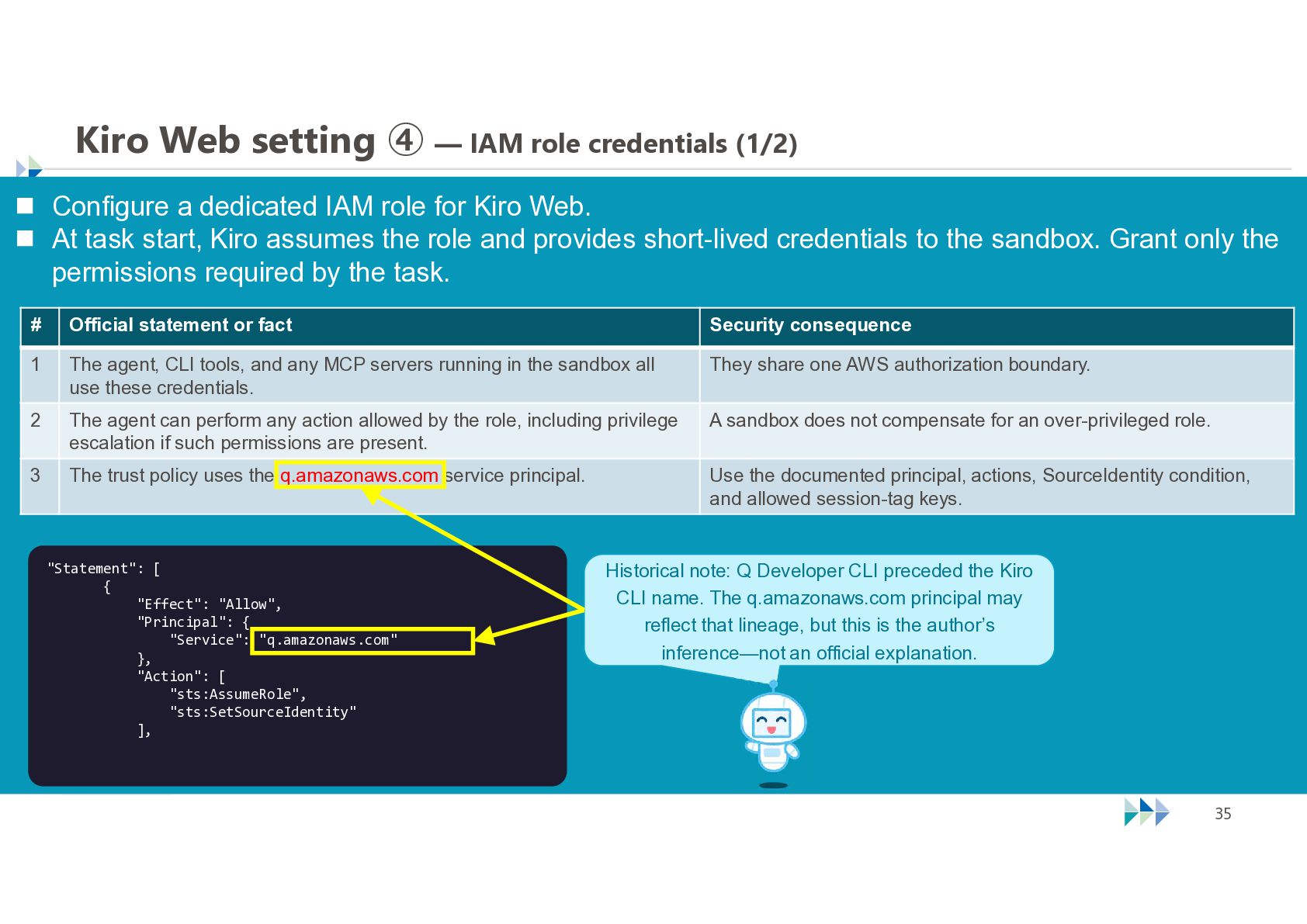
  33. Kiro Web setting ④ — IAM role credentials (1/2) 

    Configure a dedicated IAM role for Kiro Web.  At task start, Kiro assumes the role and provides short-lived credentials to the sandbox. Grant only the permissions required by the task. # Official statement or fact Security consequence 1 The agent, CLI tools, and any MCP servers running in the sandbox all use these credentials. They share one AWS authorization boundary. 2 The agent can perform any action allowed by the role, including privilege escalation if such permissions are present. A sandbox does not compensate for an over-privileged role. 3 The trust policy uses the q.amazonaws.com service principal. Use the documented principal, actions, SourceIdentity condition, and allowed session-tag keys. "Statement": [ { "Effect": "Allow", "Principal": { "Service": "q.amazonaws.com" }, "Action": [ "sts:AssumeRole", "sts:SetSourceIdentity" ], Historical note: Q Developer CLI preceded the Kiro CLI name. The q.amazonaws.com principal may reflect that lineage, but this is the author’s inference—not an official explanation. © NTT TechnoCross Corporation 35
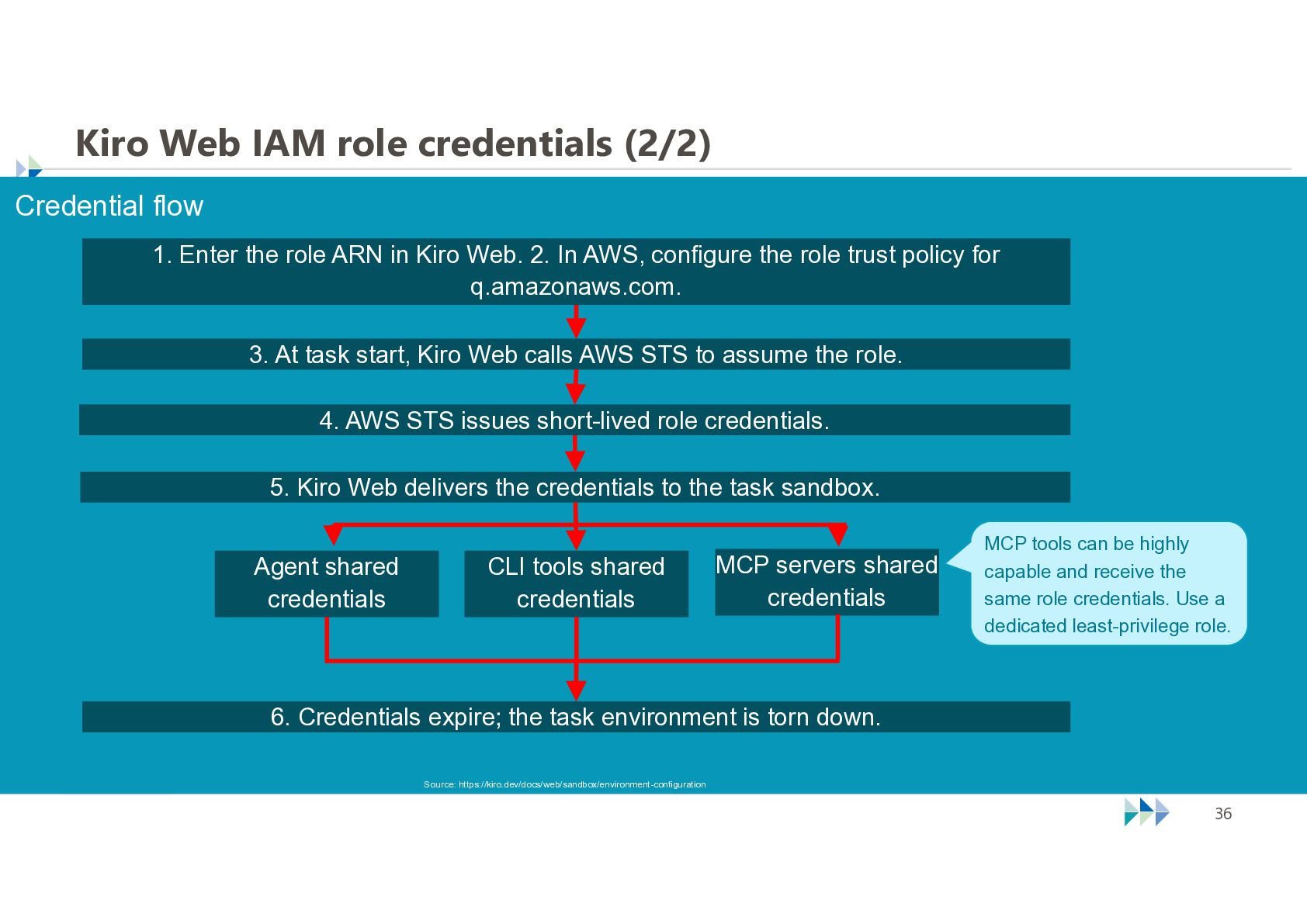
  34. Kiro Web IAM role credentials (2/2) Credential flow 1. Enter

    the role ARN in Kiro Web. 2. In AWS, configure the role trust policy for q.amazonaws.com. 3. At task start, Kiro Web calls AWS STS to assume the role. 4. AWS STS issues short-lived role credentials. 5. Kiro Web delivers the credentials to the task sandbox. Agent shared credentials CLI tools shared credentials MCP servers shared credentials MCP tools can be highly capable and receive the same role credentials. Use a dedicated least-privilege role. 6. Credentials expire; the task environment is torn down. Source: https://kiro.dev/docs/web/sandbox/environment-configuration © NTT TechnoCross Corporation 36
  35. The fifth form: Kiro Crew Security configuration matters most when

    agents run persistently. © NTT TechnoCross Corporation 37
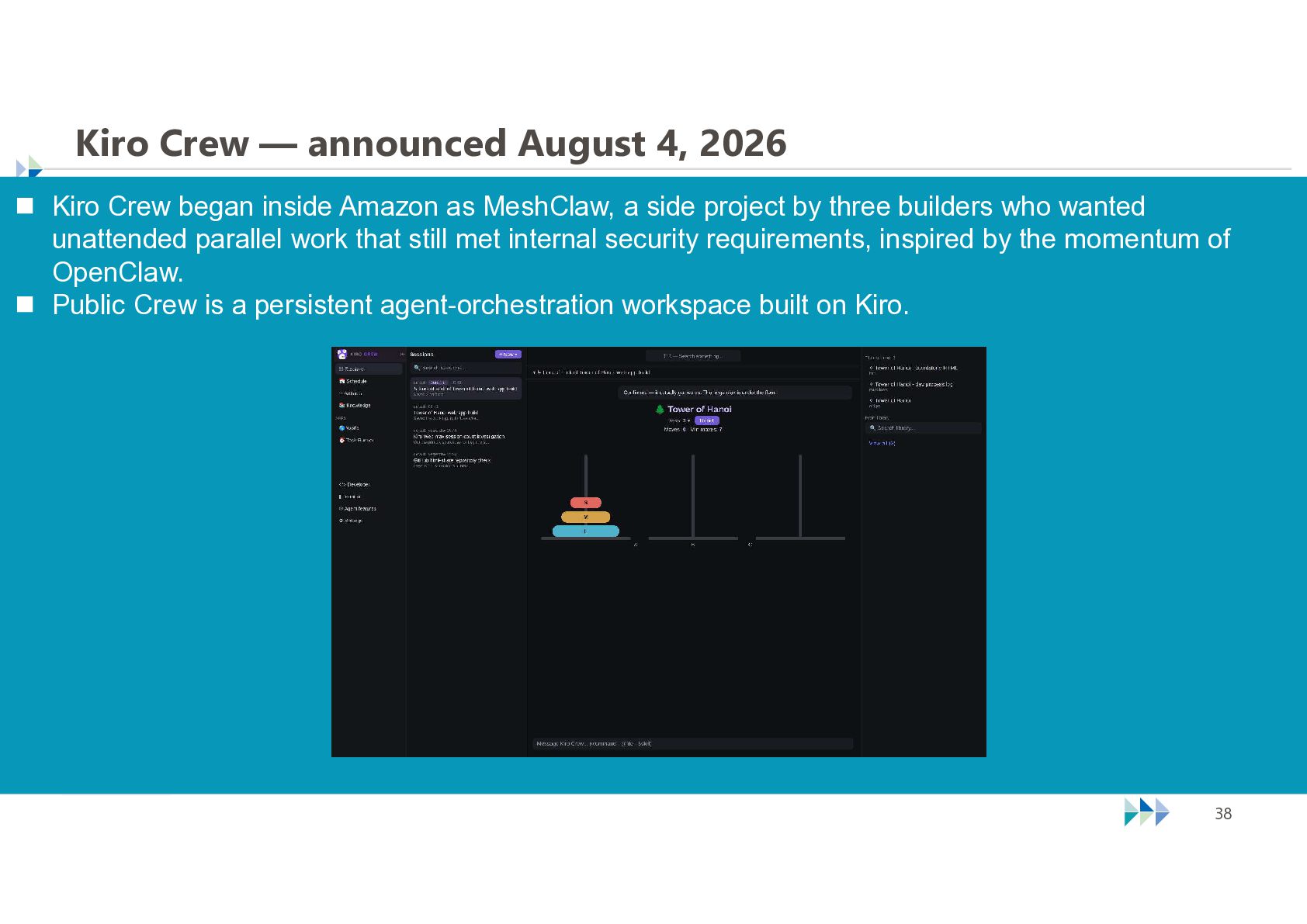
  36. Kiro Crew — announced August 4, 2026  Kiro Crew

    began inside Amazon as MeshClaw, a side project by three builders who wanted unattended parallel work that still met internal security requirements, inspired by the momentum of OpenClaw.  Public Crew is a persistent agent-orchestration workspace built on Kiro. © NTT TechnoCross Corporation 38
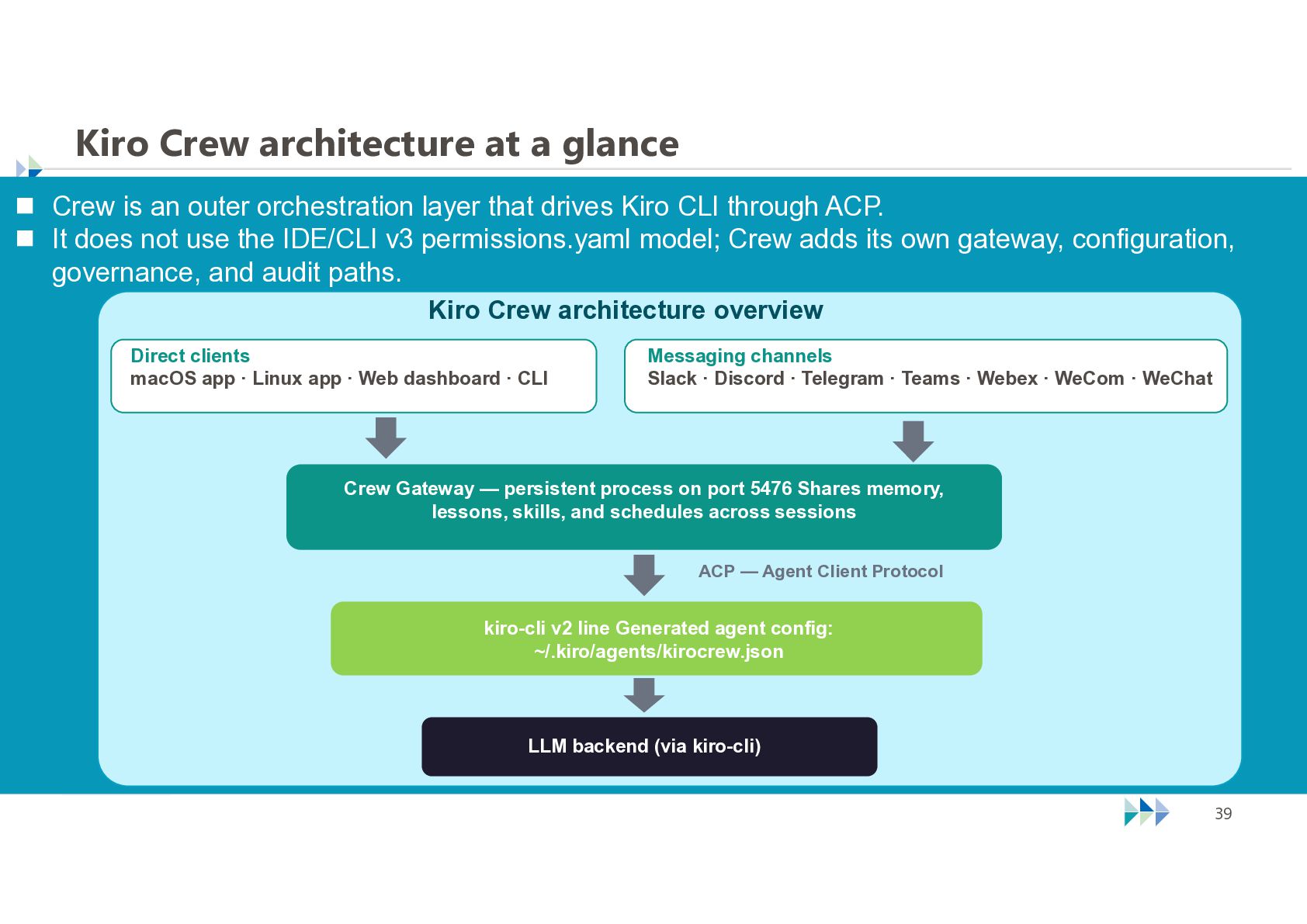
  37. Kiro Crew architecture at a glance  Crew is an

    outer orchestration layer that drives Kiro CLI through ACP.  It does not use the IDE/CLI v3 permissions.yaml model; Crew adds its own gateway, configuration, governance, and audit paths. Kiro Crew architecture overview Direct clients macOS app · Linux app · Web dashboard · CLI Messaging channels Slack · Discord · Telegram · Teams · Webex · WeCom · WeChat Crew Gateway — persistent process on port 5476 Shares memory, lessons, skills, and schedules across sessions ACP — Agent Client Protocol kiro-cli v2 line Generated agent config: ~/.kiro/agents/kirocrew.json LLM backend (via kiro-cli) © NTT TechnoCross Corporation 39
  38. Before explaining the Kiro Crew's security measures, let me take

    a brief detour. © NTT TechnoCross Corporation 40
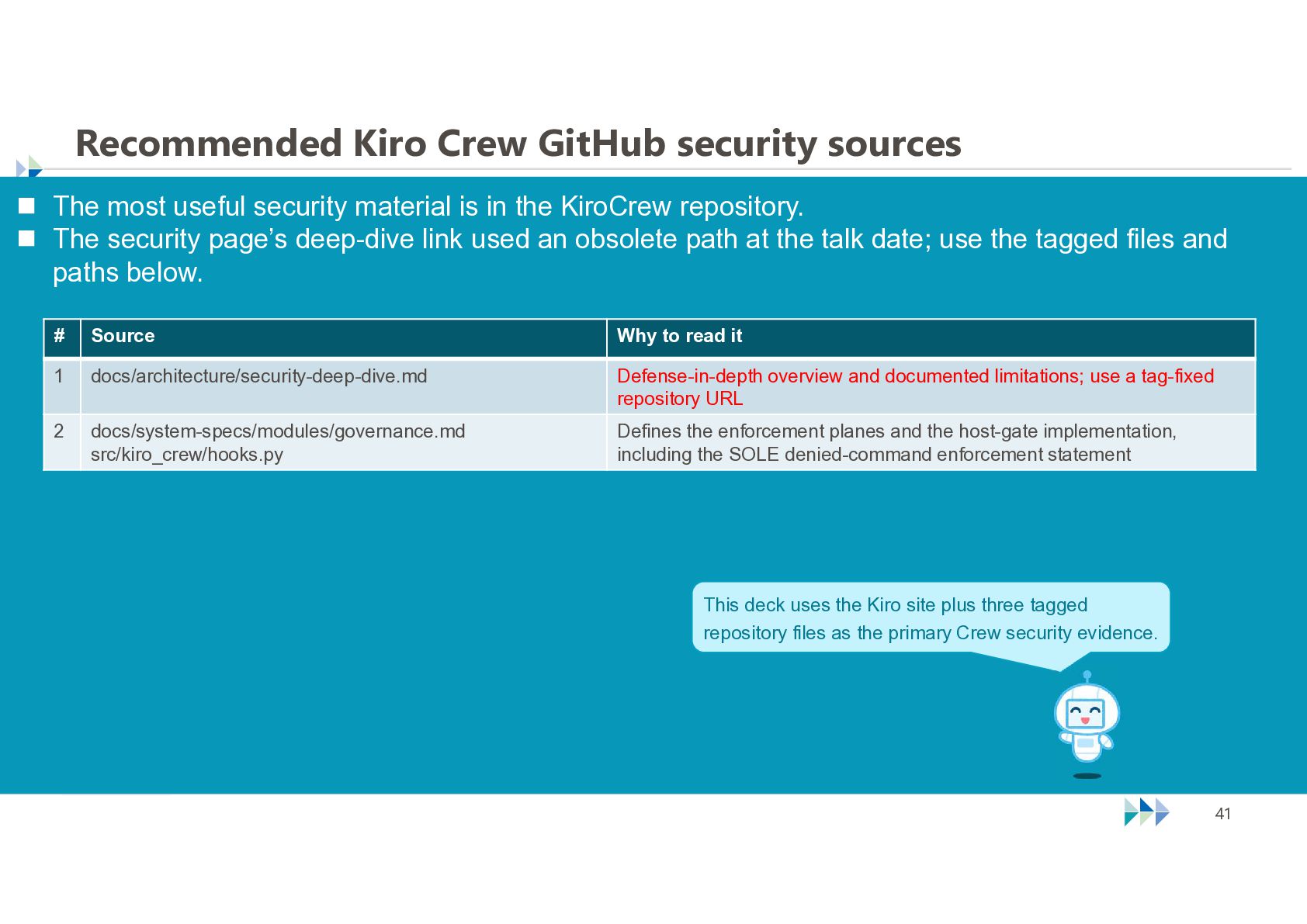
  39. Recommended Kiro Crew GitHub security sources  The most useful

    security material is in the KiroCrew repository.  The security page’s deep-dive link used an obsolete path at the talk date; use the tagged files and paths below. # Source Why to read it 1 docs/architecture/security-deep-dive.md Defense-in-depth overview and documented limitations; use a tag-fixed repository URL 2 docs/system-specs/modules/governance.md src/kiro_crew/hooks.py Defines the enforcement planes and the host-gate implementation, including the SOLE denied-command enforcement statement This deck uses the Kiro site plus three tagged repository files as the primary Crew security evidence. © NTT TechnoCross Corporation 41
  40. A note about pace  The live talk moves quickly

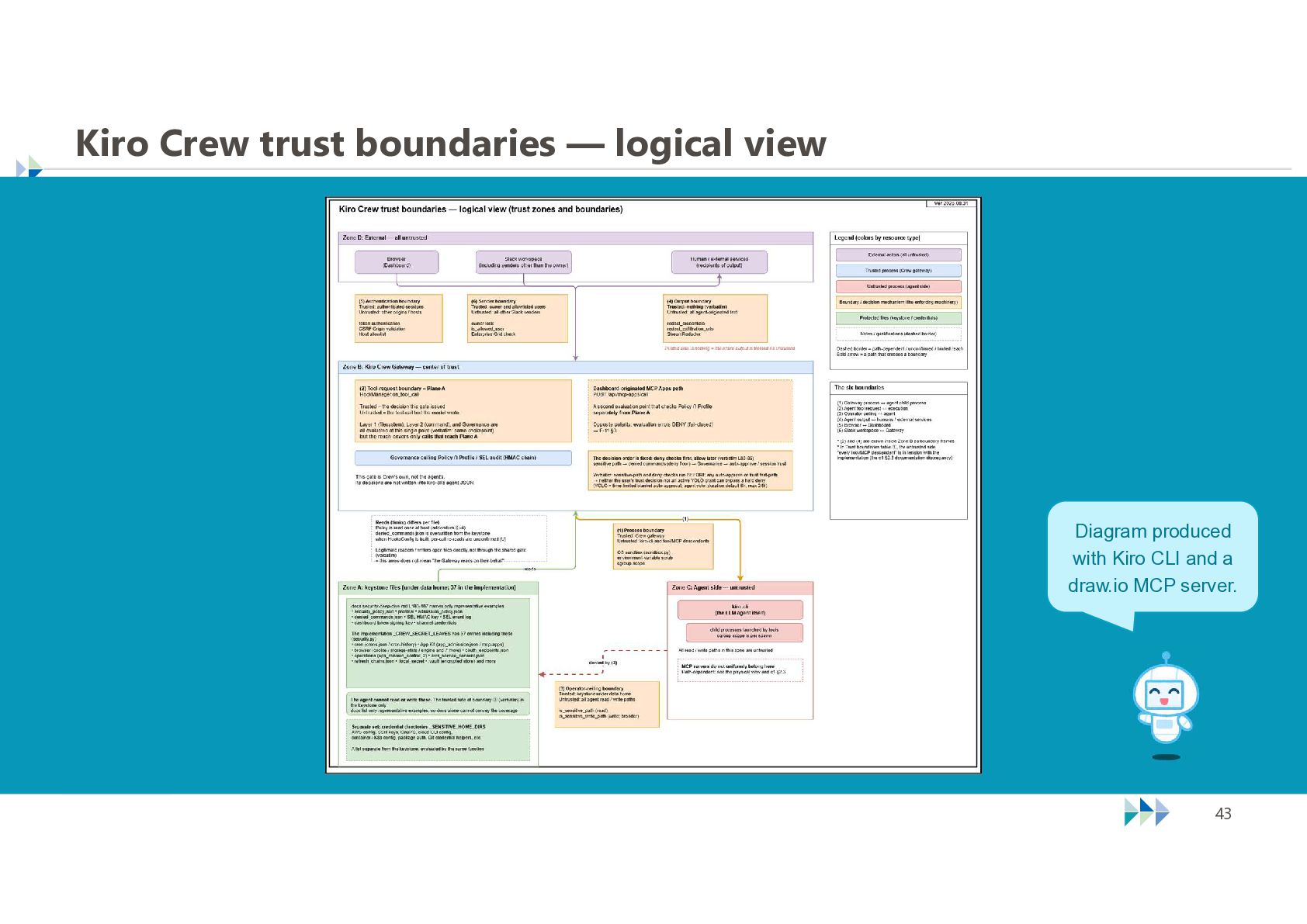
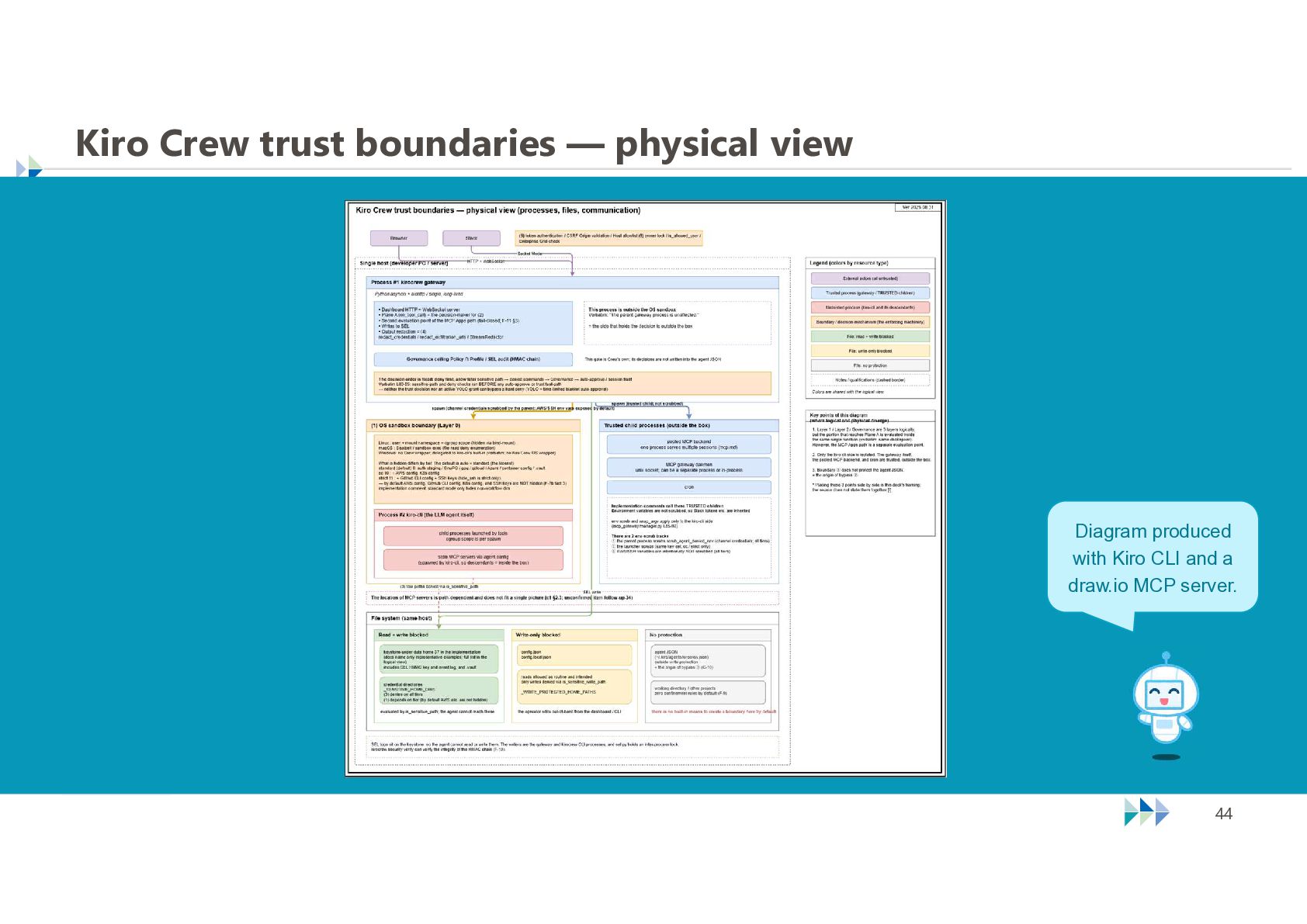
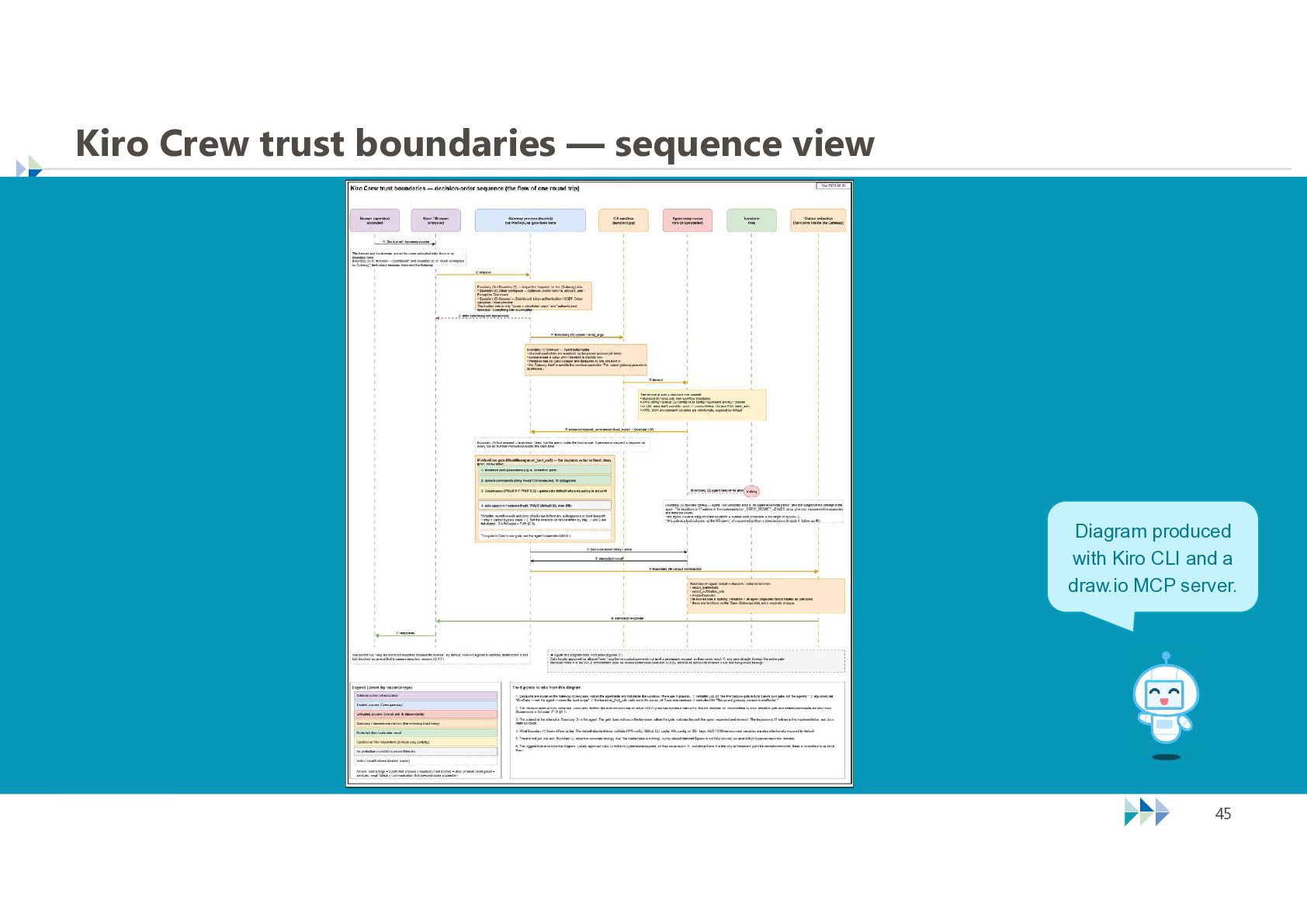
    through the next three diagrams. These three diagrams are the core of today's talk; review them carefully afterward.  Kiro Crew trust boundaries — logical view Kiro Crew trust boundaries — physical view Kiro Crew trust boundaries — sequence view I understand security systems by drawing the whole system first.  Crew's controls make more sense when viewed together rather than as isolated settings. © NTT TechnoCross Corporation 42
  41. Kiro Crew trust boundaries — logical view Diagram produced with

    Kiro CLI and a draw.io MCP server. © NTT TechnoCross Corporation 43
  42. Kiro Crew trust boundaries — physical view Diagram produced with

    Kiro CLI and a draw.io MCP server. © NTT TechnoCross Corporation 44
  43. Kiro Crew trust boundaries — sequence view Diagram produced with

    Kiro CLI and a draw.io MCP server. © NTT TechnoCross Corporation 45
  44. How to get better architecture diagrams from Kiro CLI 

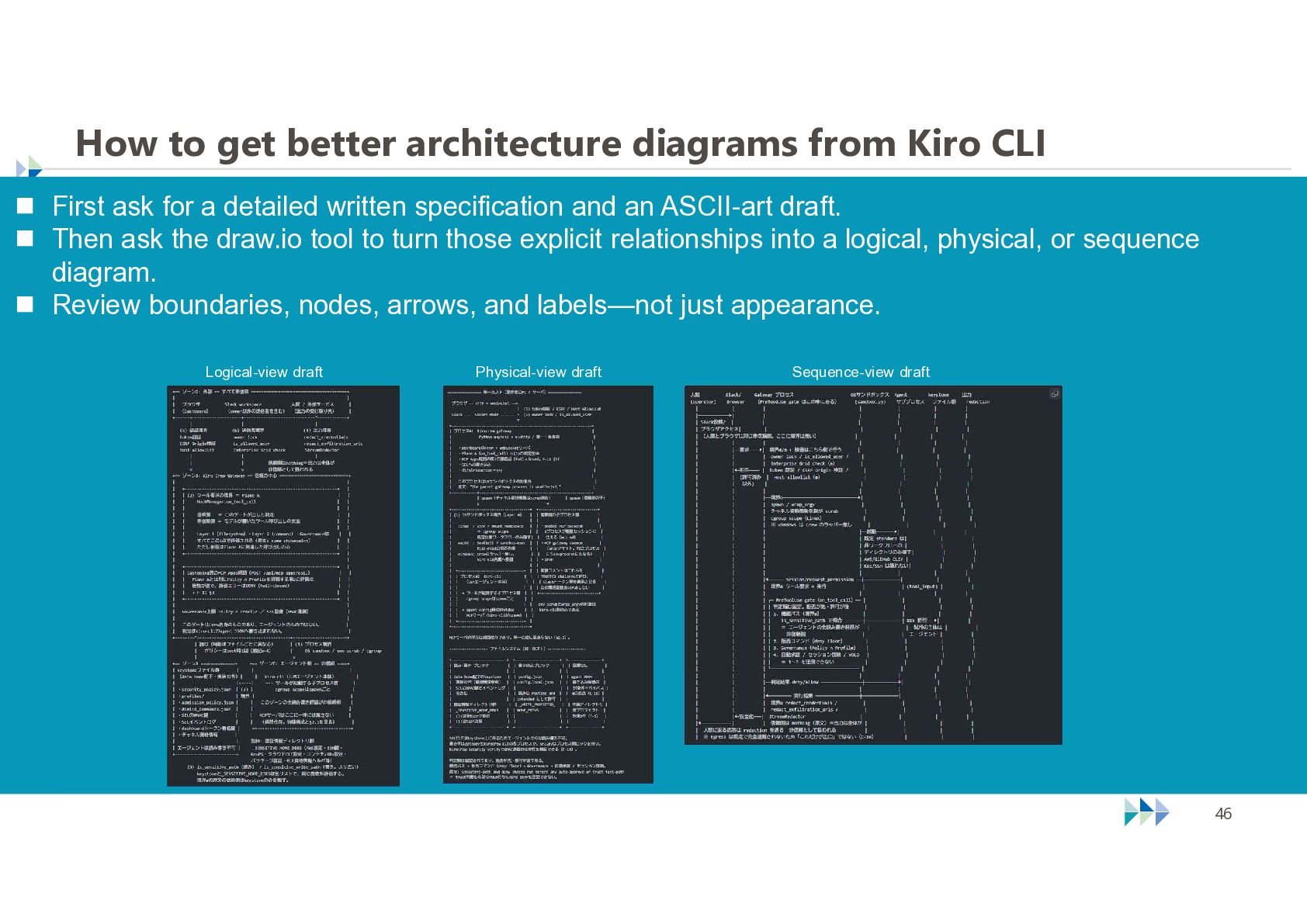
    First ask for a detailed written specification and an ASCII-art draft.  Then ask the draw.io tool to turn those explicit relationships into a logical, physical, or sequence diagram.  Review boundaries, nodes, arrows, and labels—not just appearance. Logical-view draft Physical-view draft © NTT TechnoCross Corporation Sequence-view draft 46
  45. Repository assembled with Kiro CLI for this Security-JAWS talk 

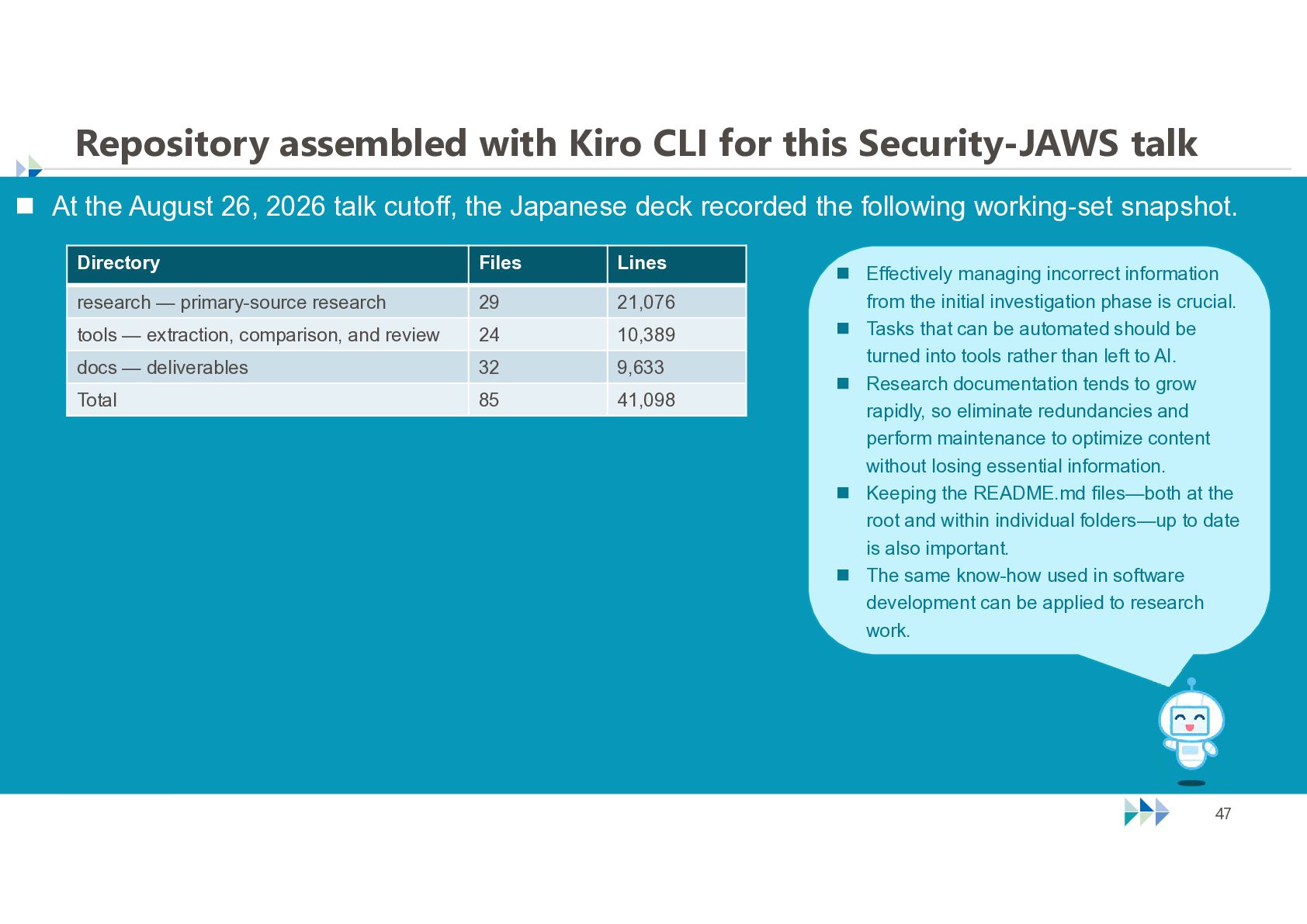
    At the August 26, 2026 talk cutoff, the Japanese deck recorded the following working-set snapshot. Directory Files Lines research — primary-source research 29 21,076 tools — extraction, comparison, and review 24 10,389 docs — deliverables 32 9,633 Total 85 41,098 © NTT TechnoCross Corporation  Effectively managing incorrect information from the initial investigation phase is crucial.  Tasks that can be automated should be turned into tools rather than left to AI.  Research documentation tends to grow rapidly, so eliminate redundancies and perform maintenance to optimize content without losing essential information.  Keeping the README.md files—both at the root and within individual folders—up to date is also important.  The same know-how used in software development can be applied to research work. 47
  46. Planned publication in the “Even a Cat Can Understand” repositories

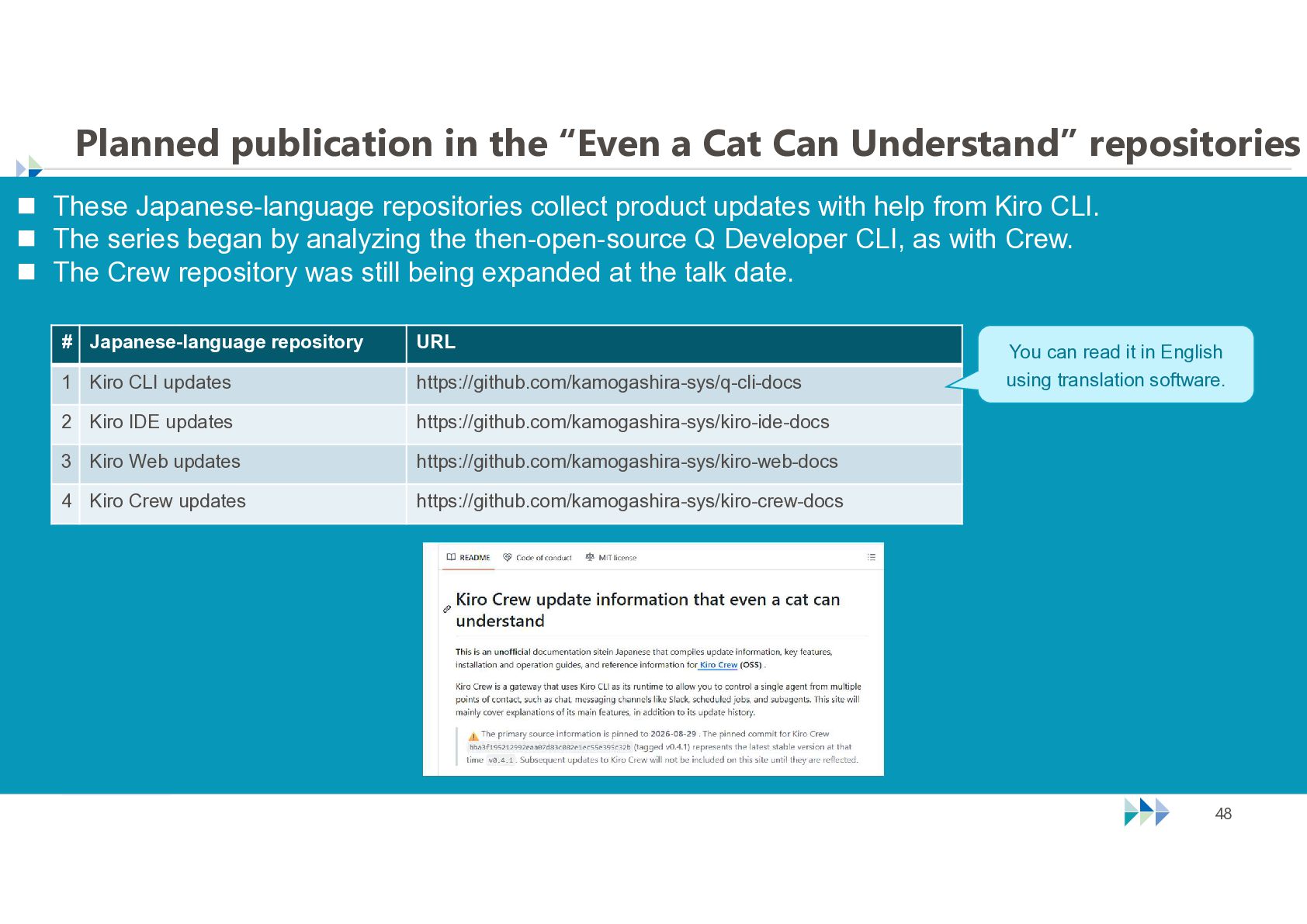
     These Japanese-language repositories collect product updates with help from Kiro CLI.  The series began by analyzing the then-open-source Q Developer CLI, as with Crew.  The Crew repository was still being expanded at the talk date. # Japanese-language repository URL 1 Kiro CLI updates https://github.com/kamogashira-sys/q-cli-docs 2 Kiro IDE updates https://github.com/kamogashira-sys/kiro-ide-docs 3 Kiro Web updates https://github.com/kamogashira-sys/kiro-web-docs 4 Kiro Crew updates https://github.com/kamogashira-sys/kiro-crew-docs © NTT TechnoCross Corporation You can read it in English using translation software. 48
  47. Getting back on track... What is the Kiro Crew's basic

    security policy? © NTT TechnoCross Corporation 49
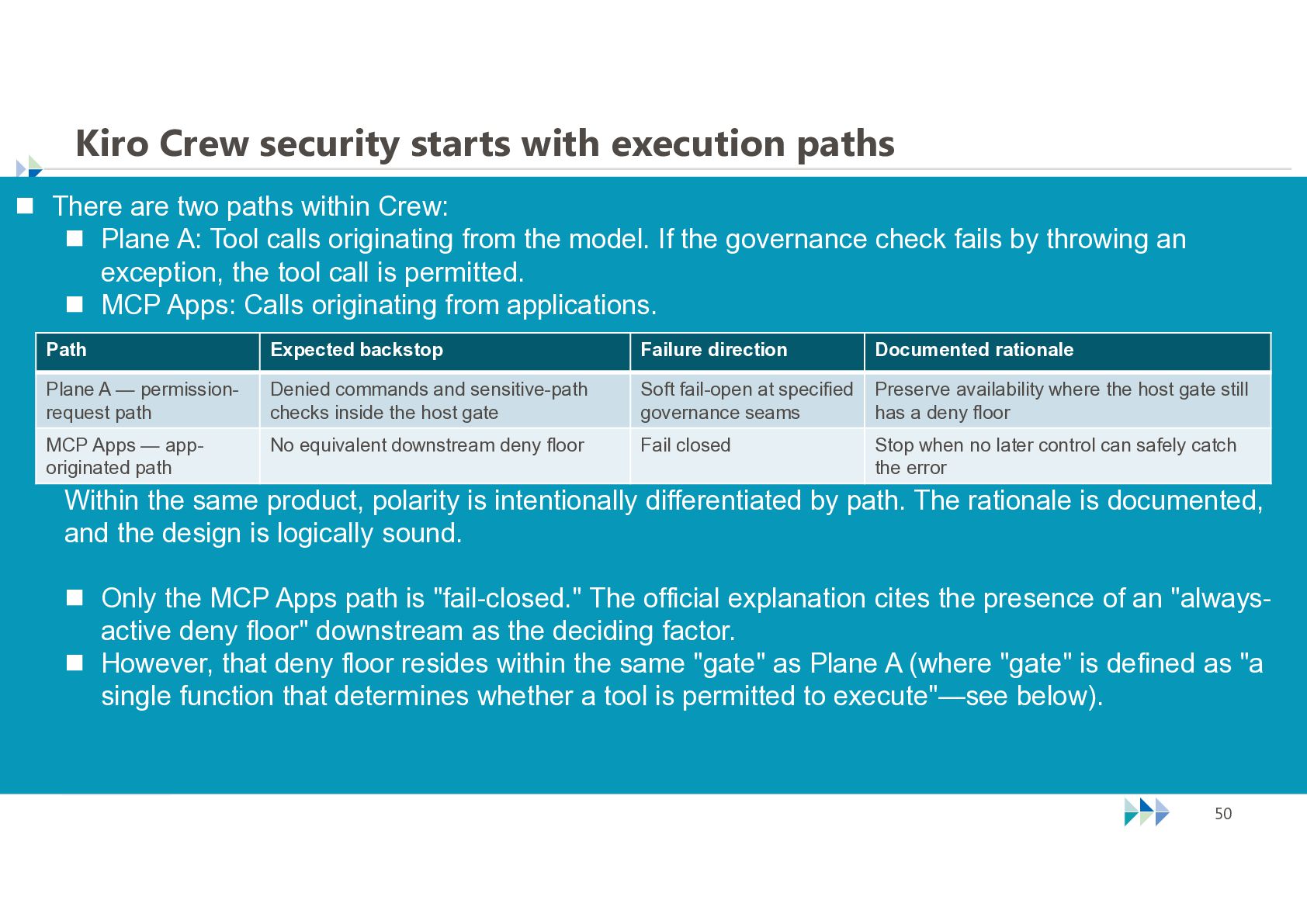
  48. Kiro Crew security starts with execution paths  There are

    two paths within Crew:  Plane A: Tool calls originating from the model. If the governance check fails by throwing an exception, the tool call is permitted.  MCP Apps: Calls originating from applications. Path Expected backstop Failure direction Documented rationale Plane A — permissionrequest path Denied commands and sensitive-path checks inside the host gate Soft fail-open at specified governance seams Preserve availability where the host gate still has a deny floor MCP Apps — apporiginated path No equivalent downstream deny floor Fail closed Stop when no later control can safely catch the error Within the same product, polarity is intentionally differentiated by path. The rationale is documented, and the design is logically sound.  Only the MCP Apps path is "fail-closed." The official explanation cites the presence of an "alwaysactive deny floor" downstream as the deciding factor.  However, that deny floor resides within the same "gate" as Plane A (where "gate" is defined as "a single function that determines whether a tool is permitted to execute"—see below). © NTT TechnoCross Corporation 50
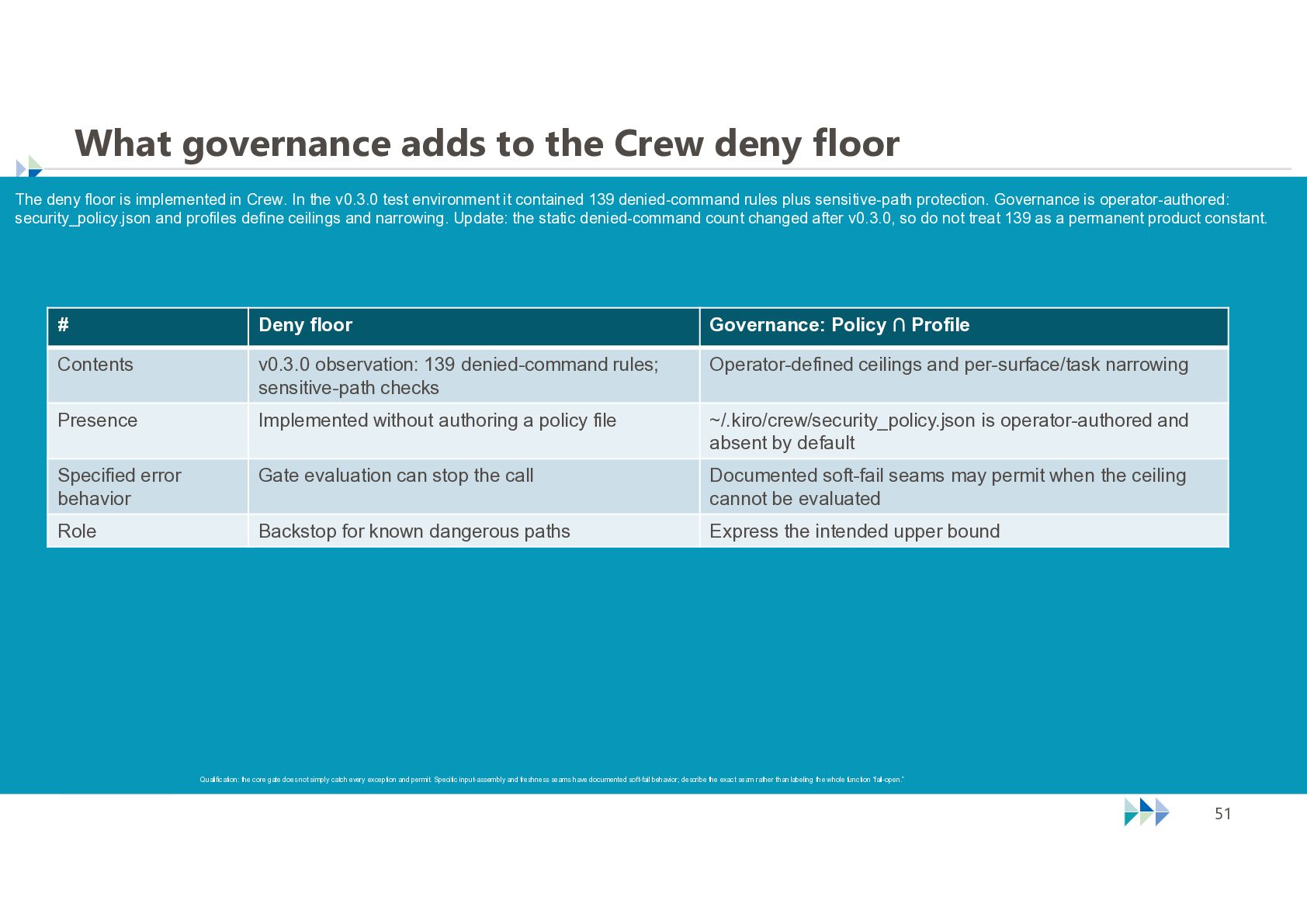
  49. What governance adds to the Crew deny floor The deny

    floor is implemented in Crew. In the v0.3.0 test environment it contained 139 denied-command rules plus sensitive-path protection. Governance is operator-authored: security_policy.json and profiles define ceilings and narrowing. Update: the static denied-command count changed after v0.3.0, so do not treat 139 as a permanent product constant. # Deny floor Governance: Policy ∩ Profile Contents v0.3.0 observation: 139 denied-command rules; sensitive-path checks Operator-defined ceilings and per-surface/task narrowing Presence Implemented without authoring a policy file ~/.kiro/crew/security_policy.json is operator-authored and absent by default Specified error behavior Gate evaluation can stop the call Documented soft-fail seams may permit when the ceiling cannot be evaluated Role Backstop for known dangerous paths Express the intended upper bound Qualification: the core gate does not simply catch every exception and permit. Specific input-assembly and freshness seams have documented soft-fail behavior; describe the exact seam rather than labeling the whole function “fail-open.” © NTT TechnoCross Corporation 51
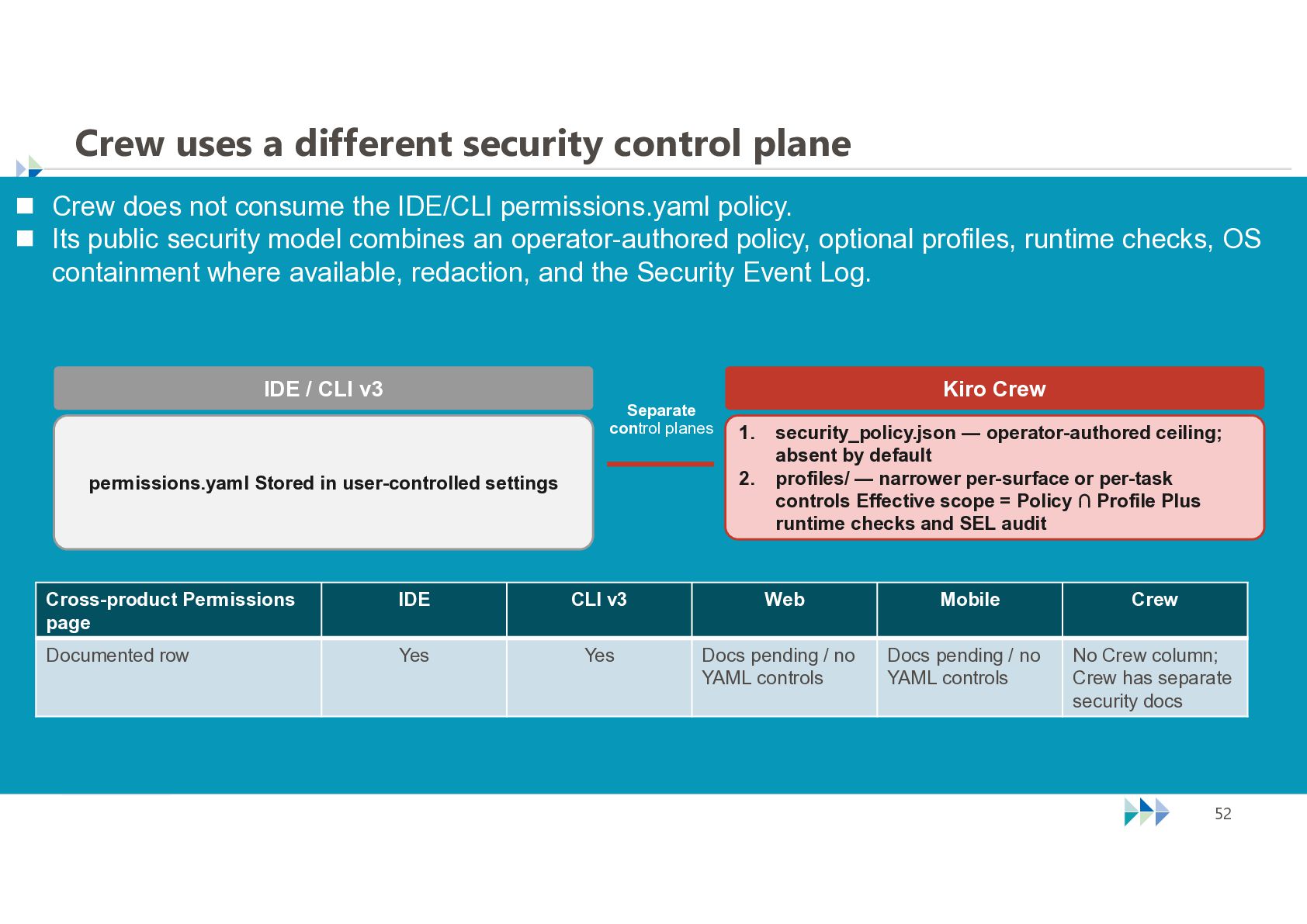
  50. Crew uses a different security control plane  Crew does

    not consume the IDE/CLI permissions.yaml policy.  Its public security model combines an operator-authored policy, optional profiles, runtime checks, OS containment where available, redaction, and the Security Event Log. IDE / CLI v3 Kiro Crew Separate control planes 1. 2. permissions.yaml Stored in user-controlled settings security_policy.json — operator-authored ceiling; absent by default profiles/ — narrower per-surface or per-task controls Effective scope = Policy ∩ Profile Plus runtime checks and SEL audit Cross-product Permissions page IDE CLI v3 Web Mobile Crew Documented row Yes Yes Docs pending / no YAML controls Docs pending / no YAML controls No Crew column; Crew has separate security docs © NTT TechnoCross Corporation 52
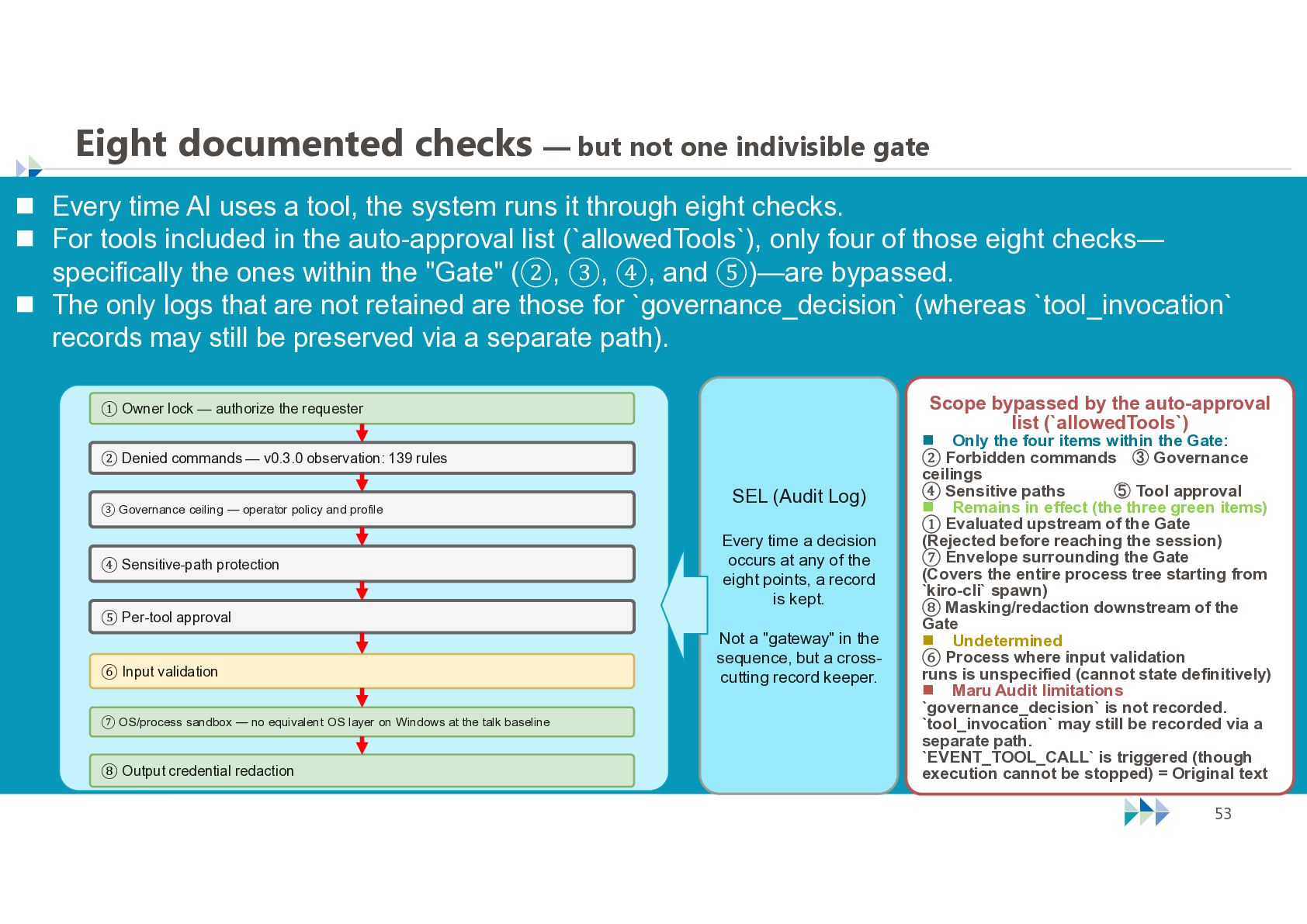
  51. Eight documented checks — but not one indivisible gate 

    Every time AI uses a tool, the system runs it through eight checks.  For tools included in the auto-approval list (`allowedTools`), only four of those eight checks— specifically the ones within the "Gate" (②, ③, ④, and ⑤)—are bypassed.  The only logs that are not retained are those for `governance_decision` (whereas `tool_invocation` records may still be preserved via a separate path). Scope bypassed by the auto-approval list (`allowedTools`) ① Owner lock — authorize the requester ② Denied commands — v0.3.0 observation: 139 rules SEL (Audit Log) ③ Governance ceiling — operator policy and profile ④ Sensitive-path protection Every time a decision occurs at any of the eight points, a record is kept. ⑤ Per-tool approval ⑥ Input validation Not a "gateway" in the sequence, but a crosscutting record keeper. ⑦ OS/process sandbox — no equivalent OS layer on Windows at the talk baseline ⑧ Output credential redaction © NTT TechnoCross Corporation  Only the four items within the Gate: ② Forbidden commands ③ Governance ceilings ④ Sensitive paths ⑤ Tool approval  Remains in effect (the three green items) ① Evaluated upstream of the Gate (Rejected before reaching the session) ⑦ Envelope surrounding the Gate (Covers the entire process tree starting from `kiro-cli` spawn) ⑧ Masking/redaction downstream of the Gate  Undetermined ⑥ Process where input validation runs is unspecified (cannot state definitively)  Maru Audit limitations `governance_decision` is not recorded. `tool_invocation` may still be recorded via a separate path. `EVENT_TOOL_CALL` is triggered (though execution cannot be stopped) = Original text 53
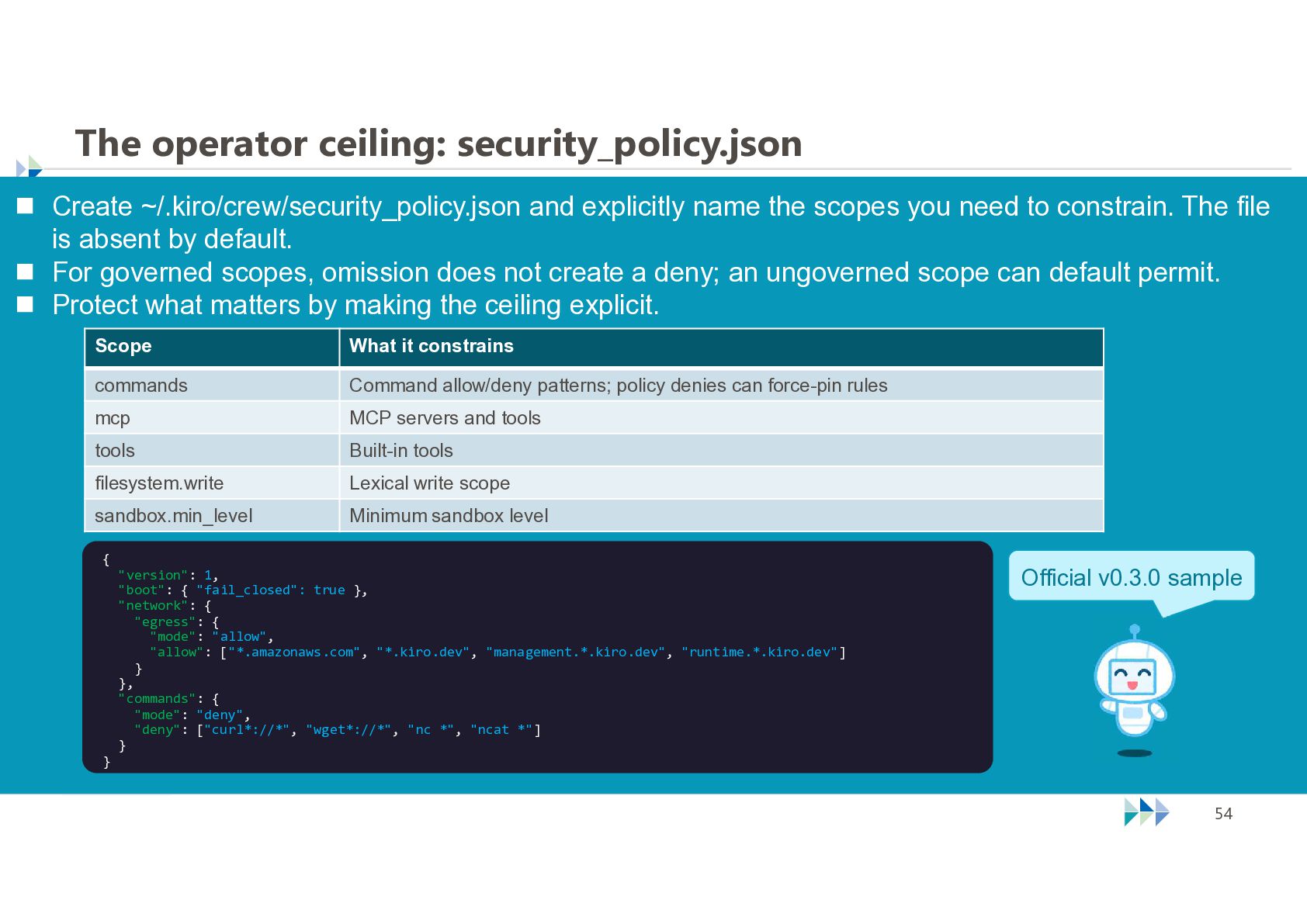
  52. The operator ceiling: security_policy.json  Create ~/.kiro/crew/security_policy.json and explicitly name

    the scopes you need to constrain. The file is absent by default.  For governed scopes, omission does not create a deny; an ungoverned scope can default permit.  Protect what matters by making the ceiling explicit. Scope What it constrains commands Command allow/deny patterns; policy denies can force-pin rules mcp MCP servers and tools tools Built-in tools filesystem.write Lexical write scope sandbox.min_level Minimum sandbox level { } "version": 1, "boot": { "fail_closed": true }, "network": { "egress": { "mode": "allow", "allow": ["*.amazonaws.com", "*.kiro.dev", "management.*.kiro.dev", "runtime.*.kiro.dev"] } }, "commands": { "mode": "deny", "deny": ["curl*://*", "wget*://*", "nc *", "ncat *"] } © NTT TechnoCross Corporation Official v0.3.0 sample 54
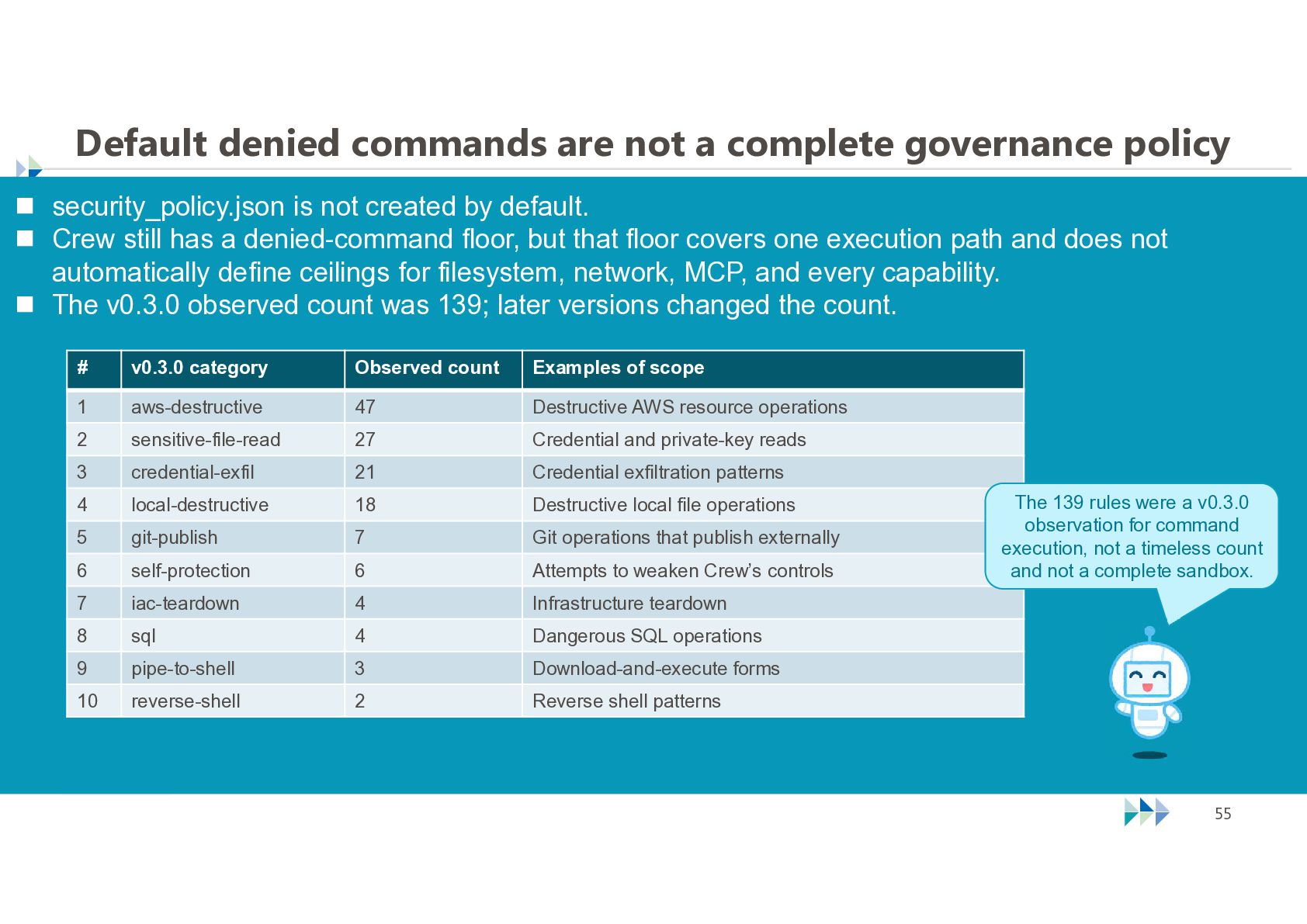
  53. Default denied commands are not a complete governance policy 

    security_policy.json is not created by default.  Crew still has a denied-command floor, but that floor covers one execution path and does not automatically define ceilings for filesystem, network, MCP, and every capability.  The v0.3.0 observed count was 139; later versions changed the count. # v0.3.0 category Observed count Examples of scope 1 aws-destructive 47 Destructive AWS resource operations 2 sensitive-file-read 27 Credential and private-key reads 3 credential-exfil 21 Credential exfiltration patterns 4 local-destructive 18 Destructive local file operations 5 git-publish 7 Git operations that publish externally 6 self-protection 6 Attempts to weaken Crew’s controls 7 iac-teardown 4 Infrastructure teardown 8 sql 4 Dangerous SQL operations 9 pipe-to-shell 3 Download-and-execute forms 10 reverse-shell 2 Reverse shell patterns © NTT TechnoCross Corporation The 139 rules were a v0.3.0 observation for command execution, not a timeless count and not a complete sandbox. 55
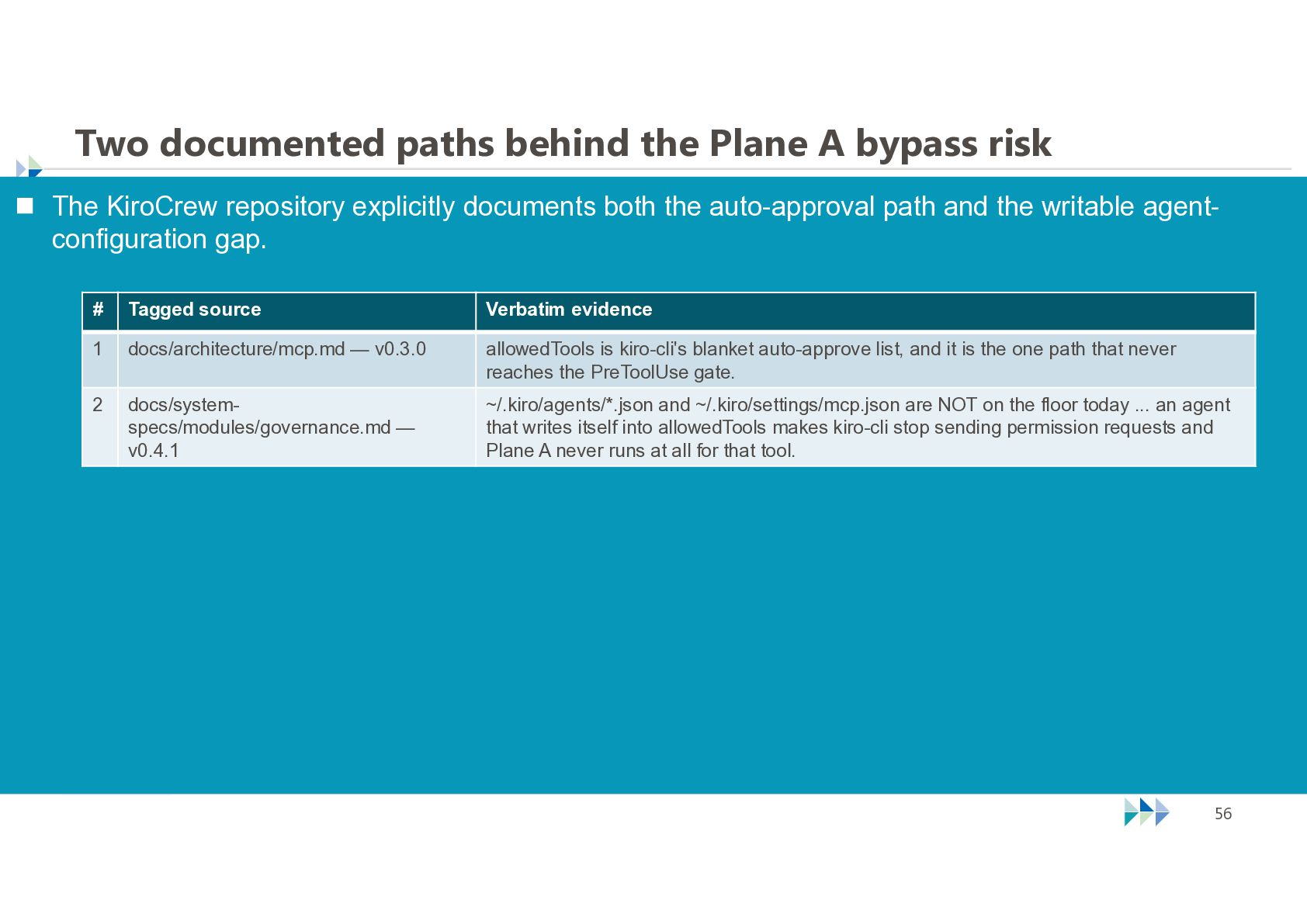
  54. Two documented paths behind the Plane A bypass risk 

    The KiroCrew repository explicitly documents both the auto-approval path and the writable agentconfiguration gap. # Tagged source Verbatim evidence 1 docs/architecture/mcp.md — v0.3.0 allowedTools is kiro-cli's blanket auto-approve list, and it is the one path that never reaches the PreToolUse gate. 2 docs/systemspecs/modules/governance.md — v0.4.1 ~/.kiro/agents/*.json and ~/.kiro/settings/mcp.json are NOT on the floor today ... an agent that writes itself into allowedTools makes kiro-cli stop sending permission requests and Plane A never runs at all for that tool. © NTT TechnoCross Corporation 56
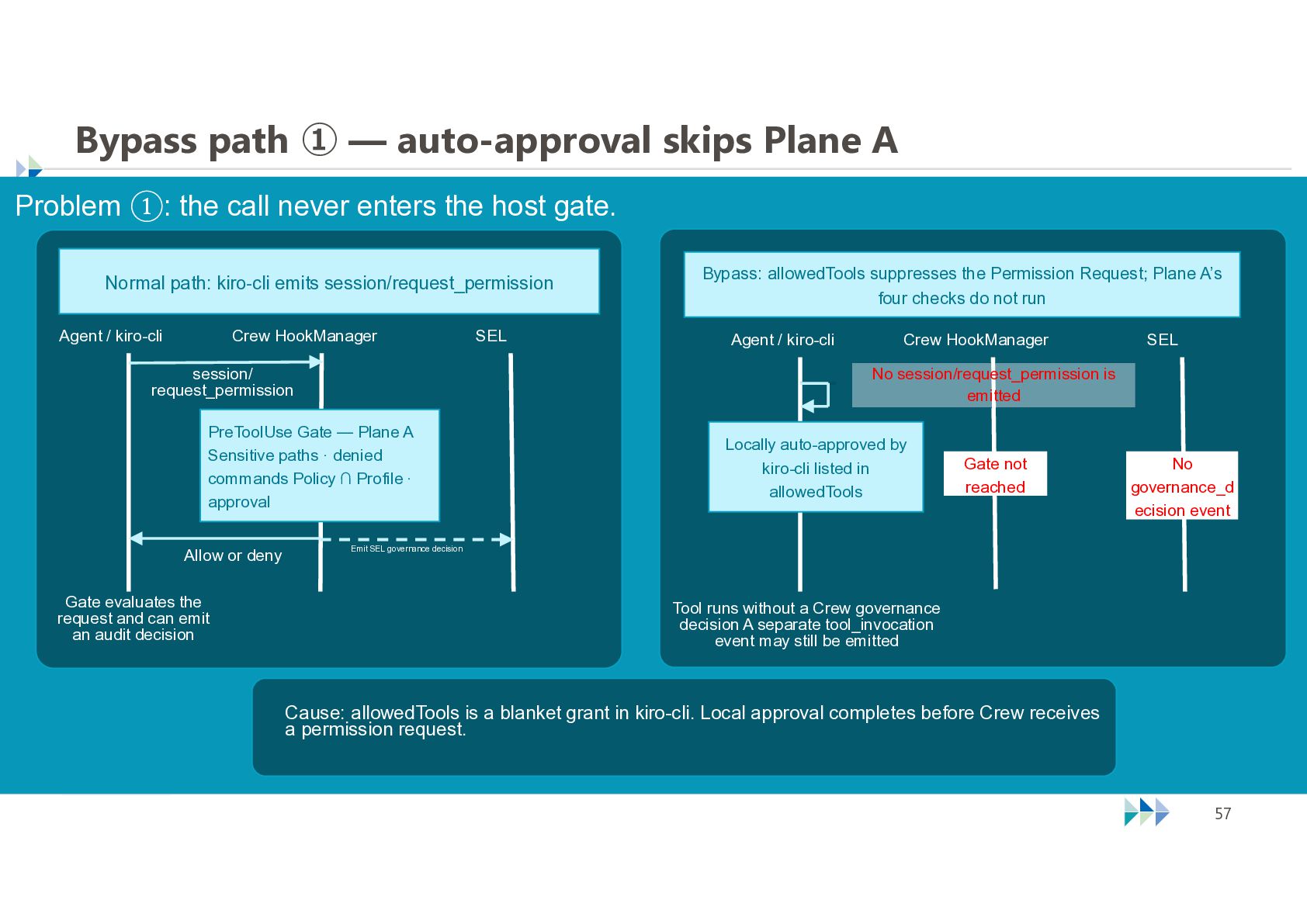
  55. Bypass path ① — auto-approval skips Plane A Problem ①:

    the call never enters the host gate. Normal path: kiro-cli emits session/request_permission Agent / kiro-cli Crew HookManager SEL Bypass: allowedTools suppresses the Permission Request; Plane A’s four checks do not run Agent / kiro-cli session/ request_permission Gate evaluates the request and can emit an audit decision SEL No session/request_permission is emitted PreToolUse Gate — Plane A Sensitive paths · denied commands Policy ∩ Profile · approval Allow or deny Crew HookManager Locally auto-approved by kiro-cli listed in allowedTools Gate not reached No governance_d ecision event Emit SEL governance decision Tool runs without a Crew governance decision A separate tool_invocation event may still be emitted Cause: allowedTools is a blanket grant in kiro-cli. Local approval completes before Crew receives a permission request. © NTT TechnoCross Corporation 57
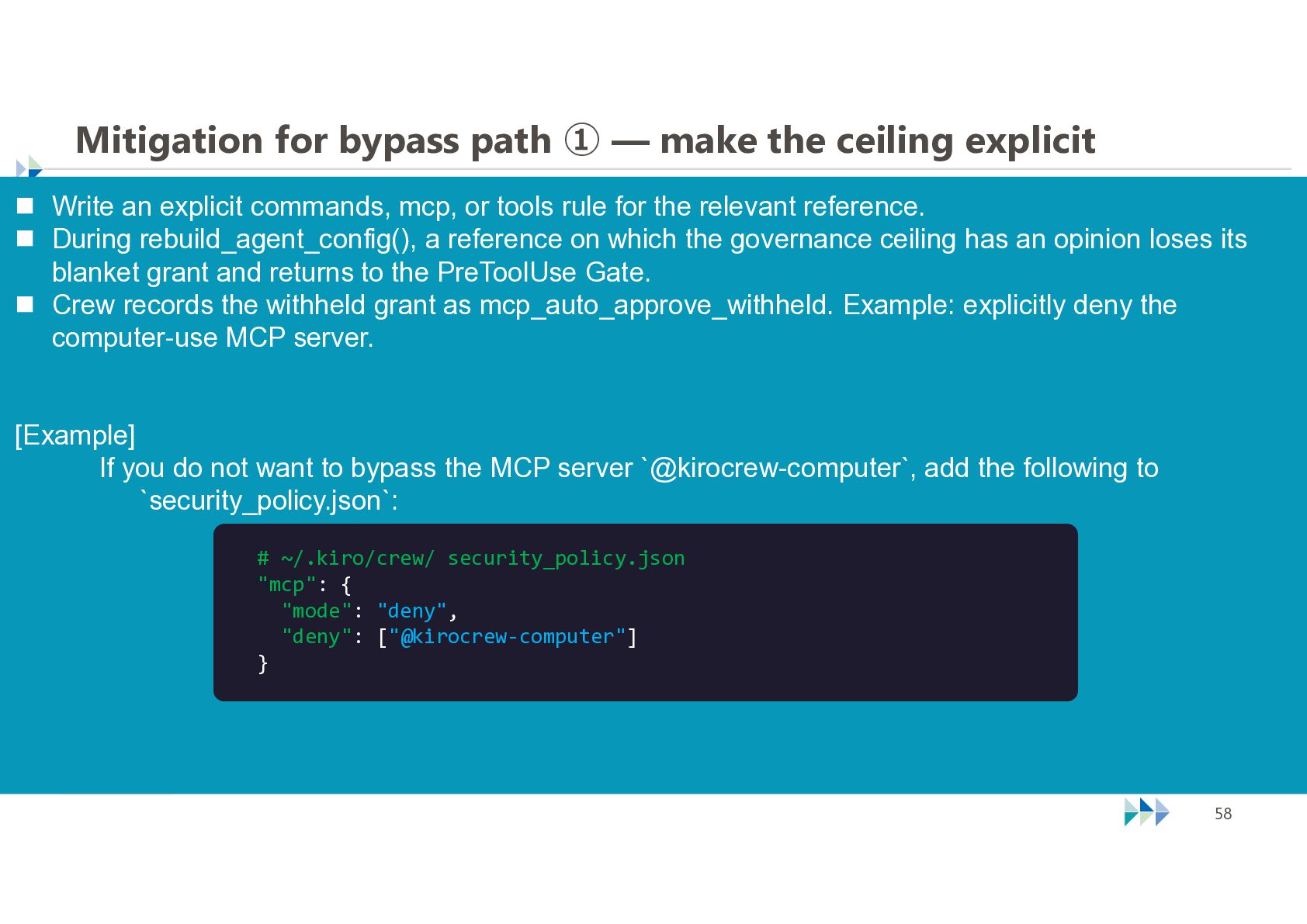
  56. Mitigation for bypass path ① — make the ceiling explicit

     Write an explicit commands, mcp, or tools rule for the relevant reference.  During rebuild_agent_config(), a reference on which the governance ceiling has an opinion loses its blanket grant and returns to the PreToolUse Gate.  Crew records the withheld grant as mcp_auto_approve_withheld. Example: explicitly deny the computer-use MCP server. [Example] If you do not want to bypass the MCP server `@kirocrew-computer`, add the following to `security_policy.json`: # ~/.kiro/crew/ security_policy.json "mcp": { "mode": "deny", "deny": ["@kirocrew-computer"] } © NTT TechnoCross Corporation 58
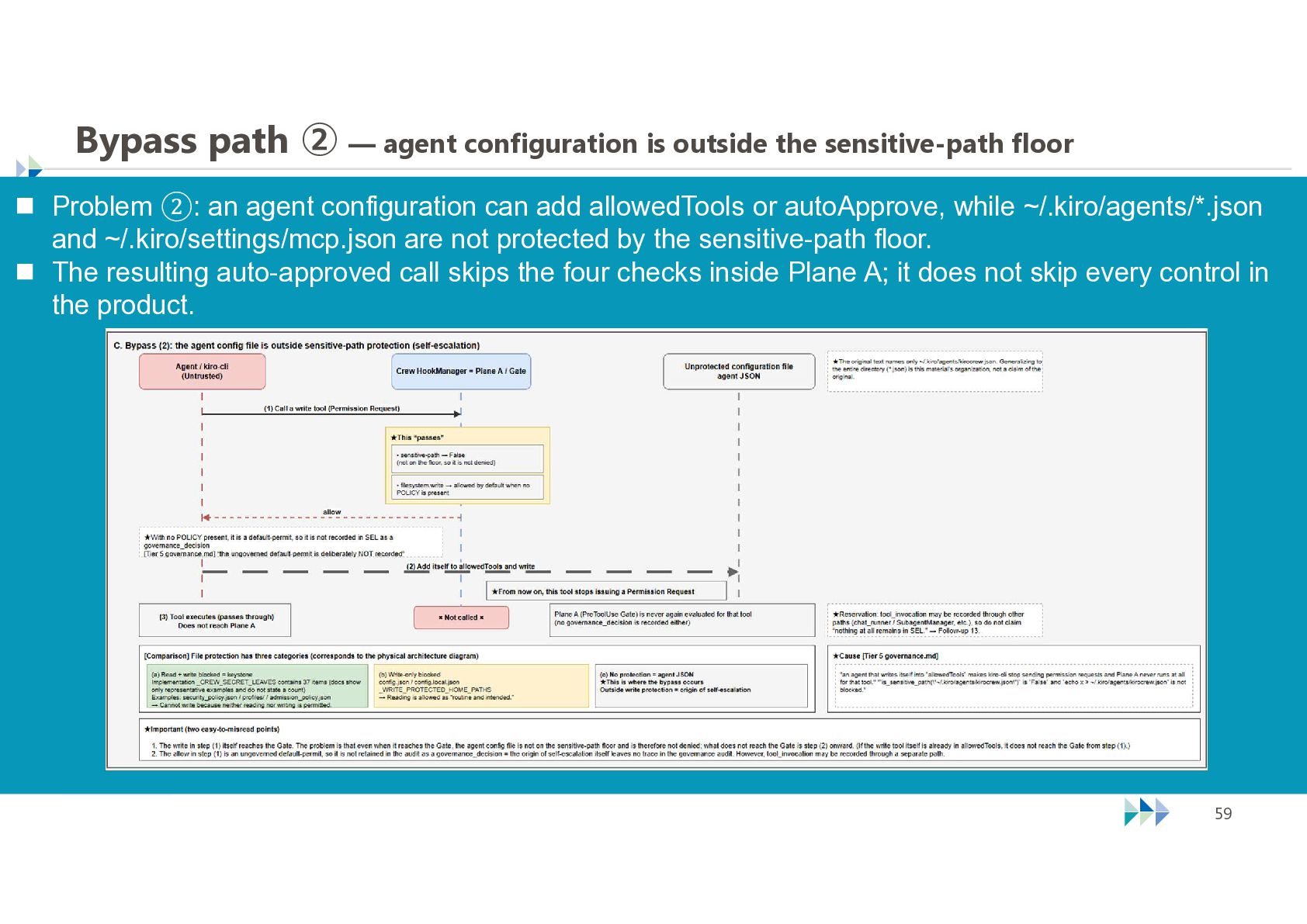
  57. Bypass path ② — agent configuration is outside the sensitive-path

    floor  Problem ②: an agent configuration can add allowedTools or autoApprove, while ~/.kiro/agents/*.json and ~/.kiro/settings/mcp.json are not protected by the sensitive-path floor.  The resulting auto-approved call skips the four checks inside Plane A; it does not skip every control in the product. © NTT TechnoCross Corporation 59
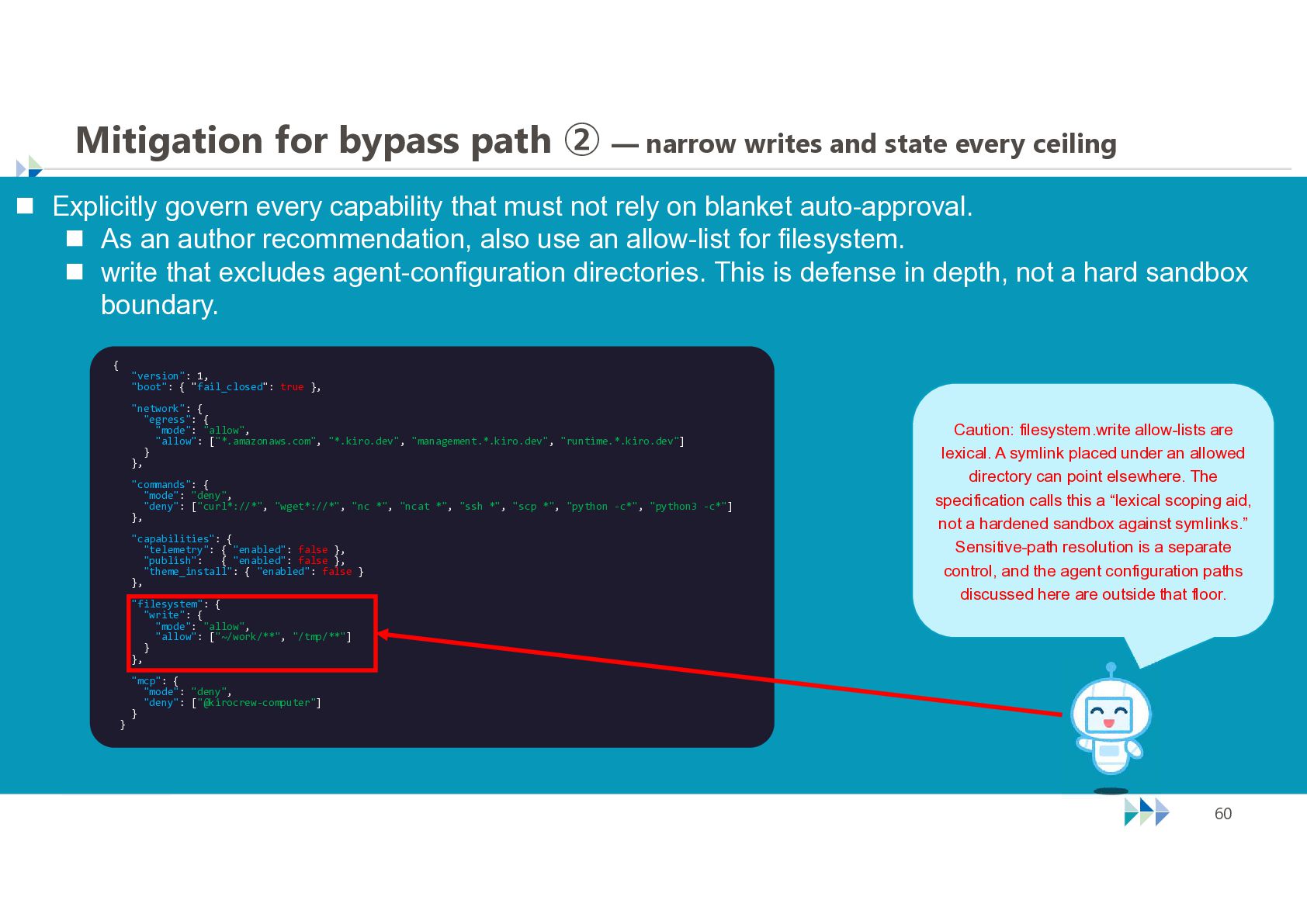
  58. Mitigation for bypass path ② — narrow writes and state

    every ceiling  Explicitly govern every capability that must not rely on blanket auto-approval.  As an author recommendation, also use an allow-list for filesystem.  write that excludes agent-configuration directories. This is defense in depth, not a hard sandbox boundary. { "version": 1, "boot": { "fail_closed": true }, "network": { "egress": { "mode": "allow", "allow": ["*.amazonaws.com", "*.kiro.dev", "management.*.kiro.dev", "runtime.*.kiro.dev"] } }, "commands": { "mode": "deny", "deny": ["curl*://*", "wget*://*", "nc *", "ncat *", "ssh *", "scp *", "python -c*", "python3 -c*"] }, "capabilities": { "telemetry": { "enabled": false }, "publish": { "enabled": false }, "theme_install": { "enabled": false } }, "filesystem": { "write": { "mode": "allow", "allow": ["~/work/**", "/tmp/**"] } }, } Caution: filesystem.write allow-lists are lexical. A symlink placed under an allowed directory can point elsewhere. The specification calls this a “lexical scoping aid, not a hardened sandbox against symlinks.” Sensitive-path resolution is a separate control, and the agent configuration paths discussed here are outside that floor. "mcp": { "mode": "deny", "deny": ["@kirocrew-computer"] } © NTT TechnoCross Corporation 60
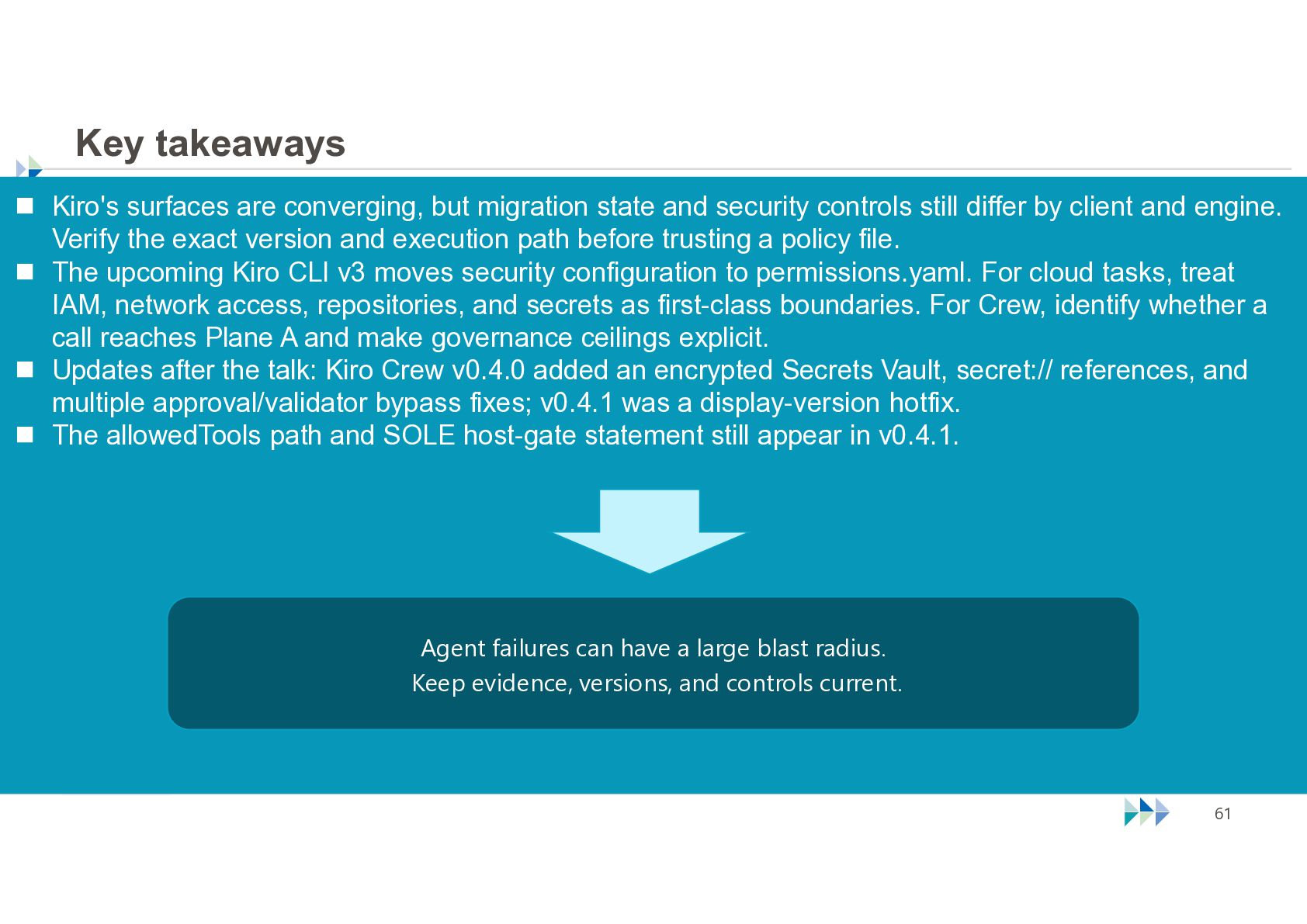
  59. Key takeaways  Kiro's surfaces are converging, but migration state

    and security controls still differ by client and engine. Verify the exact version and execution path before trusting a policy file.  The upcoming Kiro CLI v3 moves security configuration to permissions.yaml. For cloud tasks, treat IAM, network access, repositories, and secrets as first-class boundaries. For Crew, identify whether a call reaches Plane A and make governance ceilings explicit.  Updates after the talk: Kiro Crew v0.4.0 added an encrypted Secrets Vault, secret:// references, and multiple approval/validator bypass fixes; v0.4.1 was a display-version hotfix.  The allowedTools path and SOLE host-gate statement still appear in v0.4.1. Agent failures can have a large blast radius. Keep evidence, versions, and controls current. © NTT TechnoCross Corporation 61
  60. One last thought Kiro’s five forms are capable tools. Use

    each one with boundaries that match where the agent actually runs. © NTT TechnoCross Corporation 62