Upgrade to Pro
— share decks privately, control downloads, hide ads and more …
Speaker Deck
Sign up for free
Menu
Search
Features
All features
Private URLs
Password Protection
Custom URLS
Scheduled publishing
Remove Branding
Restrict embedding
Deck Collections
Notes
Features
All features
Private URLs
Password Protection
Custom URLS
Scheduled publishing
Remove Branding
Restrict embedding
Deck Collections
Notes
Explore
Featured decks
Featured speakers
Programming
Technology
Storyboards
Explore
Featured decks
Featured speakers
Programming
Technology
Storyboards
Pricing
Search
Sign in
Sign up for free
How to use the Tasking Manager
Search
Misato Sugiyama
June 29, 2017
44
0
Share
Embed
Copy iframe code
Copy JS code
Copy link
Start on current slide
How to use the Tasking Manager
Misato Sugiyama
June 29, 2017
More Decks by Misato Sugiyama
See All by Misato Sugiyama
KMZ
miton
0
110
Featured
See All Featured
Building Experiences: Design Systems, User Experience, and Full Site Editing
marktimemedia
1
630
Imperfection Machines: The Place of Print at Facebook
scottboms
270
14k
Taking LLMs out of the black box: A practical guide to human-in-the-loop distillation
inesmontani
PRO
3
2.5k
Building Applications with DynamoDB
mza
96
7.2k
Claude Code のすすめ
schroneko
67
230k
Hiding What from Whom? A Critical Review of the History of Programming languages for Music
tomoyanonymous
3
1.3k
Everyday Curiosity
cassininazir
0
350
Crafting Experiences
bethany
1
380
個人開発の失敗を避けるイケてる考え方 / tips for indie hackers
panda_program
123
22k
"I'm Feeling Lucky" - Building Great Search Experiences for Today's Users (#IAC19)
danielanewman
230
23k
Principles of Awesome APIs and How to Build Them.
keavy
128
18k
The MySQL Ecosystem @ GitHub 2015
samlambert
251
13k
Transcript
Tasking Managerの使い方 一連の流れ
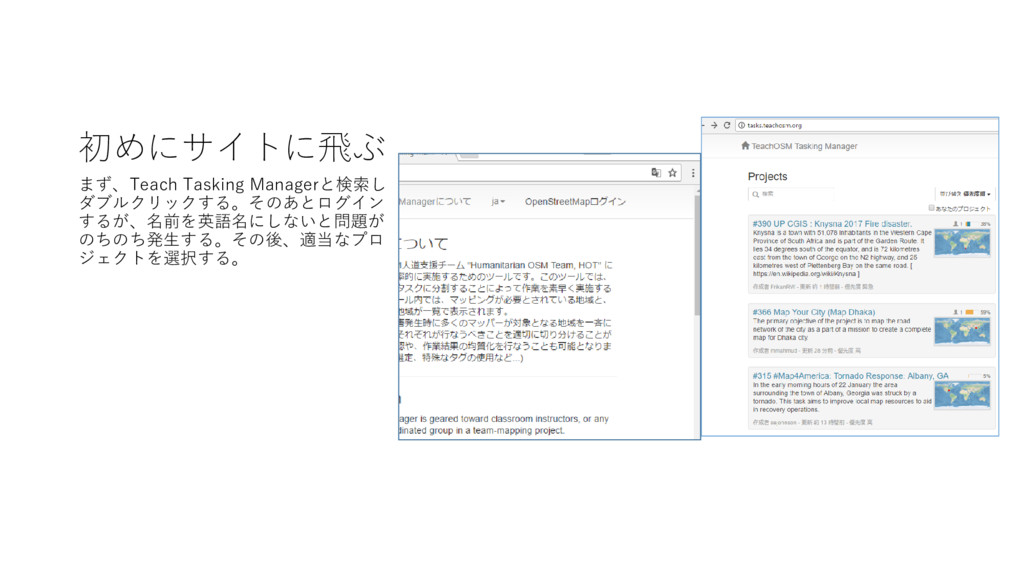
初めにサイトに飛ぶ まず、Teach Tasking Managerと検索し ダブルクリックする。そのあとログイン するが、名前を英語名にしないと問題が のちのち発生する。その後、適当なプロ ジェクトを選択する。
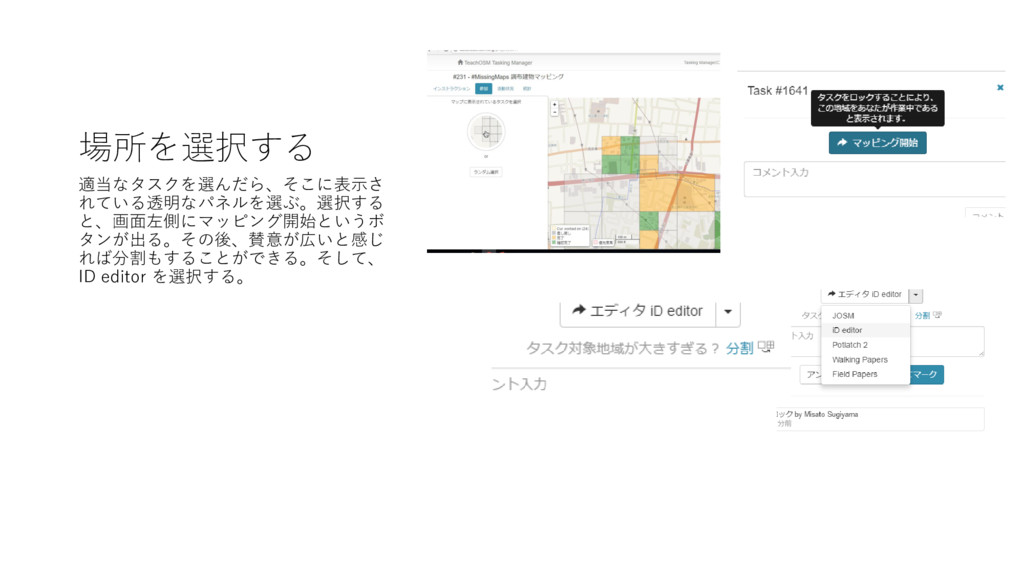
場所を選択する 適当なタスクを選んだら、そこに表示さ れている透明なパネルを選ぶ。選択する と、画面左側にマッピング開始というボ タンが出る。その後、賛意が広いと感じ れば分割もすることができる。そして、 ID editor を選択する。
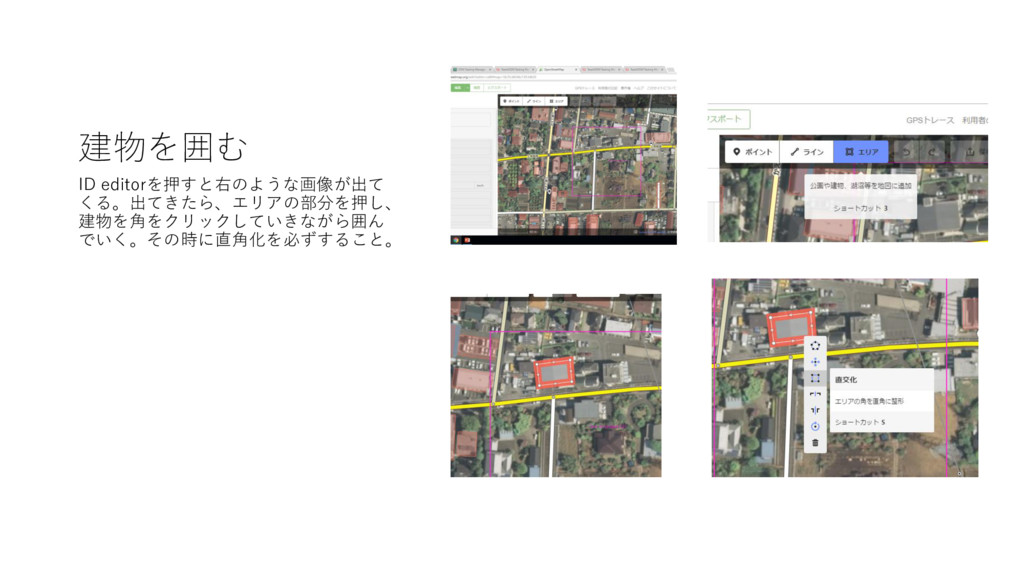
建物を囲む ID editorを押すと右のような画像が出て くる。出てきたら、エリアの部分を押し、 建物を角をクリックしていきながら囲ん でいく。その時に直角化を必ずすること。
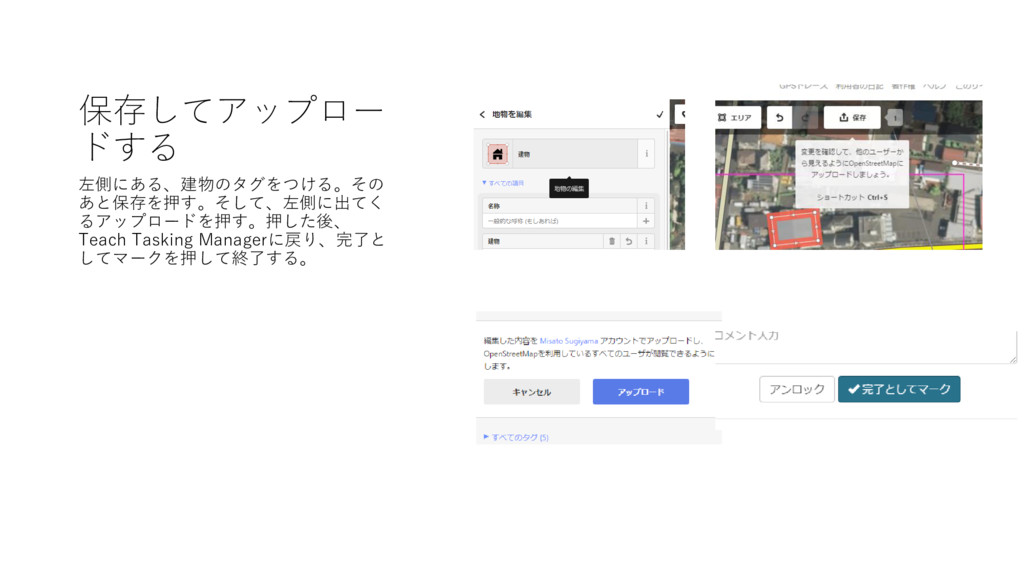
保存してアップロー ドする 左側にある、建物のタグをつける。その あと保存を押す。そして、左側に出てく るアップロードを押す。押した後、 Teach Tasking Managerに戻り、完了と してマークを押して終了する。
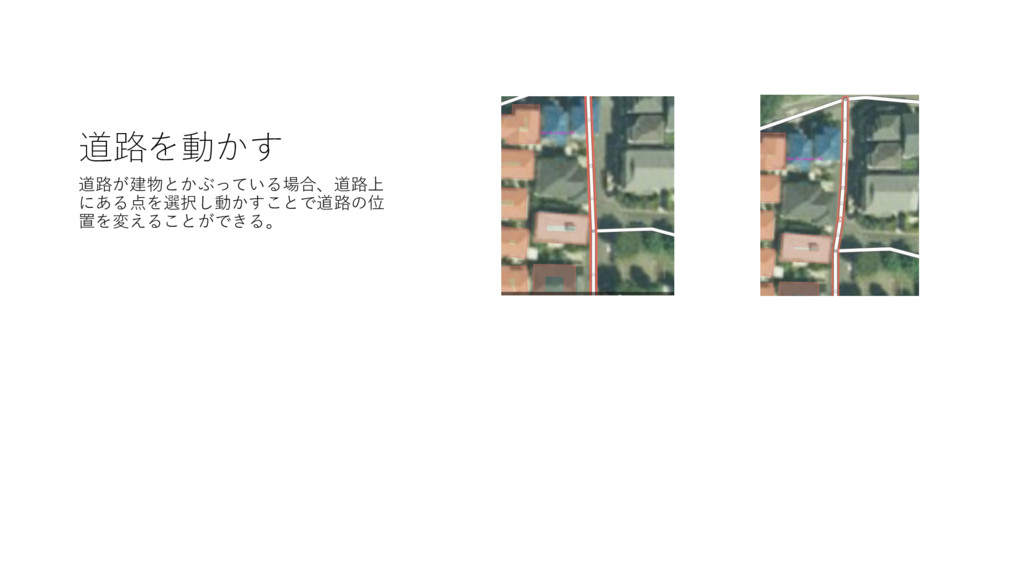
道路を動かす 道路が建物とかぶっている場合、道路上 にある点を選択し動かすことで道路の位 置を変えることができる。


 miton
miton
 marktimemedia
 scottboms
 inesmontani
 mza
mza
 schroneko
 tomoyanonymous
 cassininazir
 bethany
 panda_program
 danielanewman
 keavy
keavy
 samlambert