Upgrade to Pro — share decks privately, control downloads, hide ads and more …

[プロ研発表スライド] Kaggleの落書き認識コンペへの参加 / kaggle-doodle...

[プロ研発表スライド] Kaggleの落書き認識コンペへの参加 / kaggle-doodle-recognition-challenge-result

プロジェクト研究(学部3年時)の題材として参加した「Quick, Draw! Doodle Recognition Challenge 」というKaggleコンペに参加した結果とコンペで生成した機械学習モデルを使ったデモアプリケーションについて

Avatar for Takumi Ishiyama

Takumi Ishiyama

January 16, 2019

Other Decks in Programming

Transcript

  1. Contents 1. Introduction 2. Outline of Competition 3. Method 4.

    Results 5. Demo Application 6. Summary 2
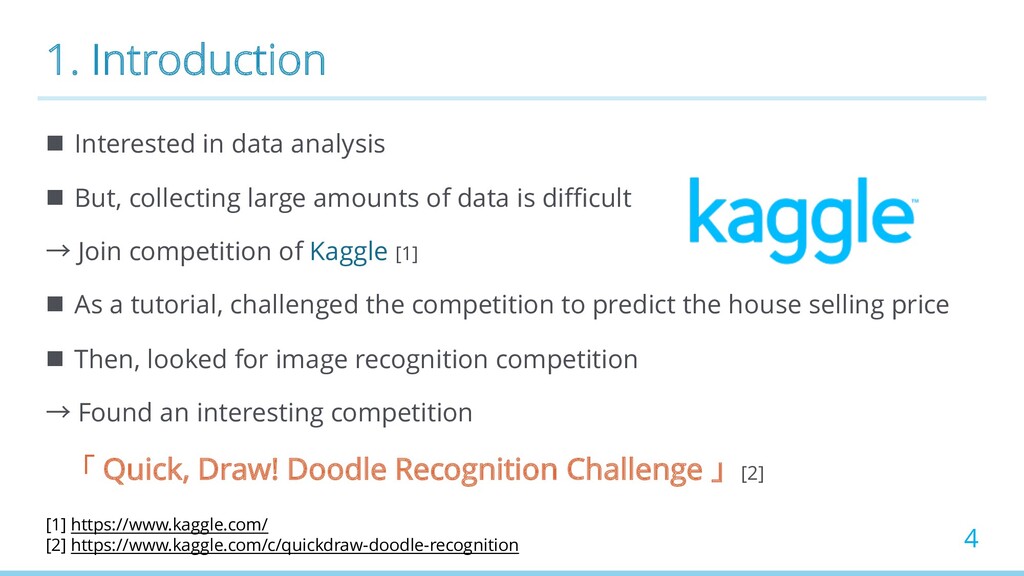
  2. 1. Introduction n Interested in data analysis n But, collecting

    large amounts of data is difficult → Join competition of Kaggle [1] n As a tutorial, challenged the competition to predict the house selling price n Then, looked for image recognition competition → Found an interesting competition 「 Quick, Draw! Doodle Recognition Challenge 」[2] 4 [1] https://www.kaggle.com/ [2] https://www.kaggle.com/c/quickdraw-doodle-recognition
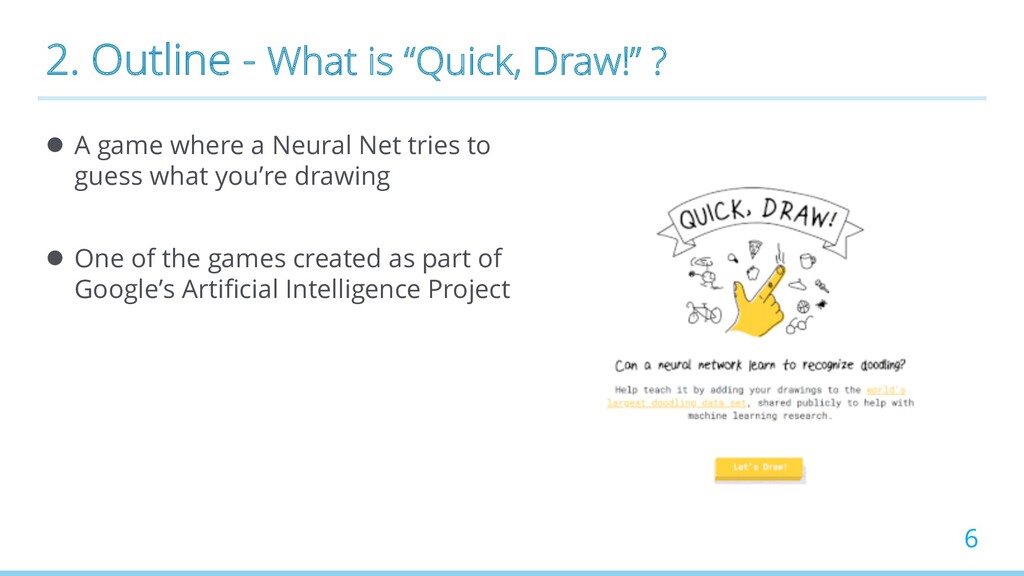
  3. 2. Outline - What is “Quick, Draw!” ? l A

    game where a Neural Net tries to guess what you’re drawing l One of the games created as part of Google’s Artificial Intelligence Project 6
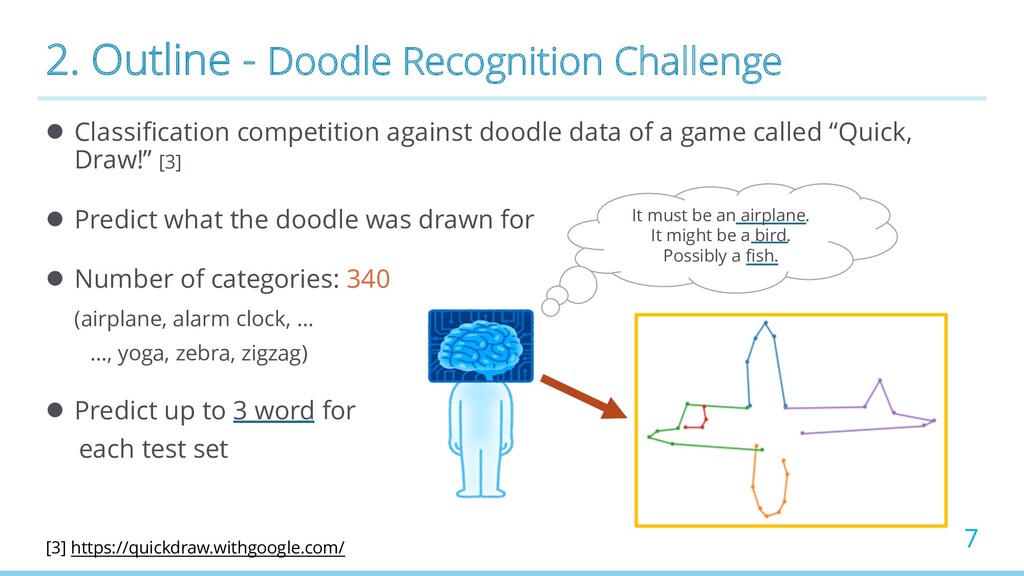
  4. 2. Outline - Doodle Recognition Challenge l Classification competition against

    doodle data of a game called “Quick, Draw!” [3] l Predict what the doodle was drawn for l Number of categories: 340 (airplane, alarm clock, … …, yoga, zebra, zigzag) l Predict up to 3 word for each test set 7 It must be an airplane. It might be a bird. Possibly a fish. [3] https://quickdraw.withgoogle.com/
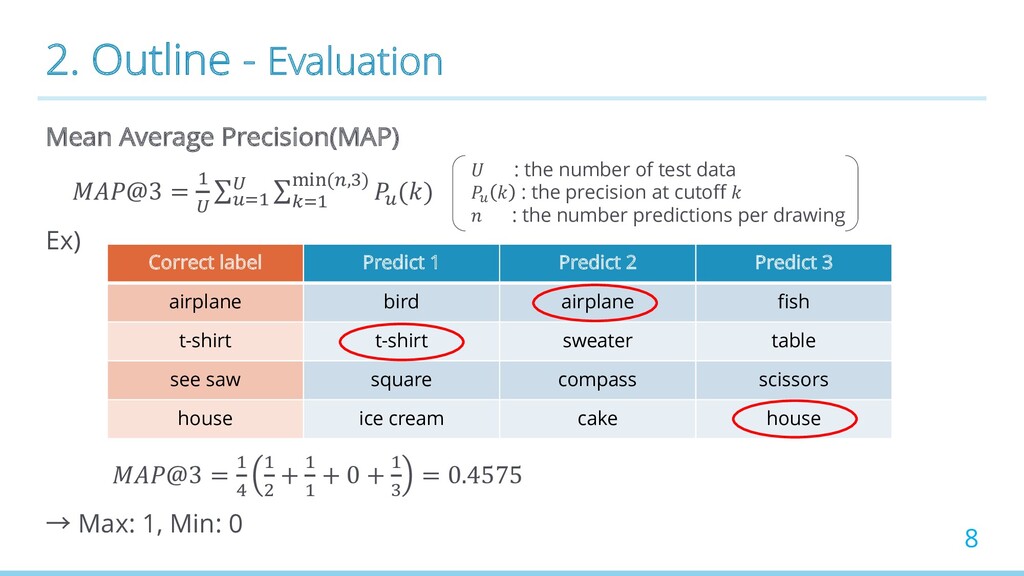
  5. 2. Outline - Evaluation Mean Average Precision(MAP) @3 = !

    " ∑#$! " ∑ %$! &'((*,,) #() Ex) @3 = ! . ! / + ! ! + 0 + ! , = 0.4575 → Max: 1, Min: 0 8 Correct label Predict 1 Predict 2 Predict 3 airplane bird airplane fish t-shirt t-shirt sweater table see saw square compass scissors house ice cream cake house : the number of test data ! : the precision at cutoff : the number predictions per drawing
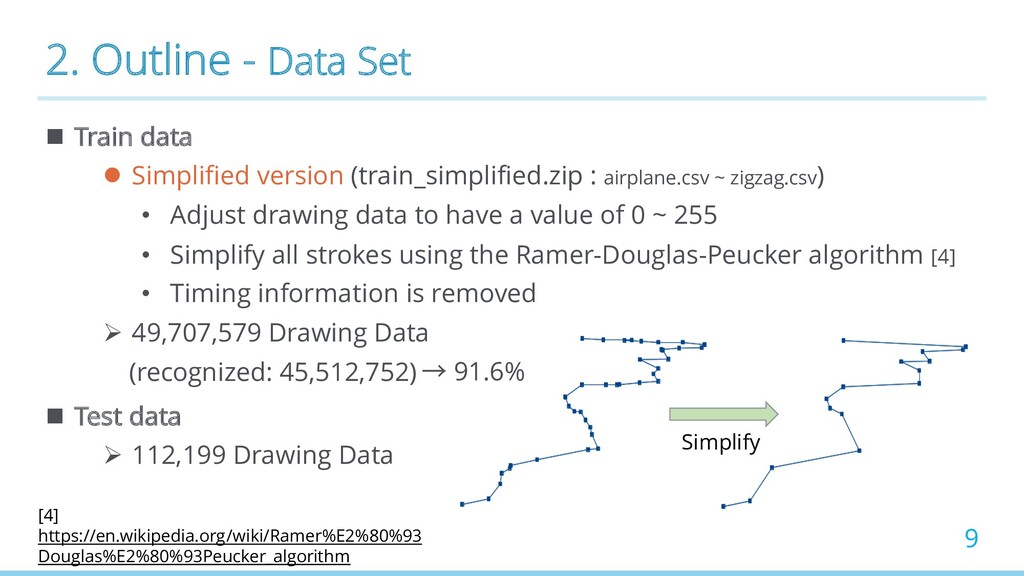
  6. 2. Outline - Data Set n Train data l Simplified

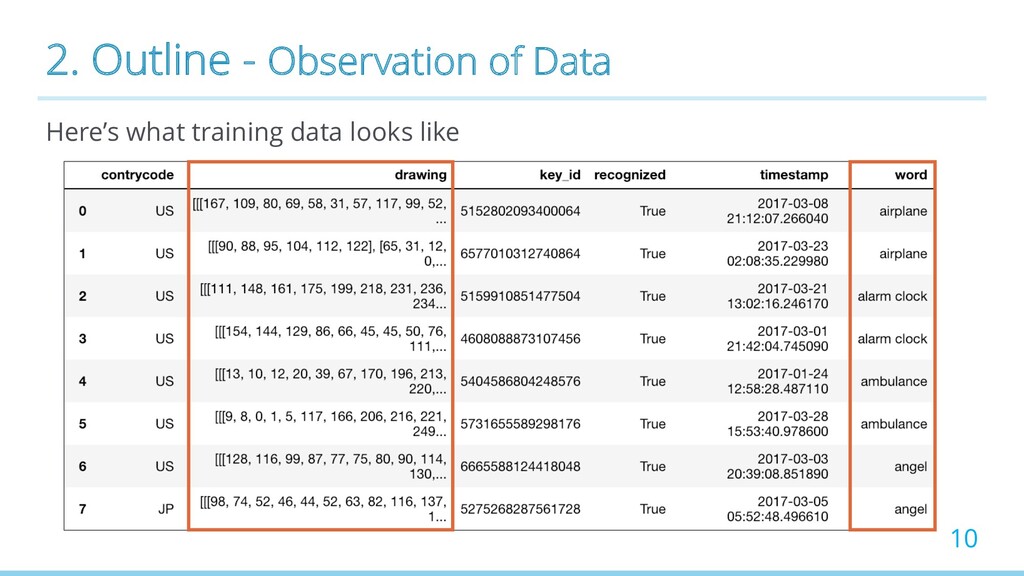
    version (train_simplified.zip : airplane.csv ~ zigzag.csv) • Adjust drawing data to have a value of 0 ~ 255 • Simplify all strokes using the Ramer-Douglas-Peucker algorithm [4] • Timing information is removed Ø 49,707,579 Drawing Data (recognized: 45,512,752) n Test data Ø 112,199 Drawing Data 9 Simplify [4] https://en.wikipedia.org/wiki/Ramer%E2%80%93 Douglas%E2%80%93Peucker_algorithm → 91.6%
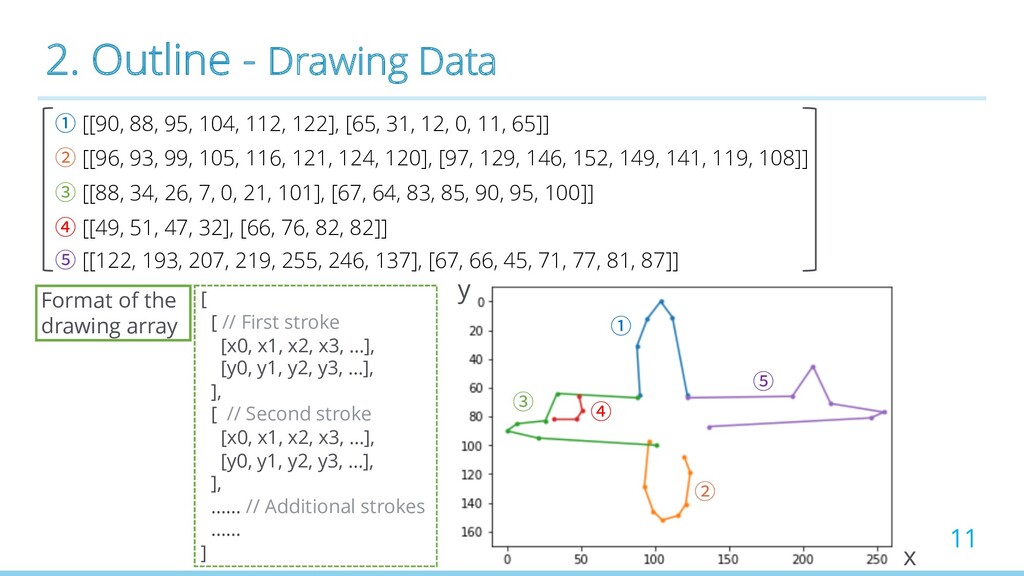
  7. 2. Outline - Drawing Data 11 ① [[90, 88, 95,

    104, 112, 122], [65, 31, 12, 0, 11, 65]] ② [[96, 93, 99, 105, 116, 121, 124, 120], [97, 129, 146, 152, 149, 141, 119, 108]] ③ [[88, 34, 26, 7, 0, 21, 101], [67, 64, 83, 85, 90, 95, 100]] ④ [[49, 51, 47, 32], [66, 76, 82, 82]] ⑤ [[122, 193, 207, 219, 255, 246, 137], [67, 66, 45, 71, 77, 81, 87]] ② ① ⑤ ④ ③ y x [ [ // First stroke [x0, x1, x2, x3, …], [y0, y1, y2, y3, …], ], [ // Second stroke [x0, x1, x2, x3, …], [y0, y1, y2, y3, …], ], …… // Additional strokes …… ] Format of the drawing array
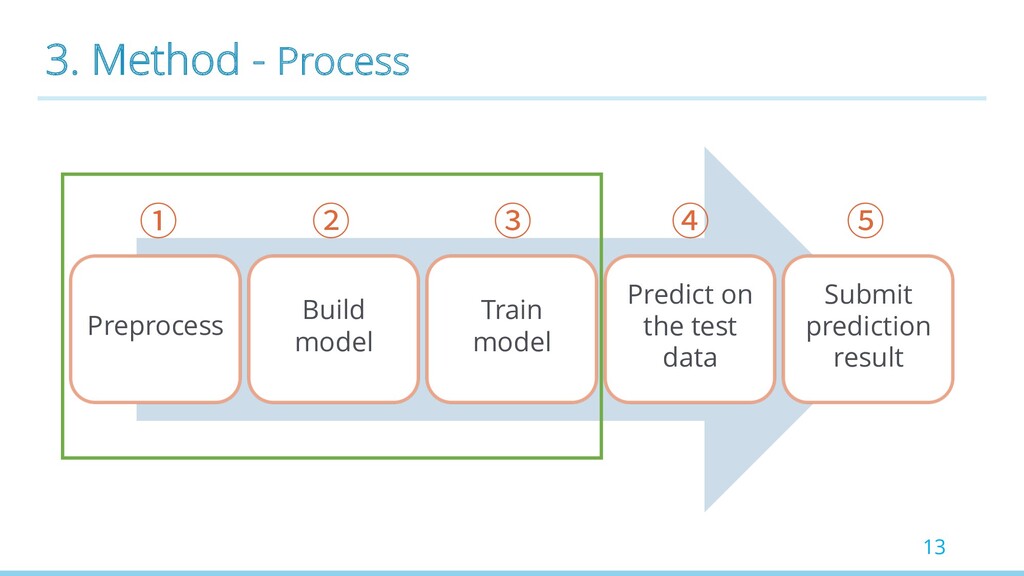
  8. 13 Preprocess Build model Train model Predict on the test

    data Submit prediction result 3. Method - Process ① ② ③ ④ ⑤
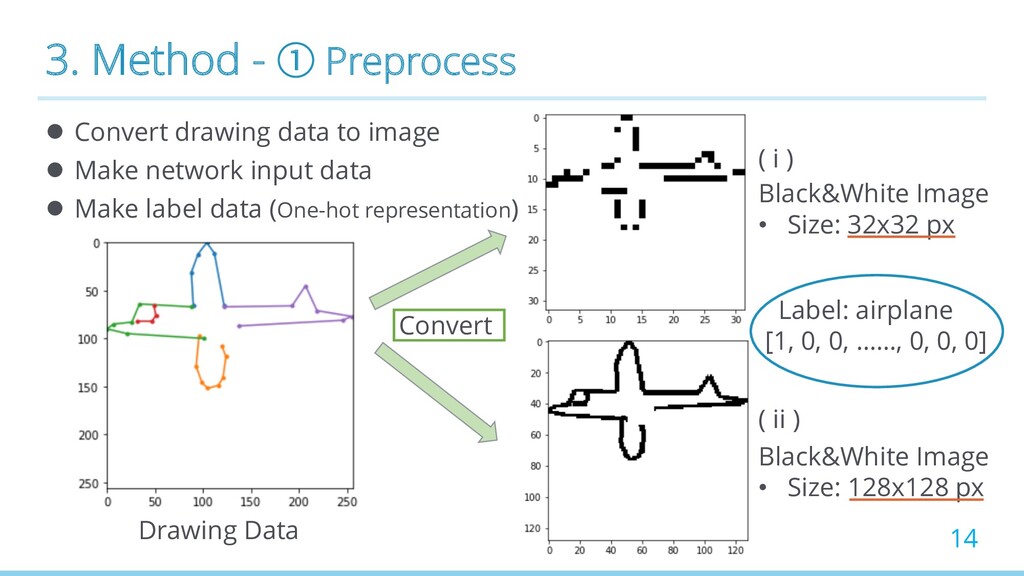
  9. 3. Method - ① Preprocess l Convert drawing data to

    image l Make network input data l Make label data (One-hot representation) 14 Drawing Data Convert Black&White Image • Size: 32x32 px Black&White Image • Size: 128x128 px ( i ) ( ii ) Label: airplane [1, 0, 0, ……, 0, 0, 0]
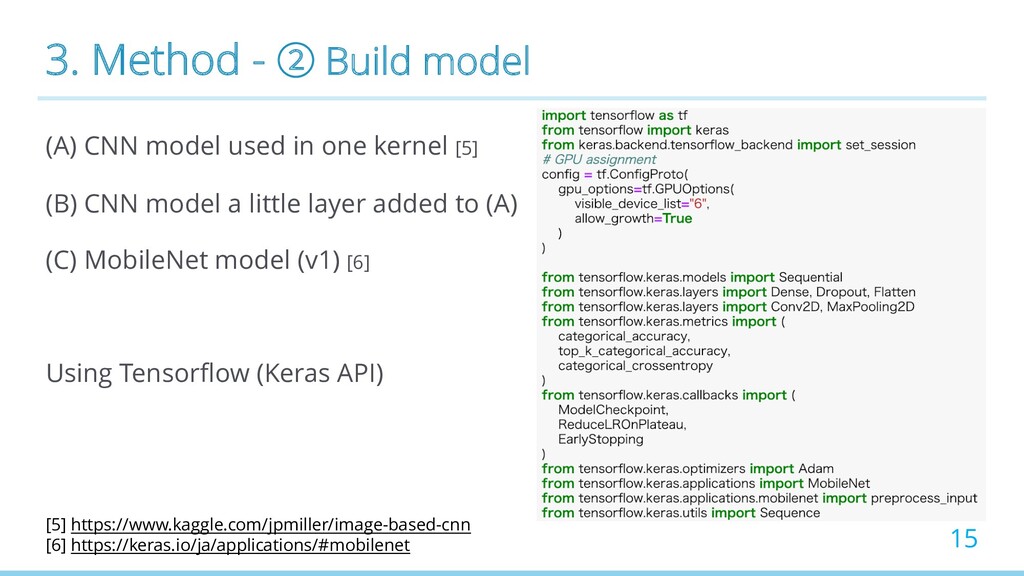
  10. 3. Method - ② Build model (A) CNN model used

    in one kernel [5] (B) CNN model a little layer added to (A) (C) MobileNet model (v1) [6] Using Tensorflow (Keras API) 15 [5] https://www.kaggle.com/jpmiller/image-based-cnn [6] https://keras.io/ja/applications/#mobilenet
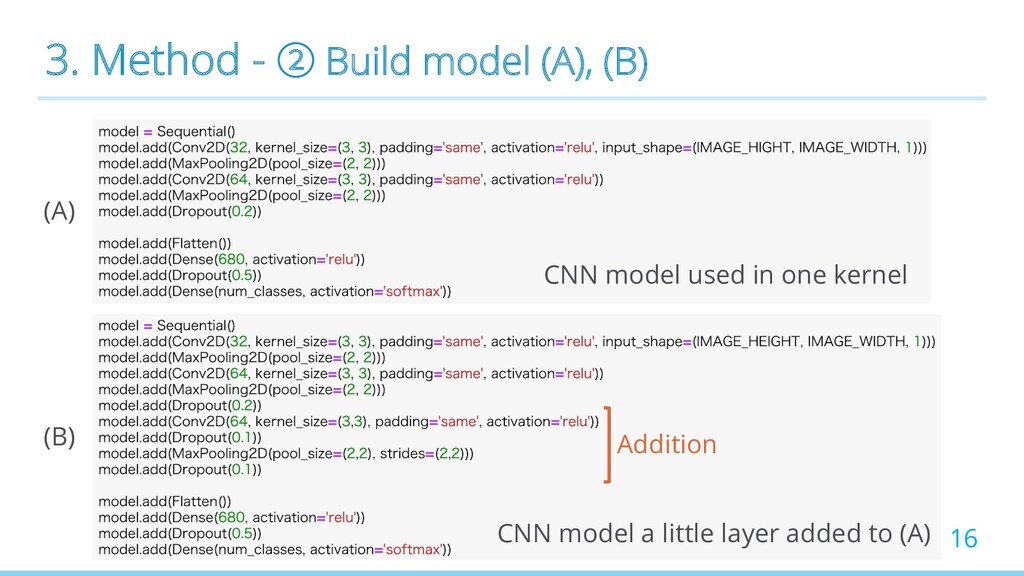
  11. 3. Method - ② Build model (A), (B) 16 (A)

    (B) Addition CNN model used in one kernel CNN model a little layer added to (A)
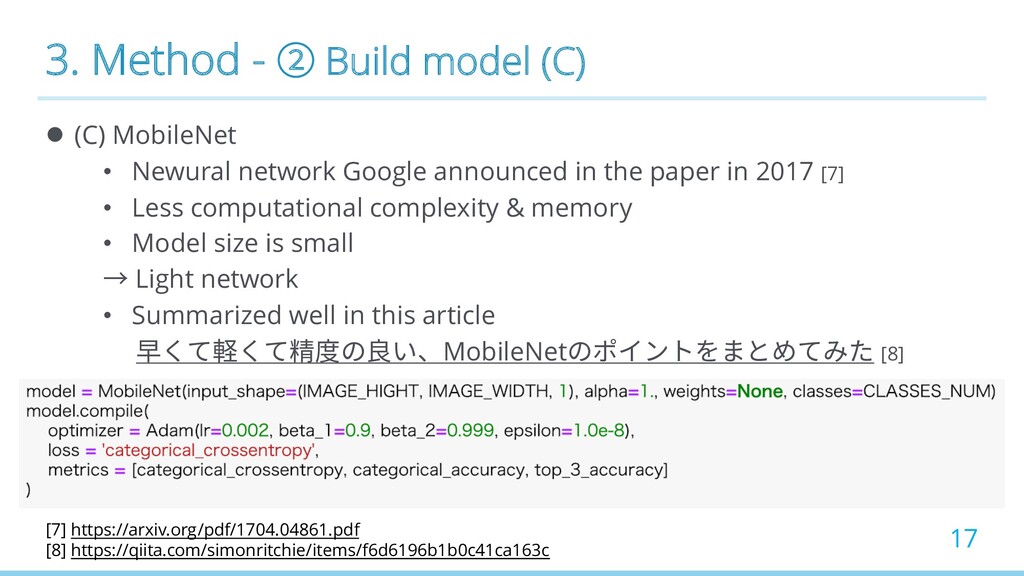
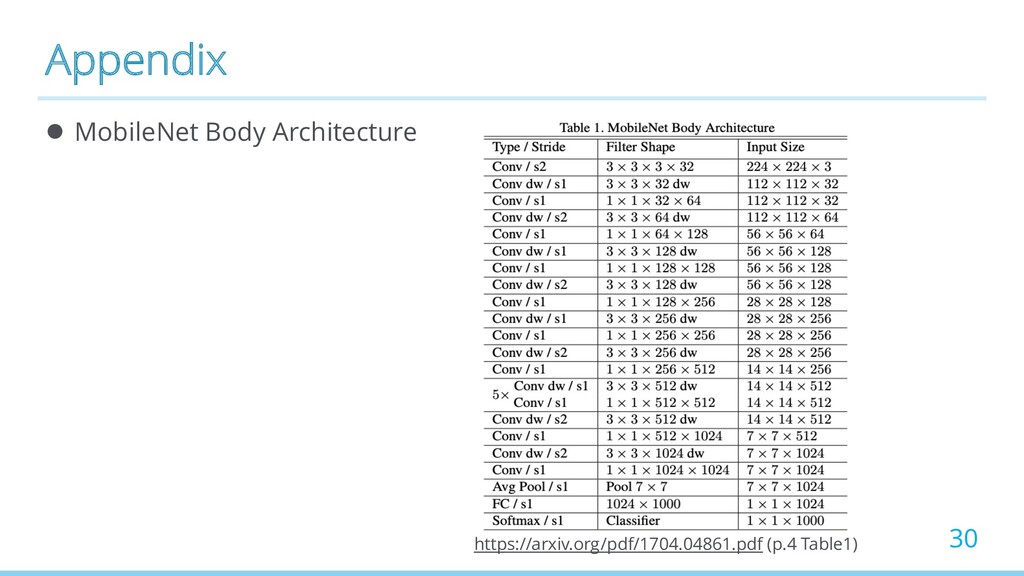
  12. 3. Method - ② Build model (C) l (C) MobileNet

    • Newural network Google announced in the paper in 2017 [7] • Less computational complexity & memory • Model size is small → Light network • Summarized well in this article 早くて軽くて精度の良い、MobileNetのポイントをまとめてみた [8] 17 [7] https://arxiv.org/pdf/1704.04861.pdf [8] https://qiita.com/simonritchie/items/f6d6196b1b0c41ca163c
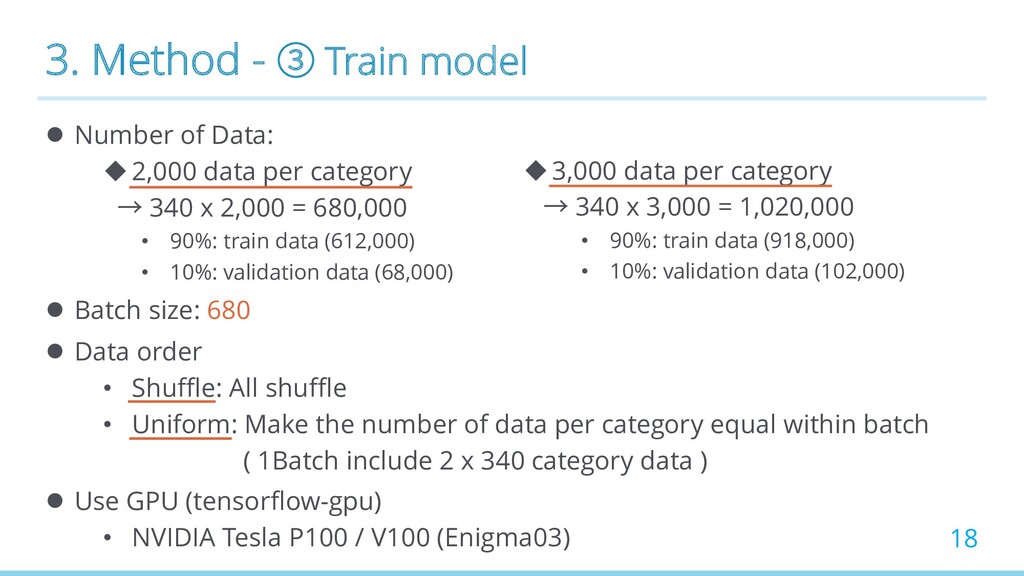
  13. 3. Method - ③ Train model l Number of Data:

    u2,000 data per category → 340 x 2,000 = 680,000 • 90%: train data (612,000) • 10%: validation data (68,000) l Batch size: 680 l Data order • Shuffle: All shuffle • Uniform: Make the number of data per category equal within batch ( 1Batch include 2 x 340 category data ) l Use GPU (tensorflow-gpu) • NVIDIA Tesla P100 / V100 (Enigma03) 18 u3,000 data per category → 340 x 3,000 = 1,020,000 • 90%: train data (918,000) • 10%: validation data (102,000)
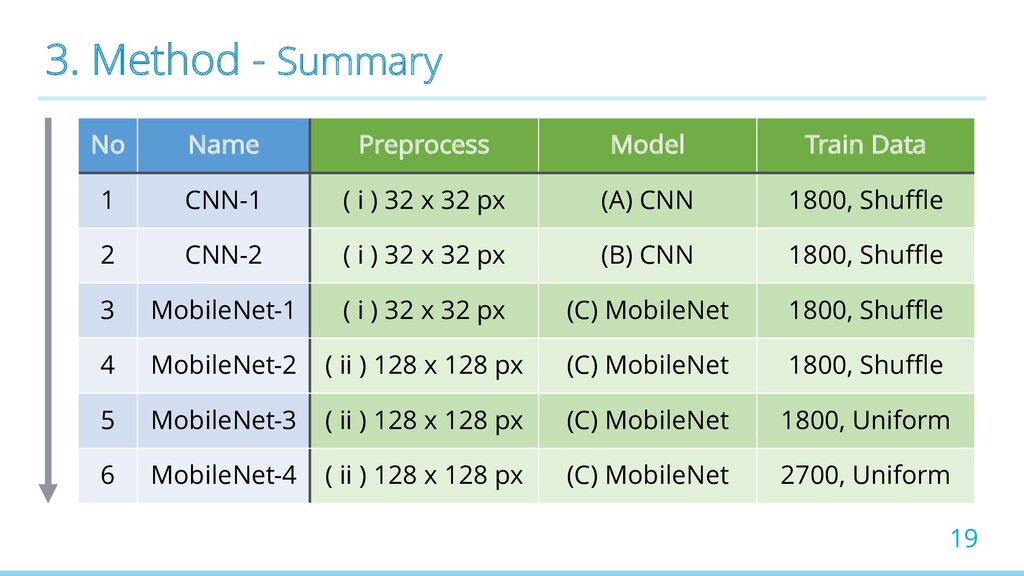
  14. 3. Method - Summary No Name Preprocess Model Train Data

    1 CNN-1 ( i ) 32 x 32 px (A) CNN 1800, Shuffle 2 CNN-2 ( i ) 32 x 32 px (B) CNN 1800, Shuffle 3 MobileNet-1 ( i ) 32 x 32 px (C) MobileNet 1800, Shuffle 4 MobileNet-2 ( ii ) 128 x 128 px (C) MobileNet 1800, Shuffle 5 MobileNet-3 ( ii ) 128 x 128 px (C) MobileNet 1800, Uniform 6 MobileNet-4 ( ii ) 128 x 128 px (C) MobileNet 2700, Uniform 19
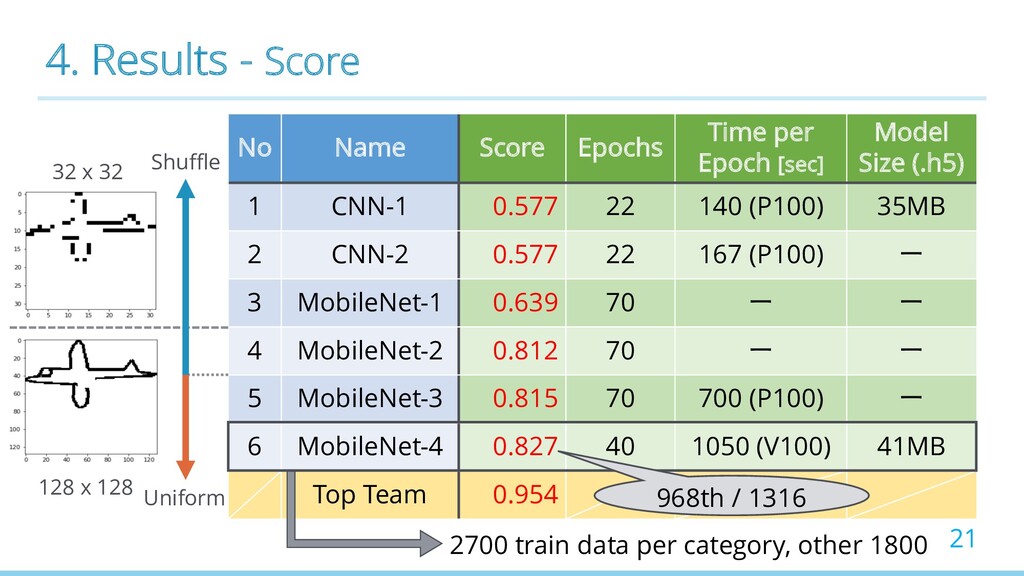
  15. 4. Results - Score No Name Score Epochs Time per

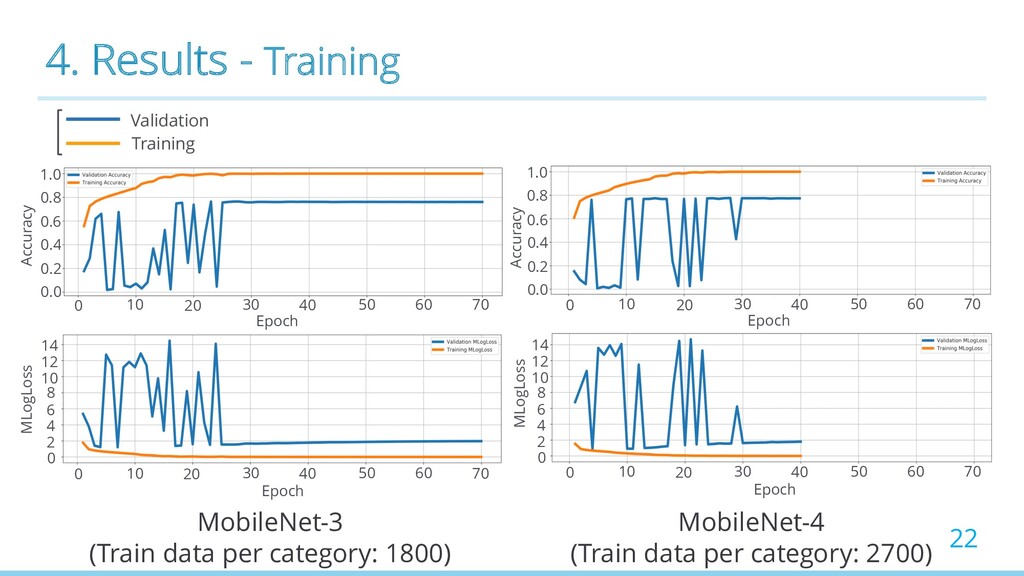
    Epoch [sec] Model Size (.h5) 1 CNN-1 0.577 22 140 (P100) 35MB 2 CNN-2 0.577 22 167 (P100) ー 3 MobileNet-1 0.639 70 ー ー 4 MobileNet-2 0.812 70 ー ー 5 MobileNet-3 0.815 70 700 (P100) ー 6 MobileNet-4 0.827 40 1050 (V100) 41MB Top Team 0.954 21 Shuffle Uniform 2700 train data per category, other 1800 32 x 32 128 x 128 968th / 1316
  16. 4. Results - Training 22 MobileNet-3 (Train data per category:

    1800) MobileNet-4 (Train data per category: 2700) 0 10 20 30 40 50 60 70 0 10 20 30 40 50 60 70 Epoch Epoch 0 10 20 30 40 50 60 70 Epoch 0 10 20 30 40 50 60 70 Epoch 0.0 0.2 0.4 0.6 0.8 1.0 0.0 0.2 0.4 0.6 0.8 1.0 Accuracy Accuracy 0 2 6 8 10 4 12 14 MLogLoss MLogLoss 0 2 6 8 10 4 12 14 Validation Training
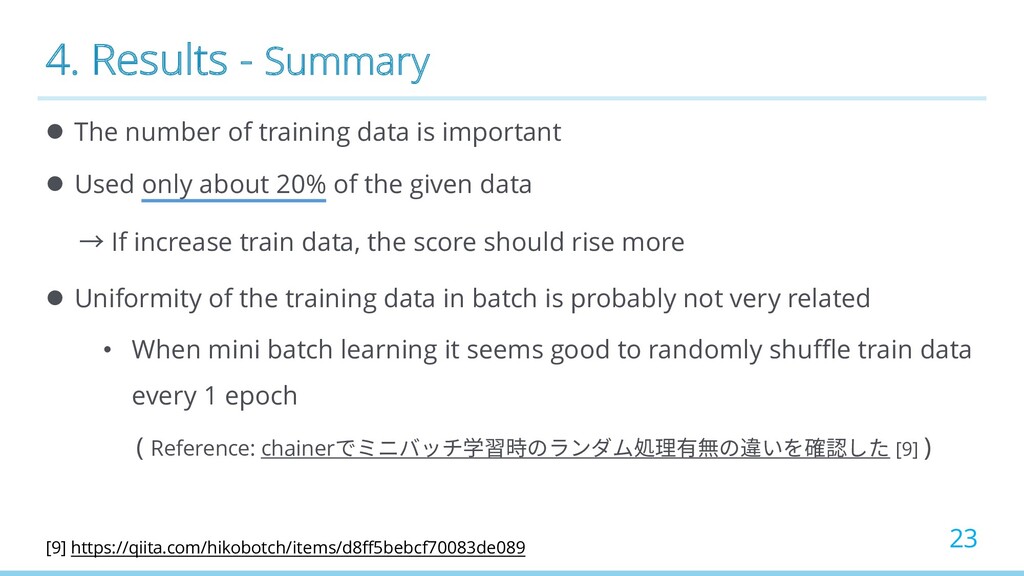
  17. 4. Results - Summary l The number of training data

    is important l Used only about 20% of the given data → If increase train data, the score should rise more l Uniformity of the training data in batch is probably not very related • When mini batch learning it seems good to randomly shuffle train data every 1 epoch ( Reference: chainerでミニバッチ学習時のランダム処理有無の違いを確認した [9] ) 23 [9] https://qiita.com/hikobotch/items/d8ff5bebcf70083de089
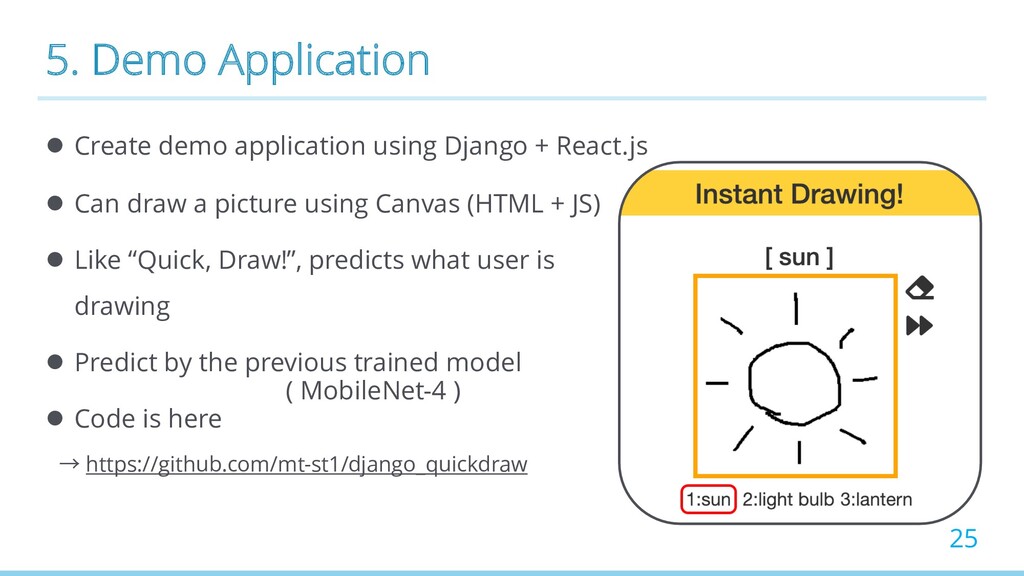
  18. 5. Demo Application l Create demo application using Django +

    React.js l Can draw a picture using Canvas (HTML + JS) l Like “Quick, Draw!”, predicts what user is drawing l Predict by the previous trained model l Code is here → https://github.com/mt-st1/django_quickdraw 25 ( MobileNet-4 )
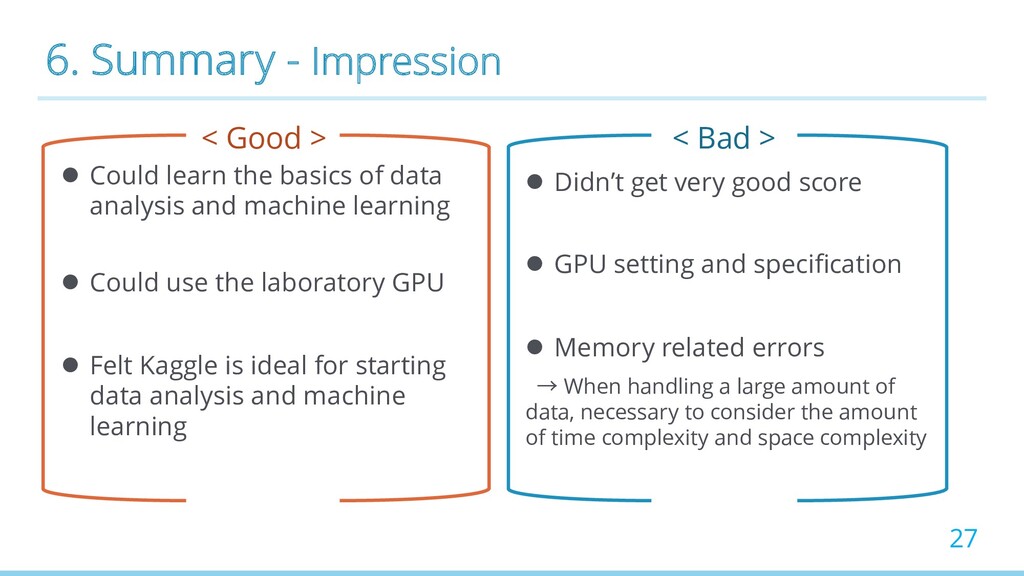
  19. 6. Summary - Impression < Good > l Could learn

    the basics of data analysis and machine learning l Could use the laboratory GPU l Felt Kaggle is ideal for starting data analysis and machine learning 27 < Bad > l Didn’t get very good score l GPU setting and specification l Memory related errors → When handling a large amount of data, necessary to consider the amount of time complexity and space complexity
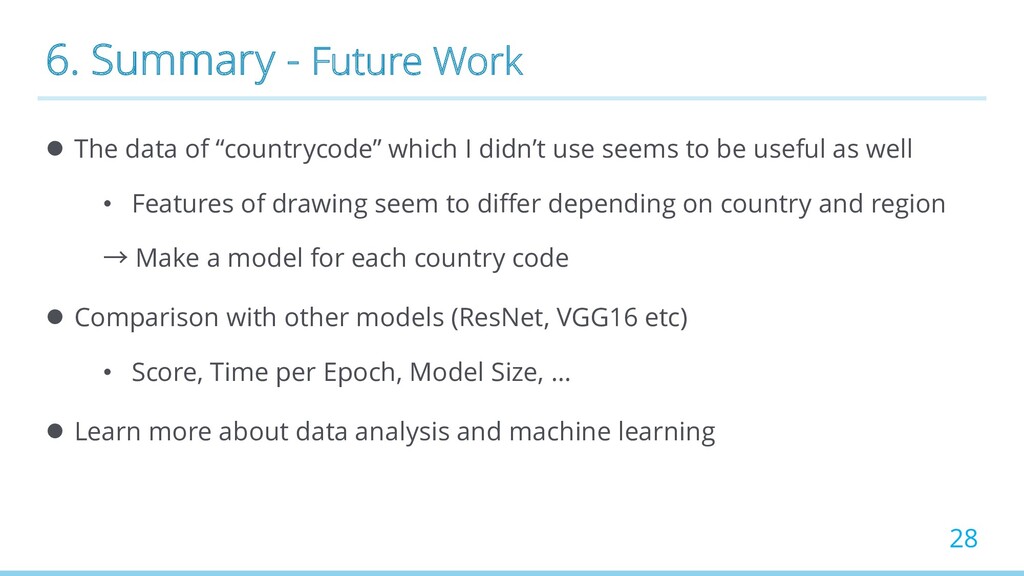
  20. 6. Summary - Future Work l The data of “countrycode”

    which I didn’t use seems to be useful as well • Features of drawing seem to differ depending on country and region → Make a model for each country code l Comparison with other models (ResNet, VGG16 etc) • Score, Time per Epoch, Model Size, … l Learn more about data analysis and machine learning 28
  21. References [1] Kaggle: https://www.kaggle.com/ [2] Quick, Draw! Doodle Recognition: https://www.kaggle.com/c/quickdraw-doodle-recognition

    [3] Quick, Draw!: https://quickdraw.withgoogle.com/ [4] Ramer-Douglas-Peucker Algorithm: https://en.wikipedia.org/wiki/Ramer%E2%80%93Douglas%E2%80%93Peucker_algorithm [5] Kaggle Image-Based CNN Kernel: https://www.kaggle.com/jpmiller/image-based-cnn [6] Keras MobileNet: https://keras.io/ja/applications/#mobilenet [7] MobileNet (v1) paper 2017: https://arxiv.org/pdf/1704.04861.pdf [8] Qiita article 早くて軽くて精度の良い、MobileNetのポイントをまとめてみた: https://qiita.com/simonritchie/items/f6d6196b1b0c41ca163c [9] Qiita article chainerでミニバッチ学習時のランダム処理有無の違いを確認した: https://qiita.com/hikobotch/items/d8ff5bebcf70083de089 29