Upgrade to Pro
— share decks privately, control downloads, hide ads and more …
Speaker Deck
Sign up for free
Menu
Search
Features
All features
Private URLs
Password Protection
Custom URLS
Scheduled publishing
Remove Branding
Restrict embedding
Deck Collections
Notes
Features
All features
Private URLs
Password Protection
Custom URLS
Scheduled publishing
Remove Branding
Restrict embedding
Deck Collections
Notes
Explore
Featured decks
Featured speakers
Programming
Technology
Storyboards
Explore
Featured decks
Featured speakers
Programming
Technology
Storyboards
Pricing
Search
Sign in
Sign up for free
Unreal Engine VR template 解体新書
Search
NameChung
July 10, 2021
96
0
Share
Embed
Copy iframe code
Copy JS code
Copy link
Start on current slide
Unreal Engine VR template 解体新書
slide内のNotionリンク
https://www.notion.so/Unreal-Engine-Wiki-fd61f93e863e4736a10212c480c5a778
NameChung
July 10, 2021
Transcript
25 slides
UE VR template 解体新書 @sketch_namerou
自己紹介 なめろう です ゲーム制作頑張ってます 今年UnityからUnreal Engineに移行しました
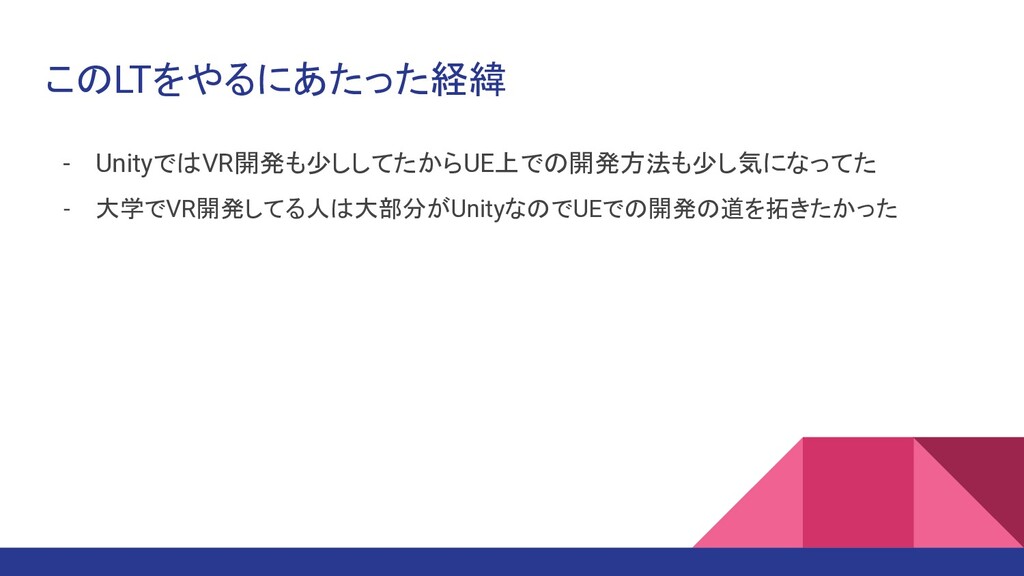
このLTをやるにあたった経緯 - UnityではVR開発も少ししてたからUE上での開発方法も少し気になってた - 大学でVR開発してる人は大部分がUnityなのでUEでの開発の道を拓きたかった
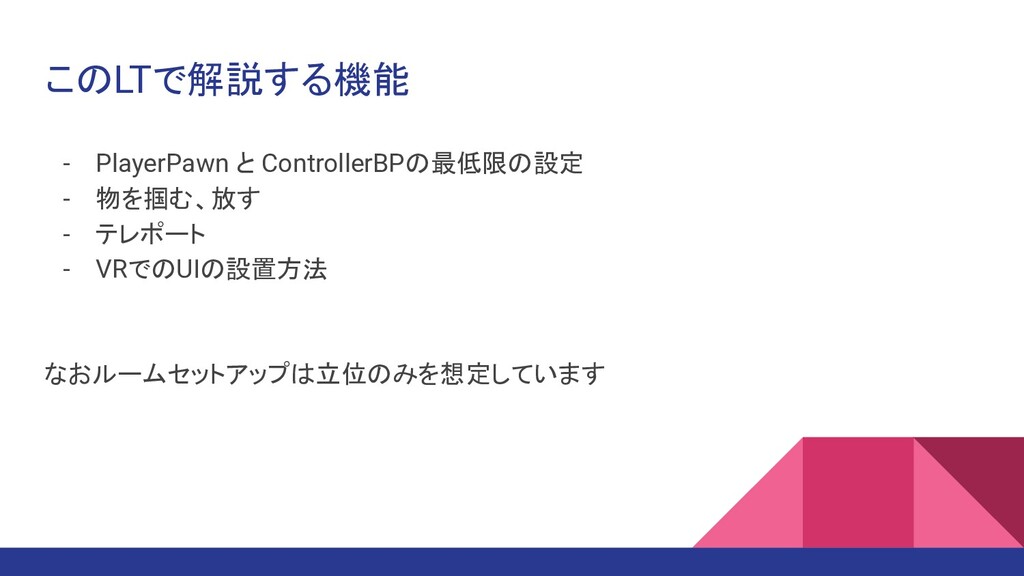
このLTで解説する機能 - PlayerPawn と ControllerBPの最低限の設定 - 物を掴む、放す - テレポート -
VRでのUIの設置方法 なおルームセットアップは立位のみを想定しています
重要!! ブループリントを全部載せたり変数を全部載せたりするのは絶対にぐちゃぐちゃになる ので以下のNotionにまとめました もし興味が出た場合はそちらをみていただけると少し詳しく書いてあるので Templateと併用してください https://www.notion.so/Unreal-Engine-Wiki-fd61f93e863e4736a10212c480c5a778
PlayerPawnと ControllerBPの 最低限の設定
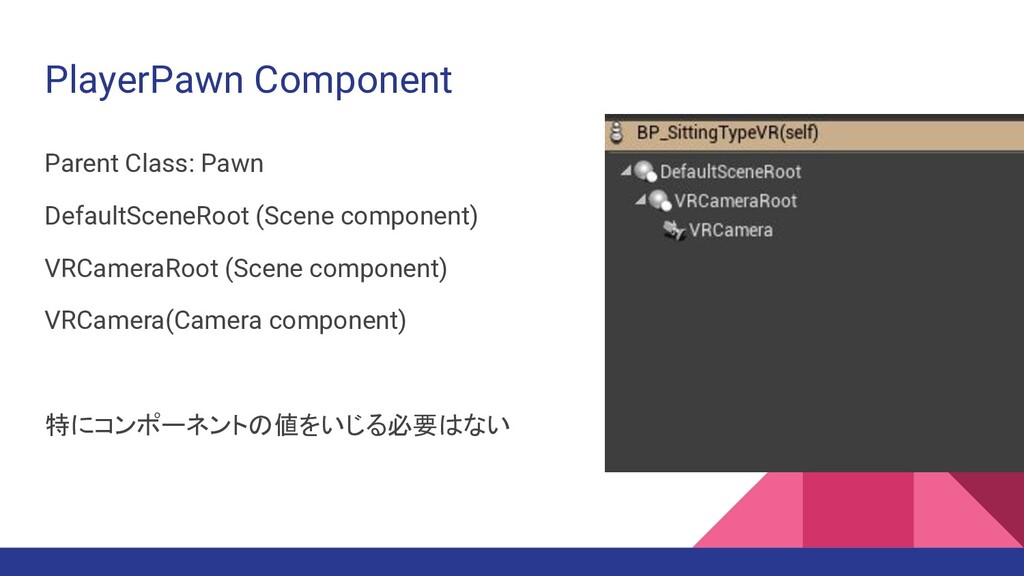
PlayerPawn Component Parent Class: Pawn DefaultSceneRoot (Scene component) VRCameraRoot (Scene
component) VRCamera(Camera component) 特にコンポーネントの値をいじる必要はない
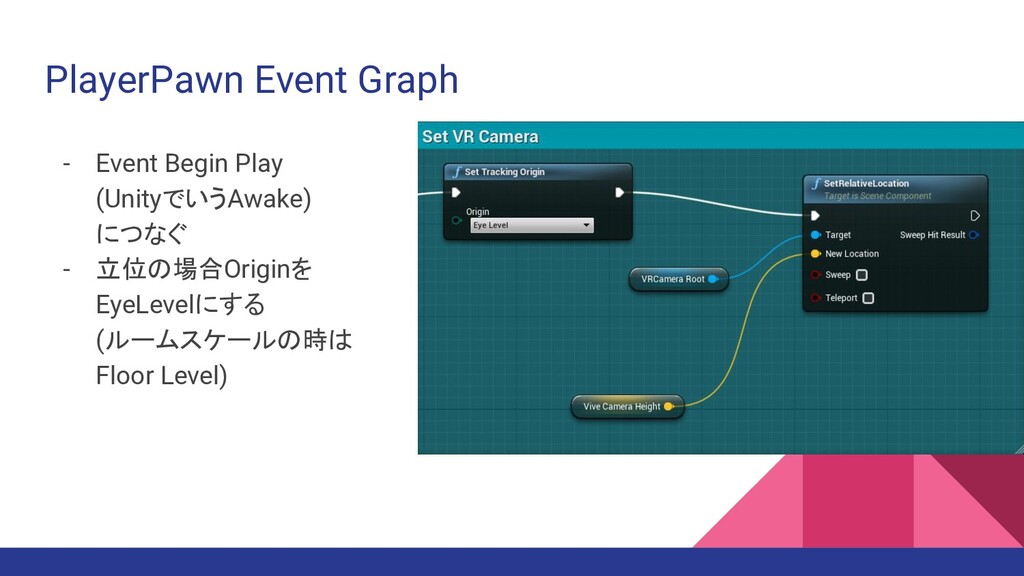
PlayerPawn Event Graph - Event Begin Play (UnityでいうAwake) につなぐ -
立位の場合Originを EyeLevelにする (ルームスケールの時は Floor Level)
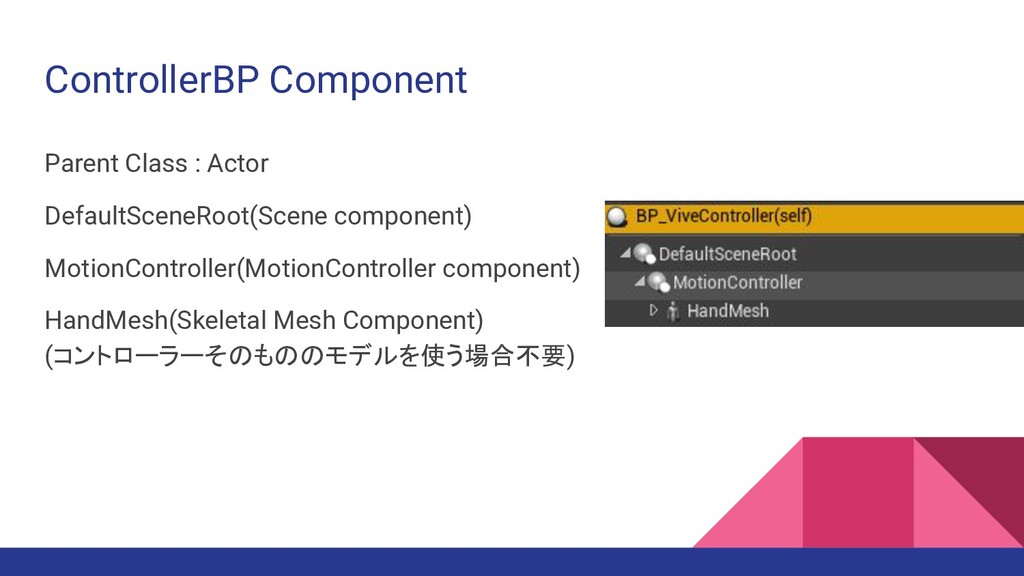
ControllerBP Component Parent Class : Actor DefaultSceneRoot(Scene component) MotionController(MotionController component)
HandMesh(Skeletal Mesh Component) (コントローラーそのもののモデルを使う場合不要)
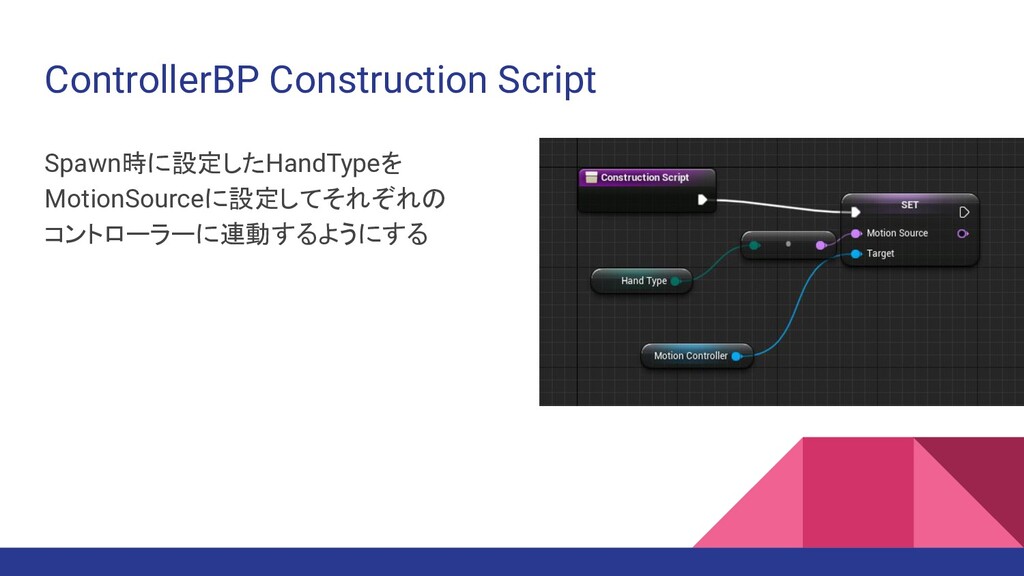
ControllerBP Construction Script Spawn時に設定したHandTypeを MotionSourceに設定してそれぞれの コントローラーに連動するようにする
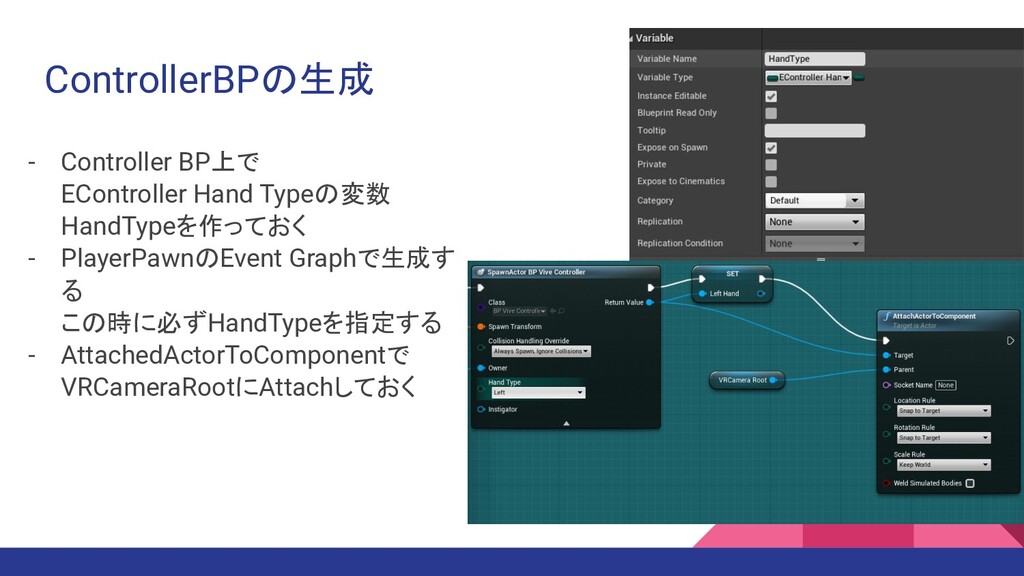
ControllerBPの生成 - Controller BP上で EController Hand Typeの変数 HandTypeを作っておく - PlayerPawnのEvent
Graphで生成す る この時に必ずHandTypeを指定する - AttachedActorToComponentで VRCameraRootにAttachしておく
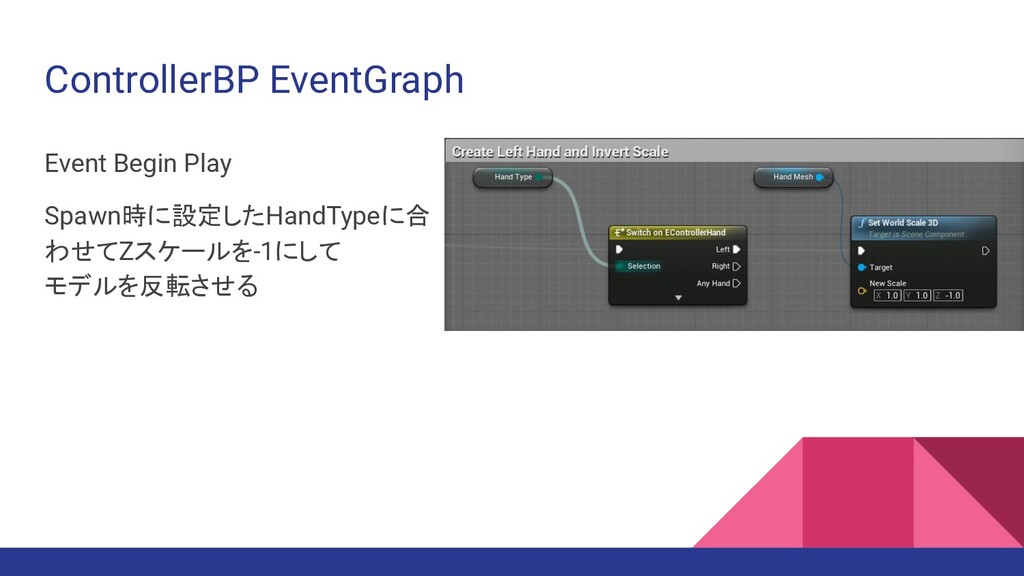
ControllerBP EventGraph Event Begin Play Spawn時に設定したHandTypeに合 わせてZスケールを-1にして モデルを反転させる
物を掴む、放す
GrabとRelease 以下の四つをいじる必要があります。 - PlayerPawn InputActionの実装 - ControllerBP 掴む物との衝突判定と関数呼び出し - Interface(new!)
掴めるか否かの判定用に作る - GrabableObjectBP(new!) Interfaceが実装されたオブジェクト
GrabとRelease実装概略 1. コントローラーのコリジョン内でインターフェイスを実装している オブジェクトを見つける 2. それぞれとの距離を求め一番近い物を取得する 3. ボタンを押したときにInputEventからコントローラーにそのオブジェクトをAttachする (一時的に子の状態にする) 4.
ボタンを放したときにInputEventからオブジェクトをDetachする
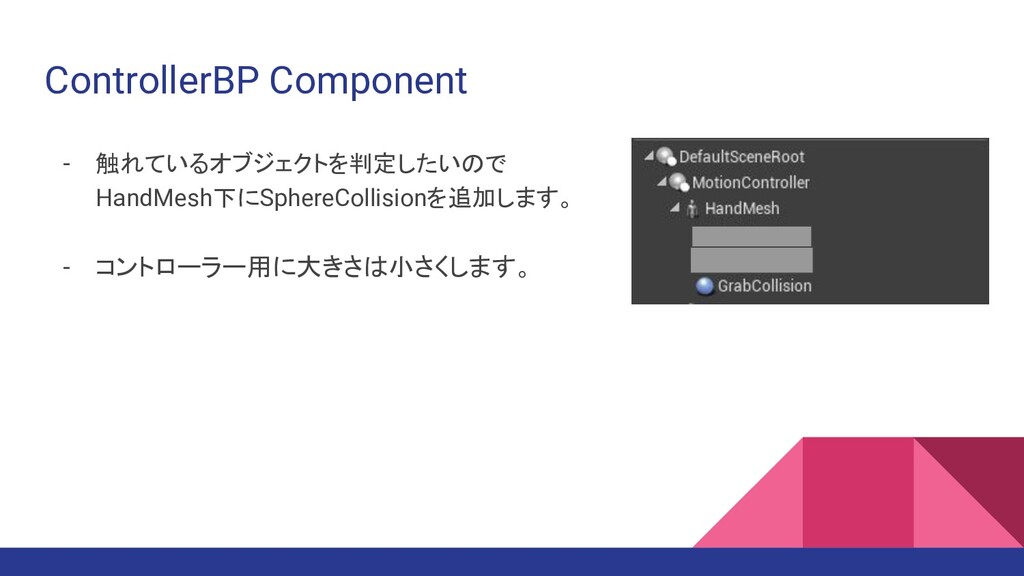
ControllerBP Component - 触れているオブジェクトを判定したいので HandMesh下にSphereCollisionを追加します。 - コントローラー用に大きさは小さくします。
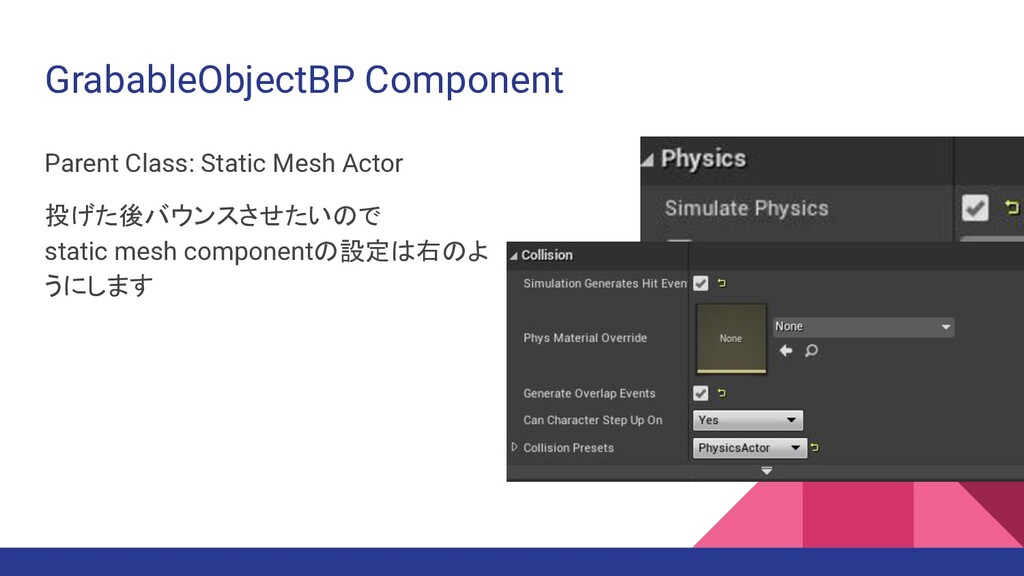
GrabableObjectBP Component Parent Class: Static Mesh Actor 投げた後バウンスさせたいので static mesh
componentの設定は右のよ うにします
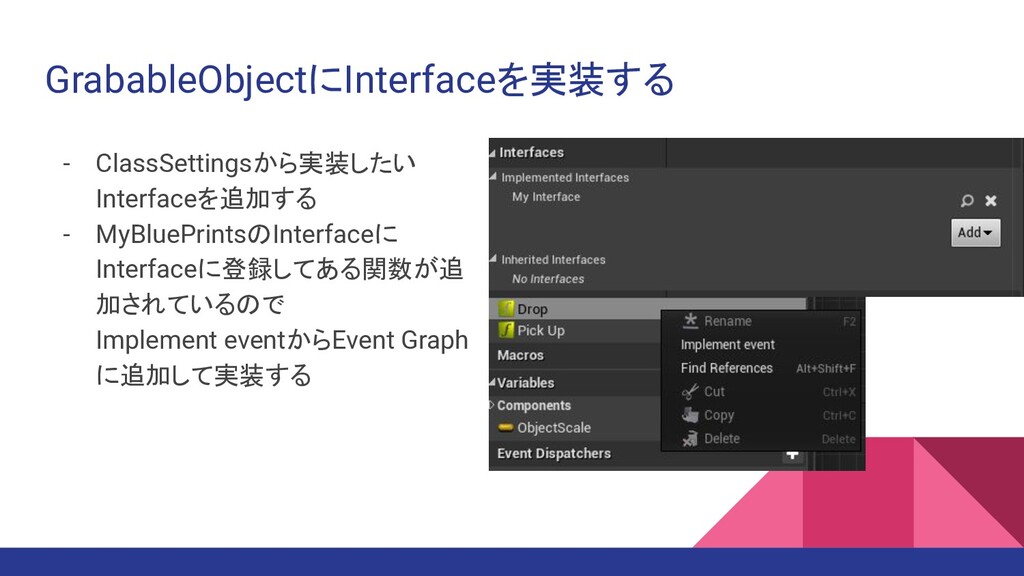
GrabableObjectにInterfaceを実装する - ClassSettingsから実装したい Interfaceを追加する - MyBluePrintsのInterfaceに Interfaceに登録してある関数が追 加されているので Implement eventからEvent
Graph に追加して実装する
Teleport
TemplateのTeleport - 多数の変数と関数が使用されているのでぱっと見分かりづらい しかし分離してみると以下の二つに分けることが出来る - テレポートする地点の計算とテレポートの実行 - テレポートする地点の可視化とそれっぽい軌道の可視化 またTemplateのTeleportは少し特殊な仕様なのにも注意
Teleport地点の計算 1. コントローラーの先から投擲シミュレーションをして落ちる地点を計算します 2. NavMeshBolume上の地点を取得します 3. 既存で用意されているTeleport関数でその地点へテレポートします またテレポートする際にコントローラーのトラックパッドの押している位置から テレポート後の方向も変えることが出来る計算が実装されています。
テレポート軌道と地点の可視化 軌道 1. テレポート地点の導出で使用した軌跡上にSpline pointを設置してカーブを作りま す。 2. 1で作ったカーブに良い感じのメッシュを取り付ける テレポート地点 1.
テレポート地点の導出で求めた地点を良い感じの地点のメッシュにセットします
おまけ VRでのUI設置方法
VRでのUI設置方法 - Add viewportだと上手くいかない - WidgetとそのWidgetをコンポーネントに持つブループリントを作る - ブループリントを設置する またカメラに常時表示させたいUIはPlayerPawnに直接Widgetコンポーネントを付けて 場所を良い感じにする
Widget上での位置の編集はあまり意味をなさなそう (Anchorとかは重要かも)
参考になれば幸いです!
More Decks by NameChung
See All by NameChung
Toon ShaderでShader入門してみた
namerou7716
0
110
Easy make AR with UnityMARS
namerou7716
0
73
Featured
See All Featured
Collaborative Software Design: How to facilitate domain modelling decisions
baasie
1
390
How to Talk to Developers About Accessibility
jct
2
630
Rebuilding a faster, lazier Slack
samanthasiow
85
9.8k
Chasing Engaging Ingredients in Design
codingconduct
0
410
Making the Leap to Tech Lead
cromwellryan
135
10k
How Software Deployment tools have changed in the past 20 years
geshan
3
35k
Crafting Experiences
bethany
1
460
How to make the Groovebox
asonas
2
2.6k
Bioeconomy Workshop: Dr. Julius Ecuru, Opportunities for a Bioeconomy in West Africa
akademiya2063
PRO
1
470
Taking LLMs out of the black box: A practical guide to human-in-the-loop distillation
inesmontani
PRO
3
2.5k
A designer walks into a library…
pauljervisheath
211
25k
Tips & Tricks on How to Get Your First Job In Tech
honzajavorek
1
850


 namerou7716
 baasie
 jct
 samanthasiow
 codingconduct
 cromwellryan
 geshan
 bethany
 asonas
 akademiya2063
 inesmontani
 pauljervisheath
 honzajavorek