Upgrade to Pro
— share decks privately, control downloads, hide ads and more …
Speaker Deck
Sign up for free
Menu
Search
Features
All features
Private URLs
Password Protection
Custom URLS
Scheduled publishing
Remove Branding
Restrict embedding
Deck Collections
Notes
Features
All features
Private URLs
Password Protection
Custom URLS
Scheduled publishing
Remove Branding
Restrict embedding
Deck Collections
Notes
Explore
Featured decks
Featured speakers
Programming
Technology
Storyboards
Explore
Featured decks
Featured speakers
Programming
Technology
Storyboards
Pricing
Search
Sign in
Sign up for free
Performance Classを触ってみよう
Search
Sponsored
·
Your Podcast. Everywhere. Effortlessly.
Share. Educate. Inspire. Entertain. You do you. We'll handle the rest.
→
takarabe-hamuyatti
January 19, 2024
380
0
Share
Embed
Copy iframe code
Copy JS code
Copy link
Start on current slide
Performance Classを触ってみよう
takarabe-hamuyatti
January 19, 2024
More Decks by takarabe-hamuyatti
See All by takarabe-hamuyatti
screenWidthDpちょっと 怖いかも、、??
rabeyatti
0
500
Featured
See All Featured
Building a Scalable Design System with Sketch
lauravandoore
464
34k
"I'm Feeling Lucky" - Building Great Search Experiences for Today's Users (#IAC19)
danielanewman
230
23k
Optimising Largest Contentful Paint
csswizardry
37
4k
Navigating the moral maze — ethical principles for Al-driven product design
skipperchong
2
630
Why Your Marketing Sucks and What You Can Do About It - Sophie Logan
marketingsoph
0
430
GraphQLの誤解/rethinking-graphql
sonatard
75
12k
Lessons Learnt from Crawling 1000+ Websites
charlesmeaden
PRO
1
1.6k
Leadership Guide Workshop - DevTernity 2021
reverentgeek
1
400
YesSQL, Process and Tooling at Scale
rocio
174
15k
Heart Work Chapter 1 - Part 1
lfama
PRO
10
37k
Agile Actions for Facilitating Distributed Teams - ADO2019
mkilby
0
310
Skip the Path - Find Your Career Trail
mkilby
1
260
Transcript
Performance Classを触って みよう shibuya.apk 2024/01/18
自己紹介 財部彰太 twitter : rabe_hamuyatti 株式会社ZOZO ZOZOTOWNのAndroidアプリを作って います。 中森明菜に大ハマりしてます。
目次 • パフォーマンスクラスについて ◦ パフォーマンスクラスとは ◦ 準備 ◦ 取得方法 •
何が嬉しい? • 実際どう使う? ◦ ドキュメントによると ◦ Composeのスクロールパフォーマンスの制限とか?
パフォーマンスクラスについて
パフォーマンスクラスとは
パフォーマンスクラスとは • Androidデバイスが満たすべき、さまざまな性能の基準が定義されたもの ◦ Android12で初めて導入された • Androidの各versionごとに、独自のパフォーマンスクラスを定義している ◦ Android互換性定義ドキュメント(CDD)としてまとめられている ◦
https://source.android.com/docs/compatibility/cdd?hl=ja • 後述するライブラリが、ビルド バージョン情報での宣言、または Google Play 開発 者サービスのデータに基づいて、デバイスのメディア パフォーマンス クラスを教え てくれる https://developer.android.com/reference/android/os/Build.VERSION#MEDIA_ PERFORMANCE_CLASS
パフォーマンスの表し方
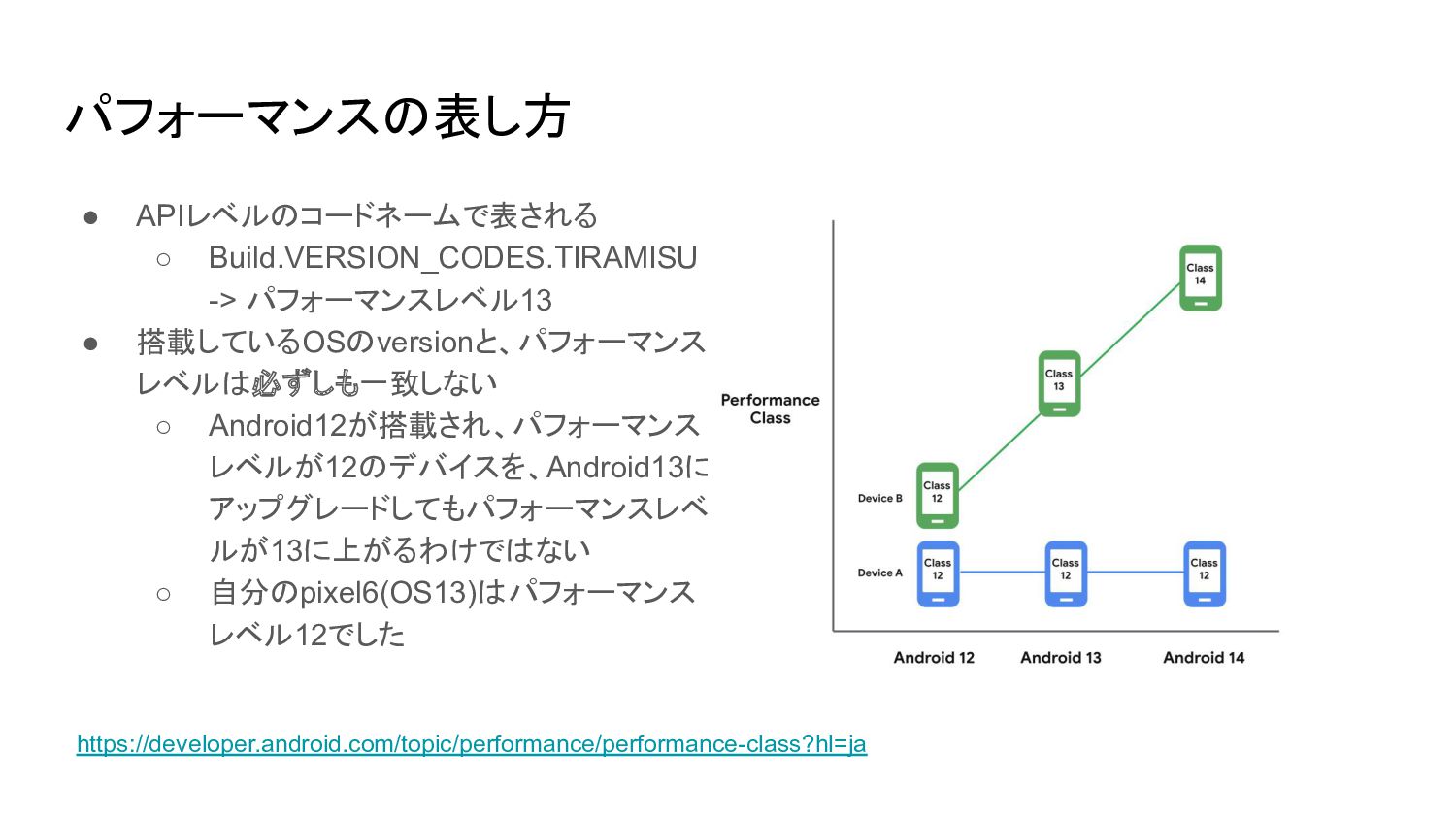
パフォーマンスの表し方 • APIレベルのコードネームで表される ◦ Build.VERSION_CODES.TIRAMISU -> パフォーマンスレベル13 • 搭載しているOSのversionと、パフォーマンス レベルは必ずしも一致しない
◦ Android12が搭載され、パフォーマンス レベルが12のデバイスを、Android13に アップグレードしてもパフォーマンスレベ ルが13に上がるわけではない ◦ 自分のpixel6(OS13)はパフォーマンス レベル12でした https://developer.android.com/topic/performance/performance-class?hl=ja
準備
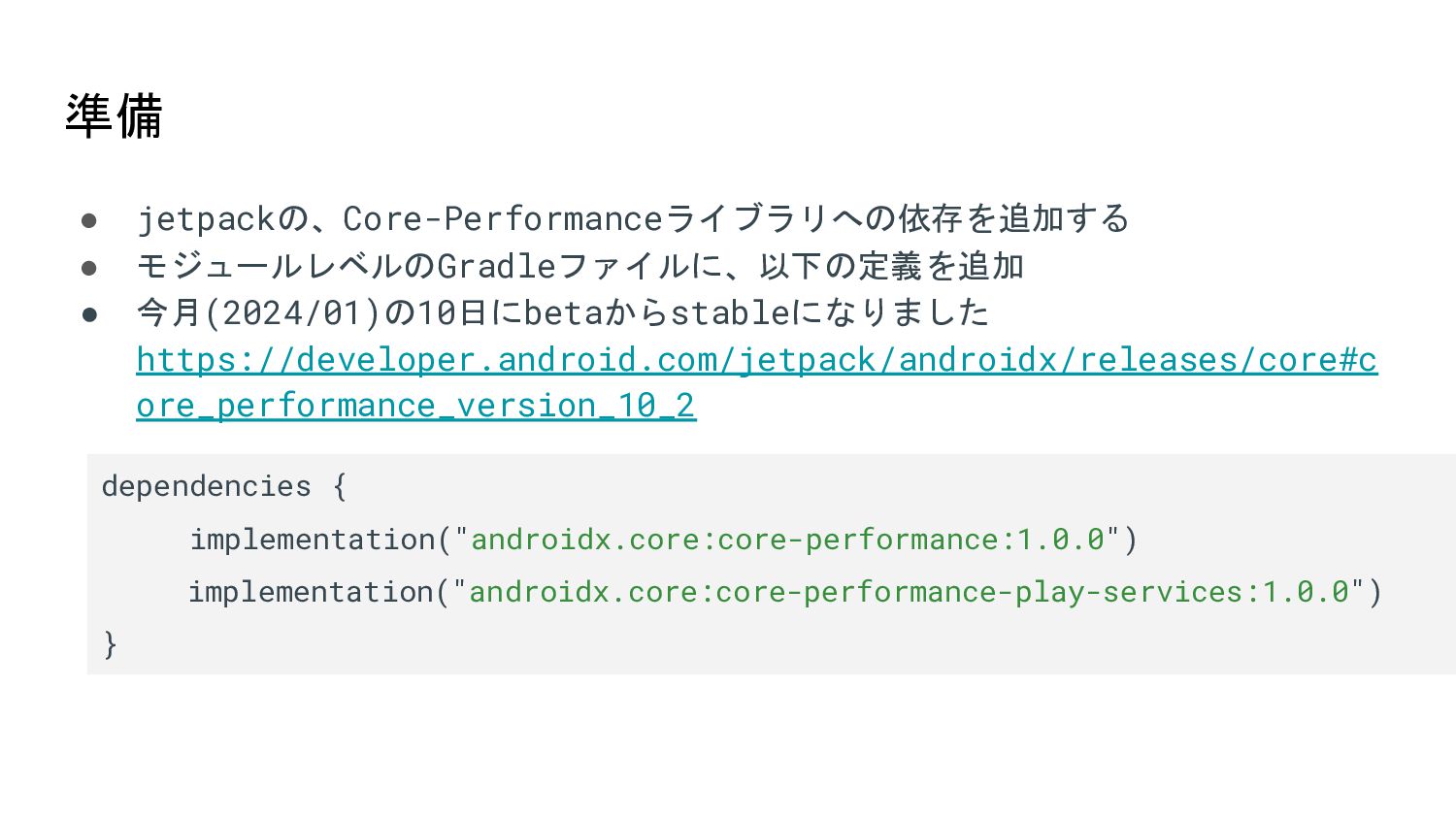
準備 • jetpackの、Core-Performanceライブラリへの依存を追加する • モジュールレベルのGradleファイルに、以下の定義を追加 • 今月(2024/01)の10日にbetaからstableになりました https://developer.android.com/jetpack/androidx/releases/core#c ore_performance_version_10_2 dependencies
{ implementation("androidx.core:core-performance:1.0.0") implementation("androidx.core:core-performance-play-services:1.0.0") }
取得方法
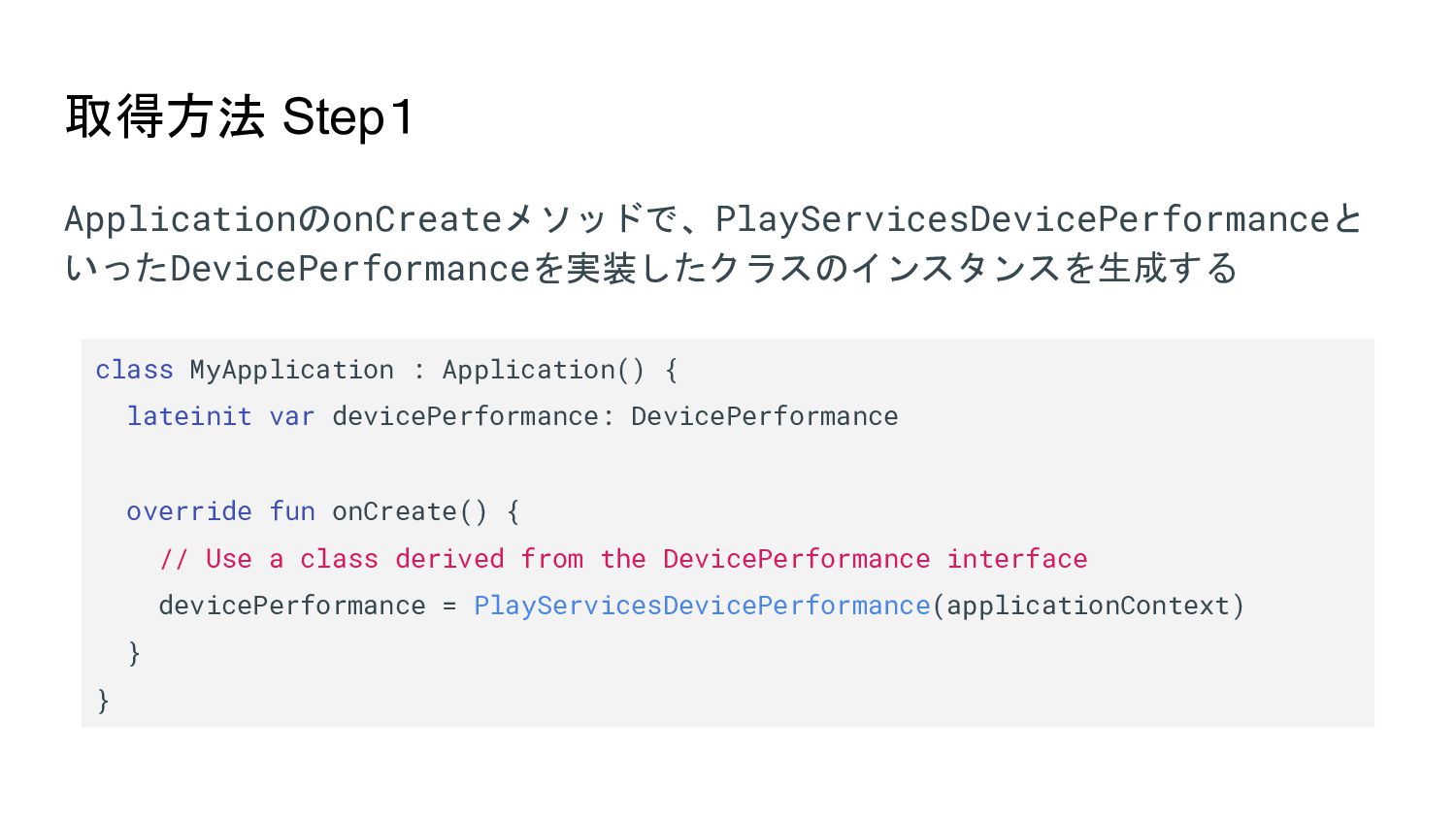
取得方法 Step1 ApplicationのonCreateメソッドで、PlayServicesDevicePerformanceと いったDevicePerformanceを実装したクラスのインスタンスを生成する class MyApplication : Application() { lateinit
var devicePerformance: DevicePerformance override fun onCreate() { // Use a class derived from the DevicePerformance interface devicePerformance = PlayServicesDevicePerformance(applicationContext) } }
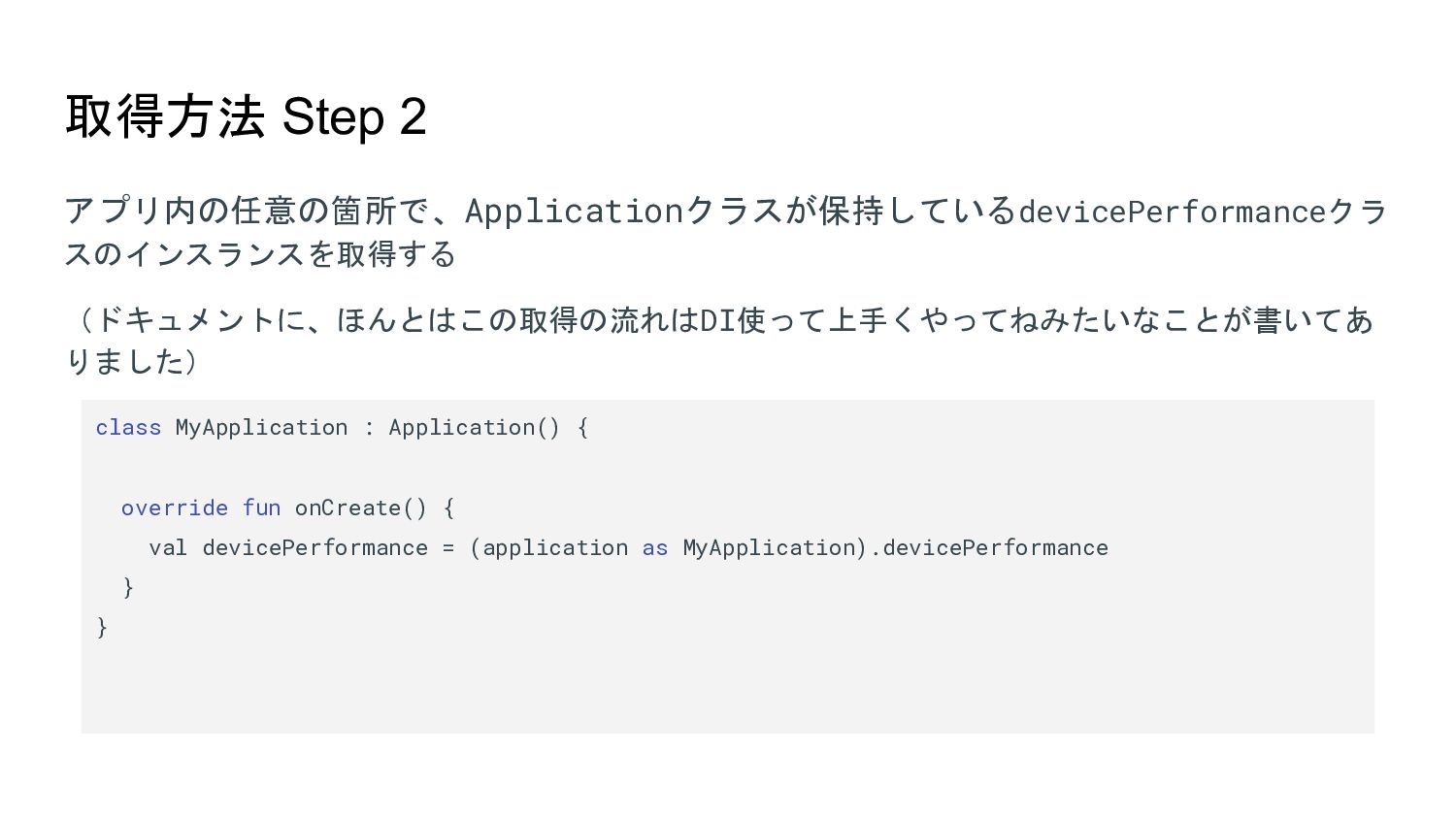
取得方法 Step 2 アプリ内の任意の箇所で、Applicationクラスが保持しているdevicePerformanceクラ スのインスランスを取得する (ドキュメントに、ほんとはこの取得の流れはDI使って上手くやってねみたいなことが書いてあ りました) class MyApplication :
Application() { override fun onCreate() { val devicePerformance = (application as MyApplication).devicePerformance } }
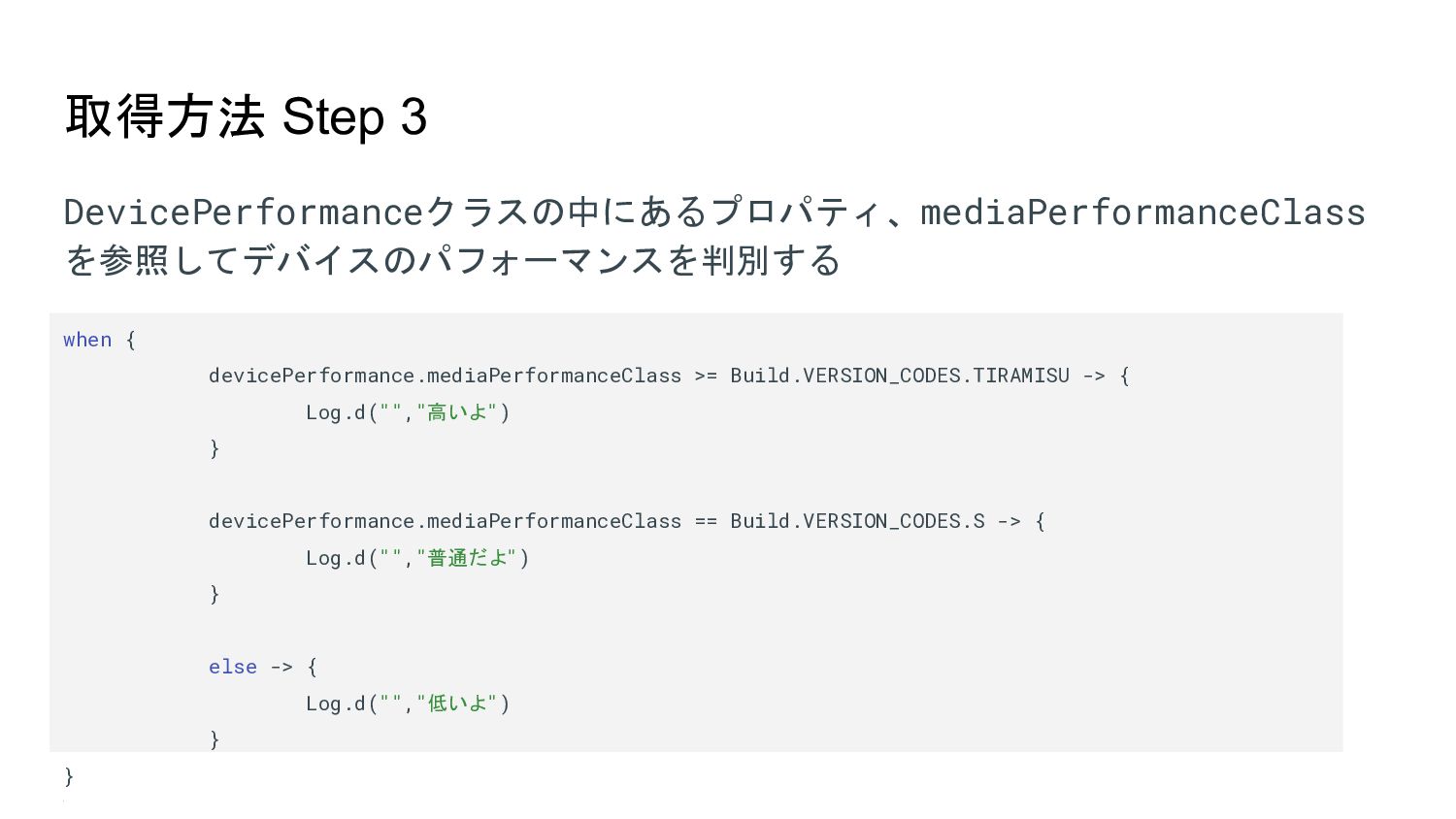
取得方法 Step 3 DevicePerformanceクラスの中にあるプロパティ、mediaPerformanceClass を参照してデバイスのパフォーマンスを判別する when { devicePerformance.mediaPerformanceClass >= Build.VERSION_CODES.TIRAMISU
-> { Log.d("","高いよ") } devicePerformance.mediaPerformanceClass == Build.VERSION_CODES.S -> { Log.d("","普通だよ") } else -> { Log.d("","低いよ") } } }
何が嬉しい?
何が嬉しい? • Performance Classは、OSのレベルと、端末の性能を切り分けて教えてくれ る → 端末の性能に合わせて柔軟な実装ができるのでは?
実際どう使う?
実際どう使う? • ドキュメントによると、、 ◦ > デベロッパーは実行時にデバイスのパフォーマンス クラスを検出し、デバイスの機能を 最大限に活用するアップグレード環境を提供できます • 具体的には
◦ Composeでのリスト ▪ Jetpack ComposeのLazyColumn/LazyRowのスクロール速度を制限する ▪ といった取り組みを、適用するかしないかの判断材料にできるかもしれません ▪ 極論、このAPIを使えば、一定以下のパフォーマンスレベルの端末には、 AndroidViewでリストを実装するといった判断も取れるのかもしれません。 ◦ 高解像度映像の生中継とか、複雑なアニメーションとか?
以上!!


 rabeyatti
 lauravandoore
 danielanewman
 csswizardry
 skipperchong
 marketingsoph
 sonatard
 charlesmeaden
 reverentgeek
 rocio
rocio
 lfama
lfama
 mkilby