Upgrade to Pro
— share decks privately, control downloads, hide ads and more …
Speaker Deck
Sign up for free
Menu
Search
Features
All features
Private URLs
Password Protection
Custom URLS
Scheduled publishing
Remove Branding
Restrict embedding
Deck Collections
Notes
Features
All features
Private URLs
Password Protection
Custom URLS
Scheduled publishing
Remove Branding
Restrict embedding
Deck Collections
Notes
Explore
Featured decks
Featured speakers
Programming
Technology
Storyboards
Explore
Featured decks
Featured speakers
Programming
Technology
Storyboards
Pricing
Search
Sign in
Sign up for free
空間情報システム入門Ⅰ Validate マニュアル 1A117033 太田理奈
Search
RinaOta
June 14, 2018
49
0
Share
Embed
Copy iframe code
Copy JS code
Copy link
Start on current slide
空間情報システム入門Ⅰ Validate マニュアル 1A117033 太田理奈
RinaOta
June 14, 2018
More Decks by RinaOta
See All by RinaOta
フィールドスタディー Ⅱ 1A117033 太田理奈
rinaota
0
76
空間情報システム入門Ⅰ__02_課題2_.pdf 1A117033 太田 理奈
rinaota
0
67
Featured
See All Featured
ピンチをチャンスに:未来をつくるプロダクトロードマップ #pmconf2020
aki_iinuma
128
56k
How GitHub (no longer) Works
holman
316
150k
The Illustrated Children's Guide to Kubernetes
chrisshort
51
53k
Avoiding the “Bad Training, Faster” Trap in the Age of AI
tmiket
0
270
Getting science done with accelerated Python computing platforms
jacobtomlinson
2
540
SERP Conf. Vienna - Web Accessibility: Optimizing for Inclusivity and SEO
sarafernandez
2
1.6k
Stop Working from a Prison Cell
hatefulcrawdad
274
21k
Groundhog Day: Seeking Process in Gaming for Health
codingconduct
0
420
Marketing to machines
jonoalderson
1
5.9k
Pawsitive SEO: Lessons from My Dog (and Many Mistakes) on Thriving as a Consultant in the Age of AI
davidcarrasco
0
260
Bridging the Design Gap: How Collaborative Modelling removes blockers to flow between stakeholders and teams @FastFlow conf
baasie
0
730
Gemini Prompt Engineering: Practical Techniques for Tangible AI Outcomes
mfonobong
2
590
Transcript
Validateのマニュアル 1A117033 太田理奈
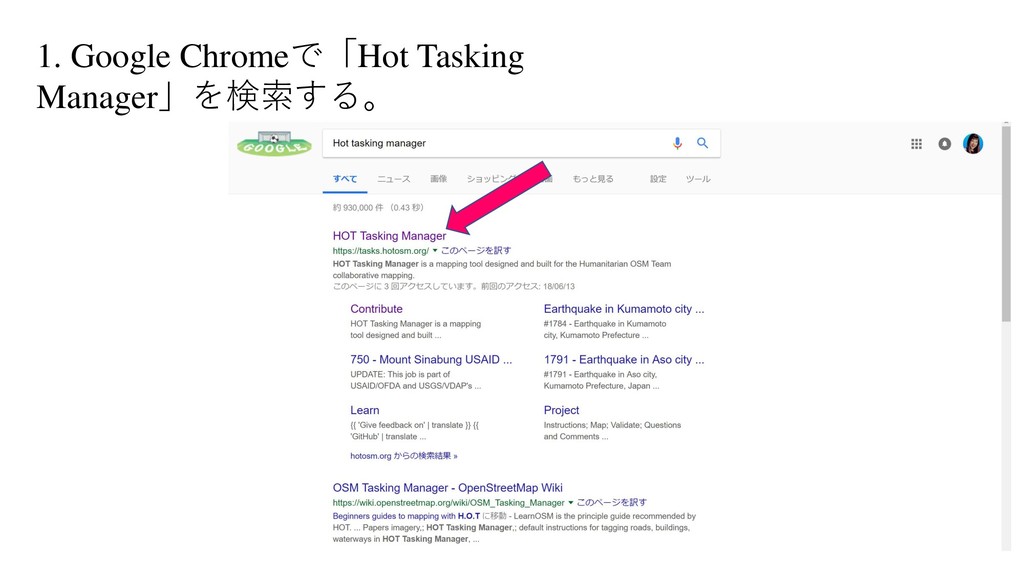
1. Google Chromeで「Hot Tasking Manager」を検索する。
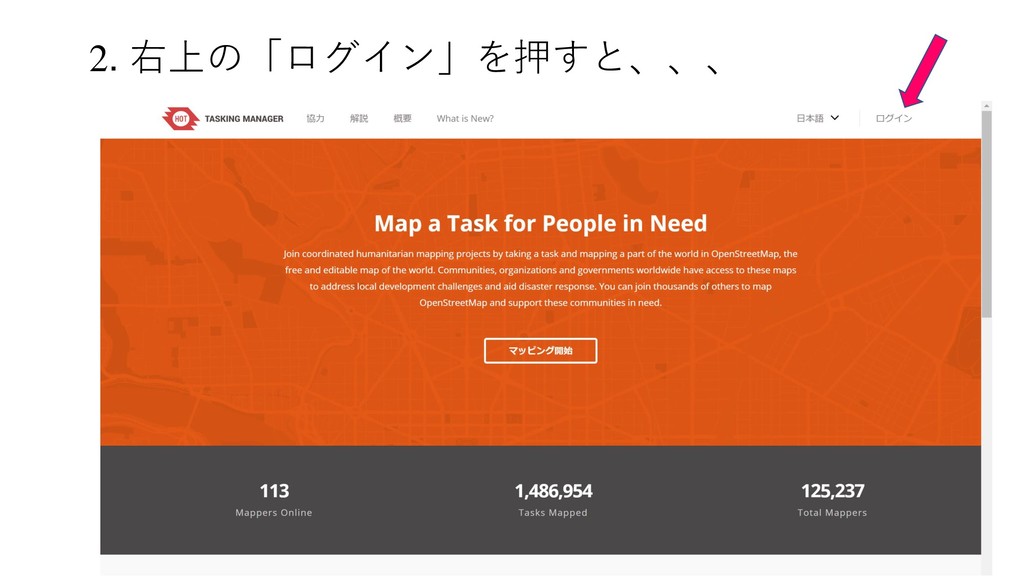
2. 右上の「ログイン」を押すと、、、
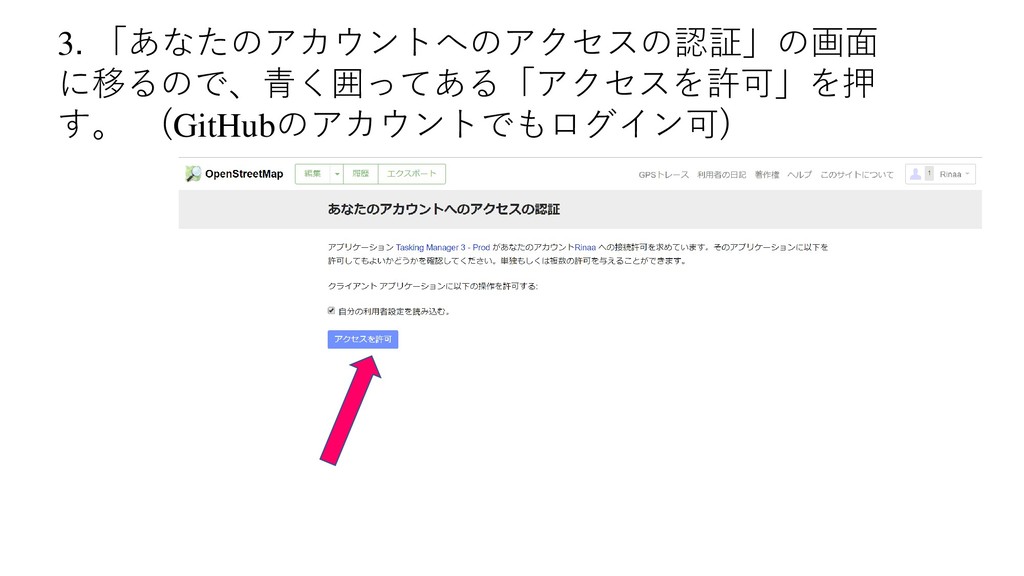
3. 「あなたのアカウントへのアクセスの認証」の画面 に移るので、青く囲ってある「アクセスを許可」を押 す。 (GitHubのアカウントでもログイン可)
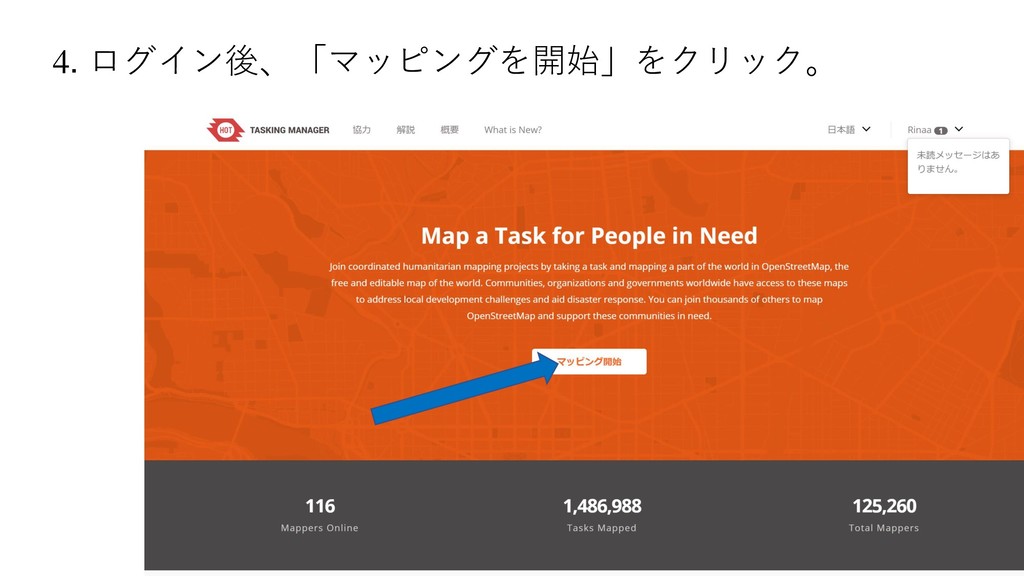
4. ログイン後、「マッピングを開始」をクリック。
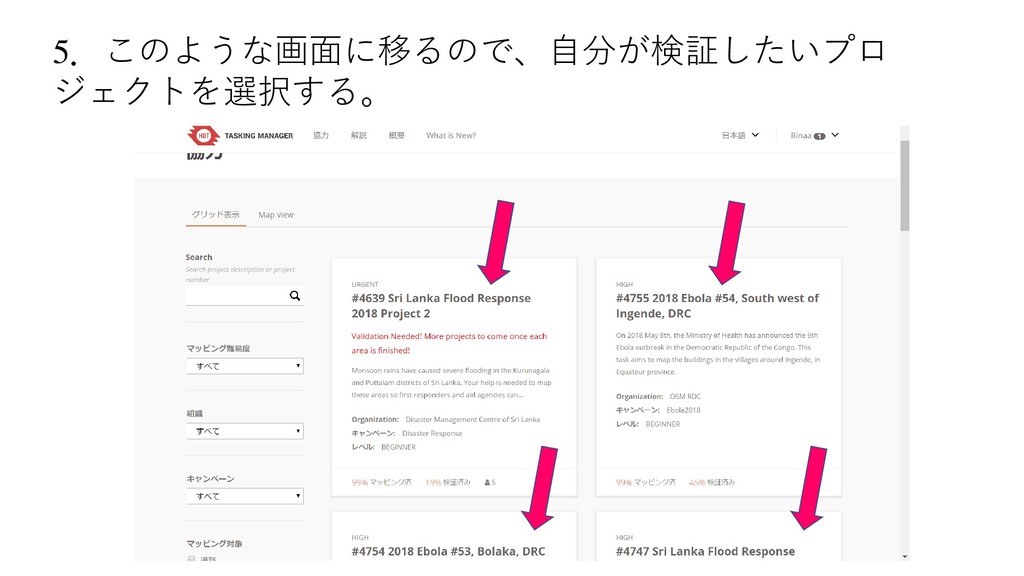
5.このような画面に移るので、自分が検証したいプロ ジェクトを選択する。
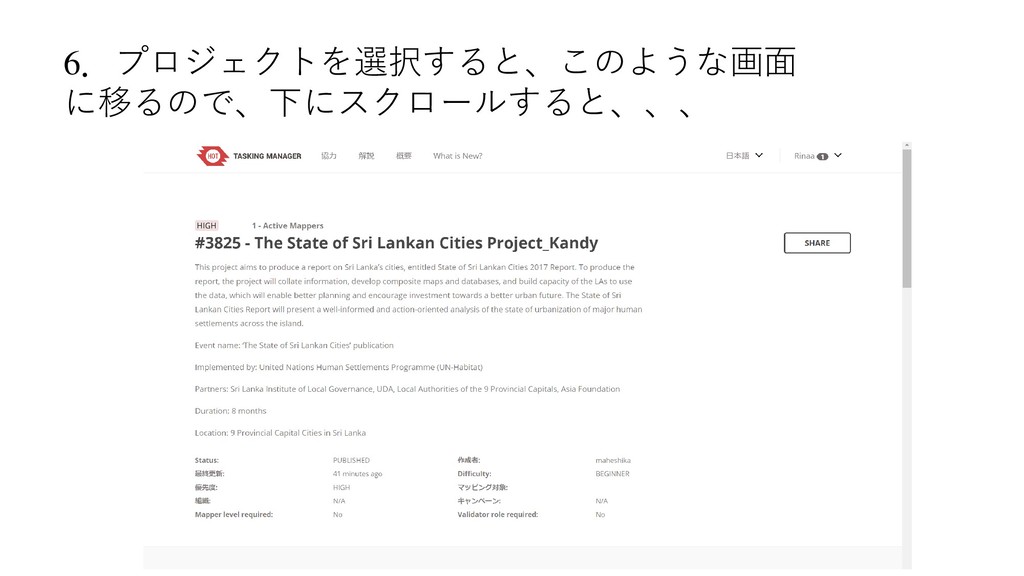
6.プロジェクトを選択すると、このような画面 に移るので、下にスクロールすると、、、
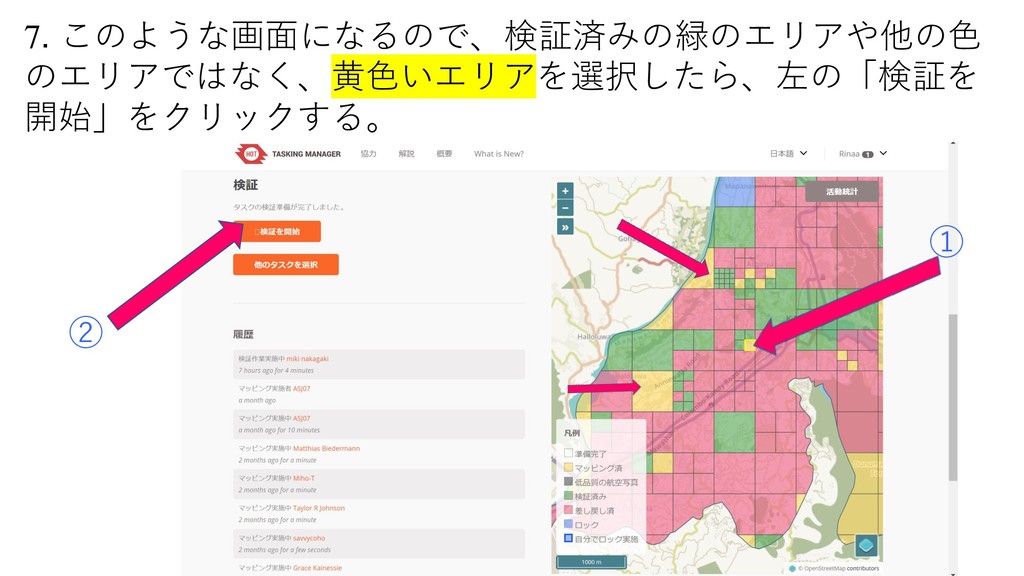
7. このような画面になるので、検証済みの緑のエリアや他の色 のエリアではなく、黄色いエリアを選択したら、左の「検証を 開始」をクリックする。 ① ②
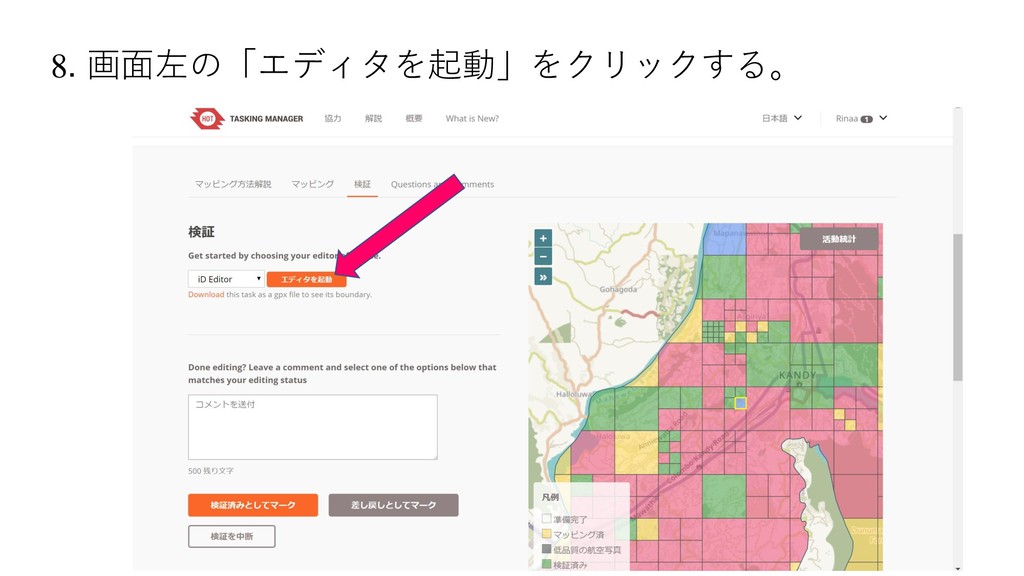
8. 画面左の「エディタを起動」をクリックする。
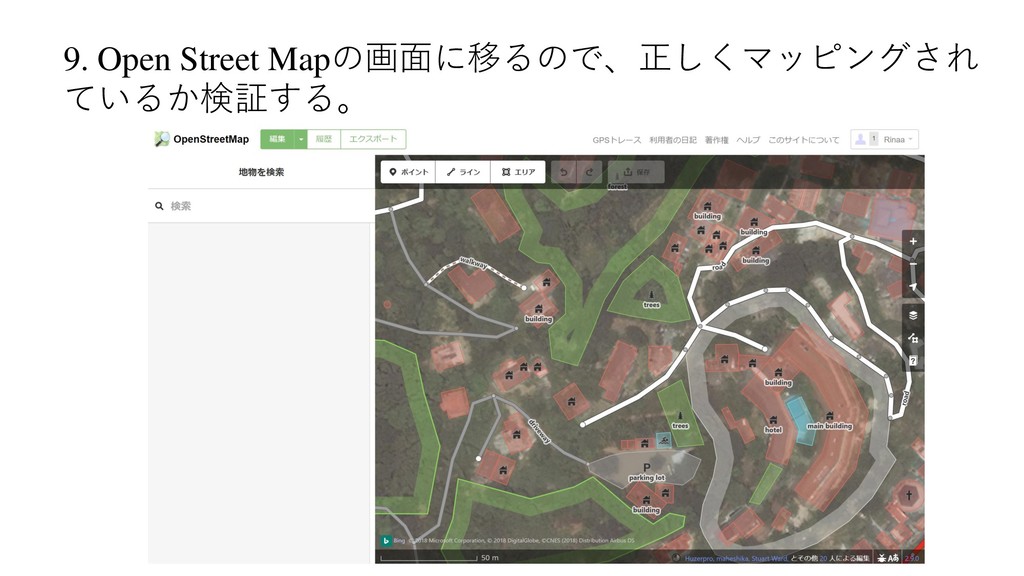
9. Open Street Mapの画面に移るので、正しくマッピングされ ているか検証する。
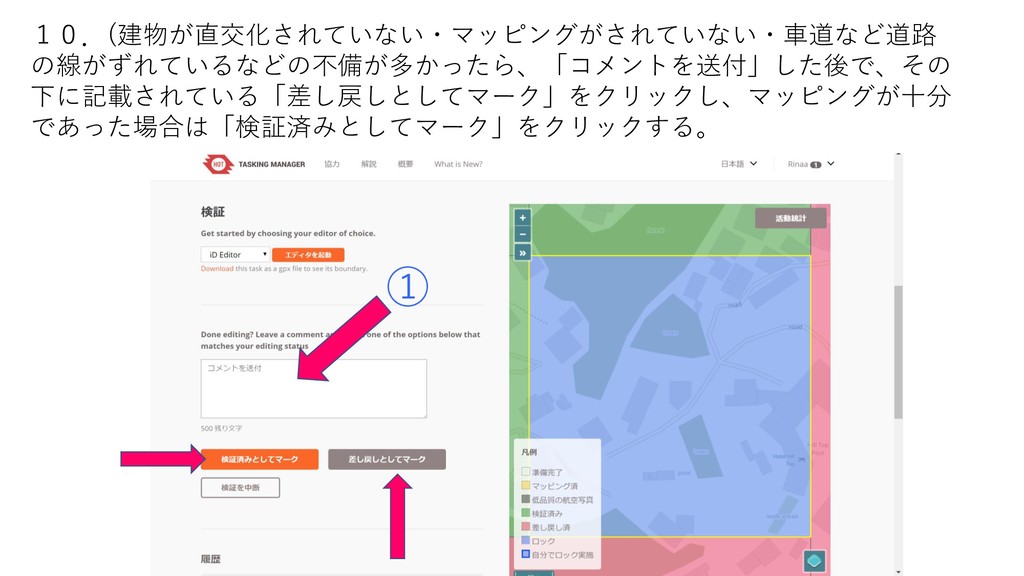
10.(建物が直交化されていない・マッピングがされていない・車道など道路 の線がずれているなどの不備が多かったら、「コメントを送付」した後で、その 下に記載されている「差し戻しとしてマーク」をクリックし、マッピングが十分 であった場合は「検証済みとしてマーク」をクリックする。 ①
お わ り


 rinaota
 aki_iinuma
 holman
 chrisshort
 tmiket
 jacobtomlinson
 sarafernandez
 hatefulcrawdad
 codingconduct
 jonoalderson
 davidcarrasco
 baasie
 mfonobong