Upgrade to Pro — share decks privately, control downloads, hide ads and more …

Getting started with React

Getting started with React

Introduction into React.

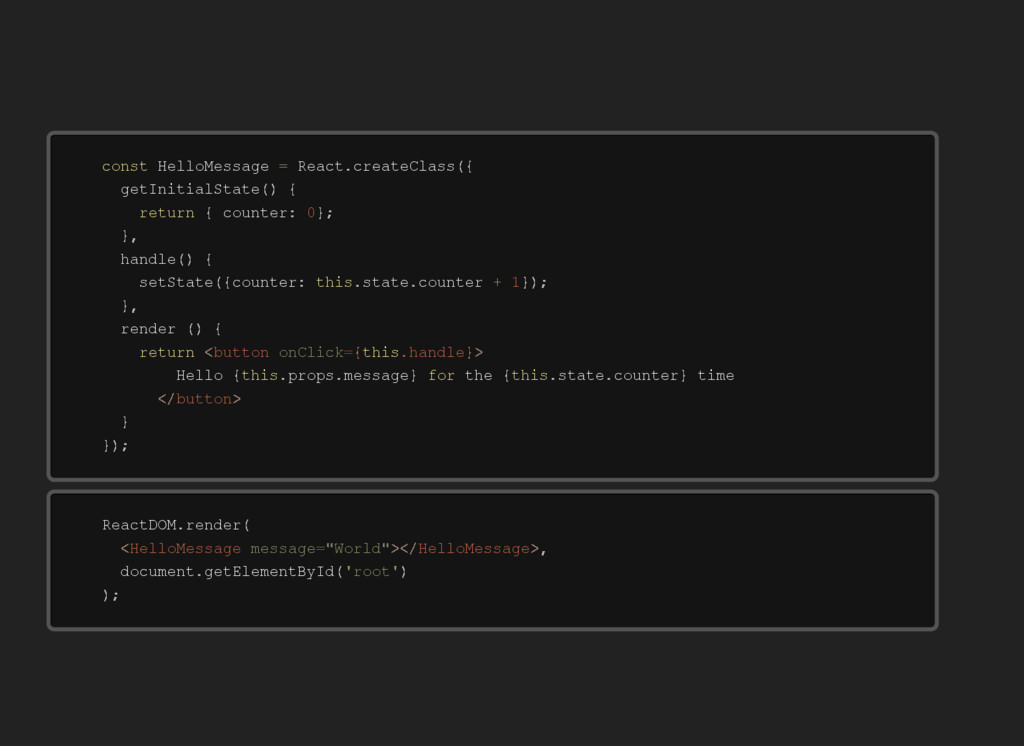
The example part has been annotated such that it can be followed without speaker.

As presented at the Eindhoven Developer Meetup on 8th of june 2016. MeetUp hosted by JouwWeb.nl; a SAAS website builder that produces modern websites and is as easy-to-use as Powerpoint.

Avatar for Roel van Duijnhoven

Roel van Duijnhoven

June 08, 2016

Other Decks in Programming

Transcript

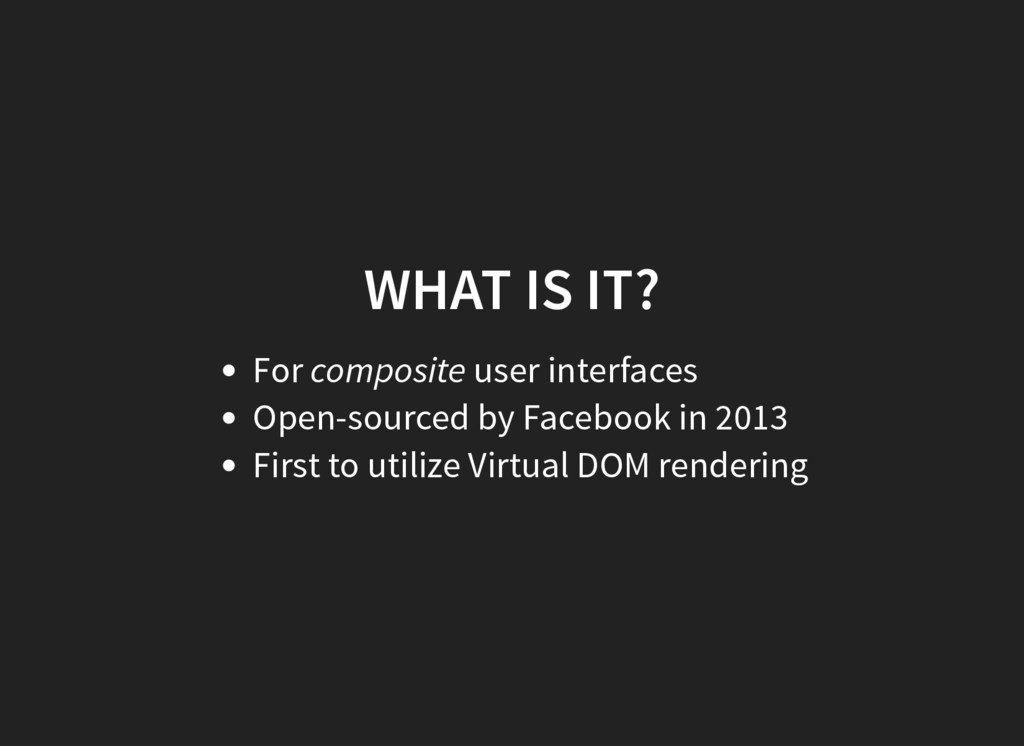
  1. WHAT IS IT? For composite user interfaces Open-sourced by Facebook

    in 2013 First to utilize Virtual DOM rendering
  2. H e l l o M e s s a

    g e R e a c t c o u n t e r c o u n t e r s t a t e c o u n t e r r e n d e r H e l l o p r o p s m e s s a g e t h e s t a t e c o u n t e r t i m e c o n s t = . c r e a t e C l a s s ( { g e t I n i t i a l S t a t e ( ) { r e t u r n { : 0 } ; } , h a n d l e ( ) { s e t S t a t e ( { : t h i s . . + 1 } ) ; } , ( ) { r e t u r n b u t t o n < o n C l i c k h a n d l e = { t h i s . } > { t h i s . . } f o r { t h i s . . } b u t t o n < / > } } ) ; R e a c t D O M d o c u m e n t . r e n d e r ( H e l l o M e s s a g e < m e s s a g e W o r l d = " " > H e l l o M e s s a g e < / > , . g e t E l e m e n t B y I d ( ' r o o t ' ) ) ;
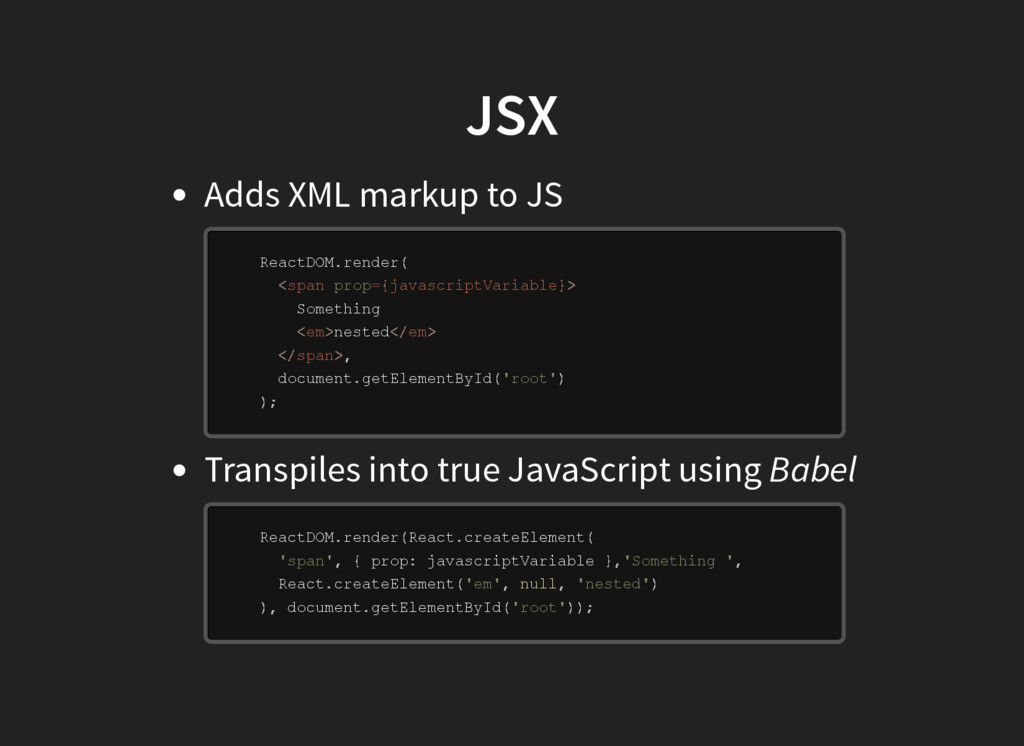
  3. JSX Adds XML markup to JS Transpiles into true JavaScript

    using Babel R e a c t D O M S o m e t h i n g n e s t e d d o c u m e n t R e a c t D O M R e a c t p r o p j a v a s c r i p t V a r i a b l e R e a c t d o c u m e n t . r e n d e r ( s p a n < p r o p j a v a s c r i p t V a r i a b l e = { } > e m < > e m < / > s p a n < / > , . g e t E l e m e n t B y I d ( ' r o o t ' ) ) ; . r e n d e r ( . c r e a t e E l e m e n t ( ' s p a n ' , { : } , ' S o m e t h i n g ' , . c r e a t e E l e m e n t ( ' e m ' , n u l l , ' n e s t e d ' ) ) , . g e t E l e m e n t B y I d ( ' r o o t ' ) ) ;
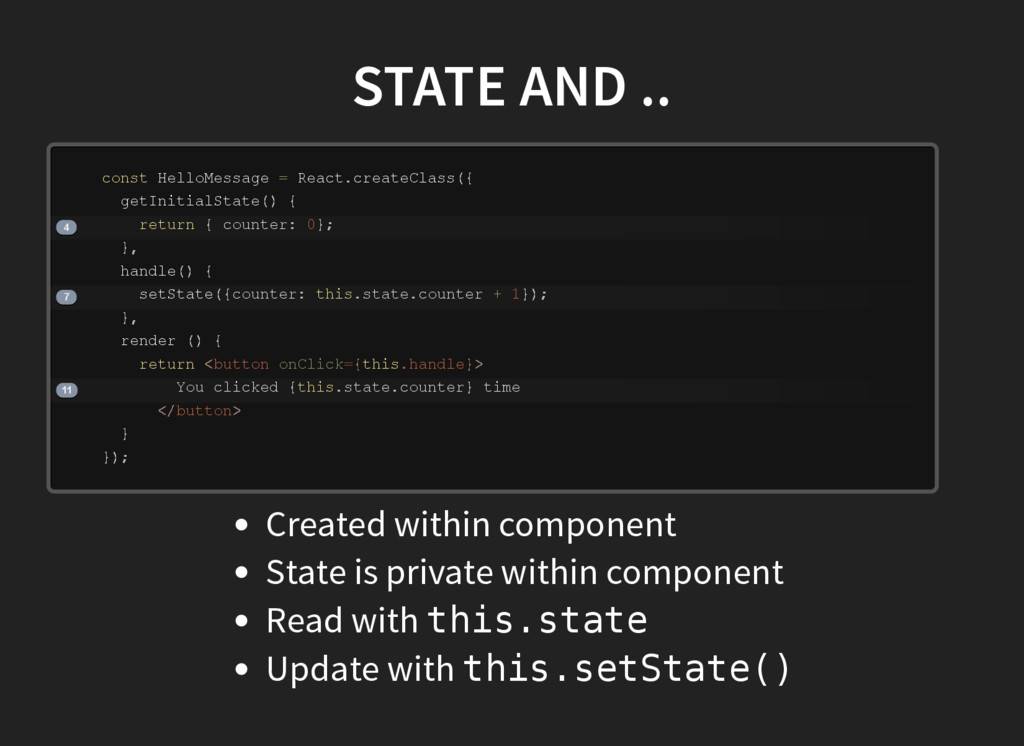
  4. STATE AND .. H e l l o M e

    s s a g e R e a c t c o u n t e r c o u n t e r s t a t e c o u n t e r r e n d e r Y o u c l i c k e d s t a t e c o u n t e r t i m e 4 7 11 c o n s t = . c r e a t e C l a s s ( { g e t I n i t i a l S t a t e ( ) { r e t u r n { : 0 } ; } , h a n d l e ( ) { s e t S t a t e ( { : t h i s . . + 1 } ) ; } , ( ) { r e t u r n b u t t o n < o n C l i c k h a n d l e = { t h i s . } > { t h i s . . } b u t t o n < / > } } ) ; Created within component State is private within component Read with t h i s . s t a t e Update with t h i s . s e t S t a t e ( )
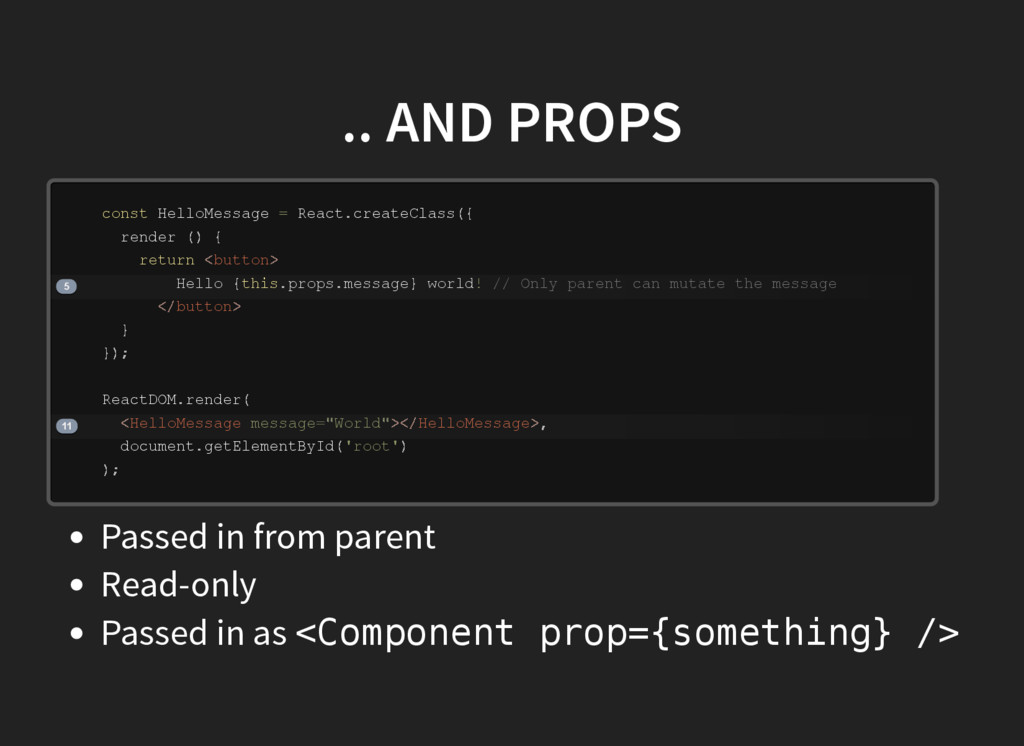
  5. .. AND PROPS H e l l o M e

    s s a g e R e a c t r e n d e r H e l l o p r o p s m e s s a g e w o r l d R e a c t D O M d o c u m e n t 5 11 c o n s t = . c r e a t e C l a s s ( { ( ) { r e t u r n b u t t o n < > { t h i s . . } ! / / O n l y p a r e n t c a n m u t a t e t h e m e s s a g e b u t t o n < / > } } ) ; . r e n d e r ( H e l l o M e s s a g e < m e s s a g e W o r l d = " " > H e l l o M e s s a g e < / > , . g e t E l e m e n t B y I d ( ' r o o t ' ) ) ; Passed in from parent Read-only Passed in as < C o m p o n e n t p r o p = { s o m e t h i n g } / >
  6. UPDATING React will take care of rerendering whatever is necessary!

    In other words: any change to prop or state will retrigger a rerender. Isn't this expensive!?
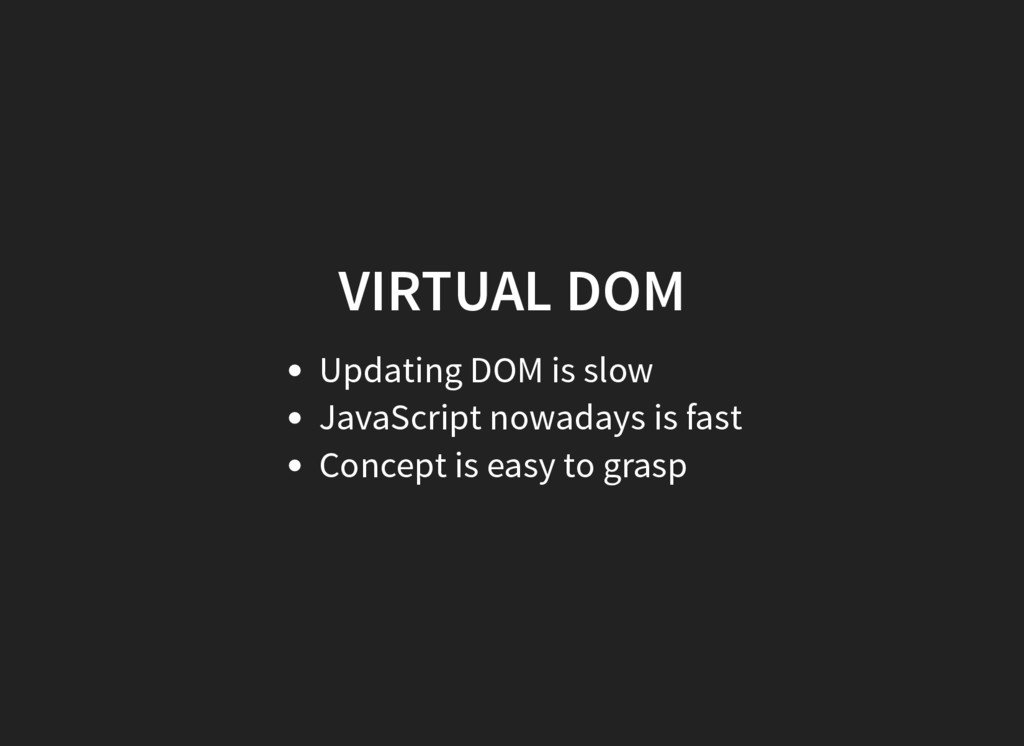
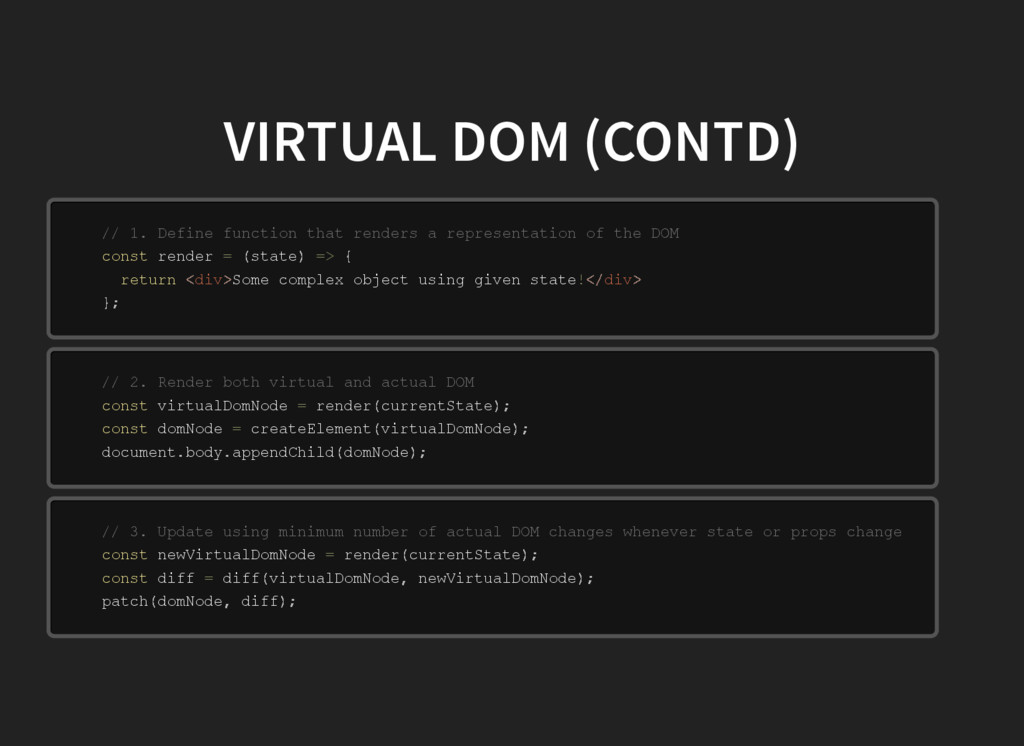
  7. VIRTUAL DOM (CONTD) r e n d e r s

    t a t e S o m e c o m p l e x o b j e c t u s i n g g i v e n s t a t e / / 1 . D e f i n e f u n c t i o n t h a t r e n d e r s a r e p r e s e n t a t i o n o f t h e D O M c o n s t = ( ) = > { r e t u r n d i v < > ! d i v < / > } ; v i r t u a l D o m N o d e c u r r e n t S t a t e d o m N o d e v i r t u a l D o m N o d e d o c u m e n t b o d y d o m N o d e / / 2 . R e n d e r b o t h v i r t u a l a n d a c t u a l D O M c o n s t = r e n d e r ( ) ; c o n s t = c r e a t e E l e m e n t ( ) ; . . a p p e n d C h i l d ( ) ; n e w V i r t u a l D o m N o d e c u r r e n t S t a t e d i f f v i r t u a l D o m N o d e n e w V i r t u a l D o m N o d e d o m N o d e d i f f / / 3 . U p d a t e u s i n g m i n i m u m n u m b e r o f a c t u a l D O M c h a n g e s w h e n e v e r s t a t e o r p r o p s c h a n g e c o n s t = r e n d e r ( ) ; c o n s t = d i f f ( , ) ; p a t c h ( , ) ;
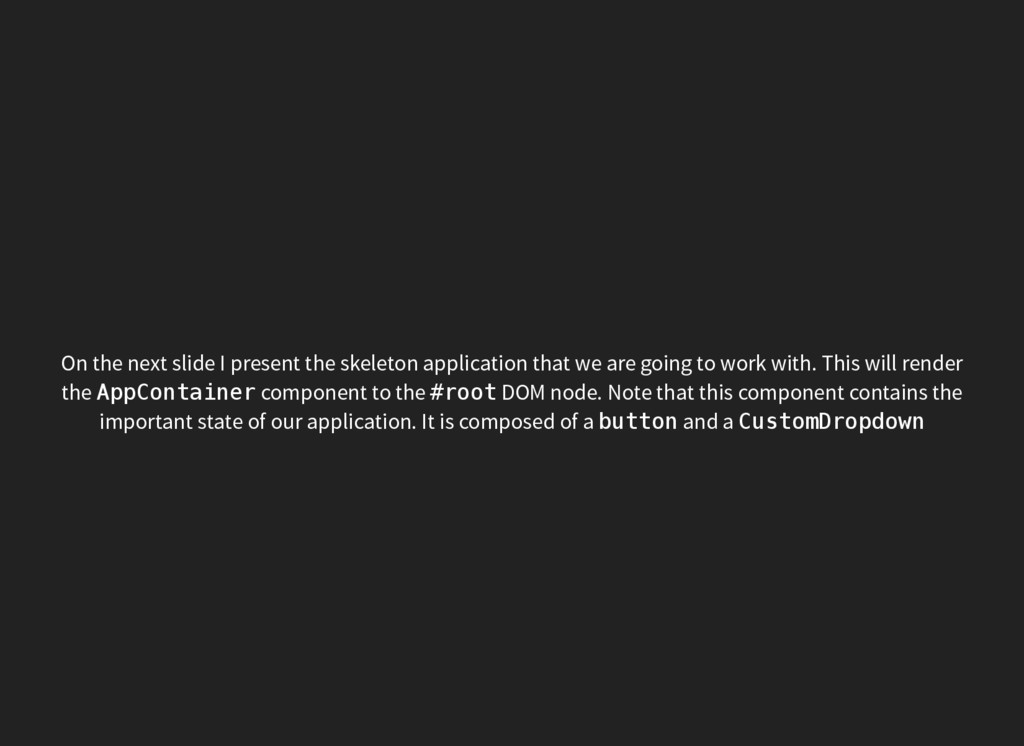
  8. On the next slide I present the skeleton application that

    we are going to work with. This will render the A p p C o n t a i n e r component to the # r o o t DOM node. Note that this component contains the important state of our application. It is composed of a b u t t o n and a C u s t o m D r o p d o w n
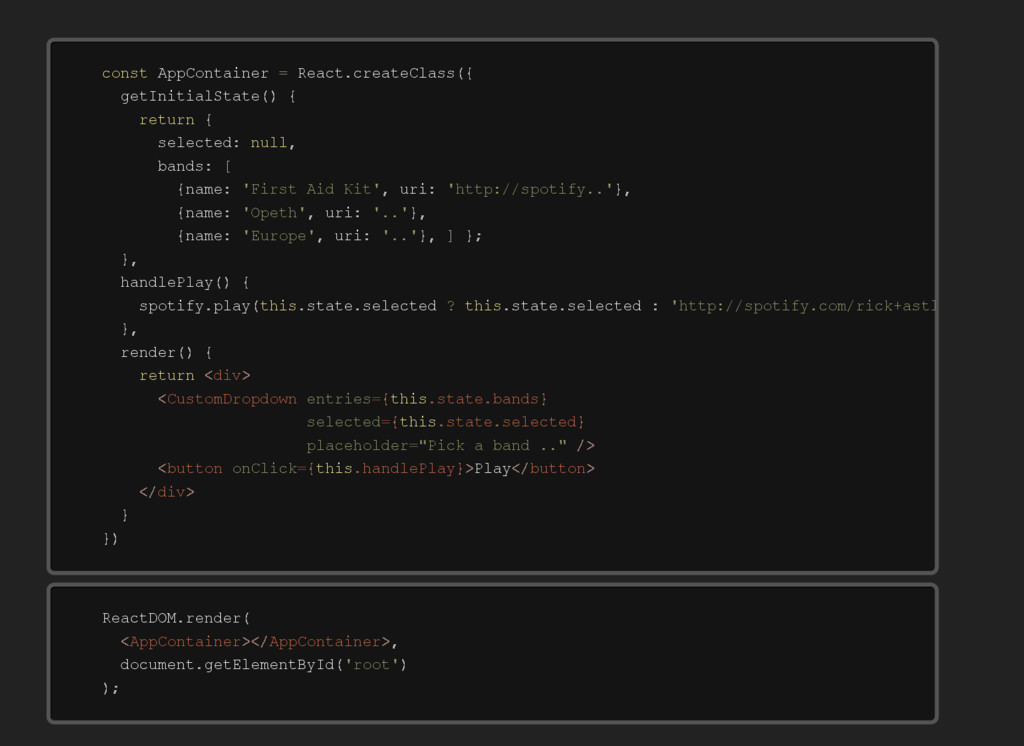
  9. A p p C o n t a i n

    e r R e a c t s e l e c t e d b a n d s n a m e u r i n a m e u r i n a m e u r i s p o t i f y s t a t e s e l e c t e d s t a t e s e l e c t e d P l a y c o n s t = . c r e a t e C l a s s ( { g e t I n i t i a l S t a t e ( ) { r e t u r n { : n u l l , : [ { : ' F i r s t A i d K i t ' , : ' h t t p : / / s p o t i f y . . ' } , { : ' O p e t h ' , : ' . . ' } , { : ' E u r o p e ' , : ' . . ' } , ] } ; } , h a n d l e P l a y ( ) { . p l a y ( t h i s . . ? t h i s . . : ' h t t p : / / s p o t i f y . c o m / r i c k + a s t l e y ' } , r e n d e r ( ) { r e t u r n d i v < > C u s t o m D r o p d o w n < e n t r i e s s t a t e b a n d s = { t h i s . . } s e l e c t e d s t a t e s e l e c t e d = { t h i s . . } p l a c e h o l d e r P i c k = " a b a n d . . " / > b u t t o n < o n C l i c k h a n d l e P l a y = { t h i s . } > b u t t o n < / > d i v < / > } } ) R e a c t D O M d o c u m e n t . r e n d e r ( A p p C o n t a i n e r < > A p p C o n t a i n e r < / > , . g e t E l e m e n t B y I d ( ' r o o t ' ) ) ;
  10. C u s t o m D r o p

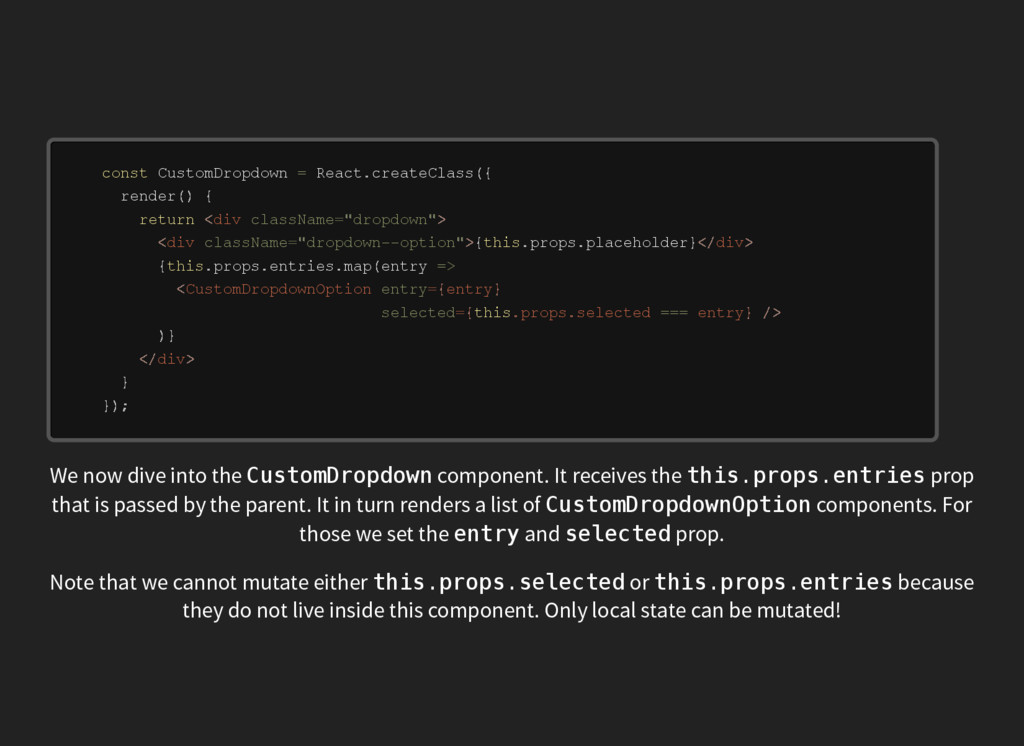
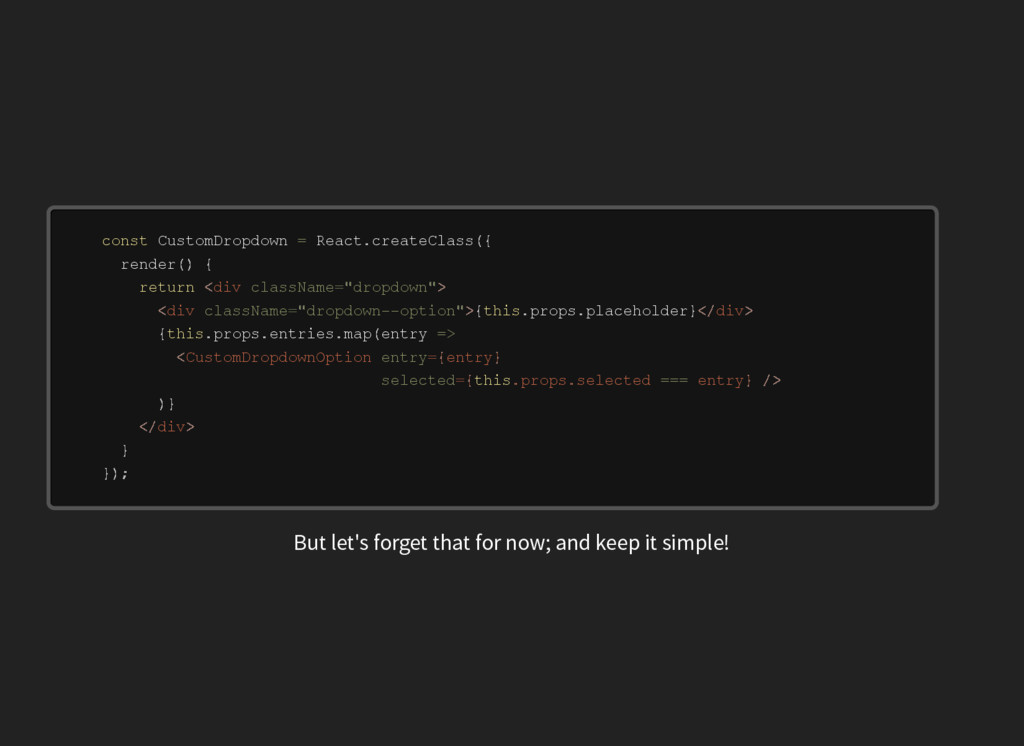
    d o w n R e a c t p r o p s p l a c e h o l d e r p r o p s e n t r i e s e n t r y c o n s t = . c r e a t e C l a s s ( { r e n d e r ( ) { r e t u r n d i v < c l a s s N a m e d r o p d o w n = " " > d i v < c l a s s N a m e d r o p d o w n ­ ­ o p t i o n = " " > { t h i s . . } d i v < / > { t h i s . . . m a p ( = > C u s t o m D r o p d o w n O p t i o n < e n t r y e n t r y = { } s e l e c t e d p r o p s s e l e c t e d e n t r y = { t h i s . . = = = } / > ) } d i v < / > } } ) ; We now dive into the C u s t o m D r o p d o w n component. It receives the t h i s . p r o p s . e n t r i e s prop that is passed by the parent. It in turn renders a list of C u s t o m D r o p d o w n O p t i o n components. For those we set the e n t r y and s e l e c t e d prop. Note that we cannot mutate either t h i s . p r o p s . s e l e c t e d or t h i s . p r o p s . e n t r i e s because they do not live inside this component. Only local state can be mutated!
  11. C u s t o m D r o p

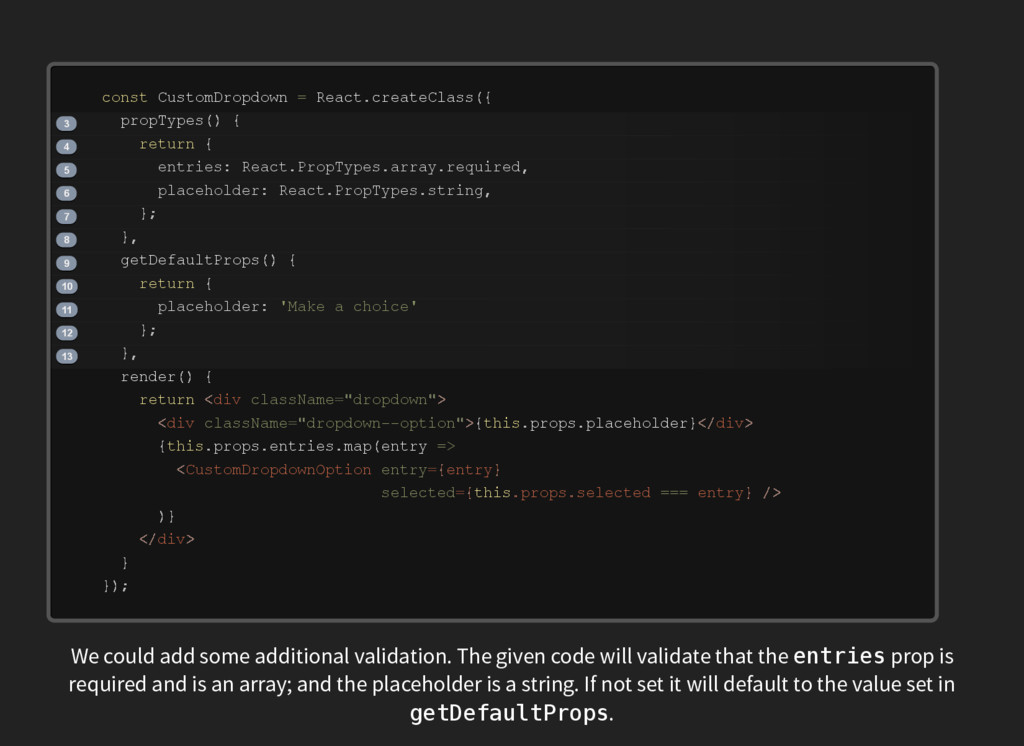
    d o w n R e a c t e n t r i e s R e a c t P r o p T y p e s a r r a y r e q u i r e d p l a c e h o l d e r R e a c t P r o p T y p e s s t r i n g p l a c e h o l d e r p r o p s p l a c e h o l d e r p r o p s e n t r i e s e n t r y 3 4 5 6 7 8 9 10 11 12 13 c o n s t = . c r e a t e C l a s s ( { p r o p T y p e s ( ) { r e t u r n { : . . . , : . . , } ; } , g e t D e f a u l t P r o p s ( ) { r e t u r n { : ' M a k e a c h o i c e ' } ; } , r e n d e r ( ) { r e t u r n d i v < c l a s s N a m e d r o p d o w n = " " > d i v < c l a s s N a m e d r o p d o w n ­ ­ o p t i o n = " " > { t h i s . . } d i v < / > { t h i s . . . m a p ( = > C u s t o m D r o p d o w n O p t i o n < e n t r y e n t r y = { } s e l e c t e d p r o p s s e l e c t e d e n t r y = { t h i s . . = = = } / > ) } d i v < / > } } ) ; We could add some additional validation. The given code will validate that the e n t r i e s prop is required and is an array; and the placeholder is a string. If not set it will default to the value set in g e t D e f a u l t P r o p s .
  12. C u s t o m D r o p

    d o w n R e a c t p r o p s p l a c e h o l d e r p r o p s e n t r i e s e n t r y c o n s t = . c r e a t e C l a s s ( { r e n d e r ( ) { r e t u r n d i v < c l a s s N a m e d r o p d o w n = " " > d i v < c l a s s N a m e d r o p d o w n ­ ­ o p t i o n = " " > { t h i s . . } d i v < / > { t h i s . . . m a p ( = > C u s t o m D r o p d o w n O p t i o n < e n t r y e n t r y = { } s e l e c t e d p r o p s s e l e c t e d e n t r y = { t h i s . . = = = } / > ) } d i v < / > } } ) ; But let's forget that for now; and keep it simple!
  13. C u s t o m D r o p

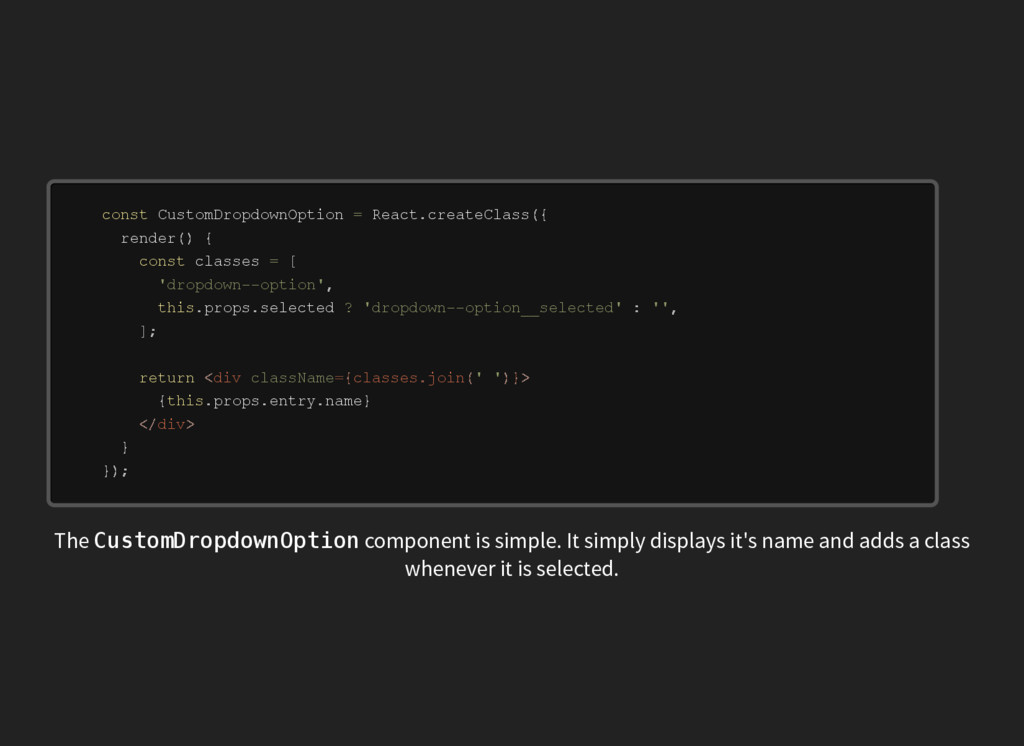
    d o w n O p t i o n R e a c t c l a s s e s p r o p s s e l e c t e d p r o p s e n t r y n a m e c o n s t = . c r e a t e C l a s s ( { r e n d e r ( ) { c o n s t = [ ' d r o p d o w n ­ ­ o p t i o n ' , t h i s . . ? ' d r o p d o w n ­ ­ o p t i o n _ _ s e l e c t e d ' : ' ' , ] ; r e t u r n d i v < c l a s s N a m e c l a s s e s = { . j o i n ( ' ' ) } > { t h i s . . . } d i v < / > } } ) ; The C u s t o m D r o p d o w n O p t i o n component is simple. It simply displays it's name and adds a class whenever it is selected.
  14. C u s t o m D r o p

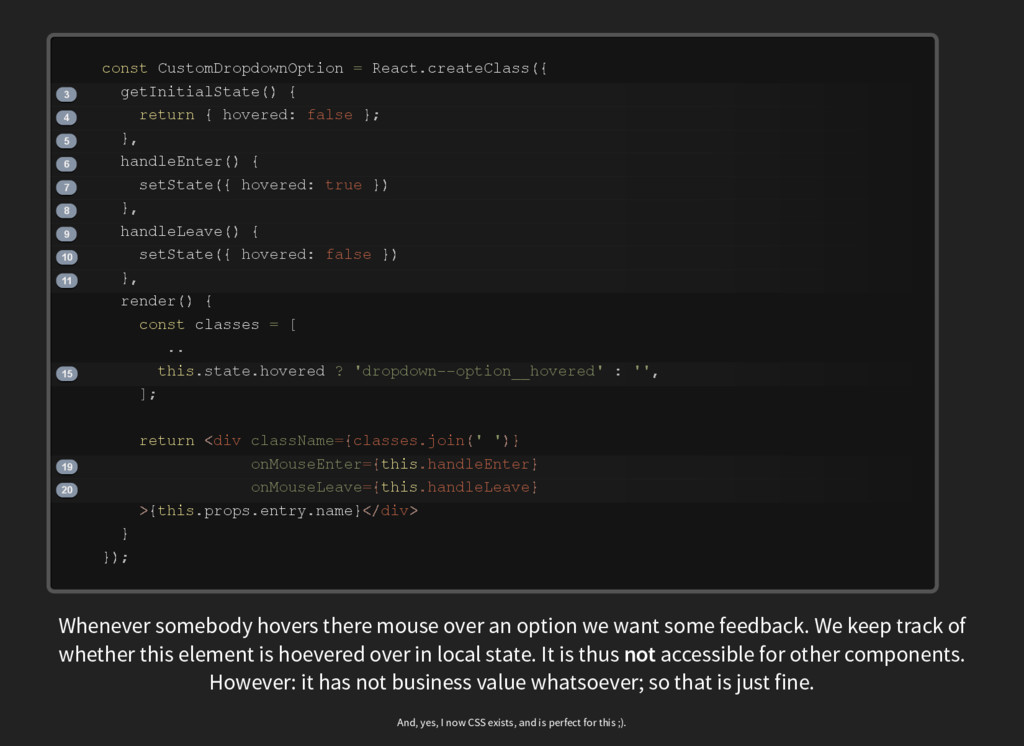
    d o w n O p t i o n R e a c t h o v e r e d h o v e r e d h o v e r e d c l a s s e s s t a t e h o v e r e d p r o p s e n t r y n a m e 3 4 5 6 7 8 9 10 11 15 19 20 c o n s t = . c r e a t e C l a s s ( { g e t I n i t i a l S t a t e ( ) { r e t u r n { : f a l s e } ; } , h a n d l e E n t e r ( ) { s e t S t a t e ( { : t r u e } ) } , h a n d l e L e a v e ( ) { s e t S t a t e ( { : f a l s e } ) } , r e n d e r ( ) { c o n s t = [ . . t h i s . . ? ' d r o p d o w n ­ ­ o p t i o n _ _ h o v e r e d ' : ' ' , ] ; r e t u r n d i v < c l a s s N a m e c l a s s e s = { . j o i n ( ' ' ) } o n M o u s e E n t e r h a n d l e E n t e r = { t h i s . } o n M o u s e L e a v e h a n d l e L e a v e = { t h i s . } > { t h i s . . . } d i v < / > } } ) ; Whenever somebody hovers there mouse over an option we want some feedback. We keep track of whether this element is hoevered over in local state. It is thus not accessible for other components. However: it has not business value whatsoever; so that is just fine. And, yes, I now CSS exists, and is perfect for this ;).
  15. C u s t o m D r o p

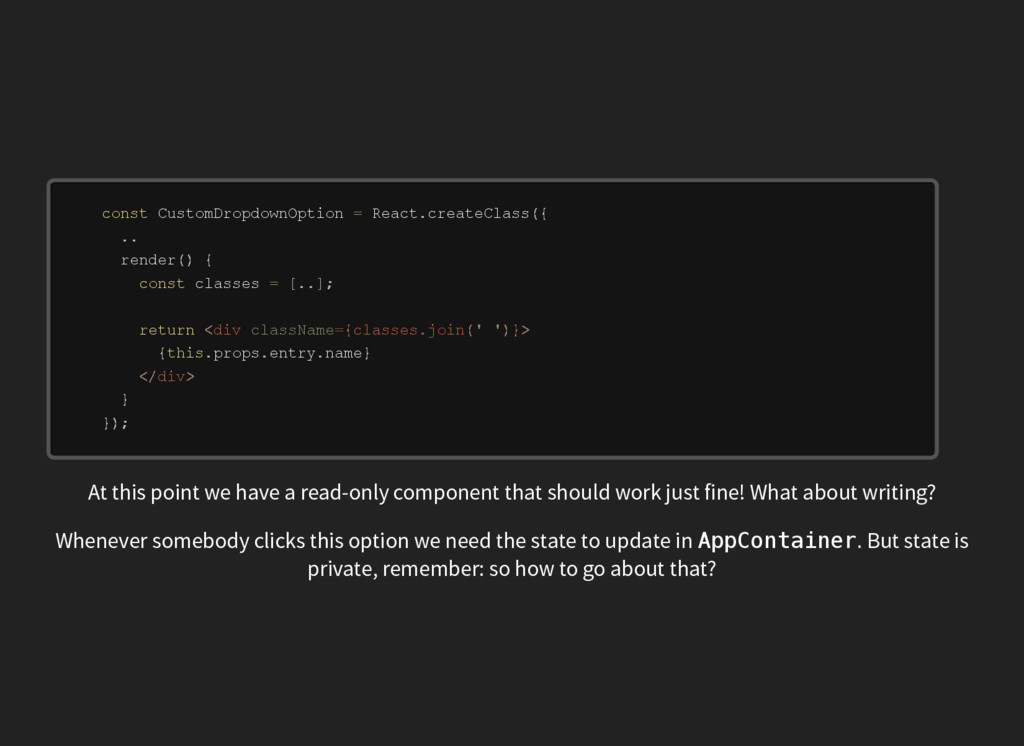
    d o w n O p t i o n R e a c t c l a s s e s p r o p s e n t r y n a m e c o n s t = . c r e a t e C l a s s ( { . . r e n d e r ( ) { c o n s t = [ . . ] ; r e t u r n d i v < c l a s s N a m e c l a s s e s = { . j o i n ( ' ' ) } > { t h i s . . . } d i v < / > } } ) ; At this point we have a read-only component that should work just fine! What about writing? Whenever somebody clicks this option we need the state to update in A p p C o n t a i n e r . But state is private, remember: so how to go about that?
  16. C u s t o m D r o p

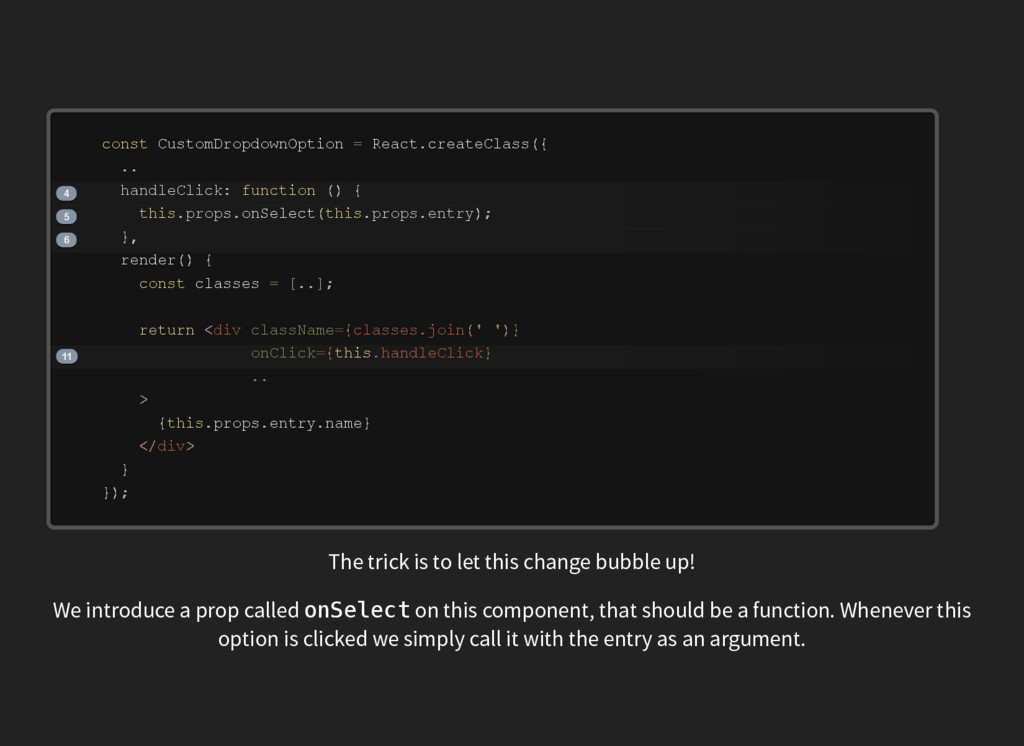
    d o w n O p t i o n R e a c t h a n d l e C l i c k p r o p s p r o p s e n t r y c l a s s e s p r o p s e n t r y n a m e 4 5 6 11 c o n s t = . c r e a t e C l a s s ( { . . : f u n c t i o n ( ) { t h i s . . o n S e l e c t ( t h i s . . ) ; } , r e n d e r ( ) { c o n s t = [ . . ] ; r e t u r n d i v < c l a s s N a m e c l a s s e s = { . j o i n ( ' ' ) } o n C l i c k h a n d l e C l i c k = { t h i s . } . . > { t h i s . . . } d i v < / > } } ) ; The trick is to let this change bubble up! We introduce a prop called o n S e l e c t on this component, that should be a function. Whenever this option is clicked we simply call it with the entry as an argument.
  17. C u s t o m D r o p

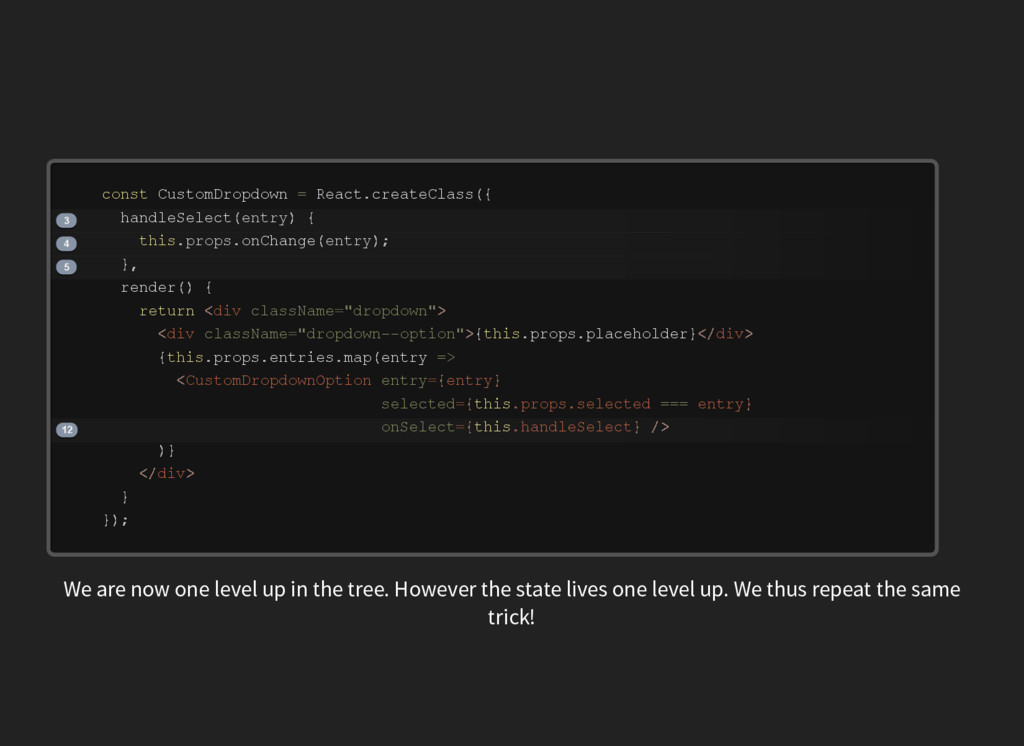
    d o w n R e a c t e n t r y p r o p s e n t r y p r o p s p l a c e h o l d e r p r o p s e n t r i e s e n t r y 3 4 5 12 c o n s t = . c r e a t e C l a s s ( { h a n d l e S e l e c t ( ) { t h i s . . o n C h a n g e ( ) ; } , r e n d e r ( ) { r e t u r n d i v < c l a s s N a m e d r o p d o w n = " " > d i v < c l a s s N a m e d r o p d o w n ­ ­ o p t i o n = " " > { t h i s . . } d i v < / > { t h i s . . . m a p ( = > C u s t o m D r o p d o w n O p t i o n < e n t r y e n t r y = { } s e l e c t e d p r o p s s e l e c t e d e n t r y = { t h i s . . = = = } o n S e l e c t h a n d l e S e l e c t = { t h i s . } / > ) } d i v < / > } } ) ; We are now one level up in the tree. However the state lives one level up. We thus repeat the same trick!
  18. A p p C o n t a i n

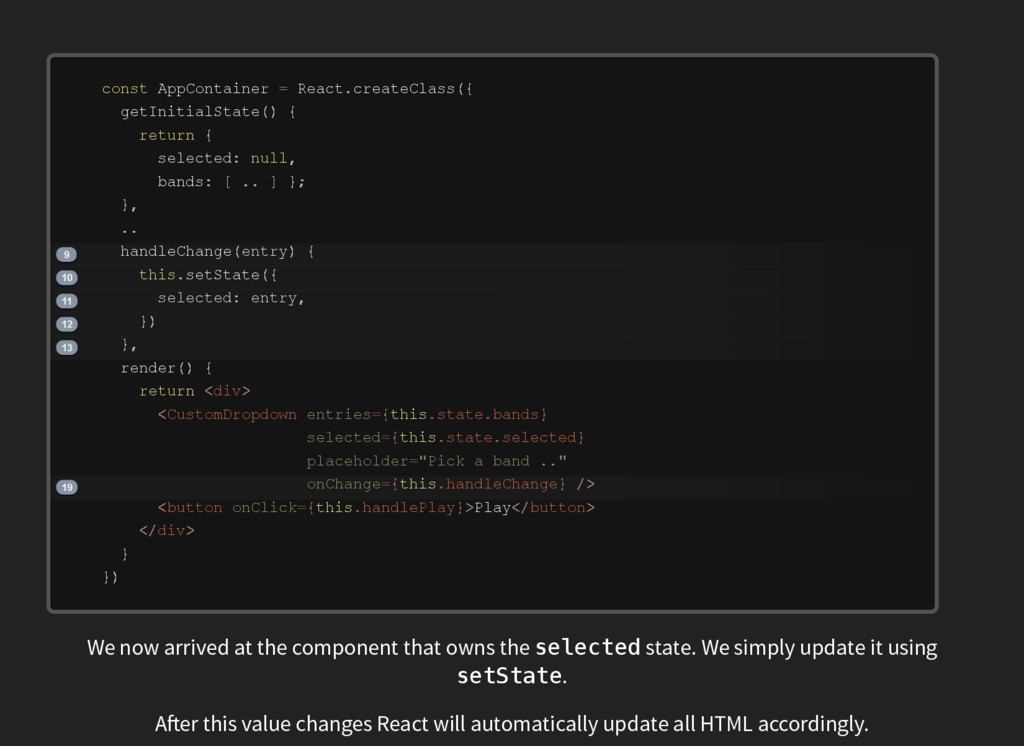
    e r R e a c t s e l e c t e d b a n d s e n t r y s e l e c t e d e n t r y P l a y 9 10 11 12 13 19 c o n s t = . c r e a t e C l a s s ( { g e t I n i t i a l S t a t e ( ) { r e t u r n { : n u l l , : [ . . ] } ; } , . . h a n d l e C h a n g e ( ) { t h i s . s e t S t a t e ( { : , } ) } , r e n d e r ( ) { r e t u r n d i v < > C u s t o m D r o p d o w n < e n t r i e s s t a t e b a n d s = { t h i s . . } s e l e c t e d s t a t e s e l e c t e d = { t h i s . . } p l a c e h o l d e r P i c k = " a b a n d . . " o n C h a n g e h a n d l e C h a n g e = { t h i s . } / > b u t t o n < o n C l i c k h a n d l e P l a y = { t h i s . } > b u t t o n < / > d i v < / > } } ) We now arrived at the component that owns the s e l e c t e d state. We simply update it using s e t S t a t e . A er this value changes React will automatically update all HTML accordingly.
  19. SIMPLE No magic [1] Basics can be taught in 30

    minutes (right?) [1] Okay, maybe a little bit
  20. RETROSPECT No convention over configuration Mixing React and non-React can

    be challenging You need more to build an App (Redux maybe?)
  21. MOST IMPORTANTLY: Quick progress in frontend Backend guys are now

    stalling progress! JouwWeb is hiring backender! [ ] link