Upgrade to Pro — share decks privately, control downloads, hide ads and more …

Loop Engineering for AI work cycle

Loop Engineering for AI work cycle

How can AI keep work moving for weeks or even months without taking over human judgment? This presentation traces the evolution of AI-assisted work—from chat and prompt engineering to context, harness, and Loop Engineering. It introduces a practical model in which humans set the direction and decision boundaries, while AI continuously executes, verifies, records progress, recovers from known failures, and escalates decisions when human judgment is required.

Japanese Edition here: https://www.slideshare.net/slideshow/ai-a647/289015722

Avatar for Sangorillab

Sangorillab

August 02, 2026

Other Decks in Technology

Transcript

  1. Speaker background AA littlebitcontextabout me on the experience behind this

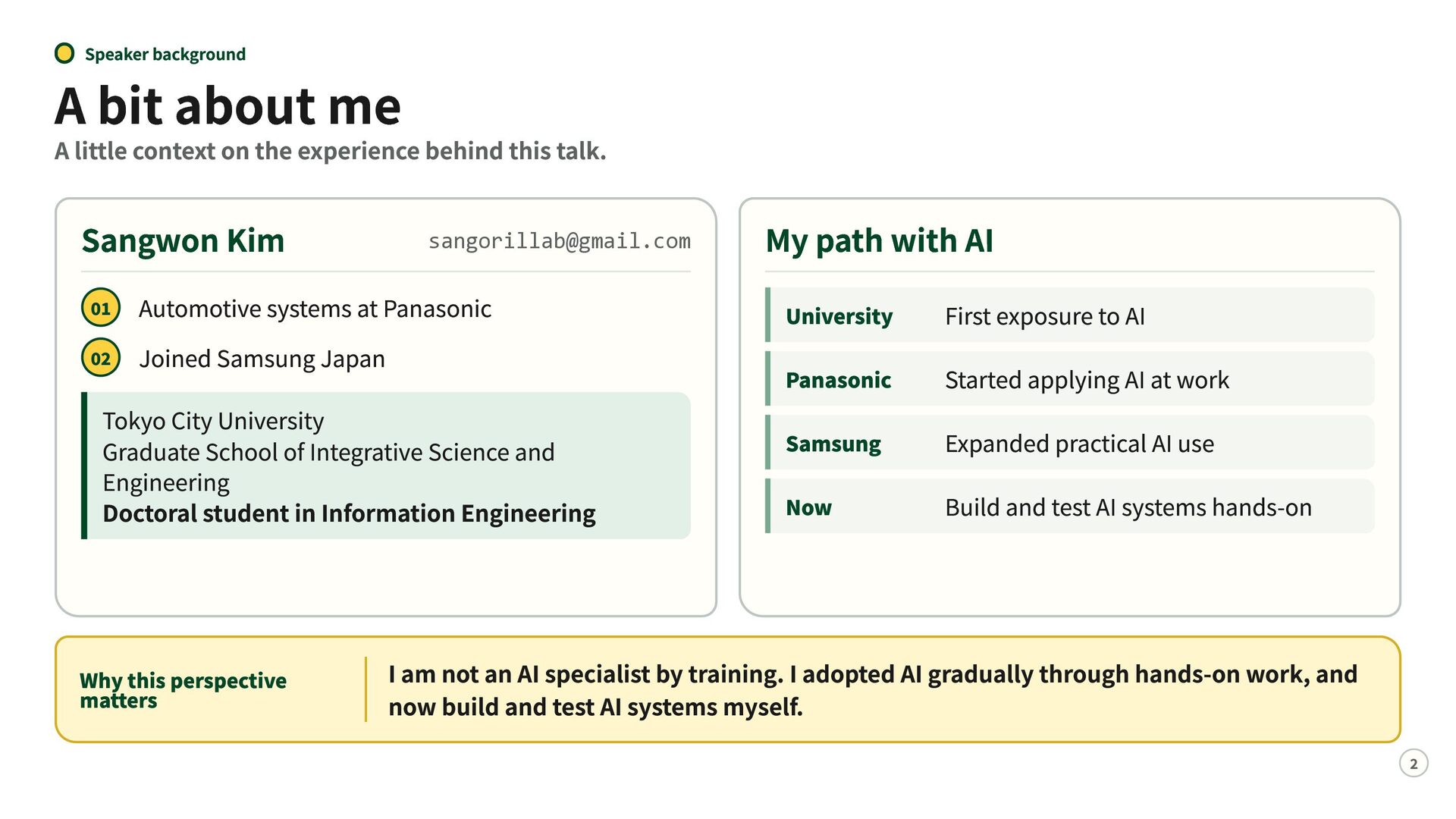
    talk. Sangwon Kim [email protected] Automotive systems at Panasonic Joined Samsung Japan Tokyo City University Graduate School of Integrative Science and Engineering Doctoral student in Information Engineering 01 02 Why this perspective matters My path with AI University Panasonic Samsung Now First exposure to AI Started applying AI at work Expanded practical AI use Build and test AI systems hands-on I am not an AI specialist by training. I adopted AI gradually through hands-on work, and now build and test AI systems myself. 2
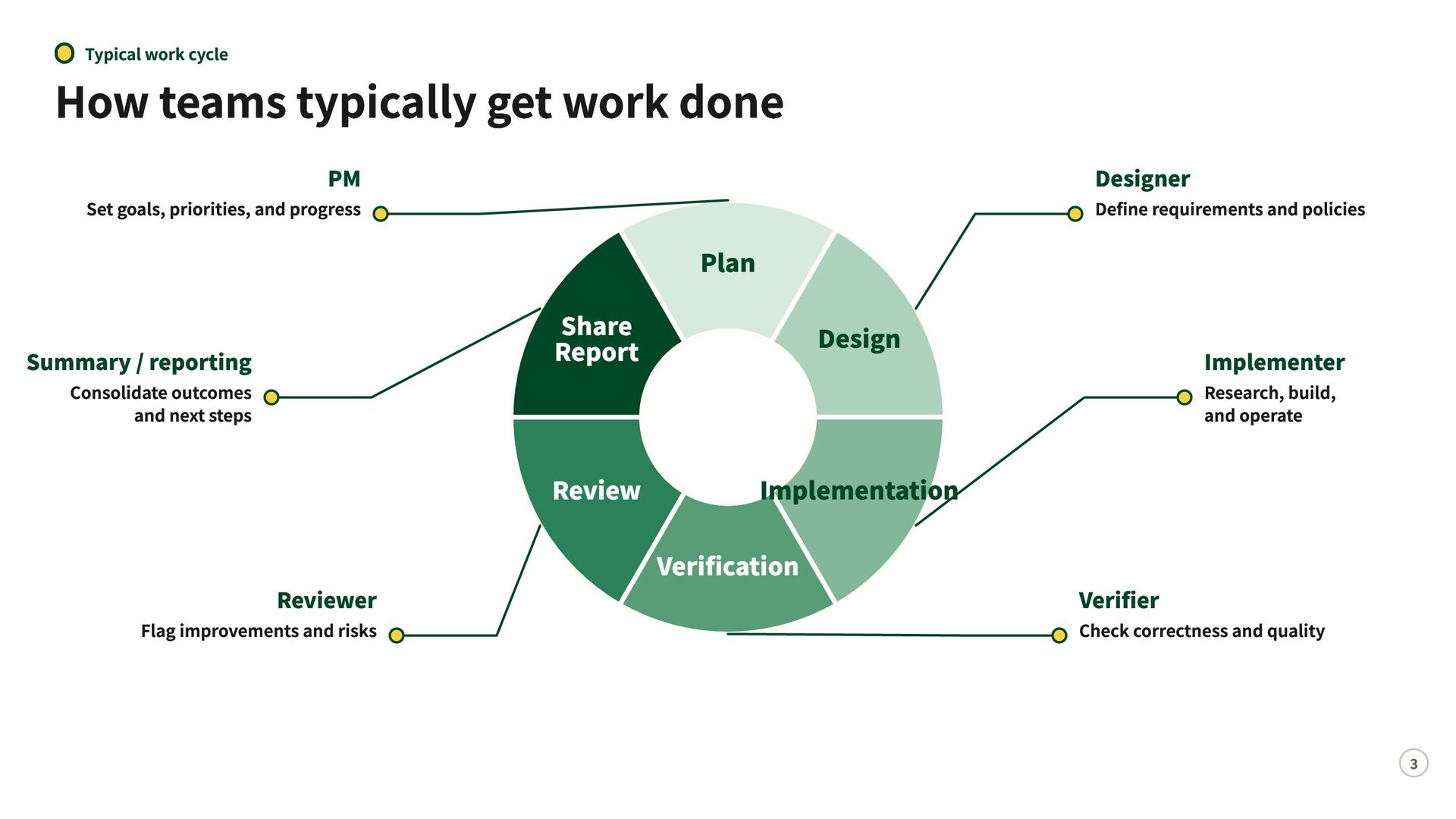
  2. Typical work cycle How teams typically get work done PM

    Set goals, priorities, and progress Summary / reporting Consolidate outcomes and next steps Reviewer Flag improvements and risks Designer Define requirements and policies Plan Share Report Design Review Implementation Implementer Research, build, and operate Verification Verifier Check correctness and quality 3
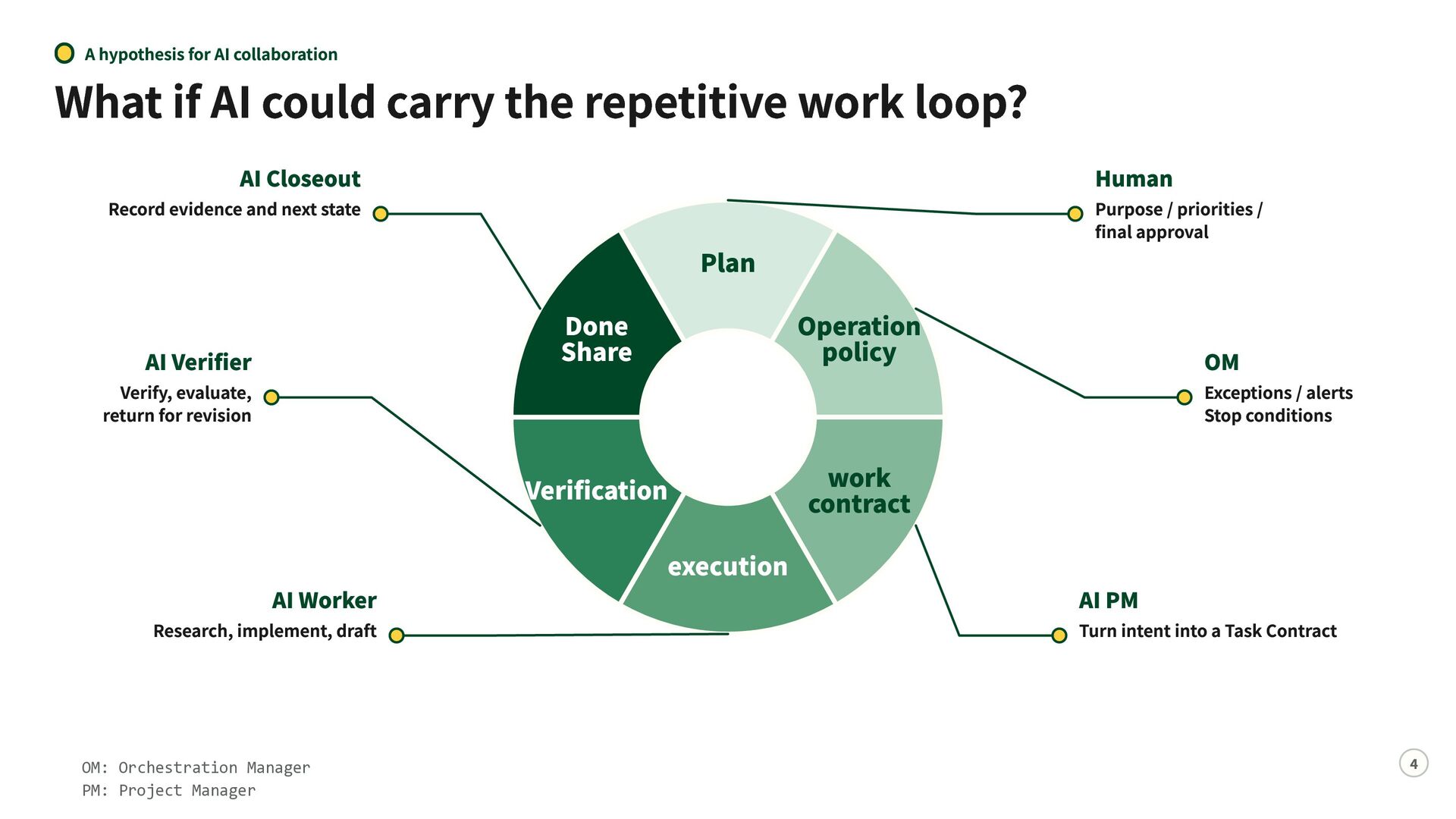
  3. A hypothesis for AI collaboration What if AI could carry

    the repetitive work loop? AI Closeout Record evidence and next state AI Verifier Verify, evaluate, return for revision AI Worker Research, implement, draft OM: Orchestration Manager PM: Project Manager Purpose / priorities / final approval Plan Done Share Operation policy Verification work contract execution Human OM Exceptions / alerts Stop conditions AI PM Turn intent into a Task Contract 4
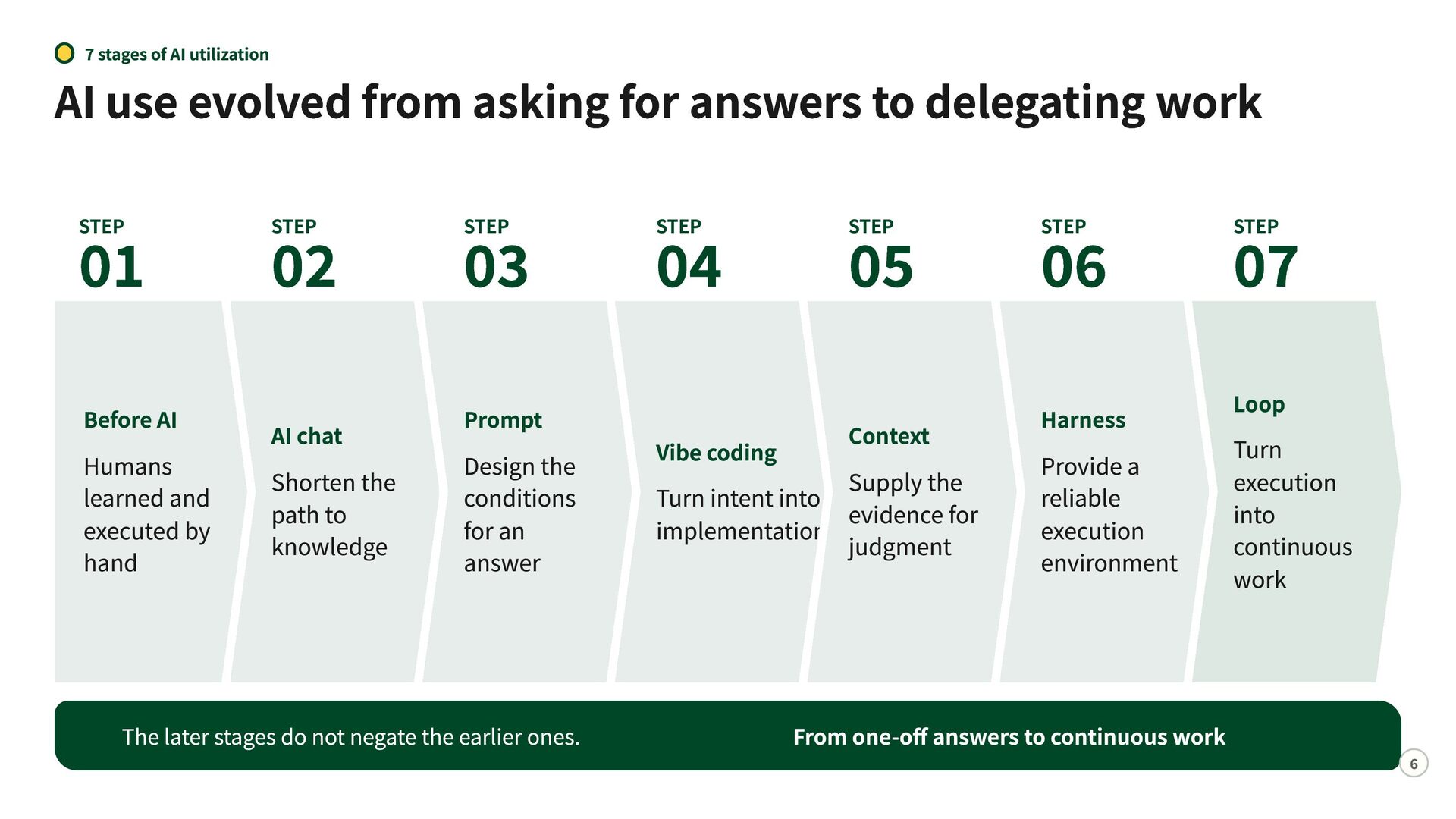
  4. 7 stages of AI utilization AI use evolved from asking

    for answers to delegating work 01 STEP Before AI Humans learned and executed by hand 02 STEP AI chat Shorten the path to knowledge 03 STEP Prompt Design the conditions for an answer The later stages do not negate the earlier ones. 04 STEP Vibe coding 05 STEP Context Supply the Turn intent into evidence for implementation judgment 06 07 STEP STEP Harness Loop Provide a reliable execution environment From one-off answers to continuous work Turn execution into continuous work 6
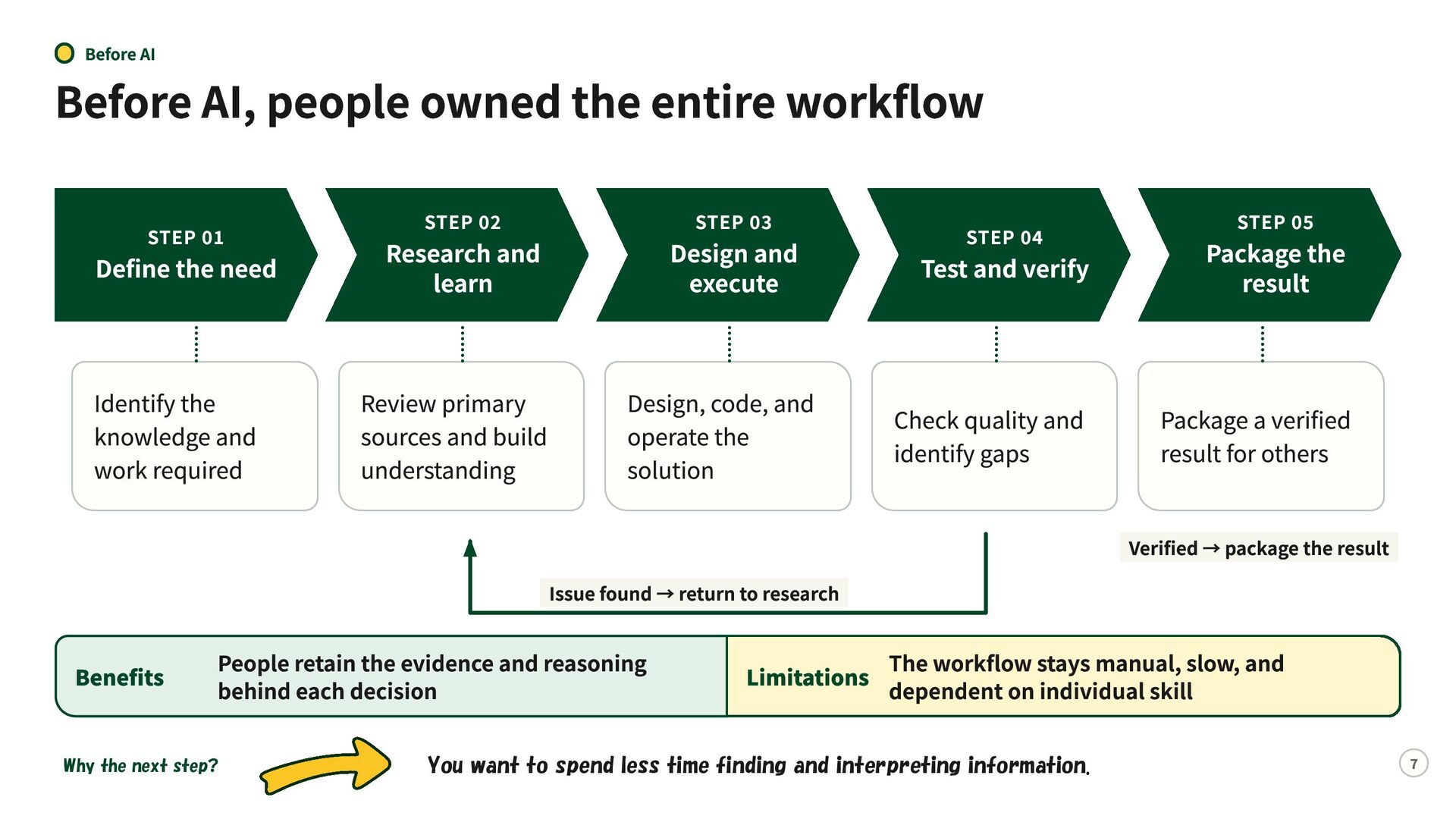
  5. Before AI Before AI, people owned the entire workflow STEP

    02 STEP 01 Define the need Research and learn Identify the knowledge and work required Review primary sources and build understanding STEP 03 Design and execute STEP 04 Test and verify Package the result Design, code, and operate the solution Check quality and identify gaps Package a verified result for others Issue found → return to research Benefits People retain the evidence and reasoning behind each decision Why the next step? STEP 05 Verified → package the result The workflow stays manual, slow, and Limitations dependent on individual skill You want to spend less time finding and interpreting information. 7
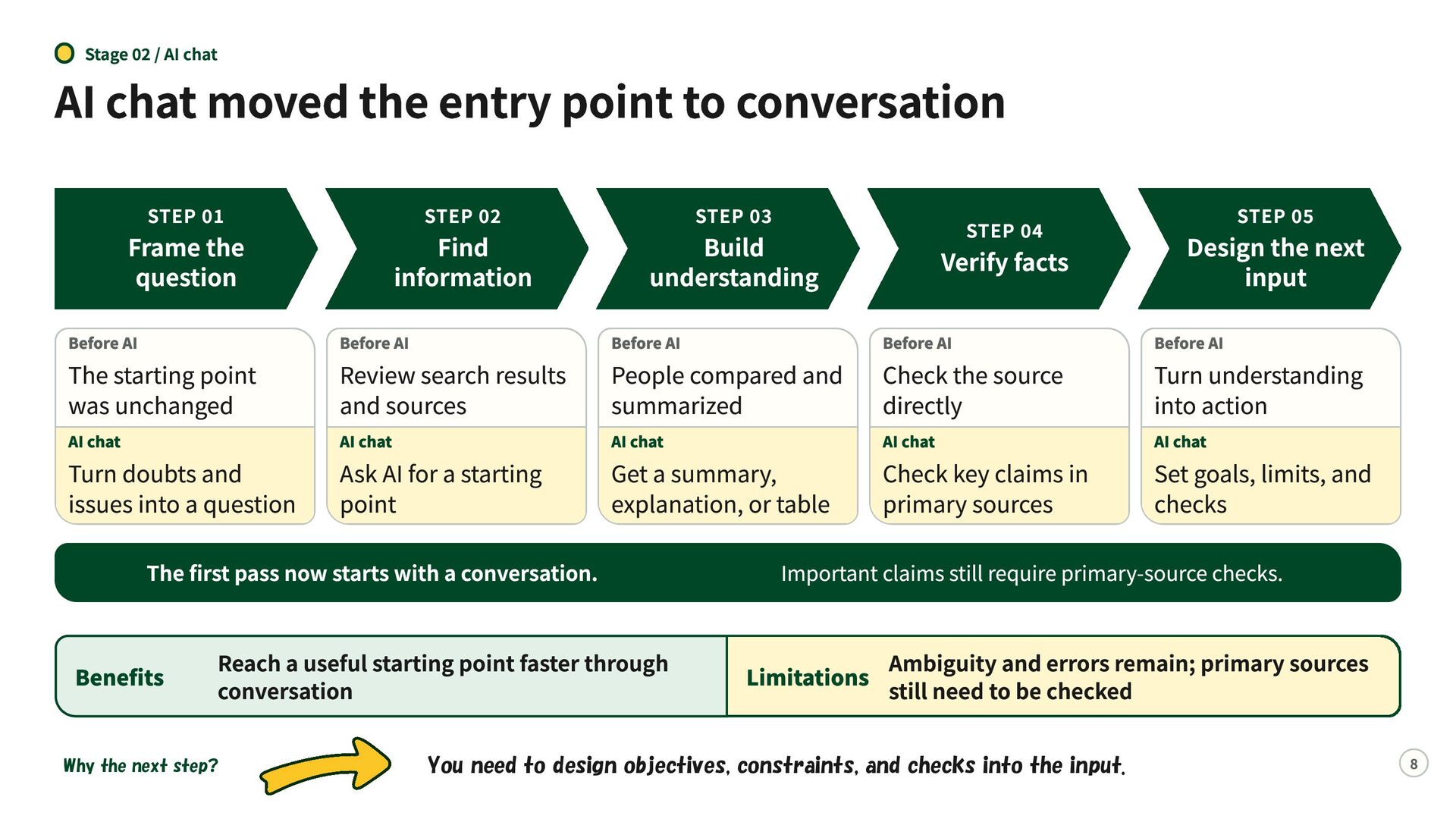
  6. Stage 02 / AI chat AI chat moved the entry

    point to conversation STEP 01 Frame the question Before AI The starting point was unchanged AI chat Turn doubts and issues into a question STEP 02 Find information Before AI Review search results and sources AI chat Ask AI for a starting point STEP 03 Build understanding Before AI People compared and summarized AI chat Get a summary, explanation, or table The first pass now starts with a conversation. Benefits Reach a useful starting point faster through conversation Why the next step? STEP 04 Verify facts Before AI Check the source directly AI chat Check key claims in primary sources STEP 05 Design the next input Before AI Turn understanding into action AI chat Set goals, limits, and checks Important claims still require primary-source checks. Ambiguity and errors remain; primary sources Limitations still need to be checked You need to design objectives, constraints, and checks into the input. 8
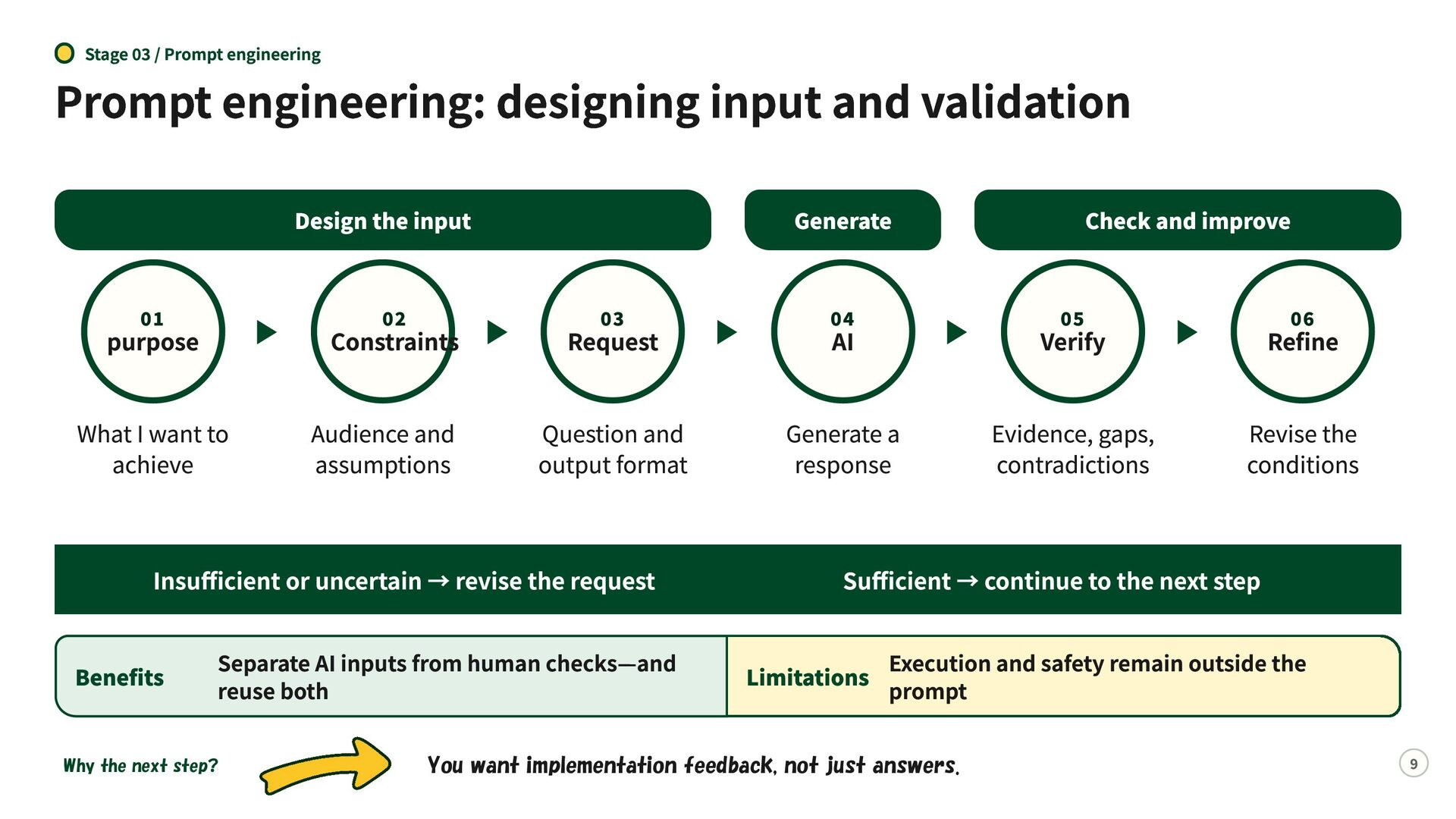
  7. Stage 03 / Prompt engineering Prompt engineering: designing input and

    validation Design the input Generate Check and improve 01 purpose 02 Constraints 03 Request 04 AI 05 Verify Refine What I want to achieve Audience and assumptions Question and output format Generate a response Evidence, gaps, contradictions Revise the conditions Insufficient or uncertain → revise the request Benefits Separate AI inputs from human checks—and reuse both Why the next step? 06 Sufficient → continue to the next step Execution and safety remain outside the Limitations prompt You want implementation feedback, not just answers. 9
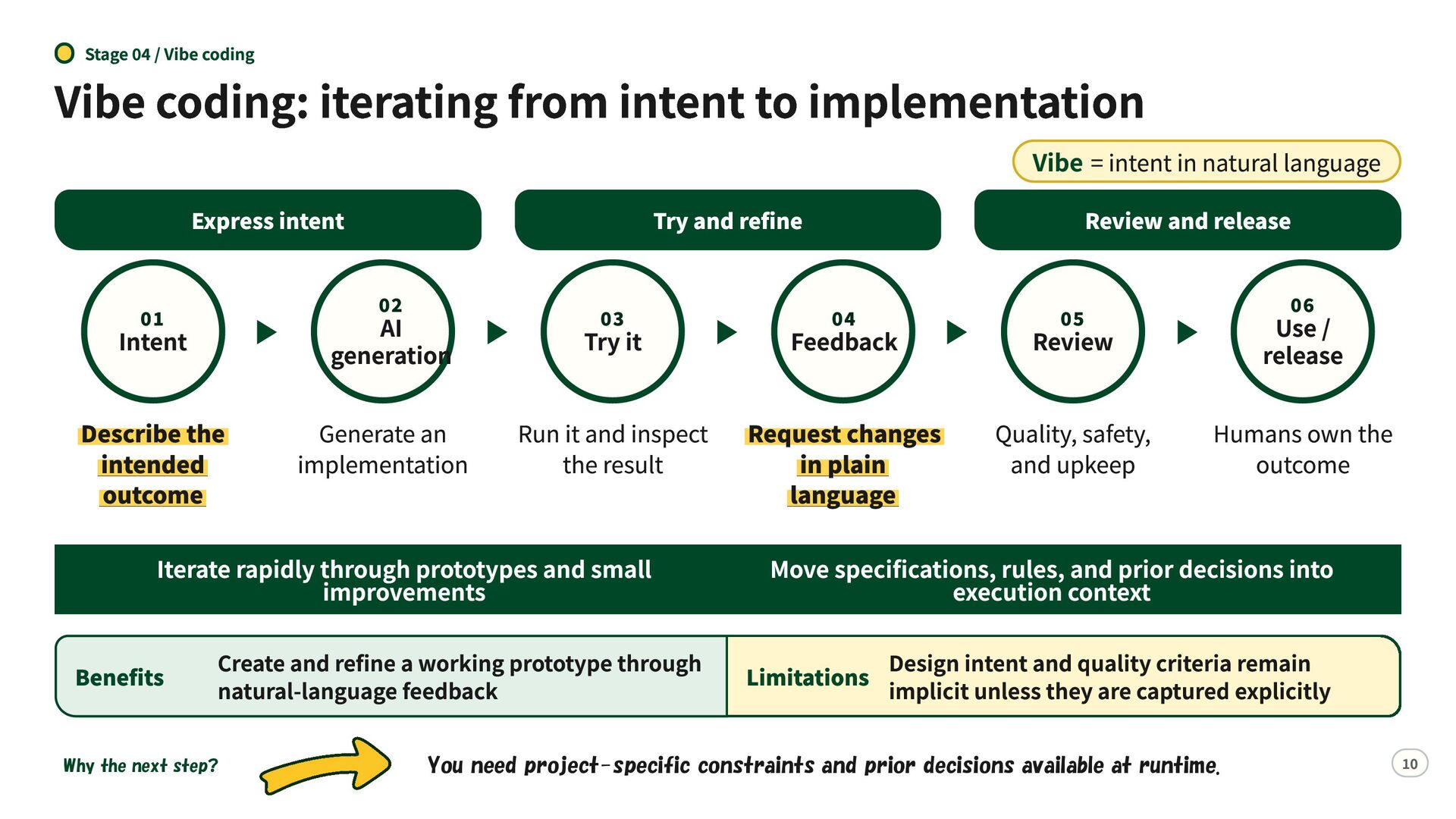
  8. Stage 04 / Vibe coding Vibe coding: iterating from intent

    to implementation Vibe = intent in natural language Express intent Try and refine 02 01 Intent AI generation Describe the intended outcome Generate an implementation 03 Try it Create and refine a working prototype through natural-language feedback Why the next step? 04 Feedback Run it and inspect Request changes the result in plain language Iterate rapidly through prototypes and small improvements Benefits Review and release 06 05 Review Use / release Quality, safety, and upkeep Humans own the outcome Move specifications, rules, and prior decisions into execution context Design intent and quality criteria remain Limitations implicit unless they are captured explicitly You need project-specific constraints and prior decisions available at runtime. 10
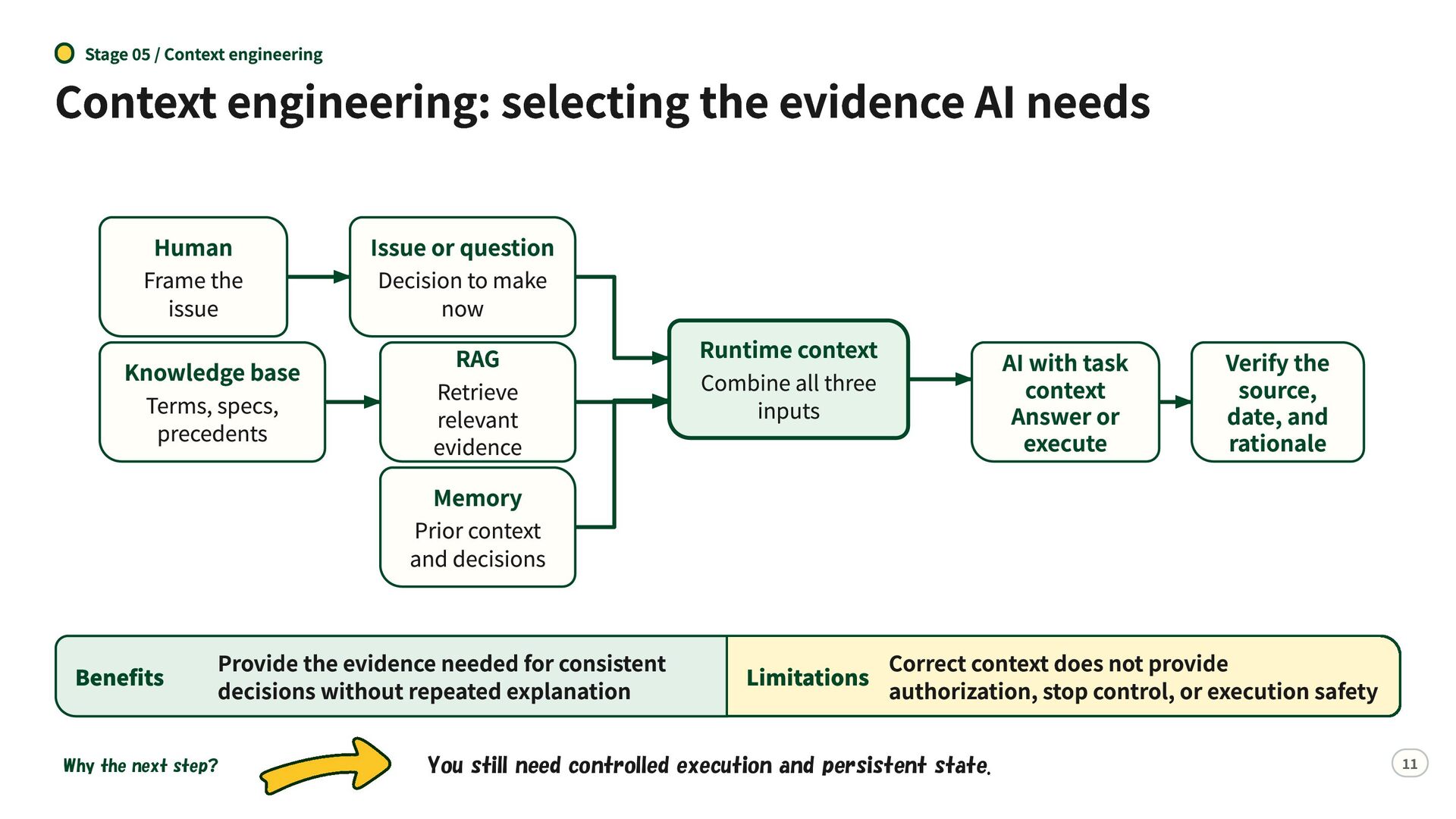
  9. Stage 05 / Context engineering Context engineering: selecting the evidence

    AI needs Human Frame the issue Knowledge base Terms, specs, precedents Benefits Issue or question Decision to make now RAG Retrieve relevant evidence Memory Prior context and decisions Provide the evidence needed for consistent decisions without repeated explanation Why the next step? Runtime context Combine all three inputs AI with task context Answer or execute Verify the source, date, and rationale Correct context does not provide Limitations authorization, stop control, or execution safety You still need controlled execution and persistent state. 11
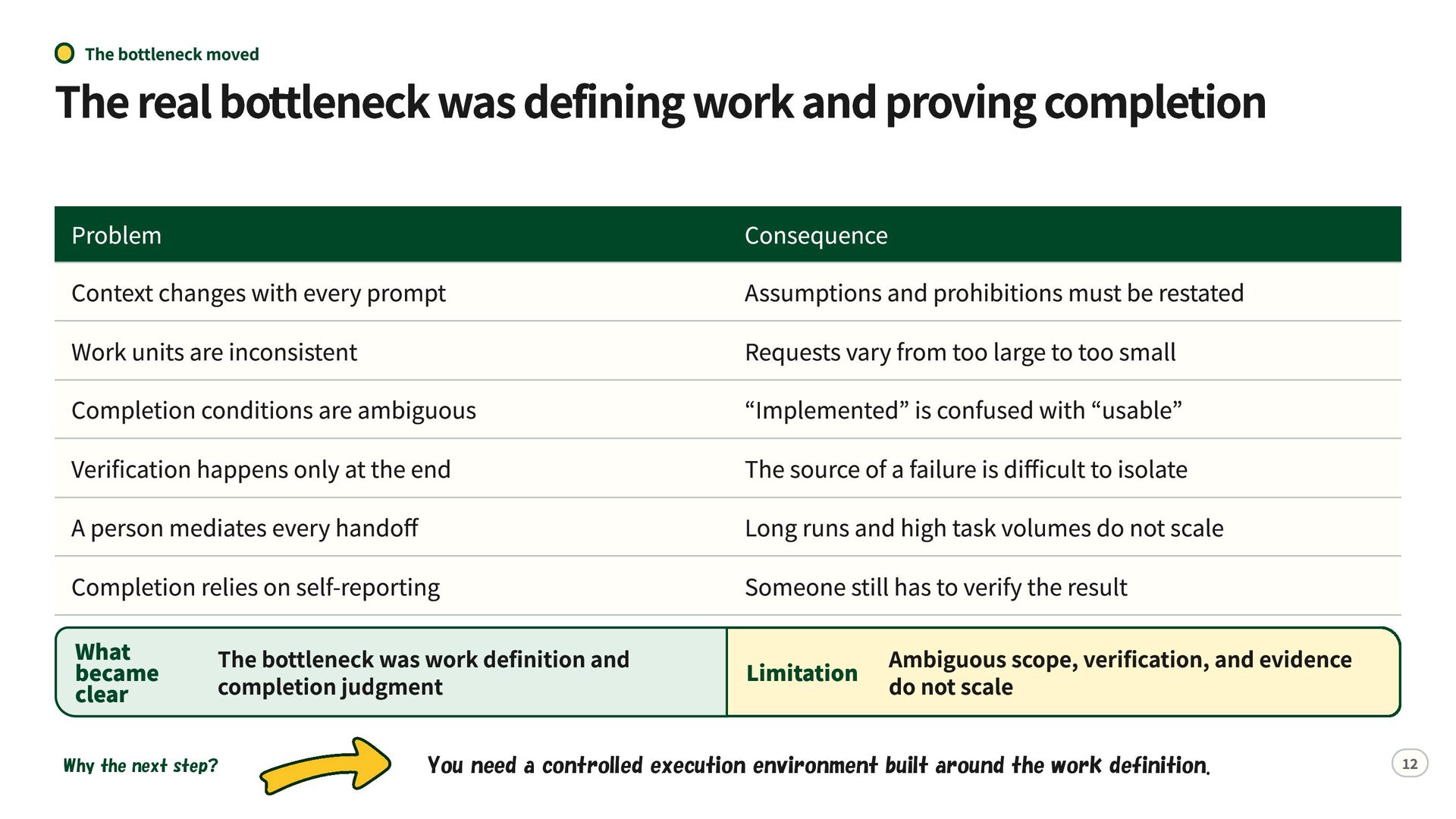
  10. The bottleneck moved The real bottleneck was defining work and

    proving completion Problem Context changes with every prompt Work units are inconsistent Completion conditions are ambiguous Verification happens only at the end A person mediates every handoff Completion relies on self-reporting Consequence Assumptions and prohibitions must be restated Requests vary from too large to too small “Implemented” is confused with “usable” The source of a failure is difficult to isolate Long runs and high task volumes do not scale Someone still has to verify the result What became clear Ambiguous scope, verification, and evidence Limitation do not scale The bottleneck was work definition and completion judgment Why the next step? You need a controlled execution environment built around the work definition. 12
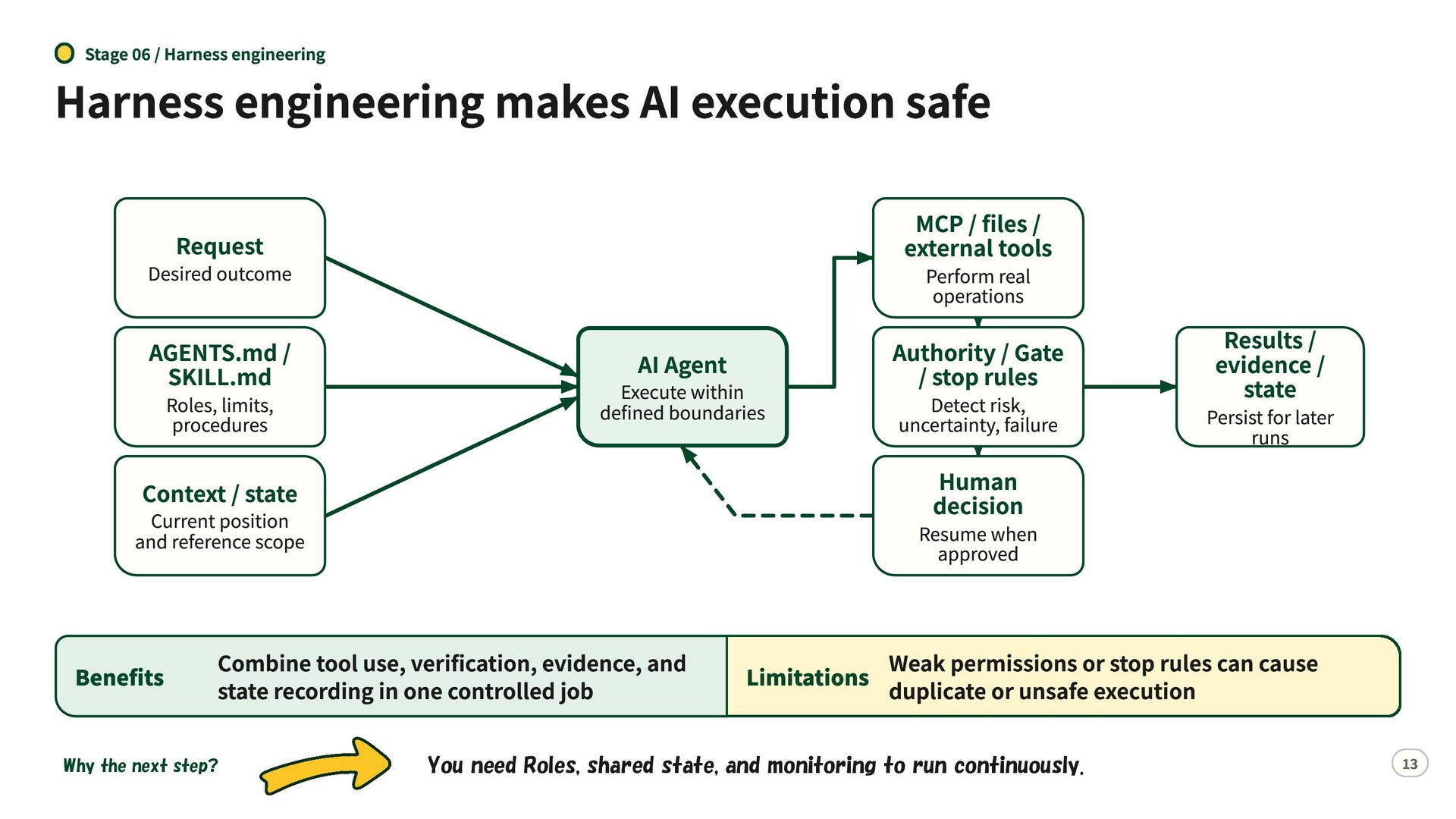
  11. Stage 06 / Harness engineering Harness engineering makes AI execution

    safe Request MCP / files / external tools AGENTS.md / SKILL.md Authority / Gate / stop rules Desired outcome Roles, limits, procedures Perform real operations AI Agent Execute within defined boundaries Human decision Context / state Current position and reference scope Benefits Persist for later runs Resume when approved Combine tool use, verification, evidence, and state recording in one controlled job Why the next step? Detect risk, uncertainty, failure Results / evidence / state Weak permissions or stop rules can cause Limitations duplicate or unsafe execution You need Roles, shared state, and monitoring to run continuously. 13
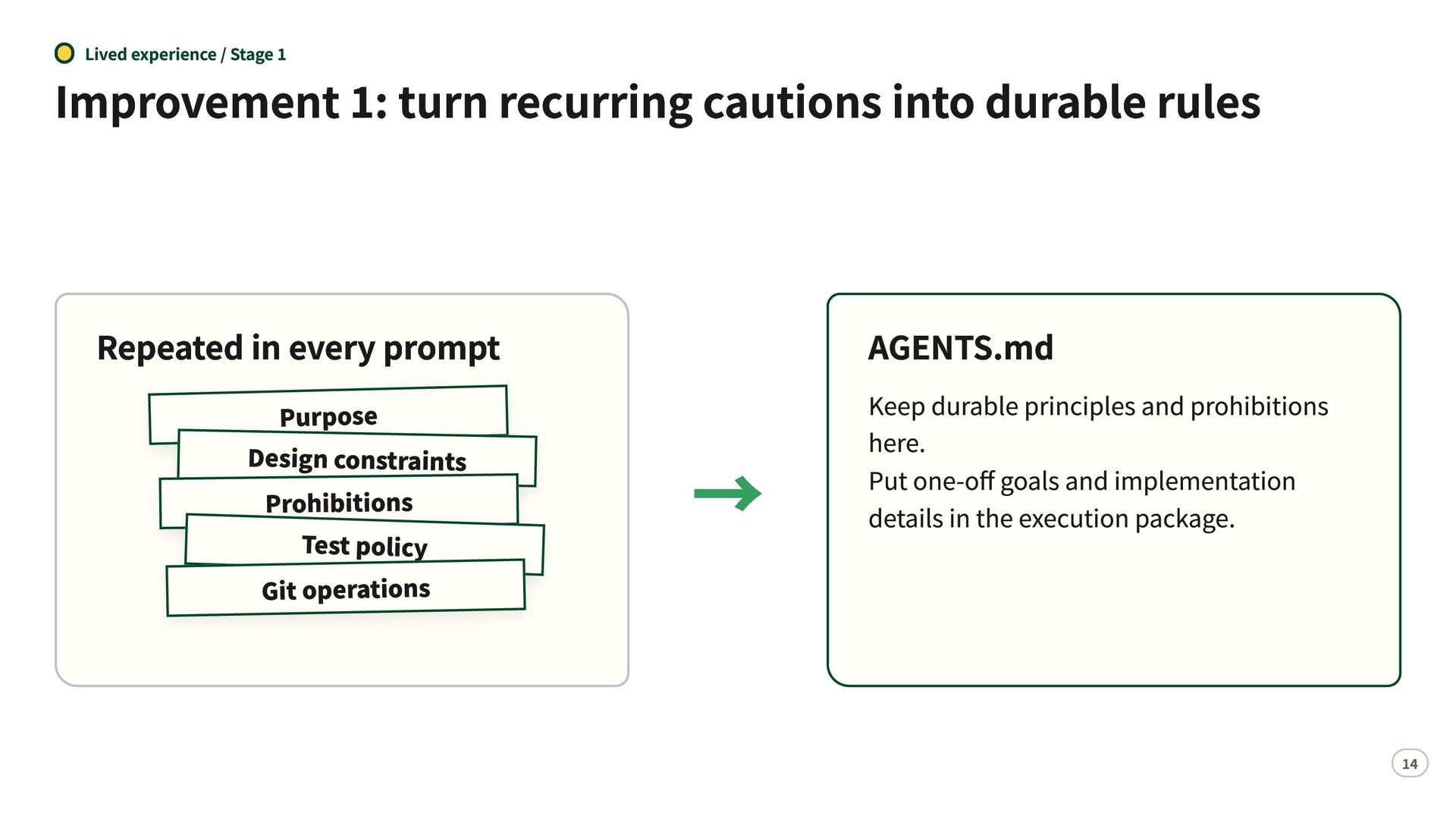
  12. Lived experience / Stage 1 Improvement 1: turn recurring cautions

    into durable rules Repeated in every prompt Purpose Design constraints Prohibitions Test policy Git operations AGENTS.md → Keep durable principles and prohibitions here. Put one-off goals and implementation details in the execution package. 14
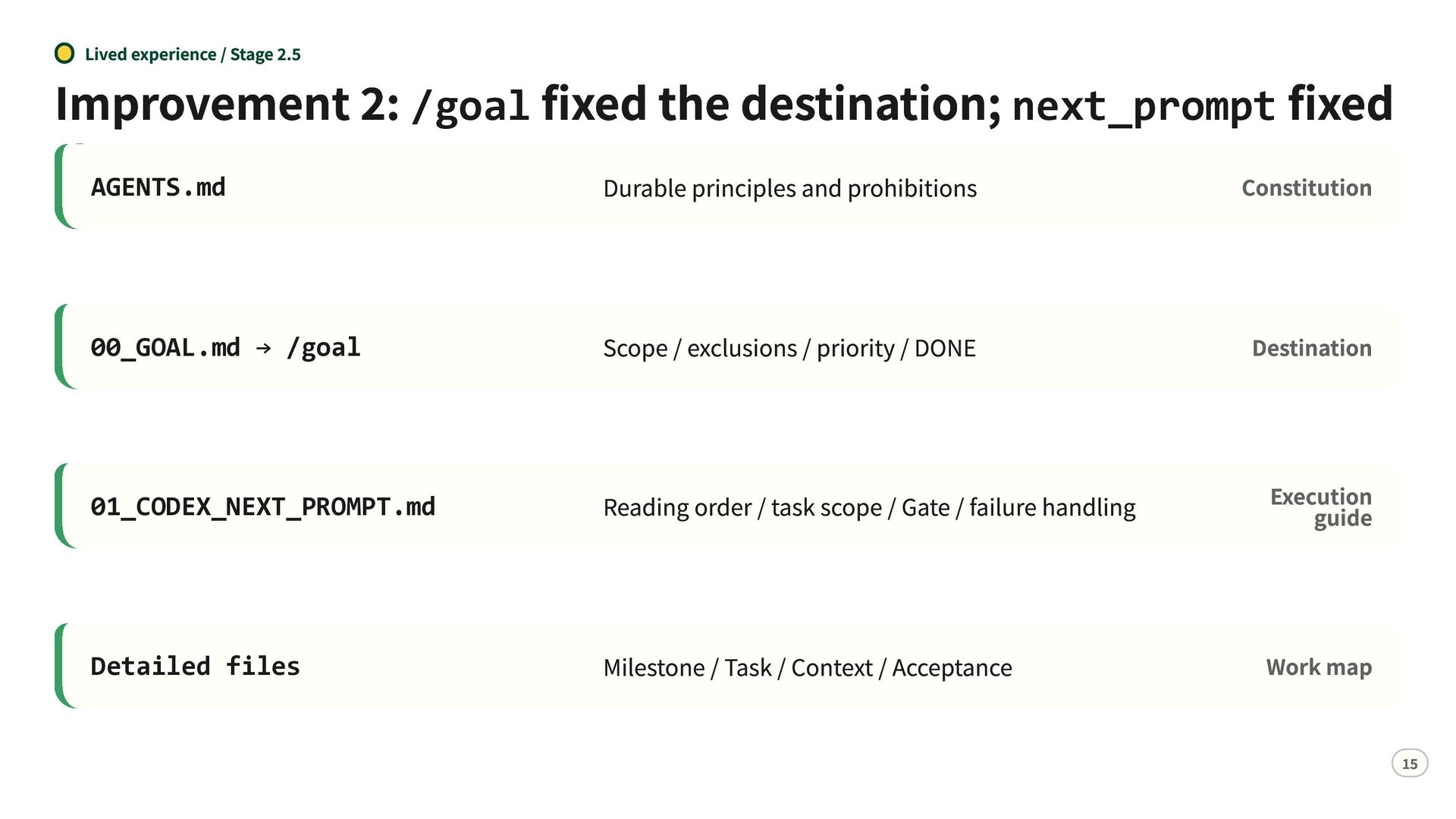
  13. Lived experience / Stage 2.5 Improvement 2: /goal fixed the

    destination; next_prompt fixed the route Constitution Durable principles and prohibitions AGENTS.md 00_GOAL.md → /goal Scope / exclusions / priority / DONE Destination 01_CODEX_NEXT_PROMPT.md Reading order / task scope / Gate / failure handling Execution guide Detailed files Milestone / Task / Context / Acceptance Work map 15
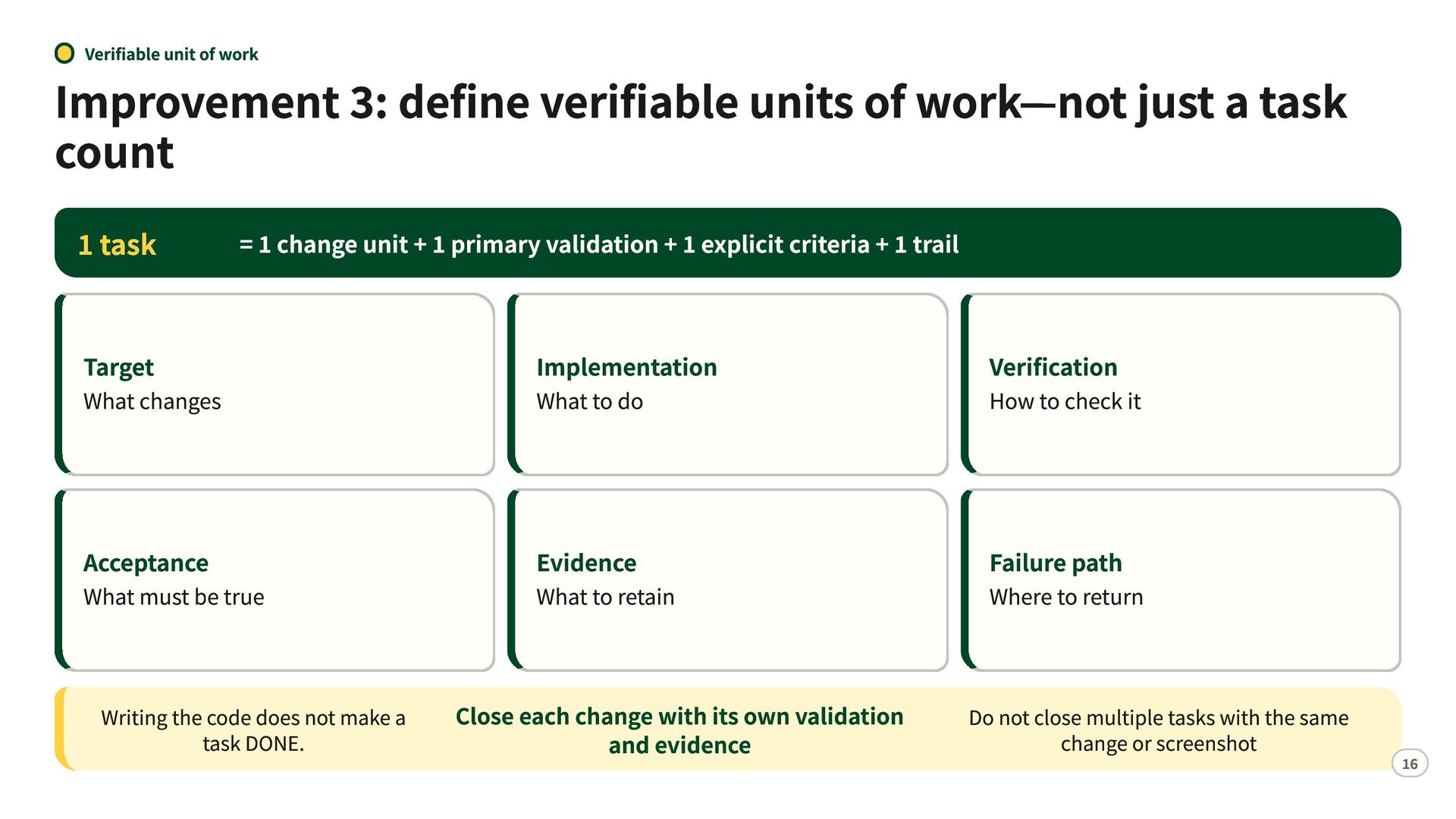
  14. Verifiable unit of work Improvement 3: define verifiable units of

    work—not just a task count 1 task = 1 change unit + 1 primary validation + 1 explicit criteria + 1 trail Target Implementation Verification Acceptance Evidence Failure path What changes What must be true Writing the code does not make a task DONE. What to do What to retain Close each change with its own validation and evidence How to check it Where to return Do not close multiple tasks with the same change or screenshot 16
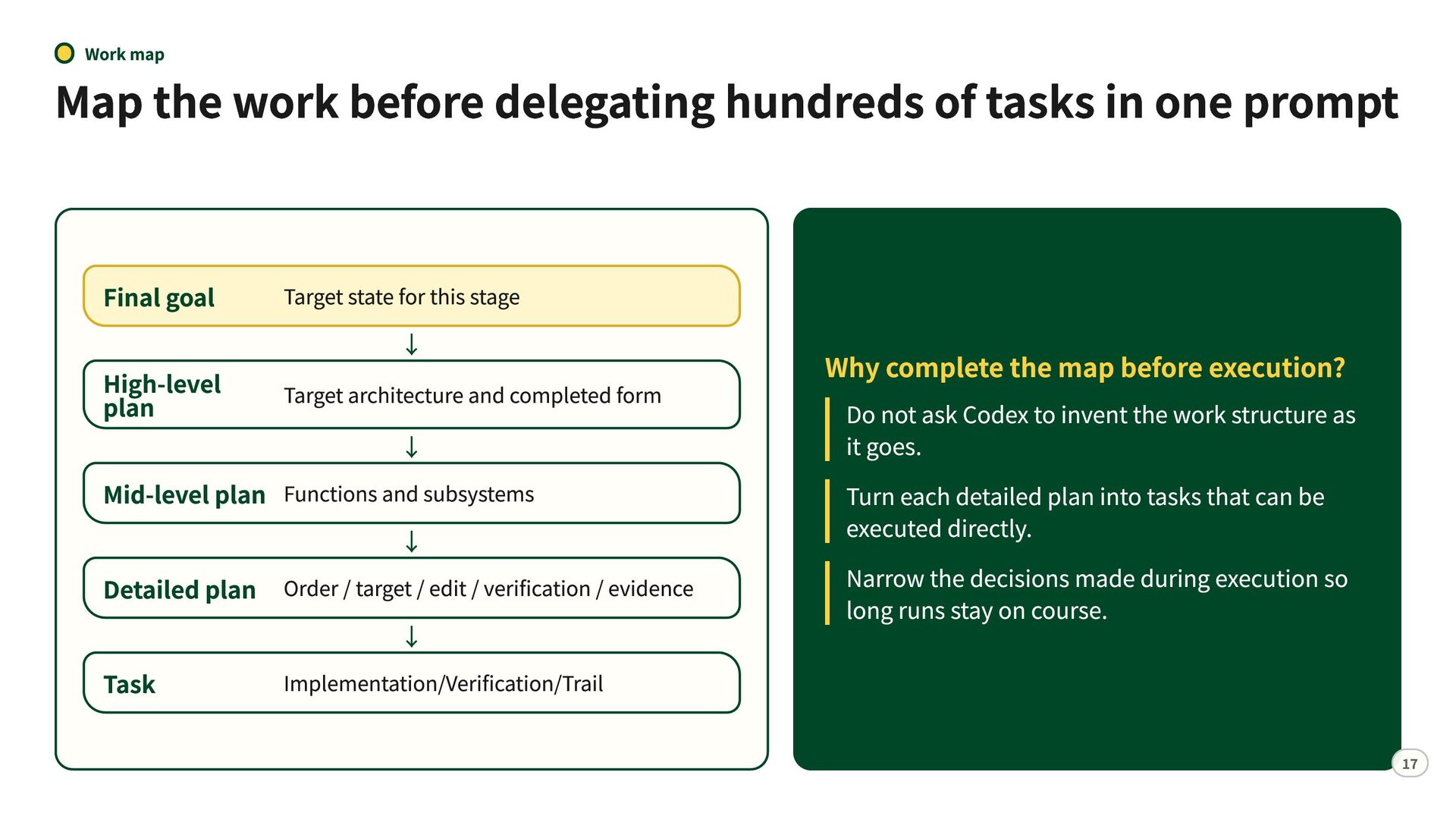
  15. Work map Map the work before delegating hundreds of tasks

    in one prompt Final goal High-level plan Target state for this stage ↓ Target architecture and completed form ↓ Mid-level plan Functions and subsystems ↓ Detailed plan Order / target / edit / verification / evidence ↓ Implementation/Verification/Trail Task Why complete the map before execution? Do not ask Codex to invent the work structure as it goes. Turn each detailed plan into tasks that can be executed directly. Narrow the decisions made during execution so long runs stay on course. 17
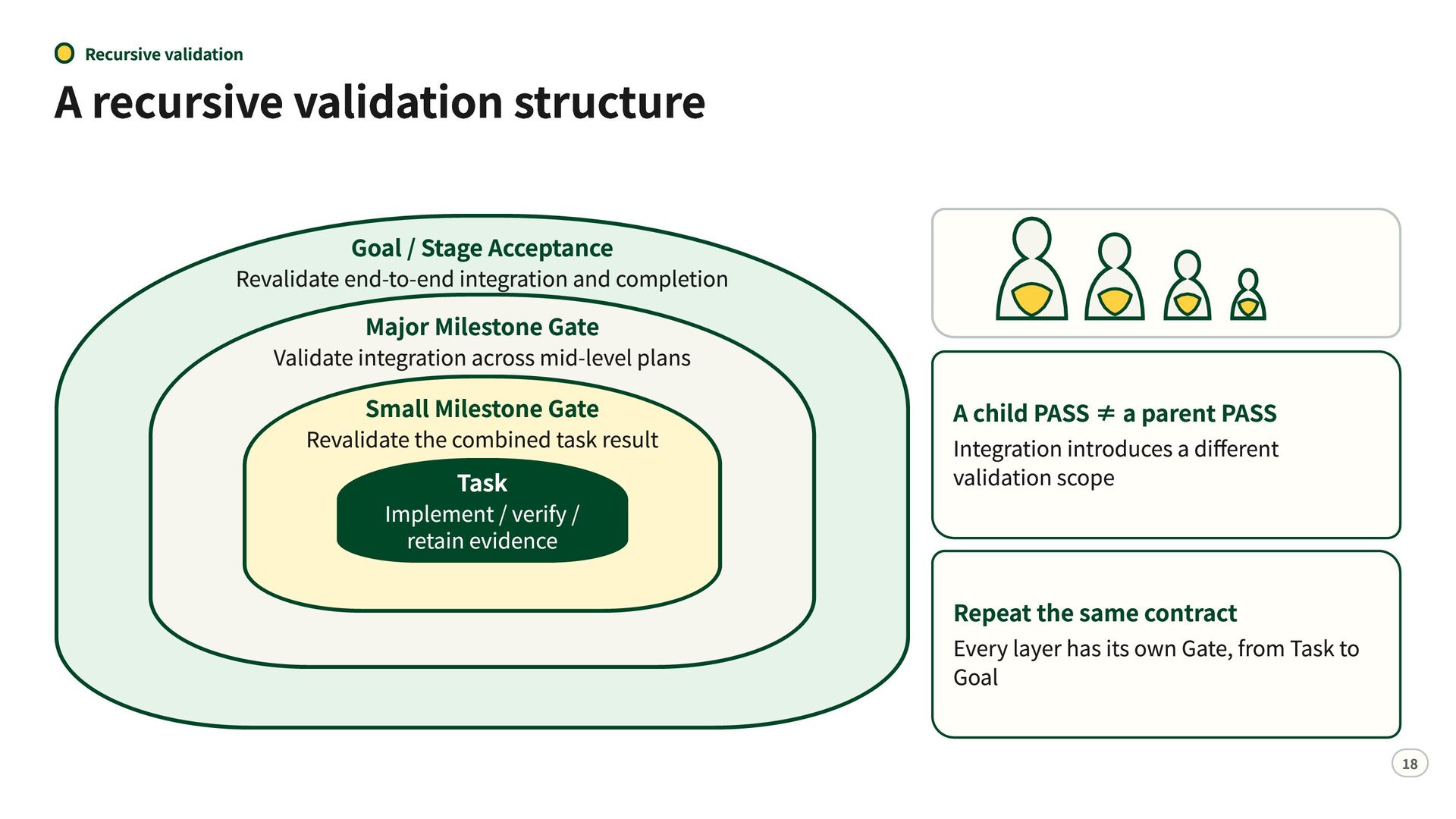
  16. Recursive validation A recursive validation structure Goal / Stage Acceptance

    Revalidate end-to-end integration and completion Major Milestone Gate Validate integration across mid-level plans Small Milestone Gate Revalidate the combined task result Task Implement / verify / retain evidence A child PASS ≠ a parent PASS Integration introduces a different validation scope Repeat the same contract Every layer has its own Gate, from Task to Goal 18
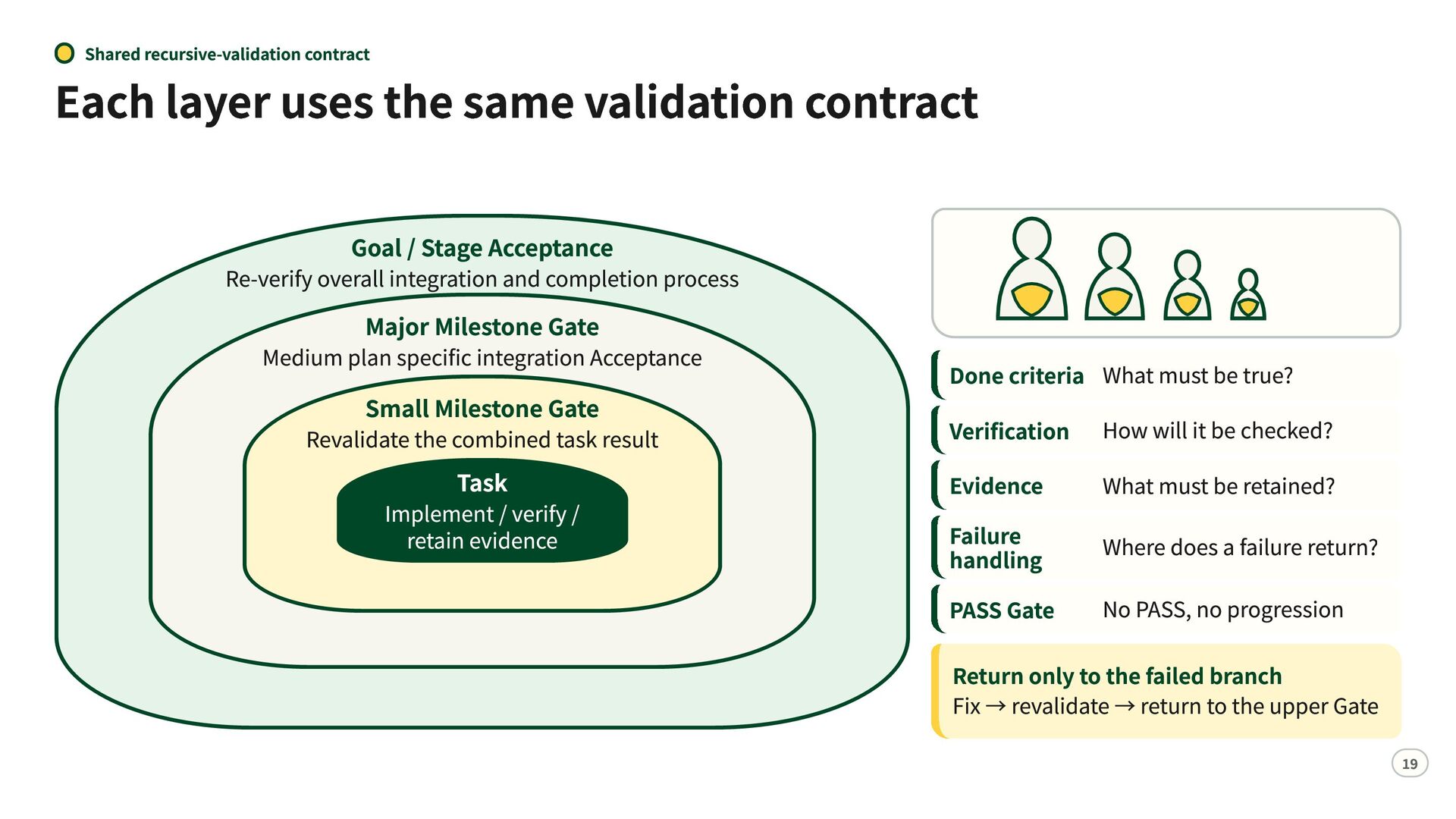
  17. Shared recursive-validation contract Each layer uses the same validation contract

    Goal / Stage Acceptance Re-verify overall integration and completion process Major Milestone Gate Medium plan specific integration Acceptance Small Milestone Gate Revalidate the combined task result Task Implement / verify / retain evidence Done criteria What must be true? Verification How will it be checked? Evidence What must be retained? Failure handling Where does a failure return? PASS Gate No PASS, no progression Return only to the failed branch Fix → revalidate → return to the upper Gate 19
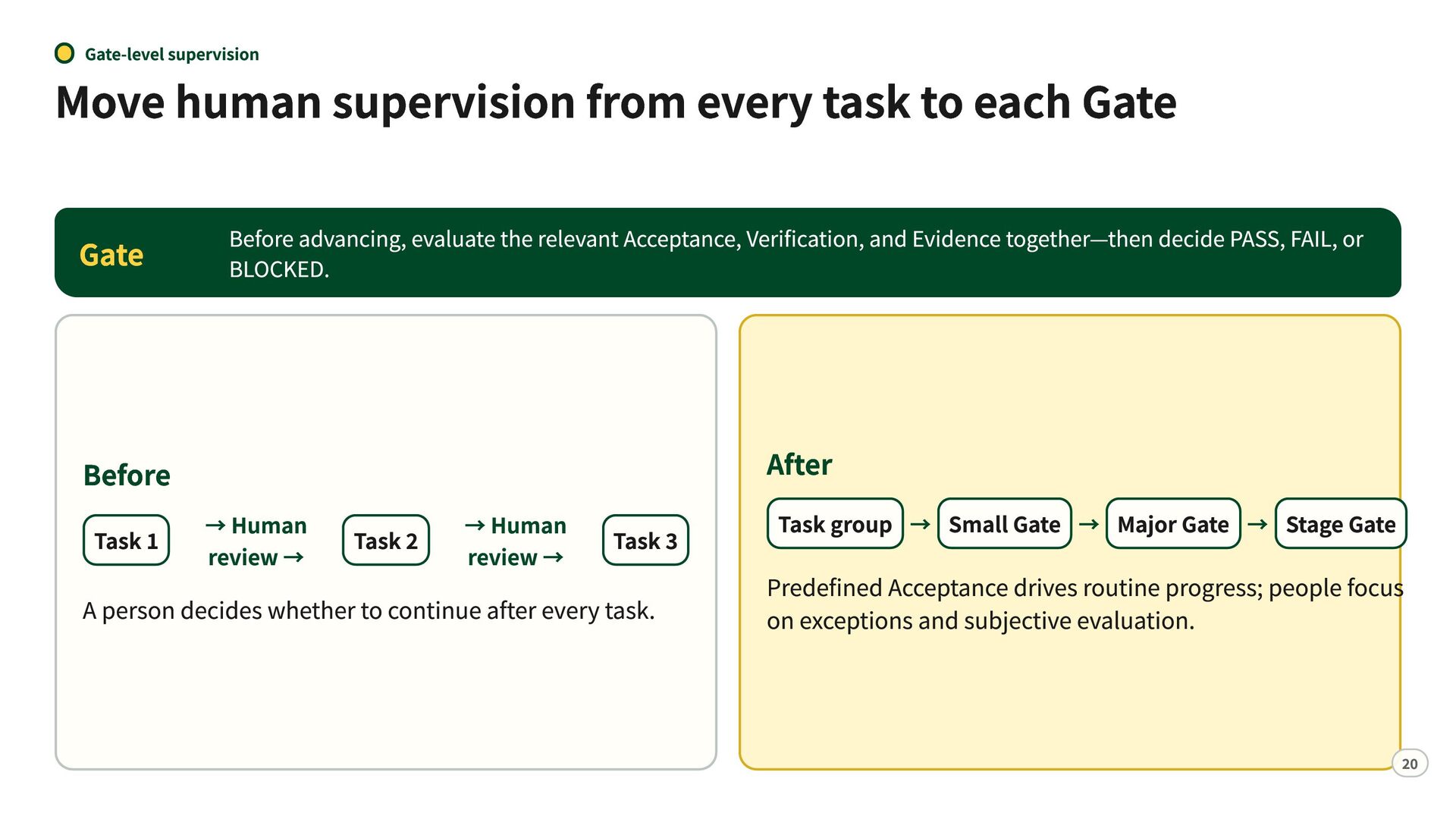
  18. Gate-level supervision Move human supervision from every task to each

    Gate Gate Before advancing, evaluate the relevant Acceptance, Verification, and Evidence together—then decide PASS, FAIL, or BLOCKED. Before After Task 1 → Human review → Task 2 → Human review → Task 3 A person decides whether to continue after every task. Task group → Small Gate → Major Gate → Stage Gate Predefined Acceptance drives routine progress; people focus on exceptions and subjective evaluation. 20
  19. State navigation Track progress explicitly during long runs [TASK 042]

    [START] Record the start States to record → Implementation / verification Perform the work and primary check → [TASK 042] [DONE] Record verified completion START DONE IN PROGRESS ON HOLD BLOCKED Progress / milestone / context export → Expose the current → position to people and systems Resume from the next confirmed point Continue across session boundaries Automation now covers progress tracking and handoff— not just code generation. 21
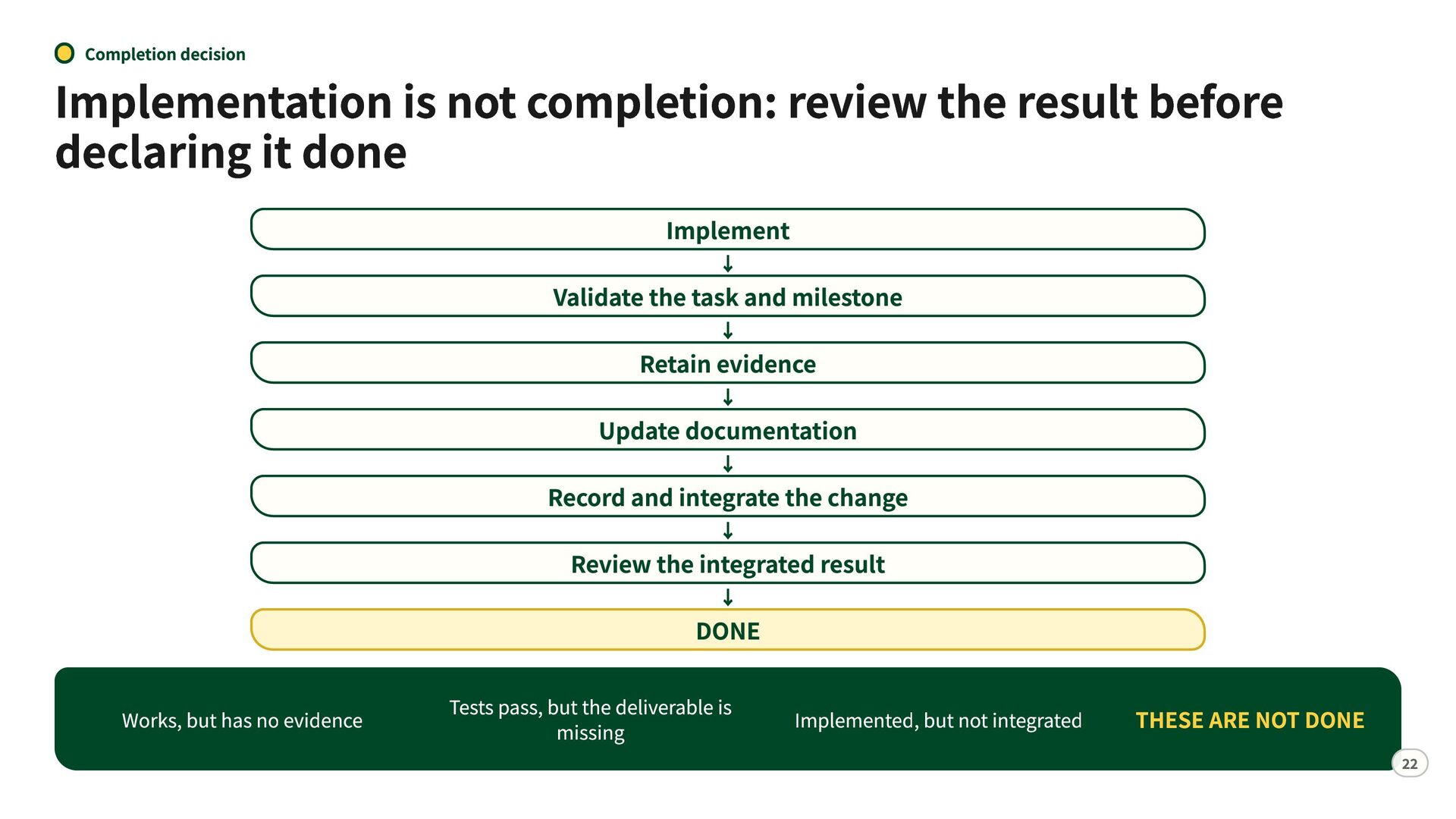
  20. Completion decision Implementation is not completion: review the result before

    declaring it done Implement ↓ Validate the task and milestone ↓ Retain evidence ↓ Update documentation ↓ Record and integrate the change ↓ Review the integrated result ↓ DONE Works, but has no evidence Tests pass, but the deliverable is missing Implemented, but not integrated THESE ARE NOT DONE 22
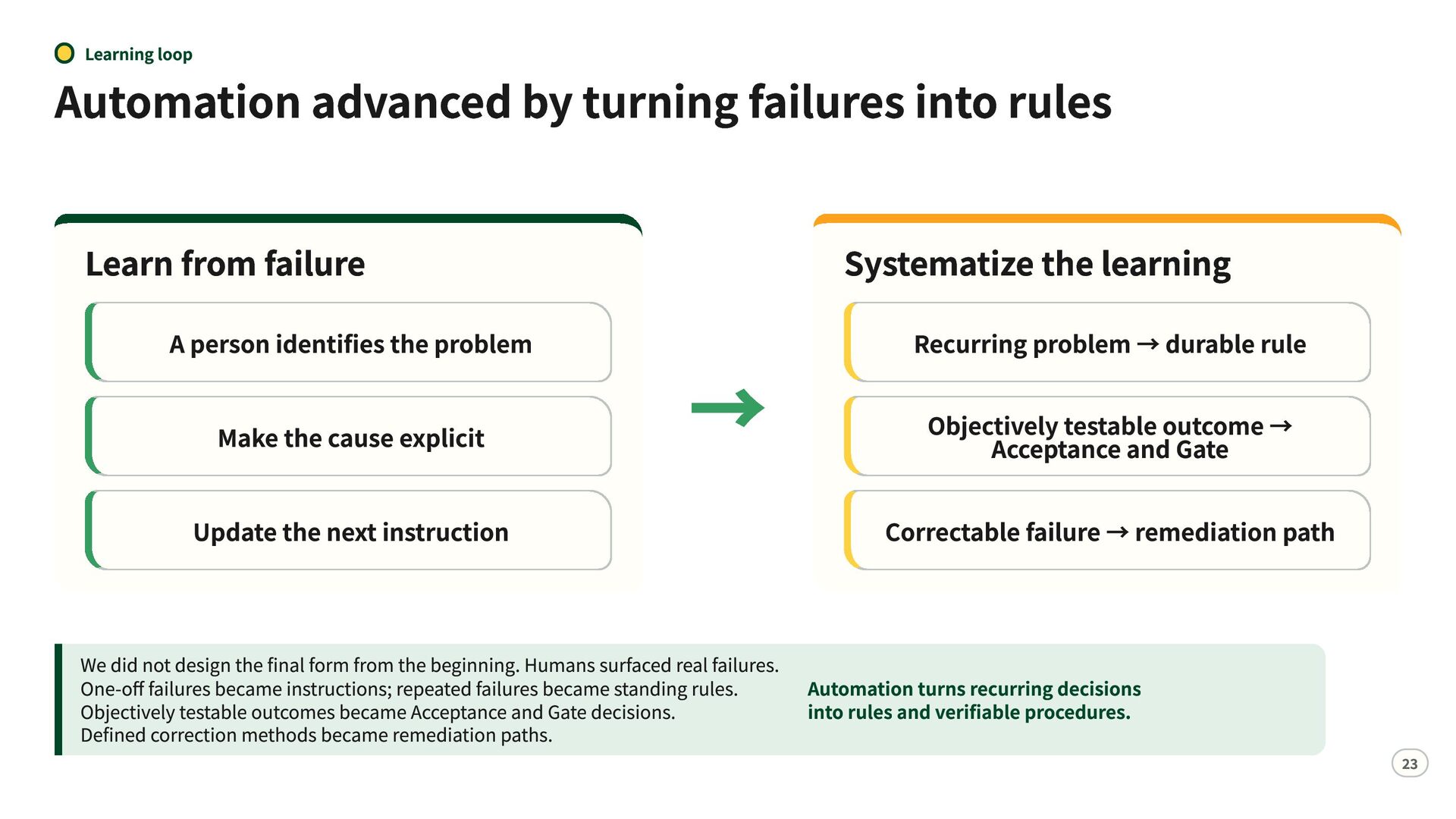
  21. Learning loop Automation advanced by turning failures into rules Learn

    from failure A person identifies the problem Make the cause explicit Update the next instruction → Systematize the learning Recurring problem → durable rule Objectively testable outcome → Acceptance and Gate Correctable failure → remediation path We did not design the final form from the beginning. Humans surfaced real failures. One-off failures became instructions; repeated failures became standing rules. Automation turns recurring decisions Objectively testable outcomes became Acceptance and Gate decisions. into rules and verifiable procedures. Defined correction methods became remediation paths. 23
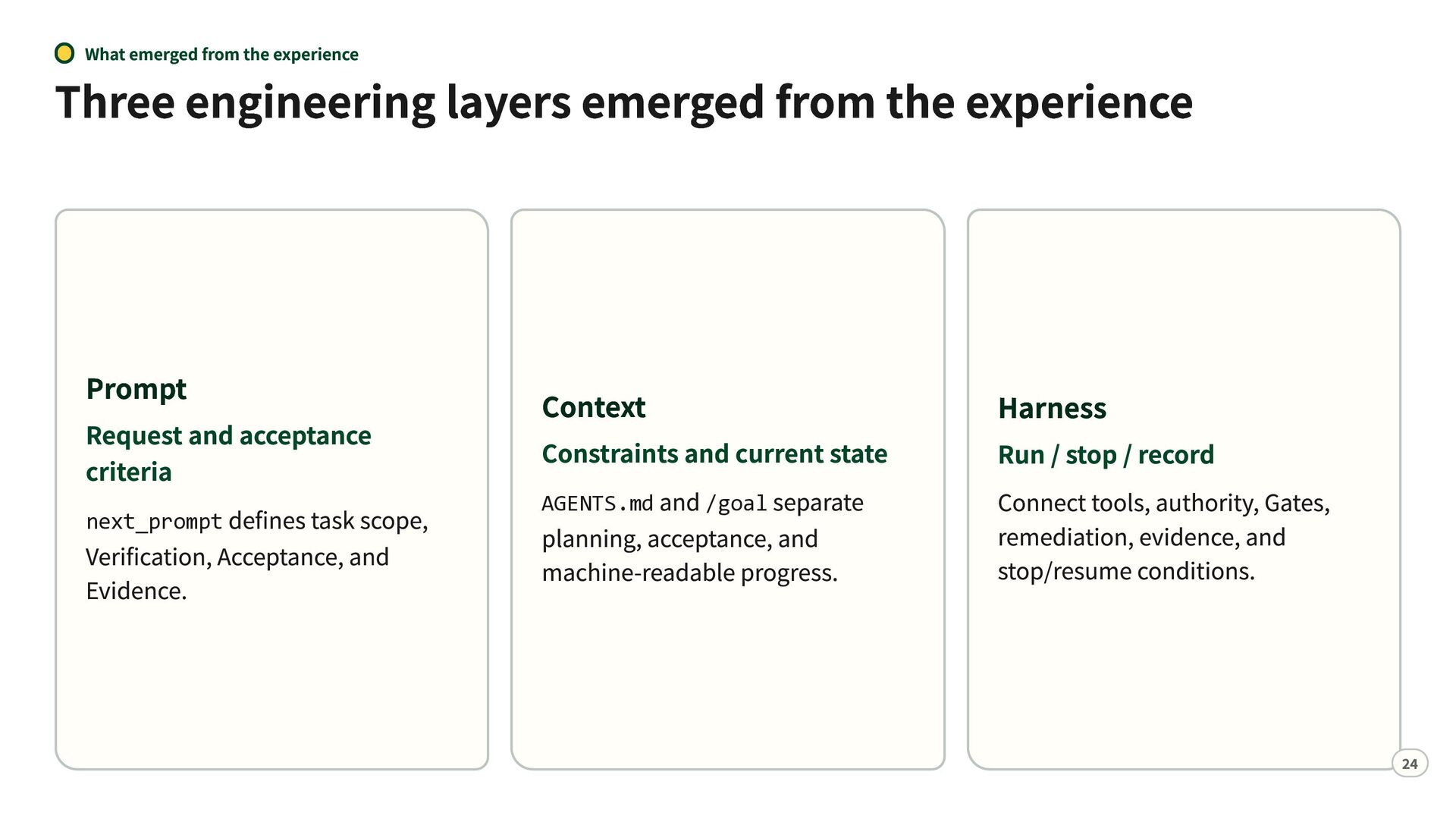
  22. What emerged from the experience Three engineering layers emerged from

    the experience Prompt Request and acceptance criteria defines task scope, Verification, Acceptance, and Evidence. next_prompt Context Harness and /goal separate planning, acceptance, and machine-readable progress. Connect tools, authority, Gates, remediation, evidence, and stop/resume conditions. Constraints and current state AGENTS.md Run / stop / record 24
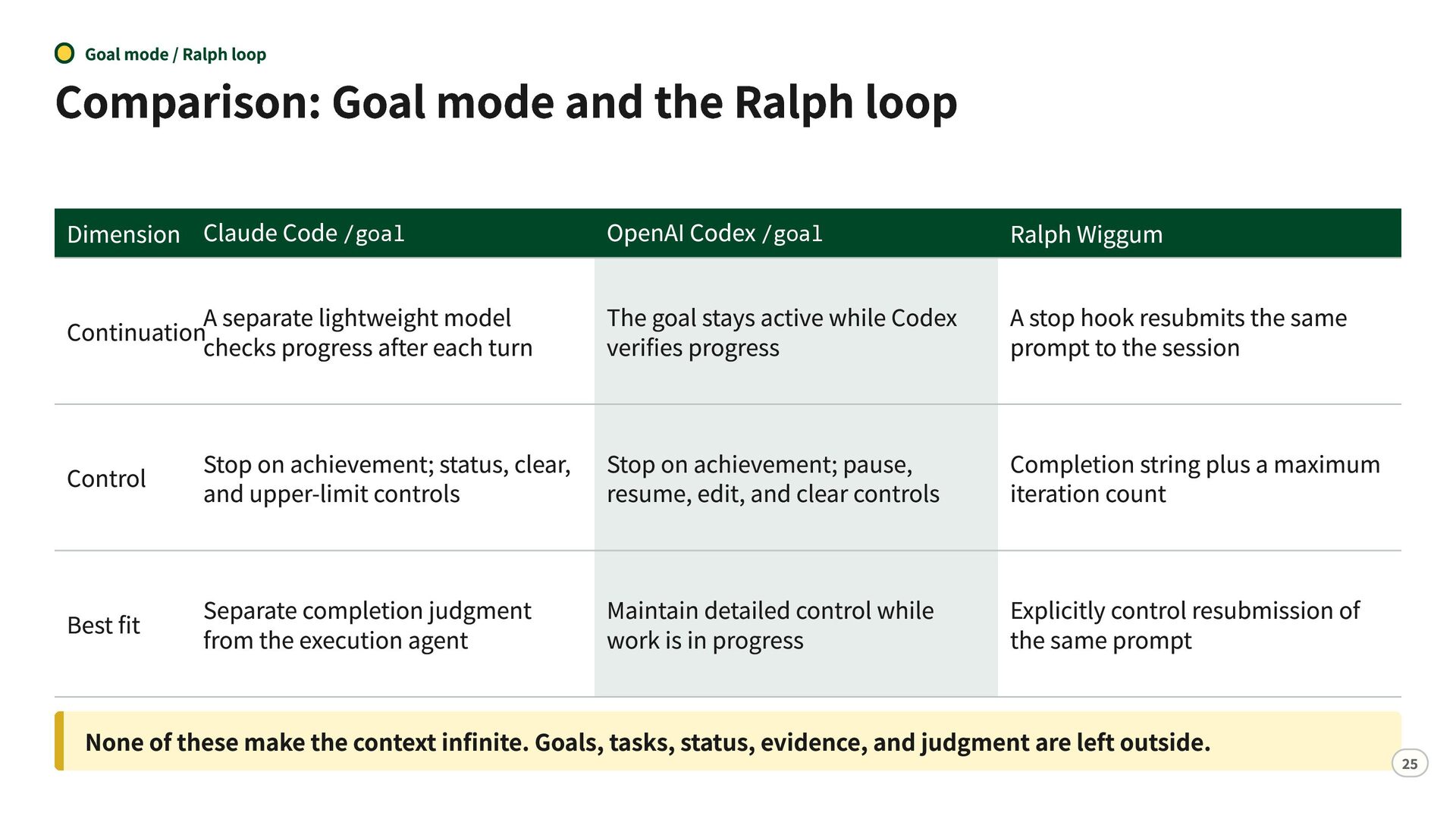
  23. Goal mode / Ralph loop Comparison: Goal mode and the

    Ralph loop Dimension Claude Code /goal OpenAI Codex /goal Ralph Wiggum A separate lightweight model Continuationchecks progress after each turn The goal stays active while Codex verifies progress A stop hook resubmits the same prompt to the session Control Stop on achievement; status, clear, Stop on achievement; pause, and upper-limit controls resume, edit, and clear controls Completion string plus a maximum iteration count Best fit Separate completion judgment from the execution agent Explicitly control resubmission of the same prompt Maintain detailed control while work is in progress None of these make the context infinite. Goals, tasks, status, evidence, and judgment are left outside. 25
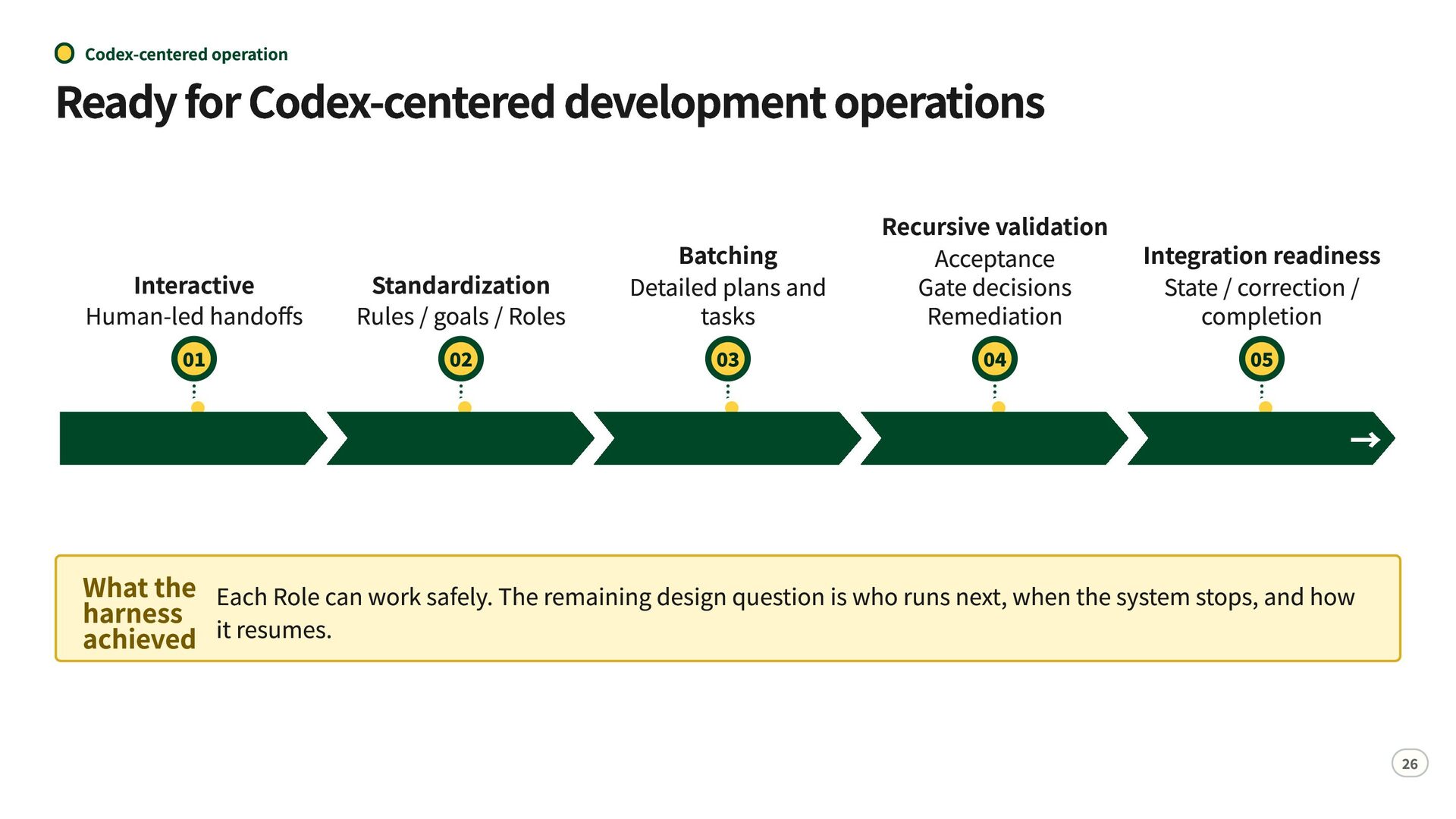
  24. Codex-centered operation Ready for Codex-centered development operations Interactive Human-led handoffs

    01 Standardization Rules / goals / Roles 02 Batching Detailed plans and tasks 03 Recursive validation Integration readiness Acceptance Gate decisions State / correction / Remediation completion 04 05 → What the Each Role can work safely. The remaining design question is who runs next, when the system stops, and how harness achieved it resumes. 26
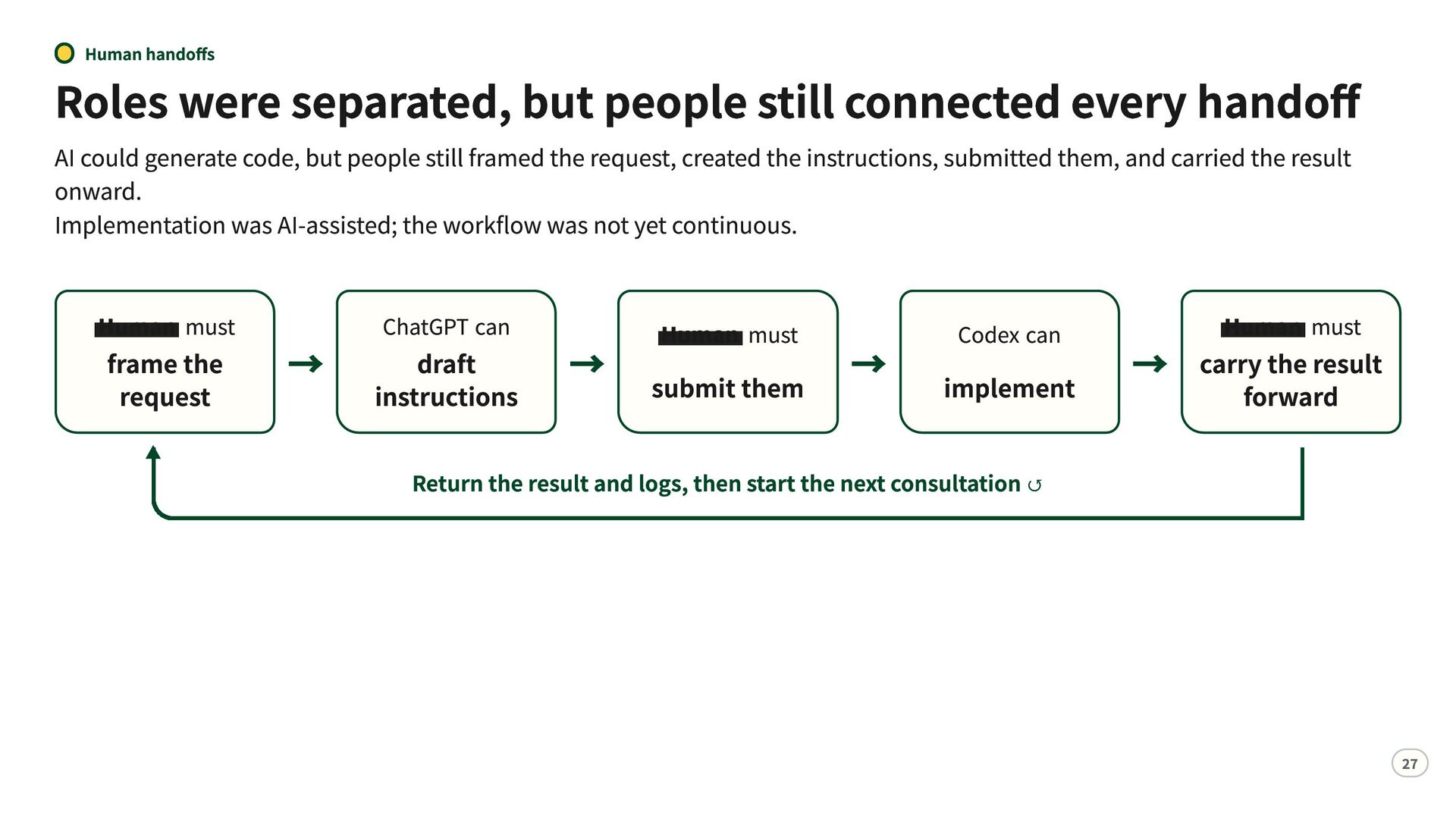
  25. Human handoffs Roles were separated, but people still connected every

    handoff AI could generate code, but people still framed the request, created the instructions, submitted them, and carried the result onward. Implementation was AI-assisted; the workflow was not yet continuous. Human must frame the request ChatGPT can Human must draft → instructions → submit them → Codex can implement Human must the result → carryforward Return the result and logs, then start the next consultation ↺ 27
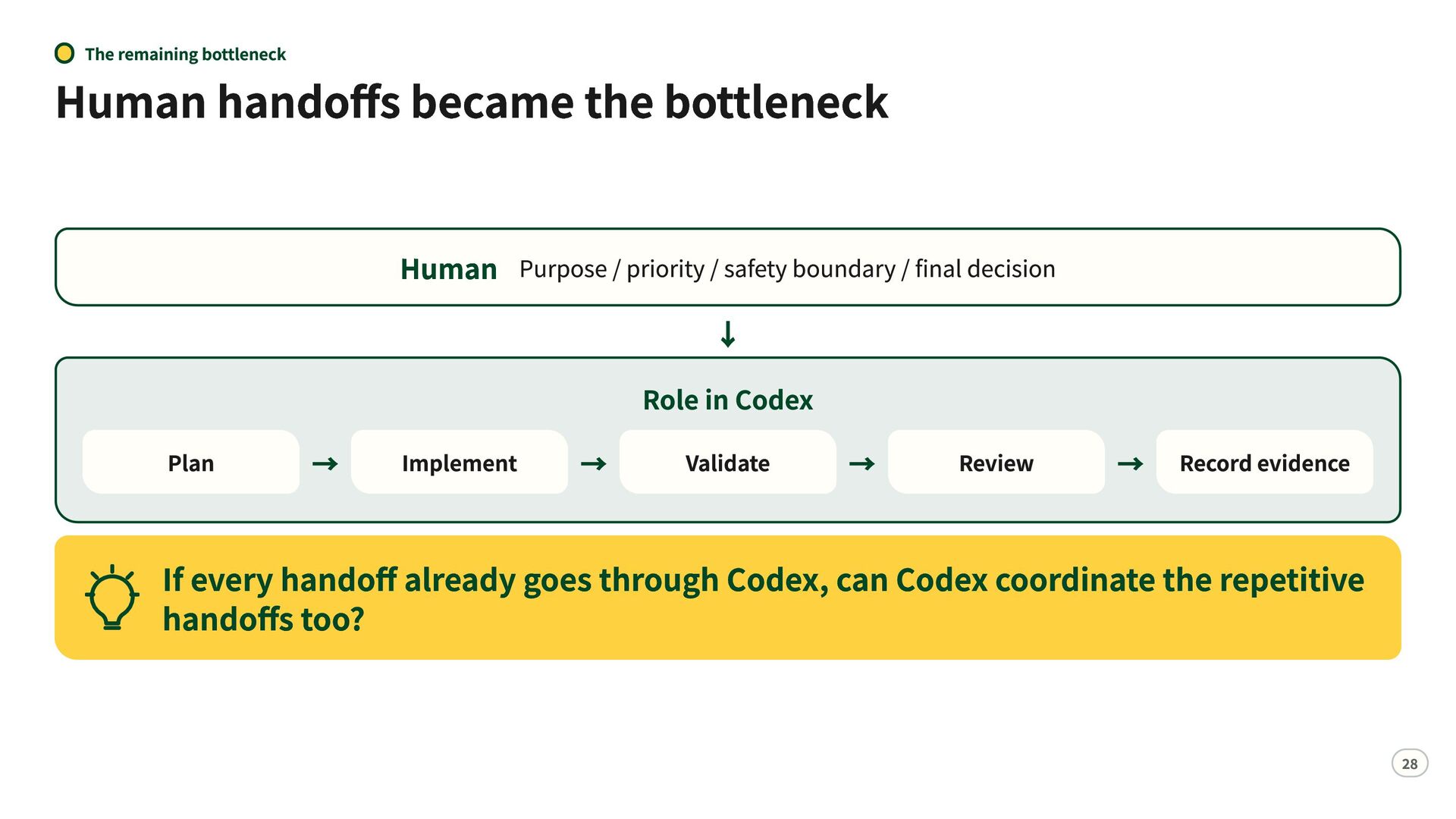
  26. The remaining bottleneck Human handoffs became the bottleneck Human Purpose

    / priority / safety boundary / final decision ↓ Plan → Implement → Role in Codex Validate → Review → Record evidence If every handoff already goes through Codex, can Codex coordinate the repetitive handoffs too? 28
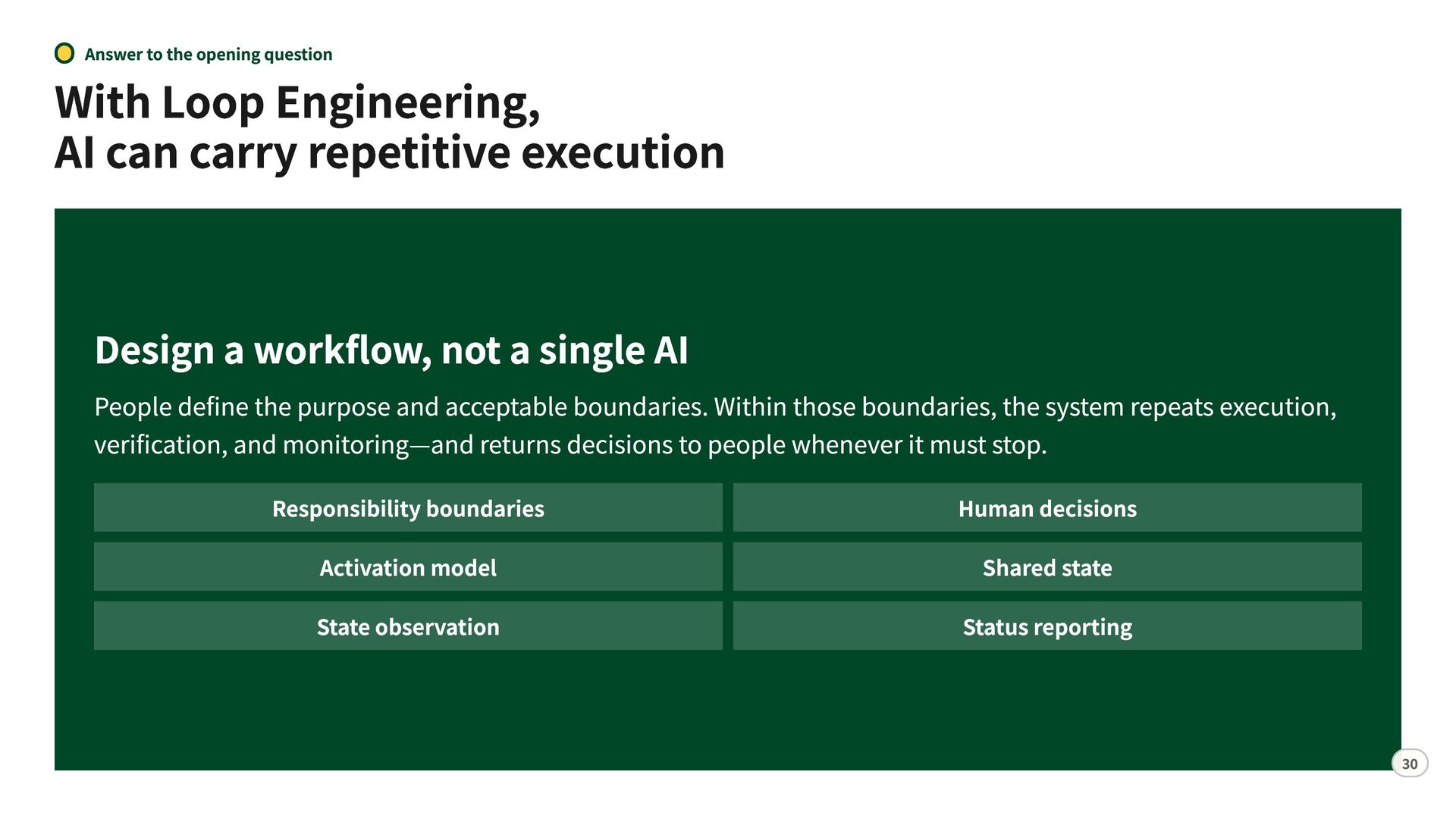
  27. Answer to the opening question With Loop Engineering, AI can

    carry repetitive execution Design a workflow, not a single AI People define the purpose and acceptable boundaries. Within those boundaries, the system repeats execution, verification, and monitoring—and returns decisions to people whenever it must stop. Responsibility boundaries Activation model State observation Human decisions Shared state Status reporting 30
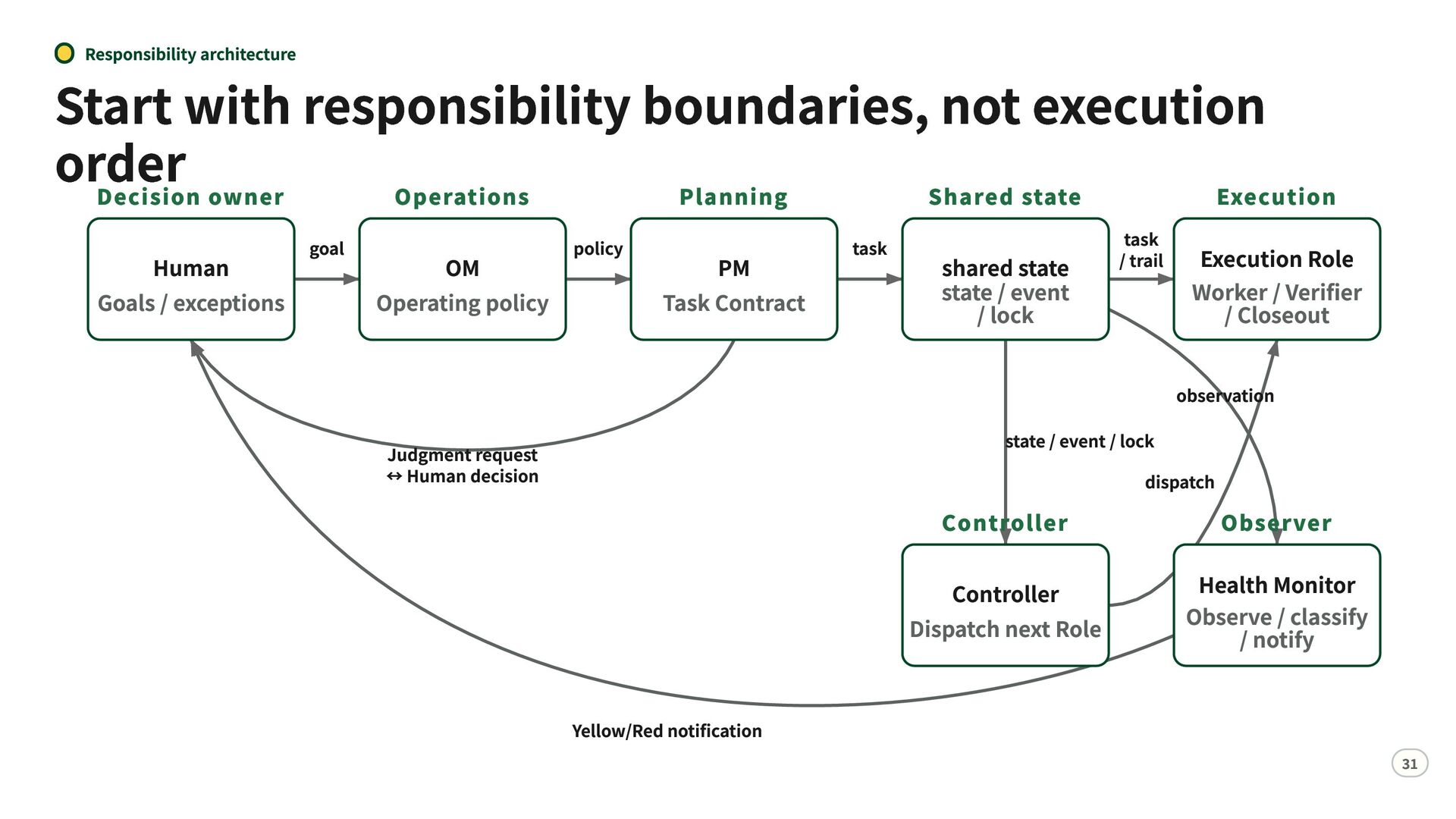
  28. Responsibility architecture Start with responsibility boundaries, not execution order Decision

    owner Operations Planning Shared state Execution Human Goals / exceptions goal OM Operating policy policy PM Task Contract task shared state state / event / lock task / trail Execution Role Worker / Verifier / Closeout observation state / event / lock dispatch Judgment request ↔ Human decision Controller Controller Dispatch next Role Yellow/Red notification Observer Health Monitor Observe / classify / notify 31
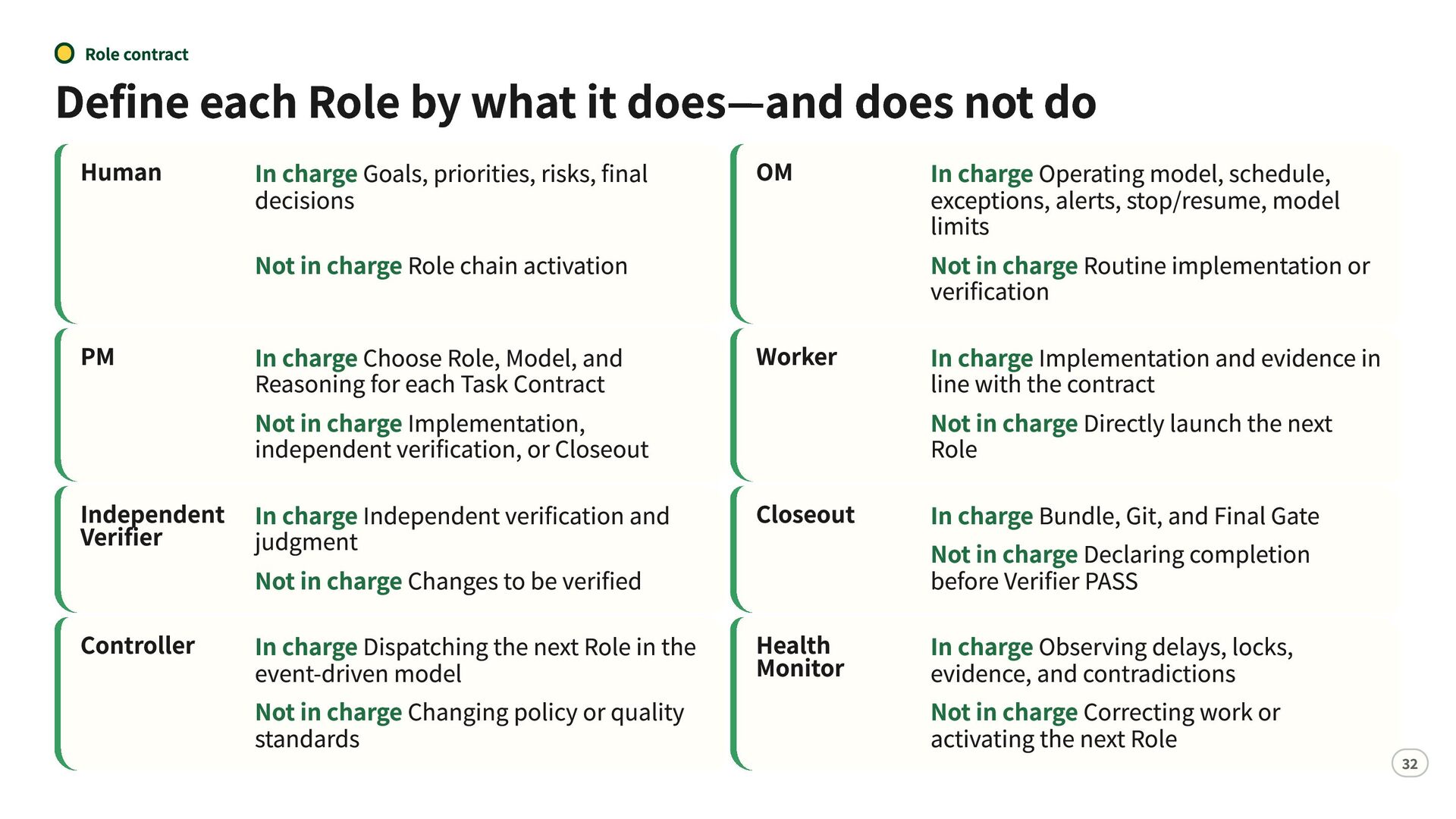
  29. Role contract Define each Role by what it does—and does

    not do Human PM In charge Goals, priorities, risks, final decisions Not in charge Role chain activation In charge Choose Role, Model, and Reasoning for each Task Contract Not in charge Implementation, independent verification, or Closeout Independent In charge Independent verification and Verifier judgment Not in charge Changes to be verified Controller In charge Dispatching the next Role in the event-driven model Not in charge Changing policy or quality standards OM Worker Closeout Health Monitor In charge Operating model, schedule, exceptions, alerts, stop/resume, model limits Not in charge Routine implementation or verification In charge Implementation and evidence in line with the contract Not in charge Directly launch the next Role In charge Bundle, Git, and Final Gate Not in charge Declaring completion before Verifier PASS In charge Observing delays, locks, evidence, and contradictions Not in charge Correcting work or activating the next Role 32
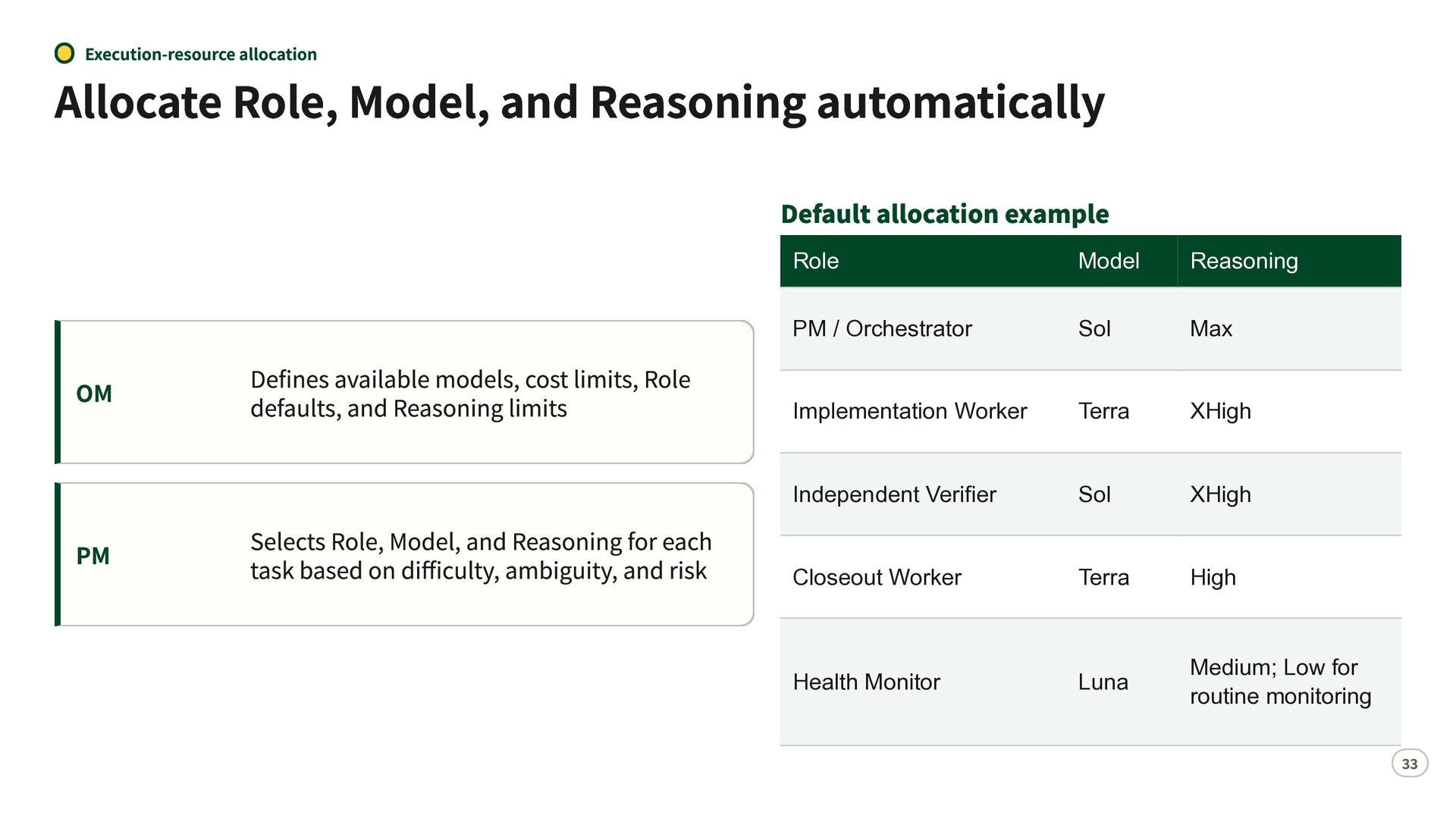
  30. Execution-resource allocation Allocate Role, Model, and Reasoning automatically Default allocation

    example OM PM Defines available models, cost limits, Role defaults, and Reasoning limits Selects Role, Model, and Reasoning for each task based on difficulty, ambiguity, and risk Role Model Reasoning PM / Orchestrator Sol Max Implementation Worker Terra XHigh Independent Verifier Sol XHigh Closeout Worker Terra High Luna Medium; Low for routine monitoring Health Monitor 33
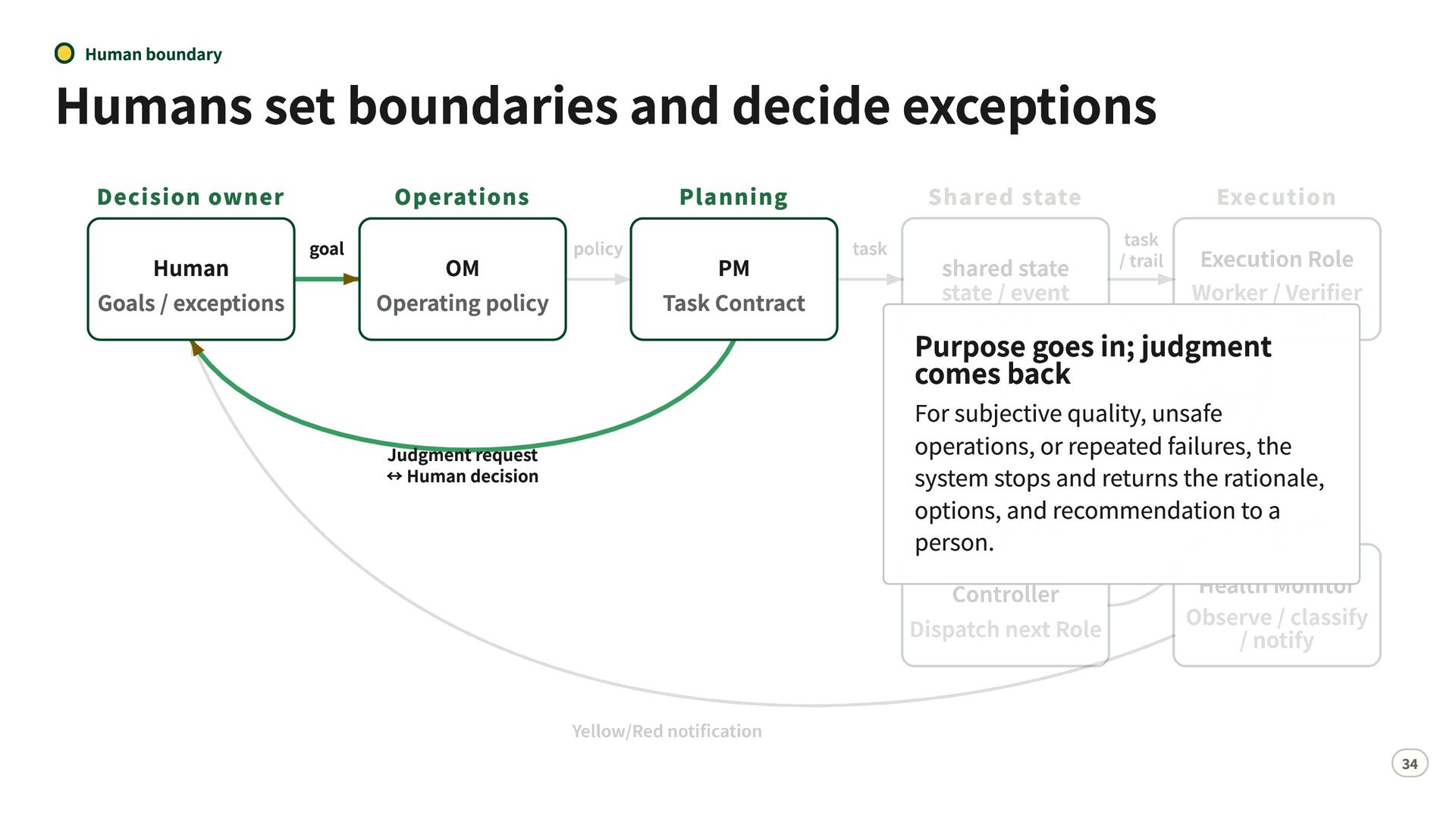
  31. Human boundary Humans set boundaries and decide exceptions Decision owner

    Human Goals / exceptions goal Operations Planning OM Operating policy PM Task Contract Judgment request ↔ Human decision Purpose goes in; judgment comes back For subjective quality, unsafe operations, or repeated failures, the system stops and returns the rationale, options, and recommendation to a person. 34
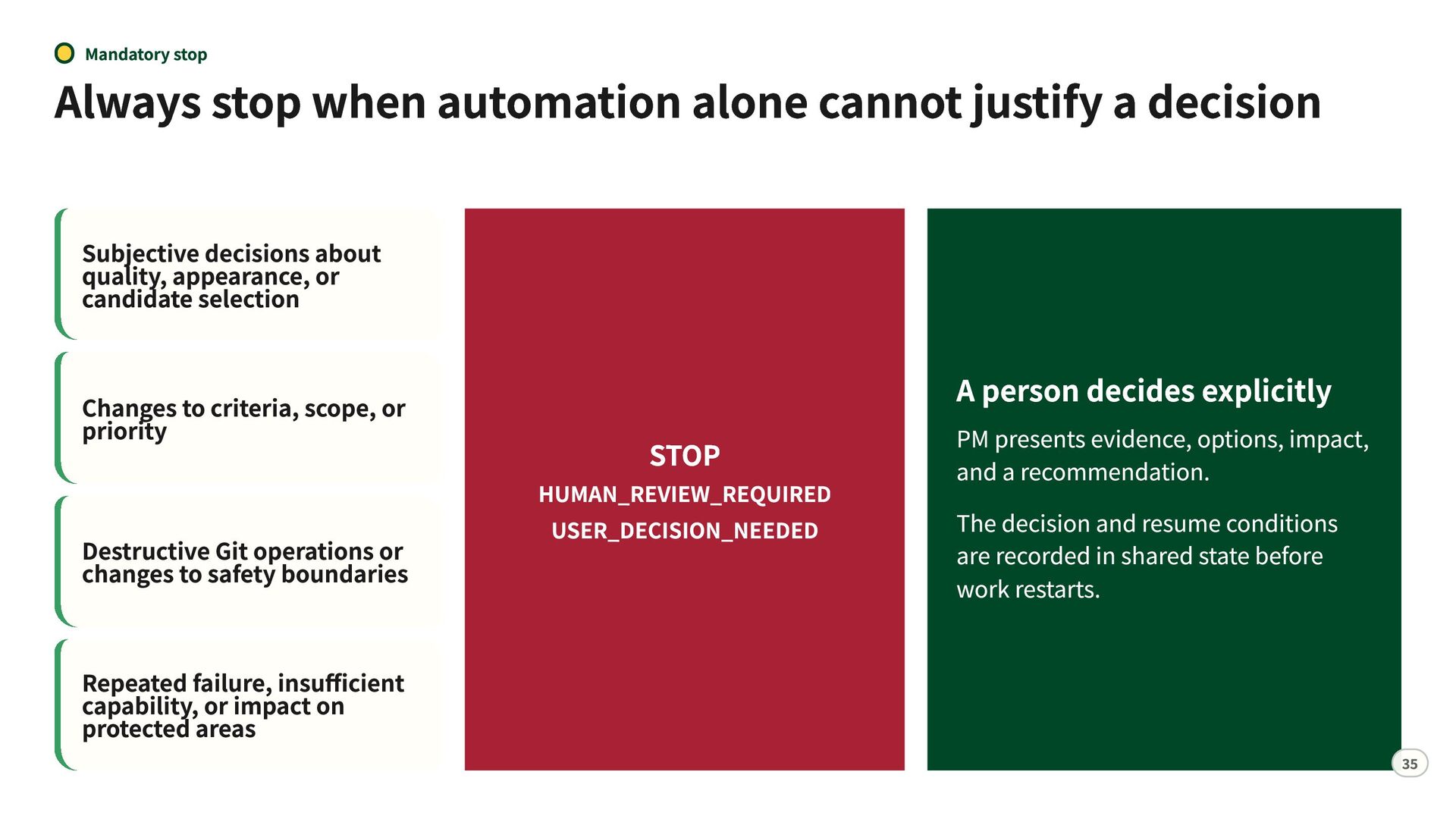
  32. Mandatory stop Always stop when automation alone cannot justify a

    decision Subjective decisions about quality, appearance, or candidate selection Changes to criteria, scope, or priority Destructive Git operations or changes to safety boundaries Repeated failure, insufficient capability, or impact on protected areas STOP HUMAN_REVIEW_REQUIRED USER_DECISION_NEEDED A person decides explicitly PM presents evidence, options, impact, and a recommendation. The decision and resume conditions are recorded in shared state before work restarts. 35
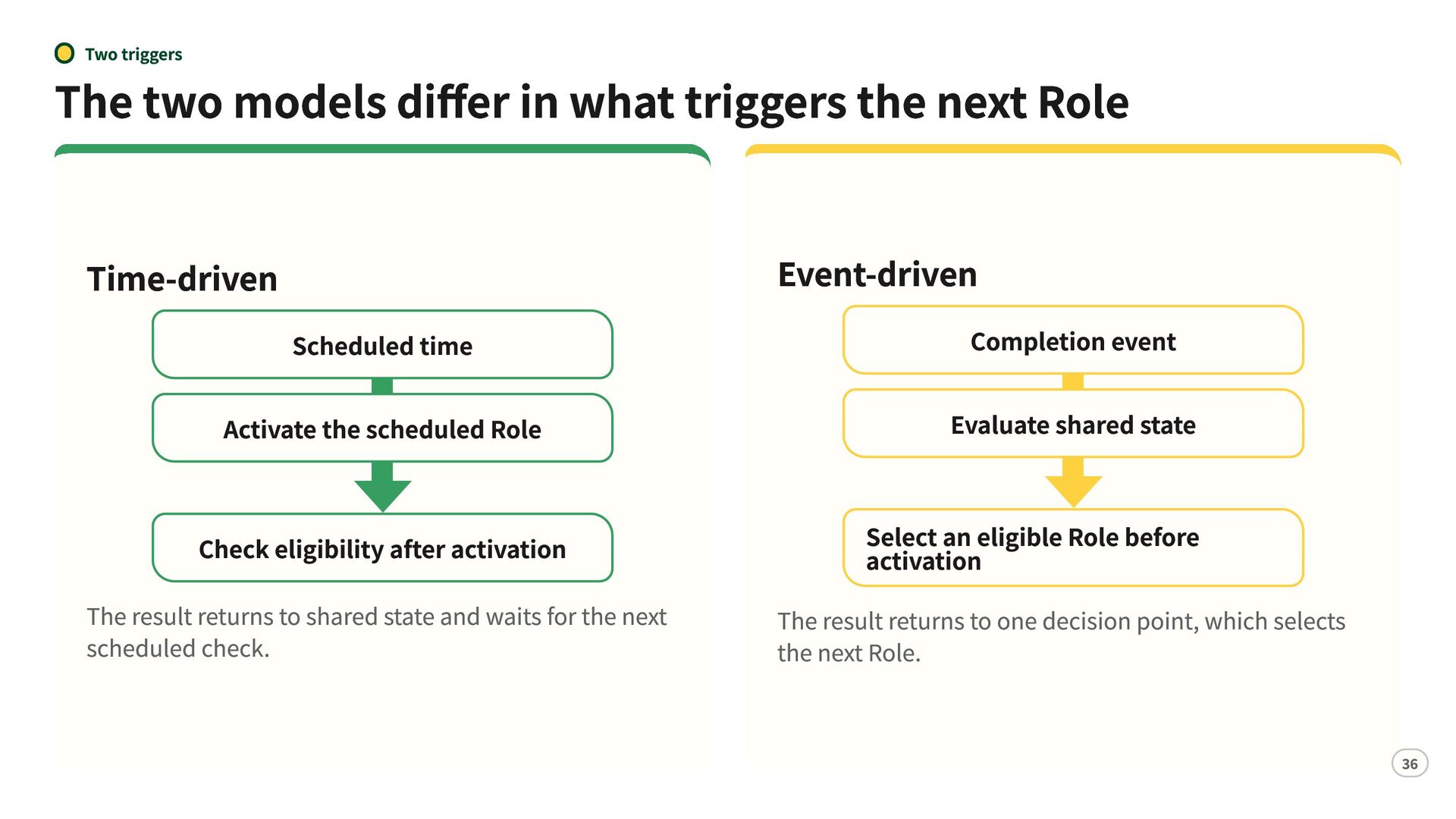
  33. Two triggers The two models differ in what triggers the

    next Role Time-driven Event-driven Scheduled time Completion event Activate the scheduled Role Evaluate shared state Check eligibility after activation The result returns to shared state and waits for the next scheduled check. Select an eligible Role before activation The result returns to one decision point, which selects the next Role. 36
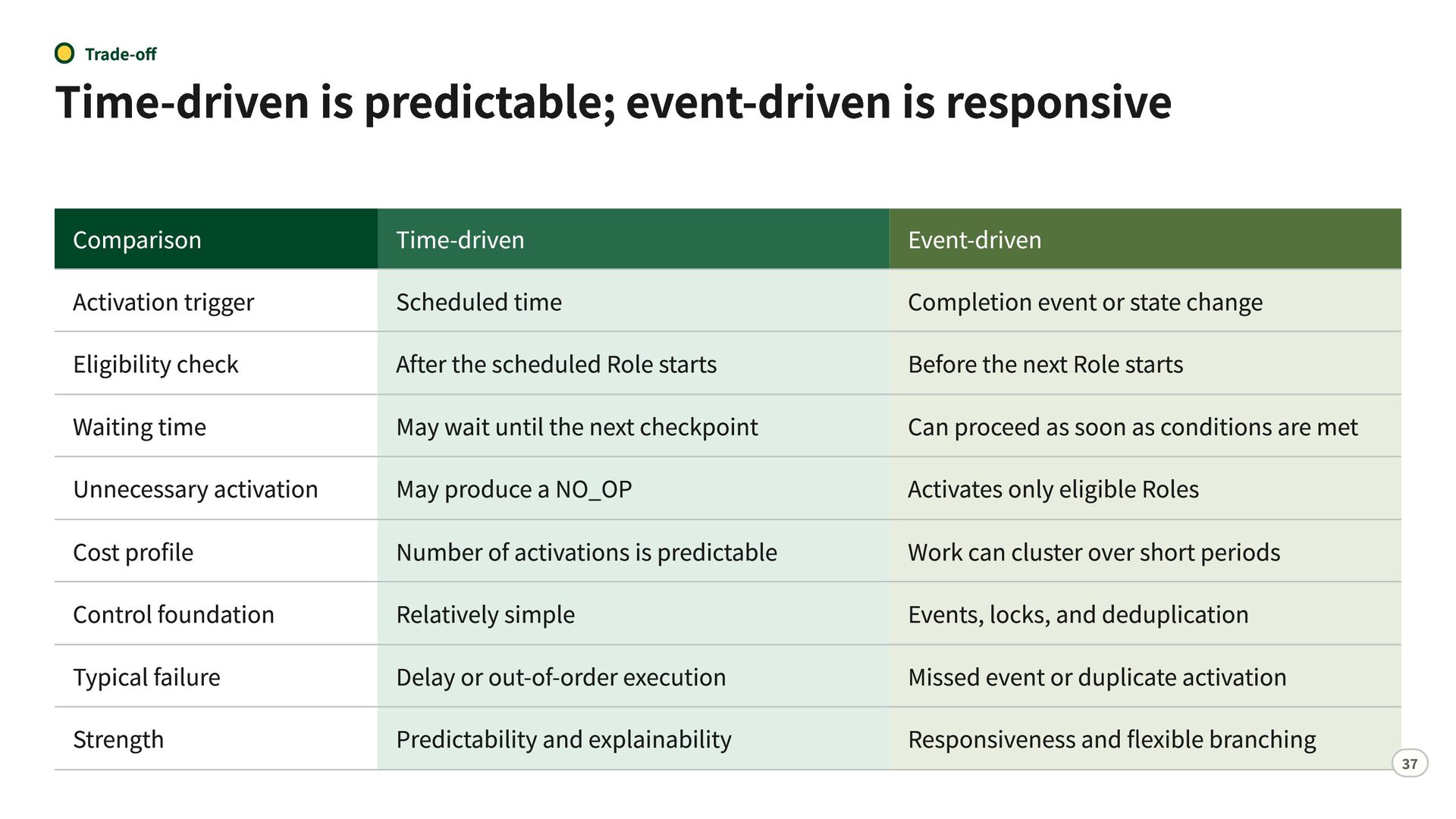
  34. Trade-off Time-driven is predictable; event-driven is responsive Comparison Activation trigger

    Eligibility check Waiting time Unnecessary activation Cost profile Control foundation Typical failure Strength Time-driven Scheduled time After the scheduled Role starts May wait until the next checkpoint May produce a NO_OP Number of activations is predictable Relatively simple Delay or out-of-order execution Predictability and explainability Event-driven Completion event or state change Before the next Role starts Can proceed as soon as conditions are met Activates only eligible Roles Work can cluster over short periods Events, locks, and deduplication Missed event or duplicate activation Responsiveness and flexible branching 37
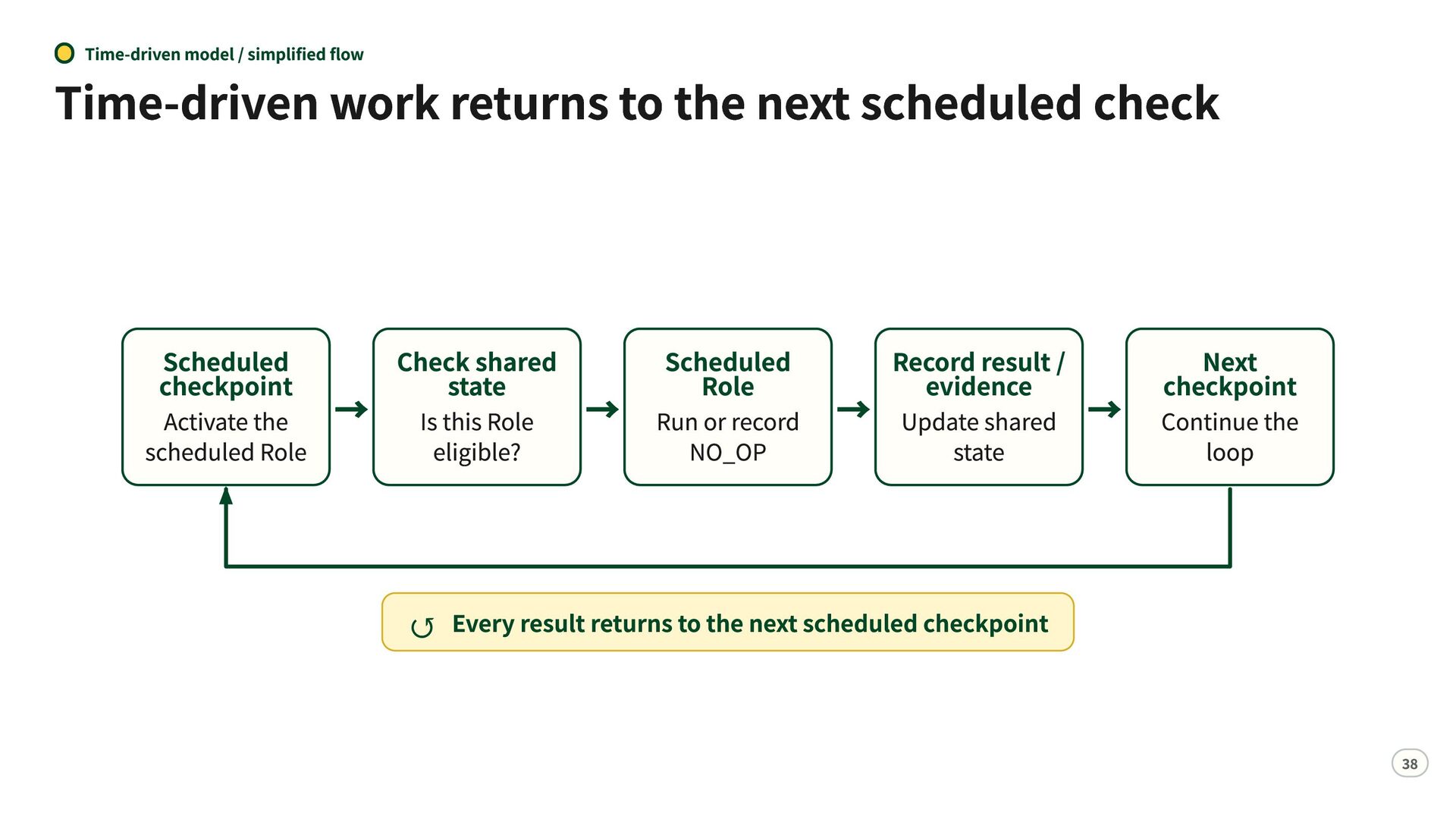
  35. Time-driven model / simplified flow Time-driven work returns to the

    next scheduled check Scheduled checkpoint Activate the → scheduled Role Checkstate shared Is this Role eligible? Scheduled Role Record result / evidence Next checkpoint NO_OP state loop → Run or record → Update shared → Continue the ↺ Every result returns to the next scheduled checkpoint 38
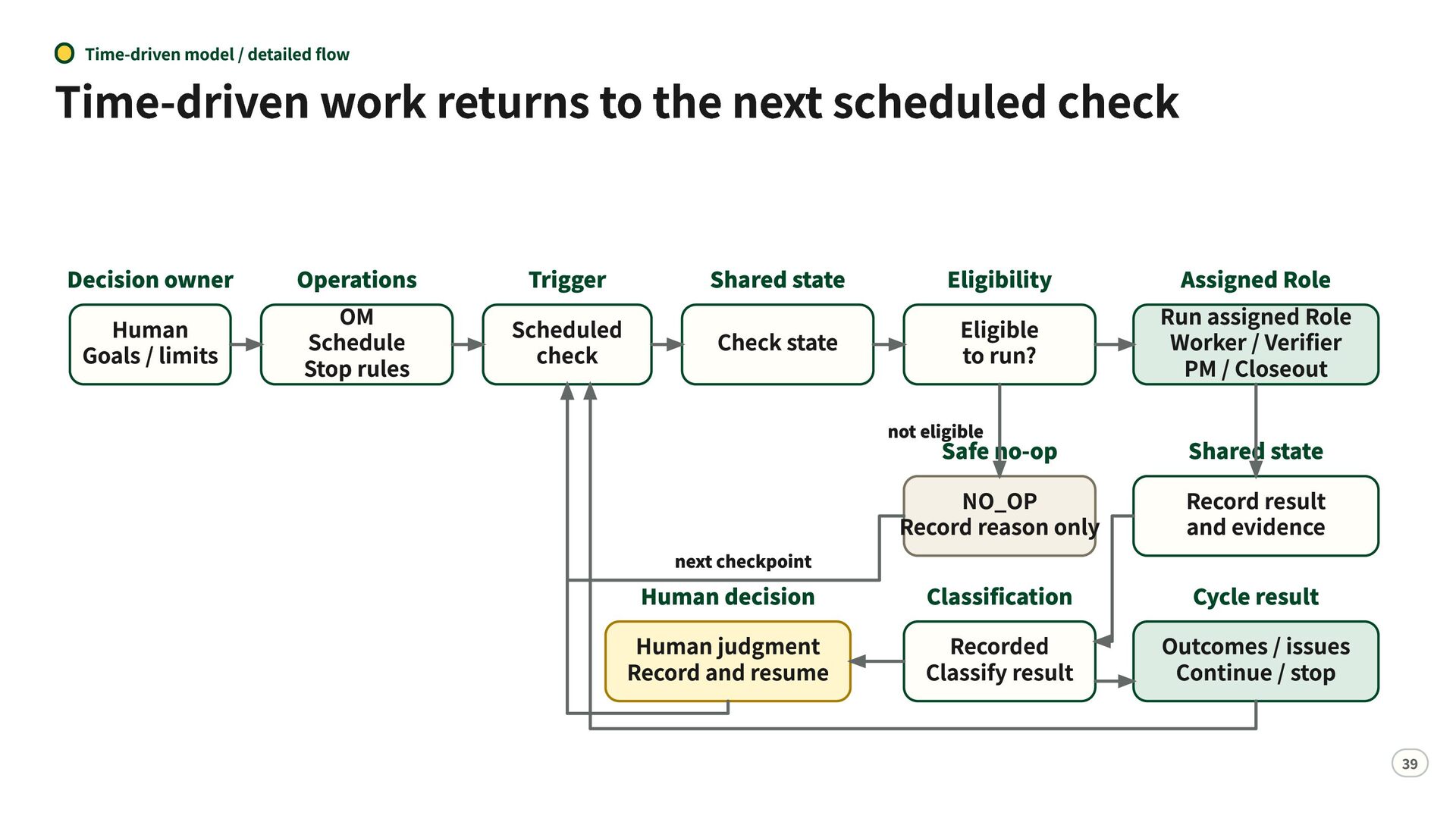
  36. Time-driven model / detailed flow Time-driven work returns to the

    next scheduled check Decision owner Human Goals / limits Operations OM Schedule Stop rules Trigger Scheduled check Shared state Check state Eligibility Eligible to run? not eligible next checkpoint Human decision Human judgment Record and resume Assigned Role Run assigned Role Worker / Verifier PM / Closeout Safe no-op NO_OP Record reason only Shared state Record result and evidence Classification Recorded Classify result Cycle result Outcomes / issues Continue / stop 39
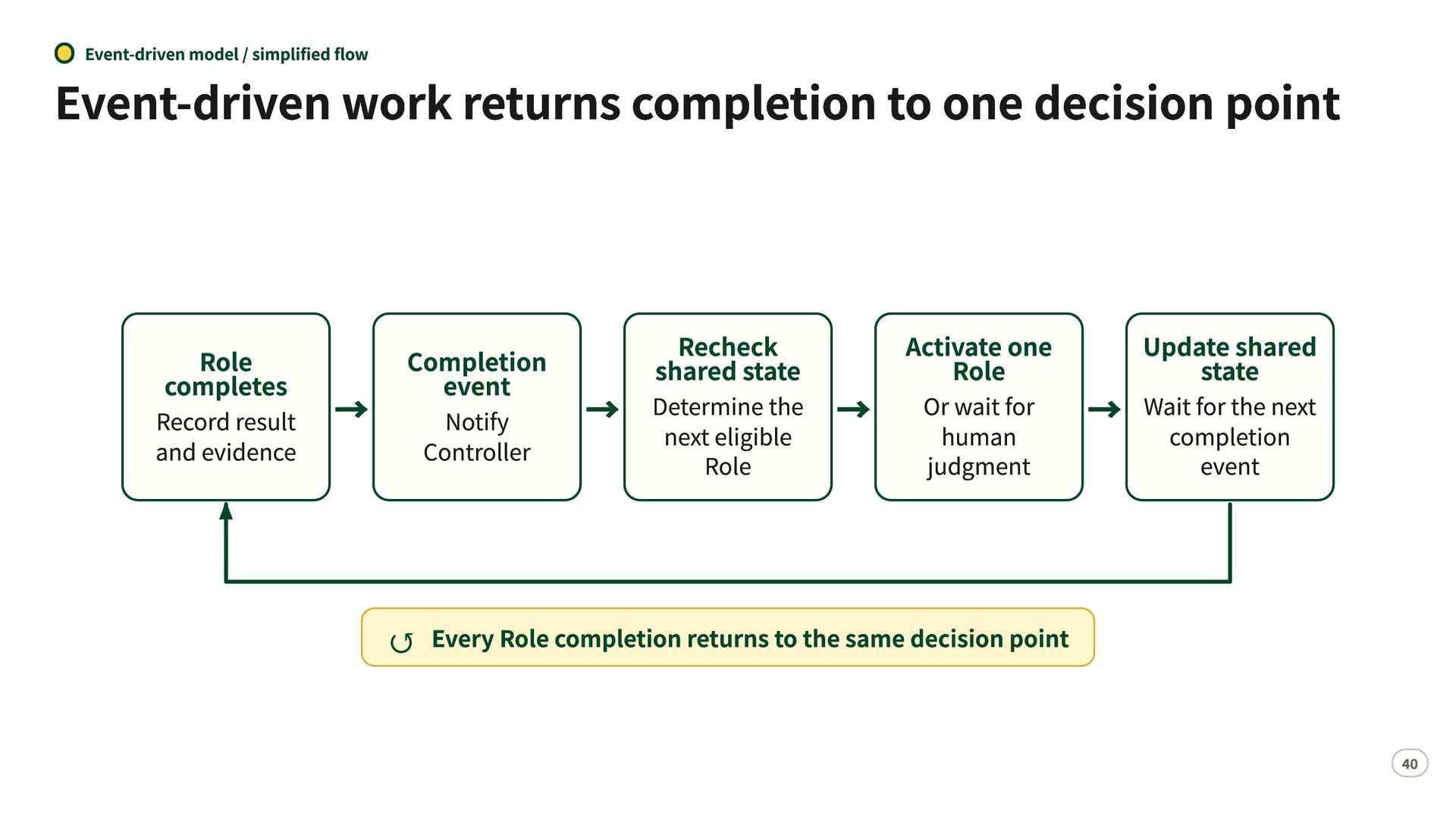
  37. Event-driven model / simplified flow Event-driven work returns completion to

    one decision point Role completes Record result → and evidence Completion event Notify Controller Recheck shared state the → → Determine next eligible Role Activate one Role Or wait for human judgment Update shared state for the next → Waitcompletion event ↺ Every Role completion returns to the same decision point 40
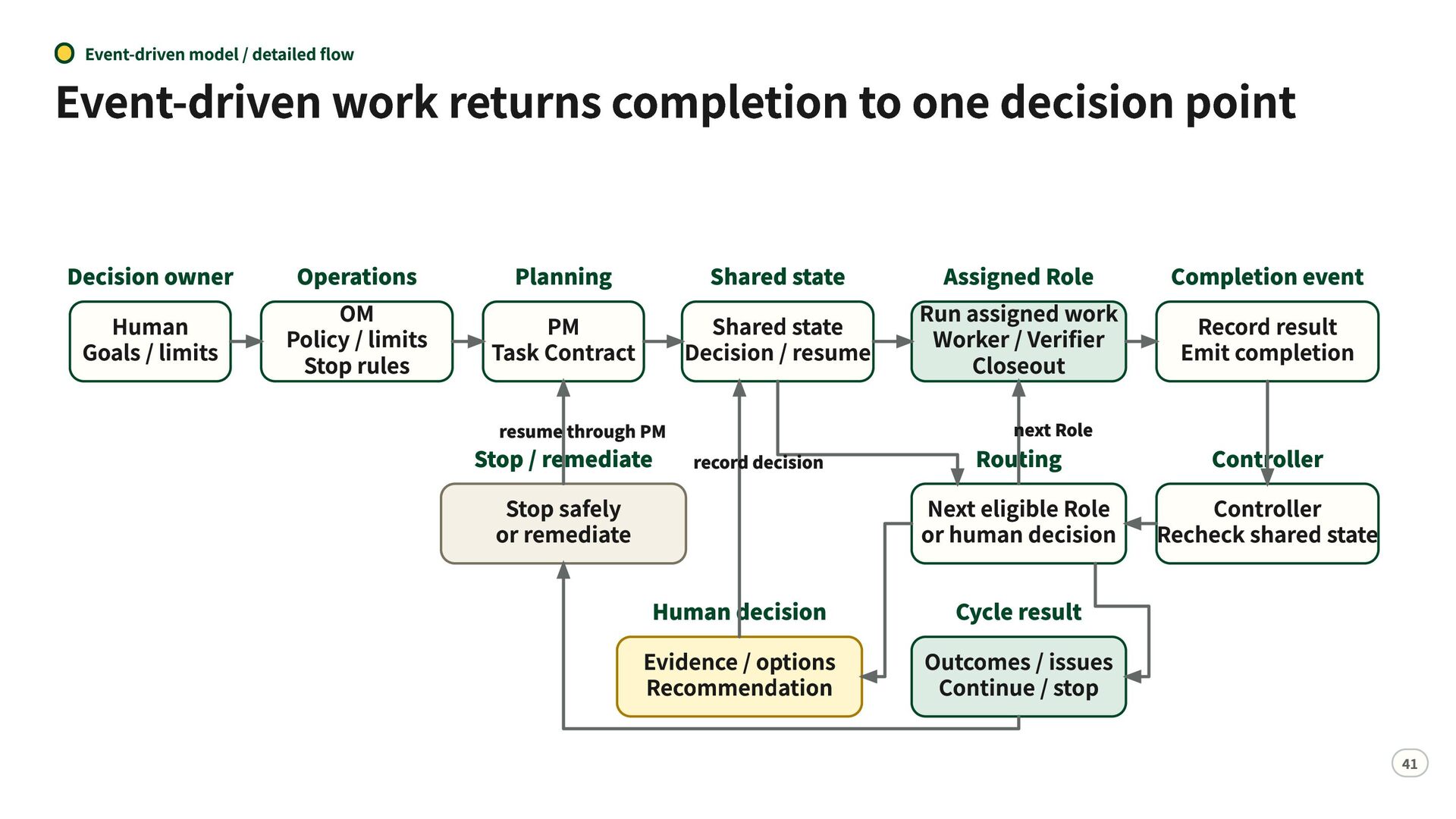
  38. Event-driven model / detailed flow Event-driven work returns completion to

    one decision point Decision owner Human Goals / limits Operations OM Policy / limits Stop rules Planning PM Task Contract Shared state Shared state Decision / resume resume through PM Stop / remediate Stop safely or remediate record decision Human decision Evidence / options Recommendation Assigned Role Run assigned work Worker / Verifier Closeout Completion event Record result Emit completion next Role Routing Controller Next eligible Role Controller or human decision Recheck shared state Cycle result Outcomes / issues Continue / stop 41
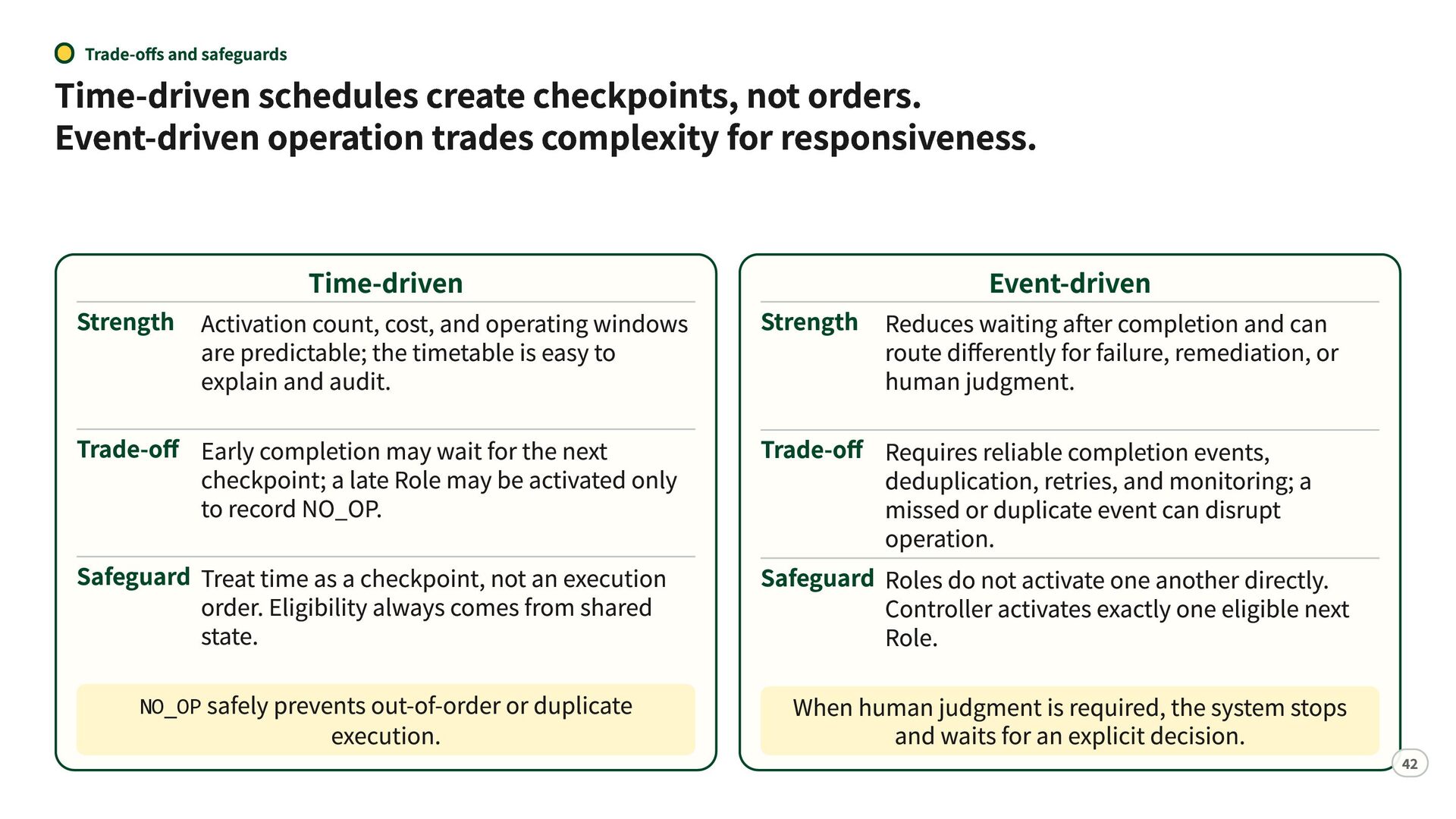
  39. Trade-offs and safeguards Time-driven schedules create checkpoints, not orders. Event-driven

    operation trades complexity for responsiveness. Time-driven Strength Activation count, cost, and operating windows are predictable; the timetable is easy to explain and audit. Trade-off Early completion may wait for the next checkpoint; a late Role may be activated only to record NO_OP. Safeguard Treat time as a checkpoint, not an execution order. Eligibility always comes from shared state. NO_OP safely prevents out-of-order or duplicate execution. Event-driven Strength Reduces waiting after completion and can route differently for failure, remediation, or human judgment. Trade-off Requires reliable completion events, deduplication, retries, and monitoring; a missed or duplicate event can disrupt operation. Safeguard Roles do not activate one another directly. Controller activates exactly one eligible next Role. When human judgment is required, the system stops and waits for an explicit decision. 42
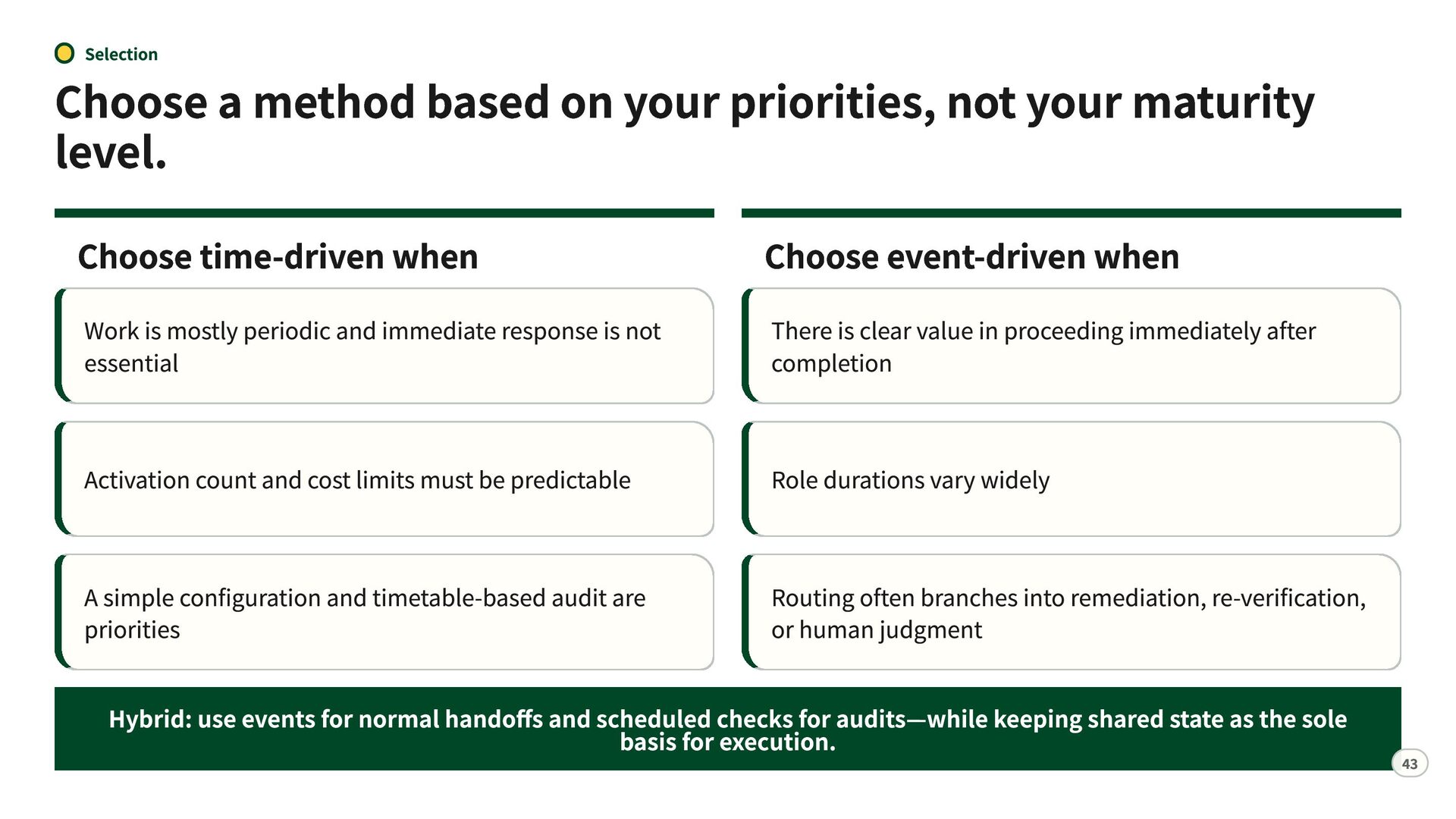
  40. Selection Choose a method based on your priorities, not your

    maturity level. Choose time-driven when Choose event-driven when Work is mostly periodic and immediate response is not essential There is clear value in proceeding immediately after completion Activation count and cost limits must be predictable Role durations vary widely A simple configuration and timetable-based audit are priorities Routing often branches into remediation, re-verification, or human judgment Hybrid: use events for normal handoffs and scheduled checks for audits—while keeping shared state as the sole basis for execution. 43
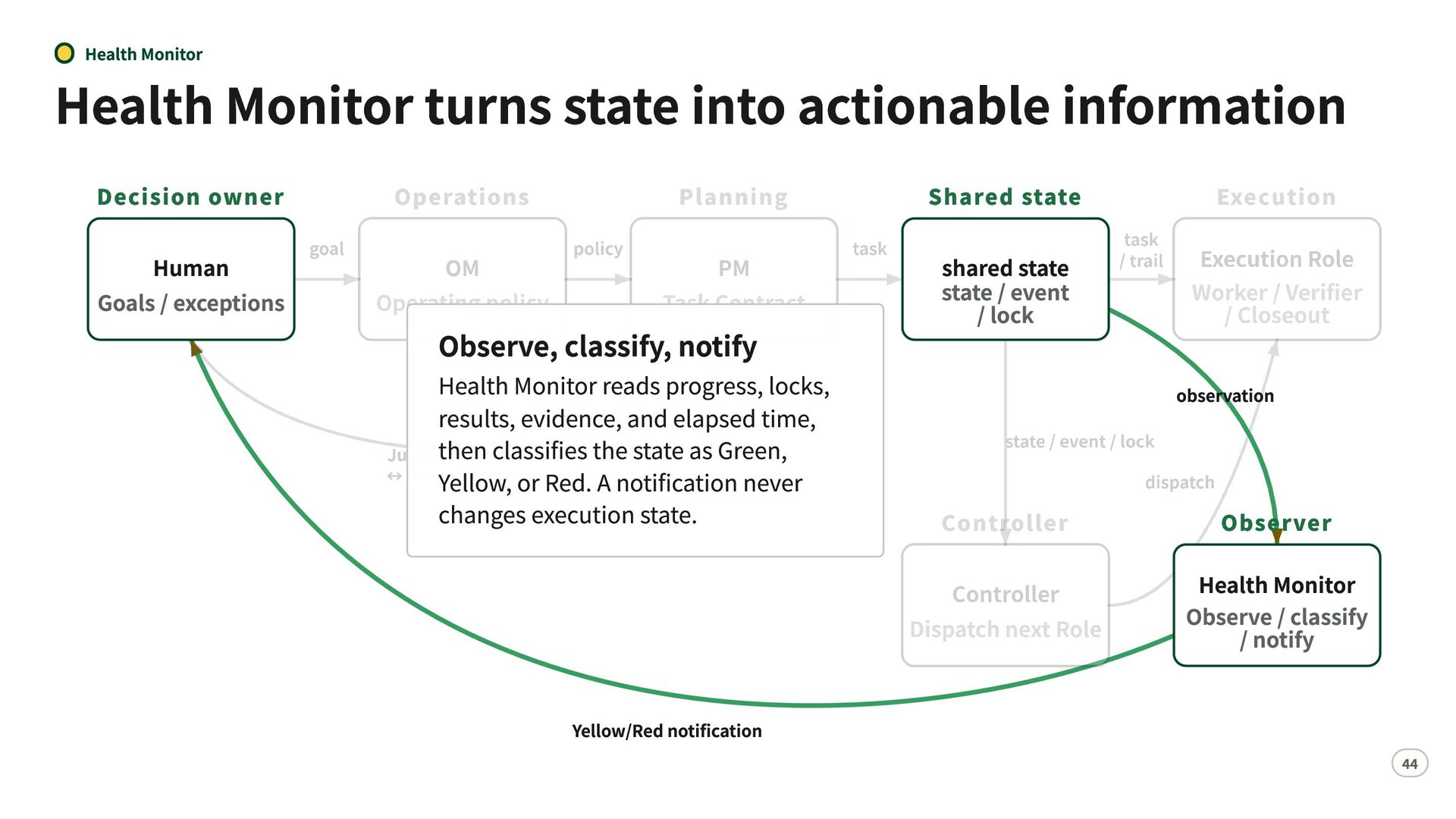
  41. Health Monitor Health Monitor turns state into actionable information Decision

    owner Shared state Human Goals / exceptions shared state state / event / lock Observe, classify, notify Health Monitor reads progress, locks, results, evidence, and elapsed time, then classifies the state as Green, Yellow, or Red. A notification never changes execution state. Yellow/Red notification observation Observer Health Monitor Observe / classify / notify 44
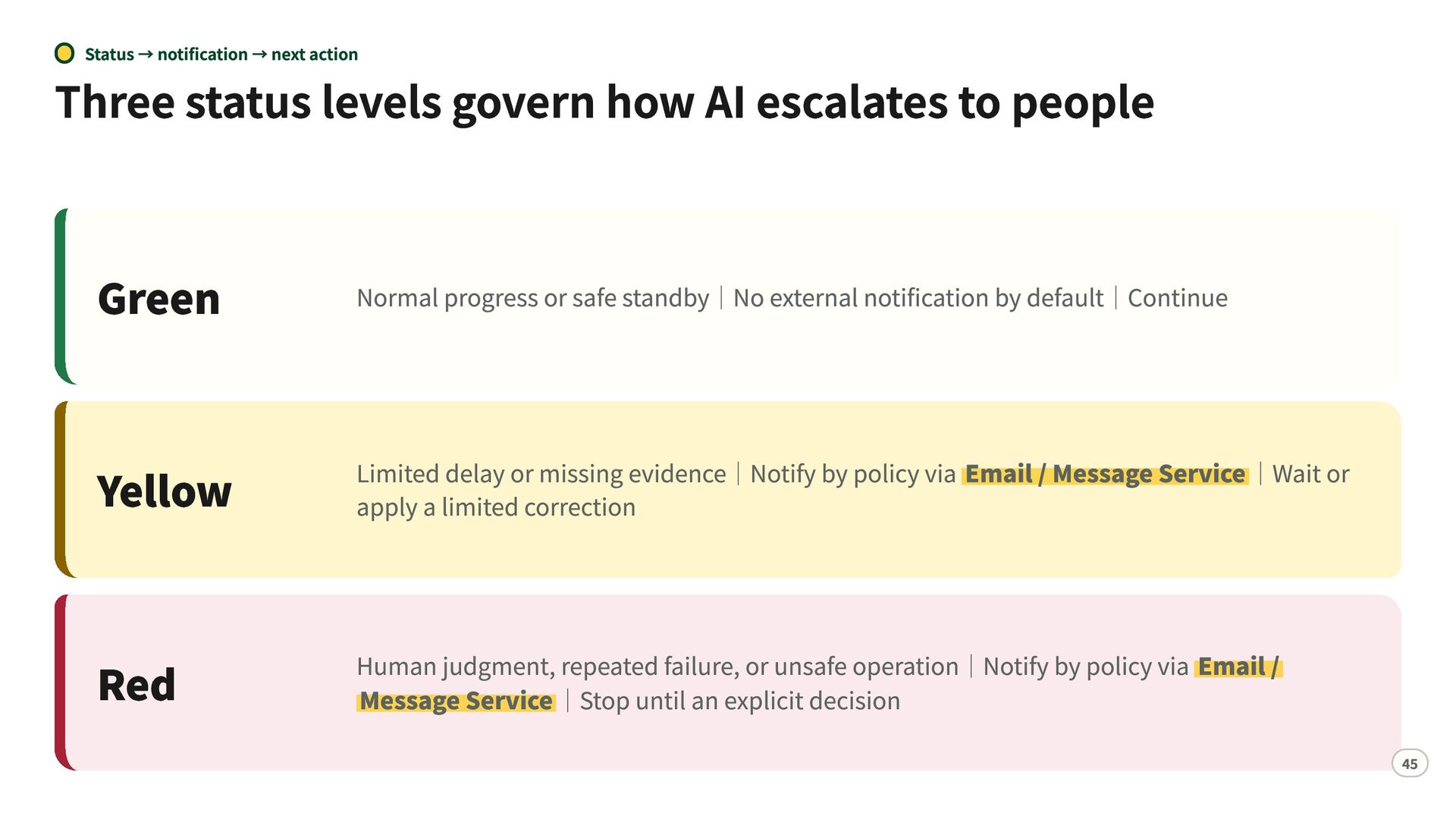
  42. Status → notification → next action Three status levels govern

    how AI escalates to people Green Normal progress or safe standby|No external notification by default|Continue Yellow Limited delay or missing evidence|Notify by policy via Email / Message Service|Wait or apply a limited correction Red Human judgment, repeated failure, or unsafe operation|Notify by policy via Email / Message Service|Stop until an explicit decision 45
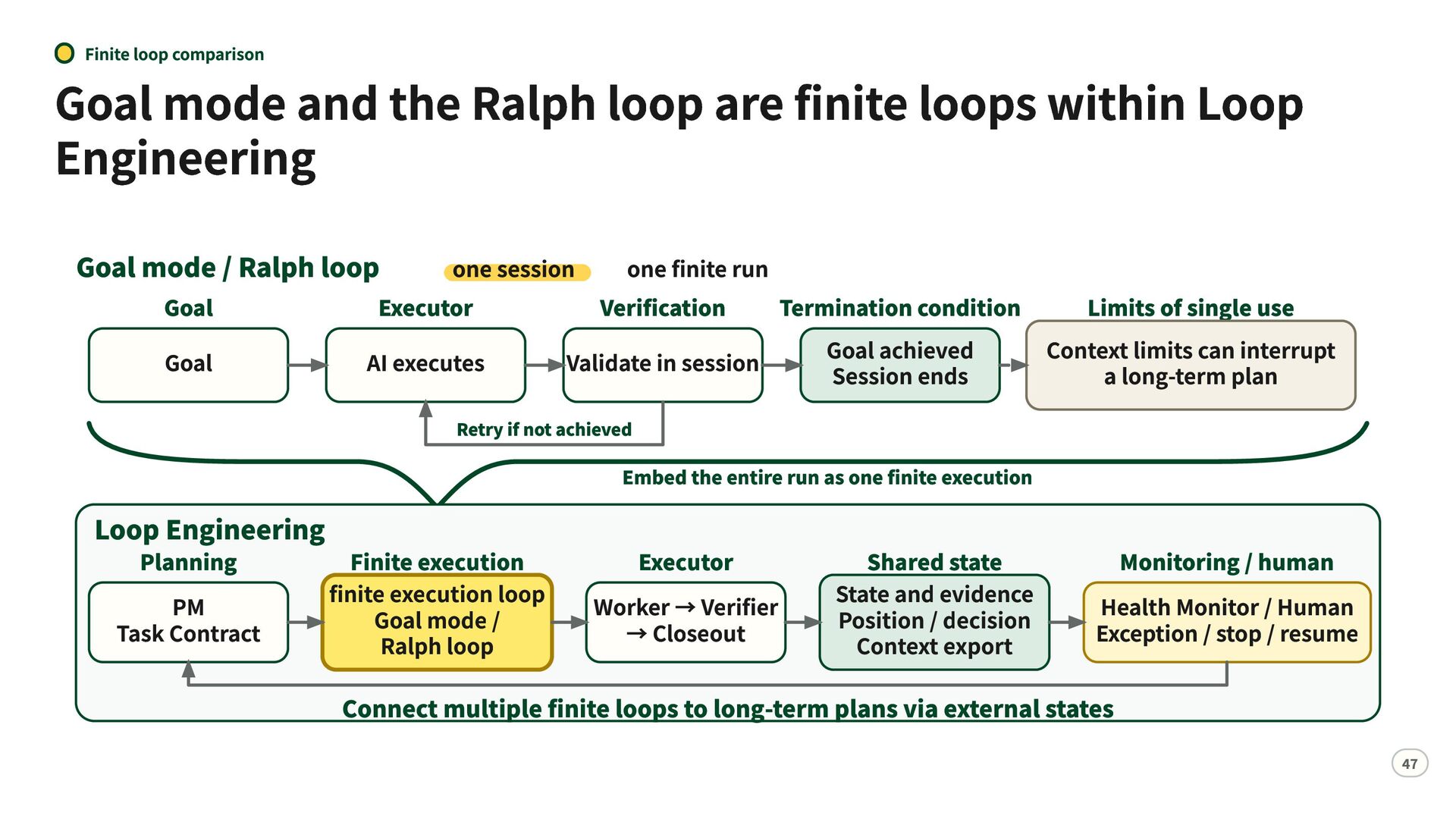
  43. Finite loop comparison Goal mode and the Ralph loop are

    finite loops within Loop Engineering Goal mode / Ralph loop Goal Goal one session one finite run Executor Verification Termination condition Limits of single use Goal achieved Context limits can interrupt AI executes Validate in session Session ends a long-term plan Retry if not achieved Loop Engineering Planning PM Task Contract Embed the entire run as one finite execution Finite execution finite execution loop Goal mode / Ralph loop Executor Worker → Verifier → Closeout Shared state State and evidence Position / decision Context export Monitoring / human Health Monitor / Human Exception / stop / resume Connect multiple finite loops to long-term plans via external states 47
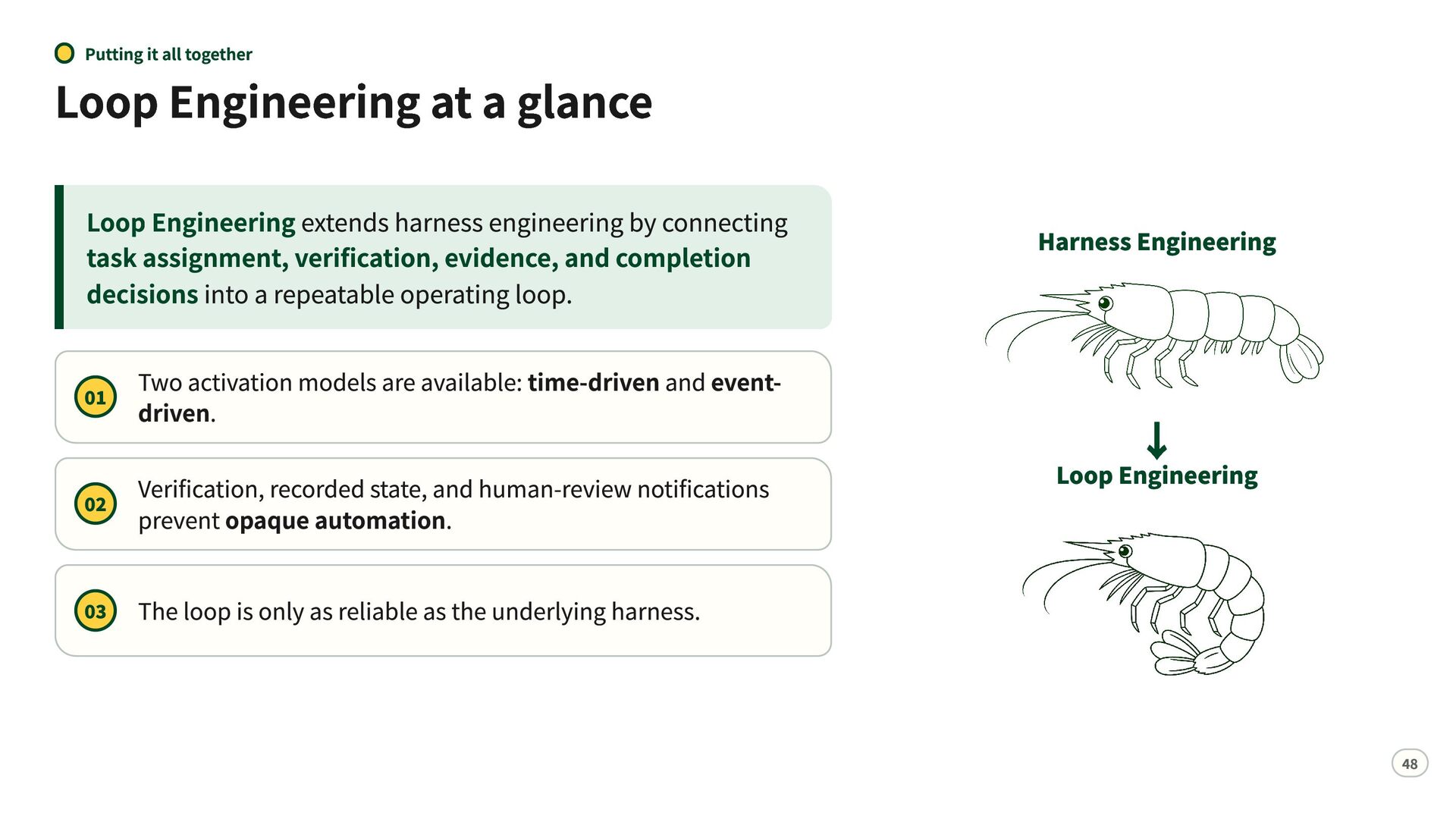
  44. Putting it all together Loop Engineering at a glance Loop

    Engineering extends harness engineering by connecting task assignment, verification, evidence, and completion decisions into a repeatable operating loop. 01 Two activation models are available: time-driven and eventdriven. Verification, recorded state, and human-review notifications 02 prevent opaque automation. 03 Harness Engineering ↓ Loop Engineering The loop is only as reliable as the underlying harness. 48
  45. Summary Human work cycles can become AI collaboration loops— without

    losing decision boundaries Moving human work to AI does not mean giving AI free rein. AI executes, verifies, and monitors within human-defined boundaries—and returns decisions to humans. Separate Roles Record state and evidence Stop for human judgment 49
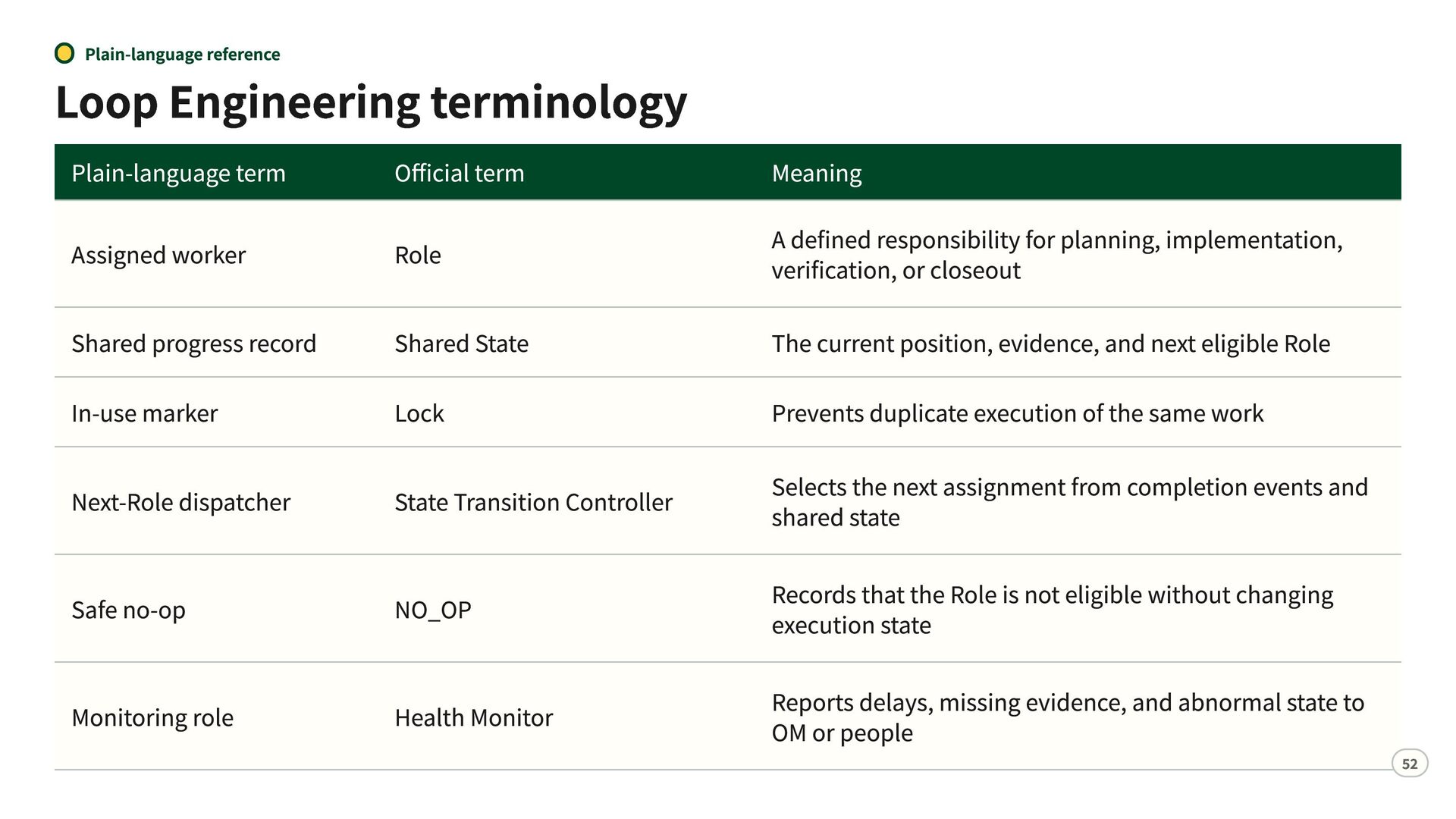
  46. Plain-language reference Loop Engineering terminology Plain-language term Official term Assigned

    worker Role Meaning A defined responsibility for planning, implementation, verification, or closeout Shared progress record Shared State The current position, evidence, and next eligible Role In-use marker Lock Prevents duplicate execution of the same work Next-Role dispatcher State Transition Controller Selects the next assignment from completion events and shared state Safe no-op NO_OP Records that the Role is not eligible without changing execution state Health Monitor Reports delays, missing evidence, and abnormal state to OM or people Monitoring role 52
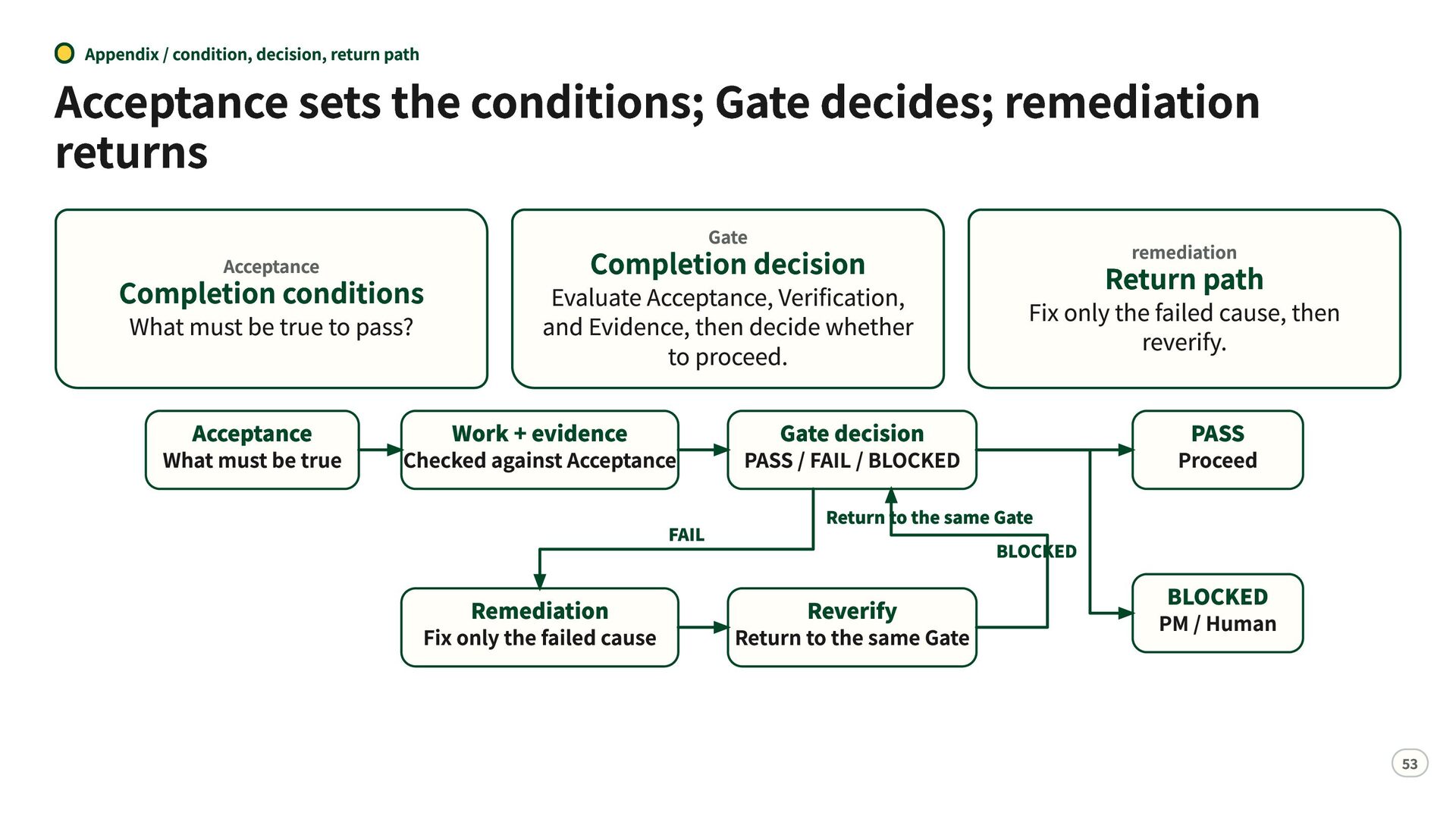
  47. Appendix / condition, decision, return path Acceptance sets the conditions;

    Gate decides; remediation returns Acceptance Completion conditions What must be true to pass? Acceptance What must be true Gate Completion decision Evaluate Acceptance, Verification, and Evidence, then decide whether to proceed. Work + evidence Checked against Acceptance FAIL Remediation Fix only the failed cause remediation Fix only the failed cause, then reverify. Gate decision PASS / FAIL / BLOCKED Return to the same Gate BLOCKED Reverify Return to the same Gate Return path PASS Proceed BLOCKED PM / Human 53
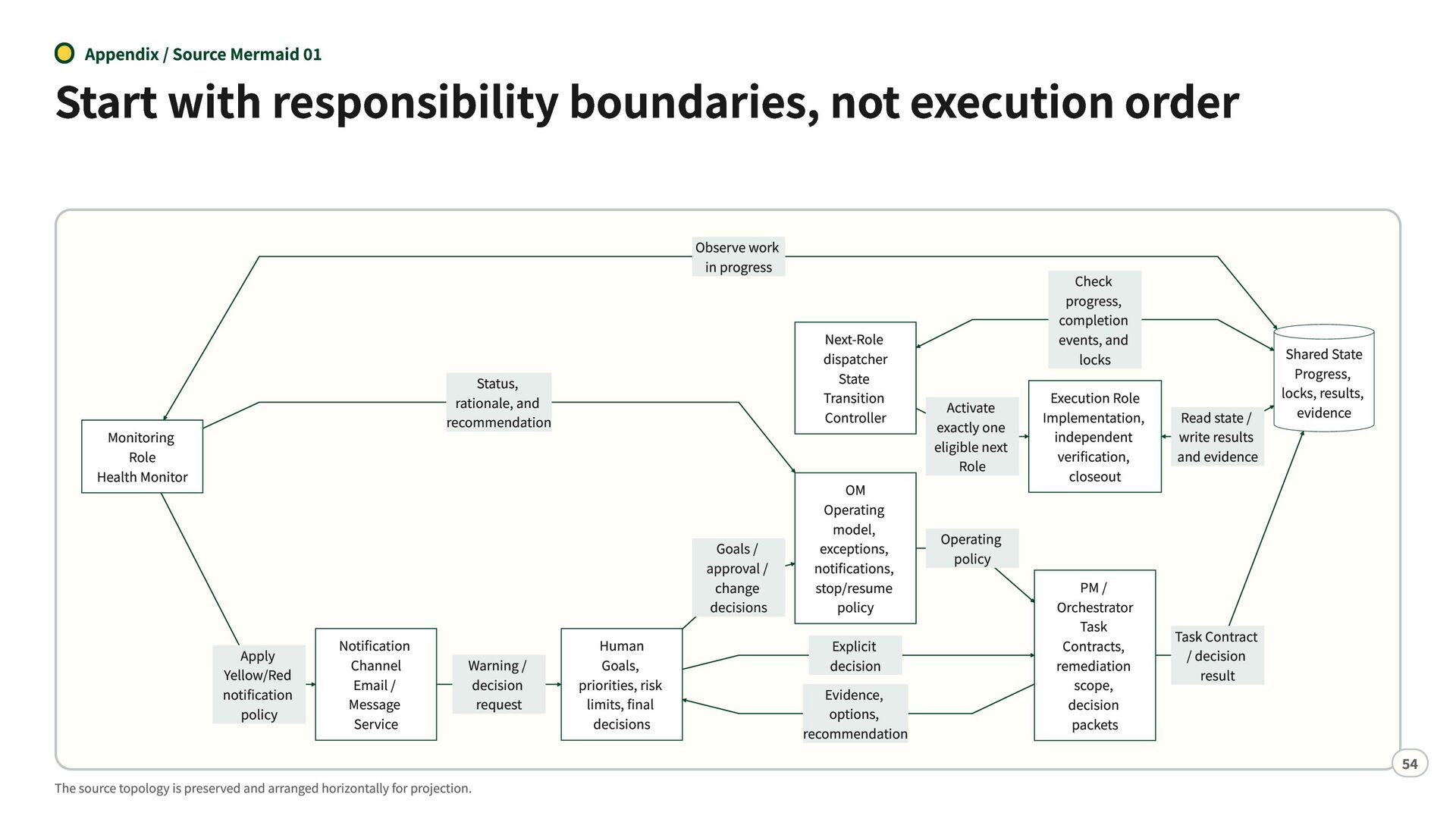
  48. Appendix / Source Mermaid 01 Start with responsibility boundaries, not

    execution order Observe work in progress Next-Role dispatcher State Transition Controller Status, rationale, and recommendation Monitoring Role Health Monitor Goals / approval / change decisions Apply Yellow/Red notification policy Notification Channel Email / Message Service Warning / decision request The source topology is preserved and arranged horizontally for projection. Human Goals, priorities, risk limits, final decisions OM Operating model, exceptions, notifications, stop/resume policy Explicit decision Evidence, options, recommendation Activate exactly one eligible next Role Operating policy Check progress, completion events, and locks Execution Role Implementation, independent verification, closeout PM / Orchestrator Task Contracts, remediation scope, decision packets Read state / write results and evidence Shared State Progress, locks, results, evidence Task Contract / decision result 54
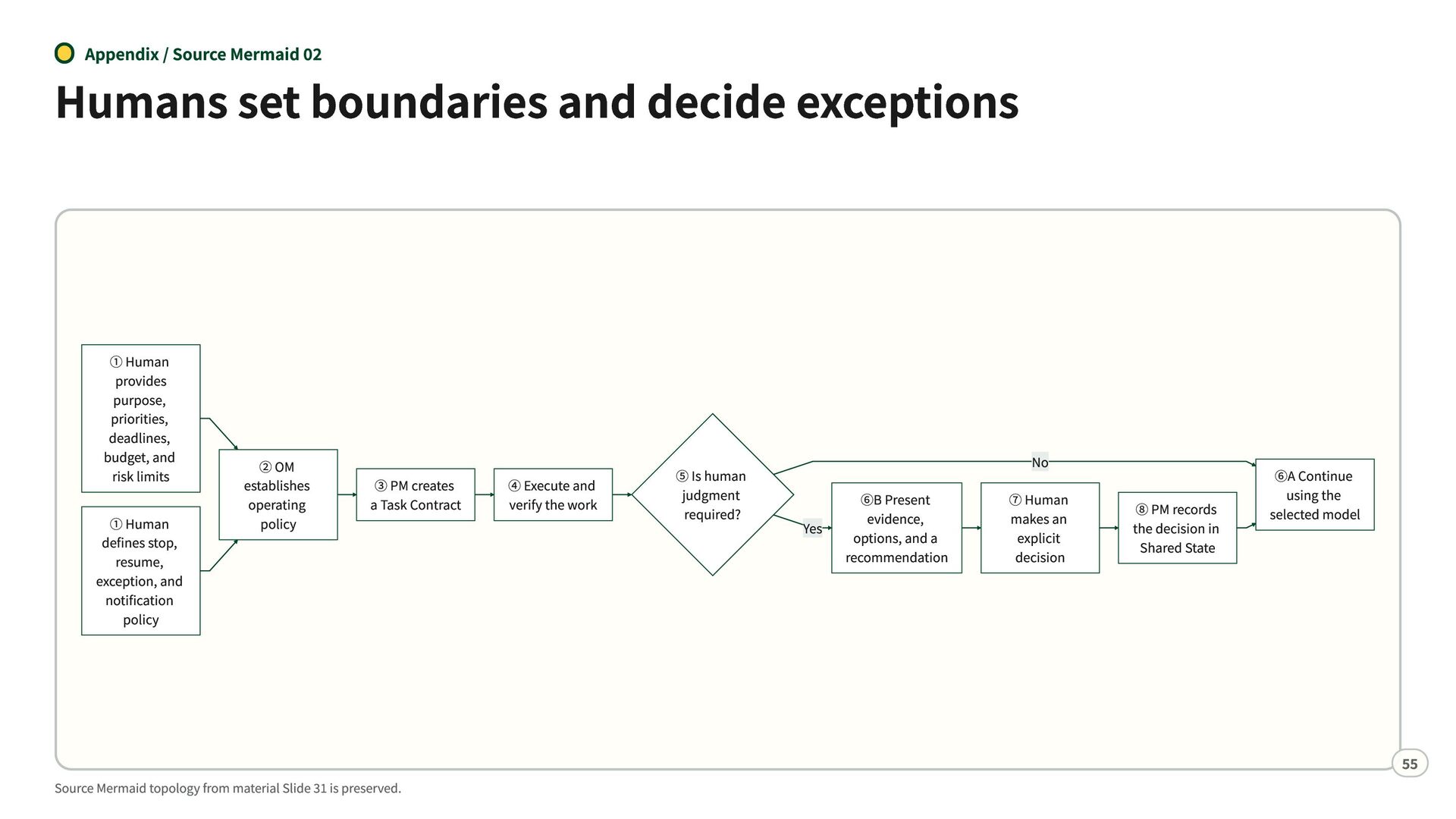
  49. Appendix / Source Mermaid 02 Humans set boundaries and decide

    exceptions ① Human provides purpose, priorities, deadlines, budget, and risk limits ① Human defines stop, resume, exception, and notification policy ② OM establishes operating policy ③ PM creates a Task Contract Source Mermaid topology from material Slide 31 is preserved. ④ Execute and verify the work ⑤ Is human judgment required? ⑥B Present evidence, Yes options, and a recommendation No ⑦ Human makes an explicit decision ⑧ PM records the decision in Shared State ⑥A Continue using the selected model 55
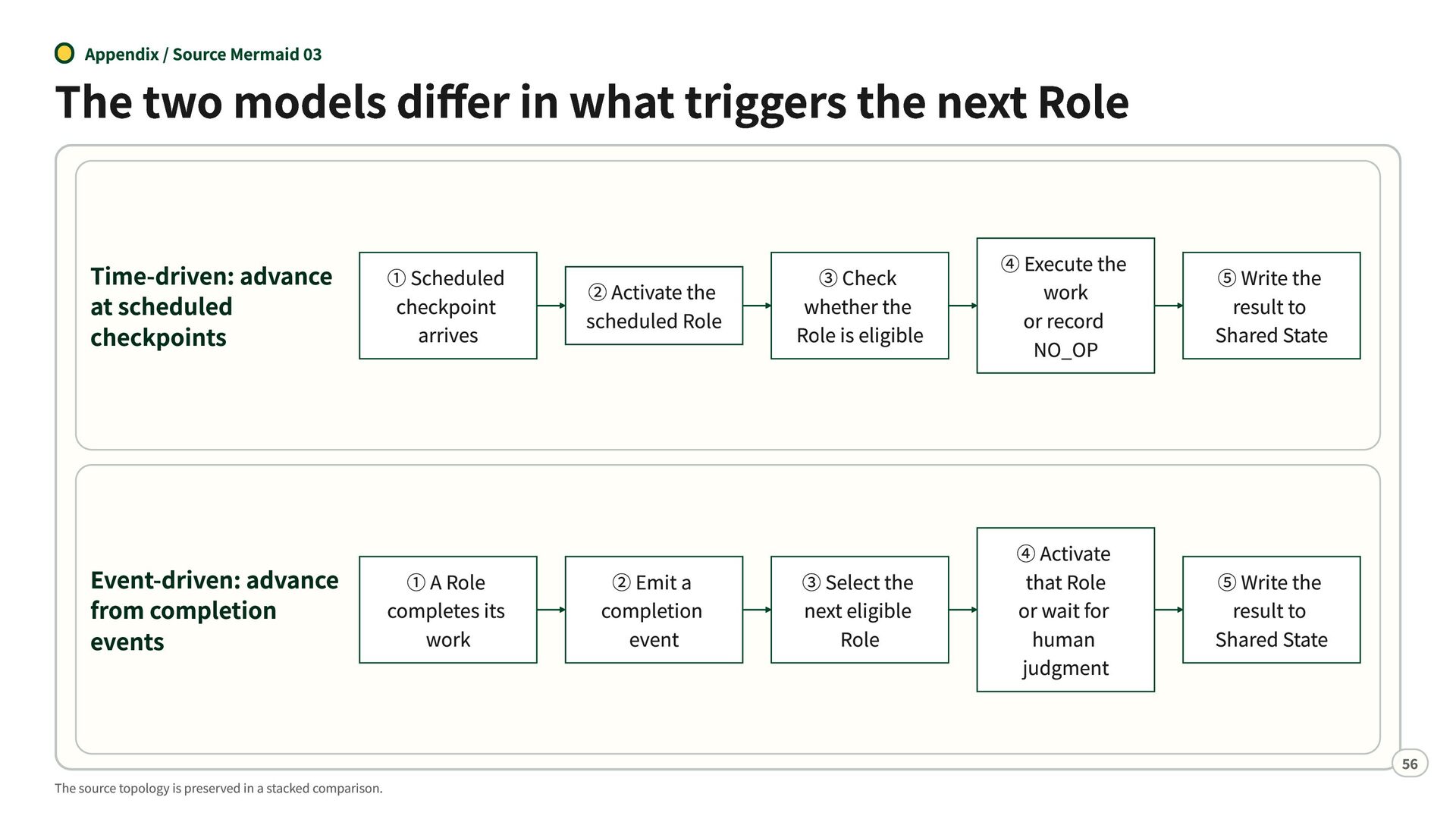
  50. Appendix / Source Mermaid 03 The two models differ in

    what triggers the next Role Time-driven: advance at scheduled checkpoints Event-driven: advance from completion events The source topology is preserved in a stacked comparison. ① Scheduled checkpoint arrives ① A Role completes its work ② Activate the scheduled Role ② Emit a completion event ③ Check whether the Role is eligible ④ Execute the work or record NO_OP ⑤ Write the result to Shared State ③ Select the next eligible Role ④ Activate that Role or wait for human judgment ⑤ Write the result to Shared State 56
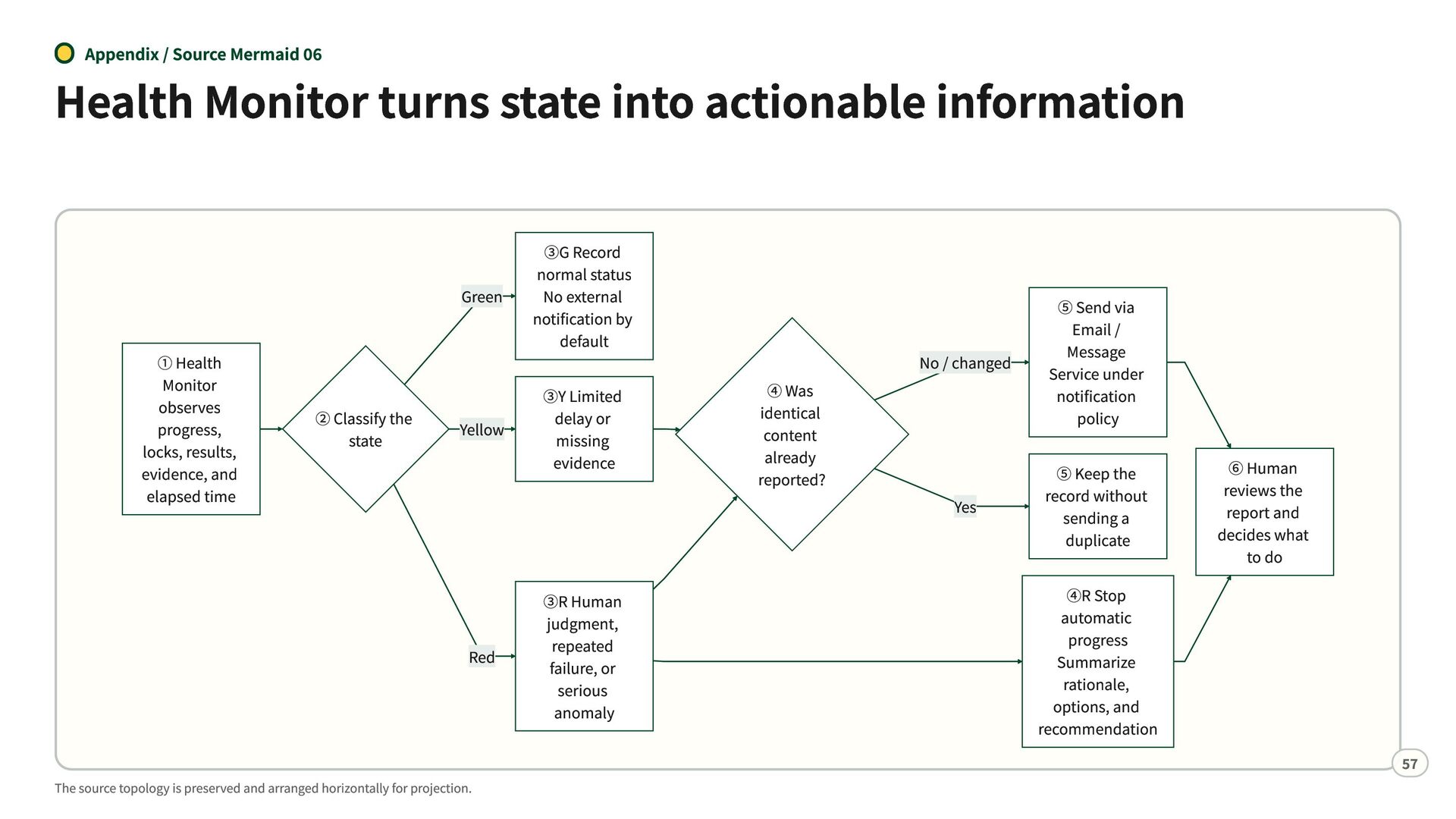
  51. Appendix / Source Mermaid 06 Health Monitor turns state into

    actionable information Green ① Health Monitor observes progress, locks, results, evidence, and elapsed time ② Classify the state Yellow Red The source topology is preserved and arranged horizontally for projection. ③G Record normal status No external notification by default ③Y Limited delay or missing evidence ③R Human judgment, repeated failure, or serious anomaly ④ Was identical content already reported? No / changed ⑤ Send via Email / Message Service under notification policy Yes ⑤ Keep the record without sending a duplicate ④R Stop automatic progress Summarize rationale, options, and recommendation ⑥ Human reviews the report and decides what to do 57
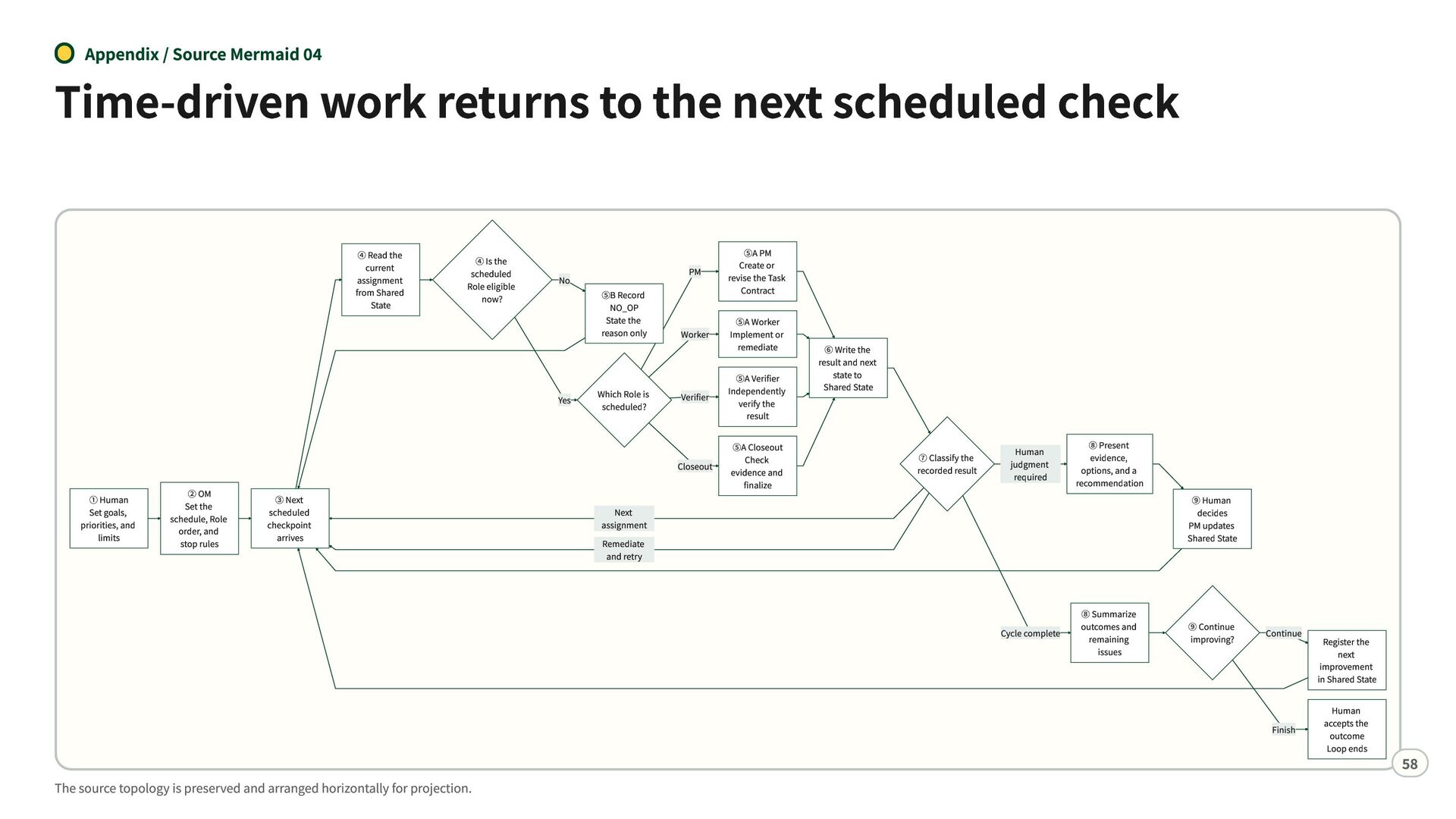
  52. Appendix / Source Mermaid 04 Time-driven work returns to the

    next scheduled check ④ Read the current assignment from Shared State ④ Is the scheduled Role eligible now? No Yes ① Human Set goals, priorities, and limits ② OM Set the schedule, Role order, and stop rules ③ Next scheduled checkpoint arrives ⑤B Record NO_OP State the reason only Which Role is scheduled? PM ⑤A PM Create or revise the Task Contract Worker ⑤A Worker Implement or remediate Verifier ⑤A Verifier Independently verify the result Closeout ⑤A Closeout Check evidence and finalize ⑥ Write the result and next state to Shared State ⑦ Classify the recorded result Human judgment required ⑧ Present evidence, options, and a recommendation Next assignment Remediate and retry Cycle complete ⑧ Summarize outcomes and remaining issues ⑨ Human decides PM updates Shared State ⑨ Continue improving? Continue Finish The source topology is preserved and arranged horizontally for projection. Register the next improvement in Shared State Human accepts the outcome Loop ends 58
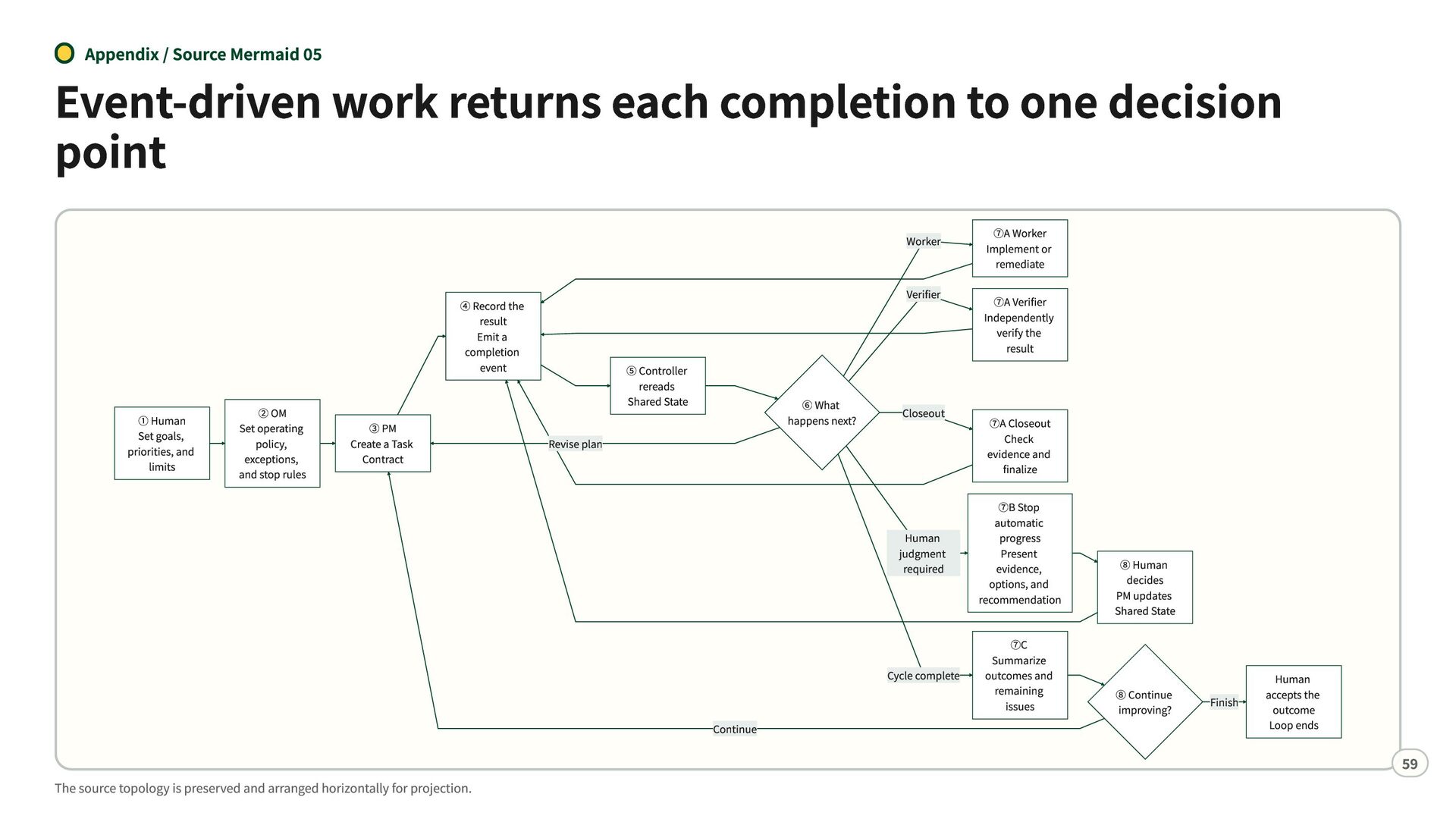
  53. Appendix / Source Mermaid 05 Event-driven work returns each completion

    to one decision point ④ Record the result Emit a completion event ① Human Set goals, priorities, and limits ② OM Set operating policy, exceptions, and stop rules ③ PM Create a Task Contract ⑤ Controller rereads Shared State ⑥ What happens next? Revise plan Continue The source topology is preserved and arranged horizontally for projection. Worker ⑦A Worker Implement or remediate Verifier ⑦A Verifier Independently verify the result Closeout ⑦A Closeout Check evidence and finalize Human judgment required ⑦B Stop automatic progress Present evidence, options, and recommendation Cycle complete ⑦C Summarize outcomes and remaining issues ⑧ Human decides PM updates Shared State ⑧ Continue improving? Finish Human accepts the outcome Loop ends 59
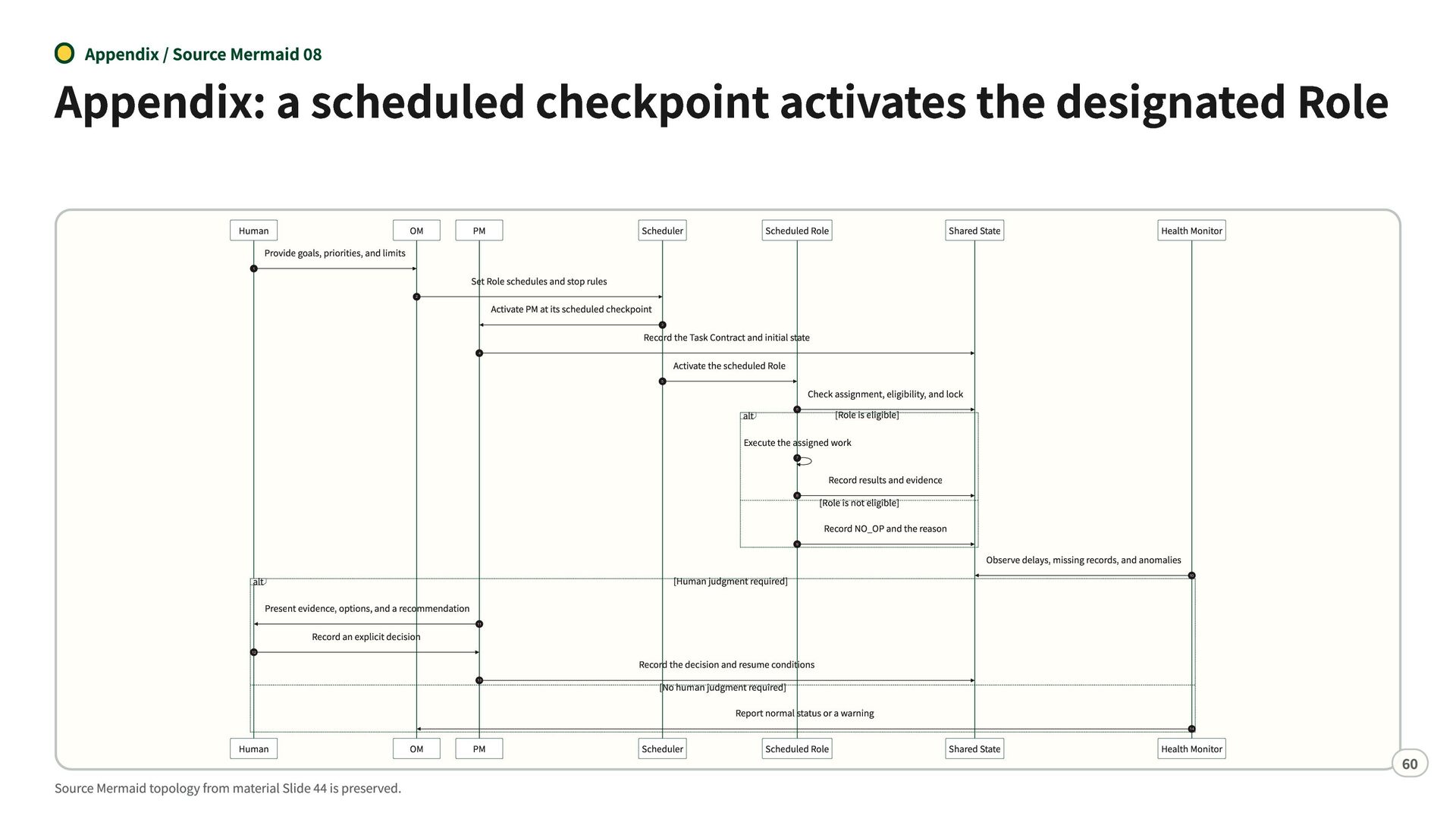
  54. Appendix / Source Mermaid 08 Appendix: a scheduled checkpoint activates

    the designated Role Human OM Provide goals, priorities, and limits 1 PM Scheduler Scheduled Role Shared State Health Monitor Set Role schedules and stop rules 2 Activate PM at its scheduled checkpoint 3 Record the Task Contract and initial state 4 Activate the scheduled Role 5 alt 6 Check assignment, eligibility, and lock [Role is eligible] Execute the assigned work 7 8 Record results and evidence [Role is not eligible] Record NO_OP and the reason 9 [Human judgment required] alt Observe delays, missing records, and anomalies 10 Present evidence, options, and a recommendation Record an explicit decision 11 12 13 Record the decision and resume conditions [No human judgment required] Report normal status or a warning 14 Human Source Mermaid topology from material Slide 44 is preserved. OM PM Scheduler Scheduled Role Shared State Health Monitor 60
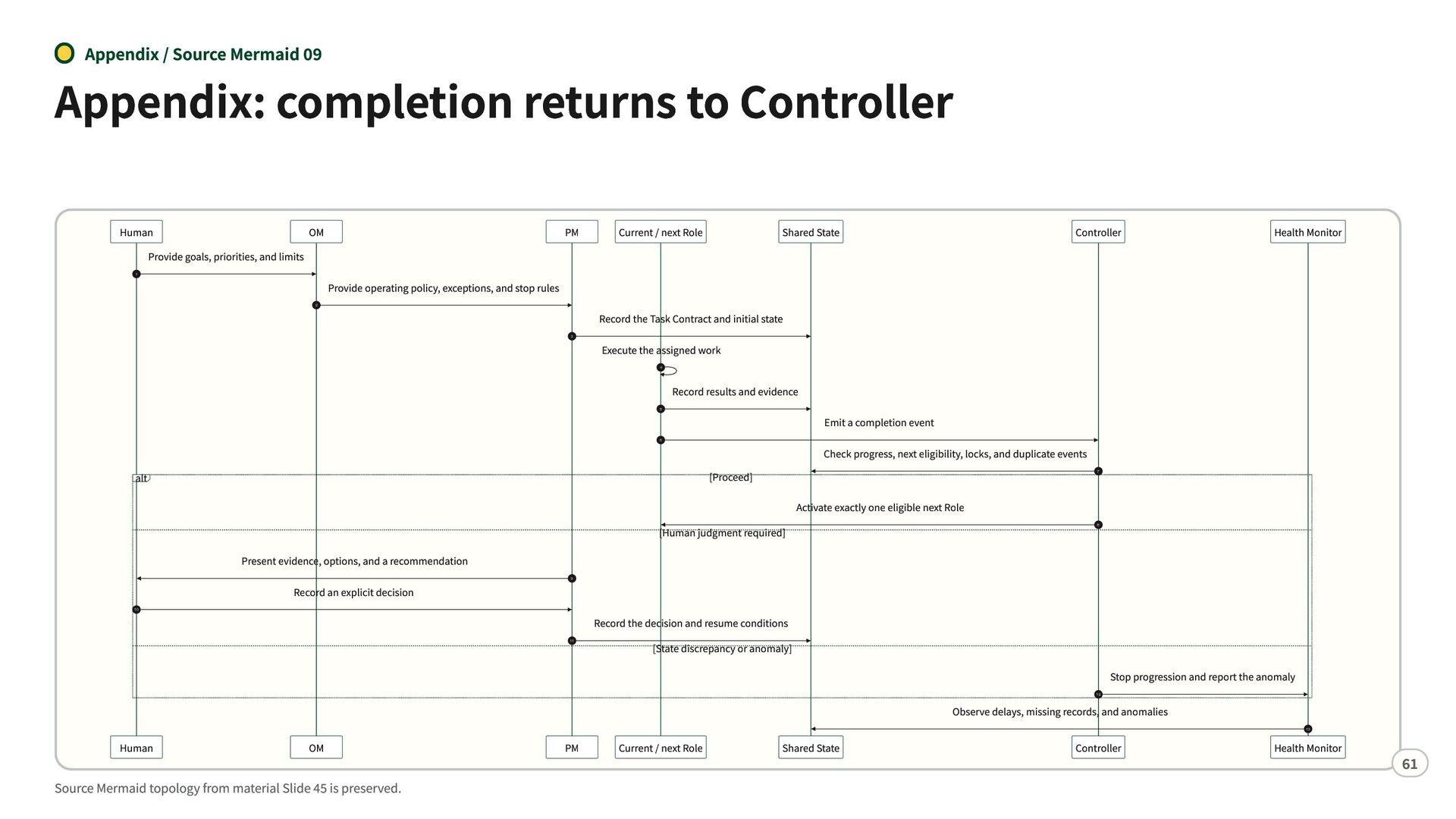
  55. Appendix / Source Mermaid 09 Appendix: completion returns to Controller

    Human OM Provide goals, priorities, and limits 1 PM Current / next Role Shared State Controller Health Monitor Provide operating policy, exceptions, and stop rules 2 Record the Task Contract and initial state 3 Execute the assigned work 4 Record results and evidence 5 Emit a completion event 6 Check progress, next eligibility, locks, and duplicate events [Proceed] alt 7 [Human judgment required] Activate exactly one eligible next Role 8 Present evidence, options, and a recommendation Record an explicit decision 9 10 11 Record the decision and resume conditions [State discrepancy or anomaly] Stop progression and report the anomaly 12 Observe delays, missing records, and anomalies 13 Human OM Source Mermaid topology from material Slide 45 is preserved. PM Current / next Role Shared State Controller Health Monitor 61
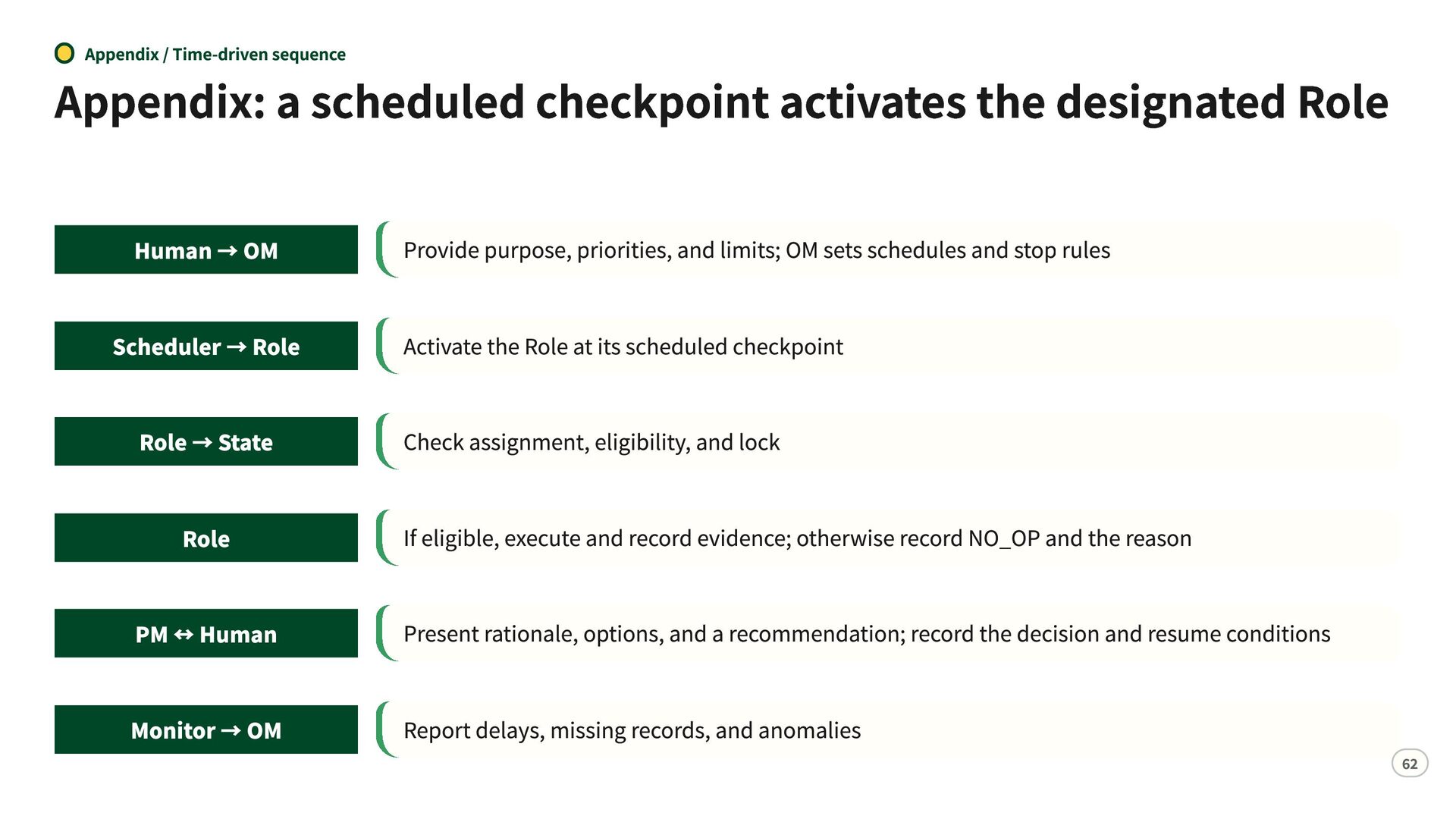
  56. Appendix / Time-driven sequence Appendix: a scheduled checkpoint activates the

    designated Role Human → OM Provide purpose, priorities, and limits; OM sets schedules and stop rules Scheduler → Role Activate the Role at its scheduled checkpoint Role → State Check assignment, eligibility, and lock Role If eligible, execute and record evidence; otherwise record NO_OP and the reason PM ↔ Human Present rationale, options, and a recommendation; record the decision and resume conditions Monitor → OM Report delays, missing records, and anomalies 62
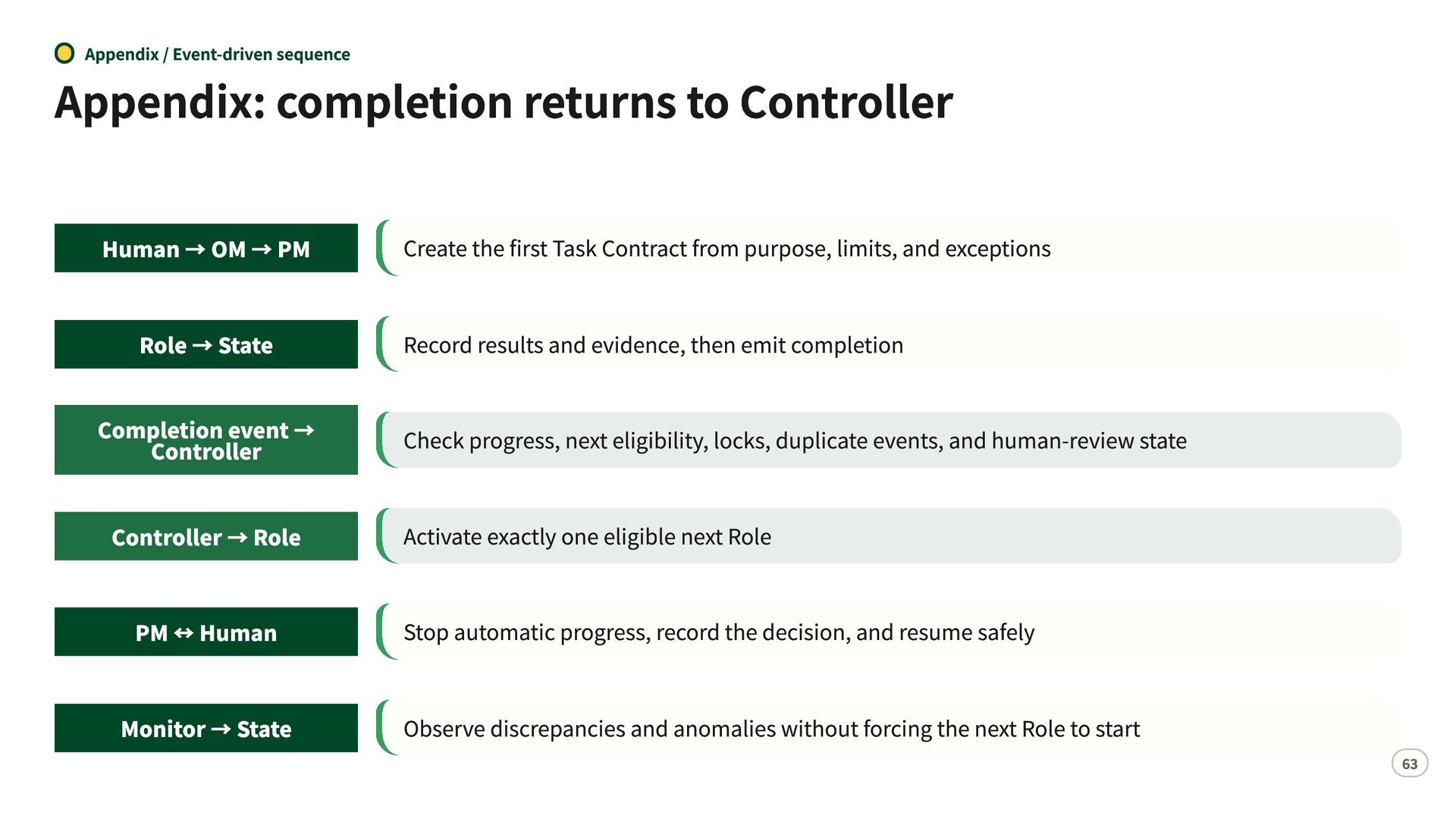
  57. Appendix / Event-driven sequence Appendix: completion returns to Controller Human

    → OM → PM Role → State Create the first Task Contract from purpose, limits, and exceptions Record results and evidence, then emit completion Completion event → Controller Check progress, next eligibility, locks, duplicate events, and human-review state Controller → Role Activate exactly one eligible next Role PM ↔ Human Stop automatic progress, record the decision, and resume safely Monitor → State Observe discrepancies and anomalies without forcing the next Role to start 63
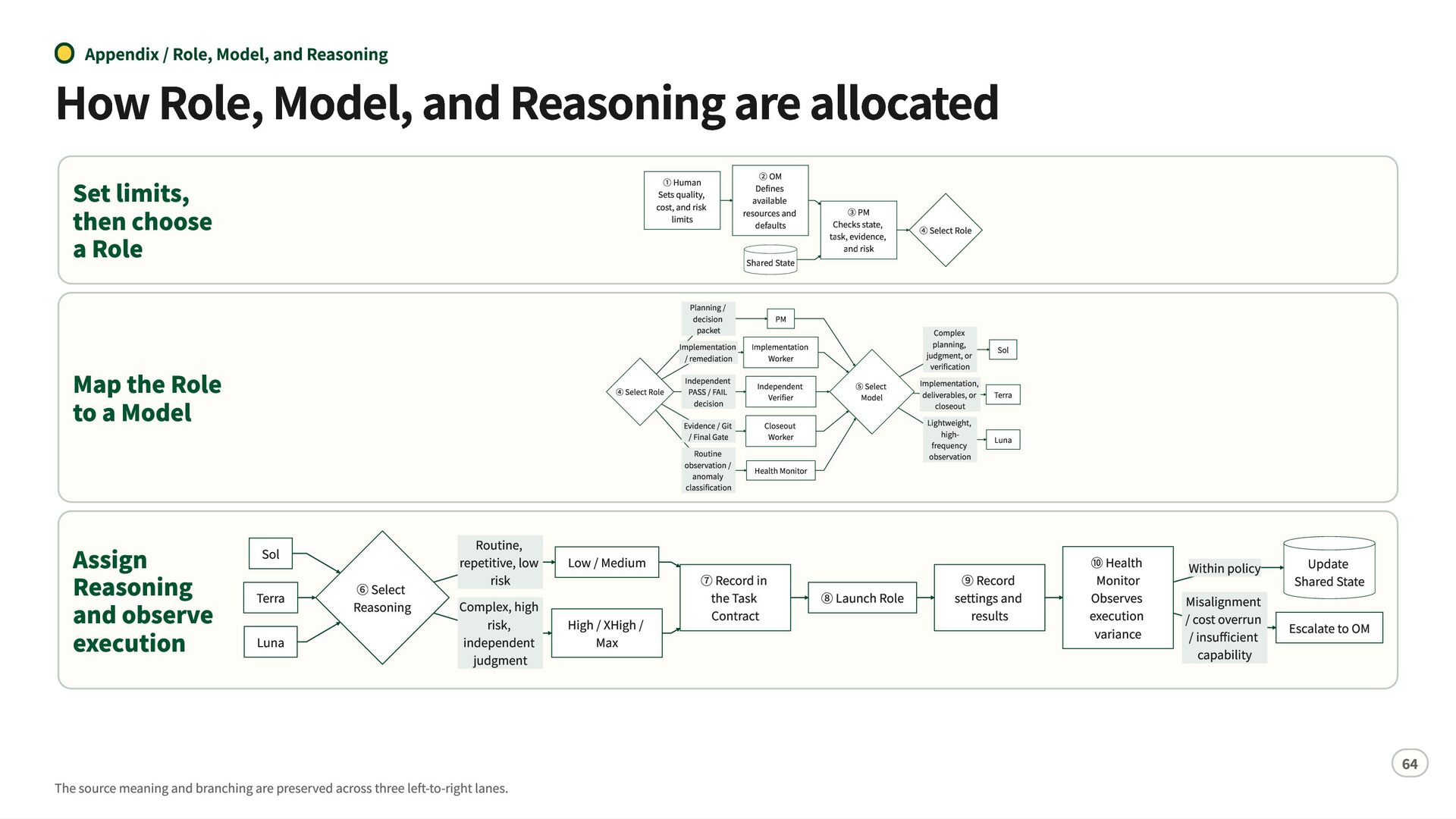
  58. Appendix / Role, Model, and Reasoning How Role, Model, and

    Reasoning are allocated Set limits, then choose a Role ① Human Sets quality, cost, and risk limits Shared State Map the Role to a Model Assign Reasoning and observe execution ② OM Defines available resources and defaults ④ Select Role Sol Terra Luna ⑥ Select Reasoning Routine, repetitive, low risk Complex, high risk, independent judgment The source meaning and branching are preserved across three left-to-right lanes. Low / Medium High / XHigh / Max Planning / decision packet Implementation / remediation Independent PASS / FAIL decision Evidence / Git / Final Gate Routine observation / anomaly classification ③ PM Checks state, task, evidence, and risk ④ Select Role ⑤ Select Model Complex planning, judgment, or verification Implementation, deliverables, or closeout Lightweight, highfrequency observation PM Implementation Worker Independent Verifier Closeout Worker Health Monitor ⑦ Record in the Task Contract ⑧ Launch Role Sol Terra Luna ⑨ Record settings and results ⑩ Health Monitor Observes execution variance Within policy Misalignment / cost overrun / insufficient capability Update Shared State Escalate to OM 64