Share
The Metric System - David Szili [ALZETTE INFORMATION SECURITY]
Lord Kelvin once said; "When you cannot express it in numbers, your knowledge is of a meagre and unsatisfactory kind". The majority information security practitioners have software engineering, electrical engineering or similar background, yet as an industry, we seem to forget the importance of measurements and metrics. Without measuring the effectiveness of our processes, it is very hard - if not impossible - to look for trends, misalignment between norms and current state or simply to make informed decisions. Even current trends point to the opposite direction; for example in Critical Security Controls (CSC) version 5, we had "Effectiveness Metrics" and "Automation Metrics" sections for each control, but CSC version 6 only mentions the importance of metrics without going into any details. In this talk, we will take an overview of the current state and resources available to security metrics. We will see why security metrics are important, how they relate to risk management and if there are "good" or "bad" metrics. We will also attempt to find the most vital security metrics that can indicate the effectiveness of the overall security program of an organization. Finally, we will see a few examples of collecting, analyzing data for metrics and how we can visualize and present them to senior management. #securitysesion2018
SecuritySession
Transcript
44 slides
-
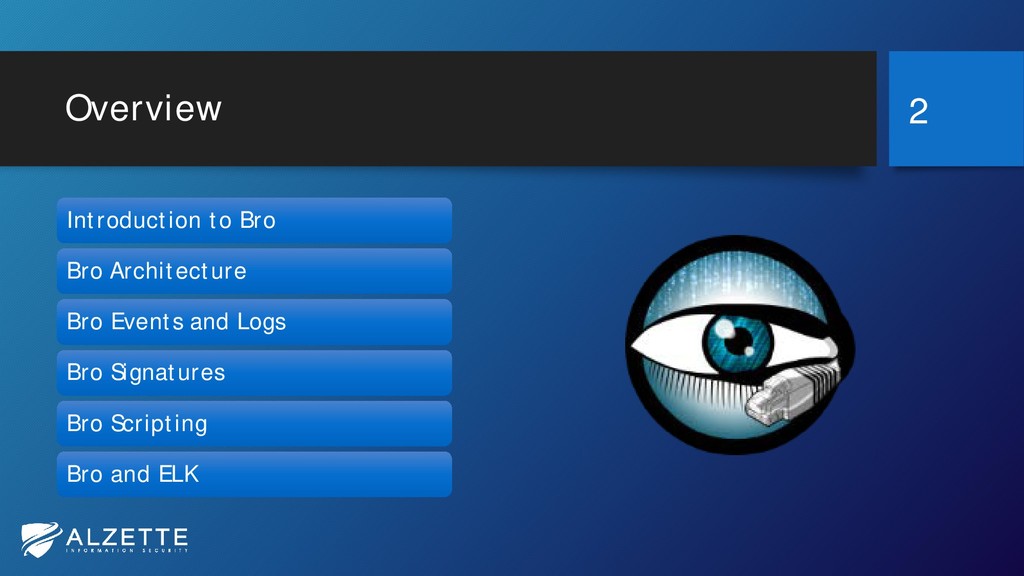
Overview 2 Introduction to Bro Bro Architecture Bro Events and
Logs Bro Signatures Bro Scripting Bro and ELK -
Introductory Workshop! • This is an introductory workshop • You
probably won’t hear/see new things if you have: • Already used Bro; • Followed SANS SEC 503; • If you are stuck, please do not suffer in silence! 3 -
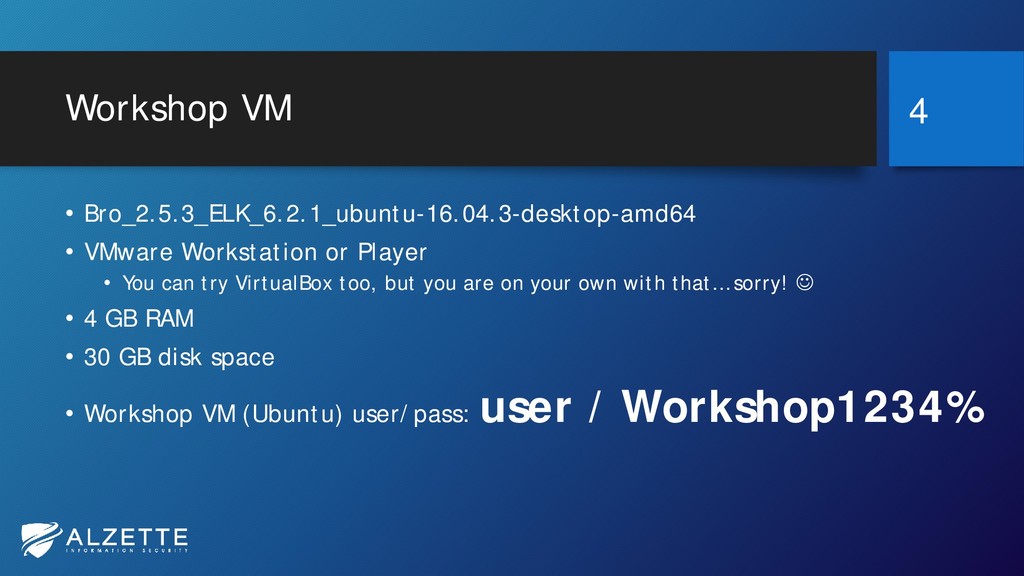
Workshop VM • Bro_2.5.3_ELK_6.2.1_ubuntu-16.04.3-desktop-amd64 • VMware Workstation or Player •
You can try VirtualBox too, but you are on your own with that… sorry! • 4 GB RAM • 30 GB disk space • Workshop VM (Ubuntu) user/pass: user / Workshop1234% 4 -
About Eva • Managing partner and CEO at Alzette Information
Security • Web application penetration testing, source code review, security monitoring • BSides Luxembourg organizer https://bsideslux.lu • Twitter: @EvaSzilagyiSec • E-mail: [email protected] • Blog: http://jumpespjump.blogspot.com 5 -
About David • Managing partner and CTO at Alzette Information
Security • Network penetration testing, security architectures, security monitoring, incident response • Instructor at SANS Institute – FOR572 • BSides Luxembourg organizer https://bsideslux.lu • Twitter: @DavidSzili • E-mail: [email protected] • Blog: http://jumpespjump.blogspot.com 6 -
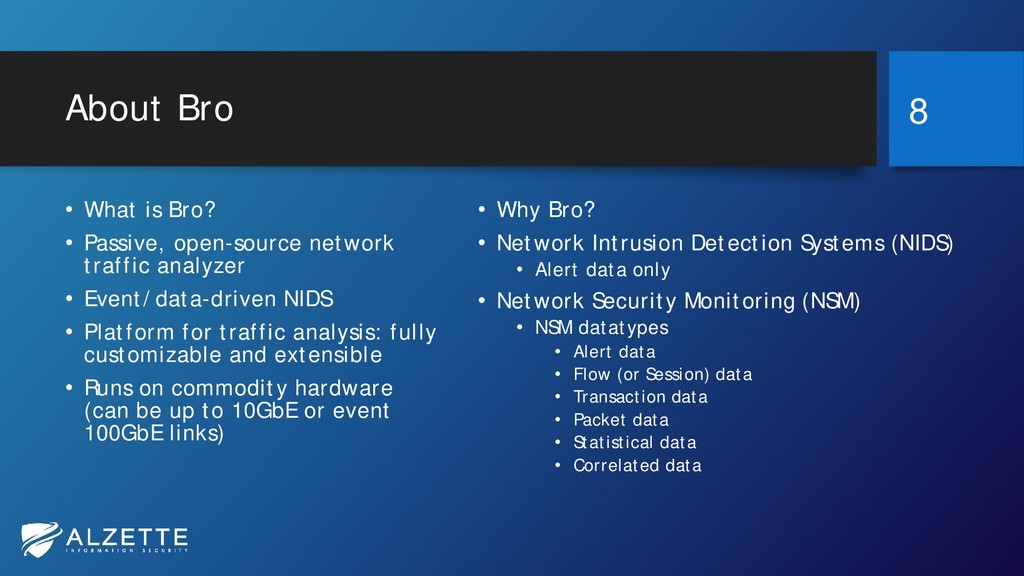
About Bro • What is Bro? • Passive, open-source network
traffic analyzer • Event/data-driven NIDS • Platform for traffic analysis: fully customizable and extensible • Runs on commodity hardware (can be up to 10GbE or event 100GbE links) • Why Bro? • Network Intrusion Detection Systems (NIDS) • Alert data only • Network Security Monitoring (NSM) • NSM datatypes • Alert data • Flow (or Session) data • Transaction data • Packet data • Statistical data • Correlated data 8 -
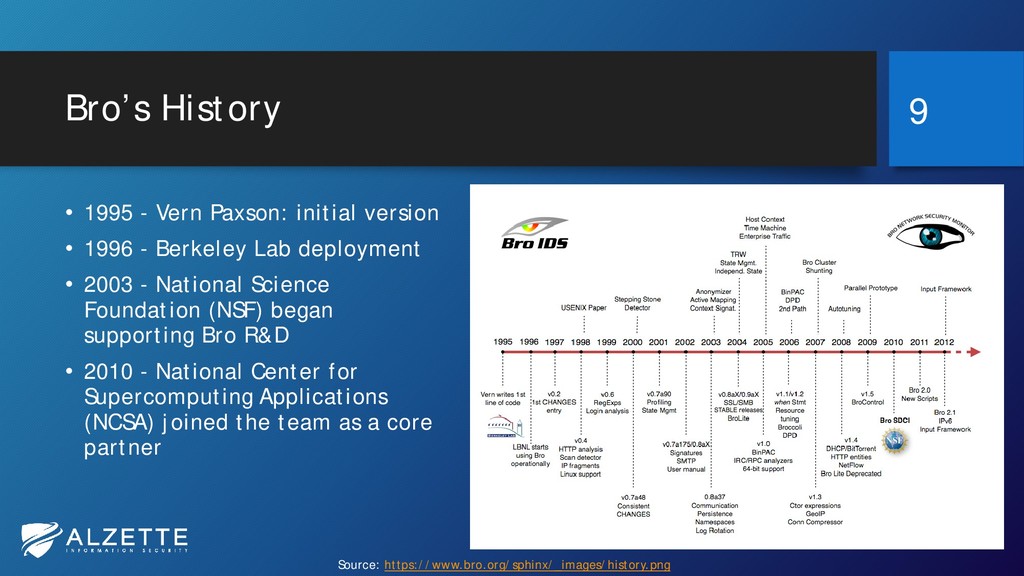
Bro’s History • 1995 - Vern Paxson: initial version •
1996 - Berkeley Lab deployment • 2003 - National Science Foundation (NSF) began supporting Bro R&D • 2010 - National Center for Supercomputing Applications (NCSA) joined the team as a core partner 9 Source: https://www.bro.org/sphinx/_images/history.png -
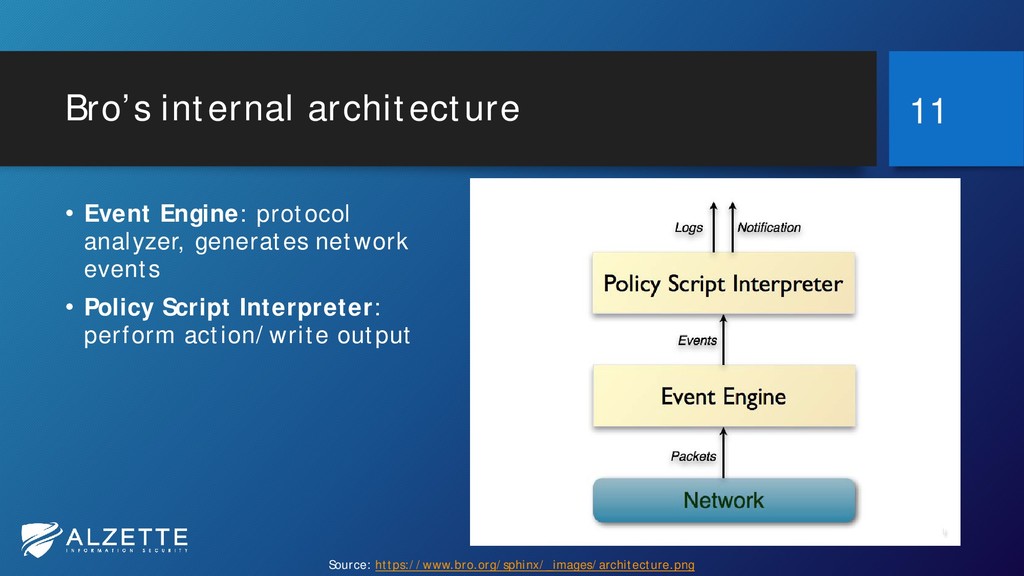
Bro’s internal architecture • Event Engine: protocol analyzer, generates network
events • Policy Script Interpreter: perform action/write output 11 Source: https://www.bro.org/sphinx/_images/architecture.png -
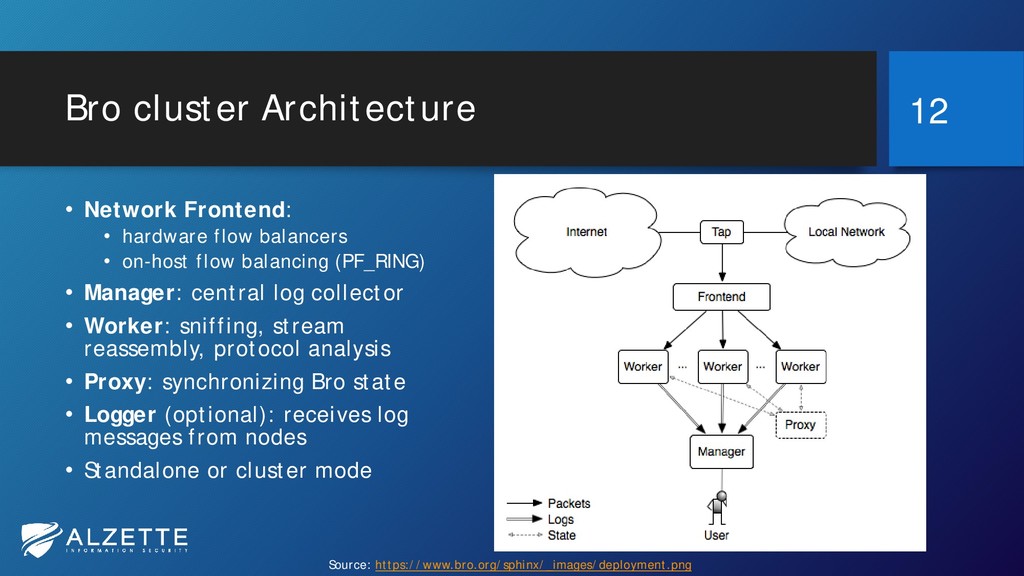
Bro cluster Architecture • Network Frontend: • hardware flow balancers
• on-host flow balancing (PF_RING) • Manager: central log collector • Worker: sniffing, stream reassembly, protocol analysis • Proxy: synchronizing Bro state • Logger (optional): receives log messages from nodes • Standalone or cluster mode 12 Source: https://www.bro.org/sphinx/_images/deployment.png -
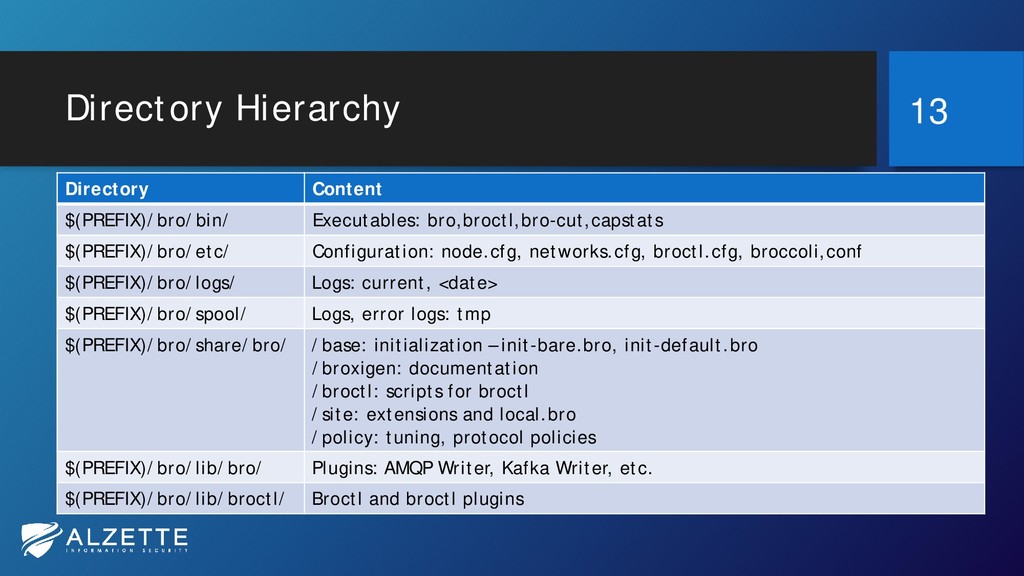
Directory Hierarchy Directory Content $(PREFIX)/bro/bin/ Executables: bro,broctl,bro-cut,capstats $(PREFIX)/bro/etc/ Configuration: node.cfg,
networks.cfg, broctl.cfg, broccoli,conf $(PREFIX)/bro/logs/ Logs: current, <date> $(PREFIX)/bro/spool/ Logs, error logs: tmp $(PREFIX)/bro/share/bro/ /base: initialization – init-bare.bro, init-default.bro /broxigen: documentation /broctl: scripts for broctl /site: extensions and local.bro /policy: tuning, protocol policies $(PREFIX)/bro/lib/bro/ Plugins: AMQP Writer, Kafka Writer, etc. $(PREFIX)/bro/lib/broctl/ Broctl and broctl plugins 13 -
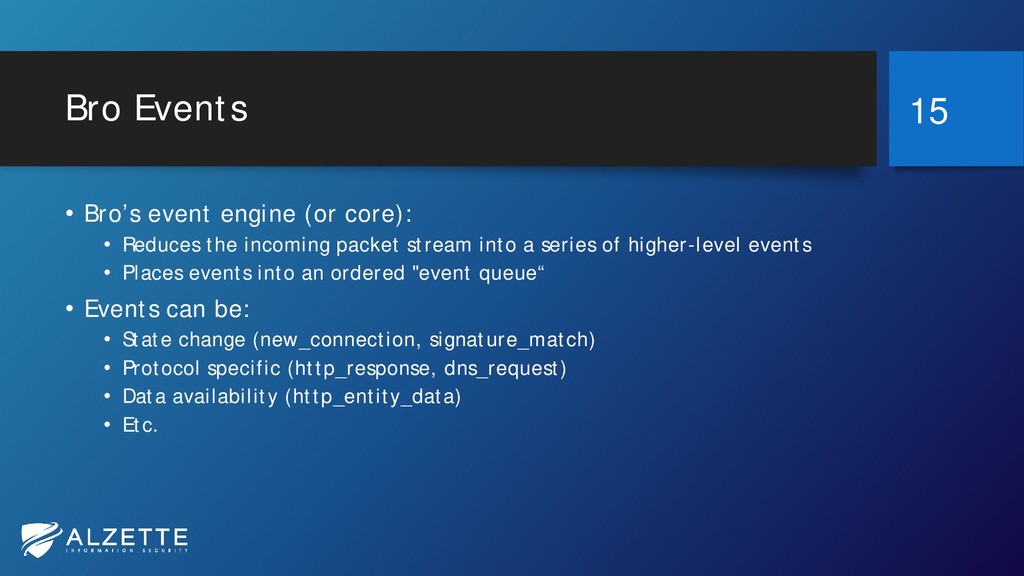
Bro Events • Bro’s event engine (or core): • Reduces
the incoming packet stream into a series of higher-level events • Places events into an ordered "event queue“ • Events can be: • State change (new_connection, signature_match) • Protocol specific (http_response, dns_request) • Data availability (http_entity_data) • Etc. 15 -
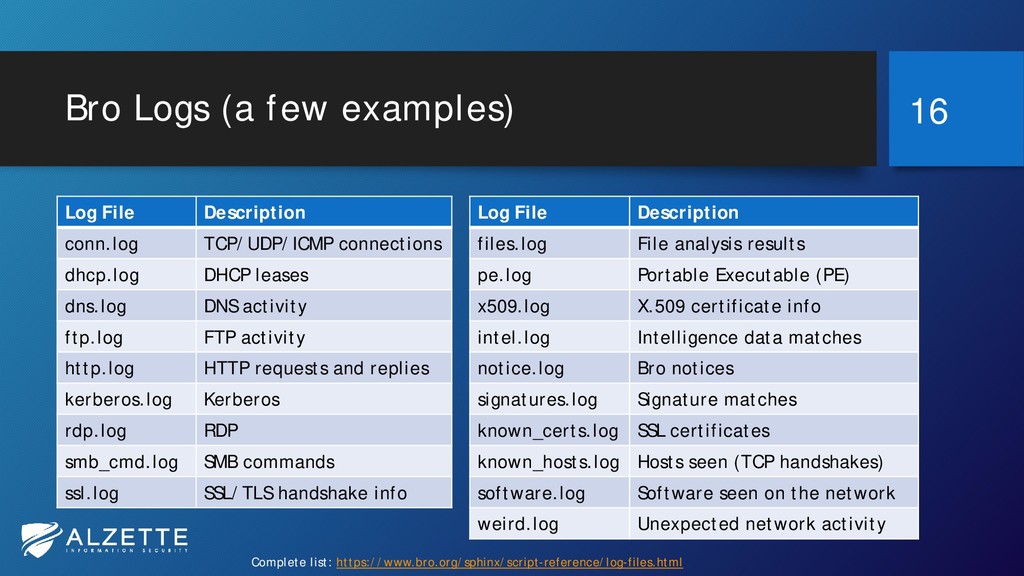
Bro Logs (a few examples) Log File Description conn.log TCP/UDP/ICMP
connections dhcp.log DHCP leases dns.log DNS activity ftp.log FTP activity http.log HTTP requests and replies kerberos.log Kerberos rdp.log RDP smb_cmd.log SMB commands ssl.log SSL/TLS handshake info Log File Description files.log File analysis results pe.log Portable Executable (PE) x509.log X.509 certificate info intel.log Intelligence data matches notice.log Bro notices signatures.log Signature matches known_certs.log SSL certificates known_hosts.log Hosts seen (TCP handshakes) software.log Software seen on the network weird.log Unexpected network activity 16 Complete list: https://www.bro.org/sphinx/script-reference/log-files.html -
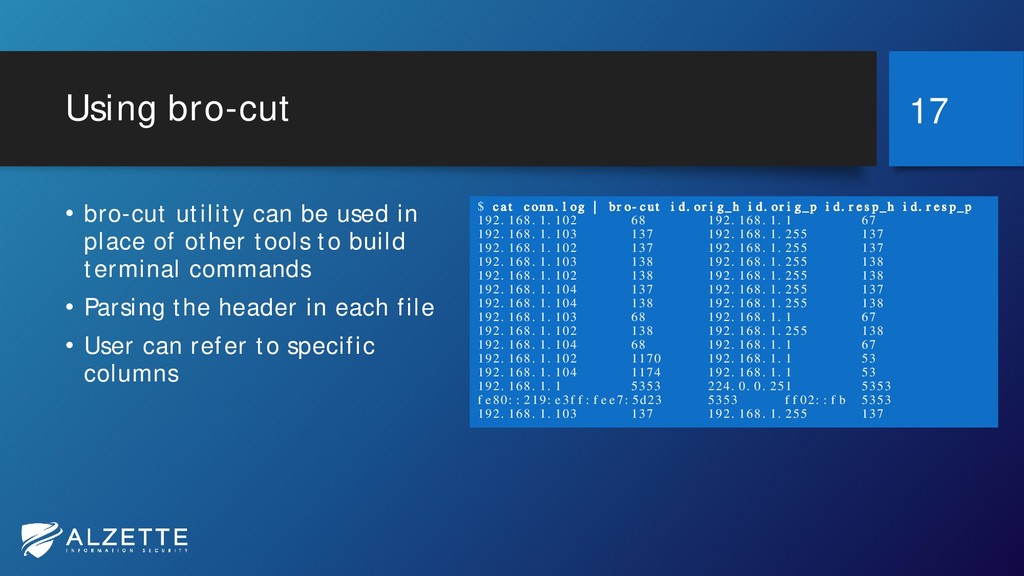
Using bro-cut • bro-cut utility can be used in place
of other tools to build terminal commands • Parsing the header in each file • User can refer to specific columns 17 $ cat conn.log | bro-cut id.orig_h id.orig_p id.resp_h id.resp_p 192.168.1.102 68 192.168.1.1 67 192.168.1.103 137 192.168.1.255 137 192.168.1.102 137 192.168.1.255 137 192.168.1.103 138 192.168.1.255 138 192.168.1.102 138 192.168.1.255 138 192.168.1.104 137 192.168.1.255 137 192.168.1.104 138 192.168.1.255 138 192.168.1.103 68 192.168.1.1 67 192.168.1.102 138 192.168.1.255 138 192.168.1.104 68 192.168.1.1 67 192.168.1.102 1170 192.168.1.1 53 192.168.1.104 1174 192.168.1.1 53 192.168.1.1 5353 224.0.0.251 5353 fe80::219:e3ff:fee7:5d23 5353 ff02::fb 5353 192.168.1.103 137 192.168.1.255 137 -
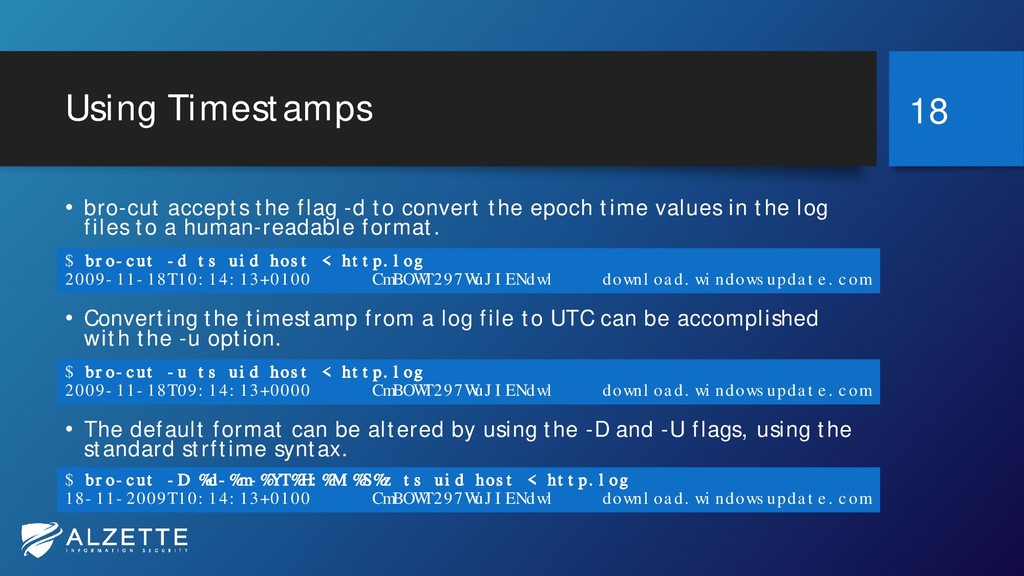
Using Timestamps • bro-cut accepts the flag -d to convert
the epoch time values in the log files to a human-readable format. • Converting the timestamp from a log file to UTC can be accomplished with the -u option. • The default format can be altered by using the -D and -U flags, using the standard strftime syntax. 18 $ bro-cut -d ts uid host < http.log 2009-11-18T10:14:13+0100 CmBOWT297WuJIENdwl download.windowsupdate.com $ bro-cut -u ts uid host < http.log 2009-11-18T09:14:13+0000 CmBOWT297WuJIENdwl download.windowsupdate.com $ bro-cut -D %d-%m-%YT%H:%M:%S%z ts uid host < http.log 18-11-2009T10:14:13+0100 CmBOWT297WuJIENdwl download.windowsupdate.com -
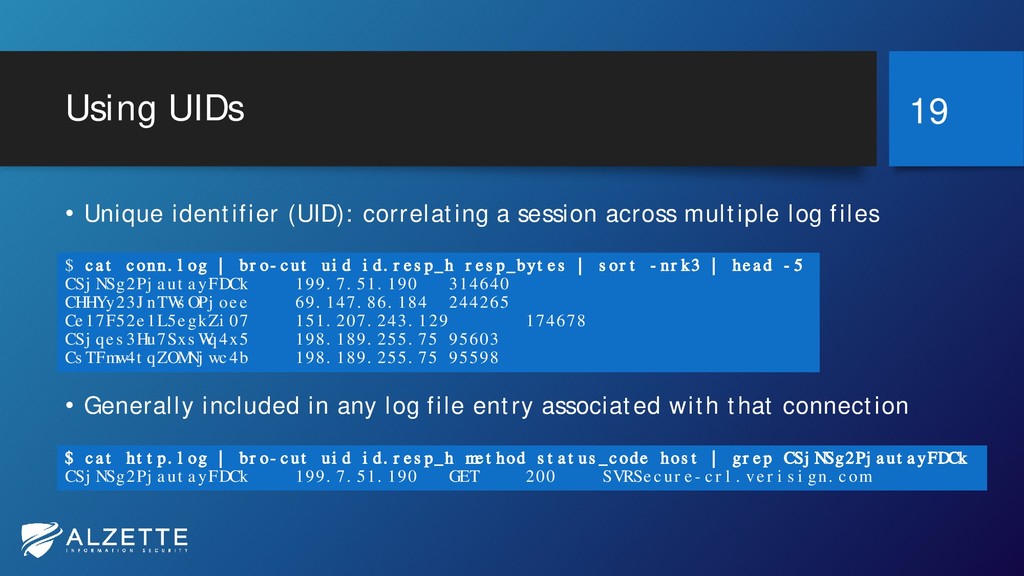
Using UIDs • Unique identifier (UID): correlating a session across
multiple log files • Generally included in any log file entry associated with that connection 19 $ cat conn.log | bro-cut uid id.resp_h resp_bytes | sort -nrk3 | head -5 CSjNSg2PjautayFDCk 199.7.51.190 314640 CHHYy23JnTWsOPjoee 69.147.86.184 244265 Ce17F52e1L5egkZi07 151.207.243.129 174678 CSjqes3Hu7SxsWq4x5 198.189.255.75 95603 CsTFmw4tqZOMNjwc4b 198.189.255.75 95598 $ cat http.log | bro-cut uid id.resp_h method status_code host | grep CSjNSg2PjautayFDCk CSjNSg2PjautayFDCk 199.7.51.190 GET 200 SVRSecure-crl.verisign.com -
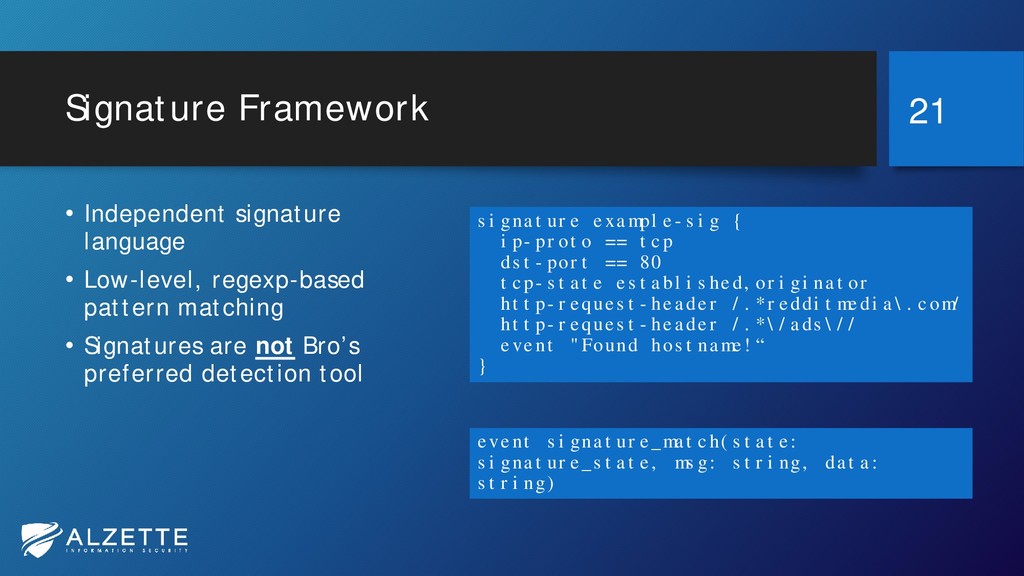
Signature Framework • Independent signature language • Low-level, regexp-based pattern
matching • Signatures are not Bro’s preferred detection tool 21 signature example-sig { ip-proto == tcp dst-port == 80 tcp-state established,originator http-request-header /.*redditmedia\.com/ http-request-header /.*\/ads\// event "Found hostname!“ } event signature_match(state: signature_state, msg: string, data: string) -
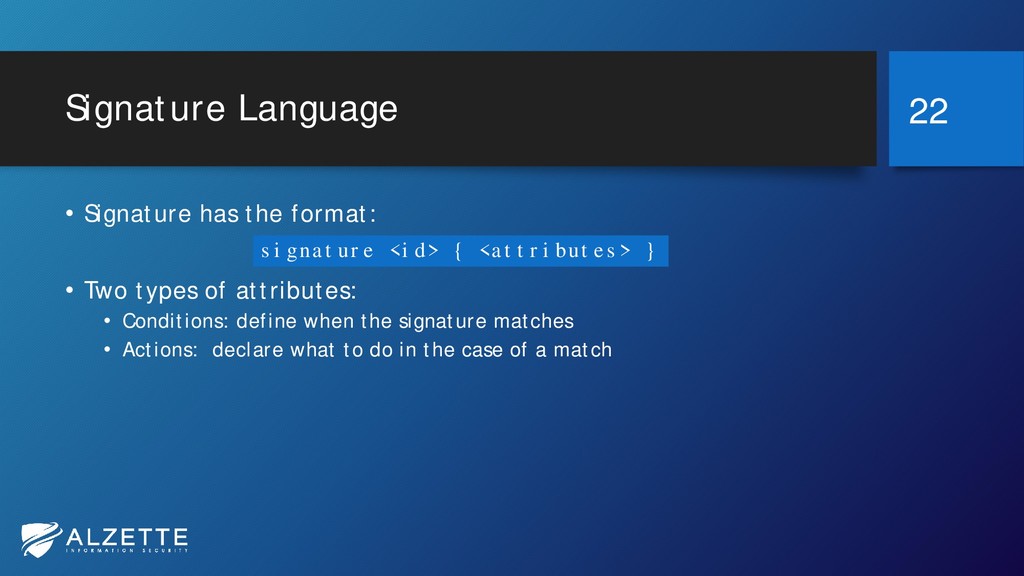
Signature Language • Signature has the format: • Two types
of attributes: • Conditions: define when the signature matches • Actions: declare what to do in the case of a match 22 signature <id> { <attributes> } -
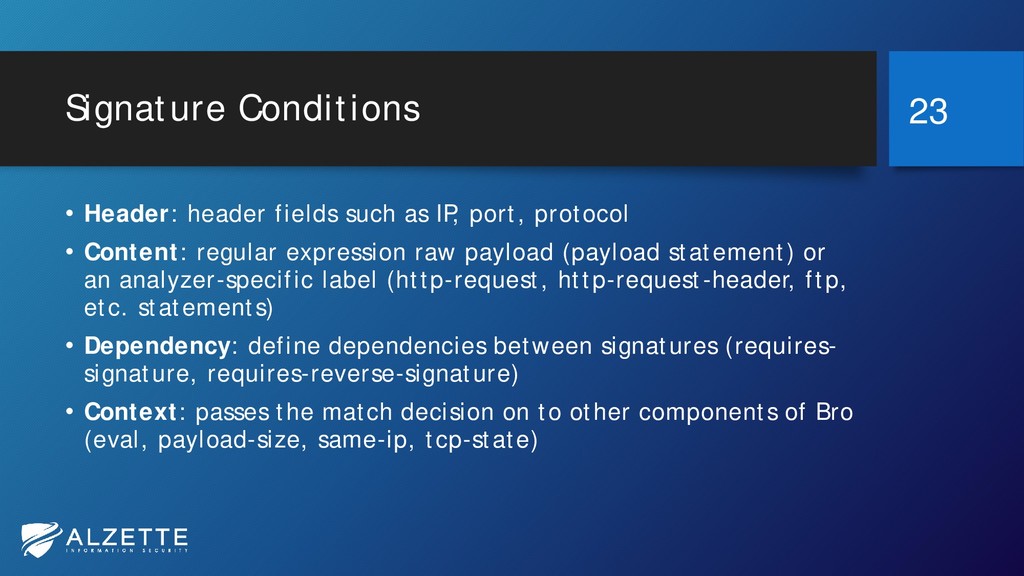
Signature Conditions • Header: header fields such as IP, port,
protocol • Content: regular expression raw payload (payload statement) or an analyzer-specific label (http-request, http-request-header, ftp, etc. statements) • Dependency: define dependencies between signatures (requires- signature, requires-reverse-signature) • Context: passes the match decision on to other components of Bro (eval, payload-size, same-ip, tcp-state) 23 -
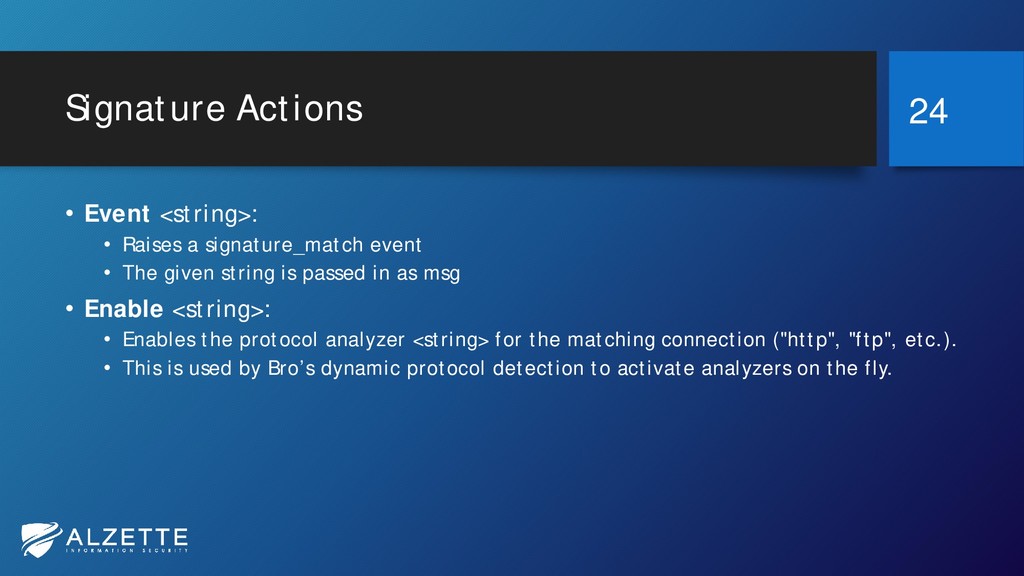
Signature Actions • Event <string>: • Raises a signature_match event
• The given string is passed in as msg • Enable <string>: • Enables the protocol analyzer <string> for the matching connection ("http", "ftp", etc.). • This is used by Bro’s dynamic protocol detection to activate analyzers on the fly. 24 -
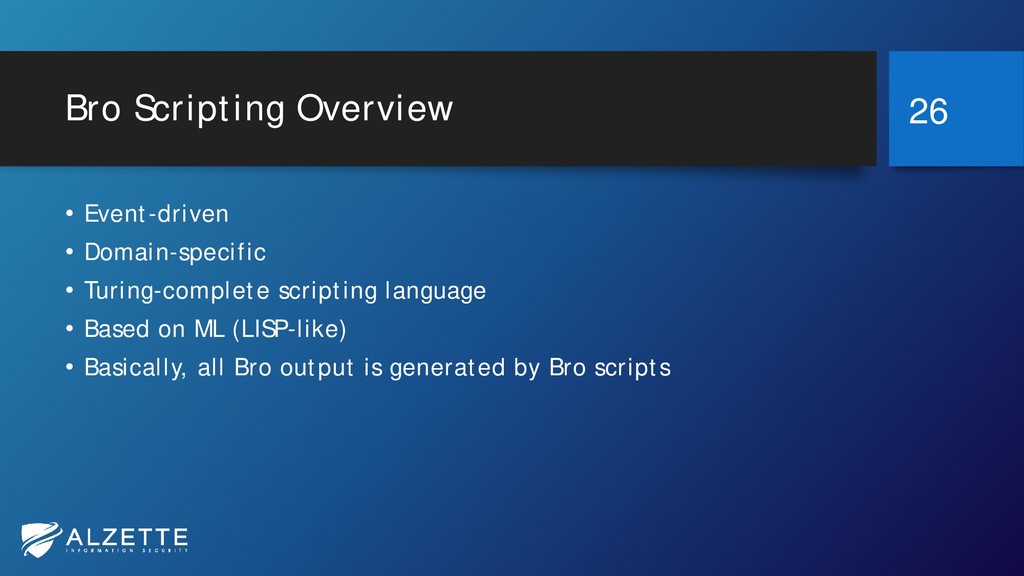
Bro Scripting Overview • Event-driven • Domain-specific • Turing-complete scripting
language • Based on ML (LISP-like) • Basically, all Bro output is generated by Bro scripts 26 -
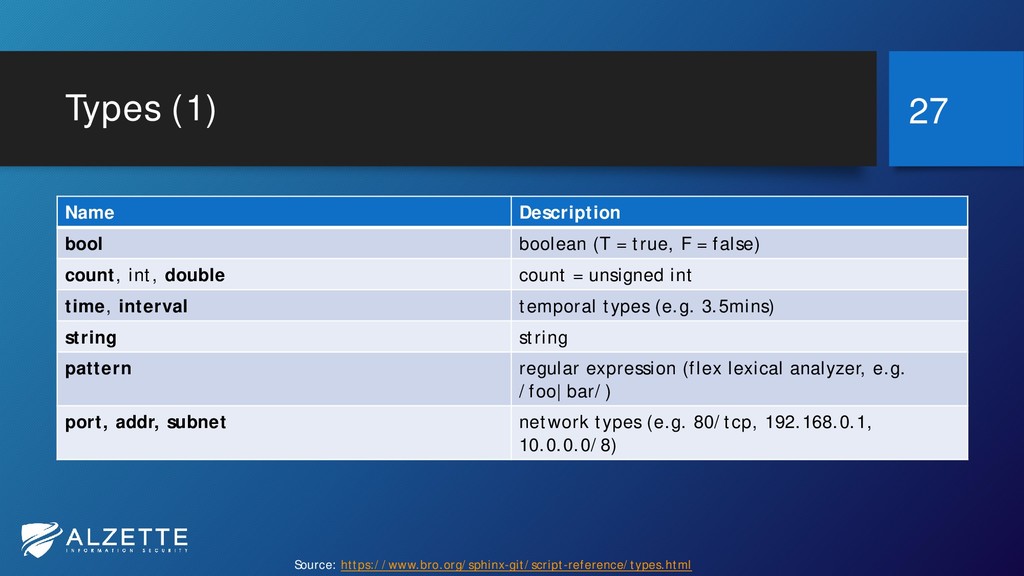
Types (1) Name Description bool boolean (T = true, F
= false) count, int, double count = unsigned int time, interval temporal types (e.g. 3.5mins) string string pattern regular expression (flex lexical analyzer, e.g. /foo|bar/) port, addr, subnet network types (e.g. 80/tcp, 192.168.0.1, 10.0.0.0/8) 27 Source: https://www.bro.org/sphinx-git/script-reference/types.html -
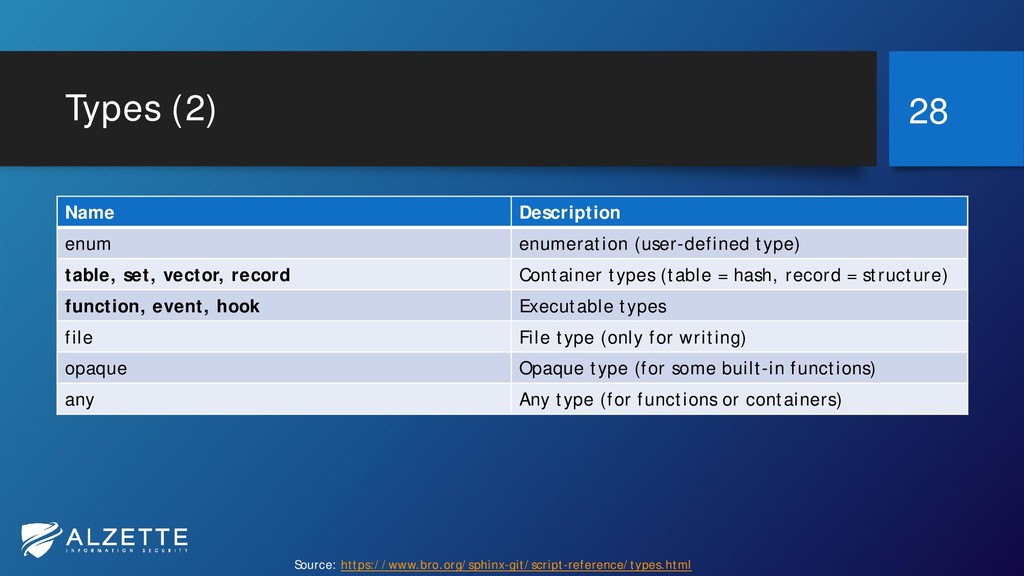
Types (2) Name Description enum enumeration (user-defined type) table, set,
vector, record Container types (table = hash, record = structure) function, event, hook Executable types file File type (only for writing) opaque Opaque type (for some built-in functions) any Any type (for functions or containers) 28 Source: https://www.bro.org/sphinx-git/script-reference/types.html -
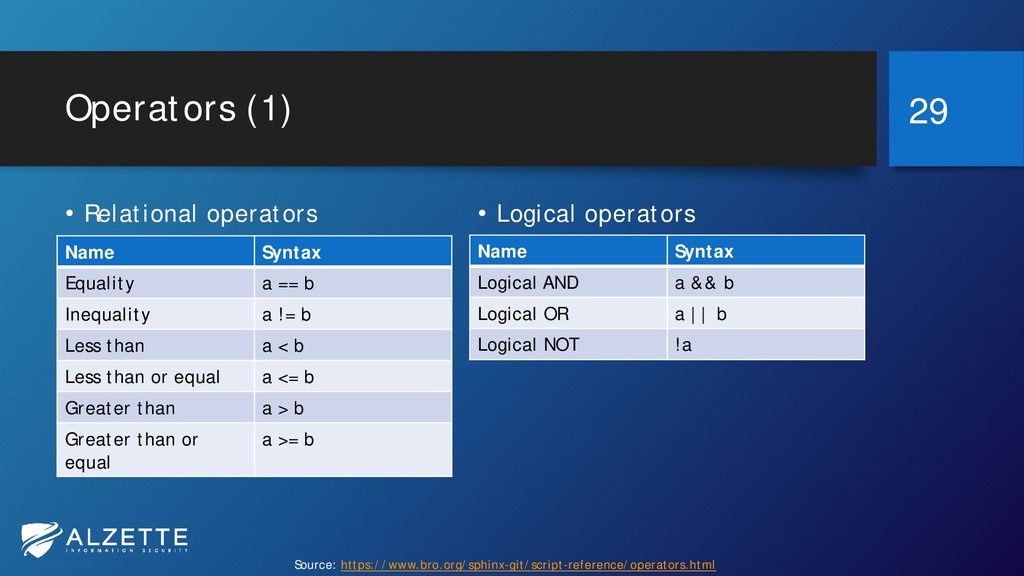
Operators (1) 29 • Logical operators Name Syntax Logical AND
a && b Logical OR a || b Logical NOT !a • Relational operators Name Syntax Equality a == b Inequality a != b Less than a < b Less than or equal a <= b Greater than a > b Greater than or equal a >= b Source: https://www.bro.org/sphinx-git/script-reference/operators.html -
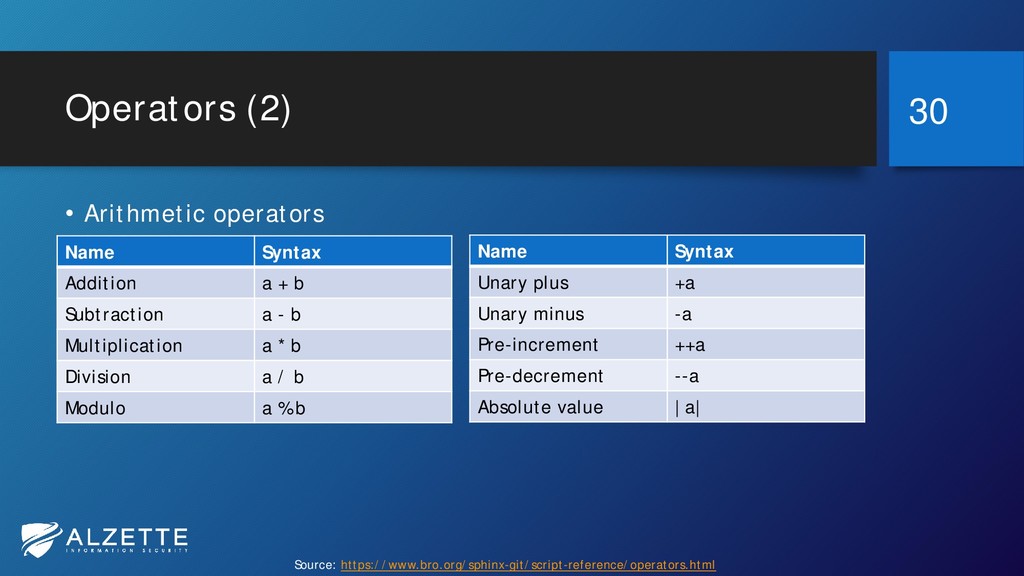
Operators (2) 30 Name Syntax Unary plus +a Unary minus
-a Pre-increment ++a Pre-decrement --a Absolute value |a| • Arithmetic operators Name Syntax Addition a + b Subtraction a - b Multiplication a * b Division a / b Modulo a % b Source: https://www.bro.org/sphinx-git/script-reference/operators.html -
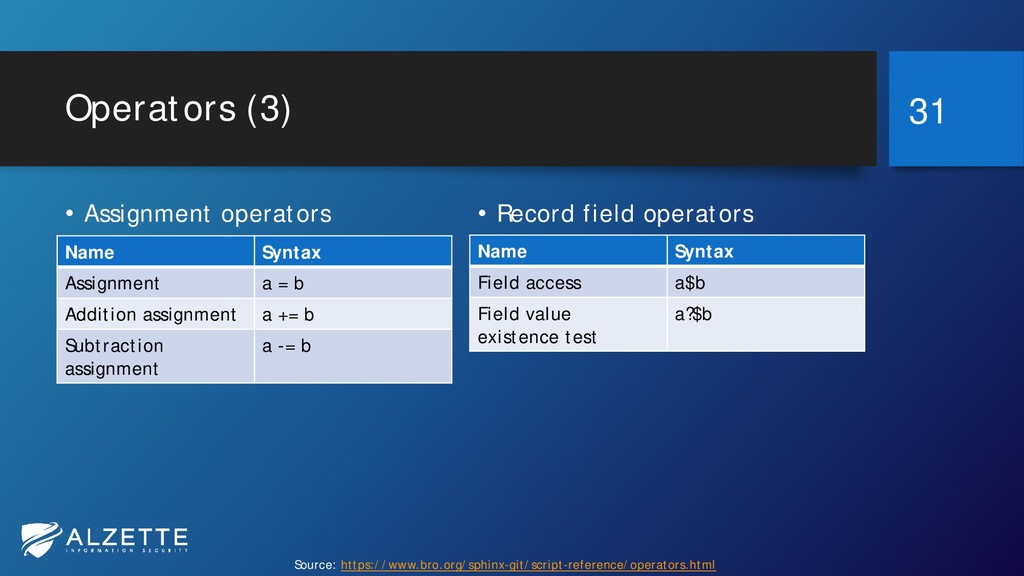
Operators (3) 31 • Record field operators Name Syntax Field
access a$b Field value existence test a?$b • Assignment operators Name Syntax Assignment a = b Addition assignment a += b Subtraction assignment a -= b Source: https://www.bro.org/sphinx-git/script-reference/operators.html -
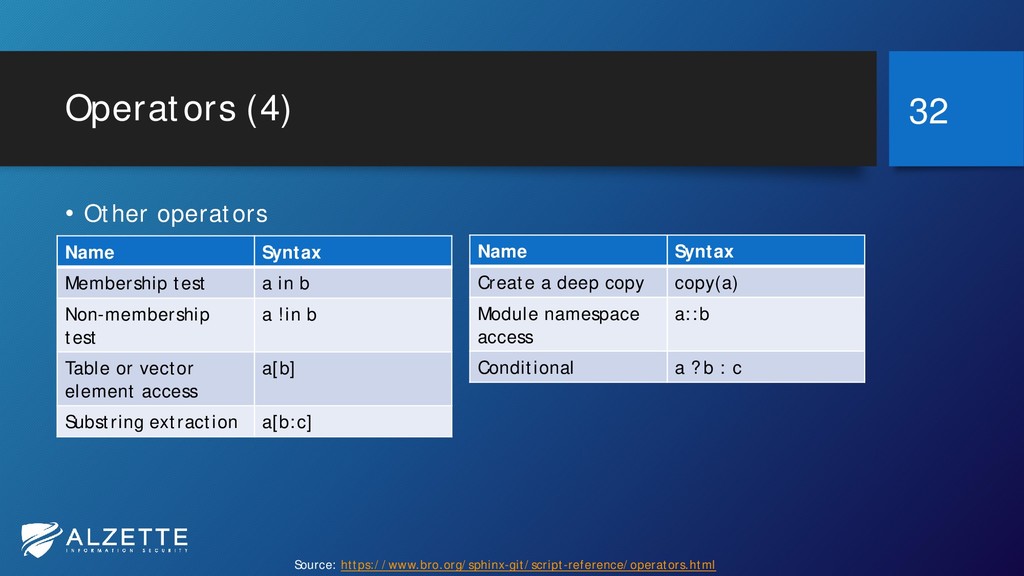
Operators (4) 32 Name Syntax Create a deep copy copy(a)
Module namespace access a::b Conditional a ? b : c • Other operators Name Syntax Membership test a in b Non-membership test a !in b Table or vector element access a[b] Substring extraction a[b:c] Source: https://www.bro.org/sphinx-git/script-reference/operators.html -
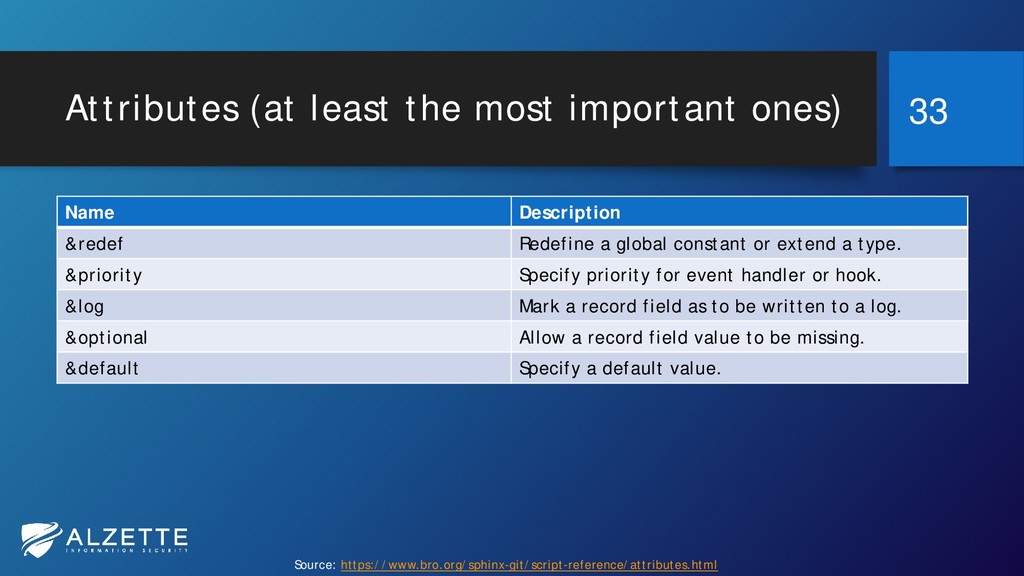
Attributes (at least the most important ones) Name Description &redef
Redefine a global constant or extend a type. &priority Specify priority for event handler or hook. &log Mark a record field as to be written to a log. &optional Allow a record field value to be missing. &default Specify a default value. 33 Source: https://www.bro.org/sphinx-git/script-reference/attributes.html -
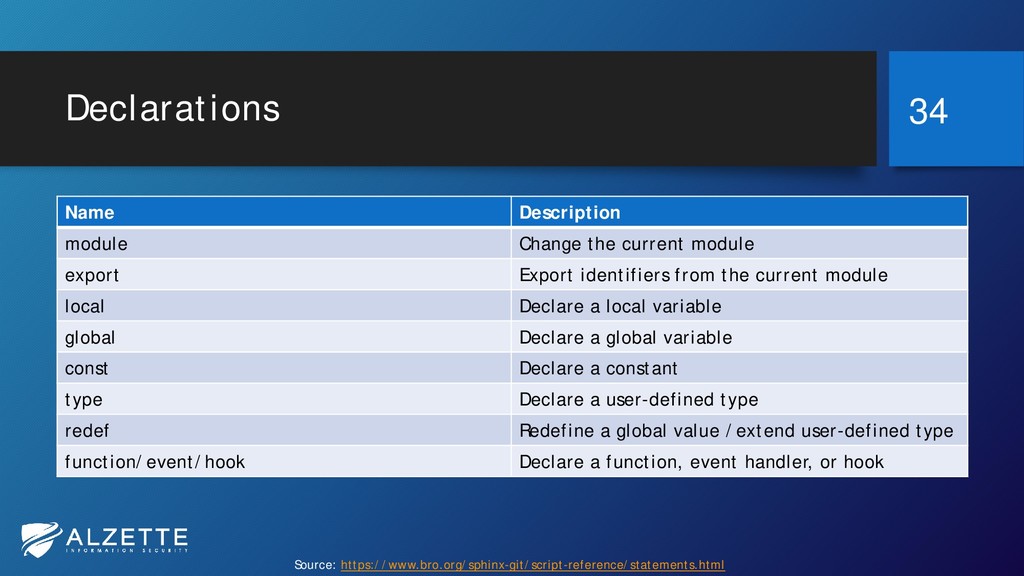
Declarations Name Description module Change the current module export Export
identifiers from the current module local Declare a local variable global Declare a global variable const Declare a constant type Declare a user-defined type redef Redefine a global value /extend user-defined type function/event/hook Declare a function, event handler, or hook 34 Source: https://www.bro.org/sphinx-git/script-reference/statements.html -
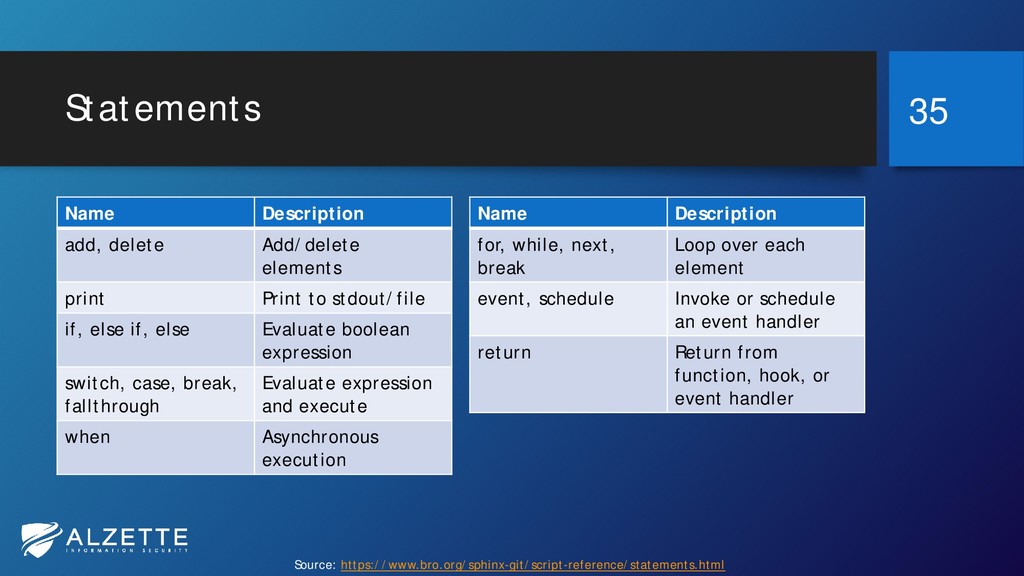
Statements 35 Name Description for, while, next, break Loop over
each element event, schedule Invoke or schedule an event handler return Return from function, hook, or event handler Name Description add, delete Add/delete elements print Print to stdout/file if, else if, else Evaluate boolean expression switch, case, break, fallthrough Evaluate expression and execute when Asynchronous execution Source: https://www.bro.org/sphinx-git/script-reference/statements.html -
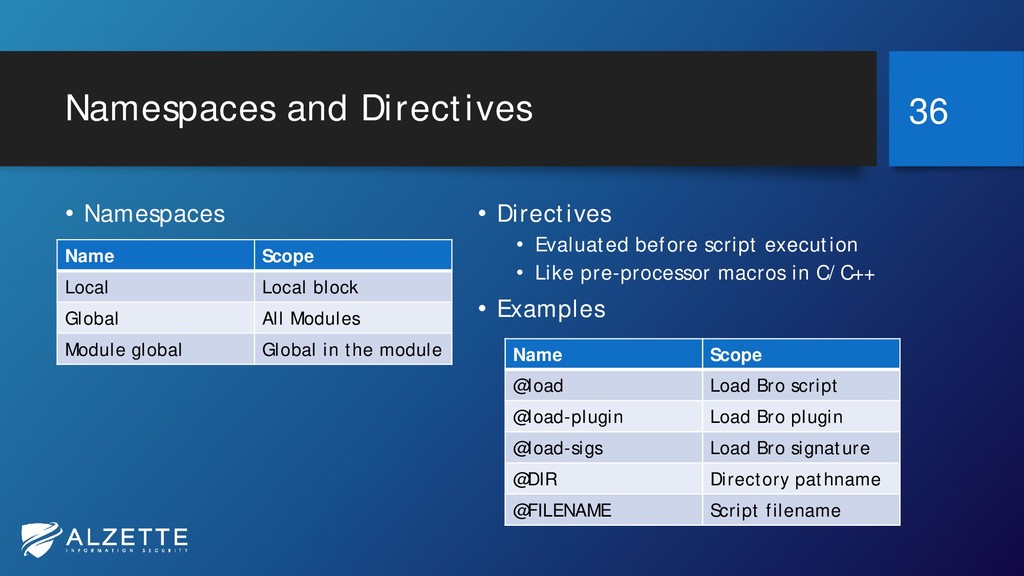
Namespaces and Directives • Namespaces • Directives • Evaluated before
script execution • Like pre-processor macros in C/C++ • Examples 36 Name Scope Local Local block Global All Modules Module global Global in the module Name Scope @load Load Bro script @load-plugin Load Bro plugin @load-sigs Load Bro signature @DIR Directory pathname @FILENAME Script filename -
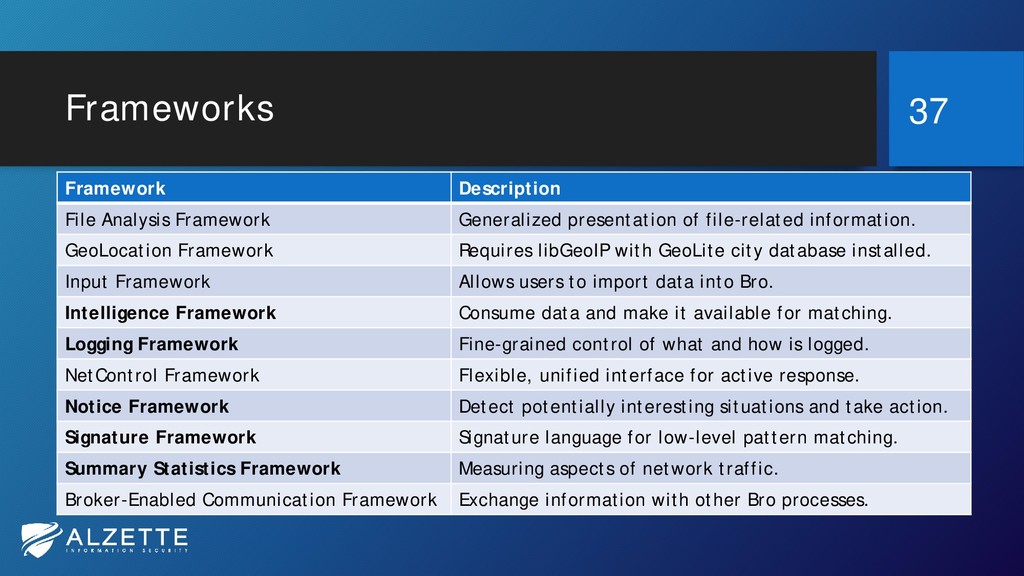
Frameworks Framework Description File Analysis Framework Generalized presentation of file-related
information. GeoLocation Framework Requires libGeoIP with GeoLite city database installed. Input Framework Allows users to import data into Bro. Intelligence Framework Consume data and make it available for matching. Logging Framework Fine-grained control of what and how is logged. NetControl Framework Flexible, unified interface for active response. Notice Framework Detect potentially interesting situations and take action. Signature Framework Signature language for low-level pattern matching. Summary Statistics Framework Measuring aspects of network traffic. Broker-Enabled Communication Framework Exchange information with other Bro processes. 37 -
And a bunch of other things… • Hooks • Analyzers
• Bro script debugging • Bro frameworks in depth • Broccoli: The Bro Client Communications Library • Bro Plugins • Go check the documentation: https://www.bro.org/documentation/index.html 38 -
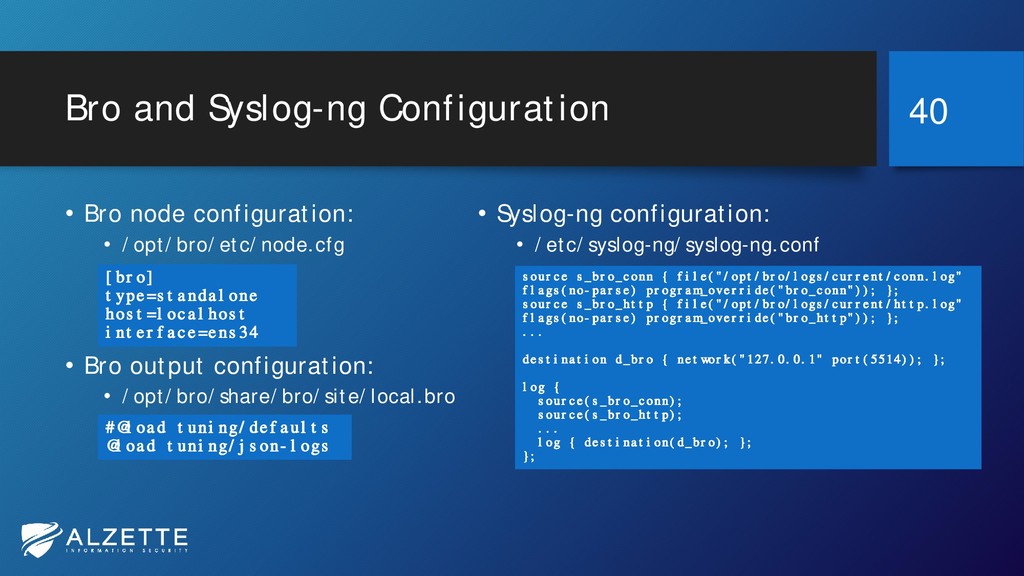
Bro and Syslog-ng Configuration • Bro node configuration: • /opt/bro/etc/node.cfg
• Bro output configuration: • /opt/bro/share/bro/site/local.bro • Syslog-ng configuration: • /etc/syslog-ng/syslog-ng.conf 40 source s_bro_conn { file("/opt/bro/logs/current/conn.log" flags(no-parse) program_override("bro_conn")); }; source s_bro_http { file("/opt/bro/logs/current/http.log" flags(no-parse) program_override("bro_http")); }; ... destination d_bro { network("127.0.0.1" port(5514)); }; log { source(s_bro_conn); source(s_bro_http); ... log { destination(d_bro); }; }; [bro] type=standalone host=localhost interface=ens34 #@load tuning/defaults @load tuning/json-logs -
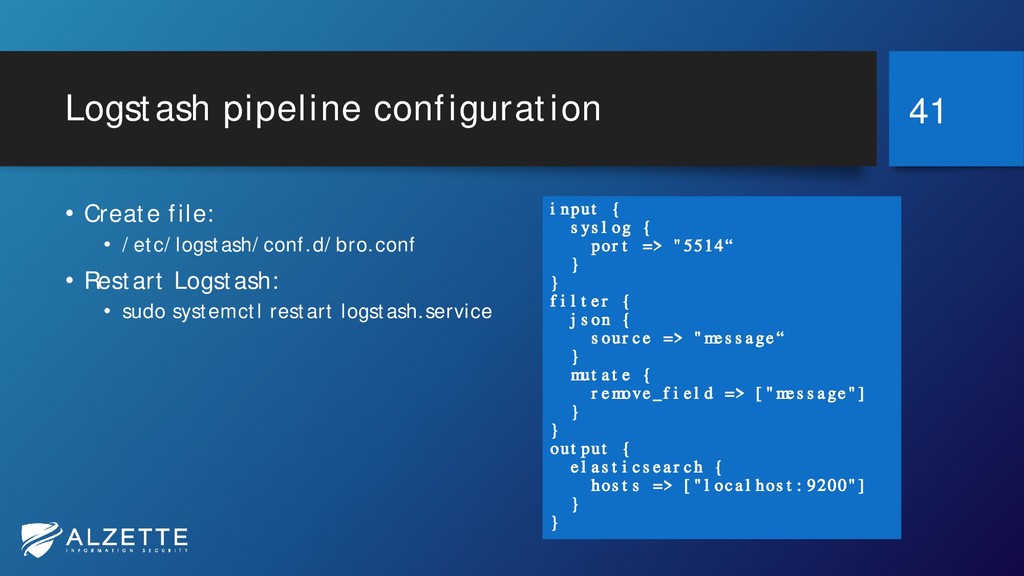
Logstash pipeline configuration • Create file: • /etc/logstash/conf.d/bro.conf • Restart
Logstash: • sudo systemctl restart logstash.service 41 input { syslog { port => "5514“ } } filter { json { source => "message“ } mutate { remove_field => ["message"] } } output { elasticsearch { hosts => ["localhost:9200"] } } -
References • Bro Documentation • https://www.bro.org/documentation/index.html • Install Bro •
https://www.bro.org/sphinx/install/install.html • Bro on DockerHub • https://hub.docker.com/u/broplatform/ • Try Bro Online • http://try.bro.org 44