MySQL and PHP/Perl stack was the internet model for so many years. But now everything is 'cloud this' or 'Kubernetes that'. But how do you move from LAMP to this new medium, how do the various 'tinker toys' work together, and what tricks does an 'old dog' need to learn to accomplish all this? Kubernetes may seem like a Rubik's Cube but there is some method in it's madness that have made it popular. So if Kubernetes is in your future but you do not know where to start then you should probably be in this presentation. You will see exactly what you need to do to move from LAMP to Kube, why you have to do those steps, and how to use your new containerized environment. Room: Ballroom G Time: Saturday, March 11, 2023 - 13:30 to 14:30 3
and bundle their own software, libraries and configuration files; they can communicate with each other through well-defined channels. Because all of the containers share the services of a single operating system kernel, they use fewer resources than virtual machines 15 https://en.wikipedia.org/wiki/Docker_(software)
make software portable. The container contains all the packages you need to run a service. The provided file system makes containers extremely portable and easy to use in development. A container can be moved from development to test or production with no or relatively few configuration changes. 17
ID IMAGE COMMAND CREATED STATUS PORTS NAMES bebf363885e8 percona/percona-server:8.0 "/docker-entrypoint.…" 2 minutes ago Up 2 minutes 3306/tcp, 33060/tcp percona-server Status 20
/bin/bash [mysql@bebf363885e8 /]$ mysql -u root -p Enter password: Welcome to the MySQL monitor. Commands end with ; or \g. Your MySQL connection id is 8 Server version: 8.0.31-23 Percona Server (GPL), Release 23, Revision 71449379 Copyright (c) 2009-2022 Percona LLC and/or its affiliates Copyright (c) 2000, 2022, Oracle and/or its affiliates. Oracle is a registered trademark of Oracle Corporation and/or its affiliates. Other names may be trademarks of their respective owners. Type 'help;' or '\h' for help. Type '\c' to clear the current input statement. mysql> 21
ID IMAGE COMMAND CREATED STATUS PORTS NAMES bebf363885e8 percona/percona-server:8.0 "/docker-entrypoint.…" 7 minutes ago Up 6 minutes 3306/tcp, 33060/tcp percona-server $ sudo docker stop bebf363885e8 bebf363885e8 Stopping that container 22
there was an actual place beyond the clouds, somewhere over the rainbow. There was an actual place, and we could go above the clouds and find it there. Barbara Walters Cloud
right? 2. No longer need a computer room, those compute operators, big air handlers, high electricity bills, an ongoing capital budget fight for new computer stuff, hardware service contracts, and all the yucky stuff. 3. Need an upgrade? Put it on the credit card! It is still cheaper, right? 4. Faster to provision a server. 5. Better integration between our handy dandy CI/CD system and containerized software and easy to provision servers. 6. Almost infinite scaling, as long as your credit holds! 24 The Rush to the Cloud
stylized as K8s[) is an open-source container orchestration system for automating software deployment, scaling, and management. Originally designed by Google, the project is now maintained by the Cloud Native Computing Foundation. The name Kubernetes originates from Greek, meaning helmsman or pilot. Kubernetes is often abbreviated as K8s, counting the eight letters between the "K" and the "s" (a numeronym). Its suitability for running and managing large cloud-native workloads has led to widespread adoption of it in the data center. There are multiple distributions of this platform - from ISVs as well as hosted-on cloud offerings from all the major public cloud vendors. 28 https://en.wikipedia.org/wiki/Kubernetes
unit in Kubernetes is a pod,[which consists of one or more containers that are guaranteed to be co-located on the same node. Each pod in Kubernetes is assigned a unique IP address within the cluster, allowing applications to use ports without the risk of conflict.Within the pod, all containers can reference each other.
kubectl apply -f mysql-svc.yaml $ kubectl get svc NAME TYPE CLUSTER-IP EXTERNAL-IP PORT(S) AGE kubernetes ClusterIP 10.96.0.1 <none> 443/TCP 46m mysql ClusterIP None <none> 3306/TCP 41m $ kubectl get pods NAME READY STATUS RESTARTS AGE mysql-84cd68c954-mmnt8 1/1 Running 0 41m $ kubectl exec --stdin --tty mysql-84cd68c954-mmnt8 -- /bin/bash Get POD Running 36
127.0.0.1 Enter password: Welcome to the MySQL monitor. Commands end with ; or \g. Your MySQL connection id is 9 Server version: 8.0.32 MySQL Community Server - GPL Copyright (c) 2000, 2023, Oracle and/or its affiliates. Oracle is a registered trademark of Oracle Corporation and/or its affiliates. Other names may be trademarks of their respective owners. Type 'help;' or '\h' for help. Type '\c' to clear the current input statement. mysql> Actually Talk To The Database 39
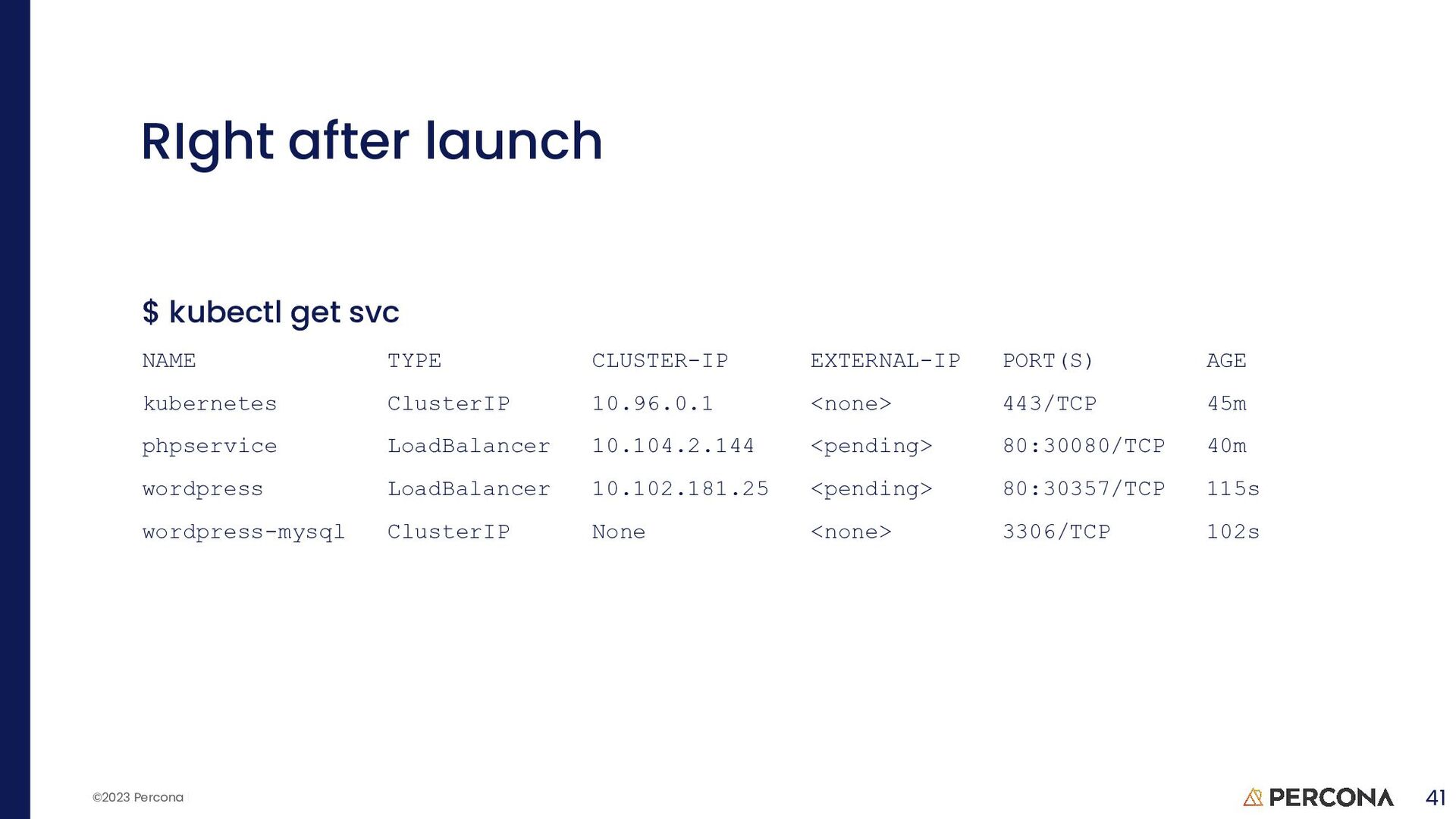
created persistentvolumeclaim/wp-pv-claim created deployment.apps/wordpress created $ kubectl create -f mysql-deployment.yaml service/wordpress-mysql created persistentvolumeclaim/mysql-pv-claim created deployment.apps/wordpress-mysql created $ kubectl get deployment NAME READY UP-TO-DATE AVAILABLE AGE wordpress 0/1 1 0 32s wordpress-mysql 0/1 1 0 18s Start A Kubed LAMP 40


 stoker
 codmoninc
 shugo
shugo
 takuroabe
 colopl
 takanorip
 yu23ki14
 willnet
 pfn
pfn
 ueponx
 kworkdev
 teamlab
 sferik
 varn
varn
 mfonobong
 addyosmani
 nonsquared
 jacobian
 baasie
 panda_program
 holman
 axbom
axbom
 akashhashmi
 reverentgeek




![percona.com THANK YOU! [email protected] @Stoker Speakerdeck.com/Stoker](https://files.speakerdeck.com/presentations/d3c52c6bada848458c80d1bac9a06bdf/slide_47.jpg)