Upgrade to Pro
— share decks privately, control downloads, hide ads and more …
Speaker Deck
Sign up for free
Menu
Search
Features
All features
Private URLs
Password Protection
Custom URLS
Scheduled publishing
Remove Branding
Restrict embedding
Deck Collections
Notes
Features
All features
Private URLs
Password Protection
Custom URLS
Scheduled publishing
Remove Branding
Restrict embedding
Deck Collections
Notes
Explore
Featured decks
Featured speakers
Programming
Technology
Storyboards
Explore
Featured decks
Featured speakers
Programming
Technology
Storyboards
Pricing
Search
Sign in
Sign up for free
ayano
Search
theayano
June 01, 2017
38
0
Share
Embed
Copy iframe code
Copy JS code
Copy link
Start on current slide
ayano
theayano
June 01, 2017
More Decks by theayano
See All by theayano
大津綾乃
theayano
0
73
マッピング作業のマニュアル
theayano
0
140
Featured
See All Featured
RailsConf & Balkan Ruby 2019: The Past, Present, and Future of Rails at GitHub
eileencodes
141
35k
How GitHub (no longer) Works
holman
316
150k
Navigating the moral maze — ethical principles for Al-driven product design
skipperchong
2
630
Side Projects
sachag
456
43k
Typedesign – Prime Four
hannesfritz
42
3.2k
Why You Should Never Use an ORM
jnunemaker
PRO
61
10k
エンジニアに許された特別な時間の終わり
watany
109
250k
Lessons Learnt from Crawling 1000+ Websites
charlesmeaden
PRO
1
1.6k
The SEO identity crisis: Don't let AI make you average
varn
0
590
How to audit for AI Accessibility on your Front & Back End
davetheseo
0
600
How People are Using Generative and Agentic AI to Supercharge Their Products, Projects, Services and Value Streams Today
helenjbeal
2
360
Making Projects Easy
brettharned
120
6.8k
Transcript
[Tasking Managerの使い方] 手順1. OSM Tasking Managerから Tasking Managerにログイン。 (アカウントが無ければ会員 登録へ…メアドと名前パス
ワードの簡単登録!) 手順2. 左のプロジェクトからエボラ のものを選択し、参加する! そして右の地図のどこかの四 角を選択するか、ランダム選 択をする。タスクが選べたら、 作業内容確認をクリック! エボラ
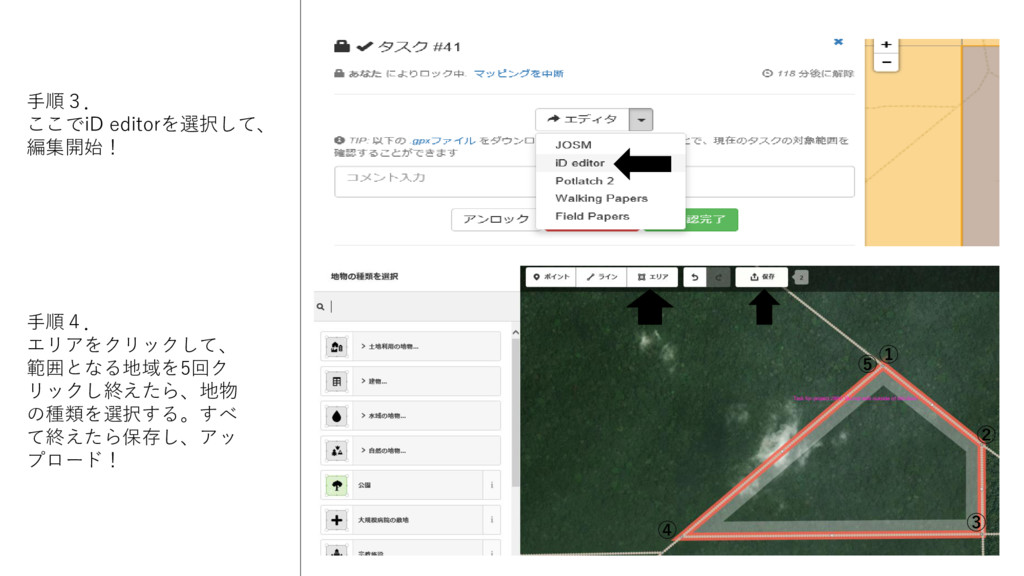
手順3. ここでiD editorを選択して、 編集開始! 手順4. エリアをクリックして、 範囲となる地域を5回ク リックし終えたら、地物 の種類を選択する。すべ て終えたら保存し、アッ
プロード! ① ② ③ ④ ⑤
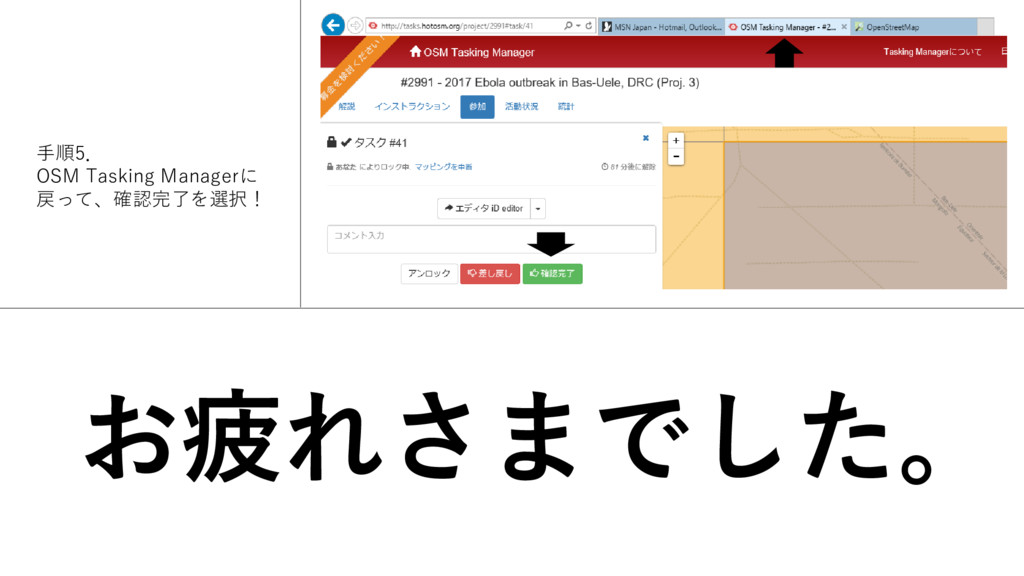
手順5. OSM Tasking Managerに 戻って、確認完了を選択! お疲れさまでした。


 theayano
 eileencodes
 holman
 skipperchong
 sachag
 hannesfritz
 jnunemaker
 watany
 charlesmeaden
 varn
varn
 davetheseo
.png) helenjbeal
helenjbeal
 brettharned
![[Tasking Managerの使い方] 手順1. OSM Tasking Managerから Tasking Managerにログイン。 (アカウントが無ければ会員 登録へ…メアドと名前パス](https://files.speakerdeck.com/presentations/f59ba3cf332f410998adf2ffb25b3eab/slide_0.jpg)