Upgrade to Pro
— share decks privately, control downloads, hide ads and more …
Speaker Deck
Sign up for free
Menu
Search
Features
All features
Private URLs
Password Protection
Custom URLS
Scheduled publishing
Remove Branding
Restrict embedding
Deck Collections
Notes
Features
All features
Private URLs
Password Protection
Custom URLS
Scheduled publishing
Remove Branding
Restrict embedding
Deck Collections
Notes
Explore
Featured decks
Featured speakers
Programming
Technology
Storyboards
Explore
Featured decks
Featured speakers
Programming
Technology
Storyboards
Pricing
Search
Sign in
Sign up for free
Cloud Vision API × Go言語で画像認識やってみました
Search
akane
June 20, 2017
290
0
Share
Embed
Copy iframe code
Copy JS code
Copy link
Start on current slide
Cloud Vision API × Go言語で画像認識やってみました
楽しいです
akane
June 20, 2017
More Decks by akane
See All by akane
未経験エンジニアがエンジニアリングマネージャーになるまで
akane256
1
960
Go言語入門
akane256
0
550
JavaScriptでチャットCLIツール作成
akane256
1
710
Featured
See All Featured
Mobile First: as difficult as doing things right
swwweet
225
10k
30 Presentation Tips
portentint
PRO
1
420
Testing 201, or: Great Expectations
jmmastey
46
8.3k
Ecommerce SEO: The Keys for Success Now & Beyond - #SERPConf2024
aleyda
1
2.2k
Design of three-dimensional binary manipulators for pick-and-place task avoiding obstacles (IECON2024)
konakalab
0
610
Efficient Content Optimization with Google Search Console & Apps Script
katarinadahlin
PRO
1
920
Darren the Foodie - Storyboard
khoart
PRO
4
4k
Building a Modern Day E-commerce SEO Strategy
aleyda
45
9.2k
Exploring the Power of Turbo Streams & Action Cable | RailsConf2023
kevinliebholz
37
6.6k
Responsive Adventures: Dirty Tricks From The Dark Corners of Front-End
smashingmag
254
22k
Data-driven link building: lessons from a $708K investment (BrightonSEO talk)
szymonslowik
1
1.4k
The World Runs on Bad Software
bkeepers
PRO
72
12k
Transcript
Cloud Vision API×Go言語で 画像認識やってみました @akane_256
自己紹介 Twitter: @akane_256 Women Who Go Tokyoの共同主催者 Women Who Go
Tokyo 2016年6月発足したGo言語を勉強する女性コミュニティ 毎月1回、テーマにそってGoを学んでいます。 次回は、6/28(水)開催です♡
アジェンダ ・Cloud Vision APIについて ・どうやって使うか ・Go言語で画像認識
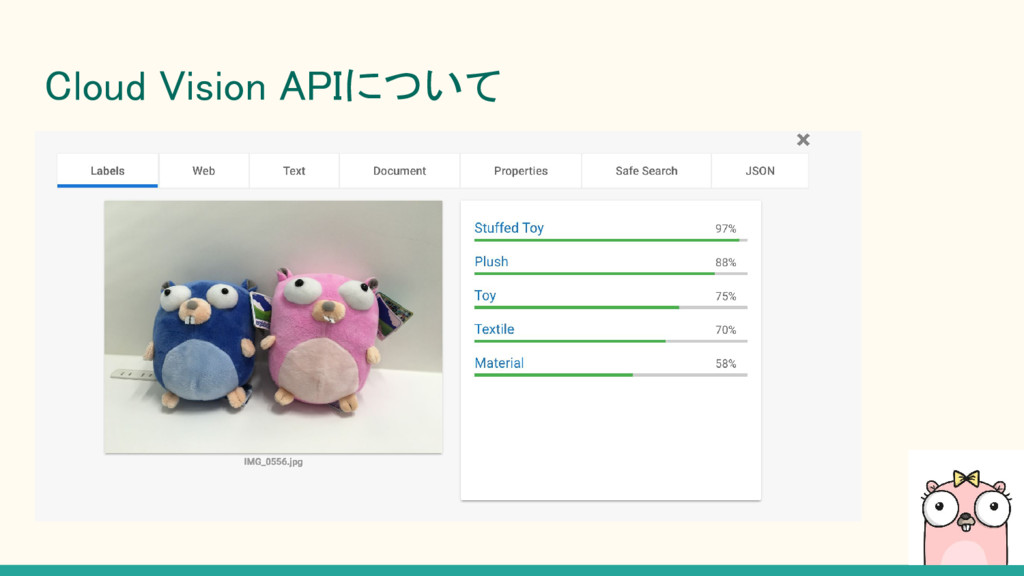
Cloud Vision APIについて 機械学習を使った画像の認識サービス。 Google Cloud Platformで、提供されています REST APIに画像認識の機械学習モデルが組み込まれていて、 APIにPOSTリクエストを送ると、リクエストした画像から
文字や顔などの特徴を検出し、情報を返却してくれます。
Cloud Vision APIについて
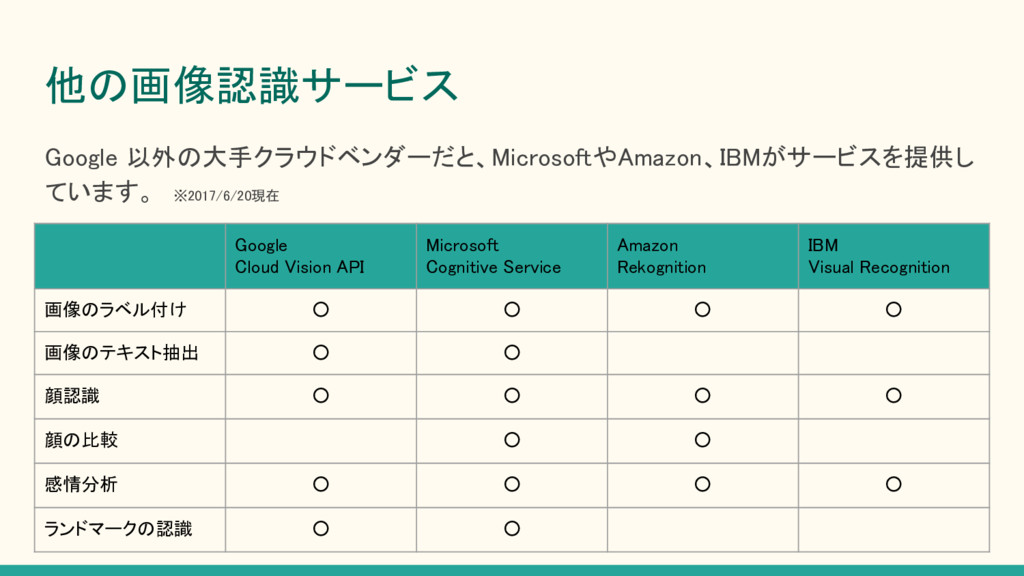
他の画像認識サービス Google Cloud Vision API Microsoft Cognitive Service Amazon Rekognition
IBM Visual Recognition 画像のラベル付け ◦ ◦ ◦ ◦ 画像のテキスト抽出 ◦ ◦ 顔認識 ◦ ◦ ◦ ◦ 顔の比較 ◦ ◦ 感情分析 ◦ ◦ ◦ ◦ ランドマークの認識 ◦ ◦ Google 以外の大手クラウドベンダーだと、MicrosoftやAmazon、IBMがサービスを提供し ています。 ※2017/6/20現在
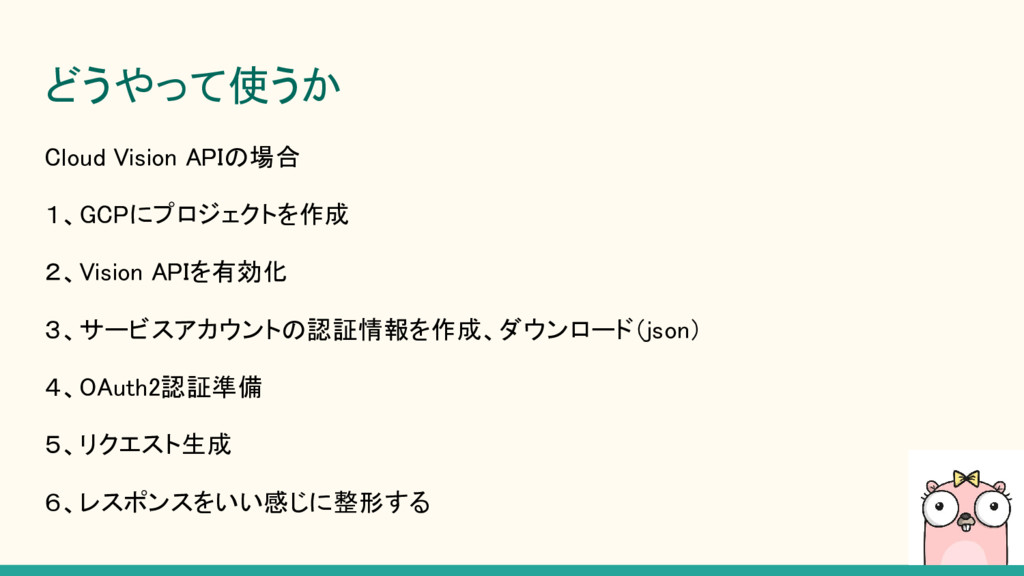
どうやって使うか Cloud Vision APIの場合 1、GCPにプロジェクトを作成 2、Vision APIを有効化 3、サービスアカウントの認証情報を作成、ダウンロード(json) 4、OAuth2認証準備 5、リクエスト生成
6、レスポンスをいい感じに整形する
DEMO
まとめ ・画像認識サービスは、APIにリクエストを投げるだけで簡単に 色々な情報を取得することができる(タグ、ロケーション情報など) ・実装するのが楽しい ・顔認識の精度が高いので、色々なサービスに使えそう ・Googleさんすごい
ありがとうございました


 akane256
 swwweet
 portentint
 jmmastey
 aleyda
 konakalab
 katarinadahlin
 khoart
 kevinliebholz
 smashingmag
 szymonslowik
 bkeepers