Upgrade to Pro
— share decks privately, control downloads, hide ads and more …
Speaker Deck
Sign up for free
Menu
Search
Features
All features
Private URLs
Password Protection
Custom URLS
Scheduled publishing
Remove Branding
Restrict embedding
Deck Collections
Notes
Features
All features
Private URLs
Password Protection
Custom URLS
Scheduled publishing
Remove Branding
Restrict embedding
Deck Collections
Notes
Explore
Featured decks
Featured speakers
Programming
Technology
Storyboards
Explore
Featured decks
Featured speakers
Programming
Technology
Storyboards
Pricing
Search
Sign in
Sign up for free
空間情報システム入門
Search
Ayaaaka
June 16, 2016
36
0
Share
Embed
Copy iframe code
Copy JS code
Copy link
Start on current slide
空間情報システム入門
Ayaaaka
June 16, 2016
More Decks by Ayaaaka
See All by Ayaaaka
Gistで保存する方法.pdf
ayaka
0
200
Featured
See All Featured
Intergalactic Javascript Robots from Outer Space
tanoku
273
28k
For a Future-Friendly Web
brad_frost
184
10k
The MySQL Ecosystem @ GitHub 2015
samlambert
251
13k
SERP Conf. Vienna - Web Accessibility: Optimizing for Inclusivity and SEO
sarafernandez
2
1.6k
Heart Work Chapter 1 - Part 1
lfama
PRO
10
37k
Public Speaking Without Barfing On Your Shoes - THAT 2023
reverentgeek
1
600
Mozcon NYC 2025: Stop Losing SEO Traffic
samtorres
1
570
Beyond borders and beyond the search box: How to win the global "messy middle" with AI-driven SEO
davidcarrasco
3
280
We Are The Robots
honzajavorek
0
400
The Art of Delivering Value - GDevCon NA Keynote
reverentgeek
16
2.2k
Noah Learner - AI + Me: how we built a GSC Bulk Export data pipeline
techseoconnect
PRO
0
460
Digital Ethics as a Driver of Design Innovation
axbom
PRO
1
460
Transcript
マッピング作業のマニュアル 1A115189 中山 彩香
1.建物の入力 • ManagerのURLを開き、Instructions→Start Constricting • オレンジのところ(入力済)以外の四角を選び作業範囲を決定 • 選択後、Start mappingで開始 •
左のEdit with ID editorでID editorを選択 • エリアを押し、建物の角を入力→書いた線をクリックし、出てきた選 択肢から直角補正を選ぶ • 左でmappingした建物の種類を選択→左枠の中の右上✔ • 建物すべてMapping し終えたら保存→Save
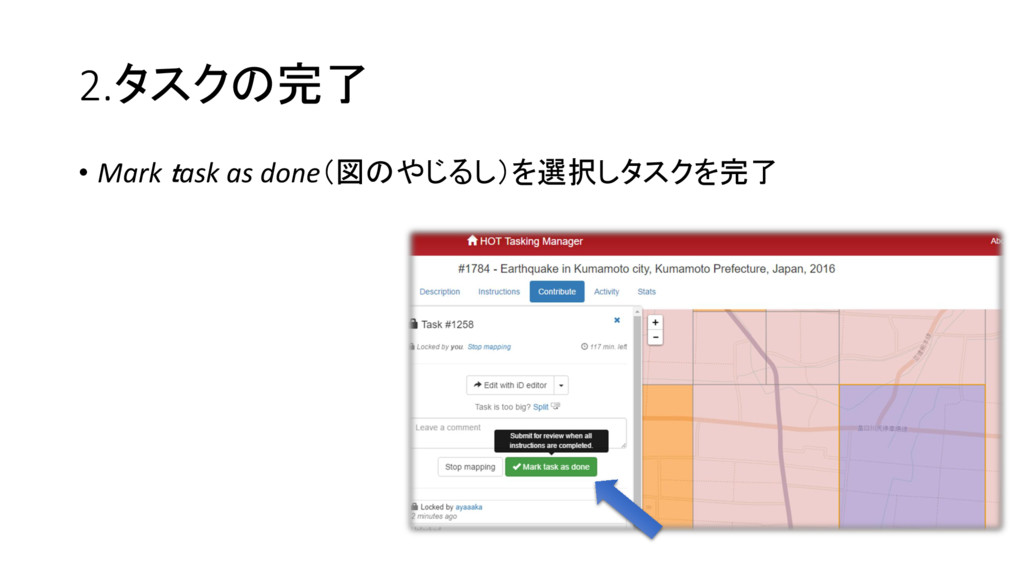
2.タスクの完了 • Mark task as done(図のやじるし)を選択しタスクを完了
3.修正 • 一つの頂点だけを消したい場合・・・ 消したい頂点を選択しごみ箱マークをクリック→消去 • 形だけを修正・・・ 頂点(◦)または辺にある△を選択し、変更したい形になるようドラッ グし移動
4.交差点を作った時の対処法 • 作業した建物(赤い線)をクリック • 出てきた5つの選択肢からゴミ箱マークを選択し、オブジェクトを完全 に消去
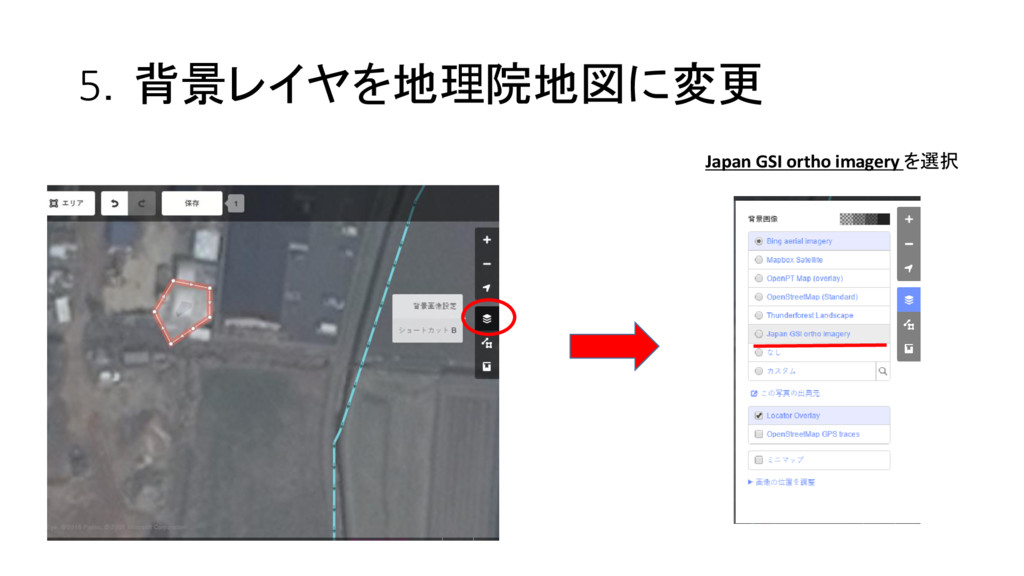
5.背景レイヤを地理院地図に変更 Japan GSI ortho imagery を選択
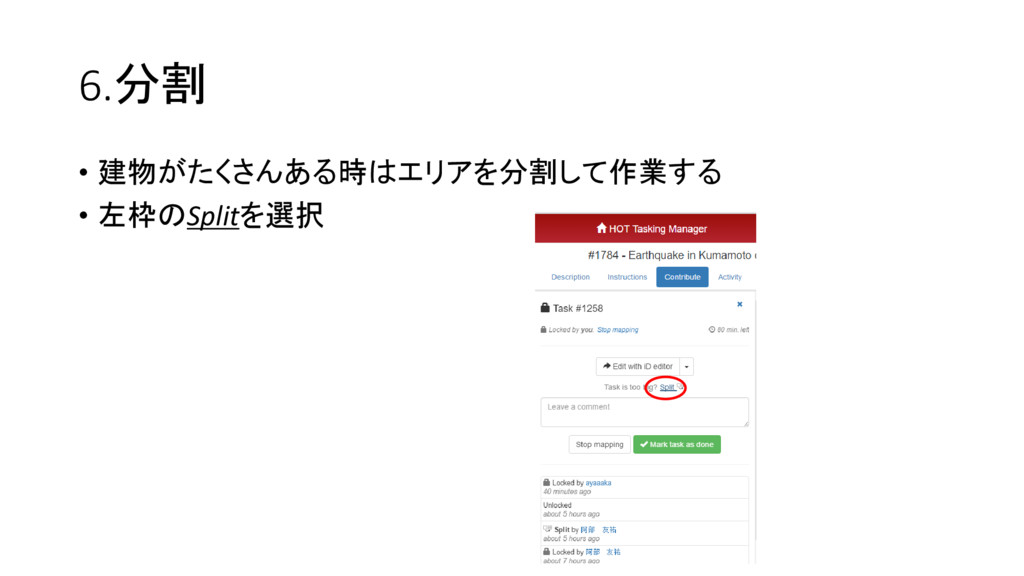
6.分割 • 建物がたくさんある時はエリアを分割して作業する • 左枠のSplitを選択


 ayaka
ayaka
 tanoku
 brad_frost
 samlambert
 sarafernandez
 lfama
lfama
 reverentgeek
 samtorres
 davidcarrasco
 honzajavorek
 techseoconnect
 axbom
axbom