Upgrade to Pro
— share decks privately, control downloads, hide ads and more …
Speaker Deck
Sign up for free
Menu
Search
Features
All features
Private URLs
Password Protection
Custom URLS
Scheduled publishing
Remove Branding
Restrict embedding
Deck Collections
Notes
Features
All features
Private URLs
Password Protection
Custom URLS
Scheduled publishing
Remove Branding
Restrict embedding
Deck Collections
Notes
Explore
Featured decks
Featured speakers
Programming
Technology
Storyboards
Explore
Featured decks
Featured speakers
Programming
Technology
Storyboards
Pricing
Search
Sign in
Sign up for free
OpenStreetMapでのマッピング方法
Search
Ayane Nakao
July 01, 2017
Education
99
0
Share
Embed
Copy iframe code
Copy JS code
Copy link
Start on current slide
OpenStreetMapでのマッピング方法
OpenStreetMapを使ったマッピングの仕方をまとめました。
Ayane Nakao
July 01, 2017
More Decks by Ayane Nakao
See All by Ayane Nakao
空間情報システム入門Ⅰ課題2017/07/06(訂正版)
ayanenakao
0
59
空間情報システム入門Ⅰ-2017/07/06課題
ayanenakao
0
50
Other Decks in Education
See All in Education
25-26 CBT Library top items
cbtlibrary
0
360
Carbohydrates: Classification, Structure & Chemical Properties
pawan_pharm
0
330
AIの力を100%引き出すために
frievea
0
610
Introduction - Lecture 1 - Web Technologies (1019888BNR)
signer
PRO
0
6.6k
AWS Academy プログラムのご紹介
hiragahh
0
110
Sekolah Sabat - Triwulan 4 2026 - Pelajaran 3
hiola
0
6.7k
Dronegeografía innovación didáctica y fotogrametría 3D para la enseñanza de la geografía local y la ciudadaniía activa
juanmartin2026
0
40k
CSS3 and Responsive Web Design - Lecture 5 - Web Technologies (1019888BNR)
signer
PRO
1
3.5k
Introduction to M&A
bvr7352
0
240
ちいかわを読め
uchi8977
1
410
Modulo : abc
robintux
0
240
【新規入学者様】ZEPメタバース校舎ガイド
ainischool
0
200
Featured
See All Featured
The Hidden Cost of Media on the Web [PixelPalooza 2025]
tammyeverts
2
530
Optimizing for Happiness
mojombo
378
71k
Jamie Indigo - Trashchat’s Guide to Black Boxes: Technical SEO Tactics for LLMs
techseoconnect
PRO
0
710
The Curse of the Amulet
leimatthew05
3
16k
Why You Should Never Use an ORM
jnunemaker
PRO
61
10k
Impact Scores and Hybrid Strategies: The future of link building
tamaranovitovic
0
460
Why Your Marketing Sucks and What You Can Do About It - Sophie Logan
marketingsoph
0
430
Documentation Writing (for coders)
carmenintech
77
5.6k
Performance Is Good for Brains [We Love Speed 2024]
tammyeverts
12
1.9k
Measuring & Analyzing Core Web Vitals
bluesmoon
9
1k
The Illustrated Children's Guide to Kubernetes
chrisshort
51
53k
We Are The Robots
honzajavorek
0
400
Transcript
OpenStreetMap での マッピング⽅法 学籍番号:1A117114 ⽒名:中尾彩⾳
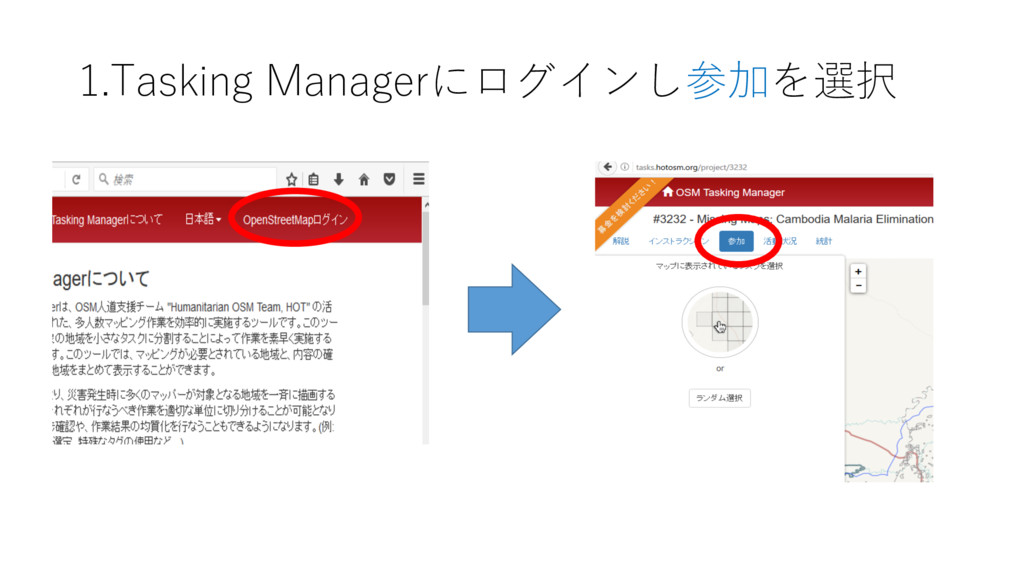
1.Tasking Managerにログインし参加を選択
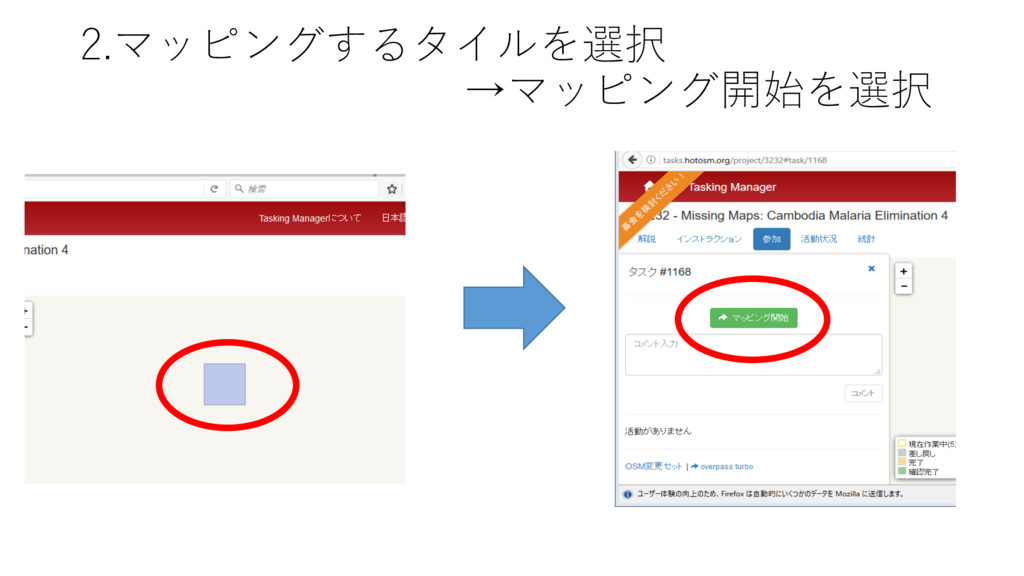
2.マッピングするタイルを選択 →マッピング開始を選択
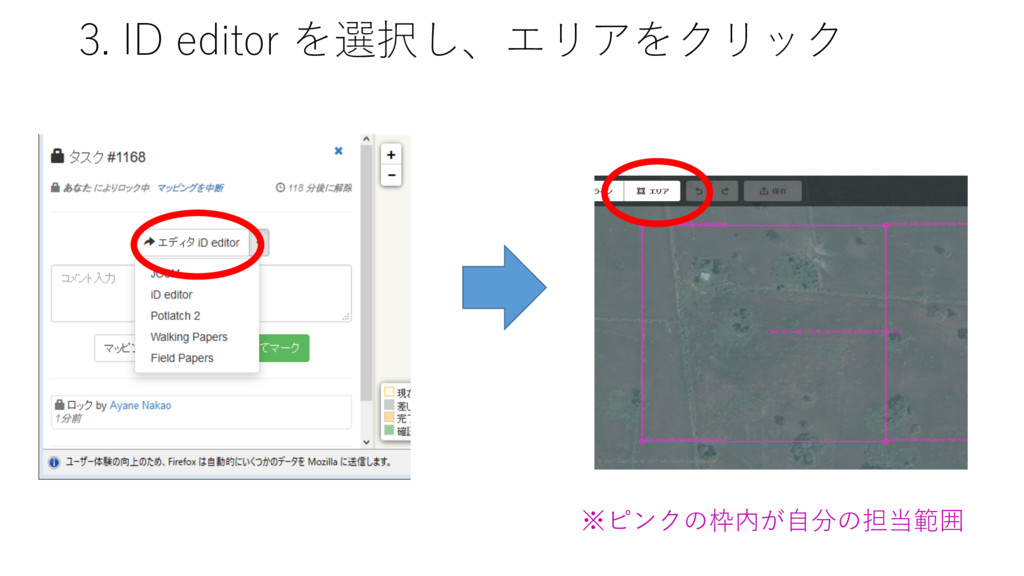
3. ID editor を選択し、エリアをクリック ※ピンクの枠内が⾃分の担当範囲
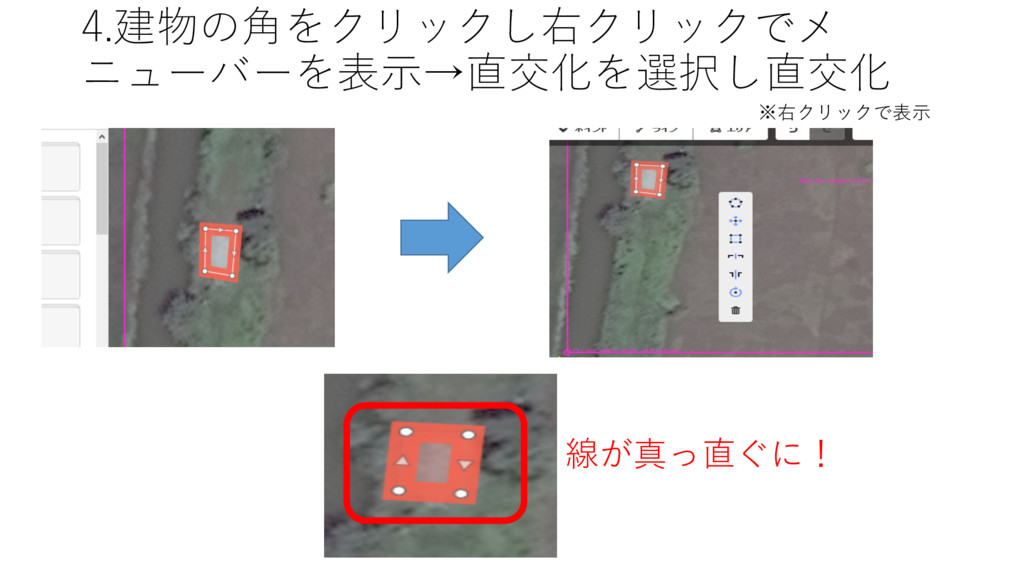
4.建物の⾓をクリックし右クリックでメ ニューバーを表⽰→直交化を選択し直交化 ※右クリックで表⽰ 線が真っ直ぐに!
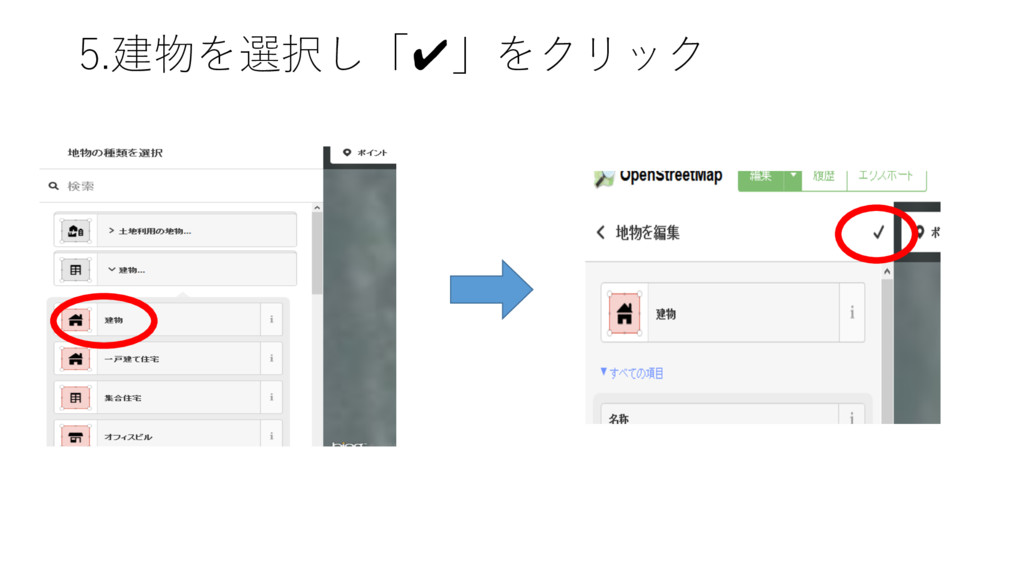
5.建物を選択し「✔」をクリック
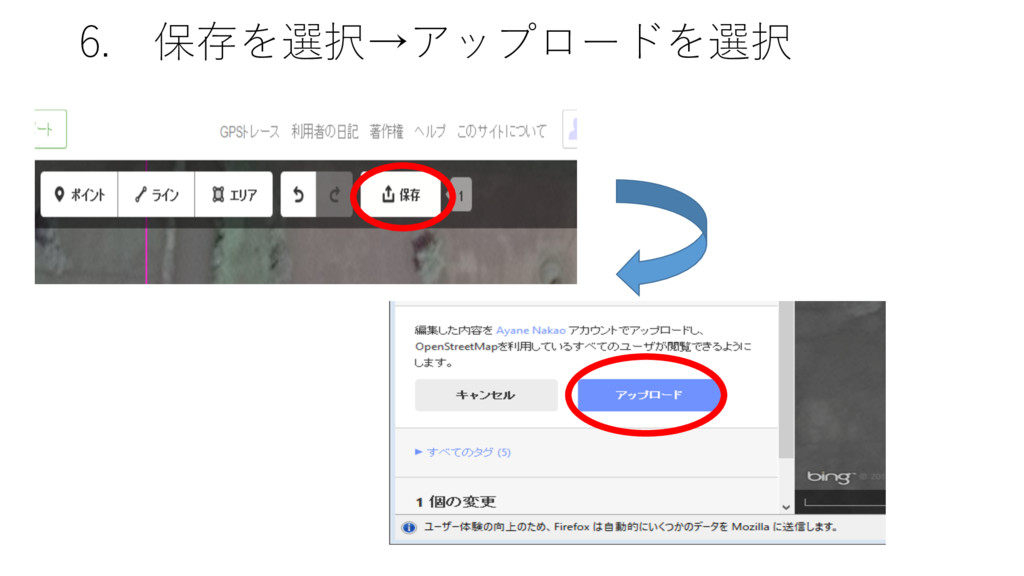
6. 保存を選択→アップロードを選択
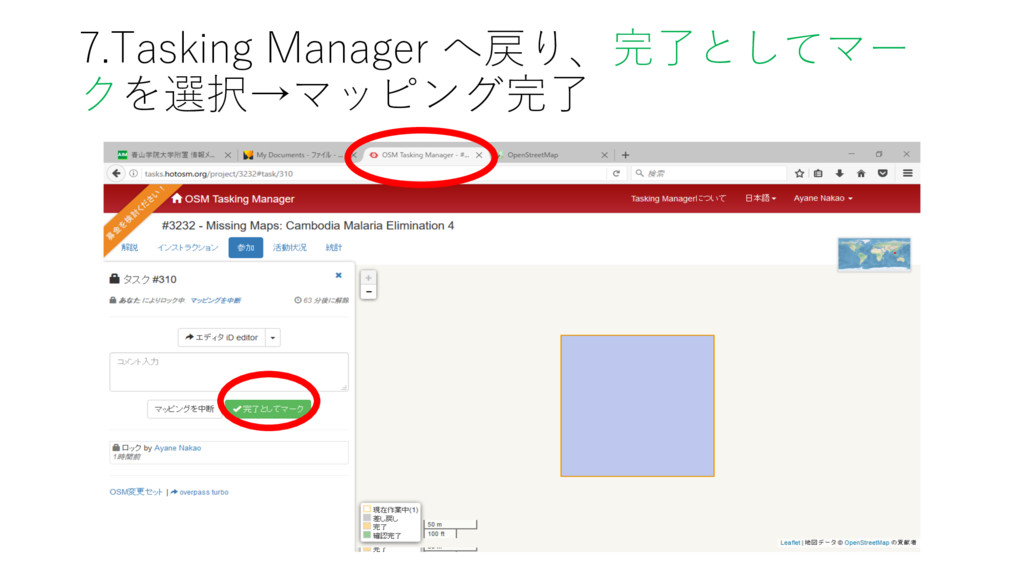
7.Tasking Manager へ戻り、完了としてマー クを選択→マッピング完了


 ayanenakao
 cbtlibrary
 pawan_pharm
 frievea
 signer
 hiragahh
 hiola
hiola
 juanmartin2026
 bvr7352
 uchi8977
 robintux
 ainischool
 tammyeverts
 mojombo
 techseoconnect
 leimatthew05
 jnunemaker
 tamaranovitovic
 marketingsoph
 carmenintech
 bluesmoon
 chrisshort
 honzajavorek