Upgrade to Pro — share decks privately, control downloads, hide ads and more …

Comparing Variation with granovagg.1w

Avatar for briandk briandk
February 21, 2012
220

Comparing Variation with granovagg.1w

The addition of stacked variance bars

Avatar for briandk

briandk

February 21, 2012
Tweet

Transcript

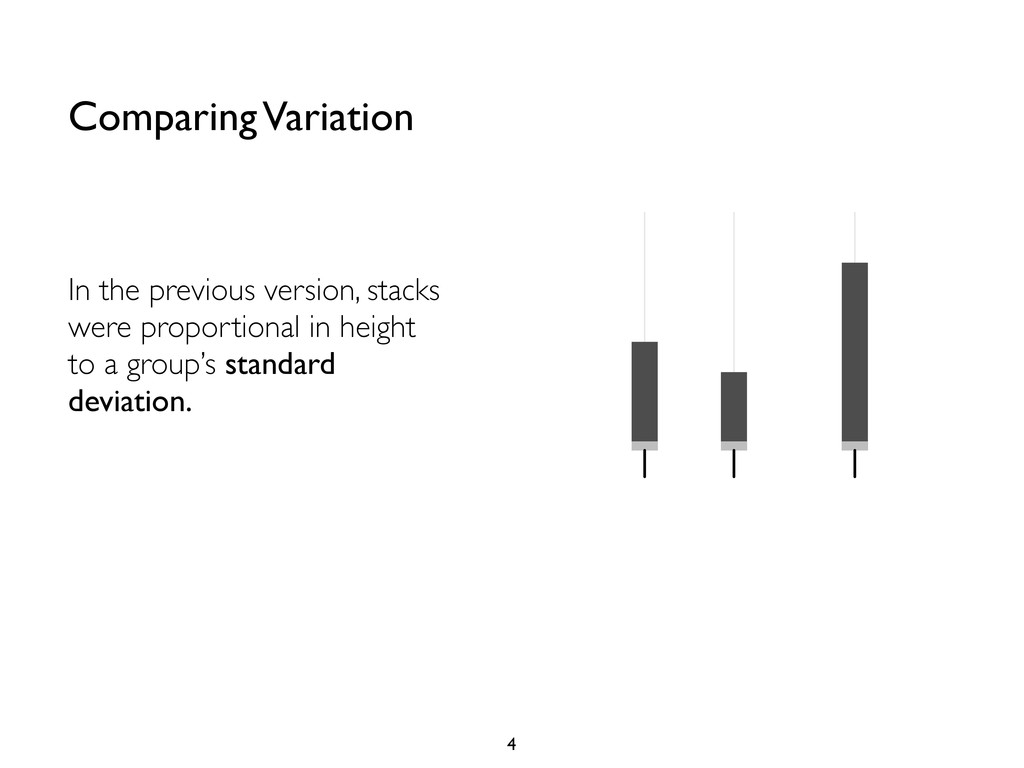
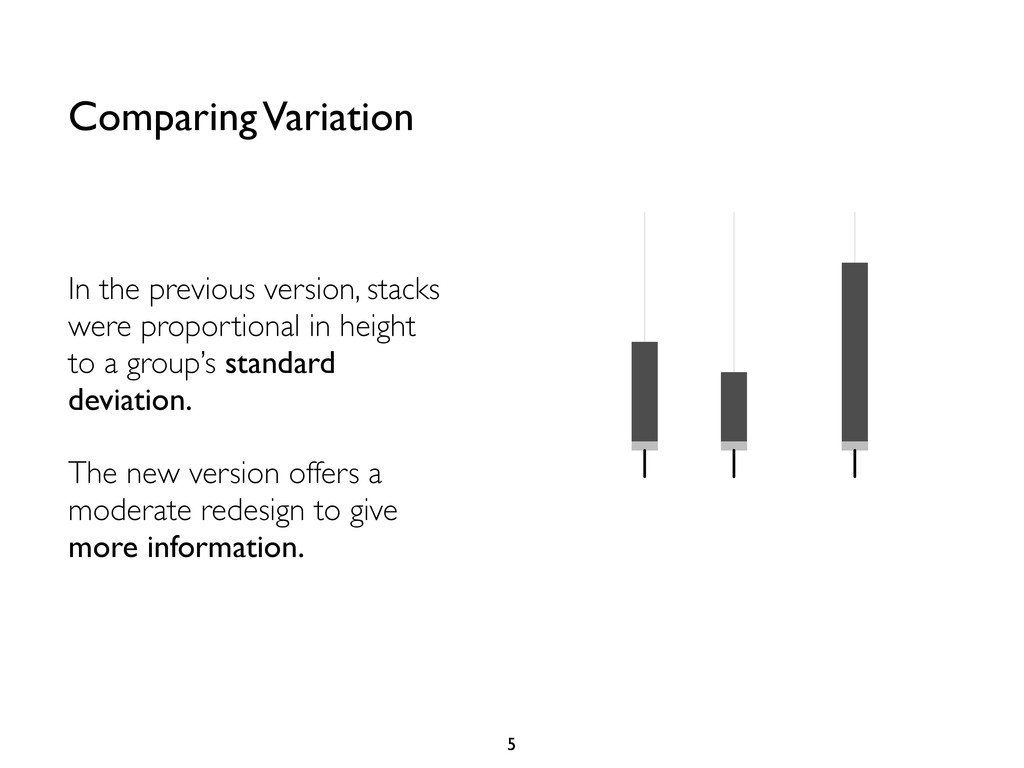
  1. In the previous version, stacks were proportional in height to

    a group’s standard deviation. Comparing Variation 4 • −0.067 −0.16 −0.14 0.088 −0.1 0.13 0.19 −0.15 0
  2. In the previous version, stacks were proportional in height to

    a group’s standard deviation. The new version offers a moderate redesign to give more information. Comparing Variation 5 • −0.067 −0.16 −0.14 0.088 −0.1 0.13 0.19 −0.15 0
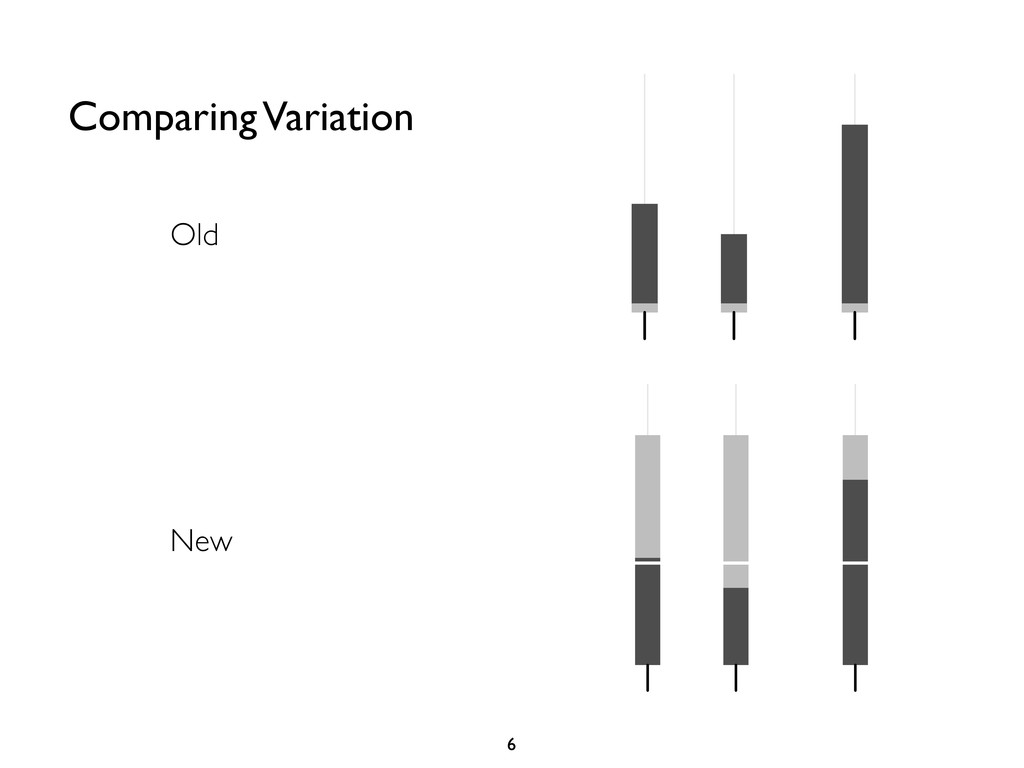
  3. Old Comparing Variation 6 ontrast coefficients based on group means

    and −0.067 −0.16 −0.14 0.088 −0.1 0.13 0.19 −0.15 0 • • • • • • • • • • • • • • • • • • • • 7 New
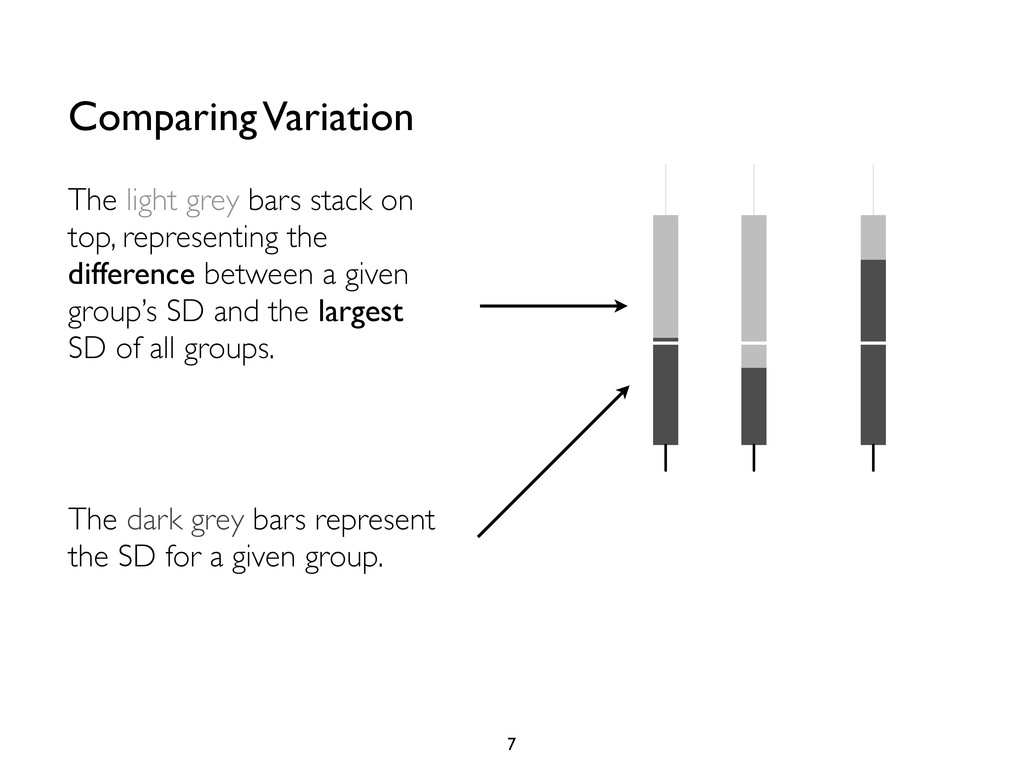
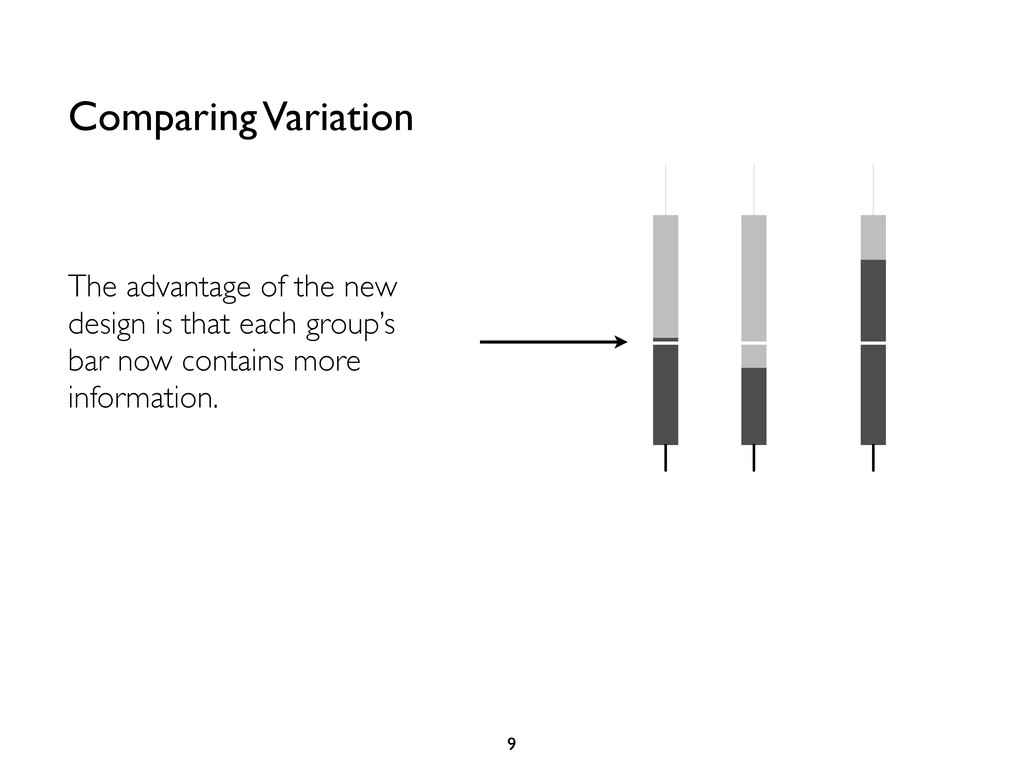
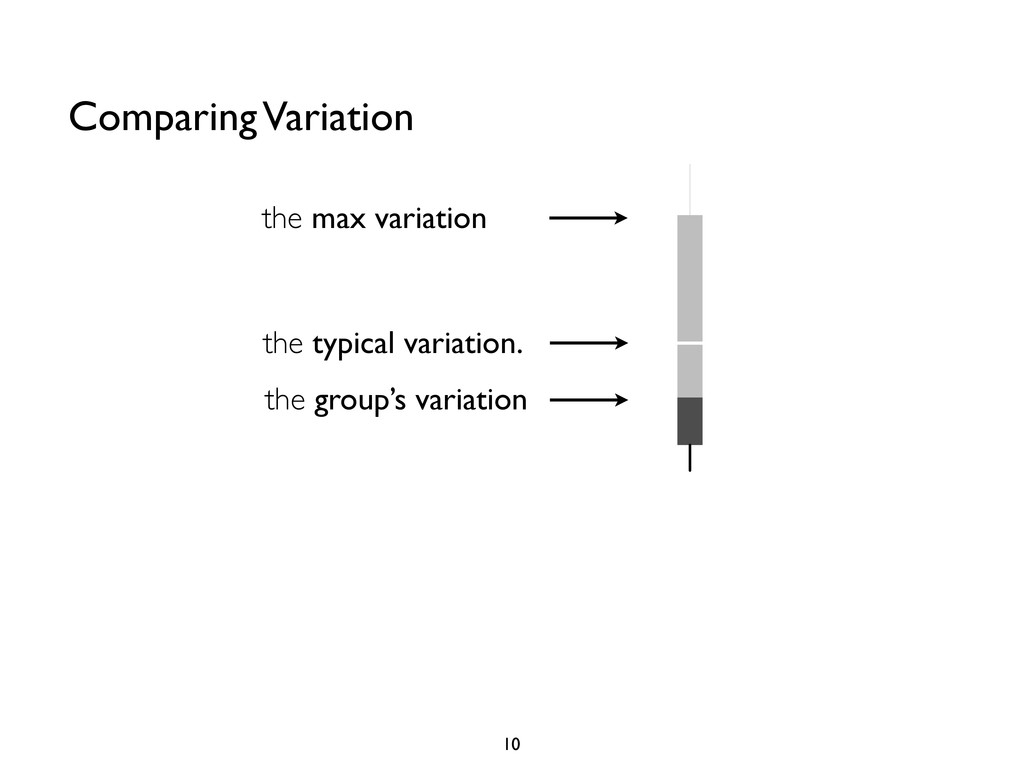
  4. The dark grey bars represent the SD for a given

    group. Comparing Variation 7 The light grey bars stack on top, representing the difference between a given group’s SD and the largest SD of all groups. • −0.067 −0.16 −0.14 0.088 −0.1 0.13 0.19 −0.15 0
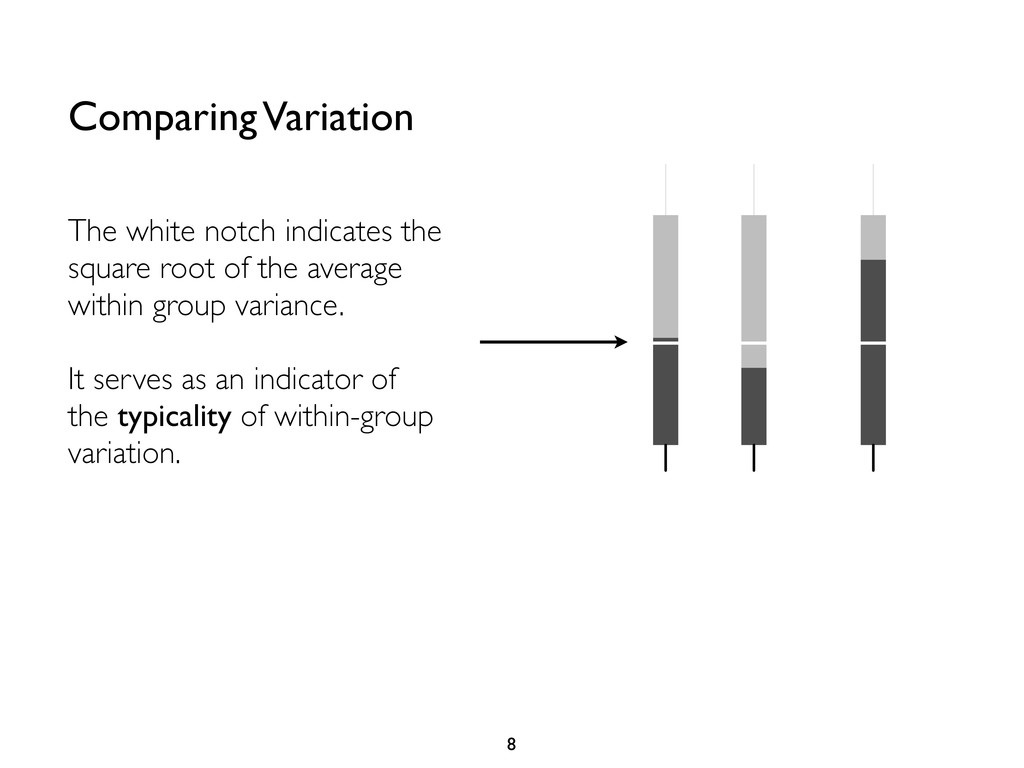
  5. Comparing Variation 8 The white notch indicates the square root

    of the average within group variance. It serves as an indicator of the typicality of within-group variation. • −0.067 −0.16 −0.14 0.088 −0.1 0.13 0.19 −0.15 0
  6. Comparing Variation 9 The advantage of the new design is

    that each group’s bar now contains more information. • −0.067 −0.16 −0.14 0.088 −0.1 0.13 0.19 −0.15 0
  7. Comparing Variation 10 • • • • • • •

    • • −0.067 −0.16 −0.27 −0.14 −0.1 −0.24 −0.15 0 the group’s variation the typical variation. the max variation
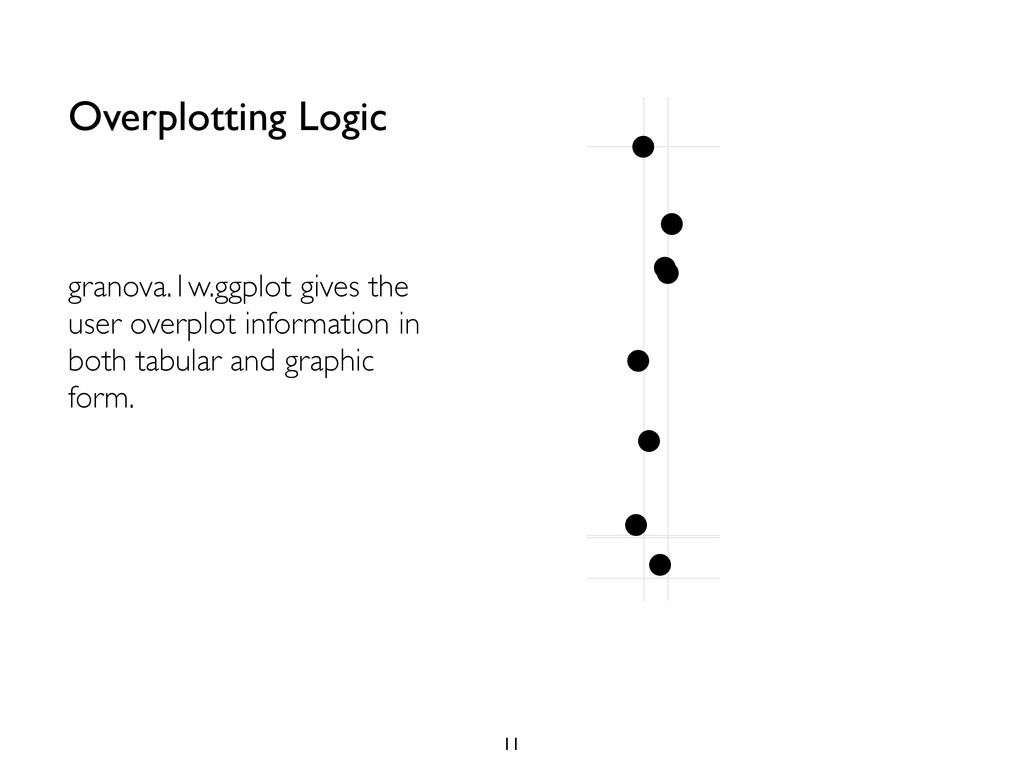
  8. Overplotting Logic 11 granova.1w.ggplot gives the user overplot information in

    both tabular and graphic form. • • • • • • • • • • • • • • • • • • • • • • • • • • • • • • • • • • • • • • • • • • • 1 1 5 6 4 9
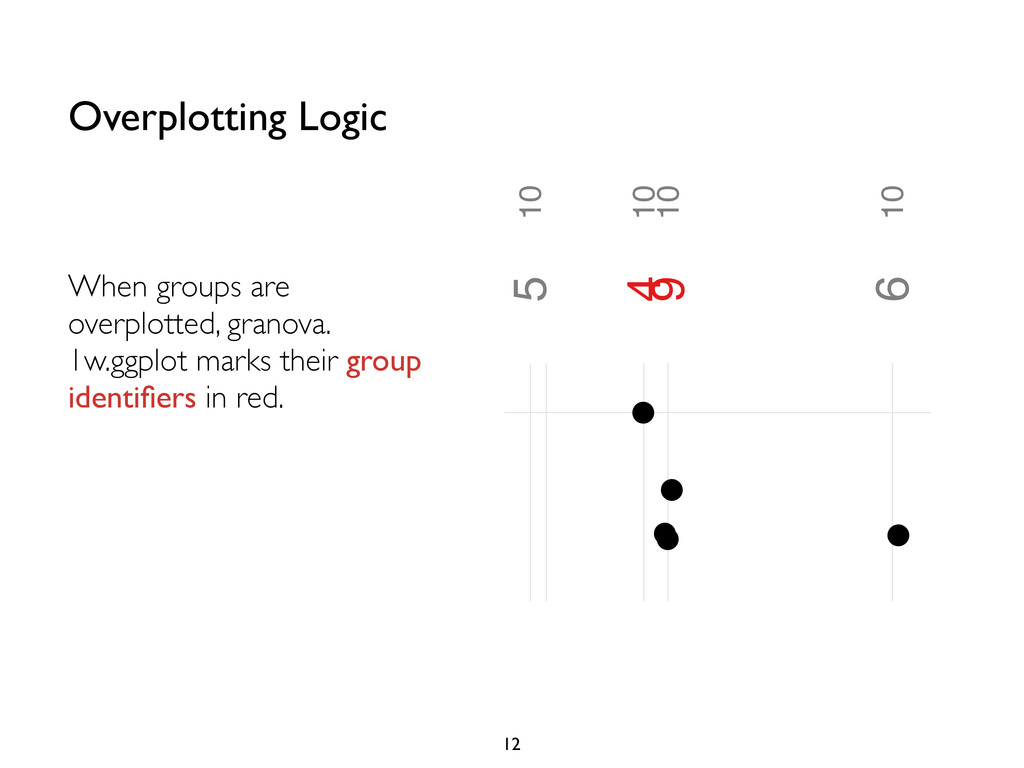
  9. Overplotting Logic 12 When groups are overplotted, granova. 1w.ggplot marks

    their group identifiers in red. −way ANOVA displaying 10 groups • • • • • • • • • • • • • • • 10 10 10 10 10 10 10 1 5 6 4 9
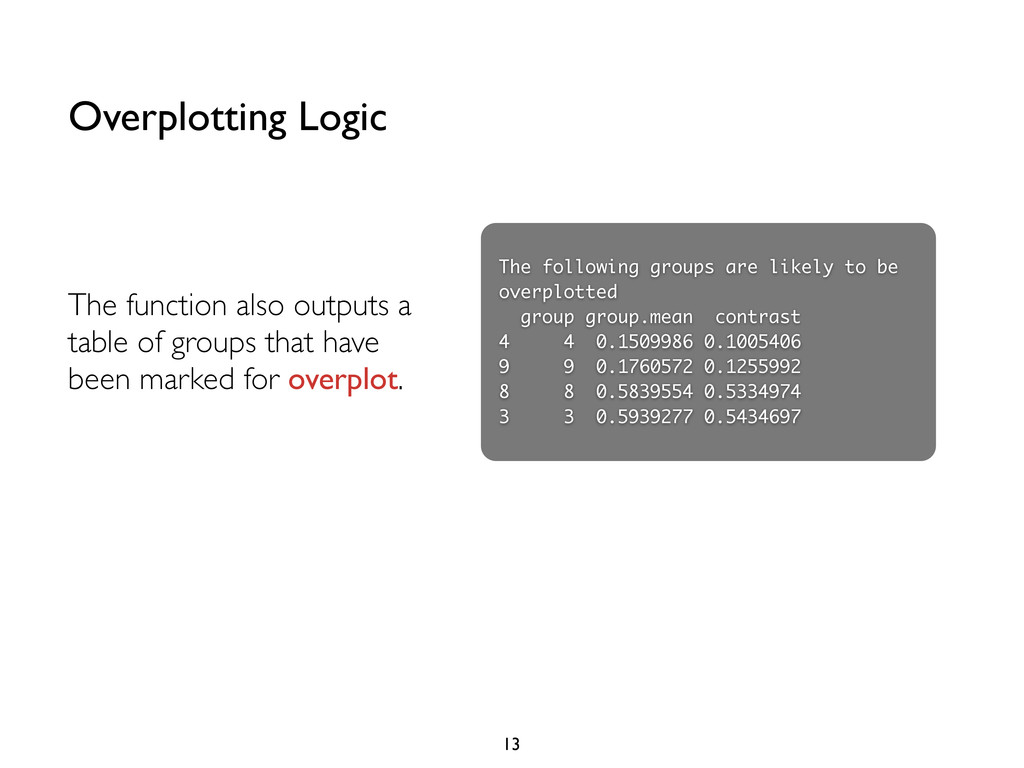
  10. Overplotting Logic 13 The function also outputs a table of

    groups that have been marked for overplot. The following groups are likely to be overplotted group group.mean contrast 4 4 0.1509986 0.1005406 9 9 0.1760572 0.1255992 8 8 0.5839554 0.5334974 3 3 0.5939277 0.5434697
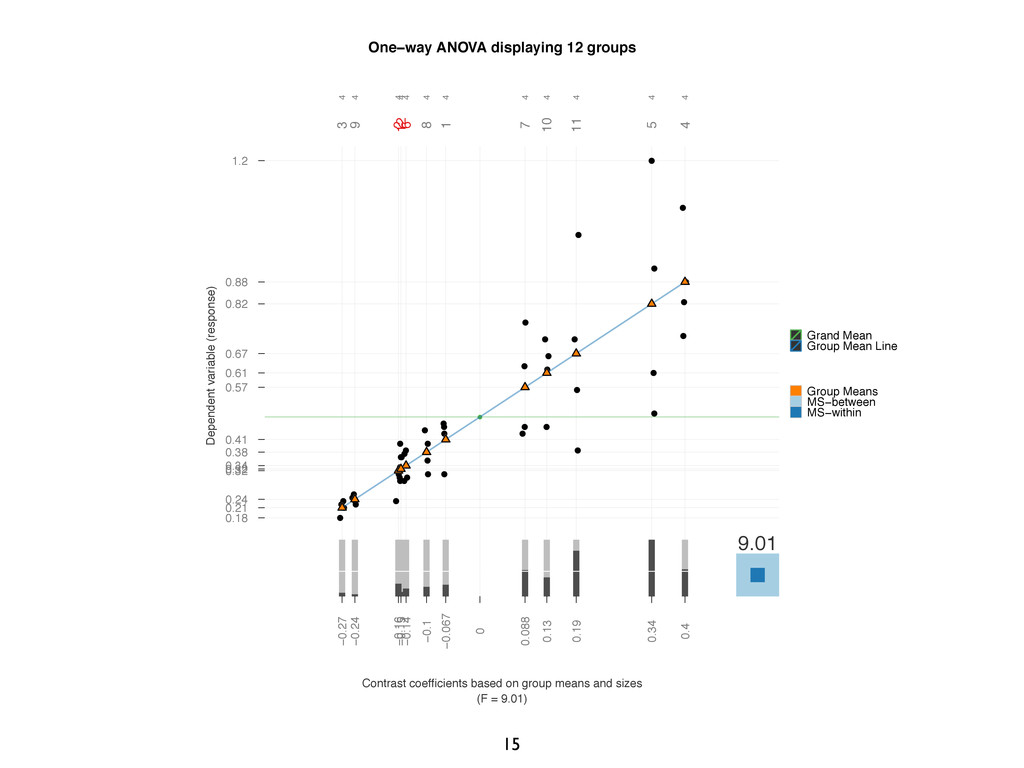
  11. 15 One−way ANOVA displaying 12 groups Contrast coefficients based on

    group means and sizes (F = 9.01) Dependent variable (response) 0.41 0.32 0.21 0.88 0.82 0.34 0.57 0.38 0.24 0.61 0.67 0.32 0.18 1.2 • • • • • • • • • • • • • • • • • • • • • • • • • • • • • • • • • • • • • • • • • • • • • • • • • 9.01 4 4 4 4 4 4 4 4 4 4 4 4 3 9 8 1 7 10 11 5 4 2 12 6 −0.067 −0.16 −0.27 0.4 0.34 −0.14 0.088 −0.1 −0.24 0.13 0.19 −0.15 0 • Grand Mean • Group Mean Line Group Means MS−between MS−within
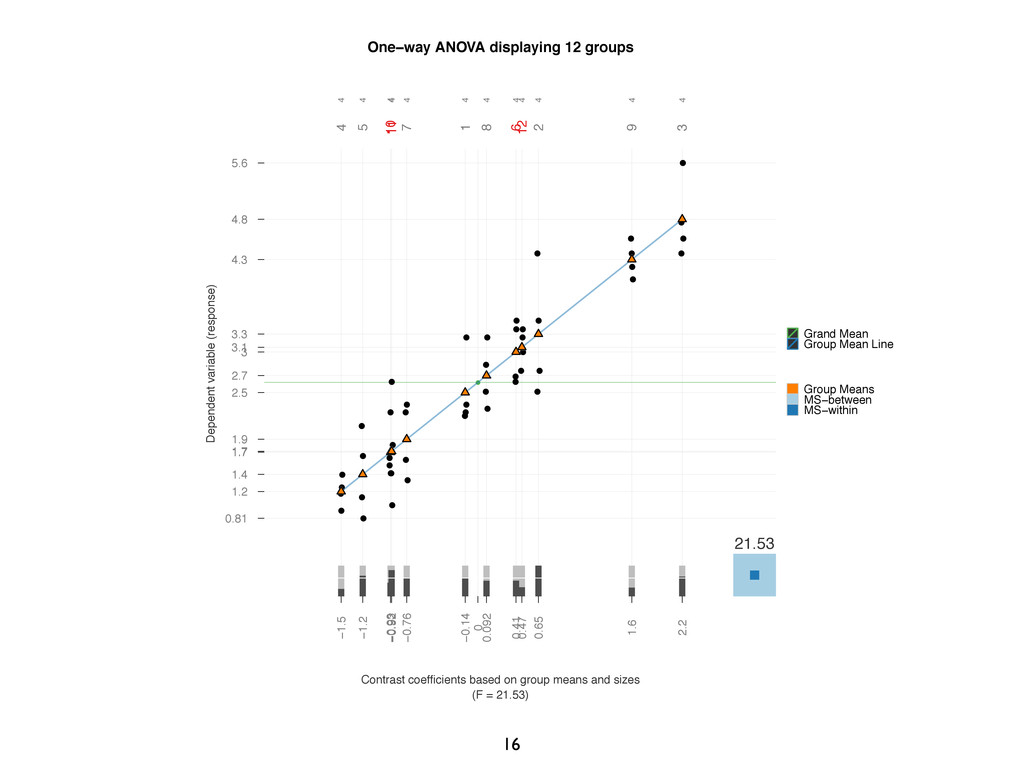
  12. 16 One−way ANOVA displaying 12 groups Contrast coefficients based on

    group means and sizes (F = 21.53) Dependent variable (response) 2.5 3.3 4.8 1.2 1.4 3 1.9 2.7 4.3 1.7 1.7 3.1 0.81 5.6 • • • • • • • • • • • • • • • • • • • • • • • • • • • • • • • • • • • • • • • • • • • • • • • • • 21.53 4 4 4 4 4 4 4 4 4 4 4 4 4 5 7 1 8 2 9 3 10 11 6 12 −0.14 0.65 2.2 −1.5 −1.2 0.41 −0.76 0.092 1.6 −0.93 −0.92 0.47 0 • Grand Mean • Group Mean Line Group Means MS−between MS−within
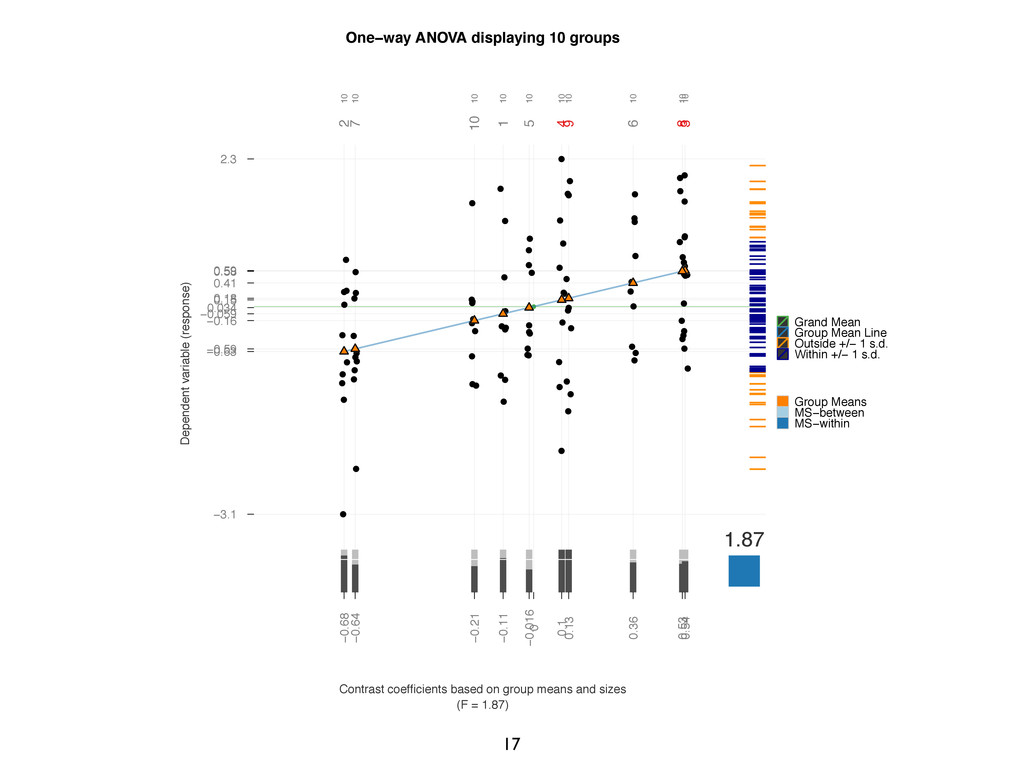
  13. 17 One−way ANOVA displaying 10 groups Contrast coefficients based on

    group means and sizes (F = 1.87) Dependent variable (response) −0.059 −0.63 0.59 0.15 0.034 0.41 −0.59 0.58 0.18 −0.16 −3.1 2.3 • • • • • • • • • • • • • • • • • • • • • • • • • • • • • • • • • • • • • • • • • • • • • • • • • • • • • • • • • • • • • • • • • • • • • • • • • • • • • • • • • • • • • • • • • • • • • • • • • • • • • 1.87 10 10 10 10 10 10 10 10 10 10 2 7 10 1 5 6 4 9 8 3 −0.11 −0.68 0.54 0.1 −0.016 0.36 −0.64 0.53 0.13 −0.21 0 • Grand Mean • Group Mean Line • Outside +/− 1 s.d. • Within +/− 1 s.d. Group Means MS−between MS−within
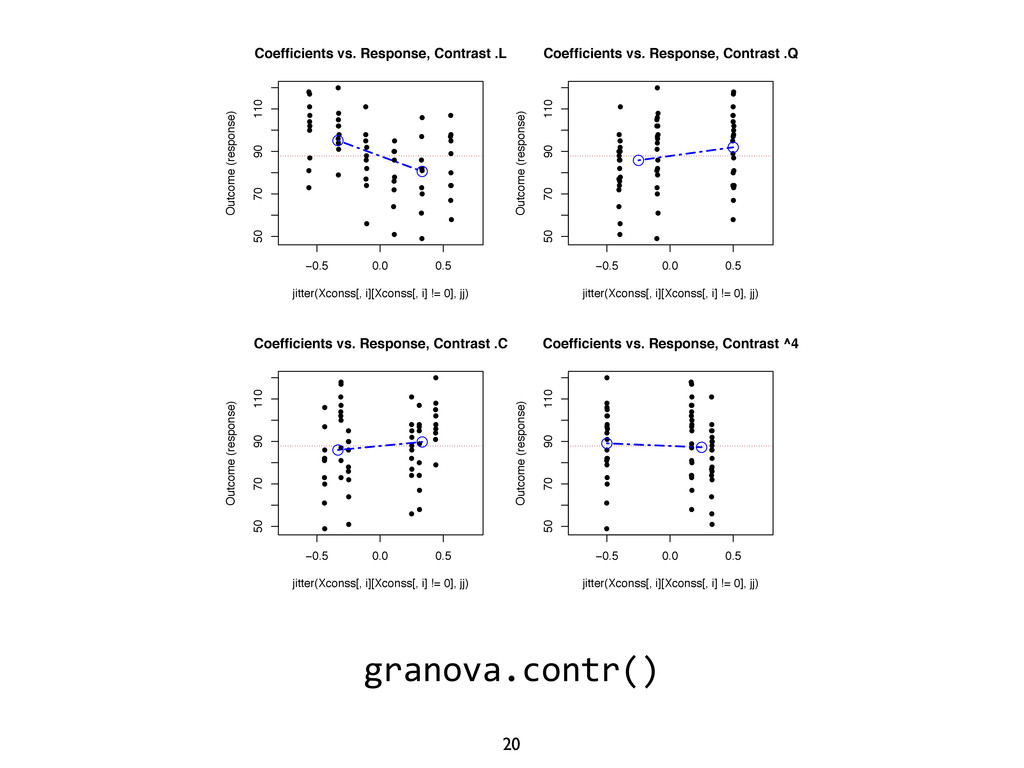
  14. 20 granova.contr() • • • • • • • •

    • • • • • • • • • • • • • • • • • • • • • • • • • • • • • • • • • • • • • • • • • • • • • • • • • • • • −0.5 0.0 0.5 50 70 90 110 jitter(Xconss[, i][Xconss[, i] != 0], jj) Outcome (response) Coefficients vs. Response, Contrast .L • • • • • • • • • • • • • • • • • • • • • • • • • • • • • • • • • • • • • • • • • • • • • • • • • • • • • • • • • • • • • • −0.5 0.0 0.5 50 70 90 110 jitter(Xconss[, i][Xconss[, i] != 0], jj) Outcome (response) Coefficients vs. Response, Contrast .Q • • • • • • • • • • • • • • • • • • • • • • • • • • • • • • • • • • • • • • • • • • • • • • • • • • • • • • • • • • • • • • −0.5 0.0 0.5 50 70 90 110 jitter(Xconss[, i][Xconss[, i] != 0], jj) Outcome (response) Coefficients vs. Response, Contrast .C • • • • • • • • • • • • • • • • • • • • • • • • • • • • • • • • • • • • • • • • • • • • • • • • • • • • • • • • • • • • • • −0.5 0.0 0.5 50 70 90 110 jitter(Xconss[, i][Xconss[, i] != 0], jj) Outcome (response) Coefficients vs. Response, Contrast ^4 • •
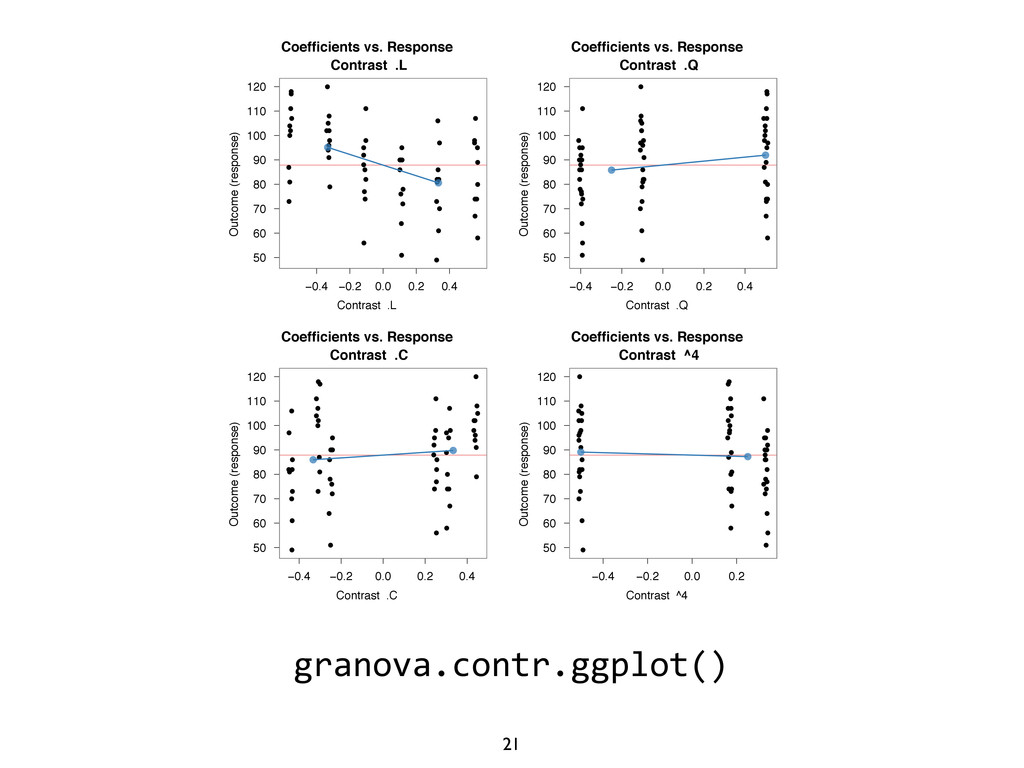
  15. 21 granova.contr.ggplot() Coefficients vs. Response Contrast .L Contrast .L Outcome

    (response) 50 60 70 80 90 100 110 120 • • • • • • • • • • • • • • • • • • • • • • • • • • • • • • • • • • • • • • • • • • • • • • • • • • • • • • • • • • • • −0.4 −0.2 0.0 0.2 0.4 Coefficients vs. Response Contrast .Q Contrast .Q Outcome (response) 50 60 70 80 90 100 110 120 • • • • • • • • • • • • • • • • • • • • • • • • • • • • • • • • • • • • • • • • • • • • • • • • • • • • • • • • • • • • −0.4 −0.2 0.0 0.2 0.4 Coefficients vs. Response Contrast .C Contrast .C Outcome (response) 50 60 70 80 90 100 110 120 • • • • • • • • • • • • • • • • • • • • • • • • • • • • • • • • • • • • • • • • • • • • • • • • • • • • • • • • • • • • −0.4 −0.2 0.0 0.2 0.4 Coefficients vs. Response Contrast ^4 Contrast ^4 Outcome (response) 50 60 70 80 90 100 110 120 • • • • • • • • • • • • • • • • • • • • • • • • • • • • • • • • • • • • • • • • • • • • • • • • • • • • • • • • • • • • −0.4 −0.2 0.0 0.2
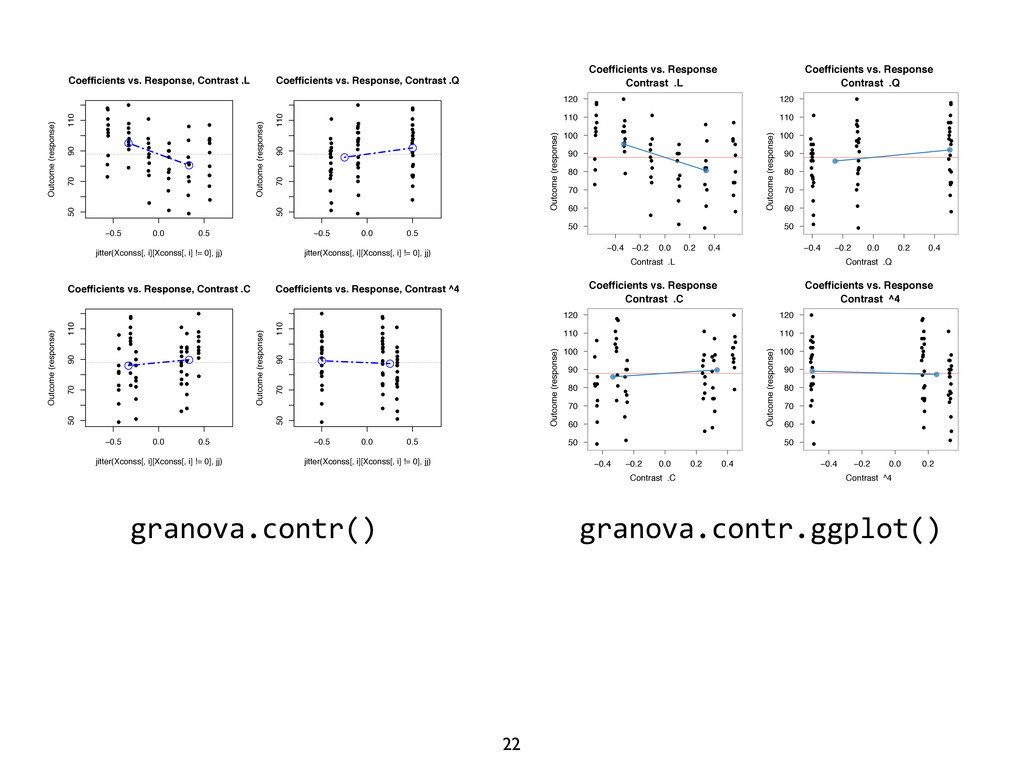
  16. 22 granova.contr.ggplot() • • • • • • • •

    • • • • • • • • • • • • • • • • • • • • • • • • • • • • • • • • • • • • • • • • • • • • • • • • • • • • −0.5 0.0 0.5 50 70 90 110 jitter(Xconss[, i][Xconss[, i] != 0], jj) Outcome (response) Coefficients vs. Response, Contrast .L • • • • • • • • • • • • • • • • • • • • • • • • • • • • • • • • • • • • • • • • • • • • • • • • • • • • • • • • • • • • • • −0.5 0.0 0.5 50 70 90 110 jitter(Xconss[, i][Xconss[, i] != 0], jj) Outcome (response) Coefficients vs. Response, Contrast .Q • • • • • • • • • • • • • • • • • • • • • • • • • • • • • • • • • • • • • • • • • • • • • • • • • • • • • • • • • • • • • • −0.5 0.0 0.5 50 70 90 110 jitter(Xconss[, i][Xconss[, i] != 0], jj) Outcome (response) Coefficients vs. Response, Contrast .C • • • • • • • • • • • • • • • • • • • • • • • • • • • • • • • • • • • • • • • • • • • • • • • • • • • • • • • • • • • • • • −0.5 0.0 0.5 50 70 90 110 jitter(Xconss[, i][Xconss[, i] != 0], jj) Outcome (response) Coefficients vs. Response, Contrast ^4 • • granova.contr() Coefficients vs. Response Contrast .L Contrast .L Outcome (response) 50 60 70 80 90 100 110 120 • • • • • • • • • • • • • • • • • • • • • • • • • • • • • • • • • • • • • • • • • • • • • • • • • • • • • • • • • • • • −0.4 −0.2 0.0 0.2 0.4 Coefficients vs. Response Contrast .Q Contrast .Q Outcome (response) 50 60 70 80 90 100 110 120 • • • • • • • • • • • • • • • • • • • • • • • • • • • • • • • • • • • • • • • • • • • • • • • • • • • • • • • • • • • • −0.4 −0.2 0.0 0.2 0.4 Coefficients vs. Response Contrast .C Contrast .C Outcome (response) 50 60 70 80 90 100 110 120 • • • • • • • • • • • • • • • • • • • • • • • • • • • • • • • • • • • • • • • • • • • • • • • • • • • • • • • • • • • • −0.4 −0.2 0.0 0.2 0.4 Coefficients vs. Response Contrast ^4 Contrast ^4 Outcome (response) 50 60 70 80 90 100 110 120 • • • • • • • • • • • • • • • • • • • • • • • • • • • • • • • • • • • • • • • • • • • • • • • • • • • • • • • • • • • • −0.4 −0.2 0.0 0.2
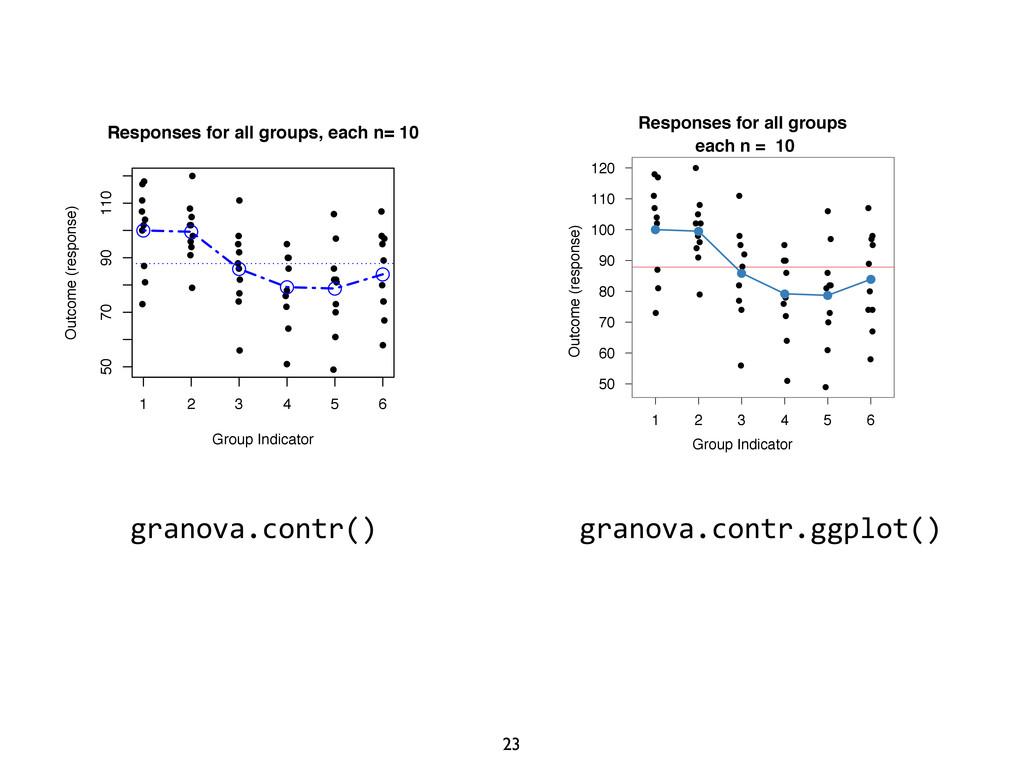
  17. 23 granova.contr.ggplot() granova.contr() ) rast ^5 • • • •

    • • • • • • • • • • • • • • • • • • • • • • • • • • • • • • • • • • • • • • • • • • • • • • • • • • • • • • • • Group Indicator Outcome (response) • • • • • • 1 2 3 4 5 6 50 70 90 110 Responses for all groups, each n= 10 Coefficients vs. Response Contrast ^5 Contrast ^5 Outcome (response) 50 60 70 80 90 100 110 120 • • • • • • • • • • • • • • • • • • • • • • • • • • • • • • • • • • • • • • • • • • • • • • • • • • • • • • • • • • • • −0.6 −0.4 −0.2 0.0 0.2 0.4 0.6 Responses for all groups each n = 10 Group Indicator Outcome (response) 50 60 70 80 90 100 110 120 • • • • • • • • • • • • • • • • • • • • • • • • • • • • • • • • • • • • • • • • • • • • • • • • • • • • • • • • • • • • • • • • • • 1 2 3 4 5 6
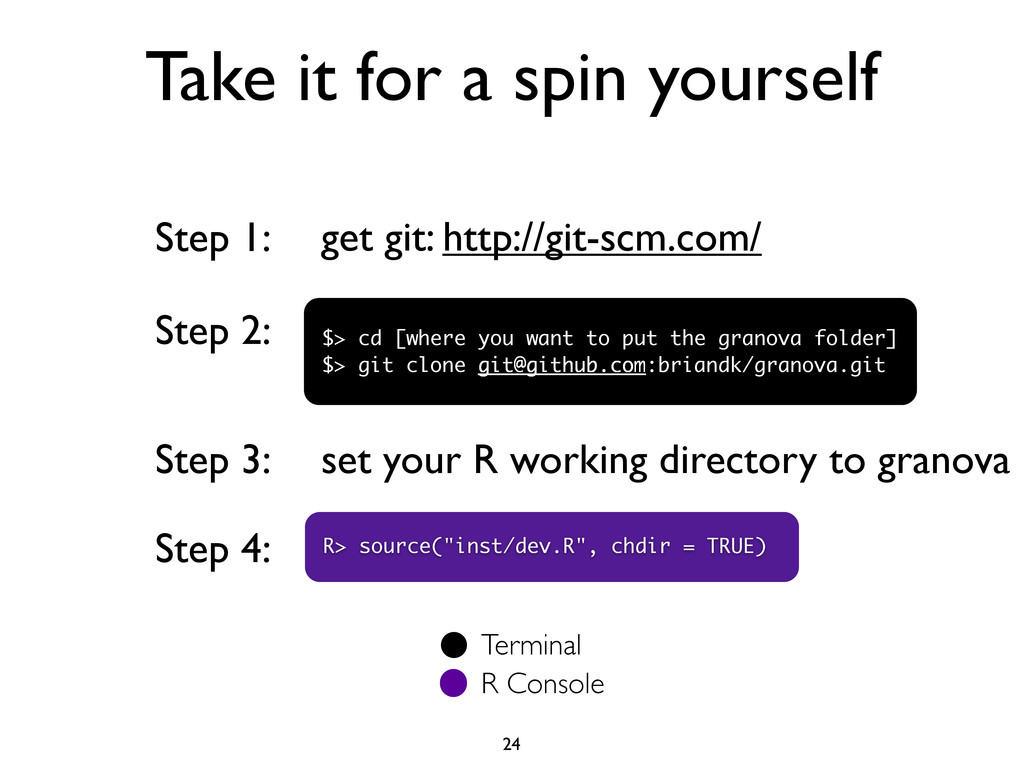
  18. 24 Take it for a spin yourself Step 1: Step

    2: $> cd [where you want to put the granova folder] $> git clone [email protected]:briandk/granova.git get git: http://git-scm.com/ Step 3: set your R working directory to granova Step 4: R> source("inst/dev.R", chdir = TRUE) Terminal R Console