Upgrade to Pro
— share decks privately, control downloads, hide ads and more …
Speaker Deck
Sign up for free
Menu
Search
Features
All features
Private URLs
Password Protection
Custom URLS
Scheduled publishing
Remove Branding
Restrict embedding
Deck Collections
Notes
Features
All features
Private URLs
Password Protection
Custom URLS
Scheduled publishing
Remove Branding
Restrict embedding
Deck Collections
Notes
Explore
Featured decks
Featured speakers
Programming
Technology
Storyboards
Explore
Featured decks
Featured speakers
Programming
Technology
Storyboards
Pricing
Search
Sign in
Sign up for free
noteでGoogleフォームを使おう!
Search
Sponsored
·
Your Podcast. Everywhere. Effortlessly.
Share. Educate. Inspire. Entertain. You do you. We'll handle the rest.
→
Conskie
June 12, 2020
How-to & DIY
120
0
Share
Embed
Copy iframe code
Copy JS code
Copy link
Start on current slide
noteでGoogleフォームを使おう!
Conskie
June 12, 2020
More Decks by Conskie
See All by Conskie
Skill shere
conskaya
0
83
Other Decks in How-to & DIY
See All in How-to & DIY
OpenClawハンズオンでのトラブルとデバイス向けなんちゃらクロー #IoTLT vol133
n0bisuke2
1
320
グローバルチームでなんとかしがみつく英語コミュニケーション
yatsu
0
110
EjecTea 2026 / 20260228-osc26tk-ejectea
akkiesoft
0
1.1k
ことみんの登壇資料の作り方〜登壇はいいぞ〜
kotomin_m
6
1.1k
Azure PortalのQoLを上げてたら Big Techに怒られた
horihiro
2
650
Burnoutとの「対話」 〜 アジャイルコーチングを活用した、燃え尽き症候群を克服するスキル 〜 / Dialogue with Burnout by Using Agile Coaching Skills
hageyahhoo
0
1.2k
チームパフォーマンスを高めるための2種類のセルフマネジメント / Two Types of Self-Management for Improving Team Performance
iwashi86
4
1.2k
ミニ四駆でト技会ミニカーバトルに参戦?
covao
0
120
サイボウズには100名以上の社員が出演する"夏フェス"があるって本当?
oguemon
1
1k
JAWS-UG/AWS Community Update
awsjcpm
0
340
高校生の時にLINEDCに出会って、 気づけば大学を卒業します!!
inoue2002
0
130
ライブ感を生む 巻き込み型スライドの作り方/Create your slide like a heavy metal concert
ikuodanaka
5
1.8k
Featured
See All Featured
Self-Hosted WebAssembly Runtime for Runtime-Neutral Checkpoint/Restore in Edge–Cloud Continuum
chikuwait
0
890
Future Trends and Review - Lecture 12 - Web Technologies (1019888BNR)
signer
PRO
0
3.8k
"I'm Feeling Lucky" - Building Great Search Experiences for Today's Users (#IAC19)
danielanewman
230
23k
Thoughts on Productivity
jonyablonski
76
5.4k
Taking LLMs out of the black box: A practical guide to human-in-the-loop distillation
inesmontani
PRO
3
2.5k
Fantastic passwords and where to find them - at NoRuKo
philnash
53
4k
Breaking role norms: Why Content Design is so much more than writing copy - Taylor Woolridge
uxyall
1
450
SEO Brein meetup: CTRL+C is not how to scale international SEO
lindahogenes
2
2.9k
Exploring the relationship between traditional SERPs and Gen AI search
raygrieselhuber
PRO
4
4.4k
職位にかかわらず全員がリーダーシップを発揮するチーム作り / Building a team where everyone can demonstrate leadership regardless of position
madoxten
69
67k
JAMstack: Web Apps at Ludicrous Speed - All Things Open 2022
reverentgeek
1
640
Six Lessons from altMBA
skipperchong
29
4.5k
Transcript
Conskie Google フォーム の作り⽅
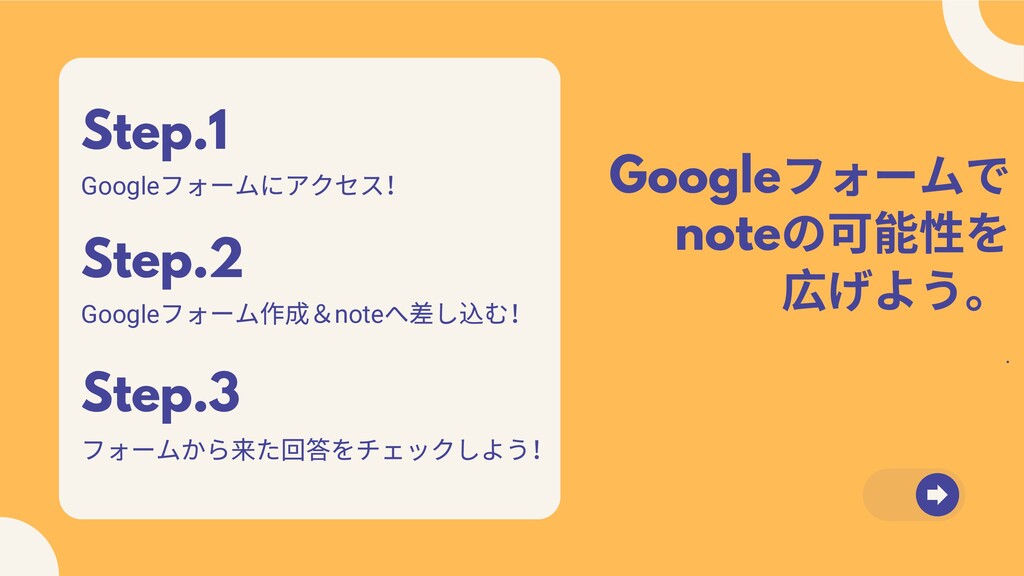
Google フォームで note の可能性を 広げよう。 . Step.2 Google フォーム作成&note へ差し込む!
Step.1 Google フォームにアクセス! Step.3 フォームから来た回答をチェックしよう!
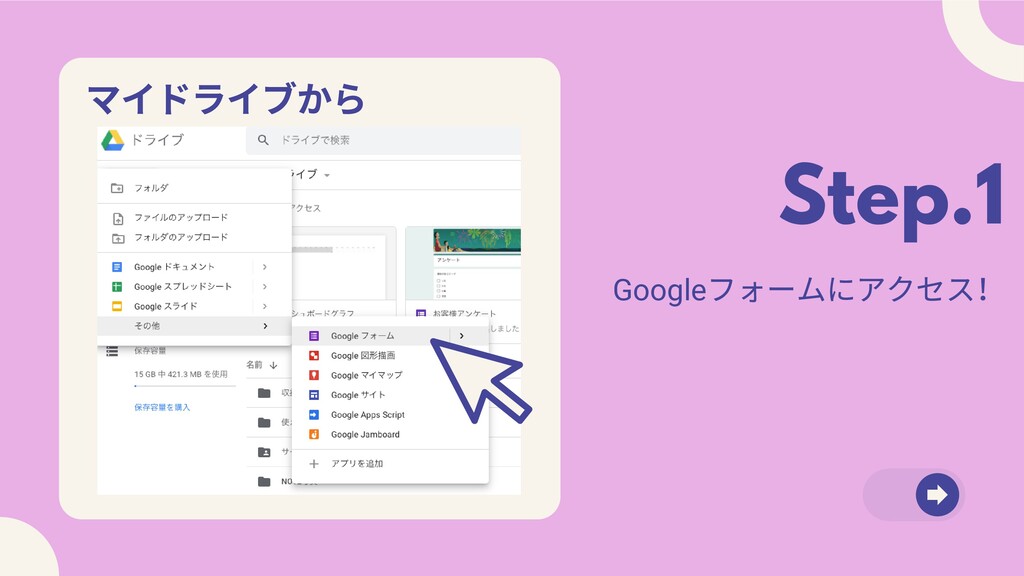
Step.1 Google フォームにアクセス! マイドライブから
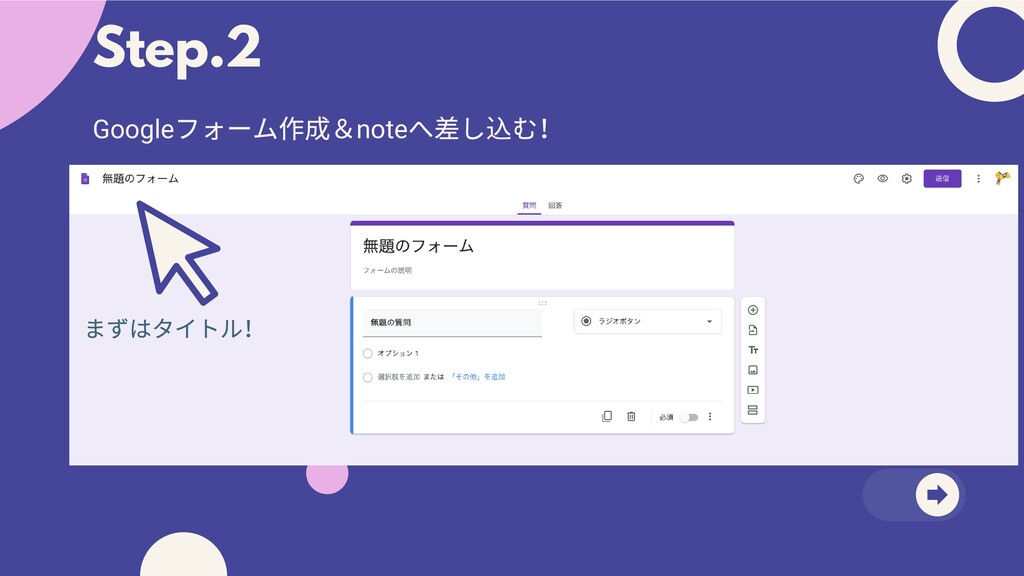
Step.2 Google フォーム作成&note へ差し込む! まずはタイトル!
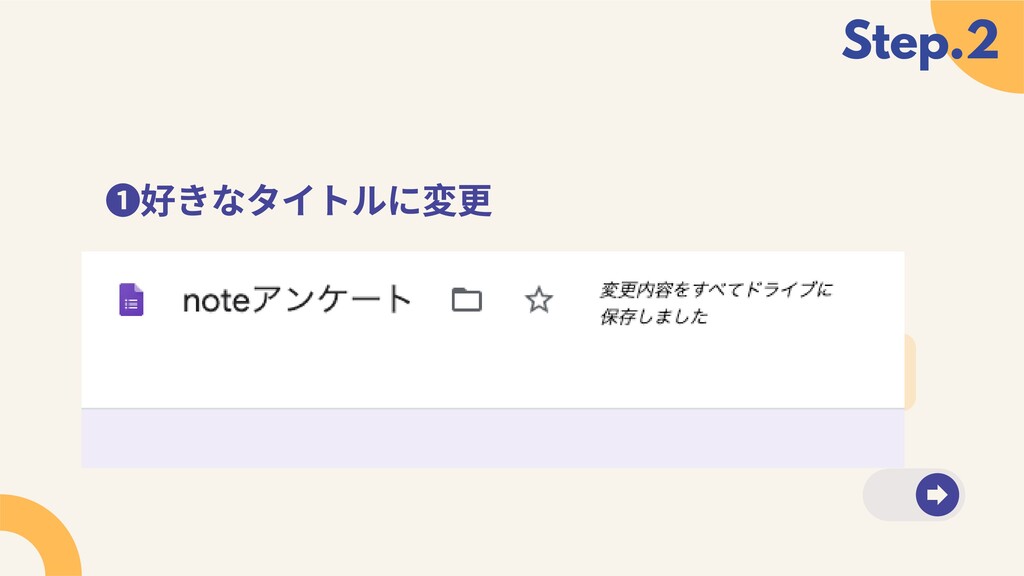
❶好きなタイトルに変更 A simple timeline on how your product or service
came to be is a helpful way of visualizing your origin story. What frustrations or ideas led to this? Step 2 Step 3 2018 2019 Step.2
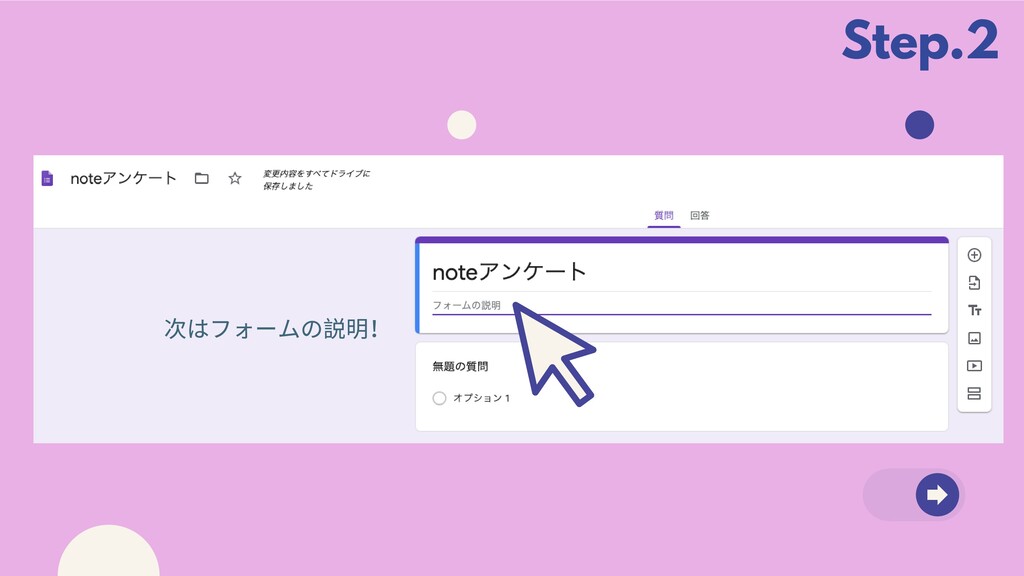
Step.2 次はフォームの説明!
Where is your company currently at? Visualize with a graph
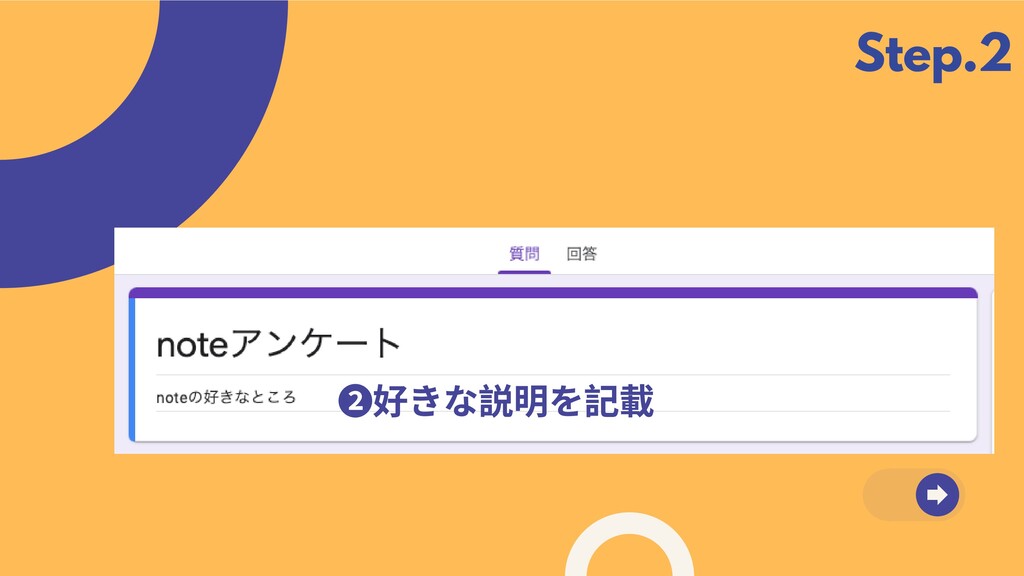
to highlight important developments. Step.2 ❷好きな説明を記載
Target Market 2 Visualize the people who will turn to
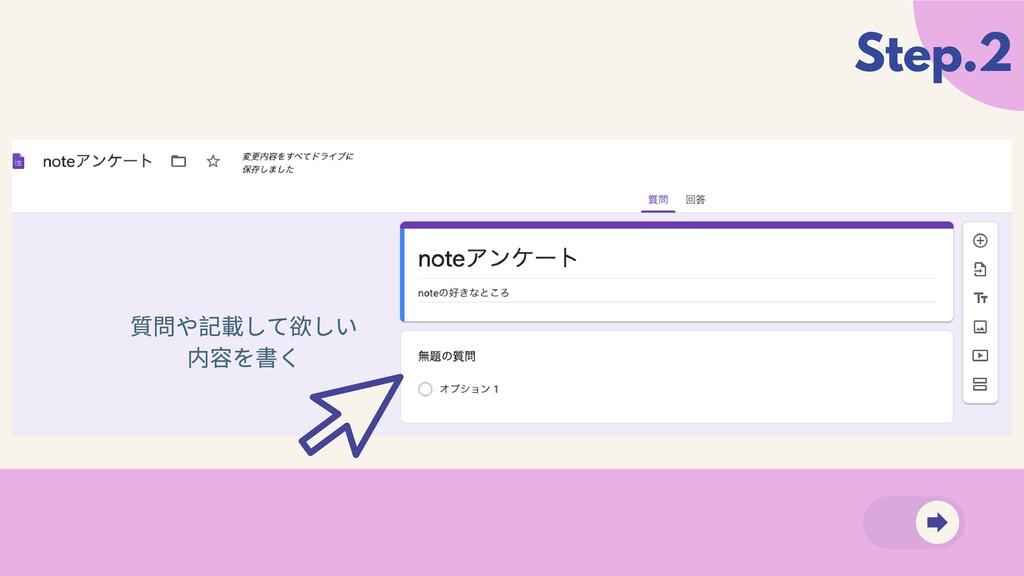
you for solutions. Target Market 1 What are their profiles and visual personas? Step.2 質問や記載して欲しい 内容を書く
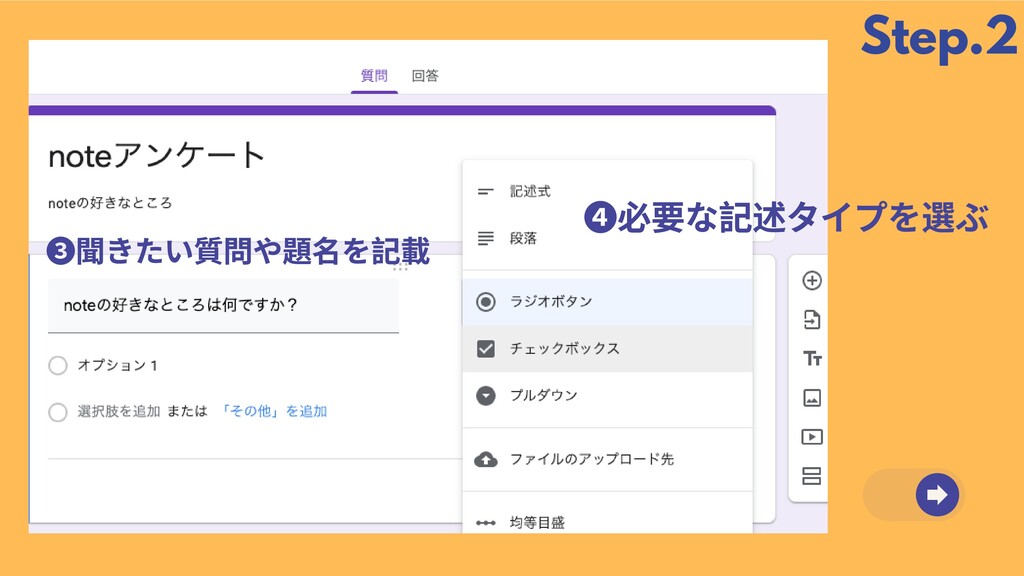
Step.2 ❹必要な記述タイプを選ぶ ❸聞きたい質問や題名を記載
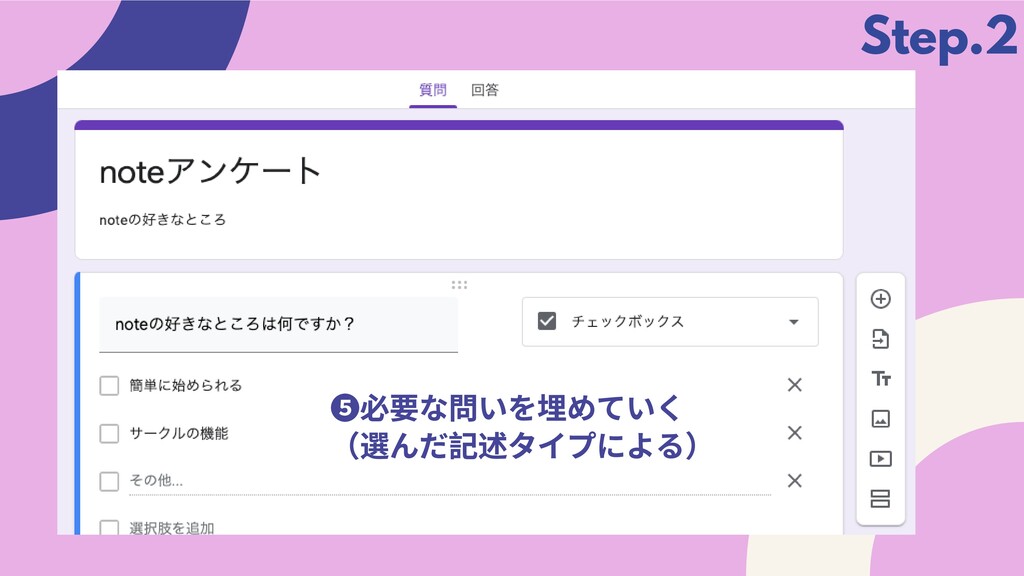
Step.2 ❺必要な問いを埋めていく (選んだ記述タイプによる)
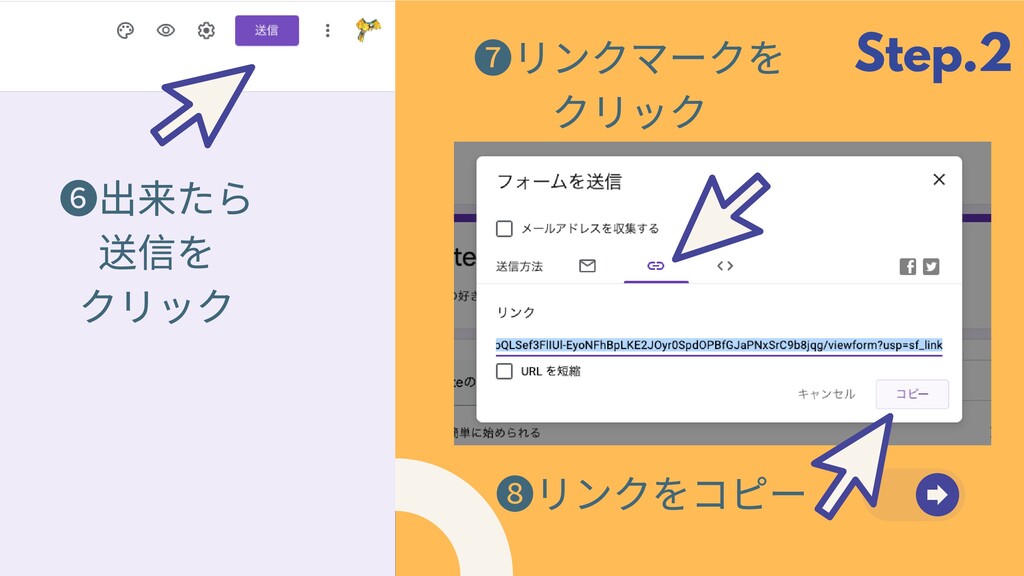
Step.2 ❻出来たら 送信を クリック ❼リンクマークを クリック ❽リンクをコピー
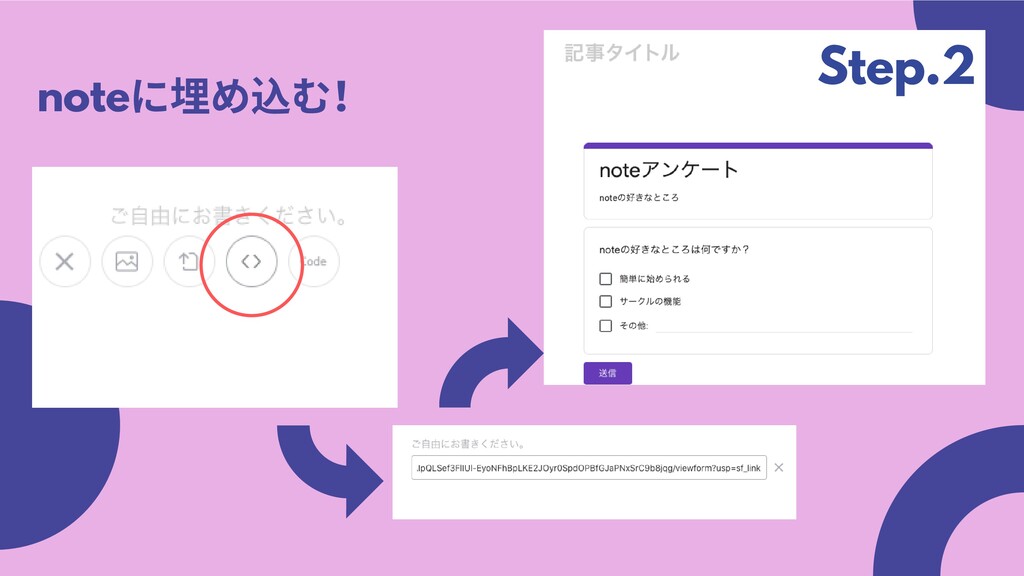
note に埋め込む! Step.2
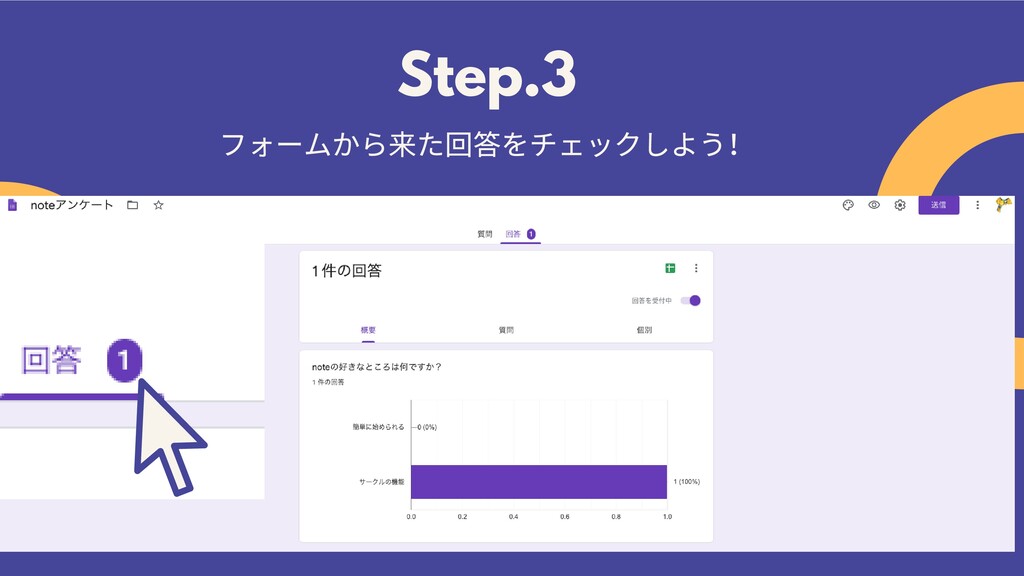
Step.3 フォームから来た回答をチェックしよう!
おわり ご質問はこちらから▼ @conskie42


 conskaya
 n0bisuke2
 yatsu
yatsu
 akkiesoft
.jpg) kotomin_m
kotomin_m
 horihiro
 hageyahhoo
 iwashi86
 covao
covao
 oguemon
 awsjcpm
 inoue2002
.jpg) ikuodanaka
ikuodanaka
 chikuwait
 signer
 danielanewman
 jonyablonski
 inesmontani
 philnash
 uxyall
 lindahogenes
 raygrieselhuber
 madoxten
 reverentgeek
 skipperchong