Upgrade to Pro — share decks privately, control downloads, hide ads and more …

1597491705_chapter_4.pdf

Avatar for dhiren dhiren
April 12, 2012
68

 1597491705_chapter_4.pdf

Avatar for dhiren

dhiren

April 12, 2012

Transcript

  1. 181 Introducing Snort Solutions in this chapter: ▪ How and

    IDS Works ▪ Where Snort Fits ▪ Snort System Requirements ▪ Exploring Snort’s Features ▪ Using Snort on Your Network ▪ Snort and Your Network Architecture ▪ Pitfalls When Running Snort ▪ Security Considerations with Snort Chapter 4 Summary Solutions Fast Track Frequently Asked Questions Reproduced from the book How to Cheat at Configuring Open Source Security Tools. Copyright© 2007, Syngress Publishing. Reproduced by permission of Syngress Publishing. Written permission from Syngress Publishing is required for all other uses. For more information, please visit www.syngress.com.
  2. Introduction An IDS is the high-tech equivalent of a burglar

    alarm, one that is configured to monitor information gateways, hostile activities, and known intruders.An IDS is a specialized tool that knows how to parse and interpret network traffic and/or host activities.This data can range from network packet analysis to the contents of log files from routers, firewalls, and servers, local system logs and access calls, net- work flow data, and more. Furthermore, an IDS often stores a database of known attack signatures and can compare patterns of activity, traffic, or behavior it sees in the data it’s monitoring against those signatures to recognize when a close match between a signature and current or recent behavior occurs.At that point, the IDS can issue alarms or alerts, take various kinds of automated actions ranging from shutting down Internet links or specific servers to launching back-traces, and make other active attempts to identify attackers and collect evidence of their nefarious activities. By analogy, an IDS does for a network what an antivirus software package does for files that enter a system: it inspects the contents of network traffic to look for and deflect possible attacks, just as an antivirus software package inspects the contents of incoming files, e-mail attachments, active Web con- tent, and so forth to look for virus signatures (patterns that match known malware) or for possible mali- cious actions (patterns of behavior that are at least suspicious, if not downright unacceptable). To be more specific, intrusion detection means detecting unauthorized use of or attacks upon a system or network.An IDS is designed and used to detect such attacks or unauthorized use of sys- tems, networks, and related resources, and then in many cases to deflect or deter them if possible. Like firewalls, IDSes can be software-based or can combine hardware and software in the form of prein- stalled and preconfigured stand-alone IDS devices. IDS software may run on the same devices or servers where firewalls, proxies, or other boundary services operate, though separate IDS sensors and managers are more popular. Nevertheless, an IDS not running on the same device or server where the firewall or other services are installed will monitor those devices with particular closeness and care. Although such devices tend to be deployed at network peripheries, IDSes can detect and deal with insider attacks as well as external attacks, and are often very useful in detecting violations of corporate security policy and other internal threats. You are likely to encounter several kinds of IDSes in the field. First, it is possible to distinguish IDSes by the kinds of activities, traffic, transactions, or systems they monitor. IDSes that monitor net- work links and backbones looking for attack signatures are called network-based IDSes, whereas those that operate on hosts and defend and monitor the operating and file systems for signs of intrusion and are called host-based IDSes. Groups of IDSes functioning as remote sensors and reporting to a central management station are known as distributed IDSes (DIDSes).A gateway IDS is a network IDS deployed at the gateway between your network and another network, monitoring the traffic passing in and out of your network at the transit point. IDSes that focus on understanding and parsing application-specific traffic with regard to the flow of application logic as well as the under- lying protocols are often called application IDSes. In practice, most commercial environments use some combination of network-, host-, and/or application-based IDSes to observe what is happening on the network while also monitoring key hosts and applications more closely. IDSes can also be distinguished by their differing approaches to event analysis. Some IDSes primarily use a technique called signature detection.This resembles the way many antivirus programs use virus signatures to recognize and block infected files, programs, or active Web content from entering a computer system, except that it uses a database of traffic or activity patterns related to known attacks, called attack signatures. Indeed, signature detection is the most widely used www.syngress.com 182 Chapter 4 • Introducing Snort
  3. approach in commercial IDS technology today.Another approach is called anomaly

    detection. It uses rules or predefined concepts about “normal” and “abnormal” system activity (called heuristics) to distin- guish anomalies from normal system behavior and to monitor, report, or block anomalies as they occur. Some anomaly detection IDSes implement user profiles.These profiles are baselines of normal activity and can be constructed using statistical sampling, rule-base approaches, or neural networks. Hundreds of vendors offer various forms of commercial IDS implementations. Most effective solutions combine network- and host-based IDS implementations. Likewise, the majority of imple- mentations are primarily signature-based, with only limited anomaly-based detection capabilities pre- sent in certain specific products or solutions. Finally, most modern IDSes include some limited automatic response capabilities, but these usually concentrate on automated traffic filtering, blocking, or disconnects as a last resort.Although some systems claim to be able to launch counterstrikes against attacks, best practices indicate that automated identification and back-trace facilities are the most useful aspects that such facilities provide and are therefore those most likely to be used. IDSes are classified by their functionality and are loosely grouped into the following three main categories: ▪ Network-based intrusion detection system (NIDS) ▪ Host-based intrusion detection system (HIDS) ▪ Distributed intrusion detection system (DIDS) How an IDS Works We’ve already touched on this to some degree in our survey of the different kinds of IDSes out there, but let’s take a look at exactly what makes an IDS tick. First, you have to understand what the IDS is watching.The particular kinds of data input will depend on the kind of IDS (indeed, what sorts of information an IDS watches is one of the hallmarks used to classify it), but in general there are three major divisions: ▪ Application-specific information such as correct application data flow ▪ Host-specific information such as system calls used, local log content, and file system per- missions ▪ Network-specific information such as the contents of packets on the wire or hosts known to be attackers A DIDS may watch any or all of these, depending on what kinds of IDSes its remote sensors are. The IDS can use a variety of techniques in order to gather this data, including packet sniffing (gener- ally in promiscuous mode to capture as much network data as possible), log parsing for local system and application logs, system call watching in the kernel to regulate the acceptable behavior of local applications, and file system watching in order to detect attempted violation of permissions. After the IDS has gathered the data, it uses several techniques to find intrusions and intrusion attempts. Much like firewalls, an IDS can adopt a known-good or a known-bad policy. With the former technique, the IDS is set to recognize good or allowed data, and to alert on anything else. Many of the anomaly detection engines embrace this model, triggering alerts when anything outside www.syngress.com Introducing Snort • Chapter 4 183
  4. of a defined set of statistical parameters occurs. Some complex

    protocol models also operate on known-good policies, defining the kinds of traffic that the protocol allows and alerting on anything that breaks that mold. Language-based models for application logic also tend to be structured as known-good policies, alerting on anything not permitted in the predefined structure of acceptable language or application flow. Known-bad policies are much simpler, as they do not require a comprehensive model of allowed input, and alert only on data or traffic known to be a problem. Most signature-based IDS engines work from a known-bad model, with an ever-expanding database of malicious attack signatures. Known-good and known-bad policies can work in conjunction within a single IDS deployment, using the known-bad signature detection and the known-good protocol anomaly detection in order to find more attacks. Finally, we should consider what the IDS does when it finds an attempted attack.There are two general categories of response: passive response, which may generate alerts or log entries but does not interfere with or manipulate the network traffic, and active response, which may send reset packets to disrupt Transmission Control Protocol (TCP) connections, drop traffic if the IDS is inline, add the attacking host to block lists, or otherwise actively interact with the flow of dubious activity. Having outlined these principles in the abstract, let’s take a look at some real network-based attacks. What Will an IDS Do for Me? The strengths of IDSes are their capability to continuously watch packets on your network, under- stand them in binary, and alert you when something suspicious that matches a signature occurs. Unlike human security analysts, the speed of IDS detection allows alerting and response almost immediately, even if it’s 3 A.M. and everyone’s sleeping. (The alerting capability of IDSes can allow you to page people and wake them up, or, if you’re deploying an IDS in inline mode or an intrusion prevention system [IPS], block the suspicious traffic, and potentially other traffic from the attacking host.) An IDS can allow you to read gigabytes of logs daily, looking for specific issues and violations. The potential enhancement of computing and analysis power is tremendous, and a well-tuned IDS will act as a force multiplier for a competent system/network administrator or security person, allowing them to monitor more data from more systems. By letting you know quickly when it looks like you are under attack, potential compromises may be prevented or minimized. It is important to realize that any IDS is likely to create tremendous amounts of data no matter how well you tune it. Without tuning, most IDSes will create so much data and so many false posi- tives that the analysis time may swamp response to the legitimate alerts in a sea of false alerts.A new IDS is almost like a new baby—it needs lots of care and feeding to be able to mature in a productive and healthy way. If you don’t tune your IDS, you might as well not have it. Another positive feature of an IDS is that it will allow the skilled analyst to find subtle trends in large amounts of data that might not otherwise be noticed. By allowing correlation between alerts and hosts, the IDS can show patterns that might not have been noticed through other means of net- work analysis.This is one example of how an IDS can supplement your other network defenses, working cooperatively to enact a defense-in-depth strategy. www.syngress.com 184 Chapter 4 • Introducing Snort
  5. What Won’t an IDS Do for Me? No IDS will

    replace the need for staffers knowledgeable about security.You’ll need skilled analysts to go through those alerts that the IDS produces, determining which are real threats and which are false positives.Although the IDS can gather data from many devices on a network segment, they still won’t understand the ramifications of threats to each machine, or the importance of every server on the network.You need clever, savvy people to take action on the information that the IDS provides. In addition, no IDS will catch every single attack that occurs, or prevent people from trying to attack you.The limitations of any kind of IDS and the timing between the development of new attacks and the development of signatures or the ability to hide within acceptable parameters of an anomaly-based system make it exceedingly likely that there will be a small window in which 0-day attacks will not be detected by a given IDS.The Internet can be a cruel and hostile place, and although it’s advisable to implement strong network defenses and prepare to be attacked, IDSes cannot psychically make people decide not to attack your network after all. In most cases, an IDS will not prevent attacks from succeeding automatically, as its function is primarily to detect and alert. There are some mechanisms that do address this problem—inline IDS, or IPS, for example—but in most cases, an IDS will not automatically defeat attacks for you.This is one of the reasons that an IDS should be seen as a complement to your other network defenses such as firewalls, antivirus software, and the like, rather than as a replacement for them. Where Snort Fits Snort is an open source network IDS capable of performing real-time traffic analysis and packet log- ging on Internet Protocol (IP) networks. Snort can perform protocol analysis and content searching/matching, and you can use it to detect a variety of attacks and probes, such as buffer over- flows, stealth port scans, Common Gateway Interface (CGI) attacks, Server Message Block (SMB) probes, operating system fingerprinting attempts, and much more. Snort is rapidly becoming the tool of choice for intrusion detection. You can configure Snort in three main modes: sniffer, packet logger, and network intrusion detection. Sniffer mode simply reads the packets off the network and displays them in a continuous stream on the console. Packet logger mode logs the packets to the disk. Network intrusion detection mode is the most complex and configurable, allowing Snort to analyze network traffic for matches against a user-defined ruleset and to perform one of several actions, based on what it sees. In addition to the community signatures provided with Snort and the Sourcefire VDB signatures available for download to registered users, you can write your own signatures with Snort to suit the particular needs of your network.This capability adds immense customization and flexibility to the Snort engine, allowing you to suit the unique security needs of your own network. In addition, there are several online communities where leading-edge intrusion analysts and incident responders swap their newest Snort rules for detecting fresh exploits and recent viruses. Snort’s network pattern matching behavior has several immediately practical applications. For example, it allows the detection of hosts infected with viruses or worms that have distinctive network behavior. Because many modern worms spread by scanning the Internet and attacking hosts they deem vulnerable, signatures can be written either for this scanning behavior or for the exploit attempt itself.Although it is not the job of the IDS to clean up infected machines, it can help identify www.syngress.com Introducing Snort • Chapter 4 185
  6. infected machines. In cases of massive virus infection, this identification

    capability can be immensely useful. In addition, watching for the same behavior after supposed virus cleanup can help to confirm that the cleanup was successful. Snort also has signatures that match the network behavior of known network reconnaissance and exploit tools.Although for the most part, rule writers make an effort to match the signature of the exploit and not of a particular tool, sometimes it’s helpful to be able to identify the tool scanning or attacking you. For example, there are rules that identify the SolarWinds scanner’s tendency to embed its name in the payload of its scanning Internet Control Message Protocol (ICMP) packets, making for easy device identification.The vast majority of exploits that end up in popular tools such as Metasploit have signatures in the Snort rulebases, making them detectable by their network behavior. Snort System Requirements Before getting a system together, you need to know a few things. First, Snort data can take up a lot of disk space, and, second, you’ll need to be able to monitor the system remotely.The Snort system we maintain is in our machine room (which is cold, and a hike downstairs). Because we’re lazy and don’t want to hike downstairs, we would like to be able to maintain it remotely and securely. For Linux and UNIX systems, this means including Secure Shell (SSH) and Apache with Secure Sockets Layer (SSL). For Windows, this would mean Terminal Services (with limitation on which users and machines can connect and Internet Information Servers [IIS]). Hardware It’s difficult to give hard-and-fast requirements on what you’ll need to run Snort because the hard- ware requirements are tremendously variable depending on the amount of traffic on your network and how much of that you’re trying to process and store. Busy enterprise networks with thousands of active servers are going to have much greater requirements than a poky home network with one client machine on it. However, we can provide general guidelines. At a bare minimum level, Snort does not have any particular hardware requirements that your OS doesn’t already require to run. Running any application with a faster processor usually makes the application work faster. However, your network connection and hard drive will limit the amount of data you can collect. One of the most important things you’ll need, especially if you’re running Snort in NIDS mode, is a really big, reasonably fast hard drive. If you’re storing your data as either syslog files or in a database, you’ll need a lot of space to store all the data that the Snort’s detection engine uses to check for rule violations. If your hard drive is too small, there is a good chance that you will be unable to write alerts to either your database or log files. For example, our current setup for a single high-traffic enterprise Snort sensor is a 100GB partition for /var (for those of you not familiar with Linux/UNIX systems, /var is where logs, including Snort data, are most likely to be stored). Some high-end deployments even use RAID arrays for storage. You will need to have a network interface card (NIC) as fast or faster than the rest of your net- work to collect all the packets on your network. For example, if you are on a 100MB network, you will need a 100MB NIC to collect the correct amount of packets. Otherwise, you will miss packets and be unable to accurately collect alerts.A highly recommended hardware component for Snort is a second Ethernet interface. One of the interfaces is necessary for typical network connectivity (SSH, www.syngress.com 186 Chapter 4 • Introducing Snort
  7. Web services, and so forth), and the other interface is

    for Snorting.This sensing interface that does the “snorting” is your “Snort sensor.” Having separate interfaces for sensor management and for net- work sniffing enhances security because it allows you to strongly restrict which machines are able to access the management interface without interfering with your promiscuous packet sniffing on the “snorting” interface. Given the new improvements to the Snort engine, we also suggest not shorting your system on memory. Since Snort has a bigger memory footprint than earlier versions, it’s useful to make sure that your sensors have enough RAM to handle the volume of traffic that you’re getting. If you notice performance lag, it’s worthwhile to make sure that your system is not swapping memory intensively. Operating System Snort was designed to be a lightweight network intrusion system. Currently, Snort can run on x86 systems Linux, FreeBSD, NetBSD, OpenBSD, and Windows. Other systems supported include Sparc Solaris, x86 Mac OS X, PowerPC Mac OS X and MkLinux, and PA-RISC HP-UX. In short, Snort will run on just about any modern OS. NOTE People can get into religious wars as to which OS is best, but you have to be the one to administer the system, so you pick the OS. There is an ongoing argument regarding the best OS on which to run Snort.A while back, the *BSDs had the better IP stack, but since Linux has gone to the 2.4 kernel, the IP stacks are compa- rable. Some of the authors prefer FreeBSD, but your preference might be different. Other Software Once you have the basic OS installed, you’re ready to go. Make sure that you have the prerequisites before you install: ▪ autoconf and automake* ▪ gcc* ▪ lex and yacc (or the GNU implementations flex and bison, respectively) ▪ the latest libcap from tcpdump.org NOTE These are only necessary if you’re compiling from source code. If you are using Linux RPMs or Debian packages or a Windows port installer, you do not need these. AND YOU SHOULD NOT HAVE THEM ON A PRODUCTION IDS SENSOR! Once you have www.syngress.com Introducing Snort • Chapter 4 187
  8. compiled and put Snort into place, all of the tools

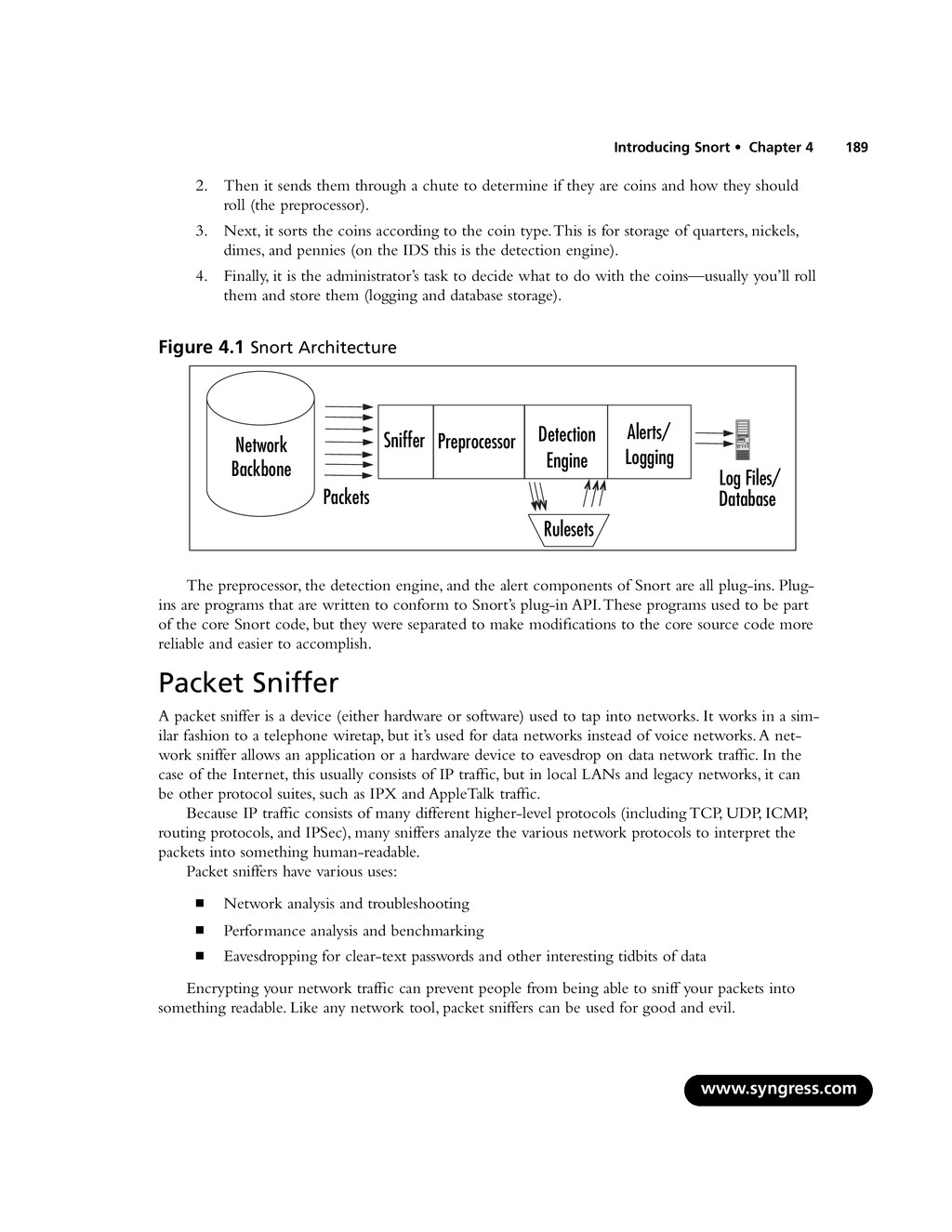
    for compiling it should be removed from any sensor that you expect to put into your production environment. You can also install the following optional software products: ▪ MySQL, Postgres, or Oracle (SQL databases) ▪ smbclient if using WinPopup messages ▪ Apache or another Web server ▪ PHP or Perl, if you have plug-ins that require them ▪ SSH for remote access (or Terminal Server with Windows) ▪ Apache with SSL capabilities for monitoring (or IIS for Windows) There’s more detail on installation in Chapter 5,“Installing Snort.” Exploring Snort’s Features In the Introduction, we provided you with a brief overview of Snort’s most important features that make it very powerful: packet sniffing, packet logging, and intrusion detection. Before learning the details of Snort’s features, you should understand Snort’s architecture. Snort has several important components such as preprocessors and alert plug-ins, most of which can be further customized with plug-ins for your particular Snort implementation.These components enable Snort to manipulate a packet to make the contents more manageable by the detection engine and the alert system. Once the packet has been passed through the preprocessors, passed through the detection engine, and then sent through the alert system, it can be handled by whatever plug-ins you have chosen to handle alerting. It sounds complicated initially, but once you understand the architecture, Snort makes a lot more sense. Snort’s architecture consists of four basic components: ▪ The sniffer ▪ The preprocessor ▪ The detection engine ▪ The output In its most basic form, Snort is a packet sniffer. However, it is designed to take packets and pro- cess them through the preprocessor, and then check those packets against a series of rules (through the detection engine). Figure 4.1 offers a high-level view of the Snort architecture. In its simplest form, Snort’s architec- ture is similar to a mechanical coin sorter. 1. It takes all the coins (packets from the network backbone). www.syngress.com 188 Chapter 4 • Introducing Snort
  9. 2. Then it sends them through a chute to determine

    if they are coins and how they should roll (the preprocessor). 3. Next, it sorts the coins according to the coin type.This is for storage of quarters, nickels, dimes, and pennies (on the IDS this is the detection engine). 4. Finally, it is the administrator’s task to decide what to do with the coins—usually you’ll roll them and store them (logging and database storage). Figure 4.1 Snort Architecture The preprocessor, the detection engine, and the alert components of Snort are all plug-ins. Plug- ins are programs that are written to conform to Snort’s plug-in API.These programs used to be part of the core Snort code, but they were separated to make modifications to the core source code more reliable and easier to accomplish. Packet Sniffer A packet sniffer is a device (either hardware or software) used to tap into networks. It works in a sim- ilar fashion to a telephone wiretap, but it’s used for data networks instead of voice networks.A net- work sniffer allows an application or a hardware device to eavesdrop on data network traffic. In the case of the Internet, this usually consists of IP traffic, but in local LANs and legacy networks, it can be other protocol suites, such as IPX and AppleTalk traffic. Because IP traffic consists of many different higher-level protocols (including TCP, UDP, ICMP, routing protocols, and IPSec), many sniffers analyze the various network protocols to interpret the packets into something human-readable. Packet sniffers have various uses: ▪ Network analysis and troubleshooting ▪ Performance analysis and benchmarking ▪ Eavesdropping for clear-text passwords and other interesting tidbits of data Encrypting your network traffic can prevent people from being able to sniff your packets into something readable. Like any network tool, packet sniffers can be used for good and evil. www.syngress.com Introducing Snort • Chapter 4 189 Preprocessor Sniffer Detection Engine Alerts/ Logging Rulesets Network Backbone Packets Log Files/ Database
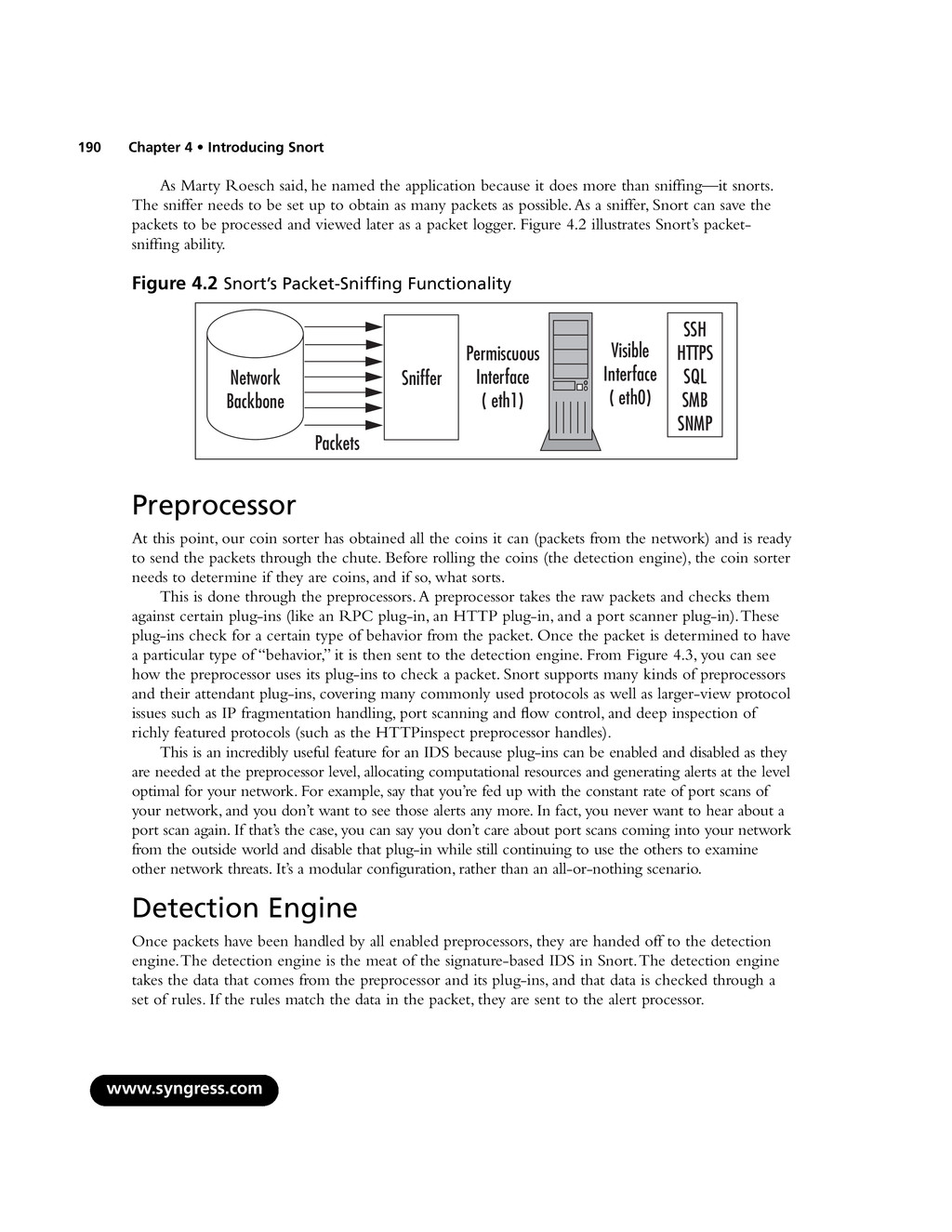
  10. As Marty Roesch said, he named the application because it

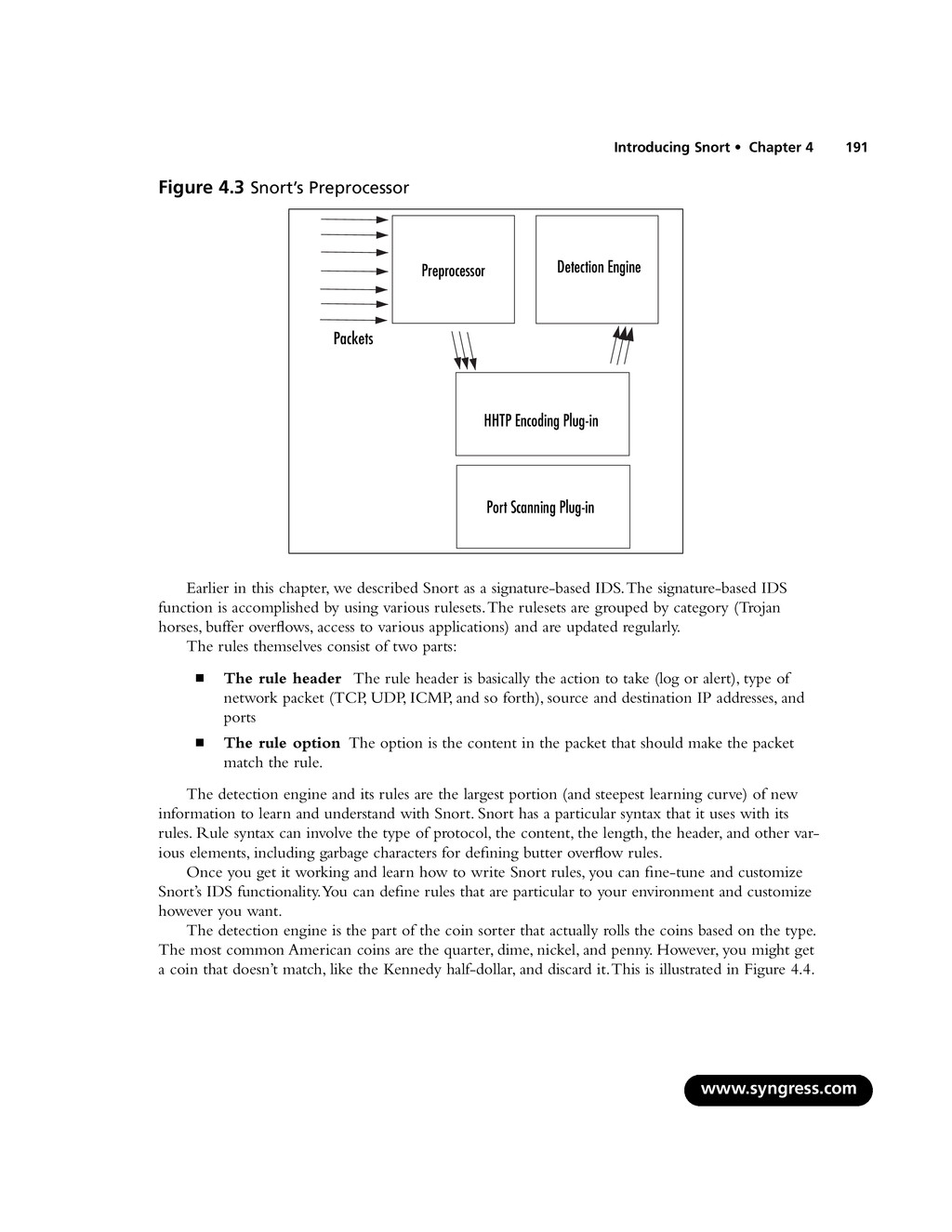
    does more than sniffing—it snorts. The sniffer needs to be set up to obtain as many packets as possible.As a sniffer, Snort can save the packets to be processed and viewed later as a packet logger. Figure 4.2 illustrates Snort’s packet- sniffing ability. Figure 4.2 Snort’s Packet-Sniffing Functionality Preprocessor At this point, our coin sorter has obtained all the coins it can (packets from the network) and is ready to send the packets through the chute. Before rolling the coins (the detection engine), the coin sorter needs to determine if they are coins, and if so, what sorts. This is done through the preprocessors.A preprocessor takes the raw packets and checks them against certain plug-ins (like an RPC plug-in, an HTTP plug-in, and a port scanner plug-in).These plug-ins check for a certain type of behavior from the packet. Once the packet is determined to have a particular type of “behavior,” it is then sent to the detection engine. From Figure 4.3, you can see how the preprocessor uses its plug-ins to check a packet. Snort supports many kinds of preprocessors and their attendant plug-ins, covering many commonly used protocols as well as larger-view protocol issues such as IP fragmentation handling, port scanning and flow control, and deep inspection of richly featured protocols (such as the HTTPinspect preprocessor handles). This is an incredibly useful feature for an IDS because plug-ins can be enabled and disabled as they are needed at the preprocessor level, allocating computational resources and generating alerts at the level optimal for your network. For example, say that you’re fed up with the constant rate of port scans of your network, and you don’t want to see those alerts any more. In fact, you never want to hear about a port scan again. If that’s the case, you can say you don’t care about port scans coming into your network from the outside world and disable that plug-in while still continuing to use the others to examine other network threats. It’s a modular configuration, rather than an all-or-nothing scenario. Detection Engine Once packets have been handled by all enabled preprocessors, they are handed off to the detection engine.The detection engine is the meat of the signature-based IDS in Snort.The detection engine takes the data that comes from the preprocessor and its plug-ins, and that data is checked through a set of rules. If the rules match the data in the packet, they are sent to the alert processor. www.syngress.com 190 Chapter 4 • Introducing Snort Network Backbone Packets Sniffer Permiscuous Interface ( eth1) Visible Interface ( eth0) SSH HTTPS SQL SMB SNMP
  11. Figure 4.3 Snort’s Preprocessor Earlier in this chapter, we described

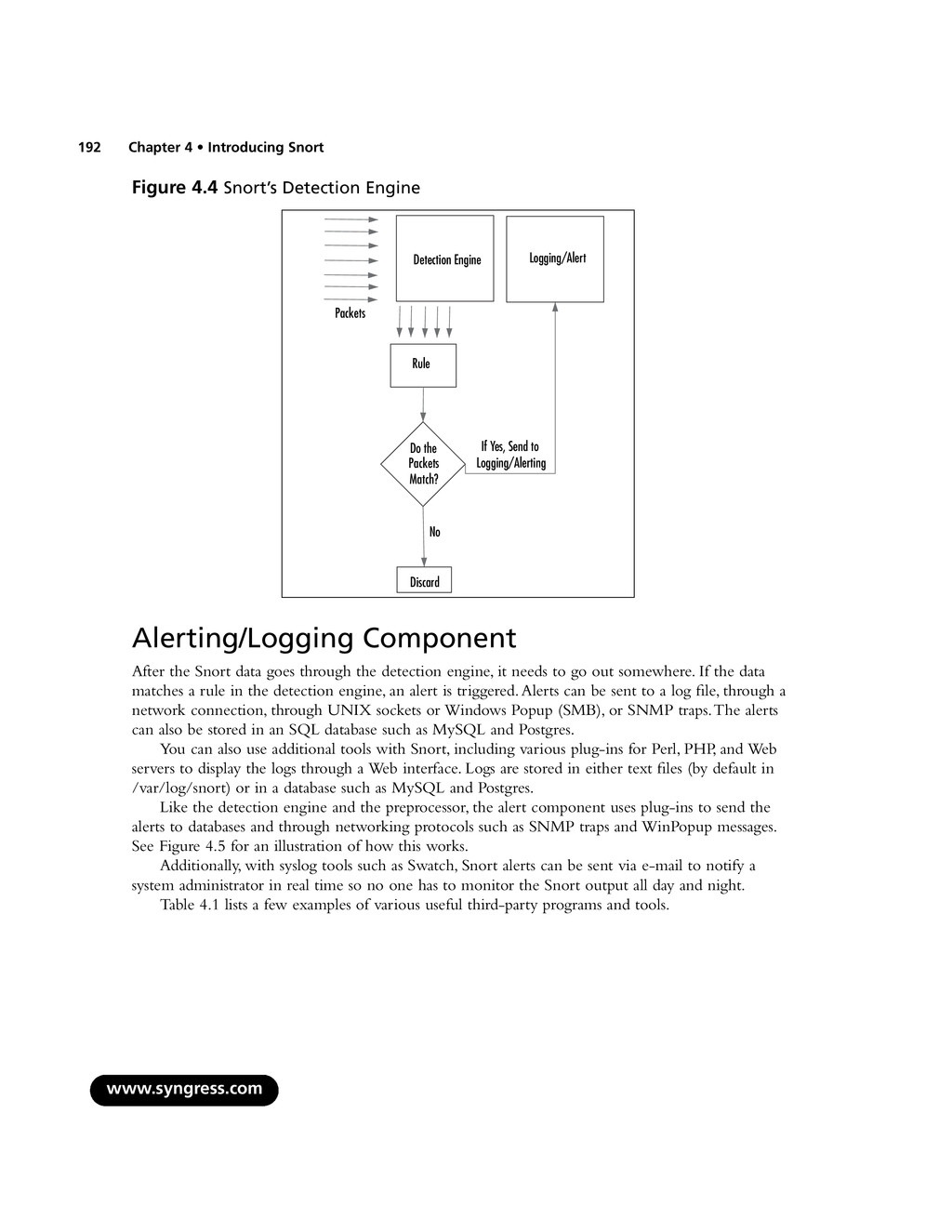
    Snort as a signature-based IDS.The signature-based IDS function is accomplished by using various rulesets.The rulesets are grouped by category (Trojan horses, buffer overflows, access to various applications) and are updated regularly. The rules themselves consist of two parts: ▪ The rule header The rule header is basically the action to take (log or alert), type of network packet (TCP, UDP, ICMP, and so forth), source and destination IP addresses, and ports ▪ The rule option The option is the content in the packet that should make the packet match the rule. The detection engine and its rules are the largest portion (and steepest learning curve) of new information to learn and understand with Snort. Snort has a particular syntax that it uses with its rules. Rule syntax can involve the type of protocol, the content, the length, the header, and other var- ious elements, including garbage characters for defining butter overflow rules. Once you get it working and learn how to write Snort rules, you can fine-tune and customize Snort’s IDS functionality.You can define rules that are particular to your environment and customize however you want. The detection engine is the part of the coin sorter that actually rolls the coins based on the type. The most common American coins are the quarter, dime, nickel, and penny. However, you might get a coin that doesn’t match, like the Kennedy half-dollar, and discard it.This is illustrated in Figure 4.4. www.syngress.com Introducing Snort • Chapter 4 191 Preprocessor Detection Engine Packets HHTP Encoding Plug-in Port Scanning Plug-in
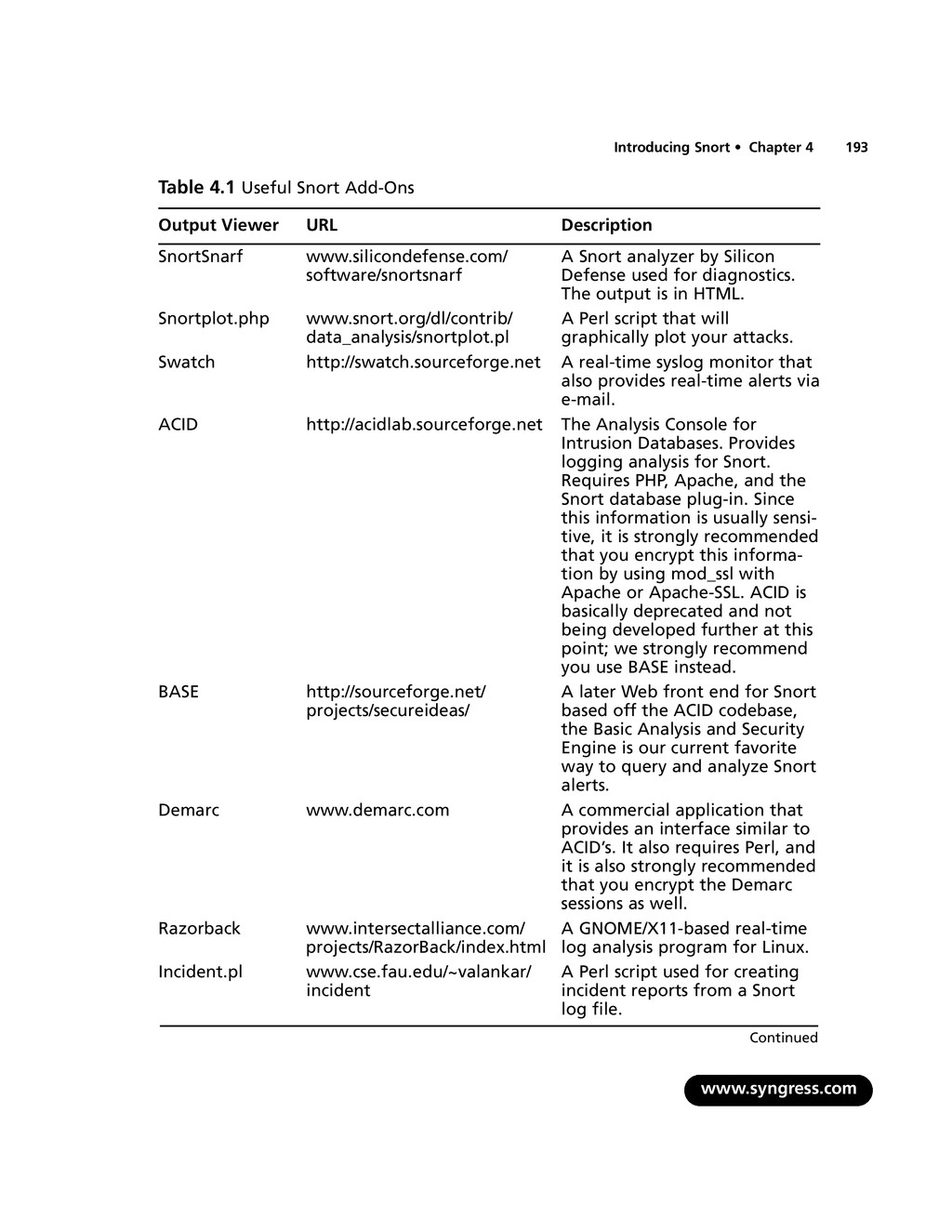
  12. Figure 4.4 Snort’s Detection Engine Alerting/Logging Component After the Snort

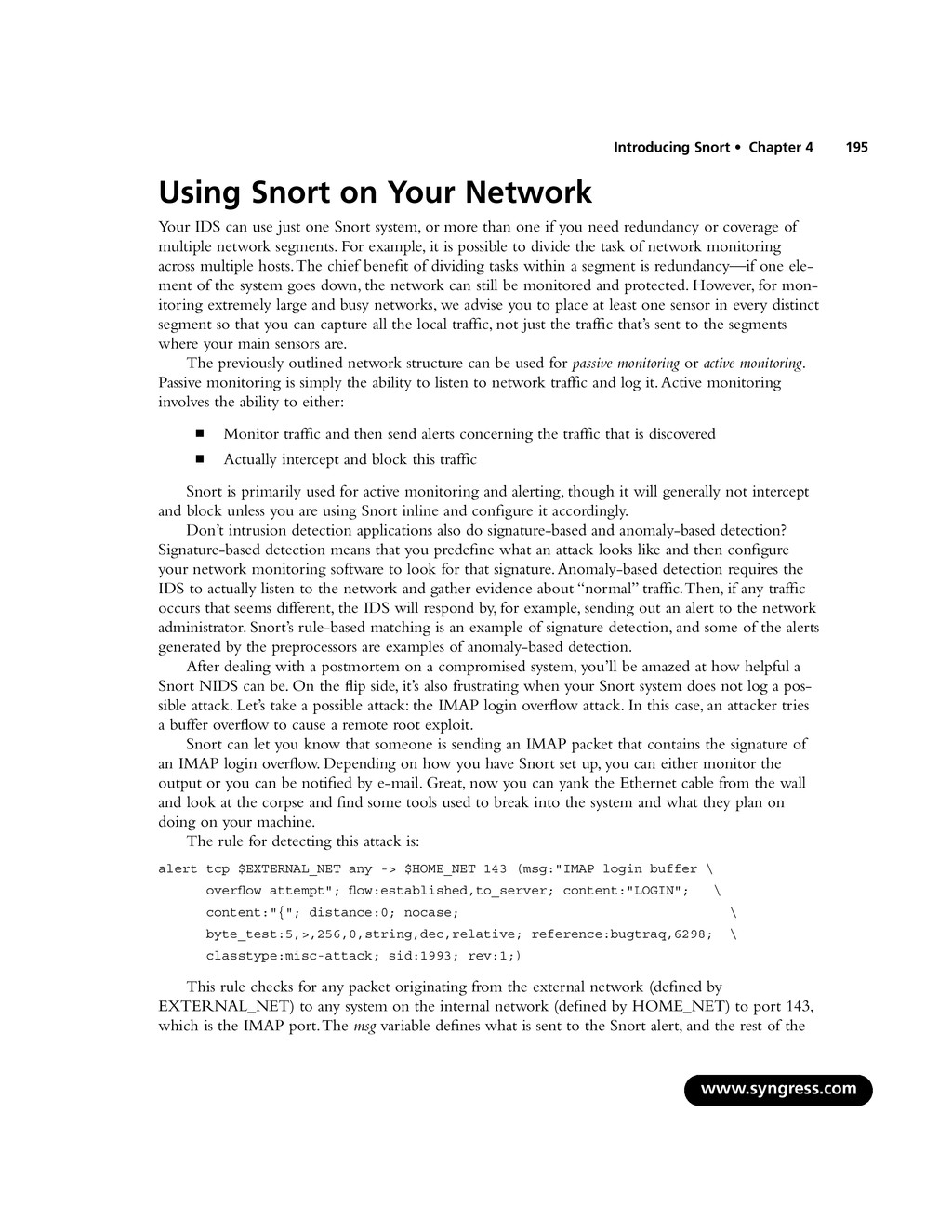
    data goes through the detection engine, it needs to go out somewhere. If the data matches a rule in the detection engine, an alert is triggered.Alerts can be sent to a log file, through a network connection, through UNIX sockets or Windows Popup (SMB), or SNMP traps.The alerts can also be stored in an SQL database such as MySQL and Postgres. You can also use additional tools with Snort, including various plug-ins for Perl, PHP, and Web servers to display the logs through a Web interface. Logs are stored in either text files (by default in /var/log/snort) or in a database such as MySQL and Postgres. Like the detection engine and the preprocessor, the alert component uses plug-ins to send the alerts to databases and through networking protocols such as SNMP traps and WinPopup messages. See Figure 4.5 for an illustration of how this works. Additionally, with syslog tools such as Swatch, Snort alerts can be sent via e-mail to notify a system administrator in real time so no one has to monitor the Snort output all day and night. Table 4.1 lists a few examples of various useful third-party programs and tools. www.syngress.com 192 Chapter 4 • Introducing Snort Detection Engine Packets Rule Packets Match? No Discard If Yes, Send to Logging/Alerting Logging/Alert Do the
  13. Table 4.1 Useful Snort Add-Ons Output Viewer URL Description SnortSnarf

    www.silicondefense.com/ A Snort analyzer by Silicon software/snortsnarf Defense used for diagnostics. The output is in HTML. Snortplot.php www.snort.org/dl/contrib/ A Perl script that will data_analysis/snortplot.pl graphically plot your attacks. Swatch http://swatch.sourceforge.net A real-time syslog monitor that also provides real-time alerts via e-mail. ACID http://acidlab.sourceforge.net The Analysis Console for Intrusion Databases. Provides logging analysis for Snort. Requires PHP, Apache, and the Snort database plug-in. Since this information is usually sensi- tive, it is strongly recommended that you encrypt this informa- tion by using mod_ssl with Apache or Apache-SSL. ACID is basically deprecated and not being developed further at this point; we strongly recommend you use BASE instead. BASE http://sourceforge.net/ A later Web front end for Snort projects/secureideas/ based off the ACID codebase, the Basic Analysis and Security Engine is our current favorite way to query and analyze Snort alerts. Demarc www.demarc.com A commercial application that provides an interface similar to ACID’s. It also requires Perl, and it is also strongly recommended that you encrypt the Demarc sessions as well. Razorback www.intersectalliance.com/ A GNOME/X11-based real-time projects/RazorBack/index.html log analysis program for Linux. Incident.pl www.cse.fau.edu/~valankar/ A Perl script used for creating incident incident reports from a Snort log file. www.syngress.com Introducing Snort • Chapter 4 193 Continued
  14. Table 4.1 continued Useful Snort Add-Ons Output Viewer URL Description

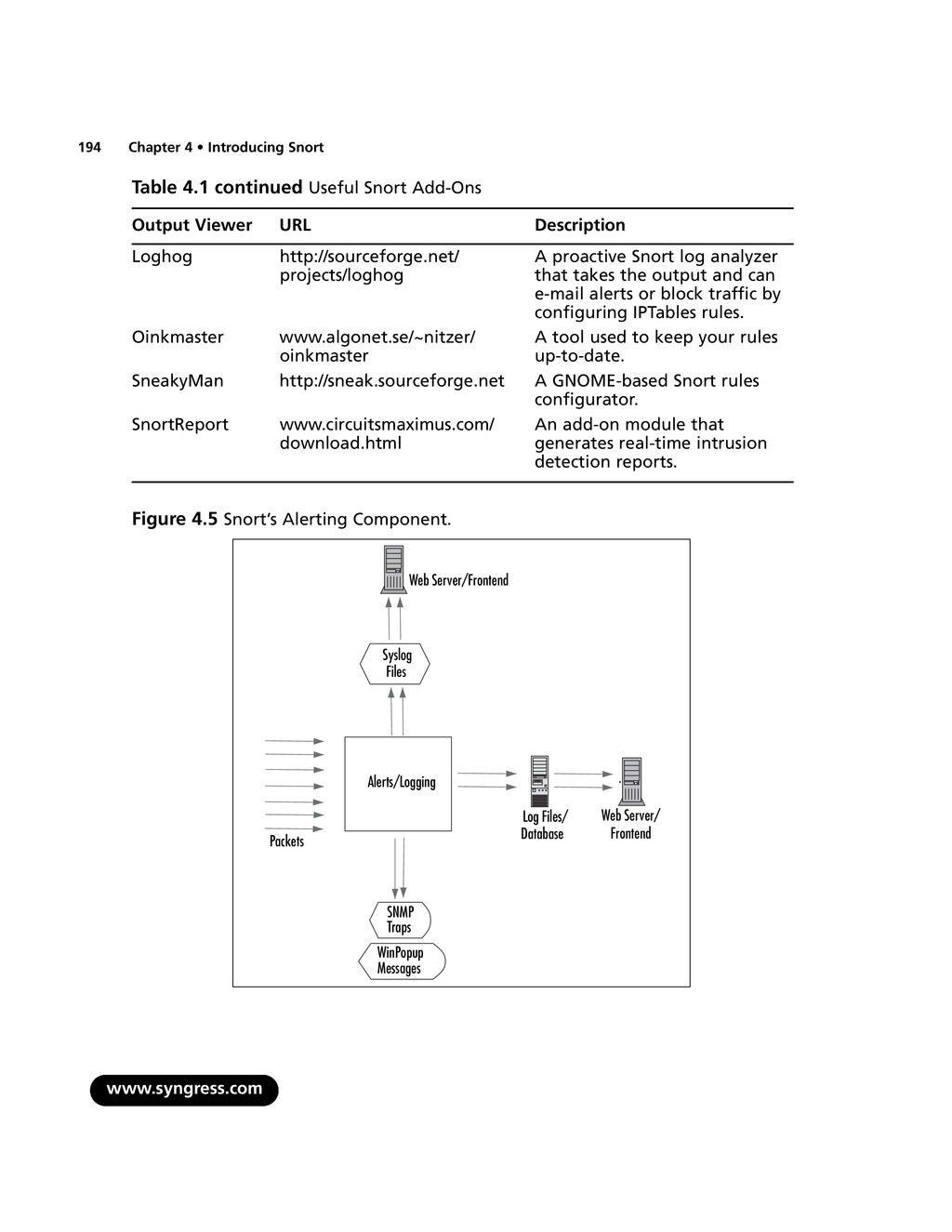
    Loghog http://sourceforge.net/ A proactive Snort log analyzer projects/loghog that takes the output and can e-mail alerts or block traffic by configuring IPTables rules. Oinkmaster www.algonet.se/~nitzer/ A tool used to keep your rules oinkmaster up-to-date. SneakyMan http://sneak.sourceforge.net A GNOME-based Snort rules configurator. SnortReport www.circuitsmaximus.com/ An add-on module that download.html generates real-time intrusion detection reports. Figure 4.5 Snort’s Alerting Component. www.syngress.com 194 Chapter 4 • Introducing Snort Alerts/Logging Packets Log Files/ Database SNMP Traps WinPopup Messages Syslog Files Web Server/Frontend Web Server/ Frontend
  15. Using Snort on Your Network Your IDS can use just

    one Snort system, or more than one if you need redundancy or coverage of multiple network segments. For example, it is possible to divide the task of network monitoring across multiple hosts.The chief benefit of dividing tasks within a segment is redundancy—if one ele- ment of the system goes down, the network can still be monitored and protected. However, for mon- itoring extremely large and busy networks, we advise you to place at least one sensor in every distinct segment so that you can capture all the local traffic, not just the traffic that’s sent to the segments where your main sensors are. The previously outlined network structure can be used for passive monitoring or active monitoring. Passive monitoring is simply the ability to listen to network traffic and log it.Active monitoring involves the ability to either: ▪ Monitor traffic and then send alerts concerning the traffic that is discovered ▪ Actually intercept and block this traffic Snort is primarily used for active monitoring and alerting, though it will generally not intercept and block unless you are using Snort inline and configure it accordingly. Don’t intrusion detection applications also do signature-based and anomaly-based detection? Signature-based detection means that you predefine what an attack looks like and then configure your network monitoring software to look for that signature.Anomaly-based detection requires the IDS to actually listen to the network and gather evidence about “normal” traffic.Then, if any traffic occurs that seems different, the IDS will respond by, for example, sending out an alert to the network administrator. Snort’s rule-based matching is an example of signature detection, and some of the alerts generated by the preprocessors are examples of anomaly-based detection. After dealing with a postmortem on a compromised system, you’ll be amazed at how helpful a Snort NIDS can be. On the flip side, it’s also frustrating when your Snort system does not log a pos- sible attack. Let’s take a possible attack: the IMAP login overflow attack. In this case, an attacker tries a buffer overflow to cause a remote root exploit. Snort can let you know that someone is sending an IMAP packet that contains the signature of an IMAP login overflow. Depending on how you have Snort set up, you can either monitor the output or you can be notified by e-mail. Great, now you can yank the Ethernet cable from the wall and look at the corpse and find some tools used to break into the system and what they plan on doing on your machine. The rule for detecting this attack is: alert tcp $EXTERNAL_NET any -> $HOME_NET 143 (msg:"IMAP login buffer \ overflow attempt"; flow:established,to_server; content:"LOGIN"; \ content:"{"; distance:0; nocase; \ byte_test:5,>,256,0,string,dec,relative; reference:bugtraq,6298; \ classtype:misc-attack; sid:1993; rev:1;) This rule checks for any packet originating from the external network (defined by EXTERNAL_NET) to any system on the internal network (defined by HOME_NET) to port 143, which is the IMAP port.The msg variable defines what is sent to the Snort alert, and the rest of the www.syngress.com Introducing Snort • Chapter 4 195
  16. information of the packet is content based.There are definitions on

    the type of attack (misc-attack), the SID number (1993), and the Bugtraq (www.securityfocus.com) reference on the attack 6298 (which you can find at www.securityfocus.com/bid/6298). Then, there’s the flip side: what happens when Snort does not detect an attack on your system? Take another UNIX system you have running.This one is running Apache with FrontPage exten- sions (gasp!). Someone finds a new overflow on FrontPage, writes a zero-day attack, and then he or she has your box. No IDS is perfect, and Snort will not catch attacks if there’s no preprocessor code or signature written to cover them yet.This is one of the primary reasons why it’s important to keep your rules as up-to-date as possible—you stand a greater chance of detecting attacks if you have the most recent rules. Because rules actively developed as new attacks show up on the Internet, Snort’s detection capabilities continually improve in response to the evolution of new attacks. Snort’s Uses Snort has three major uses: ▪ A packet sniffer ▪ A packet logger ▪ An NIDS All the uses relate to each other in a way that builds on each other. However, it’s easiest to put the packet sniffer and the packet logger together in the same category—basically, it’s the same func- tionality.The difference is that with the logging functionality, you can save the packets into a file. Conversely, you can read the packet logs with Snort as well. Using Snort as a Packet Sniffer and Logger In its simplest form, Snort is a packet sniffer.That said, it’s the easiest way to start.The command-line interface for packet sniffing is very easy to remember: # snort –d –e -v Note that the -v option is required. If you run Snort on a command line without any options, it looks for the configuration file (.snortrc) in your home directory. Snort configuration files are dis- cussed in Chapter 5. Table 4.2 lists Snort options and their function. Table 4.2 Basic Snort Options for Packet Sniffing and Logging Option What It Does -v Put Snort in packet-sniffing mode (TCP headers only) -d Include all network layer headers (TCP, UDP, and ICMP) -e Include the data link layer headers www.syngress.com 196 Chapter 4 • Introducing Snort
  17. You cannot use options –d and –e together without also

    using the –v option. If you do, you get the same output if you use snort without any options: florida:/usr/share/doc/snort-doc# snort -de Log directory = /var/log/snort Initializing Network Interface eth0 using config file /root/.snortrc Parsing Rules file /root/.snortrc +++++++++++++++++++++++++++++++++++++++++++++++++++ Initializing rule chains... ERROR: Unable to open rules file: /root/.snortrc or /root//root/.snortrc Fatal Error, Quitting.. Now, if you run snort with the –v option, you get this: whiplash:~ root# snort -v Running in packet dump mode --== Initializing Snort ==-- Initializing Output Plugins! Verifying Preprocessor Configurations! *** *** interface device lookup found: en0 *** Initializing Network Interface en0 OpenPcap() device en0 network lookup: en0: no IPv4 address assigned Decoding Ethernet on interface en0 --== Initialization Complete ==-- ,,_ -*> Snort! <*- o" )~ Version 2.6.0 (Build 59) '''' By Martin Roesch & The Snort Team: http://www.snort.org/team.html (C) Copyright 1998-2006 Sourcefire Inc., et al. 01/22-20:27:44.272934 192.168.1.1:1901 -> 239.255.255.250:1900 UDP TTL:150 TOS:0x0 ID:0 IpLen:20 DgmLen:297 Len: 277 www.syngress.com Introducing Snort • Chapter 4 197
  18. =+=+=+=+=+=+=+=+=+=+=+=+=+=+=+=+=+=+=+=+=+=+=+=+=+=+=+=+=+=+=+=+=+=+=+=+=+ 01/22-20:27:44.273807 192.168.1.1:1901 -> 239.255.255.250:1900 UDP TTL:150 TOS:0x0 ID:1 IpLen:20

    DgmLen:353 Len: 333 =+=+=+=+=+=+=+=+=+=+=+=+=+=+=+=+=+=+=+=+=+=+=+=+=+=+=+=+=+=+=+=+=+=+=+=+=+ [] After a while, the text scrolls off your screen. Once you press Ctrl-C, you get an output summary that summarizes the packets that Snort picked up, by network type (TCP, UDP, ICMP, IPX), data link information (including ARP), wireless packets, and any packet fragments. Snort analyzed 56 out of 56 packets, dropping 0(0.000%) packets Breakdown by protocol: Action Stats: TCP: 0 (0.000%) ALERTS: 0 UDP: 44 (78.571%) LOGGED: 0 ICMP: 0 (0.000%) PASSED: 0 ARP: 1 (1.786%) EAPOL: 0 (0.000%) IPv6: 0 (0.000%) IPX: 0 (0.000%) OTHER: 11 (19.643%) DISCARD: 0 (0.000%) ============================================================================ Wireless Stats: Breakdown by type: Management Packets: 0 (0.000%) Control Packets: 0 (0.000%) Data Packets: 0 (0.000%) ============================================================================ Fragmentation Stats: Fragmented IP Packets: 0 (0.000%) Fragment Trackers: 0 Rebuilt IP Packets: 0 Frag elements used: 0 Discarded(incomplete): 0 Discarded(timeout): 0 Frag2 memory faults: 0 ============================================================================ TCP Stream Reassembly Stats: TCP Packets Used: 0 (0.000%) Stream Trackers: 0 www.syngress.com 198 Chapter 4 • Introducing Snort
  19. Stream flushes: 0 Segments used: 0 Stream4 Memory Faults: 0

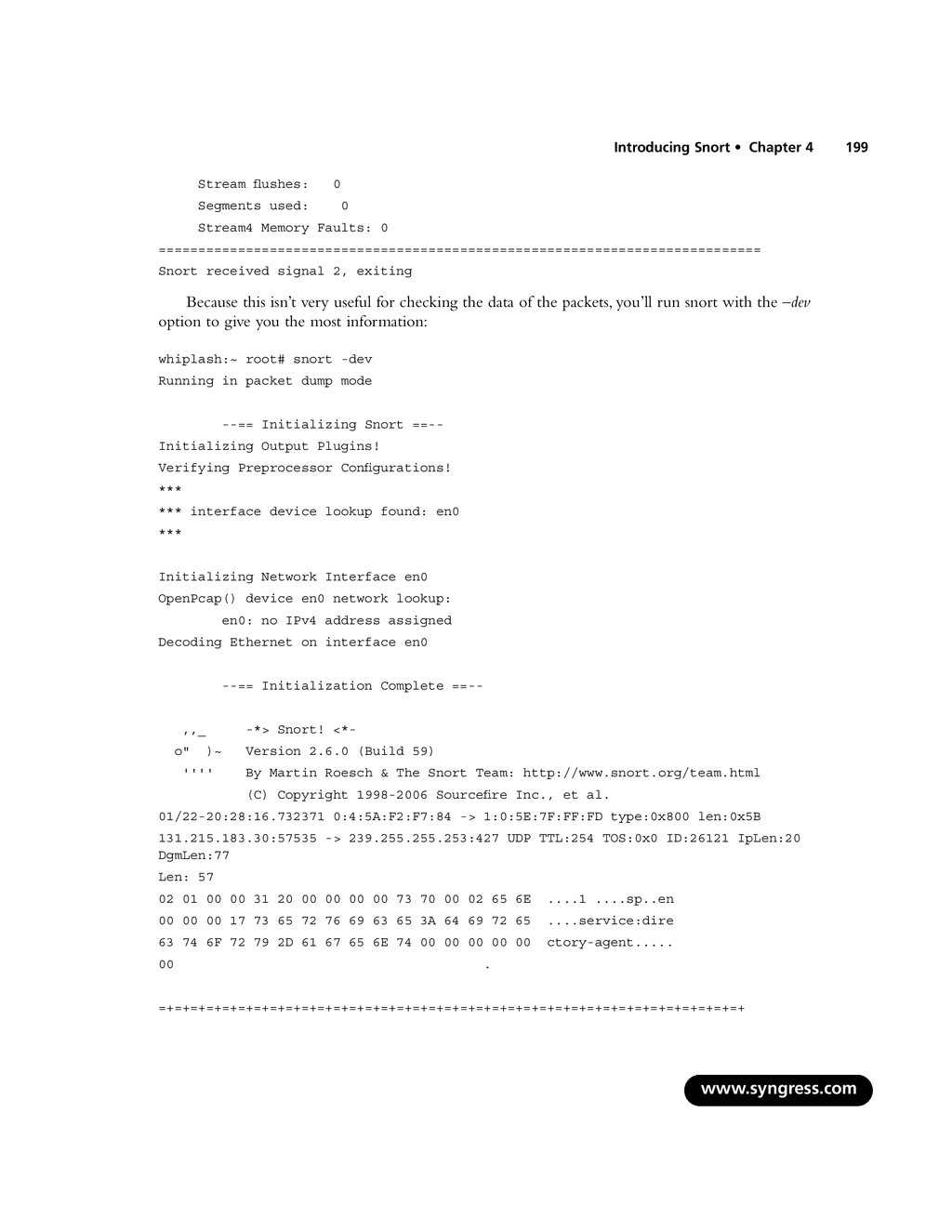
    ============================================================================ Snort received signal 2, exiting Because this isn’t very useful for checking the data of the packets, you’ll run snort with the –dev option to give you the most information: whiplash:~ root# snort -dev Running in packet dump mode --== Initializing Snort ==-- Initializing Output Plugins! Verifying Preprocessor Configurations! *** *** interface device lookup found: en0 *** Initializing Network Interface en0 OpenPcap() device en0 network lookup: en0: no IPv4 address assigned Decoding Ethernet on interface en0 --== Initialization Complete ==-- ,,_ -*> Snort! <*- o" )~ Version 2.6.0 (Build 59) '''' By Martin Roesch & The Snort Team: http://www.snort.org/team.html (C) Copyright 1998-2006 Sourcefire Inc., et al. 01/22-20:28:16.732371 0:4:5A:F2:F7:84 -> 1:0:5E:7F:FF:FD type:0x800 len:0x5B 131.215.183.30:57535 -> 239.255.255.253:427 UDP TTL:254 TOS:0x0 ID:26121 IpLen:20 DgmLen:77 Len: 57 02 01 00 00 31 20 00 00 00 00 73 70 00 02 65 6E ....1 ....sp..en 00 00 00 17 73 65 72 76 69 63 65 3A 64 69 72 65 ....service:dire 63 74 6F 72 79 2D 61 67 65 6E 74 00 00 00 00 00 ctory-agent..... 00 . =+=+=+=+=+=+=+=+=+=+=+=+=+=+=+=+=+=+=+=+=+=+=+=+=+=+=+=+=+=+=+=+=+=+=+=+=+ www.syngress.com Introducing Snort • Chapter 4 199
  20. 01/22-20:28:18.354830 0:4:5A:F2:F7:84 -> 1:0:5E:0:0:2 type:0x800 len:0x3E 131.215.184.253:1985 -> 224.0.0.2:1985 UDP

    TTL:2 TOS:0x0 ID:0 IpLen:20 DgmLen:48 Len: 28 00 00 10 03 0A 78 01 00 63 69 73 63 6F 00 00 00 .....x..cisco... 83 D7 B8 FE .... =+=+=+=+=+=+=+=+=+=+=+=+=+=+=+=+=+=+=+=+=+=+=+=+=+=+=+=+=+=+=+=+=+=+=+=+=+ If you’ve used TCPDump before, you will see that Snort’s output in this mode looks very similar. It looks very typical of a packet sniffer in general. {date}-{time} {source-hw-address} -> {dest-hw-address} {type} {length} {source-ip-address:port} -> {destination-ip-address:port} {protocol} {TTL} {TOS} {ID} {IP-length} {datagram-length} {payload-length} {hex-dump} {ASCII-dump} This is all great information that you’re gathering, and Snort can collect it into a file as well as display it to standard output. Snort has built-in packet-logging mechanisms that you can use to col- lect the data as a file, sort it into directories, or store the data as a binary file. To use the packet-logging features, the command format is simple: # snort -dev -l {logging-directory} -h {home-subnet-slash-notation} If you wanted to log the data into the directory /var/adm/snort/logs with the home subnet 10.1.0.0/24, you would use the following: # snort -dev -l /var/adm/snort/logs -h 10.1.0.0/24 However, if you log the data in binary format, you don’t need all the options.The binary format is also known as the TCPDump formatted data file. Several packet sniffers use the TCPDump data format, including Snort. The binary format for Snort makes the packet collection much faster because Snort doesn’t have to translate the data into a human-readable format immediately.You need only two options: the binary log file option -L and the binary option -b. For binary packet logging, just run the following: # snort -b -L {log-file} For each log file, Snort appends a time stamp to the specified filename. It’s great that you’re able to collect the data. Now, how do you read it? What you need to do is parse it back through Snort with filtering options.You also have the option to look at the data through TCPDump and Ethereal, as they use the same type of format for the data. # snort [-d|e] -r {log-file} [tcp|udp|icmp] The last item on the line is optional if you want to filter the packets based on packet type (for example,TCP).To take further advantage of Snort’s packet-logging features, you can use Snort in conjunction with the Berkeley Packet Filter (BPF).The BPF allows packets to be filtered at the kernel level.This can optimize performance of network sniffers and loggers with marked improve- ments to performance. Because BPF filtering happens at a low level in the operating system, packets www.syngress.com 200 Chapter 4 • Introducing Snort
  21. are eliminated from processing before they go through extensive processing

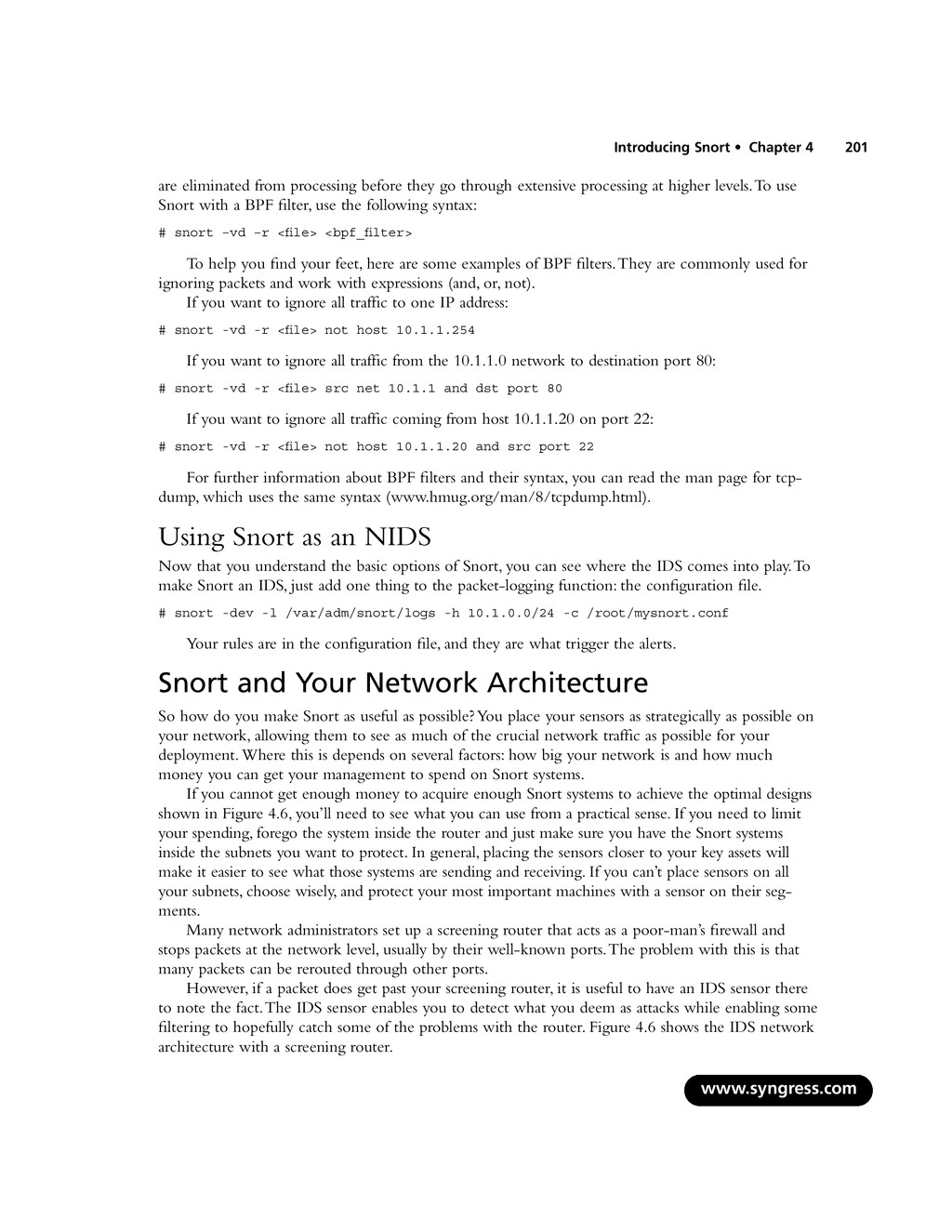
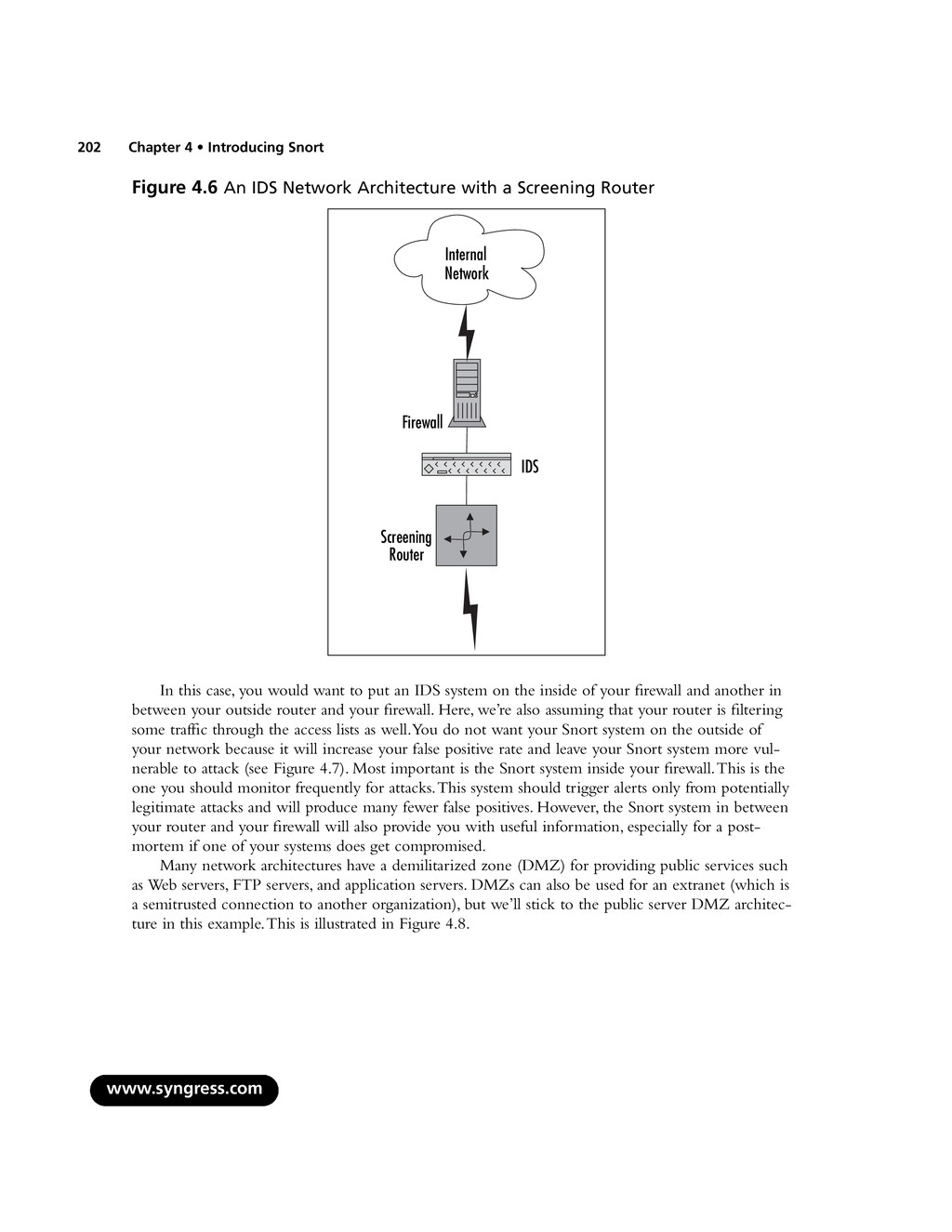
    at higher levels.To use Snort with a BPF filter, use the following syntax: # snort –vd –r <file> <bpf_filter> To help you find your feet, here are some examples of BPF filters.They are commonly used for ignoring packets and work with expressions (and, or, not). If you want to ignore all traffic to one IP address: # snort -vd -r <file> not host 10.1.1.254 If you want to ignore all traffic from the 10.1.1.0 network to destination port 80: # snort -vd -r <file> src net 10.1.1 and dst port 80 If you want to ignore all traffic coming from host 10.1.1.20 on port 22: # snort -vd -r <file> not host 10.1.1.20 and src port 22 For further information about BPF filters and their syntax, you can read the man page for tcp- dump, which uses the same syntax (www.hmug.org/man/8/tcpdump.html). Using Snort as an NIDS Now that you understand the basic options of Snort, you can see where the IDS comes into play.To make Snort an IDS, just add one thing to the packet-logging function: the configuration file. # snort -dev -l /var/adm/snort/logs -h 10.1.0.0/24 -c /root/mysnort.conf Your rules are in the configuration file, and they are what trigger the alerts. Snort and Your Network Architecture So how do you make Snort as useful as possible? You place your sensors as strategically as possible on your network, allowing them to see as much of the crucial network traffic as possible for your deployment. Where this is depends on several factors: how big your network is and how much money you can get your management to spend on Snort systems. If you cannot get enough money to acquire enough Snort systems to achieve the optimal designs shown in Figure 4.6, you’ll need to see what you can use from a practical sense. If you need to limit your spending, forego the system inside the router and just make sure you have the Snort systems inside the subnets you want to protect. In general, placing the sensors closer to your key assets will make it easier to see what those systems are sending and receiving. If you can’t place sensors on all your subnets, choose wisely, and protect your most important machines with a sensor on their seg- ments. Many network administrators set up a screening router that acts as a poor-man’s firewall and stops packets at the network level, usually by their well-known ports.The problem with this is that many packets can be rerouted through other ports. However, if a packet does get past your screening router, it is useful to have an IDS sensor there to note the fact.The IDS sensor enables you to detect what you deem as attacks while enabling some filtering to hopefully catch some of the problems with the router. Figure 4.6 shows the IDS network architecture with a screening router. www.syngress.com Introducing Snort • Chapter 4 201
  22. Figure 4.6 An IDS Network Architecture with a Screening Router

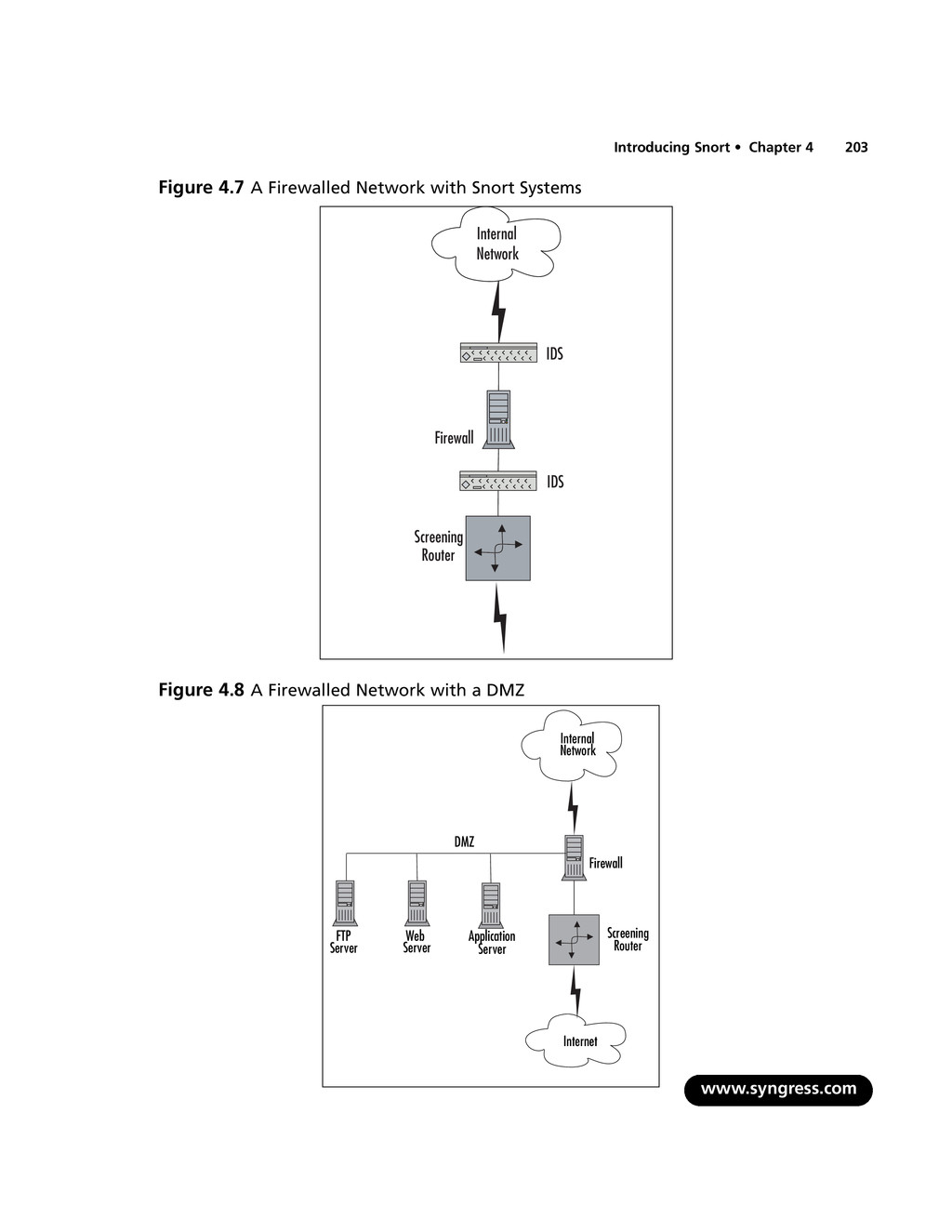
    In this case, you would want to put an IDS system on the inside of your firewall and another in between your outside router and your firewall. Here, we’re also assuming that your router is filtering some traffic through the access lists as well.You do not want your Snort system on the outside of your network because it will increase your false positive rate and leave your Snort system more vul- nerable to attack (see Figure 4.7). Most important is the Snort system inside your firewall.This is the one you should monitor frequently for attacks.This system should trigger alerts only from potentially legitimate attacks and will produce many fewer false positives. However, the Snort system in between your router and your firewall will also provide you with useful information, especially for a post- mortem if one of your systems does get compromised. Many network architectures have a demilitarized zone (DMZ) for providing public services such as Web servers, FTP servers, and application servers. DMZs can also be used for an extranet (which is a semitrusted connection to another organization), but we’ll stick to the public server DMZ architec- ture in this example.This is illustrated in Figure 4.8. www.syngress.com 202 Chapter 4 • Introducing Snort Screening Router Firewall Internal Network IDS
  23. Figure 4.7 A Firewalled Network with Snort Systems Figure 4.8

    A Firewalled Network with a DMZ Introducing Snort • Chapter 4 203 Screening Router Firewall Internal Network IDS IDS Internet Screening Router Firewall Internal Network DMZ FTP Server Web Server Application Server www.syngress.com
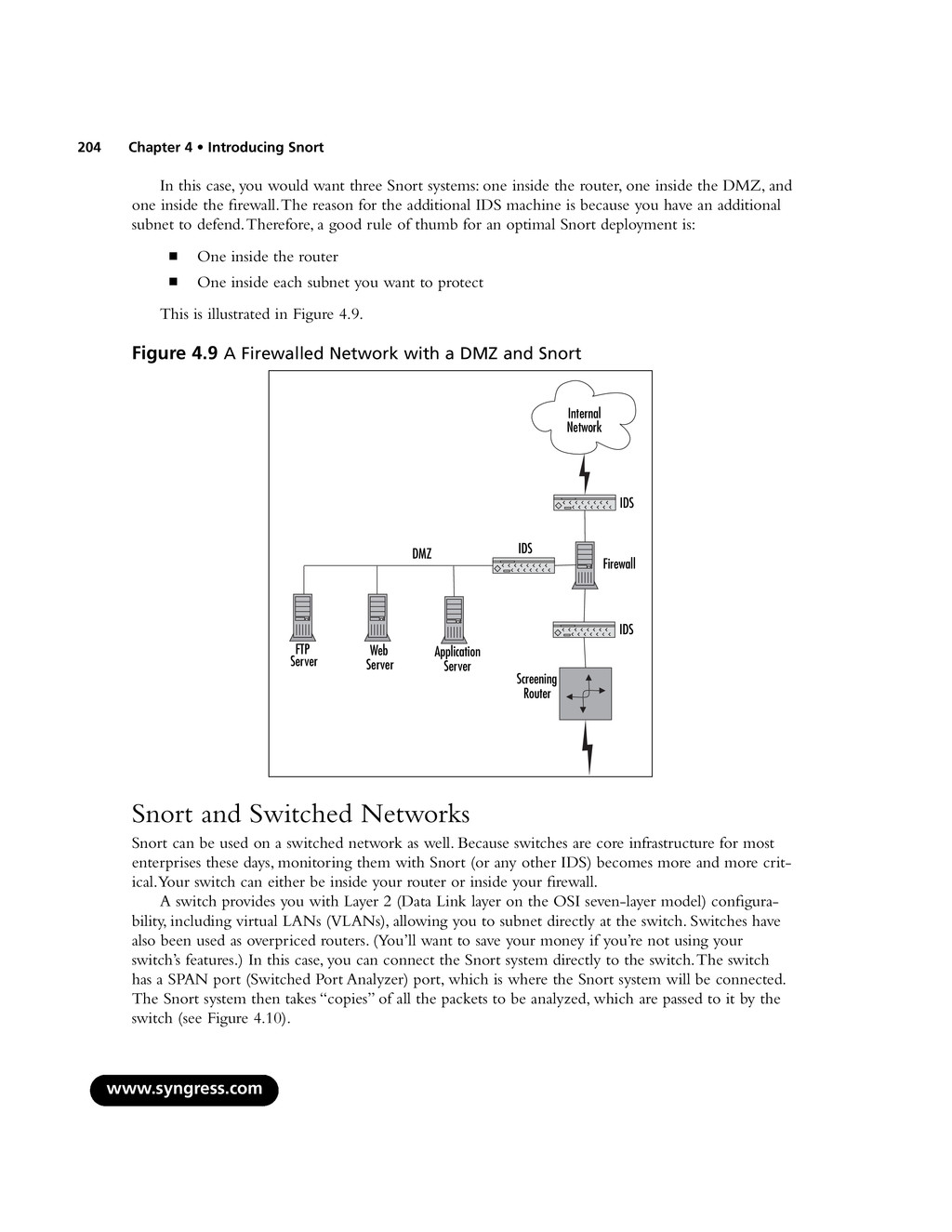
  24. In this case, you would want three Snort systems: one

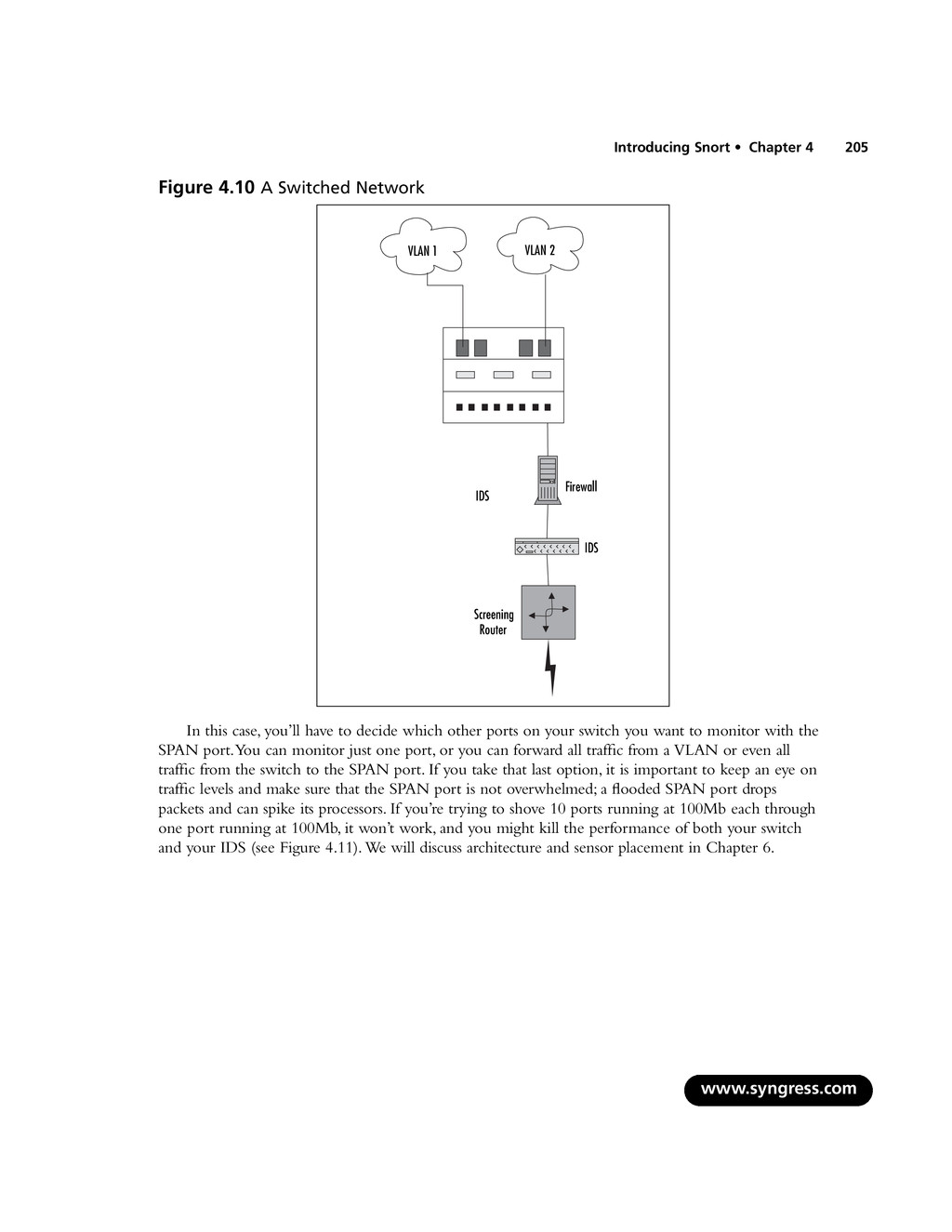
    inside the router, one inside the DMZ, and one inside the firewall.The reason for the additional IDS machine is because you have an additional subnet to defend.Therefore, a good rule of thumb for an optimal Snort deployment is: ▪ One inside the router ▪ One inside each subnet you want to protect This is illustrated in Figure 4.9. Figure 4.9 A Firewalled Network with a DMZ and Snort Snort and Switched Networks Snort can be used on a switched network as well. Because switches are core infrastructure for most enterprises these days, monitoring them with Snort (or any other IDS) becomes more and more crit- ical.Your switch can either be inside your router or inside your firewall. A switch provides you with Layer 2 (Data Link layer on the OSI seven-layer model) configura- bility, including virtual LANs (VLANs), allowing you to subnet directly at the switch. Switches have also been used as overpriced routers. (You’ll want to save your money if you’re not using your switch’s features.) In this case, you can connect the Snort system directly to the switch.The switch has a SPAN port (Switched Port Analyzer) port, which is where the Snort system will be connected. The Snort system then takes “copies” of all the packets to be analyzed, which are passed to it by the switch (see Figure 4.10). www.syngress.com 204 Chapter 4 • Introducing Snort Screening Router Firewall Internal Network DMZ FTP Server Web Server Application Server IDS IDS IDS
  25. Figure 4.10 A Switched Network In this case, you’ll have

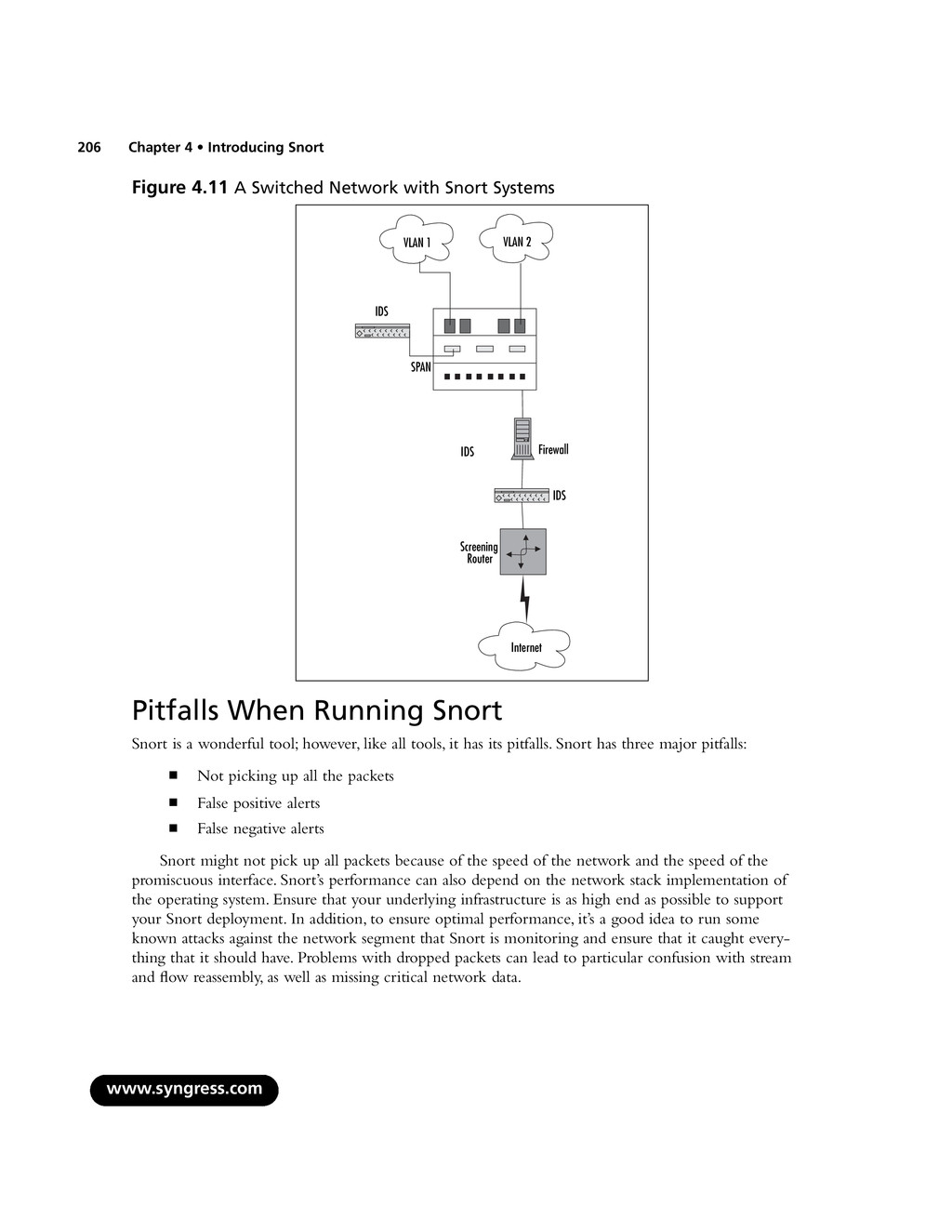
    to decide which other ports on your switch you want to monitor with the SPAN port.You can monitor just one port, or you can forward all traffic from a VLAN or even all traffic from the switch to the SPAN port. If you take that last option, it is important to keep an eye on traffic levels and make sure that the SPAN port is not overwhelmed; a flooded SPAN port drops packets and can spike its processors. If you’re trying to shove 10 ports running at 100Mb each through one port running at 100Mb, it won’t work, and you might kill the performance of both your switch and your IDS (see Figure 4.11).We will discuss architecture and sensor placement in Chapter 6. www.syngress.com Introducing Snort • Chapter 4 205 Screening Router Firewall VLAN 1 IDS IDS VLAN 2
  26. Figure 4.11 A Switched Network with Snort Systems Pitfalls When

    Running Snort Snort is a wonderful tool; however, like all tools, it has its pitfalls. Snort has three major pitfalls: ▪ Not picking up all the packets ▪ False positive alerts ▪ False negative alerts Snort might not pick up all packets because of the speed of the network and the speed of the promiscuous interface. Snort’s performance can also depend on the network stack implementation of the operating system. Ensure that your underlying infrastructure is as high end as possible to support your Snort deployment. In addition, to ensure optimal performance, it’s a good idea to run some known attacks against the network segment that Snort is monitoring and ensure that it caught every- thing that it should have. Problems with dropped packets can lead to particular confusion with stream and flow reassembly, as well as missing critical network data. www.syngress.com 206 Chapter 4 • Introducing Snort Internet Screening Router Firewall VLAN 1 IDS IDS IDS VLAN 2 SPAN
  27. False Alerts False positives are when Snort gives you a

    warning when it shouldn’t. Basically, a false positive is a false alarm. If you go with a default ruleset with Snort, then you will definitely get many false alarms. Why do IDSes behave this way? Well, it’s better to get false alerts and whittle them down through tuning than it is to miss data that might have been a critical attack. So a new Snort installation can trigger a lot of alerts until you decide what is relevant to your network.The more open your net- work is, the more alarms you’ll want to monitor. On the opposite end, you can get false negatives. In other words, someone compromises a Snort- monitored system and your Snort system doesn’t detect it.You might think that this doesn’t happen, but when you get an e-mail from another system administrator describing a suspicious activity and your Snort system didn’t pick it up, well, this is a very real scenario, and it usually happens with either out-of-date rulesets or brand-new attacks for which signatures have not yet been written. Make sure you keep your Snort rulesets up-to-date. Upgrading Snort Upgrading Snort can be quite painful for two reasons: the ruleset syntax may change, and the inter- face to the alert logs may change. We have found both to be obstacles when trying to upgrade Snort systems, and they can be quite a pain to deal with, particularly when you didn’t want to have to do a forklift upgrade. If Snort changes its architecture to increase performance (as happened with the Snort 2.0 upgrade), you may experience a painful upgrade to any custom rulesets or alert interfaces in now-deprecated syntax and interfaces. In addition, there are administrative foibles that may be encountered while creating rules, while reading logs, and while analyzing logs. When writing your own rules, make sure that they do what you think they’re going to do, and test them to make sure that they alert you when they’re supposed to. Rule syntax is tricky sometimes, and all it takes is one misplaced PCRE expression to cause either a whole lot of false positives or a whole lot of nothing. Having the rule in place won’t help you much if the rule is incorrectly written. Similar attention should be paid when reading and analyzing logs—make sure that your security analysts understand the network and its context enough to be able to accurately identify when something is a false positive rather than a problem, and vice versa. We’ve seen unfortunate deployments where clueless analysts marked every noisy rule as a false positive and tuned it out, rather than figuring out what was triggering the rule and writing a targeted pass rule for allowed traffic.That sort of approach doesn’t help anyone, and may negate much of the benefit of having an IDS in the first place. Security Considerations with Snort Even though you are using Snort to improve your security, making sure that your Snort system is as secure as possible will make the data more trustworthy. If someone breaks into your Snort system, there is no reason to trust the alerts that it sends, thereby making the system completely useless until after you wipe the disks and reinstall everything. www.syngress.com Introducing Snort • Chapter 4 207
  28. Snort Is Susceptible to Attacks With that said, a typical

    Snort installation is subject to attacks, both in Snort itself and in the under- lying OS. Why? You’ll want to get in remotely (SSH), and you’ll probably want to store the alerts in a database (MySQL or Postgres). In addition, you’ll probably want to view the alerts with a spiffy inter- face that might require a Web server (Apache or IIS).Any listening service is a possible surface for attacks, and some driver attacks can even target a listening interface that isn’t advertising any services in particular at all.This makes your Snort system just like any other application, so stay on top of security vulnerability announcements and OS security announcements for whatever platform you’ve chosen, just as you would for any other crucial network appliance. Now, based on this information, you may have several ports open on your Snort system: SSH (port 22), HTTP (port 80), HTTPS (port 443), and possibly MySQL (port 3306) or Postgres (port 5432).Anyone with access to the network can use NMAP and port scan your sniffer directly on its nonpromiscuous interface.This is one of the major reasons that we advocate having a separate inter- face for management than for sniffing and for locking down the management interface to restrict access and services as tightly as possible. Reducing the potential attack surface will help keep your IDS secure. This is something that needs to be addressed because all of the preceding applications have had quite a few serious security issues, historically. In addition to making sure that your applications are up-to-date, you need to make sure that your kernel is configured properly and that it also is up-to- date.You didn’t think that running Snort allows you to disregard basic system administration prac- tices; did you? Notes from the Underground…. Snort Security Vulnerabilities All applications end up with some discovered vulnerabilities eventually. Snort is no exception. Although Snort itself has had relatively few flaws, some of the vulnerabilities in recent years have been notable. The RPC preprocessor flaw of 2003 (http://xforce.iss.net/xforce/alerts/id/advise141) allowed denial of service or potential host compromise. The flaw in the Back Orifice handling in 2005 (www.osvdb.org/displayvuln.php?osvdb_id=20034) could be triggered by a single UDP packet, and the frag3 Preprocessor Packet Reassembly Vulnerability earlier this year (2006) could potentially allow malicious traffic to pass undetected (www.osvdb.org/displayvuln.php?osvdb_id=23501). Because of issues like these, it is critically important to pay attention to vulnerability research and announce- ment lists and to patch your systems as new software becomes available. www.syngress.com 208 Chapter 4 • Introducing Snort
  29. Securing Your Snort System Even though your Snort implementation is

    locked down, your system itself might not be. Make sure you do the basics.There are some things you need to do without exception: ▪ Turn off services you don’t need Services like Telnet, the Berkeley R services, FTP, NFS, and NIS should not be running on your system. In addition, make sure you don’t have any of the useless services running; for example, echo, discard, and chargen. ▪ Maintain system integrity Tripwire is a freeware application that checks for those backdoors and Trojans you don’t suspect.There are plenty of other freeware applications like Tripwire—AIDE and Samhain are two worth mentioning. ▪ Firewall or TCP Wrap the services you do use Services like SSH and MySQL should be TCP wrapped or firewalled because they have their own security holes as well, and access should be restricted to the smallest possible set of necessary users. For services that you can’t TCP Wrap such as Apache, make sure you have them configured as securely as possible. IPTables is the latest version of the Linux firewall, and there are plenty of refer- ences on how to implement it. ▪ Encrypt and use public key authentication as much as you can You should enable public key authentication only for OpenSSH.Another thing you might want to consider doing for Apache for using it to view logs is to use Apache-SSL and use digital certificates for client-side authentication.This helps keep the obvious people out of your system through the usual compromisable channels. ▪ Patch, patch, patch We cannot stress this enough. Make sure you keep your patches and packages up-to-date as much as possible. Stay on top of applications you use and their security announcements—the same goes for any operating system you use. For FreeBSD/NetBSD/OpenBSD, make sure you keep your ports and packages up-to-date. For Red Hat Linux, make sure you stay on top of the updated RPMs. For those of you who are using Debian, you’ll have the easiest time as long as you remember to run apt-get update && apt-get upgrade on a regular basis. You can find more detail about securing your Snort system in Chapter 5. NOTE You can perform all these actions on your own, or you can use something handy like Bastille Linux (www.bastille-linux.org/) to do the majority of the necessary hardening for you. www.syngress.com Introducing Snort • Chapter 4 209
  30. Summary This chapter provided practical knowledge of the open-source IDS

    called Snort, and how it can help you with your security concerns.You learned about the history of Snort, how the Snort architecture works, and system requirements. Additionally, you learned about Snort’s different uses, including using Snort as a packet sniffer, a packet logger, and an IDS.You also learned about some pitfalls with Snort, including false positives. Finally, this chapter also touched on some security issues that you should consider when running a Snort system. It’s critical to keep the system as secure as possible, especially as an active packet logger or IDS. Solutions Fast Track What Is Snort? Snort is a packet sniffer, a packet logger, and a network IDS. Snort runs on various operating systems and hardware platforms, including many UNIX systems and Windows. Hardware platforms include Intel-based systems, PA-RISC, PowerPC, and Sparc. We highly recommended having a large hard disk for data storage.Additionally, it is recommended to have two network interfaces on the system: one to run in promiscuous mode and the other for typical network connectivity (for example, SSH and HTTPS). Exploring Snort’s Features Snort’s major components are the preprocessor, the detection engine, and the alert/logging components.All of Snort’s components are implemented as plug-ins to increase flexibility. The preprocessor is used to take the packet data and process it before the data gets checked against the rules in the detection engine. The detection engine works by checking the data in each packet against a ruleset. Snort comes with a standard set of rules, but administrators can write their own as well. The alert/logging component takes the output of the data after it gets checked against the ruleset.The data can go straight into a log file in text or binary (TCPDump data) format. In addition, the data can be stored in SQL databases or be sent over the network through SNMP traps or WinPopup messages. Using Snort on Your Network Snort can be used in various ways on your network.You can use it as a packet sniffer or as a packet logger in addition to for network intrusion detection. www.syngress.com 210 Chapter 4 • Introducing Snort
  31. Snort can write packets in both text and binary mode.

    Binary mode is also known as TCPDump data format.This is not human readable, but it is a standard that Snort, TCPDump, and Ethereal all use to read and write network data. In addition to writing data, Snort can also filter the data to human-readable format from the binary format. Snort as an IDS needs to go on each of the private subnets you plan to monitor. It also helps to be able to place a Snort system behind the screening router as well. Security Considerations with Snort Like any other application, Snort is subject to security vulnerabilities, including buffer overflows and DoS attacks. Snort should be upgraded on a regular basis to keep up-to-date with the latest signatures and the latest bug fixes with the application itself. In addition to securing the Snort application, you also need to secure the OS.This includes disabling unnecessary services, regularly applying patches, and proper configuration. It also includes encrypting sensitive traffic, such as login sessions with SSH and HTTP traffic with SSL. Q: What OS can I run Snort on? Which one is best for performance? A: Snort runs on many UNIX distributions, including Linux, FreeBSD, OpenBSD, NetBSD, Mac OS X, HP-UX, and Solaris. It also runs on Windows.The *BSD distributions are known for the good implementations of the TCP/IP stack; however, Linux is comparable in kernel Version 2.4.x and higher. Q: Why log the Snort data in binary format? What can I gain from this? A: Snort’s binary format is also known as the TCPDump data format. Logging the packets to binary format makes packet collection faster. It also means that later you can look through the data and filter it after collection instead of during. Logging in binary format saves time because Snort does not have to translate the data from binary to human-readable format on the fly. Q: How does Snort use plug-ins? www.syngress.com Introducing Snort • Chapter 4 211 Frequently Asked Questions The following Frequently Asked Questions, answered by the authors of this book, are designed to both measure your understanding of the concepts presented in this chapter and to assist you with real-life implementation of these concepts. To have your questions about this chapter answered by the author, browse to www.syngress.com/solutions and click on the “Ask the Author” form.
  32. A: Snort uses plug-ins in various ways.The preprocessor can take

    plug-ins to translate data such as HTTP data into a more readable format, or it can take plug-ins that check for patterns such as checking for port scans.The detection engine can take rulesets of various types, but it can also take plug-ins.The alerting/logging component is the most obvious place you’ll see plug-ins.The plug-ins for alerting/logging include functionality for SQL databases, SNMP traps, and WinPopup messages. Q: How do I keep my Snort system secure? A: Keeping your Snort system secure is just a matter of good system administration.This includes proper configuration, disabling unnecessary services, regular updates, and encrypting sensitive data. www.syngress.com 212 Chapter 4 • Introducing Snort