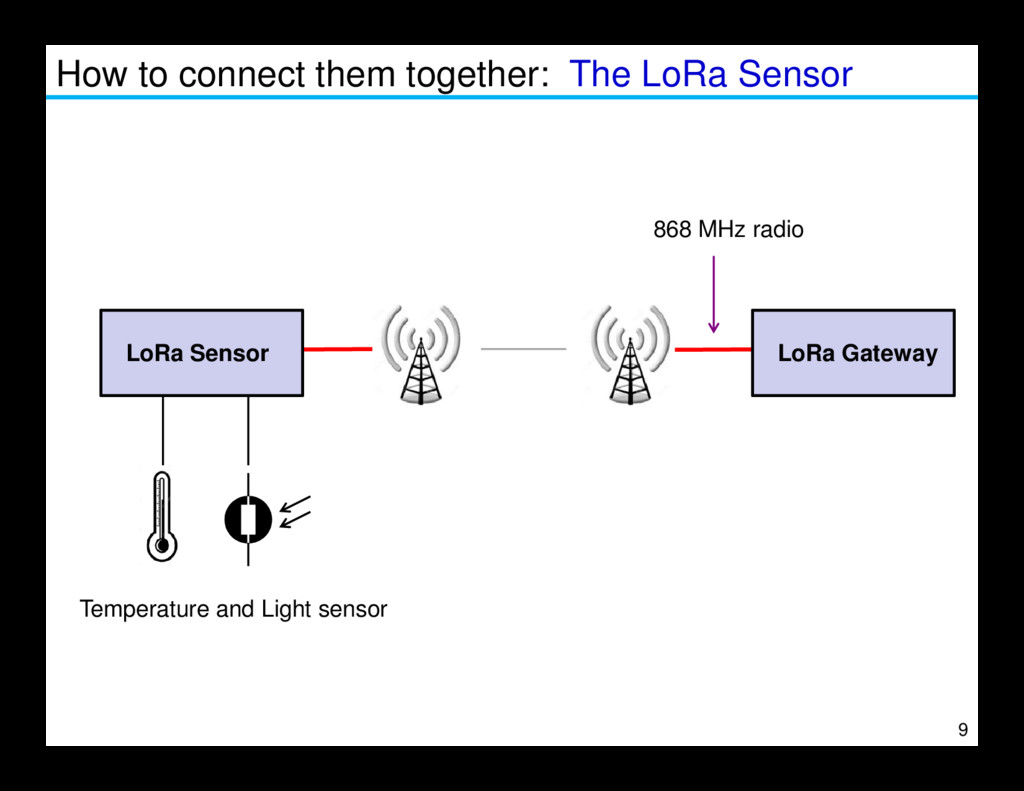
connect them • How to configure the Gateway • How to configure the Mote • Antenna considerations 2 • Antenna considerations • The internet of things server • Using the sensor data within an App • More about LoRa Radio
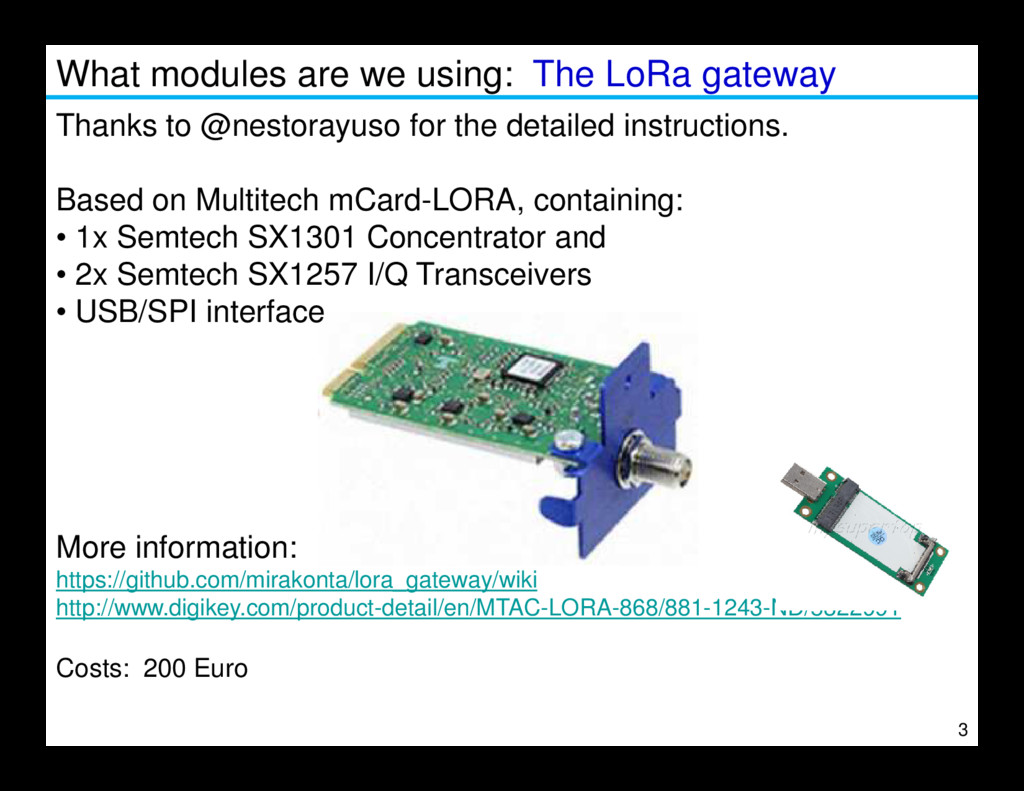
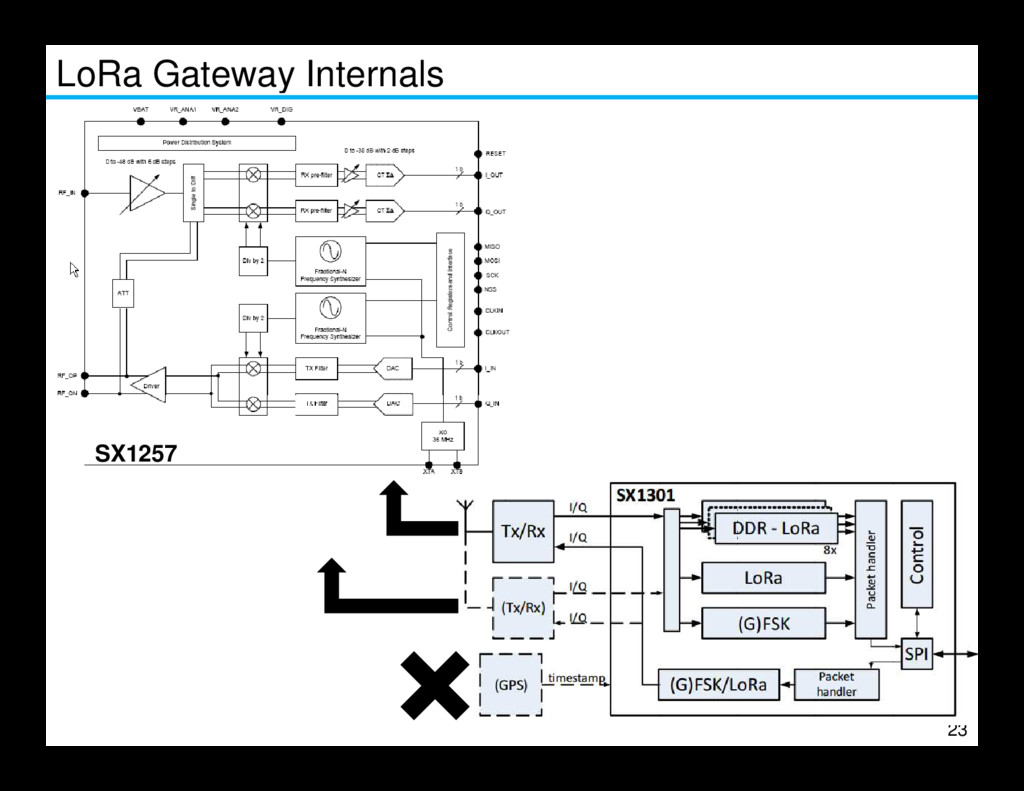
@nestorayuso for the detailed instructions. Based on Multitech mCard-LORA, containing: • 1x Semtech SX1301 Concentrator and • 2x Semtech SX1257 I/Q Transceivers • USB/SPI interface 3 More information: https://github.com/mirakonta/lora_gateway/wiki http://www.digikey.com/product-detail/en/MTAC-LORA-868/881-1243-ND/5322991 Costs: 200 Euro
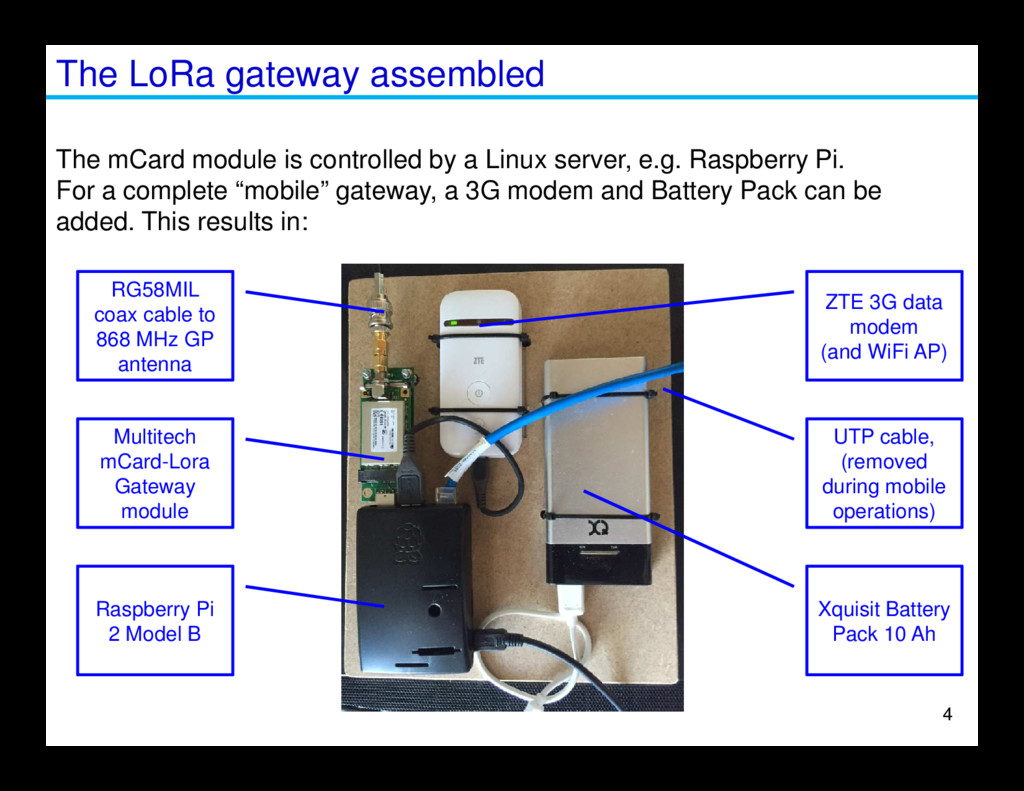
a Linux server, e.g. Raspberry Pi. For a complete “mobile” gateway, a 3G modem and Battery Pack can be added. This results in: RG58MIL coax cable to 868 MHz GP antenna ZTE 3G data modem (and WiFi AP) Raspberry Pi 2 Model B Multitech mCard-Lora Gateway module UTP cable, (removed during mobile operations) Xquisit Battery Pack 10 Ah 4
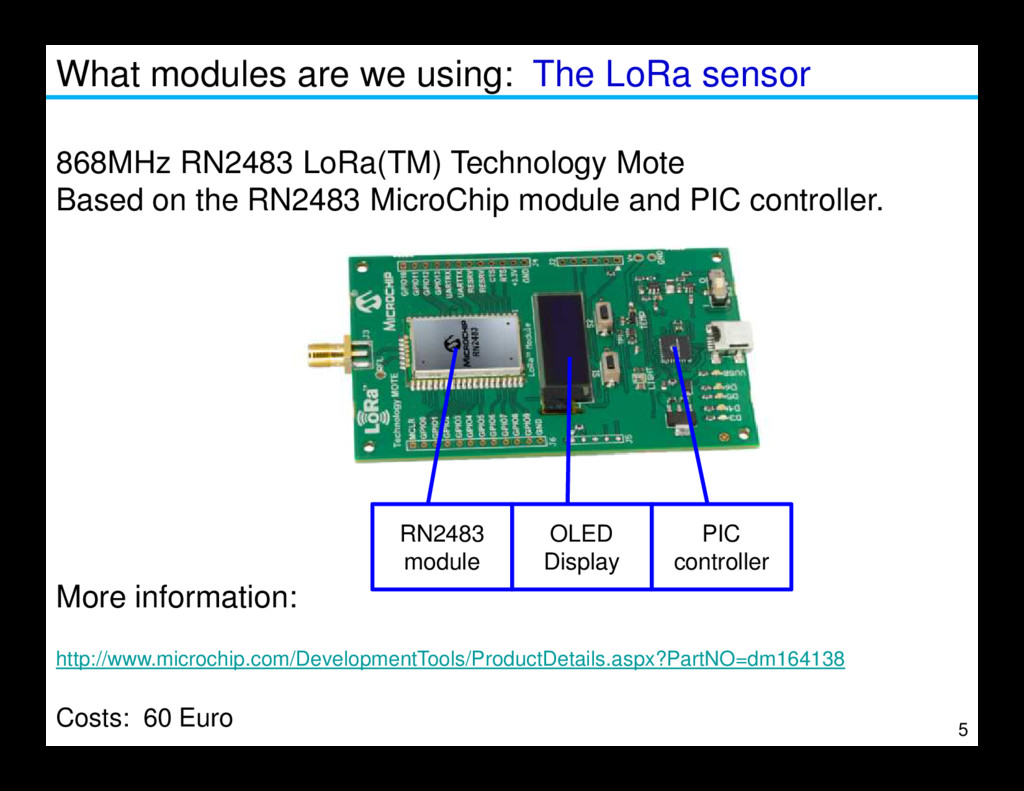
LoRa(TM) Technology Mote Based on the RN2483 MicroChip module and PIC controller. 5 More information: http://www.microchip.com/DevelopmentTools/ProductDetails.aspx?PartNO=dm164138 Costs: 60 Euro RN2483 module OLED Display PIC controller
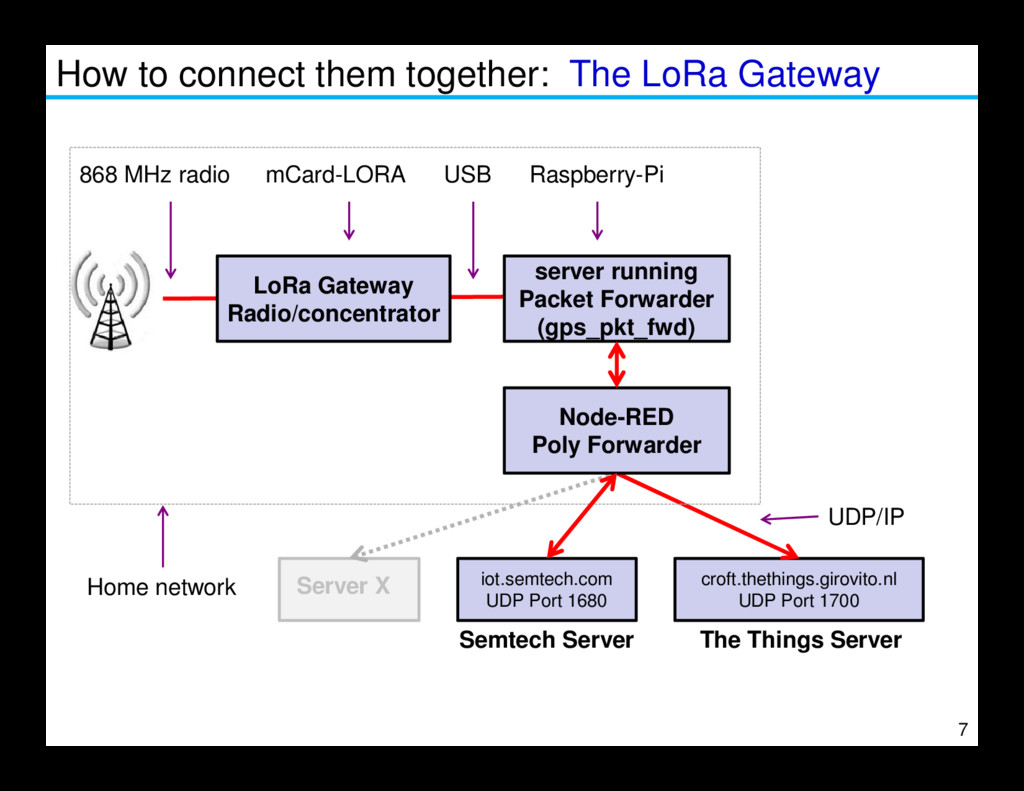
Radio/concentrator server running Packet Forwarder (gps_pkt_fwd) 868 MHz radio USB Raspberry-Pi mCard-LORA 7 croft.thethings.girovito.nl UDP Port 1700 The Things Server Server X iot.semtech.com UDP Port 1680 UDP/IP Home network Node-RED Poly Forwarder Semtech Server
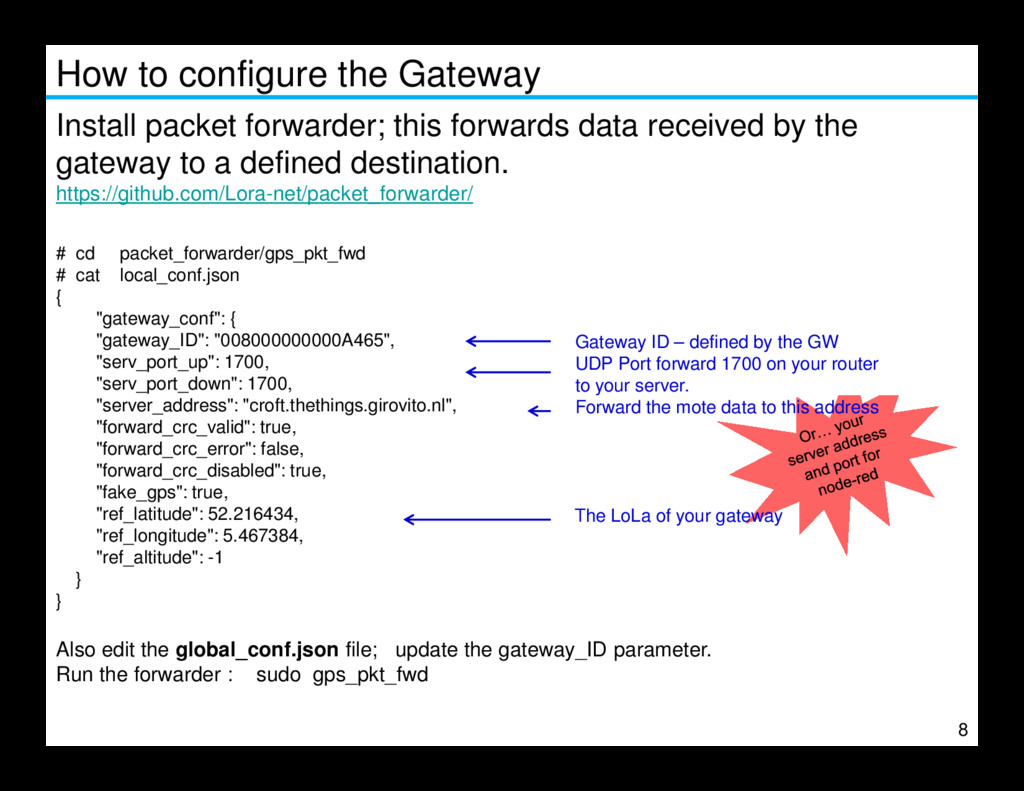
data received by the gateway to a defined destination. https://github.com/Lora-net/packet_forwarder/ # cd packet_forwarder/gps_pkt_fwd # cat local_conf.json { "gateway_conf": { "gateway_ID": "008000000000A465", "serv_port_up": 1700, "serv_port_down": 1700, "server_address": "croft.thethings.girovito.nl", Gateway ID – defined by the GW UDP Port forward 1700 on your router to your server. 8 "server_address": "croft.thethings.girovito.nl", "forward_crc_valid": true, "forward_crc_error": false, "forward_crc_disabled": true, "fake_gps": true, "ref_latitude": 52.216434, "ref_longitude": 5.467384, "ref_altitude": -1 } } Also edit the global_conf.json file; update the gateway_ID parameter. Run the forwarder : sudo gps_pkt_fwd Forward the mote data to this address The LoLa of your gateway
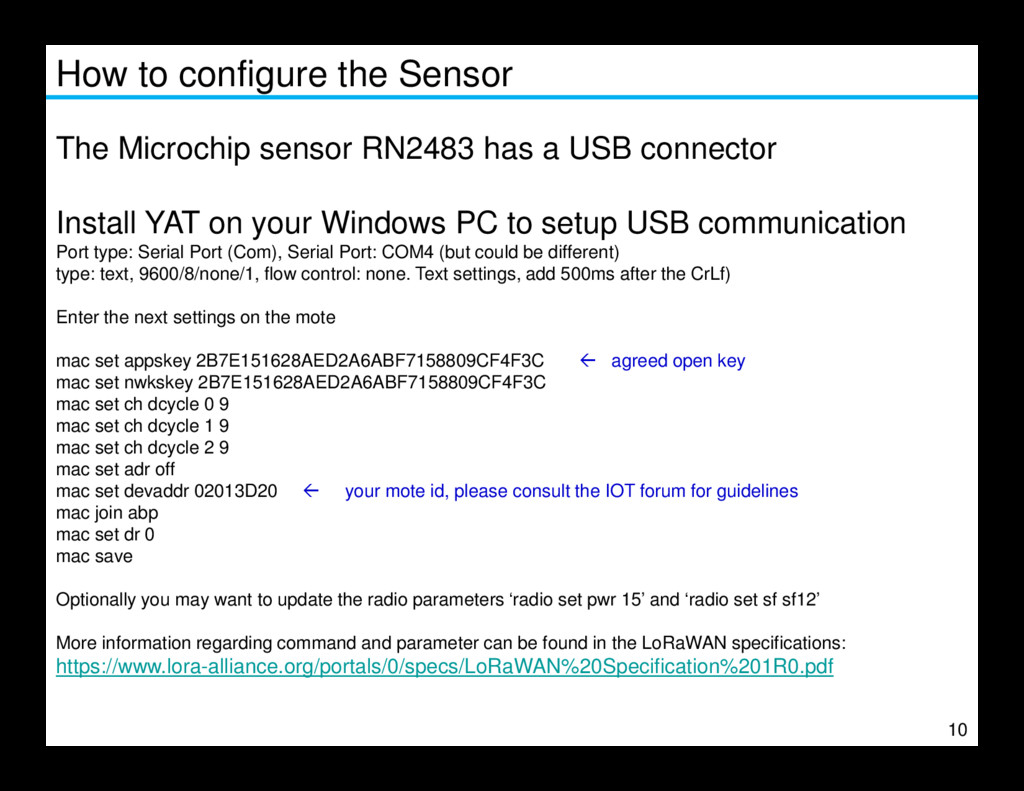
a USB connector Install YAT on your Windows PC to setup USB communication Port type: Serial Port (Com), Serial Port: COM4 (but could be different) type: text, 9600/8/none/1, flow control: none. Text settings, add 500ms after the CrLf) Enter the next settings on the mote mac set appskey 2B7E151628AED2A6ABF7158809CF4F3C agreed open key mac set nwkskey 2B7E151628AED2A6ABF7158809CF4F3C mac set ch dcycle 0 9 10 mac set ch dcycle 0 9 mac set ch dcycle 1 9 mac set ch dcycle 2 9 mac set adr off mac set devaddr 02013D20 your mote id, please consult the IOT forum for guidelines mac join abp mac set dr 0 mac save Optionally you may want to update the radio parameters ‘radio set pwr 15’ and ‘radio set sf sf12’ More information regarding command and parameter can be found in the LoRaWAN specifications: https://www.lora-alliance.org/portals/0/specs/LoRaWAN%20Specification%201R0.pdf
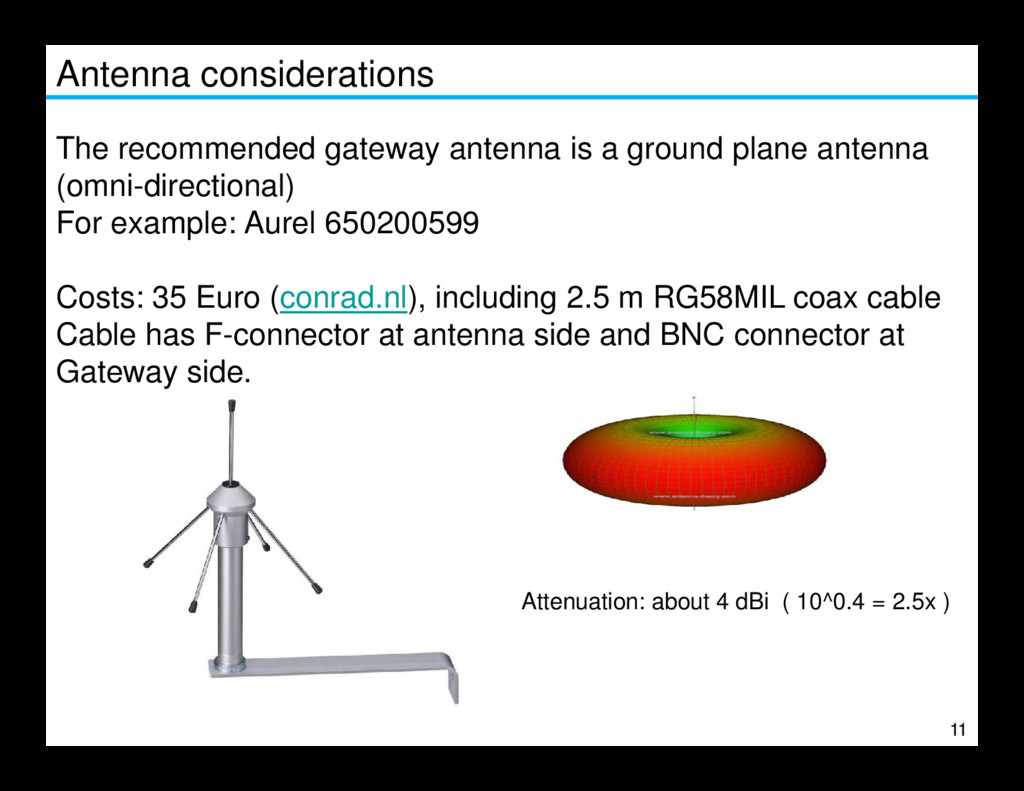
antenna (omni-directional) For example: Aurel 650200599 Costs: 35 Euro (conrad.nl), including 2.5 m RG58MIL coax cable Cable has F-connector at antenna side and BNC connector at Gateway side. 11 Attenuation: about 4 dBi ( 10^0.4 = 2.5x )
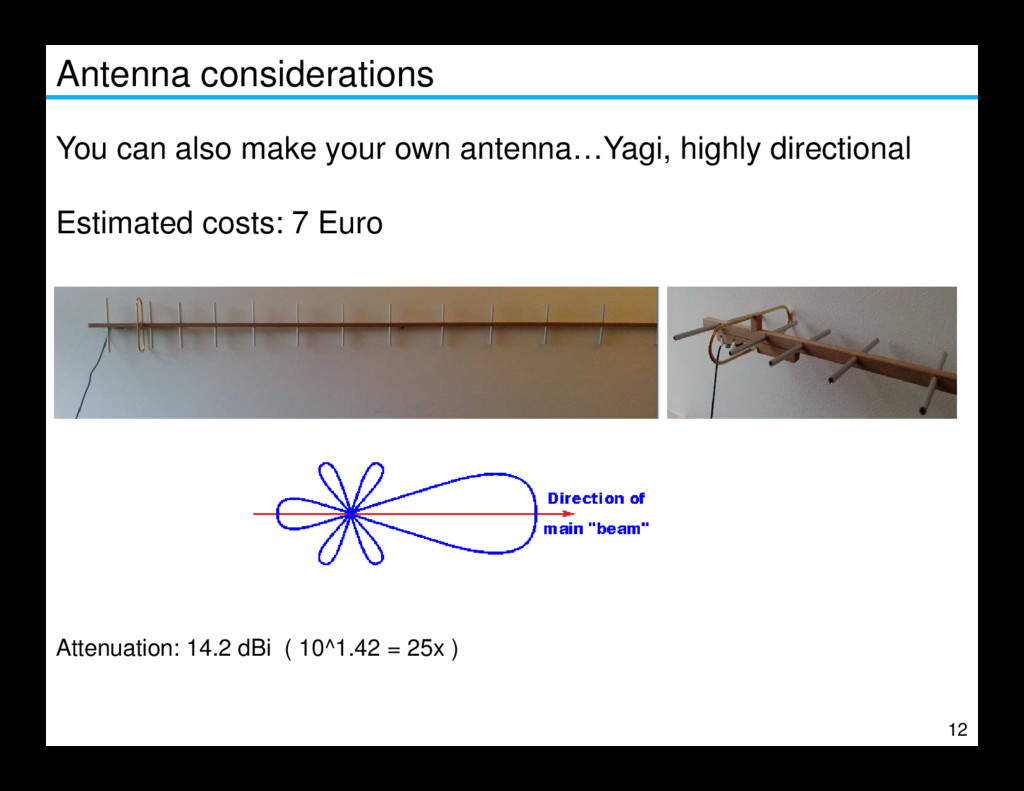
to improve the line of sight • Place the antenna vertically polarized • Avoid metal obstacles nearby since it will take away radio-sight • Make use of high quality HF cable (e.g. RG58) 13 • The gateway impedance is 50 Ω, do not connect another impedance or you will get a bad SWR. • Keep the cable as short as possible to avoid loss. • Consider to mount the gateway device as close as possible to the antenna and transport the data via a USB cable to the packet-forwarder server or use UTP cable from server to internet, PoE is an option.
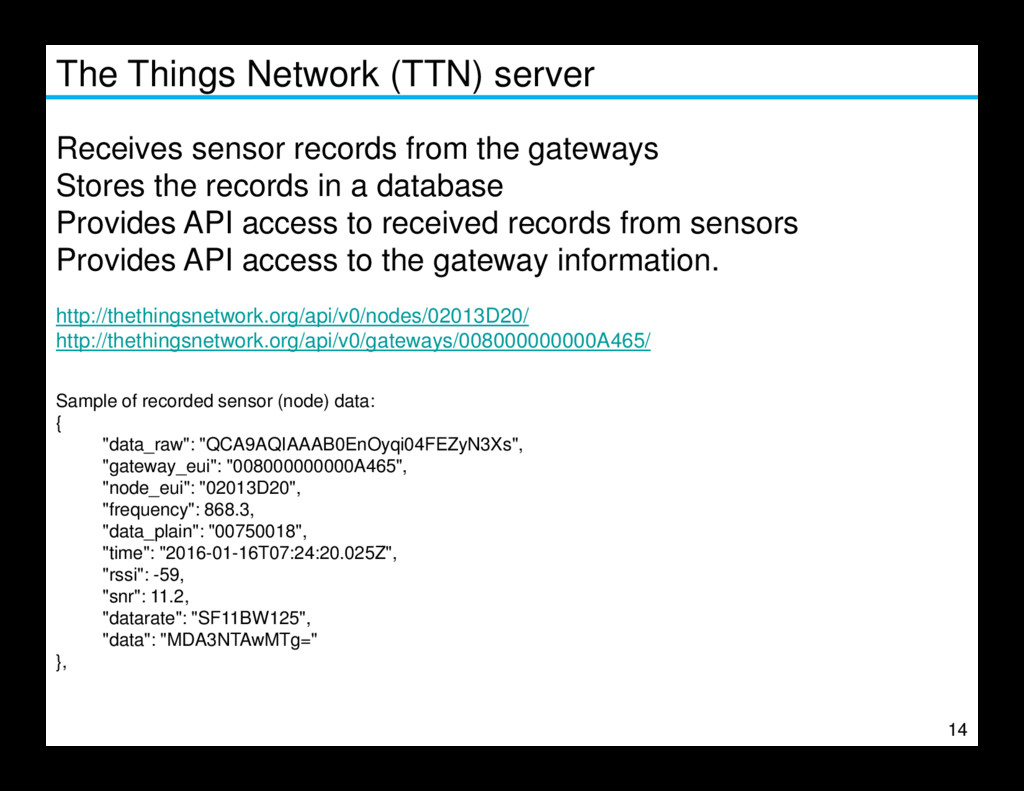
gateways Stores the records in a database Provides API access to received records from sensors Provides API access to the gateway information. http://thethingsnetwork.org/api/v0/nodes/02013D20/ http://thethingsnetwork.org/api/v0/gateways/008000000000A465/ Sample of recorded sensor (node) data: 14 Sample of recorded sensor (node) data: { "data_raw": "QCA9AQIAAAB0EnOyqi04FEZyN3Xs", "gateway_eui": "008000000000A465", "node_eui": "02013D20", "frequency": 868.3, "data_plain": "00750018", "time": "2016-01-16T07:24:20.025Z", "rssi": -59, "snr": 11.2, "datarate": "SF11BW125", "data": "MDA3NTAwMTg=" },
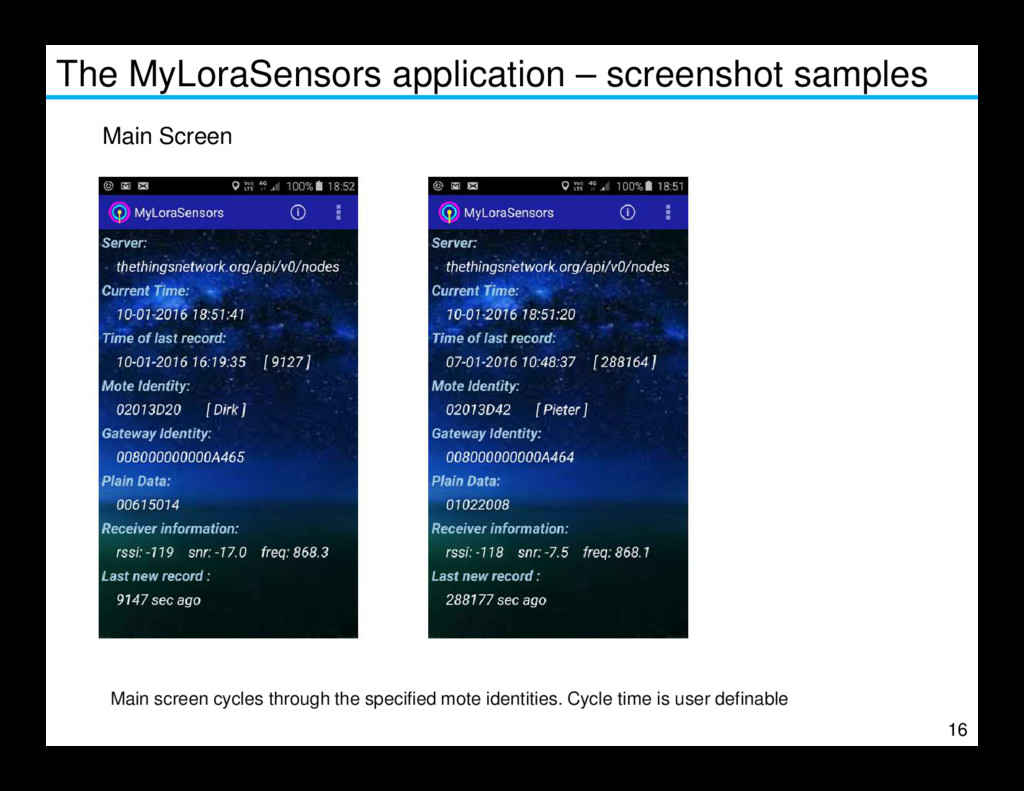
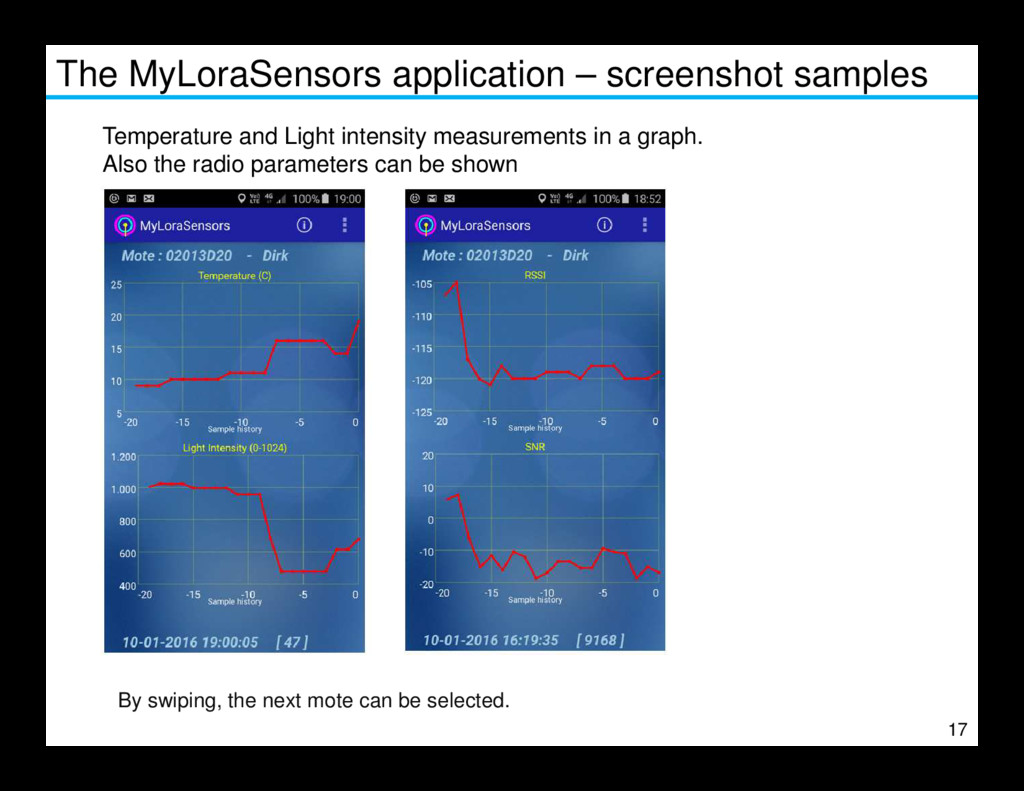
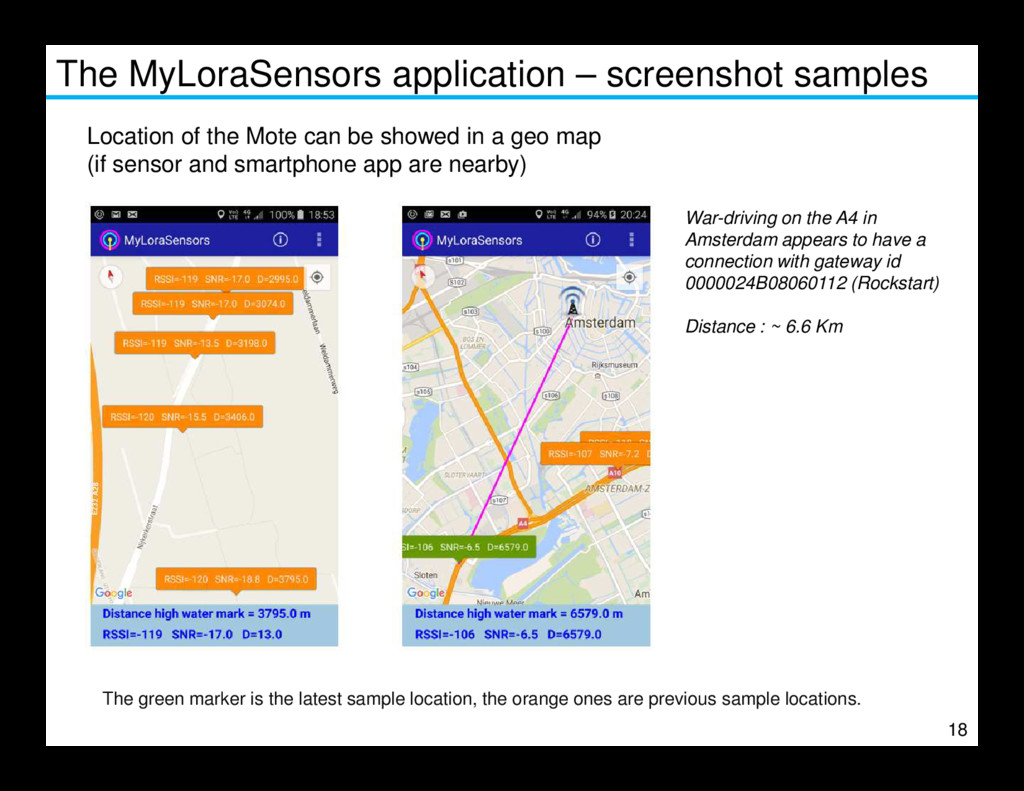
API of the TTN server, an application has been developed called ‘MyLoraSensors’. The MyLoraSensors application obtains records from the TTN server and shows the data in a graphical way. The application can subscribe to a maximum of 6 sensors (mote ids) and show the temperature and light intensity curve. With the recent update of the TTN server software to also store the radio parameters, 15 With the recent update of the TTN server software to also store the radio parameters, the application also shows these parameters in a curve (RSSI, SNR) The application also features a MAP to show the geographical location of the app. If the sensor is nearby, the MAP shows the radio parameters and in this way a plot can be made of where the sensors can still be received and also with which gateway it is connected. Optionally, with every new received record, the current (smartphone) coordinates are being forwarded to a dedicated server which presents the data on a web site. The next slides show screenshots of the app.
can be showed in a geo map (if sensor and smartphone app are nearby) War-driving on the A4 in Amsterdam appears to have a connection with gateway id 0000024B08060112 (Rockstart) Distance : ~ 6.6 Km 18 The green marker is the latest sample location, the orange ones are previous sample locations.
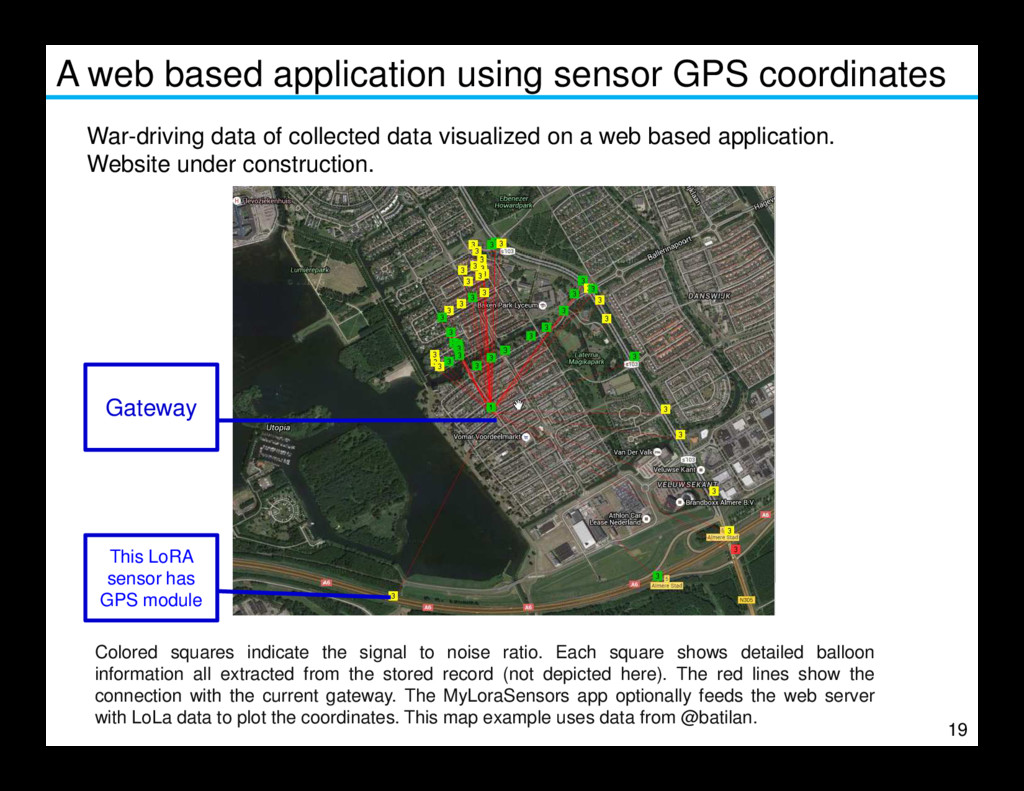
of collected data visualized on a web based application. Website under construction. Gateway 19 Colored squares indicate the signal to noise ratio. Each square shows detailed balloon information all extracted from the stored record (not depicted here). The red lines show the connection with the current gateway. The MyLoraSensors app optionally feeds the web server with LoLa data to plot the coordinates. This map example uses data from @batilan. This LoRA sensor has GPS module Gateway
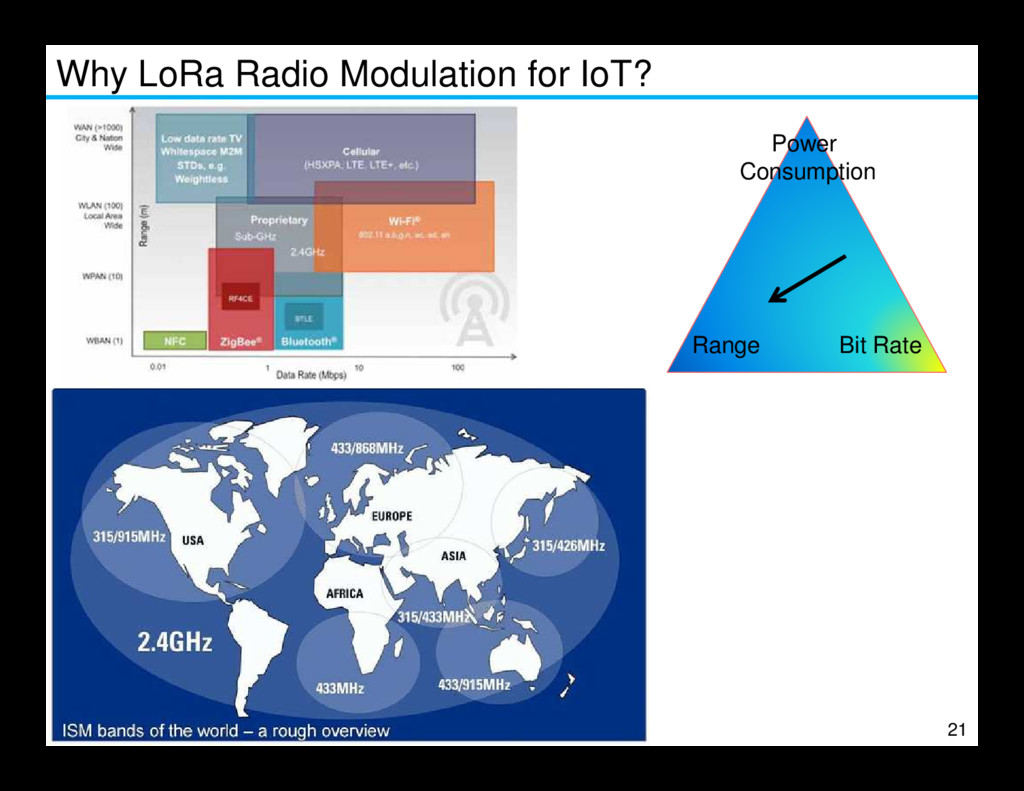
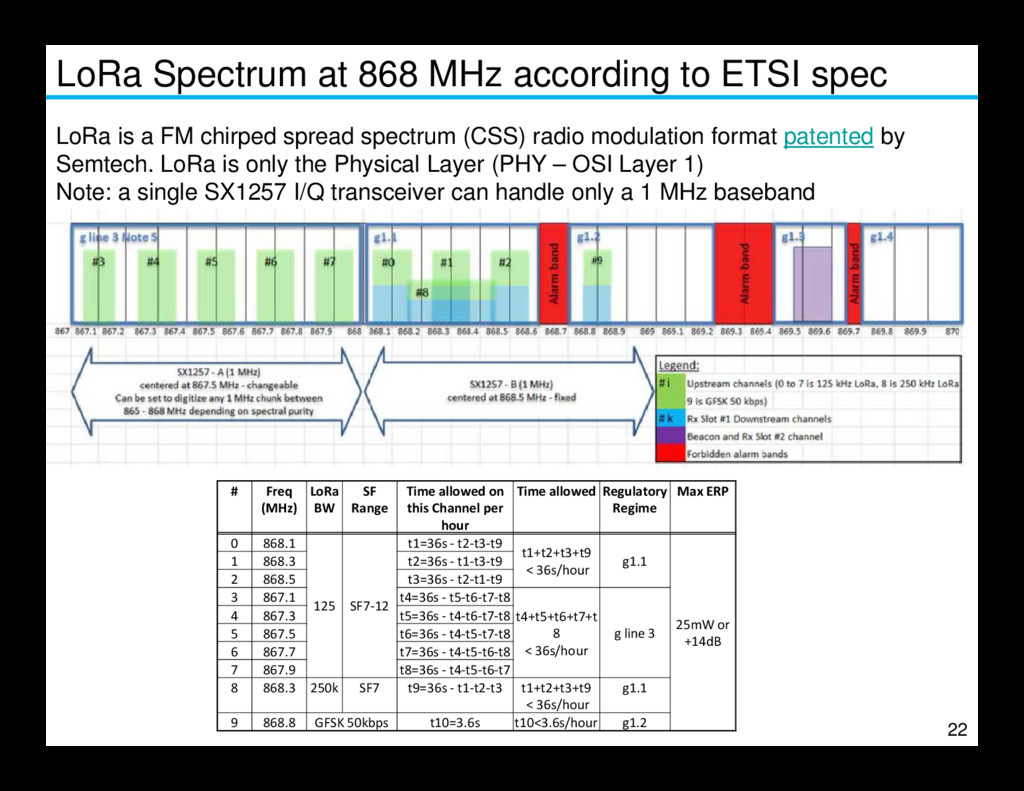
with regards to Radio. Topics will be addressed: What is Spreading Factor Which frequencies are being used What happens during a concurrent mote sending data What parameters on the sensor are important for the radio connection. What can we do to improve the radio coverage 20 What can we do to improve the radio coverage What does ‘confirmed’ mode mean …
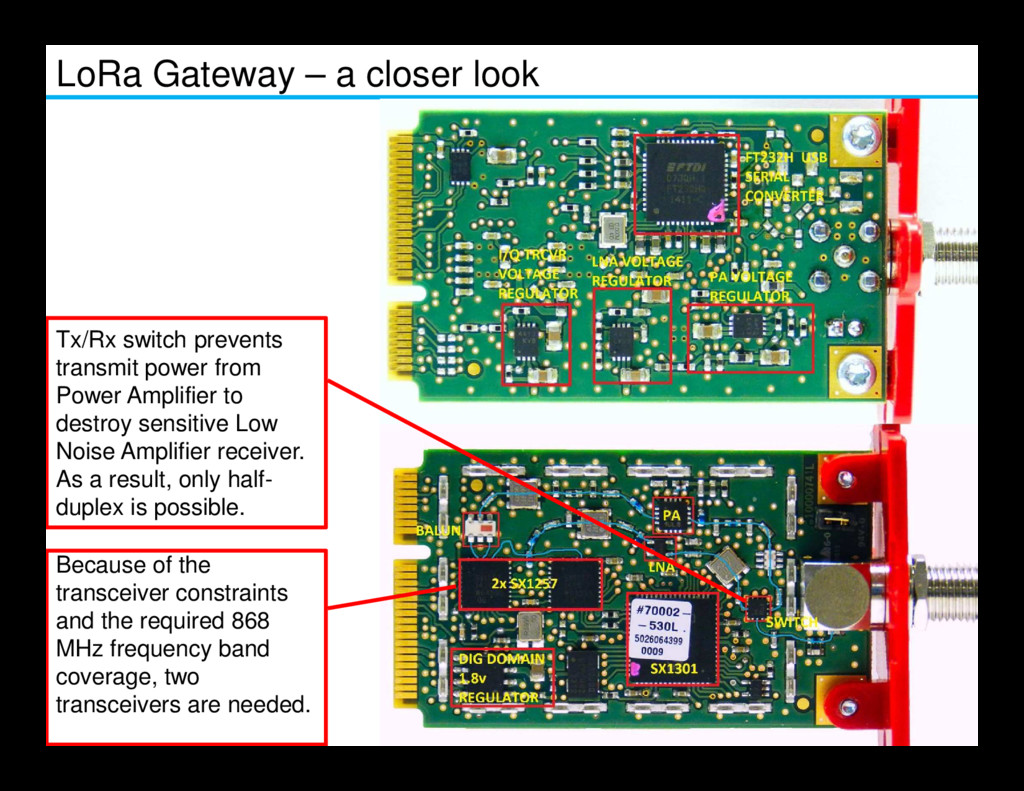
power from Power Amplifier to 24 Because of the transceiver constraints and the required 868 MHz frequency band coverage, two transceivers are needed. Power Amplifier to destroy sensitive Low Noise Amplifier receiver. As a result, only half- duplex is possible.
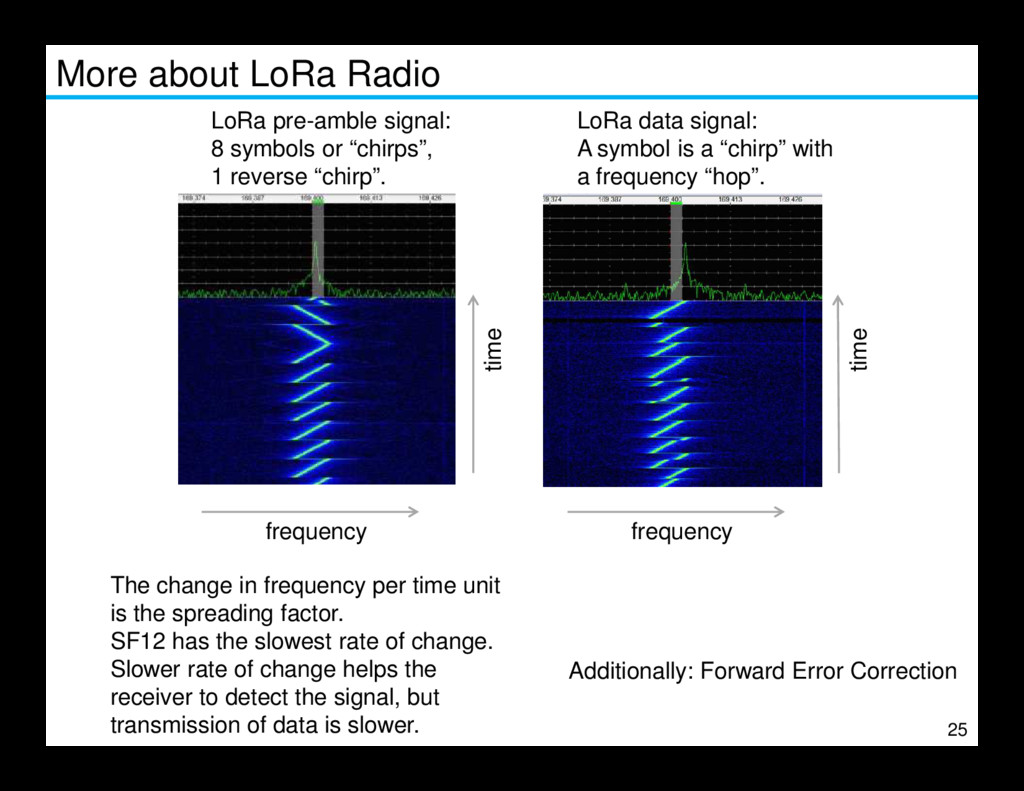
or “chirps”, 1 reverse “chirp”. time LoRa data signal: A symbol is a “chirp” with a frequency “hop”. 25 frequency frequency The change in frequency per time unit is the spreading factor. SF12 has the slowest rate of change. Slower rate of change helps the receiver to detect the signal, but transmission of data is slower. Additionally: Forward Error Correction
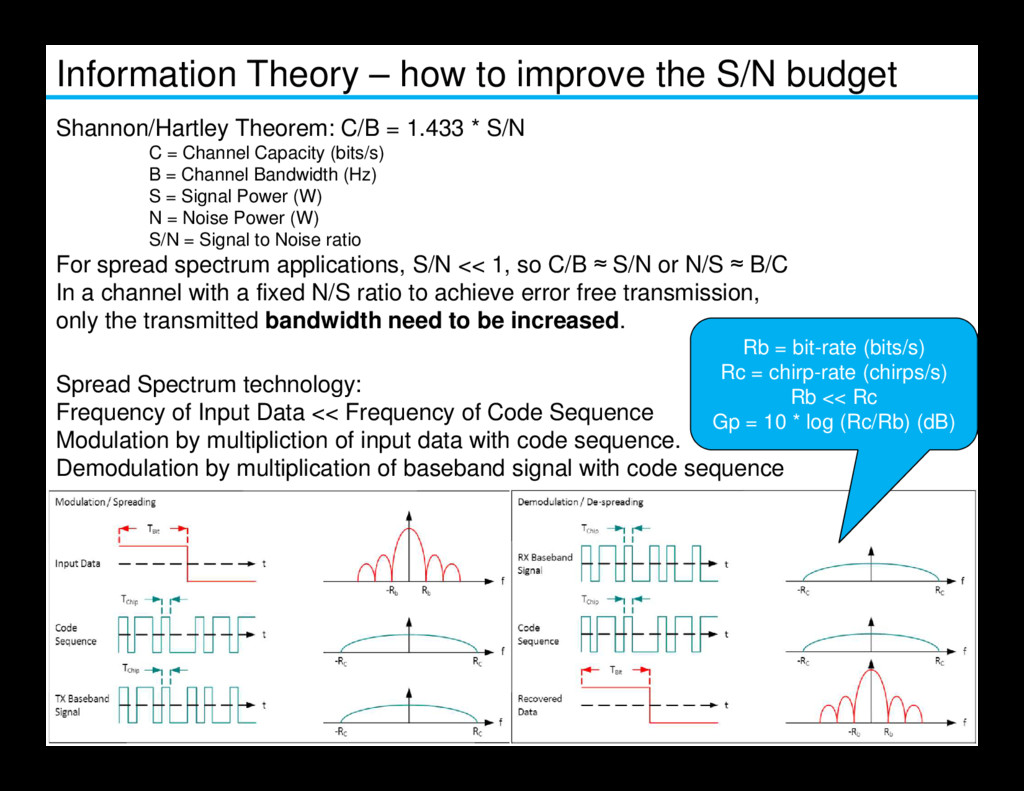
Theorem: C/B = 1.433 * S/N C = Channel Capacity (bits/s) B = Channel Bandwidth (Hz) S = Signal Power (W) N = Noise Power (W) S/N = Signal to Noise ratio For spread spectrum applications, S/N << 1, so C/B ≈ S/N or N/S ≈ B/C In a channel with a fixed N/S ratio to achieve error free transmission, only the transmitted bandwidth need to be increased. Spread Spectrum technology: Rb = bit-rate (bits/s) Rc = chirp-rate (chirps/s) Rb << Rc 26 Spread Spectrum technology: Frequency of Input Data << Frequency of Code Sequence Modulation by multipliction of input data with code sequence. Demodulation by multiplication of baseband signal with code sequence Rb << Rc Gp = 10 * log (Rc/Rb) (dB)
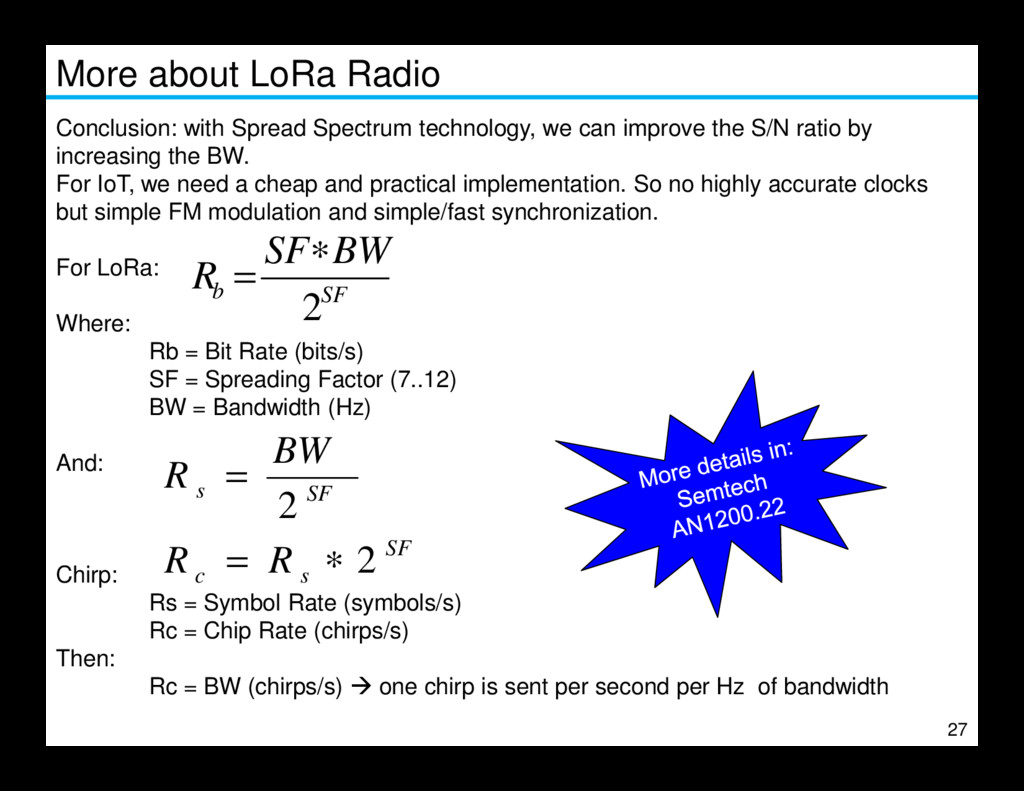
can improve the S/N ratio by increasing the BW. For IoT, we need a cheap and practical implementation. So no highly accurate clocks but simple FM modulation and simple/fast synchronization. For LoRa: Where: Rb = Bit Rate (bits/s) SF = Spreading Factor (7..12) BW = Bandwidth (Hz) SF b BW SF R 2 ∗ = 27 BW = Bandwidth (Hz) And: Chirp: Rs = Symbol Rate (symbols/s) Rc = Chip Rate (chirps/s) Then: Rc = BW (chirps/s) one chirp is sent per second per Hz of bandwidth SF s c SF s R R BW R 2 2 ∗ = =
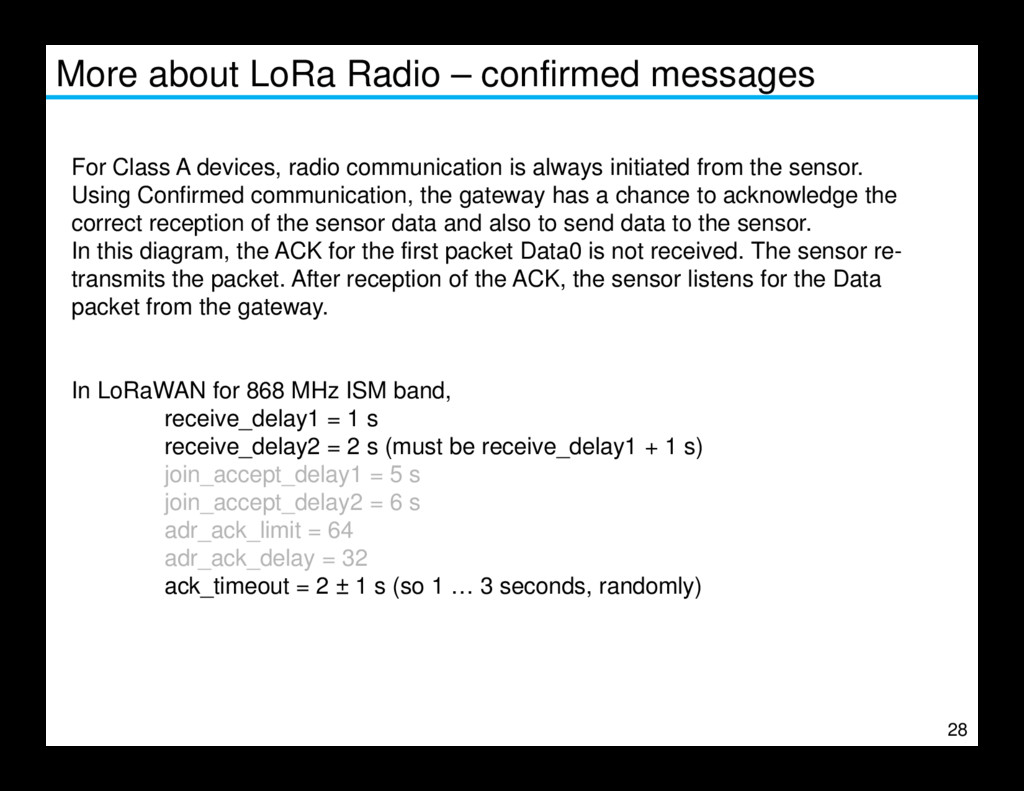
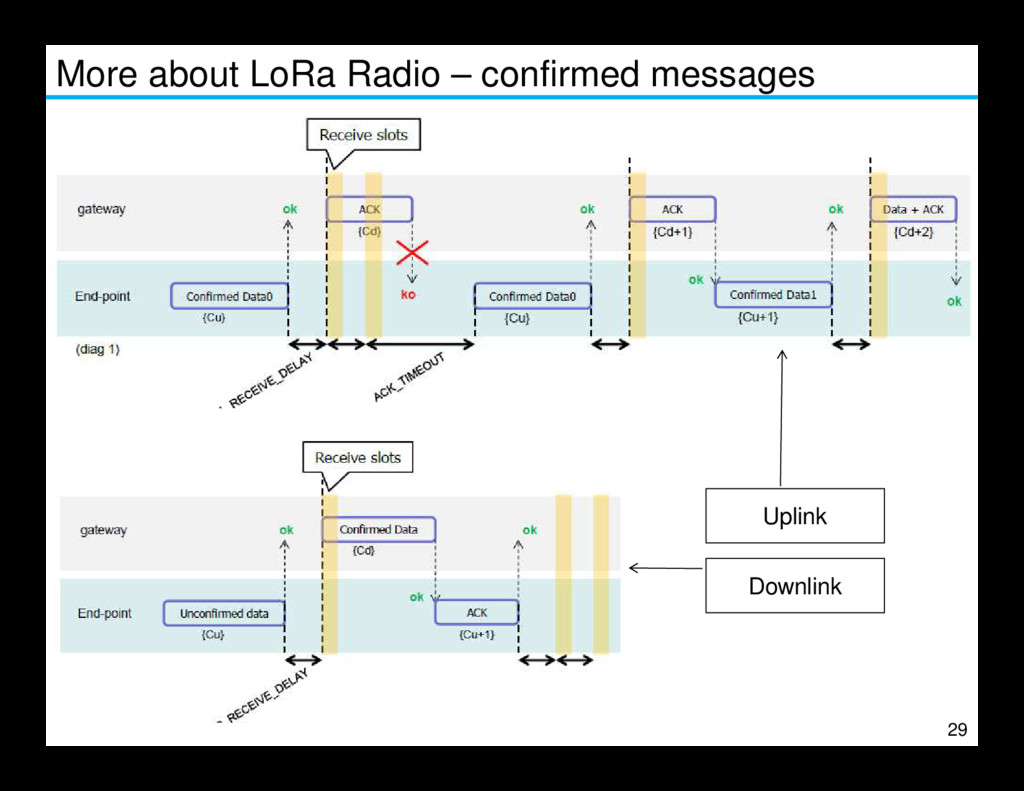
devices, radio communication is always initiated from the sensor. Using Confirmed communication, the gateway has a chance to acknowledge the correct reception of the sensor data and also to send data to the sensor. In this diagram, the ACK for the first packet Data0 is not received. The sensor re- transmits the packet. After reception of the ACK, the sensor listens for the Data packet from the gateway. In LoRaWAN for 868 MHz ISM band, 28 In LoRaWAN for 868 MHz ISM band, receive_delay1 = 1 s receive_delay2 = 2 s (must be receive_delay1 + 1 s) join_accept_delay1 = 5 s join_accept_delay2 = 6 s adr_ack_limit = 64 adr_ack_delay = 32 ack_timeout = 2 ± 1 s (so 1 … 3 seconds, randomly)


 hansd
hansd
 tammyeverts
 notwaldorf
 reverentgeek
 trallard
 kimpetersen
 inesmontani
 morganepeng
 auna
auna
 techseoconnect
 jacobtomlinson
 madoxten