Upgrade to Pro
— share decks privately, control downloads, hide ads and more …
Speaker Deck
Sign up for free
Menu
Search
Features
All features
Private URLs
Password Protection
Custom URLS
Scheduled publishing
Remove Branding
Restrict embedding
Deck Collections
Notes
Features
All features
Private URLs
Password Protection
Custom URLS
Scheduled publishing
Remove Branding
Restrict embedding
Deck Collections
Notes
Explore
Featured decks
Featured speakers
Programming
Technology
Storyboards
Explore
Featured decks
Featured speakers
Programming
Technology
Storyboards
Pricing
Search
Sign in
Sign up for free
0章 開発環境の導入(C/C++入門)
Search
Iseya
April 08, 2018
Programming
14
0
Share
Embed
Copy iframe code
Copy JS code
Copy link
Start on current slide
0章 開発環境の導入(C/C++入門)
Iseya
April 08, 2018
More Decks by Iseya
See All by Iseya
Cpp chap.10
hoge_piyo
0
17
Other Decks in Programming
See All in Programming
[ハンズオン]AIへの指示だけで「五目並べ」を作ってみよう
satoshi256kbyte
1
380
コードで差別化できない時代の ソフトウェアエンジニアリング / Software Engineering in an Era Where Code Doesn’t Differentiate
kishida
2
180
When benchmarks go bad - what I learned from measuring performance wrong
hollycummins
0
220
月間100万人のサービス刷新で、 技術選定をHonoに振り切った話
yutobara
8
6.6k
気持ちぃ〜角丸 Squircle
ryu1013
0
310
sbt 2.0: takeoff
eed3si9n
0
160
Rでドレミ/Do-Re-Mi_with_R
florets1
0
130
[Dev Group Paris Octobre 26] Agentforce, SIforce, Claudeforce, Slackbot… on s'y retrouve ?
nabondance
0
110
Verilogで学ぶCPU自作入門
uyuki234
8
4.1k
最近”作らせてる” ローカルAIアプリの話
akit37
0
470
個人開発者よ、Honoを使え(おじさんver)
tanahiro2010
2
260
phperだってパンチカードでコーディングしたい
o0h
PRO
0
330
Featured
See All Featured
The Cult of Friendly URLs
andyhume
79
7k
AI Search: Implications for SEO and How to Move Forward - #ShenzhenSEOConference
aleyda
1
1.4k
Heart Work Chapter 1 - Part 1
lfama
PRO
10
37k
Designing for Performance
lara
612
70k
Un-Boring Meetings
codingconduct
0
460
Tell your own story through comics
letsgokoyo
1
1.1k
Refactoring Trust on Your Teams (GOTO; Chicago 2020)
rmw
35
3.8k
Making the Leap to Tech Lead
cromwellryan
135
10k
Navigating Team Friction
lara
192
16k
Improving Core Web Vitals using Speculation Rules API
sergeychernyshev
21
1.7k
Beyond borders and beyond the search box: How to win the global "messy middle" with AI-driven SEO
davidcarrasco
3
280
Dominate Local Search Results - an insider guide to GBP, reviews, and Local SEO
greggifford
PRO
0
370
Transcript
0章 統合開発環境の導入 1
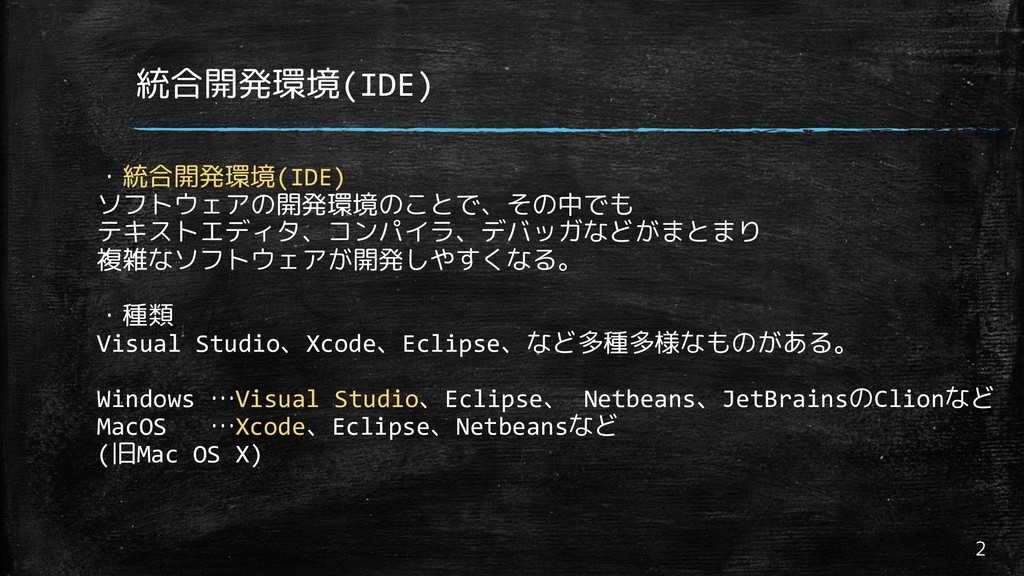
統合開発環境(IDE) 2 ・統合開発環境(IDE) ソフトウェアの開発環境のことで、その中でも テキストエディタ、コンパイラ、デバッガなどがまとまり 複雑なソフトウェアが開発しやすくなる。 ・種類 Visual Studio、Xcode、Eclipse、など多種多様なものがある。 Windows
…Visual Studio、Eclipse、 Netbeans、JetBrainsのClionなど MacOS …Xcode、Eclipse、Netbeansなど (旧Mac OS X)
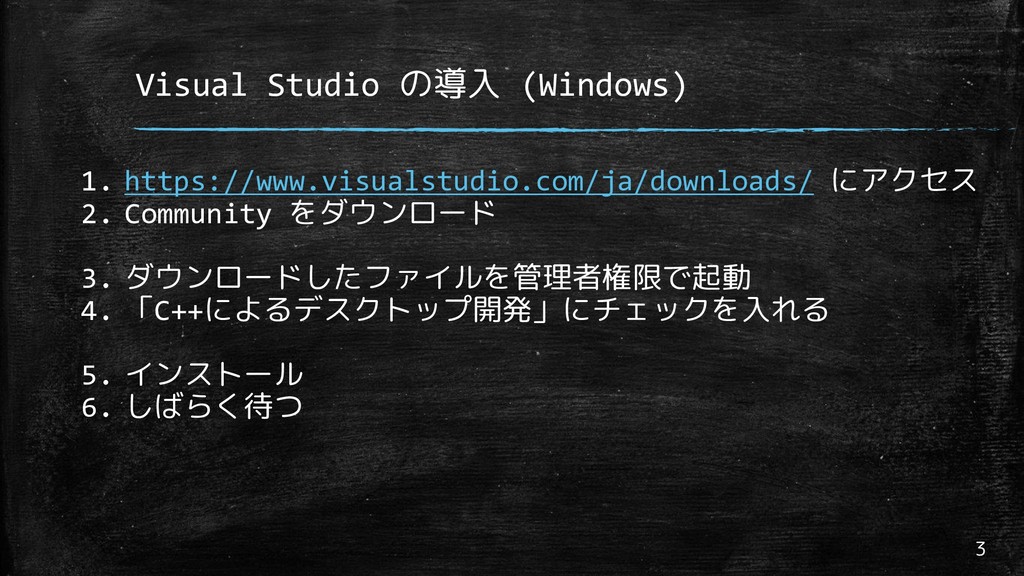
Visual Studio の導入 (Windows) 3 1. https://www.visualstudio.com/ja/downloads/ にアクセス 2. Community
をダウンロード 3. ダウンロードしたファイルを管理者権限で起動 4. 「C++によるデスクトップ開発」にチェックを入れる 5. インストール 6. しばらく待つ
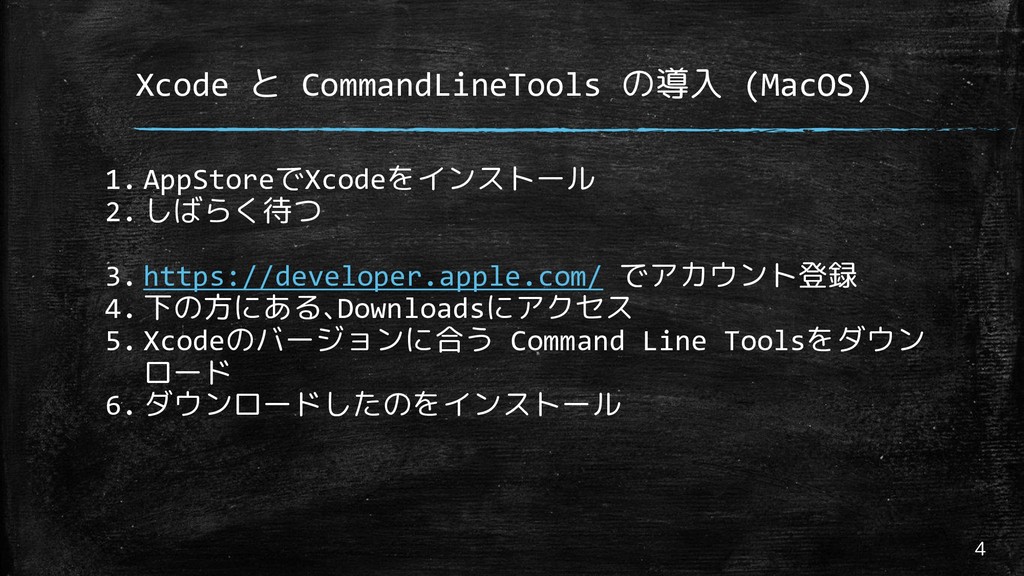
Xcode と CommandLineTools の導入 (MacOS) 4 1. AppStoreでXcodeをインストール 2. しばらく待つ
3. https://developer.apple.com/ でアカウント登録 4. 下の方にある、Downloadsにアクセス 5. Xcodeのバージョンに合う Command Line Toolsをダウン ロード 6. ダウンロードしたのをインストール
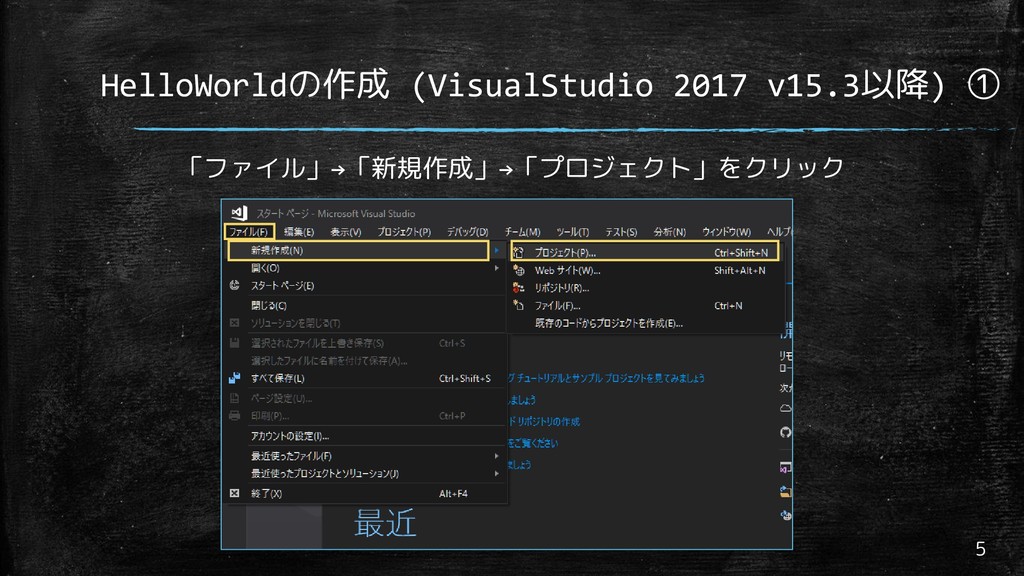
HelloWorldの作成 (VisualStudio 2017 v15.3以降) ① 5 「ファイル」→「新規作成」→「プロジェクト」をクリック
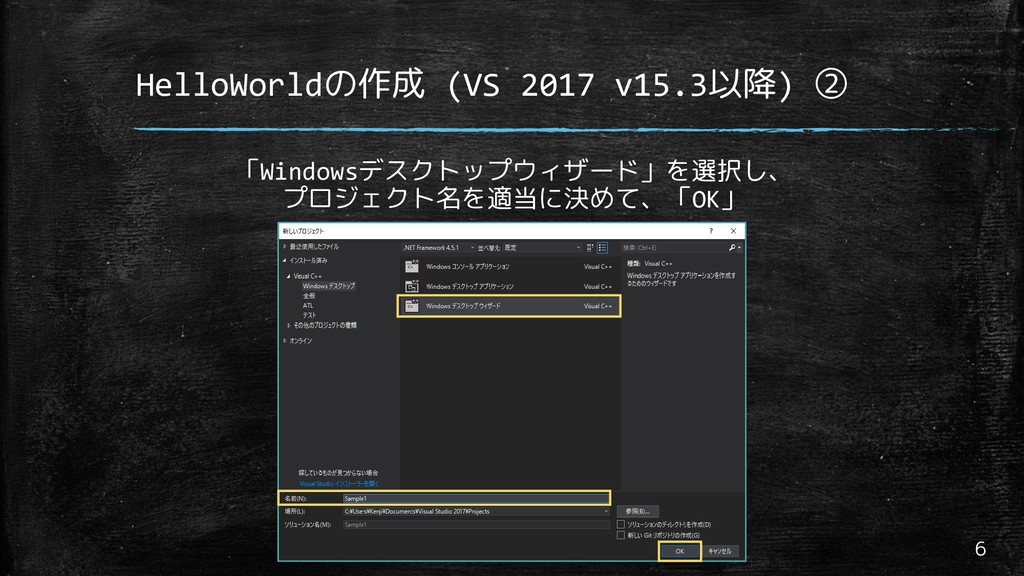
HelloWorldの作成 (VS 2017 v15.3以降) ② 6 「Windowsデスクトップウィザード」を選択し、 プロジェクト名を適当に決めて、「OK」
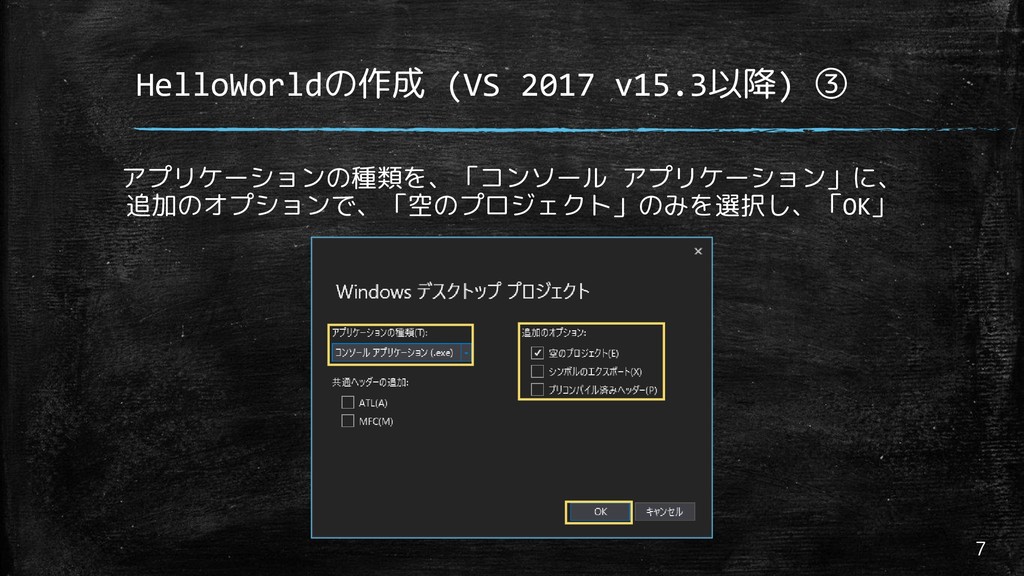
HelloWorldの作成 (VS 2017 v15.3以降) ③ 7 アプリケーションの種類を、「コンソール アプリケーション」に、 追加のオプションで、「空のプロジェクト」のみを選択し、「OK」
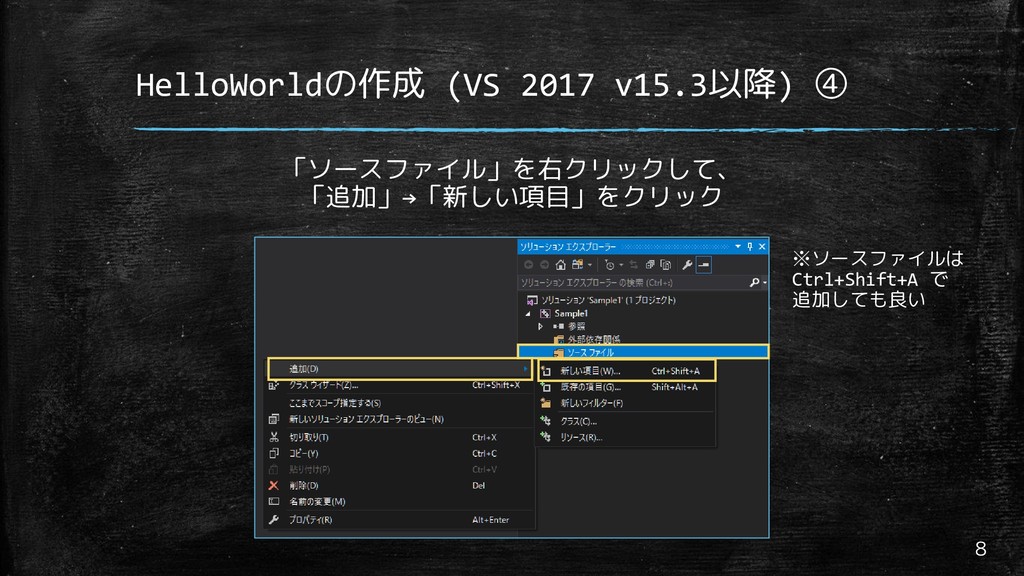
HelloWorldの作成 (VS 2017 v15.3以降) ④ 8 「ソースファイル」を右クリックして、 「追加」→「新しい項目」をクリック ※ソースファイルは Ctrl+Shift+A
で 追加しても良い
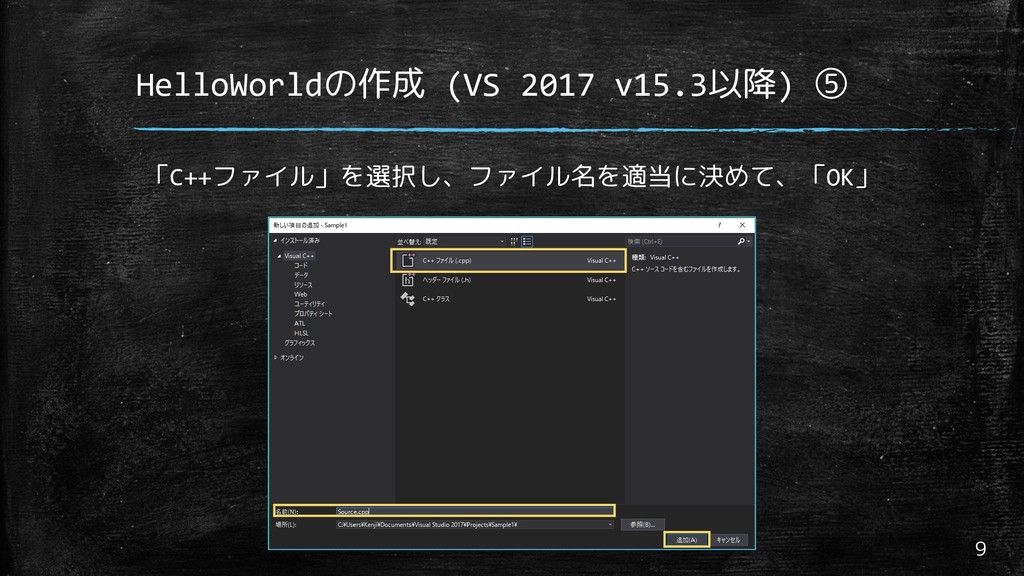
HelloWorldの作成 (VS 2017 v15.3以降) ⑤ 9 「C++ファイル」を選択し、ファイル名を適当に決めて、「OK」
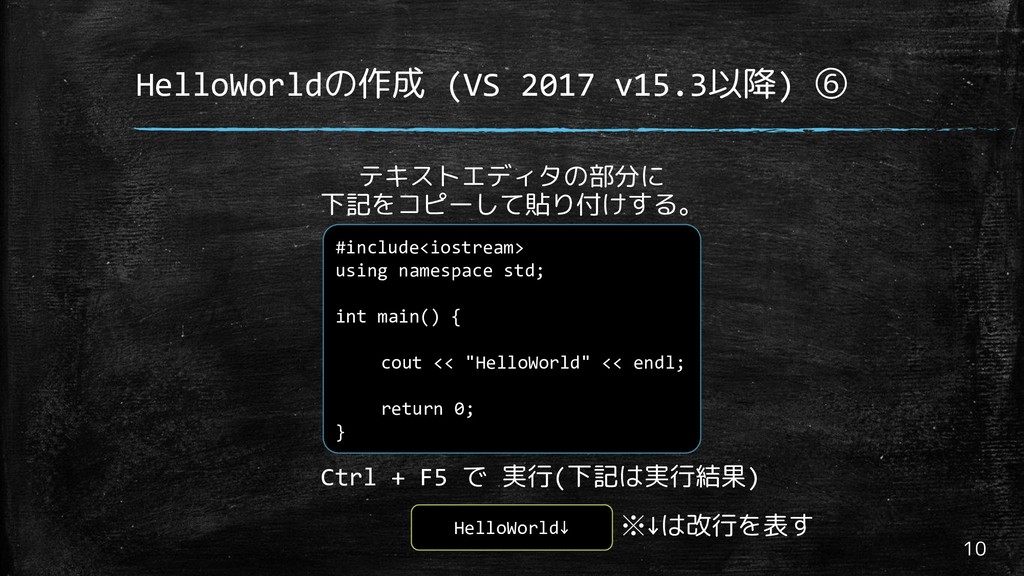
HelloWorldの作成 (VS 2017 v15.3以降) ⑥ 10 #include<iostream> using namespace std;
int main() { cout << "HelloWorld" << endl; return 0; } テキストエディタの部分に 下記をコピーして貼り付けする。 Ctrl + F5 で 実行(下記は実行結果) HelloWorld↓ ※↓は改行を表す
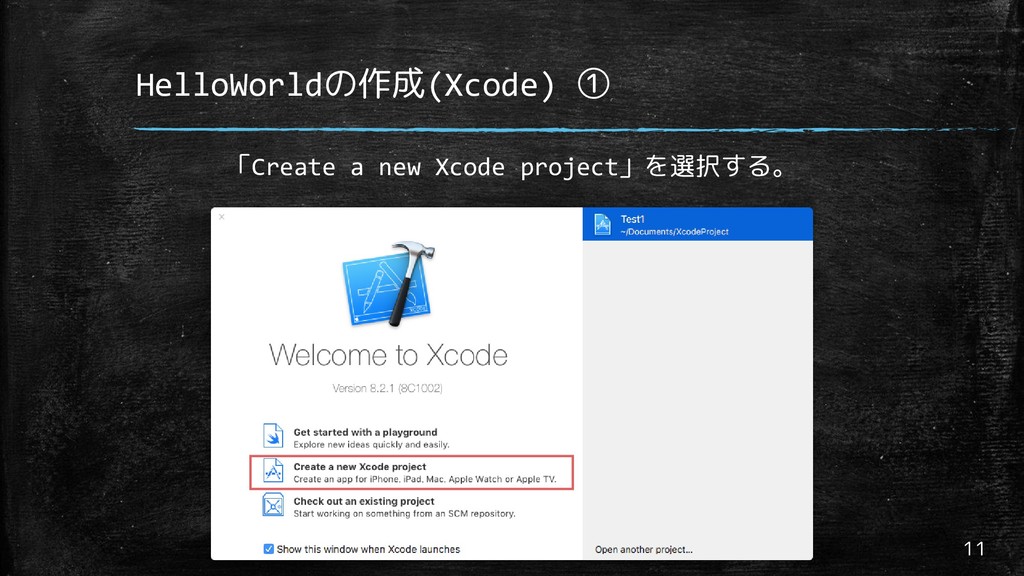
HelloWorldの作成(Xcode) ① 11 「Create a new Xcode project」を選択する。
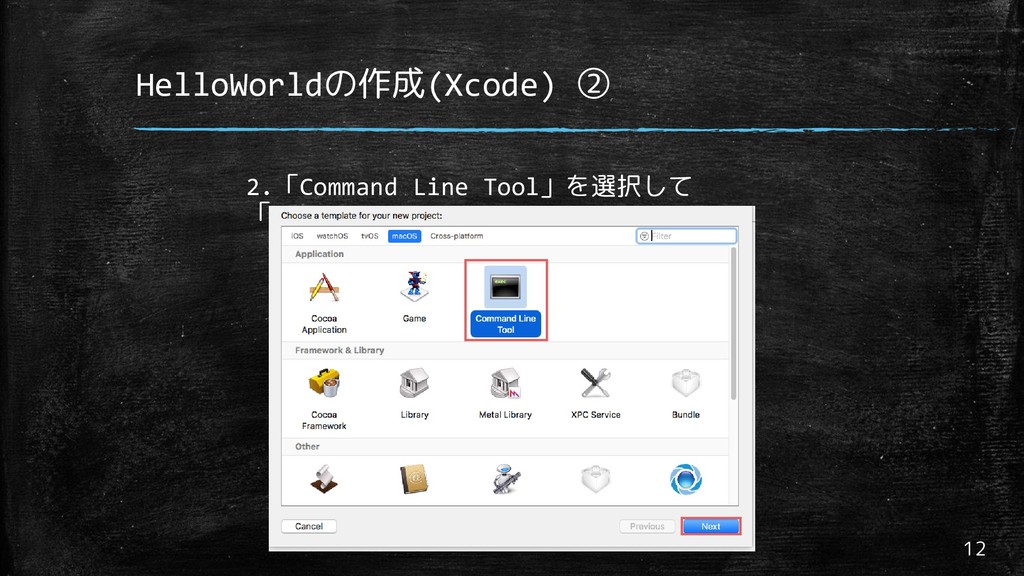
HelloWorldの作成(Xcode) ② 12 2.「Command Line Tool」を選択して 「Next」
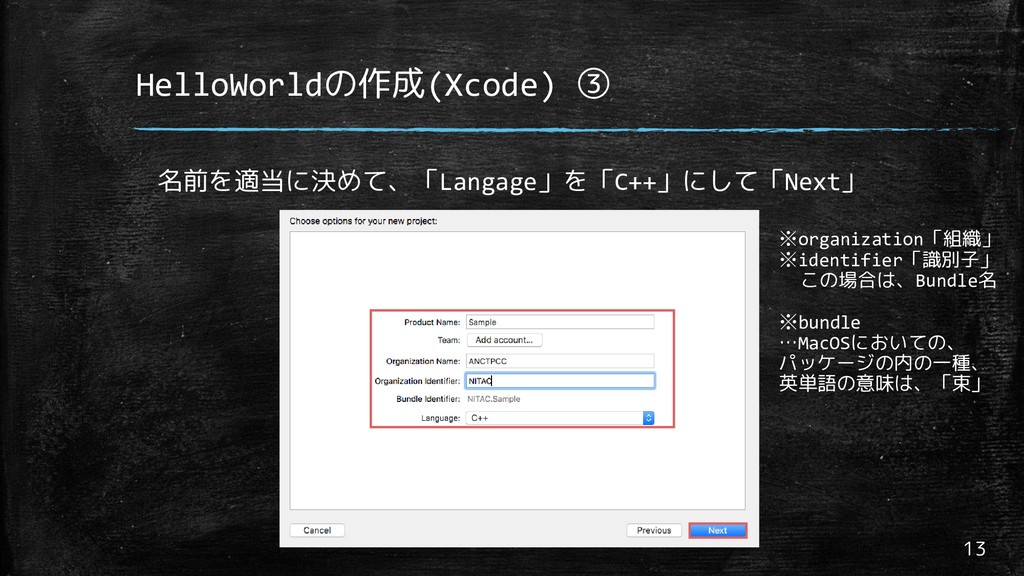
HelloWorldの作成(Xcode) ③ 13 名前を適当に決めて、「Langage」を「C++」にして「Next」 ※organization「組織」 ※identifier「識別子」 この場合は、Bundle名 ※bundle …MacOSにおいての、 パッケージの内の一種、
英単語の意味は、「束」
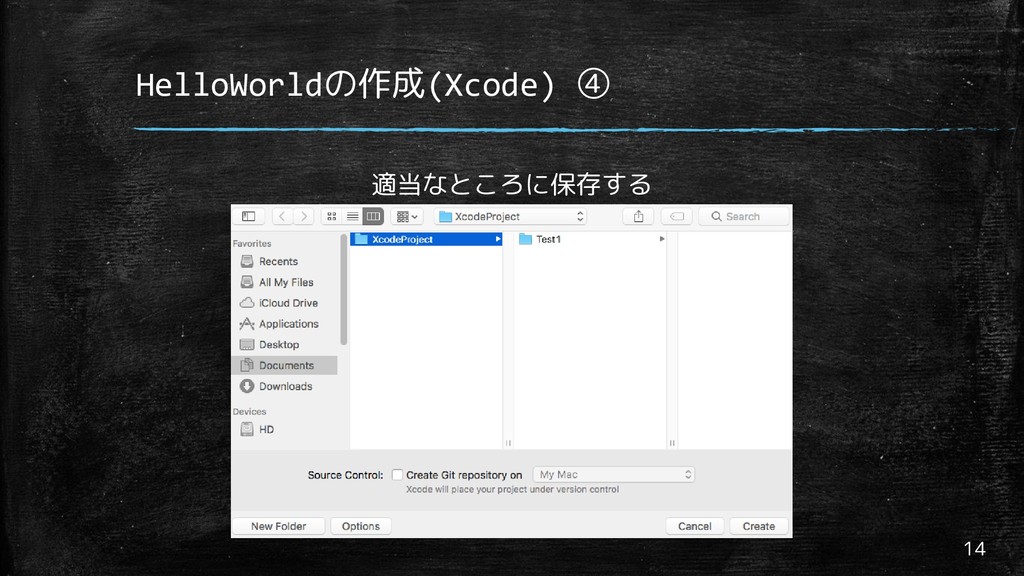
HelloWorldの作成(Xcode) ④ 14 適当なところに保存する
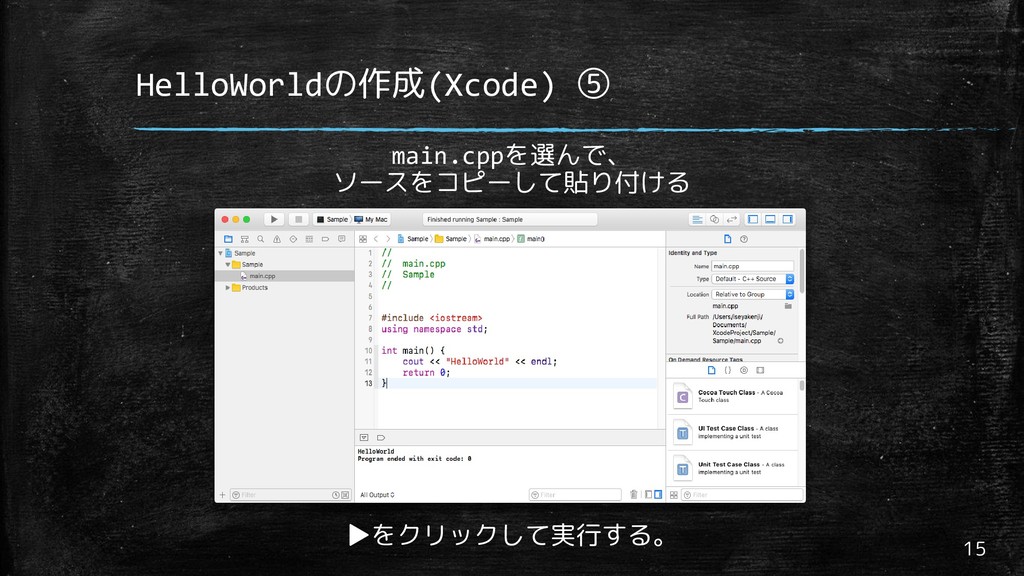
HelloWorldの作成(Xcode) ⑤ 15 main.cppを選んで、 ソースをコピーして貼り付ける ▶をクリックして実行する。
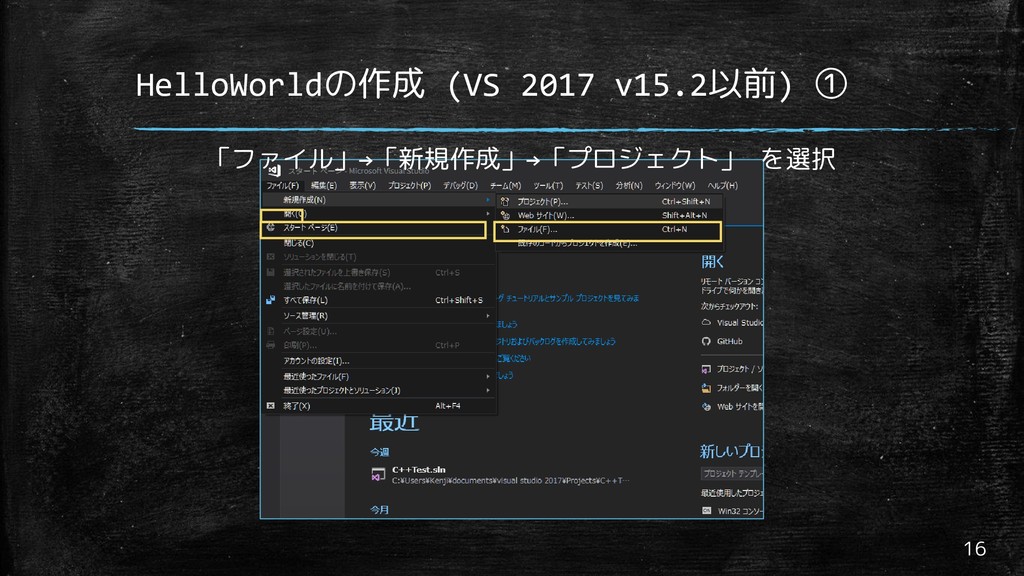
HelloWorldの作成 (VS 2017 v15.2以前) ① 16 「ファイル」→「新規作成」→「プロジェクト」 を選択
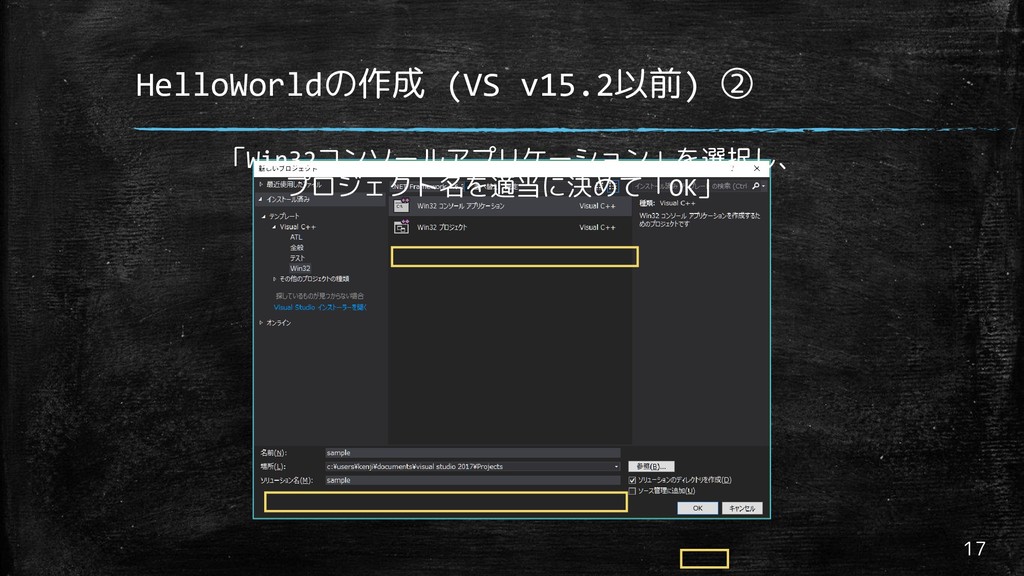
HelloWorldの作成 (VS v15.2以前) ② 17 「Win32コンソールアプリケーション」を選択し、 プロジェクト名を適当に決めて「OK」
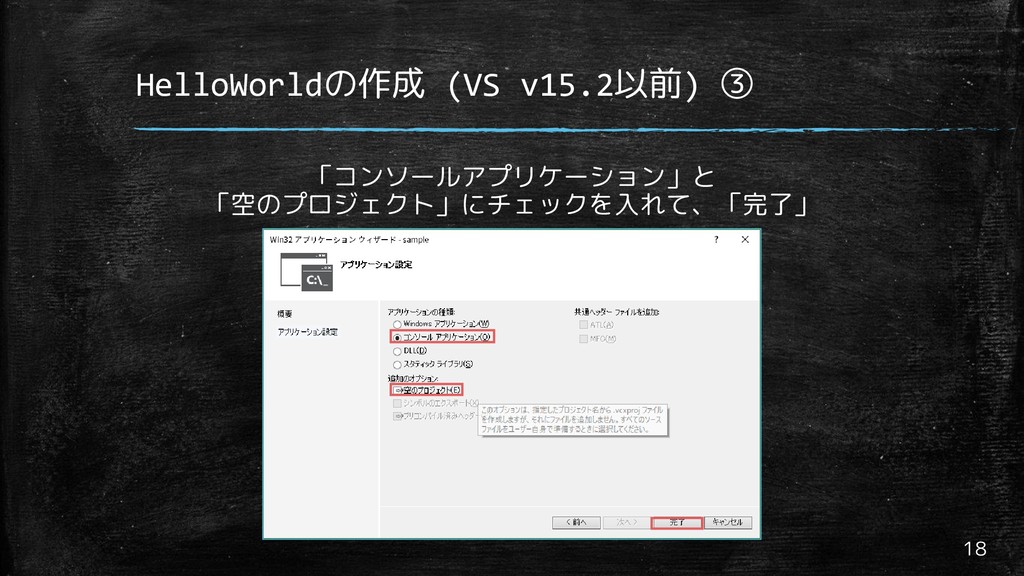
HelloWorldの作成 (VS v15.2以前) ③ 18 「コンソールアプリケーション」と 「空のプロジェクト」にチェックを入れて、「完了」
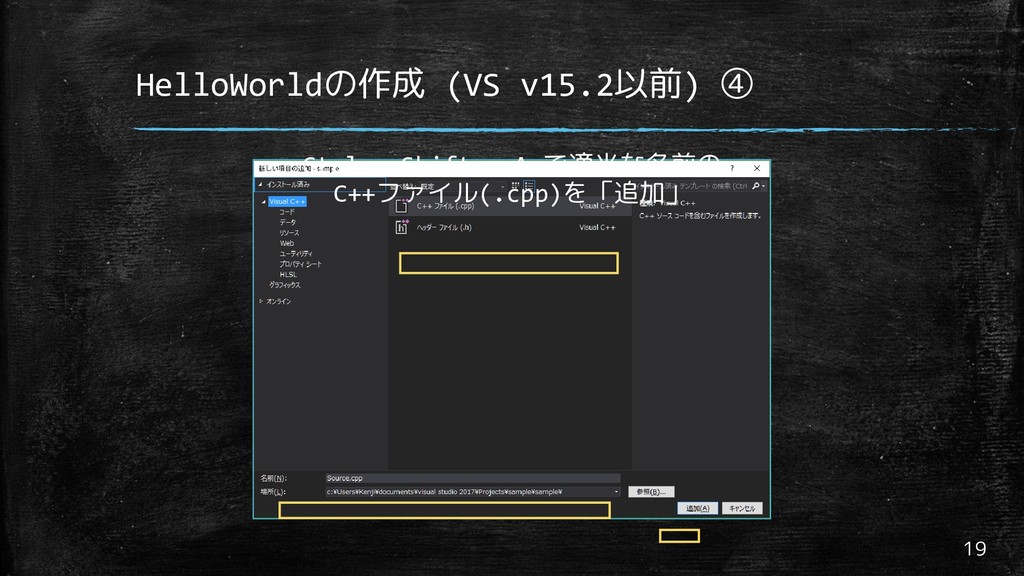
HelloWorldの作成 (VS v15.2以前) ④ 19 Ctrl + Shift + A
で適当な名前の C++ファイル(.cpp)を「追加」
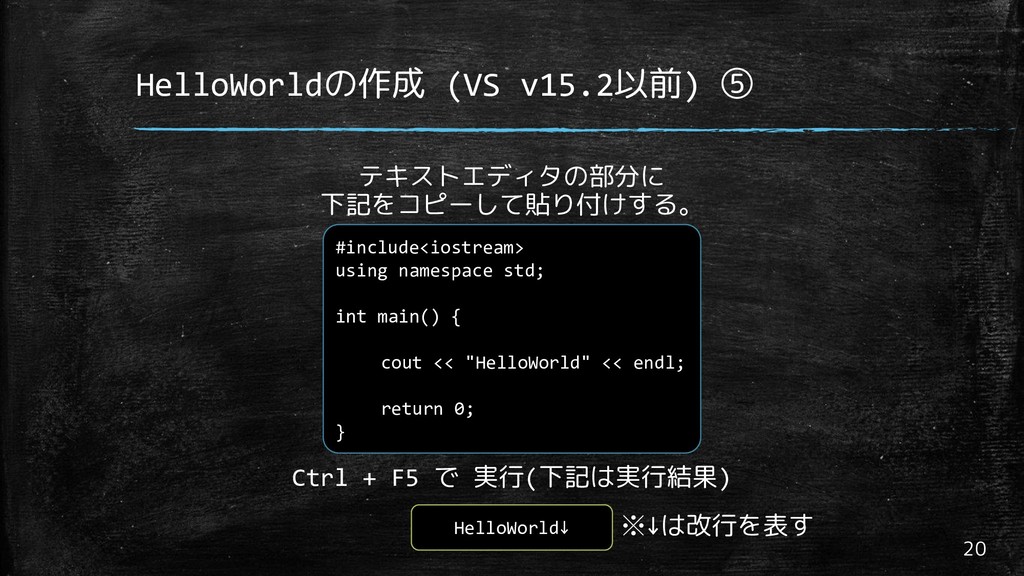
HelloWorldの作成 (VS v15.2以前) ⑤ 20 #include<iostream> using namespace std; int
main() { cout << "HelloWorld" << endl; return 0; } テキストエディタの部分に 下記をコピーして貼り付けする。 Ctrl + F5 で 実行(下記は実行結果) HelloWorld↓ ※↓は改行を表す
参考・ライセンス 21 •参考 やさしいC++(高橋麻奈 著) •ライセンス ANCTPCC を著作者とするこのプレゼンテーションは クリエイティブ・コモンズ・表示 –
継承 4.0 国際・ライセンス で提供されています。 このライセンスのコピーを閲覧するには、 http://creativecommons.org/licenses/by-sa/4.0/deed.ja を訪問して下さい。


 hoge_piyo
 satoshi256kbyte
 kishida
 hollycummins
 yutobara
 ryu1013
 eed3si9n
 florets1
 nabondance
 uyuki234
 akit37
 tanahiro2010
 o0h
o0h
 andyhume
 aleyda
 lfama
lfama
 lara
lara
 codingconduct
 letsgokoyo
 rmw
rmw
 cromwellryan
 sergeychernyshev
 davidcarrasco
 greggifford