Share
Connect tools (Turn APIs and MCP servers into tools with Gateway) | Learn Amazon Bedrock AgentCore with Kiro 04
This Level 300 deck shows why an agent picks the wrong tool when similar tools pile up, and how Amazon Bedrock AgentCore Gateway puts a shop's three AWS Lambda functions behind one MCP endpoint with IAM inbound auth and semantic tool search, drawn with the official AWS icons. It then takes the help desk agent of a made-up online electronics shop through the AgentCore CLI (add gateway, add gateway-target, deploy to the Tokyo Region, invoke) with real terminal output, and checks tool names, descriptions, error results, rate limits and prices against the AgentCore documentation, as deck 04 (Build it out) of the series Learn Amazon Bedrock AgentCore with Kiro.

Riku INADA PRO
Annual Pro sale · Save $30
Have presentations of your own?
Share with private links, password protection, and more control over your work.
Transcript
38 slides
-
Learn Amazon Bedrock AgentCore with Kiro 04 Build it out
Level 300 Connect tools Turn APIs and MCP servers into tools with Gateway 04 As of November 2026 (AgentCore CLI 1.0.2) November 2026 Riku Inada Amazon Web Services Japan © 2026, Amazon Web Services, Inc. or its affiliates. All rights reserved. Kiro + AgentCore 1 -
Introduction About me Riku Inada Amazon Web Services Japan G.K.
Solutions Architect Works mainly with manufacturing customers Recent work Promoting the AI-Driven Development Life Cycle (AI-DLC) Writing and speaking about Kiro and AWS Amplify © 2026, Amazon Web Services, Inc. or its affiliates. All rights reserved. X @inada_riku Speaker Deck speakerdeck.com/inariku Zenn zenn.dev/inariku GitHub github.com/inariku 2 -
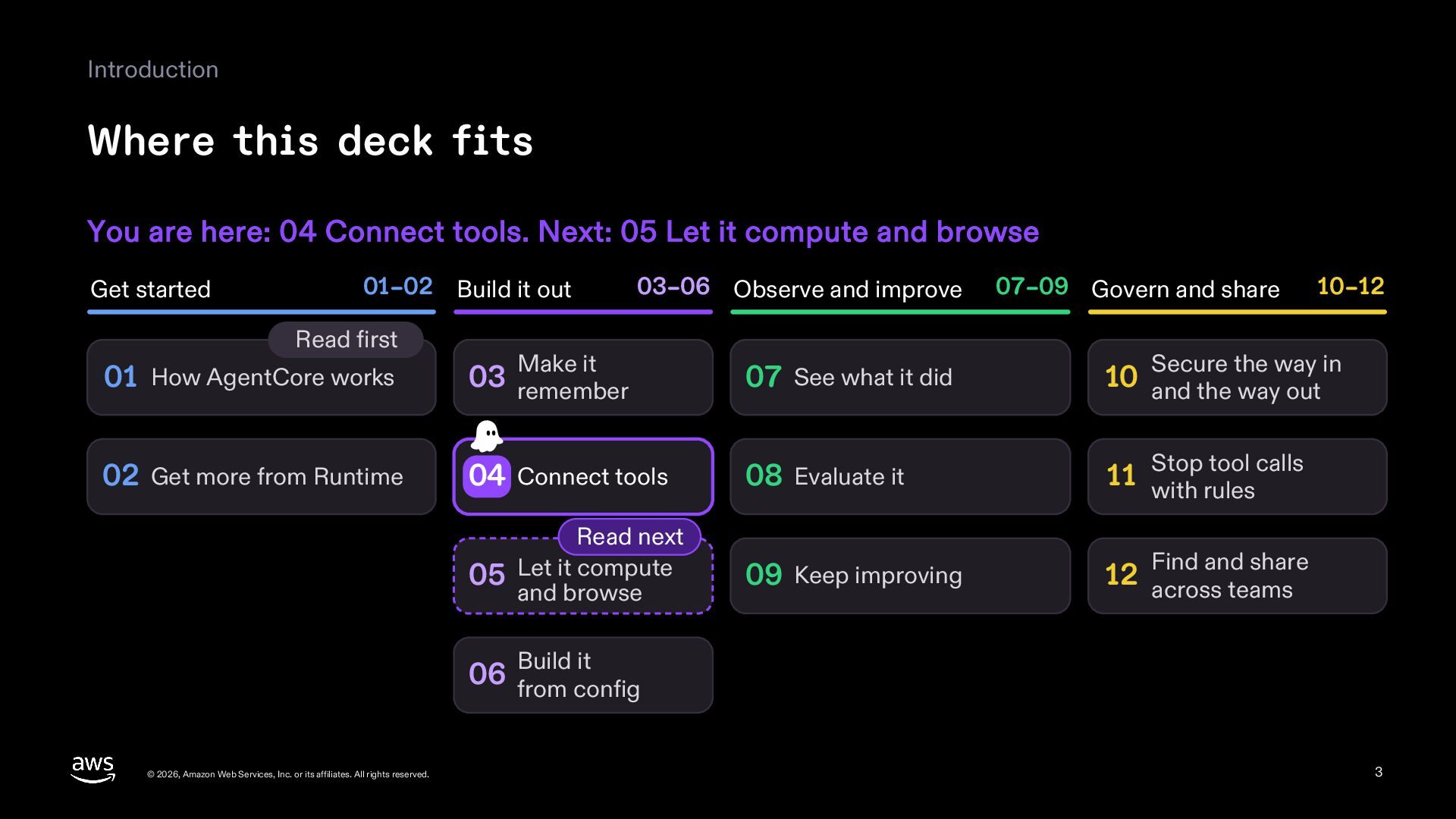
Introduction Where this deck fits You are here: 04 Connect
tools. Next: 05 Let it compute and browse Get started 01–02 Build it out Read first 03–06 Observe and improve Make it 07–09 Govern and share 10–12 Secure the way in 01 How AgentCore works 03 remember 07 See what it did 10 and the way out 02 Get more from Runtime 04 Connect tools 08 Evaluate it tool calls 11 Stop with rules Read next 05 Let it compute and browse 09 Keep improving 12 across teams Find and share Build it 06 from config © 2026, Amazon Web Services, Inc. or its affiliates. All rights reserved. 3 -
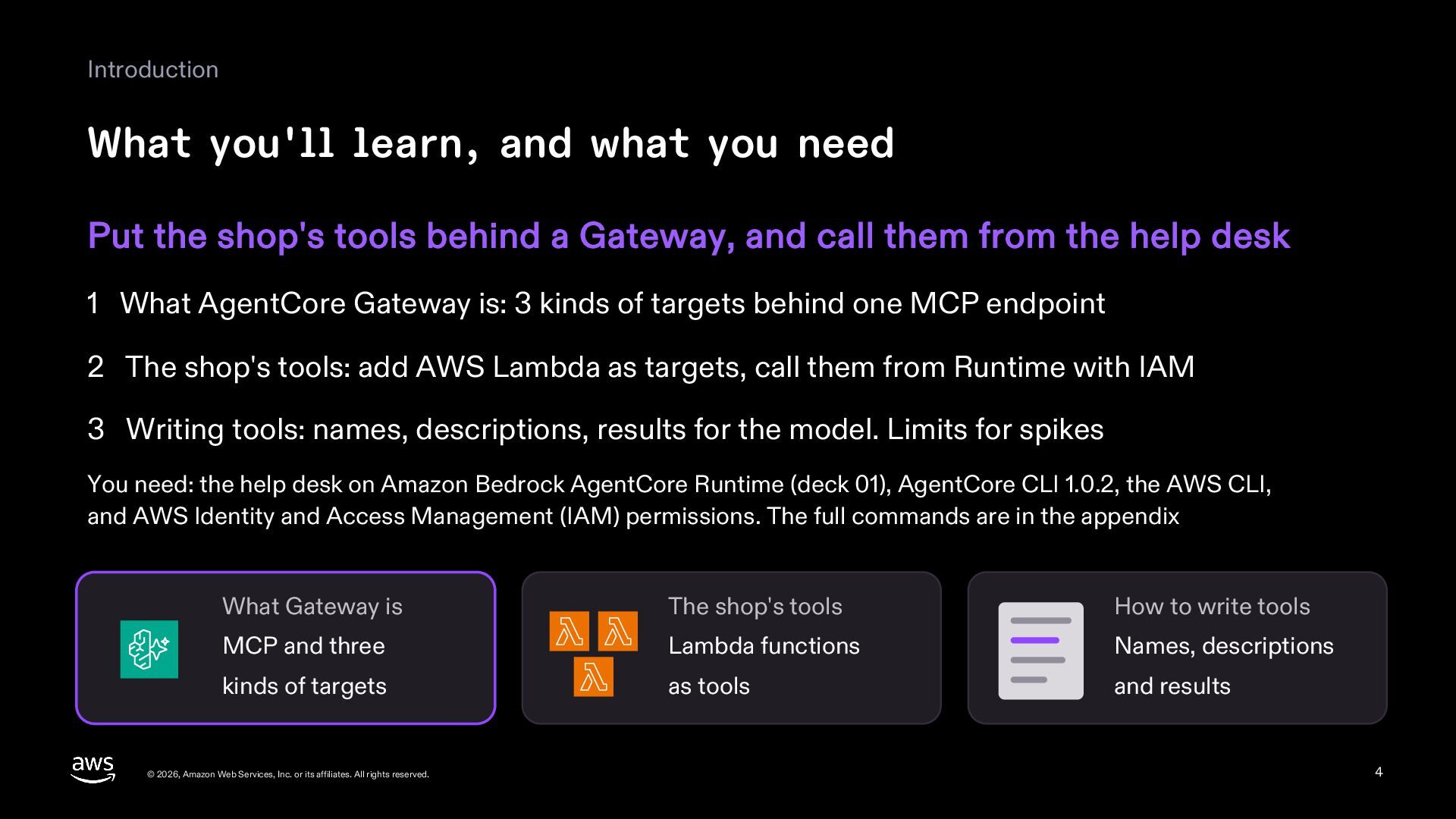
Introduction What you'll learn, and what you need Put the
shop's tools behind a Gateway, and call them from the help desk 1 What AgentCore Gateway is: 3 kinds of targets behind one MCP endpoint 2 The shop's tools: add AWS Lambda as targets, call them from Runtime with IAM 3 Writing tools: names, descriptions, results for the model. Limits for spikes You need: the help desk on Amazon Bedrock AgentCore Runtime (deck 01), AgentCore CLI 1.0.2, the AWS CLI, and AWS Identity and Access Management (IAM) permissions. The full commands are in the appendix What Gateway is The shop's tools How to write tools MCP and three Lambda functions Names, descriptions kinds of targets as tools and results © 2026, Amazon Web Services, Inc. or its affiliates. All rights reserved. 4 -
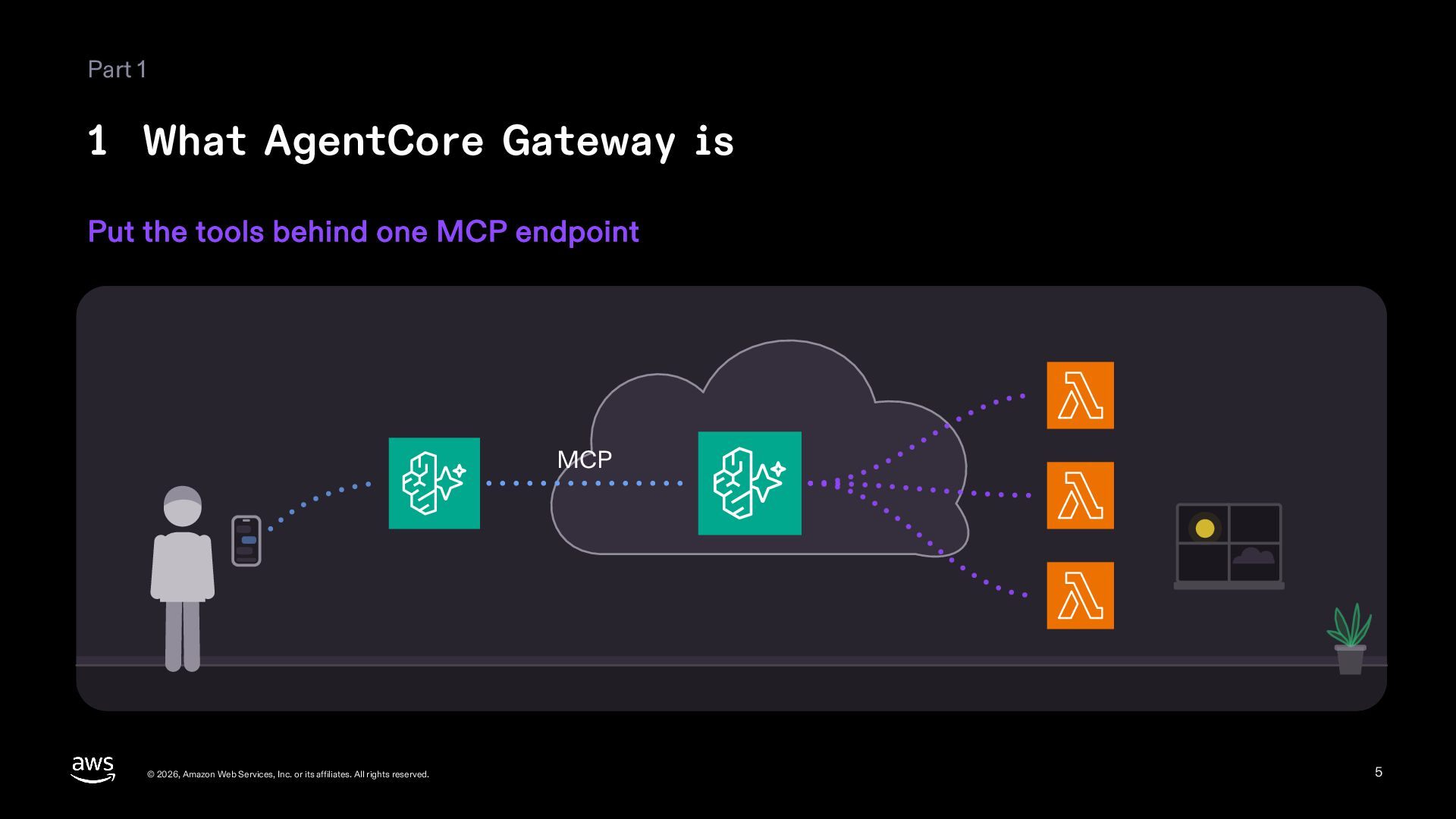
Part 1 1 What AgentCore Gateway is Put the tools
behind one MCP endpoint MCP © 2026, Amazon Web Services, Inc. or its affiliates. All rights reserved. 5 -
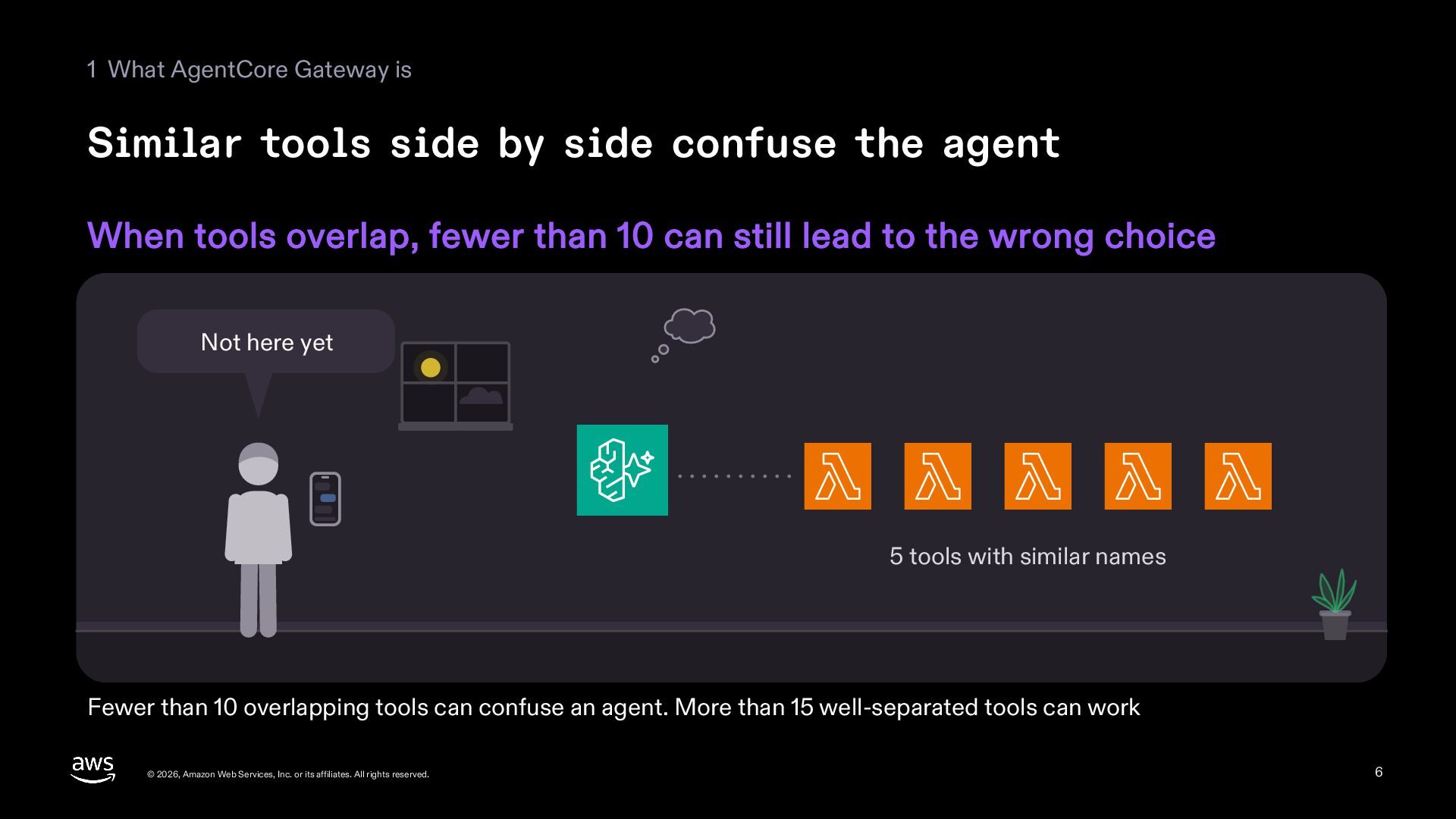
1 What AgentCore Gateway is Similar tools side by side
confuse the agent When tools overlap, fewer than 10 can still lead to the wrong choice Not here yet 5 tools with similar names Fewer than 10 overlapping tools can confuse an agent. More than 15 well-separated tools can work © 2026, Amazon Web Services, Inc. or its affiliates. All rights reserved. 6 -
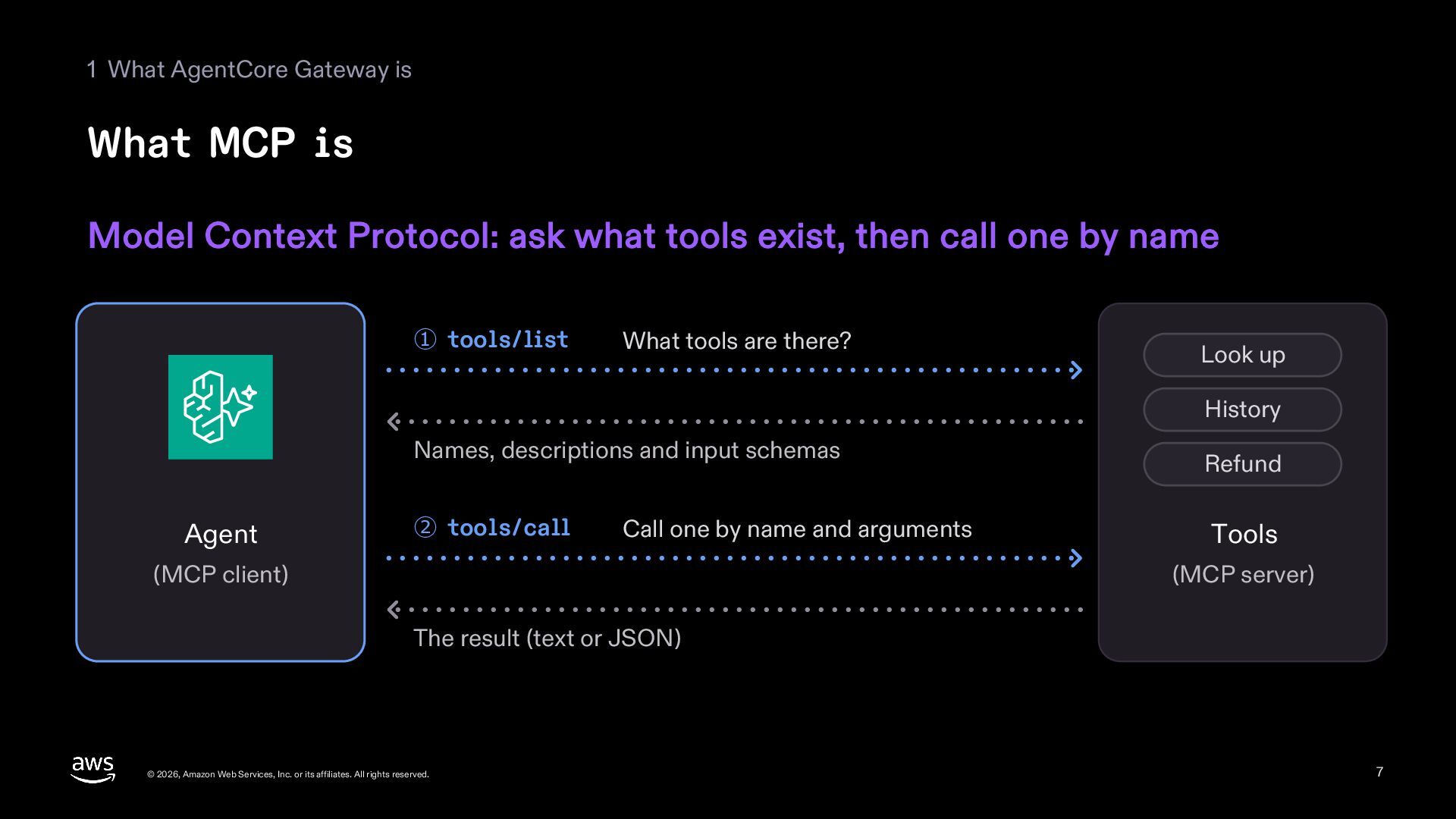
1 What AgentCore Gateway is What MCP is Model Context
Protocol: ask what tools exist, then call one by name ① tools/list What tools are there? Look up History Names, descriptions and input schemas Agent ② tools/call Call one by name and arguments (MCP client) Refund Tools (MCP server) The result (text or JSON) © 2026, Amazon Web Services, Inc. or its affiliates. All rights reserved. 7 -
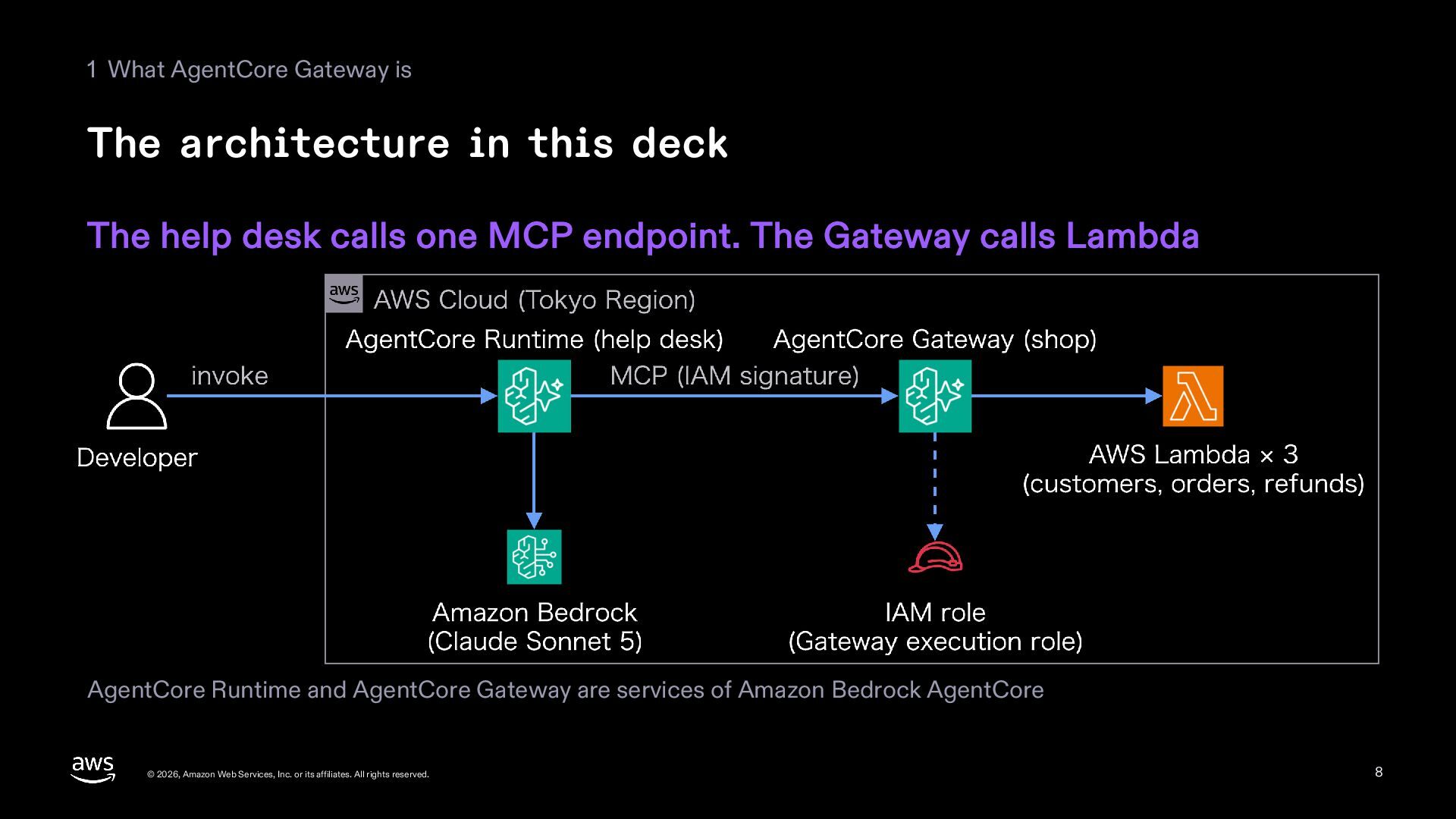
1 What AgentCore Gateway is The architecture in this deck
The help desk calls one MCP endpoint. The Gateway calls Lambda AgentCore Runtime and AgentCore Gateway are services of Amazon Bedrock AgentCore © 2026, Amazon Web Services, Inc. or its affiliates. All rights reserved. 8 -
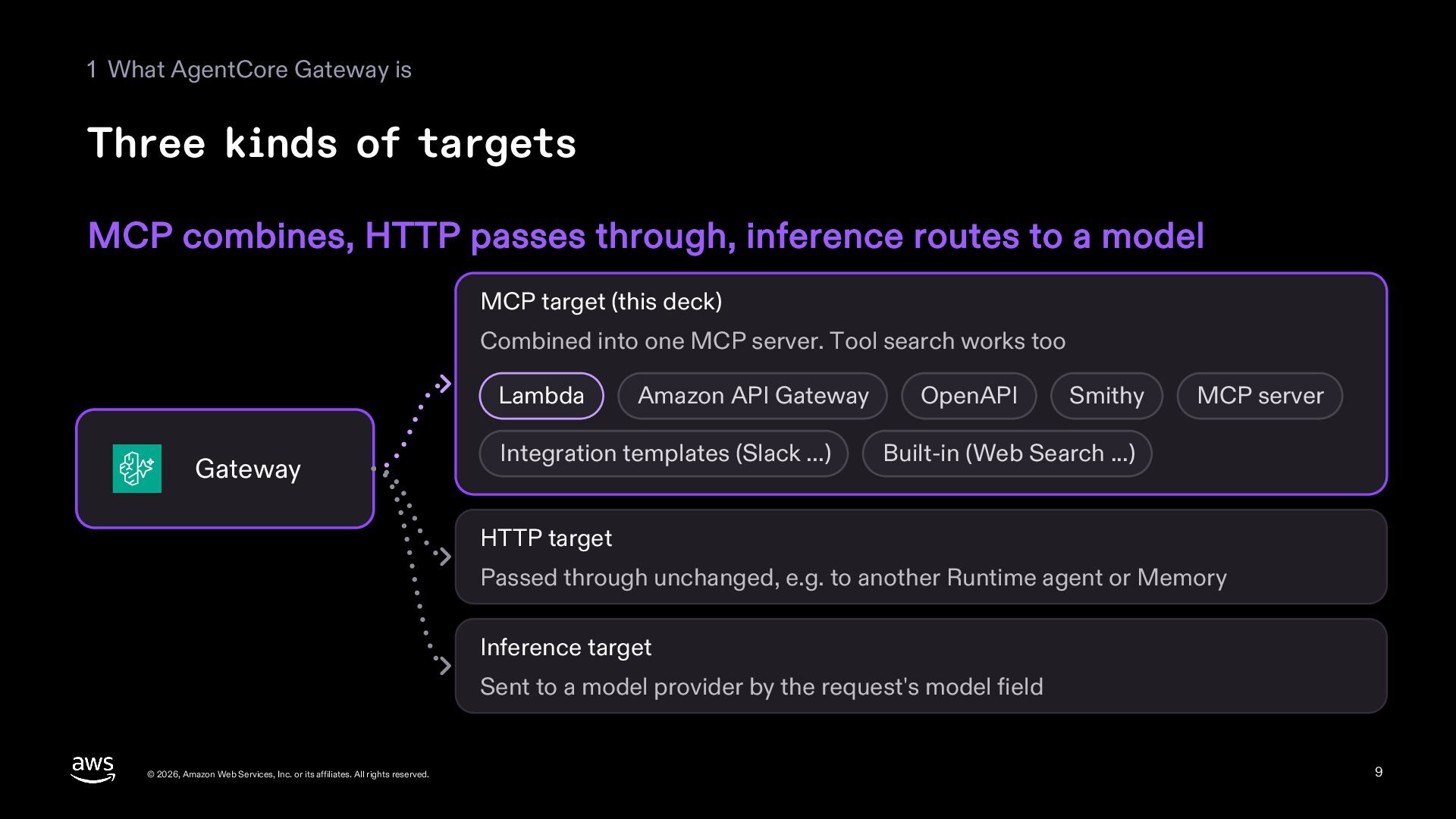
1 What AgentCore Gateway is Three kinds of targets MCP
combines, HTTP passes through, inference routes to a model MCP target (this deck) Combined into one MCP server. Tool search works too Lambda Gateway Amazon API Gateway Integration templates (Slack ...) OpenAPI Smithy MCP server Built-in (Web Search ...) HTTP target Passed through unchanged, e.g. to another Runtime agent or Memory Inference target Sent to a model provider by the request's model field © 2026, Amazon Web Services, Inc. or its affiliates. All rights reserved. 9 -
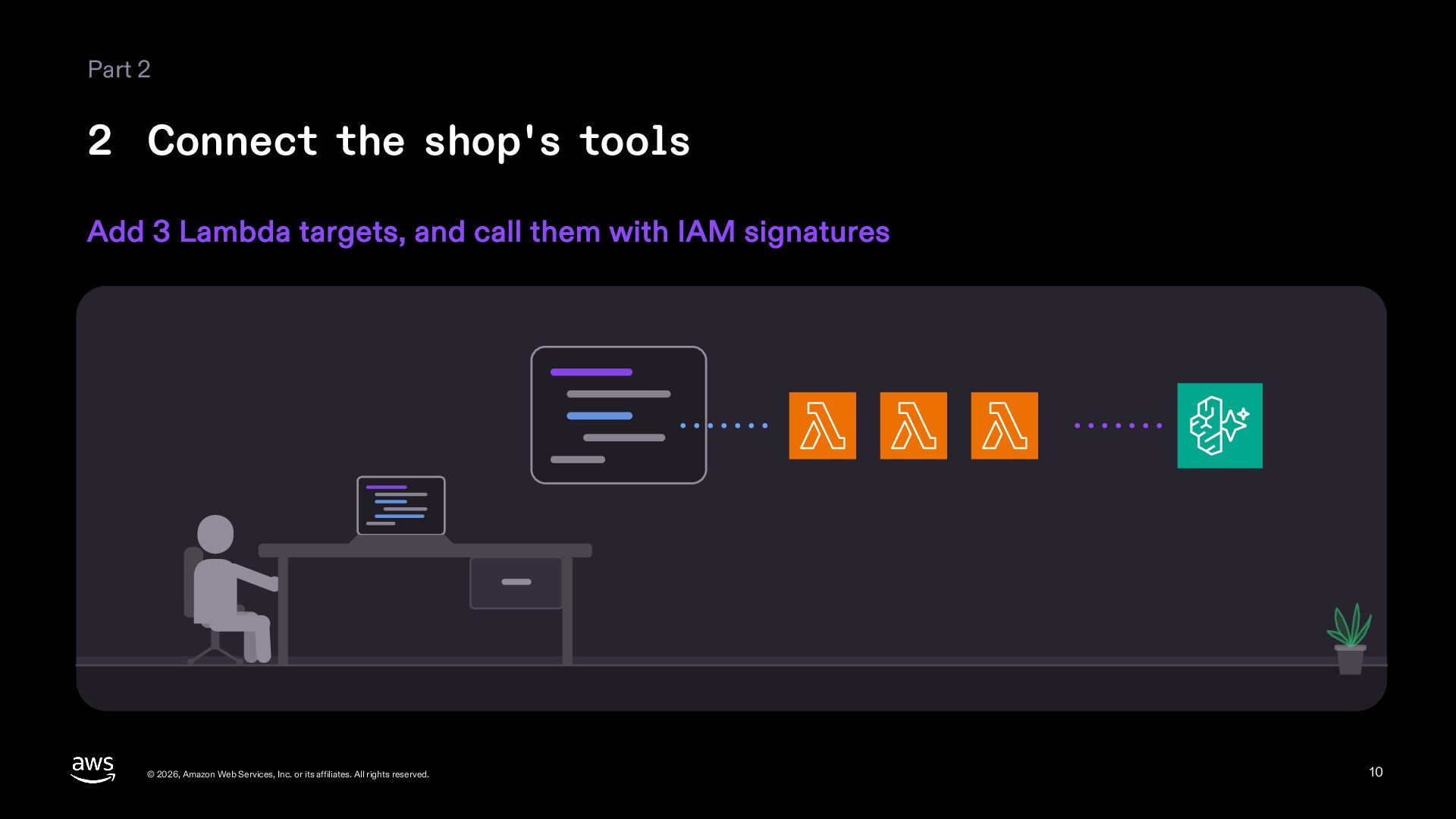
Part 2 2 Connect the shop's tools Add 3 Lambda
targets, and call them with IAM signatures © 2026, Amazon Web Services, Inc. or its affiliates. All rights reserved. 10 -
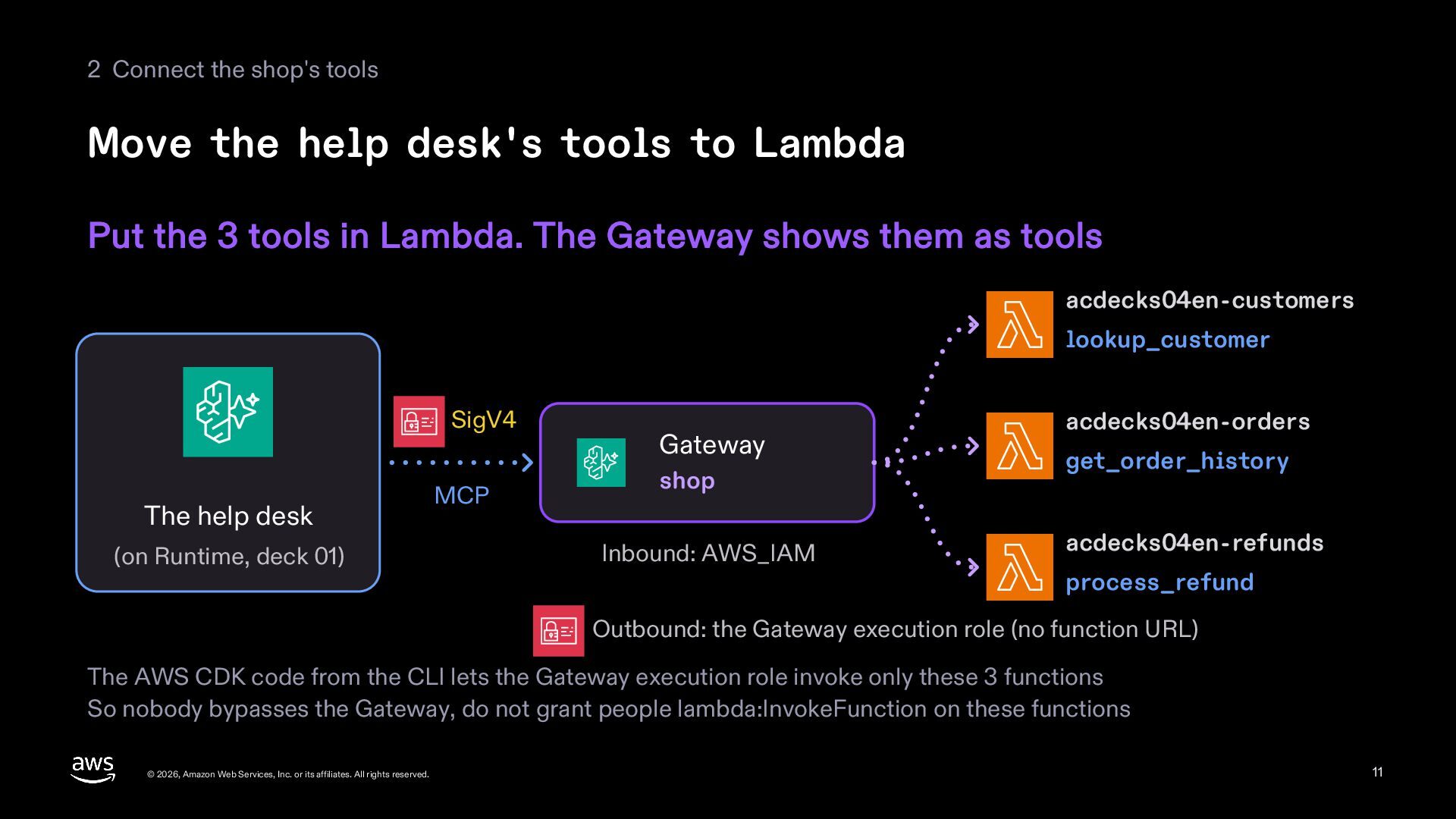
2 Connect the shop's tools Move the help desk's tools
to Lambda Put the 3 tools in Lambda. The Gateway shows them as tools acdecks04en-customers lookup_customer SigV4 The help desk (on Runtime, deck 01) MCP Gateway shop Inbound: AWS_IAM acdecks04en-orders get_order_history acdecks04en-refunds process_refund Outbound: the Gateway execution role (no function URL) The AWS CDK code from the CLI lets the Gateway execution role invoke only these 3 functions So nobody bypasses the Gateway, do not grant people lambda:InvokeFunction on these functions © 2026, Amazon Web Services, Inc. or its affiliates. All rights reserved. 11 -
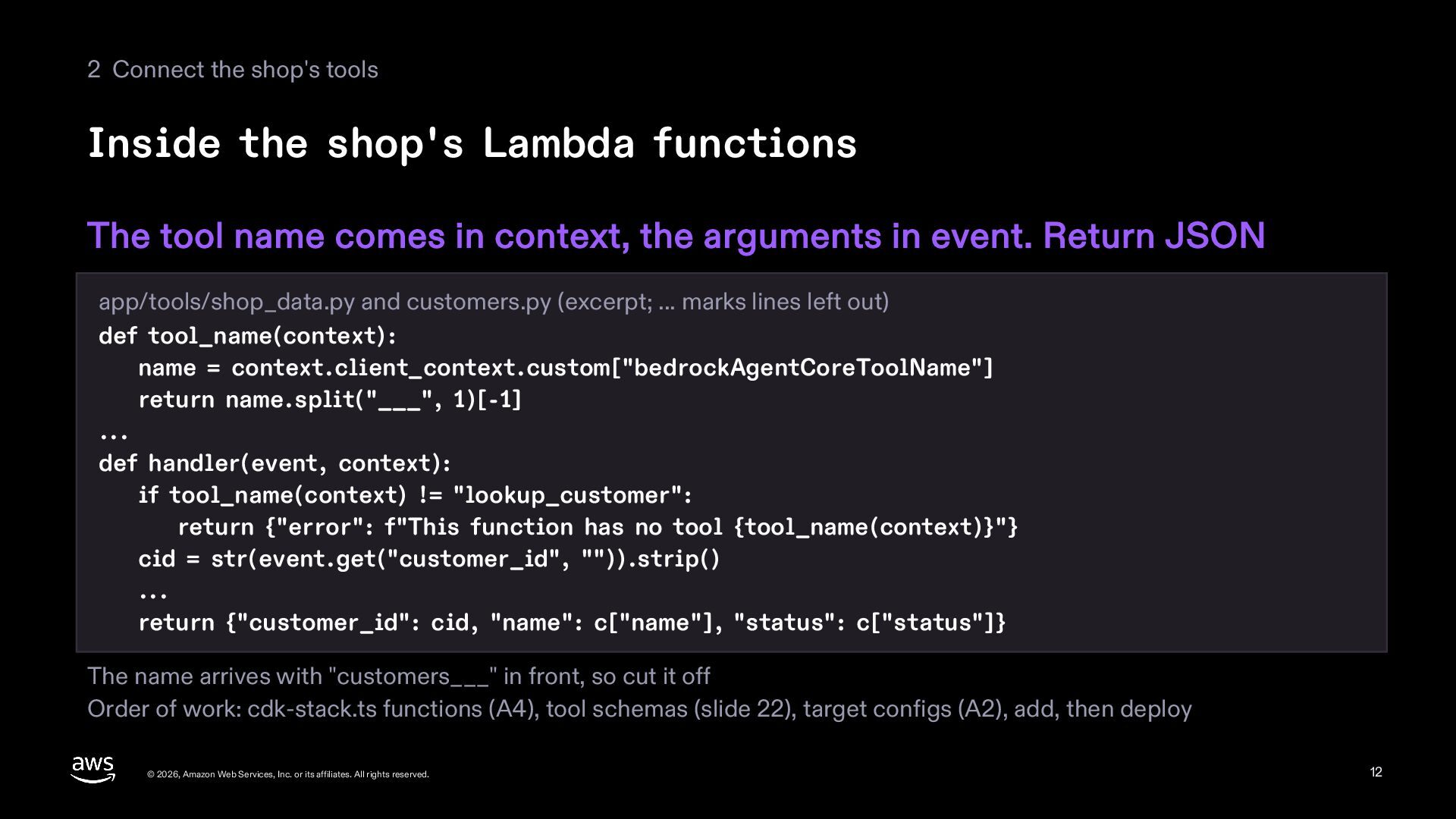
2 Connect the shop's tools Inside the shop's Lambda functions
The tool name comes in context, the arguments in event. Return JSON app/tools/shop_data.py and customers.py (excerpt; ... marks lines left out) def tool_name(context): name = context.client_context.custom["bedrockAgentCoreToolName"] return name.split("___", 1)[-1] ... def handler(event, context): if tool_name(context) != "lookup_customer": return {"error": f"This function has no tool {tool_name(context)}"} cid = str(event.get("customer_id", "")).strip() ... return {"customer_id": cid, "name": c["name"], "status": c["status"]} The name arrives with "customers___" in front, so cut it off Order of work: cdk-stack.ts functions (A4), tool schemas (slide 22), target configs (A2), add, then deploy © 2026, Amazon Web Services, Inc. or its affiliates. All rights reserved. 12 -
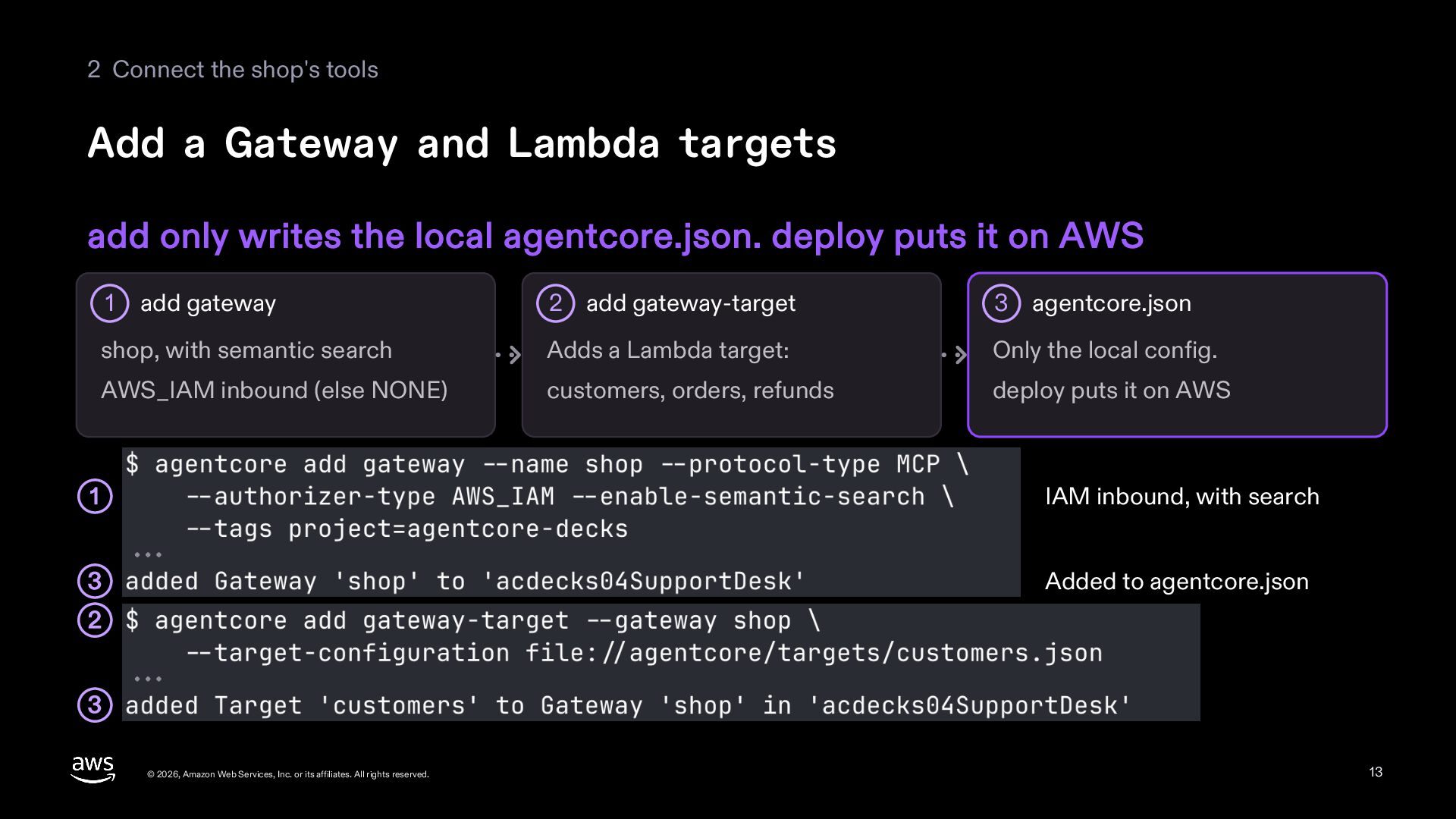
2 Connect the shop's tools Add a Gateway and Lambda
targets add only writes the local agentcore.json. deploy puts it on AWS 2 add gateway-target 3 agentcore.json shop, with semantic search Adds a Lambda target: Only the local config. AWS_IAM inbound (else NONE) customers, orders, refunds deploy puts it on AWS 1 add gateway 1 IAM inbound, with search 3 Added to agentcore.json 2 3 © 2026, Amazon Web Services, Inc. or its affiliates. All rights reserved. 13 -
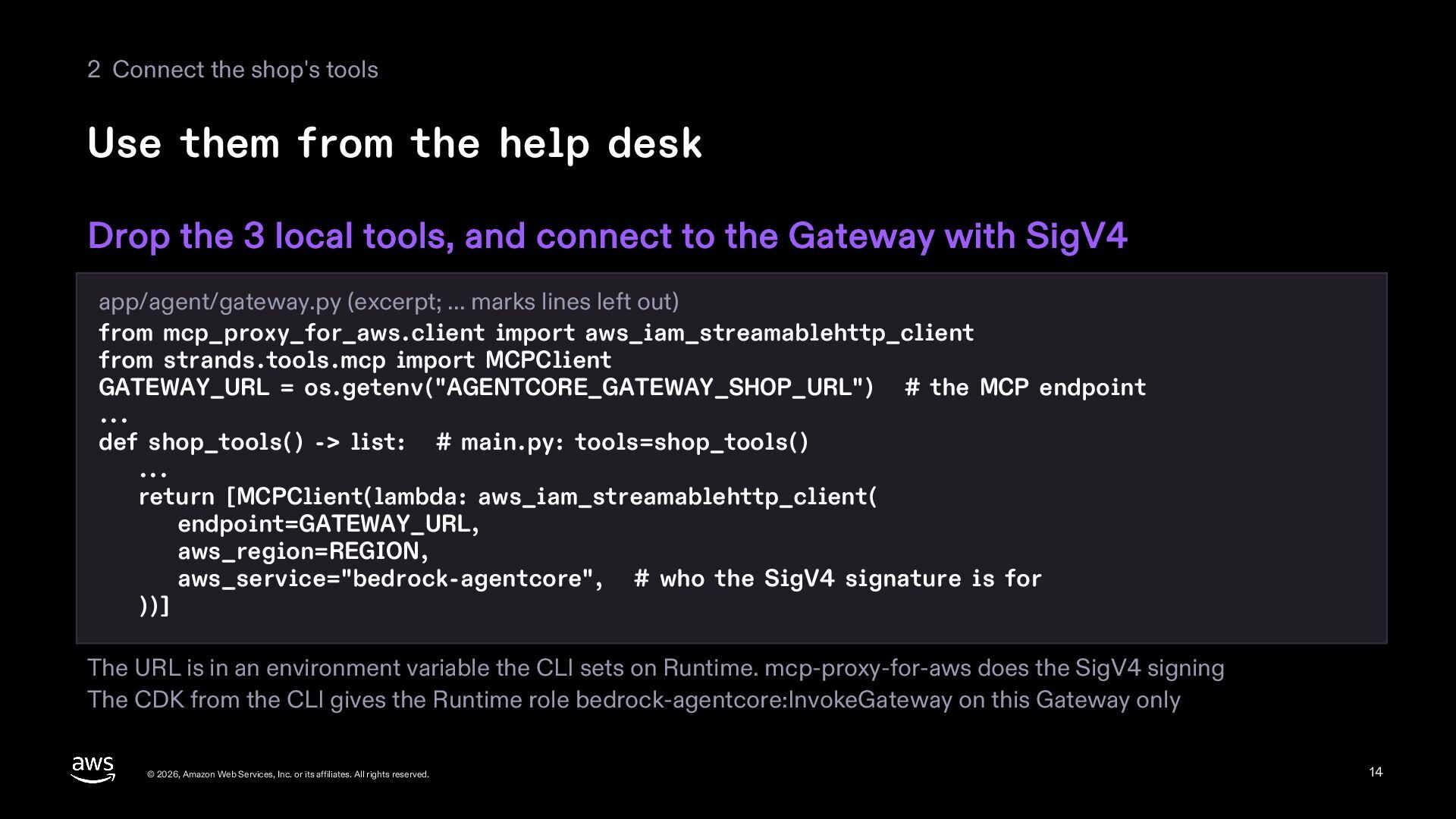
2 Connect the shop's tools Use them from the help
desk Drop the 3 local tools, and connect to the Gateway with SigV4 app/agent/gateway.py (excerpt; ... marks lines left out) from mcp_proxy_for_aws.client import aws_iam_streamablehttp_client from strands.tools.mcp import MCPClient GATEWAY_URL = os.getenv("AGENTCORE_GATEWAY_SHOP_URL") # the MCP endpoint ... def shop_tools() -> list: # main.py: tools=shop_tools() ... return [MCPClient(lambda: aws_iam_streamablehttp_client( endpoint=GATEWAY_URL, aws_region=REGION, aws_service="bedrock-agentcore", # who the SigV4 signature is for ))] The URL is in an environment variable the CLI sets on Runtime. mcp-proxy-for-aws does the SigV4 signing The CDK from the CLI gives the Runtime role bedrock-agentcore:InvokeGateway on this Gateway only © 2026, Amazon Web Services, Inc. or its affiliates. All rights reserved. 14 -
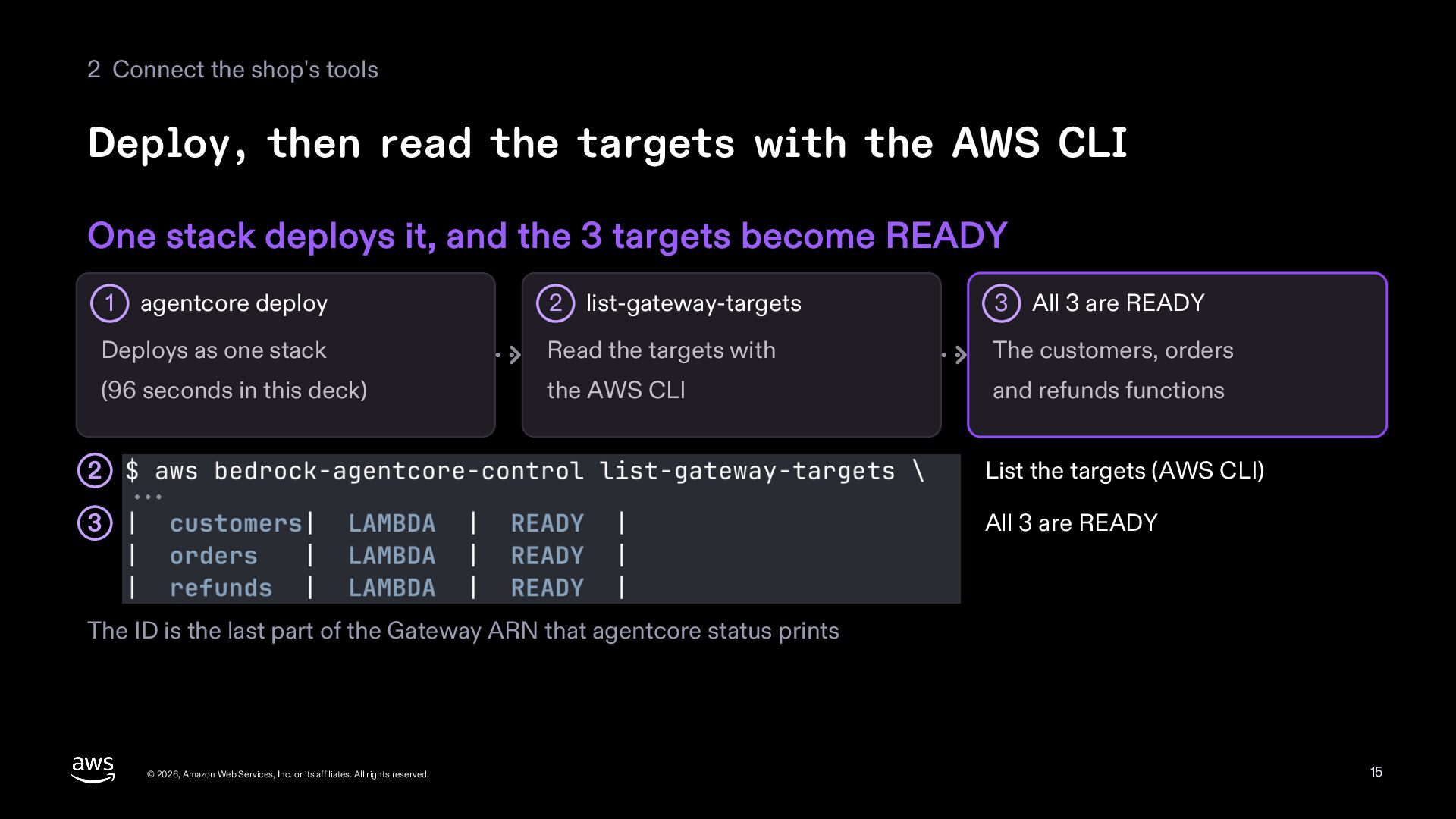
2 Connect the shop's tools Deploy, then read the targets
with the AWS CLI One stack deploys it, and the 3 targets become READY 2 list-gateway-targets 3 All 3 are READY Deploys as one stack Read the targets with The customers, orders (96 seconds in this deck) the AWS CLI and refunds functions 1 agentcore deploy 2 List the targets (AWS CLI) 3 All 3 are READY The ID is the last part of the Gateway ARN that agentcore status prints © 2026, Amazon Web Services, Inc. or its affiliates. All rights reserved. 15 -
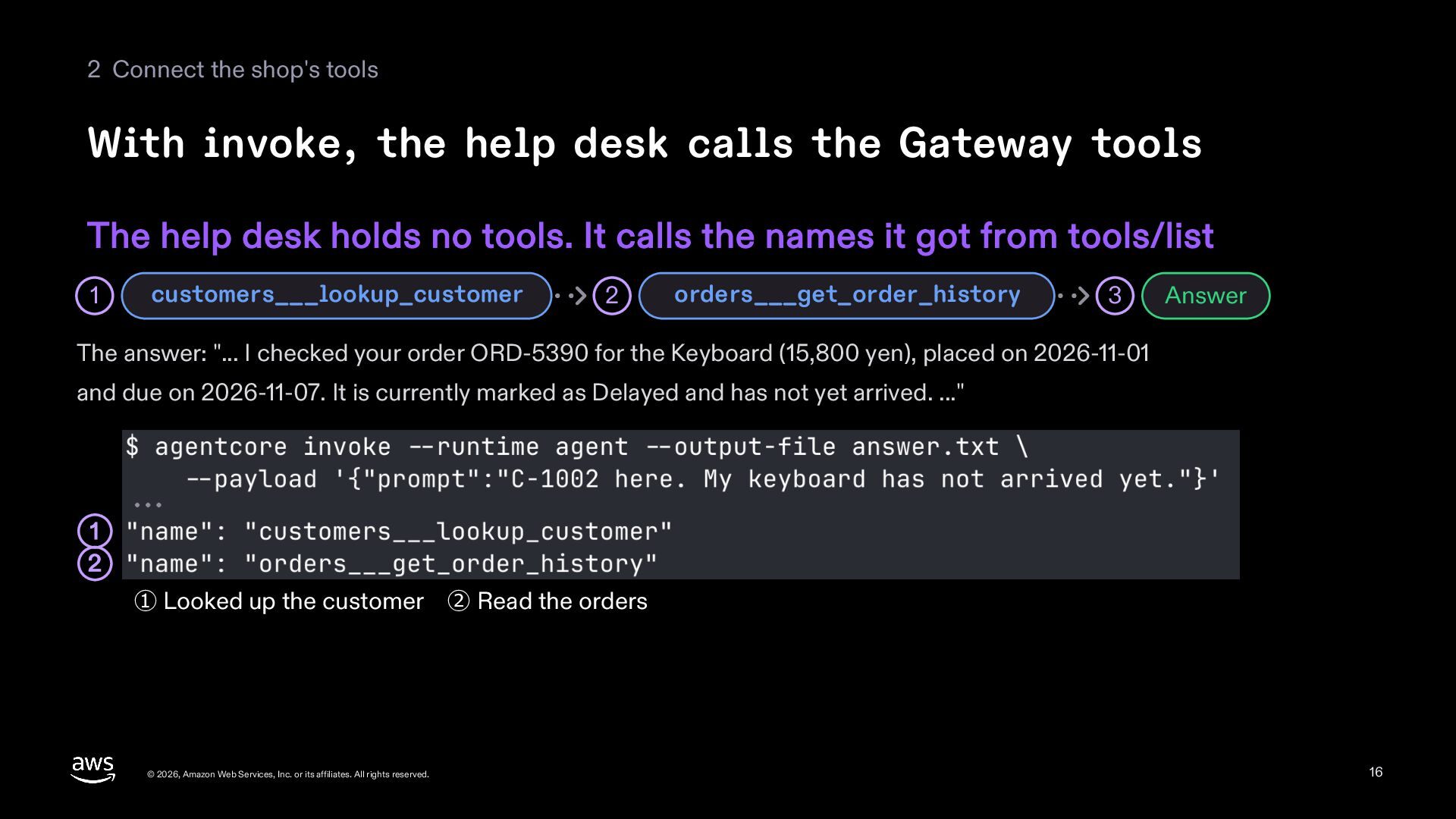
2 Connect the shop's tools With invoke, the help desk
calls the Gateway tools The help desk holds no tools. It calls the names it got from tools/list 1 customers___lookup_customer 2 orders___get_order_history 3 Answer The answer: "... I checked your order ORD-5390 for the Keyboard (15,800 yen), placed on 2026-11-01 and due on 2026-11-07. It is currently marked as Delayed and has not yet arrived. ..." 1 2 ① Looked up the customer ② Read the orders © 2026, Amazon Web Services, Inc. or its affiliates. All rights reserved. 16 -
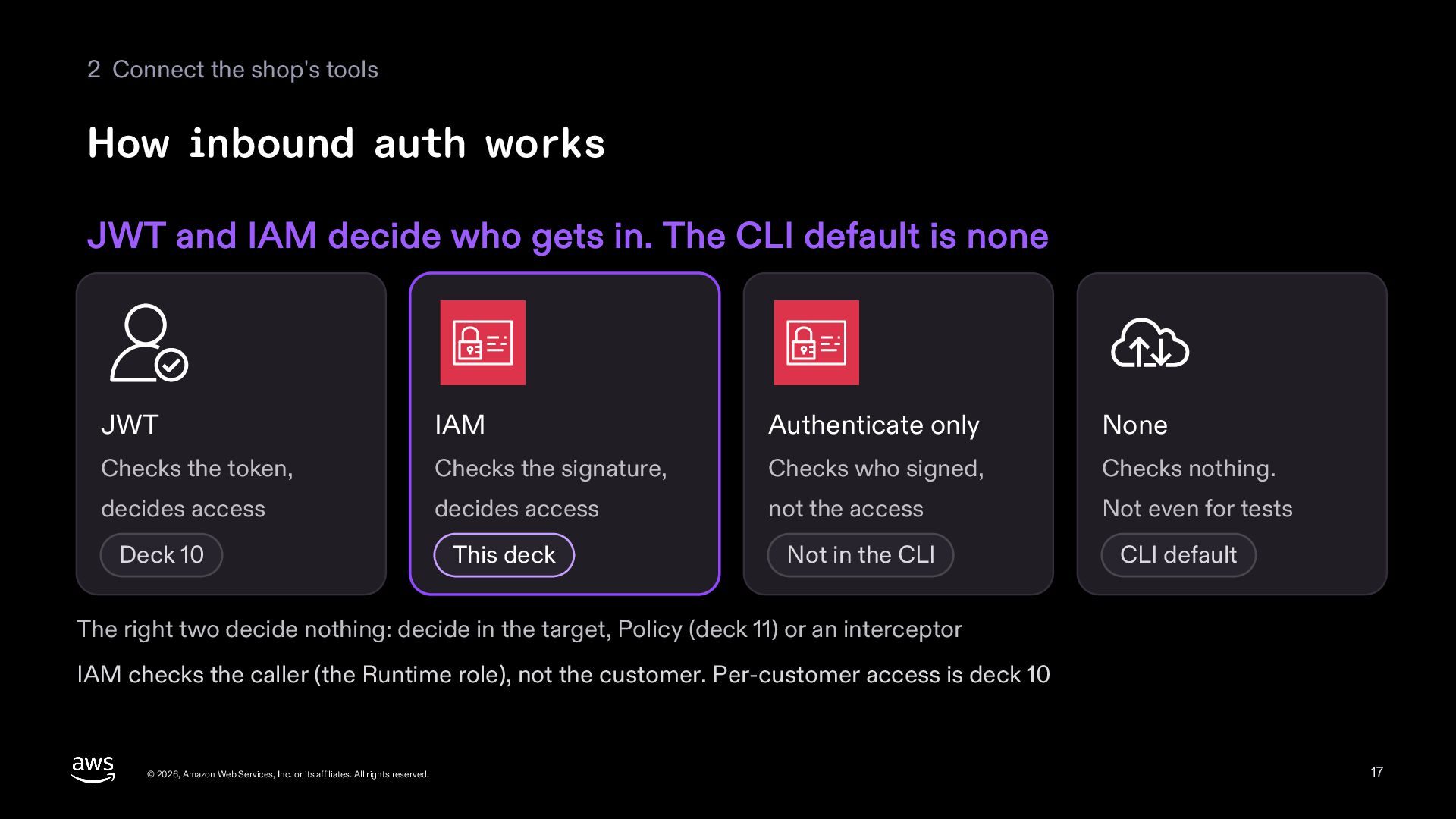
2 Connect the shop's tools How inbound auth works JWT
and IAM decide who gets in. The CLI default is none JWT IAM Authenticate only None Checks the token, Checks the signature, Checks who signed, Checks nothing. decides access decides access not the access Not even for tests This deck Not in the CLI Deck 10 CLI default The right two decide nothing: decide in the target, Policy (deck 11) or an interceptor IAM checks the caller (the Runtime role), not the customer. Per-customer access is deck 10 © 2026, Amazon Web Services, Inc. or its affiliates. All rights reserved. 17 -
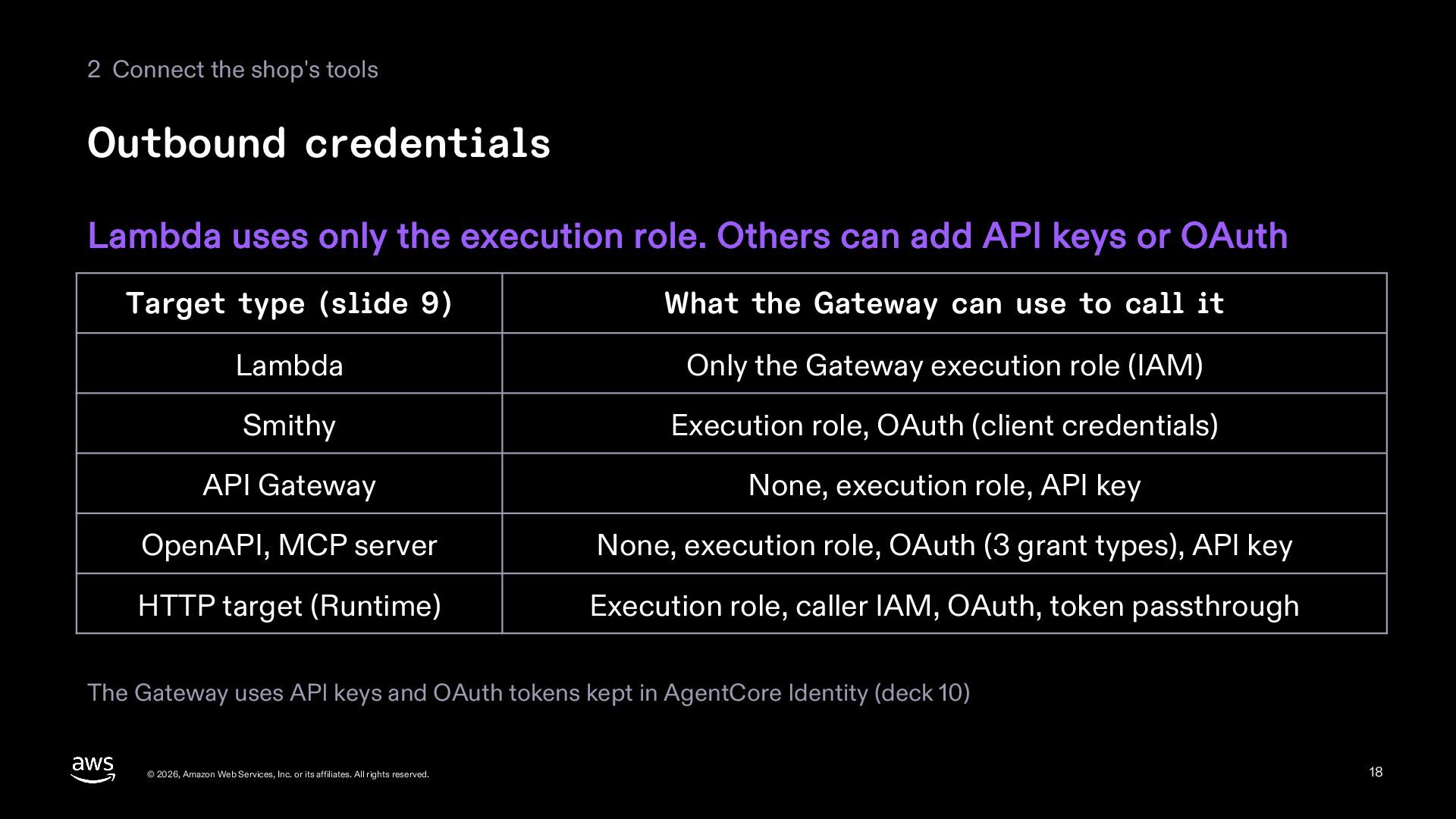
2 Connect the shop's tools Outbound credentials Lambda uses only
the execution role. Others can add API keys or OAuth Target type (slide 9) What the Gateway can use to call it Lambda Only the Gateway execution role (IAM) Smithy Execution role, OAuth (client credentials) API Gateway None, execution role, API key OpenAPI, MCP server None, execution role, OAuth (3 grant types), API key HTTP target (Runtime) Execution role, caller IAM, OAuth, token passthrough The Gateway uses API keys and OAuth tokens kept in AgentCore Identity (deck 10) © 2026, Amazon Web Services, Inc. or its affiliates. All rights reserved. 18 -
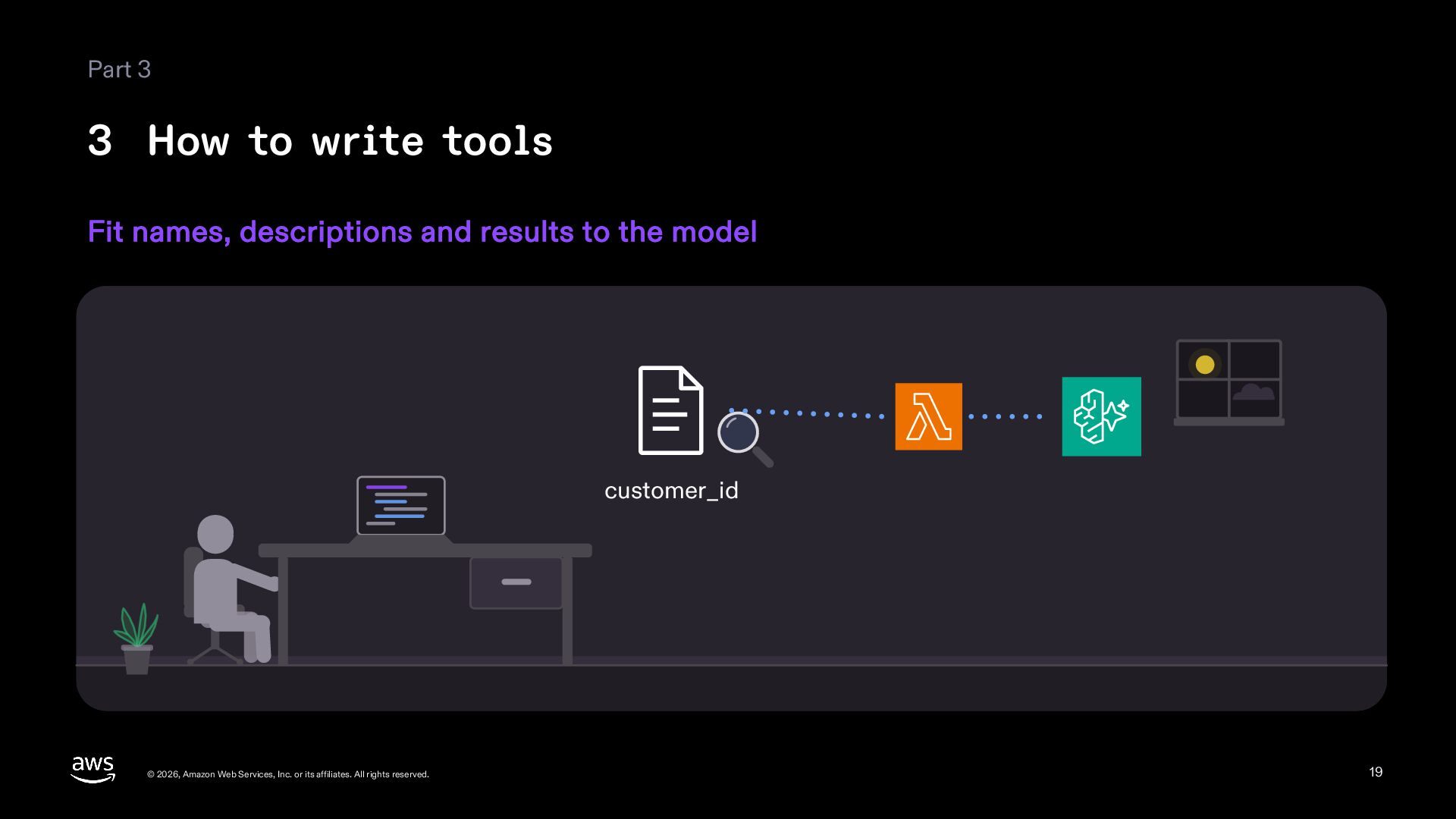
Part 3 3 How to write tools Fit names, descriptions
and results to the model customer_id © 2026, Amazon Web Services, Inc. or its affiliates. All rights reserved. 19 -
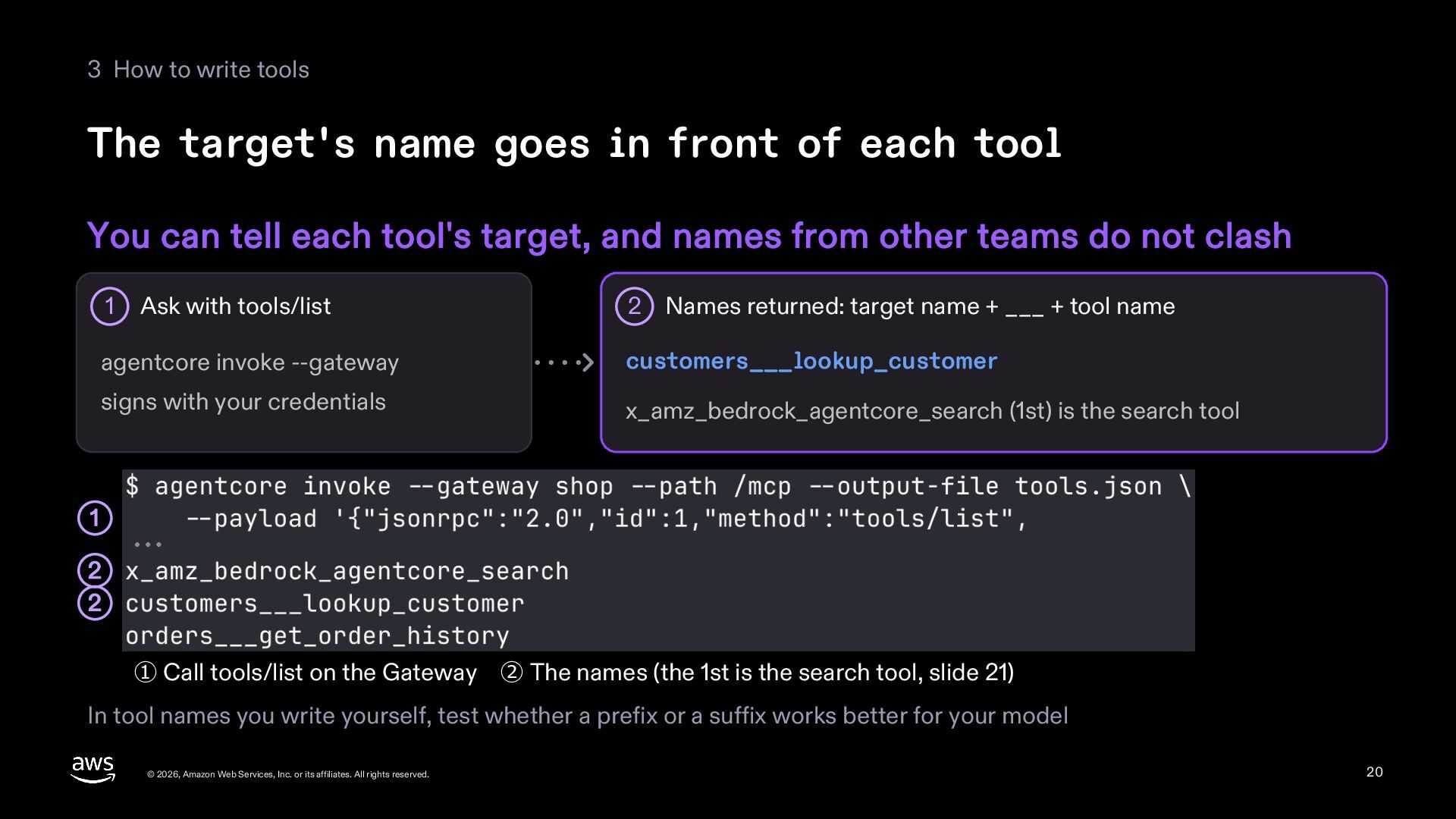
3 How to write tools The target's name goes in
front of each tool You can tell each tool's target, and names from other teams do not clash 1 Ask with tools/list 2 Names returned: target name + ___ + tool name agentcore invoke --gateway customers___lookup_customer signs with your credentials x_amz_bedrock_agentcore_search (1st) is the search tool 1 2 2 ① Call tools/list on the Gateway ② The names (the 1st is the search tool, slide 21) In tool names you write yourself, test whether a prefix or a suffix works better for your model © 2026, Amazon Web Services, Inc. or its affiliates. All rights reserved. 20 -
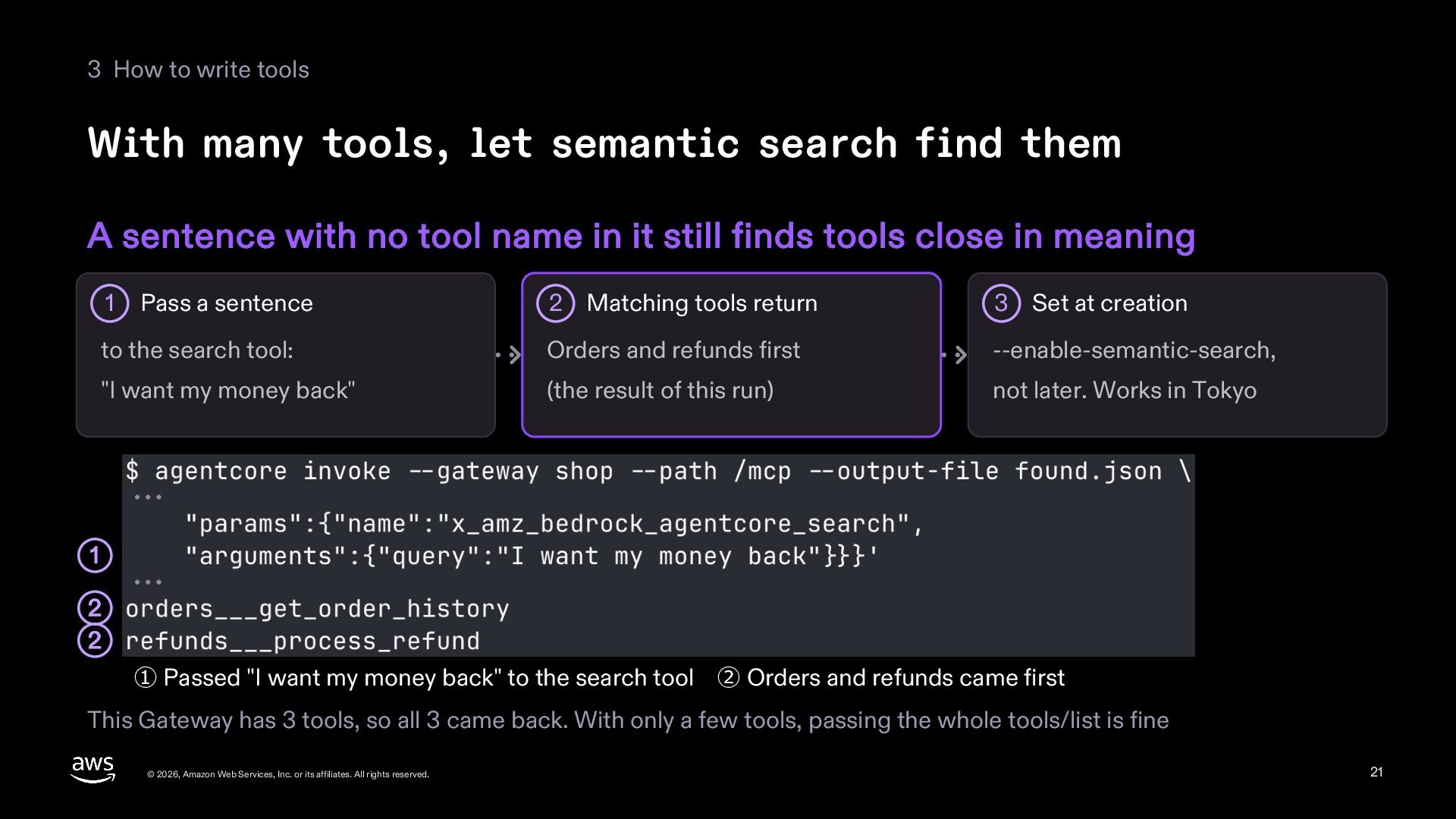
3 How to write tools With many tools, let semantic
search find them A sentence with no tool name in it still finds tools close in meaning 2 Matching tools return 3 Set at creation to the search tool: Orders and refunds first --enable-semantic-search, "I want my money back" (the result of this run) not later. Works in Tokyo 1 Pass a sentence 1 2 2 ① Passed "I want my money back" to the search tool ② Orders and refunds came first This Gateway has 3 tools, so all 3 came back. With only a few tools, passing the whole tools/list is fine © 2026, Amazon Web Services, Inc. or its affiliates. All rights reserved. 21 -
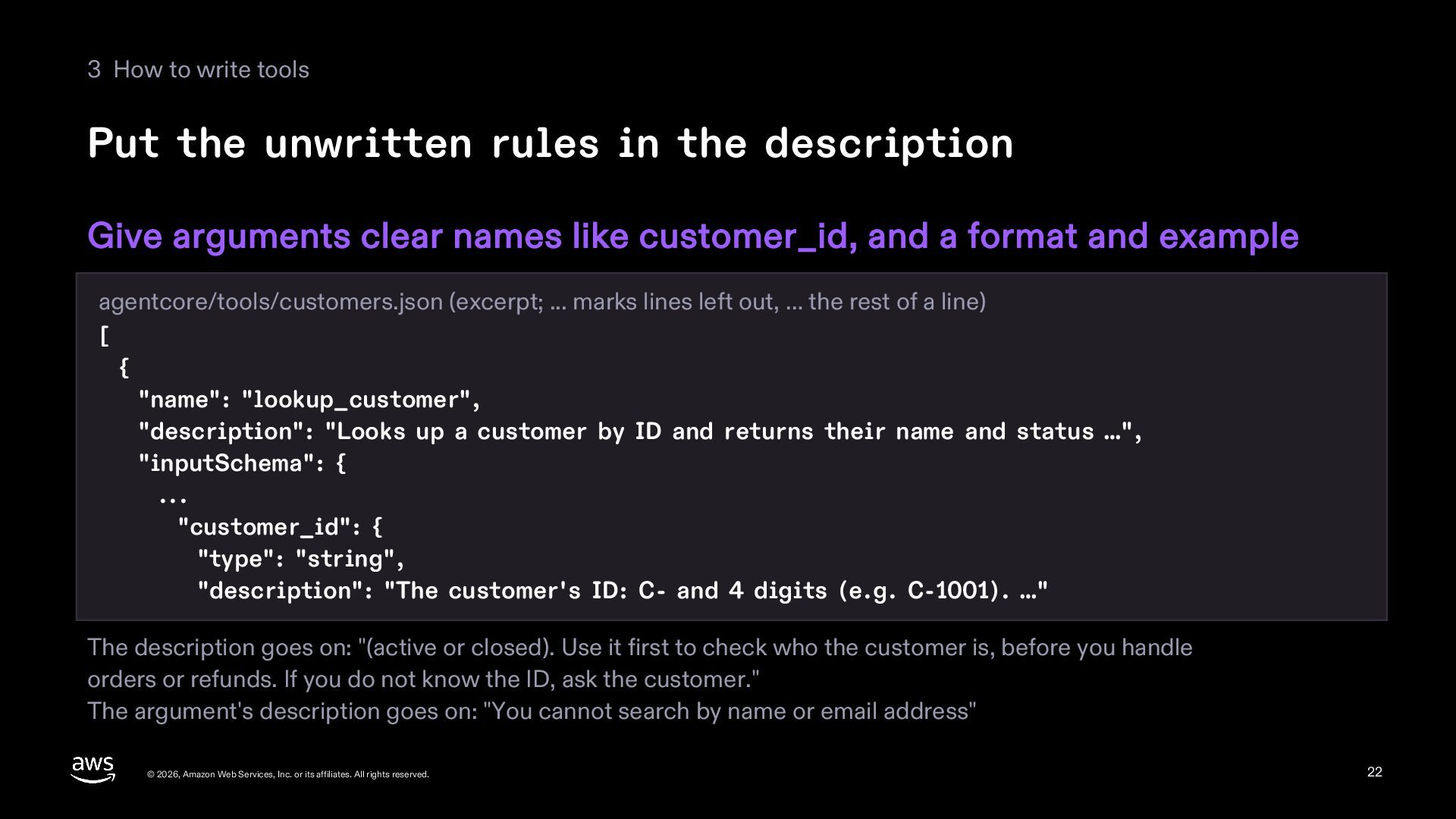
3 How to write tools Put the unwritten rules in
the description Give arguments clear names like customer_id, and a format and example agentcore/tools/customers.json (excerpt; ... marks lines left out, … the rest of a line) [ { "name": "lookup_customer", "description": "Looks up a customer by ID and returns their name and status …", "inputSchema": { ... "customer_id": { "type": "string", "description": "The customer's ID: C- and 4 digits (e.g. C-1001). …" The description goes on: "(active or closed). Use it first to check who the customer is, before you handle orders or refunds. If you do not know the ID, ask the customer." The argument's description goes on: "You cannot search by name or email address" © 2026, Amazon Web Services, Inc. or its affiliates. All rights reserved. 22 -
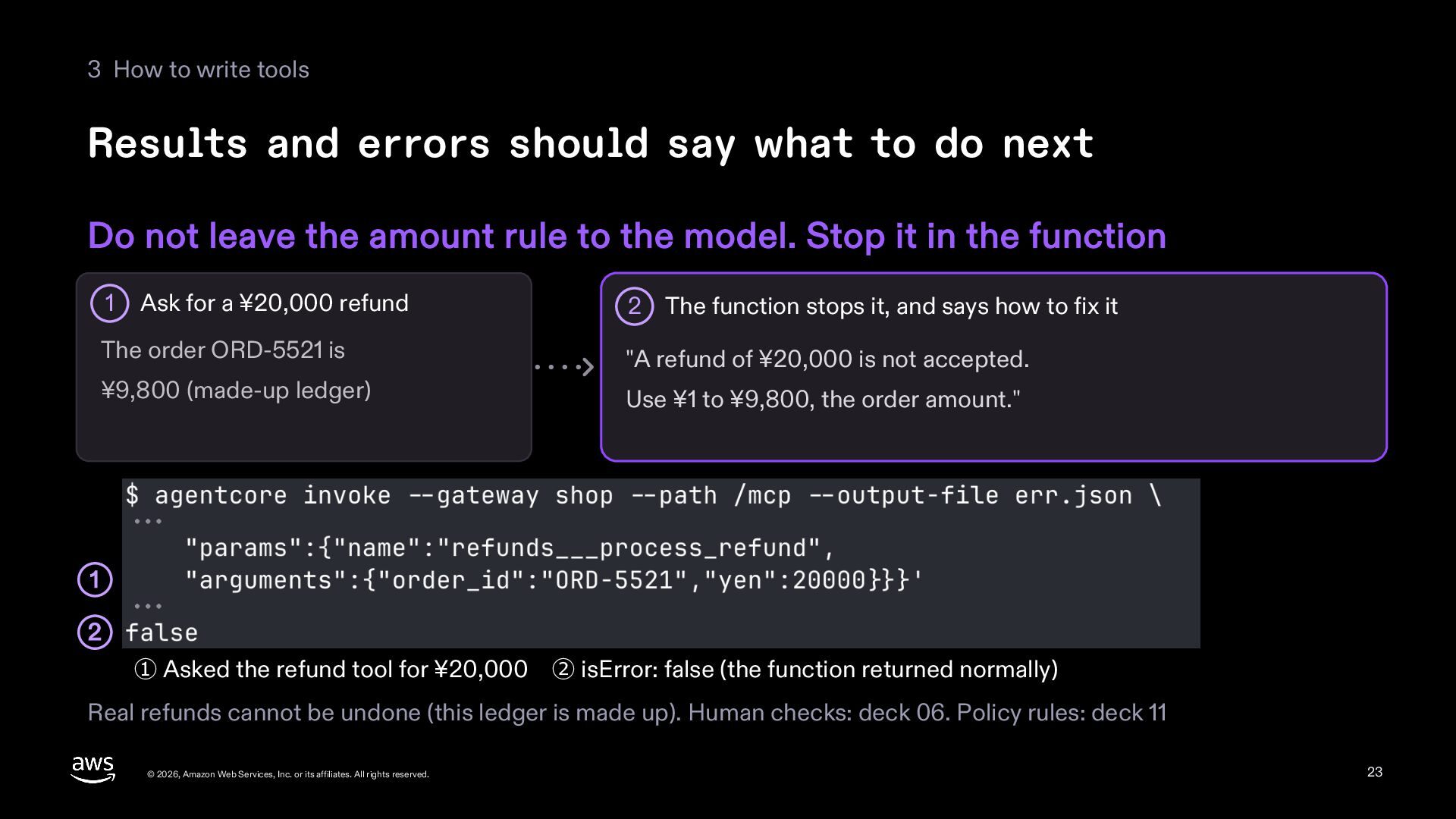
3 How to write tools Results and errors should say
what to do next Do not leave the amount rule to the model. Stop it in the function 1 Ask for a ¥20,000 refund 2 The function stops it, and says how to fix it The order ORD-5521 is "A refund of ¥20,000 is not accepted. ¥9,800 (made-up ledger) Use ¥1 to ¥9,800, the order amount." 1 2 ① Asked the refund tool for ¥20,000 ② isError: false (the function returned normally) Real refunds cannot be undone (this ledger is made up). Human checks: deck 06. Policy rules: deck 11 © 2026, Amazon Web Services, Inc. or its affiliates. All rights reserved. 23 -
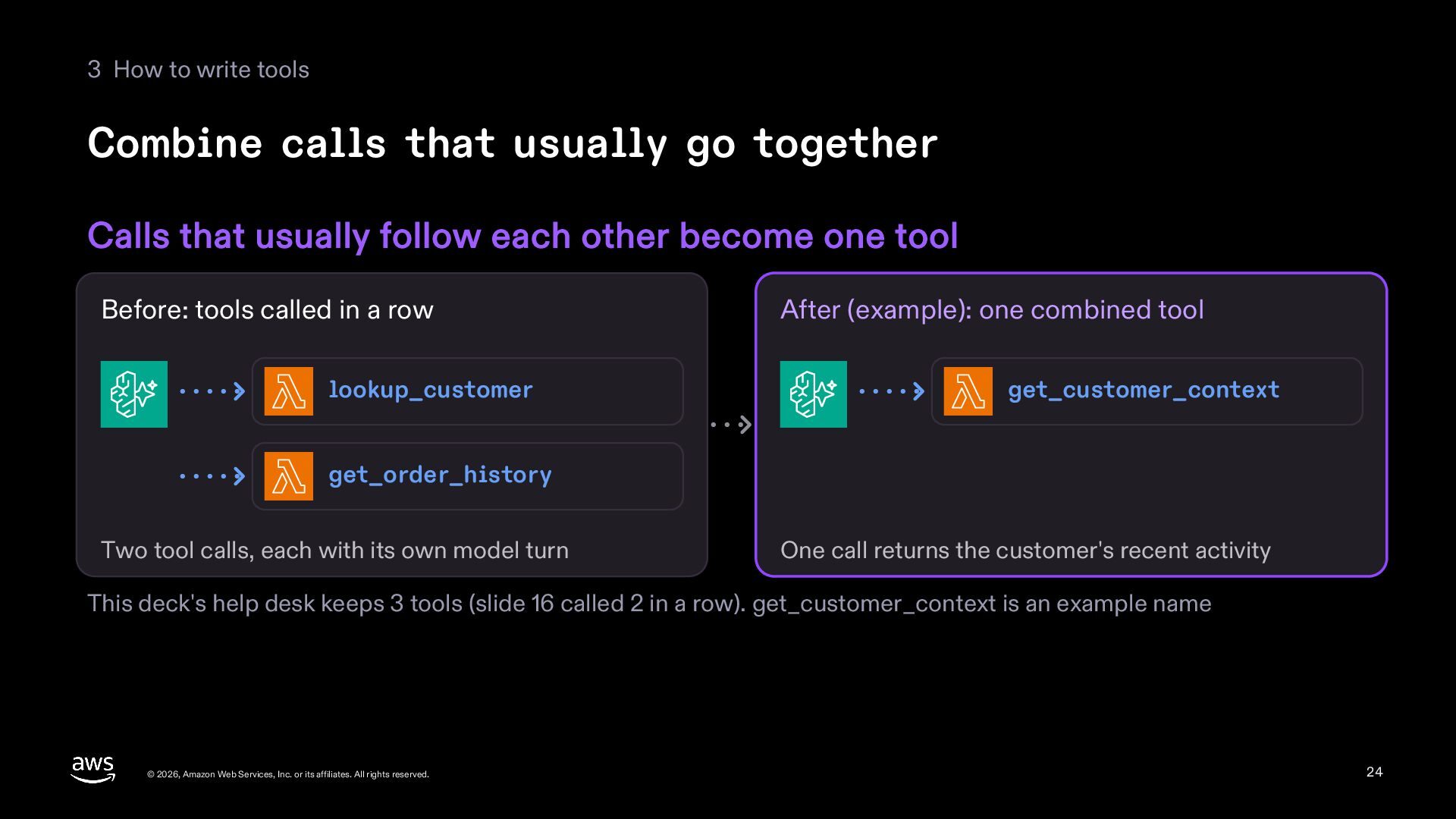
3 How to write tools Combine calls that usually go
together Calls that usually follow each other become one tool Before: tools called in a row lookup_customer After (example): one combined tool get_customer_context get_order_history Two tool calls, each with its own model turn One call returns the customer's recent activity This deck's help desk keeps 3 tools (slide 16 called 2 in a row). get_customer_context is an example name © 2026, Amazon Web Services, Inc. or its affiliates. All rights reserved. 24 -
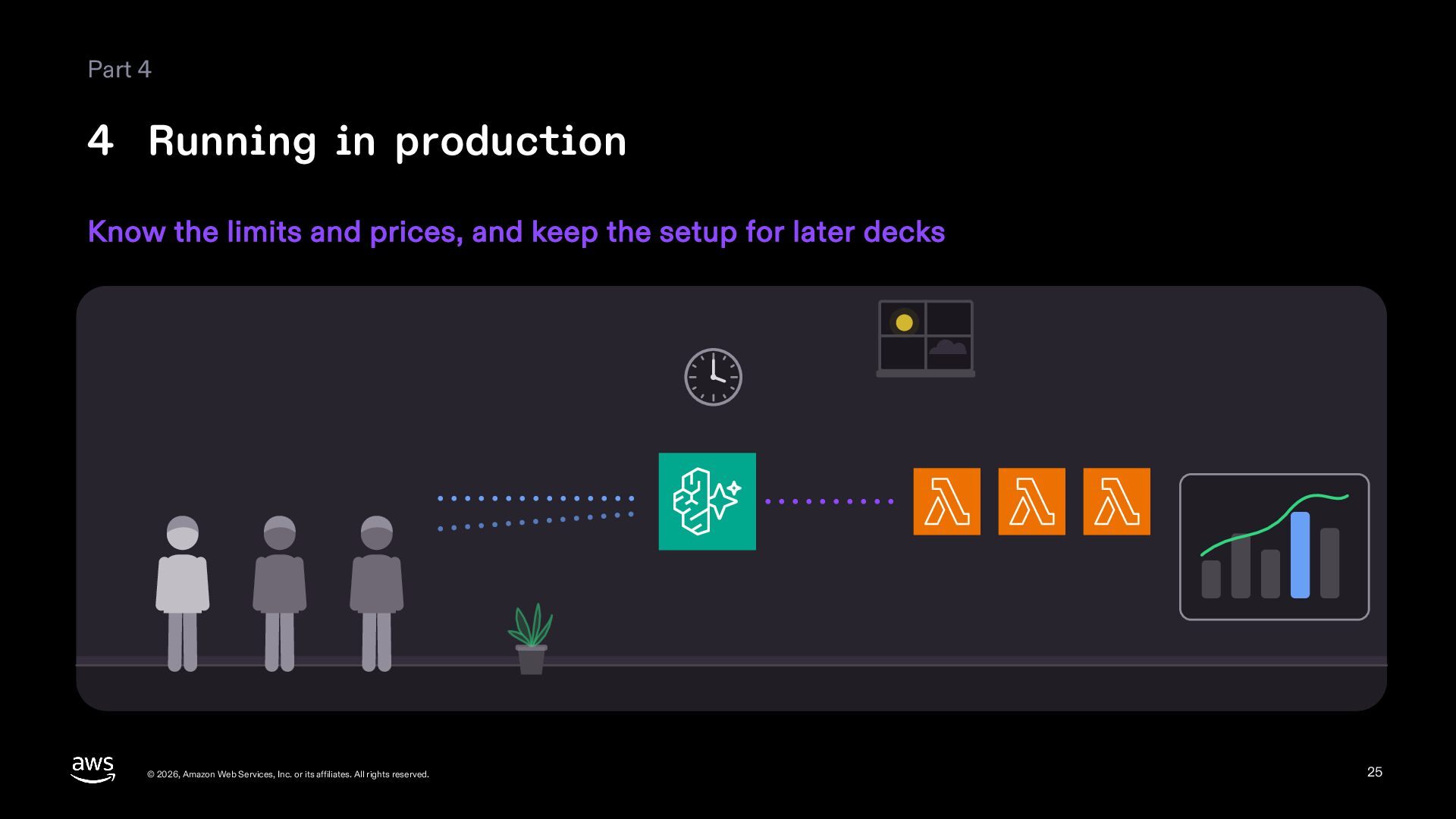
Part 4 4 Running in production Know the limits and
prices, and keep the setup for later decks © 2026, Amazon Web Services, Inc. or its affiliates. All rights reserved. 25 -
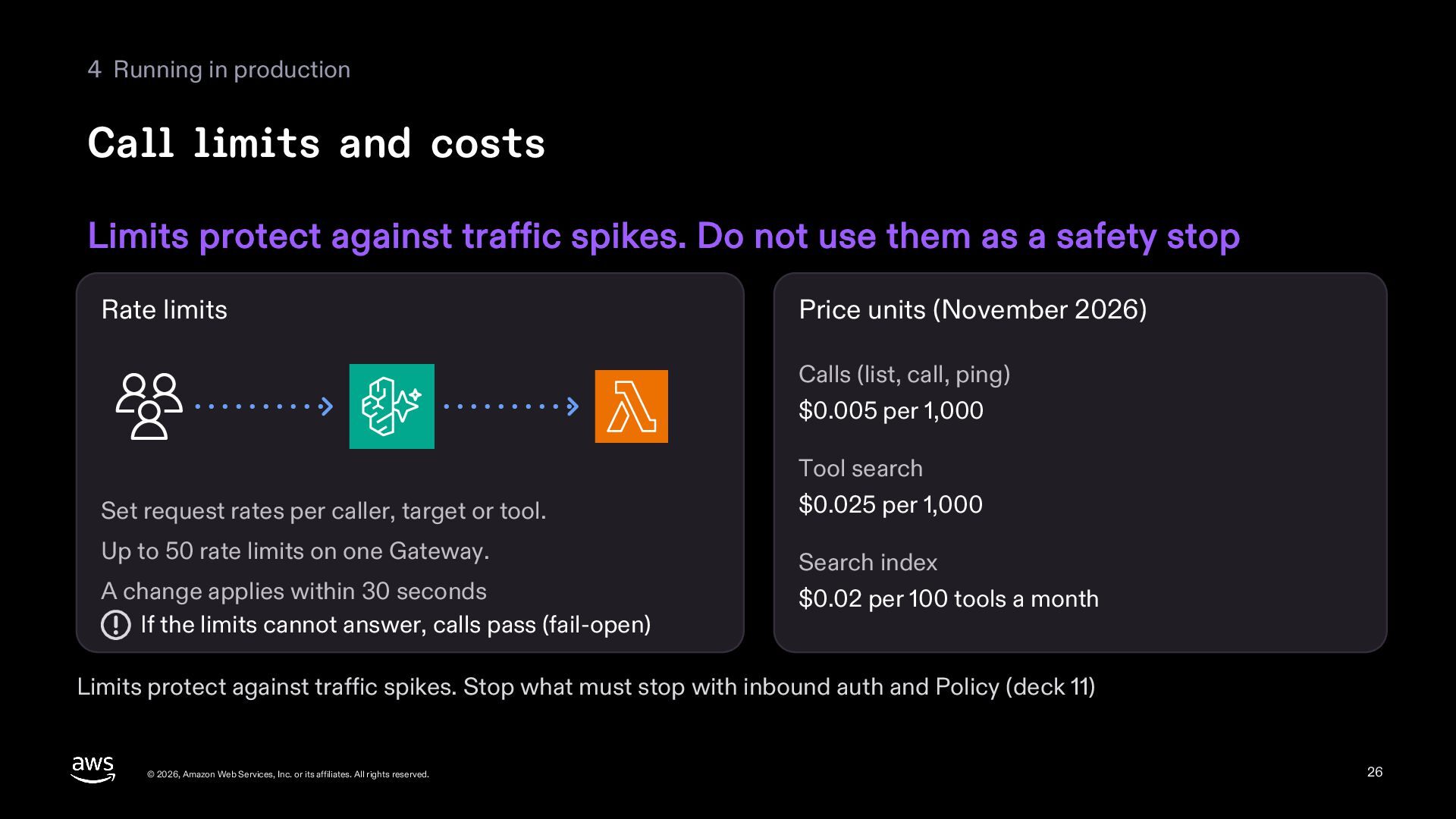
4 Running in production Call limits and costs Limits protect
against traffic spikes. Do not use them as a safety stop Rate limits Price units (November 2026) Calls (list, call, ping) $0.005 per 1,000 Tool search Set request rates per caller, target or tool. $0.025 per 1,000 Up to 50 rate limits on one Gateway. Search index A change applies within 30 seconds If the limits cannot answer, calls pass (fail-open) $0.02 per 100 tools a month Limits protect against traffic spikes. Stop what must stop with inbound auth and Policy (deck 11) © 2026, Amazon Web Services, Inc. or its affiliates. All rights reserved. 26 -
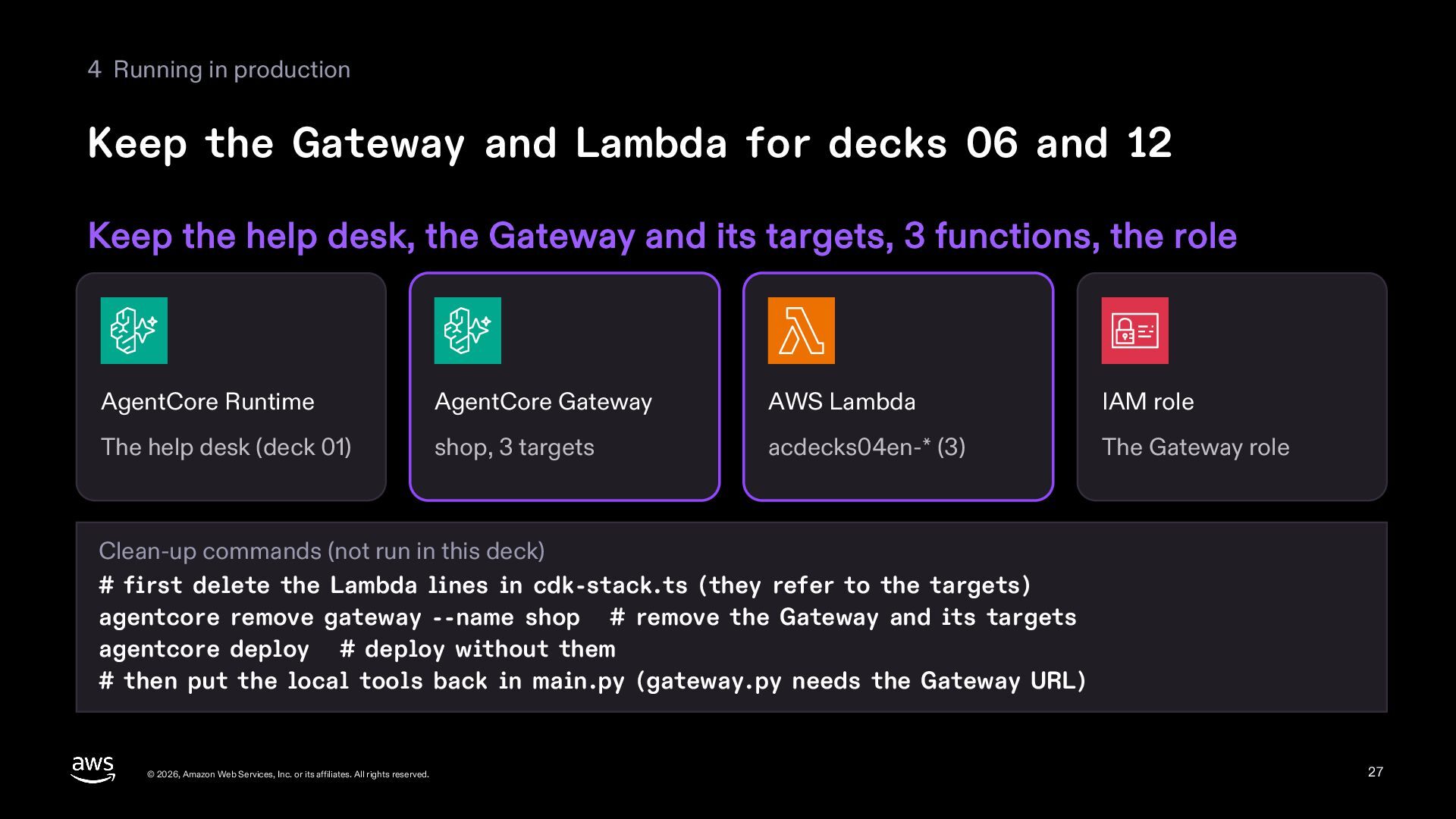
4 Running in production Keep the Gateway and Lambda for
decks 06 and 12 Keep the help desk, the Gateway and its targets, 3 functions, the role AgentCore Runtime AgentCore Gateway AWS Lambda IAM role The help desk (deck 01) shop, 3 targets acdecks04en-* (3) The Gateway role Clean-up commands (not run in this deck) # first delete the Lambda lines in cdk-stack.ts (they refer to the targets) agentcore remove gateway --name shop # remove the Gateway and its targets agentcore deploy # deploy without them # then put the local tools back in main.py (gateway.py needs the Gateway URL) © 2026, Amazon Web Services, Inc. or its affiliates. All rights reserved. 27 -
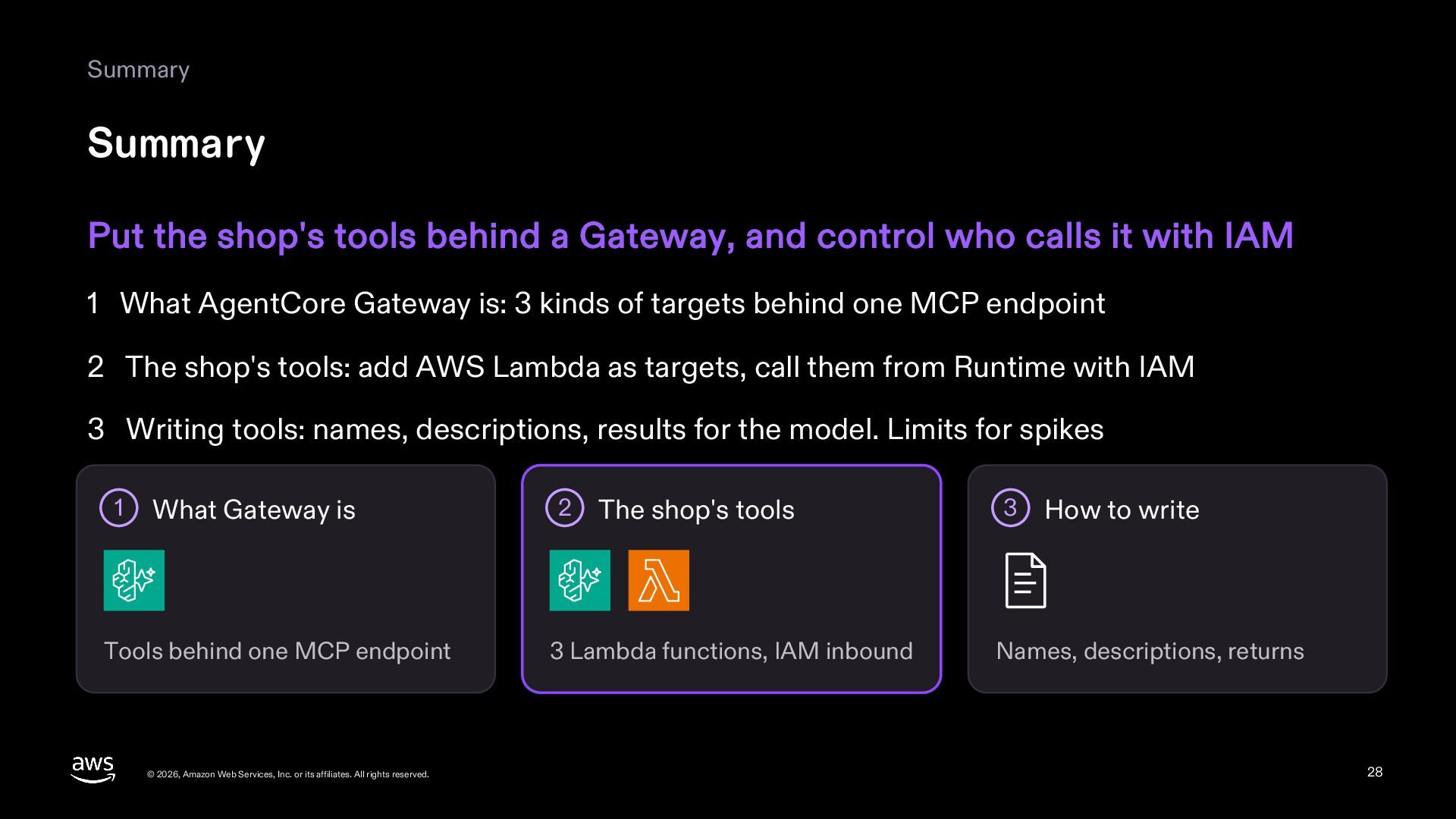
Summary Summary Put the shop's tools behind a Gateway, and
control who calls it with IAM 1 What AgentCore Gateway is: 3 kinds of targets behind one MCP endpoint 2 The shop's tools: add AWS Lambda as targets, call them from Runtime with IAM 3 Writing tools: names, descriptions, results for the model. Limits for spikes 1 What Gateway is Tools behind one MCP endpoint © 2026, Amazon Web Services, Inc. or its affiliates. All rights reserved. 2 The shop's tools 3 Lambda functions, IAM inbound 3 How to write Names, descriptions, returns 28 -
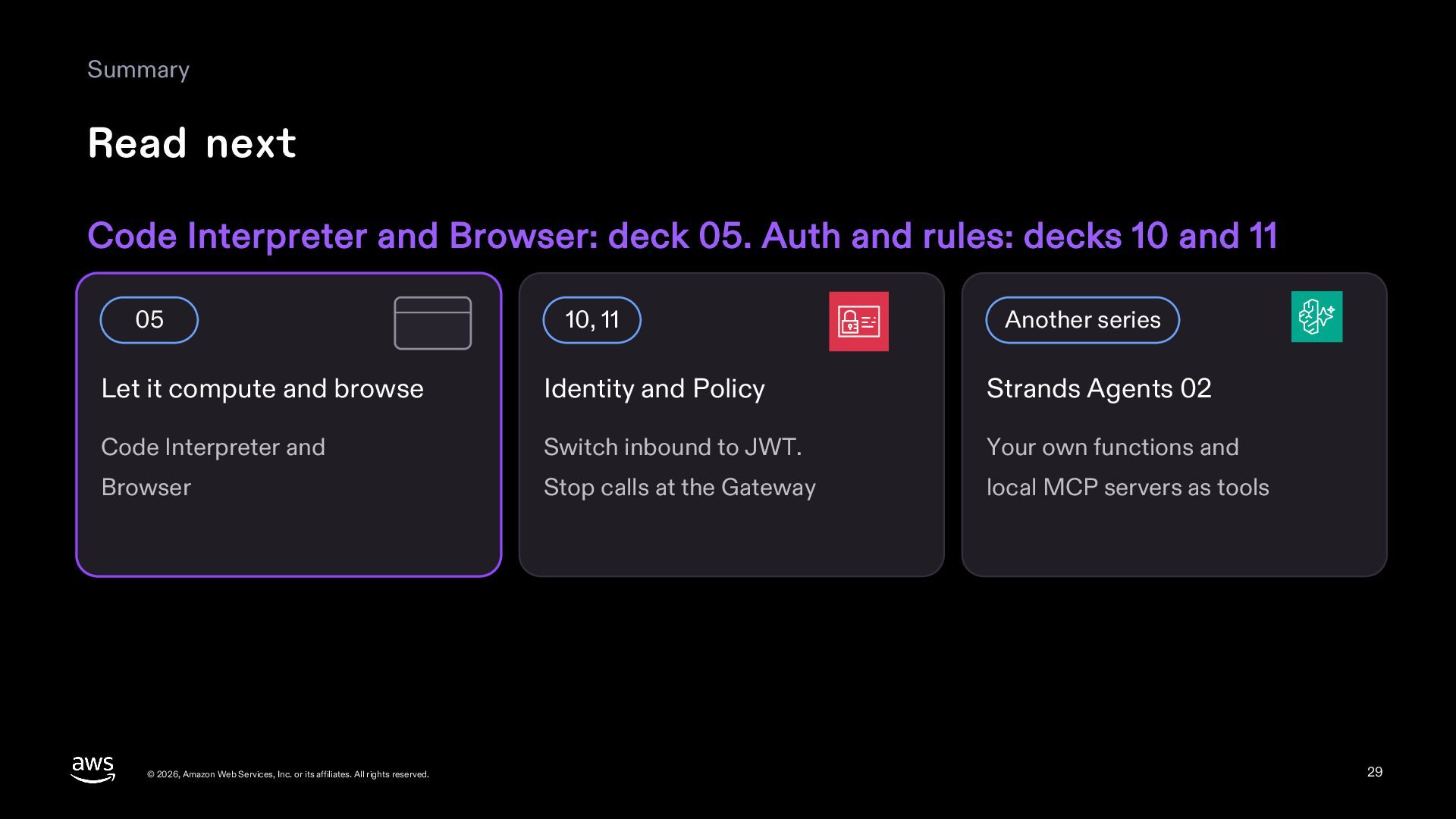
Summary Read next Code Interpreter and Browser: deck 05. Auth
and rules: decks 10 and 11 05 10, 11 Another series Let it compute and browse Identity and Policy Strands Agents 02 Code Interpreter and Switch inbound to JWT. Your own functions and Browser Stop calls at the Gateway local MCP servers as tools © 2026, Amazon Web Services, Inc. or its affiliates. All rights reserved. 29 -
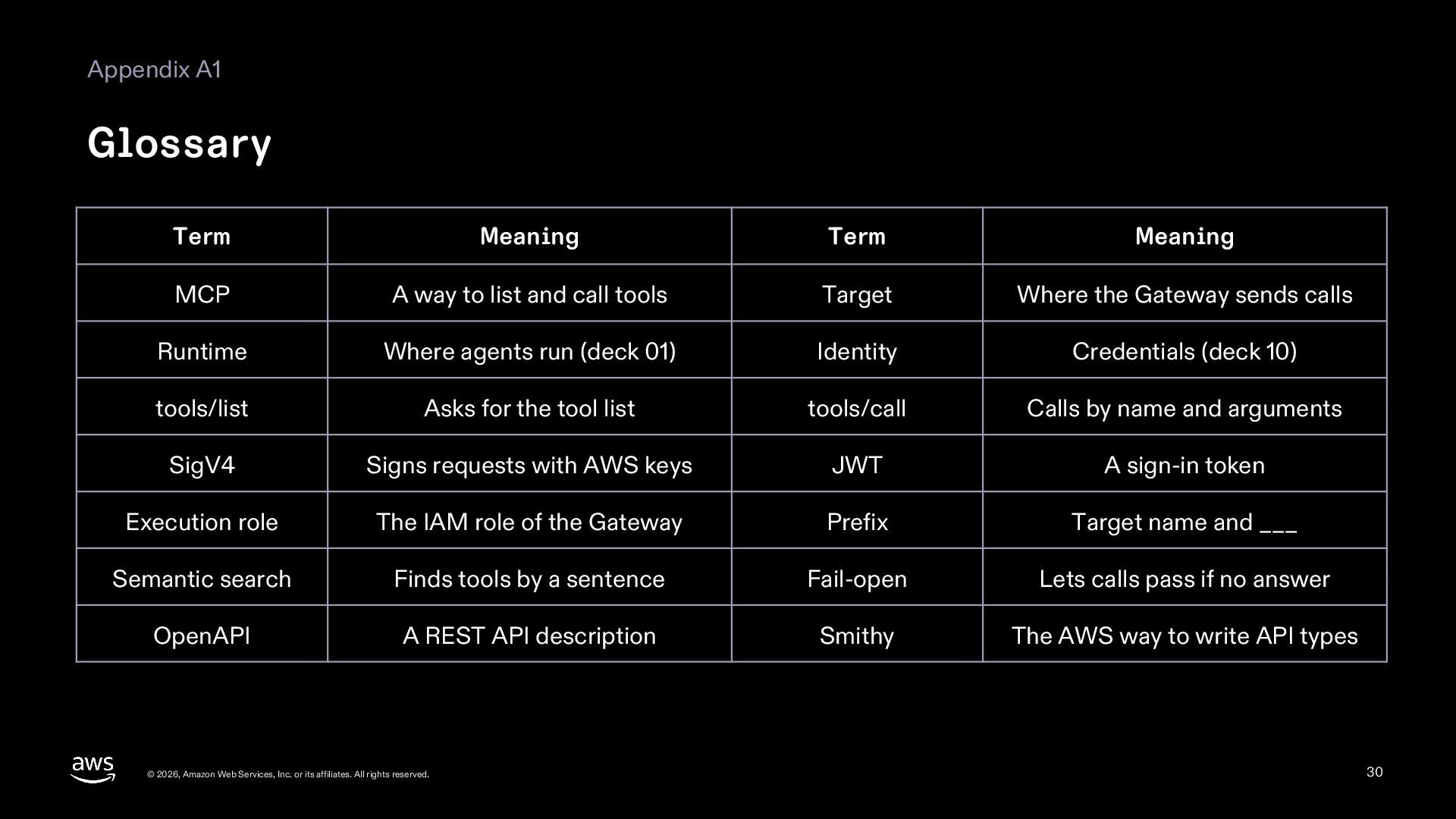
Appendix A1 Glossary Term Meaning Term Meaning MCP A way
to list and call tools Target Where the Gateway sends calls Runtime Where agents run (deck 01) Identity Credentials (deck 10) tools/list Asks for the tool list tools/call Calls by name and arguments SigV4 Signs requests with AWS keys JWT A sign-in token Execution role The IAM role of the Gateway Prefix Target name and ___ Semantic search Finds tools by a sentence Fail-open Lets calls pass if no answer OpenAPI A REST API description Smithy The AWS way to write API types © 2026, Amazon Web Services, Inc. or its affiliates. All rights reserved. 30 -
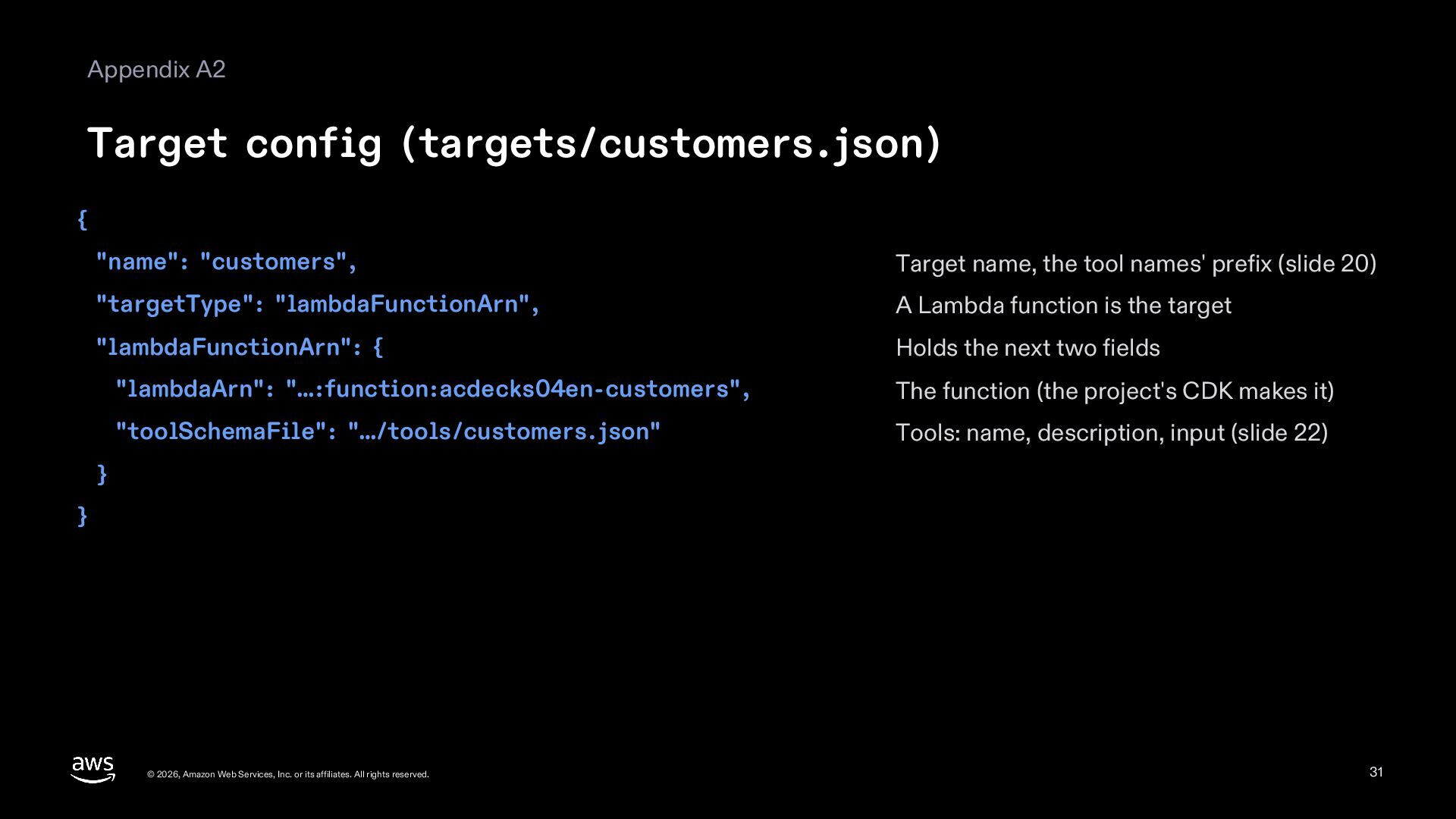
Appendix A2 Target config (targets/customers.json) { "name": "customers", Target name,
the tool names' prefix (slide 20) "targetType": "lambdaFunctionArn", A Lambda function is the target "lambdaFunctionArn": { Holds the next two fields "lambdaArn": "…:function:acdecks04en-customers", The function (the project's CDK makes it) "toolSchemaFile": "…/tools/customers.json" Tools: name, description, input (slide 22) } } © 2026, Amazon Web Services, Inc. or its affiliates. All rights reserved. 31 -
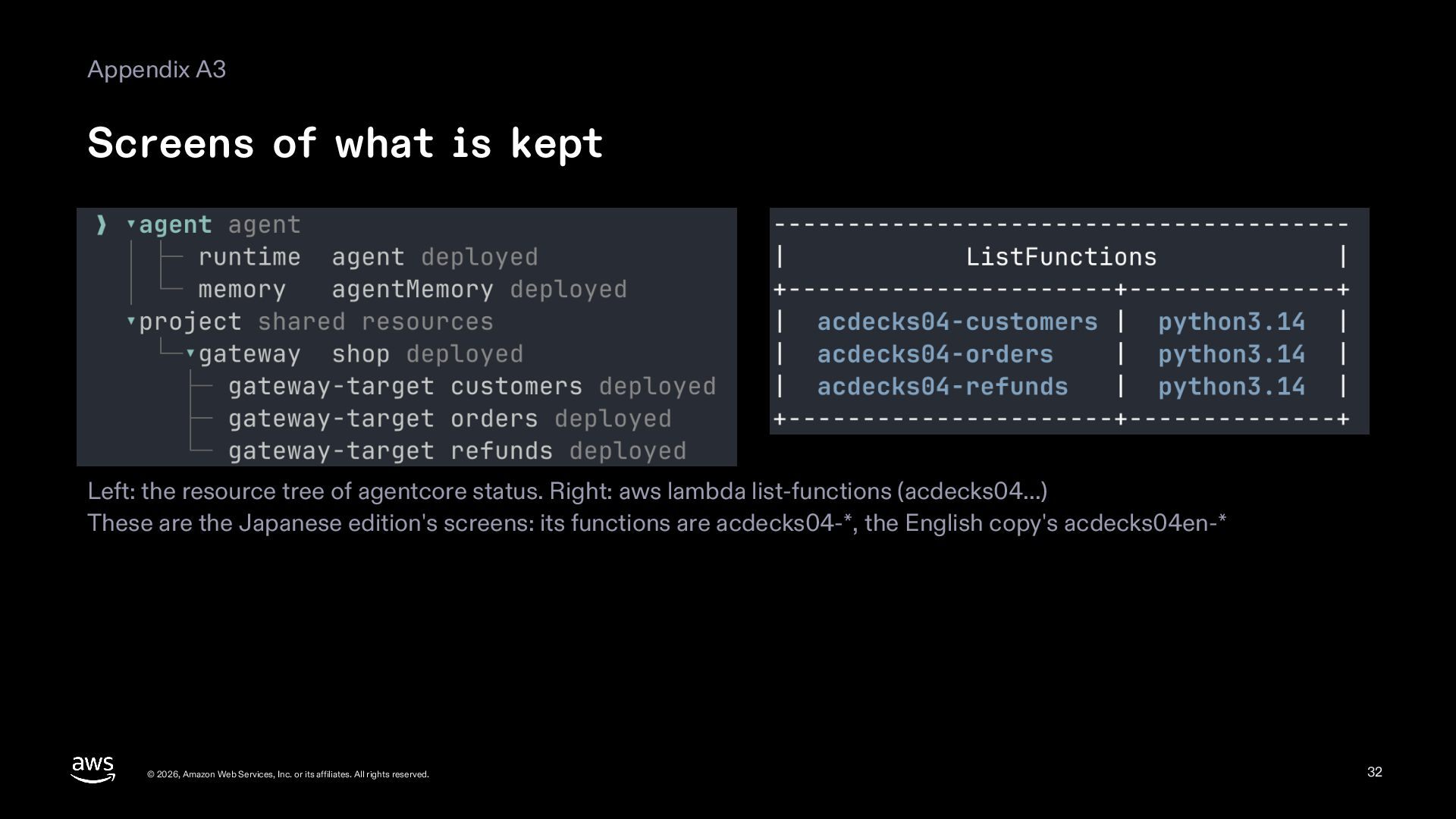
Appendix A3 Screens of what is kept Left: the resource
tree of agentcore status. Right: aws lambda list-functions (acdecks04...) These are the Japanese edition's screens: its functions are acdecks04-*, the English copy's acdecks04en-* © 2026, Amazon Web Services, Inc. or its affiliates. All rights reserved. 32 -
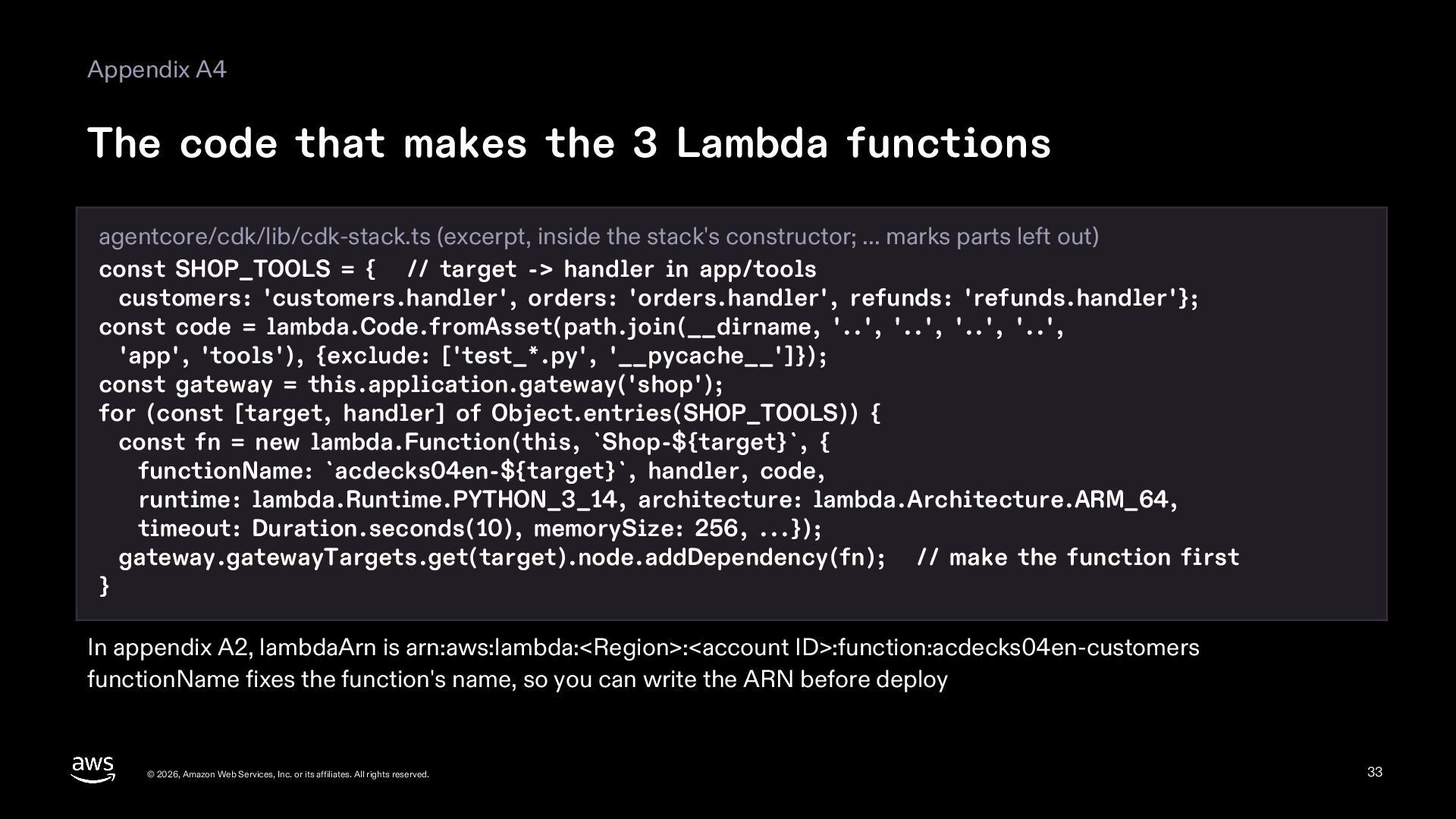
Appendix A4 The code that makes the 3 Lambda functions
agentcore/cdk/lib/cdk-stack.ts (excerpt, inside the stack's constructor; ... marks parts left out) const SHOP_TOOLS = { // target -> handler in app/tools customers: 'customers.handler', orders: 'orders.handler', refunds: 'refunds.handler'}; const code = lambda.Code.fromAsset(path.join(__dirname, '..', '..', '..', '..', 'app', 'tools'), {exclude: ['test_*.py', '__pycache__']}); const gateway = this.application.gateway('shop'); for (const [target, handler] of Object.entries(SHOP_TOOLS)) { const fn = new lambda.Function(this, `Shop-${target}`, { functionName: `acdecks04en-${target}`, handler, code, runtime: lambda.Runtime.PYTHON_3_14, architecture: lambda.Architecture.ARM_64, timeout: Duration.seconds(10), memorySize: 256, ...}); gateway.gatewayTargets.get(target).node.addDependency(fn); // make the function first } In appendix A2, lambdaArn is arn:aws:lambda:<Region>:<account ID>:function:acdecks04en-customers functionName fixes the function's name, so you can write the ARN before deploy © 2026, Amazon Web Services, Inc. or its affiliates. All rights reserved. 33 -
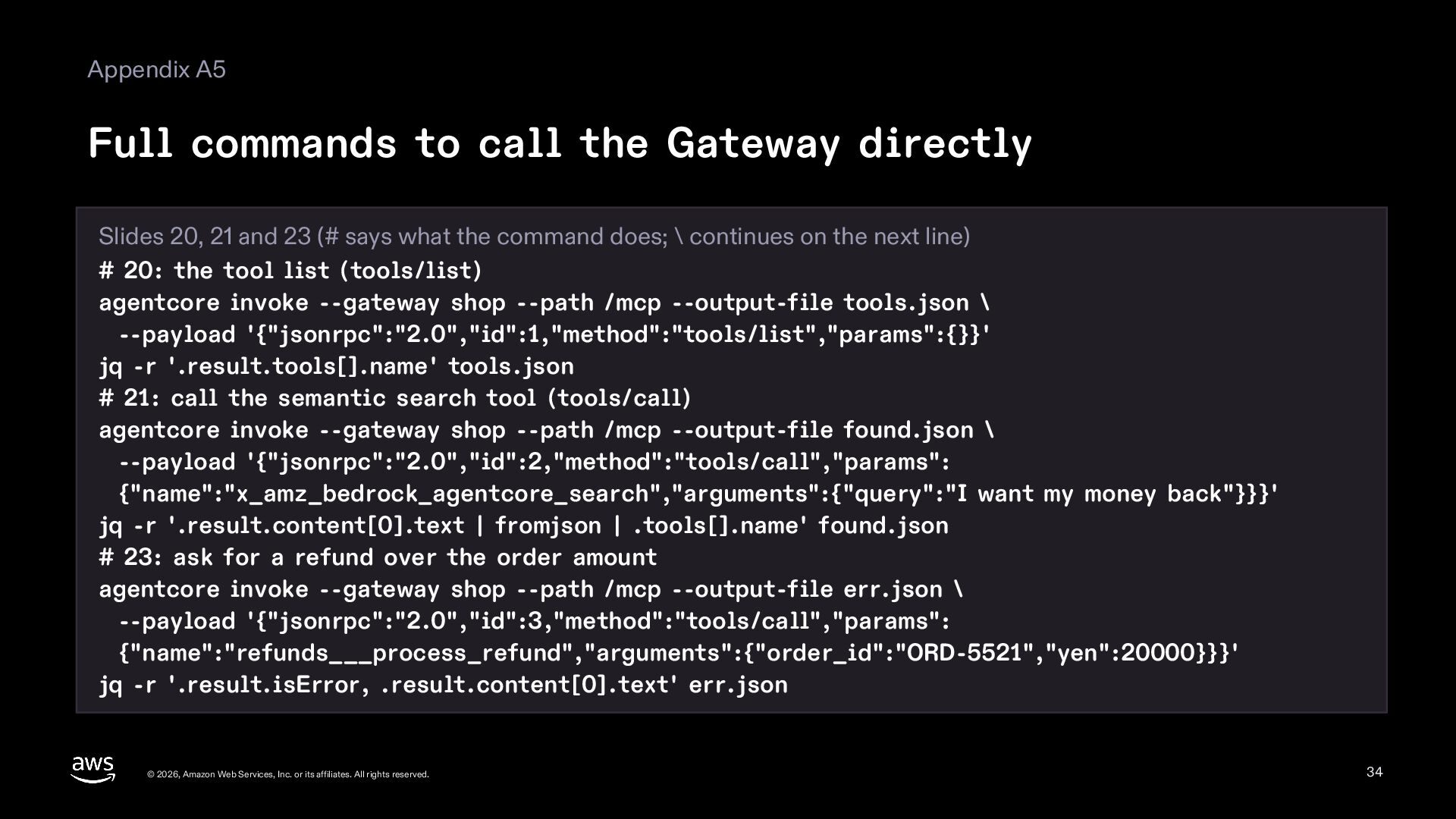
Appendix A5 Full commands to call the Gateway directly Slides
20, 21 and 23 (# says what the command does; \ continues on the next line) # 20: the tool list (tools/list) agentcore invoke --gateway shop --path /mcp --output-file tools.json \ --payload '{"jsonrpc":"2.0","id":1,"method":"tools/list","params":{}}' jq -r '.result.tools[].name' tools.json # 21: call the semantic search tool (tools/call) agentcore invoke --gateway shop --path /mcp --output-file found.json \ --payload '{"jsonrpc":"2.0","id":2,"method":"tools/call","params": {"name":"x_amz_bedrock_agentcore_search","arguments":{"query":"I want my money back"}}}' jq -r '.result.content[0].text | fromjson | .tools[].name' found.json # 23: ask for a refund over the order amount agentcore invoke --gateway shop --path /mcp --output-file err.json \ --payload '{"jsonrpc":"2.0","id":3,"method":"tools/call","params": {"name":"refunds___process_refund","arguments":{"order_id":"ORD-5521","yen":20000}}}' jq -r '.result.isError, .result.content[0].text' err.json © 2026, Amazon Web Services, Inc. or its affiliates. All rights reserved. 34 -
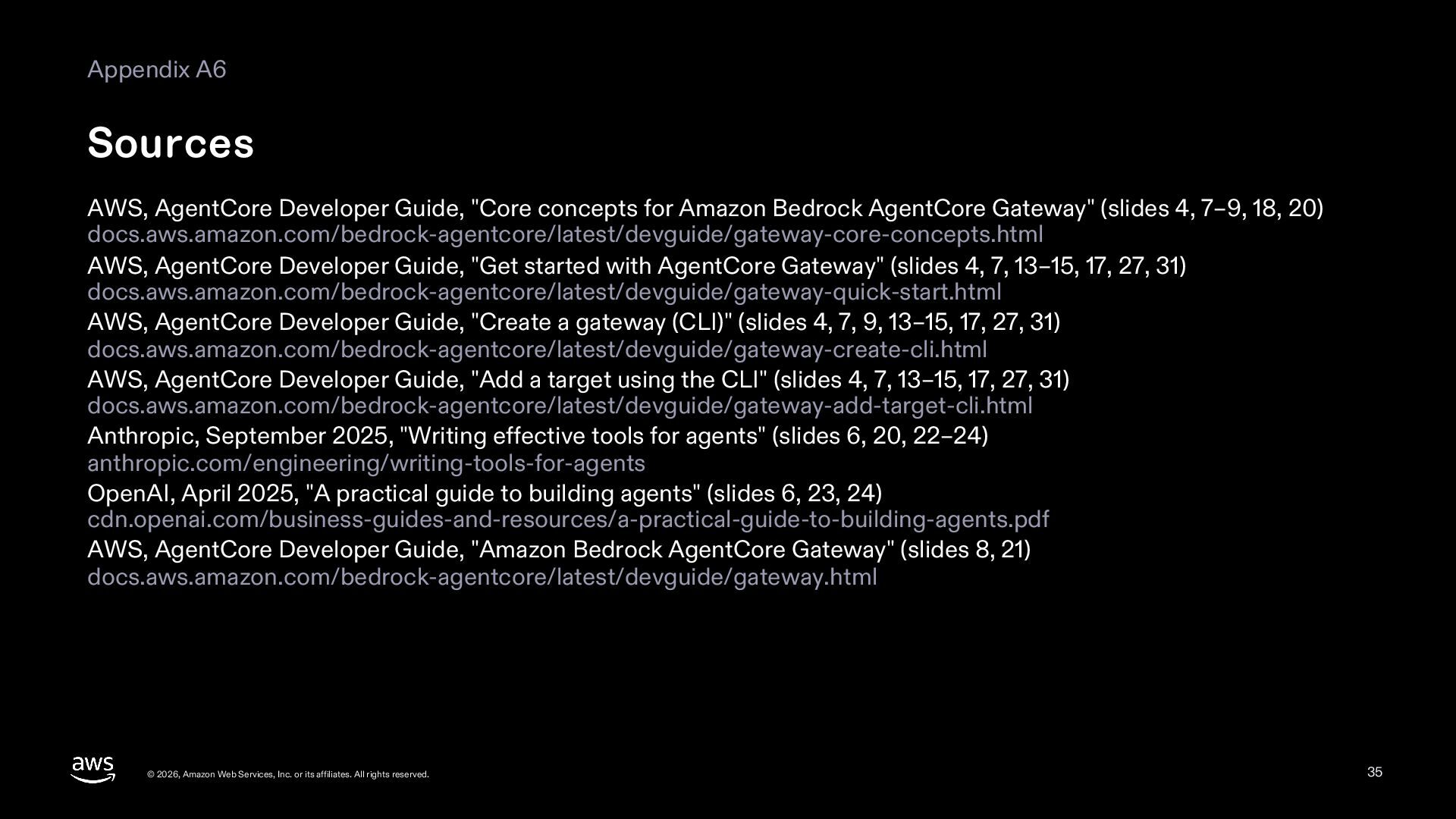
Appendix A6 Sources AWS, AgentCore Developer Guide, "Core concepts for
Amazon Bedrock AgentCore Gateway" (slides 4, 7–9, 18, 20) docs.aws.amazon.com/bedrock-agentcore/latest/devguide/gateway-core-concepts.html AWS, AgentCore Developer Guide, "Get started with AgentCore Gateway" (slides 4, 7, 13–15, 17, 27, 31) docs.aws.amazon.com/bedrock-agentcore/latest/devguide/gateway-quick-start.html AWS, AgentCore Developer Guide, "Create a gateway (CLI)" (slides 4, 7, 9, 13–15, 17, 27, 31) docs.aws.amazon.com/bedrock-agentcore/latest/devguide/gateway-create-cli.html AWS, AgentCore Developer Guide, "Add a target using the CLI" (slides 4, 7, 13–15, 17, 27, 31) docs.aws.amazon.com/bedrock-agentcore/latest/devguide/gateway-add-target-cli.html Anthropic, September 2025, "Writing effective tools for agents" (slides 6, 20, 22–24) anthropic.com/engineering/writing-tools-for-agents OpenAI, April 2025, "A practical guide to building agents" (slides 6, 23, 24) cdn.openai.com/business-guides-and-resources/a-practical-guide-to-building-agents.pdf AWS, AgentCore Developer Guide, "Amazon Bedrock AgentCore Gateway" (slides 8, 21) docs.aws.amazon.com/bedrock-agentcore/latest/devguide/gateway.html © 2026, Amazon Web Services, Inc. or its affiliates. All rights reserved. 35 -
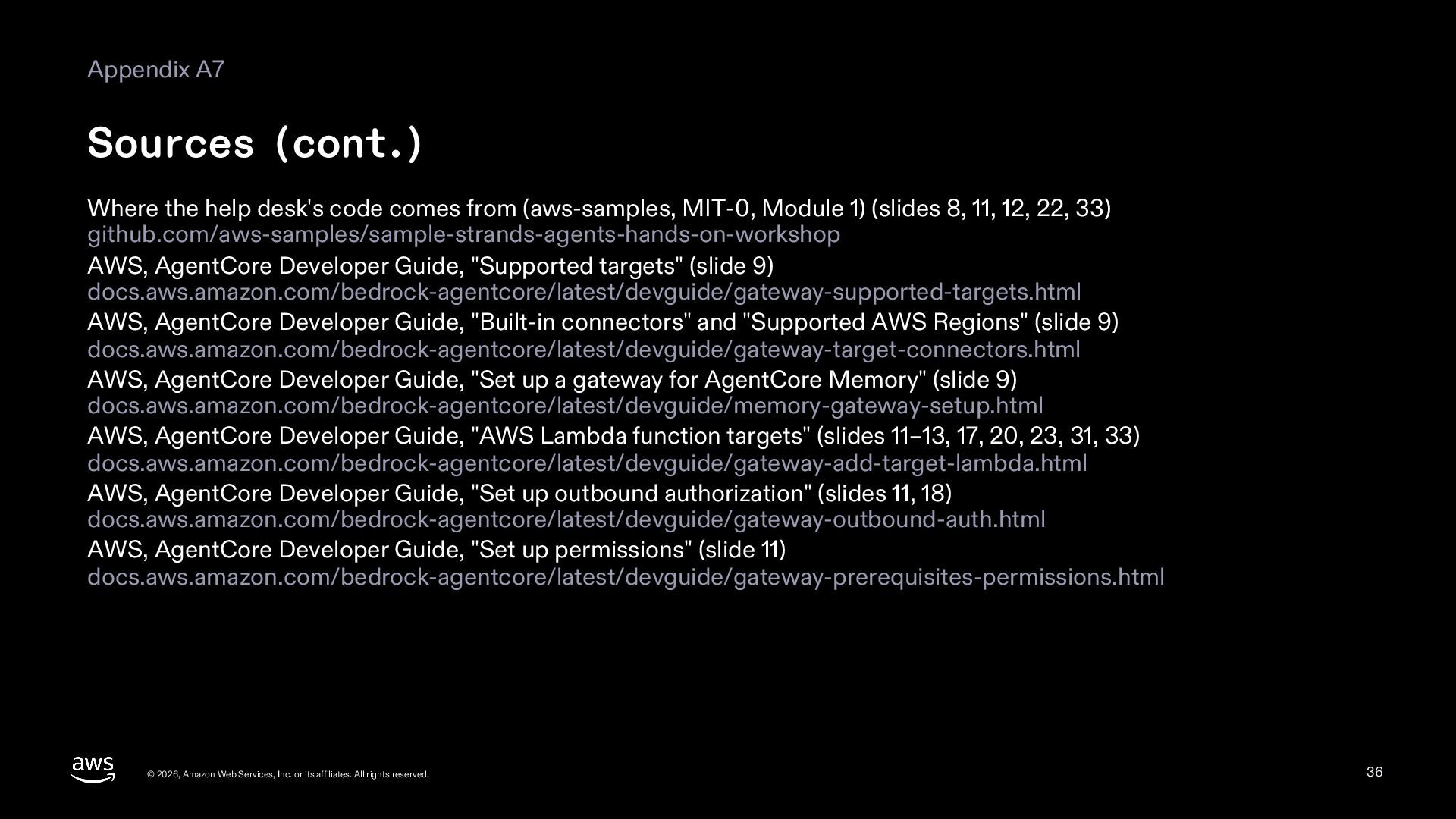
Appendix A7 Sources (cont.) Where the help desk's code comes
from (aws-samples, MIT-0, Module 1) (slides 8, 11, 12, 22, 33) github.com/aws-samples/sample-strands-agents-hands-on-workshop AWS, AgentCore Developer Guide, "Supported targets" (slide 9) docs.aws.amazon.com/bedrock-agentcore/latest/devguide/gateway-supported-targets.html AWS, AgentCore Developer Guide, "Built-in connectors" and "Supported AWS Regions" (slide 9) docs.aws.amazon.com/bedrock-agentcore/latest/devguide/gateway-target-connectors.html AWS, AgentCore Developer Guide, "Set up a gateway for AgentCore Memory" (slide 9) docs.aws.amazon.com/bedrock-agentcore/latest/devguide/memory-gateway-setup.html AWS, AgentCore Developer Guide, "AWS Lambda function targets" (slides 11–13, 17, 20, 23, 31, 33) docs.aws.amazon.com/bedrock-agentcore/latest/devguide/gateway-add-target-lambda.html AWS, AgentCore Developer Guide, "Set up outbound authorization" (slides 11, 18) docs.aws.amazon.com/bedrock-agentcore/latest/devguide/gateway-outbound-auth.html AWS, AgentCore Developer Guide, "Set up permissions" (slide 11) docs.aws.amazon.com/bedrock-agentcore/latest/devguide/gateway-prerequisites-permissions.html © 2026, Amazon Web Services, Inc. or its affiliates. All rights reserved. 36 -
Appendix A8 Sources (cont.) AWS, AgentCore Developer Guide, "Understand how
AgentCore Gateway tools are named" (slides 12, 20) docs.aws.amazon.com/bedrock-agentcore/latest/devguide/gateway-tool-naming.html AWS, AgentCore Developer Guide, "Example: AgentCore CLI gateway authorization" (slide 13) docs.aws.amazon.com/bedrock-agentcore/latest/devguide/gateway-using-auth-ex-starter.html AWS, AgentCore Developer Guide, "Create a gateway" (slides 13, 21) docs.aws.amazon.com/bedrock-agentcore/latest/devguide/gateway-create.html AWS, mcp-proxy-for-aws (signs MCP calls with SigV4) (slide 14) github.com/aws/mcp-proxy-for-aws AWS, AgentCore Developer Guide, "Set up inbound authorization" (slide 17) docs.aws.amazon.com/bedrock-agentcore/latest/devguide/gateway-inbound-auth.html AWS, AgentCore Developer Guide, "Search for tools in your AgentCore gateway" (slide 21) docs.aws.amazon.com/bedrock-agentcore/latest/devguide/gateway-using-mcp-semantic-search.html AWS, AgentCore Developer Guide, "Add rate limits to a gateway" and "Rate limit enforcement" (slide 26) docs.aws.amazon.com/bedrock-agentcore/latest/devguide/gateway-rate-limits.html © 2026, Amazon Web Services, Inc. or its affiliates. All rights reserved. 37 -
Appendix A9 Sources (cont.) AWS, AgentCore Developer Guide, "AgentCore Gateway
Service Quotas" (slide 26) docs.aws.amazon.com/bedrock-agentcore/latest/devguide/bedrock-agentcore-limits.html AWS, AgentCore Developer Guide, "Gateway interceptors" (slide 26) docs.aws.amazon.com/bedrock-agentcore/latest/devguide/gateway-interceptors.html AWS, AgentCore Developer Guide, "AWS WAF" (slide 26) docs.aws.amazon.com/bedrock-agentcore/latest/devguide/gateway-waf.html AWS, Amazon Bedrock AgentCore pricing, the Gateway rows (slide 26) aws.amazon.com/bedrock/agentcore/pricing/ © 2026, Amazon Web Services, Inc. or its affiliates. All rights reserved. 38
 inariku
 suh1101
 rokuosan
 nenonaninu
 sansan33
 nakker1218
 kaminashi
 ar_tama
 anatofuz
 yamakenji24
 hinalin
 kazeburo
 kumaiu
 thirion
 nmsamuel
 joshbly
 baasie
 asonas
 malarkey
 ianozsvald
 katiecoart
 techseoconnect
 raygrieselhuber
 aleyda
 apolaine