Share
Embed
Hand over intent as specs (Requirements, a done condition, and tests that check them) | Learn Harness Engineering with Kiro 03
Level 300. This deck shows how to hand your intent to Kiro as a spec: expand a one-sentence request into requirements with EARS acceptance criteria, decide what done looks like before the work starts, and write down what must not change. On a small booking app, it then connects the spec to checks, with property-based tests that find a counterexample and mutation testing that shows weak tests as a number. This is deck 03 (Guide pillar) of the "Learn Harness Engineering with Kiro" series.

Riku INADA PRO
November 11, 2026
Annual Pro sale · Save $30
Have presentations of your own?
Share with private links, password protection, and more control over your work.
Transcript
33 slides
-
Learn Harness Engineering with Kiro Guide Level 300 Hand over
intent as specs Specs, plans, and property-based tests 03 As of November 2026 November 2026 Riku Inada Amazon Web Services Japan + Kiro + Harness Engineering © 2026, Amazon Web Services, Inc. or its affiliates. All rights reserved. 1 -
Introduction About me Riku Inada Amazon Web Services Japan G.K.
Solutions Architect Works mainly with manufacturing customers Recent work Promoting the AI-Driven Development Life Cycle (AI-DLC) Writing and speaking about Kiro and AWS Amplify © 2026, Amazon Web Services, Inc. or its affiliates. All rights reserved. X @inada_riku Speaker Deck speakerdeck.com/inariku Zenn zenn.dev/inariku GitHub github.com/inariku 2 -
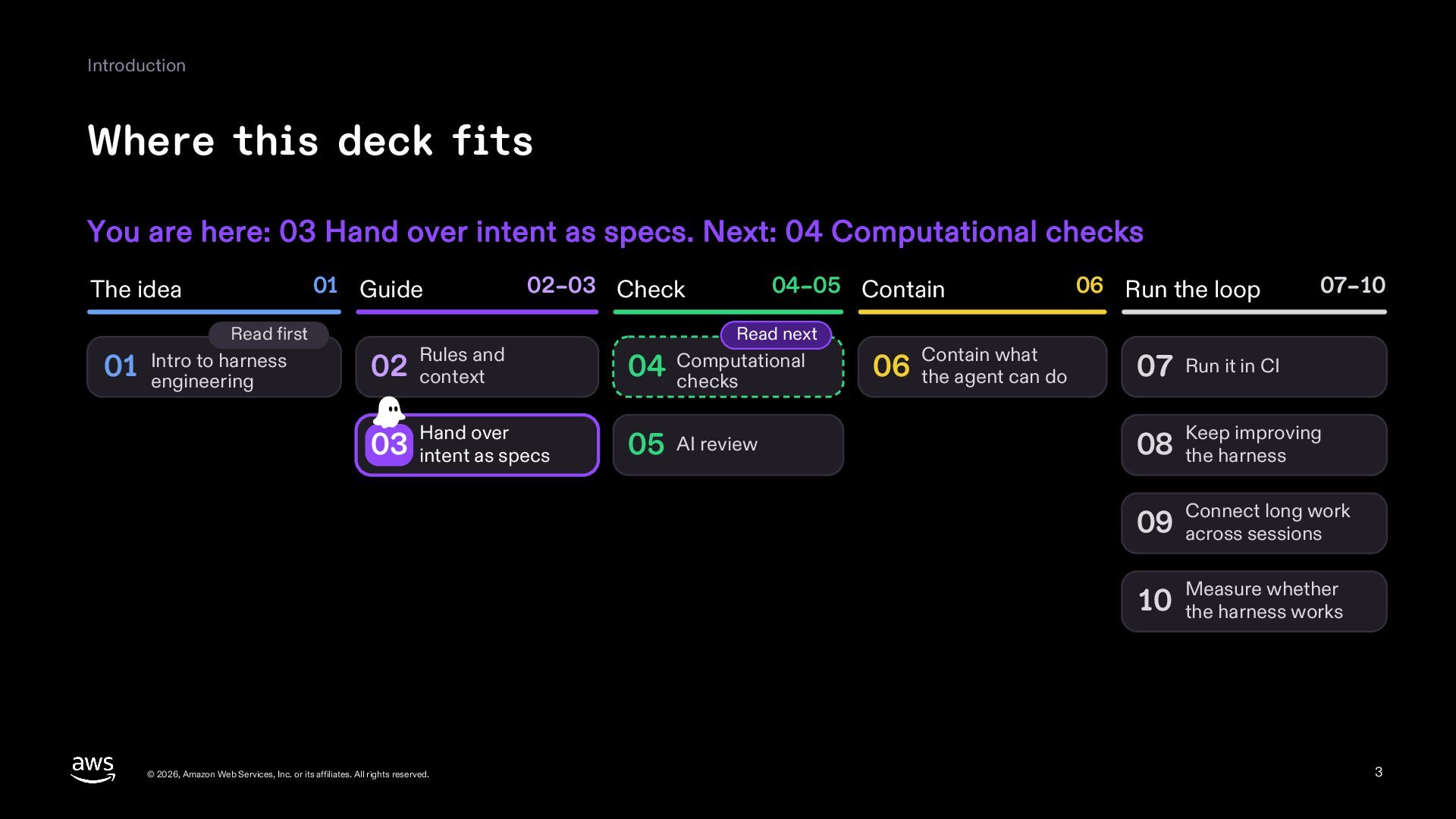
Introduction Where this deck fits You are here: 03 Hand
over intent as specs. Next: 04 Computational checks 01 Guide The idea Read first to harness 01 Intro engineering 02–03 Check Rules and 02 context Hand over 03 intent as specs 04–05 Contain Read next 04 Computational checks 05 AI review Contain what 06 the agent can do 06 Run the loop 07–10 07 Run it in CI Keep improving 08 the harness long work 09 Connect across sessions whether 10 Measure the harness works © 2026, Amazon Web Services, Inc. or its affiliates. All rights reserved. 3 -
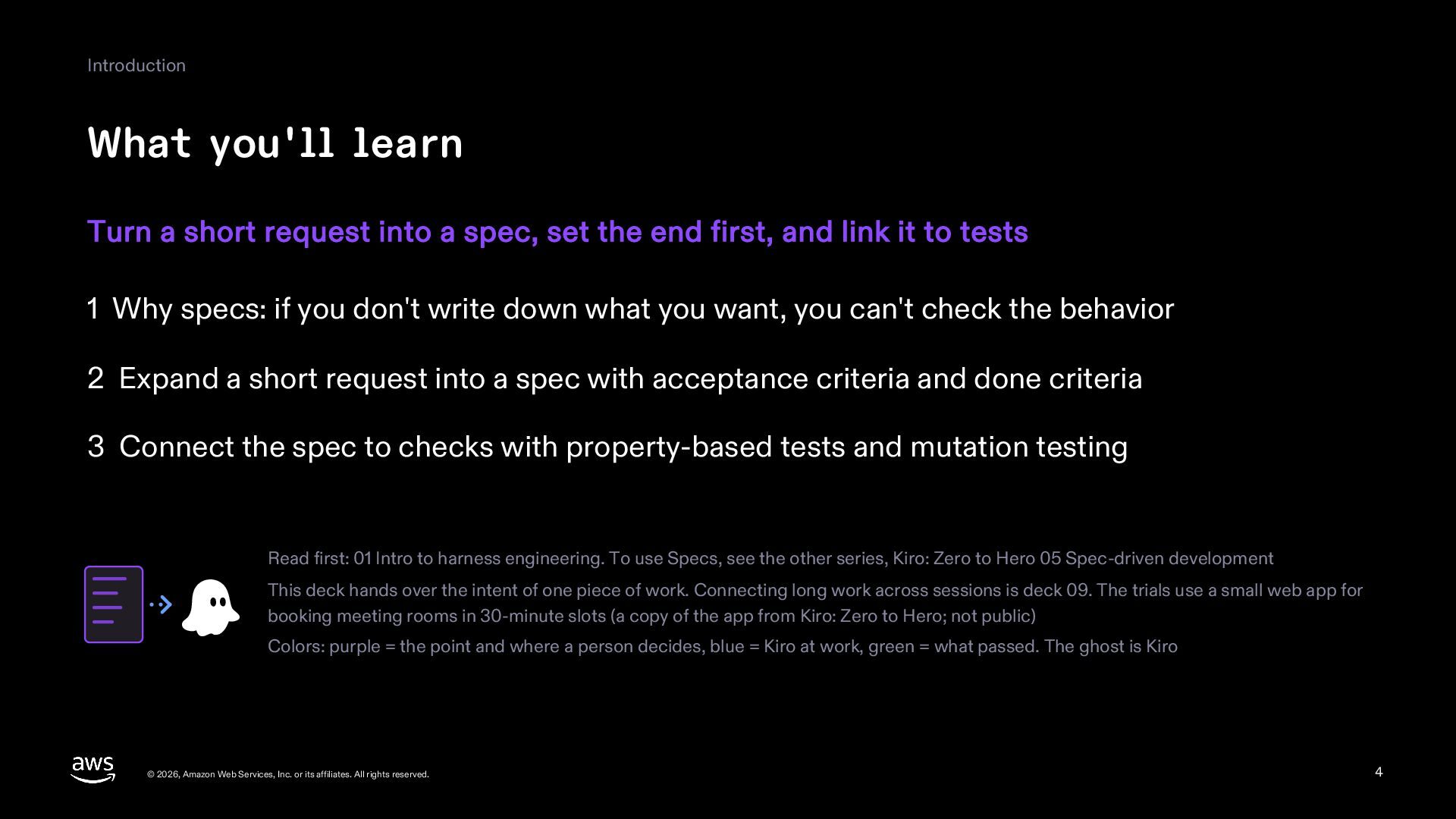
Introduction What you'll learn Turn a short request into a
spec, set the end first, and link it to tests 1 Why specs: if you don't write down what you want, you can't check the behavior 2 Expand a short request into a spec with acceptance criteria and done criteria 3 Connect the spec to checks with property-based tests and mutation testing Read first: 01 Intro to harness engineering. To use Specs, see the other series, Kiro: Zero to Hero 05 Spec-driven development This deck hands over the intent of one piece of work. Connecting long work across sessions is deck 09. The trials use a small web app for booking meeting rooms in 30-minute slots (a copy of the app from Kiro: Zero to Hero; not public) Colors: purple = the point and where a person decides, blue = Kiro at work, green = what passed. The ghost is Kiro © 2026, Amazon Web Services, Inc. or its affiliates. All rights reserved. 4 -
Part 1 of 6 Part 1: Why specs © 2026,
Amazon Web Services, Inc. or its affiliates. All rights reserved. 5 -
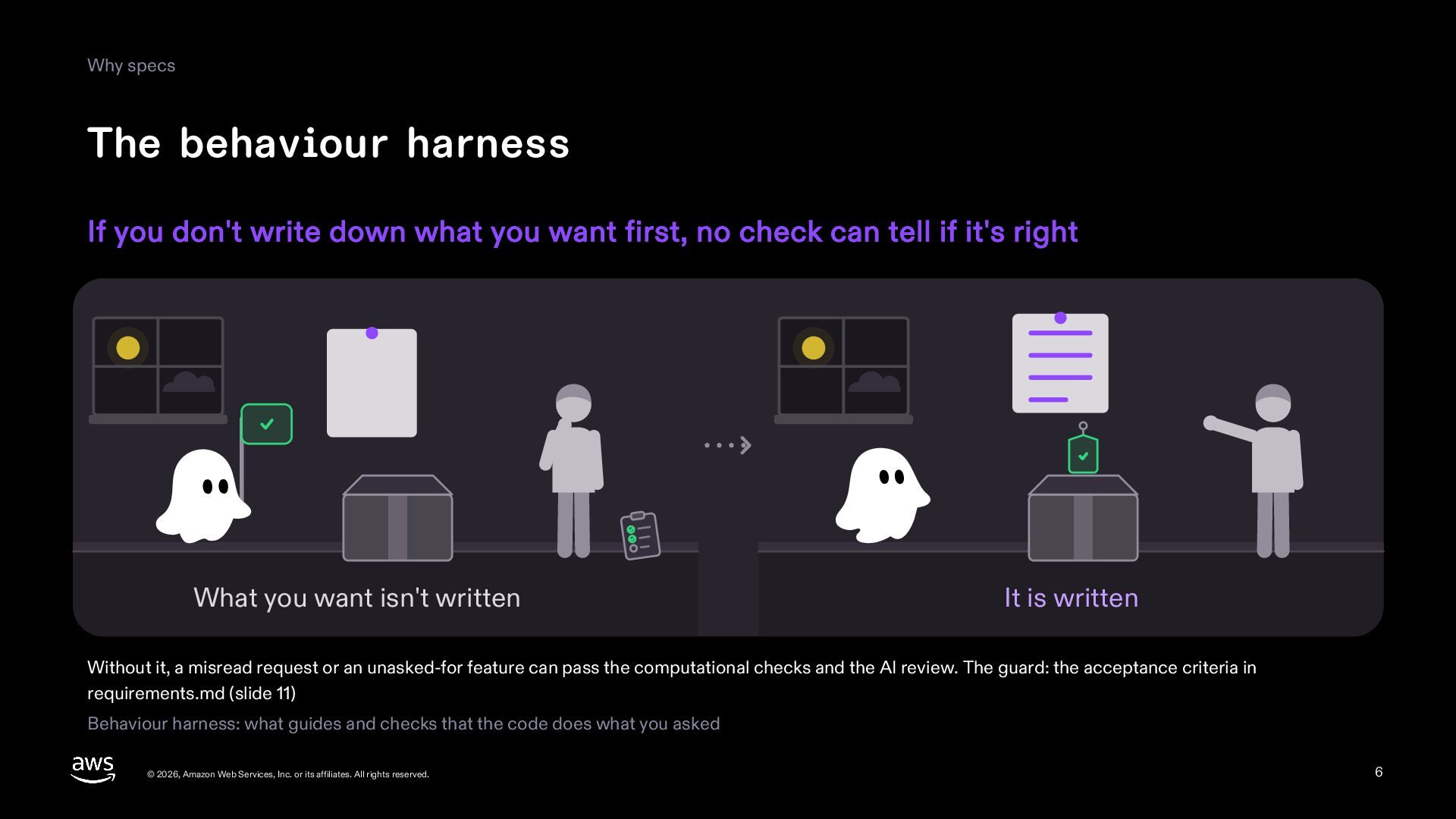
Why specs The behaviour harness If you don't write down
what you want first, no check can tell if it's right What you want isn't written It is written Without it, a misread request or an unasked-for feature can pass the computational checks and the AI review. The guard: the acceptance criteria in requirements.md (slide 11) Behaviour harness: what guides and checks that the code does what you asked © 2026, Amazon Web Services, Inc. or its affiliates. All rights reserved. 6 -
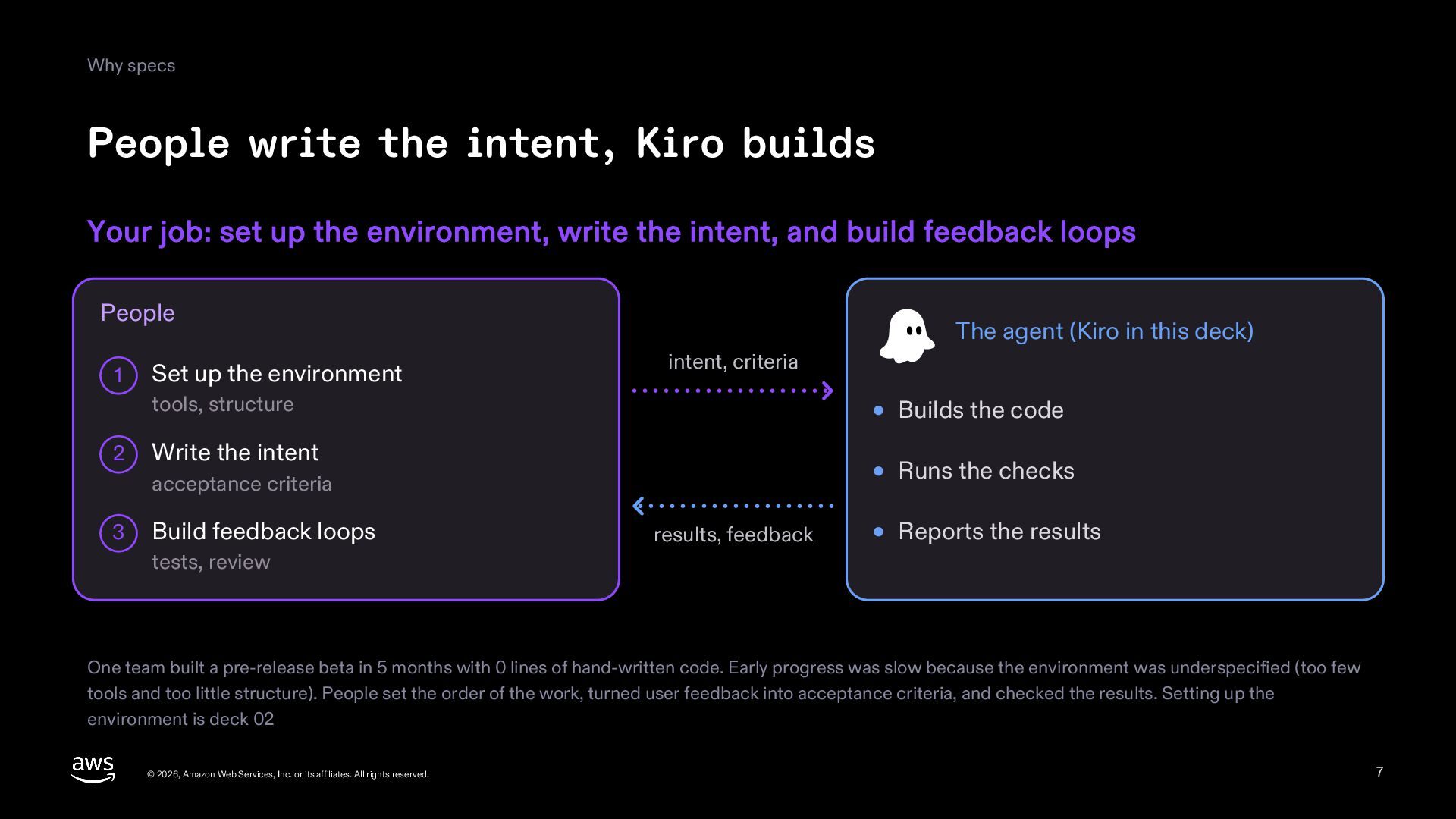
Why specs People write the intent, Kiro builds Your job:
set up the environment, write the intent, and build feedback loops People 1 Set up the environment The agent (Kiro in this deck) intent, criteria tools, structure 2 Builds the code Write the intent Runs the checks acceptance criteria 3 Build feedback loops results, feedback Reports the results tests, review One team built a pre-release beta in 5 months with 0 lines of hand-written code. Early progress was slow because the environment was underspecified (too few tools and too little structure). People set the order of the work, turned user feedback into acceptance criteria, and checked the results. Setting up the environment is deck 02 © 2026, Amazon Web Services, Inc. or its affiliates. All rights reserved. 7 -
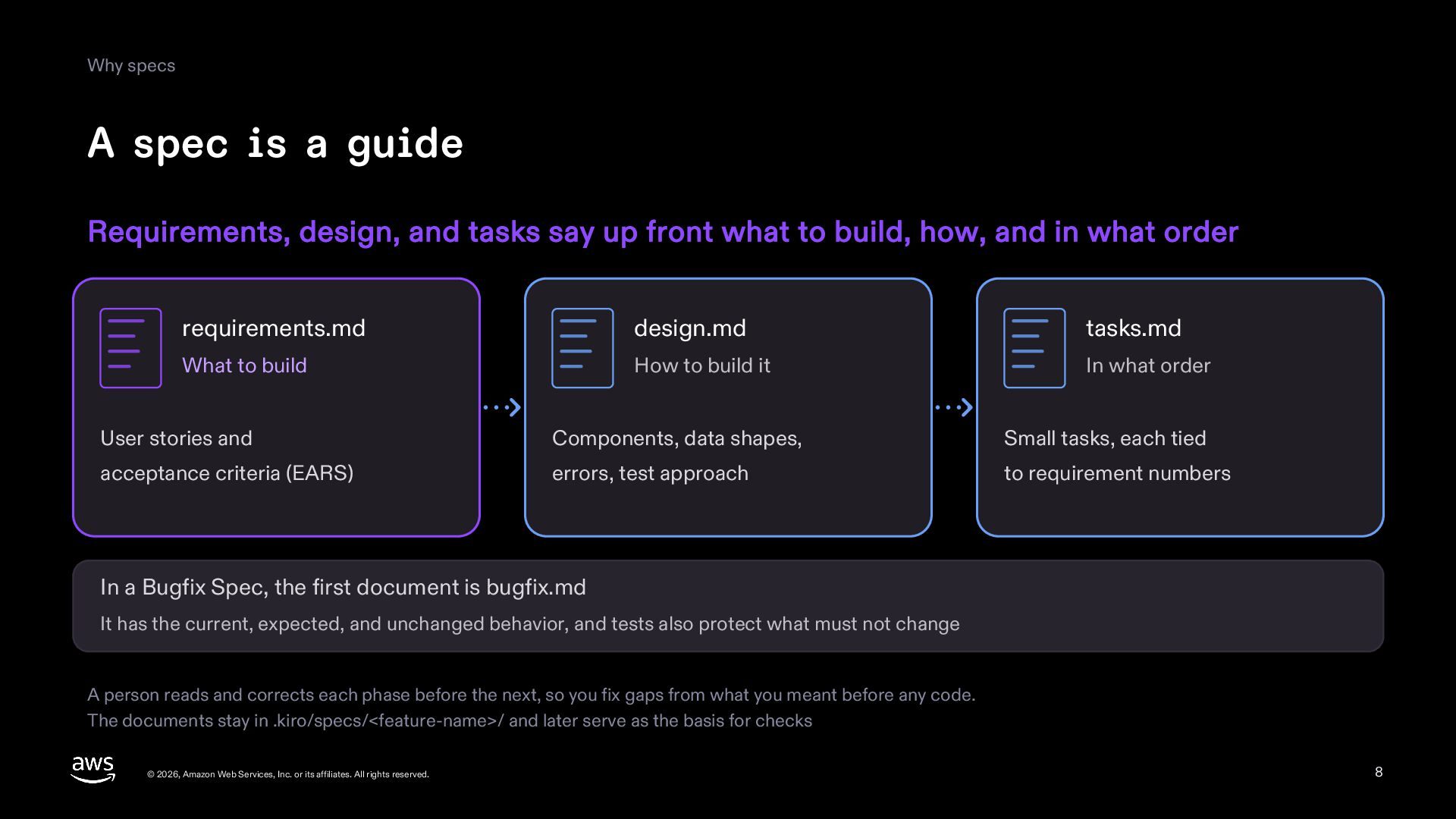
Why specs A spec is a guide Requirements, design, and
tasks say up front what to build, how, and in what order requirements.md design.md tasks.md What to build How to build it In what order User stories and Components, data shapes, Small tasks, each tied acceptance criteria (EARS) errors, test approach to requirement numbers In a Bugfix Spec, the first document is bugfix.md It has the current, expected, and unchanged behavior, and tests also protect what must not change A person reads and corrects each phase before the next, so you fix gaps from what you meant before any code. The documents stay in .kiro/specs/<feature-name>/ and later serve as the basis for checks © 2026, Amazon Web Services, Inc. or its affiliates. All rights reserved. 8 -
Part 2 of 6 Part 2: Expand a short request
© 2026, Amazon Web Services, Inc. or its affiliates. All rights reserved. 9 -
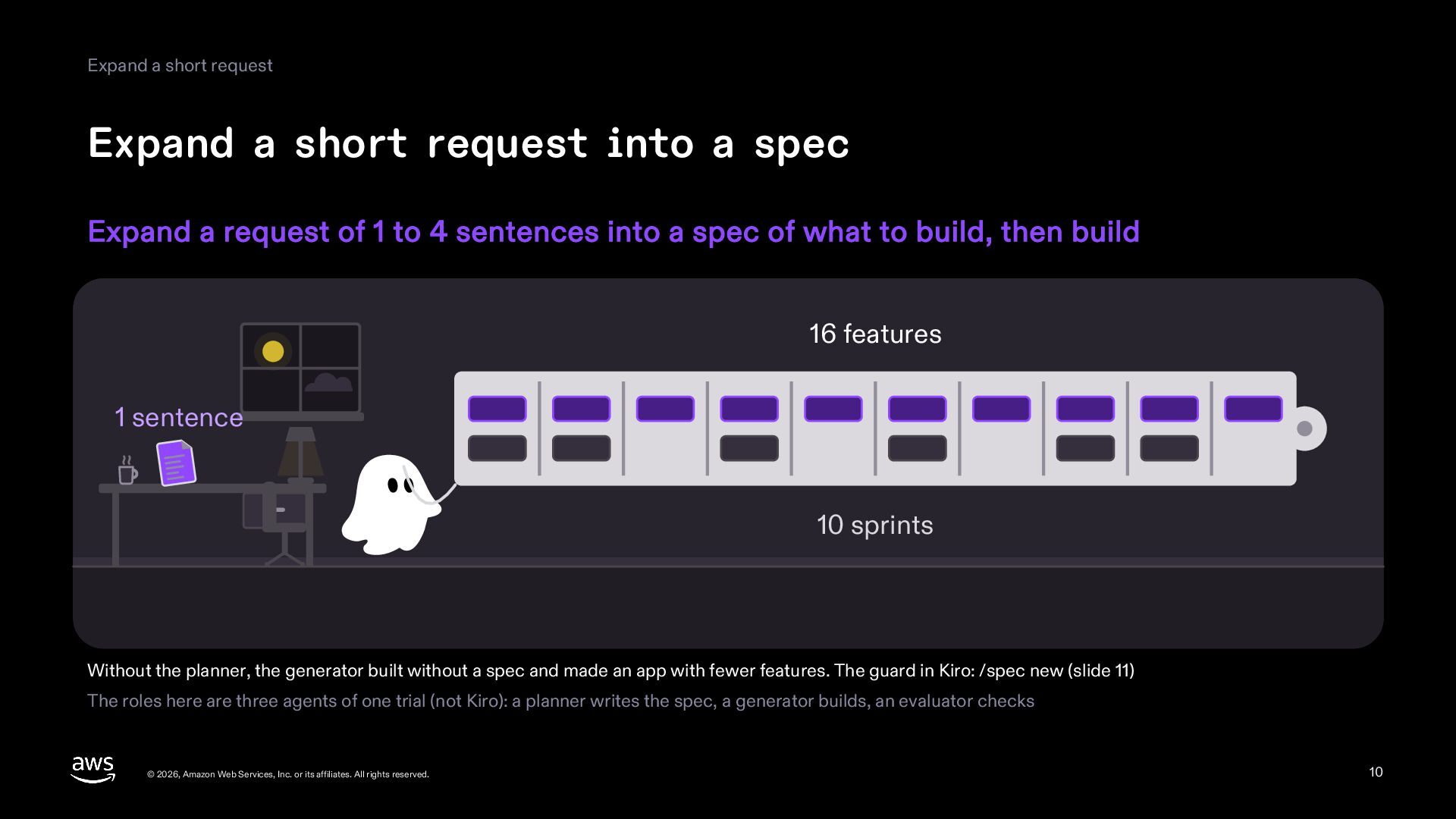
Expand a short request Expand a short request into a
spec Expand a request of 1 to 4 sentences into a spec of what to build, then build 16 features 1 sentence 10 sprints Without the planner, the generator built without a spec and made an app with fewer features. The guard in Kiro: /spec new (slide 11) The roles here are three agents of one trial (not Kiro): a planner writes the spec, a generator builds, an evaluator checks © 2026, Amazon Web Services, Inc. or its affiliates. All rights reserved. 10 -
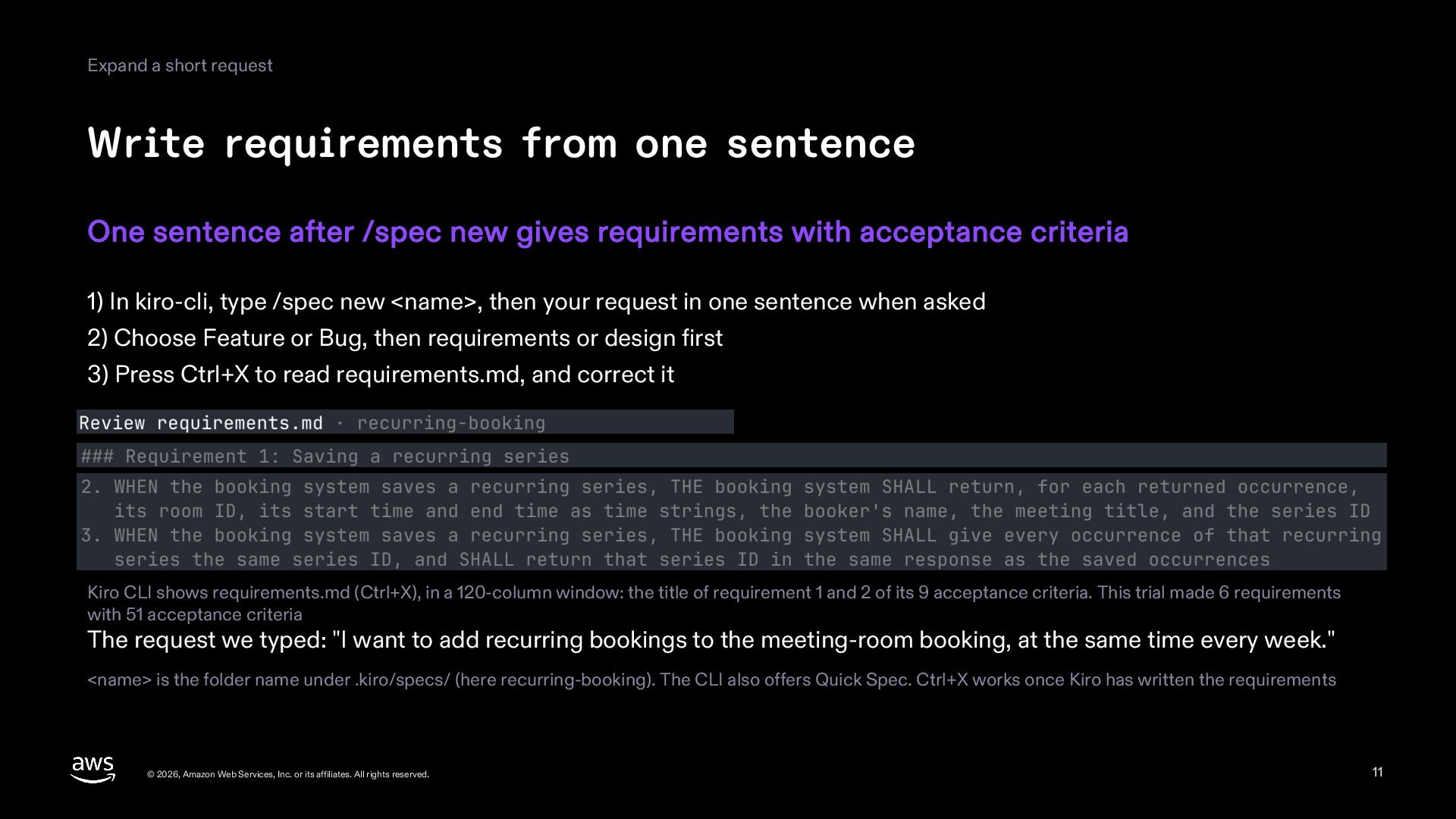
Expand a short request Write requirements from one sentence One
sentence after /spec new gives requirements with acceptance criteria 1) In kiro-cli, type /spec new <name>, then your request in one sentence when asked 2) Choose Feature or Bug, then requirements or design first 3) Press Ctrl+X to read requirements.md, and correct it Kiro CLI shows requirements.md (Ctrl+X), in a 120-column window: the title of requirement 1 and 2 of its 9 acceptance criteria. This trial made 6 requirements with 51 acceptance criteria The request we typed: "I want to add recurring bookings to the meeting-room booking, at the same time every week." <name> is the folder name under .kiro/specs/ (here recurring-booking). The CLI also offers Quick Spec. Ctrl+X works once Kiro has written the requirements © 2026, Amazon Web Services, Inc. or its affiliates. All rights reserved. 11 -
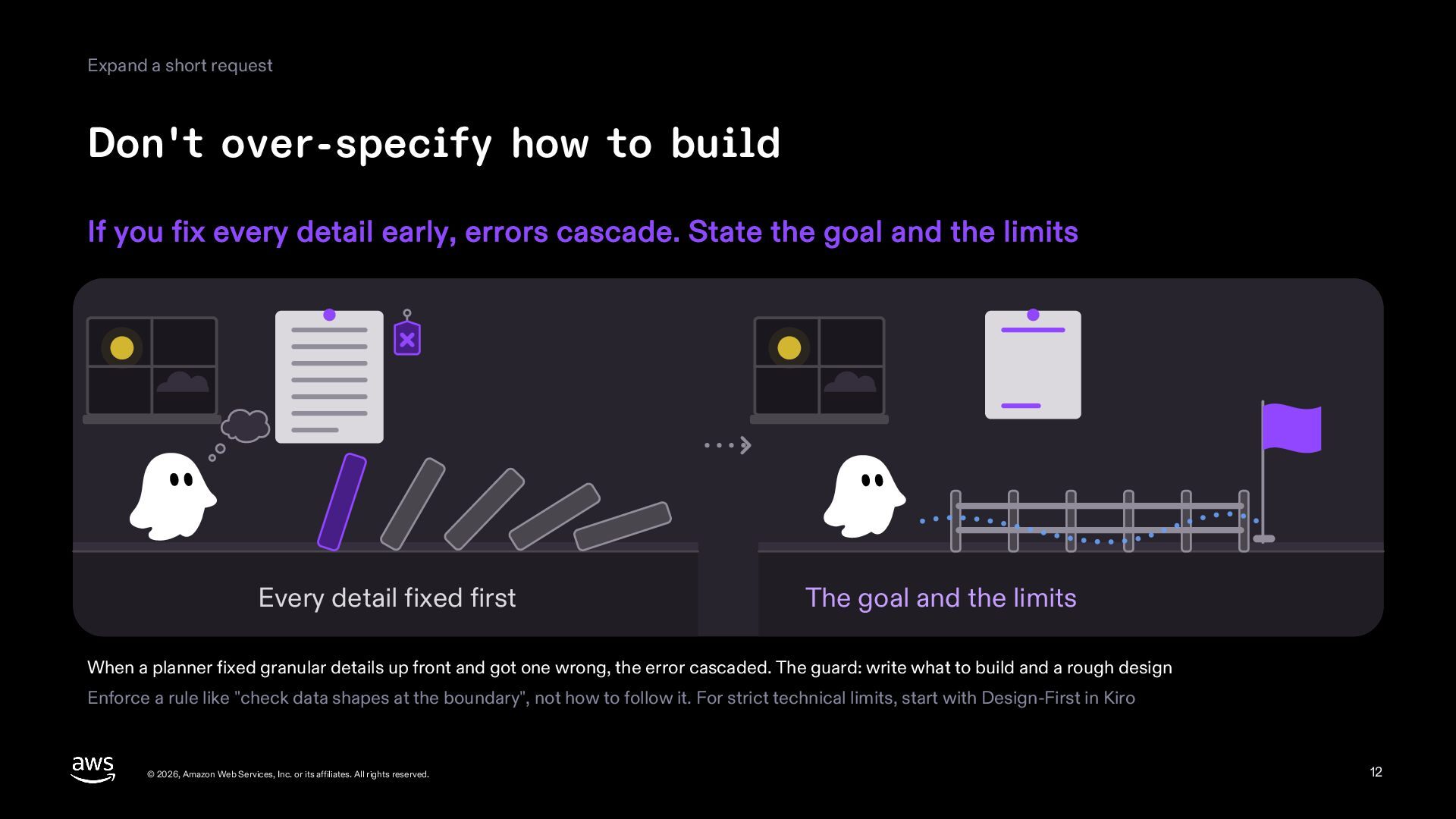
Expand a short request Don't over-specify how to build If
you fix every detail early, errors cascade. State the goal and the limits Every detail fixed first The goal and the limits When a planner fixed granular details up front and got one wrong, the error cascaded. The guard: write what to build and a rough design Enforce a rule like "check data shapes at the boundary", not how to follow it. For strict technical limits, start with Design-First in Kiro © 2026, Amazon Web Services, Inc. or its affiliates. All rights reserved. 12 -
Expand a short request Match the handover to the size
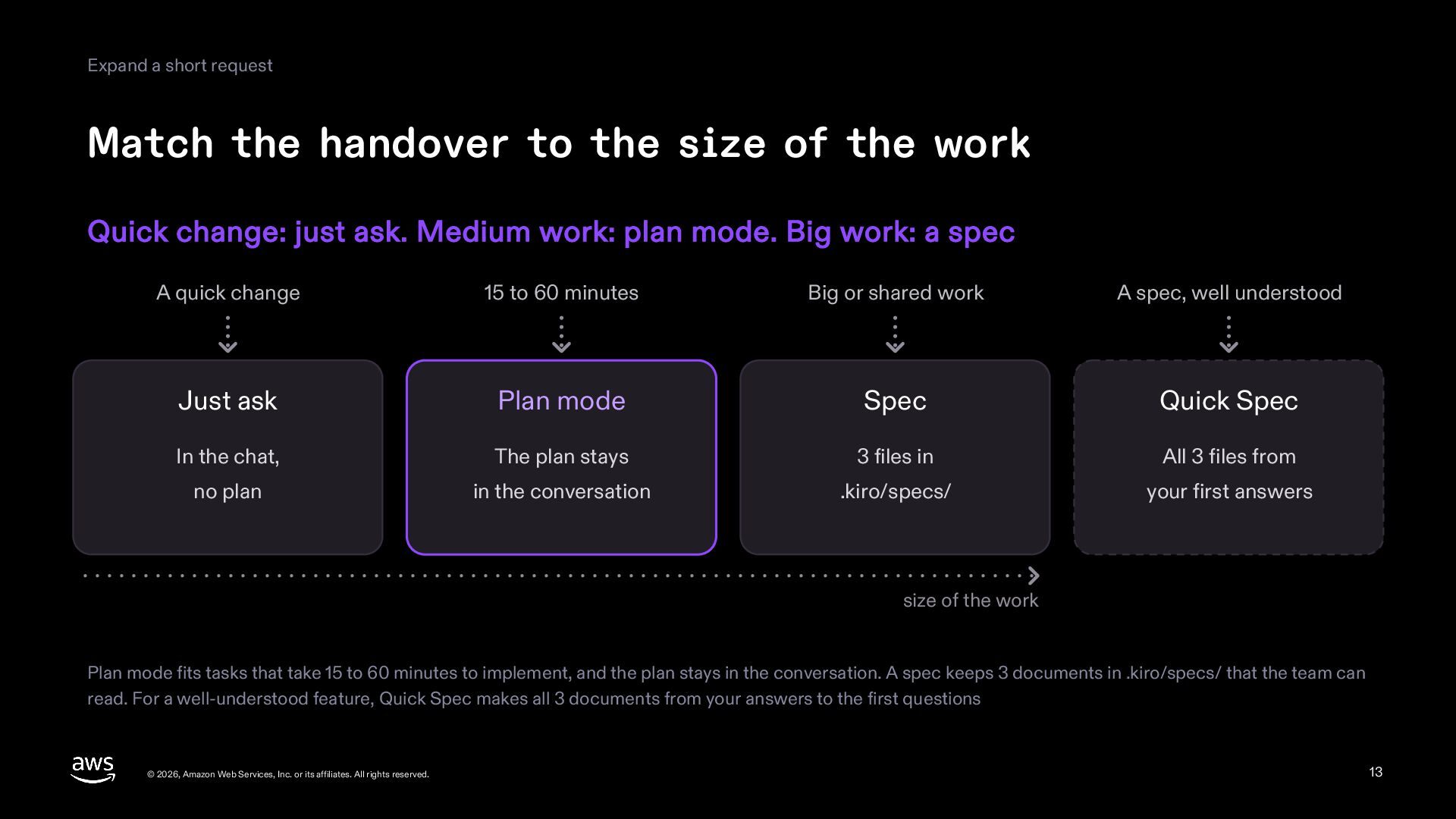
of the work Quick change: just ask. Medium work: plan mode. Big work: a spec A quick change 15 to 60 minutes Big or shared work A spec, well understood Just ask Plan mode Spec Quick Spec In the chat, The plan stays 3 files in All 3 files from no plan in the conversation .kiro/specs/ your first answers size of the work Plan mode fits tasks that take 15 to 60 minutes to implement, and the plan stays in the conversation. A spec keeps 3 documents in .kiro/specs/ that the team can read. For a well-understood feature, Quick Spec makes all 3 documents from your answers to the first questions © 2026, Amazon Web Services, Inc. or its affiliates. All rights reserved. 13 -
Expand a short request Look at the plan before writing
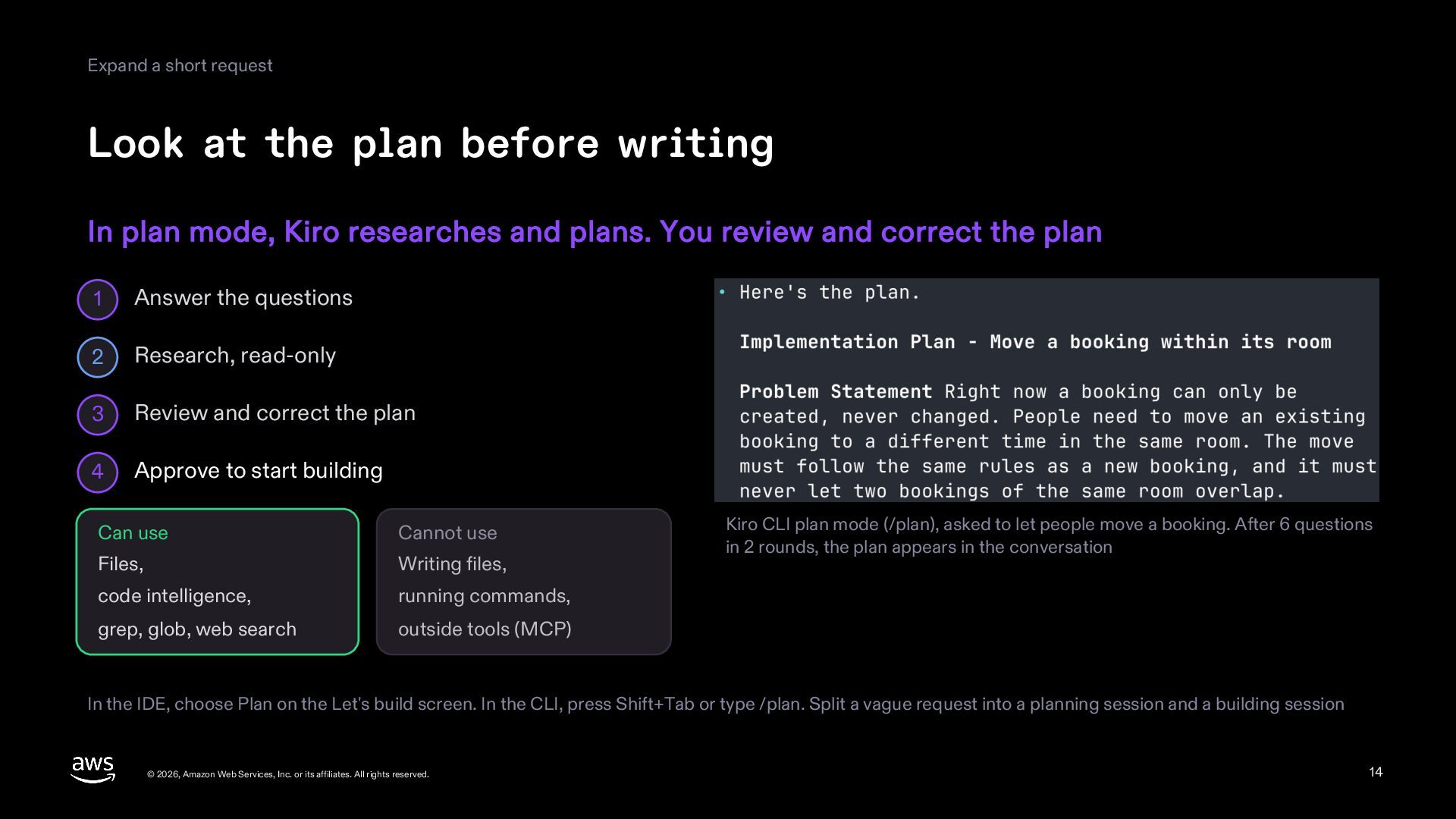
In plan mode, Kiro researches and plans. You review and correct the plan 1 Answer the questions 2 Research, read-only 3 Review and correct the plan 4 Approve to start building Can use Cannot use Files, Writing files, code intelligence, running commands, grep, glob, web search outside tools (MCP) Kiro CLI plan mode (/plan), asked to let people move a booking. After 6 questions in 2 rounds, the plan appears in the conversation In the IDE, choose Plan on the Let's build screen. In the CLI, press Shift+Tab or type /plan. Split a vague request into a planning session and a building session © 2026, Amazon Web Services, Inc. or its affiliates. All rights reserved. 14 -
Part 3 of 6 Part 3: Write it so it
can be checked © 2026, Amazon Web Services, Inc. or its affiliates. All rights reserved. 15 -
Write it so it can be checked Acceptance criteria Write
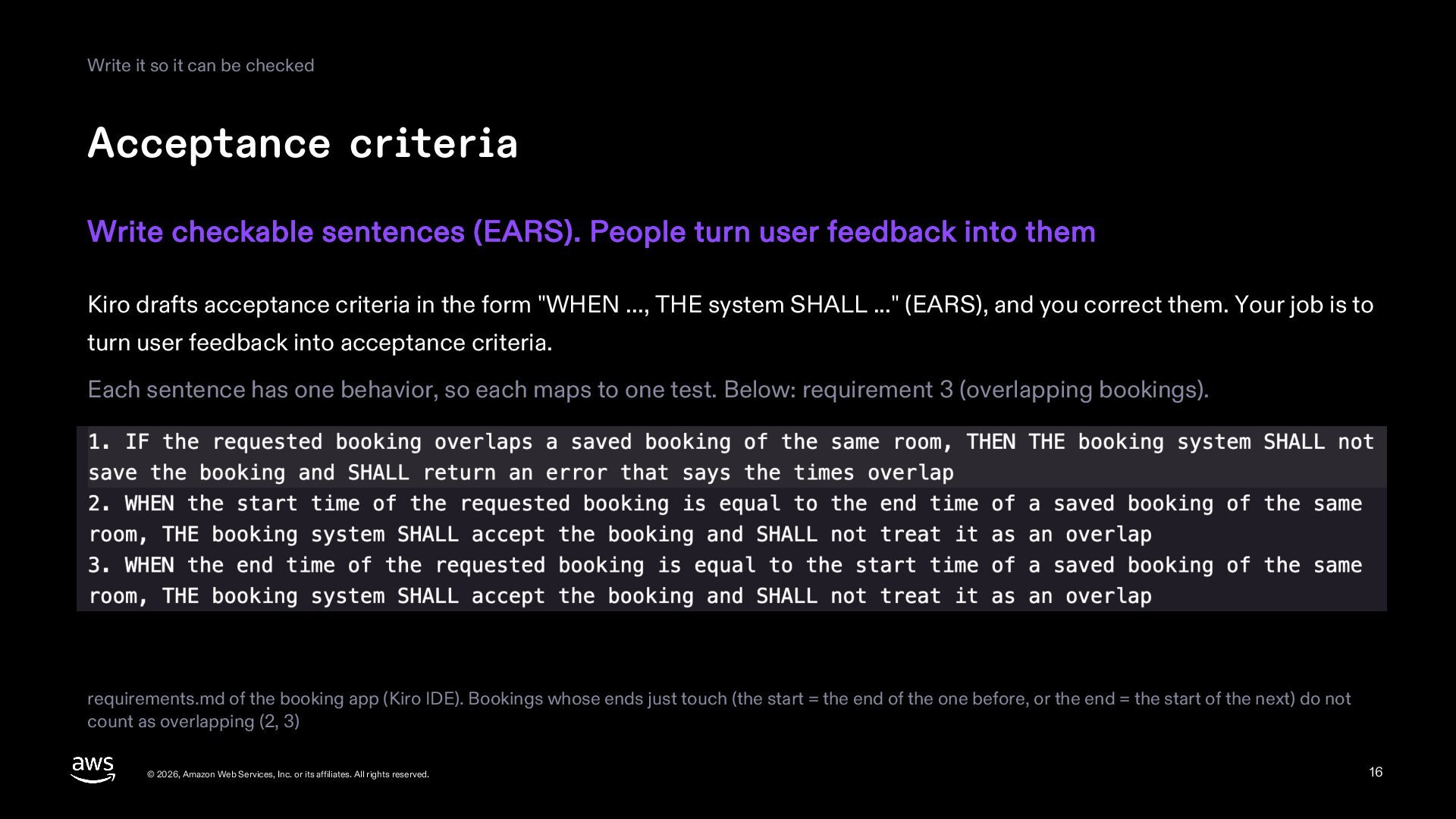
checkable sentences (EARS). People turn user feedback into them Kiro drafts acceptance criteria in the form "WHEN ..., THE system SHALL ..." (EARS), and you correct them. Your job is to turn user feedback into acceptance criteria. Each sentence has one behavior, so each maps to one test. Below: requirement 3 (overlapping bookings). requirements.md of the booking app (Kiro IDE). Bookings whose ends just touch (the start = the end of the one before, or the end = the start of the next) do not count as overlapping (2, 3) © 2026, Amazon Web Services, Inc. or its affiliates. All rights reserved. 16 -
Write it so it can be checked The five patterns
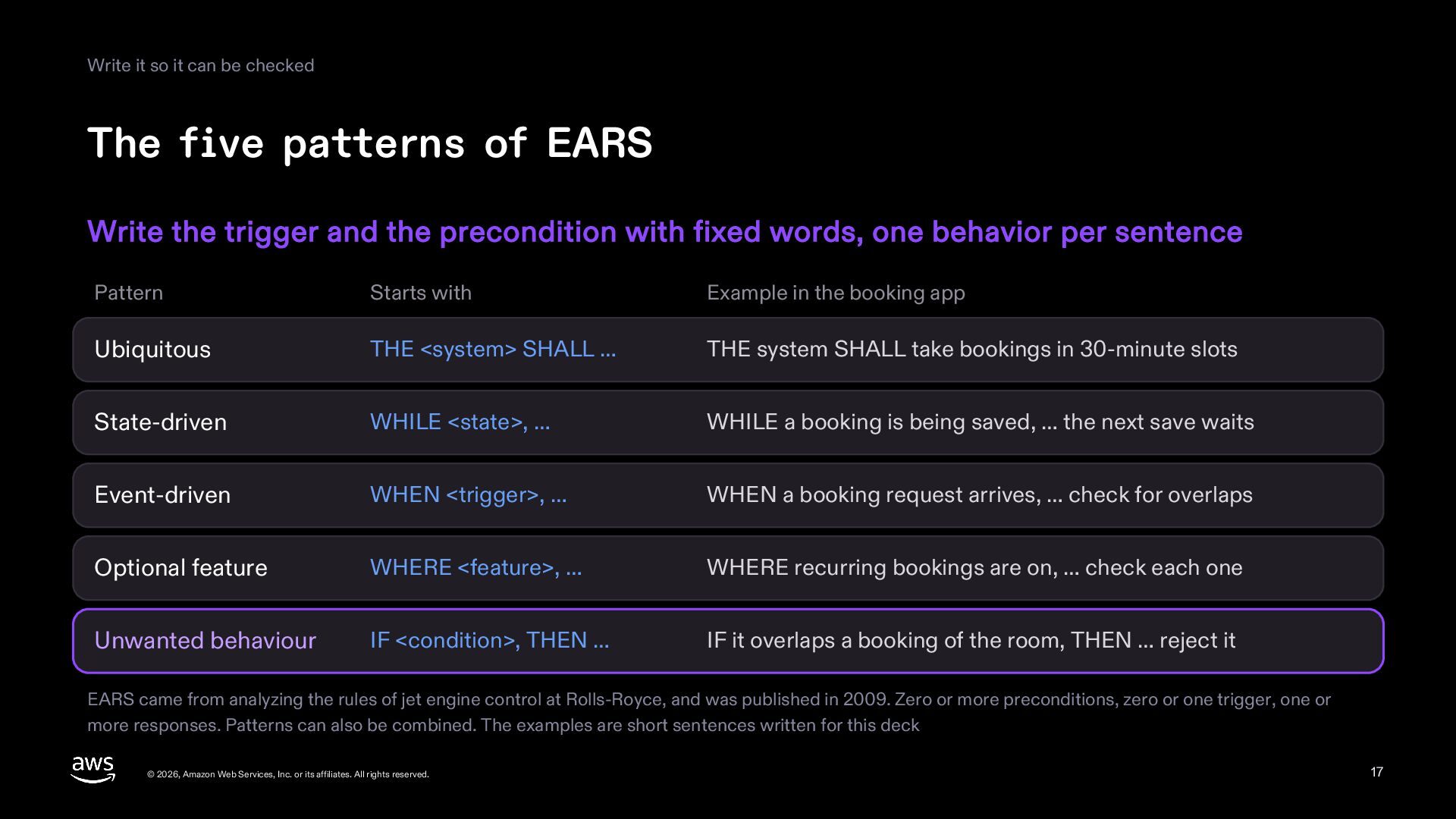
of EARS Write the trigger and the precondition with fixed words, one behavior per sentence Pattern Starts with Example in the booking app Ubiquitous THE <system> SHALL … THE system SHALL take bookings in 30-minute slots State-driven WHILE <state>, … WHILE a booking is being saved, … the next save waits Event-driven WHEN <trigger>, … WHEN a booking request arrives, … check for overlaps Optional feature WHERE <feature>, … WHERE recurring bookings are on, … check each one Unwanted behaviour IF <condition>, THEN … IF it overlaps a booking of the room, THEN … reject it EARS came from analyzing the rules of jet engine control at Rolls-Royce, and was published in 2009. Zero or more preconditions, zero or one trigger, one or more responses. Patterns can also be combined. The examples are short sentences written for this deck © 2026, Amazon Web Services, Inc. or its affiliates. All rights reserved. 17 -
Write it so it can be checked Analyze the requirements
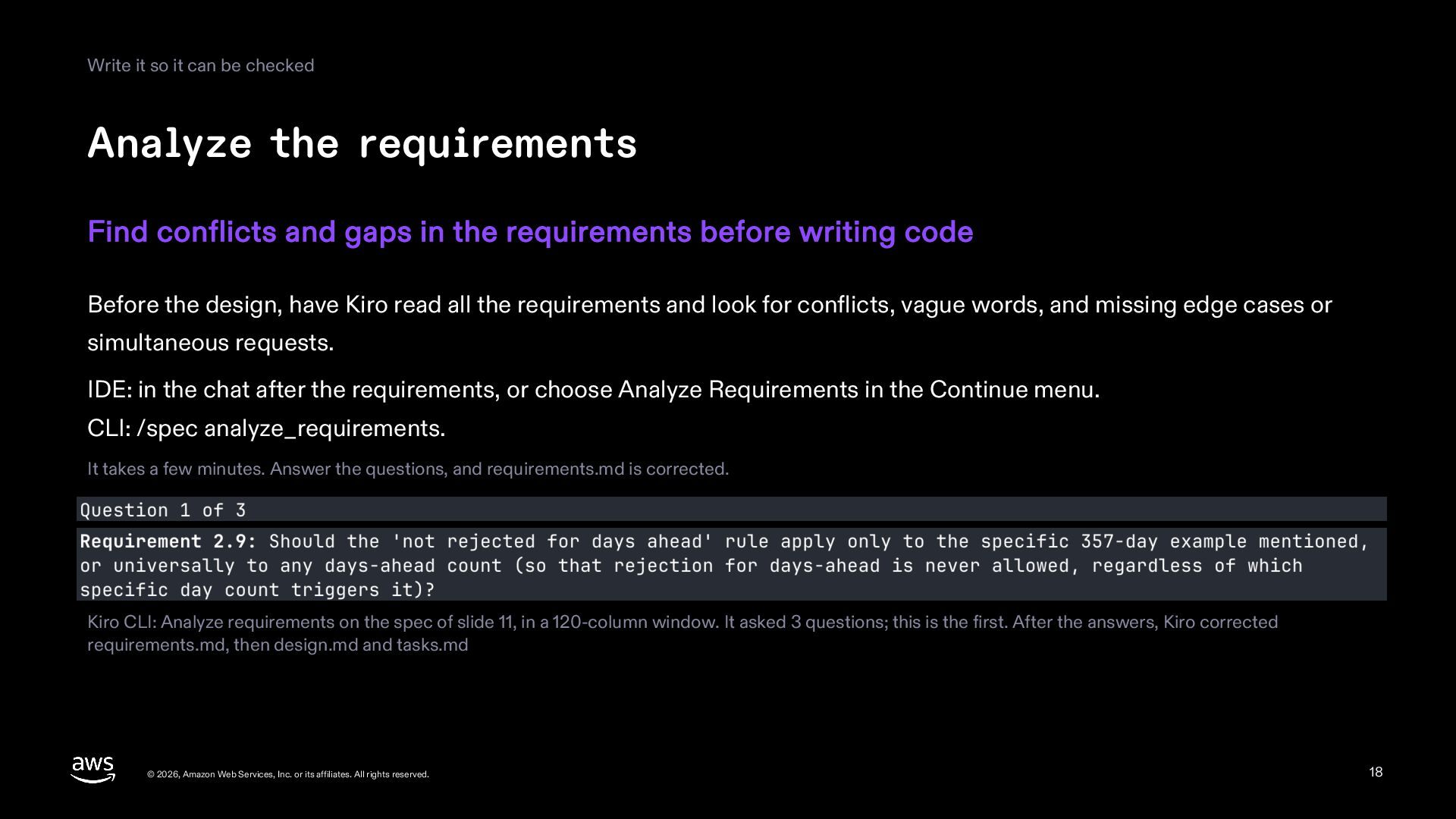
Find conflicts and gaps in the requirements before writing code Before the design, have Kiro read all the requirements and look for conflicts, vague words, and missing edge cases or simultaneous requests. IDE: in the chat after the requirements, or choose Analyze Requirements in the Continue menu. CLI: /spec analyze_requirements. It takes a few minutes. Answer the questions, and requirements.md is corrected. Kiro CLI: Analyze requirements on the spec of slide 11, in a 120-column window. It asked 3 questions; this is the first. After the answers, Kiro corrected requirements.md, then design.md and tasks.md © 2026, Amazon Web Services, Inc. or its affiliates. All rights reserved. 18 -
Write it so it can be checked Write what must
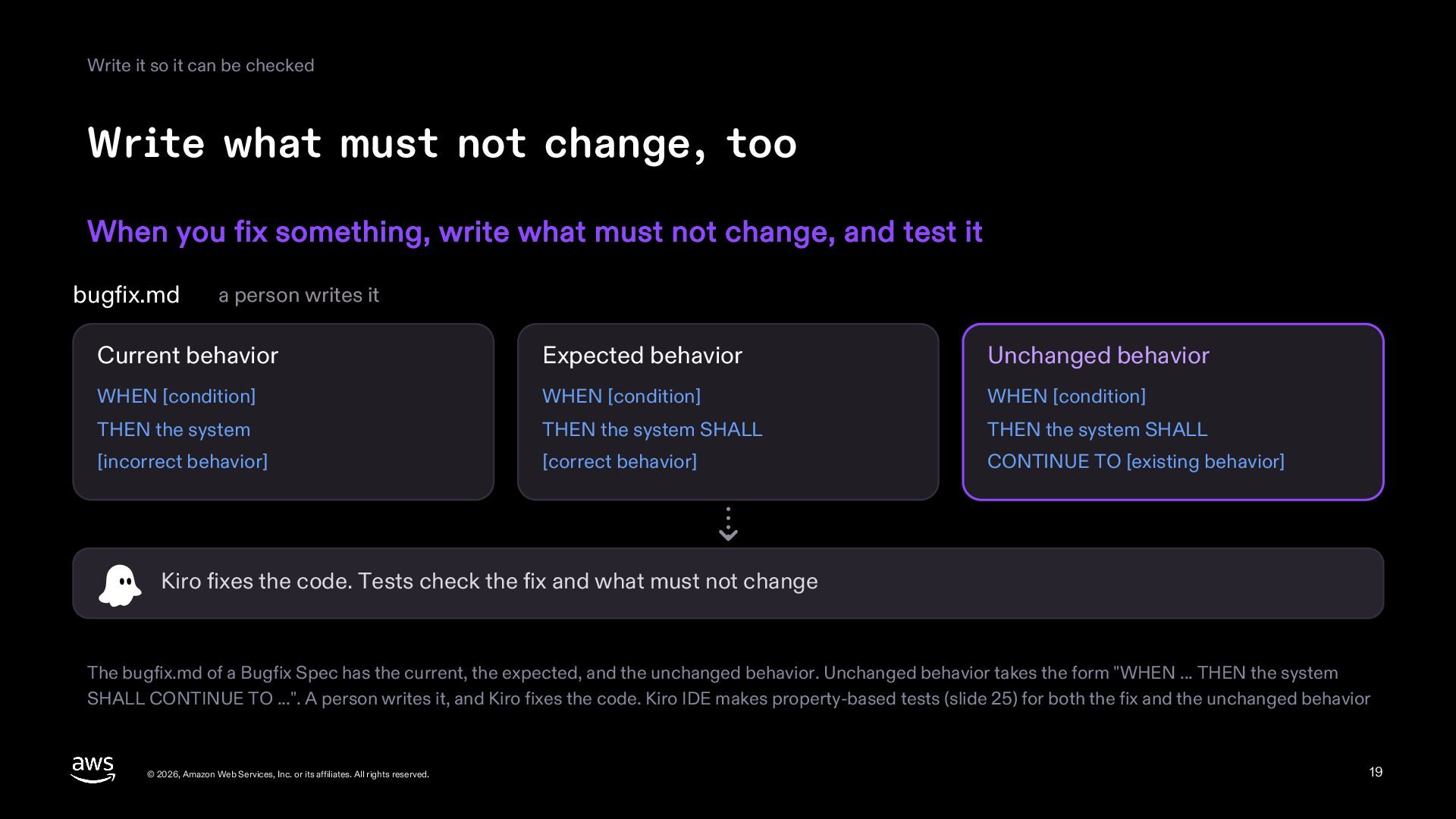
not change, too When you fix something, write what must not change, and test it bugfix.md a person writes it Current behavior Expected behavior Unchanged behavior WHEN [condition] WHEN [condition] WHEN [condition] THEN the system THEN the system SHALL THEN the system SHALL [incorrect behavior] [correct behavior] CONTINUE TO [existing behavior] Kiro fixes the code. Tests check the fix and what must not change The bugfix.md of a Bugfix Spec has the current, the expected, and the unchanged behavior. Unchanged behavior takes the form "WHEN ... THEN the system SHALL CONTINUE TO ...". A person writes it, and Kiro fixes the code. Kiro IDE makes property-based tests (slide 25) for both the fix and the unchanged behavior © 2026, Amazon Web Services, Inc. or its affiliates. All rights reserved. 19 -
Part 4 of 6 Part 4: Decide the end first
© 2026, Amazon Web Services, Inc. or its affiliates. All rights reserved. 20 -
Decide the end first Decide what done looks like first
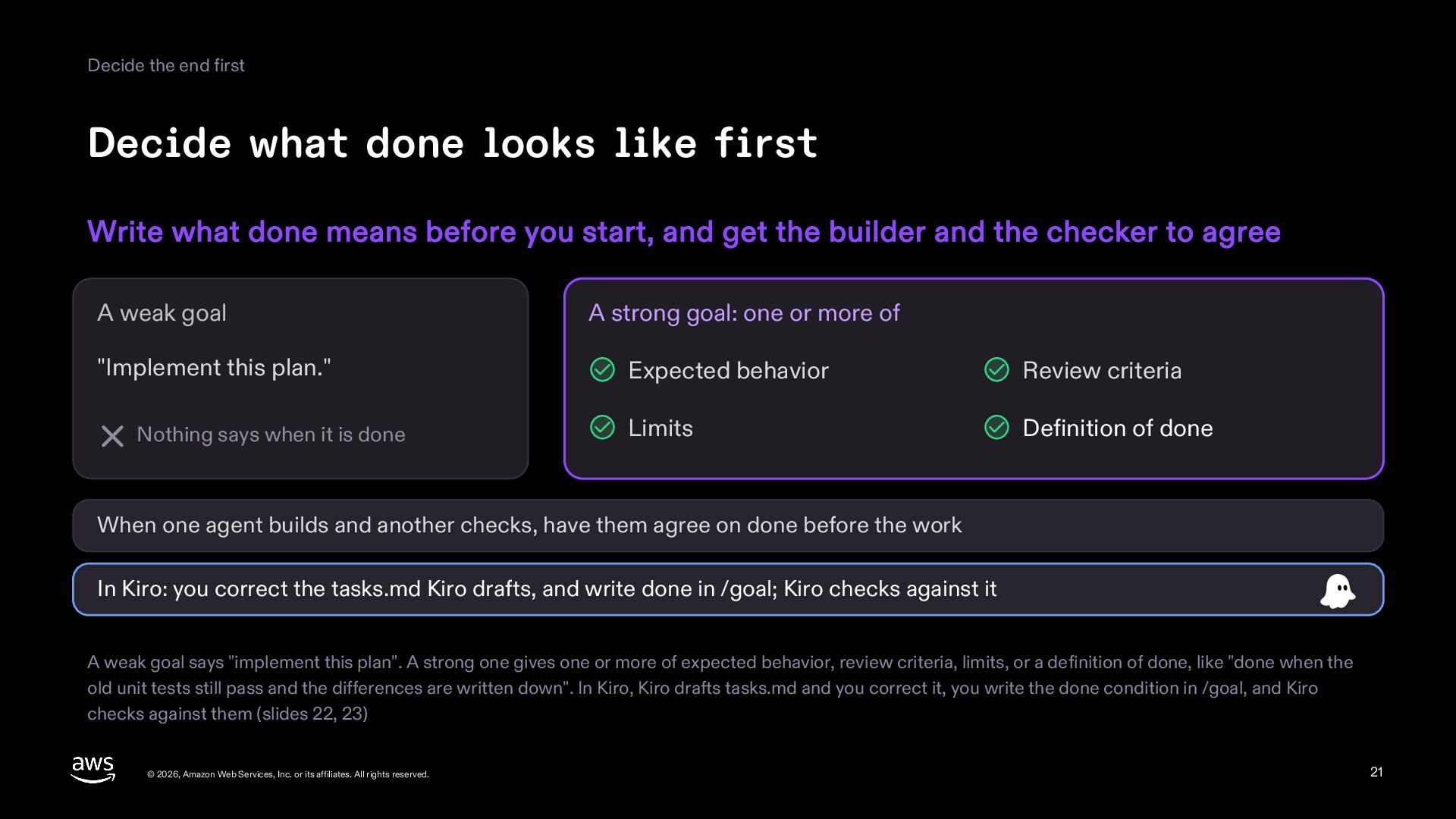
Write what done means before you start, and get the builder and the checker to agree A weak goal "Implement this plan." Nothing says when it is done A strong goal: one or more of Expected behavior Review criteria Limits Definition of done When one agent builds and another checks, have them agree on done before the work In Kiro: you correct the tasks.md Kiro drafts, and write done in /goal; Kiro checks against it A weak goal says "implement this plan". A strong one gives one or more of expected behavior, review criteria, limits, or a definition of done, like "done when the old unit tests still pass and the differences are written down". In Kiro, Kiro drafts tasks.md and you correct it, you write the done condition in /goal, and Kiro checks against them (slides 22, 23) © 2026, Amazon Web Services, Inc. or its affiliates. All rights reserved. 21 -
Decide the end first Check the done criteria in the
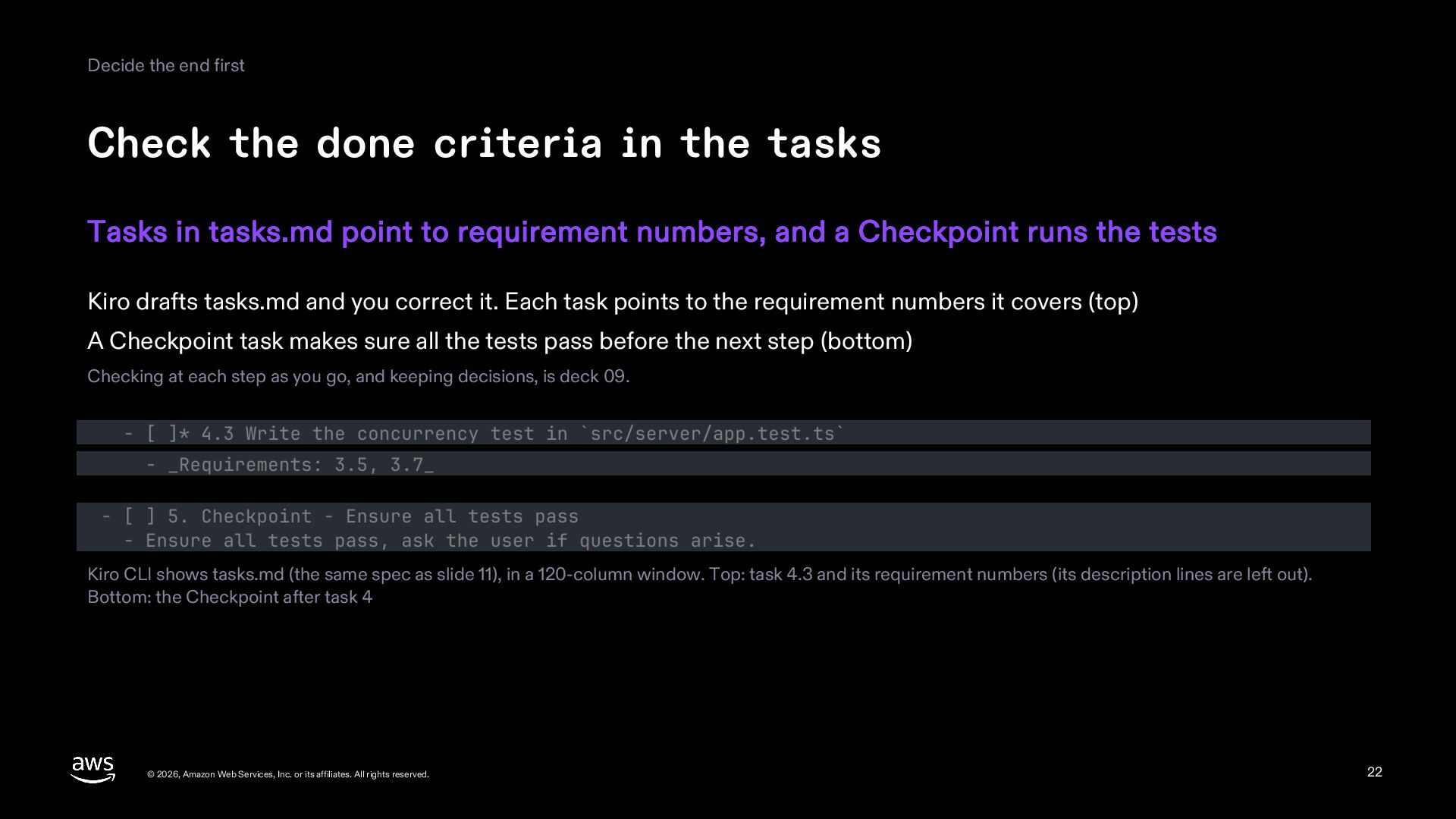
tasks Tasks in tasks.md point to requirement numbers, and a Checkpoint runs the tests Kiro drafts tasks.md and you correct it. Each task points to the requirement numbers it covers (top) A Checkpoint task makes sure all the tests pass before the next step (bottom) Checking at each step as you go, and keeping decisions, is deck 09. Kiro CLI shows tasks.md (the same spec as slide 11), in a 120-column window. Top: task 4.3 and its requirement numbers (its description lines are left out). Bottom: the Checkpoint after task 4 © 2026, Amazon Web Services, Inc. or its affiliates. All rights reserved. 22 -
Decide the end first Give /goal what done looks like
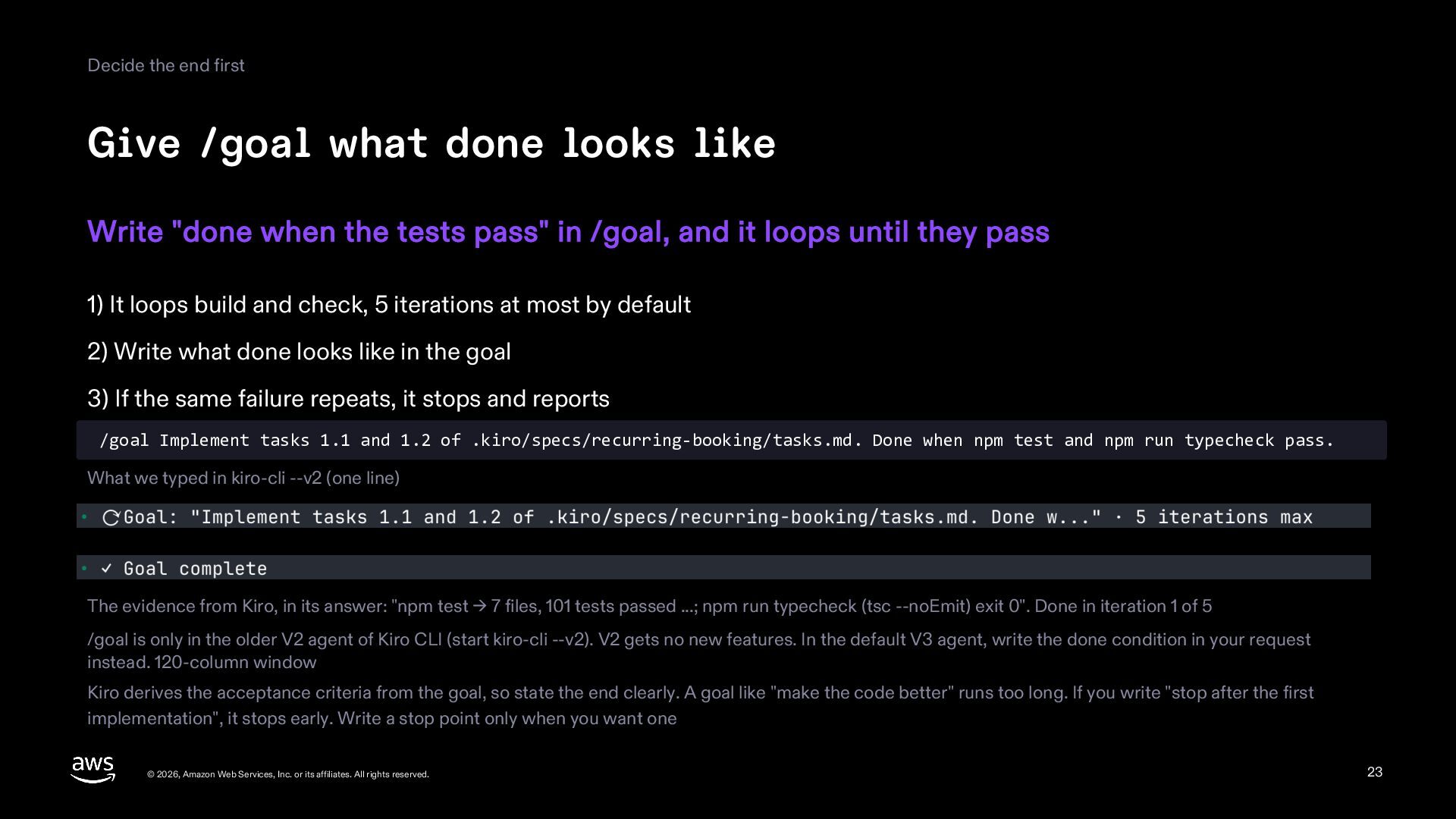
Write "done when the tests pass" in /goal, and it loops until they pass 1) It loops build and check, 5 iterations at most by default 2) Write what done looks like in the goal 3) If the same failure repeats, it stops and reports /goal Implement tasks 1.1 and 1.2 of .kiro/specs/recurring-booking/tasks.md. Done when npm test and npm run typecheck pass. What we typed in kiro-cli --v2 (one line) The evidence from Kiro, in its answer: "npm test → 7 files, 101 tests passed ...; npm run typecheck (tsc --noEmit) exit 0". Done in iteration 1 of 5 /goal is only in the older V2 agent of Kiro CLI (start kiro-cli --v2). V2 gets no new features. In the default V3 agent, write the done condition in your request instead. 120-column window Kiro derives the acceptance criteria from the goal, so state the end clearly. A goal like "make the code better" runs too long. If you write "stop after the first implementation", it stops early. Write a stop point only when you want one © 2026, Amazon Web Services, Inc. or its affiliates. All rights reserved. 23 -
Part 5 of 6 Part 5: Connect with property-based tests
© 2026, Amazon Web Services, Inc. or its affiliates. All rights reserved. 24 -
Connect with property-based tests Property-based tests Check "no two bookings
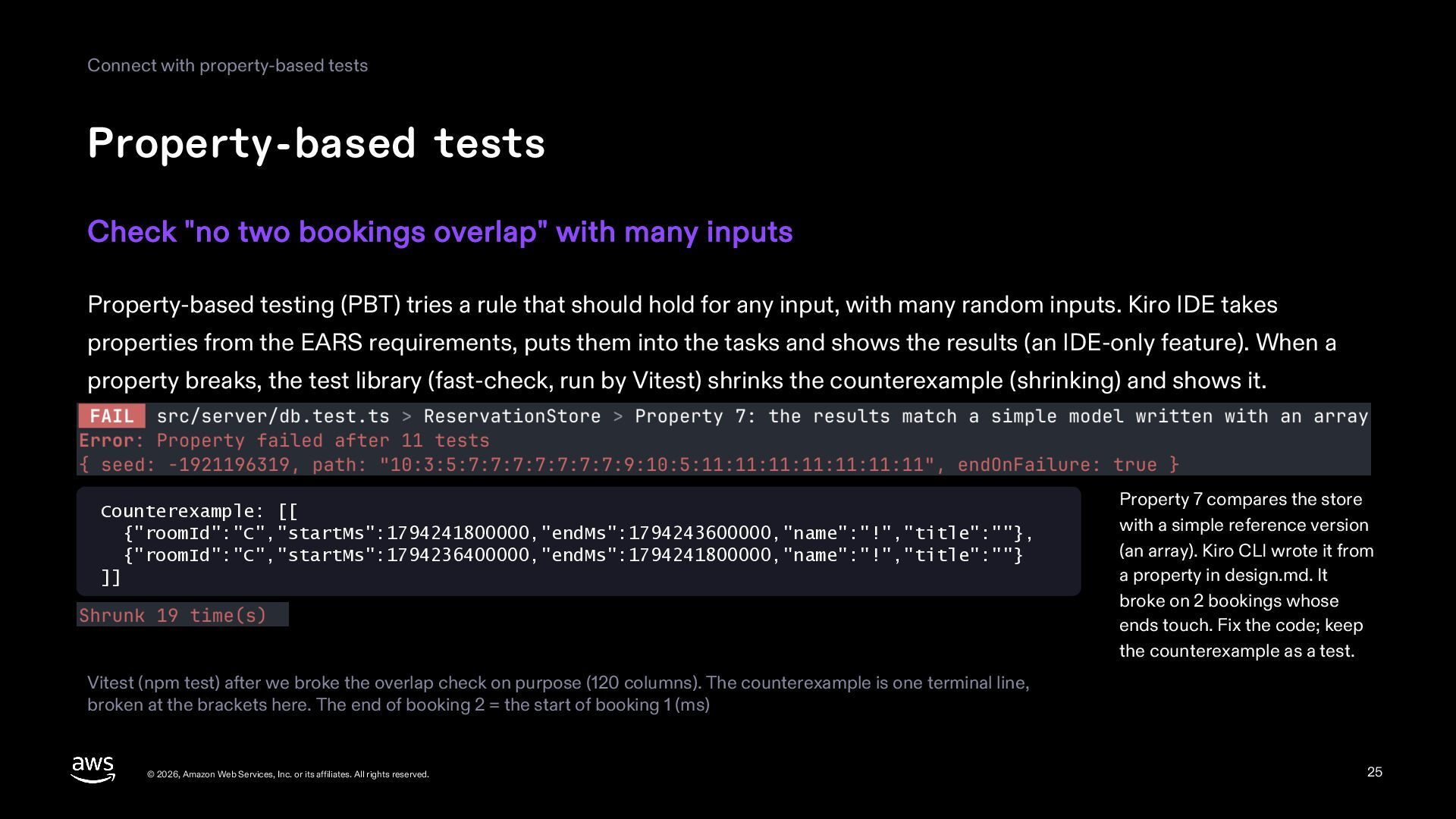
overlap" with many inputs Property-based testing (PBT) tries a rule that should hold for any input, with many random inputs. Kiro IDE takes properties from the EARS requirements, puts them into the tasks and shows the results (an IDE-only feature). When a property breaks, the test library (fast-check, run by Vitest) shrinks the counterexample (shrinking) and shows it. Counterexample: [[ {"roomId":"C","startMs":1794241800000,"endMs":1794243600000,"name":"!","title":""}, {"roomId":"C","startMs":1794236400000,"endMs":1794241800000,"name":"!","title":""} ]] Property 7 compares the store with a simple reference version (an array). Kiro CLI wrote it from a property in design.md. It broke on 2 bookings whose ends touch. Fix the code; keep the counterexample as a test. Vitest (npm test) after we broke the overlap check on purpose (120 columns). The counterexample is one terminal line, broken at the brackets here. The end of booking 2 = the start of booking 1 (ms) © 2026, Amazon Web Services, Inc. or its affiliates. All rights reserved. 25 -
Connect with property-based tests Don't trust AI-written tests too much
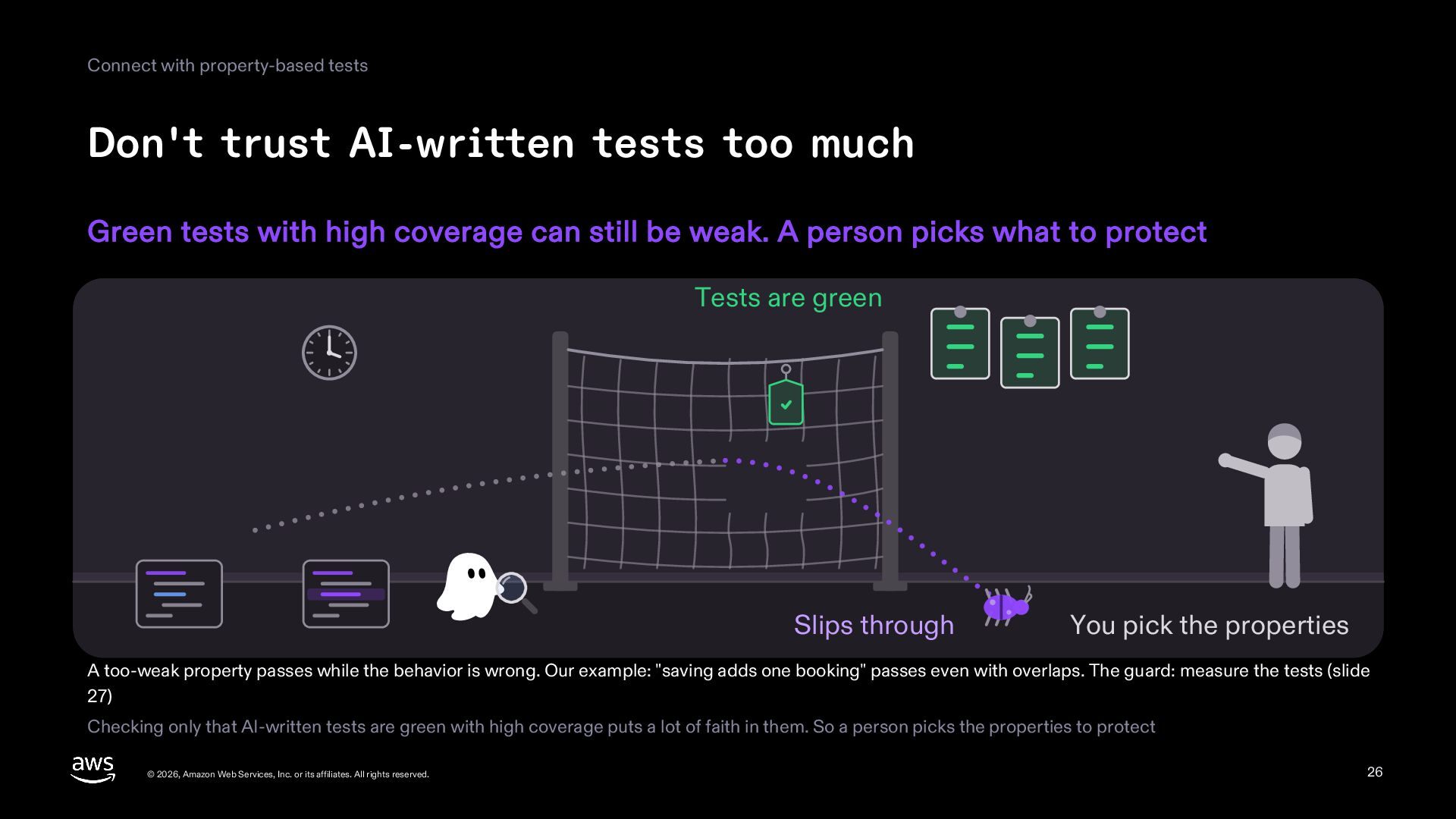
Green tests with high coverage can still be weak. A person picks what to protect Tests are green Slips through You pick the properties A too-weak property passes while the behavior is wrong. Our example: "saving adds one booking" passes even with overlaps. The guard: measure the tests (slide 27) Checking only that AI-written tests are green with high coverage puts a lot of faith in them. So a person picks the properties to protect © 2026, Amazon Web Services, Inc. or its affiliates. All rights reserved. 26 -
Connect with property-based tests Measure test strength (mutation testing) The
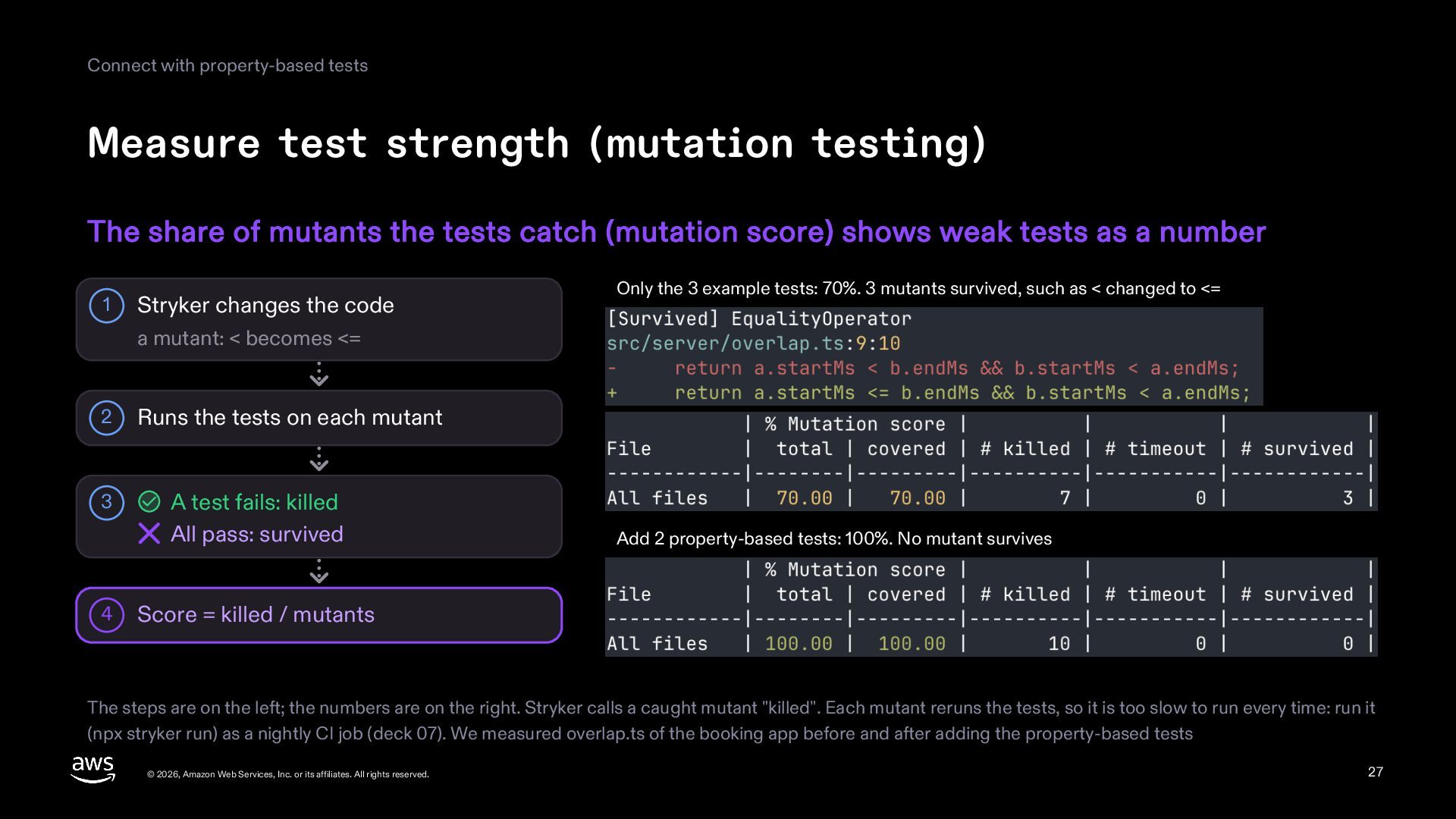
share of mutants the tests catch (mutation score) shows weak tests as a number 1 Stryker changes the code Only the 3 example tests: 70%. 3 mutants survived, such as < changed to <= a mutant: < becomes <= 2 3 4 Runs the tests on each mutant A test fails: killed All pass: survived Add 2 property-based tests: 100%. No mutant survives Score = killed / mutants The steps are on the left; the numbers are on the right. Stryker calls a caught mutant "killed". Each mutant reruns the tests, so it is too slow to run every time: run it (npx stryker run) as a nightly CI job (deck 07). We measured overlap.ts of the booking app before and after adding the property-based tests © 2026, Amazon Web Services, Inc. or its affiliates. All rights reserved. 27 -
Part 6 of 6 Part 6: Summary © 2026, Amazon
Web Services, Inc. or its affiliates. All rights reserved. 28 -
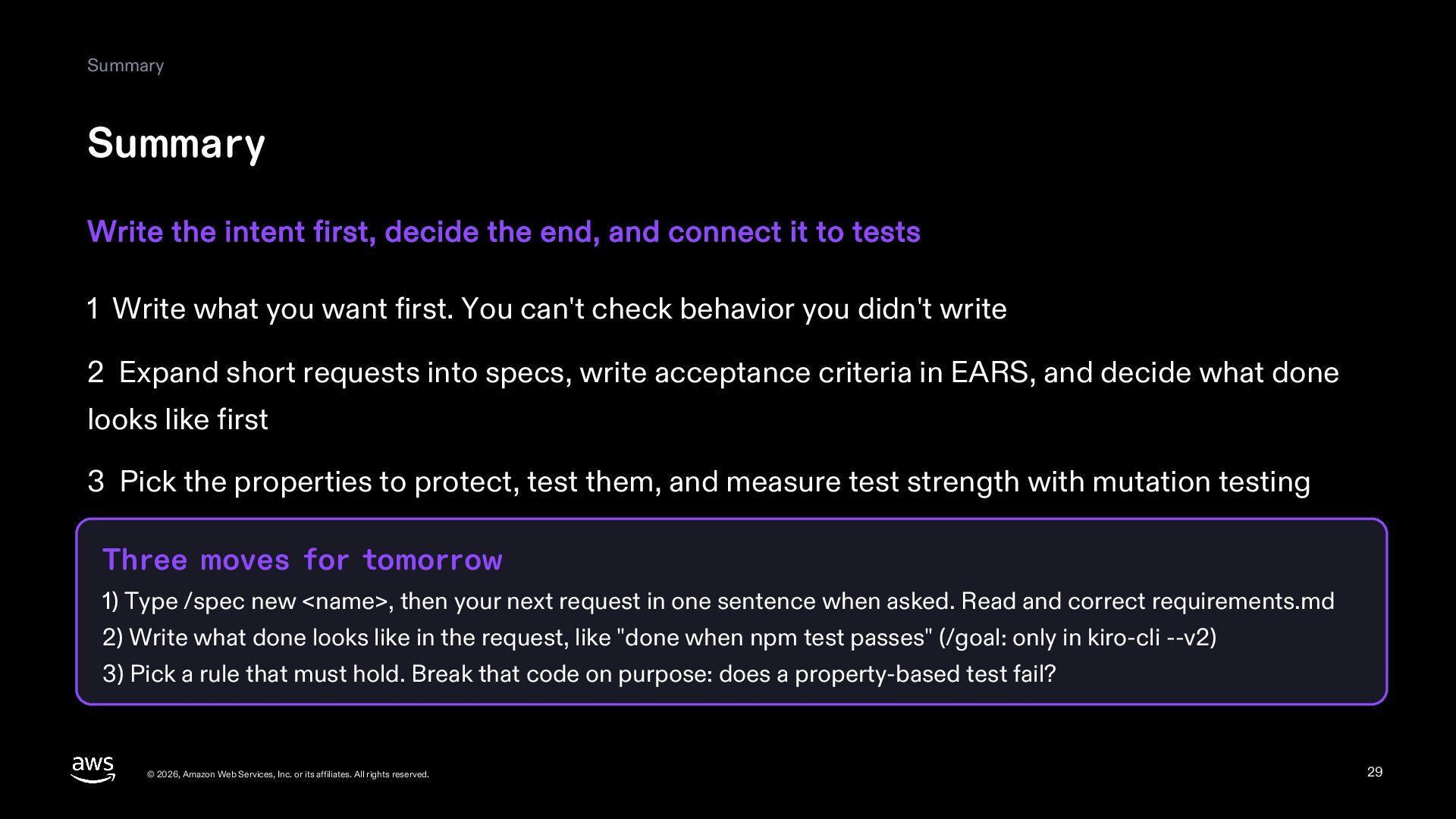
Summary Summary Write the intent first, decide the end, and
connect it to tests 1 Write what you want first. You can't check behavior you didn't write 2 Expand short requests into specs, write acceptance criteria in EARS, and decide what done looks like first 3 Pick the properties to protect, test them, and measure test strength with mutation testing Three moves for tomorrow 1) Type /spec new <name>, then your next request in one sentence when asked. Read and correct requirements.md 2) Write what done looks like in the request, like "done when npm test passes" (/goal: only in kiro-cli --v2) 3) Pick a rule that must hold. Break that code on purpose: does a property-based test fail? © 2026, Amazon Web Services, Inc. or its affiliates. All rights reserved. 29 -
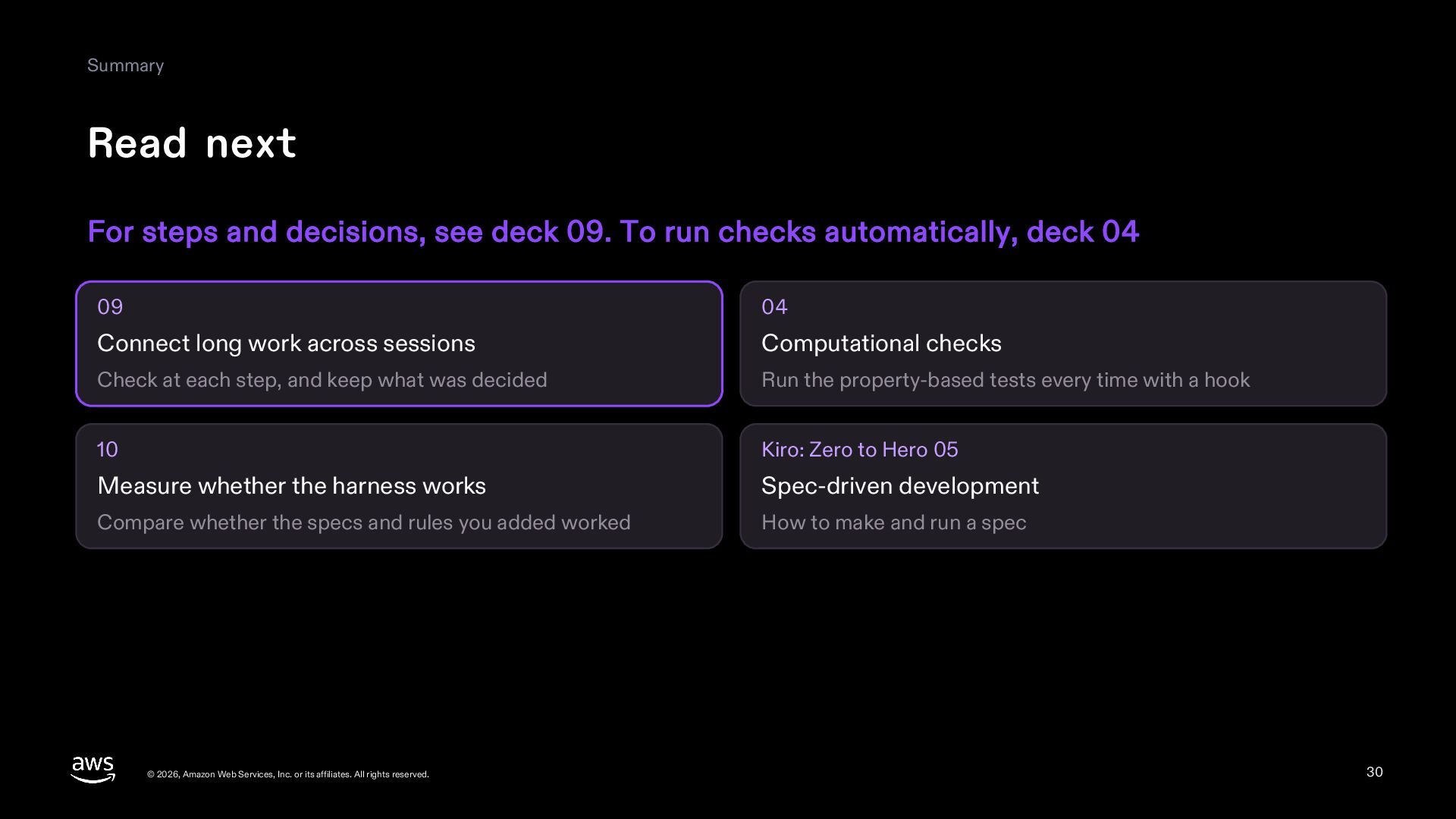
Summary Read next For steps and decisions, see deck 09.
To run checks automatically, deck 04 09 04 Connect long work across sessions Computational checks Check at each step, and keep what was decided Run the property-based tests every time with a hook 10 Kiro: Zero to Hero 05 Measure whether the harness works Spec-driven development Compare whether the specs and rules you added worked How to make and run a spec © 2026, Amazon Web Services, Inc. or its affiliates. All rights reserved. 30 -
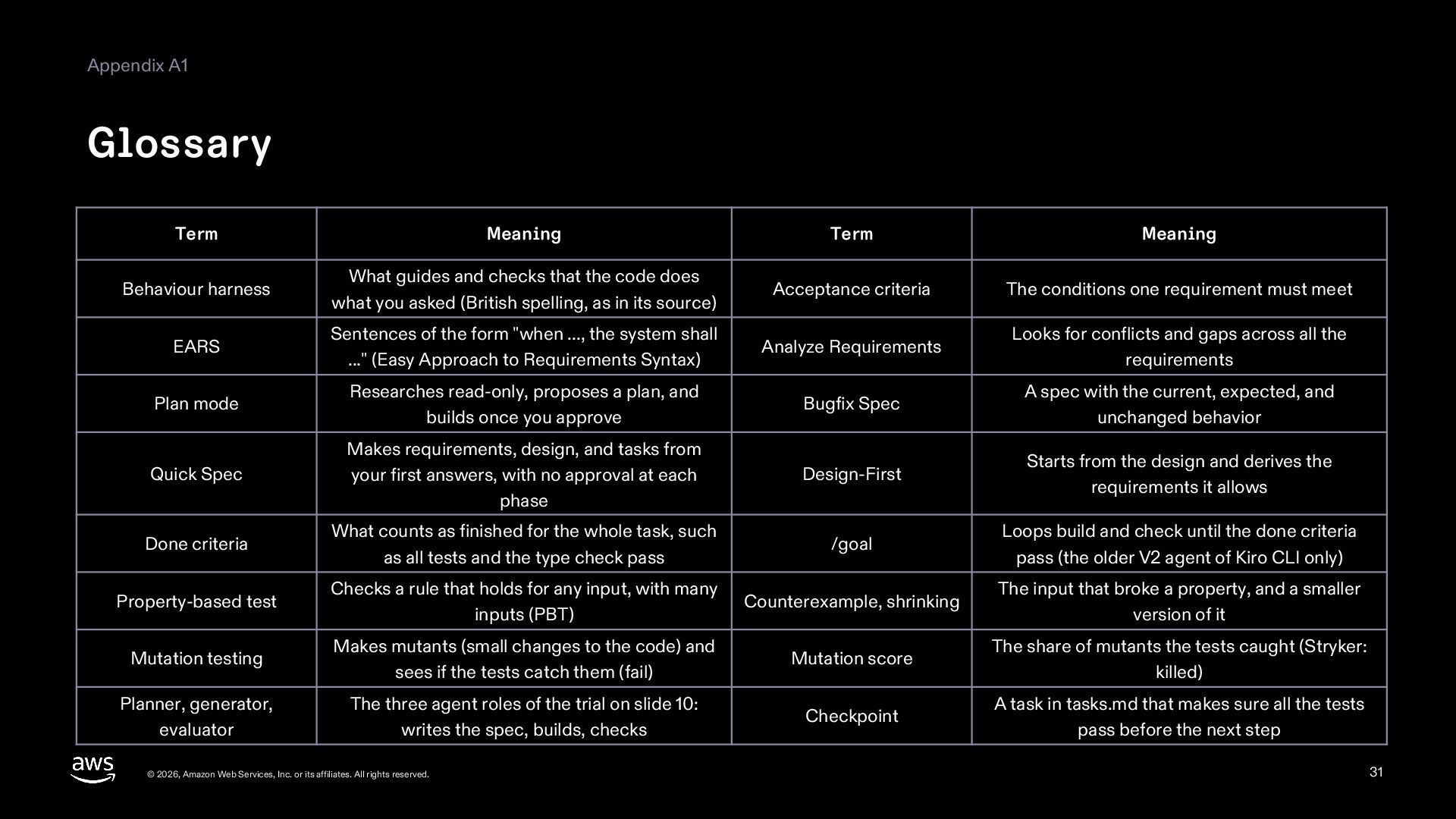
Appendix A1 Glossary Term Meaning Term Meaning Behaviour harness What
guides and checks that the code does what you asked (British spelling, as in its source) Acceptance criteria The conditions one requirement must meet EARS Sentences of the form "when ..., the system shall ..." (Easy Approach to Requirements Syntax) Analyze Requirements Looks for conflicts and gaps across all the requirements Plan mode Researches read-only, proposes a plan, and builds once you approve Bugfix Spec A spec with the current, expected, and unchanged behavior Quick Spec Makes requirements, design, and tasks from your first answers, with no approval at each phase Design-First Starts from the design and derives the requirements it allows Done criteria What counts as finished for the whole task, such as all tests and the type check pass /goal Loops build and check until the done criteria pass (the older V2 agent of Kiro CLI only) Property-based test Checks a rule that holds for any input, with many inputs (PBT) Counterexample, shrinking The input that broke a property, and a smaller version of it Mutation testing Makes mutants (small changes to the code) and sees if the tests catch them (fail) Mutation score The share of mutants the tests caught (Stryker: killed) Planner, generator, evaluator The three agent roles of the trial on slide 10: writes the spec, builds, checks Checkpoint A task in tasks.md that makes sure all the tests pass before the next step © 2026, Amazon Web Services, Inc. or its affiliates. All rights reserved. 31 -
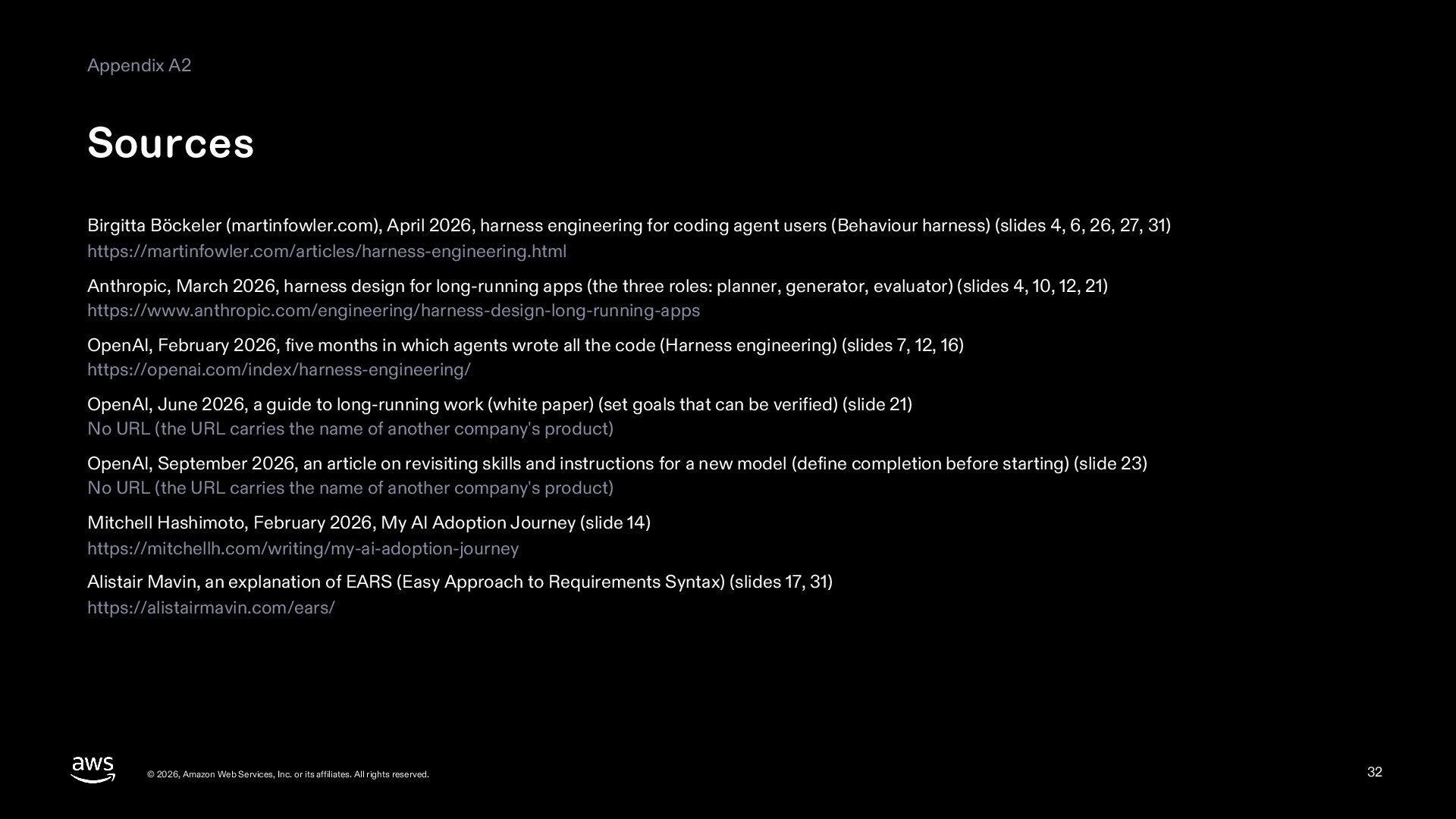
Appendix A2 Sources Birgitta Böckeler (martinfowler.com), April 2026, harness engineering
for coding agent users (Behaviour harness) (slides 4, 6, 26, 27, 31) https://martinfowler.com/articles/harness-engineering.html Anthropic, March 2026, harness design for long-running apps (the three roles: planner, generator, evaluator) (slides 4, 10, 12, 21) https://www.anthropic.com/engineering/harness-design-long-running-apps OpenAI, February 2026, five months in which agents wrote all the code (Harness engineering) (slides 7, 12, 16) https://openai.com/index/harness-engineering/ OpenAI, June 2026, a guide to long-running work (white paper) (set goals that can be verified) (slide 21) No URL (the URL carries the name of another company's product) OpenAI, September 2026, an article on revisiting skills and instructions for a new model (define completion before starting) (slide 23) No URL (the URL carries the name of another company's product) Mitchell Hashimoto, February 2026, My AI Adoption Journey (slide 14) https://mitchellh.com/writing/my-ai-adoption-journey Alistair Mavin, an explanation of EARS (Easy Approach to Requirements Syntax) (slides 17, 31) https://alistairmavin.com/ears/ © 2026, Amazon Web Services, Inc. or its affiliates. All rights reserved. 32 -
Appendix A3 Sources The kiro.dev docs (read as .md on
November 10, 2026): Specs, Feature Specs, Requirements-First, Design-First, Quick Spec, Bugfix Specs, Best practices, Analyze Requirements (slides 4, 8, 11, 12, 13, 16, 18, 19, 22, 31) https://kiro.dev/docs/specs/ The kiro.dev docs: Plan mode (slides 13, 14, 31) https://kiro.dev/docs/specs/plan/ The kiro.dev docs: Correctness with Property-based tests (slides 4, 19, 25, 26, 31) https://kiro.dev/docs/specs/correctness/ The kiro.dev docs: Goal (Kiro CLI) (slides 23, 31) https://kiro.dev/docs/cli/chat/goal/ The kiro.dev docs: Choose an agent harness (V3 and V2 of Kiro CLI) (slide 23) https://kiro.dev/docs/cli/agent-harness/ Stryker Mutator docs: What is mutation testing?, Mutant states and metrics (slides 27, 31) https://stryker-mutator.io/docs/ fast-check docs: What is Property-Based Testing?, Read and troubleshoot test report (slide 25) https://fast-check.dev/docs/introduction/what-is-property-based-testing/ Screens: slides 11, 14, 18, 22, 23 (Kiro CLI 3.1.0) and 25, 27 (npm test, StrykerJS 10.1.1 in Ghostty), November 10, 2026, requests in English. Slide 16: Kiro: Zero to Hero 05, English edition (Kiro IDE 1.4.121). The booking app is a copy of the one made for Kiro: Zero to Hero (not public). © 2026, Amazon Web Services, Inc. or its affiliates. All rights reserved. 33
 inariku
 okappy
 tarappo
 tetsuyaoi
 arawn
 tkyowa
 gotalab555
 ysuzuki
 shoe116
 masahirokawahara
 taka_aki
 mineo_matsuya
 _kotobuki_
 cargoodrich
 aleyda
 sonatard
 baasie
 carmenintech
 eileencodes
 marktimemedia
 kastner
 wjessup
 paigeccino
 schroneko
 stephaniewalter