Upgrade to Pro
— share decks privately, control downloads, hide ads and more …
Speaker Deck
Sign up for free
Menu
Search
Features
All features
Private URLs
Password Protection
Custom URLS
Scheduled publishing
Remove Branding
Restrict embedding
Deck Collections
Notes
Features
All features
Private URLs
Password Protection
Custom URLS
Scheduled publishing
Remove Branding
Restrict embedding
Deck Collections
Notes
Explore
Featured decks
Featured speakers
Programming
Technology
Storyboards
Explore
Featured decks
Featured speakers
Programming
Technology
Storyboards
Pricing
Search
Sign in
Sign up for free
Tasking Managerによるマッピング方法
Search
K_Ogose
July 05, 2017
66
0
Share
Embed
Copy iframe code
Copy JS code
Copy link
Start on current slide
Tasking Managerによるマッピング方法
K_Ogose
July 05, 2017
More Decks by K_Ogose
See All by K_Ogose
生越課題提出
kei0218
0
66
Featured
See All Featured
The browser strikes back
jonoalderson
0
1.8k
No one is an island. Learnings from fostering a developers community.
thoeni
21
3.9k
Building Flexible Design Systems
yeseniaperezcruz
330
41k
Designing for Timeless Needs
cassininazir
1
530
Let's Do A Bunch of Simple Stuff to Make Websites Faster
chriscoyier
508
140k
A Soul's Torment
seathinner
8
3.8k
DevOps and Value Stream Thinking: Enabling flow, efficiency and business value
helenjbeal
2
410
ラッコキーワード サービス紹介資料
rakko
1
5.4M
Visual Storytelling: How to be a Superhuman Communicator
reverentgeek
2
710
First, design no harm
axbom
PRO
2
1.3k
Taking LLMs out of the black box: A practical guide to human-in-the-loop distillation
inesmontani
PRO
3
2.5k
Why Your Marketing Sucks and What You Can Do About It - Sophie Logan
marketingsoph
0
430
Transcript
Tasking Managerによる マッピング方法 1A116060 生越 慶
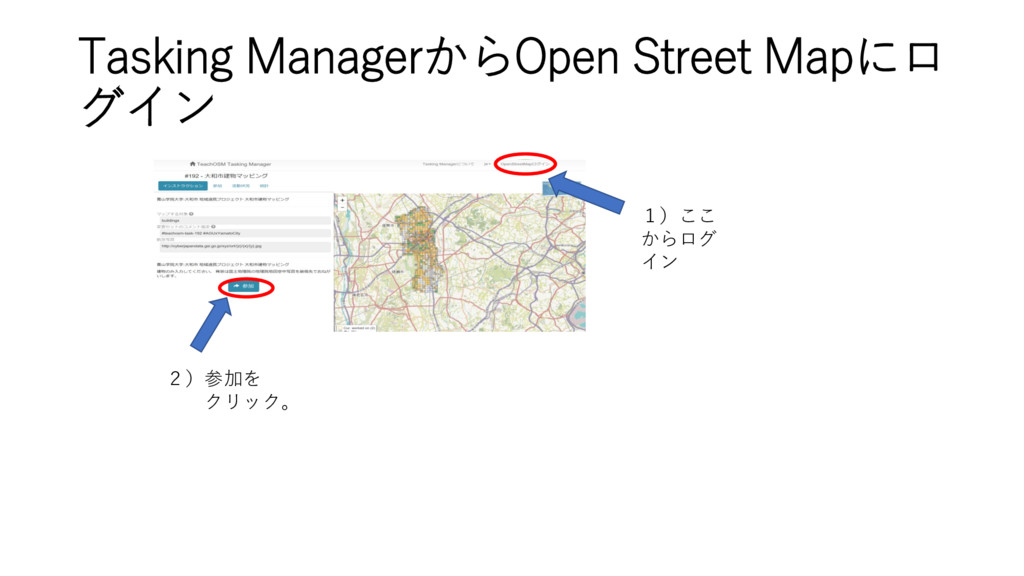
Tasking ManagerからOpen Street Mapにロ グイン 1)ここ からログ イン 2)参加を クリック。
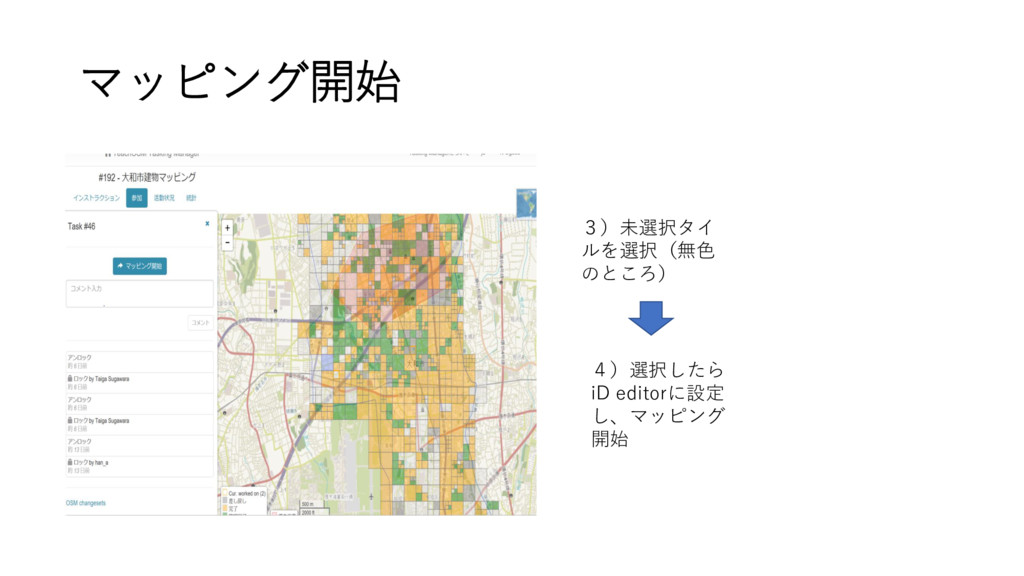
マッピング開始 3)未選択タイ ルを選択(無色 のところ) 4)選択したら iD editorに設定 し、マッピング 開始
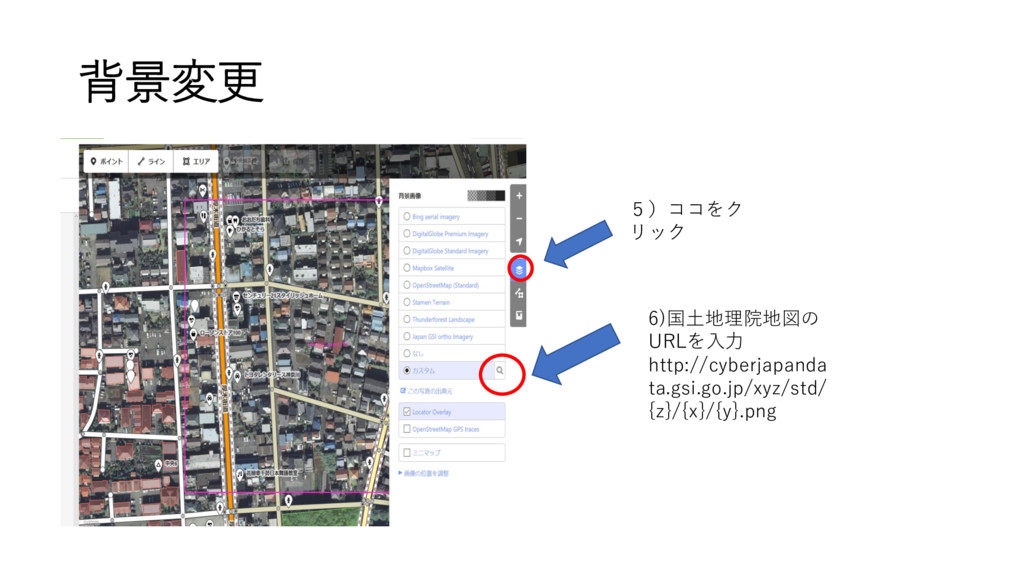
背景変更 5)ココをク リック 6)国土地理院地図の URLを入力 http://cyberjapanda ta.gsi.go.jp/xyz/std/ {z}/{x}/{y}.png
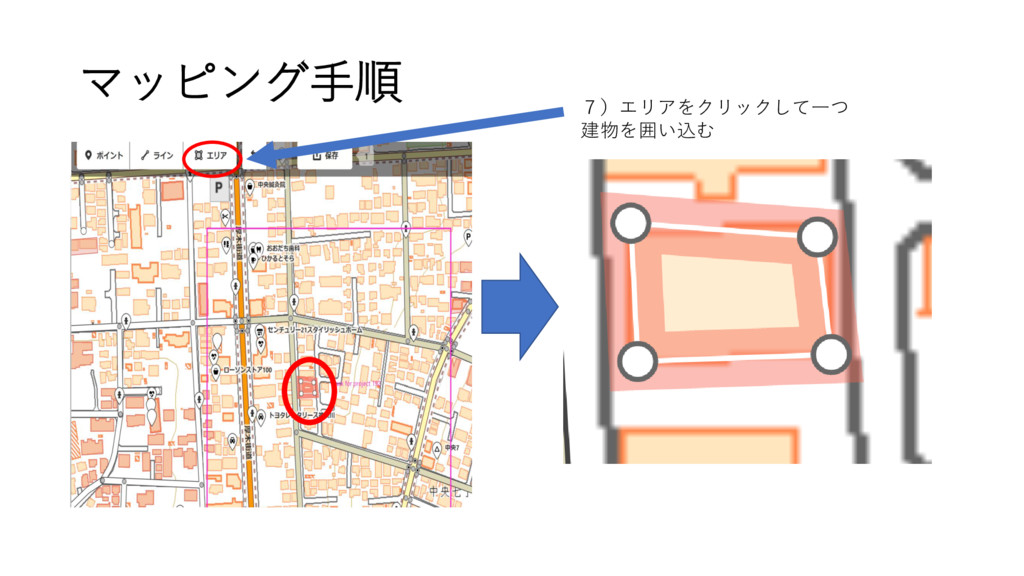
マッピング手順 7)エリアをクリックして一つ 建物を囲い込む
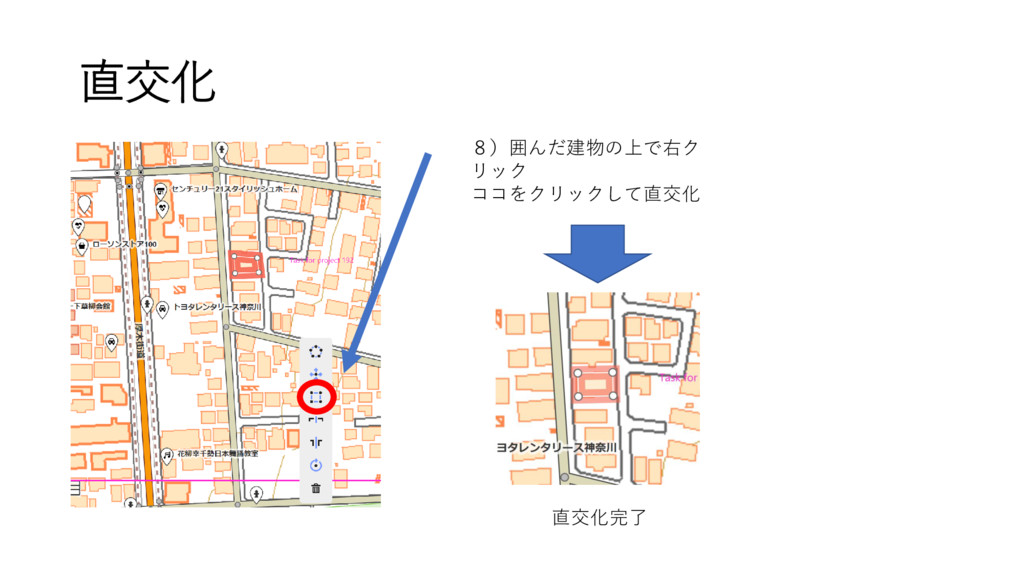
直交化 8)囲んだ建物の上で右ク リック ココをクリックして直交化 直交化完了
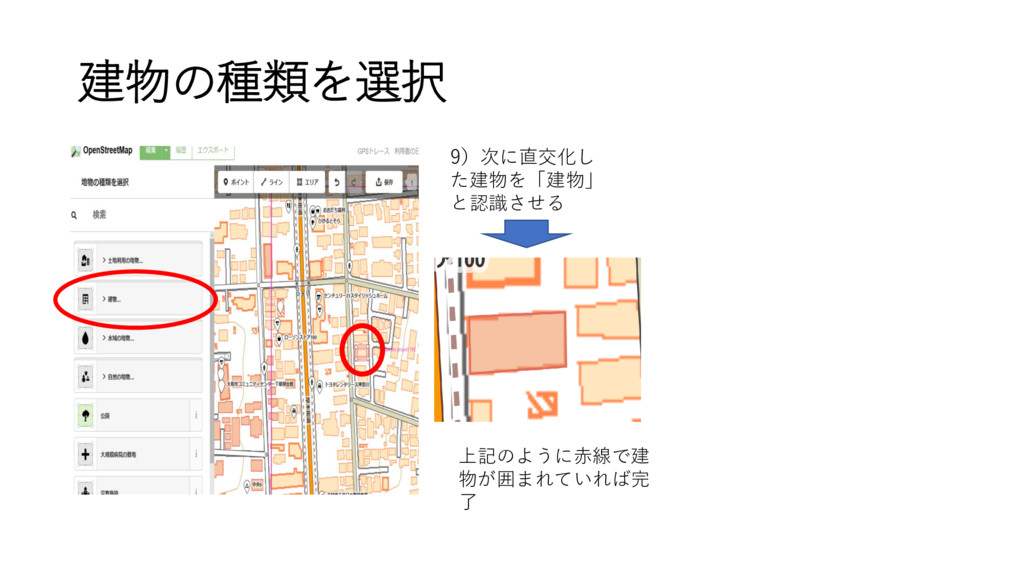
建物の種類を選択 9)次に直交化し た建物を「建物」 と認識させる 上記のように赤線で建 物が囲まれていれば完 了
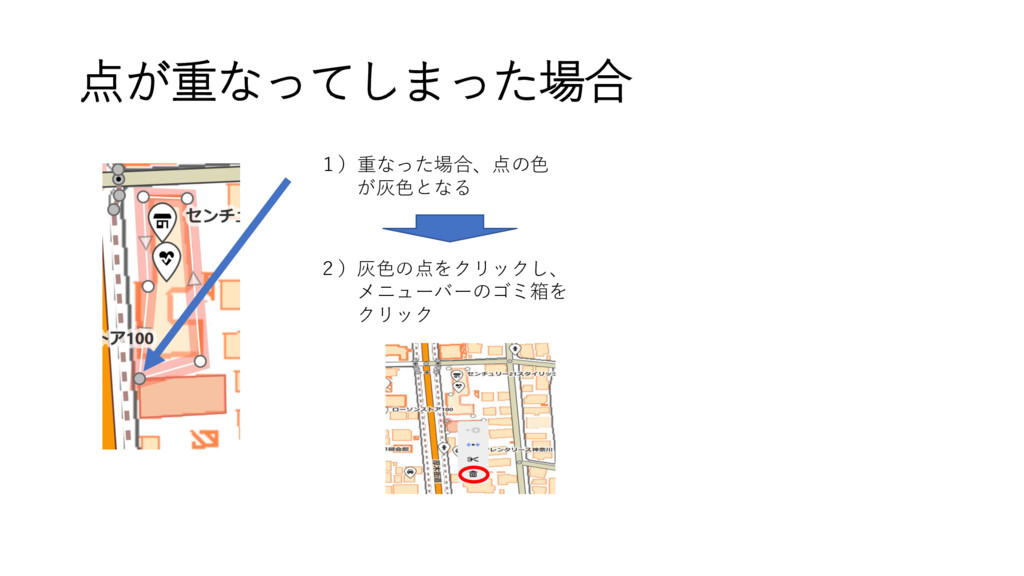
点が重なってしまった場合 1)重なった場合、点の色 が灰色となる 2)灰色の点をクリックし、 メニューバーのゴミ箱を クリック
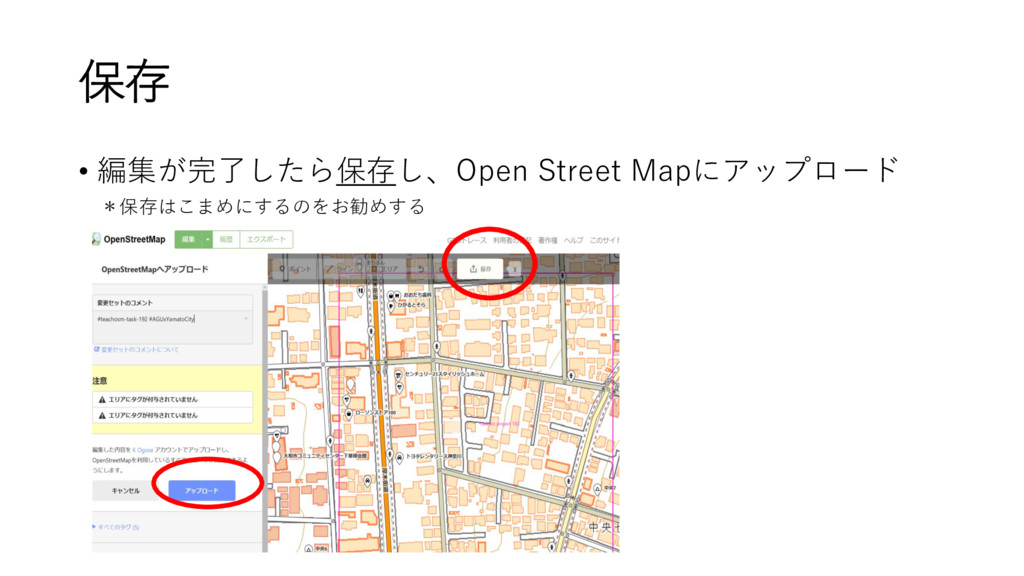
保存 • 編集が完了したら保存し、Open Street Mapにアップロード *保存はこまめにするのをお勧めする
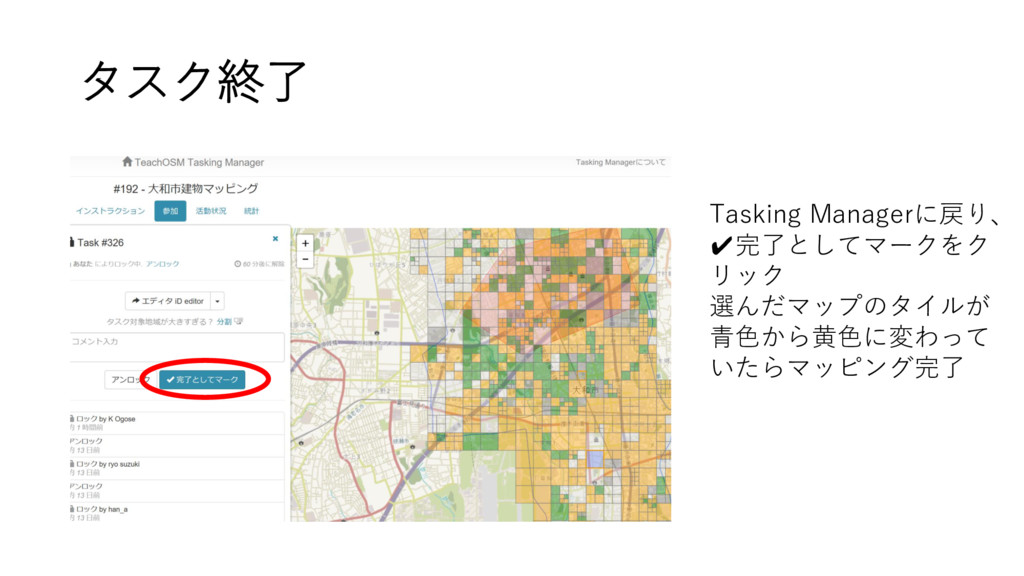
タスク終了 Tasking Managerに戻り、 ✔完了としてマークをク リック 選んだマップのタイルが 青色から黄色に変わって いたらマッピング完了


 kei0218
 jonoalderson
 thoeni
 yeseniaperezcruz
 cassininazir
 chriscoyier
 seathinner
.png) helenjbeal
helenjbeal
 rakko
rakko
 reverentgeek
 axbom
axbom
 inesmontani
 marketingsoph