Upgrade to Pro
— share decks privately, control downloads, hide ads and more …
Speaker Deck
Sign up for free
Menu
Search
Features
All features
Private URLs
Password Protection
Custom URLS
Scheduled publishing
Remove Branding
Restrict embedding
Deck Collections
Notes
Features
All features
Private URLs
Password Protection
Custom URLS
Scheduled publishing
Remove Branding
Restrict embedding
Deck Collections
Notes
Explore
Featured decks
Featured speakers
Programming
Technology
Storyboards
Explore
Featured decks
Featured speakers
Programming
Technology
Storyboards
Pricing
Search
Sign in
Sign up for free
tasking manager validate manual
Search
Sponsored
·
Your Podcast. Everywhere. Effortlessly.
Share. Educate. Inspire. Entertain. You do you. We'll handle the rest.
→
MtaichiM
June 20, 2018
64
0
Share
Embed
Copy iframe code
Copy JS code
Copy link
Start on current slide
tasking manager validate manual
空間情報システムⅠ 課題
MtaichiM
June 20, 2018
More Decks by MtaichiM
See All by MtaichiM
tasking managerの使い方
mtaichim
0
77
Featured
See All Featured
Practical Tips for Bootstrapping Information Extraction Pipelines
honnibal
25
2.1k
Rebuilding a faster, lazier Slack
samanthasiow
85
9.7k
Jess Joyce - The Pitfalls of Following Frameworks
techseoconnect
PRO
1
450
Java REST API Framework Comparison - PWX 2021
mraible
34
9.8k
BBQ
matthewcrist
90
10k
The Director’s Chair: Orchestrating AI for Truly Effective Learning
tmiket
1
330
The Anti-SEO Checklist Checklist. Pubcon Cyber Week
ryanjones
0
270
CoffeeScript is Beautiful & I Never Want to Write Plain JavaScript Again
sstephenson
162
16k
Leo the Paperboy
mayatellez
10
2.4k
Groundhog Day: Seeking Process in Gaming for Health
codingconduct
0
410
The #1 spot is gone: here's how to win anyway
tamaranovitovic
4
1.2k
Unsuck your backbone
ammeep
672
58k
Transcript
Validate マニュアル 1A118166 毛呂太一
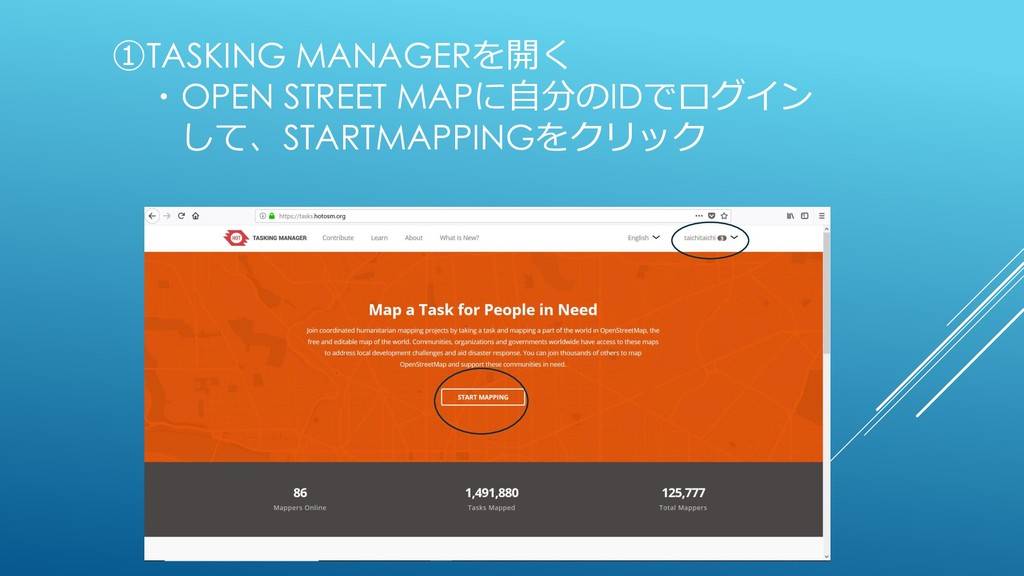
①TASKING MANAGERを開く ・OPEN STREET MAPに自分のIDでログイン して、STARTMAPPINGをクリック
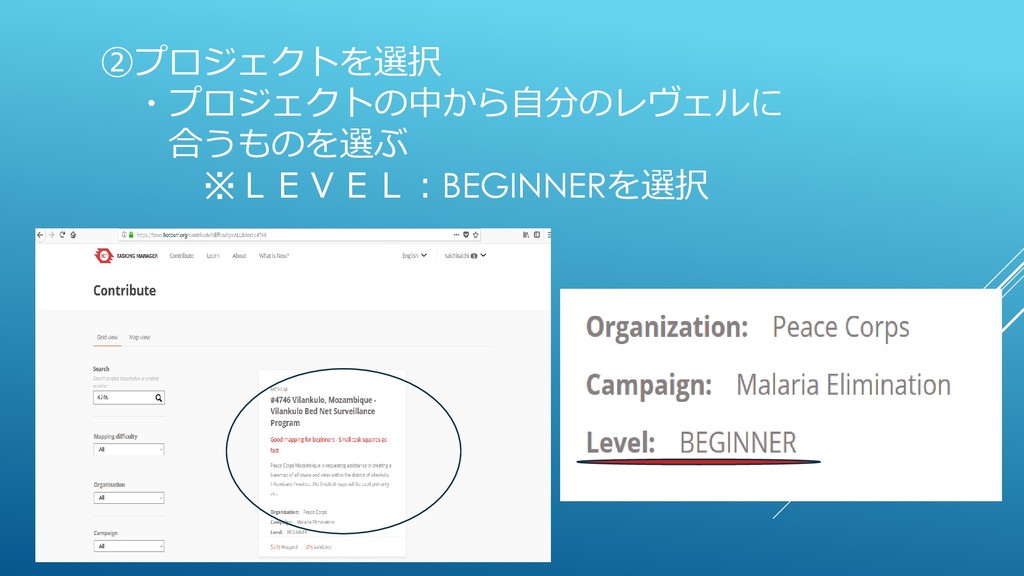
②プロジェクトを選択 ・プロジェクトの中から自分のレヴェルに 合うものを選ぶ ※LEVEL:BEGINNERを選択
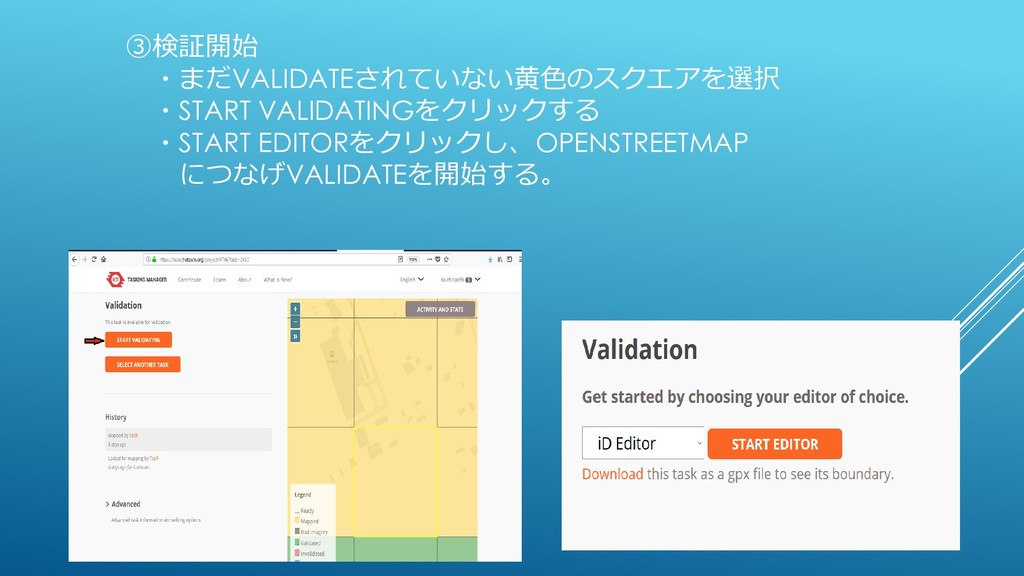
③検証開始 ・まだVALIDATEされていない黄色のスクエアを選択 ・START VALIDATINGをクリックする ・START EDITORをクリックし、OPENSTREETMAP につなげVALIDATEを開始する。
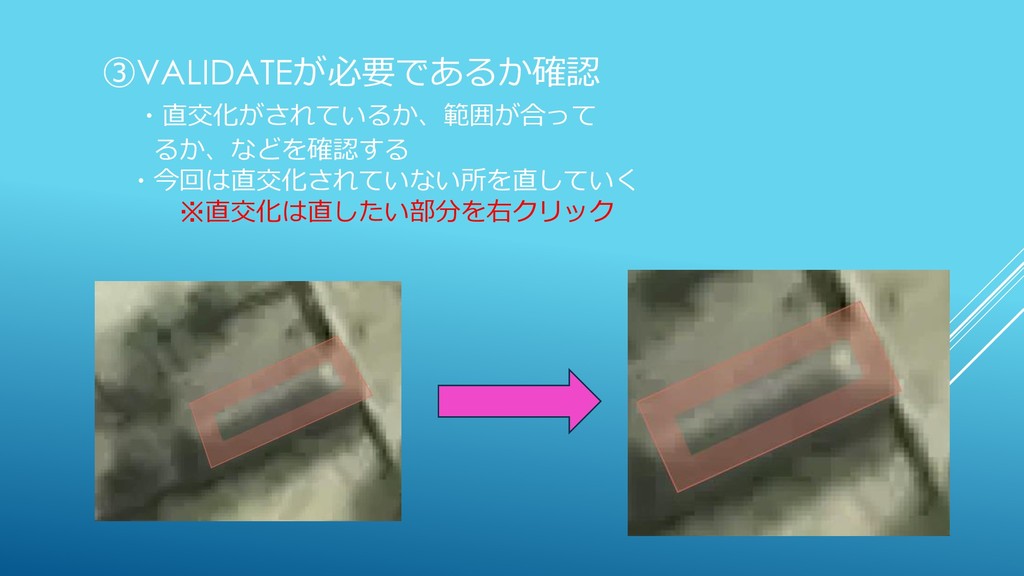
③VALIDATEが必要であるか確認 ・直交化がされているか、範囲が合って るか、などを確認する ・今回は直交化されていない所を直していく ※直交化は直したい部分を右クリック
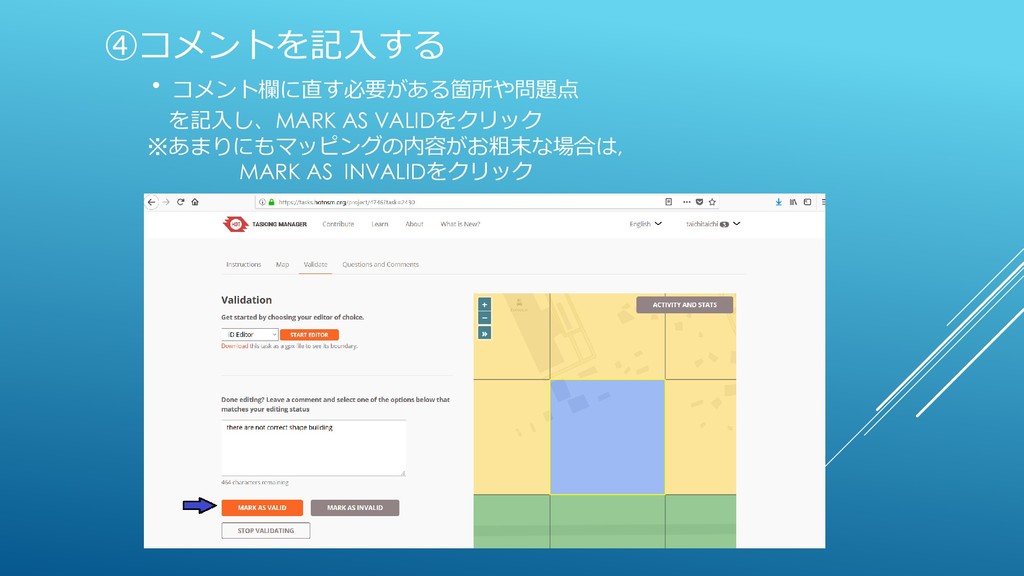
④コメントを記入する ・コメント欄に直す必要がある箇所や問題点 を記入し、MARK AS VALIDをクリック ※あまりにもマッピングの内容がお粗末な場合は, MARK AS INVALIDをクリック
validate作業完了


 mtaichim
 honnibal
 samanthasiow
 techseoconnect
 mraible
 matthewcrist
 tmiket
 ryanjones
 sstephenson
 mayatellez
 codingconduct
 tamaranovitovic
 ammeep