Upgrade to Pro
— share decks privately, control downloads, hide ads and more …
Speaker Deck
Sign up for free
Menu
Search
Features
All features
Private URLs
Password Protection
Custom URLS
Scheduled publishing
Remove Branding
Restrict embedding
Deck Collections
Notes
Features
All features
Private URLs
Password Protection
Custom URLS
Scheduled publishing
Remove Branding
Restrict embedding
Deck Collections
Notes
Explore
Featured decks
Featured speakers
Programming
Technology
Storyboards
Explore
Featured decks
Featured speakers
Programming
Technology
Storyboards
Pricing
Search
Sign in
Sign up for free
Tasking_Manager.pdf
Search
Sponsored
·
Your Podcast. Everywhere. Effortlessly.
Share. Educate. Inspire. Entertain. You do you. We'll handle the rest.
→
竹田七海
June 20, 2019
31
0
Share
Embed
Copy iframe code
Copy JS code
Copy link
Start on current slide
Tasking_Manager.pdf
竹田七海
June 20, 2019
Featured
See All Featured
Automating Front-end Workflow
addyosmani
1369
210k
Bootstrapping a Software Product
garrettdimon
PRO
306
120k
The Language of Interfaces
destraynor
162
27k
Become a Pro
speakerdeck
PRO
31
6.3k
Paper Plane (Part 1)
katiecoart
PRO
2
12k
職位にかかわらず全員がリーダーシップを発揮するチーム作り / Building a team where everyone can demonstrate leadership regardless of position
madoxten
69
67k
How to Talk to Developers About Accessibility
jct
2
580
ピンチをチャンスに:未来をつくるプロダクトロードマップ #pmconf2020
aki_iinuma
128
56k
Leveraging LLMs for student feedback in introductory data science courses - posit::conf(2025)
minecr
1
440
<Decoding/> the Language of Devs - We Love SEO 2024
nikkihalliwell
1
360
Improving Core Web Vitals using Speculation Rules API
sergeychernyshev
21
1.7k
Designing for humans not robots
tammielis
254
26k
Transcript
Tasking Manager マニュアル #600 Tanzania 1A119104 竹田七海
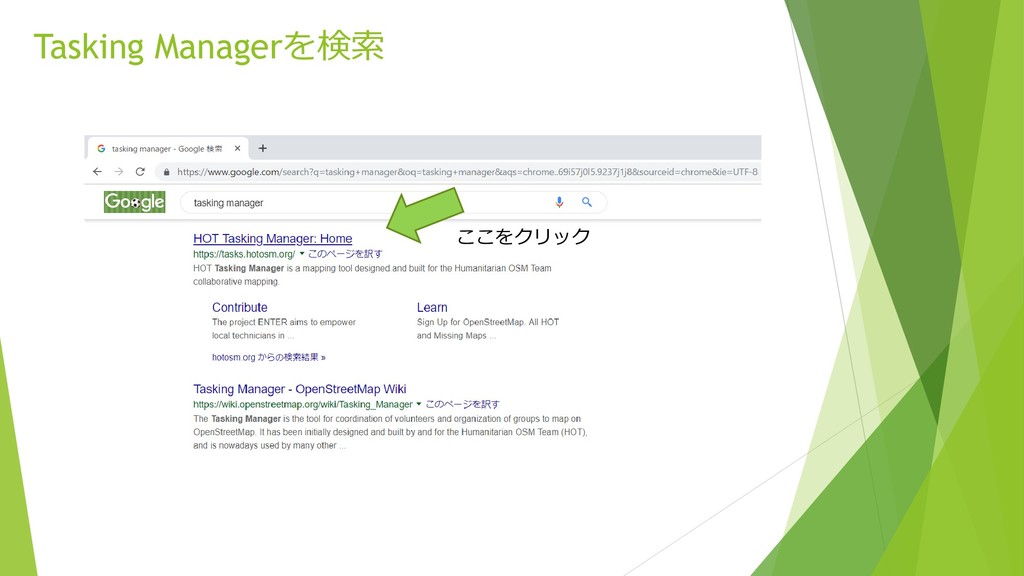
Tasking Managerを検索 ここをクリック
ログイン 右上のLoginをクリックして、 メールアドレス、パスワードを入力
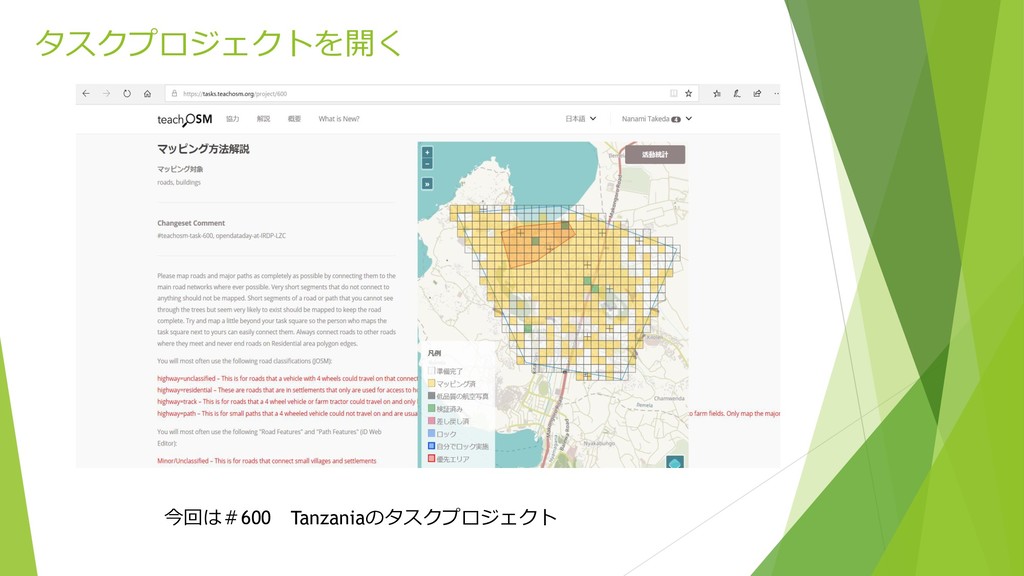
タスクプロジェクトを開く 今回は#600 Tanzaniaのタスクプロジェクト
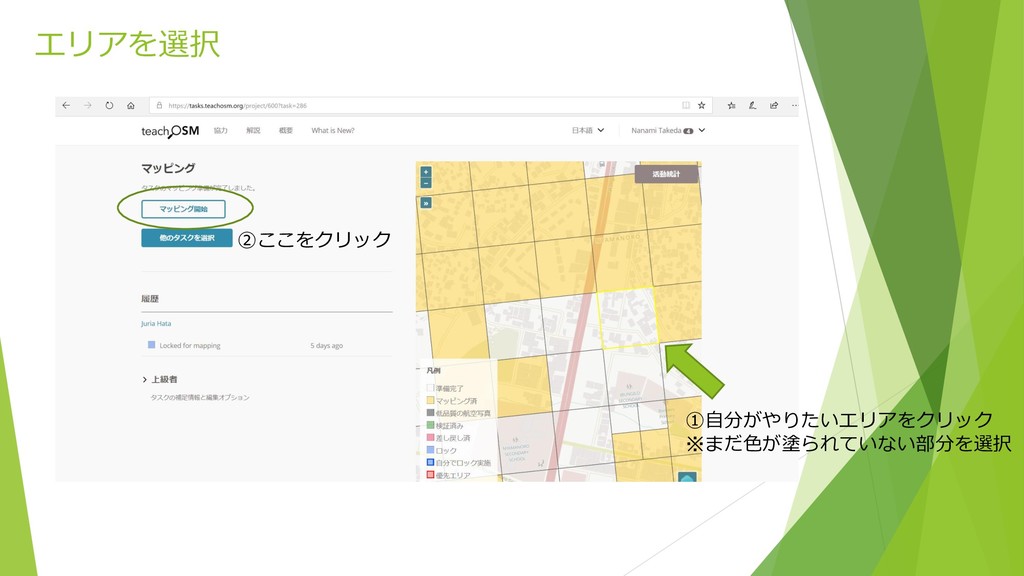
エリアを選択 ①自分がやりたいエリアをクリック ※まだ色が塗られていない部分を選択 ②ここをクリック
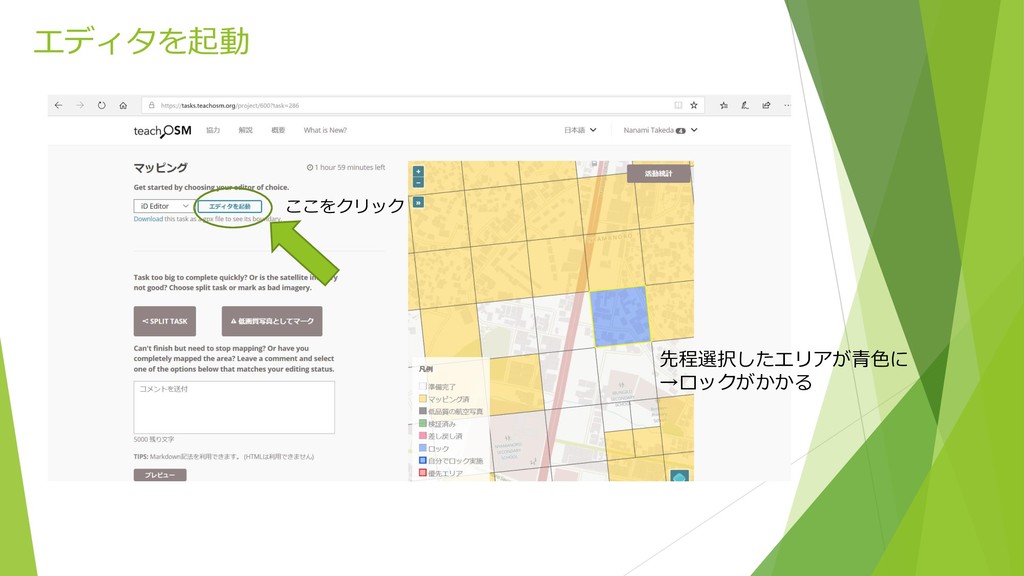
エディタを起動 先程選択したエリアが青色に →ロックがかかる ここをクリック
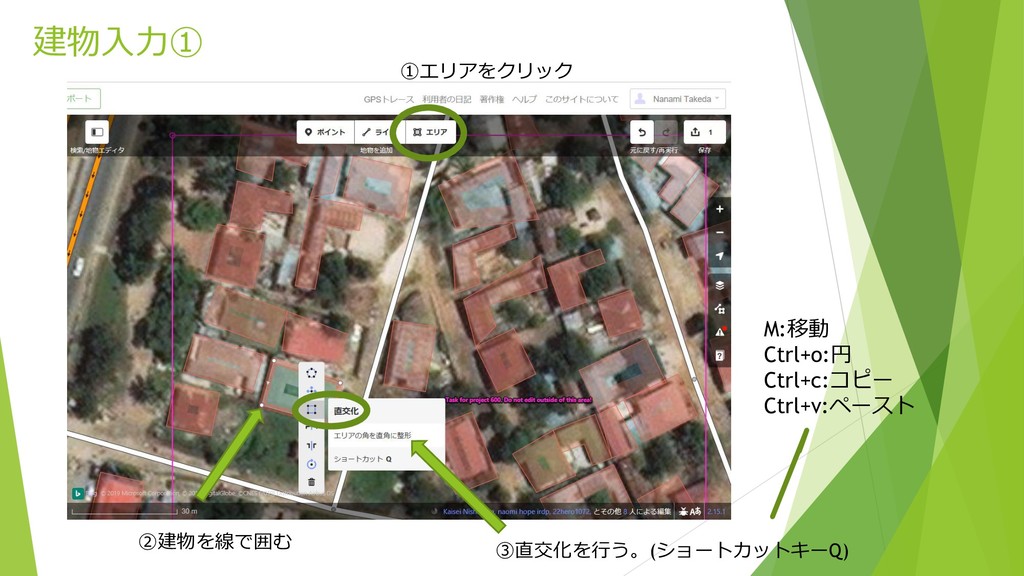
建物入力① ①エリアをクリック ②建物を線で囲む ③直交化を行う。(ショートカットキーQ) M:移動 Ctrl+o:円 Ctrl+c:コピー Ctrl+v:ペースト
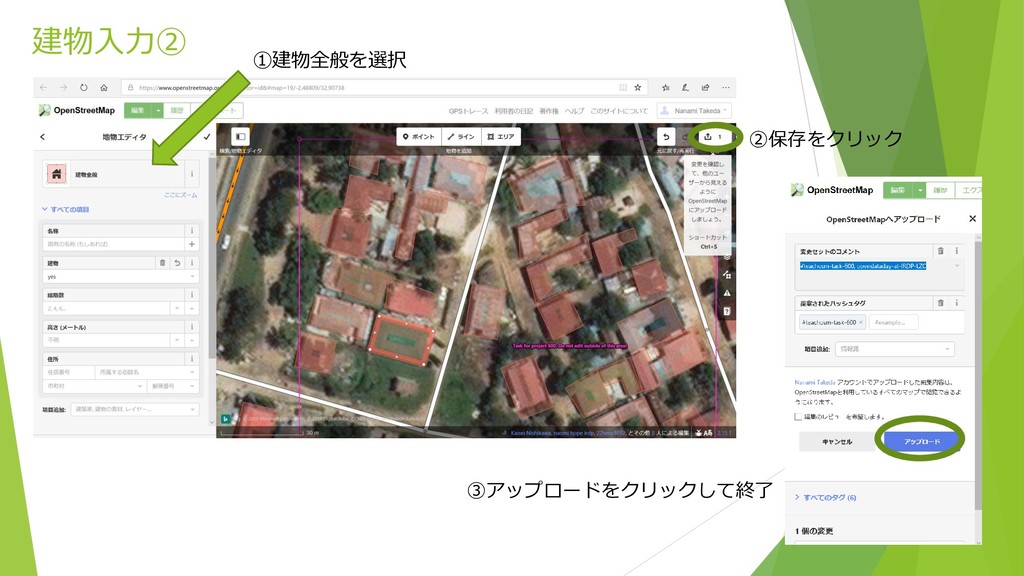
建物入力② ①建物全般を選択 ②保存をクリック ③アップロードをクリックして終了
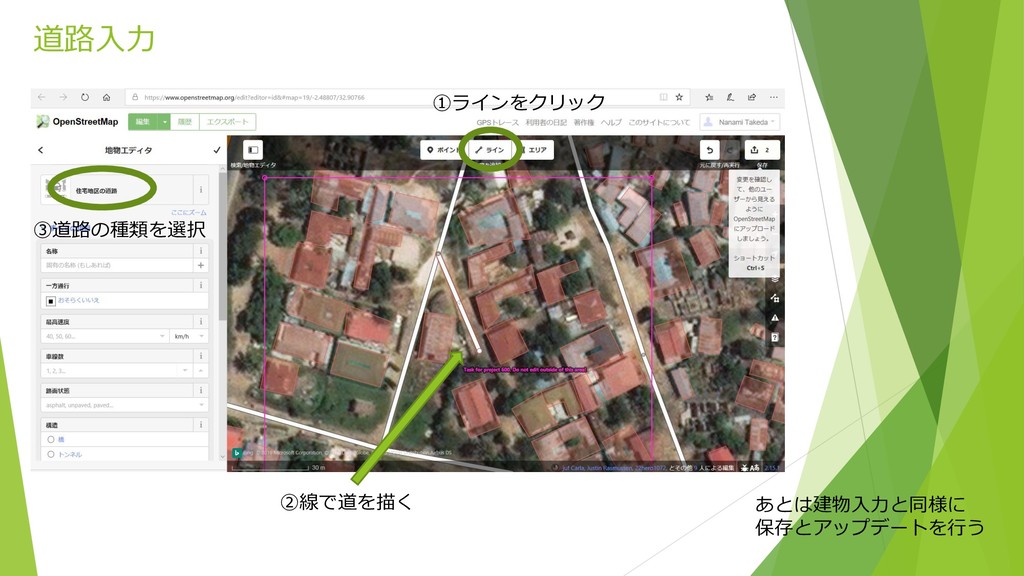
道路入力 ①ラインをクリック ②線で道を描く ③道路の種類を選択 あとは建物入力と同様に 保存とアップデートを行う
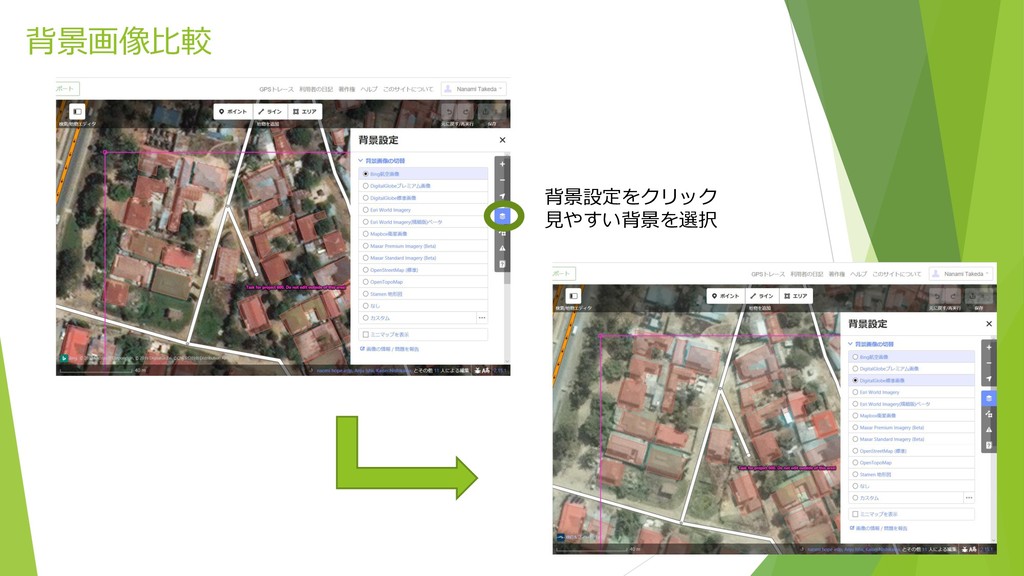
背景画像比較 背景設定をクリック 見やすい背景を選択
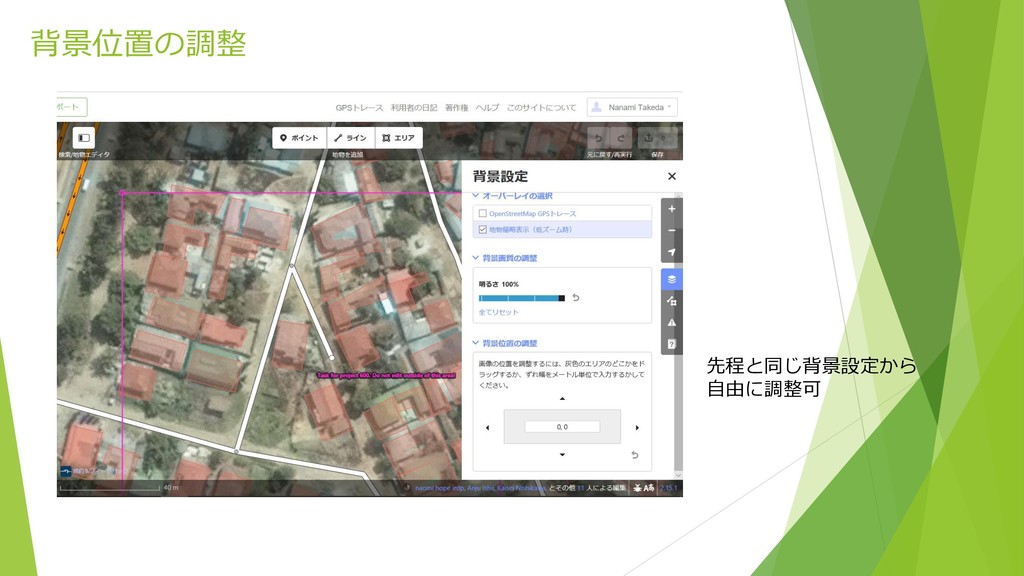
背景位置の調整 先程と同じ背景設定から 自由に調整可
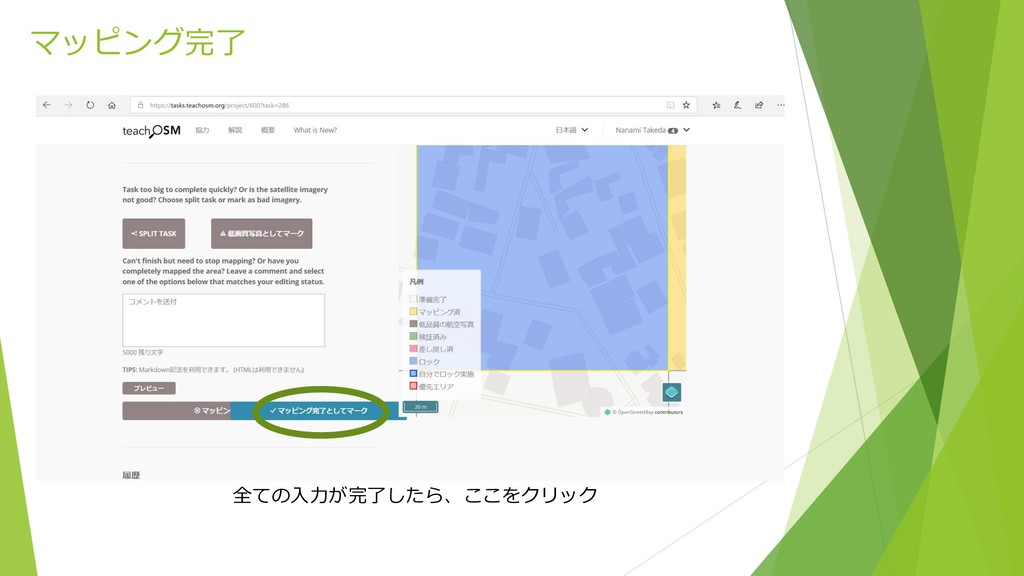
マッピング完了 全ての入力が完了したら、ここをクリック


 addyosmani
 garrettdimon
 destraynor
 speakerdeck
 katiecoart
 madoxten
 jct
jct
 aki_iinuma
 minecr
 nikkihalliwell
 sergeychernyshev
 tammielis