Share
Embed
Securing AI Apps on Azure: Add User Login to AI Apps using MSAL SDK
Description from stream:
Need a user sign-in feature for your AI app? We'll show you how to setup an OAuth2 OIDC flow in Python using the the MSAL SDK with the open source identity package. You can use this approach to either enable employees to sign-in to a workforce tenant or, thanks to Entra External ID, let customers sign-in with a one-time passcode, username/password, or Google/Facebook login. Then your app can use user details from the Graph SDK, like their name and email. We'll also demonstrate how to automate the creation of Microsoft Entra applications using the Graph SDK.
Recording:
https://www.youtube.com/watch?v=vMccS3u16WU
GitHub repo:
https://github.com/Azure-Samples/openai-chat-app-entra-auth-local
Pamela Fox
July 09, 2024
Transcript
40 slides
-
Securing AI Apps on Azure Date Topic Speakers July 2
5-6PM UTC Using Keyless Auth with Azure AI Services Marlene Mhangami Pamela Fox July 8 5-6PM UTC Add User Login to AI Apps using Built-in Auth James Casey Pamela Fox July 9 7-8PM UTC Add User Login to AI Apps using MSAL SDK Ray Luo Pamela Fox July 10 7-8PM UTC Handling User Auth for a SPA App on Azure Matt Gotteiner July 17 7-8PM UTC Data Access Control for AI RAG Apps on Azure Matt Gotteiner Pamela Fox July 25 11PM-12PM Deploying an AI App to a Private Network on Azure Matt Gotteiner Anthony Shaw https://aka.ms/S-1355 -
Securing AI Apps on Azure: Add User Login to AI
Apps using MSAL SDK Pamela Fox Python Cloud Advocacy github.com/pamelafox Ray Luo Senior Software Engineer, MSAL team github.com/rayluo https://aka.ms/securing-msal-slides -
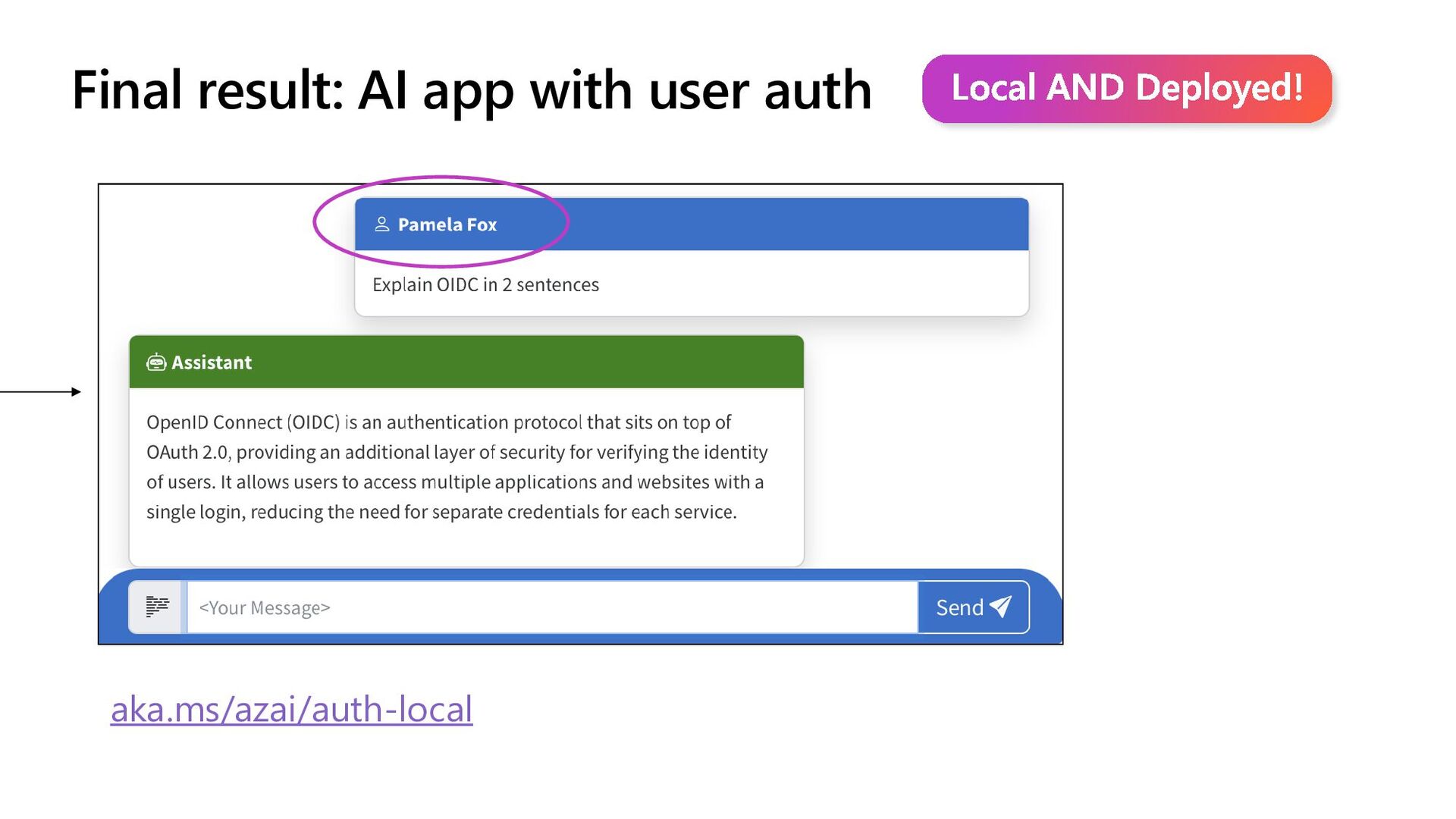
Final result: AI app with user auth Local AND Deployed!
aka.ms/azai/auth-local -
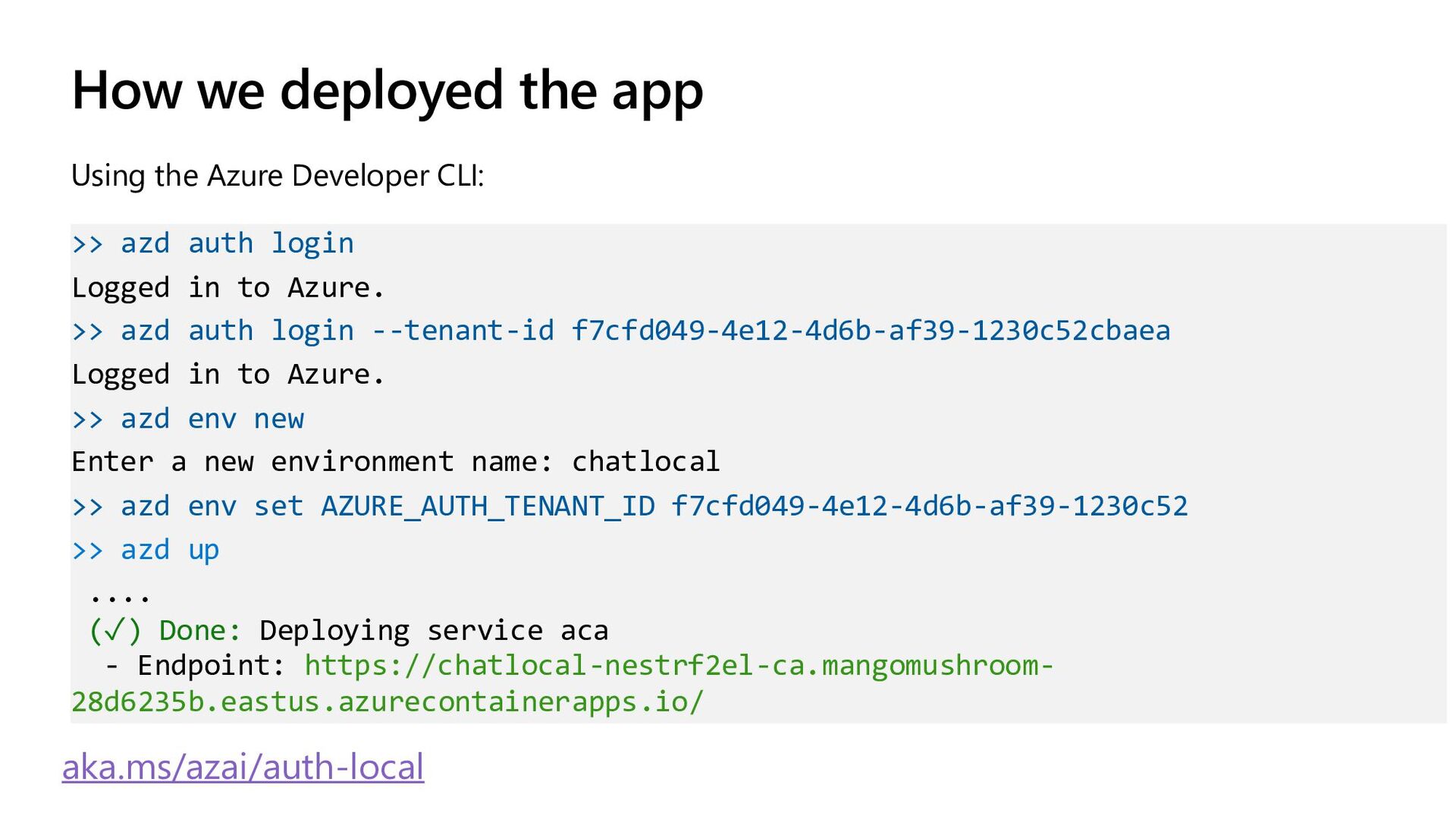
How we deployed the app >> azd auth login Logged
in to Azure. >> azd auth login --tenant-id f7cfd049-4e12-4d6b-af39-1230c52cbaea Logged in to Azure. >> azd env new Enter a new environment name: chatlocal >> azd env set AZURE_AUTH_TENANT_ID f7cfd049-4e12-4d6b-af39-1230c52 >> azd up .... (✓) Done: Deploying service aca - Endpoint: https://chatlocal-nestrf2el-ca.mangomushroom- 28d6235b.eastus.azurecontainerapps.io/ aka.ms/azai/auth-local Using the Azure Developer CLI: -
Now we'll break down how it works... OAuth2 &
Microsoft Entra 101 Setting up Entra applications using Graph SDK Implementing OAuth2 flow using MSAL SDK End-to-end deployment with Azure Developer CLI Upcoming improvements -

What is Identity and Access Management? Ensures the right user
gets access to the right resource -
How do Authentication and Authorization Work? Authenticate users through the
Open ID Connect protocol (OIDC) Authorize users using OAuth 2.0 protocol Terminology: Authorization Server ▪ Issues tokens for apps to access protected resources Client ▪ App requesting access to a protected resource Resource Owner ▪ Owns protected resource client is trying to access Resource Server ▪ Provides access to protected data ▪ Relies on authorization server for authentication, uses token for authorization Auth Flow ▪ Authentication / Authorization Exchange -
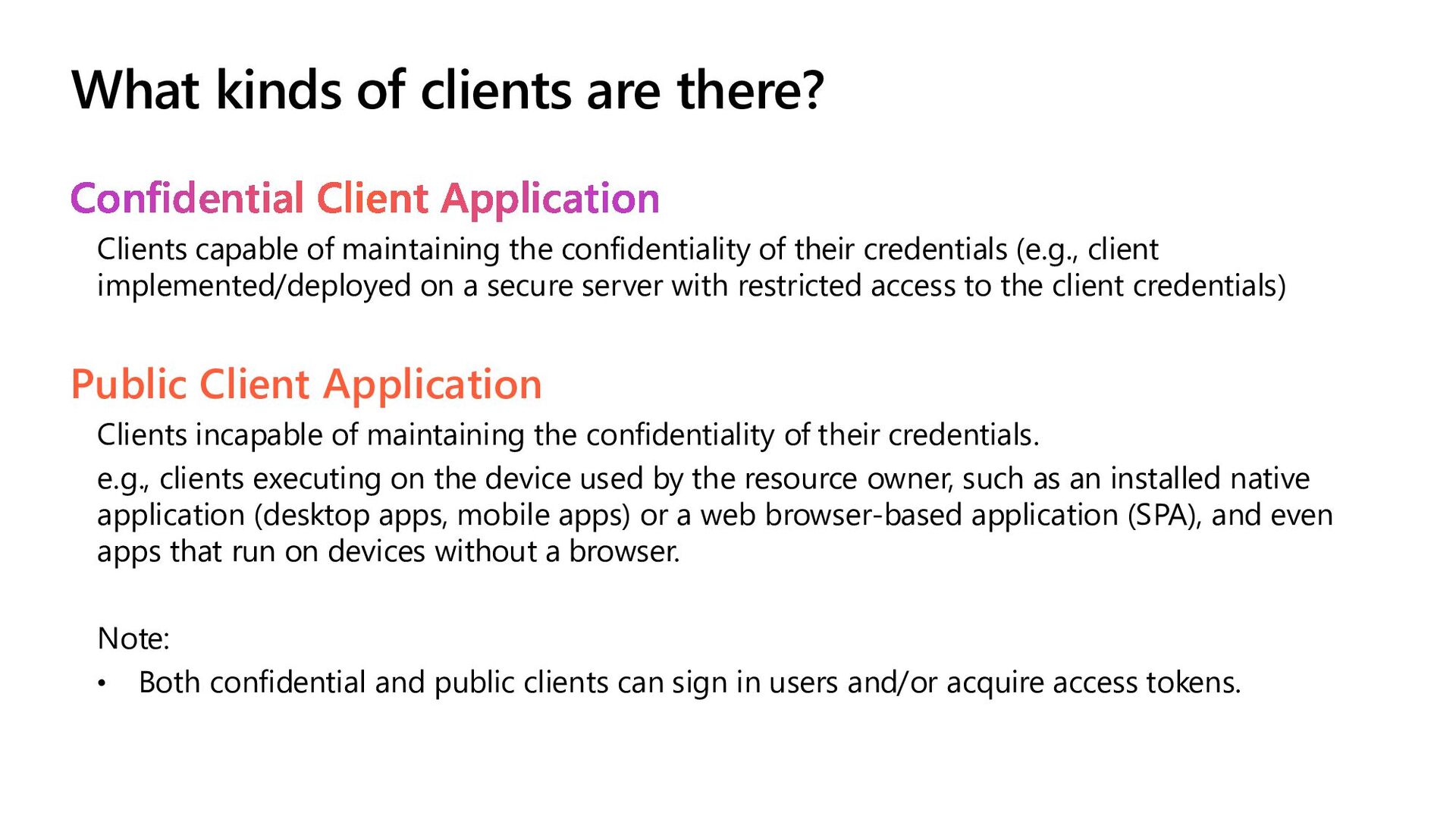
What kinds of clients are there? Confidential Client Application Clients
capable of maintaining the confidentiality of their credentials (e.g., client implemented/deployed on a secure server with restricted access to the client credentials) Public Client Application Clients incapable of maintaining the confidentiality of their credentials. e.g., clients executing on the device used by the resource owner, such as an installed native application (desktop apps, mobile apps) or a web browser-based application (SPA), and even apps that run on devices without a browser. Note: • Both confidential and public clients can sign in users and/or acquire access tokens. -
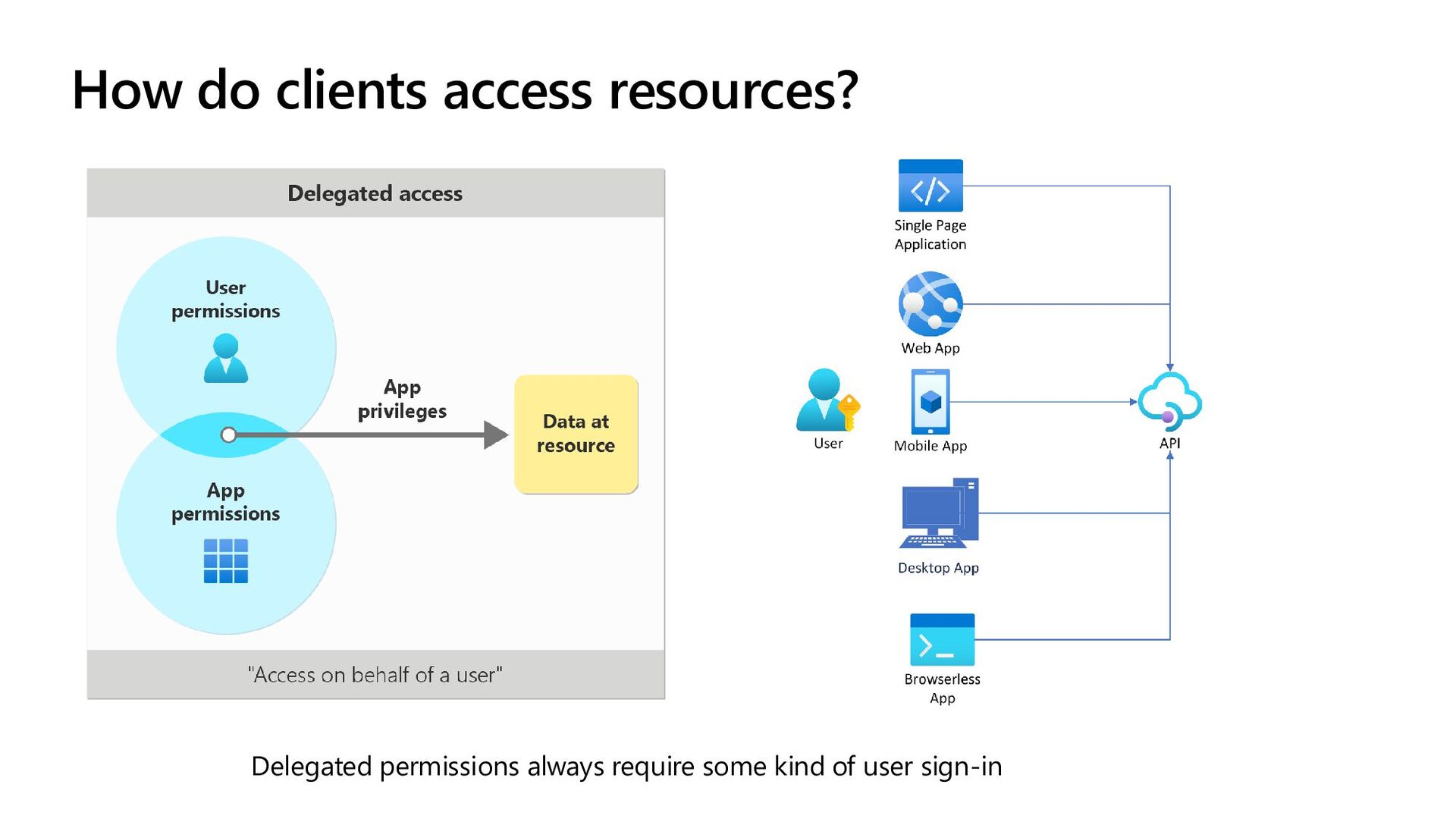
How do clients access resources? Delegated permissions always require some
kind of user sign-in -
OAuth2 authentication flow App backend Microsoft Entra servers Browser OAuth2
Leg 1 Initiate the authorization code flow User Signs in Returns redirect to redirectURI OAuth2 Leg 2 Exchange authorization code for token Redirect to sign-in URI Visits webapp Returns access token, ID token Render user details User has not signed in User already signed in -
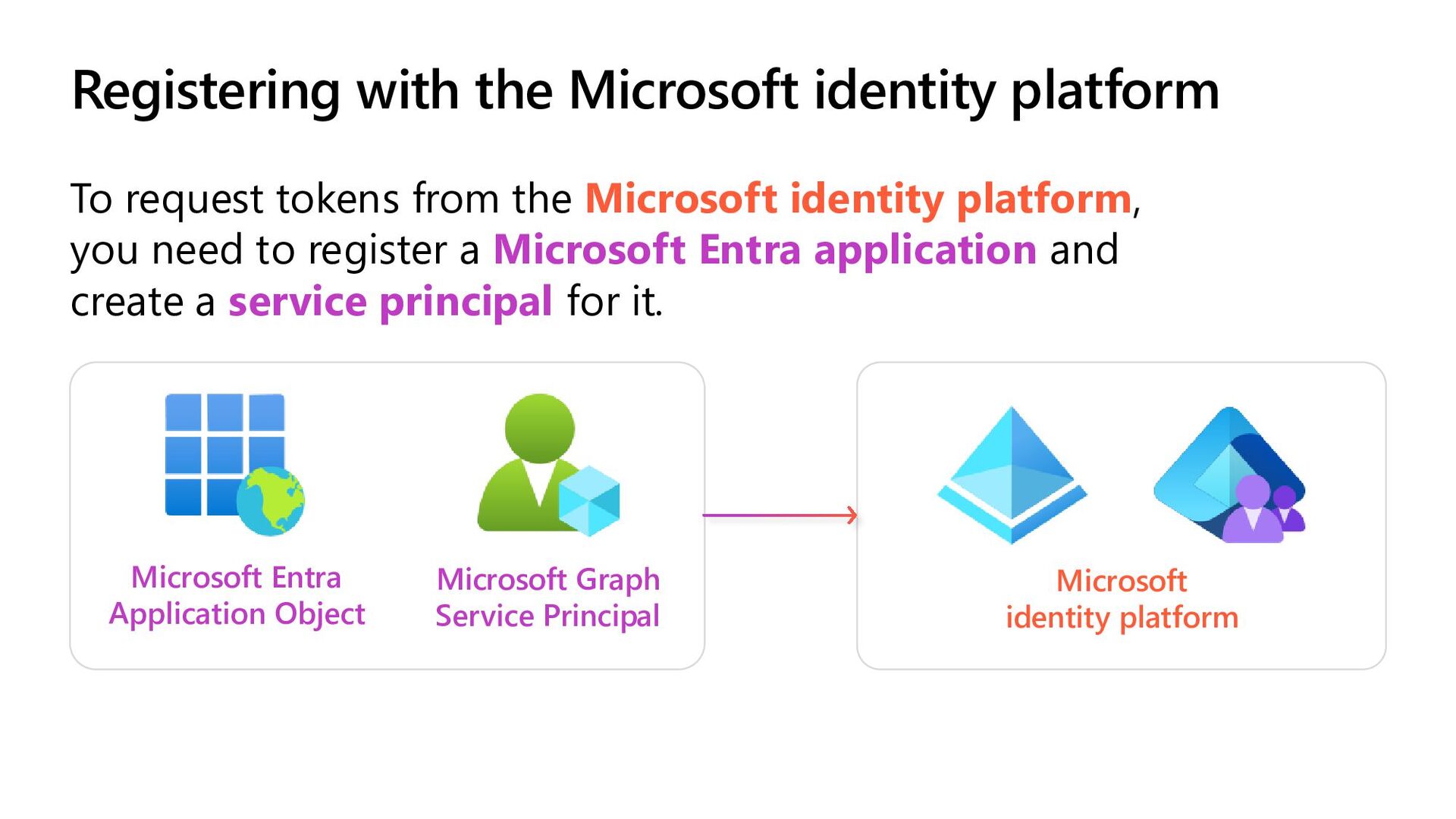
Registering with the Microsoft identity platform To request tokens from
the Microsoft identity platform, you need to register a Microsoft Entra application and create a service principal for it. Microsoft Entra Application Object Microsoft Graph Service Principal Microsoft identity platform -
Registering Entra applications with Graph SDK graph_client = GraphServiceClient( credentials=credential,
scopes=scopes) graph_client.applications.post(Application( display_name=f"ChatGPT Sample Client App {identifier}", sign_in_audience="AzureADAndPersonalAccount", web=WebApplication( redirect_uris=["http://YOUR-APP-URL/.auth/login/aad/callback"], implicit_grant_settings=ImplicitGrantSettings(enable_id_token_issuance=True)) ) Graph SDKs available in C#, Go, Java, JavaScript, PHP, Powershell, Python auth_init.py aka.ms/azai/auth-local -
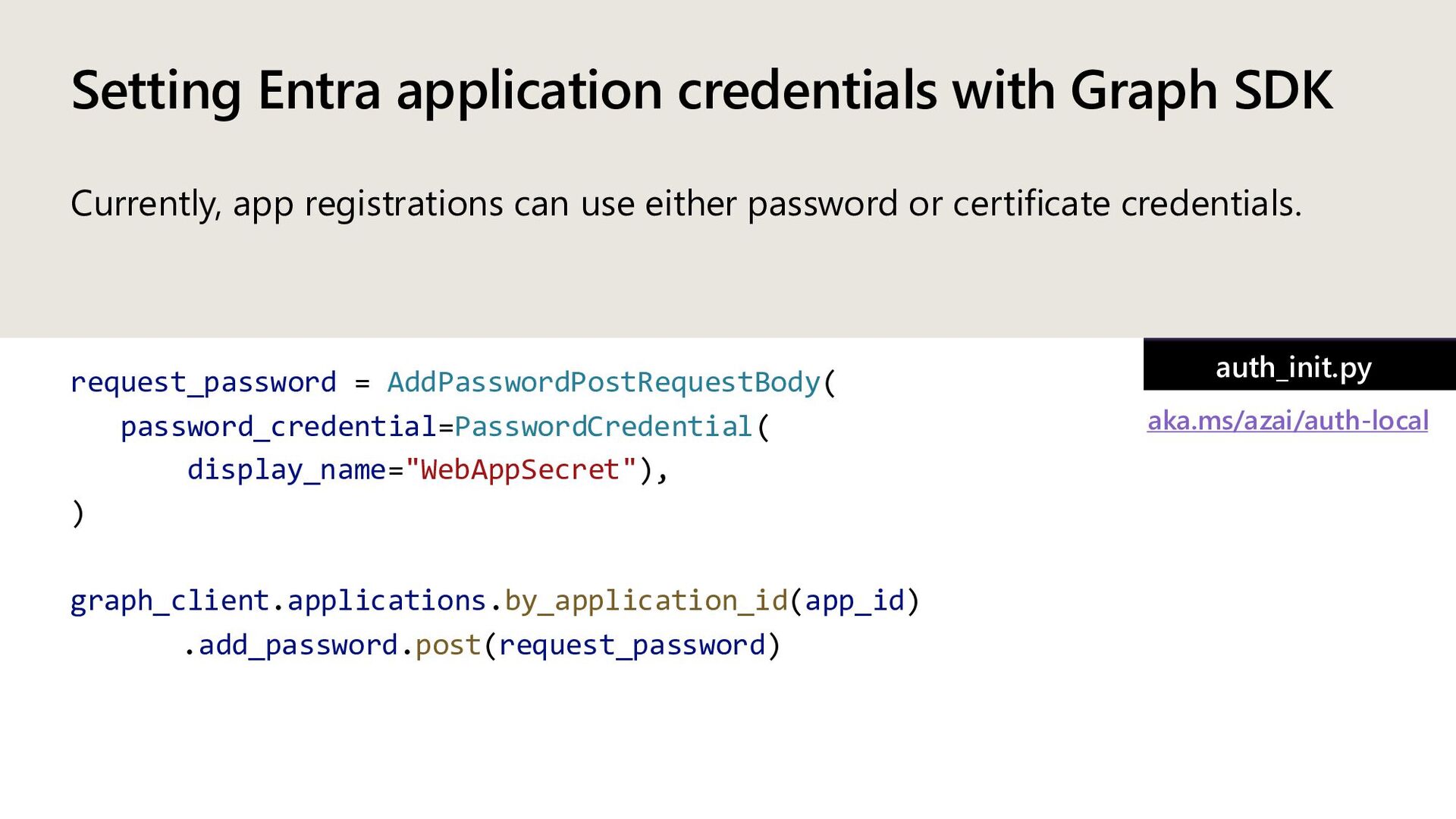
Setting Entra application credentials with Graph SDK request_password = AddPasswordPostRequestBody(
password_credential=PasswordCredential( display_name="WebAppSecret"), ) graph_client.applications.by_application_id(app_id) .add_password.post(request_password) Currently, app registrations can use either password or certificate credentials. auth_init.py aka.ms/azai/auth-local -
Implementing the authentication flow Option 1: For auth on Azure
App Service or Container Apps Option 2: For auth on any host (including local) Use MSAL packages to orchestrate OIDC flow using app registration Configure built-in authentication and authorization with Microsoft identity platform as the provider Watch the recording from our July 8 session! -
OAuth2 authentication flow App backend Microsoft Entra servers Browser OAuth2
Leg 1 Initiate the authorization code flow User Signs in Returns redirect to redirectURI OAuth2 Leg 2 Exchange authorization code for token Redirect to sign-in URI Visits webapp Returns access token, ID token Render user details User has not signed in User already signed in -
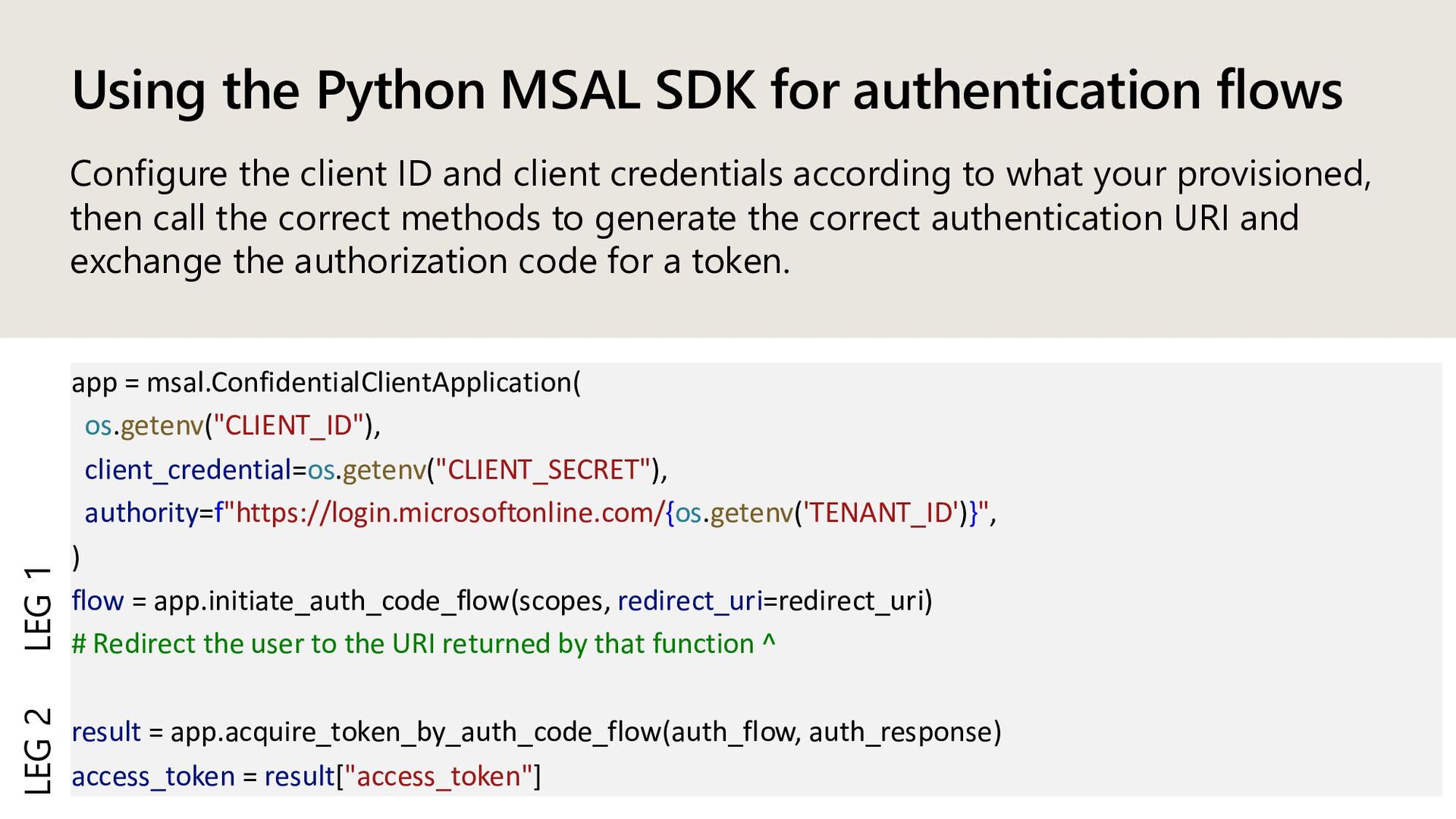
Using the Python MSAL SDK for authentication flows app =
msal.ConfidentialClientApplication( os.getenv("CLIENT_ID"), client_credential=os.getenv("CLIENT_SECRET"), authority=f"https://login.microsoftonline.com/{os.getenv('TENANT_ID')}", ) flow = app.initiate_auth_code_flow(scopes, redirect_uri=redirect_uri) # Redirect the user to the URI returned by that function ^ result = app.acquire_token_by_auth_code_flow(auth_flow, auth_response) access_token = result["access_token"] Configure the client ID and client credentials according to what your provisioned, then call the correct methods to generate the correct authentication URI and exchange the authorization code for a token. LEG 1 LEG 2 -
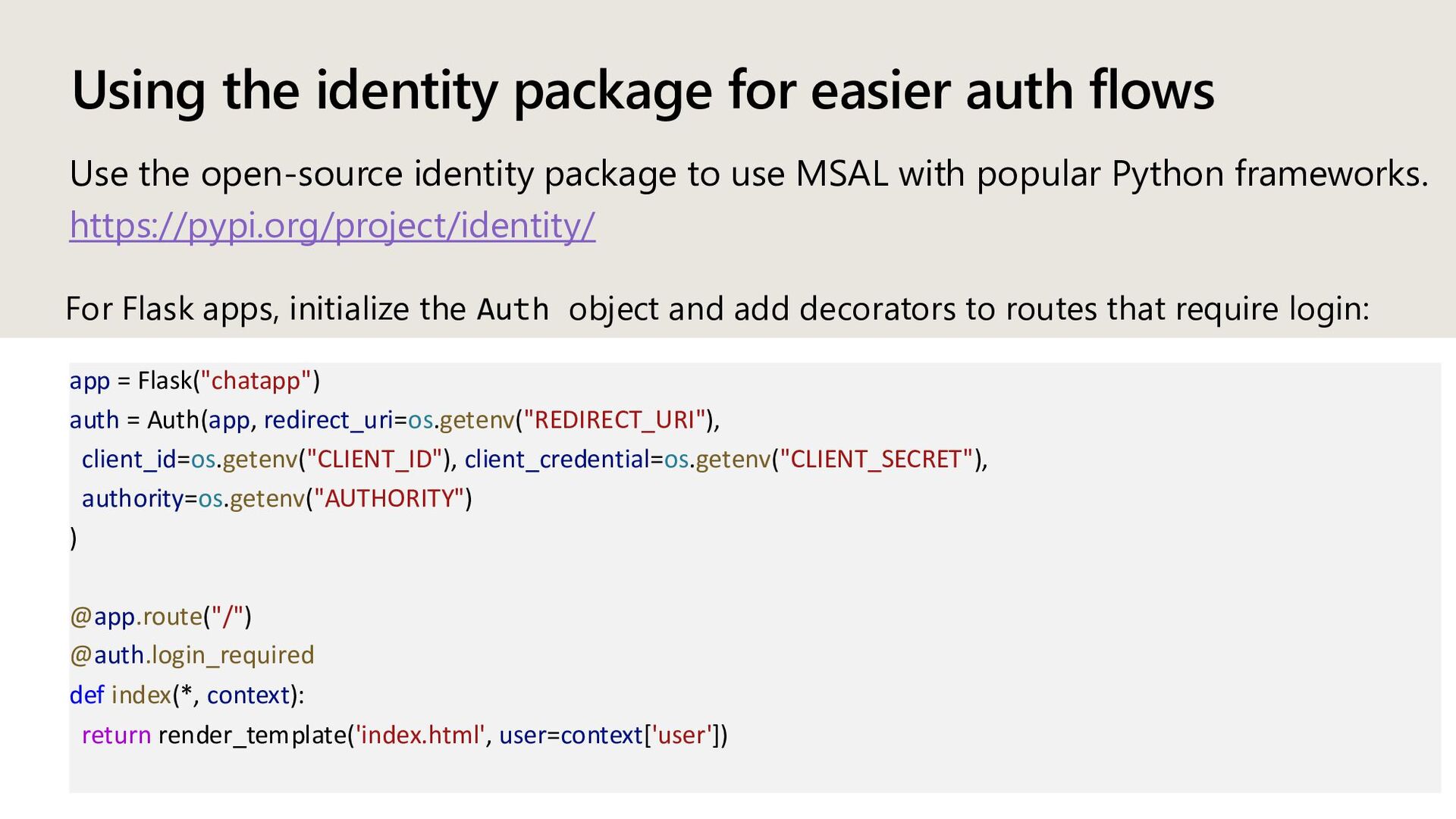
Using the identity package for easier auth flows app =
Flask("chatapp") auth = Auth(app, redirect_uri=os.getenv("REDIRECT_URI"), client_id=os.getenv("CLIENT_ID"), client_credential=os.getenv("CLIENT_SECRET"), authority=os.getenv("AUTHORITY") ) @app.route("/") @auth.login_required def index(*, context): return render_template('index.html', user=context['user']) Use the open-source identity package to use MSAL with popular Python frameworks. https://pypi.org/project/identity/ For Flask apps, initialize the Auth object and add decorators to routes that require login: -
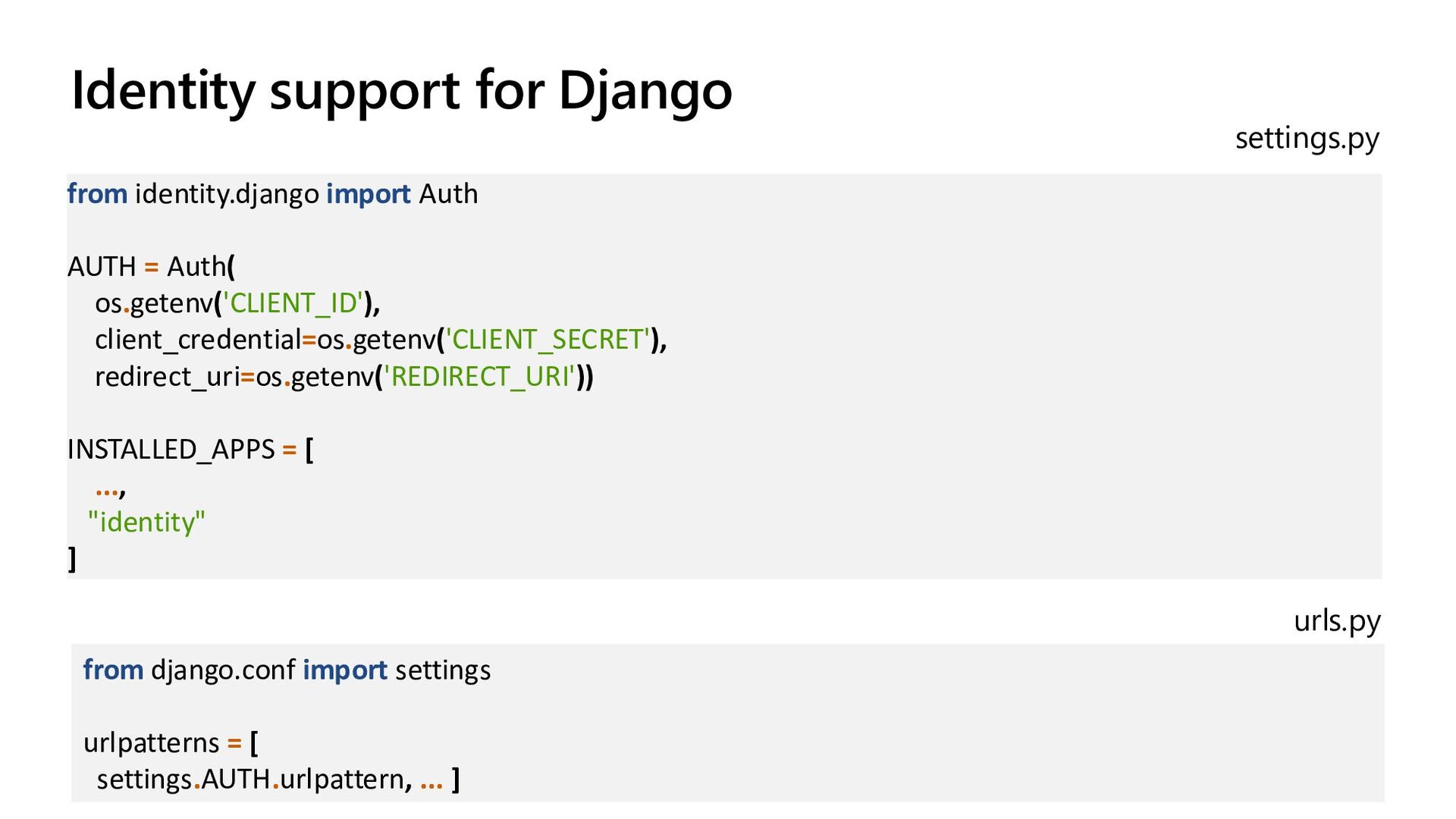
Identity support for Django from identity.django import Auth AUTH =
Auth( os.getenv('CLIENT_ID'), client_credential=os.getenv('CLIENT_SECRET'), redirect_uri=os.getenv('REDIRECT_URI')) INSTALLED_APPS = [ ..., "identity" ] from django.conf import settings urlpatterns = [ settings.AUTH.urlpattern, ... ] urls.py settings.py -
Identity support for Quart app = Quart(__name__) auth = Auth(app,
redirect_uri=os.getenv('REDIRECT_URI'), client_id=os.getenv('CLIENT_ID'), client_credential=os.getenv('CLIENT_SECRET'), ) @app.route("/") @auth.login_required async def index(*, context): user = context['user'] ... Quart is the asynchronous version of Flask, and can be setup similarly. -
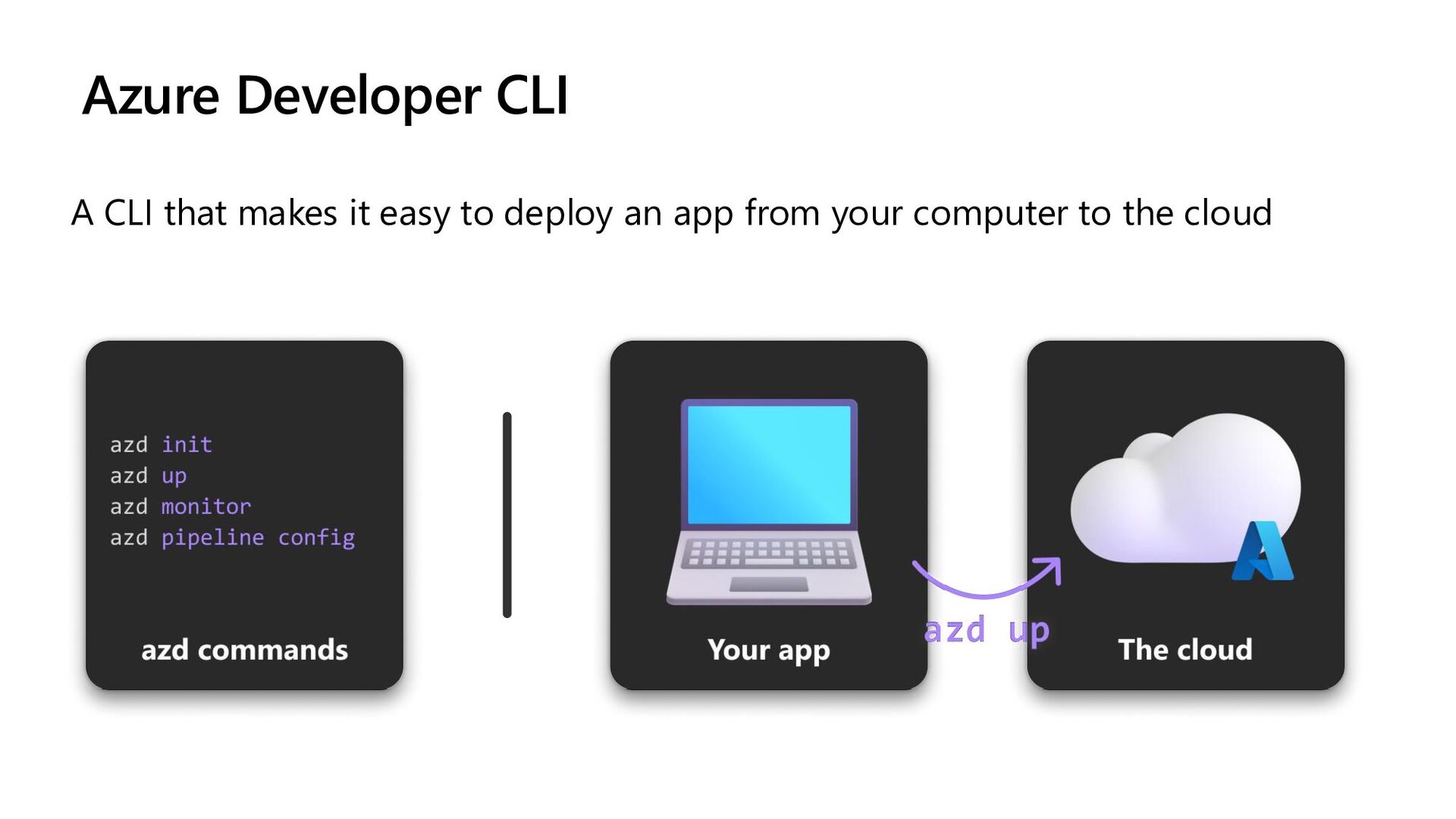
A CLI that makes it easy to deploy an app
from your computer to the cloud Azure Developer CLI -
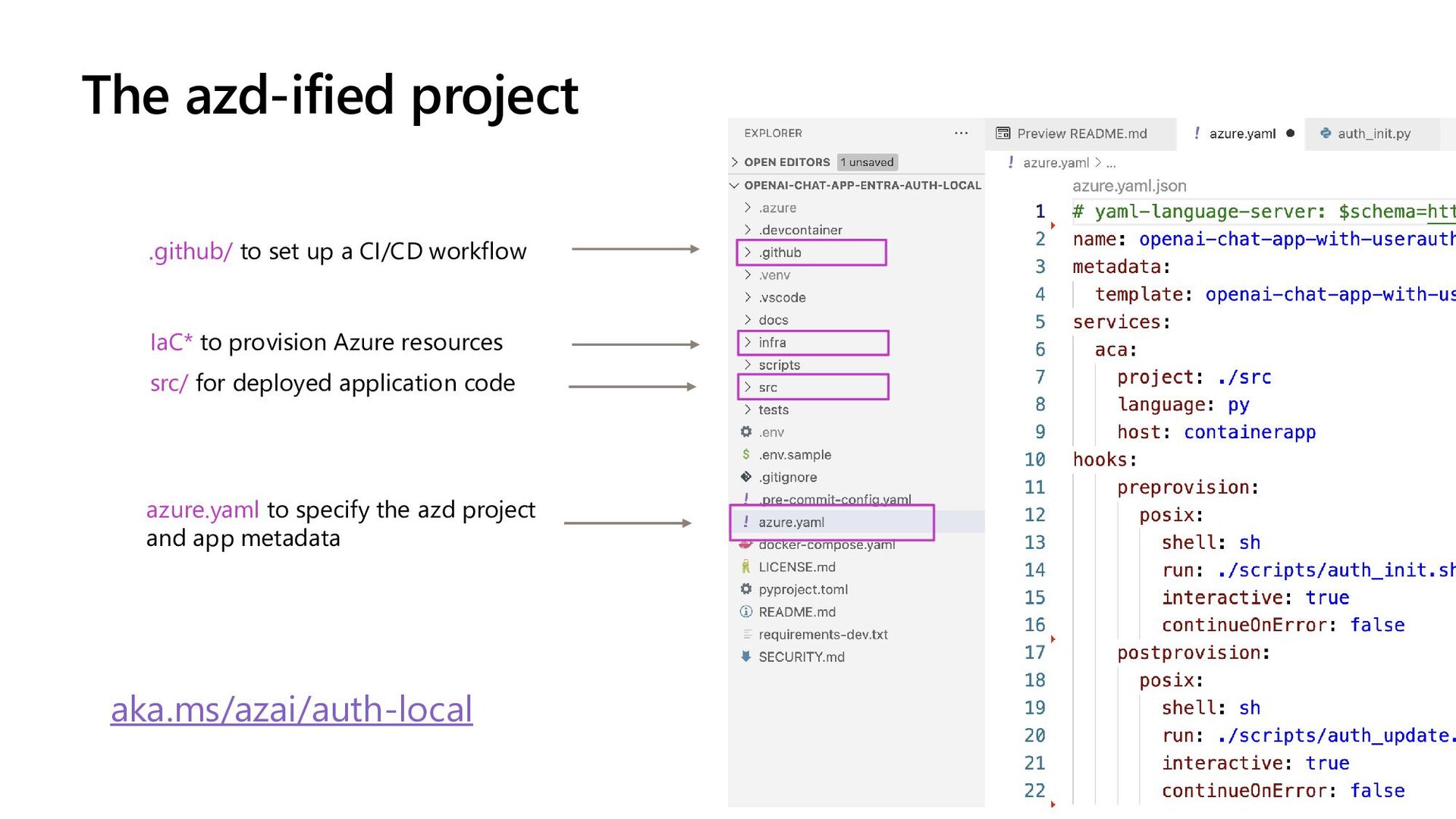
azure.yaml to specify the azd project and app metadata src/
for deployed application code IaC* to provision Azure resources .github/ to set up a CI/CD workflow The azd-ified project aka.ms/azai/auth-local -
azd up: Packaging stage >> azd up ? Select an
Azure location to use: 44. (US) East US (eastus) Packaging services (azd package) (✓) Done: Packaging service aca - Image Hash: sha256:c634223eb334d13cbfbb907496aebf1f72758f94cf - Target Image: openai-chat-app-with-userauth-msal/aca- chatlocal:azd-deploy-1720523286 -
azd up: Pre-provision script >> azd up ... INFO Loading
azd env from .azure/chatlocal/.env INFO Setting up authentication... INFO Creating application registration INFO Adding client secret to 7d74a3ef-5784-445a-b6cb-cde107f3c0ec INFO Updating azd env with AZURE_AUTH_APP_ID, AZURE_AUTH_CLIENT_ID, AZURE_AUTH_CLIENT_SECRET -
azd up: Provisioning stage aka.ms/azai/auth-local >> azd up ... Provisioning
Azure resources (azd provision) Subscription: ca-pamelafox-demo-test Location: East US (✓) Done: Resource group: chatlocal-rg (✓) Done: Log Analytics workspace: chatlocal-nestrf2elxm6o- loganalytics (✓) Done: Key Vault: chatlocalnestrf2-vault (✓) Done: Azure OpenAI: nestrf2elxm6o-cog (✓) Done: Container Registry: chatlocalnestrf2elxm6oregistry (✓) Done: Container Apps Environment: chatlocal-nestrf2elxm6o- containerapps-env (✓) Done: Cache for Redis: chatlocal-nestrf2elxm6o-redis (✓) Done: Container App: chatlocal-nestrf2el-ca -
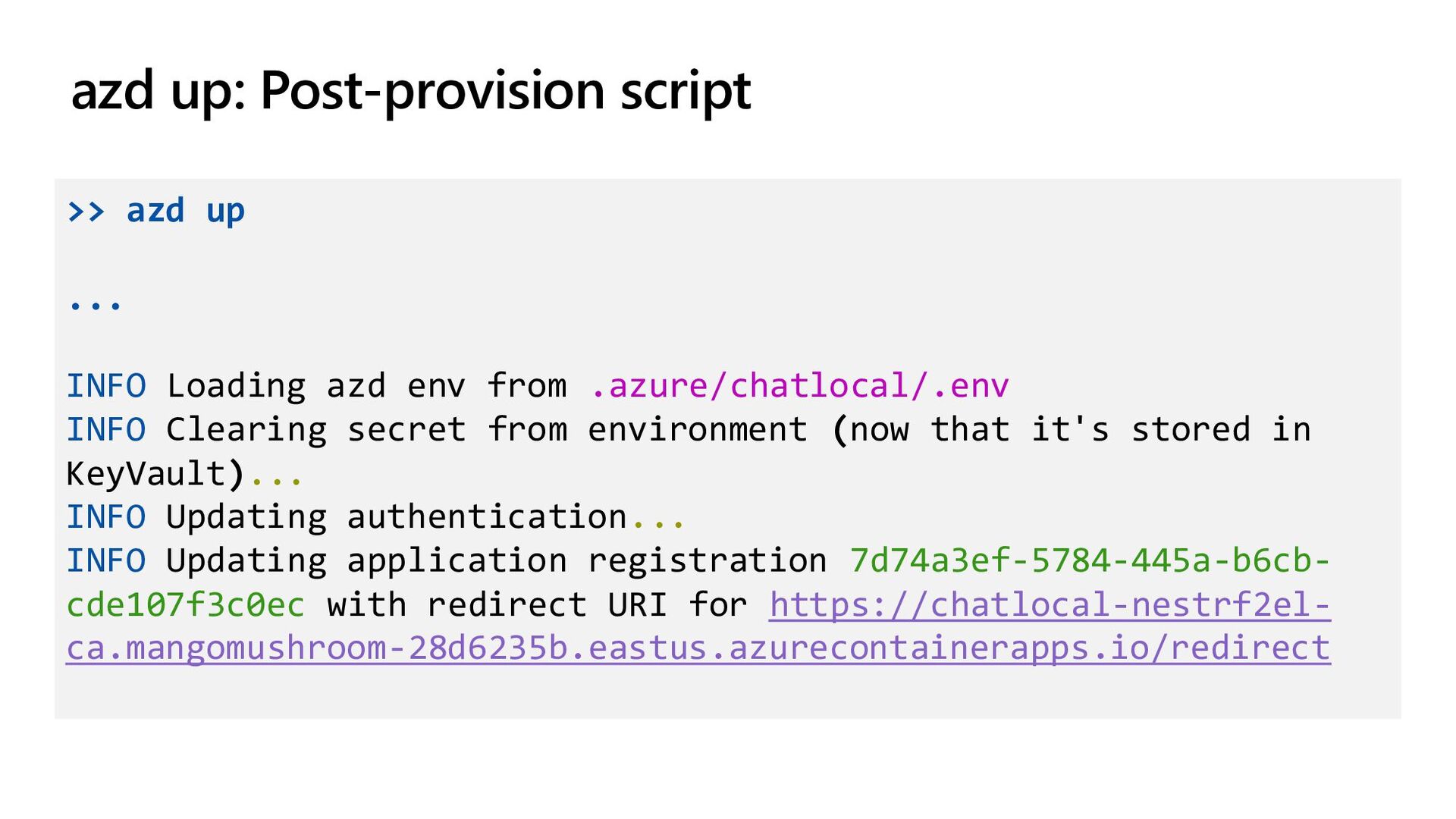
azd up: Post-provision script >> azd up ... INFO Loading
azd env from .azure/chatlocal/.env INFO Clearing secret from environment (now that it's stored in KeyVault)... INFO Updating authentication... INFO Updating application registration 7d74a3ef-5784-445a-b6cb- cde107f3c0ec with redirect URI for https://chatlocal-nestrf2el- ca.mangomushroom-28d6235b.eastus.azurecontainerapps.io/redirect -
azd up: Deploying stage >> azd up ... Deploying services
(azd deploy) (✓) Done: Deploying service aca - Endpoint: https://chatlocal-nestrf2el-ca.mangomushroom- 28d6235b.eastus.azurecontainerapps.io/ SUCCESS: Your up workflow to provision and deploy to Azure completed in 37 minutes 55 seconds. -
azd up: All the stages package: Makes the Docker image
that will get uploaded later preprovision: Calls the auth_init script to create an Entra app registration and credentials provision: Creates the Azure resources (Container App, OpenAI, KeyVault, Redis) postprovision: Calls the auth_init script to update the Entra app registration with redirect URI deploy: Uploads the artifact (a Docker image) to Azure Container Registry and restarts the Azure Container Apps server -
Registering Entra applications with Graph Bicep template resource clientApp 'Microsoft.Graph/[email protected]'
= { uniqueName: clientAppName displayName: clientAppDisplayName signInAudience: 'AzureADMyOrg' web: { redirectUris: ['${webAppEndpoint}/.auth/login/aad/callback'] implicitGrantSettings: {enableIdTokenIssuance: true}} requiredResourceAccess: [{ resourceAppId: '00000003-0000-0000-c000-000000000000' resourceAccess: [ // User.Read {id: 'e1fe6dd8-ba31-4d61-89e7-88639da4683d', type: 'Scope'} // offline_access {id: '7427e0e9-2fba-42fe-b0c0-848c9e6a8182', type: 'Scope'} // openid {id: '37f7f235-527c-4136-accd-4a02d197296e', type: 'Scope'} // profile {id: '14dad69e-099b-42c9-810b-d002981feec1', type: 'Scope'} ]} ]} resource clientSp 'Microsoft.Graph/servicePrincipals@beta' = { appId: clientApp.appId } Create a Graph application and associated service principal in Bicep (vs. SDK) Public preview appreg.bicep https://aka.ms/graphbicep aka.ms/graph-bicep-mi-fic -
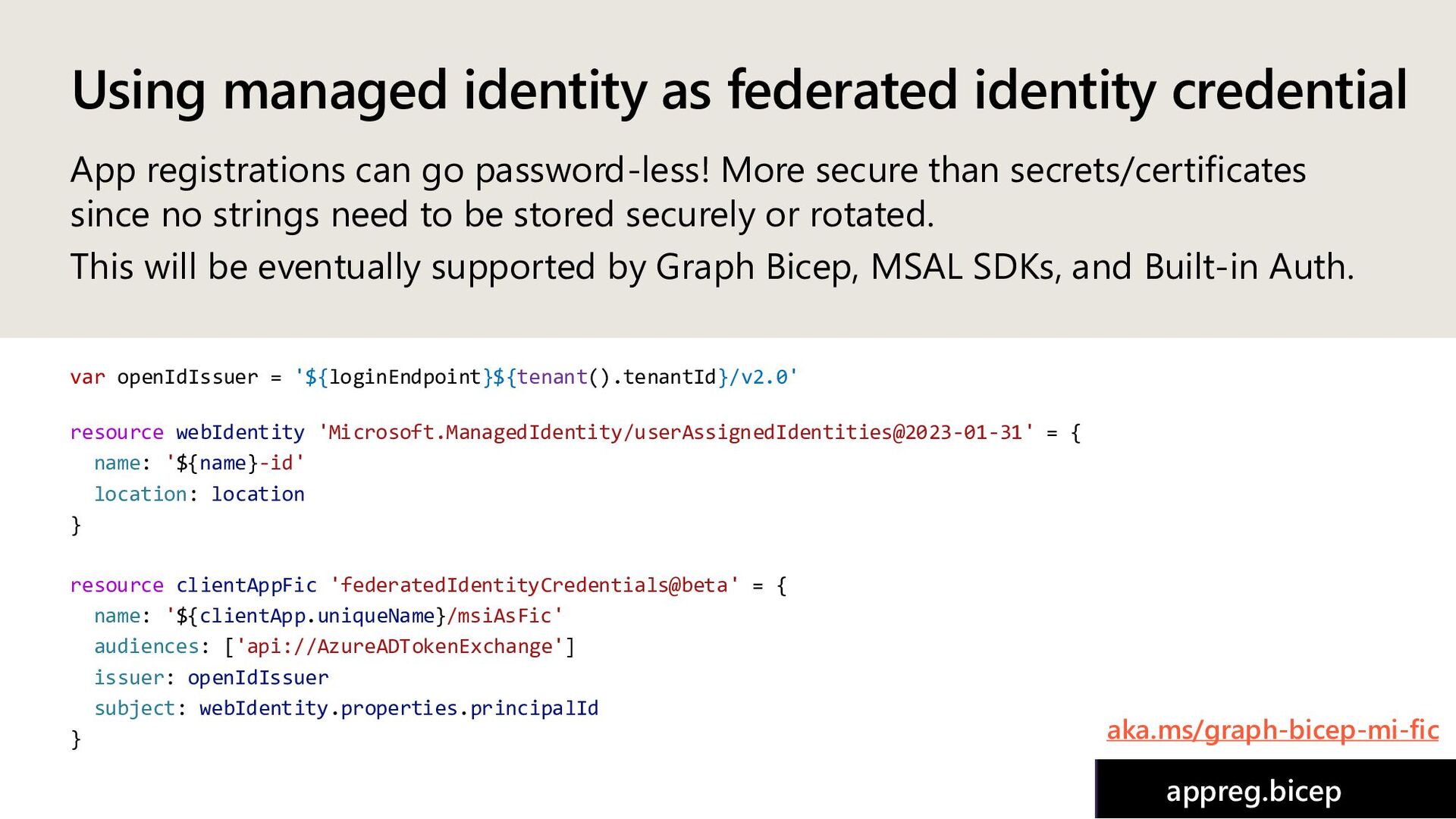
Using managed identity as federated identity credential var openIdIssuer =
'${loginEndpoint}${tenant().tenantId}/v2.0' resource webIdentity 'Microsoft.ManagedIdentity/userAssignedIdentities@2023-01-31' = { name: '${name}-id' location: location } resource clientAppFic 'federatedIdentityCredentials@beta' = { name: '${clientApp.uniqueName}/msiAsFic' audiences: ['api://AzureADTokenExchange'] issuer: openIdIssuer subject: webIdentity.properties.principalId } App registrations can go password-less! More secure than secrets/certificates since no strings need to be stored securely or rotated. This will be eventually supported by Graph Bicep, MSAL SDKs, and Built-in Auth. appreg.bicep aka.ms/graph-bicep-mi-fic -
Configuring MSAL constructors import msal, requests mi = msal.ManagedIdentityClient( msal.UserAssignedManagedIdentity(client_id="guid"),
http_client=requests.Session(), token_cache=msal.TokenCache(), ) result = mi.acquire_token_for_client(resource="resource_abc") App registrations will be able to use a managed identity as a "federated identity credential". This will be supported by Graph Bicep, MSAL SDKs, and Built-in Auth. -
Local development approach You cannot use a managed identity for
local development. Approaches: • Use ConfidentialClient with secret locally, use ManagedIdentityClient in production • Use a VM that has the same managed identity • Use some sort of emulator for managed identity -
Get started with our samples and documentation aka.ms/azai/auth/local Azure OpenAI
+ Entra + MSAL + Identity package Identity documentation: https://identity-library.readthedocs.io/ MSAL Python SDK: https://github.com/AzureAD/microsoft-authentication-library-for-python Microsoft Entra developer center https://aka.ms/dev/ms-entra -
Securing AI Apps on Azure Date Topic Speakers July 2
5-6PM UTC Using Keyless Auth with Azure AI Services Marlene Mhangami Pamela Fox July 8 5-6PM UTC Add User Login to AI Apps using Built-in Auth James Casey Pamela Fox July 9 7-8PM UTC Add User Login to AI Apps using MSAL SDK Ray Luo Pamela Fox July 10 7-8PM UTC Handling User Auth for a SPA App on Azure Matt Gotteiner July 17 7-8PM UTC Data Access Control for AI RAG Apps on Azure Matt Gotteiner Pamela Fox July 25 11PM-12PM Deploying an AI App to a Private Network on Azure Matt Gotteiner Anthony Shaw https://aka.ms/S-1355