Upgrade to Pro
— share decks privately, control downloads, hide ads and more …
Speaker Deck
Sign up for free
Menu
Search
Features
All features
Private URLs
Password Protection
Custom URLS
Scheduled publishing
Remove Branding
Restrict embedding
Deck Collections
Notes
Features
All features
Private URLs
Password Protection
Custom URLS
Scheduled publishing
Remove Branding
Restrict embedding
Deck Collections
Notes
Explore
Featured decks
Featured speakers
Programming
Technology
Storyboards
Explore
Featured decks
Featured speakers
Programming
Technology
Storyboards
Pricing
Search
Sign in
Sign up for free
1A116104 佐藤麗奈
Search
Sponsored
·
Your Podcast. Everywhere. Effortlessly.
Share. Educate. Inspire. Entertain. You do you. We'll handle the rest.
→
佐藤麗奈
June 22, 2016
58
0
Share
Embed
Copy iframe code
Copy JS code
Copy link
Start on current slide
1A116104 佐藤麗奈
空間情報システム入門課題
佐藤麗奈
June 22, 2016
More Decks by 佐藤麗奈
See All by 佐藤麗奈
1A116104 佐藤麗奈
rerereina719
0
49
Featured
See All Featured
Tips & Tricks on How to Get Your First Job In Tech
honzajavorek
1
800
Rails Girls Zürich Keynote
gr2m
96
14k
The Cost Of JavaScript in 2023
addyosmani
55
10k
Design and Strategy: How to Deal with People Who Don’t "Get" Design
morganepeng
133
20k
The Language of Interfaces
destraynor
162
27k
New Earth Scene 8
popppiees
4
2.7k
Site-Speed That Sticks
csswizardry
13
1.6k
Jess Joyce - The Pitfalls of Following Frameworks
techseoconnect
PRO
1
450
Responsive Adventures: Dirty Tricks From The Dark Corners of Front-End
smashingmag
254
22k
Mind Mapping
helmedeiros
1
400
Max Prin - Stacking Signals: How International SEO Comes Together (And Falls Apart)
techseoconnect
PRO
0
490
Bash Introduction
62gerente
615
220k
Transcript
Tasking Managerによる マッピング作業のマニュアル 1A116104 佐藤麗奈
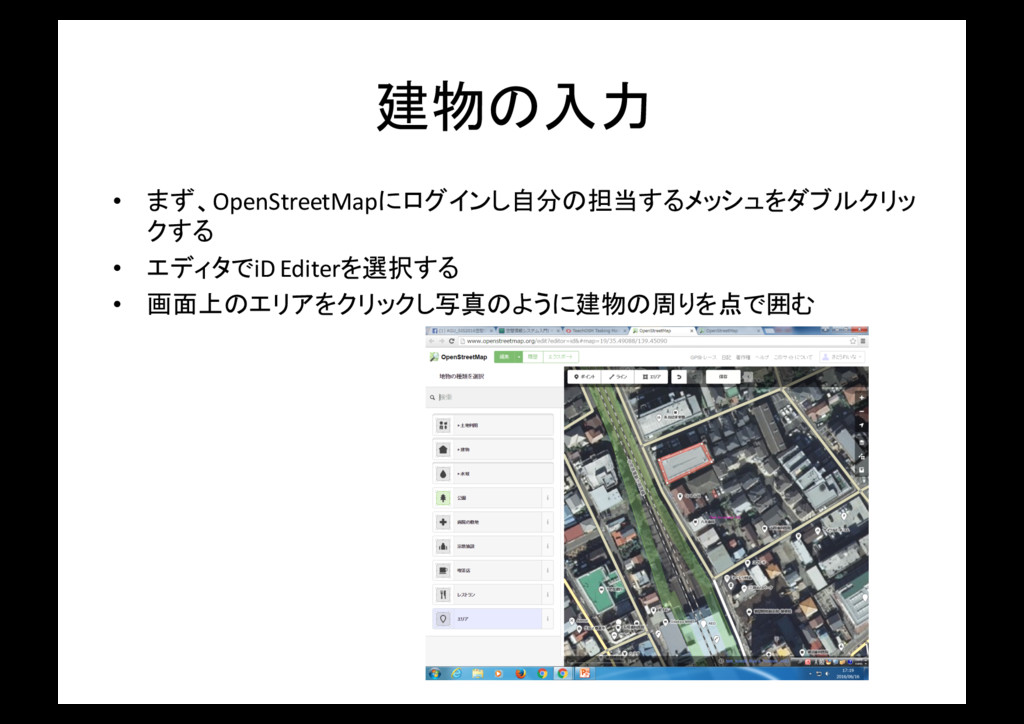
建物の入力 • まず、OpenStreetMapにログインし自分の担当するメッシュをダブルクリッ クする • エディタでiDEditerを選択する • 画面上のエリアをクリックし写真のように建物の周りを点で囲む
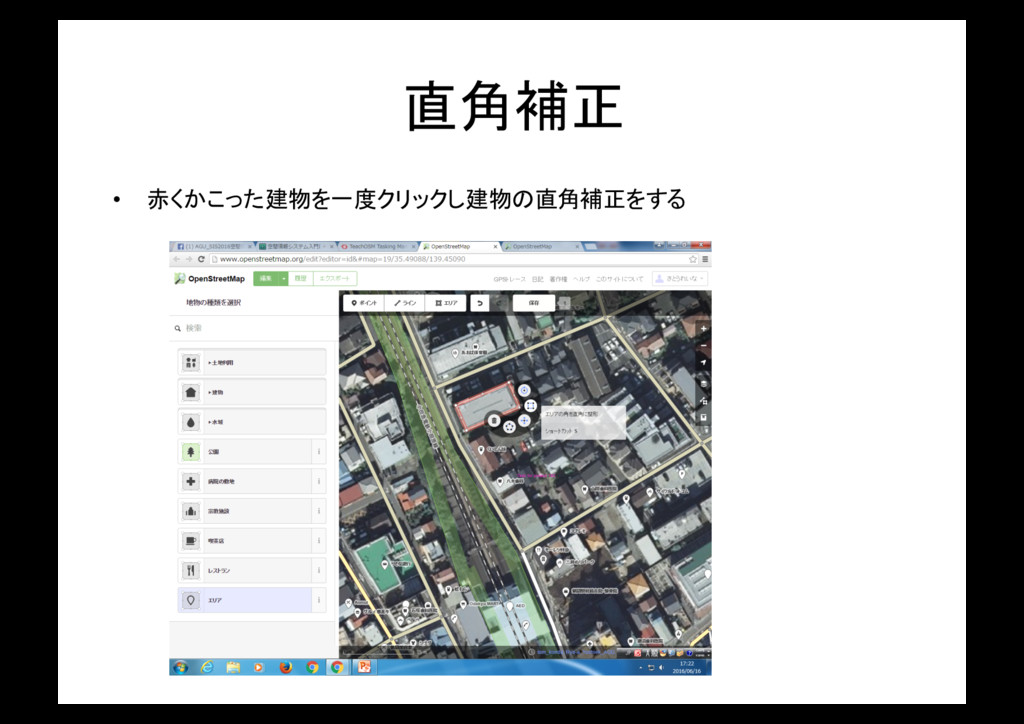
直角補正 • 赤くかこった建物を一度クリックし建物の直角補正をする
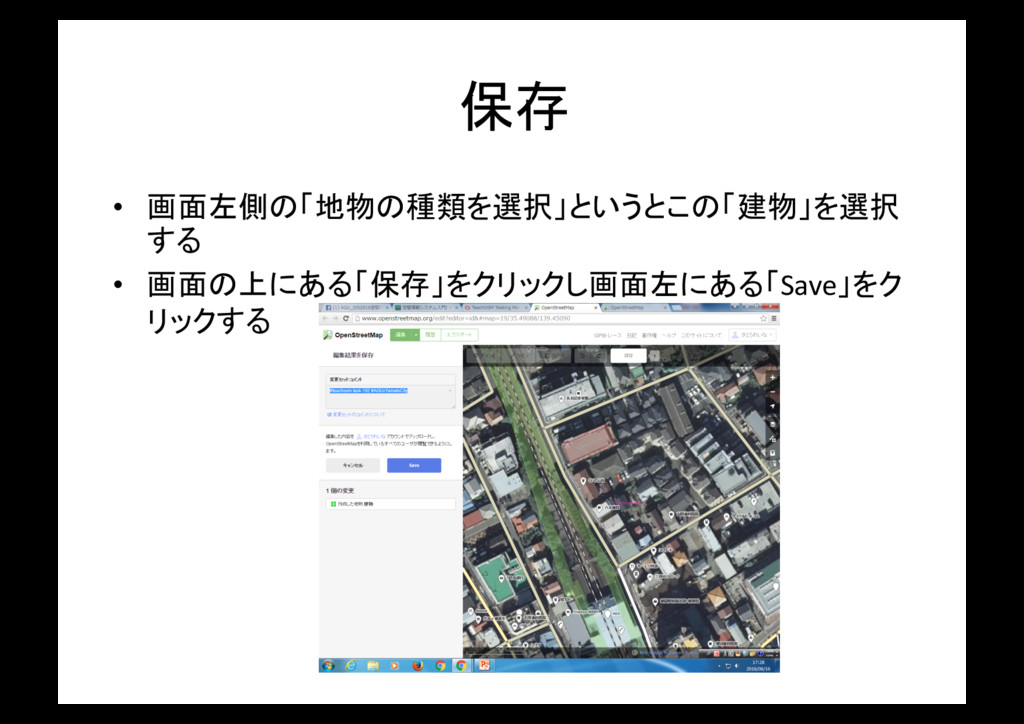
保存 • 画面左側の「地物の種類を選択」というとこの「建物」を選択 する • 画面の上にある「保存」をクリックし画面左にある「Save」をク リックする
修正 • 修正をしたい場合は点と点の間の三角形を 修正したいところまで移動させる
交差点作った場合の対処法 • 交差したエリアが交差すると、灰色の◦が表 示される。 • 灰色の◦をクリックして削除を押すと、重なっ ていた建物のエリアが離れる • △をクリックしもう一度建物の形に合わせて エリアを設定する
• これで交差点の修正は完了だ
背景レイヤを地理院地図に変更 • 背景画像設定で「Japan GIS ortho Imagery」を 選択することで地図が見やすくなる。
分割 • 選択したメッシュの大きさが大きい場合はその土地を分割す ることができる。
タスク完了 • 最後にタスク完了ボタンをクリックしマッピン グは終了だ


 rerereina719
 honzajavorek
 gr2m
gr2m
 addyosmani
 morganepeng
 destraynor
 popppiees
 csswizardry
 techseoconnect
 smashingmag
 helmedeiros
 62gerente