Upgrade to Pro
— share decks privately, control downloads, hide ads and more …
Speaker Deck
Sign up for free
Menu
Search
Features
All features
Private URLs
Password Protection
Custom URLS
Scheduled publishing
Remove Branding
Restrict embedding
Deck Collections
Notes
Features
All features
Private URLs
Password Protection
Custom URLS
Scheduled publishing
Remove Branding
Restrict embedding
Deck Collections
Notes
Explore
Featured decks
Featured speakers
Programming
Technology
Storyboards
Explore
Featured decks
Featured speakers
Programming
Technology
Storyboards
Pricing
Search
Sign in
Sign up for free
Tasking Manager Manual
Search
Sponsored
·
Your Podcast. Everywhere. Effortlessly.
Share. Educate. Inspire. Entertain. You do you. We'll handle the rest.
→
Rihonskb
June 14, 2018
33
0
Share
Embed
Copy iframe code
Copy JS code
Copy link
Start on current slide
Tasking Manager Manual
Rihonskb
June 14, 2018
More Decks by Rihonskb
See All by Rihonskb
Tasking Manager Manual (Validate)
rihonskb
0
36
Featured
See All Featured
jQuery: Nuts, Bolts and Bling
dougneiner
66
8.6k
Skip the Path - Find Your Career Trail
mkilby
1
260
JavaScript: Past, Present, and Future - NDC Porto 2020
reverentgeek
52
6.1k
End of SEO as We Know It (SMX Advanced Version)
ipullrank
3
4.4k
What does AI have to do with Human Rights?
axbom
PRO
1
2.5k
ReactJS: Keep Simple. Everything can be a component!
pedronauck
666
130k
Winning Ecommerce Organic Search in an AI Era - #searchnstuff2025
aleyda
2
2.2k
Optimising Largest Contentful Paint
csswizardry
37
4k
Why Mistakes Are the Best Teachers: Turning Failure into a Pathway for Growth
auna
0
320
Visualization
eitanlees
153
17k
Paper Plane (Part 1)
katiecoart
PRO
2
12k
Navigating Algorithm Shifts & AI Overviews - #SMXNext
aleyda
1
1.7k
Transcript
Tasking Manager Manual 空間情報システム入門Ⅰ 1A118113 錦部 里歩
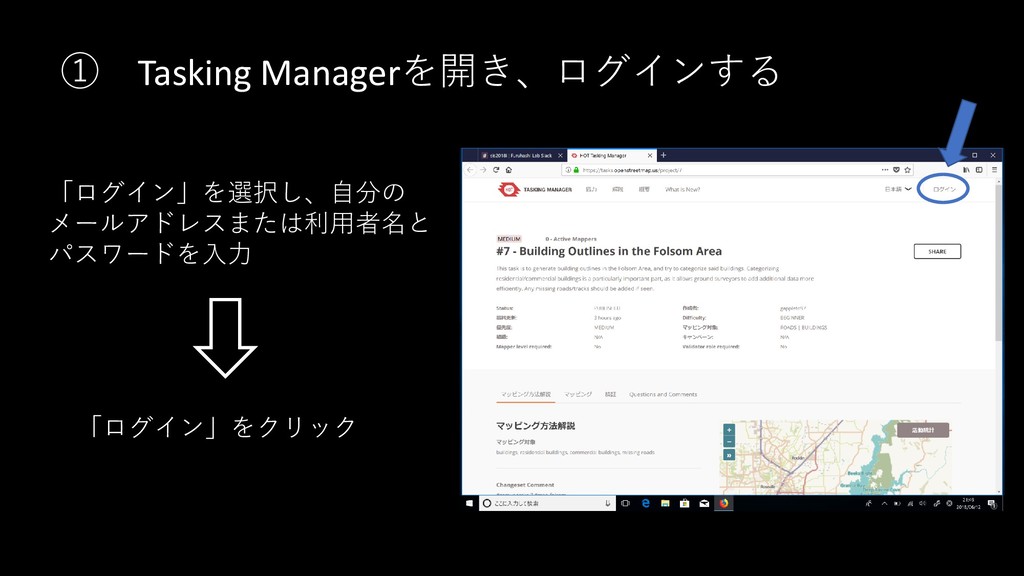
① Tasking Managerを開き、ログインする 「ログイン」を選択し、自分の メールアドレスまたは利用者名と パスワードを入力 「ログイン」をクリック
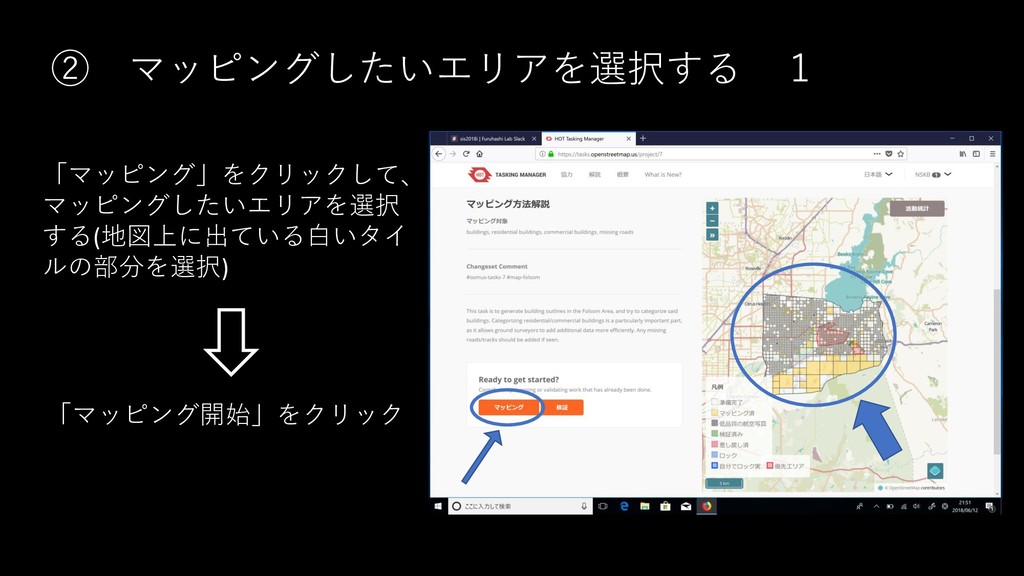
② マッピングしたいエリアを選択する 1 「マッピング」をクリックして、 マッピングしたいエリアを選択 する(地図上に出ている白いタイ ルの部分を選択) 「マッピング開始」をクリック
③ マッピングしたいエリアを選択する 2 「ID Editor」を選択して、 「エディタを起動」を クリック
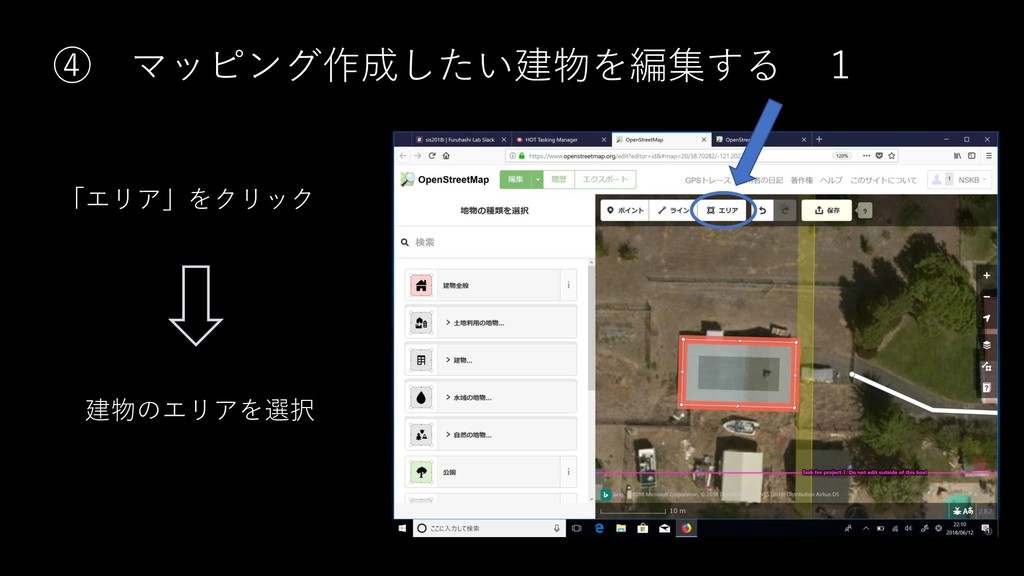
④ マッピング作成したい建物を編集する 1 「エリア」をクリック 建物のエリアを選択
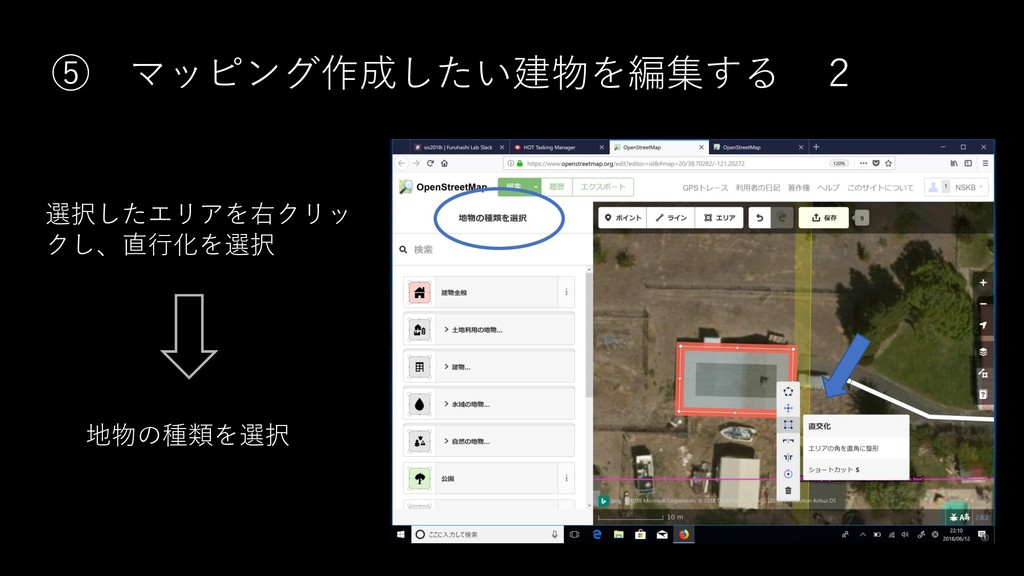
⑤ マッピング作成したい建物を編集する 2 選択したエリアを右クリッ クし、直行化を選択 地物の種類を選択
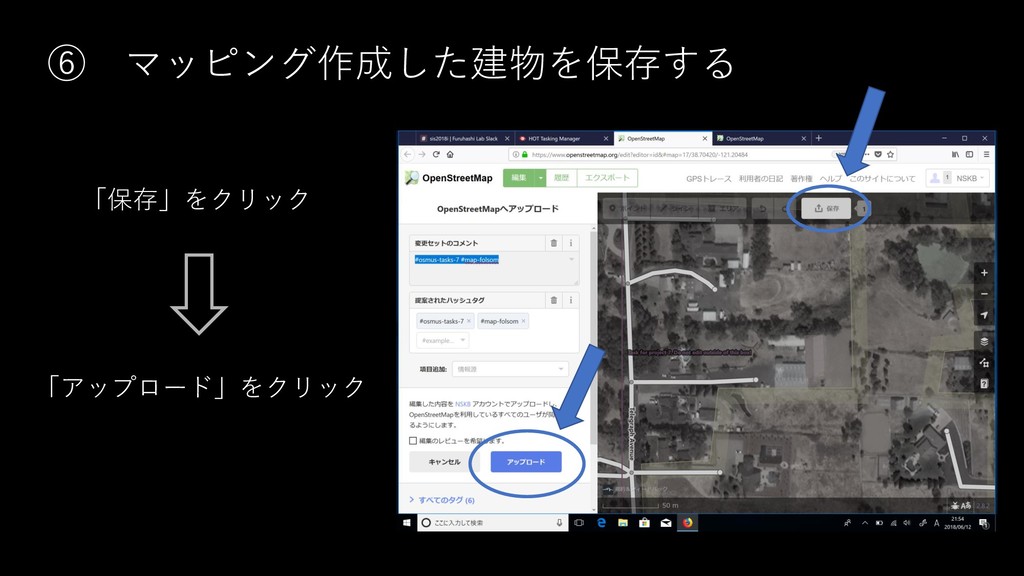
⑥ マッピング作成した建物を保存する 「保存」をクリック 「アップロード」をクリック
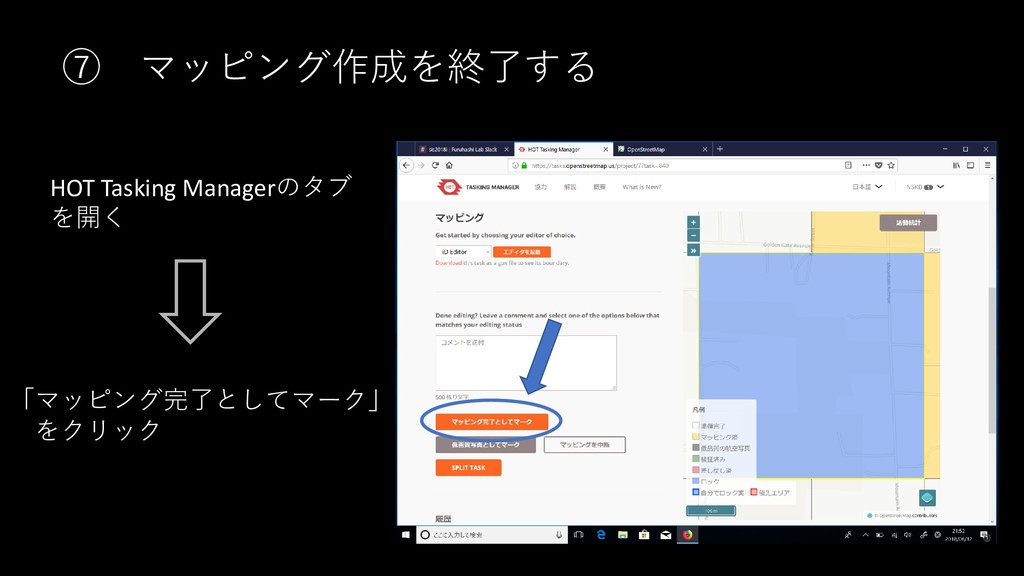
⑦ マッピング作成を終了する HOT Tasking Managerのタブ を開く 「マッピング完了としてマーク」 をクリック


 rihonskb
 dougneiner
 mkilby
 reverentgeek
 ipullrank
 axbom
axbom
 pedronauck
 aleyda
 csswizardry
 auna
auna
 eitanlees
 katiecoart