Upgrade to Pro
— share decks privately, control downloads, hide ads and more …
Speaker Deck
Sign up for free
Menu
Search
Features
All features
Private URLs
Password Protection
Custom URLS
Scheduled publishing
Remove Branding
Restrict embedding
Deck Collections
Notes
Features
All features
Private URLs
Password Protection
Custom URLS
Scheduled publishing
Remove Branding
Restrict embedding
Deck Collections
Notes
Explore
Featured decks
Featured speakers
Programming
Technology
Storyboards
Explore
Featured decks
Featured speakers
Programming
Technology
Storyboards
Pricing
Search
Sign in
Sign up for free
空間情報1 課題(7/14)
Search
taksea
July 14, 2016
57
0
Share
Embed
Copy iframe code
Copy JS code
Copy link
Start on current slide
空間情報1 課題(7/14)
完成
taksea
July 14, 2016
More Decks by taksea
See All by taksea
19/06/16 空間情報システムⅠ課題
taksea
0
65
Featured
See All Featured
GraphQLとの向き合い方2022年版
quramy
50
15k
Git: the NoSQL Database
bkeepers
PRO
433
67k
Templates, Plugins, & Blocks: Oh My! Creating the theme that thinks of everything
marktimemedia
31
2.9k
Lightning Talk: Beautiful Slides for Beginners
inesmontani
PRO
2
730
The Straight Up "How To Draw Better" Workshop
denniskardys
239
140k
The AI Search Optimization Roadmap by Aleyda Solis
aleyda
2
6.3k
Evolution of real-time – Irina Nazarova, EuRuKo, 2024
irinanazarova
9
1.6k
Bash Introduction
62gerente
615
220k
Game over? The fight for quality and originality in the time of robots
wayneb77
1
300
The Pragmatic Product Professional
lauravandoore
37
7.5k
Practical Orchestrator
shlominoach
192
12k
Digital Projects Gone Horribly Wrong (And the UX Pros Who Still Save the Day) - Dean Schuster
uxyall
1
3.4k
Transcript
1A116246 渡辺 匠
まず最初に http://wiki.openstreetmap.org/wiki/JA:How_to_map_a にアクセスする。 次に[五十音順POIタグ一覧]の中から Pokestopに選ばれそうな場所の名称を 五十音順から探す。 例)神社 …
シ
目的の対象を見つけ、[タグ付け(基本)]という項目にあるリンク を開く。 (図のように複数ある場合は、その対象が何の種類かを考え、 その種類の名称のリンクを開く。下図ではplace_of_worship)
リンクを開いたら右下の[ツール]にある [overpass-turbo]を選択する。
すると、このような画面になるので左上の[実行]を押す。
すると、マップ上に神社の位置が記されるようになる。 その後、左上の[エクスポート]を押す。
押したらこのような画面になるので、新しく出てきたウィンドウの 下にある[gist]を押す。
するとこのようになるので Gist:の下にある[58e7f3f…]というリンクを押す。
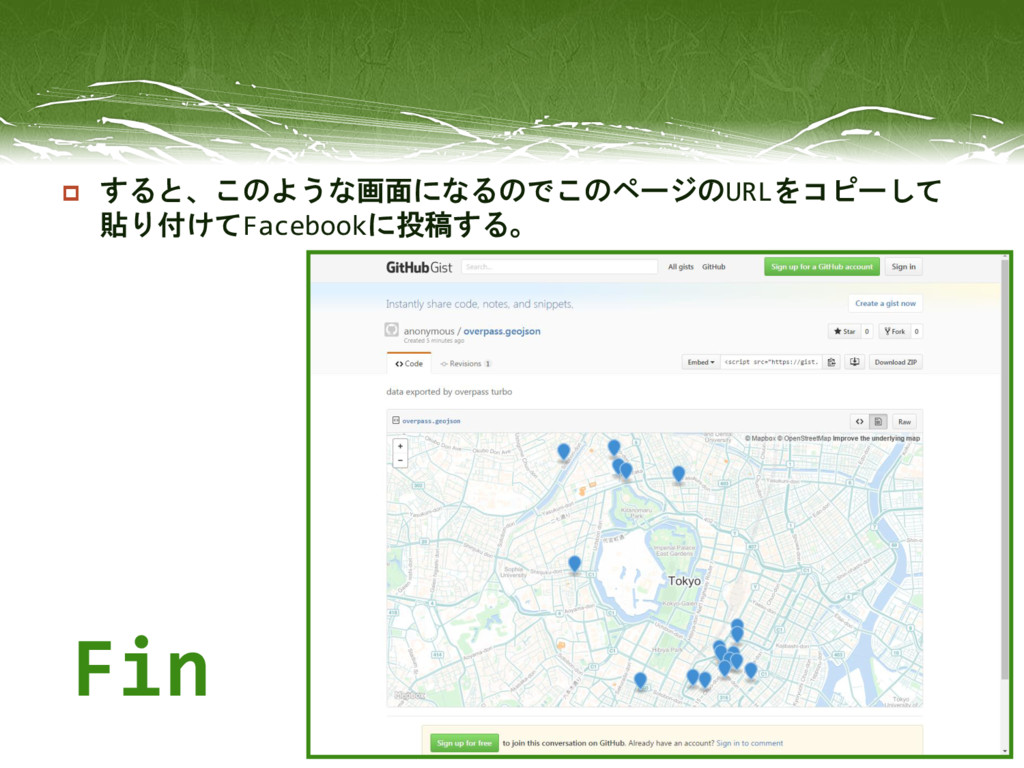
すると、このような画面になるのでこのページのURLをコピーして 貼り付けてFacebookに投稿する。 Fin


 taksea
 quramy
 bkeepers
 marktimemedia
 inesmontani
 denniskardys
 aleyda
 irinanazarova
 62gerente
 wayneb77
 lauravandoore
 shlominoach
 uxyall

![ まず最初に http://wiki.openstreetmap.org/wiki/JA:How_to_map_a にアクセスする。 次に[五十音順POIタグ一覧]の中から Pokestopに選ばれそうな場所の名称を 五十音順から探す。 例)神社 …](https://files.speakerdeck.com/presentations/18d2cdd33a1448118d2038bccd591033/slide_1.jpg)
![ 目的の対象を見つけ、[タグ付け(基本)]という項目にあるリンク を開く。 (図のように複数ある場合は、その対象が何の種類かを考え、 その種類の名称のリンクを開く。下図ではplace_of_worship)](https://files.speakerdeck.com/presentations/18d2cdd33a1448118d2038bccd591033/slide_2.jpg)
![ リンクを開いたら右下の[ツール]にある [overpass-turbo]を選択する。](https://files.speakerdeck.com/presentations/18d2cdd33a1448118d2038bccd591033/slide_3.jpg)
![ すると、このような画面になるので左上の[実行]を押す。](https://files.speakerdeck.com/presentations/18d2cdd33a1448118d2038bccd591033/slide_4.jpg)
![ すると、マップ上に神社の位置が記されるようになる。 その後、左上の[エクスポート]を押す。](https://files.speakerdeck.com/presentations/18d2cdd33a1448118d2038bccd591033/slide_5.jpg)
![ 押したらこのような画面になるので、新しく出てきたウィンドウの 下にある[gist]を押す。](https://files.speakerdeck.com/presentations/18d2cdd33a1448118d2038bccd591033/slide_6.jpg)
![ するとこのようになるので Gist:の下にある[58e7f3f…]というリンクを押す。](https://files.speakerdeck.com/presentations/18d2cdd33a1448118d2038bccd591033/slide_7.jpg)